
LAN Technologies Lesson 7 Objectives Exam Objective Matrix
LAN Technologies Lesson 7
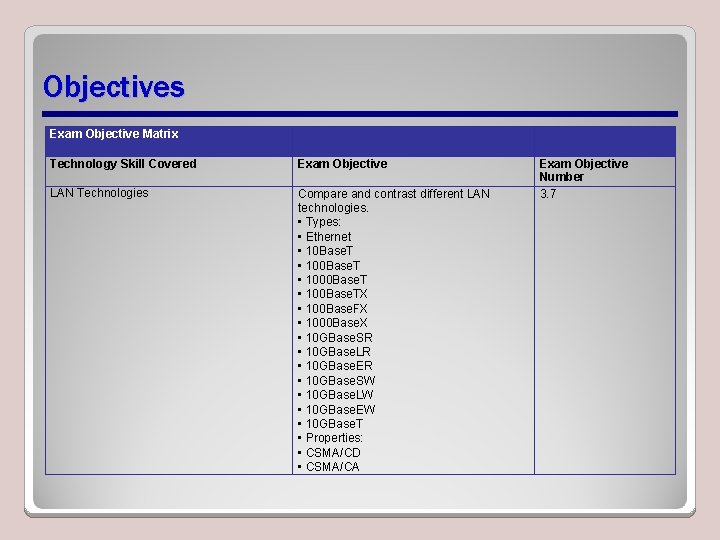
Objectives Exam Objective Matrix Technology Skill Covered Exam Objective LAN Technologies Compare and contrast different LAN technologies. • Types: • Ethernet • 10 Base. T • 1000 Base. T • 100 Base. TX • 100 Base. FX • 1000 Base. X • 10 GBase. SR • 10 GBase. LR • 10 GBase. ER • 10 GBase. SW • 10 GBase. LW • 10 GBase. EW • 10 GBase. T • Properties: • CSMA/CD • CSMA/CA Exam Objective Number 3. 7
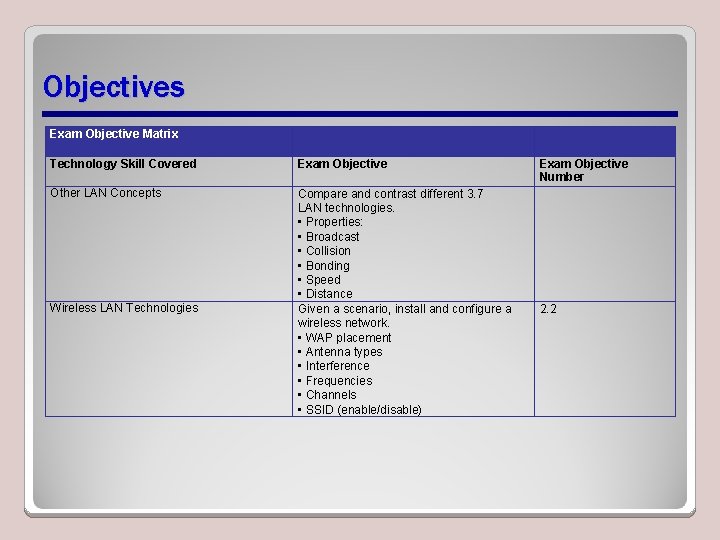
Objectives Exam Objective Matrix Technology Skill Covered Exam Objective Other LAN Concepts Compare and contrast different 3. 7 LAN technologies. • Properties: • Broadcast • Collision • Bonding • Speed • Distance Given a scenario, install and configure a wireless network. • WAP placement • Antenna types • Interference • Frequencies • Channels • SSID (enable/disable) Wireless LAN Technologies Exam Objective Number 2. 2
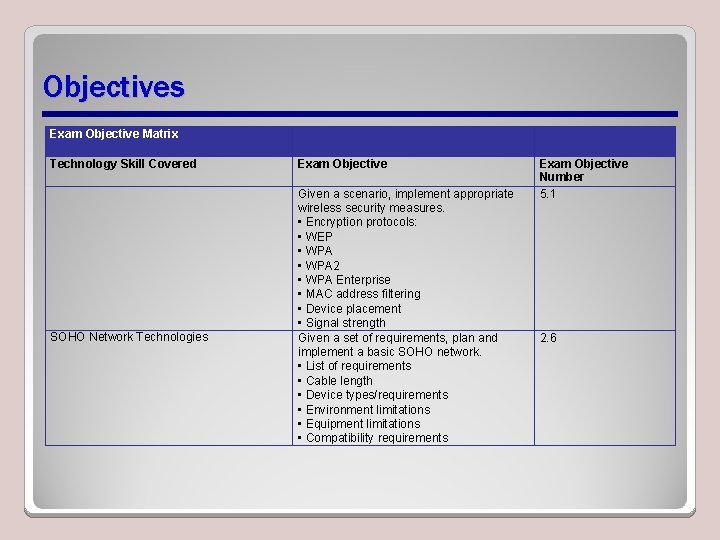
Objectives Exam Objective Matrix Technology Skill Covered SOHO Network Technologies Exam Objective Given a scenario, implement appropriate wireless security measures. • Encryption protocols: • WEP • WPA 2 • WPA Enterprise • MAC address filtering • Device placement • Signal strength Given a set of requirements, plan and implement a basic SOHO network. • List of requirements • Cable length • Device types/requirements • Environment limitations • Equipment limitations • Compatibility requirements Exam Objective Number 5. 1 2. 6
Ethernet Frames • Four types of Ethernet available, result of different frame types used over time • Most widely used Ethernet frame type is Ethernet II, or Ethernet DIX
Ethernet Communications Methods • How Ethernet transfers data on a network: – Carrier Sense Multiple Access with Collision Detection (CSMA/CD) – Carrier Sense Multiple Access with Collision Avoidance (CSMA/CA) • Both are contention-based access methods – Different nodes on the network segment compete to see which node is able to send out its packet first
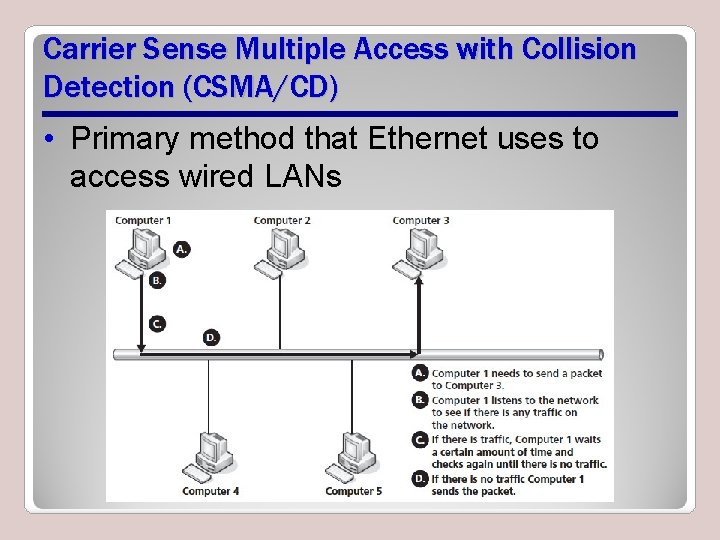
Carrier Sense Multiple Access with Collision Detection (CSMA/CD) • Primary method that Ethernet uses to access wired LANs
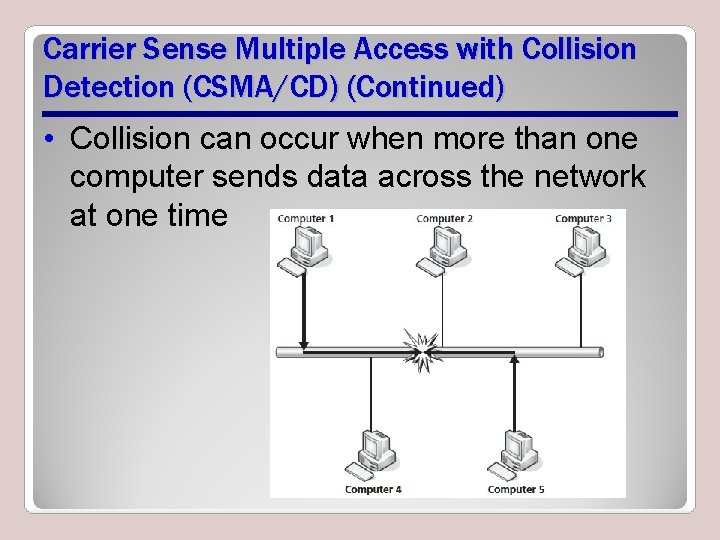
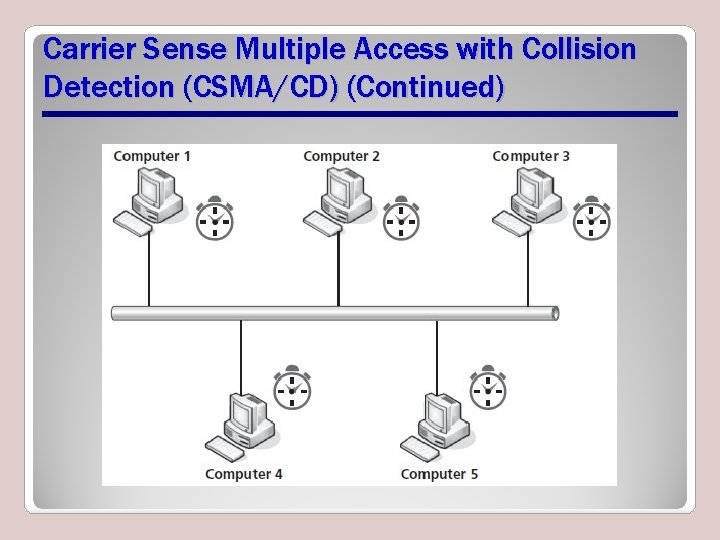
Carrier Sense Multiple Access with Collision Detection (CSMA/CD) (Continued) • Collision can occur when more than one computer sends data across the network at one time
Carrier Sense Multiple Access with Collision Detection (CSMA/CD) (Continued)
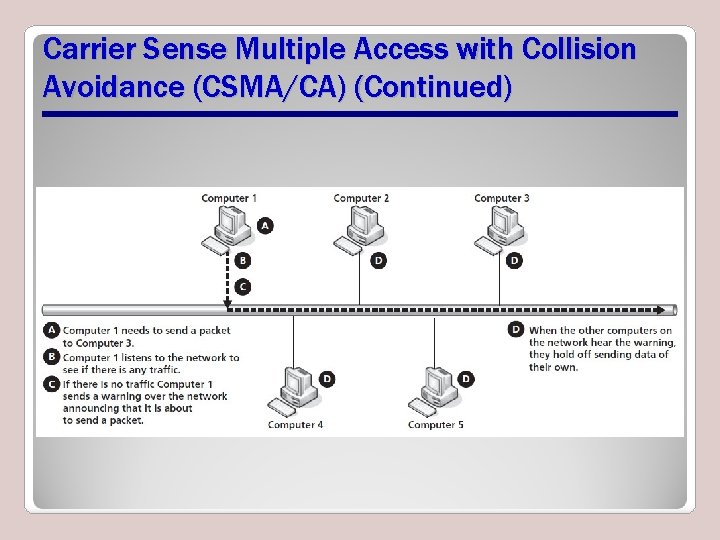
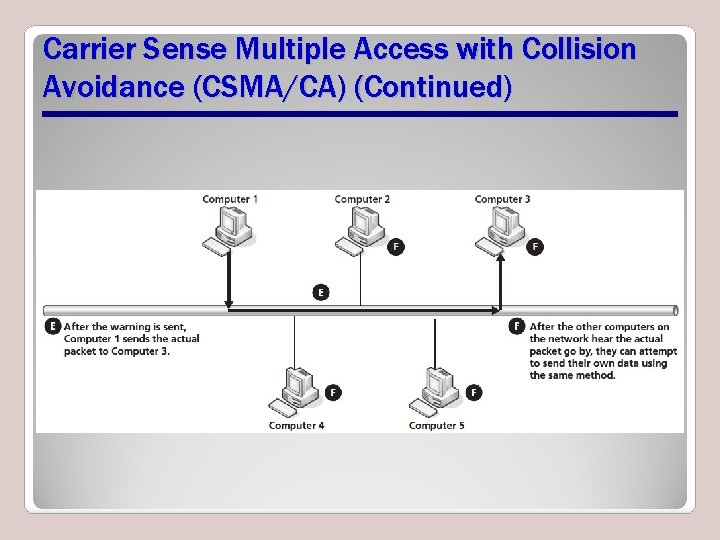
Carrier Sense Multiple Access with Collision Avoidance (CSMA/CA) • A method used by Ethernet to access a local area network • Most commonly used for wireless networks • Differs from CSMA/CD in that CSMA/CA first sends out a warning message letting all the other computers on the network know that a data packet is coming
Carrier Sense Multiple Access with Collision Avoidance (CSMA/CA) (Continued)
Carrier Sense Multiple Access with Collision Avoidance (CSMA/CA) (Continued)
Baseband Ethernet Technologies • Baseband means that a cable can only carry one signal one way at one time – In most modern Ethernet cables, one line for sending signals and another line for receiving signals – Can result in collisions • Broadband media type can carry multiple data signals on the same wire using some type of multiplexing
XBase-Y Naming Convention • X indicates possible transfer rates for particular media type – Usually some multiple of megabits per second (mbps) – A capital G after the number indicates gigabits per second (gbps) • Base indicates a baseband media type – If Broad, means broadband • Y indicates type of media being used
10 Base-5 • First version of Ethernet widely used (but no longer) • Called Thick Ethernet • A baseband technology • 10 mbps throughput • A range of up to 500 meters
10 Base-2 • Defined as the IEEE 802. 3 a standard • Used a thinner coaxial cable than 10 Base 5 – 10 Base-2 came to be known as Thin Ethernet – 10 Base-5 was known as Thick Ethernet • Range of up to 185 meters
10 Base-T • Used CAT 3 unshielded twisted pair (UTP) – Became known as Twisted Pair Ethernet • A baseband technology • Carries 10 mbps of throughput for a distance of 100 meters
100 Base-T • Functions at speeds of 100 mbps • Became known as Fast Ethernet • Fast Ethernet designation refers to both copper and fiber based versions of Ethernet that runs at 100 mbps
100 Base-FX • Version of Fast Ethernet intended to be used over fiber-optic cable • 100 Base-FX introduced at same time as 100 Base-TX – Part of the same IEEE 802. 3 y standard • Can be used in either half-duplex mode or in full-duplex mode • Throughput of 100 mbps in all usage modes
1000 Base-X • First 1, 000 megabit or 1 gigabit Ethernet standard to be released • Known as Gigabit Ethernet • Intended for use with fiber-optic cables
1000 Base-T • Copper version of Gigabit Ethernet • Used the IEEE 802. 3 ab standard – 802. 3 ab designed to use CAT 5, 5 e, or 6 – Allowed businesses to use Gigabit Ethernet on their current installations • 1000 Base-T can reach 100 meters on CAT 5 cable, but CAT 5 e is recommended for twisted-pair Gigabit Ethernet implementations
10 Gigabit Ethernet • Supports full-duplex communications only • Does not support CSMA/CD • Proposed under the IEEE 802. 3 ae standard in 2002 • Ethernet standards proposed under 802. 3 ae • Potential to become an alternative to different WAN technologies
40 Gigabit and 100 Gigabit Ethernet • The latest Ethernet standards • Defined under IEEE 802. 3 ba • 40/100 Gigabit Ethernet is full-duplex, and intended to be used with multimode fiber, single-mode fiber, and copper cabling • 100 Gigabit Ethernet is intended to have range of up to 40 km usingle-mode fiber • 40/100 Gigabit Ethernet does not support CSMA/CD
Broadcast • A computer sends data across a network by sending the data frame containing the data to all computers directly connected to it on a local network • Broadcasts send data across a local network • Ethernet is a broadcast-based network technology
Collision • Two different data frames from two different computers interfere with each other because they were released onto the network at the same time • CSMA/CD and CSMA/CA were developed to: (1) limit the number of collisions that take place on a network (2) so the network and the computers on it know how to recover when a collision takes place
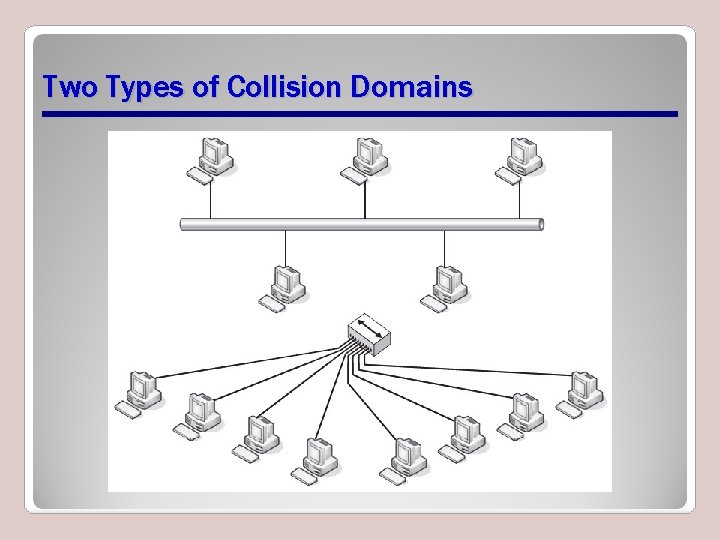
Two Types of Collision Domains
Bonding • Using two or more NICs, channels, or connections to push data through instead of just one • Works somewhat like disk striping in a RAID setup • Increases throughput • Provides redundancy for a network connection
Network Speed • Referred to as network speed, bandwidth, or throughput • The measure of how much data can move through the network in a given amount of time • Measured in kilobits per second (kbps), megabits per second (mbps), gigabits per second (gbps), or terabits per second (tbps)
Network Speed (Continued) • Network’s actual speed or a specific connection’s actual speed can be measured by going to sites such as www. speedtest. net • The potential speed of a network or network connection is usually the “stated” speed – When buying network services and technologies, you are purchasing potential speed not actual speed
Distance • How far data has to travel to get from one point on a network to another • Regarding media, distance refers to how far a data signal can travel before it needs to be rebuilt, such as by a switch • Actual versus subjective distance
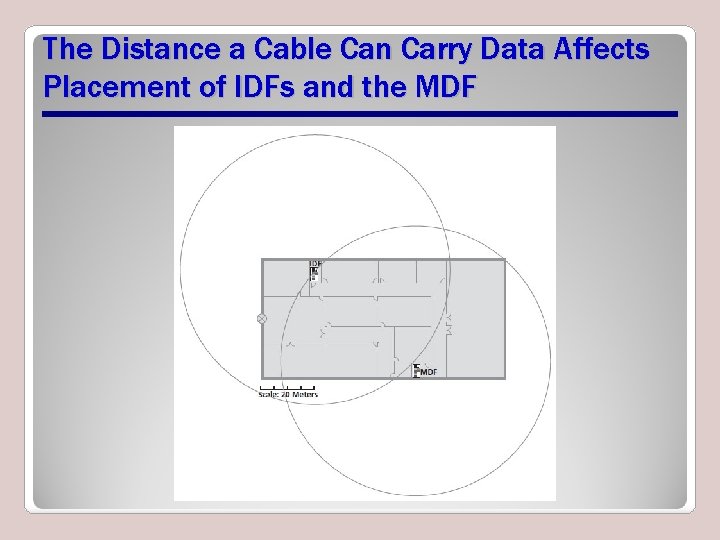
The Distance a Cable Can Carry Data Affects Placement of IDFs and the MDF
Wireless LAN Technologies • This section reviews installation and configuration issues for wireless LANs • Examples use a Linksys WRT 54 GS 2 Wireless-G router and Windows 7
Install Client • Involves installing the wireless NIC in your computer • Most modern laptop and smaller computers have built-in wireless NICs -no installation needed • Otherwise, two options: – Install a wireless NIC using your laptop’s PCMCIA slot, also known as PC card slot – Use a USB port–based wireless NIC
Wireless Access Point (WAP) Placement • If single access point, locate centrally in relationship to computers • Keep in mind – The further a computer is from the access point, the slower the data throughput for the computer
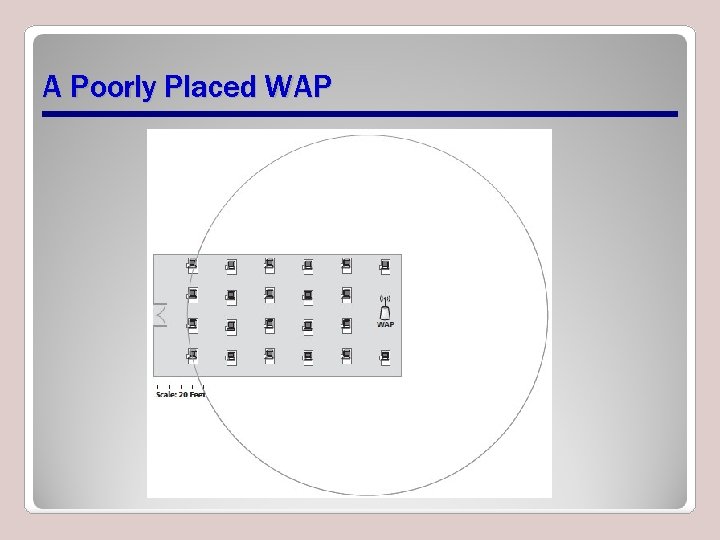
A Poorly Placed WAP
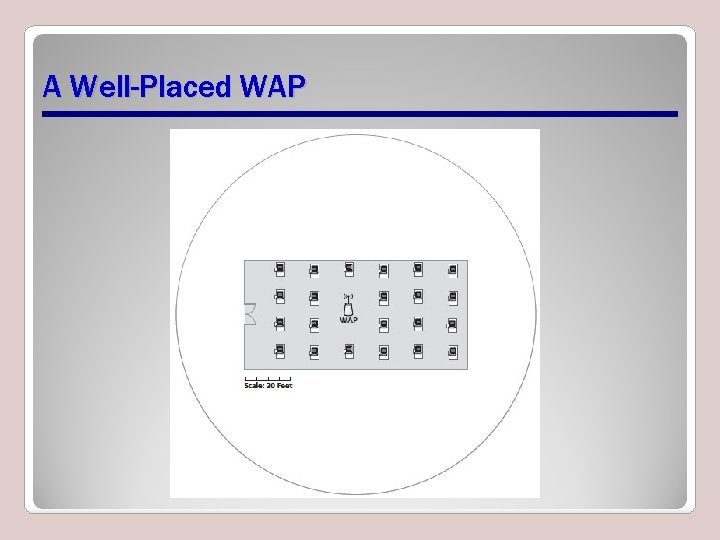
A Well-Placed WAP
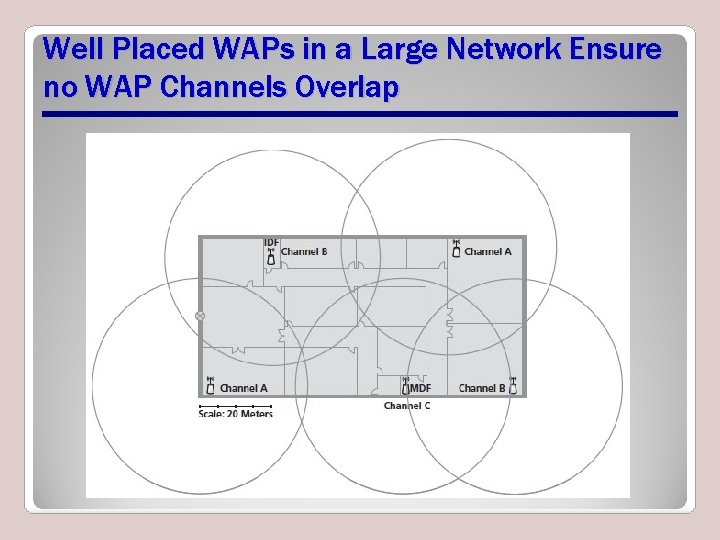
Well Placed WAPs in a Large Network Ensure no WAP Channels Overlap
Install Access Point • Link to main network server via a switch and a wired connection, or to client computer if at home – Can perform wirelessly but wired bandwidth is better • Run WAP setup software on computer connected to WAP • Change the Service Set Identifier (SSID) and admin password
Enforce MAC Filtering • Only preprogrammed MAC addresses will be allowed access to a specific WAP • Need configuration info from computer • Run ipconfig command at command line
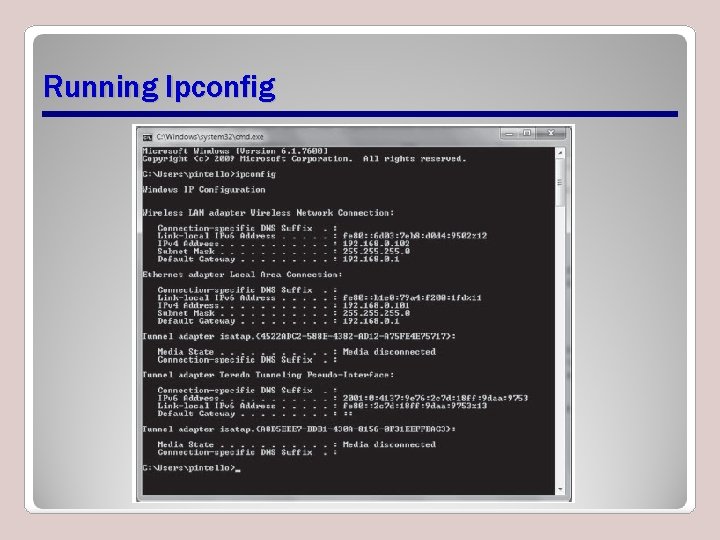
Running Ipconfig
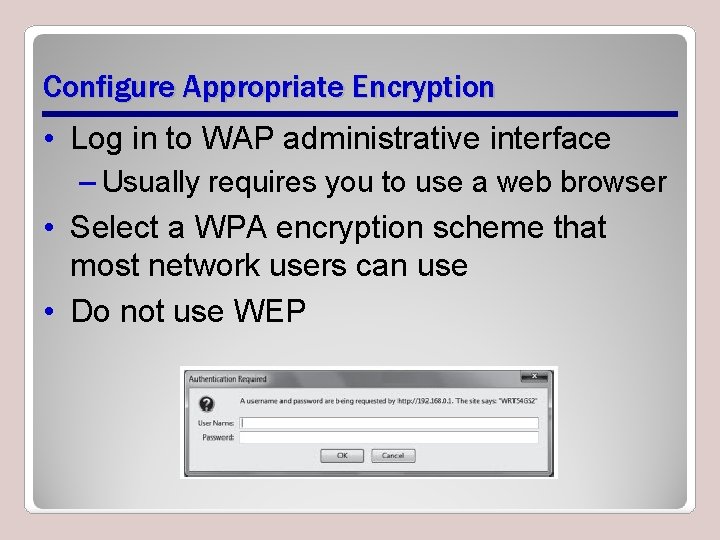
Configure Appropriate Encryption • Log in to WAP administrative interface – Usually requires you to use a web browser • Select a WPA encryption scheme that most network users can use • Do not use WEP
Channels and Frequencies • 2. 4 GHz radio-frequency range • Frequency range broken up into several channels, or sub-ranges of frequency • There can be no overlap of channels on the same network
Service Set Identifiers (SSIDs) • Extended Service Set Identifier (ESSID) • Basic Service Set Identifier (BSSID) • Both identify wireless networks • BSSIDs identify independent wireless networks – Ad hoc or have a central access point • ESSIDs used when two or more independent wireless networks are connected
Antenna Types • Omni-directional antenna – Broadcasts a signal in all directions • Directional antenna – Sends a signal in only one general direction
Interference • Interference – Any electromagnetic signal that interferes with passing data over a wireless network Examples: Electric motors and microwave ovens – Something that redirects wireless signals Example: A building that uses steel studs in its walls rather than wooden ones
Signal Strength • The strength of a wireless signal when you are trying to send or receive information across a wireless network • Factors that affect signal strength – Actual distance to WAP – Interference
Beacon Frames • A frame periodically broadcasted by a WAP to announce presence of the wireless network • Contains: • A MAC header identifying its MAC address • A body with relevant information about the wireless network – Timestamp, interval the beacon frame is broadcast on, and basic summary
Verify Installation • After installation and configuration, verify that: – You changed the default SSID and password – All network devices know the SSID – All devices that need access to the network are entered correctly into the MAC filter list (if applicable) • Test wireless network to make sure that data is flowing across it
SOHO Network Technologies • Considerations before setup: – Wired or wireless? – Peer-to-peer or client/server-based? – Location of SOHO network? • Cable length (if wired), device types and requirements, and compatibility issues are similar to larger environments • Main limitation is number of devices
Summary • Ethernet transfers data on a network via Carrier Sense Multiple Access with Collision Detection (CSMA/CD) or Carrier Sense Multiple Access with Collision Avoidance (CSMA/CA). • CSMA/CD is commonly used in wired environment. • CSMA/CA is geared toward wireless environments. • Baseband means that a cable can only carry one signal one way at one time. A broadband media type can carry multiple data signals on the same wire using some type of multiplexing.
Summary (Continued) • Ethernet follows the XBase-Y naming convention. • 10 Base-T is known as Fast Ethernet; it functions at speeds of 100 mbps. • 10 Gigabit Ethernet has the potential to become an alternative to different WAN technologies. • Collisions result when two different data frames from two different computers interfere with each other because they were released onto the network at the same time.
Summary (Continued) • Network speed comes in two flavors: actual and potential. • To install a wireless network, install NICs in clients (if necessary), locate and configure a WAP, and then verify and test connectivity. • To set up a wireless network in a SOHO environment, you will encounter many of the same issues as a much larger environment. A SOHO's main limitation is the number of devices that can be installed.
- Slides: 52