
Label Submission and Approval System LSAS Webinar Presentation
Label Submission and Approval System LSAS Webinar Presentation February 20, 2013 Labeling and Program Delivery Division USDA, FSIS, OPPD
Agenda • • • Introduction and Background Submitter Benefits Review of Navigating Your Dashboard Review of Managing Establishments Brief Review of Creation and Submission of a Label Application How to check for Status How to respond to a Return Helpful Tips (Formula Examples, Claims & Supporting Documents, Appeals, and Miscellaneous Tips) Resources Questions 2
Introduction and Background The Labeling and Program Delivery Division (LPDD) within the United States Department of Agriculture (USDA), Food Safety and Inspection Service (FSIS) develops and provides labeling guidance, policies and inspection methods and administers programs to protect consumers from misbranded and economically adulterated meat, poultry, and egg products which ensure that all labels are truthful and not misleading. Labeling includes all forms of product identification, health-related claims, net weight, species identification and nutrition. LSAS is a web-based software application that integrates and implements a secure electronic label application process for establishments to submit label applications and appeals. LPDD launched the Label Submission Approval System (LSAS) on May 22, 2012. 3
LSAS Submitter Benefits • Wizard available to assist submitters with determining which labels can be submitted through the Generic Label submission process will reduce submission errors and questions to LPDD staff around generic approval • Application processing will be faster vs. paper submission • Realize cost and time savings vs. shipping via surface mail • Quick and ready online access to application status • Access via Level 2 e. Authentication 4

LSAS: Submitter Benefits (Continued) • Storage and record keeping in an electronic environment allowing establishments to save & re-submit standard documentation (e. g. , documents that support claims; written protocols) vs. having to print and re-submit with each label application • Edit checks in the system will check formatting and submission errors, allowing for corrections in “real time” vs. correcting upon return from LPDD, reducing turnaround time for label review • Enhanced communication mechanisms (e. g. , messaging within LSAS), reducing initial time spent on first time application submission and re-submissions 5
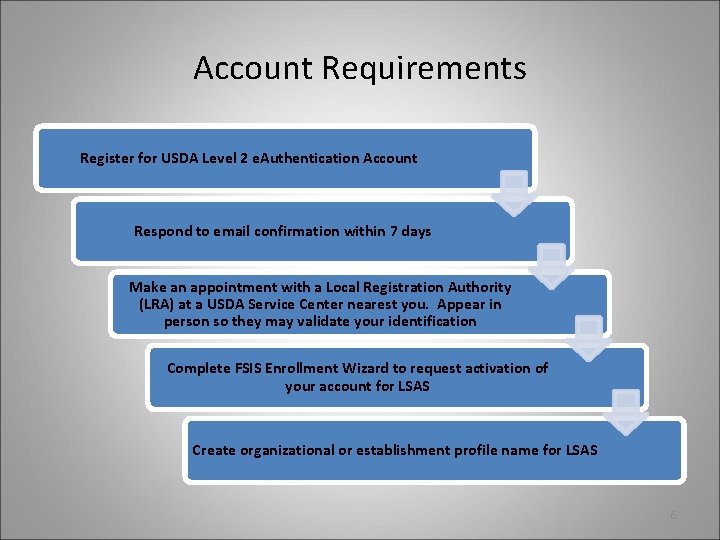
Account Requirements Register for USDA Level 2 e. Authentication Account Respond to email confirmation within 7 days Make an appointment with a Local Registration Authority (LRA) at a USDA Service Center nearest you. Appear in person so they may validate your identification Complete FSIS Enrollment Wizard to request activation of your account for LSAS Create organizational or establishment profile name for LSAS 6
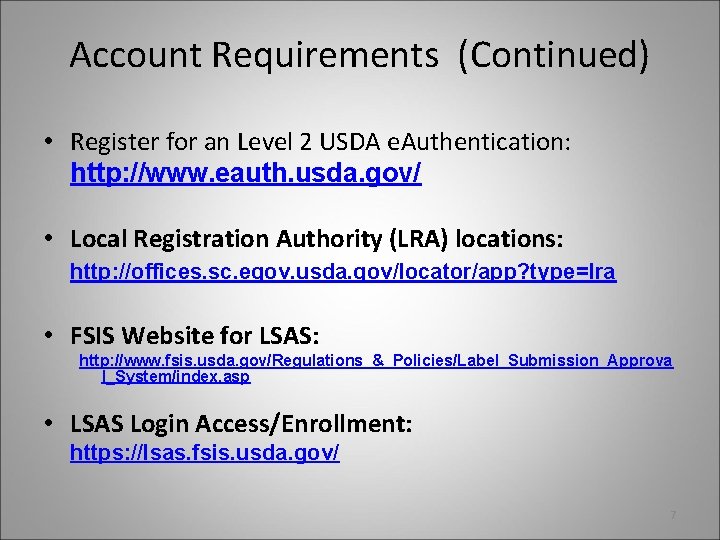
Account Requirements (Continued) • Register for an Level 2 USDA e. Authentication: http: //www. eauth. usda. gov/ • Local Registration Authority (LRA) locations: http: //offices. sc. egov. usda. gov/locator/app? type=lra • FSIS Website for LSAS: http: //www. fsis. usda. gov/Regulations_&_Policies/Label_Submission_Approva l_System/index. asp • LSAS Login Access/Enrollment: https: //lsas. fsis. usda. gov/ 7
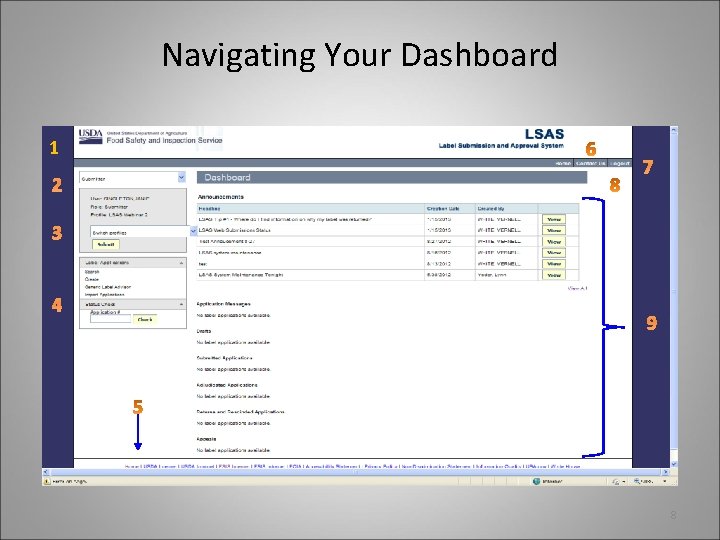
Navigating Your Dashboard 1 4 7 9 8
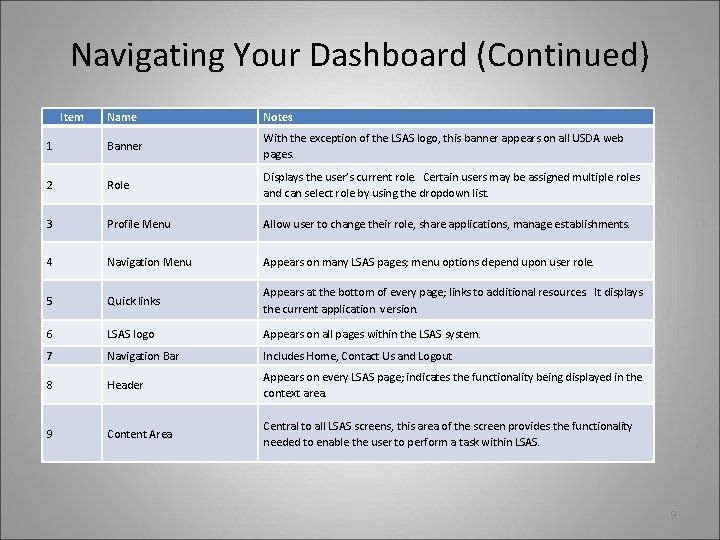
Navigating Your Dashboard (Continued) Item Name Notes 1 Banner With the exception of the LSAS logo, this banner appears on all USDA web pages. 2 Role Displays the user’s current role. Certain users may be assigned multiple roles and can select role by using the dropdown list. 3 Profile Menu Allow user to change their role, share applications, manage establishments. 4 Navigation Menu Appears on many LSAS pages; menu options depend upon user role. 5 Quick links Appears at the bottom of every page; links to additional resources. It displays the current application version. 6 LSAS logo Appears on all pages within the LSAS system. 7 Navigation Bar Includes Home, Contact Us and Logout 8 Header Appears on every LSAS page; indicates the functionality being displayed in the context area. 9 Content Area Central to all LSAS screens, this area of the screen provides the functionality needed to enable the user to perform a task within LSAS. 9
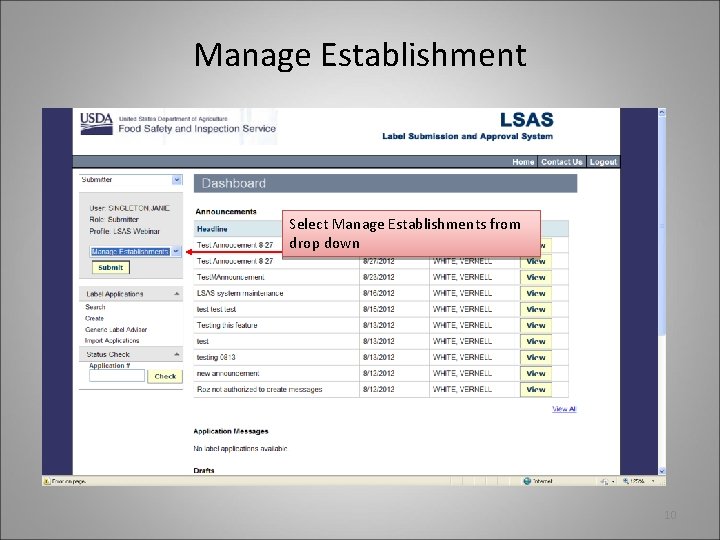
Manage Establishment Select Manage Establishments from drop down 10
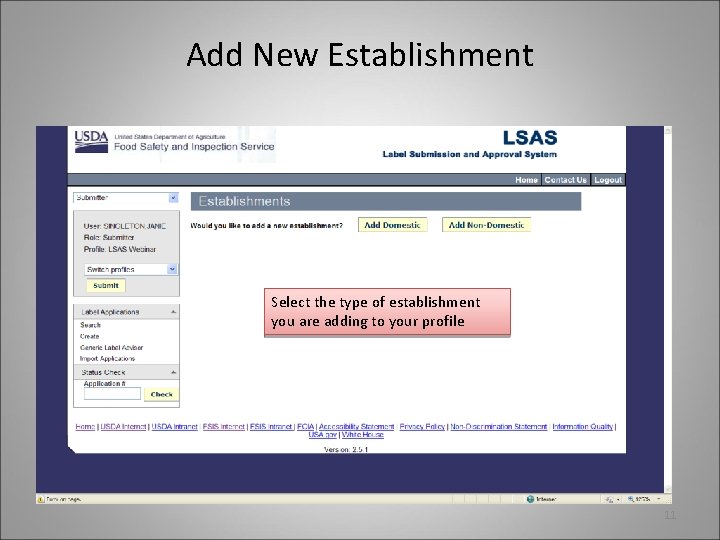
Add New Establishment Select the type of establishment you are adding to your profile 11
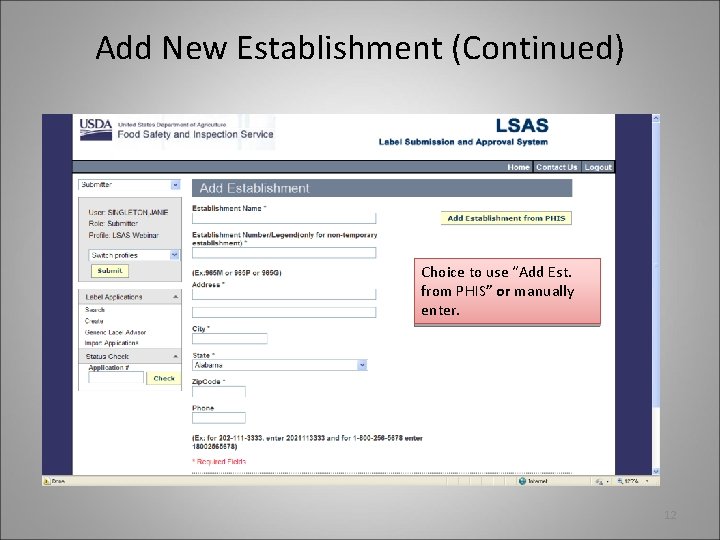
Add New Establishment (Continued) Choice to use “Add Est. from PHIS” or manually enter. 12
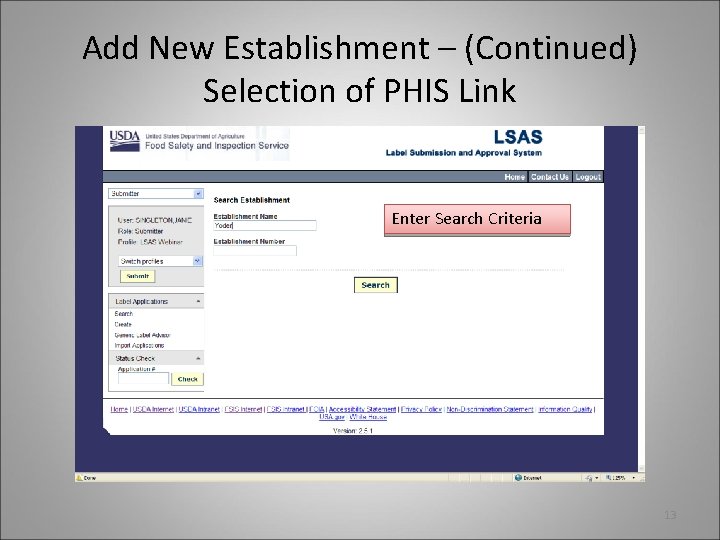
Add New Establishment – (Continued) Selection of PHIS Link Enter Search Criteria 13
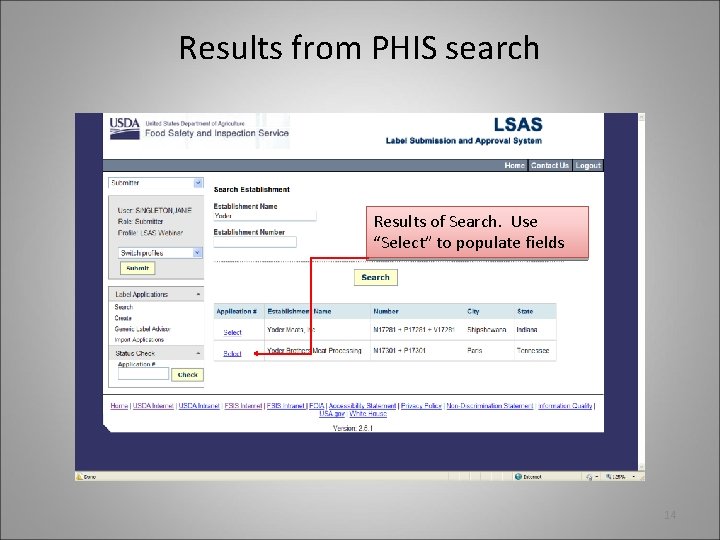
Results from PHIS search Results of Search. Use “Select” to populate fields 14
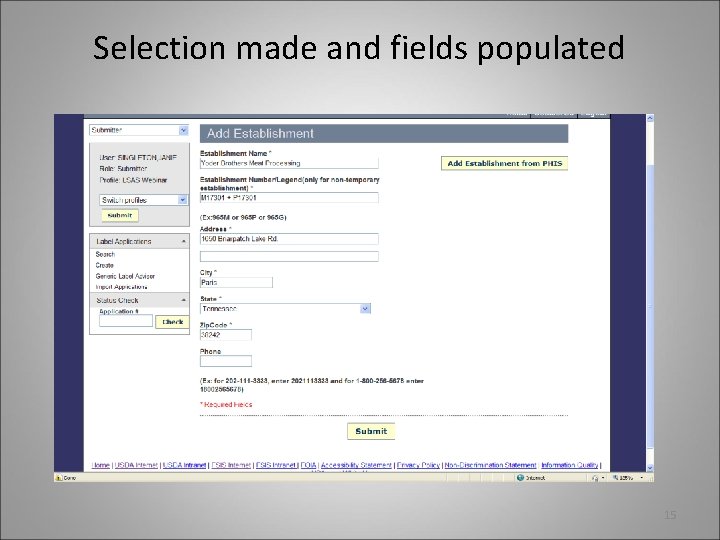
Selection made and fields populated 15
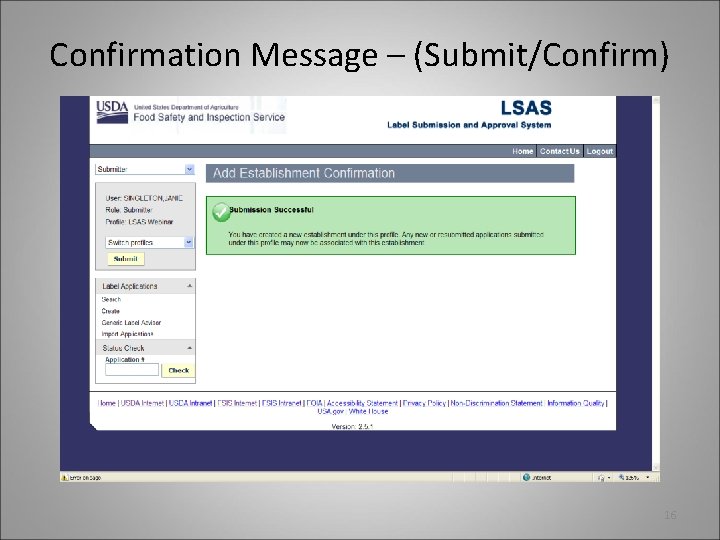
Confirmation Message – (Submit/Confirm) 16
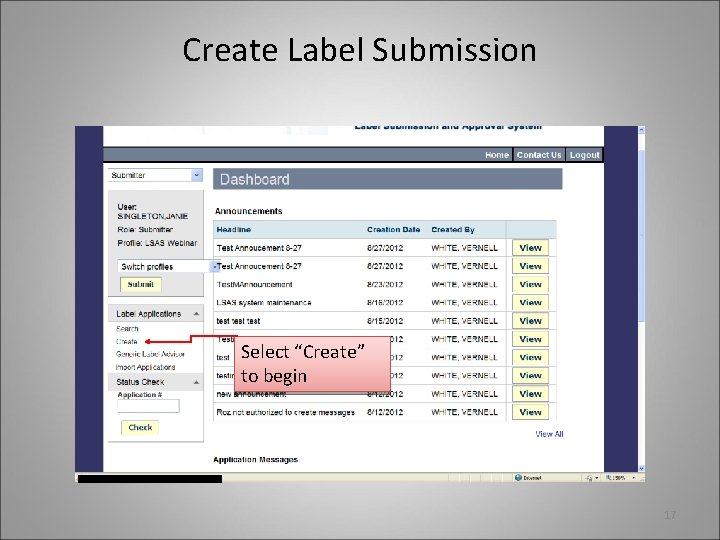
Create Label Submission Select “Create” to begin 17
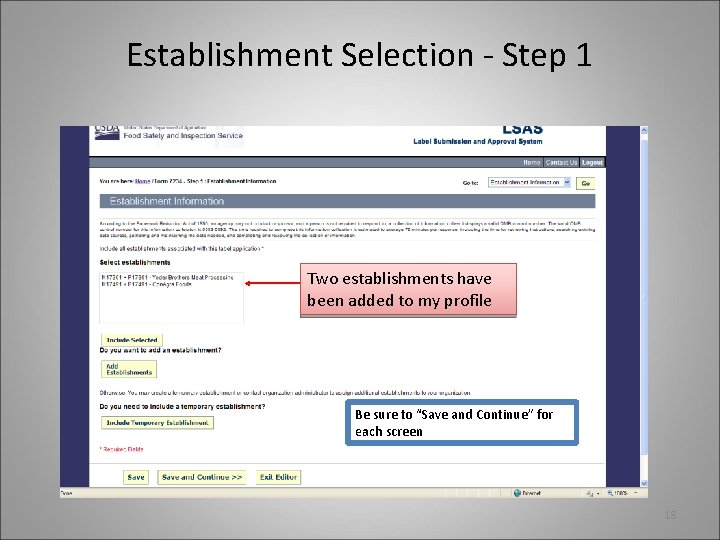
Establishment Selection - Step 1 Two establishments have been added to my profile Be sure to “Save and Continue” for each screen 18
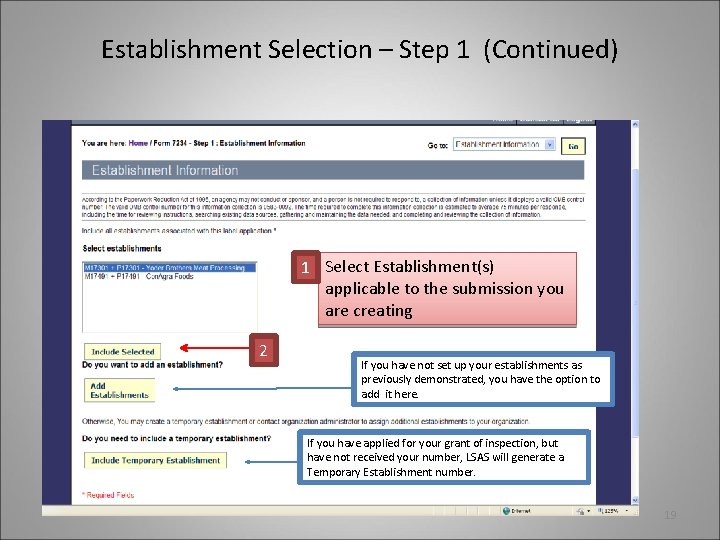
Establishment Selection – Step 1 (Continued) 1 Select Establishment(s) applicable to the submission you are creating 2 If you have not set up your establishments as previously demonstrated, you have the option to add it here. If you have applied for your grant of inspection, but have not received your number, LSAS will generate a Temporary Establishment number. 19
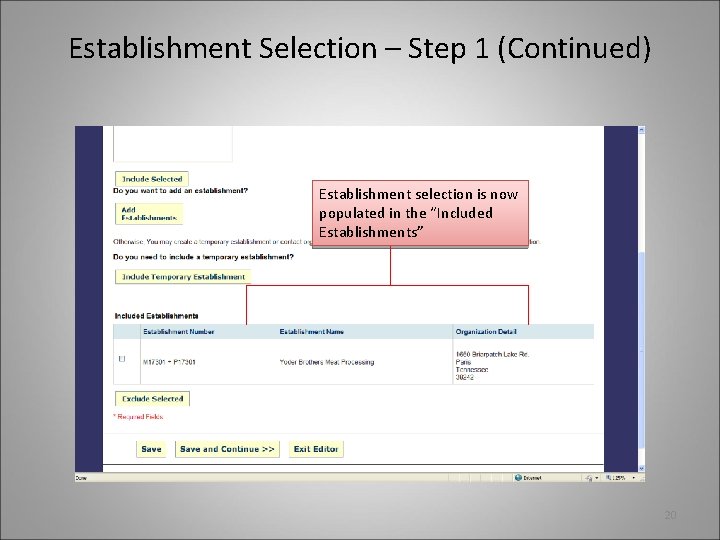
Establishment Selection – Step 1 (Continued) Establishment selection is now populated in the “Included Establishments” 20
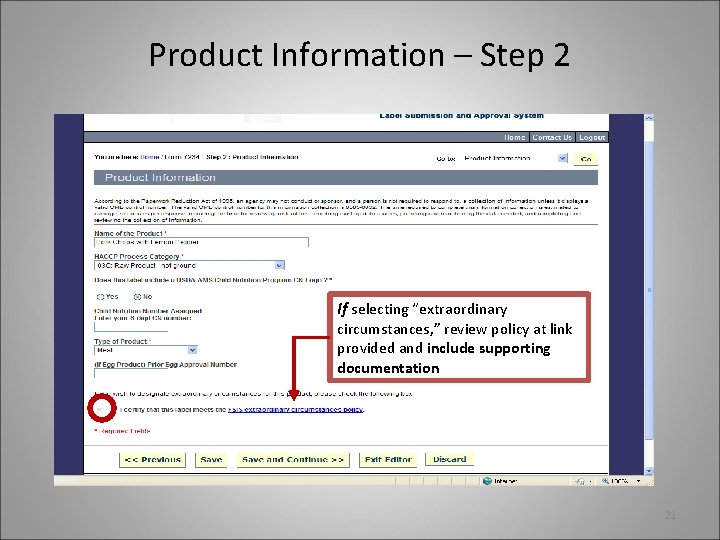
Product Information – Step 2 If selecting “extraordinary circumstances, ” review policy at link provided and include supporting documentation 21
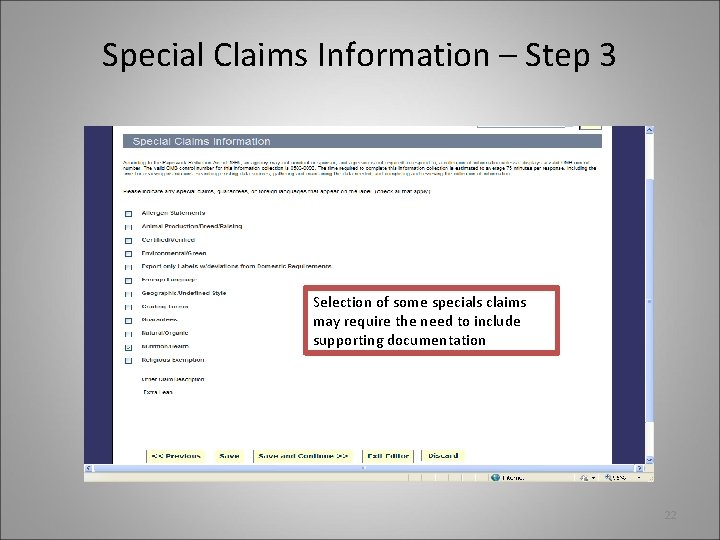
Special Claims Information – Step 3 Selection of some specials claims may require the need to include supporting documentation 22
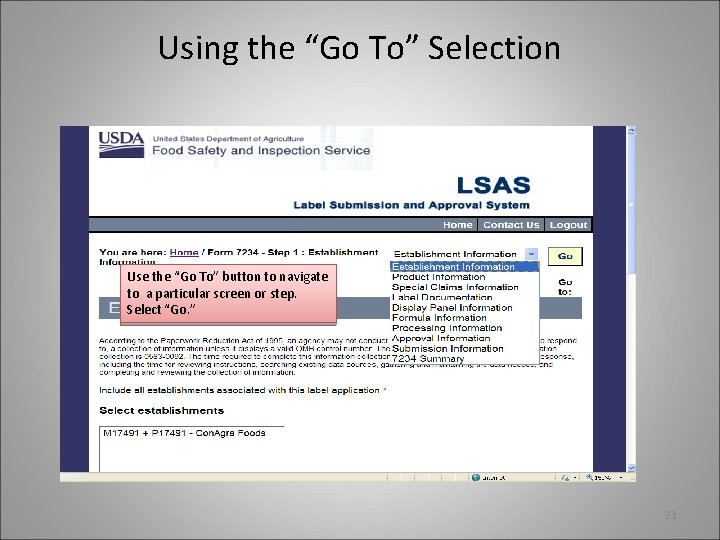
Using the “Go To” Selection Use the “Go To” button to navigate to a particular screen or step. Select “Go. ” 23
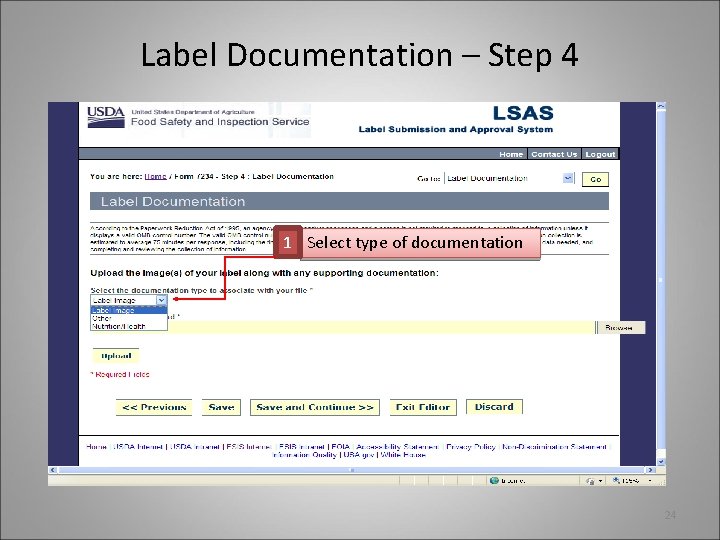
Label Documentation – Step 4 1 Select type of documentation 24
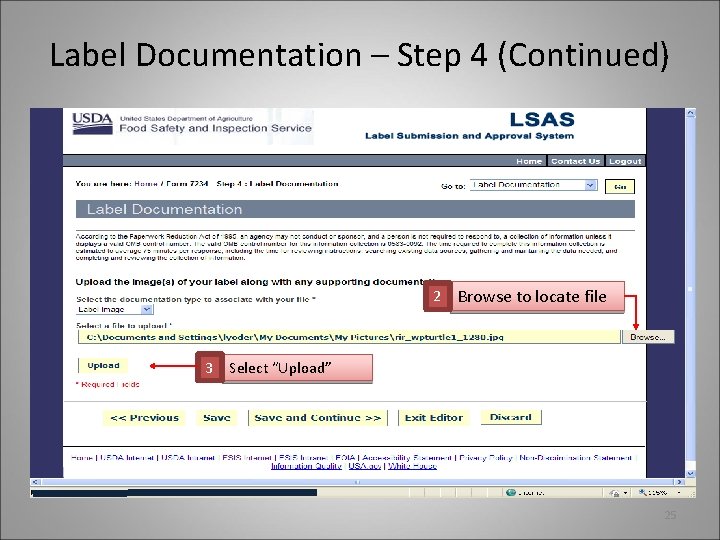
Label Documentation – Step 4 (Continued) 2 Browse to locate file 3 Select “Upload” 25
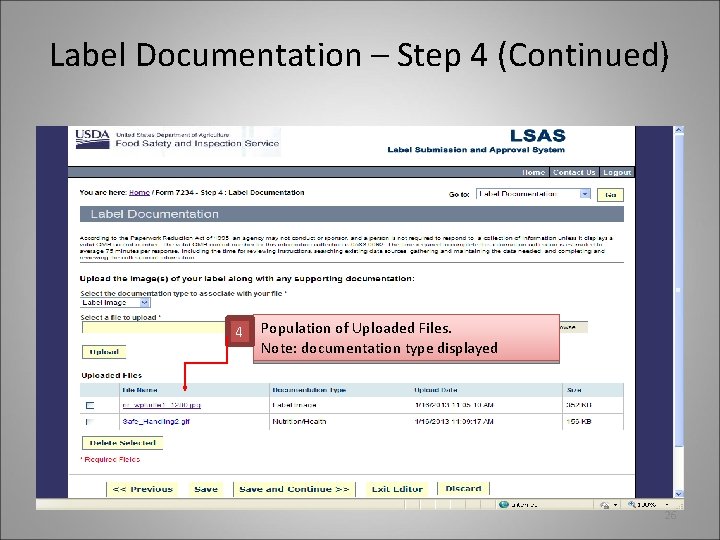
Label Documentation – Step 4 (Continued) 4 Population of Uploaded Files. Note: documentation type displayed 26
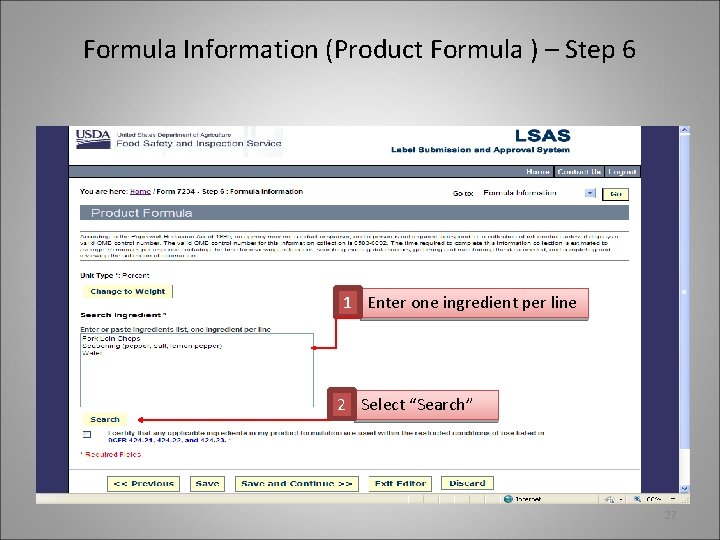
Formula Information (Product Formula ) – Step 6 1 Enter one ingredient per line 2 Select “Search” 27
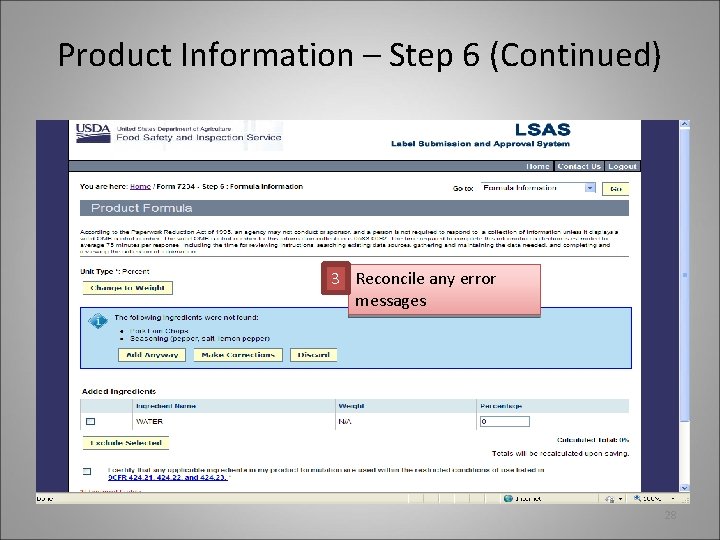
Product Information – Step 6 (Continued) 3 Reconcile any error messages 28
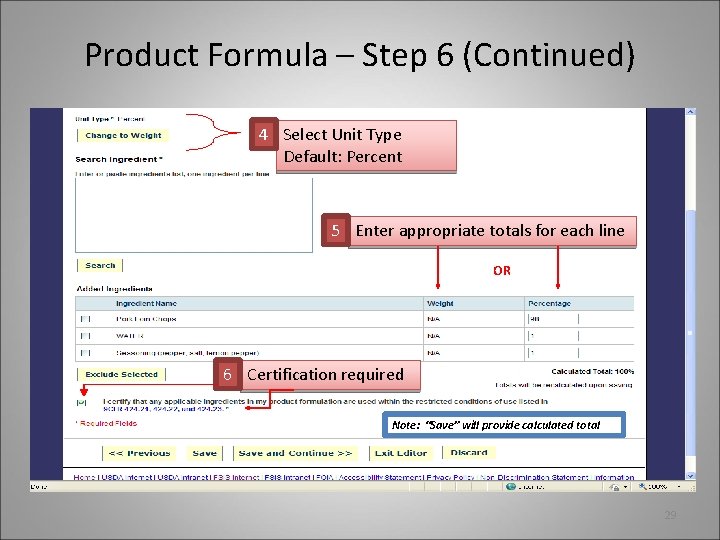
Product Formula – Step 6 (Continued) 4 Select Unit Type Default: Percent 5 Enter appropriate totals for each line OR 6 Certification required Note: “Save” will provide calculated total 29
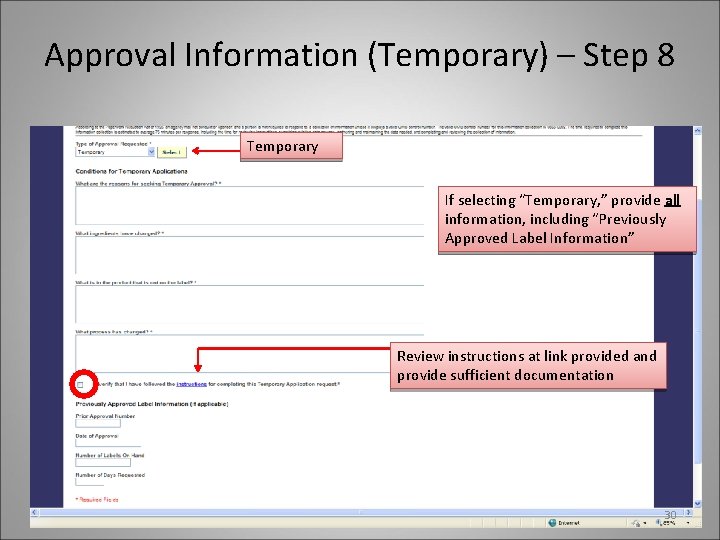
Approval Information (Temporary) – Step 8 Temporary If selecting “Temporary, ” provide all information, including “Previously Approved Label Information” Review instructions at link provided and provide sufficient documentation 30
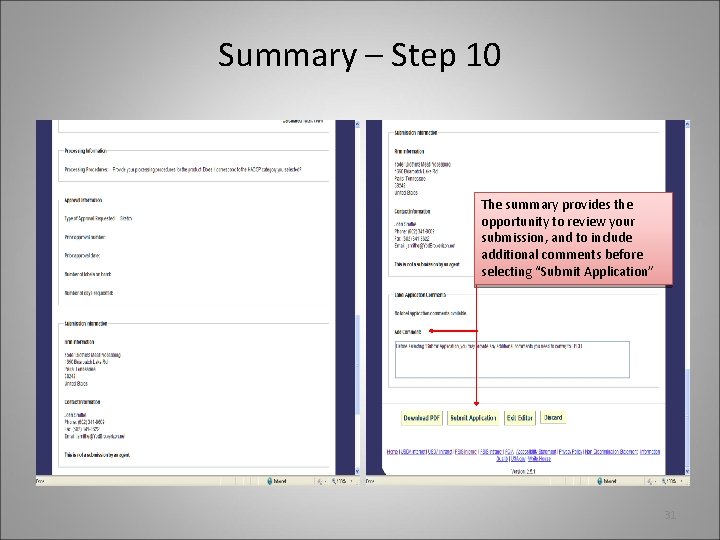
Summary – Step 10 The summary provides the opportunity to review your submission, and to include additional comments before selecting “Submit Application” 31
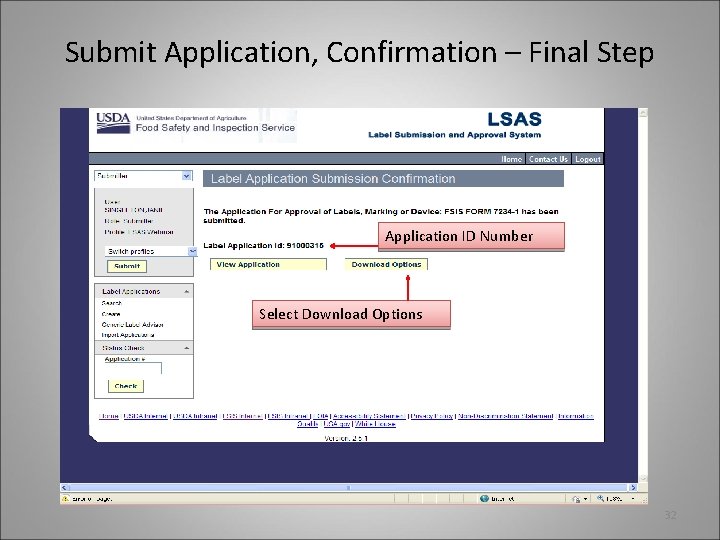
Submit Application, Confirmation – Final Step Application ID Number Select Download Options 32
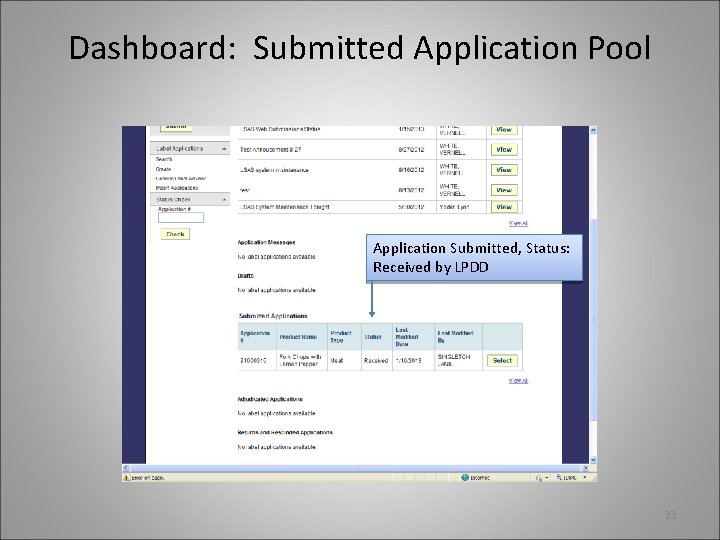
Dashboard: Submitted Application Pool Application Submitted, Status: Received by LPDD 33
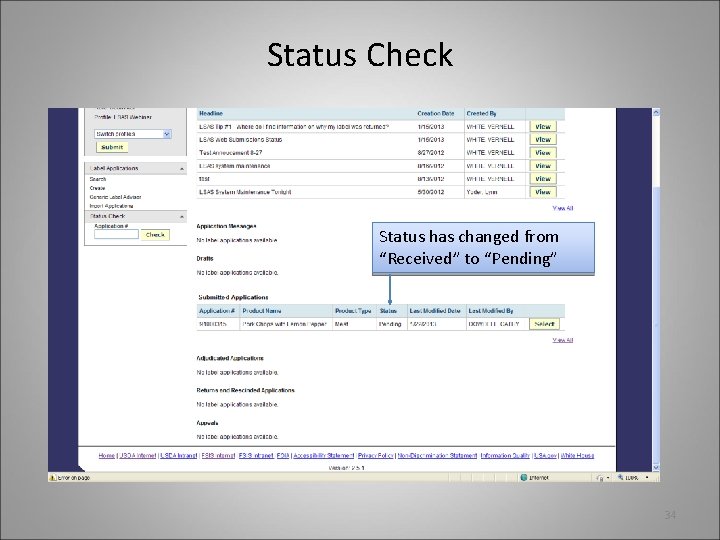
Status Check Status has changed from “Received” to “Pending” 34
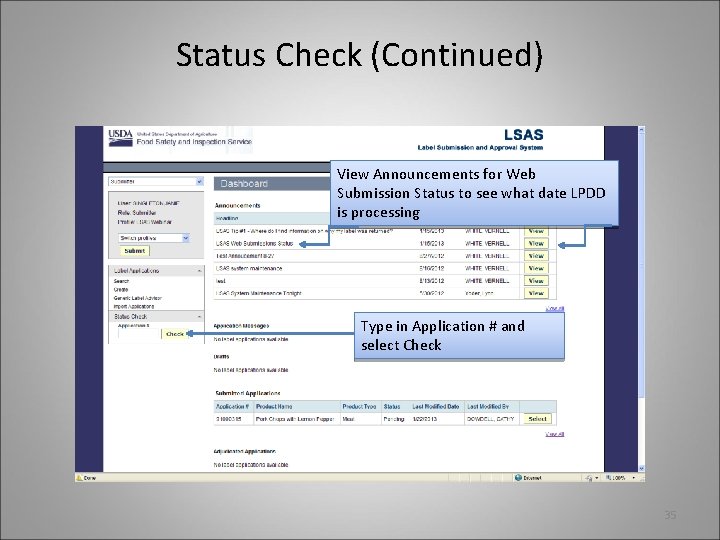
Status Check (Continued) View Announcements for Web Submission Status to see what date LPDD is processing Type in Application # and select Check 35
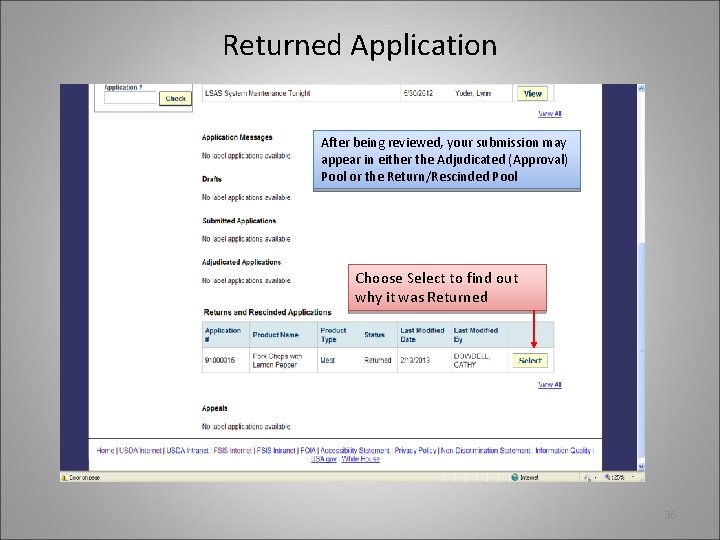
Returned Application After being reviewed, your submission may appear in either the Adjudicated (Approval) Pool or the Return/Rescinded Pool Choose Select to find out why it was Returned 36
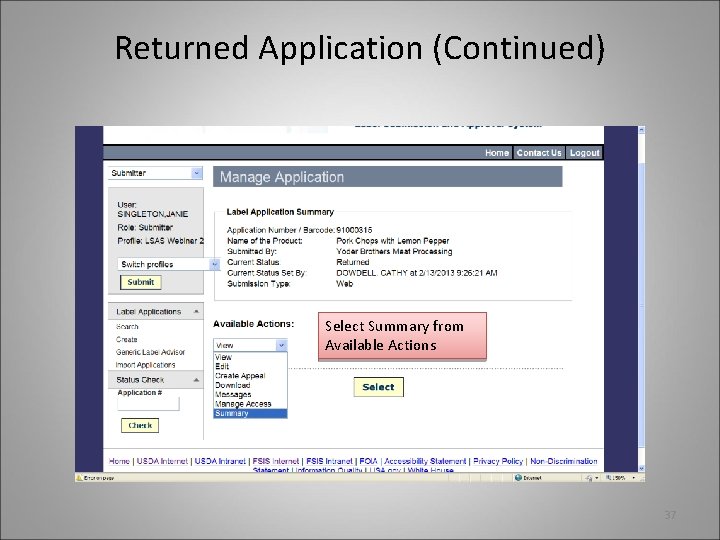
Returned Application (Continued) Select Summary from Available Actions 37
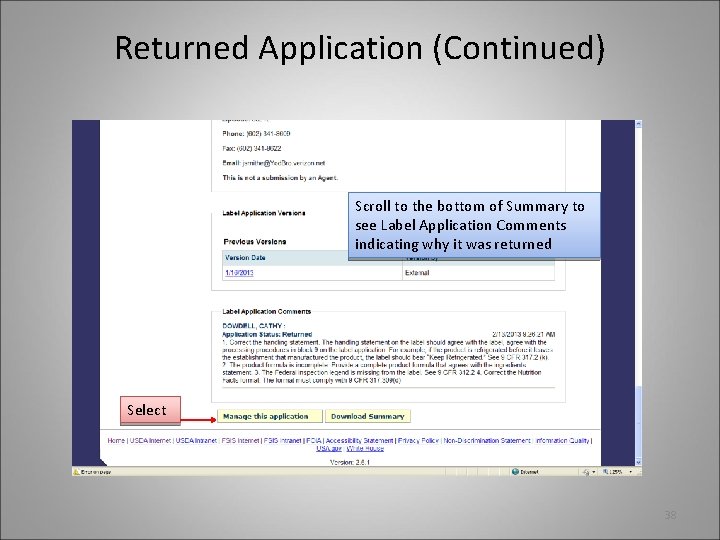
Returned Application (Continued) Scroll to the bottom of Summary to see Label Application Comments indicating why it was returned Select 38
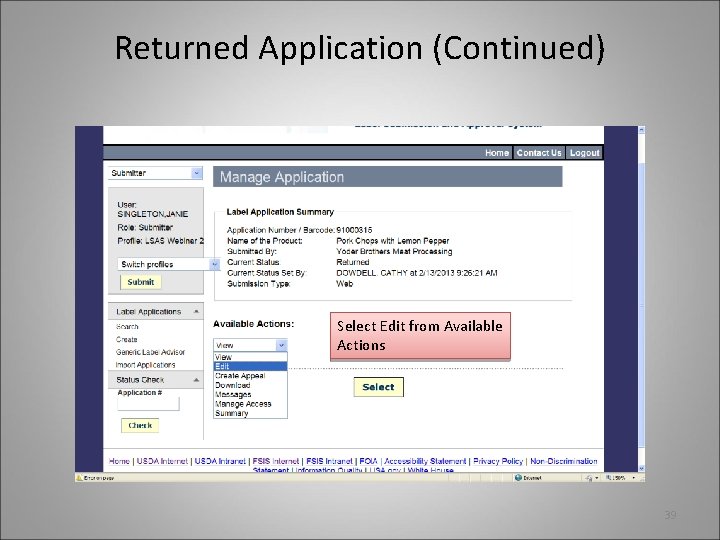
Returned Application (Continued) Select Edit from Available Actions 39
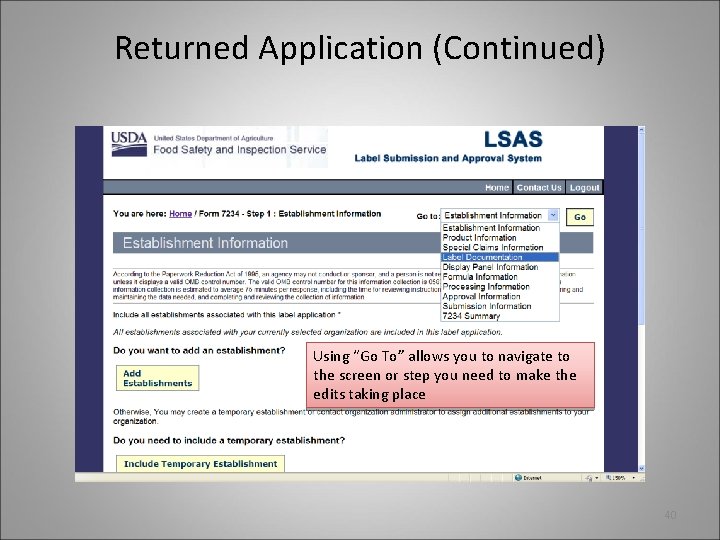
Returned Application (Continued) Using “Go To” allows you to navigate to the screen or step you need to make the edits taking place 40
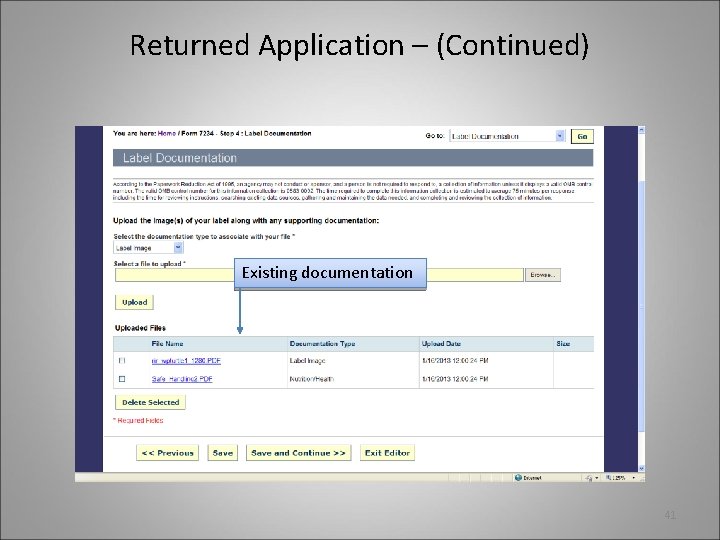
Returned Application – (Continued) Existing documentation 41
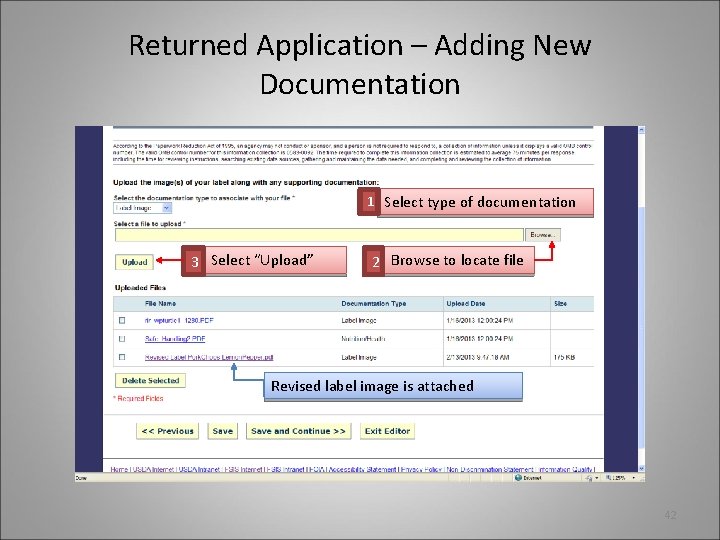
Returned Application – Adding New Documentation 1 Select type of documentation 3 Select “Upload” 2 Browse to locate file Revised label image is attached 42
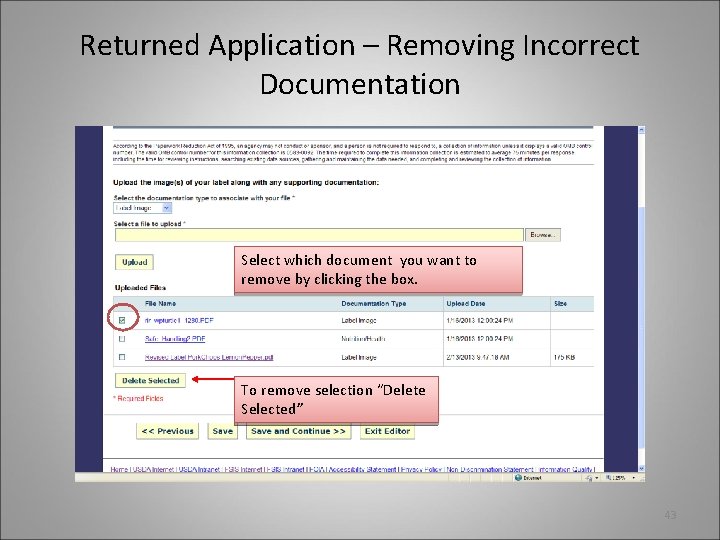
Returned Application – Removing Incorrect Documentation Select which document you want to remove by clicking the box. To remove selection “Delete Selected” 43
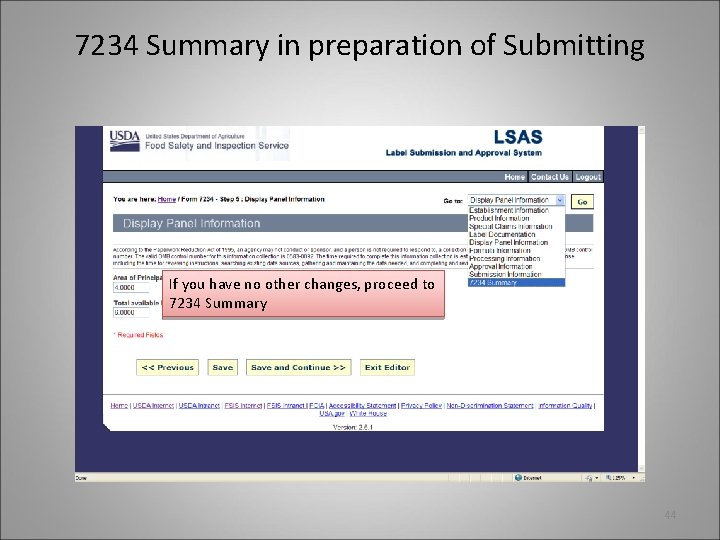
7234 Summary in preparation of Submitting If you have no other changes, proceed to 7234 Summary 44
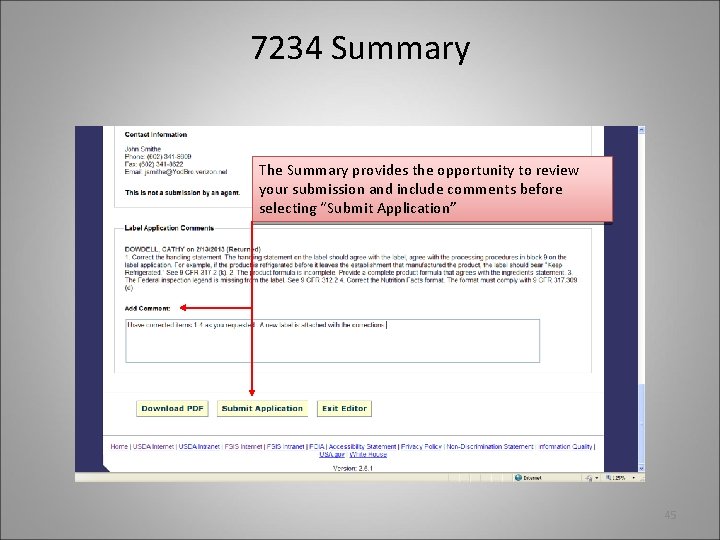
7234 Summary The Summary provides the opportunity to review your submission and include comments before selecting “Submit Application” 45
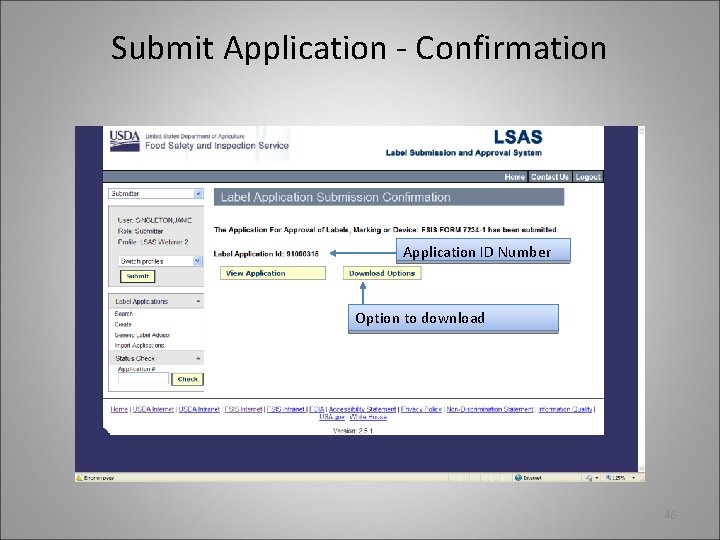
Submit Application - Confirmation Application ID Number Option to download 46
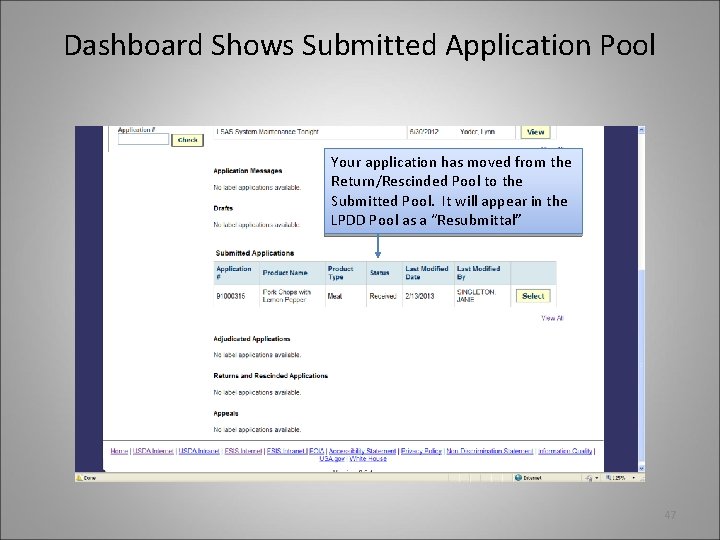
Dashboard Shows Submitted Application Pool Your application has moved from the Return/Rescinded Pool to the Submitted Pool. It will appear in the LPDD Pool as a “Resubmittal” 47
APPEALS ES L P M U M R FO A X E LA HELPFUL TIPS Misc ellan Cla eous Tips ims & Do Sup cum po ent rting s 48
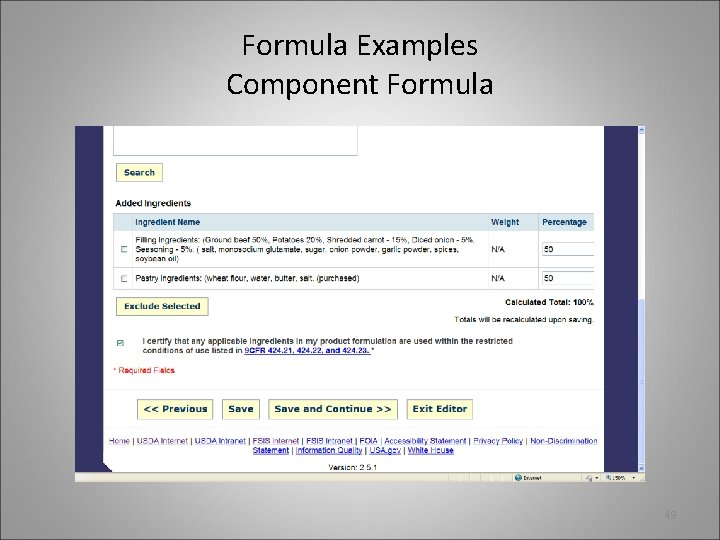
Formula Examples Component Formula 49
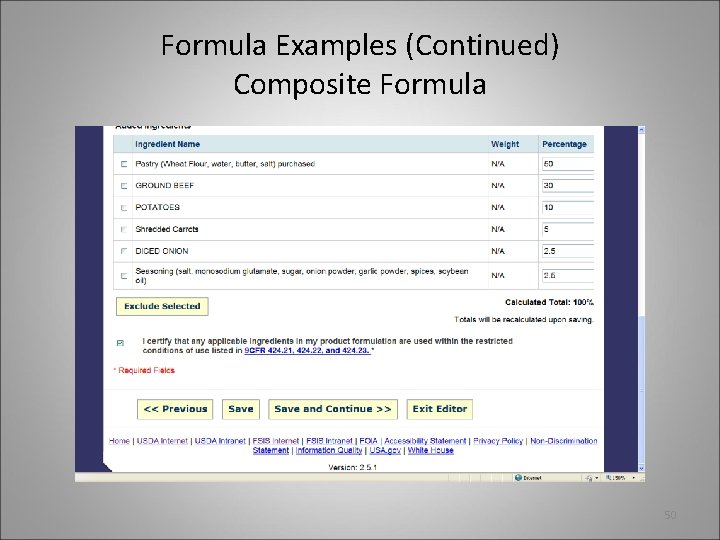
Formula Examples (Continued) Composite Formula 50
Formula Tips • When listing your ingredients, DO NOT include bullets, special characters, or numbered listing, (e. g. , # cheddar cheese, 109. Ham, **Parsley, - -Tomato paste, etc. ). • List all ingredients first. Perform search and reconcile error message. Then indicate the percentage or weight amounts. 51
Claims & Supporting Documentation • Which claims need supporting documents? • What specific documentation is required? The following chart provides some general guidance. Note: This chart is not all inclusive and should not be relied upon solely. 52
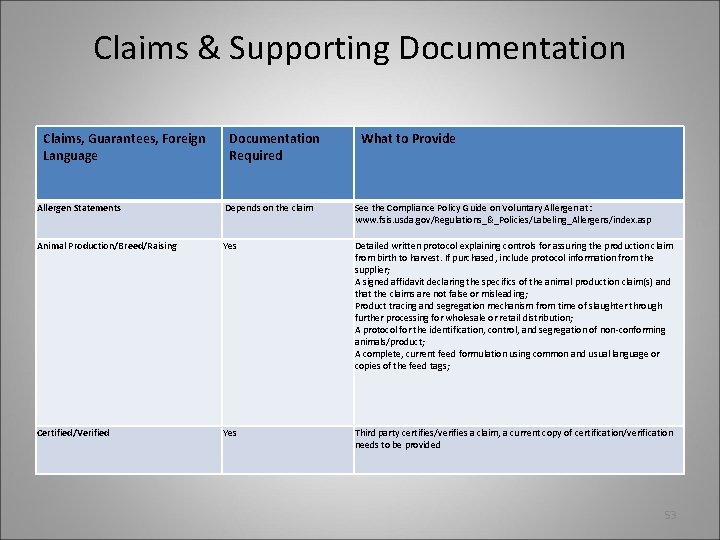
Claims & Supporting Documentation Claims, Guarantees, Foreign Language Documentation Required What to Provide Allergen Statements Depends on the claim See the Compliance Policy Guide on Voluntary Allergen at: www. fsis. usda. gov/Regulations_&_Policies/Labeling_Allergens/index. asp Animal Production/Breed/Raising Yes Detailed written protocol explaining controls for assuring the production claim from birth to harvest. If purchased, include protocol information from the supplier; A signed affidavit declaring the specifics of the animal production claim(s) and that the claims are not false or misleading; Product tracing and segregation mechanism from time of slaughter through further processing for wholesale or retail distribution; A protocol for the identification, control, and segregation of non-conforming animals/product; A complete, current feed formulation using common and usual language or copies of the feed tags; Certified/Verified Yes Third party certifies/verifies a claim, a current copy of certification/verification needs to be provided 53
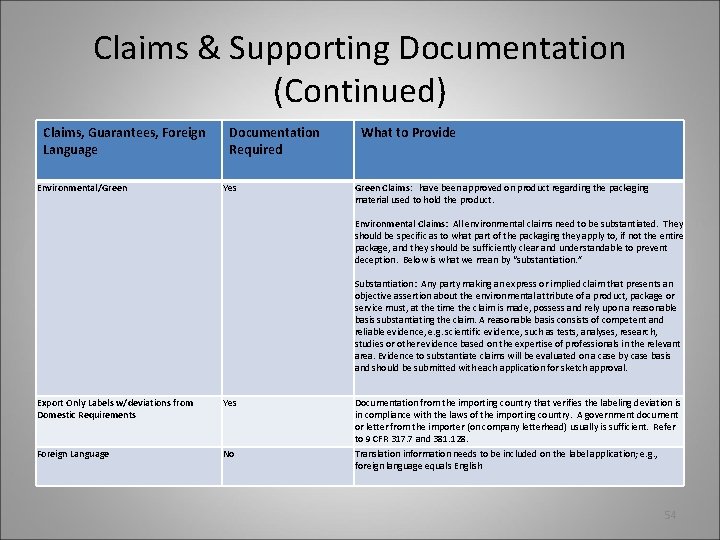
Claims & Supporting Documentation (Continued) Claims, Guarantees, Foreign Language Environmental/Green Documentation Required Yes What to Provide Green Claims: have been approved on product regarding the packaging material used to hold the product. Environmental Claims: All environmental claims need to be substantiated. They should be specific as to what part of the packaging they apply to, if not the entire package, and they should be sufficiently clear and understandable to prevent deception. Below is what we mean by “substantiation. ” Substantiation: Any party making an express or implied claim that presents an objective assertion about the environmental attribute of a product, package or service must, at the time the claim is made, possess and rely upon a reasonable basis substantiating the claim. A reasonable basis consists of competent and reliable evidence, e. g. scientific evidence, such as tests, analyses, research, studies or other evidence based on the expertise of professionals in the relevant area. Evidence to substantiate claims will be evaluated on a case by case basis and should be submitted with each application for sketch approval. Export Only Labels w/deviations from Domestic Requirements Yes Documentation from the importing country that verifies the labeling deviation is in compliance with the laws of the importing country. A government document or letter from the importer (on company letterhead) usually is sufficient. Refer to 9 CFR 317. 7 and 381. 128. Foreign Language No Translation information needs to be included on the label application; e. g. , foreign language equals English 54
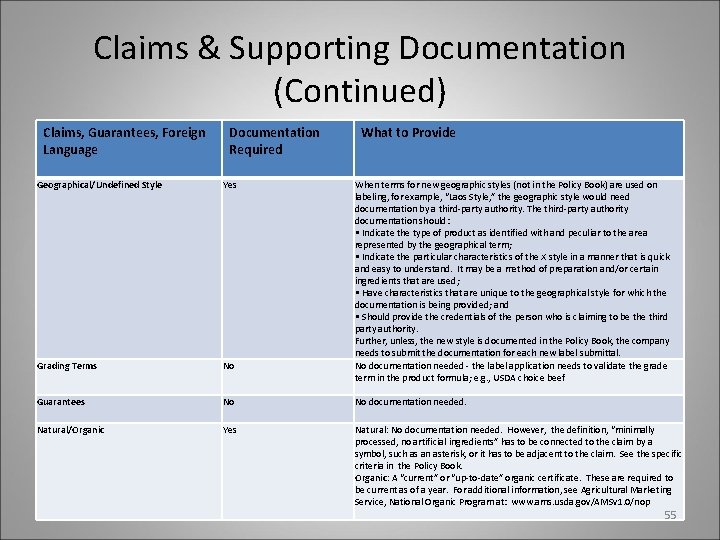
Claims & Supporting Documentation (Continued) Claims, Guarantees, Foreign Language Documentation Required What to Provide Geographical/Undefined Style Yes When terms for new geographic styles (not in the Policy Book) are used on labeling, for example, “Laos Style, ” the geographic style would need documentation by a third-party authority. The third-party authority documentation should: • Indicate the type of product as identified with and peculiar to the area represented by the geographical term; • Indicate the particular characteristics of the X style in a manner that is quick and easy to understand. It may be a method of preparation and/or certain ingredients that are used; • Have characteristics that are unique to the geographical style for which the documentation is being provided; and • Should provide the credentials of the person who is claiming to be third party authority. Further, unless, the new style is documented in the Policy Book, the company needs to submit the documentation for each new label submittal. No documentation needed - the label application needs to validate the grade term in the product formula; e. g. , USDA choice beef Grading Terms No Guarantees No No documentation needed. Natural/Organic Yes Natural: No documentation needed. However, the definition, “minimally processed, no artificial ingredients” has to be connected to the claim by a symbol, such as an asterisk, or it has to be adjacent to the claim. See the specific criteria in the Policy Book. Organic: A “current” or “up-to-date” organic certificate. These are required to be current as of a year. For additional information, see Agricultural Marketing Service, National Organic Program at: www. ams. usda. gov/AMSv 1. 0/nop 55
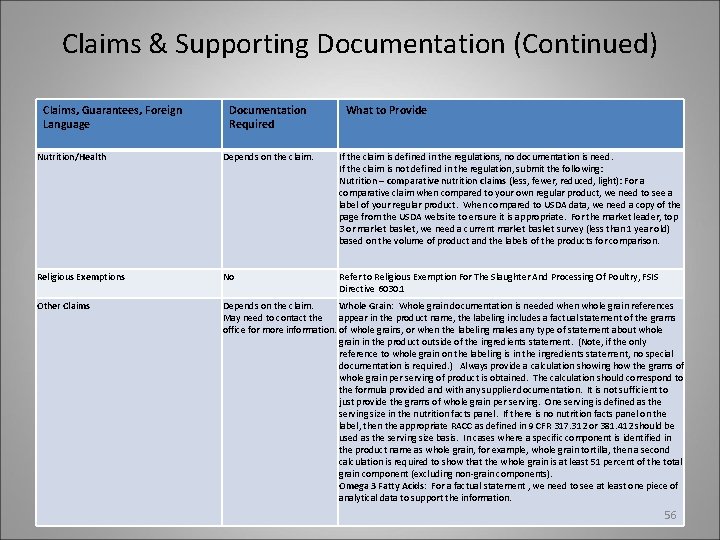
Claims & Supporting Documentation (Continued) Claims, Guarantees, Foreign Language Documentation Required What to Provide Nutrition/Health Depends on the claim. If the claim is defined in the regulations, no documentation is need. If the claim is not defined in the regulation, submit the following: Nutrition – comparative nutrition claims (less, fewer, reduced, light): For a comparative claim when compared to your own regular product, we need to see a label of your regular product. When compared to USDA data, we need a copy of the page from the USDA website to ensure it is appropriate. For the market leader, top 3 or market basket, we need a current market basket survey (less than 1 year old) based on the volume of product and the labels of the products for comparison. Religious Exemptions No Refer to Religious Exemption For The Slaughter And Processing Of Poultry, FSIS Directive 6030. 1 Other Claims Depends on the claim. Whole Grain: Whole grain documentation is needed when whole grain references May need to contact the appear in the product name, the labeling includes a factual statement of the grams office for more information. of whole grains, or when the labeling makes any type of statement about whole grain in the product outside of the ingredients statement. (Note, if the only reference to whole grain on the labeling is in the ingredients statement, no special documentation is required. ) Always provide a calculation showing how the grams of whole grain per serving of product is obtained. The calculation should correspond to the formula provided and with any supplier documentation. It is not sufficient to just provide the grams of whole grain per serving. One serving is defined as the serving size in the nutrition facts panel. If there is no nutrition facts panel on the label, then the appropriate RACC as defined in 9 CFR 317. 312 or 381. 412 should be used as the serving size basis. In cases where a specific component is identified in the product name as whole grain, for example, whole grain tortilla, then a second calculation is required to show that the whole grain is at least 51 percent of the total grain component (excluding non-grain components). Omega 3 Fatty Acids: For a factual statement , we need to see at least one piece of analytical data to support the information. 56
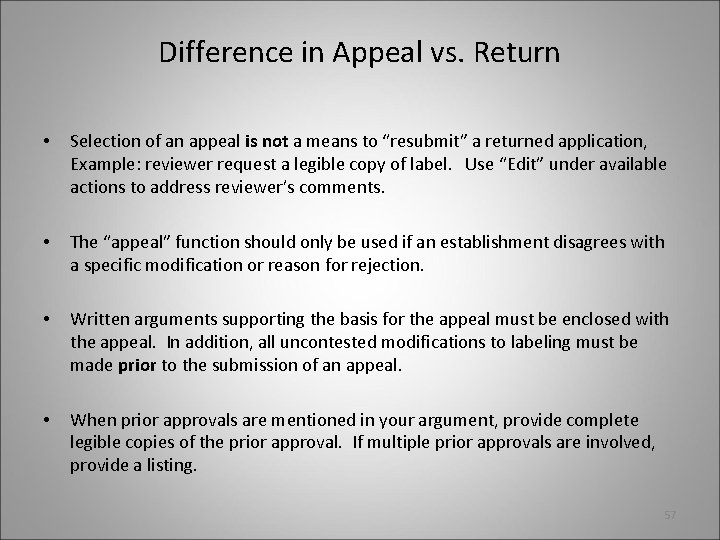
Difference in Appeal vs. Return • Selection of an appeal is not a means to “resubmit” a returned application, Example: reviewer request a legible copy of label. Use “Edit” under available actions to address reviewer’s comments. • The “appeal” function should only be used if an establishment disagrees with a specific modification or reason for rejection. • Written arguments supporting the basis for the appeal must be enclosed with the appeal. In addition, all uncontested modifications to labeling must be made prior to the submission of an appeal. • When prior approvals are mentioned in your argument, provide complete legible copies of the prior approval. If multiple prior approvals are involved, provide a listing. 57
Miscellaneous Tips • Never share your e-Authentication credentials with anyone. This account is specific to you as an individual. • If you are using a temporary establishment number, (example: LSAS_Temp 123) be sure that you update your establishment profile with the correct establishment number and address. This is particularly important, once you receive your final grant of approval, as it ensure that LPDD can provide effective reporting. • If you have requested an Extraordinary Circumstance (EC), and your submission remains in Draft, be sure you have uploaded your supporting documentation. • If you permanently leave your company or establishment, contact the LSAS Administrator immediately to ensure that your account is properly closed. If other employees in your company will need access to your labels, instructions will be provided. 58
Additional Resources • Label System and Approval System (LSAS): http: //www. fsis. usda. gov/Regulations_&_Policies/Label_Submission_Approval_System/index. asp • LSAS Industry Webinar: January 23, 2013: http: //www. fsis. usda. gov/PDF/LSAS_Industry_Webinar_012313. pdf • Industry User Guide: http: //www. fsis. usda. gov/PDF/LSAS_Industry_User_Guide_052112. pdf • LPDD Labeling Guidance: http: //www. fsis. usda. gov/About_FSIS/labeling_&_consumer_protection/index. asp • Child Nutrition (CN) Labeling Program: http: //www. fns. usda. gov/cnd/cnlabeling/default. htm • Generic Labeling: http: //www. fsis. usda. gov/Regulations_&_Policies/Generic_Labeling/index. asp 59
Additional Resources (Continued) • LSAS Administrator: LSAS@fsis. usda. gov or lynn. yoder@fsis. usda. gov or call: (301) 504 -0837 • ask. FSIS: http: //askfsis. custhelp. com/ • Labeling and Program Delivery Division: Office: (301) 504 -0878 60

61
- Slides: 61