
Lab 8 Multiplexer and Demultiplexer Systems Slide 2
Lab 8 : Multiplexer and Demultiplexer Systems: Slide #2 MUX : Slide #3 De. MUX : Slide #4 Security System Basics : Slide #5 Security System Part 1 : Slide #6 Security System Part 2 : Slide #7 Using a MUX as a logic system :
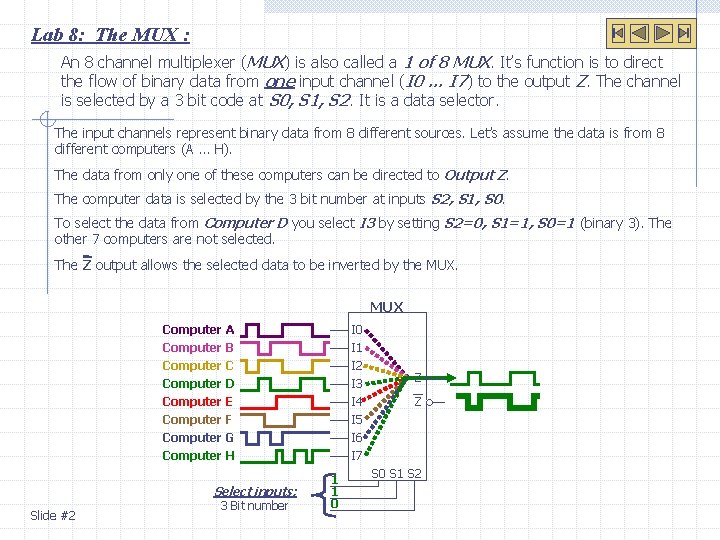
Lab 8: The MUX : An 8 channel multiplexer (MUX) is also called a 1 of 8 MUX. It’s function is to direct the flow of binary data from one input channel (I 0 … I 7) to the output Z. The channel is selected by a 3 bit code at S 0, S 1, S 2. It is a data selector. The input channels represent binary data from 8 different sources. Let’s assume the data is from 8 different computers (A … H). The data from only one of these computers can be directed to Output Z. The computer data is selected by the 3 bit number at inputs S 2, S 1, S 0. To select the data from Computer D you select I 3 by setting S 2=0, S 1=1, S 0=1 (binary 3). The other 7 computers are not selected. The Z output allows the selected data to be inverted by the MUX Computer A Computer B Computer C Computer D Computer E Computer F I 0 Computer G Computer H I 6 I 7 Select inputs: Slide #2 3 Bit number I 1 I 2 I 3 I 4 I 5 1 1 0 Z Z S 0 S 1 S 2
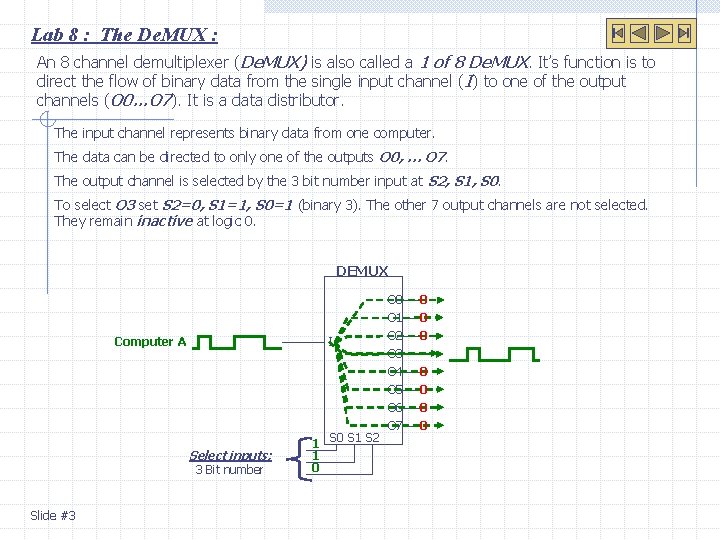
Lab 8 : The De. MUX : An 8 channel demultiplexer (De. MUX) is also called a 1 of 8 De. MUX. It’s function is to direct the flow of binary data from the single input channel ( I) to one of the output channels (O 0…O 7). It is a data distributor. The input channel represents binary data from one computer. The data can be directed to only one of the outputs O 0, … O 7. The output channel is selected by the 3 bit number input at S 2, S 1, S 0. To select O 3 set S 2=0, S 1=1, S 0=1 (binary 3). The other 7 output channels are not selected. They remain inactive at logic 0. DEMUX Computer A I Select inputs: 3 Bit number Slide #3 1 S 0 S 1 S 2 1 0 O 1 O 2 O 3 O 4 O 5 O 6 O 7 0 0 0 0
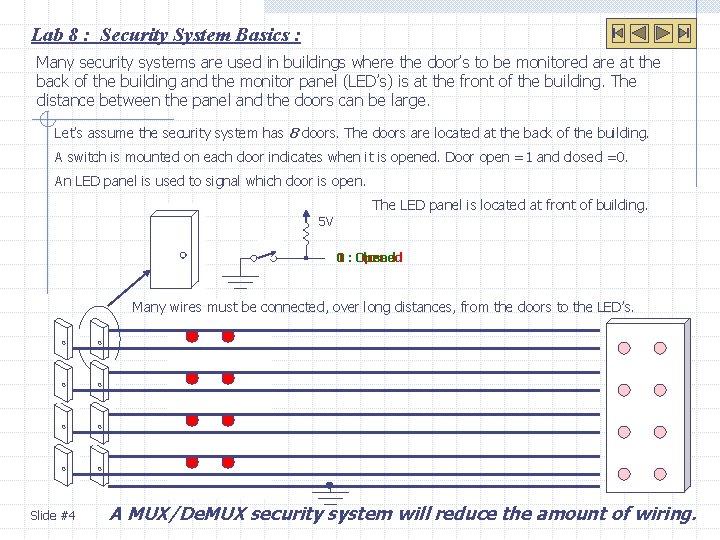
Lab 8 : Security System Basics : Many security systems are used in buildings where the door’s to be monitored are at the back of the building and the monitor panel (LED’s) is at the front of the building. The distance between the panel and the doors can be large. Let’s assume the security system has 8 doors. The doors are located at the back of the building. A switch is mounted on each door indicates when it is opened. Door open =1 and closed =0. An LED panel is used to signal which door is open. The LED panel is located at front of building. 5 V 1 : Closed Opened 0 Many wires must be connected, over long distances, from the doors to the LED’s. Slide #4 A MUX/De. MUX security system will reduce the amount of wiring.
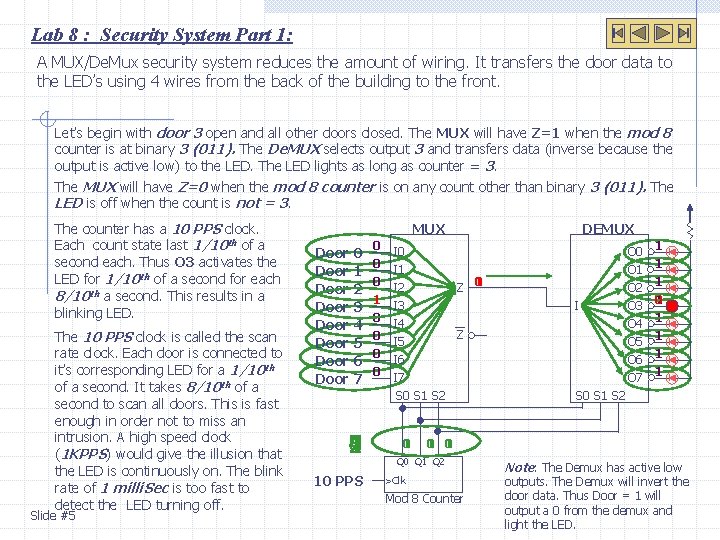
Lab 8 : Security System Part 1: A MUX/De. Mux security system reduces the amount of wiring. It transfers the door data to the LED’s using 4 wires from the back of the building to the front. Let’s begin with door 3 open and all other doors closed. The MUX will have Z=1 when the mod 8 counter is at binary 3 (011). The De. MUX selects output 3 and transfers data (inverse because the output is active low) to the LED. The LED lights as long as counter = 3. The MUX will have Z=0 when the mod 8 counter is on any count other than binary 3 (011). The LED is off when the count is not = 3. The counter has a 10 PPS clock. Each count state last 1/10 th of a second each. Thus O 3 activates the LED for 1/10 th of a second for each 8/10 th a second. This results in a blinking LED. The 10 PPS clock is called the scan rate clock. Each door is connected to it’s corresponding LED for a 1/10 th of a second. It takes 8/10 th of a second to scan all doors. This is fast enough in order not to miss an intrusion. A high speed clock (1 KPPS) would give the illusion that the LED is continuously on. The blink rate of 1 milli. Sec is too fast to detect the LED turning off. Slide #5 MUX Door 0 Door 1 Door 2 Door 3 Door 4 Door 5 Door 6 Door 7 5 4 6 7 0 1 2 10 PPS 0 0 0 1 0 0 I 0 I 1 0 I 2 Z 1 I 3 I 4 Z I 5 I 6 I 7 S 0 S 1 S 2 0 1 DEMUX I O 0 O 1 O 2 O 3 O 4 O 5 O 6 O 7 1 1 0 1 1 S 0 S 1 S 2 1 1 0 0 Q 1 Q 2 >Clk Mod 8 Counter Note: The Demux has active low outputs. The Demux will invert the door data. Thus Door = 1 will output a 0 from the demux and light the LED.
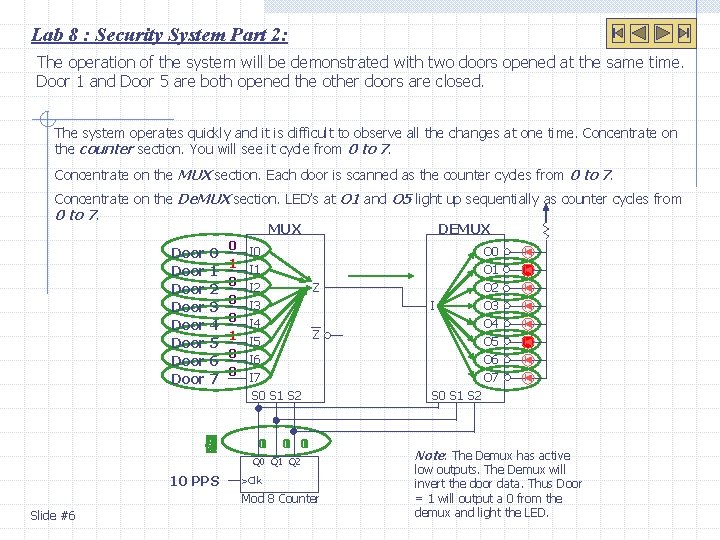
Lab 8 : Security System Part 2: The operation of the system will be demonstrated with two doors opened at the same time. Door 1 and Door 5 are both opened the other doors are closed. The system operates quickly and it is difficult to observe all the changes at one time. Concentrate on the counter section. You will see it cycle from 0 to 7. Concentrate on the MUX section. Each door is scanned as the counter cycles from 0 to 7. Concentrate on the De. MUX section. LED’s at O 1 and O 5 light up sequentially as counter cycles from 0 to 7. MUX DEMUX Door 0 Door 1 Door 2 Door 3 Door 4 Door 5 Door 6 Door 7 1 5 0 2 3 4 6 7 10 PPS 0 1 0 0 I 0 I 1 I 2 Z I 3 I 4 Z I 5 I 6 I 7 S 0 S 1 S 2 1 0 0 1 1 0 Q 1 Q 2 >Clk Mod 8 Counter Slide #6 I O 0 O 1 O 2 O 3 O 4 O 5 O 6 O 7 S 0 S 1 S 2 Note: The Demux has active low outputs. The Demux will invert the door data. Thus Door = 1 will output a 0 from the demux and light the LED.
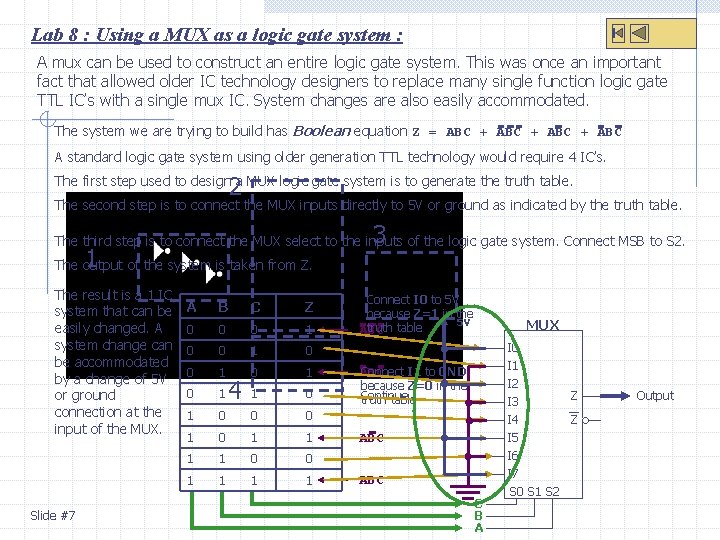
Lab 8 : Using a MUX as a logic gate system : A mux can be used to construct an entire logic gate system. This was once an important fact that allowed older IC technology designers to replace many single function logic gate TTL IC’s with a single mux IC. System changes are also easily accommodated. The system we are trying to build has Boolean equation Z = ABC + ABC A standard logic gate system using older generation TTL technology would require 4 IC’s. 2 The first step used to design a MUX logic gate system is to generate the truth table. The second step is to connect the MUX inputs directly to 5 V or ground as indicated by the truth table. 3 The third step is to connect the MUX select to the inputs of the logic gate system. Connect MSB to S 2. 1 The output of the system is taken from Z. The result is a 1 IC system that can be easily changed. A system change can be accommodated by a change of 5 V or ground connection at the input of the MUX. Slide #7 A B C Z 0 0 0 1 0 1 1 0 0 0 1 1 1 1 0 0 1 1 4 Connect I 0 to 5 V because Z=1 in the 5 V truth table ABC MUX I 0 I 1 I 2 I 3 I 4 I 5 Connect I 1 to GND ABC because Z=0 in the Continue truth table… ABC C B A I 6 I 7 S 0 S 1 S 2 Z Z Output
- Slides: 7