
Knowledge Sharing session on Airtel Voice Mail Service

- Slides: 10
Knowledge Sharing session on Airtel Voice Mail Service Presenter: Raghvendra Singh 24/05/14
About Voice Mail Service Voicemail systems are designed to convey a caller's recorded audio message to a recipient. Needless to say, the ability to tell someone something without talking to them, can be a powerful reason to choose Voice-mail for delivery of a particular message.
Setting Voice Mail Number in your mobile. Long Press number 1 (or) Go to Settings Call Settings Sim Card Related settings Enter voice mail number 52555 and save. Press “ 1”(default number for Voice mail) for voice mail service.
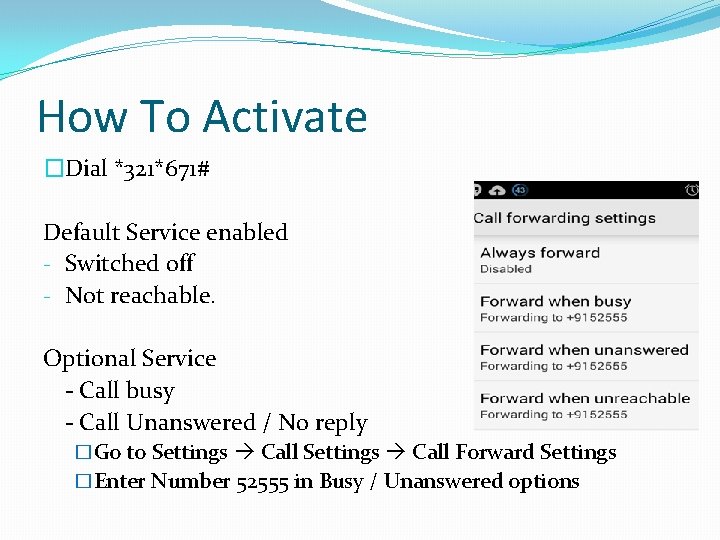
How To Activate �Dial *321*671# Default Service enabled - Switched off - Not reachable. Optional Service - Call busy - Call Unanswered / No reply �Go to Settings Call Forward Settings �Enter Number 52555 in Busy / Unanswered options
How To retrieve The message You will receive a SMS from the number you have got a voice mail. Now dial 52555 (or) dial 1. (toll free number within circle) Now automated IVR will give you message.
Retrieve The message in roaming You will receive a SMS from the number you have got a voice mail. Now dial 09810098200 (Standard roaming call charges apply) Now automated IVR will give you message.
Commercials Monthly rent – Nil Retrieval of message cost – Nil Message box size : 30 nos. of 60 seconds each.
How To Deactivate Dial *321*673#
Questions
Thank You