
KNOWLEDGE SHARING HOW TO TRAIN NEW PATRICIA USERS
- Slides: 14
KNOWLEDGE SHARING - HOW TO TRAIN NEW PATRICIA® USERS ?
Available Resources • Manuals – Patricia / Maintenance manuals • Underused / valuable source of knowledge • Links to You. Tube training – Patrix website documentation • Client area • Download area • You. Tube training • Internal resource – Documentation – Super User as a resource
Video Training • What does this course offer? – 80+ High quality tutorial videos – 8+ hours of content – Focus • Strengthen user knowledge • Increase skillset – Foundational structure – Business process agnostic – No additional cost – Library is expanding constantly – Inform us of training content wishes
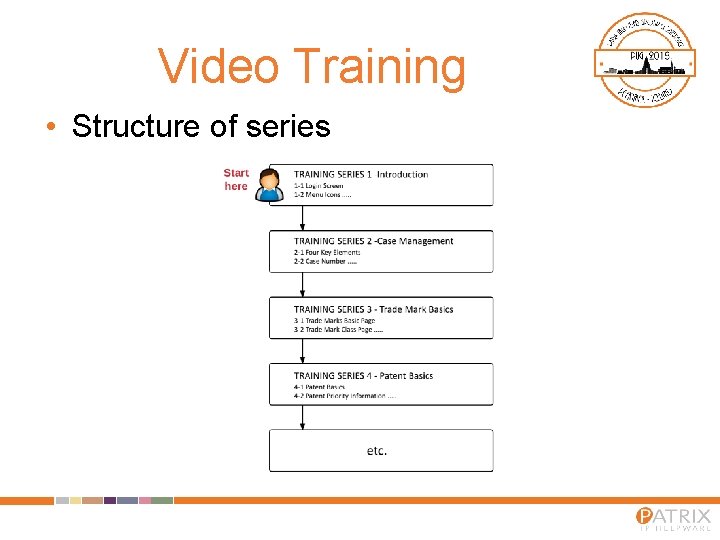
Video Training • Structure of series
Requirements / Accessing • You. Tube connectivity • Dedicated training stations • Accessing – Simply google ‘patrix ip helpware youtube’ – Search in Youtube for ‘patrix ip helpware’
You. Tube • Home page – Subscribe – Bell icon • Playlist button – All created playlists – Play to view all • Video quality • E-learning guide
Who will benefit? • New staff • Existing staff – Users don’t know what they don’t know – Evens knowledge level • Referencing content
Execution • • • Long term commitment Distraction free environment Test environment Follow up Incentives – Certification of some sort – Quiz portion
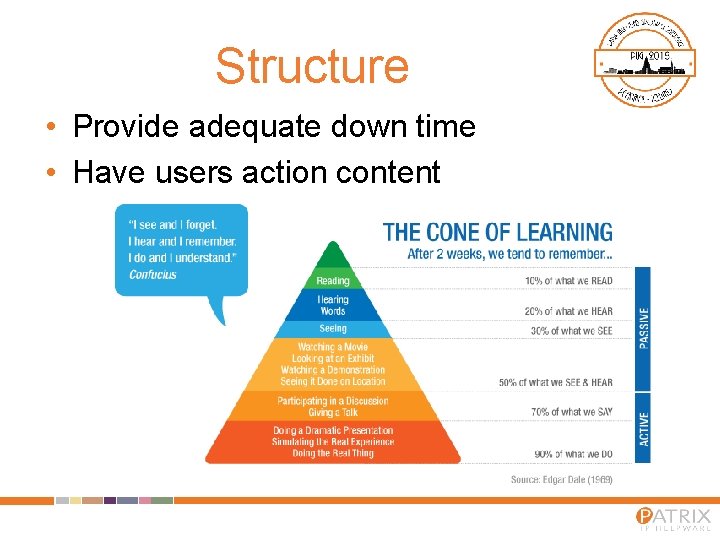
Structure • Provide adequate down time • Have users action content
Example structure • Week 1 – Day 1 / Morning – You. Tube Training Series 1 – 6 – Day 1 / Afternoon – Simple exercise given that incorporates activities learned – Day 2 – Internal business process training with a focus on what their responsibilities will be. Here you can also have them go through custom training content – Day 3 -5 – Practical work day in the office with mentor available to assist. • Week 2 – Day 1– You. Tube Training Series 7 – 10 • Week 3 – Note progress and if need be have them repeat the training exercises where their knowledge is lacking
Creating custom content • Create your own content – Incorporate Patricia content – Focus on your business processes • Preplanning – Topics – Script preparation • Recording – Via free software – Active Presenter – https: //atomisystems. com/activepresenter/ – Records video content with narration • Graphical elements via Power Point or Active Presentor
Video breakdown • Audio / Music • Conceptual first – Animations – Visual representations • Practical second – Highlight key areas • Break practical to move into conceptual where needed.
Q&A
THANK YOU