
King Fahd University of Petroleum Minerals College of

- Slides: 39
King Fahd University of Petroleum & Minerals College of Computer Science & Engineering Information & Computer Science Department Unit 13 Data Compression
Reading Assignment n “Data Structures and Algorithms in Java”, 3 rd Edition, Adam Drozdek, Cengage Learning, ISBN 978 -9814239233 n Chapter 11 n n n Section 11. 2: Huffman Coding (11. 2. 1 is not included) Section 11. 3: Run-Length Encoding Section 11. 4: Ziv-Lempel Code (LZW is not included)
3 Data Compression and Huffman Coding • Introduction • • What is Data Compression? Why Data Compression? • Lossless and Lossy Data Compression • Static, Adaptive, and Hybrid Compression • Compression Utilities and Formats • Compression Techniques • • • Run-length Encoding Static Huffman Coding Lempel-Ziv Encoding
Introduction: What is Data Compression? Data compression is the representation of an information source (e. g. a data file, a speech signal, an image, or a video signal) as accurately as possible using the fewest number of bits. Compressed data can only be understood if the decoding method is known by the receiver. 4
Introduction: Why Data Compression? • Data storage and transmission cost money. This cost increases with the amount of data available. • • Some data types consist of many chunks of repeated data (e. g. multimedia data such as audio, video, images, …). • • This cost can be reduced by processing the data so that it takes less memory and less transmission time. Such “raw” data can be transformed into a compressed data representation form saving a lot of storage and transmission costs. Disadvantage of Data compression: Compressed data must be decompressed to be viewed (or heard), thus extra processing is required. 5
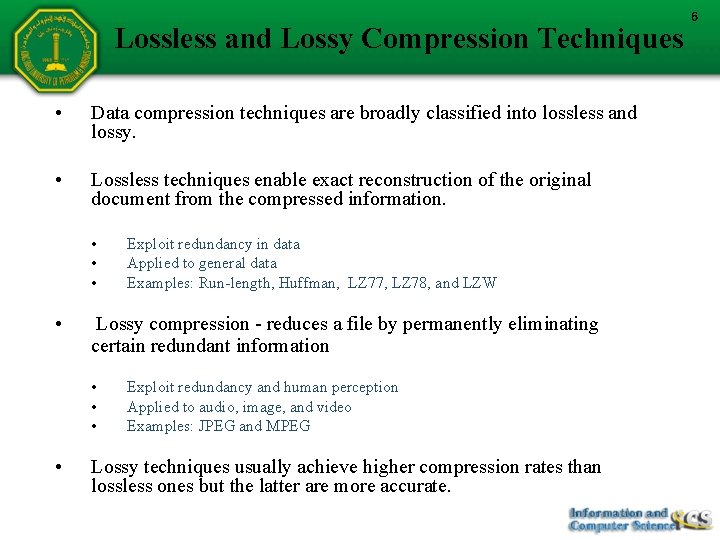
Lossless and Lossy Compression Techniques • Data compression techniques are broadly classified into lossless and lossy. • Lossless techniques enable exact reconstruction of the original document from the compressed information. • • Lossy compression - reduces a file by permanently eliminating certain redundant information • • Exploit redundancy in data Applied to general data Examples: Run-length, Huffman, LZ 77, LZ 78, and LZW Exploit redundancy and human perception Applied to audio, image, and video Examples: JPEG and MPEG Lossy techniques usually achieve higher compression rates than lossless ones but the latter are more accurate. 6
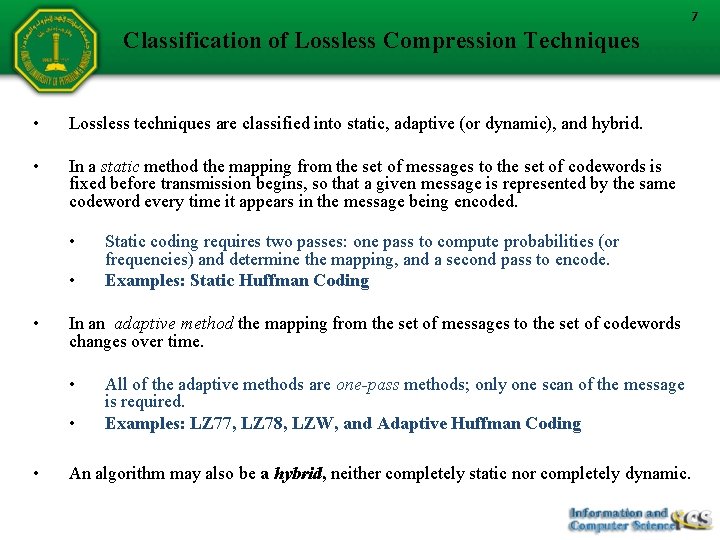
7 Classification of Lossless Compression Techniques • Lossless techniques are classified into static, adaptive (or dynamic), and hybrid. • In a static method the mapping from the set of messages to the set of codewords is fixed before transmission begins, so that a given message is represented by the same codeword every time it appears in the message being encoded. • • • In an adaptive method the mapping from the set of messages to the set of codewords changes over time. • • • Static coding requires two passes: one pass to compute probabilities (or frequencies) and determine the mapping, and a second pass to encode. Examples: Static Huffman Coding All of the adaptive methods are one-pass methods; only one scan of the message is required. Examples: LZ 77, LZ 78, LZW, and Adaptive Huffman Coding An algorithm may also be a hybrid, neither completely static nor completely dynamic.
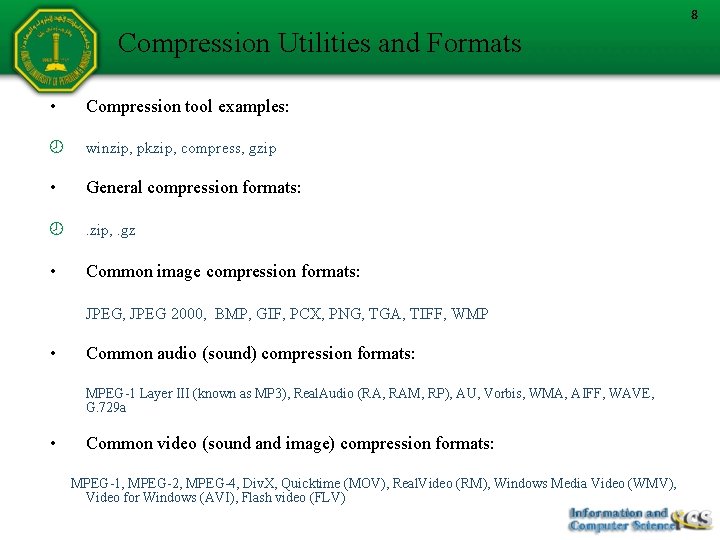
8 Compression Utilities and Formats • Compression tool examples: winzip, pkzip, compress, gzip • General compression formats: . zip, . gz • Common image compression formats: JPEG, JPEG 2000, BMP, GIF, PCX, PNG, TGA, TIFF, WMP • Common audio (sound) compression formats: MPEG-1 Layer III (known as MP 3), Real. Audio (RA, RAM, RP), AU, Vorbis, WMA, AIFF, WAVE, G. 729 a • Common video (sound and image) compression formats: MPEG-1, MPEG-2, MPEG-4, Div. X, Quicktime (MOV), Real. Video (RM), Windows Media Video (WMV), Video for Windows (AVI), Flash video (FLV)
Compression Techniques Run-length Encoding Static Huffman Coding Lempel-Ziv Encoding LZ 78 Encoding and Decoding 9
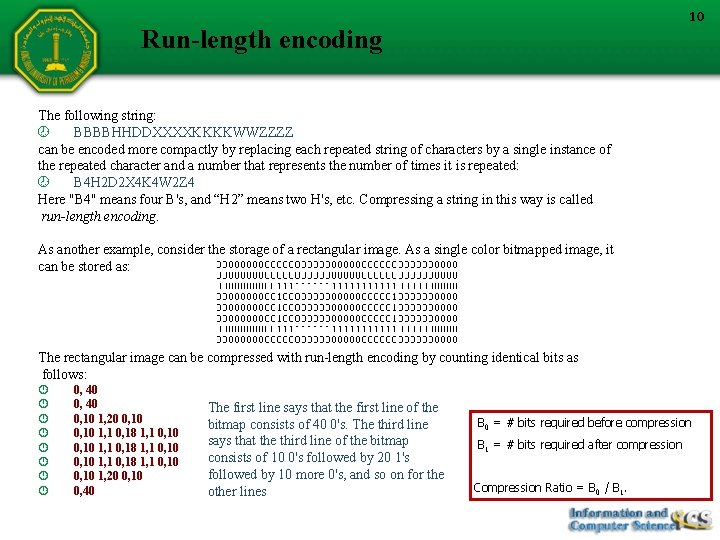
10 Run-length encoding The following string: BBBBHHDDXXXXKKKKWWZZZZ can be encoded more compactly by replacing each repeated string of characters by a single instance of the repeated character and a number that represents the number of times it is repeated: B 4 H 2 D 2 X 4 K 4 W 2 Z 4 Here "B 4" means four B's, and “H 2” means two H's, etc. Compressing a string in this way is called run-length encoding. As another example, consider the storage of a rectangular image. As a single color bitmapped image, it can be stored as: The rectangular image can be compressed with run-length encoding by counting identical bits as follows: 0, 40 0, 10 1, 20 0, 10 1, 1 0, 18 1, 1 0, 10 1, 20 0, 10 0, 40 The first line says that the first line of the bitmap consists of 40 0's. The third line says that the third line of the bitmap consists of 10 0's followed by 20 1's followed by 10 more 0's, and so on for the other lines B 0 = # bits required before compression B 1 = # bits required after compression Compression Ratio = B 0 / B 1.
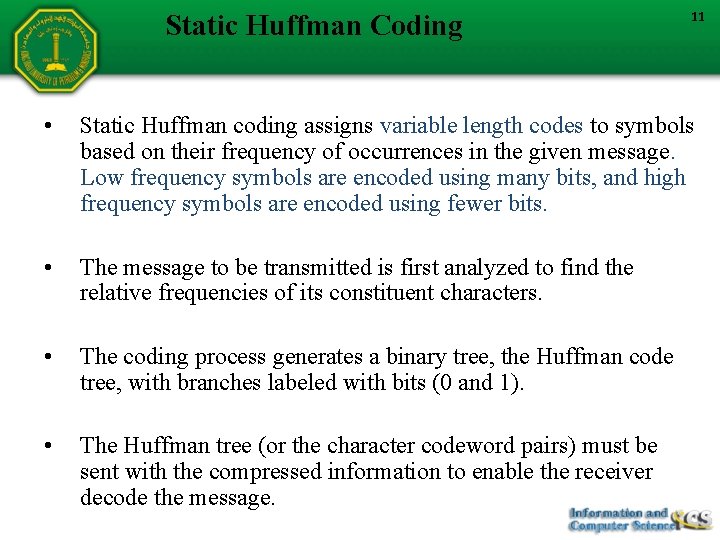
Static Huffman Coding 11 • Static Huffman coding assigns variable length codes to symbols based on their frequency of occurrences in the given message. Low frequency symbols are encoded using many bits, and high frequency symbols are encoded using fewer bits. • The message to be transmitted is first analyzed to find the relative frequencies of its constituent characters. • The coding process generates a binary tree, the Huffman code tree, with branches labeled with bits (0 and 1). • The Huffman tree (or the character codeword pairs) must be sent with the compressed information to enable the receiver decode the message.
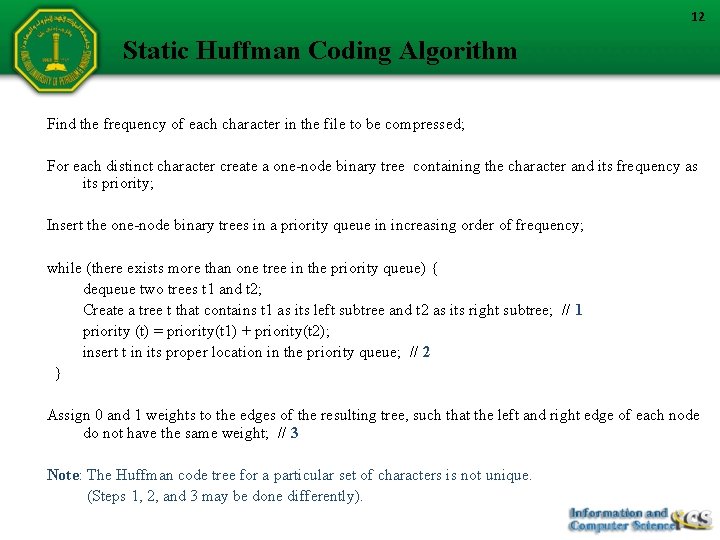
12 Static Huffman Coding Algorithm Find the frequency of each character in the file to be compressed; For each distinct character create a one-node binary tree containing the character and its frequency as its priority; Insert the one-node binary trees in a priority queue in increasing order of frequency; while (there exists more than one tree in the priority queue) { dequeue two trees t 1 and t 2; Create a tree t that contains t 1 as its left subtree and t 2 as its right subtree; // 1 priority (t) = priority(t 1) + priority(t 2); insert t in its proper location in the priority queue; // 2 } Assign 0 and 1 weights to the edges of the resulting tree, such that the left and right edge of each node do not have the same weight; // 3 Note: The Huffman code tree for a particular set of characters is not unique. (Steps 1, 2, and 3 may be done differently).
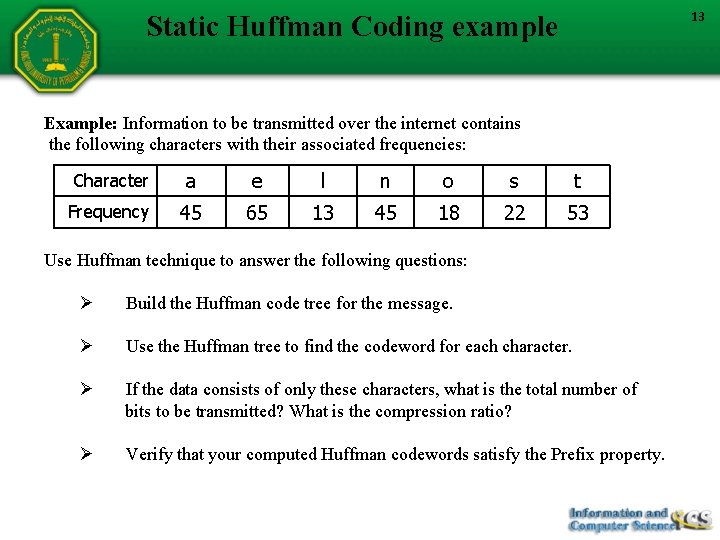
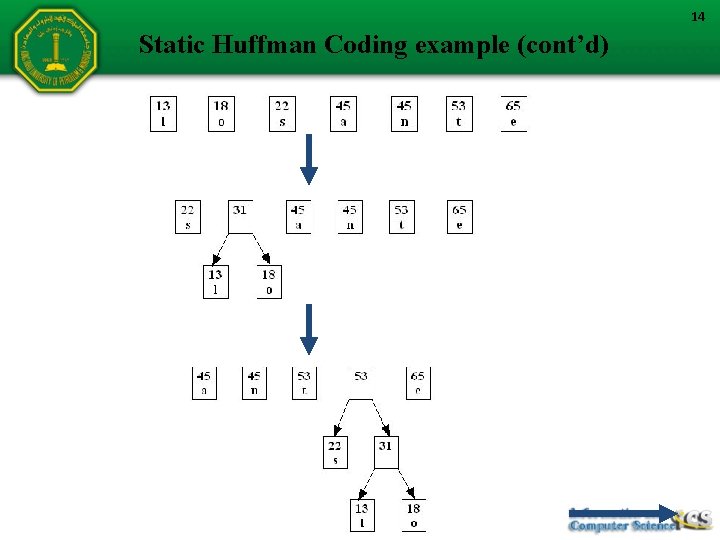
13 Static Huffman Coding example Example: Information to be transmitted over the internet contains the following characters with their associated frequencies: Character a e l n o s t Frequency 45 65 13 45 18 22 53 Use Huffman technique to answer the following questions: Ø Build the Huffman code tree for the message. Ø Use the Huffman tree to find the codeword for each character. Ø If the data consists of only these characters, what is the total number of bits to be transmitted? What is the compression ratio? Ø Verify that your computed Huffman codewords satisfy the Prefix property.
14 Static Huffman Coding example (cont’d)
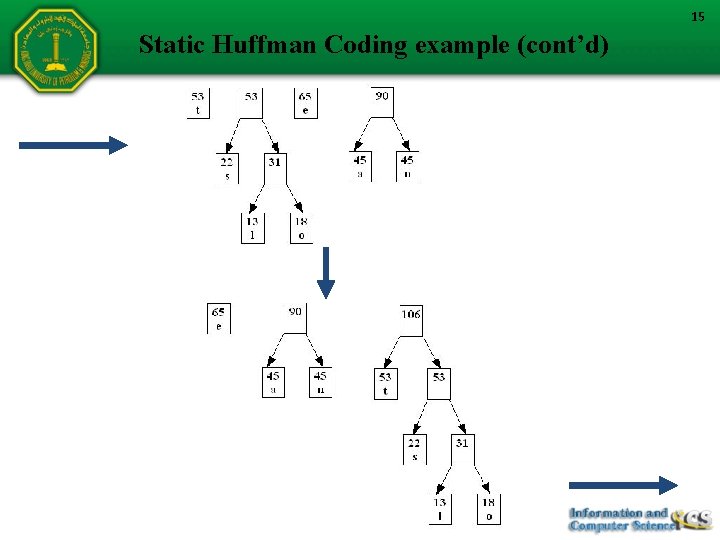
15 Static Huffman Coding example (cont’d)
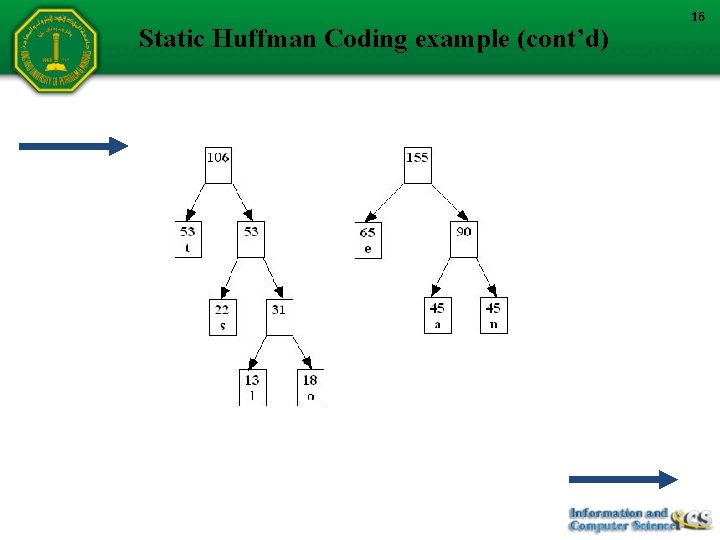
Static Huffman Coding example (cont’d) 16
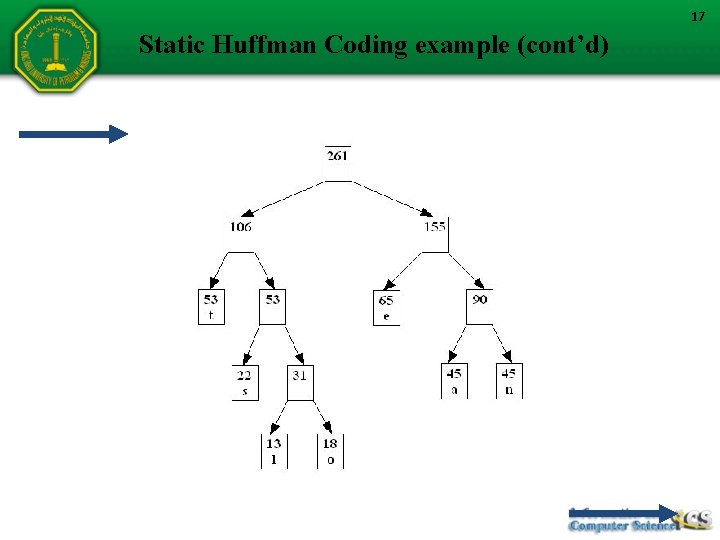
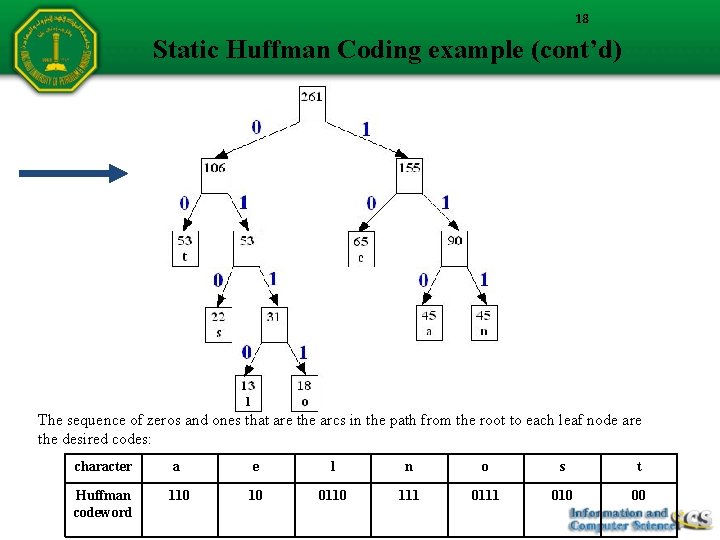
17 Static Huffman Coding example (cont’d)
18 Static Huffman Coding example (cont’d) The sequence of zeros and ones that are the arcs in the path from the root to each leaf node are the desired codes: character a e l n o s t Huffman codeword 110 10 0110 111 010 00
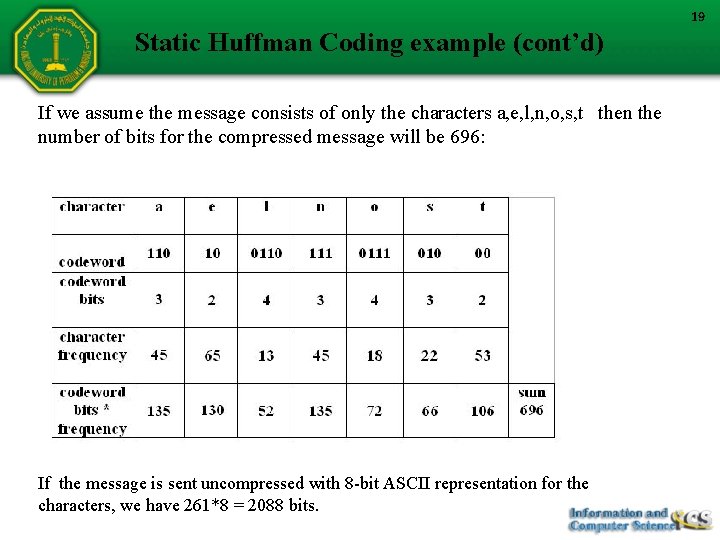
19 Static Huffman Coding example (cont’d) If we assume the message consists of only the characters a, e, l, n, o, s, t then the number of bits for the compressed message will be 696: If the message is sent uncompressed with 8 -bit ASCII representation for the characters, we have 261*8 = 2088 bits.
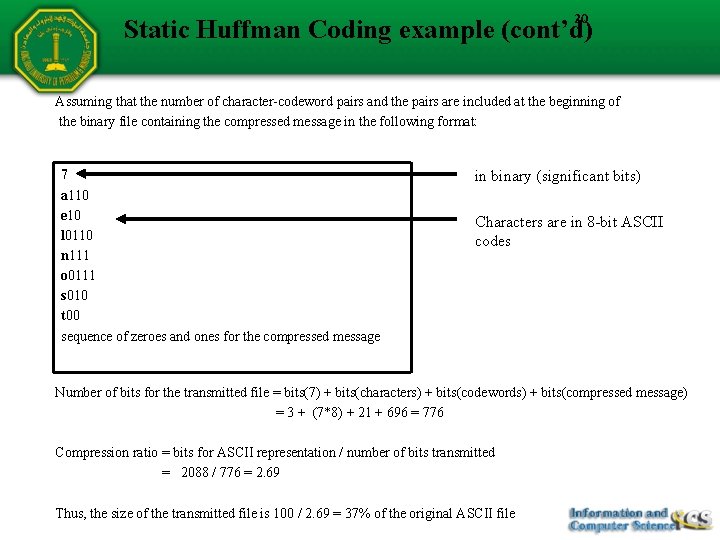
20 Static Huffman Coding example (cont’d) Assuming that the number of character-codeword pairs and the pairs are included at the beginning of the binary file containing the compressed message in the following format: 7 a 110 e 10 l 0110 n 111 o 0111 s 010 t 00 sequence of zeroes and ones for the compressed message in binary (significant bits) Characters are in 8 -bit ASCII codes Number of bits for the transmitted file = bits(7) + bits(characters) + bits(codewords) + bits(compressed message) = 3 + (7*8) + 21 + 696 = 776 Compression ratio = bits for ASCII representation / number of bits transmitted = 2088 / 776 = 2. 69 Thus, the size of the transmitted file is 100 / 2. 69 = 37% of the original ASCII file
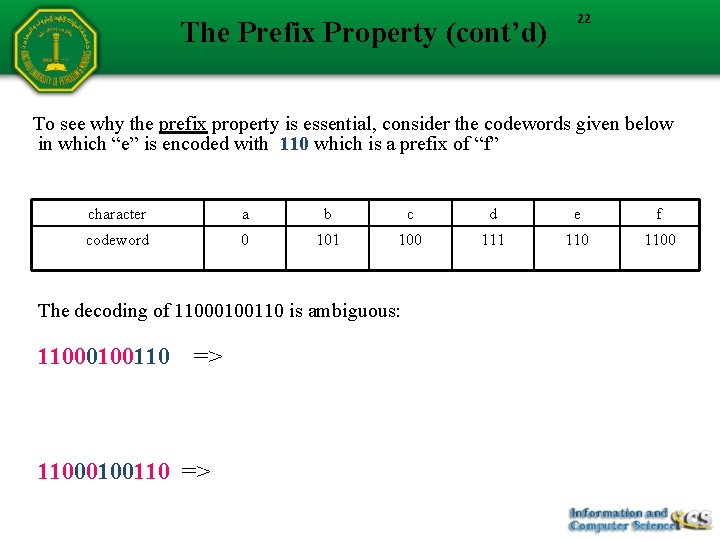
21 The Prefix Property Ø Data encoded using Huffman coding is uniquely decodable. This is because Huffman codes satisfy an important property called the prefix property: In a given set of Huffman codewords, no codeword is a prefix of another Huffman codeword Ø For example, in a given set of Huffman codewords, 10 and 101 cannot simultaneously be valid Huffman codewords because the first is a prefix of the second. Ø We can see by inspection that the codewords we generated in the previous example are valid Huffman codewords.
The Prefix Property (cont’d) 22 To see why the prefix property is essential, consider the codewords given below in which “e” is encoded with 110 which is a prefix of “f” character a b c d e f codeword 0 101 100 111 1100 The decoding of 11000100110 is ambiguous: 11000100110 => face 11000100110 => eaace
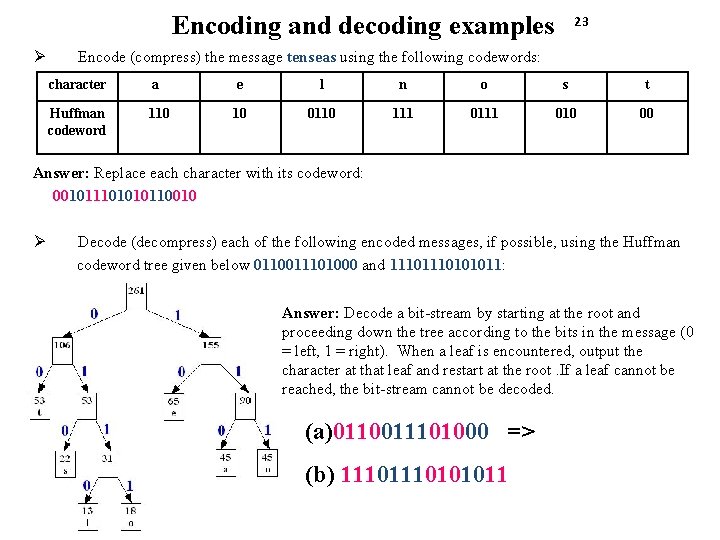
Encoding and decoding examples Ø 23 Encode (compress) the message tenseas using the following codewords: character a e l n o s t Huffman codeword 110 10 0110 111 010 00 Answer: Replace each character with its codeword: 001011101010110010 Ø Decode (decompress) each of the following encoded messages, if possible, using the Huffman codeword tree given below 0110011101000 and 1110101011: Answer: Decode a bit-stream by starting at the root and proceeding down the tree according to the bits in the message (0 = left, 1 = right). When a leaf is encountered, output the character at that leaf and restart at the root. If a leaf cannot be reached, the bit-stream cannot be decoded. (a)0110011101000 => lost (b) 1110101011 The decoding fails because the corresponding node for 11 is not a leaf
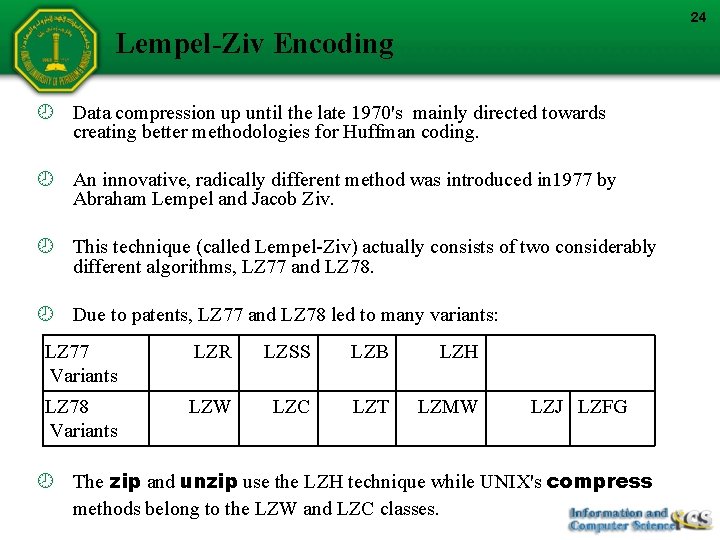
24 Lempel-Ziv Encoding Data compression up until the late 1970's mainly directed towards creating better methodologies for Huffman coding. An innovative, radically different method was introduced in 1977 by Abraham Lempel and Jacob Ziv. This technique (called Lempel-Ziv) actually consists of two considerably different algorithms, LZ 77 and LZ 78. Due to patents, LZ 77 and LZ 78 led to many variants: LZ 77 Variants LZR LZSS LZB LZH LZ 78 Variants LZW LZC LZT LZMW LZJ LZFG The zip and unzip use the LZH technique while UNIX's compress methods belong to the LZW and LZC classes.
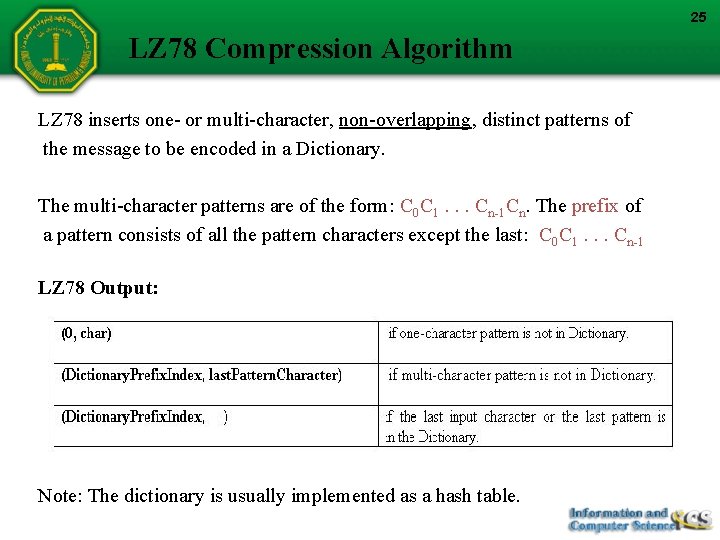
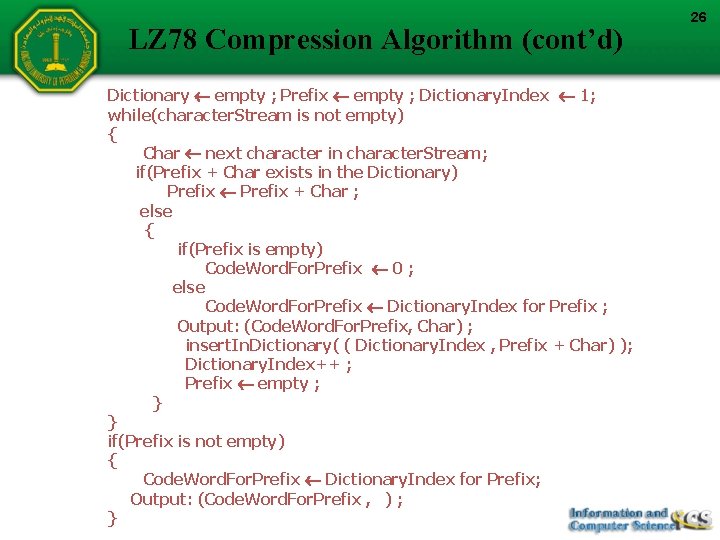
25 LZ 78 Compression Algorithm LZ 78 inserts one- or multi-character, non-overlapping, distinct patterns of the message to be encoded in a Dictionary. The multi-character patterns are of the form: C 0 C 1. . . Cn-1 Cn. The prefix of a pattern consists of all the pattern characters except the last: C 0 C 1. . . Cn-1 LZ 78 Output: Note: The dictionary is usually implemented as a hash table.
LZ 78 Compression Algorithm (cont’d) Dictionary empty ; Prefix empty ; Dictionary. Index 1; while(character. Stream is not empty) { Char next character in character. Stream; if(Prefix + Char exists in the Dictionary) Prefix + Char ; else { if(Prefix is empty) Code. Word. For. Prefix 0 ; else Code. Word. For. Prefix Dictionary. Index for Prefix ; Output: (Code. Word. For. Prefix, Char) ; insert. In. Dictionary( ( Dictionary. Index , Prefix + Char) ); Dictionary. Index++ ; Prefix empty ; } } if(Prefix is not empty) { Code. Word. For. Prefix Dictionary. Index for Prefix; Output: (Code. Word. For. Prefix , ) ; } 26
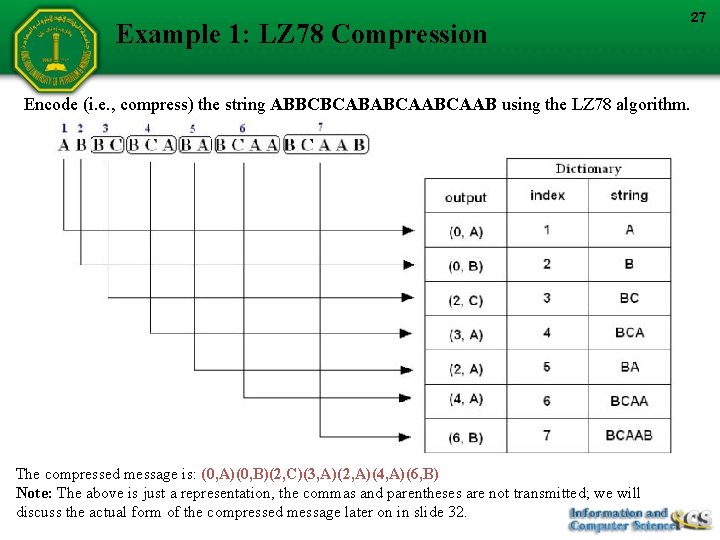
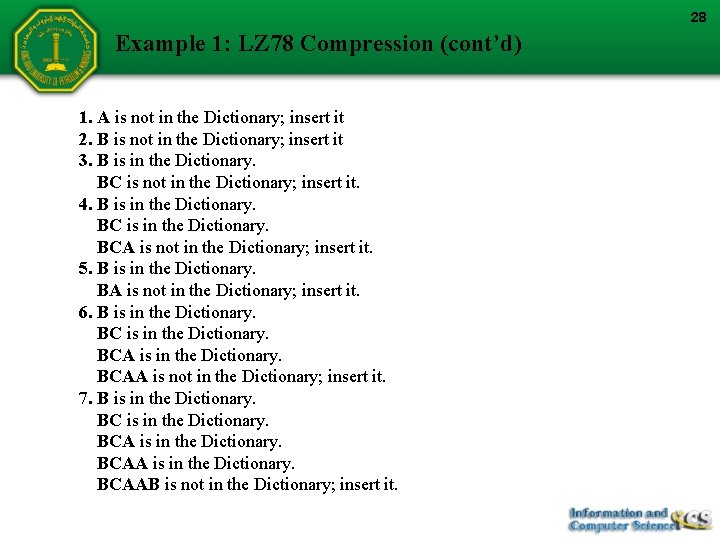
Example 1: LZ 78 Compression Encode (i. e. , compress) the string ABBCBCABABCAAB using the LZ 78 algorithm. The compressed message is: (0, A)(0, B)(2, C)(3, A)(2, A)(4, A)(6, B) Note: The above is just a representation, the commas and parentheses are not transmitted; we will discuss the actual form of the compressed message later on in slide 32. 27
28 Example 1: LZ 78 Compression (cont’d) 1. A is not in the Dictionary; insert it 2. B is not in the Dictionary; insert it 3. B is in the Dictionary. BC is not in the Dictionary; insert it. 4. B is in the Dictionary. BCA is not in the Dictionary; insert it. 5. B is in the Dictionary. BA is not in the Dictionary; insert it. 6. B is in the Dictionary. BCAA is not in the Dictionary; insert it. 7. B is in the Dictionary. BCAAB is not in the Dictionary; insert it.
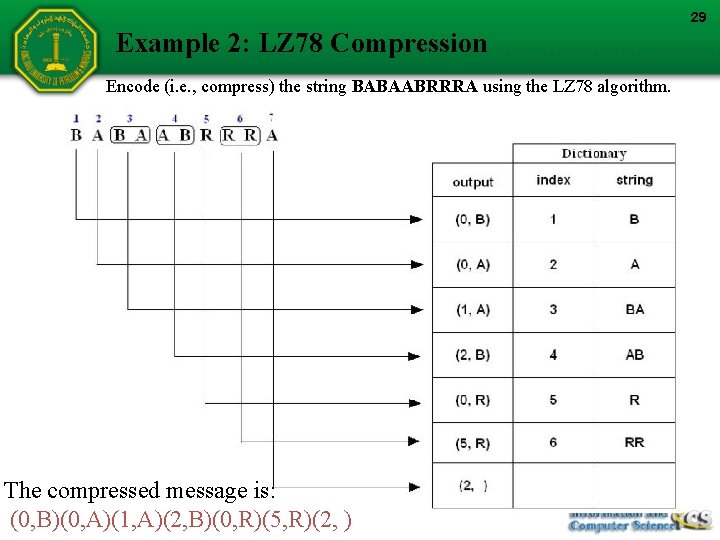
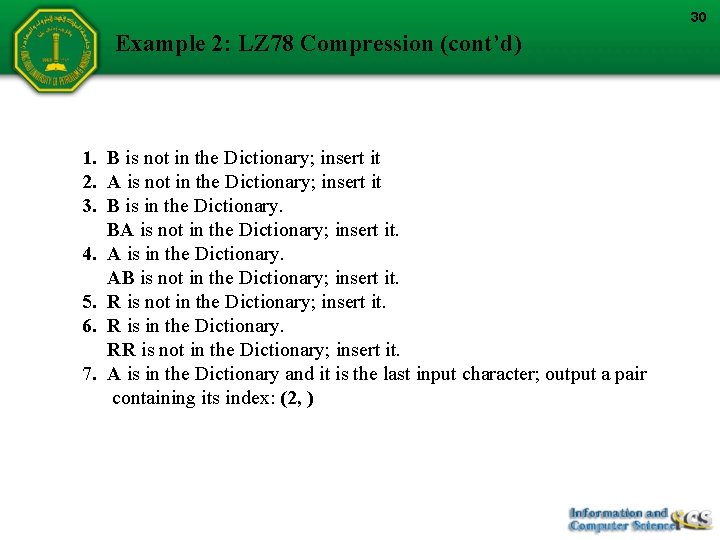
29 Example 2: LZ 78 Compression Encode (i. e. , compress) the string BABAABRRRA using the LZ 78 algorithm. The compressed message is: (0, B)(0, A)(1, A)(2, B)(0, R)(5, R)(2, )
30 Example 2: LZ 78 Compression (cont’d) 1. B is not in the Dictionary; insert it 2. A is not in the Dictionary; insert it 3. B is in the Dictionary. BA is not in the Dictionary; insert it. 4. A is in the Dictionary. AB is not in the Dictionary; insert it. 5. R is not in the Dictionary; insert it. 6. R is in the Dictionary. RR is not in the Dictionary; insert it. 7. A is in the Dictionary and it is the last input character; output a pair containing its index: (2, )
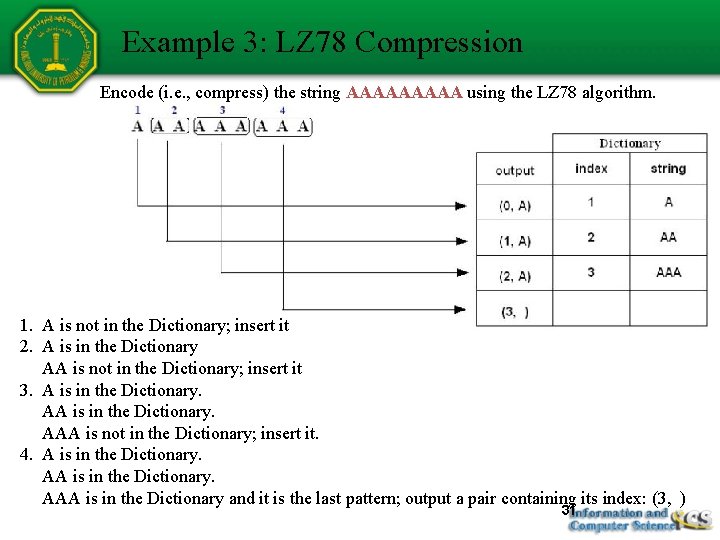
Example 3: LZ 78 Compression Encode (i. e. , compress) the string AAAAA using the LZ 78 algorithm. 1. A is not in the Dictionary; insert it 2. A is in the Dictionary AA is not in the Dictionary; insert it 3. A is in the Dictionary. AAA is not in the Dictionary; insert it. 4. A is in the Dictionary. AAA is in the Dictionary and it is the last pattern; output a pair containing its index: (3, ) 31
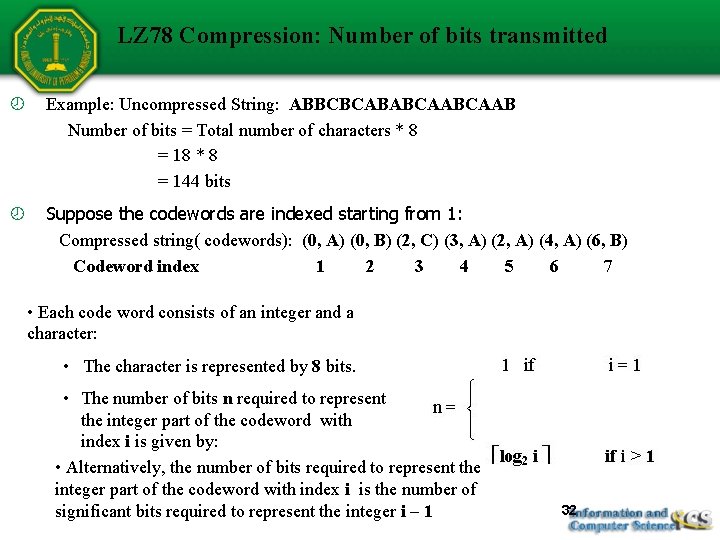
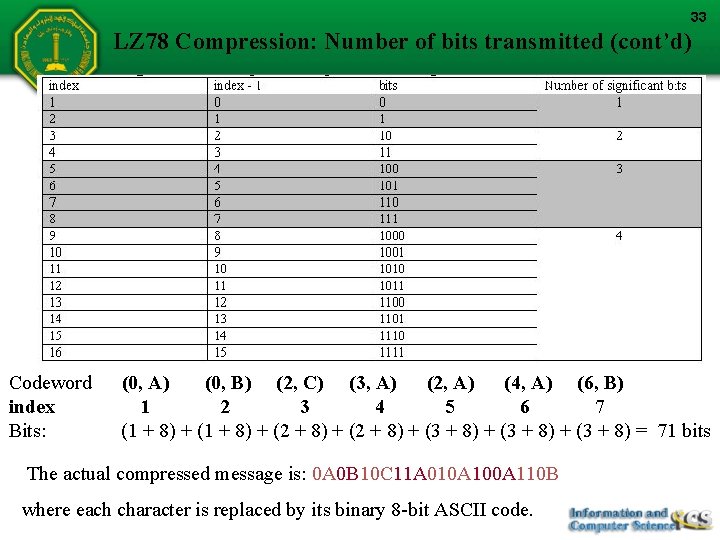
LZ 78 Compression: Number of bits transmitted Example: Uncompressed String: ABBCBCABABCAAB Number of bits = Total number of characters * 8 = 18 * 8 = 144 bits Suppose the codewords are indexed starting from 1: Compressed string( codewords): (0, A) (0, B) (2, C) (3, A) (2, A) (4, A) (6, B) Codeword index 1 2 3 4 5 6 7 • Each code word consists of an integer and a character: • The character is represented by 8 bits. • The number of bits n required to represent the integer part of the codeword with index i is given by: • Alternatively, the number of bits required to represent the integer part of the codeword with index i is the number of significant bits required to represent the integer i – 1 32
33 LZ 78 Compression: Number of bits transmitted (cont’d) Codeword index Bits: (0, A) (0, B) (2, C) (3, A) (2, A) (4, A) (6, B) 1 2 3 4 5 6 7 (1 + 8) + (2 + 8) + (3 + 8) = 71 bits The actual compressed message is: 0 A 0 B 10 C 11 A 010 A 100 A 110 B where each character is replaced by its binary 8 -bit ASCII code.
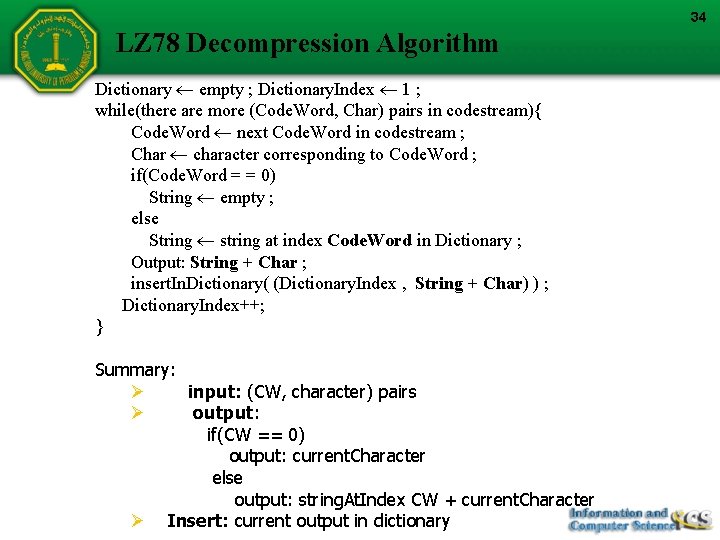
34 LZ 78 Decompression Algorithm Dictionary empty ; Dictionary. Index 1 ; while(there are more (Code. Word, Char) pairs in codestream){ Code. Word next Code. Word in codestream ; Char character corresponding to Code. Word ; if(Code. Word = = 0) String empty ; else String string at index Code. Word in Dictionary ; Output: String + Char ; insert. In. Dictionary( (Dictionary. Index , String + Char) ) ; Dictionary. Index++; } Summary: Ø input: (CW, character) pairs Ø output: if(CW == 0) output: current. Character else output: string. At. Index CW + current. Character Ø Insert: current output in dictionary
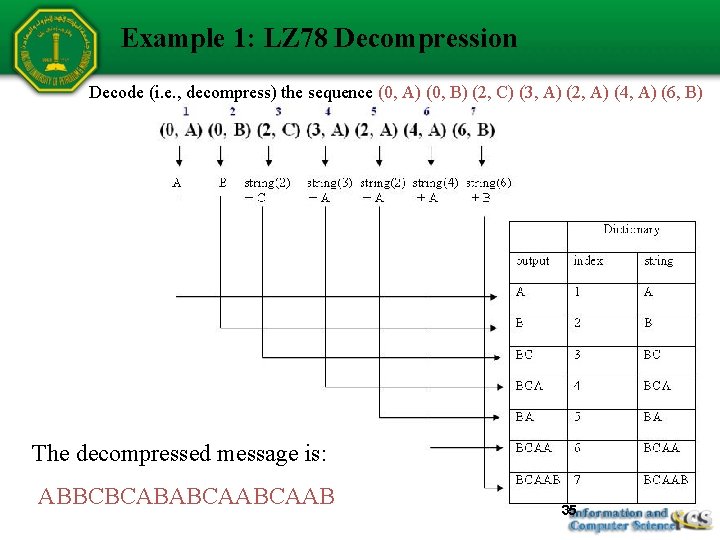
Example 1: LZ 78 Decompression Decode (i. e. , decompress) the sequence (0, A) (0, B) (2, C) (3, A) (2, A) (4, A) (6, B) The decompressed message is: ABBCBCABABCAAB 35
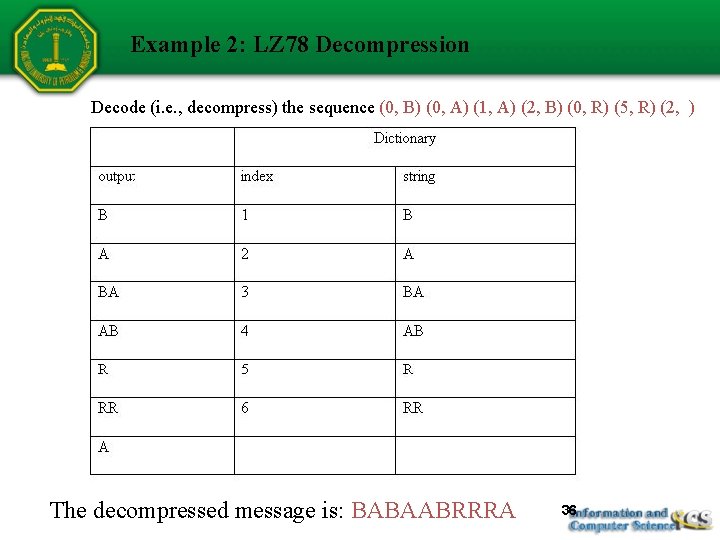
Example 2: LZ 78 Decompression Decode (i. e. , decompress) the sequence (0, B) (0, A) (1, A) (2, B) (0, R) (5, R) (2, ) The decompressed message is: BABAABRRRA 36
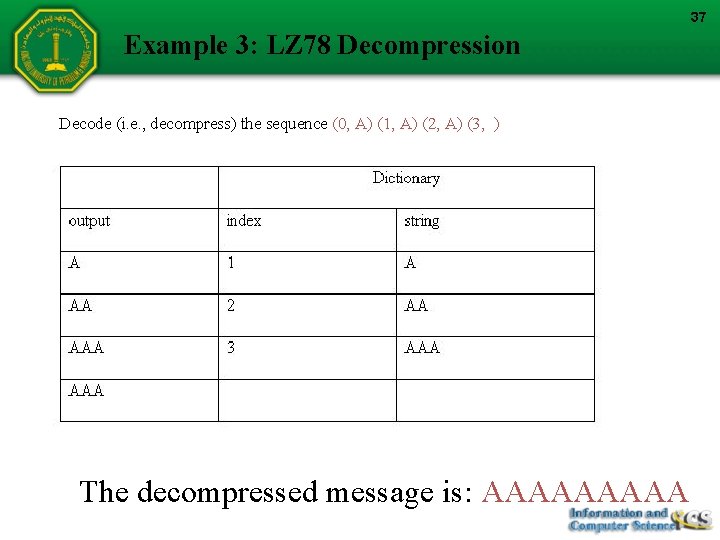
37 Example 3: LZ 78 Decompression Decode (i. e. , decompress) the sequence (0, A) (1, A) (2, A) (3, ) The decompressed message is: AAAAA
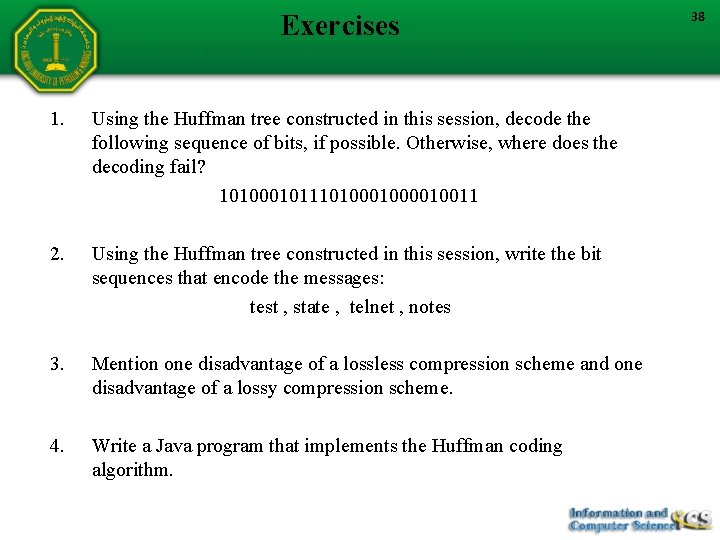
Exercises 1. Using the Huffman tree constructed in this session, decode the following sequence of bits, if possible. Otherwise, where does the decoding fail? 1010001011101000010011 2. Using the Huffman tree constructed in this session, write the bit sequences that encode the messages: test , state , telnet , notes 3. Mention one disadvantage of a lossless compression scheme and one disadvantage of a lossy compression scheme. 4. Write a Java program that implements the Huffman coding algorithm. 38
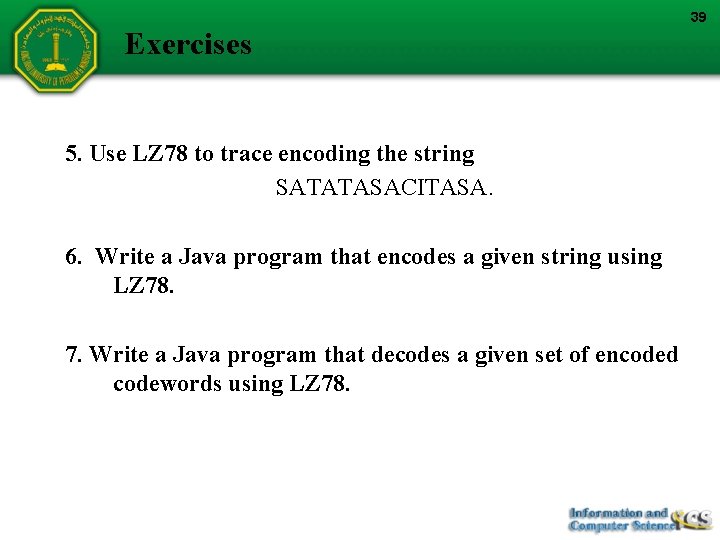
39 Exercises 5. Use LZ 78 to trace encoding the string SATATASACITASA. 6. Write a Java program that encodes a given string using LZ 78. 7. Write a Java program that decodes a given set of encoded codewords using LZ 78.