
Keyboard Level Model KLM The KLM is a

Keyboard Level Model (KLM) • The KLM is a practical design tool that can capture and calculate the physical actions a user will have to carry out to complete specific tasks The KLM can be used to determine the most efficient method and its suitability for specific contexts. Copyright © 2008 Pearson Education, Inc. Publishing as Pearson Addison-Wesley 1 -17
Keyboard Level Model (KLM) • Given: – – A task (possibly involving several subtasks) The command language of a system The motor skill parameter of the user The response time parameters • Predict: The time an expert user will take to execute the task using the system – Provided that he or she uses the method without error Copyright © 2008 Pearson Education, Inc. Publishing as Pearson Addison-Wesley 1 -18
Keyboard Level Model (KLM) • The KLM is comprised of: – Operators – Encoding methods – Heuristics for the placement of mental (M) operators Copyright © 2008 Pearson Education, Inc. Publishing as Pearson Addison-Wesley 1 -19
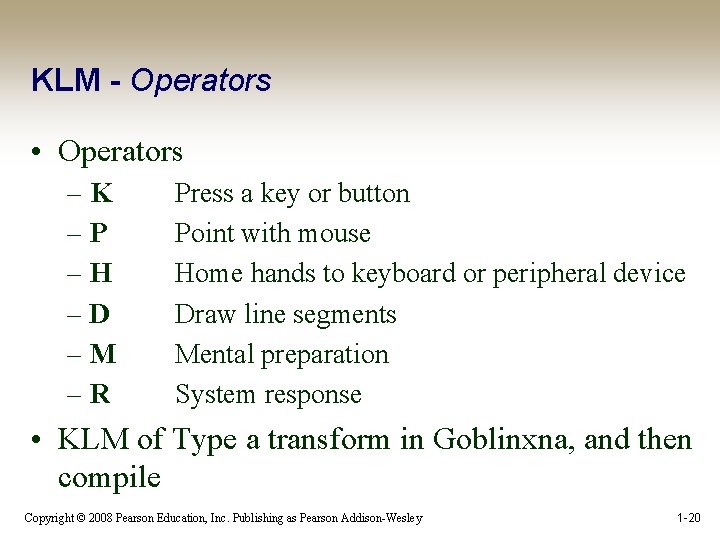
KLM - Operators • Operators –K –P –H –D –M –R Press a key or button Point with mouse Home hands to keyboard or peripheral device Draw line segments Mental preparation System response • KLM of Type a transform in Goblinxna, and then compile Copyright © 2008 Pearson Education, Inc. Publishing as Pearson Addison-Wesley 1 -20

KLM – Encoding Methods • Encoding methods define how the operators involved in a task are to be written MK[i] K[p] K[c] K[o] K[n] K[f] K[i] K[g] K[RETURN] It would be encoded in the short-hand version as M 8 K [ipconfig RETURN] This results in a timing of 1. 35 + 8 * 0. 20 = 2. 95 seconds for an average skilled typist. Copyright © 2008 Pearson Education, Inc. Publishing as Pearson Addison-Wesley 1 -21
KLM – Heuristics for M Operator Placement • The KLM operators can be placed into one of two groups—physical or cognitive. • The physical operators are defined by the chosen method of operation, such as clicking an icon or entering a command string. • The cognitive operators are governed by the set of heuristics Copyright © 2008 Pearson Education, Inc. Publishing as Pearson Addison-Wesley 1 -22
What the KLM Does Not Do • The KLM was not designed to consider the following: – Errors – Learning – Functionality – Recall – Concentration – Fatigue – Acceptability Copyright © 2008 Pearson Education, Inc. Publishing as Pearson Addison-Wesley 1 -23
Applications for the KLM • Case 1 (Mouse-Driven Text Editor) – During the development of the Xerox Star KLMs served as expert proxies • Case 2 (Directory Assistance Workstation) – The KLM clarified the tradeoffs between the number of keystrokes entered in the query and the number of returned fields Copyright © 2008 Pearson Education, Inc. Publishing as Pearson Addison-Wesley 1 -24

GOMS Goal/task models can be used to explore the methods people use to accomplish their goals • Card et al. suggested that user interaction could be described by defining the sequential actions a person undertakes to accomplish a task. • The GOMS model has four components: – – goals operators methods selection rules Copyright © 2008 Pearson Education, Inc. Publishing as Pearson Addison-Wesley 1 -25
GOMS • Goals - Tasks are deconstructed as a set of goals and subgoals. • Operators - Tasks can only be carried out by undertaking specific actions. • Methods - Represent ways of achieving a goal – Comprised of operators that facilitate method completion • Selection Rules - The method that the user chooses is determined by selection rules Copyright © 2008 Pearson Education, Inc. Publishing as Pearson Addison-Wesley 1 -26

Copyright © 2008 Pearson Education, Inc. Publishing as Pearson Addison-Wesley 1 -27

GOMS – CMN-GOMS can predict behavior and assess memory requirements • CMN-GOMS (named after Card, Moran, and Newell) -a detailed expansion of the general GOMS model – Includes specific analysis procedures and notation descriptions • Can judge memory requirements (the depth of the nested goal structures) • Provides insight into user performance measures Copyright © 2008 Pearson Education, Inc. Publishing as Pearson Addison-Wesley 1 -28

GOMS – Other GOMS Models • NGOMSL (Natural GOMS Language), developed by Kieras, provides a structured natural-language notation for GOMS analysis and describes the procedures for accomplishing that analysis (Kieras, 1997) – NGOMSL Provides: • A method for measuring the time it will take to learn specific method of operation • A way to determine the consistency of a design’s methods of operation Copyright © 2008 Pearson Education, Inc. Publishing as Pearson Addison-Wesley 1 -29

GOMS – Other GOMS Models • CPM-GOMS represents – Cognitive – Perceptual – Motor operators • CPM-GOMS uses Program Evaluation Review Technique (PERT) charts – Maps task durations using the critical path method (CPM). • CPM-GOMS is based directly on the Model Human Processor – Assumes that perceptual, cognitive, and motor processors function in parallel Copyright © 2008 Pearson Education, Inc. Publishing as Pearson Addison-Wesley 1 -30

GOMS – Other GOMS Models • Program Evaluation Review Technique (PERT) chart Resource Flows Copyright © 2008 Pearson Education, Inc. Publishing as Pearson Addison-Wesley 1 -31

Modeling Structure • Structural models can help us to see the relationship between the conceptual components of a design and the physical components of the system, allowing us to judge the design’s relative effectiveness. Copyright © 2008 Pearson Education, Inc. Publishing as Pearson Addison-Wesley 1 -32

Modeling Structure – Hicks Law Hick’s law can be used to create menu structures • Hick’s law states that the time it takes to choose one item from n alternatives is proportional to the logarithm (base 2) of the number of choices, plus 1. • This equation is predicated on all items having an equal probability of being chosen Copyright © 2008 Pearson Education, Inc. Publishing as Pearson Addison-Wesley 1 -33

Modeling Structure – Hicks Law T = a + b log 2(n 1) • The coefficients are empirically determined from experimental design • Raskin (2000) suggests that a 50 and b 150 are sufficient place holders for “back-of-theenvelope” approximations Copyright © 2008 Pearson Education, Inc. Publishing as Pearson Addison-Wesley 1 -34

Modeling Structure – Hicks Law Menu listing order must be logical and relevant • Menus are lists grouped according to some predetermined system • If the rules are not understood or if they are not relevant to a particular task, their arrangement may seem arbitrary and random, requiring users to search in a linear, sequential manner. Copyright © 2008 Pearson Education, Inc. Publishing as Pearson Addison-Wesley 1 -35
Modeling Dynamics Understanding the temporal aspects of interaction design is essential to the design of usable and useful systems • Interaction designs involve dynamic feedback loops between the user and the system – User actions alter the state of the system, which in turn influences the user’s subsequent actions • Interaction designers need tools to explore how a system undergoes transitions from one state to the next Copyright © 2008 Pearson Education, Inc. Publishing as Pearson Addison-Wesley 1 -36
Modeling Dynamics – State Transition Networks • State Transition Networks can be used to explore: – Menus – Icons – Tools • State Transition Networks can show the operation of peripheral devices Copyright © 2008 Pearson Education, Inc. Publishing as Pearson Addison-Wesley 1 -37
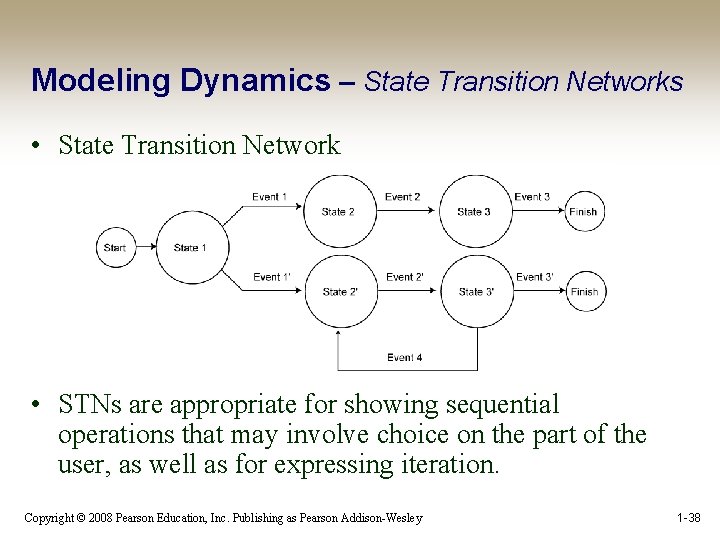
Modeling Dynamics – State Transition Networks • State Transition Network • STNs are appropriate for showing sequential operations that may involve choice on the part of the user, as well as for expressing iteration. Copyright © 2008 Pearson Education, Inc. Publishing as Pearson Addison-Wesley 1 -38

Modeling Dynamics – Three-State Model The Three-State Model can help designers to determine appropriate I/O devices for specific interaction designs • The TSM can reveal intrinsic device states and their subsequent transitions – The interaction designer can use these to make determinations about the correlation between task and device – Certain devices can be ruled out early in the design process if they do not possess the appropriate states for the specified task Copyright © 2008 Pearson Education, Inc. Publishing as Pearson Addison-Wesley 1 -39
Modeling Dynamics – Three-State Model • The Three-State Model (TSM) is capable of describing three different types of pointer movements – Tracked: A mouse device is tracked by the system and represented by the cursor position – Dragged: A mouse also can be used to manipulate screen elements using drag-and-drop operations – Disengaged movement: Some pointing devices can be moved without being tracked by the system, such as light pens or fingers on a touchscreen, and then reengage the system at random screen locations Copyright © 2008 Pearson Education, Inc. Publishing as Pearson Addison-Wesley 1 -40
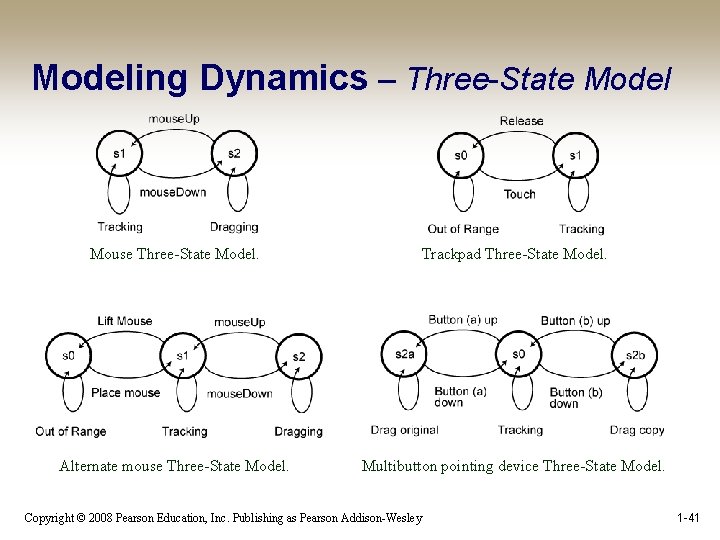
Modeling Dynamics – Three-State Model Mouse Three-State Model. Trackpad Three-State Model. Alternate mouse Three-State Model. Multibutton pointing device Three-State Model. Copyright © 2008 Pearson Education, Inc. Publishing as Pearson Addison-Wesley 1 -41
Modeling Dynamics – Glimpse Model • Forlines et al. (2005): – Because the pen and finger give clear feedback about their location when they touch the screen and enter state 2, it is redundant for the cursor to track this movement – Pressure-sensitive devices can take advantage of the s 1 redundancy and map pressure to other features – Undo commands coupled with a preview function (Glimpse) can be mapped to a pressure-sensitive direct input device Copyright © 2008 Pearson Education, Inc. Publishing as Pearson Addison-Wesley 1 -42

Modeling Dynamics – Glimpse Model Copyright © 2008 Pearson Education, Inc. Publishing as Pearson Addison-Wesley 1 -43

Modeling Dynamics – Glimpse Model • Some applications – Pan and zoom interfaces—Preview different magnification levels – Navigation in a 3 D world—Quick inspection of an object from different perspectives – Color selection in a paint program—Preview the effects of color manipulation – Volume control—Preview different volume levels – Window control—Moving or resizing windows to view occluded objects – Scrollbar manipulation—Preview other sections of a document Copyright © 2008 Pearson Education, Inc. Publishing as Pearson Addison-Wesley 1 -44

Physical Models • Physical models can predict efficiency based on the physical aspects of a design • They calculate the time it takes to perform actions such as targeting a screen object and clicking on it Copyright © 2008 Pearson Education, Inc. Publishing as Pearson Addison-Wesley 1 -45
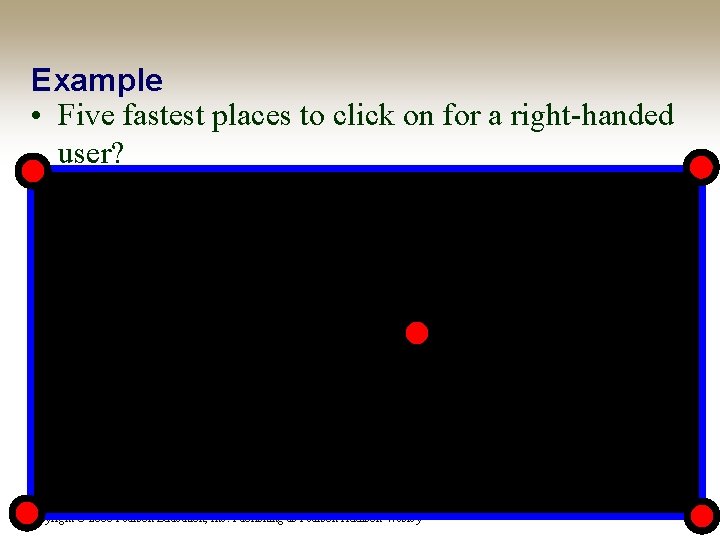
Example • Five fastest places to click on for a right-handed user? Copyright © 2008 Pearson Education, Inc. Publishing as Pearson Addison-Wesley
Physical Models – Fitts’ Law • Fitts’ law states that the time it takes to hit a target is a function of the size of the target and the distance to that target Fitts’ law can be used to determine the size and location of a screen object Copyright © 2008 Pearson Education, Inc. Publishing as Pearson Addison-Wesley 1 -47
Physical Models – Fitts’ Law • There are essentially three parts to Fitts’ law: – Index of Difficulty (ID)—Quantifies the difficulty of a task based on width and distance – Movement Time (MT)—Quantifies the time it takes to complete a task based on the difficulty of the task (ID) and two empirically derived coefficients that are sensitive to the specific experimental conditions – Index of Performance (IP) [also called throughput (TP)]— Based on the relationship between the time it takes to perform a task and the relative difficulty of the task Copyright © 2008 Pearson Education, Inc. Publishing as Pearson Addison-Wesley 1 -48

Physical Models – Fitts’ Law • Fitts described “reciprocal tapping” – Subjects were asked to tap back and forth on two 6 inch-tall plates with width W of 2, 1, 0. 5, and 0. 25 inches Copyright © 2008 Pearson Education, Inc. Publishing as Pearson Addison-Wesley 1 -49
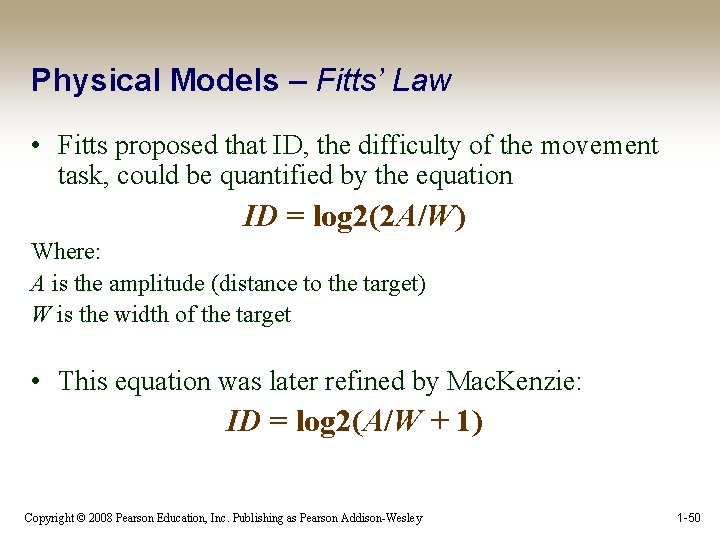
Physical Models – Fitts’ Law • Fitts proposed that ID, the difficulty of the movement task, could be quantified by the equation ID = log 2(2 A/W) Where: A is the amplitude (distance to the target) W is the width of the target • This equation was later refined by Mac. Kenzie: ID = log 2(A/W + 1) Copyright © 2008 Pearson Education, Inc. Publishing as Pearson Addison-Wesley 1 -50
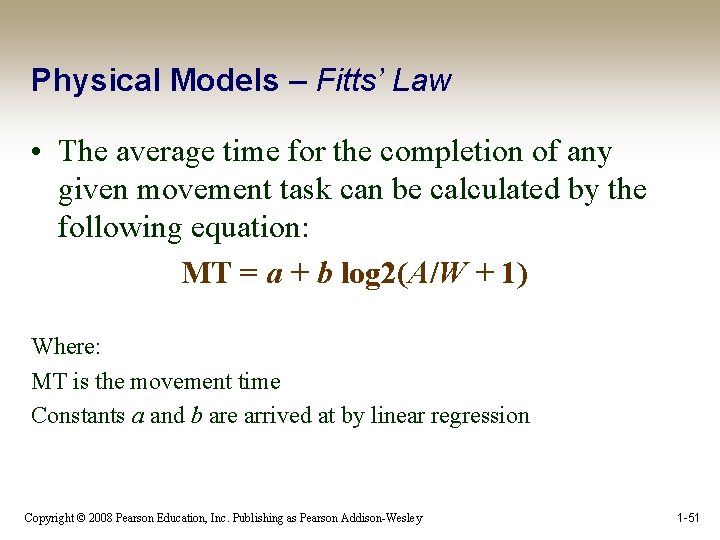
Physical Models – Fitts’ Law • The average time for the completion of any given movement task can be calculated by the following equation: MT = a + b log 2(A/W + 1) Where: MT is the movement time Constants a and b are arrived at by linear regression Copyright © 2008 Pearson Education, Inc. Publishing as Pearson Addison-Wesley 1 -51
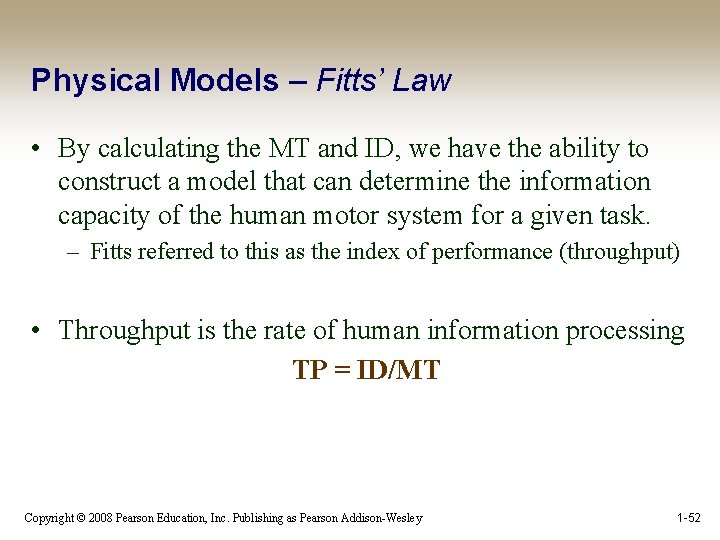
Physical Models – Fitts’ Law • By calculating the MT and ID, we have the ability to construct a model that can determine the information capacity of the human motor system for a given task. – Fitts referred to this as the index of performance (throughput) • Throughput is the rate of human information processing TP = ID/MT Copyright © 2008 Pearson Education, Inc. Publishing as Pearson Addison-Wesley 1 -52

Physical Models – Fitts’ Law • Implications of Fitts’ Law – Large targets and small distances between targets are advantageous – Screen elements should occupy as much of the available screen space as possible – The largest Fitts-based pixel is the one under the cursor – Screen elements should take advantage of the screen edge whenever possible – Large menus like pie menus are easier to uses than other types of menus. Copyright © 2008 Pearson Education, Inc. Publishing as Pearson Addison-Wesley 1 -53
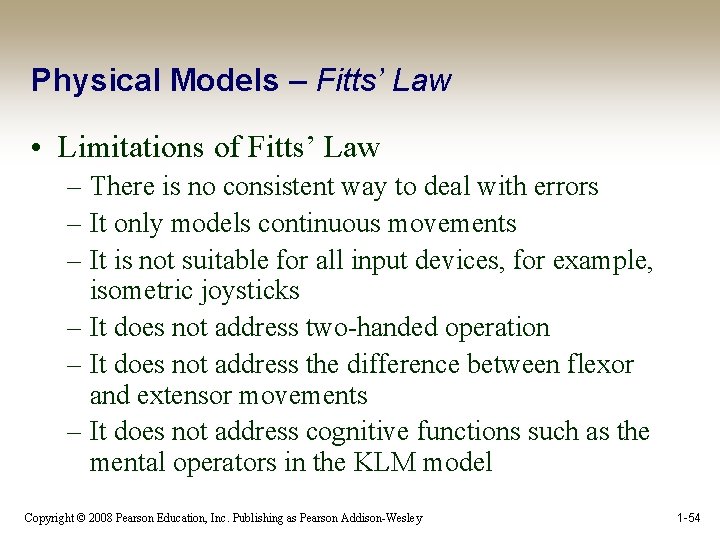
Physical Models – Fitts’ Law • Limitations of Fitts’ Law – There is no consistent way to deal with errors – It only models continuous movements – It is not suitable for all input devices, for example, isometric joysticks – It does not address two-handed operation – It does not address the difference between flexor and extensor movements – It does not address cognitive functions such as the mental operators in the KLM model Copyright © 2008 Pearson Education, Inc. Publishing as Pearson Addison-Wesley 1 -54
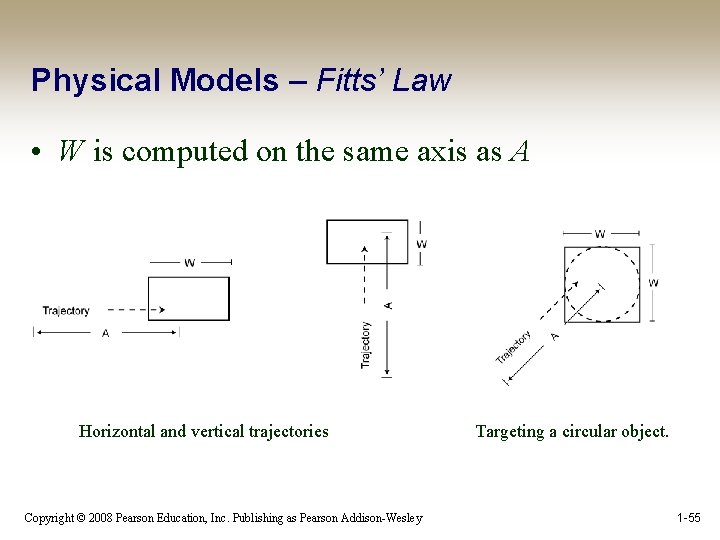
Physical Models – Fitts’ Law • W is computed on the same axis as A Horizontal and vertical trajectories Copyright © 2008 Pearson Education, Inc. Publishing as Pearson Addison-Wesley Targeting a circular object. 1 -55
Physical Models – Fitts’ Law • Bivariate data – Smaller-Of—The smaller of the width and height measurements: IDmin(W, H ) = log 2 [D/min (W, H ) + 1] This is not a particularly good method. Why? Copyright © 2008 Pearson Education, Inc. Publishing as Pearson Addison-Wesley 1 -56
Physical Models – Fitts’ Law • Amplitude Pointing: One-dimensional tasks – Only the target width (whether horizontal or vertical) is considered – The constraint is based on W, and target height (H) is infinite or equal to W – AP errors are controlled at “the final landing” • Directional Pointing: If W is set at infinity then H becomes significant – The constraint is based on H – DP errors are corrected incrementally during the pointing movement (Accot & Zhai, 2003) Copyright © 2008 Pearson Education, Inc. Publishing as Pearson Addison-Wesley 1 -58
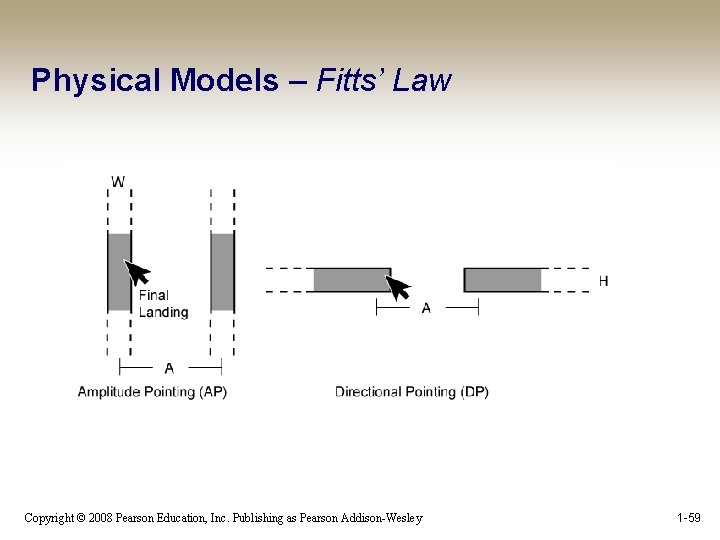
Physical Models – Fitts’ Law Copyright © 2008 Pearson Education, Inc. Publishing as Pearson Addison-Wesley 1 -59

Physical Models – Fitts’ Law • Implications for interaction design: – Overly elongated objects hold no advantage (W/H ratios of 3 and higher). – Objects should be elongated along the most common trajectory path (widgets normally approached from the side should use W, those approached from the bottom or top should use H). – Objects should not be offset from the screen edge (consistent with the Macintosh OS). – Objects that are defined by English words generally have W>H and should be placed on the sides of the screen. (However, greater amplitude measurements may be significant on the normal “landscape”-oriented screens. ) (Accot & Zhai, 2003) Copyright © 2008 Pearson Education, Inc. Publishing as Pearson Addison-Wesley 1 -60
- Slides: 43