
Key Figure Overview for BP Monitoring BP Analytics
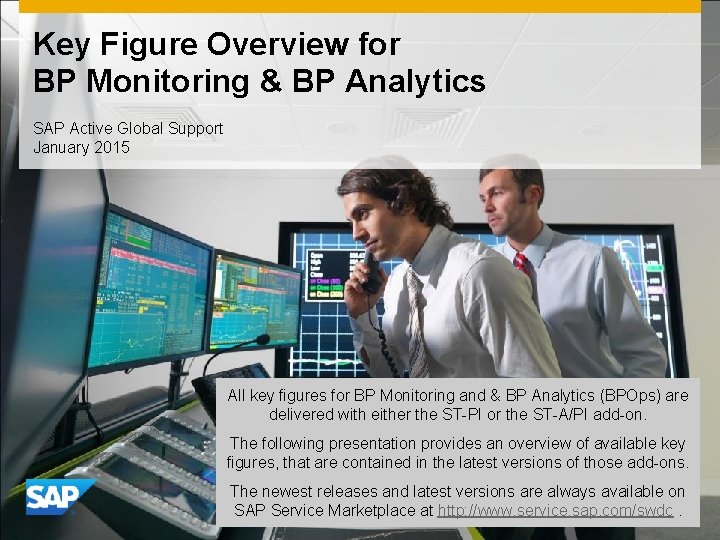
Key Figure Overview for BP Monitoring & BP Analytics SAP Active Global Support January 2015 All key figures for BP Monitoring and & BP Analytics (BPOps) are delivered with either the ST-PI or the ST-A/PI add-on. The following presentation provides an overview of available key figures, that are contained in the latest versions of those add-ons. The newest releases and latest versions are always available on SAP Service Marketplace at http: //www. service. sap. com/swdc.
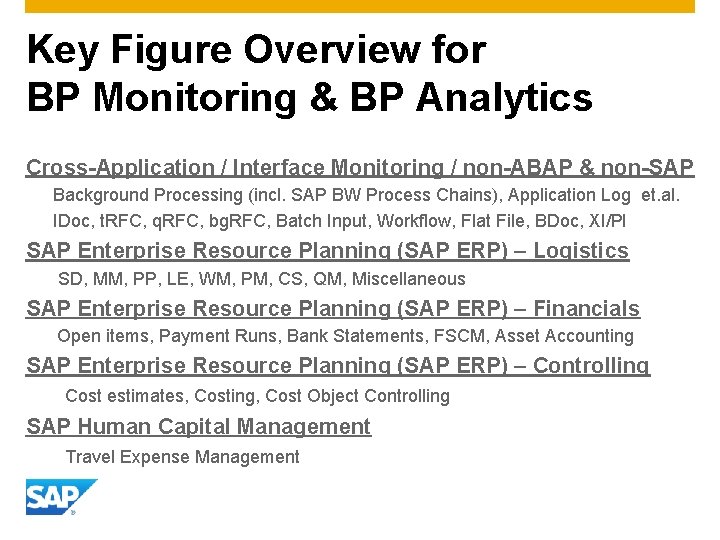
Key Figure Overview for BP Monitoring & BP Analytics Cross-Application / Interface Monitoring / non-ABAP & non-SAP Background Processing (incl. SAP BW Process Chains), Application Log et. al. IDoc, t. RFC, q. RFC, bg. RFC, Batch Input, Workflow, Flat File, BDoc, XI/PI SAP Enterprise Resource Planning (SAP ERP) – Logistics SD, MM, PP, LE, WM, PM, CS, QM, Miscellaneous SAP Enterprise Resource Planning (SAP ERP) – Financials Open items, Payment Runs, Bank Statements, FSCM, Asset Accounting SAP Enterprise Resource Planning (SAP ERP) – Controlling Cost estimates, Costing, Cost Object Controlling SAP Human Capital Management Travel Expense Management
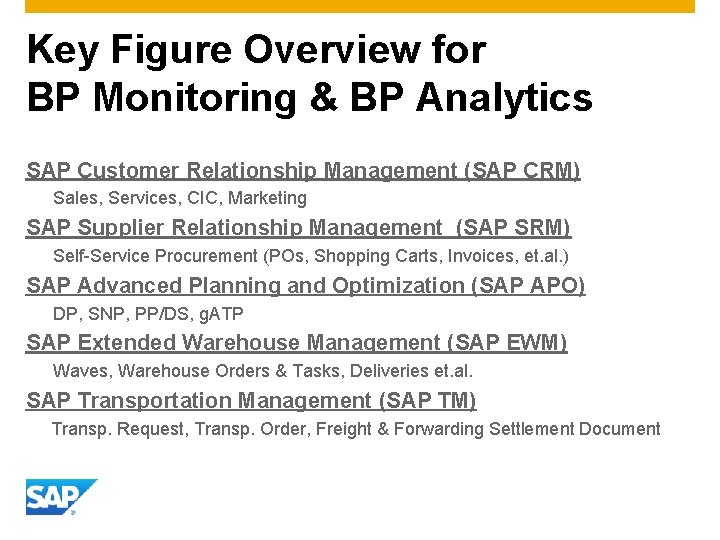
Key Figure Overview for BP Monitoring & BP Analytics SAP Customer Relationship Management (SAP CRM) Sales, Services, CIC, Marketing SAP Supplier Relationship Management (SAP SRM) Self-Service Procurement (POs, Shopping Carts, Invoices, et. al. ) SAP Advanced Planning and Optimization (SAP APO) DP, SNP, PP/DS, g. ATP SAP Extended Warehouse Management (SAP EWM) Waves, Warehouse Orders & Tasks, Deliveries et. al. SAP Transportation Management (SAP TM) Transp. Request, Transp. Order, Freight & Forwarding Settlement Document
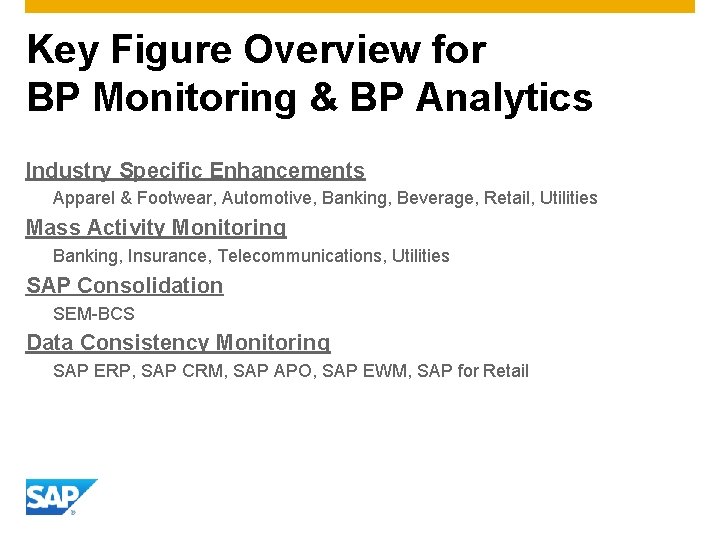
Key Figure Overview for BP Monitoring & BP Analytics Industry Specific Enhancements Apparel & Footwear, Automotive, Banking, Beverage, Retail, Utilities Mass Activity Monitoring Banking, Insurance, Telecommunications, Utilities SAP Consolidation SEM-BCS Data Consistency Monitoring SAP ERP, SAP CRM, SAP APO, SAP EWM, SAP for Retail
Cross-Application & Interfaces Cross-Application monitoring ALE / IDoc monitoring t. RFC, q. RFC, bg. RFC monitoring SAP Batch Input monitoring File monitoring Workflow monitoring BDoc, CRM Middleware monitoring XI / PI monitoring non-SAP & non-ABAP monitoring
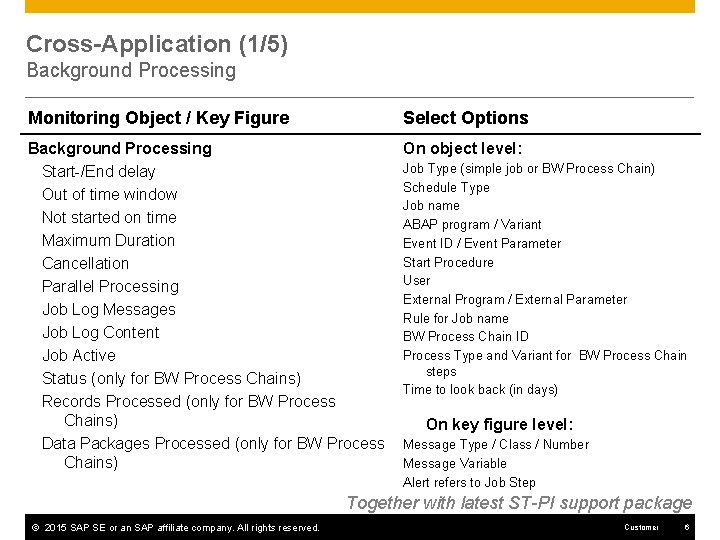
Cross-Application (1/5) Background Processing Monitoring Object / Key Figure Select Options Background Processing Start-/End delay Out of time window Not started on time Maximum Duration Cancellation Parallel Processing Job Log Messages Job Log Content Job Active Status (only for BW Process Chains) Records Processed (only for BW Process Chains) Data Packages Processed (only for BW Process Chains) On object level: Job Type (simple job or BW Process Chain) Schedule Type Job name ABAP program / Variant Event ID / Event Parameter Start Procedure User External Program / External Parameter Rule for Job name BW Process Chain ID Process Type and Variant for BW Process Chain steps Time to look back (in days) On key figure level: Message Type / Class / Number Message Variable Alert refers to Job Step Together with latest ST-PI support package © 2015 SAP SE or an SAP affiliate company. All rights reserved. Customer 6
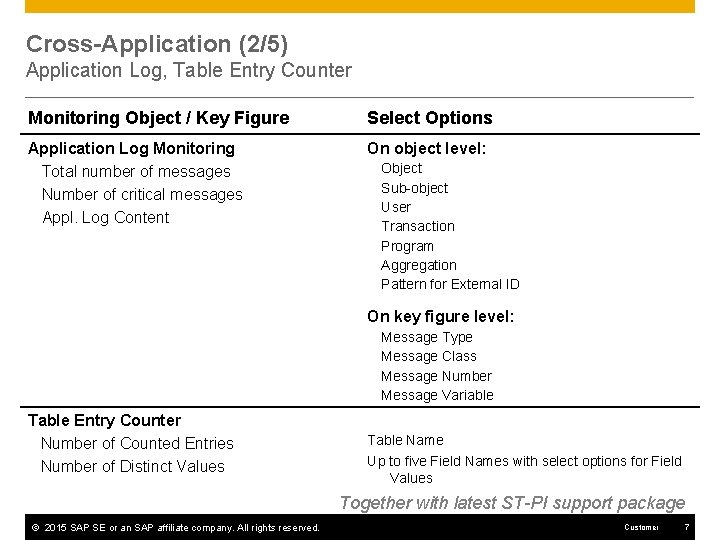
Cross-Application (2/5) Application Log, Table Entry Counter Monitoring Object / Key Figure Select Options Application Log Monitoring Total number of messages Number of critical messages Appl. Log Content On object level: Object Sub-object User Transaction Program Aggregation Pattern for External ID On key figure level: Message Type Message Class Message Number Message Variable Table Entry Counter Number of Counted Entries Number of Distinct Values Table Name Up to five Field Names with select options for Field Values Together with latest ST-PI support package © 2015 SAP SE or an SAP affiliate company. All rights reserved. Customer 7
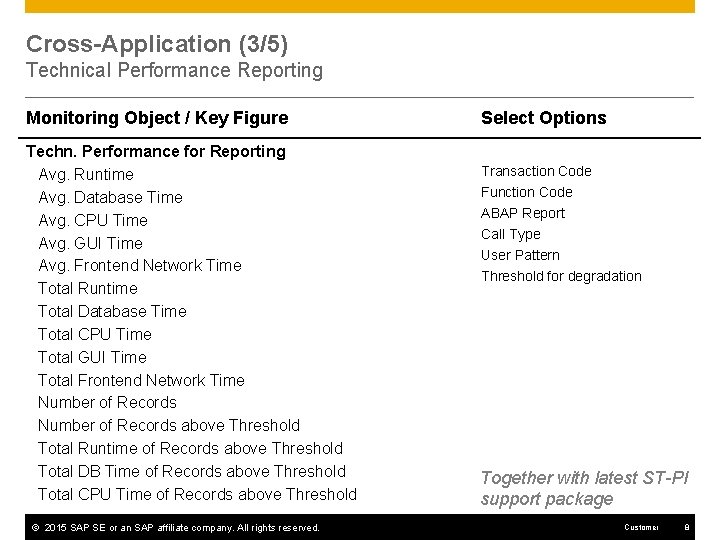
Cross-Application (3/5) Technical Performance Reporting Monitoring Object / Key Figure Techn. Performance for Reporting Avg. Runtime Avg. Database Time Avg. CPU Time Avg. GUI Time Avg. Frontend Network Time Total Runtime Total Database Time Total CPU Time Total GUI Time Total Frontend Network Time Number of Records above Threshold Total Runtime of Records above Threshold Total DB Time of Records above Threshold Total CPU Time of Records above Threshold © 2015 SAP SE or an SAP affiliate company. All rights reserved. Select Options Transaction Code Function Code ABAP Report Call Type User Pattern Threshold for degradation Together with latest ST-PI support package Customer 8
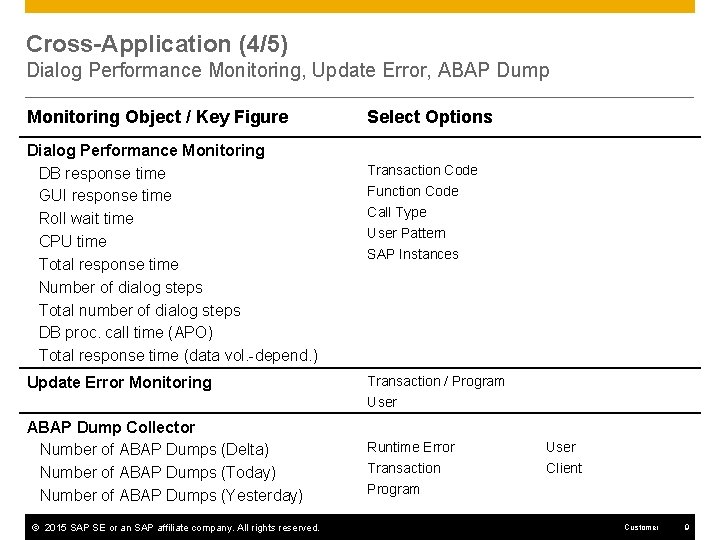
Cross-Application (4/5) Dialog Performance Monitoring, Update Error, ABAP Dump Monitoring Object / Key Figure Dialog Performance Monitoring DB response time GUI response time Roll wait time CPU time Total response time Number of dialog steps Total number of dialog steps DB proc. call time (APO) Total response time (data vol. -depend. ) Update Error Monitoring Select Options Transaction Code Function Code Call Type User Pattern SAP Instances Transaction / Program User ABAP Dump Collector Number of ABAP Dumps (Delta) Number of ABAP Dumps (Today) Number of ABAP Dumps (Yesterday) © 2015 SAP SE or an SAP affiliate company. All rights reserved. Runtime Error User Transaction Program Client Customer 9
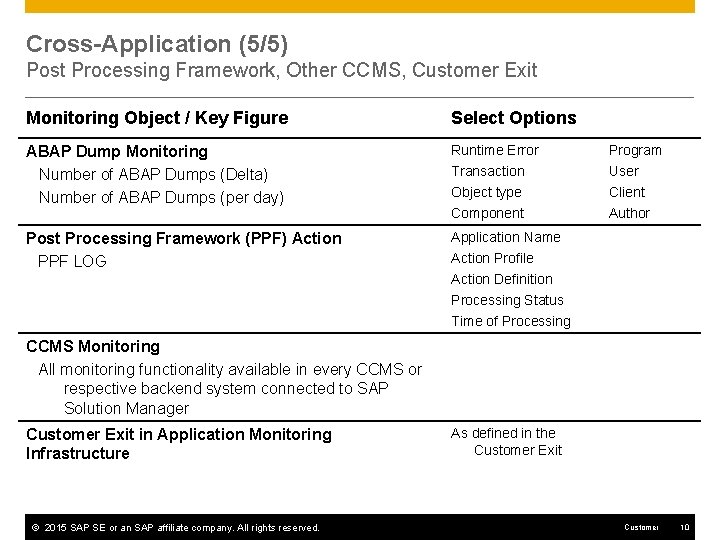
Cross-Application (5/5) Post Processing Framework, Other CCMS, Customer Exit Monitoring Object / Key Figure Select Options ABAP Dump Monitoring Number of ABAP Dumps (Delta) Number of ABAP Dumps (per day) Runtime Error Program Transaction User Object type Component Client Author Post Processing Framework (PPF) Action PPF LOG Application Name Action Profile Action Definition Processing Status Time of Processing CCMS Monitoring All monitoring functionality available in every CCMS or respective backend system connected to SAP Solution Manager Customer Exit in Application Monitoring Infrastructure © 2015 SAP SE or an SAP affiliate company. All rights reserved. As defined in the Customer Exit Customer 10
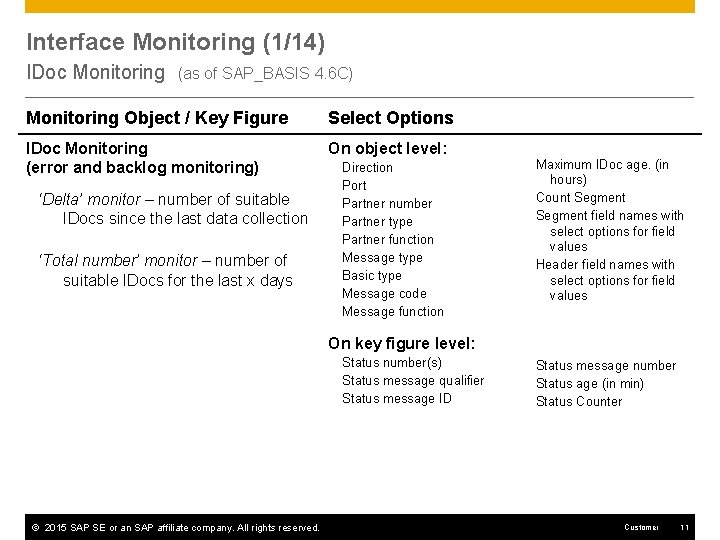
Interface Monitoring (1/14) IDoc Monitoring (as of SAP_BASIS 4. 6 C) Monitoring Object / Key Figure Select Options IDoc Monitoring (error and backlog monitoring) On object level: ‘Delta’ monitor – number of suitable IDocs since the last data collection ‘Total number’ monitor – number of suitable IDocs for the last x days Direction Port Partner number Partner type Partner function Message type Basic type Message code Message function Maximum IDoc age. (in hours) Count Segment field names with select options for field values Header field names with select options for field values On key figure level: Status number(s) Status message qualifier Status message ID © 2015 SAP SE or an SAP affiliate company. All rights reserved. Status message number Status age (in min) Status Counter Customer 11
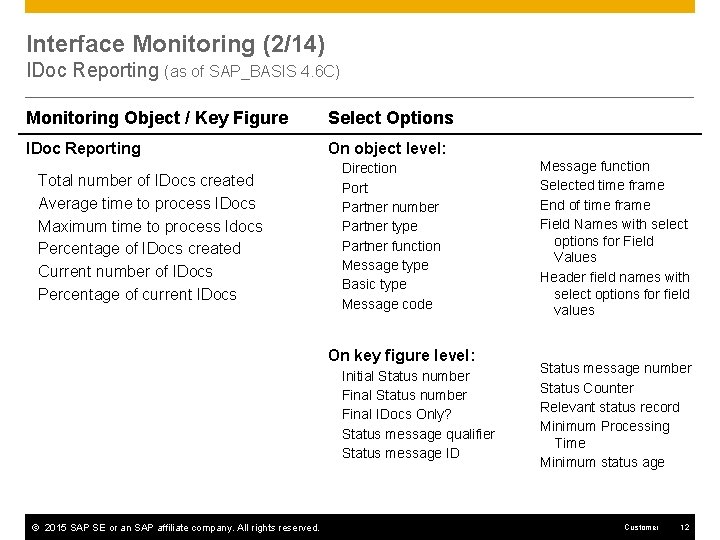
Interface Monitoring (2/14) IDoc Reporting (as of SAP_BASIS 4. 6 C) Monitoring Object / Key Figure Select Options IDoc Reporting On object level: Total number of IDocs created Average time to process IDocs Maximum time to process Idocs Percentage of IDocs created Current number of IDocs Percentage of current IDocs Direction Port Partner number Partner type Partner function Message type Basic type Message code On key figure level: Initial Status number Final IDocs Only? Status message qualifier Status message ID © 2015 SAP SE or an SAP affiliate company. All rights reserved. Message function Selected time frame End of time frame Field Names with select options for Field Values Header field names with select options for field values Status message number Status Counter Relevant status record Minimum Processing Time Minimum status age Customer 12
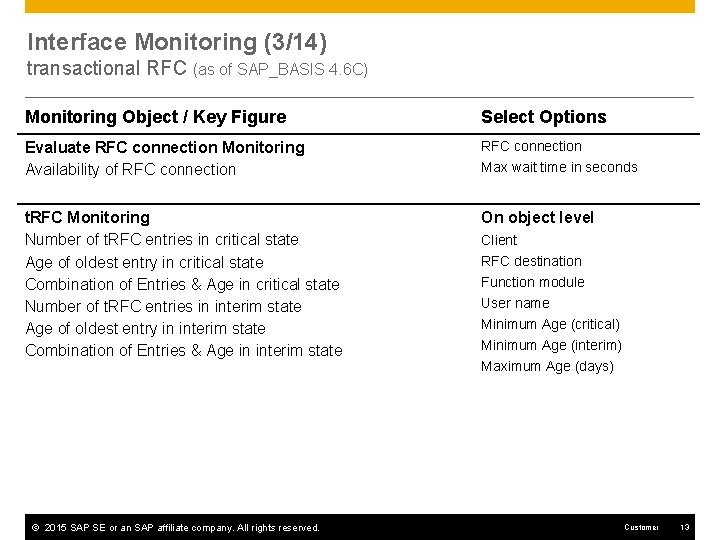
Interface Monitoring (3/14) transactional RFC (as of SAP_BASIS 4. 6 C) Monitoring Object / Key Figure Select Options Evaluate RFC connection Monitoring Availability of RFC connection t. RFC Monitoring Number of t. RFC entries in critical state Age of oldest entry in critical state Combination of Entries & Age in critical state Number of t. RFC entries in interim state Age of oldest entry in interim state Combination of Entries & Age in interim state On object level © 2015 SAP SE or an SAP affiliate company. All rights reserved. Max wait time in seconds Client RFC destination Function module User name Minimum Age (critical) Minimum Age (interim) Maximum Age (days) Customer 13
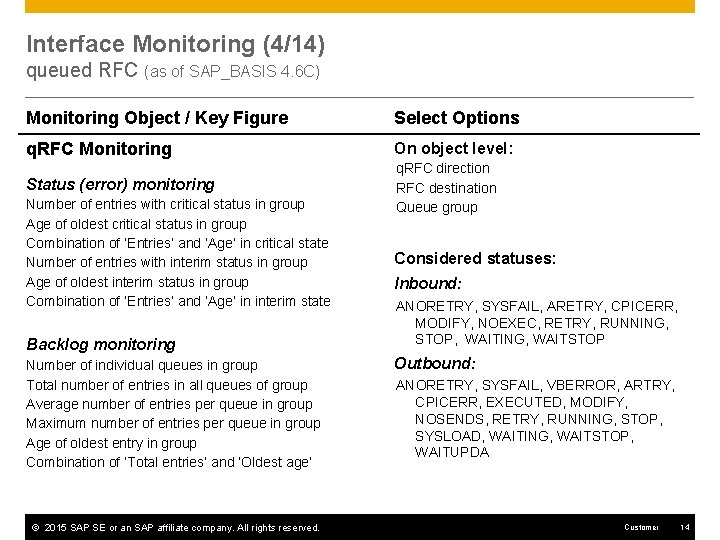
Interface Monitoring (4/14) queued RFC (as of SAP_BASIS 4. 6 C) Monitoring Object / Key Figure Select Options q. RFC Monitoring On object level: Status (error) monitoring q. RFC direction RFC destination Queue group Number of entries with critical status in group Age of oldest critical status in group Combination of ‘Entries’ and ‘Age’ in critical state Number of entries with interim status in group Age of oldest interim status in group Combination of ‘Entries’ and ‘Age’ in interim state Backlog monitoring Number of individual queues in group Total number of entries in all queues of group Average number of entries per queue in group Maximum number of entries per queue in group Age of oldest entry in group Combination of ‘Total entries’ and ‘Oldest age’ © 2015 SAP SE or an SAP affiliate company. All rights reserved. Considered statuses: Inbound: ANORETRY, SYSFAIL, ARETRY, CPICERR, MODIFY, NOEXEC, RETRY, RUNNING, STOP, WAITING, WAITSTOP Outbound: ANORETRY, SYSFAIL, VBERROR, ARTRY, CPICERR, EXECUTED, MODIFY, NOSENDS, RETRY, RUNNING, STOP, SYSLOAD, WAITING, WAITSTOP, WAITUPDA Customer 14
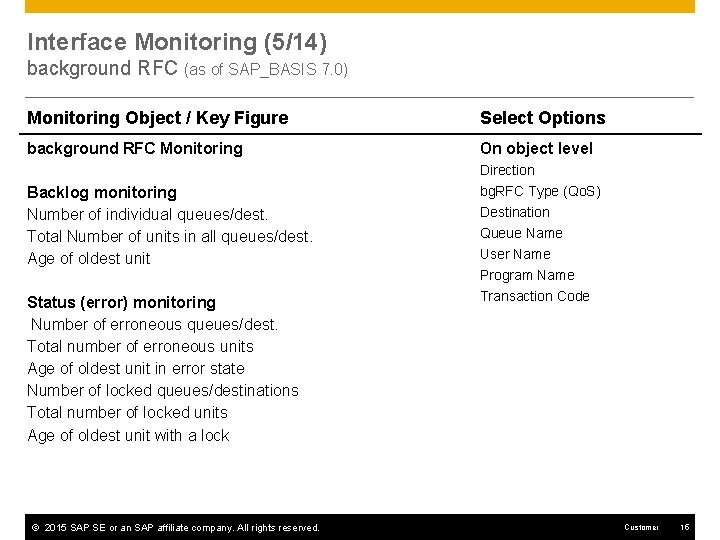
Interface Monitoring (5/14) background RFC (as of SAP_BASIS 7. 0) Monitoring Object / Key Figure Select Options background RFC Monitoring On object level Direction Backlog monitoring Number of individual queues/dest. Total Number of units in all queues/dest. Age of oldest unit Status (error) monitoring Number of erroneous queues/dest. Total number of erroneous units Age of oldest unit in error state Number of locked queues/destinations Total number of locked units Age of oldest unit with a lock © 2015 SAP SE or an SAP affiliate company. All rights reserved. bg. RFC Type (Qo. S) Destination Queue Name User Name Program Name Transaction Code Customer 15
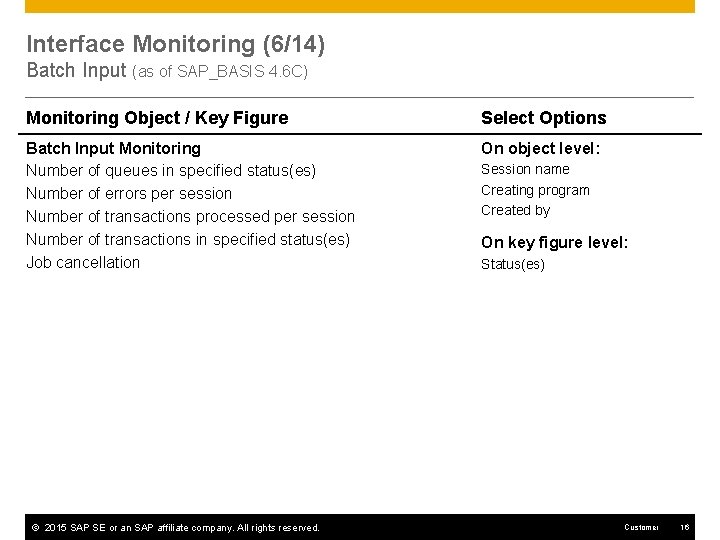
Interface Monitoring (6/14) Batch Input (as of SAP_BASIS 4. 6 C) Monitoring Object / Key Figure Select Options Batch Input Monitoring Number of queues in specified status(es) Number of errors per session Number of transactions processed per session Number of transactions in specified status(es) Job cancellation On object level: © 2015 SAP SE or an SAP affiliate company. All rights reserved. Session name Creating program Created by On key figure level: Status(es) Customer 16
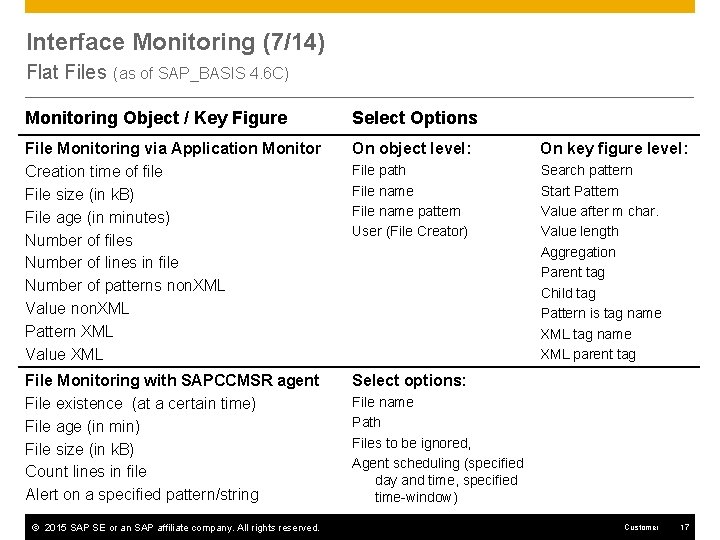
Interface Monitoring (7/14) Flat Files (as of SAP_BASIS 4. 6 C) Monitoring Object / Key Figure Select Options File Monitoring via Application Monitor Creation time of file File size (in k. B) File age (in minutes) Number of files Number of lines in file Number of patterns non. XML Value non. XML Pattern XML Value XML On object level: On key figure level: File path File name pattern User (File Creator) Search pattern Start Pattern Value after m char. Value length Aggregation Parent tag Child tag Pattern is tag name XML parent tag File Monitoring with SAPCCMSR agent File existence (at a certain time) File age (in min) File size (in k. B) Count lines in file Alert on a specified pattern/string Select options: © 2015 SAP SE or an SAP affiliate company. All rights reserved. File name Path Files to be ignored, Agent scheduling (specified day and time, specified time-window) Customer 17
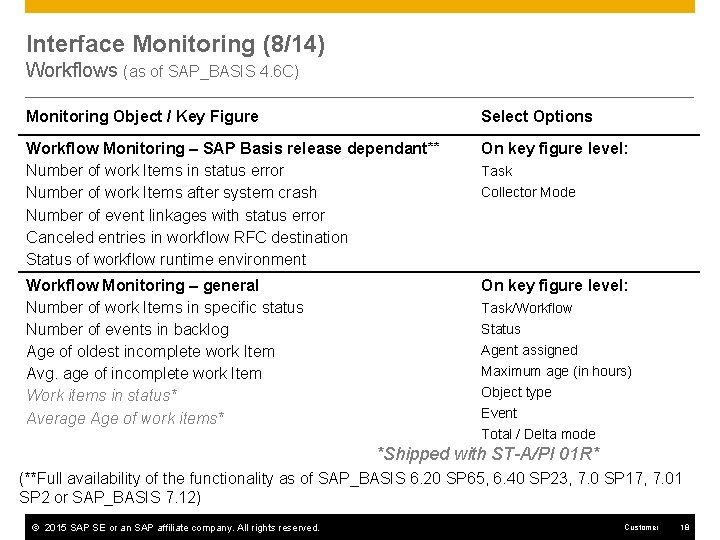
Interface Monitoring (8/14) Workflows (as of SAP_BASIS 4. 6 C) Monitoring Object / Key Figure Select Options Workflow Monitoring – SAP Basis release dependant** Number of work Items in status error Number of work Items after system crash Number of event linkages with status error Canceled entries in workflow RFC destination Status of workflow runtime environment On key figure level: Workflow Monitoring – general Number of work Items in specific status Number of events in backlog Age of oldest incomplete work Item Avg. age of incomplete work Item Work items in status* Average Age of work items* On key figure level: Task Collector Mode Task/Workflow Status Agent assigned Maximum age (in hours) Object type Event Total / Delta mode *Shipped with ST-A/PI 01 R* (**Full availability of the functionality as of SAP_BASIS 6. 20 SP 65, 6. 40 SP 23, 7. 0 SP 17, 7. 01 SP 2 or SAP_BASIS 7. 12) © 2015 SAP SE or an SAP affiliate company. All rights reserved. Customer 18
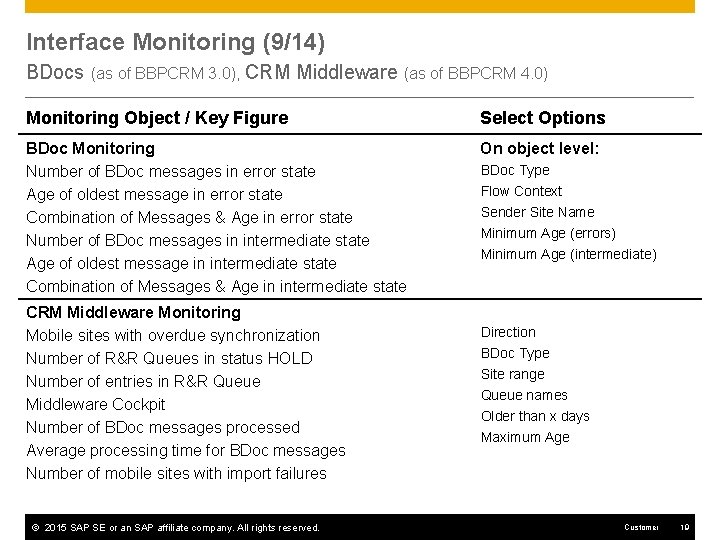
Interface Monitoring (9/14) BDocs (as of BBPCRM 3. 0), CRM Middleware (as of BBPCRM 4. 0) Monitoring Object / Key Figure Select Options BDoc Monitoring Number of BDoc messages in error state Age of oldest message in error state Combination of Messages & Age in error state Number of BDoc messages in intermediate state Age of oldest message in intermediate state Combination of Messages & Age in intermediate state On object level: CRM Middleware Monitoring Mobile sites with overdue synchronization Number of R&R Queues in status HOLD Number of entries in R&R Queue Middleware Cockpit Number of BDoc messages processed Average processing time for BDoc messages Number of mobile sites with import failures © 2015 SAP SE or an SAP affiliate company. All rights reserved. BDoc Type Flow Context Sender Site Name Minimum Age (errors) Minimum Age (intermediate) Direction BDoc Type Site range Queue names Older than x days Maximum Age Customer 19
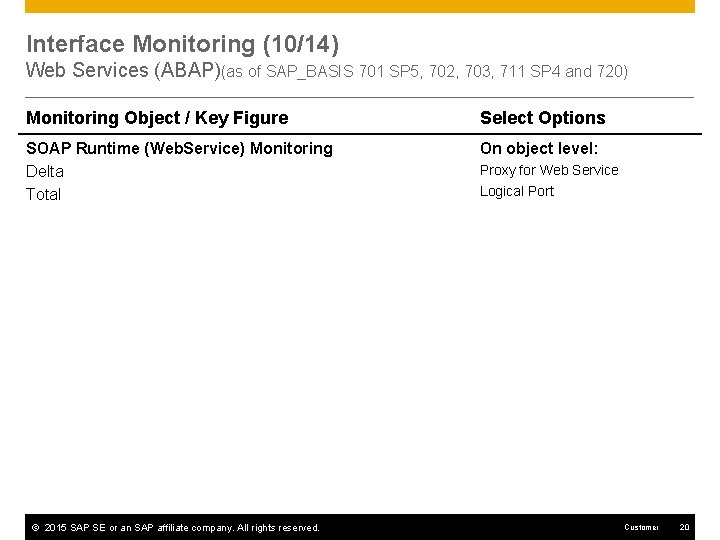
Interface Monitoring (10/14) Web Services (ABAP)(as of SAP_BASIS 701 SP 5, 702, 703, 711 SP 4 and 720) Monitoring Object / Key Figure Select Options SOAP Runtime (Web. Service) Monitoring Delta Total On object level: © 2015 SAP SE or an SAP affiliate company. All rights reserved. Proxy for Web Service Logical Port Customer 20
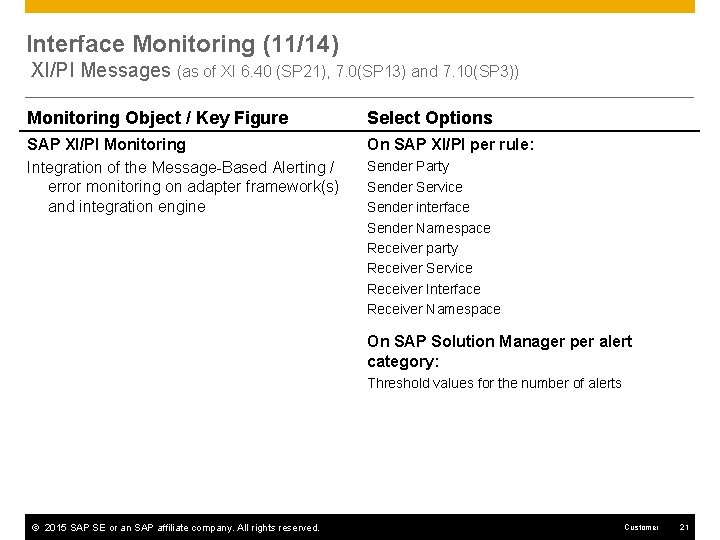
Interface Monitoring (11/14) XI/PI Messages (as of XI 6. 40 (SP 21), 7. 0(SP 13) and 7. 10(SP 3)) Monitoring Object / Key Figure Select Options SAP XI/PI Monitoring Integration of the Message-Based Alerting / error monitoring on adapter framework(s) and integration engine On SAP XI/PI per rule: Sender Party Sender Service Sender interface Sender Namespace Receiver party Receiver Service Receiver Interface Receiver Namespace On SAP Solution Manager per alert category: Threshold values for the number of alerts © 2015 SAP SE or an SAP affiliate company. All rights reserved. Customer 21
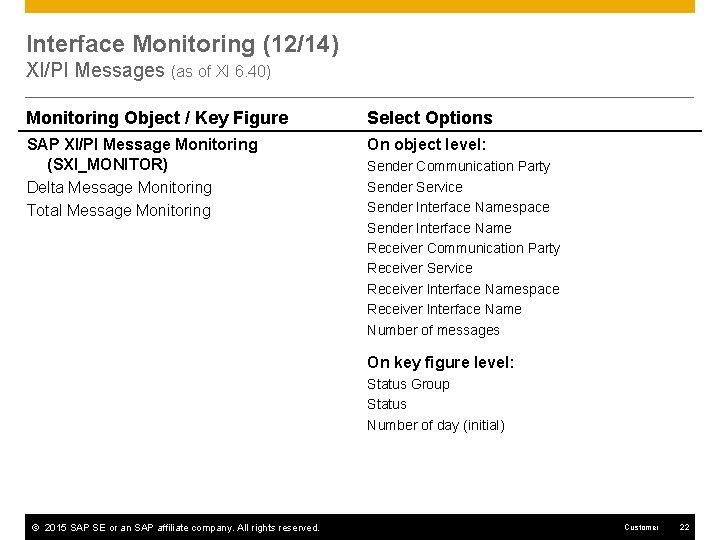
Interface Monitoring (12/14) XI/PI Messages (as of XI 6. 40) Monitoring Object / Key Figure Select Options SAP XI/PI Message Monitoring (SXI_MONITOR) Delta Message Monitoring Total Message Monitoring On object level: Sender Communication Party Sender Service Sender Interface Namespace Sender Interface Name Receiver Communication Party Receiver Service Receiver Interface Namespace Receiver Interface Name Number of messages On key figure level: Status Group Status Number of day (initial) © 2015 SAP SE or an SAP affiliate company. All rights reserved. Customer 22
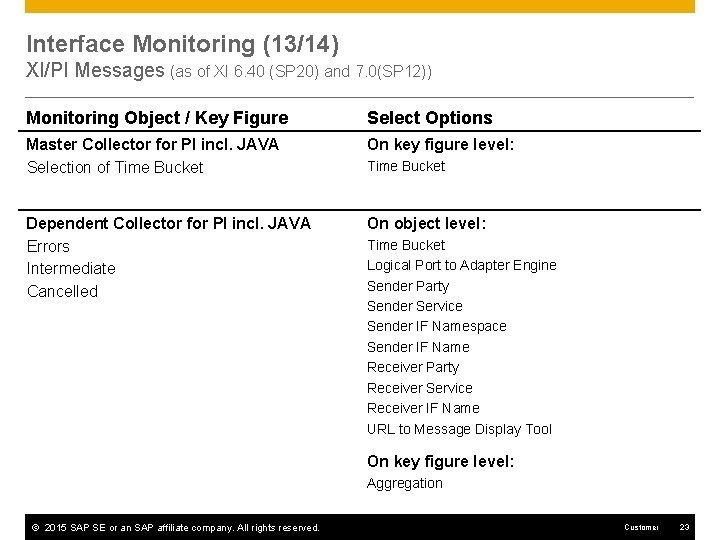
Interface Monitoring (13/14) XI/PI Messages (as of XI 6. 40 (SP 20) and 7. 0(SP 12)) Monitoring Object / Key Figure Select Options Master Collector for PI incl. JAVA Selection of Time Bucket On key figure level: Dependent Collector for PI incl. JAVA Errors Intermediate Cancelled On object level: Time Bucket Logical Port to Adapter Engine Sender Party Sender Service Sender IF Namespace Sender IF Name Receiver Party Receiver Service Receiver IF Name URL to Message Display Tool On key figure level: Aggregation © 2015 SAP SE or an SAP affiliate company. All rights reserved. Customer 23
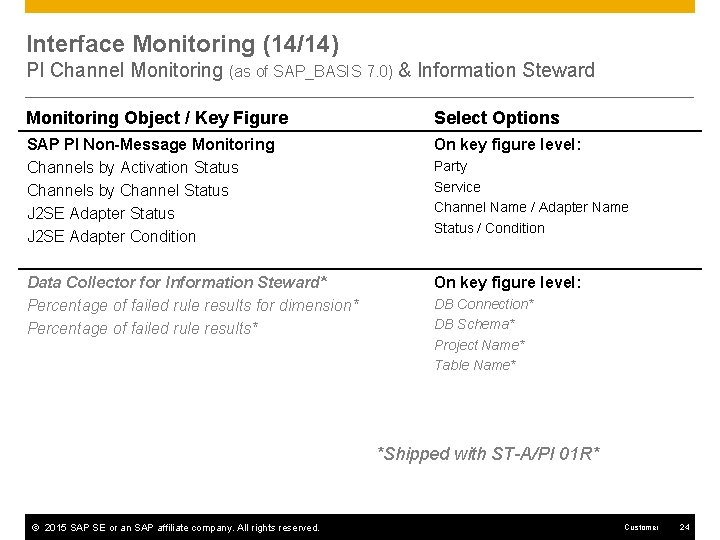
Interface Monitoring (14/14) PI Channel Monitoring (as of SAP_BASIS 7. 0) & Information Steward Monitoring Object / Key Figure Select Options SAP PI Non-Message Monitoring Channels by Activation Status Channels by Channel Status J 2 SE Adapter Condition On key figure level: Data Collector for Information Steward* Percentage of failed rule results for dimension* Percentage of failed rule results* On key figure level: Party Service Channel Name / Adapter Name Status / Condition DB Connection* DB Schema* Project Name* Table Name* *Shipped with ST-A/PI 01 R* © 2015 SAP SE or an SAP affiliate company. All rights reserved. Customer 24
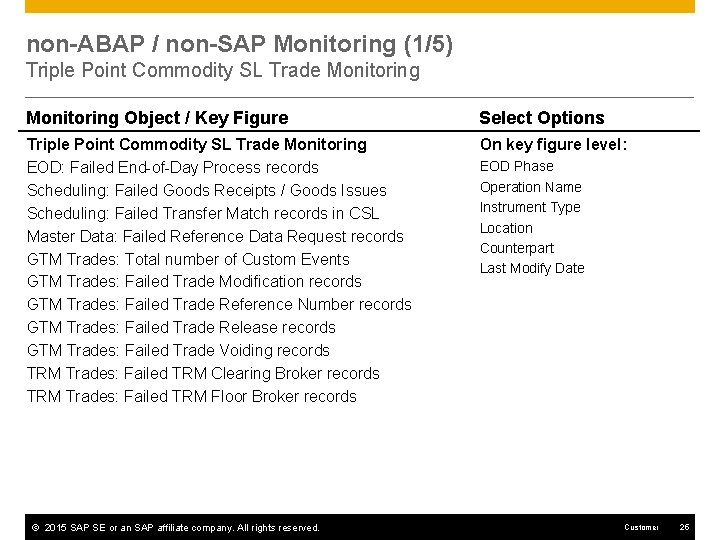
non-ABAP / non-SAP Monitoring (1/5) Triple Point Commodity SL Trade Monitoring Object / Key Figure Select Options Triple Point Commodity SL Trade Monitoring EOD: Failed End-of-Day Process records Scheduling: Failed Goods Receipts / Goods Issues Scheduling: Failed Transfer Match records in CSL Master Data: Failed Reference Data Request records GTM Trades: Total number of Custom Events GTM Trades: Failed Trade Modification records GTM Trades: Failed Trade Reference Number records GTM Trades: Failed Trade Release records GTM Trades: Failed Trade Voiding records TRM Trades: Failed TRM Clearing Broker records TRM Trades: Failed TRM Floor Broker records On key figure level: © 2015 SAP SE or an SAP affiliate company. All rights reserved. EOD Phase Operation Name Instrument Type Location Counterpart Last Modify Date Customer 25
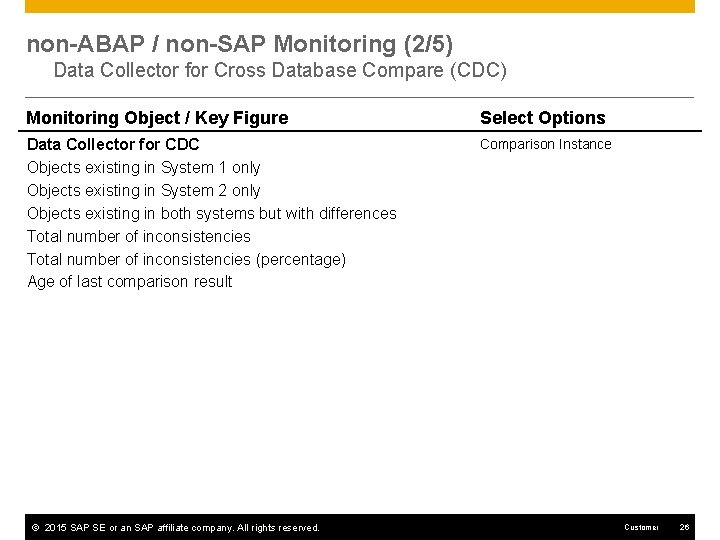
non-ABAP / non-SAP Monitoring (2/5) Data Collector for Cross Database Compare (CDC) Monitoring Object / Key Figure Select Options Data Collector for CDC Objects existing in System 1 only Objects existing in System 2 only Objects existing in both systems but with differences Total number of inconsistencies (percentage) Age of last comparison result Comparison Instance © 2015 SAP SE or an SAP affiliate company. All rights reserved. Customer 26
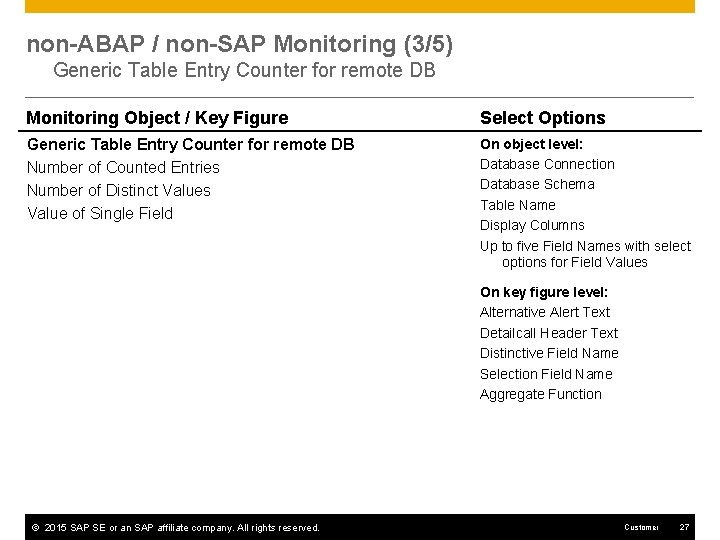
non-ABAP / non-SAP Monitoring (3/5) Generic Table Entry Counter for remote DB Monitoring Object / Key Figure Select Options Generic Table Entry Counter for remote DB Number of Counted Entries Number of Distinct Values Value of Single Field On object level: Database Connection Database Schema Table Name Display Columns Up to five Field Names with select options for Field Values On key figure level: Alternative Alert Text Detailcall Header Text Distinctive Field Name Selection Field Name Aggregate Function © 2015 SAP SE or an SAP affiliate company. All rights reserved. Customer 27
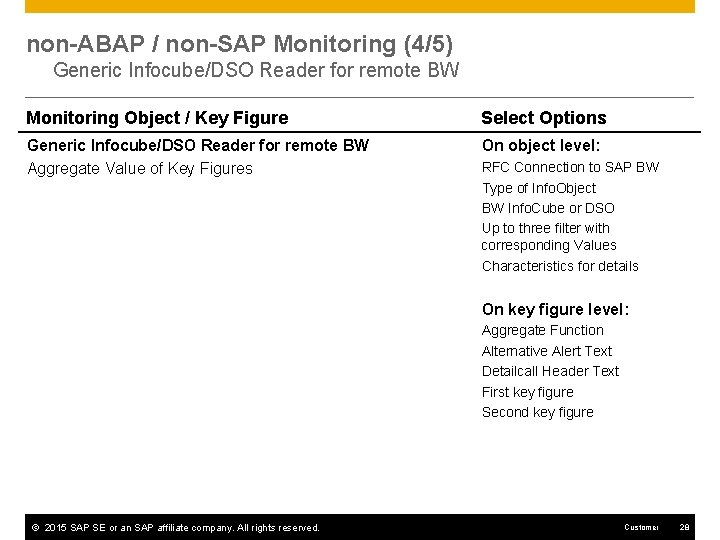
non-ABAP / non-SAP Monitoring (4/5) Generic Infocube/DSO Reader for remote BW Monitoring Object / Key Figure Select Options Generic Infocube/DSO Reader for remote BW Aggregate Value of Key Figures On object level: RFC Connection to SAP BW Type of Info. Object BW Info. Cube or DSO Up to three filter with corresponding Values Characteristics for details On key figure level: Aggregate Function Alternative Alert Text Detailcall Header Text First key figure Second key figure © 2015 SAP SE or an SAP affiliate company. All rights reserved. Customer 28
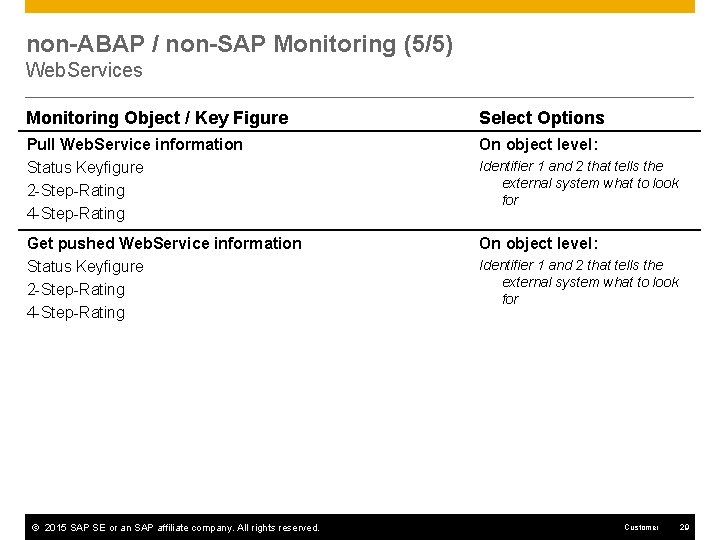
non-ABAP / non-SAP Monitoring (5/5) Web. Services Monitoring Object / Key Figure Select Options Pull Web. Service information Status Keyfigure 2 -Step-Rating 4 -Step-Rating On object level: Get pushed Web. Service information Status Keyfigure 2 -Step-Rating 4 -Step-Rating On object level: © 2015 SAP SE or an SAP affiliate company. All rights reserved. Identifier 1 and 2 that tells the external system what to look for Customer 29
SAP ERP Logistics Sales & Services Procurement Inventory Management Manufacturing Logistics Execution Warehouse Management Plant Maintenance & Customer Service Quality Management Miscellaneous
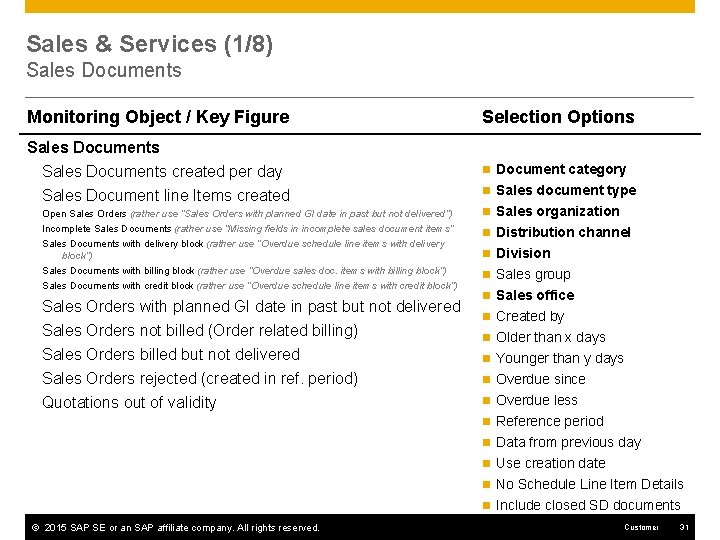
Sales & Services (1/8) Sales Documents Monitoring Object / Key Figure Selection Options Sales Documents created per day Sales Document line Items created n Document category Open Sales Orders (rather use “Sales Orders with planned GI date in past but not delivered”) Incomplete Sales Documents (rather use “Missing fields in incomplete sales document items” Sales Documents with delivery block (rather use “Overdue schedule line items with delivery block”) Sales Documents with billing block (rather use “Overdue sales doc. items with billing block”) Sales Documents with credit block (rather use “Overdue schedule line items with credit block”) Sales Orders with planned GI date in past but not delivered Sales Orders not billed (Order related billing) Sales Orders billed but not delivered Sales Orders rejected (created in ref. period) Quotations out of validity n Sales document type n Sales organization n Distribution channel n Division n Sales group n Sales office n Created by n Older than x days n Younger than y days n Overdue since n Overdue less n Reference period n Data from previous day n Use creation date n No Schedule Line Item Details n Include closed SD documents © 2015 SAP SE or an SAP affiliate company. All rights reserved. Customer 31
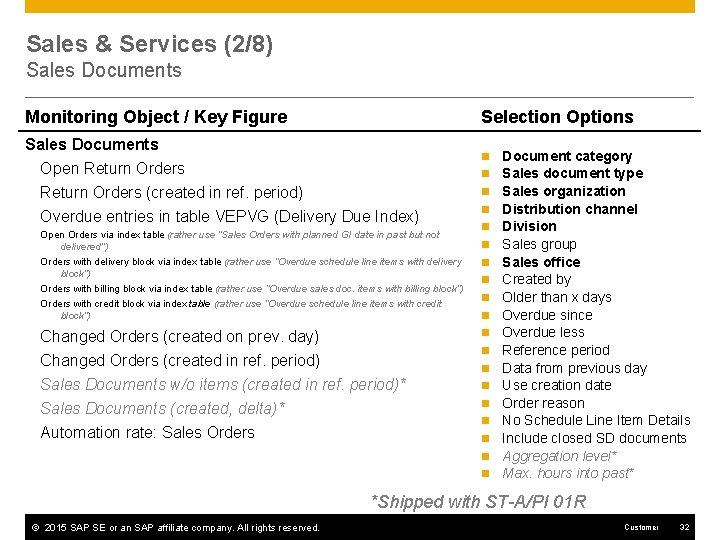
Sales & Services (2/8) Sales Documents Monitoring Object / Key Figure Selection Options Sales Documents Open Return Orders (created in ref. period) n n n Overdue entries in table VEPVG (Delivery Due Index) Open Orders via index table (rather use “Sales Orders with planned GI date in past but not delivered”) n n n Orders with delivery block via index table (rather use “Overdue schedule line items with delivery block”) Orders with billing block via index table (rather use “Overdue sales doc. items with billing block”) Orders with credit block via index table (rather use “Overdue schedule line items with credit block”) n Changed Orders (created on prev. day) Changed Orders (created in ref. period) Sales Documents w/o items (created in ref. period)* Sales Documents (created, delta)* Automation rate: Sales Orders n n n Document category Sales document type Sales organization Distribution channel Division Sales group Sales office Created by Older than x days Overdue since Overdue less Reference period Data from previous day Use creation date Order reason No Schedule Line Item Details Include closed SD documents Aggregation level* Max. hours into past* *Shipped with ST-A/PI 01 R © 2015 SAP SE or an SAP affiliate company. All rights reserved. Customer 32
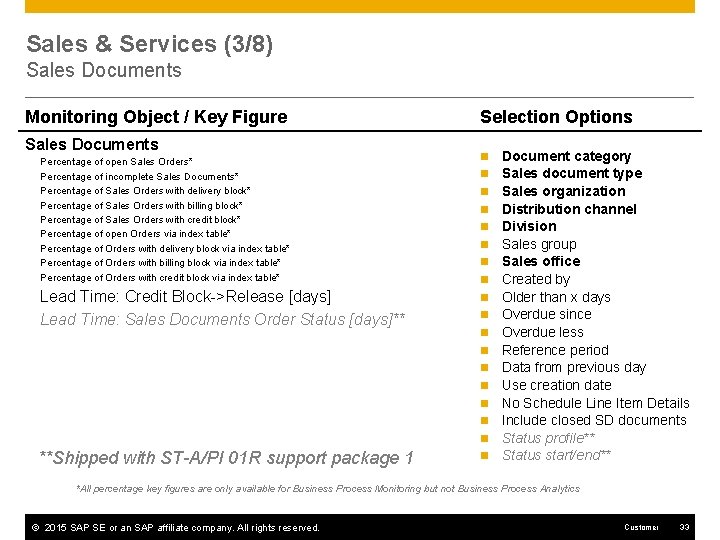
Sales & Services (3/8) Sales Documents Monitoring Object / Key Figure Sales Documents Percentage of open Sales Orders* Percentage of incomplete Sales Documents* Percentage of Sales Orders with delivery block* Percentage of Sales Orders with billing block* Percentage of Sales Orders with credit block* Percentage of open Orders via index table* Percentage of Orders with delivery block via index table* Percentage of Orders with billing block via index table* Percentage of Orders with credit block via index table* Lead Time: Credit Block->Release [days] Lead Time: Sales Documents Order Status [days]** Selection Options n n n n n **Shipped with ST-A/PI 01 R support package 1 n Document category Sales document type Sales organization Distribution channel Division Sales group Sales office Created by Older than x days Overdue since Overdue less Reference period Data from previous day Use creation date No Schedule Line Item Details Include closed SD documents Status profile** Status start/end** *All percentage key figures are only available for Business Process Monitoring but not Business Process Analytics © 2015 SAP SE or an SAP affiliate company. All rights reserved. Customer 33
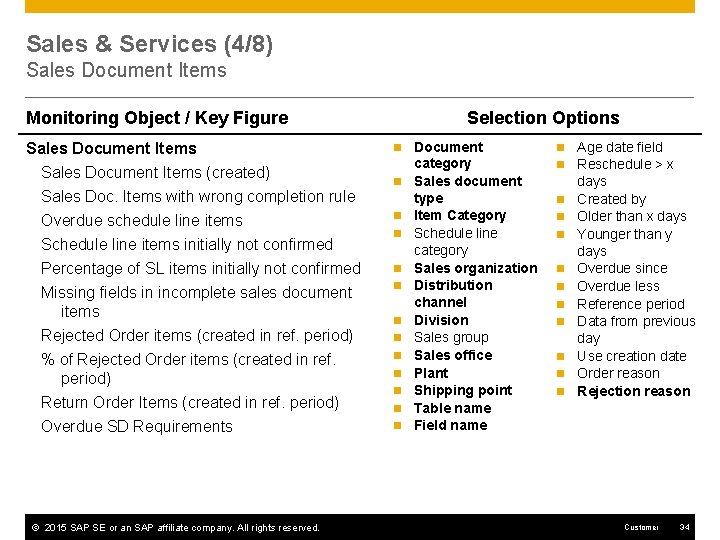
Sales & Services (4/8) Sales Document Items Monitoring Object / Key Figure Sales Document Items (created) Sales Doc. Items with wrong completion rule Overdue schedule line items Schedule line items initially not confirmed Percentage of SL items initially not confirmed Missing fields in incomplete sales document items Rejected Order items (created in ref. period) % of Rejected Order items (created in ref. period) Return Order Items (created in ref. period) Overdue SD Requirements © 2015 SAP SE or an SAP affiliate company. All rights reserved. Selection Options n n n n Document category Sales document type Item Category Schedule line category Sales organization Distribution channel Division Sales group Sales office Plant Shipping point Table name Field name n n n Age date field Reschedule > x days Created by Older than x days Younger than y days Overdue since Overdue less Reference period Data from previous day Use creation date Order reason Rejection reason Customer 34
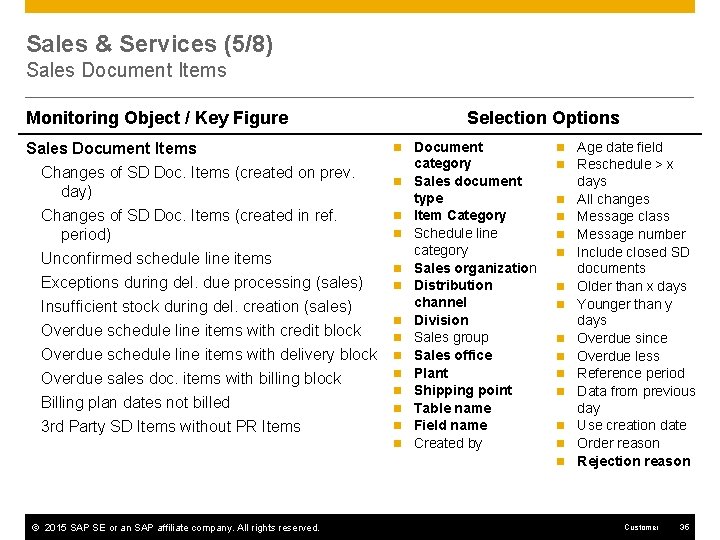
Sales & Services (5/8) Sales Document Items Monitoring Object / Key Figure Selection Options Sales Document Items Changes of SD Doc. Items (created on prev. day) n Changes of SD Doc. Items (created in ref. period) n Unconfirmed schedule line items Exceptions during del. due processing (sales) Insufficient stock during del. creation (sales) Overdue schedule line items with credit block Overdue schedule line items with delivery block Overdue sales doc. items with billing block Billing plan dates not billed 3 rd Party SD Items without PR Items n n n Document category Sales document type Item Category Schedule line category Sales organization Distribution channel Division Sales group Sales office Plant Shipping point Table name Field name Created by n n n n © 2015 SAP SE or an SAP affiliate company. All rights reserved. Age date field Reschedule > x days All changes Message class Message number Include closed SD documents Older than x days Younger than y days Overdue since Overdue less Reference period Data from previous day Use creation date Order reason Rejection reason Customer 35
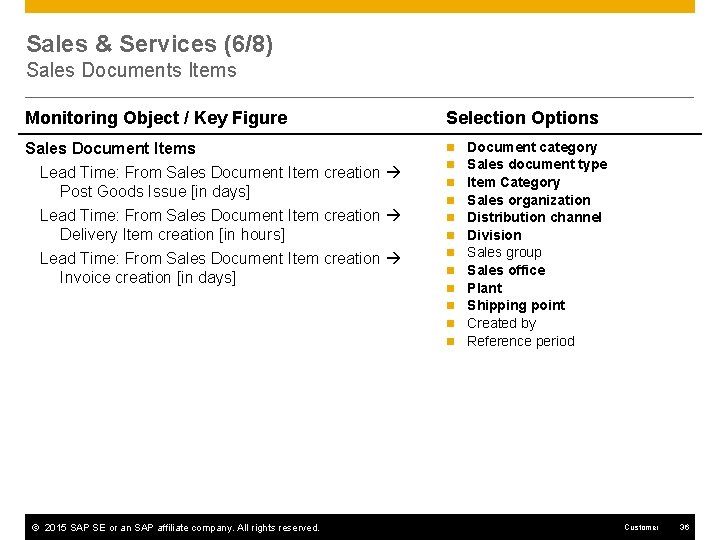
Sales & Services (6/8) Sales Documents Items Monitoring Object / Key Figure Selection Options Sales Document Items Lead Time: From Sales Document Item creation Post Goods Issue [in days] Lead Time: From Sales Document Item creation Delivery Item creation [in hours] Lead Time: From Sales Document Item creation Invoice creation [in days] n n n © 2015 SAP SE or an SAP affiliate company. All rights reserved. Document category Sales document type Item Category Sales organization Distribution channel Division Sales group Sales office Plant Shipping point Created by Reference period Customer 36
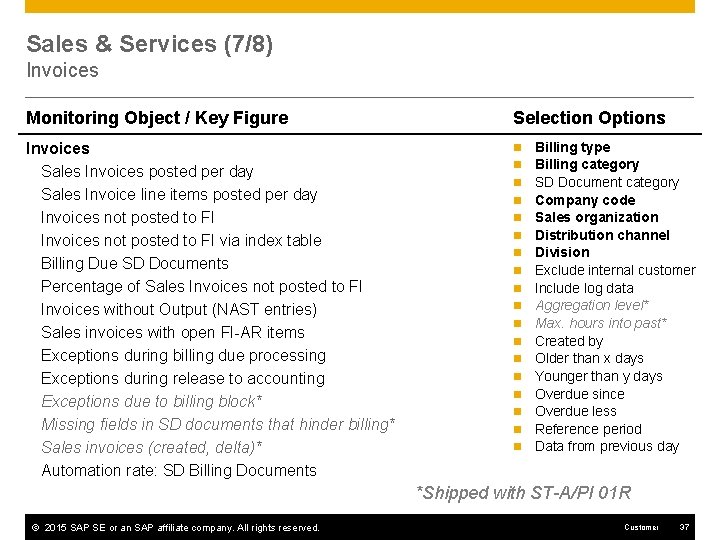
Sales & Services (7/8) Invoices Monitoring Object / Key Figure Selection Options Invoices Sales Invoices posted per day Sales Invoice line items posted per day Invoices not posted to FI via index table Billing Due SD Documents Percentage of Sales Invoices not posted to FI Invoices without Output (NAST entries) Sales invoices with open FI-AR items Exceptions during billing due processing Exceptions during release to accounting Exceptions due to billing block* Missing fields in SD documents that hinder billing* Sales invoices (created, delta)* Automation rate: SD Billing Documents n n n n n Billing type Billing category SD Document category Company code Sales organization Distribution channel Division Exclude internal customer Include log data Aggregation level* Max. hours into past* Created by Older than x days Younger than y days Overdue since Overdue less Reference period Data from previous day *Shipped with ST-A/PI 01 R © 2015 SAP SE or an SAP affiliate company. All rights reserved. Customer 37
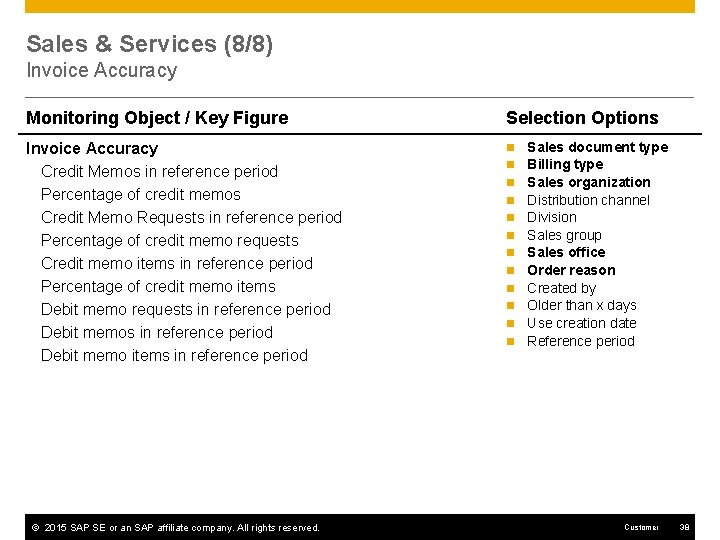
Sales & Services (8/8) Invoice Accuracy Monitoring Object / Key Figure Selection Options Invoice Accuracy Credit Memos in reference period Percentage of credit memos Credit Memo Requests in reference period Percentage of credit memo requests Credit memo items in reference period Percentage of credit memo items Debit memo requests in reference period Debit memo items in reference period n © 2015 SAP SE or an SAP affiliate company. All rights reserved. n n n Sales document type Billing type Sales organization Distribution channel Division Sales group Sales office Order reason Created by Older than x days Use creation date Reference period Customer 38
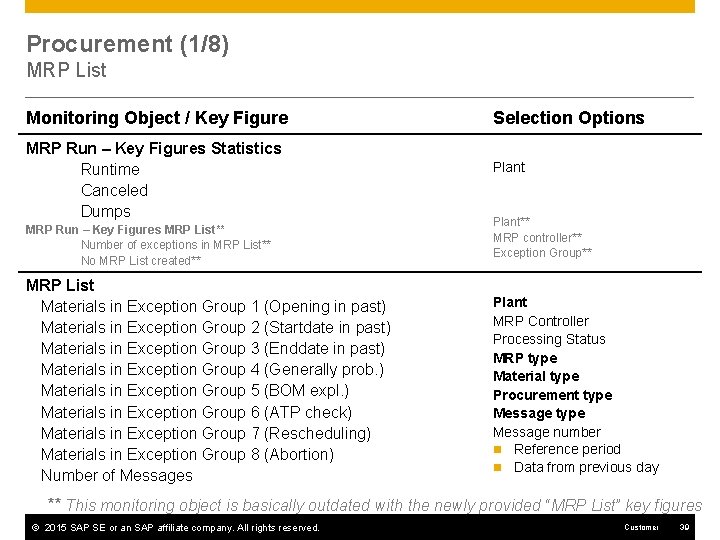
Procurement (1/8) MRP List Monitoring Object / Key Figure MRP Run – Key Figures Statistics Runtime Canceled Dumps MRP Run – Key Figures MRP List** Number of exceptions in MRP List** No MRP List created** MRP List Materials in Exception Group 1 (Opening in past) Materials in Exception Group 2 (Startdate in past) Materials in Exception Group 3 (Enddate in past) Materials in Exception Group 4 (Generally prob. ) Materials in Exception Group 5 (BOM expl. ) Materials in Exception Group 6 (ATP check) Materials in Exception Group 7 (Rescheduling) Materials in Exception Group 8 (Abortion) Number of Messages Selection Options Plant** MRP controller** Exception Group** Plant MRP Controller Processing Status MRP type Material type Procurement type Message number n Reference period n Data from previous day ** This monitoring object is basically outdated with the newly provided “MRP List” key figures © 2015 SAP SE or an SAP affiliate company. All rights reserved. Customer 39
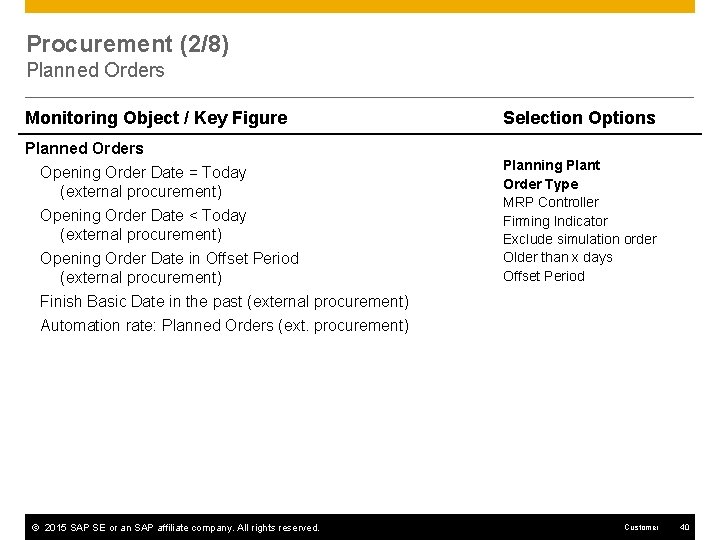
Procurement (2/8) Planned Orders Monitoring Object / Key Figure Planned Orders Opening Order Date = Today (external procurement) Opening Order Date < Today (external procurement) Opening Order Date in Offset Period (external procurement) Finish Basic Date in the past (external procurement) Automation rate: Planned Orders (ext. procurement) © 2015 SAP SE or an SAP affiliate company. All rights reserved. Selection Options Planning Plant Order Type MRP Controller Firming Indicator Exclude simulation order Older than x days Offset Period Customer 40
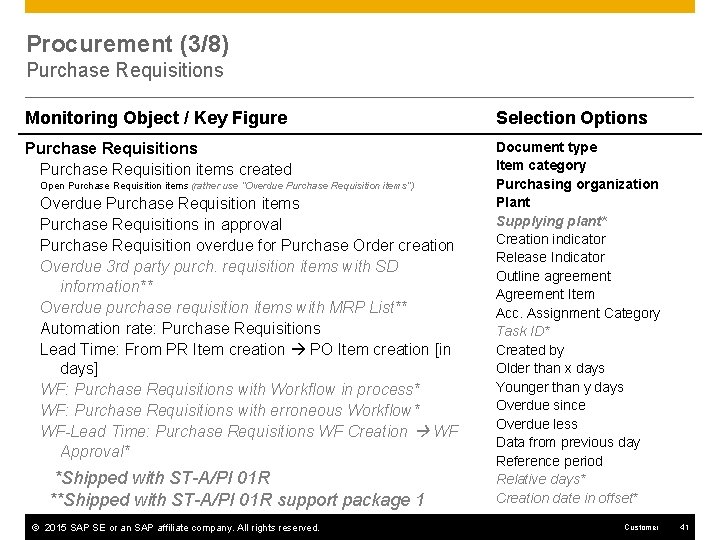
Procurement (3/8) Purchase Requisitions Monitoring Object / Key Figure Selection Options Purchase Requisition items created Document type Item category Purchasing organization Plant Supplying plant* Creation indicator Release Indicator Outline agreement Agreement Item Acc. Assignment Category Task ID* Created by Older than x days Younger than y days Overdue since Overdue less Data from previous day Reference period Relative days* Creation date in offset* Open Purchase Requisition items (rather use “Overdue Purchase Requisition items”) Overdue Purchase Requisition items Purchase Requisitions in approval Purchase Requisition overdue for Purchase Order creation Overdue 3 rd party purch. requisition items with SD information** Overdue purchase requisition items with MRP List** Automation rate: Purchase Requisitions Lead Time: From PR Item creation PO Item creation [in days] WF: Purchase Requisitions with Workflow in process* WF: Purchase Requisitions with erroneous Workflow* WF-Lead Time: Purchase Requisitions WF Creation WF Approval* *Shipped with ST-A/PI 01 R **Shipped with ST-A/PI 01 R support package 1 © 2015 SAP SE or an SAP affiliate company. All rights reserved. Customer 41
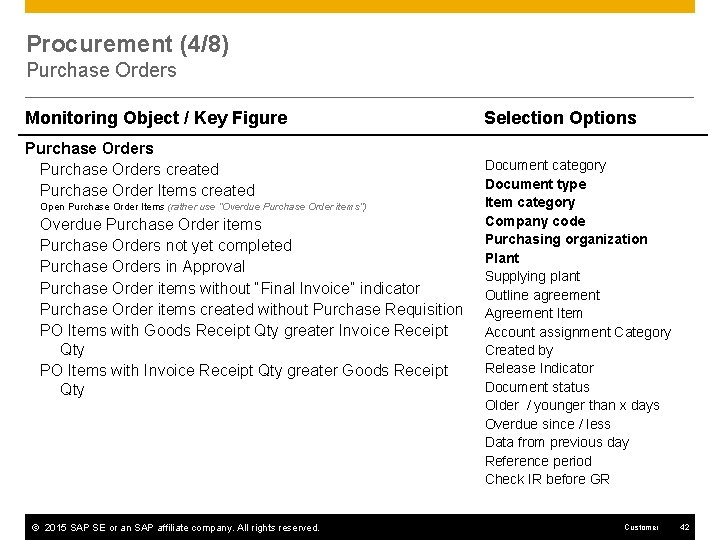
Procurement (4/8) Purchase Orders Monitoring Object / Key Figure Purchase Orders created Purchase Order Items created Open Purchase Order Items (rather use “Overdue Purchase Order items”) Overdue Purchase Order items Purchase Orders not yet completed Purchase Orders in Approval Purchase Order items without “Final Invoice” indicator Purchase Order items created without Purchase Requisition PO Items with Goods Receipt Qty greater Invoice Receipt Qty PO Items with Invoice Receipt Qty greater Goods Receipt Qty © 2015 SAP SE or an SAP affiliate company. All rights reserved. Selection Options Document category Document type Item category Company code Purchasing organization Plant Supplying plant Outline agreement Agreement Item Account assignment Category Created by Release Indicator Document status Older / younger than x days Overdue since / less Data from previous day Reference period Check IR before GR Customer 42
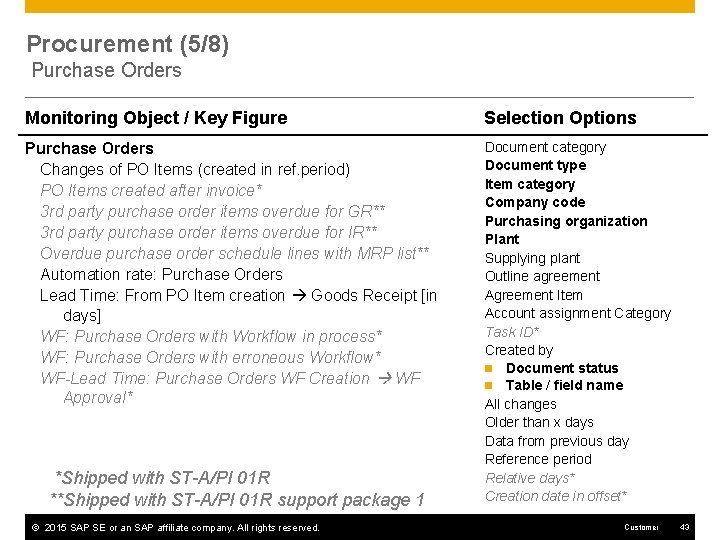
Procurement (5/8) Purchase Orders Monitoring Object / Key Figure Selection Options Purchase Orders Changes of PO Items (created in ref. period) PO Items created after invoice* 3 rd party purchase order items overdue for GR** 3 rd party purchase order items overdue for IR** Overdue purchase order schedule lines with MRP list** Automation rate: Purchase Orders Lead Time: From PO Item creation Goods Receipt [in days] WF: Purchase Orders with Workflow in process* WF: Purchase Orders with erroneous Workflow* WF-Lead Time: Purchase Orders WF Creation WF Approval* Document category Document type Item category Company code Purchasing organization Plant Supplying plant Outline agreement Agreement Item Account assignment Category Task ID* Created by n Document status n Table / field name All changes Older than x days Data from previous day Reference period Relative days* Creation date in offset* *Shipped with ST-A/PI 01 R **Shipped with ST-A/PI 01 R support package 1 © 2015 SAP SE or an SAP affiliate company. All rights reserved. Customer 43
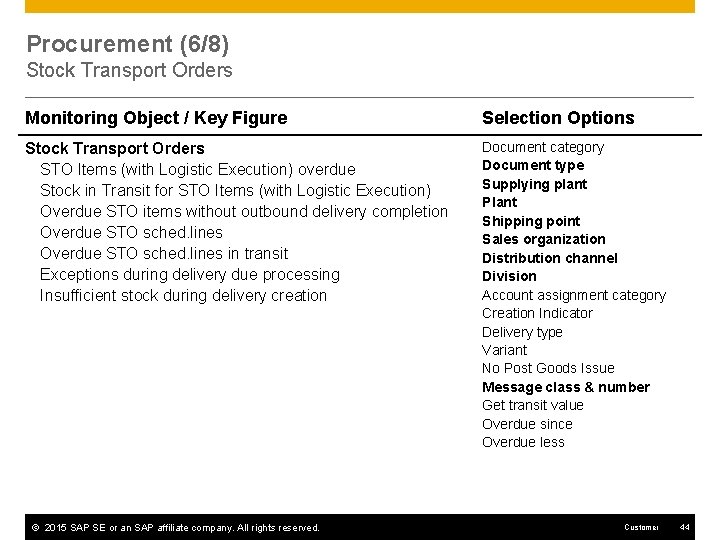
Procurement (6/8) Stock Transport Orders Monitoring Object / Key Figure Selection Options Stock Transport Orders STO Items (with Logistic Execution) overdue Stock in Transit for STO Items (with Logistic Execution) Overdue STO items without outbound delivery completion Overdue STO sched. lines in transit Exceptions during delivery due processing Insufficient stock during delivery creation Document category Document type Supplying plant Plant Shipping point Sales organization Distribution channel Division Account assignment category Creation Indicator Delivery type Variant No Post Goods Issue Message class & number Get transit value Overdue since Overdue less © 2015 SAP SE or an SAP affiliate company. All rights reserved. Customer 44
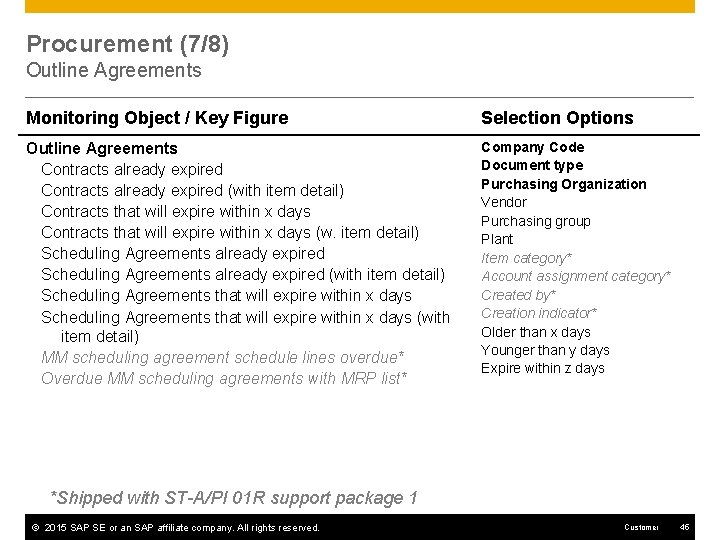
Procurement (7/8) Outline Agreements Monitoring Object / Key Figure Selection Options Outline Agreements Contracts already expired (with item detail) Contracts that will expire within x days (w. item detail) Scheduling Agreements already expired (with item detail) Scheduling Agreements that will expire within x days (with item detail) MM scheduling agreement schedule lines overdue* Overdue MM scheduling agreements with MRP list* Company Code Document type Purchasing Organization Vendor Purchasing group Plant Item category* Account assignment category* Created by* Creation indicator* Older than x days Younger than y days Expire within z days *Shipped with ST-A/PI 01 R support package 1 © 2015 SAP SE or an SAP affiliate company. All rights reserved. Customer 45
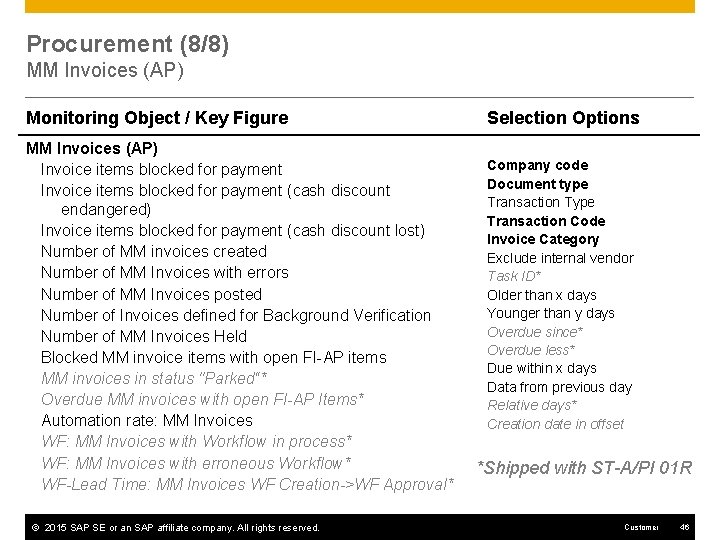
Procurement (8/8) MM Invoices (AP) Monitoring Object / Key Figure MM Invoices (AP) Invoice items blocked for payment (cash discount endangered) Invoice items blocked for payment (cash discount lost) Number of MM invoices created Number of MM Invoices with errors Number of MM Invoices posted Number of Invoices defined for Background Verification Number of MM Invoices Held Blocked MM invoice items with open FI-AP items MM invoices in status "Parked“* Overdue MM invoices with open FI-AP Items* Automation rate: MM Invoices WF: MM Invoices with Workflow in process* WF: MM Invoices with erroneous Workflow* WF-Lead Time: MM Invoices WF Creation->WF Approval* © 2015 SAP SE or an SAP affiliate company. All rights reserved. Selection Options Company code Document type Transaction Type Transaction Code Invoice Category Exclude internal vendor Task ID* Older than x days Younger than y days Overdue since* Overdue less* Due within x days Data from previous day Relative days* Creation date in offset *Shipped with ST-A/PI 01 R Customer 46
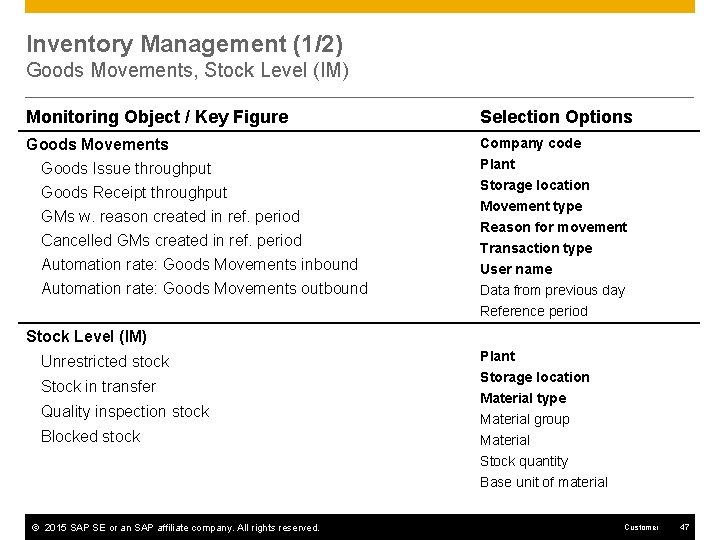
Inventory Management (1/2) Goods Movements, Stock Level (IM) Monitoring Object / Key Figure Selection Options Goods Movements Goods Issue throughput Goods Receipt throughput Company code GMs w. reason created in ref. period Cancelled GMs created in ref. period Automation rate: Goods Movements inbound Automation rate: Goods Movements outbound Plant Storage location Movement type Reason for movement Transaction type User name Data from previous day Reference period Stock Level (IM) Unrestricted stock Stock in transfer Quality inspection stock Blocked stock © 2015 SAP SE or an SAP affiliate company. All rights reserved. Plant Storage location Material type Material group Material Stock quantity Base unit of material Customer 47
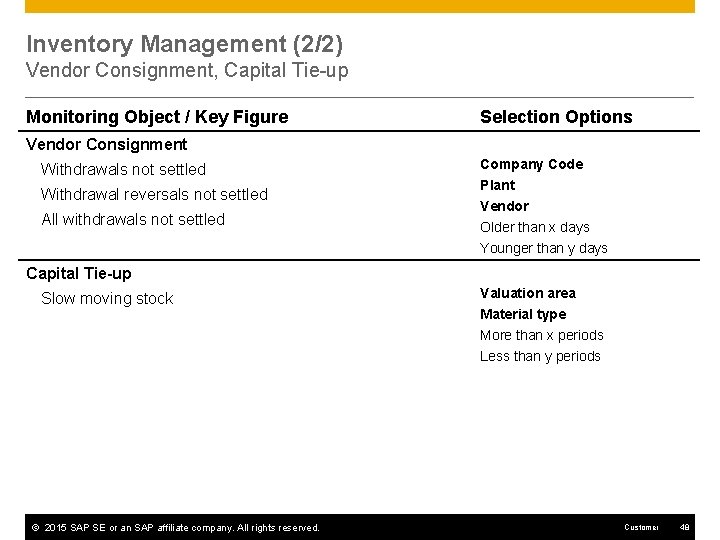
Inventory Management (2/2) Vendor Consignment, Capital Tie-up Monitoring Object / Key Figure Selection Options Vendor Consignment Withdrawals not settled Withdrawal reversals not settled All withdrawals not settled Company Code Plant Vendor Older than x days Younger than y days Capital Tie-up Slow moving stock © 2015 SAP SE or an SAP affiliate company. All rights reserved. Valuation area Material type More than x periods Less than y periods Customer 48
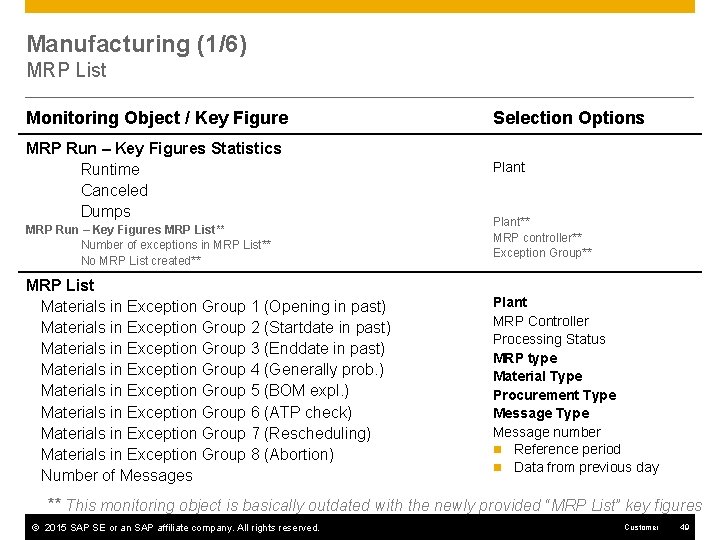
Manufacturing (1/6) MRP List Monitoring Object / Key Figure MRP Run – Key Figures Statistics Runtime Canceled Dumps MRP Run – Key Figures MRP List** Number of exceptions in MRP List** No MRP List created** MRP List Materials in Exception Group 1 (Opening in past) Materials in Exception Group 2 (Startdate in past) Materials in Exception Group 3 (Enddate in past) Materials in Exception Group 4 (Generally prob. ) Materials in Exception Group 5 (BOM expl. ) Materials in Exception Group 6 (ATP check) Materials in Exception Group 7 (Rescheduling) Materials in Exception Group 8 (Abortion) Number of Messages Selection Options Plant** MRP controller** Exception Group** Plant MRP Controller Processing Status MRP type Material Type Procurement Type Message number n Reference period n Data from previous day ** This monitoring object is basically outdated with the newly provided “MRP List” key figures © 2015 SAP SE or an SAP affiliate company. All rights reserved. Customer 49
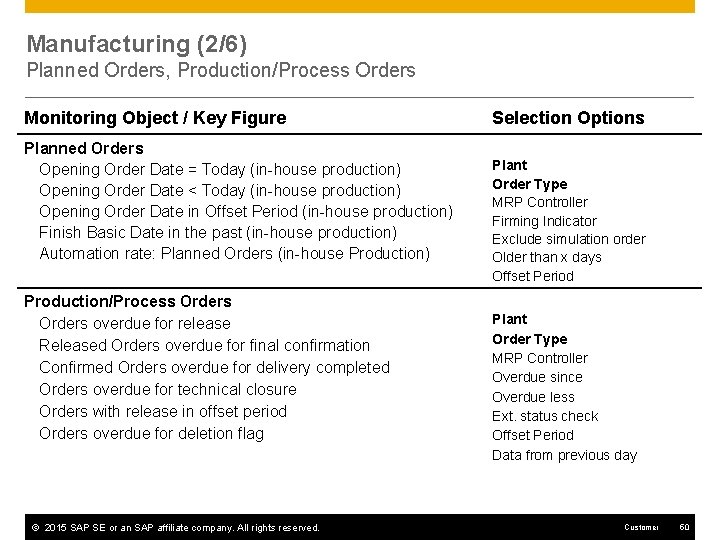
Manufacturing (2/6) Planned Orders, Production/Process Orders Monitoring Object / Key Figure Planned Orders Opening Order Date = Today (in-house production) Opening Order Date < Today (in-house production) Opening Order Date in Offset Period (in-house production) Finish Basic Date in the past (in-house production) Automation rate: Planned Orders (in-house Production) Production/Process Orders overdue for release Released Orders overdue for final confirmation Confirmed Orders overdue for delivery completed Orders overdue for technical closure Orders with release in offset period Orders overdue for deletion flag © 2015 SAP SE or an SAP affiliate company. All rights reserved. Selection Options Plant Order Type MRP Controller Firming Indicator Exclude simulation order Older than x days Offset Period Plant Order Type MRP Controller Overdue since Overdue less Ext. status check Offset Period Data from previous day Customer 50
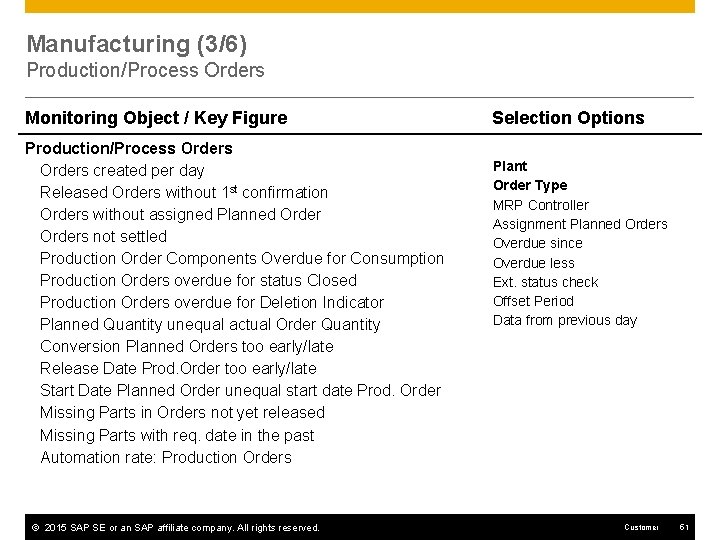
Manufacturing (3/6) Production/Process Orders Monitoring Object / Key Figure Production/Process Orders created per day Released Orders without 1 st confirmation Orders without assigned Planned Orders not settled Production Order Components Overdue for Consumption Production Orders overdue for status Closed Production Orders overdue for Deletion Indicator Planned Quantity unequal actual Order Quantity Conversion Planned Orders too early/late Release Date Prod. Order too early/late Start Date Planned Order unequal start date Prod. Order Missing Parts in Orders not yet released Missing Parts with req. date in the past Automation rate: Production Orders © 2015 SAP SE or an SAP affiliate company. All rights reserved. Selection Options Plant Order Type MRP Controller Assignment Planned Orders Overdue since Overdue less Ext. status check Offset Period Data from previous day Customer 51
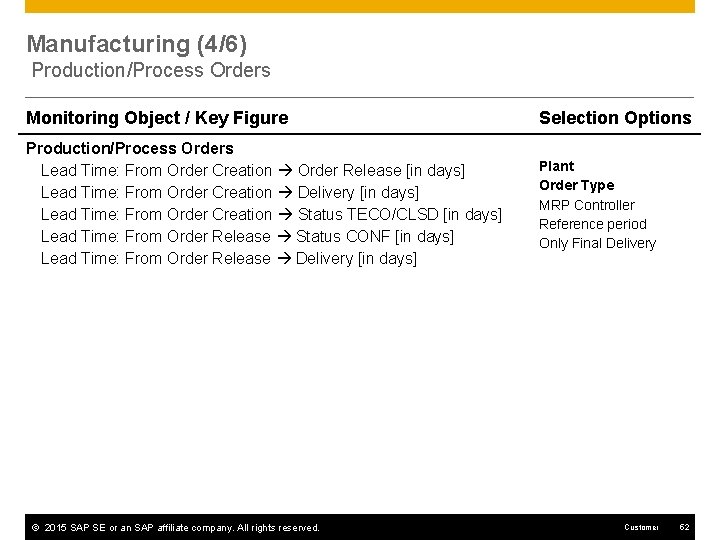
Manufacturing (4/6) Production/Process Orders Monitoring Object / Key Figure Selection Options Production/Process Orders Lead Time: From Order Creation Order Release [in days] Lead Time: From Order Creation Delivery [in days] Lead Time: From Order Creation Status TECO/CLSD [in days] Lead Time: From Order Release Status CONF [in days] Lead Time: From Order Release Delivery [in days] Plant Order Type MRP Controller Reference period Only Final Delivery © 2015 SAP SE or an SAP affiliate company. All rights reserved. Customer 52
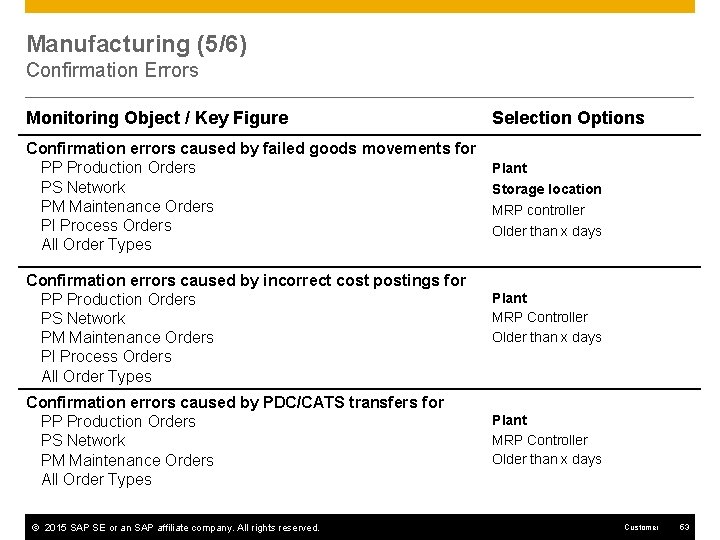
Manufacturing (5/6) Confirmation Errors Monitoring Object / Key Figure Confirmation errors caused by failed goods movements for PP Production Orders PS Network PM Maintenance Orders PI Process Orders All Order Types Confirmation errors caused by incorrect cost postings for PP Production Orders PS Network PM Maintenance Orders PI Process Orders All Order Types Confirmation errors caused by PDC/CATS transfers for PP Production Orders PS Network PM Maintenance Orders All Order Types © 2015 SAP SE or an SAP affiliate company. All rights reserved. Selection Options Plant Storage location MRP controller Older than x days Plant MRP Controller Older than x days Customer 53
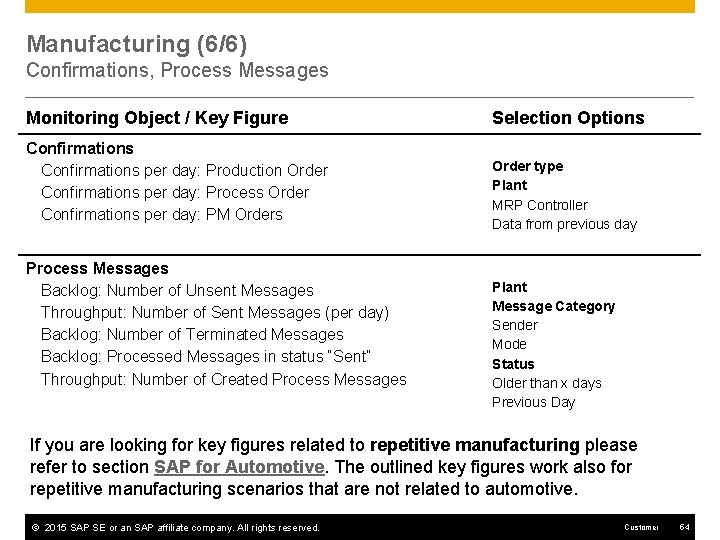
Manufacturing (6/6) Confirmations, Process Messages Monitoring Object / Key Figure Confirmations per day: Production Order Confirmations per day: Process Order Confirmations per day: PM Orders Process Messages Backlog: Number of Unsent Messages Throughput: Number of Sent Messages (per day) Backlog: Number of Terminated Messages Backlog: Processed Messages in status “Sent” Throughput: Number of Created Process Messages Selection Options Order type Plant MRP Controller Data from previous day Plant Message Category Sender Mode Status Older than x days Previous Day If you are looking for key figures related to repetitive manufacturing please refer to section SAP for Automotive. The outlined key figures work also for repetitive manufacturing scenarios that are not related to automotive. © 2015 SAP SE or an SAP affiliate company. All rights reserved. Customer 54
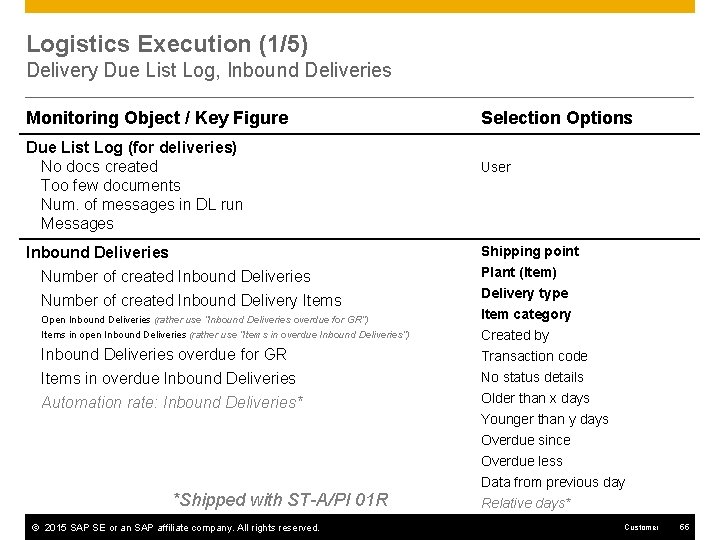
Logistics Execution (1/5) Delivery Due List Log, Inbound Deliveries Monitoring Object / Key Figure Due List Log (for deliveries) No docs created Too few documents Num. of messages in DL run Messages Inbound Deliveries Number of created Inbound Delivery Items Open Inbound Deliveries (rather use “Inbound Deliveries overdue for GR”) Items in open Inbound Deliveries (rather use “Items in overdue Inbound Deliveries”) Inbound Deliveries overdue for GR Items in overdue Inbound Deliveries Automation rate: Inbound Deliveries* *Shipped with ST-A/PI 01 R © 2015 SAP SE or an SAP affiliate company. All rights reserved. Selection Options User Shipping point Plant (Item) Delivery type Item category Created by Transaction code No status details Older than x days Younger than y days Overdue since Overdue less Data from previous day Relative days* Customer 55
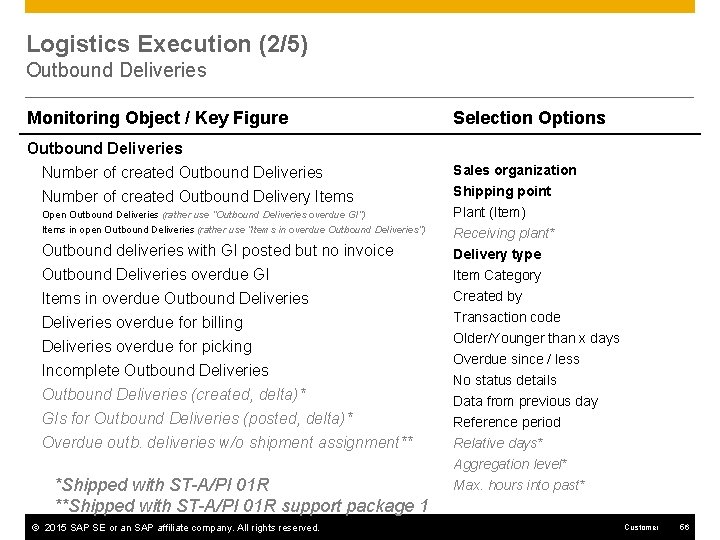
Logistics Execution (2/5) Outbound Deliveries Monitoring Object / Key Figure Selection Options Outbound Deliveries Number of created Outbound Delivery Items Sales organization Open Outbound Deliveries (rather use “Outbound Deliveries overdue GI”) Items in open Outbound Deliveries (rather use “Items in overdue Outbound Deliveries”) Outbound deliveries with GI posted but no invoice Outbound Deliveries overdue GI Items in overdue Outbound Deliveries overdue for billing Deliveries overdue for picking Incomplete Outbound Deliveries (created, delta)* GIs for Outbound Deliveries (posted, delta)* Overdue outb. deliveries w/o shipment assignment** *Shipped with ST-A/PI 01 R **Shipped with ST-A/PI 01 R support package 1 © 2015 SAP SE or an SAP affiliate company. All rights reserved. Shipping point Plant (Item) Receiving plant* Delivery type Item Category Created by Transaction code Older/Younger than x days Overdue since / less No status details Data from previous day Reference period Relative days* Aggregation level* Max. hours into past* Customer 56
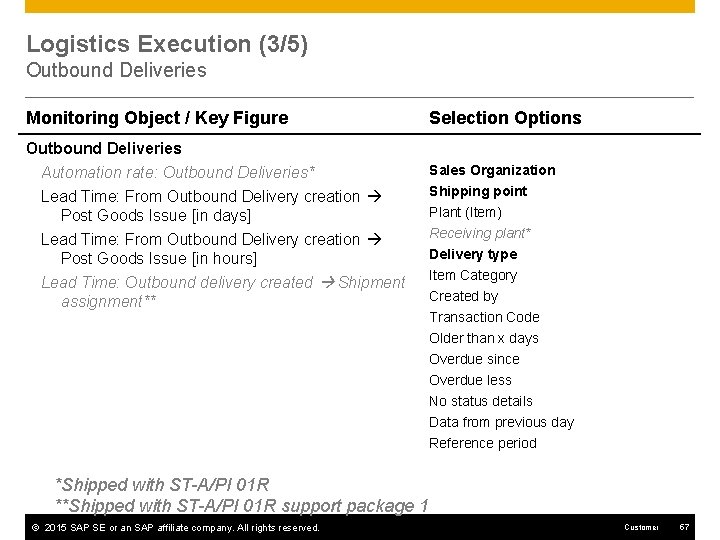
Logistics Execution (3/5) Outbound Deliveries Monitoring Object / Key Figure Outbound Deliveries Automation rate: Outbound Deliveries* Lead Time: From Outbound Delivery creation Post Goods Issue [in days] Lead Time: From Outbound Delivery creation Post Goods Issue [in hours] Lead Time: Outbound delivery created Shipment assignment** Selection Options Sales Organization Shipping point Plant (Item) Receiving plant* Delivery type Item Category Created by Transaction Code Older than x days Overdue since Overdue less No status details Data from previous day Reference period *Shipped with ST-A/PI 01 R **Shipped with ST-A/PI 01 R support package 1 © 2015 SAP SE or an SAP affiliate company. All rights reserved. Customer 57
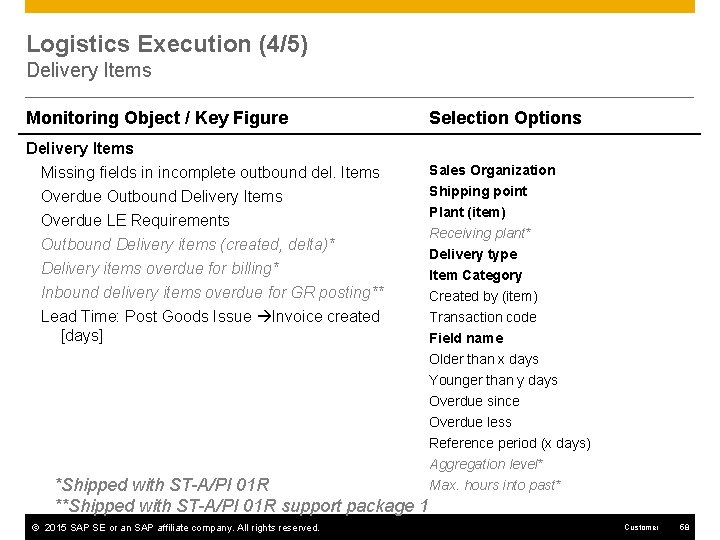
Logistics Execution (4/5) Delivery Items Monitoring Object / Key Figure Selection Options Delivery Items Missing fields in incomplete outbound del. Items Overdue Outbound Delivery Items Sales Organization Overdue LE Requirements Outbound Delivery items (created, delta)* Delivery items overdue for billing* Inbound delivery items overdue for GR posting** Lead Time: Post Goods Issue Invoice created [days] Shipping point Plant (item) Receiving plant* Delivery type Item Category Created by (item) Transaction code Field name Older than x days Younger than y days Overdue since Overdue less Reference period (x days) Aggregation level* Max. hours into past* *Shipped with ST-A/PI 01 R **Shipped with ST-A/PI 01 R support package 1 © 2015 SAP SE or an SAP affiliate company. All rights reserved. Customer 58
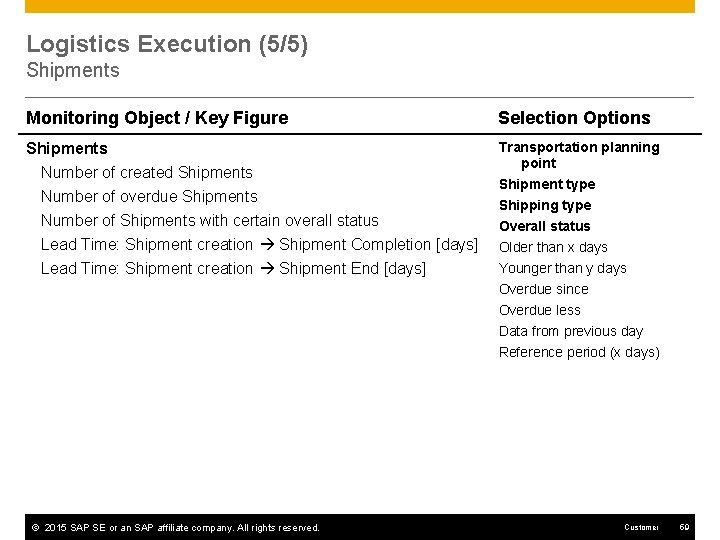
Logistics Execution (5/5) Shipments Monitoring Object / Key Figure Selection Options Shipments Number of created Shipments Number of overdue Shipments Transportation planning point Number of Shipments with certain overall status Lead Time: Shipment creation Shipment Completion [days] Lead Time: Shipment creation Shipment End [days] © 2015 SAP SE or an SAP affiliate company. All rights reserved. Shipment type Shipping type Overall status Older than x days Younger than y days Overdue since Overdue less Data from previous day Reference period (x days) Customer 59
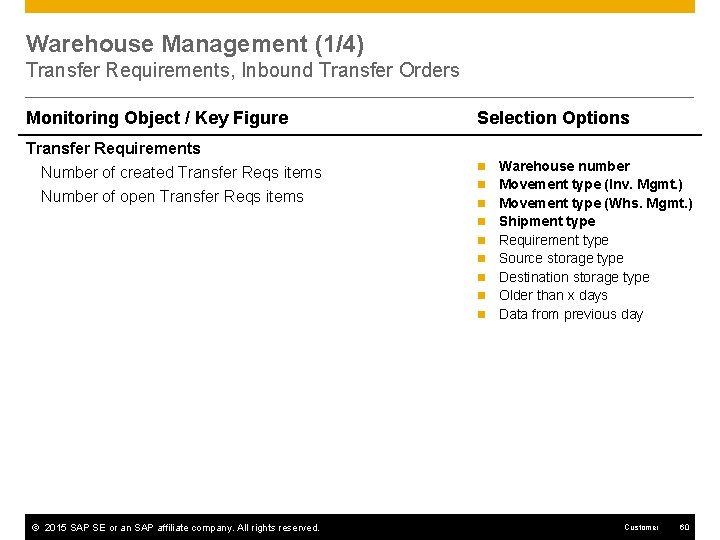
Warehouse Management (1/4) Transfer Requirements, Inbound Transfer Orders Monitoring Object / Key Figure Transfer Requirements Number of created Transfer Reqs items Number of open Transfer Reqs items Selection Options n n n n n © 2015 SAP SE or an SAP affiliate company. All rights reserved. Warehouse number Movement type (Inv. Mgmt. ) Movement type (Whs. Mgmt. ) Shipment type Requirement type Source storage type Destination storage type Older than x days Data from previous day Customer 60
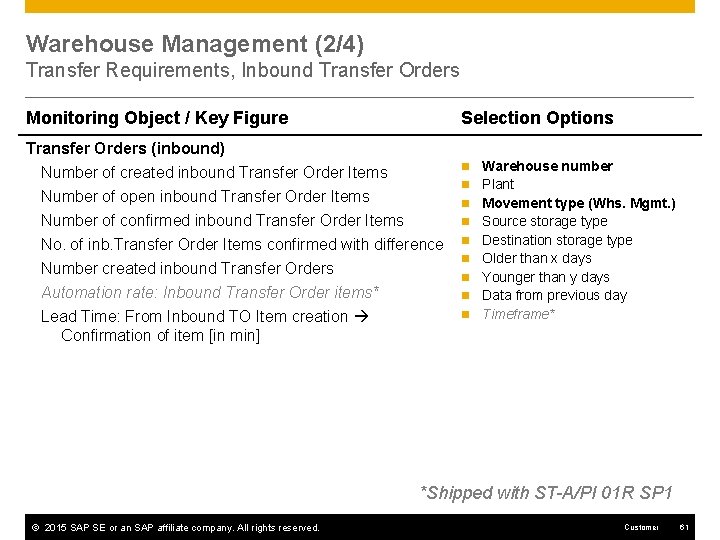
Warehouse Management (2/4) Transfer Requirements, Inbound Transfer Orders Monitoring Object / Key Figure Selection Options Transfer Orders (inbound) Number of created inbound Transfer Order Items Number of open inbound Transfer Order Items n n n Number of confirmed inbound Transfer Order Items n No. of inb. Transfer Order Items confirmed with difference n Number created inbound Transfer Orders Automation rate: Inbound Transfer Order items* Lead Time: From Inbound TO Item creation Confirmation of item [in min] n n Warehouse number Plant Movement type (Whs. Mgmt. ) Source storage type Destination storage type Older than x days Younger than y days Data from previous day Timeframe* *Shipped with ST-A/PI 01 R SP 1 © 2015 SAP SE or an SAP affiliate company. All rights reserved. Customer 61
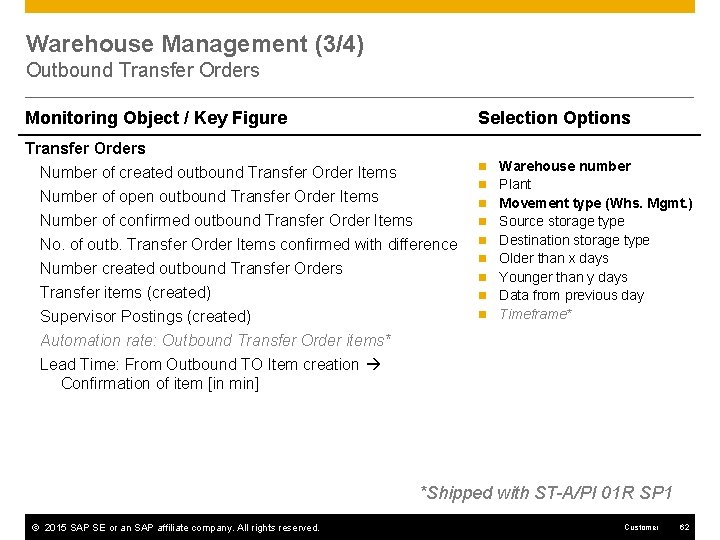
Warehouse Management (3/4) Outbound Transfer Orders Monitoring Object / Key Figure Selection Options Transfer Orders Number of created outbound Transfer Order Items Number of open outbound Transfer Order Items n n n Number of confirmed outbound Transfer Order Items n No. of outb. Transfer Order Items confirmed with difference n Number created outbound Transfer Orders Transfer items (created) Supervisor Postings (created) Automation rate: Outbound Transfer Order items* Lead Time: From Outbound TO Item creation Confirmation of item [in min] n n Warehouse number Plant Movement type (Whs. Mgmt. ) Source storage type Destination storage type Older than x days Younger than y days Data from previous day Timeframe* *Shipped with ST-A/PI 01 R SP 1 © 2015 SAP SE or an SAP affiliate company. All rights reserved. Customer 62
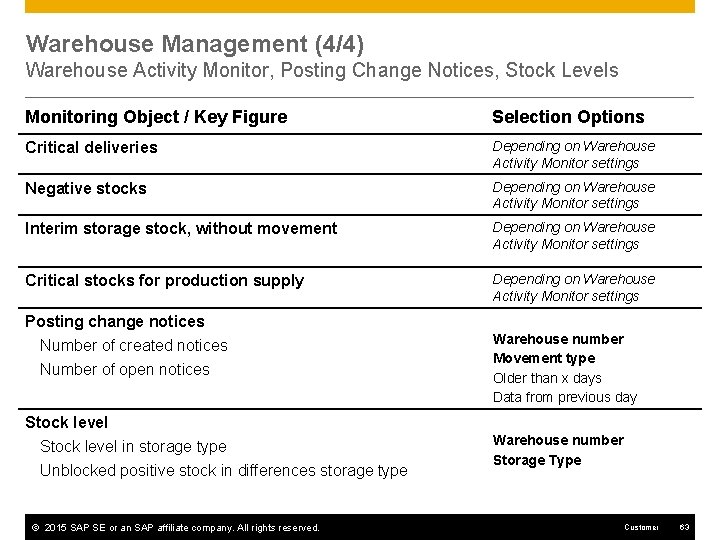
Warehouse Management (4/4) Warehouse Activity Monitor, Posting Change Notices, Stock Levels Monitoring Object / Key Figure Selection Options Critical deliveries Depending on Warehouse Activity Monitor settings Negative stocks Depending on Warehouse Activity Monitor settings Interim storage stock, without movement Depending on Warehouse Activity Monitor settings Critical stocks for production supply Depending on Warehouse Activity Monitor settings Posting change notices Number of created notices Number of open notices Stock level in storage type Unblocked positive stock in differences storage type © 2015 SAP SE or an SAP affiliate company. All rights reserved. Warehouse number Movement type Older than x days Data from previous day Warehouse number Storage Type Customer 63
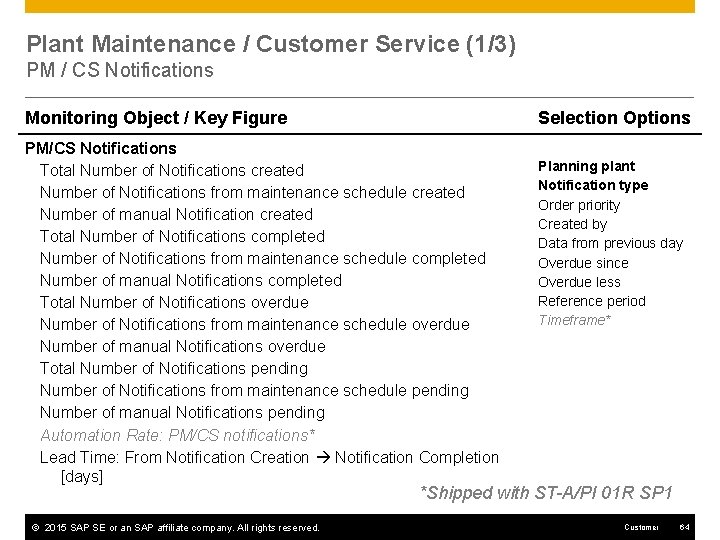
Plant Maintenance / Customer Service (1/3) PM / CS Notifications Monitoring Object / Key Figure Selection Options PM/CS Notifications Total Number of Notifications created Number of Notifications from maintenance schedule created Number of manual Notification created Total Number of Notifications completed Number of Notifications from maintenance schedule completed Number of manual Notifications completed Total Number of Notifications overdue Number of Notifications from maintenance schedule overdue Number of manual Notifications overdue Total Number of Notifications pending Number of Notifications from maintenance schedule pending Number of manual Notifications pending Automation Rate: PM/CS notifications* Lead Time: From Notification Creation Notification Completion [days] Planning plant Notification type Order priority Created by Data from previous day Overdue since Overdue less Reference period Timeframe* *Shipped with ST-A/PI 01 R SP 1 © 2015 SAP SE or an SAP affiliate company. All rights reserved. Customer 64
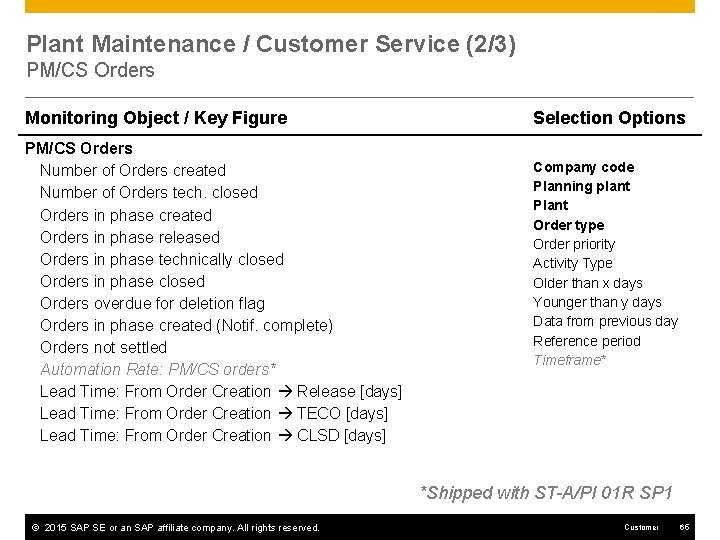
Plant Maintenance / Customer Service (2/3) PM/CS Orders Monitoring Object / Key Figure PM/CS Orders Number of Orders created Number of Orders tech. closed Orders in phase created Orders in phase released Orders in phase technically closed Orders in phase closed Orders overdue for deletion flag Orders in phase created (Notif. complete) Orders not settled Automation Rate: PM/CS orders* Lead Time: From Order Creation Release [days] Lead Time: From Order Creation TECO [days] Lead Time: From Order Creation CLSD [days] Selection Options Company code Planning plant Plant Order type Order priority Activity Type Older than x days Younger than y days Data from previous day Reference period Timeframe* *Shipped with ST-A/PI 01 R SP 1 © 2015 SAP SE or an SAP affiliate company. All rights reserved. Customer 65
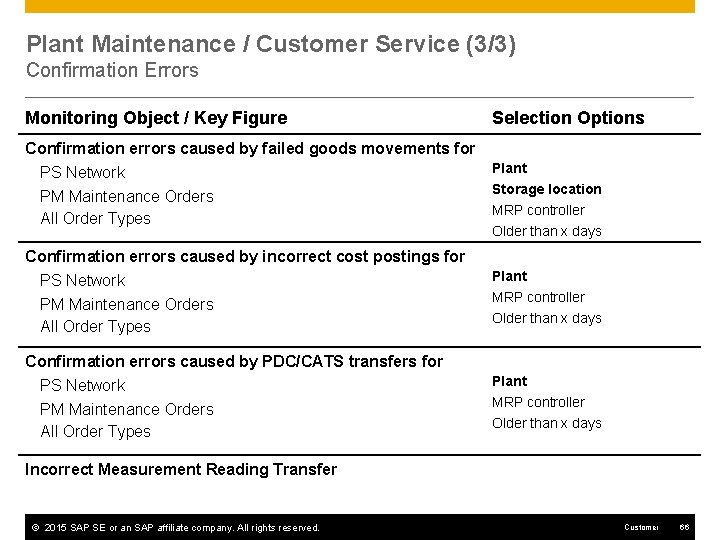
Plant Maintenance / Customer Service (3/3) Confirmation Errors Monitoring Object / Key Figure Confirmation errors caused by failed goods movements for PS Network PM Maintenance Orders All Order Types Confirmation errors caused by incorrect cost postings for PS Network PM Maintenance Orders All Order Types Confirmation errors caused by PDC/CATS transfers for PS Network PM Maintenance Orders All Order Types Selection Options Plant Storage location MRP controller Older than x days Plant MRP controller Older than x days Incorrect Measurement Reading Transfer © 2015 SAP SE or an SAP affiliate company. All rights reserved. Customer 66
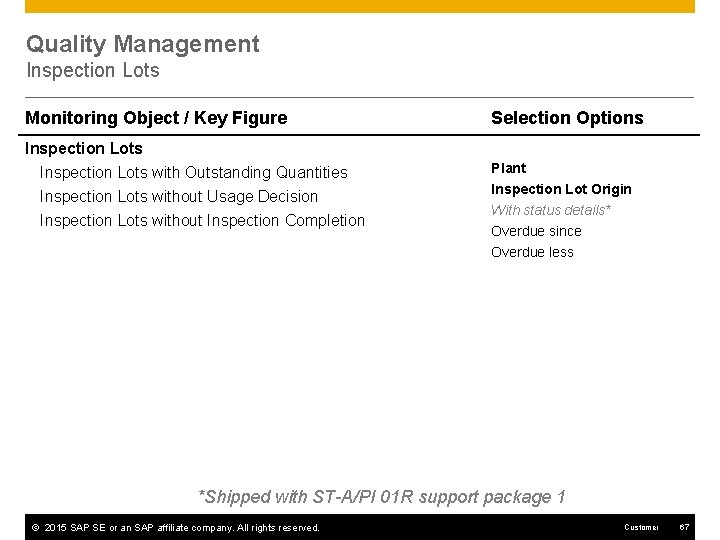
Quality Management Inspection Lots Monitoring Object / Key Figure Selection Options Inspection Lots with Outstanding Quantities Inspection Lots without Usage Decision Plant Inspection Lots without Inspection Completion Inspection Lot Origin With status details* Overdue since Overdue less *Shipped with ST-A/PI 01 R support package 1 © 2015 SAP SE or an SAP affiliate company. All rights reserved. Customer 67
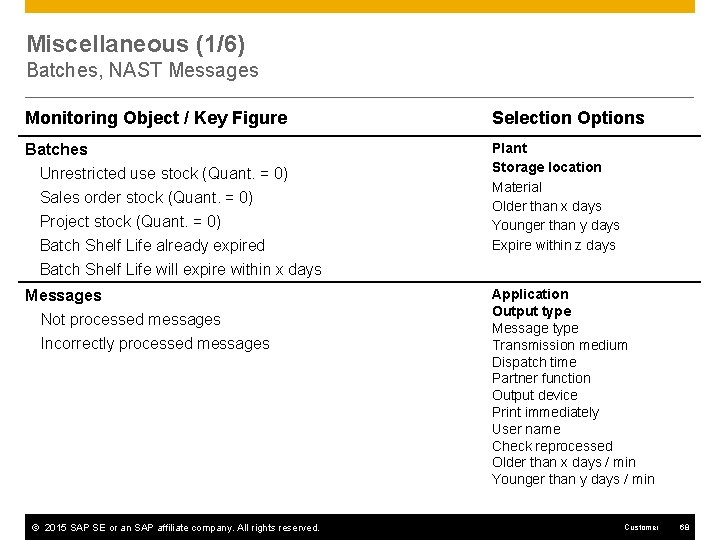
Miscellaneous (1/6) Batches, NAST Messages Monitoring Object / Key Figure Selection Options Batches Unrestricted use stock (Quant. = 0) Sales order stock (Quant. = 0) Plant Storage location Material Older than x days Younger than y days Expire within z days Project stock (Quant. = 0) Batch Shelf Life already expired Batch Shelf Life will expire within x days Messages Not processed messages Incorrectly processed messages © 2015 SAP SE or an SAP affiliate company. All rights reserved. Application Output type Message type Transmission medium Dispatch time Partner function Output device Print immediately User name Check reprocessed Older than x days / min Younger than y days / min Customer 68
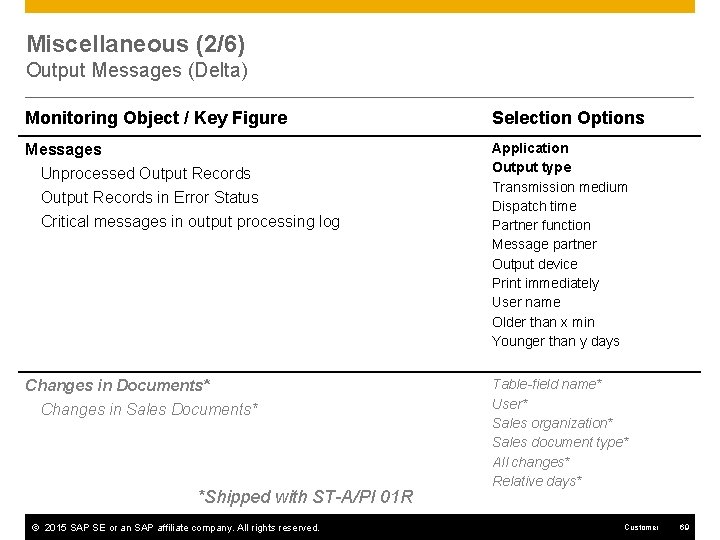
Miscellaneous (2/6) Output Messages (Delta) Monitoring Object / Key Figure Selection Options Messages Unprocessed Output Records in Error Status Application Output type Transmission medium Dispatch time Partner function Message partner Output device Print immediately User name Older than x min Younger than y days Critical messages in output processing log Changes in Documents* Changes in Sales Documents* *Shipped with ST-A/PI 01 R © 2015 SAP SE or an SAP affiliate company. All rights reserved. Table-field name* User* Sales organization* Sales document type* All changes* Relative days* Customer 69
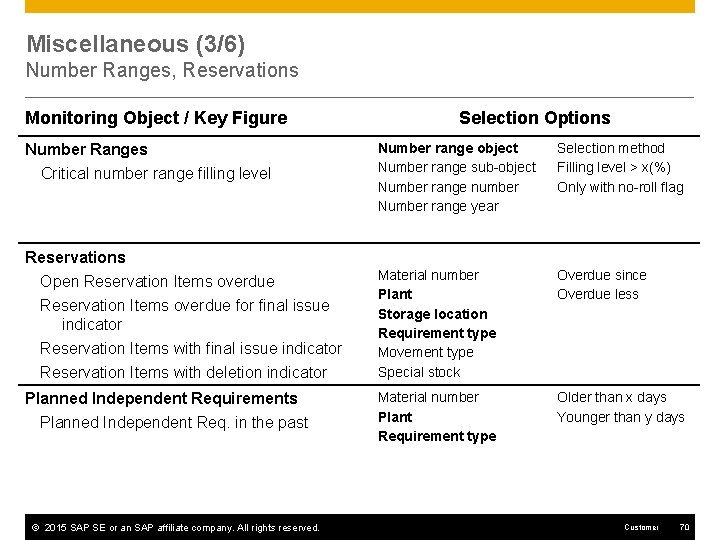
Miscellaneous (3/6) Number Ranges, Reservations Monitoring Object / Key Figure Number Ranges Critical number range filling level Reservations Open Reservation Items overdue for final issue indicator Reservation Items with deletion indicator Planned Independent Requirements Planned Independent Req. in the past © 2015 SAP SE or an SAP affiliate company. All rights reserved. Selection Options Number range object Number range sub-object Number range number Number range year Selection method Filling level > x(%) Only with no-roll flag Material number Plant Storage location Requirement type Movement type Special stock Overdue since Overdue less Material number Plant Requirement type Older than x days Younger than y days Customer 70
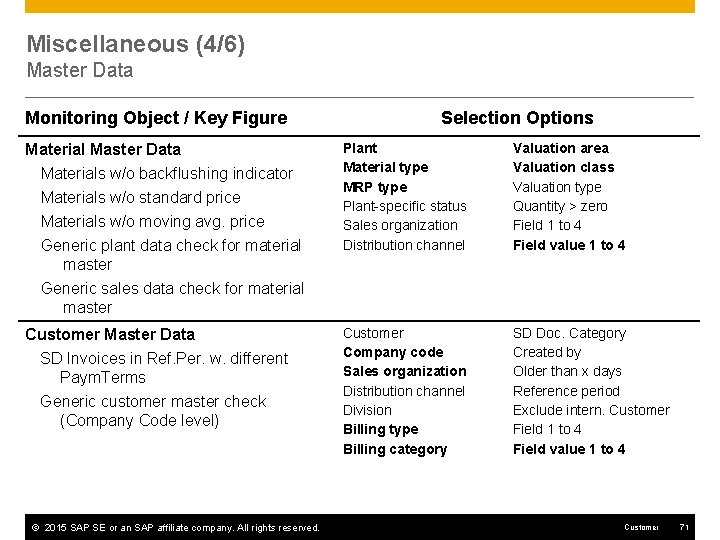
Miscellaneous (4/6) Master Data Monitoring Object / Key Figure Material Master Data Materials w/o backflushing indicator Materials w/o standard price Materials w/o moving avg. price Generic plant data check for material master Generic sales data check for material master Customer Master Data SD Invoices in Ref. Per. w. different Paym. Terms Generic customer master check (Company Code level) © 2015 SAP SE or an SAP affiliate company. All rights reserved. Selection Options Plant Material type MRP type Plant-specific status Sales organization Distribution channel Valuation area Valuation class Valuation type Quantity > zero Field 1 to 4 Field value 1 to 4 Customer Company code Sales organization Distribution channel Division Billing type Billing category SD Doc. Category Created by Older than x days Reference period Exclude intern. Customer Field 1 to 4 Field value 1 to 4 Customer 71
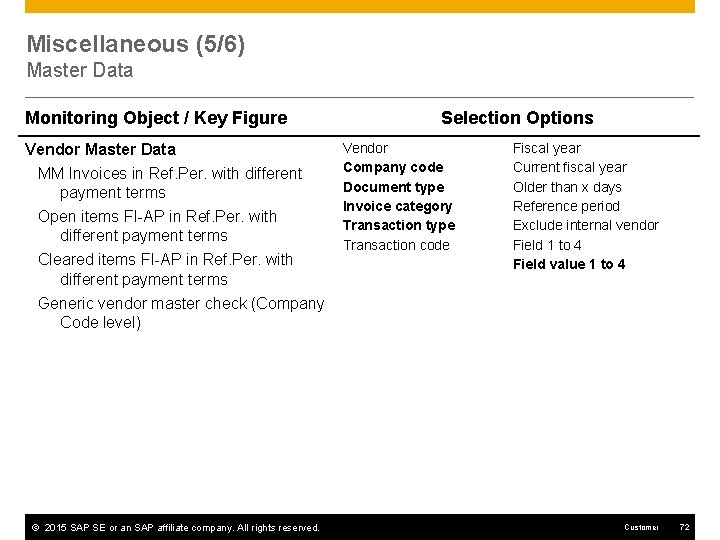
Miscellaneous (5/6) Master Data Monitoring Object / Key Figure Vendor Master Data MM Invoices in Ref. Per. with different payment terms Open items FI-AP in Ref. Per. with different payment terms Cleared items FI-AP in Ref. Per. with different payment terms Generic vendor master check (Company Code level) © 2015 SAP SE or an SAP affiliate company. All rights reserved. Selection Options Vendor Company code Document type Invoice category Transaction type Transaction code Fiscal year Current fiscal year Older than x days Reference period Exclude internal vendor Field 1 to 4 Field value 1 to 4 Customer 72
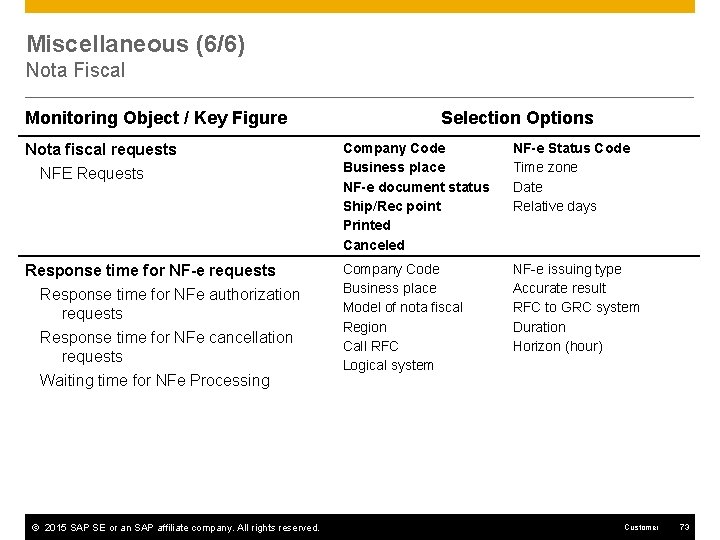
Miscellaneous (6/6) Nota Fiscal Monitoring Object / Key Figure Selection Options Nota fiscal requests NFE Requests Company Code Business place NF-e document status Ship/Rec point Printed Canceled NF-e Status Code Time zone Date Relative days Response time for NF-e requests Response time for NFe authorization requests Company Code Business place Model of nota fiscal Region Call RFC Logical system NF-e issuing type Accurate result RFC to GRC system Duration Horizon (hour) Response time for NFe cancellation requests Waiting time for NFe Processing © 2015 SAP SE or an SAP affiliate company. All rights reserved. Customer 73
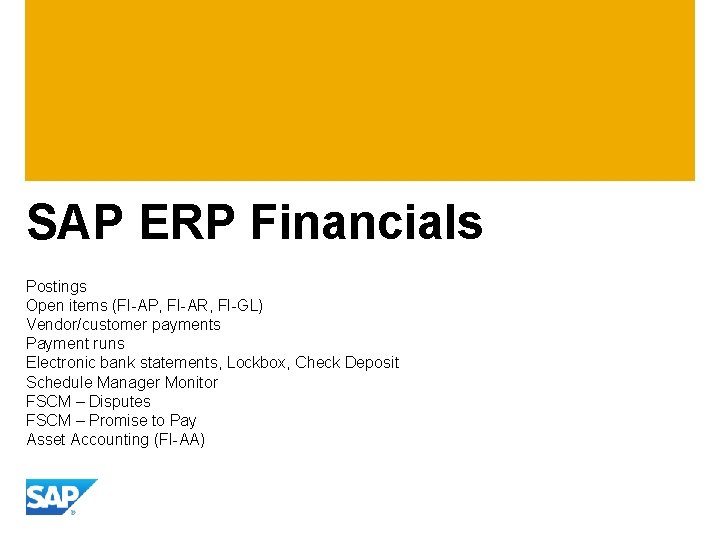
SAP ERP Financials Postings Open items (FI-AP, FI-AR, FI-GL) Vendor/customer payments Payment runs Electronic bank statements, Lockbox, Check Deposit Schedule Manager Monitor FSCM – Disputes FSCM – Promise to Pay Asset Accounting (FI-AA)
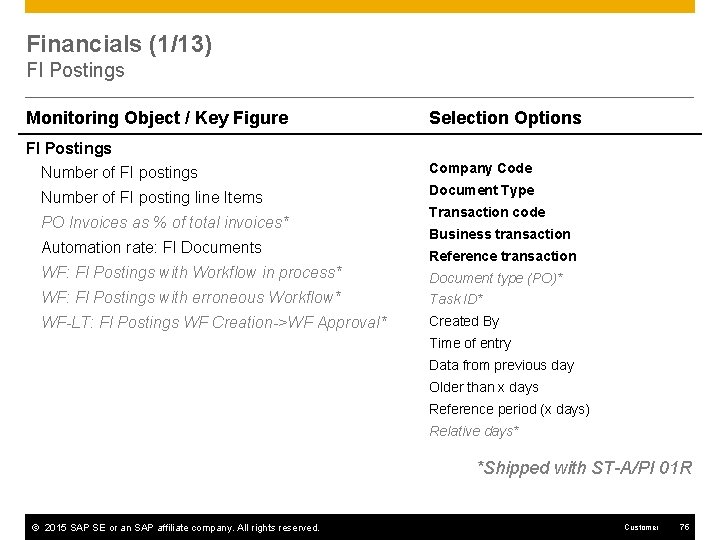
Financials (1/13) FI Postings Monitoring Object / Key Figure Selection Options FI Postings Number of FI postings Company Code Number of FI posting line Items Document Type PO Invoices as % of total invoices* Automation rate: FI Documents Transaction code Business transaction Reference transaction WF: FI Postings with Workflow in process* Document type (PO)* WF: FI Postings with erroneous Workflow* Task ID* WF-LT: FI Postings WF Creation->WF Approval* Created By Time of entry Data from previous day Older than x days Reference period (x days) Relative days* *Shipped with ST-A/PI 01 R © 2015 SAP SE or an SAP affiliate company. All rights reserved. Customer 75
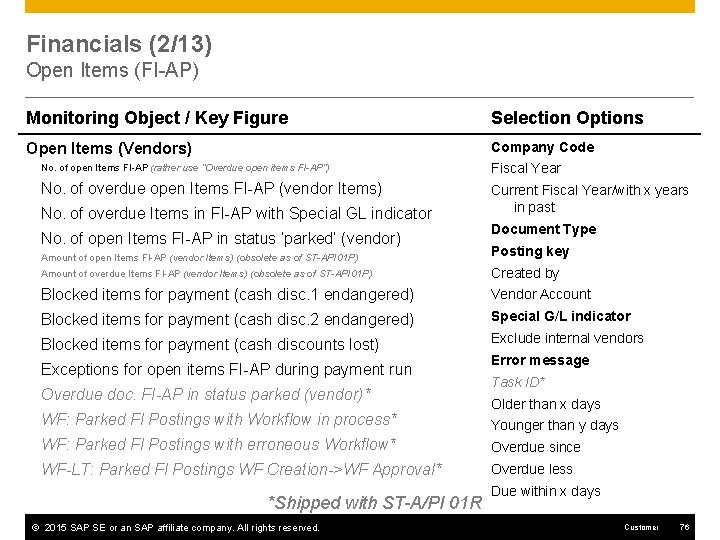
Financials (2/13) Open Items (FI-AP) Monitoring Object / Key Figure Selection Options Open Items (Vendors) Company Code No. of open Items FI-AP (rather use “Overdue open items FI-AP”) Fiscal Year No. of overdue open Items FI-AP (vendor Items) Current Fiscal Year/with x years in past No. of overdue Items in FI-AP with Special GL indicator No. of open Items FI-AP in status ‘parked’ (vendor) Document Type Amount of open Items FI-AP (vendor Items) (obsolete as of ST-API 01 P) Posting key Amount of overdue Items FI-AP (vendor Items) (obsolete as of ST-API 01 P) Created by Blocked items for payment (cash disc. 1 endangered) Vendor Account Blocked items for payment (cash disc. 2 endangered) Special G/L indicator Blocked items for payment (cash discounts lost) Exclude internal vendors Exceptions for open items FI-AP during payment run Overdue doc. FI-AP in status parked (vendor)* WF: Parked FI Postings with Workflow in process* Error message Task ID* Older than x days Younger than y days WF: Parked FI Postings with erroneous Workflow* Overdue since WF-LT: Parked FI Postings WF Creation->WF Approval* Overdue less *Shipped with ST-A/PI 01 R © 2015 SAP SE or an SAP affiliate company. All rights reserved. Due within x days Customer 76
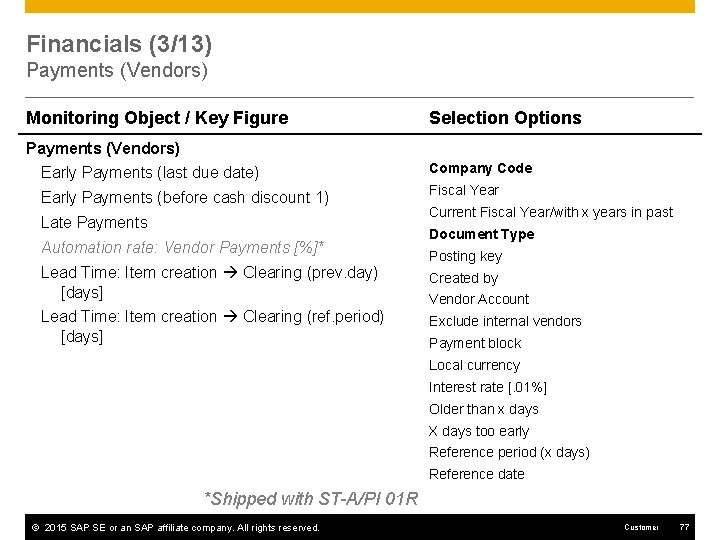
Financials (3/13) Payments (Vendors) Monitoring Object / Key Figure Selection Options Payments (Vendors) Early Payments (last due date) Company Code Early Payments (before cash discount 1) Fiscal Year Late Payments Automation rate: Vendor Payments [%]* Current Fiscal Year/with x years in past Document Type Posting key Lead Time: Item creation Clearing (prev. day) [days] Created by Lead Time: Item creation Clearing (ref. period) [days] Exclude internal vendors Vendor Account Payment block Local currency Interest rate [. 01%] Older than x days X days too early Reference period (x days) Reference date *Shipped with ST-A/PI 01 R © 2015 SAP SE or an SAP affiliate company. All rights reserved. Customer 77
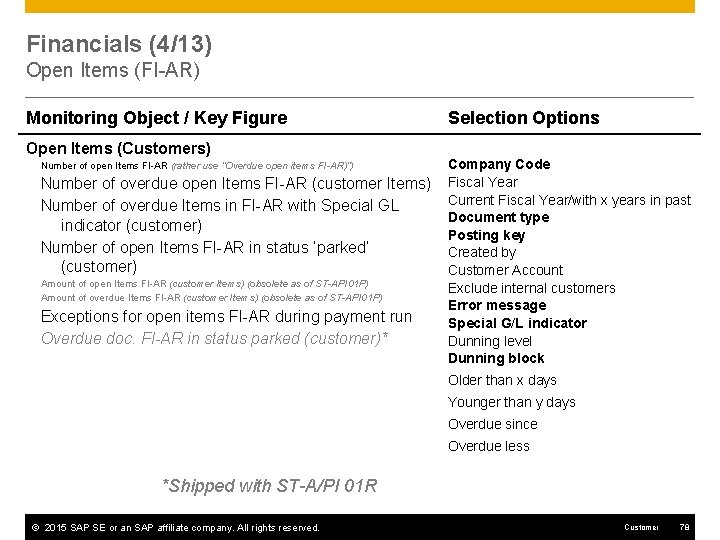
Financials (4/13) Open Items (FI-AR) Monitoring Object / Key Figure Open Items (Customers) Number of open Items FI-AR (rather use “Overdue open items FI-AR)”) Number of overdue open Items FI-AR (customer Items) Number of overdue Items in FI-AR with Special GL indicator (customer) Number of open Items FI-AR in status ‘parked’ (customer) Amount of open Items FI-AR (customer Items) (obsolete as of ST-API 01 P) Amount of overdue Items FI-AR (customer Items) (obsolete as of ST-API 01 P) Exceptions for open items FI-AR during payment run Overdue doc. FI-AR in status parked (customer)* Selection Options Company Code Fiscal Year Current Fiscal Year/with x years in past Document type Posting key Created by Customer Account Exclude internal customers Error message Special G/L indicator Dunning level Dunning block Older than x days Younger than y days Overdue since Overdue less *Shipped with ST-A/PI 01 R © 2015 SAP SE or an SAP affiliate company. All rights reserved. Customer 78
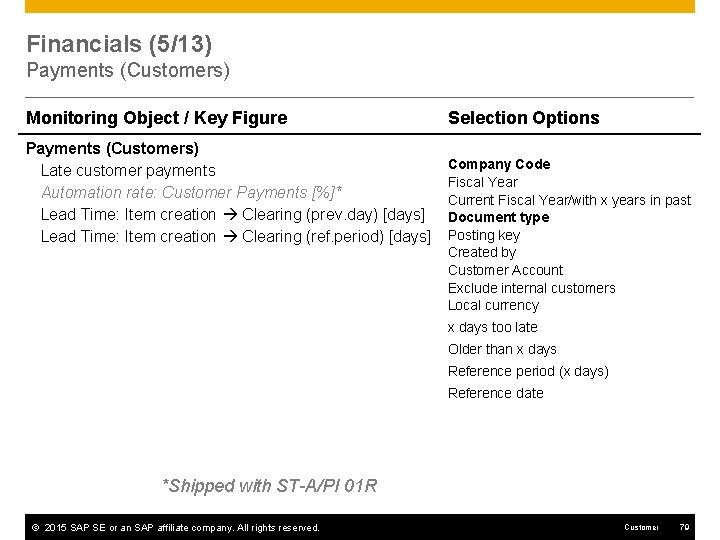
Financials (5/13) Payments (Customers) Monitoring Object / Key Figure Payments (Customers) Late customer payments Automation rate: Customer Payments [%]* Lead Time: Item creation Clearing (prev. day) [days] Lead Time: Item creation Clearing (ref. period) [days] Selection Options Company Code Fiscal Year Current Fiscal Year/with x years in past Document type Posting key Created by Customer Account Exclude internal customers Local currency x days too late Older than x days Reference period (x days) Reference date *Shipped with ST-A/PI 01 R © 2015 SAP SE or an SAP affiliate company. All rights reserved. Customer 79
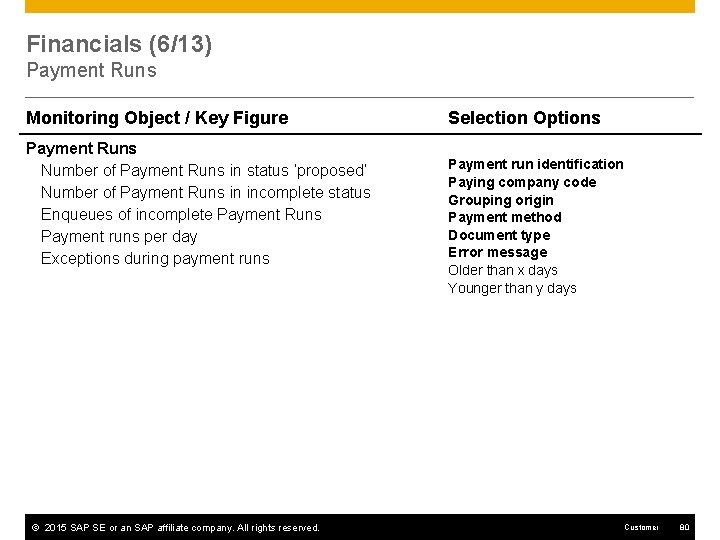
Financials (6/13) Payment Runs Monitoring Object / Key Figure Payment Runs Number of Payment Runs in status ‘proposed’ Number of Payment Runs in incomplete status Enqueues of incomplete Payment Runs Payment runs per day Exceptions during payment runs © 2015 SAP SE or an SAP affiliate company. All rights reserved. Selection Options Payment run identification Paying company code Grouping origin Payment method Document type Error message Older than x days Younger than y days Customer 80
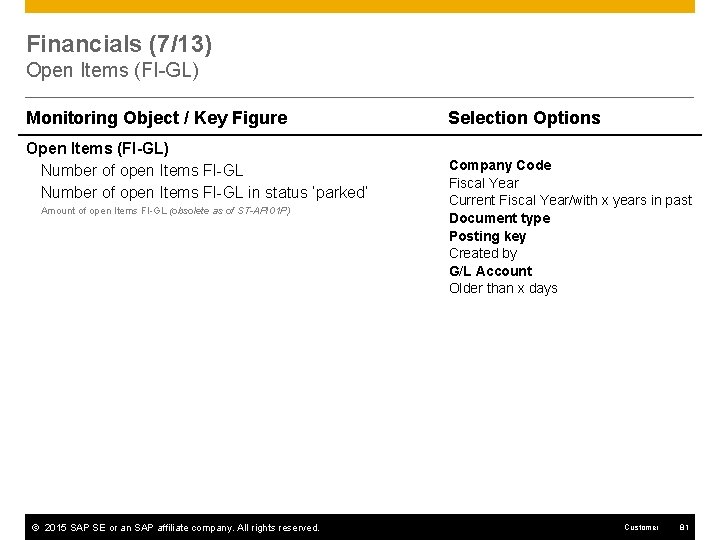
Financials (7/13) Open Items (FI-GL) Monitoring Object / Key Figure Open Items (FI-GL) Number of open Items FI-GL in status ‘parked’ Amount of open Items FI-GL (obsolete as of ST-API 01 P) © 2015 SAP SE or an SAP affiliate company. All rights reserved. Selection Options Company Code Fiscal Year Current Fiscal Year/with x years in past Document type Posting key Created by G/L Account Older than x days Customer 81
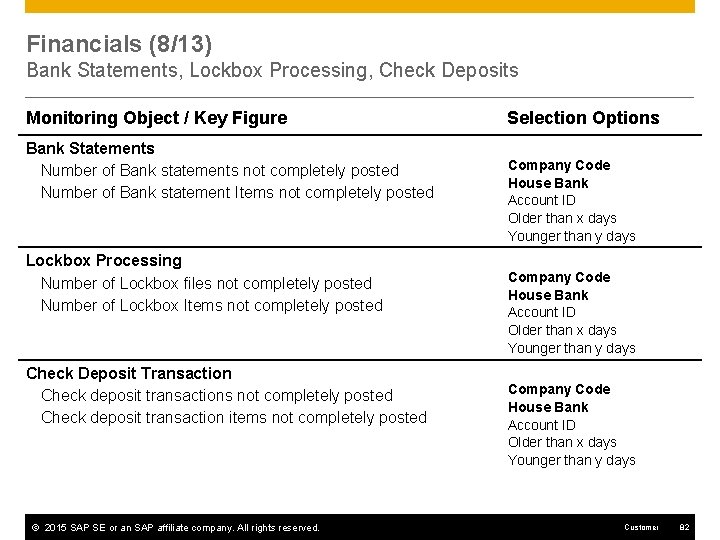
Financials (8/13) Bank Statements, Lockbox Processing, Check Deposits Monitoring Object / Key Figure Bank Statements Number of Bank statements not completely posted Number of Bank statement Items not completely posted Lockbox Processing Number of Lockbox files not completely posted Number of Lockbox Items not completely posted Check Deposit Transaction Check deposit transactions not completely posted Check deposit transaction items not completely posted © 2015 SAP SE or an SAP affiliate company. All rights reserved. Selection Options Company Code House Bank Account ID Older than x days Younger than y days Customer 82
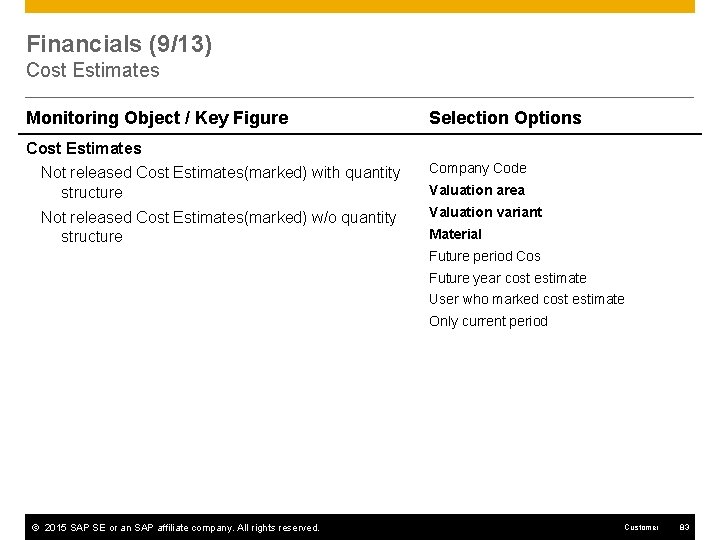
Financials (9/13) Cost Estimates Monitoring Object / Key Figure Selection Options Cost Estimates Not released Cost Estimates(marked) with quantity structure Company Code Not released Cost Estimates(marked) w/o quantity structure Valuation variant Valuation area Material Future period Cos Future year cost estimate User who marked cost estimate Only current period © 2015 SAP SE or an SAP affiliate company. All rights reserved. Customer 83
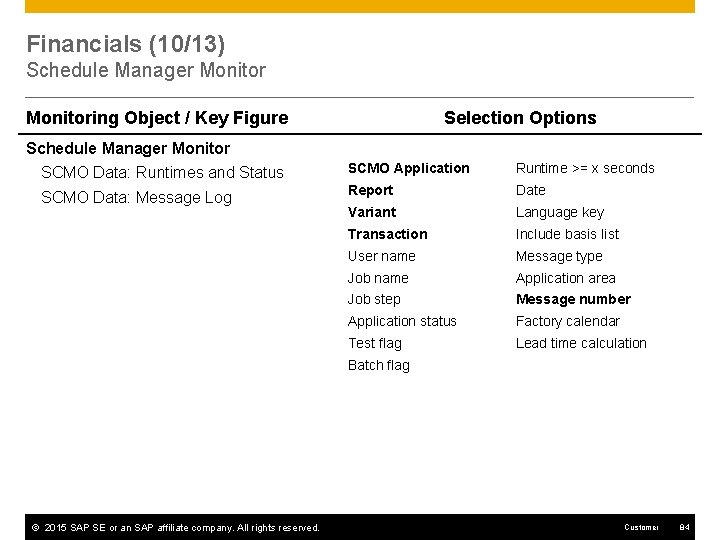
Financials (10/13) Schedule Manager Monitoring Object / Key Figure Selection Options Schedule Manager Monitor SCMO Data: Runtimes and Status SCMO Application Runtime >= x seconds SCMO Data: Message Log Report Date Variant Language key Transaction Include basis list User name Message type Job name Application area Job step Message number Application status Factory calendar Test flag Lead time calculation Batch flag © 2015 SAP SE or an SAP affiliate company. All rights reserved. Customer 84
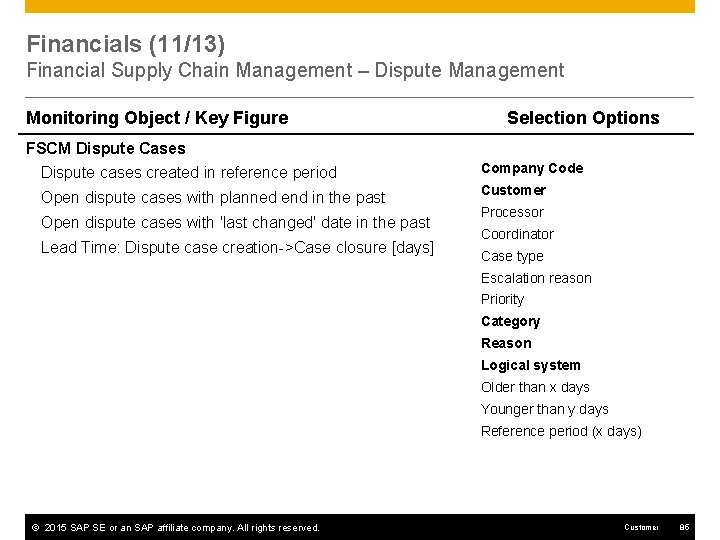
Financials (11/13) Financial Supply Chain Management – Dispute Management Monitoring Object / Key Figure Selection Options FSCM Dispute Cases Dispute cases created in reference period Company Code Open dispute cases with planned end in the past Customer Open dispute cases with 'last changed' date in the past Lead Time: Dispute case creation->Case closure [days] Processor Coordinator Case type Escalation reason Priority Category Reason Logical system Older than x days Younger than y days Reference period (x days) © 2015 SAP SE or an SAP affiliate company. All rights reserved. Customer 85
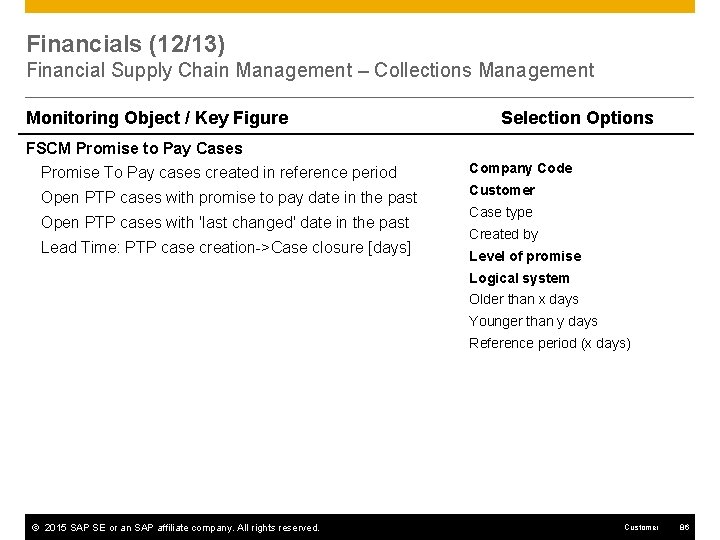
Financials (12/13) Financial Supply Chain Management – Collections Management Monitoring Object / Key Figure Selection Options FSCM Promise to Pay Cases Promise To Pay cases created in reference period Company Code Open PTP cases with promise to pay date in the past Customer Open PTP cases with 'last changed' date in the past Lead Time: PTP case creation->Case closure [days] Case type Created by Level of promise Logical system Older than x days Younger than y days Reference period (x days) © 2015 SAP SE or an SAP affiliate company. All rights reserved. Customer 86
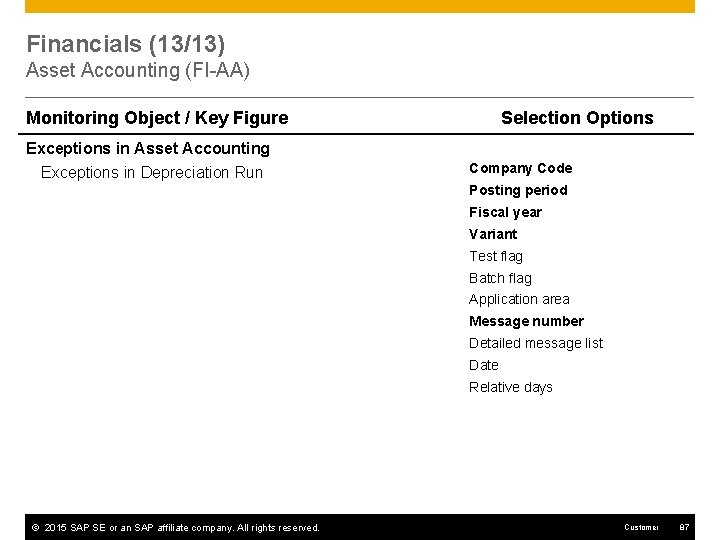
Financials (13/13) Asset Accounting (FI-AA) Monitoring Object / Key Figure Selection Options Exceptions in Asset Accounting Exceptions in Depreciation Run Company Code Posting period Fiscal year Variant Test flag Batch flag Application area Message number Detailed message list Date Relative days © 2015 SAP SE or an SAP affiliate company. All rights reserved. Customer 87
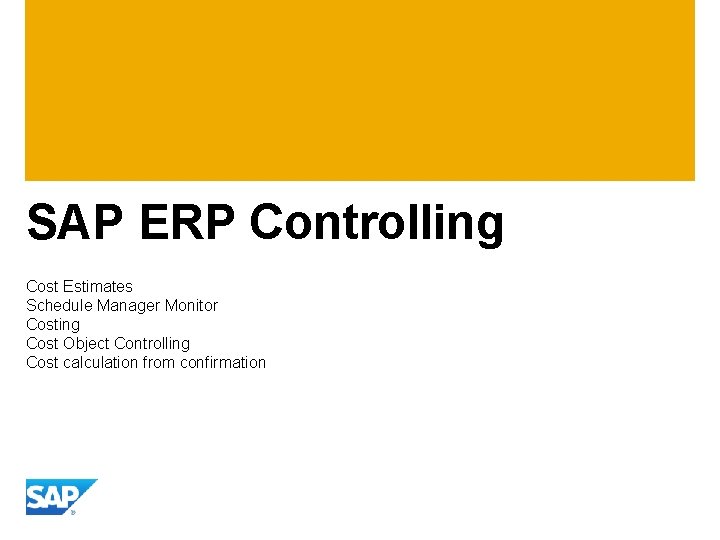
SAP ERP Controlling Cost Estimates Schedule Manager Monitor Costing Cost Object Controlling Cost calculation from confirmation
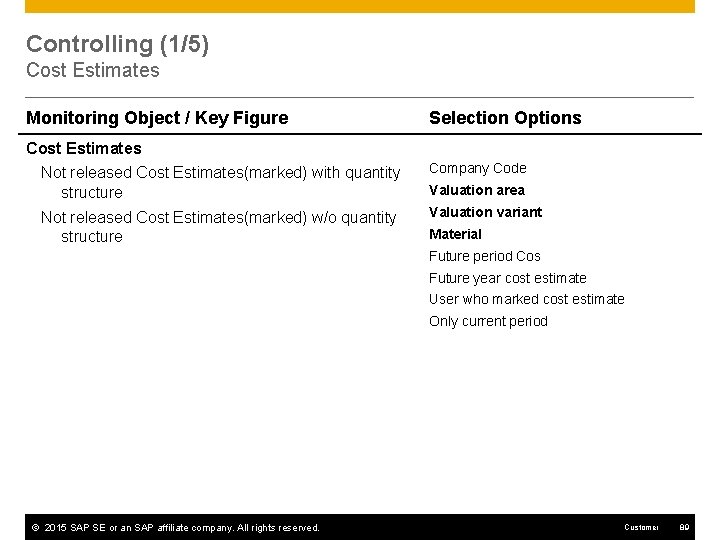
Controlling (1/5) Cost Estimates Monitoring Object / Key Figure Selection Options Cost Estimates Not released Cost Estimates(marked) with quantity structure Company Code Not released Cost Estimates(marked) w/o quantity structure Valuation variant Valuation area Material Future period Cos Future year cost estimate User who marked cost estimate Only current period © 2015 SAP SE or an SAP affiliate company. All rights reserved. Customer 89
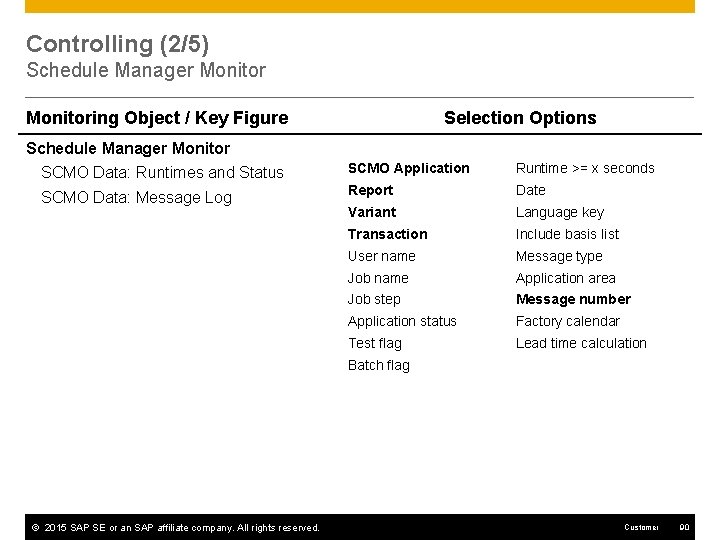
Controlling (2/5) Schedule Manager Monitoring Object / Key Figure Selection Options Schedule Manager Monitor SCMO Data: Runtimes and Status SCMO Application Runtime >= x seconds SCMO Data: Message Log Report Date Variant Language key Transaction Include basis list User name Message type Job name Application area Job step Message number Application status Factory calendar Test flag Lead time calculation Batch flag © 2015 SAP SE or an SAP affiliate company. All rights reserved. Customer 90
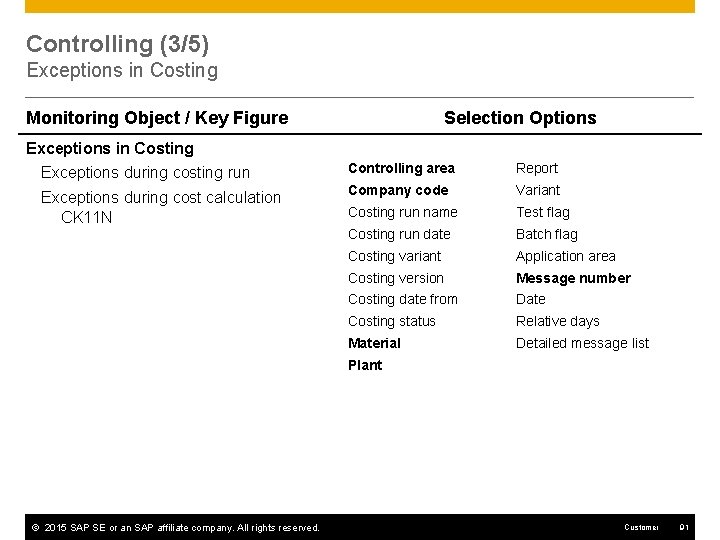
Controlling (3/5) Exceptions in Costing Monitoring Object / Key Figure Selection Options Exceptions in Costing Exceptions during costing run Controlling area Report Exceptions during cost calculation CK 11 N Company code Variant Costing run name Test flag Costing run date Batch flag Costing variant Application area Costing version Message number Costing date from Date Costing status Relative days Material Detailed message list Plant © 2015 SAP SE or an SAP affiliate company. All rights reserved. Customer 91
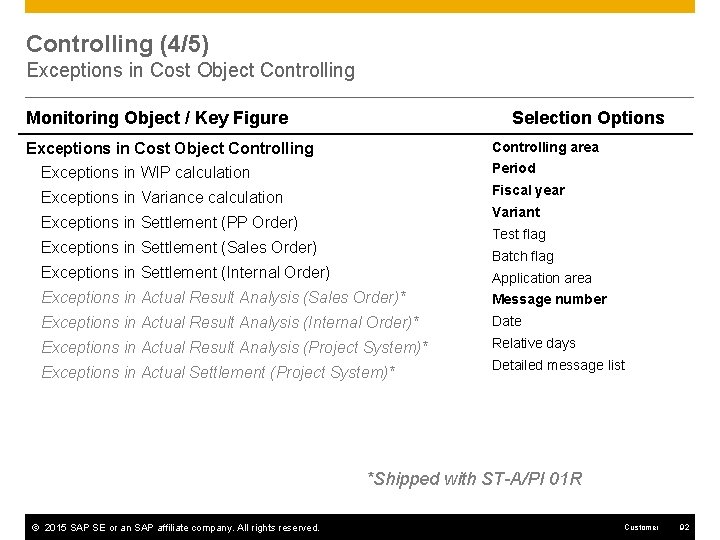
Controlling (4/5) Exceptions in Cost Object Controlling Monitoring Object / Key Figure Selection Options Controlling area Exceptions in Cost Object Controlling Exceptions in WIP calculation Period Exceptions in Variance calculation Fiscal year Variant Exceptions in Settlement (PP Order) Test flag Exceptions in Settlement (Sales Order) Batch flag Exceptions in Settlement (Internal Order) Application area Exceptions in Actual Result Analysis (Sales Order)* Message number Exceptions in Actual Result Analysis (Internal Order)* Date Exceptions in Actual Result Analysis (Project System)* Relative days Exceptions in Actual Settlement (Project System)* Detailed message list *Shipped with ST-A/PI 01 R © 2015 SAP SE or an SAP affiliate company. All rights reserved. Customer 92
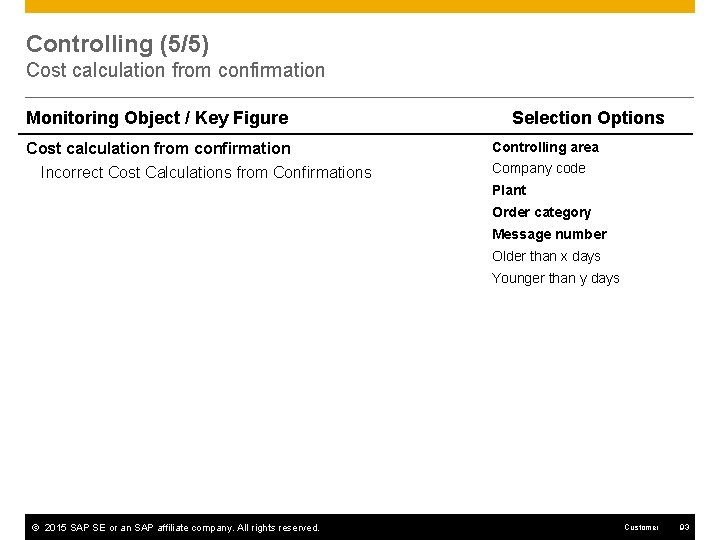
Controlling (5/5) Cost calculation from confirmation Monitoring Object / Key Figure Cost calculation from confirmation Incorrect Cost Calculations from Confirmations Selection Options Controlling area Company code Plant Order category Message number Older than x days Younger than y days © 2015 SAP SE or an SAP affiliate company. All rights reserved. Customer 93
SAP HCM Travel & Expense Management
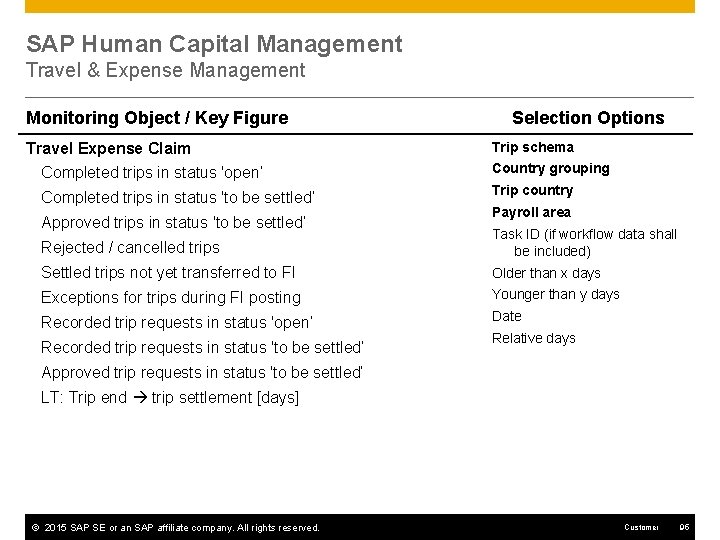
SAP Human Capital Management Travel & Expense Management Monitoring Object / Key Figure Travel Expense Claim Selection Options Trip schema Completed trips in status 'open‘ Country grouping Completed trips in status 'to be settled‘ Trip country Approved trips in status 'to be settled‘ Payroll area Rejected / cancelled trips Task ID (if workflow data shall be included) Settled trips not yet transferred to FI Older than x days Exceptions for trips during FI posting Younger than y days Recorded trip requests in status 'open‘ Date Recorded trip requests in status 'to be settled‘ Relative days Approved trip requests in status 'to be settled‘ LT: Trip end trip settlement [days] © 2015 SAP SE or an SAP affiliate company. All rights reserved. Customer 95
SAP CRM Sales Services Customer Interaction Center Marketing
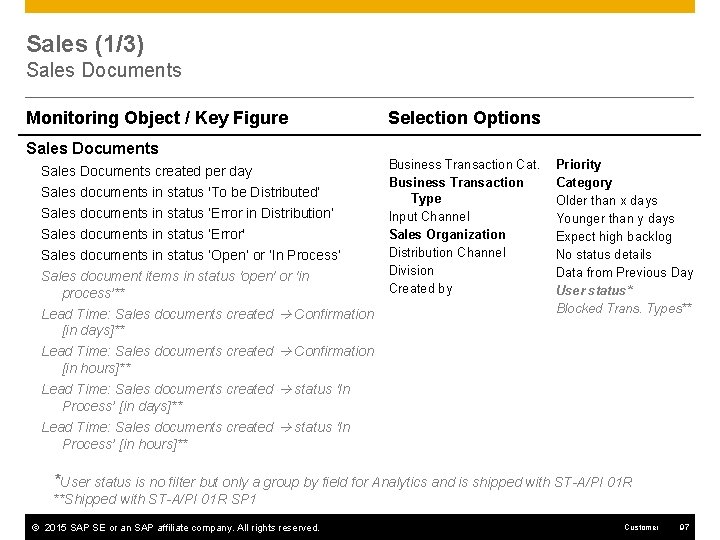
Sales (1/3) Sales Documents Monitoring Object / Key Figure Sales Documents created per day Sales documents in status 'To be Distributed‘ Sales documents in status ‘Error in Distribution‘ Sales documents in status ‘Error' Sales documents in status ‘Open‘ or ‘In Process’ Sales document items in status 'open' or 'in process’** Lead Time: Sales documents created Confirmation [in days]** Lead Time: Sales documents created Confirmation [in hours]** Lead Time: Sales documents created status 'In Process’ [in days]** Lead Time: Sales documents created status 'In Process’ [in hours]** Selection Options Business Transaction Cat. Business Transaction Type Input Channel Sales Organization Distribution Channel Division Created by Priority Category Older than x days Younger than y days Expect high backlog No status details Data from Previous Day User status* Blocked Trans. Types** *User status is no filter but only a group by field for Analytics and is shipped with ST-A/PI 01 R **Shipped with ST-A/PI 01 R SP 1 © 2015 SAP SE or an SAP affiliate company. All rights reserved. Customer 97
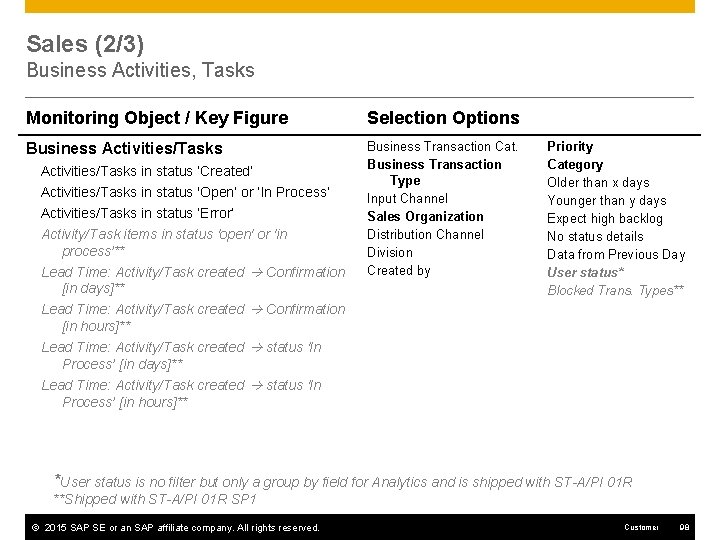
Sales (2/3) Business Activities, Tasks Monitoring Object / Key Figure Selection Options Business Activities/Tasks Business Transaction Cat. Business Transaction Type Input Channel Sales Organization Distribution Channel Division Created by Activities/Tasks in status ‘Created’ Activities/Tasks in status 'Open‘ or ‘In Process’ Activities/Tasks in status ‘Error’ Activity/Task items in status 'open' or 'in process’** Lead Time: Activity/Task created Confirmation [in days]** Lead Time: Activity/Task created Confirmation [in hours]** Lead Time: Activity/Task created status 'In Process’ [in days]** Lead Time: Activity/Task created status 'In Process’ [in hours]** Priority Category Older than x days Younger than y days Expect high backlog No status details Data from Previous Day User status* Blocked Trans. Types** *User status is no filter but only a group by field for Analytics and is shipped with ST-A/PI 01 R **Shipped with ST-A/PI 01 R SP 1 © 2015 SAP SE or an SAP affiliate company. All rights reserved. Customer 98
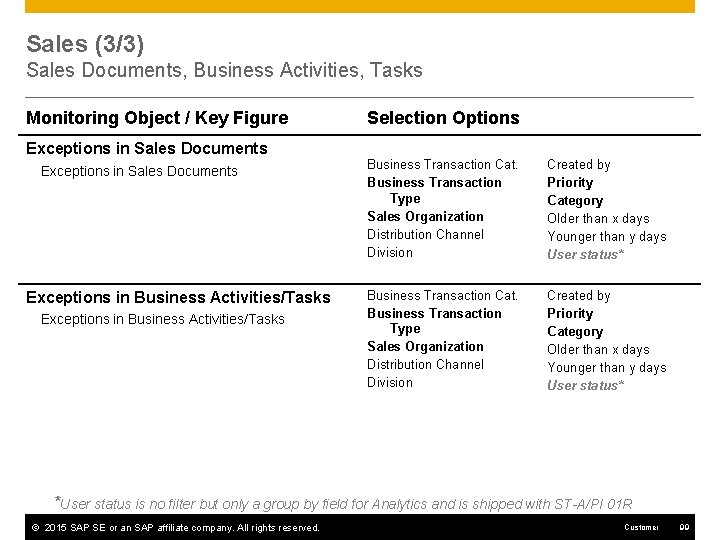
Sales (3/3) Sales Documents, Business Activities, Tasks Monitoring Object / Key Figure Exceptions in Sales Documents Exceptions in Business Activities/Tasks Selection Options Business Transaction Cat. Business Transaction Type Sales Organization Distribution Channel Division Created by Priority Category Older than x days Younger than y days User status* *User status is no filter but only a group by field for Analytics and is shipped with ST-A/PI 01 R © 2015 SAP SE or an SAP affiliate company. All rights reserved. Customer 99
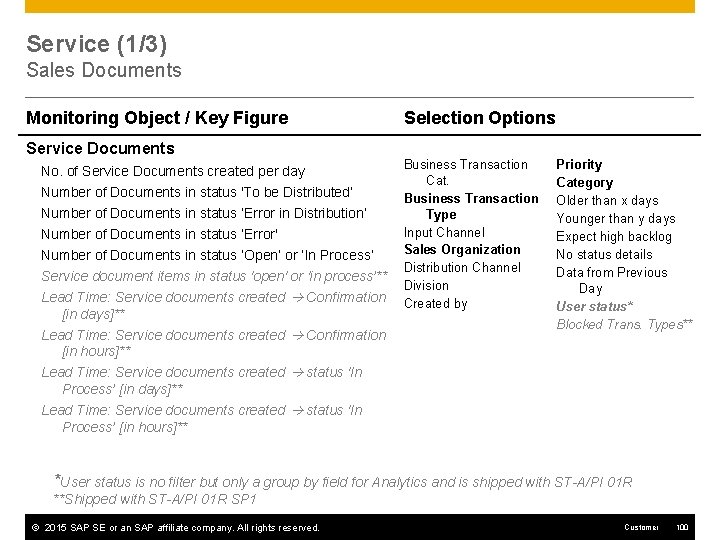
Service (1/3) Sales Documents Monitoring Object / Key Figure Service Documents No. of Service Documents created per day Number of Documents in status 'To be Distributed‘ Number of Documents in status ‘Error in Distribution‘ Number of Documents in status ‘Error' Number of Documents in status ‘Open‘ or ‘In Process’ Service document items in status 'open' or 'in process’** Lead Time: Service documents created Confirmation [in days]** Lead Time: Service documents created Confirmation [in hours]** Lead Time: Service documents created status 'In Process’ [in days]** Lead Time: Service documents created status 'In Process’ [in hours]** Selection Options Business Transaction Cat. Business Transaction Type Input Channel Sales Organization Distribution Channel Division Created by Priority Category Older than x days Younger than y days Expect high backlog No status details Data from Previous Day User status* Blocked Trans. Types** *User status is no filter but only a group by field for Analytics and is shipped with ST-A/PI 01 R **Shipped with ST-A/PI 01 R SP 1 © 2015 SAP SE or an SAP affiliate company. All rights reserved. Customer 100
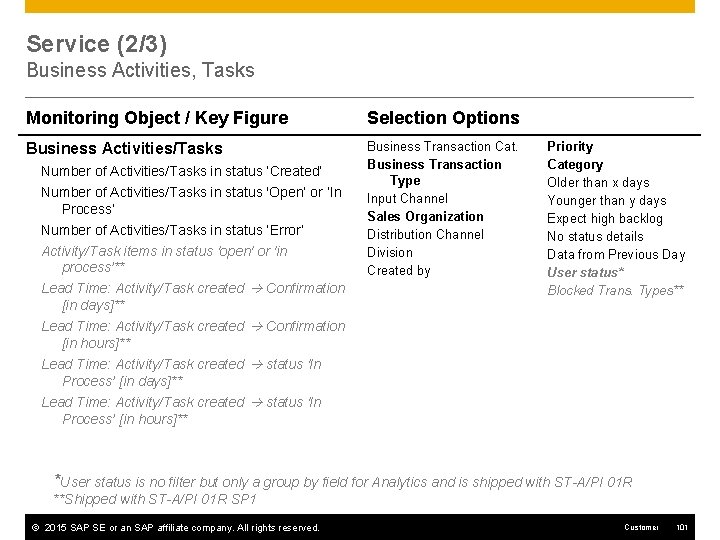
Service (2/3) Business Activities, Tasks Monitoring Object / Key Figure Selection Options Business Activities/Tasks Business Transaction Cat. Business Transaction Type Input Channel Sales Organization Distribution Channel Division Created by Number of Activities/Tasks in status ‘Created’ Number of Activities/Tasks in status 'Open‘ or ‘In Process’ Number of Activities/Tasks in status ‘Error’ Activity/Task items in status 'open' or 'in process’** Lead Time: Activity/Task created Confirmation [in days]** Lead Time: Activity/Task created Confirmation [in hours]** Lead Time: Activity/Task created status 'In Process’ [in days]** Lead Time: Activity/Task created status 'In Process’ [in hours]** Priority Category Older than x days Younger than y days Expect high backlog No status details Data from Previous Day User status* Blocked Trans. Types** *User status is no filter but only a group by field for Analytics and is shipped with ST-A/PI 01 R **Shipped with ST-A/PI 01 R SP 1 © 2015 SAP SE or an SAP affiliate company. All rights reserved. Customer 101
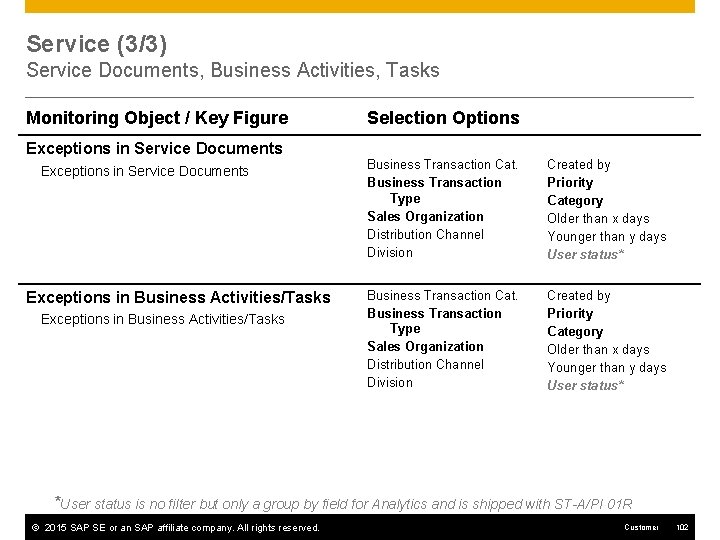
Service (3/3) Service Documents, Business Activities, Tasks Monitoring Object / Key Figure Exceptions in Service Documents Exceptions in Business Activities/Tasks Selection Options Business Transaction Cat. Business Transaction Type Sales Organization Distribution Channel Division Created by Priority Category Older than x days Younger than y days User status* *User status is no filter but only a group by field for Analytics and is shipped with ST-A/PI 01 R © 2015 SAP SE or an SAP affiliate company. All rights reserved. Customer 102
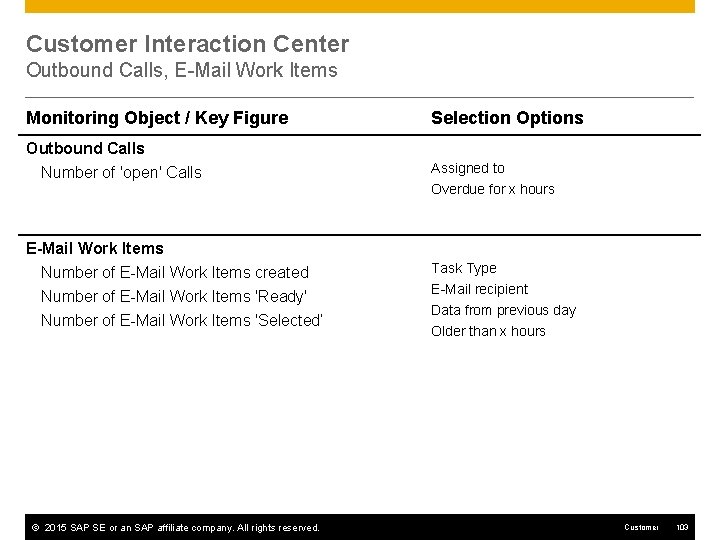
Customer Interaction Center Outbound Calls, E-Mail Work Items Monitoring Object / Key Figure Selection Options Outbound Calls Number of 'open' Calls Assigned to Overdue for x hours E-Mail Work Items Number of E-Mail Work Items created Number of E-Mail Work Items 'Ready' Number of E-Mail Work Items 'Selected‘ © 2015 SAP SE or an SAP affiliate company. All rights reserved. Task Type E-Mail recipient Data from previous day Older than x hours Customer 103
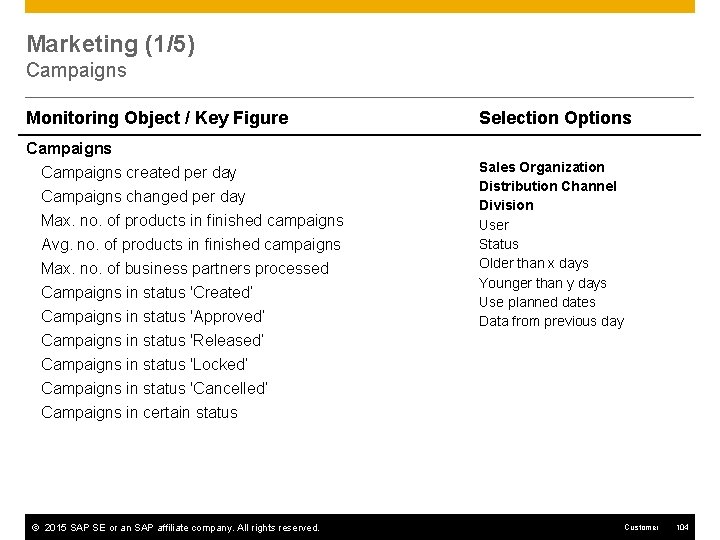
Marketing (1/5) Campaigns Monitoring Object / Key Figure Campaigns created per day Campaigns changed per day Max. no. of products in finished campaigns Avg. no. of products in finished campaigns Max. no. of business partners processed Campaigns in status 'Created‘ Campaigns in status 'Approved‘ Campaigns in status 'Released‘ Campaigns in status 'Locked‘ Campaigns in status 'Cancelled‘ Campaigns in certain status © 2015 SAP SE or an SAP affiliate company. All rights reserved. Selection Options Sales Organization Distribution Channel Division User Status Older than x days Younger than y days Use planned dates Data from previous day Customer 104
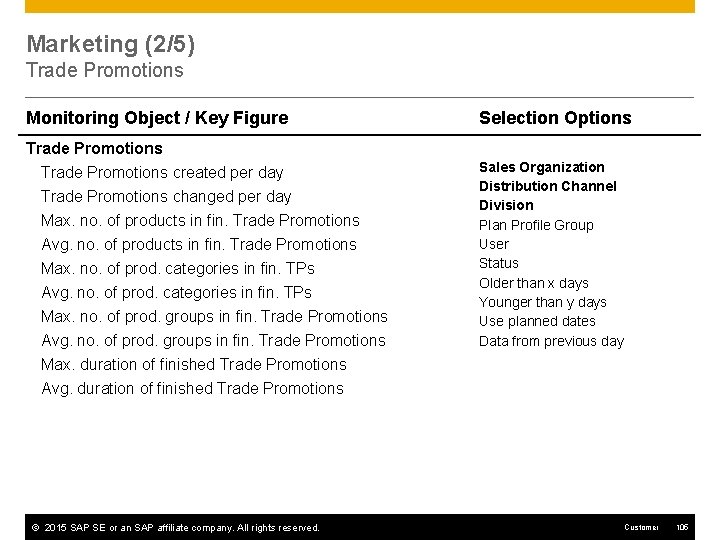
Marketing (2/5) Trade Promotions Monitoring Object / Key Figure Trade Promotions created per day Trade Promotions changed per day Max. no. of products in fin. Trade Promotions Avg. no. of products in fin. Trade Promotions Max. no. of prod. categories in fin. TPs Avg. no. of prod. categories in fin. TPs Max. no. of prod. groups in fin. Trade Promotions Avg. no. of prod. groups in fin. Trade Promotions Max. duration of finished Trade Promotions Avg. duration of finished Trade Promotions © 2015 SAP SE or an SAP affiliate company. All rights reserved. Selection Options Sales Organization Distribution Channel Division Plan Profile Group User Status Older than x days Younger than y days Use planned dates Data from previous day Customer 105
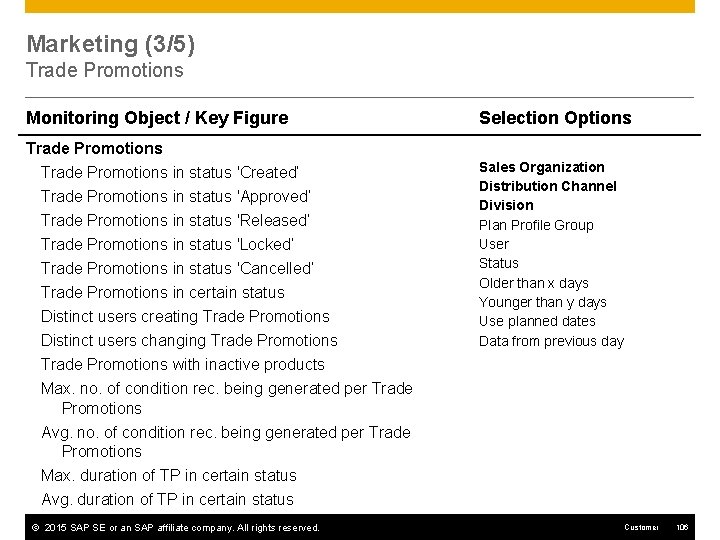
Marketing (3/5) Trade Promotions Monitoring Object / Key Figure Trade Promotions in status 'Created‘ Trade Promotions in status 'Approved‘ Trade Promotions in status 'Released‘ Trade Promotions in status 'Locked‘ Trade Promotions in status 'Cancelled‘ Trade Promotions in certain status Distinct users creating Trade Promotions Distinct users changing Trade Promotions with inactive products Max. no. of condition rec. being generated per Trade Promotions Avg. no. of condition rec. being generated per Trade Promotions Max. duration of TP in certain status Avg. duration of TP in certain status © 2015 SAP SE or an SAP affiliate company. All rights reserved. Selection Options Sales Organization Distribution Channel Division Plan Profile Group User Status Older than x days Younger than y days Use planned dates Data from previous day Customer 106
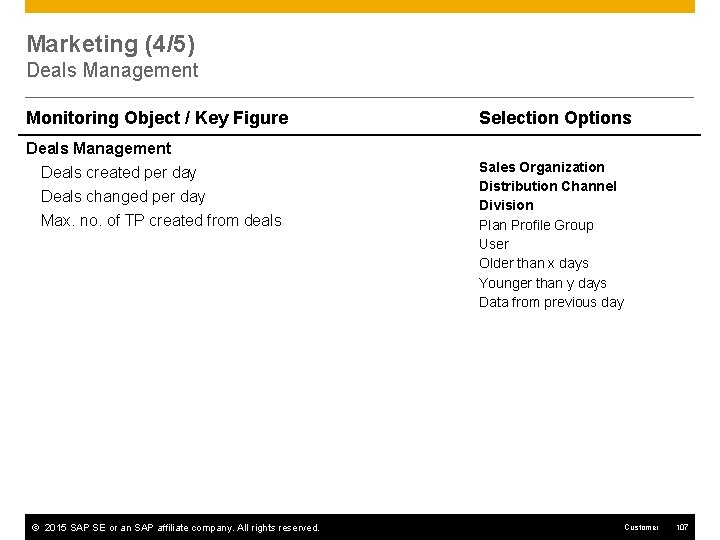
Marketing (4/5) Deals Management Monitoring Object / Key Figure Deals Management Deals created per day Deals changed per day Max. no. of TP created from deals © 2015 SAP SE or an SAP affiliate company. All rights reserved. Selection Options Sales Organization Distribution Channel Division Plan Profile Group User Older than x days Younger than y days Data from previous day Customer 107
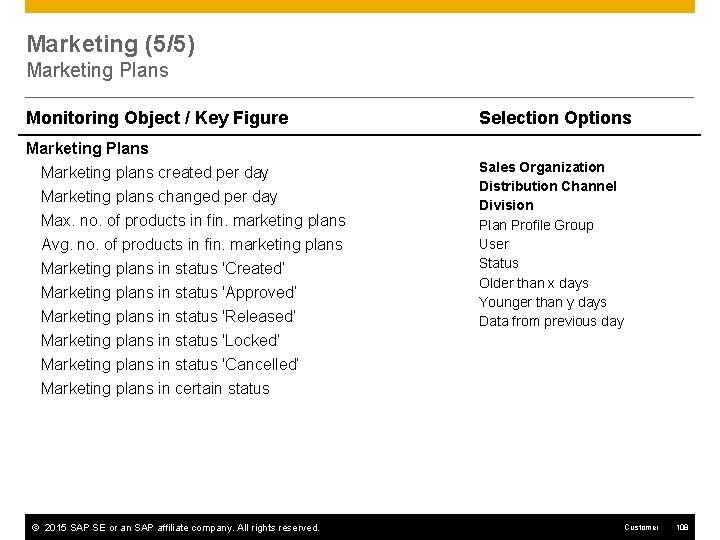
Marketing (5/5) Marketing Plans Monitoring Object / Key Figure Marketing Plans Marketing plans created per day Marketing plans changed per day Max. no. of products in fin. marketing plans Avg. no. of products in fin. marketing plans Marketing plans in status 'Created‘ Marketing plans in status 'Approved‘ Marketing plans in status 'Released‘ Marketing plans in status 'Locked‘ Marketing plans in status 'Cancelled‘ Marketing plans in certain status © 2015 SAP SE or an SAP affiliate company. All rights reserved. Selection Options Sales Organization Distribution Channel Division Plan Profile Group User Status Older than x days Younger than y days Data from previous day Customer 108
SAP SRM Self Service Procurement
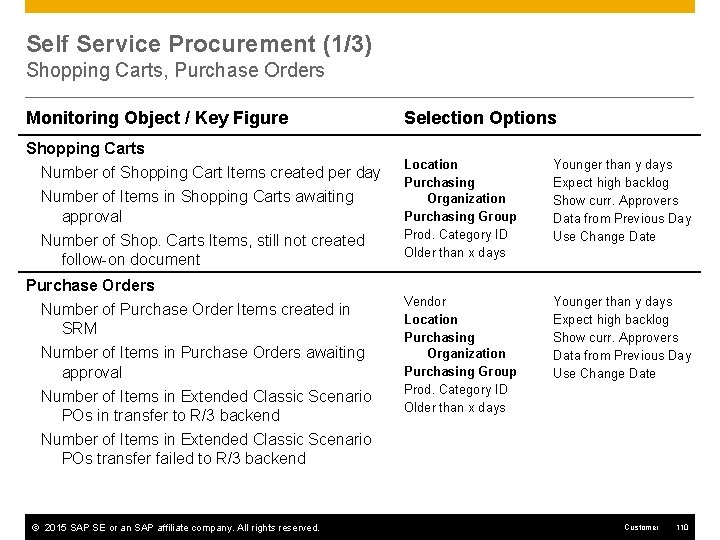
Self Service Procurement (1/3) Shopping Carts, Purchase Orders Monitoring Object / Key Figure Shopping Carts Number of Shopping Cart Items created per day Number of Items in Shopping Carts awaiting approval Number of Shop. Carts Items, still not created follow-on document Purchase Orders Number of Purchase Order Items created in SRM Number of Items in Purchase Orders awaiting approval Number of Items in Extended Classic Scenario POs in transfer to R/3 backend Number of Items in Extended Classic Scenario POs transfer failed to R/3 backend © 2015 SAP SE or an SAP affiliate company. All rights reserved. Selection Options Location Purchasing Organization Purchasing Group Prod. Category ID Older than x days Younger than y days Expect high backlog Show curr. Approvers Data from Previous Day Use Change Date Vendor Location Purchasing Organization Purchasing Group Prod. Category ID Older than x days Younger than y days Expect high backlog Show curr. Approvers Data from Previous Day Use Change Date Customer 110
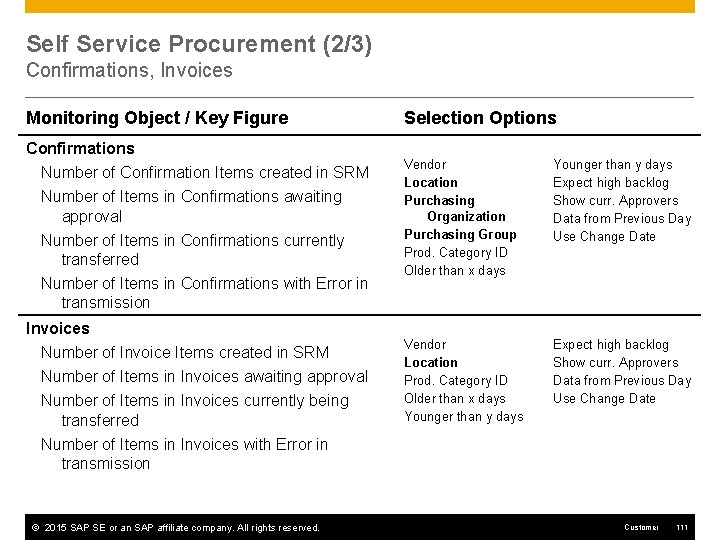
Self Service Procurement (2/3) Confirmations, Invoices Monitoring Object / Key Figure Confirmations Number of Confirmation Items created in SRM Number of Items in Confirmations awaiting approval Number of Items in Confirmations currently transferred Number of Items in Confirmations with Error in transmission Invoices Number of Invoice Items created in SRM Number of Items in Invoices awaiting approval Number of Items in Invoices currently being transferred Selection Options Vendor Location Purchasing Organization Purchasing Group Prod. Category ID Older than x days Younger than y days Expect high backlog Show curr. Approvers Data from Previous Day Use Change Date Vendor Location Prod. Category ID Older than x days Younger than y days Expect high backlog Show curr. Approvers Data from Previous Day Use Change Date Number of Items in Invoices with Error in transmission © 2015 SAP SE or an SAP affiliate company. All rights reserved. Customer 111
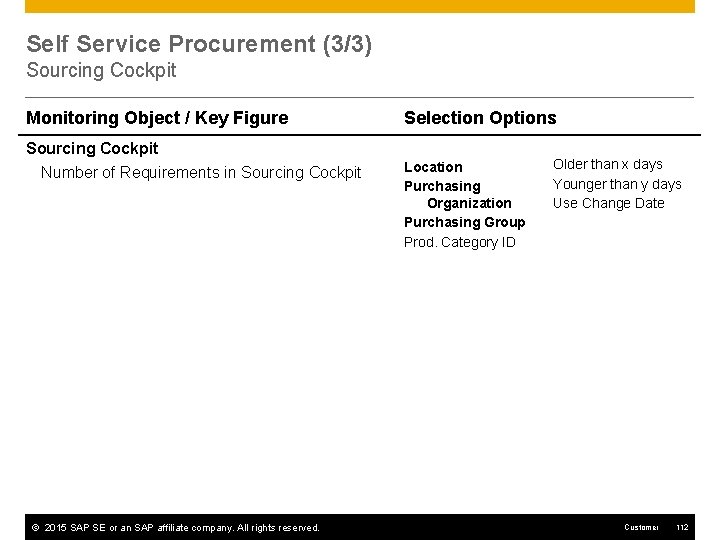
Self Service Procurement (3/3) Sourcing Cockpit Monitoring Object / Key Figure Sourcing Cockpit Number of Requirements in Sourcing Cockpit © 2015 SAP SE or an SAP affiliate company. All rights reserved. Selection Options Location Purchasing Organization Purchasing Group Prod. Category ID Older than x days Younger than y days Use Change Date Customer 112
SAP APO Forecasting Demand Planning (DP) Supply Network Planning (SNP) Production Planning / Detailed Scheduling (PP/DS) Global ATP Collaborative Procurement Master Data
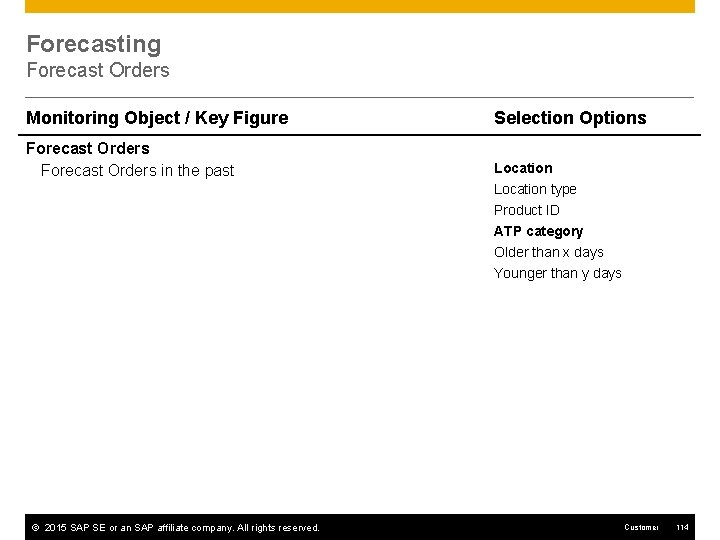
Forecasting Forecast Orders Monitoring Object / Key Figure Selection Options Forecast Orders in the past Location type Product ID ATP category Older than x days Younger than y days © 2015 SAP SE or an SAP affiliate company. All rights reserved. Customer 114
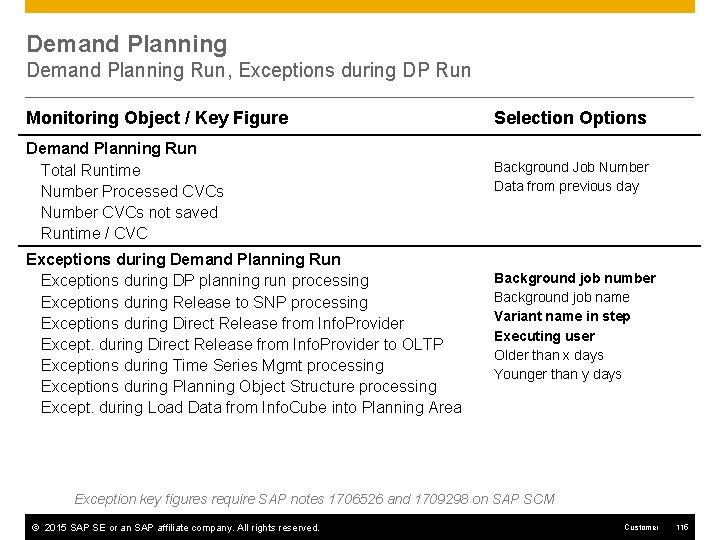
Demand Planning Run, Exceptions during DP Run Monitoring Object / Key Figure Demand Planning Run Total Runtime Number Processed CVCs Number CVCs not saved Runtime / CVC Exceptions during Demand Planning Run Exceptions during DP planning run processing Exceptions during Release to SNP processing Exceptions during Direct Release from Info. Provider Except. during Direct Release from Info. Provider to OLTP Exceptions during Time Series Mgmt processing Exceptions during Planning Object Structure processing Except. during Load Data from Info. Cube into Planning Area Selection Options Background Job Number Data from previous day Background job number Background job name Variant name in step Executing user Older than x days Younger than y days Exception key figures require SAP notes 1706526 and 1709298 on SAP SCM © 2015 SAP SE or an SAP affiliate company. All rights reserved. Customer 115
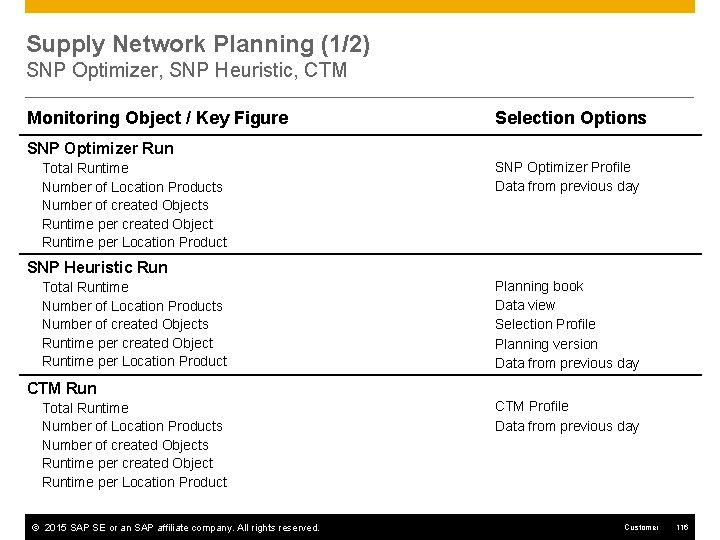
Supply Network Planning (1/2) SNP Optimizer, SNP Heuristic, CTM Monitoring Object / Key Figure Selection Options SNP Optimizer Run Total Runtime Number of Location Products Number of created Objects Runtime per created Object Runtime per Location Product SNP Optimizer Profile Data from previous day SNP Heuristic Run Total Runtime Number of Location Products Number of created Objects Runtime per created Object Runtime per Location Product Planning book Data view Selection Profile Planning version Data from previous day CTM Run Total Runtime Number of Location Products Number of created Objects Runtime per created Object Runtime per Location Product © 2015 SAP SE or an SAP affiliate company. All rights reserved. CTM Profile Data from previous day Customer 116
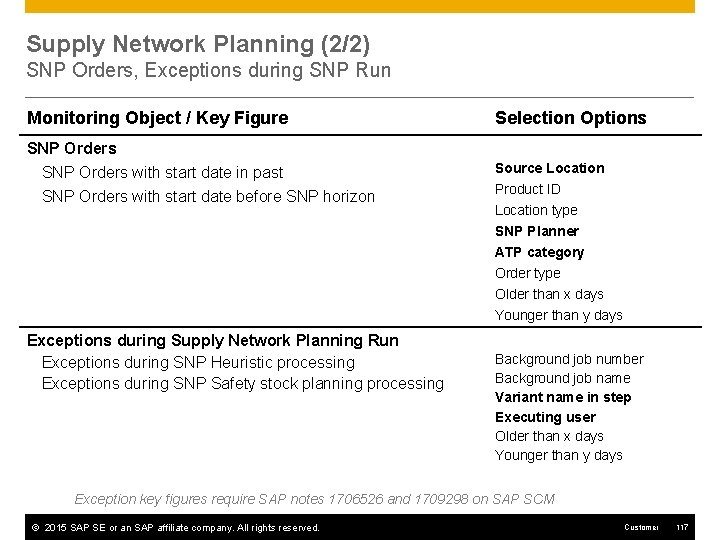
Supply Network Planning (2/2) SNP Orders, Exceptions during SNP Run Monitoring Object / Key Figure Selection Options SNP Orders with start date in past SNP Orders with start date before SNP horizon Source Location Exceptions during Supply Network Planning Run Exceptions during SNP Heuristic processing Exceptions during SNP Safety stock planning processing Product ID Location type SNP Planner ATP category Order type Older than x days Younger than y days Background job number Background job name Variant name in step Executing user Older than x days Younger than y days Exception key figures require SAP notes 1706526 and 1709298 on SAP SCM © 2015 SAP SE or an SAP affiliate company. All rights reserved. Customer 117
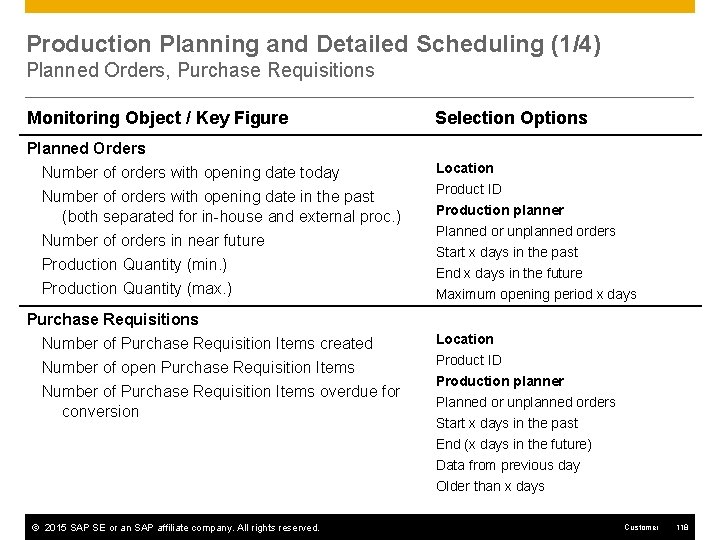
Production Planning and Detailed Scheduling (1/4) Planned Orders, Purchase Requisitions Monitoring Object / Key Figure Planned Orders Number of orders with opening date today Number of orders with opening date in the past (both separated for in-house and external proc. ) Number of orders in near future Production Quantity (min. ) Production Quantity (max. ) Purchase Requisitions Number of Purchase Requisition Items created Number of open Purchase Requisition Items Number of Purchase Requisition Items overdue for conversion © 2015 SAP SE or an SAP affiliate company. All rights reserved. Selection Options Location Product ID Production planner Planned or unplanned orders Start x days in the past End x days in the future Maximum opening period x days Location Product ID Production planner Planned or unplanned orders Start x days in the past End (x days in the future) Data from previous day Older than x days Customer 118
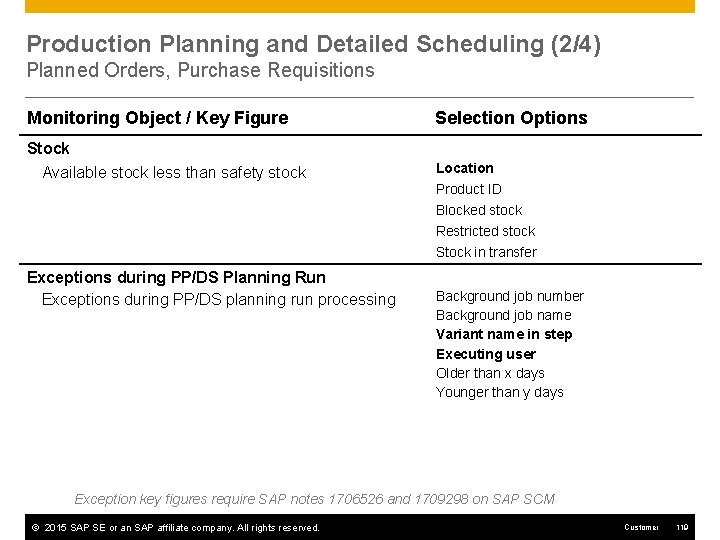
Production Planning and Detailed Scheduling (2/4) Planned Orders, Purchase Requisitions Monitoring Object / Key Figure Selection Options Stock Available stock less than safety stock Location Product ID Blocked stock Restricted stock Stock in transfer Exceptions during PP/DS Planning Run Exceptions during PP/DS planning run processing Background job number Background job name Variant name in step Executing user Older than x days Younger than y days Exception key figures require SAP notes 1706526 and 1709298 on SAP SCM © 2015 SAP SE or an SAP affiliate company. All rights reserved. Customer 119
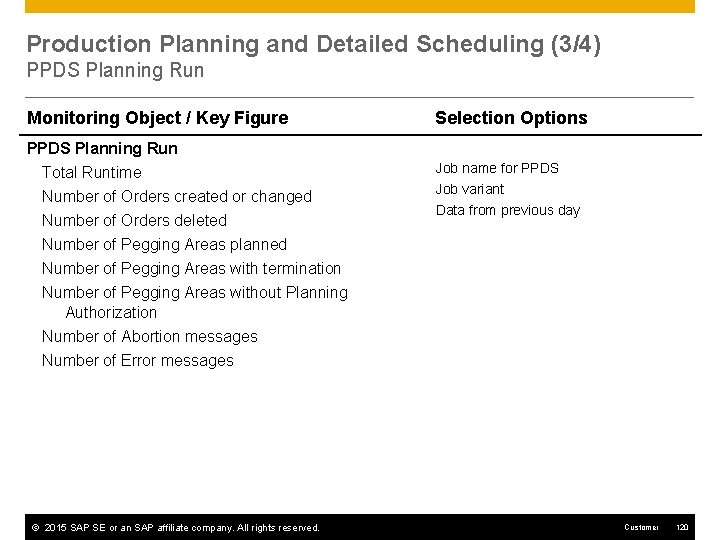
Production Planning and Detailed Scheduling (3/4) PPDS Planning Run Monitoring Object / Key Figure Selection Options PPDS Planning Run Total Runtime Number of Orders created or changed Job name for PPDS Number of Orders deleted Job variant Data from previous day Number of Pegging Areas planned Number of Pegging Areas with termination Number of Pegging Areas without Planning Authorization Number of Abortion messages Number of Error messages © 2015 SAP SE or an SAP affiliate company. All rights reserved. Customer 120
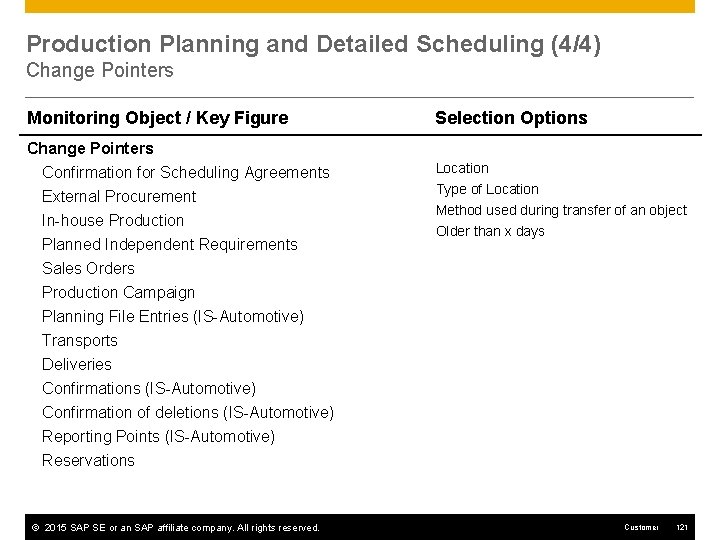
Production Planning and Detailed Scheduling (4/4) Change Pointers Monitoring Object / Key Figure Selection Options Change Pointers Confirmation for Scheduling Agreements External Procurement Location In-house Production Planned Independent Requirements Type of Location Method used during transfer of an object Older than x days Sales Orders Production Campaign Planning File Entries (IS-Automotive) Transports Deliveries Confirmations (IS-Automotive) Confirmation of deletions (IS-Automotive) Reporting Points (IS-Automotive) Reservations © 2015 SAP SE or an SAP affiliate company. All rights reserved. Customer 121
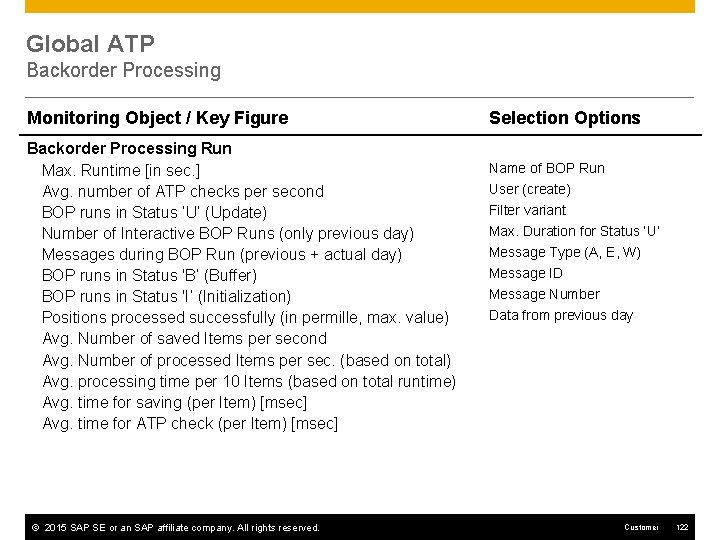
Global ATP Backorder Processing Monitoring Object / Key Figure Backorder Processing Run Max. Runtime [in sec. ] Avg. number of ATP checks per second BOP runs in Status ‘U‘ (Update) Number of Interactive BOP Runs (only previous day) Messages during BOP Run (previous + actual day) BOP runs in Status 'B‘ (Buffer) BOP runs in Status 'I‘ (Initialization) Positions processed successfully (in permille, max. value) Avg. Number of saved Items per second Avg. Number of processed Items per sec. (based on total) Avg. processing time per 10 Items (based on total runtime) Avg. time for saving (per Item) [msec] Avg. time for ATP check (per Item) [msec] © 2015 SAP SE or an SAP affiliate company. All rights reserved. Selection Options Name of BOP Run User (create) Filter variant Max. Duration for Status ‘U‘ Message Type (A, E, W) Message ID Message Number Data from previous day Customer 122
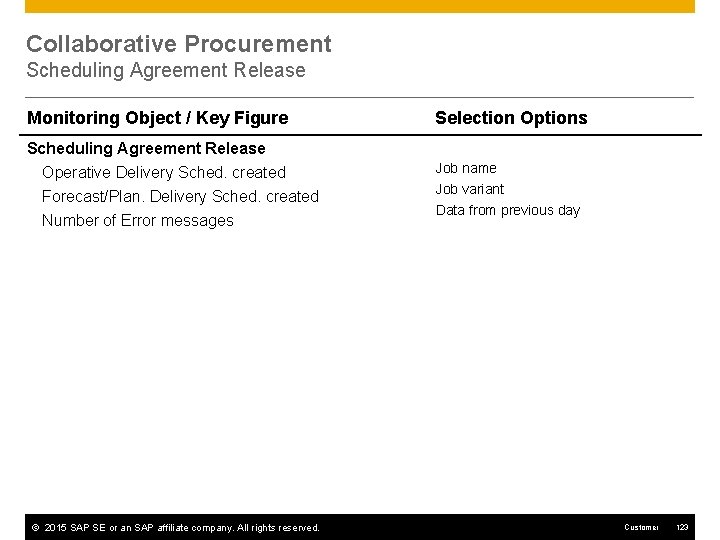
Collaborative Procurement Scheduling Agreement Release Monitoring Object / Key Figure Selection Options Scheduling Agreement Release Operative Delivery Sched. created Forecast/Plan. Delivery Sched. created Job name Number of Error messages © 2015 SAP SE or an SAP affiliate company. All rights reserved. Job variant Data from previous day Customer 123
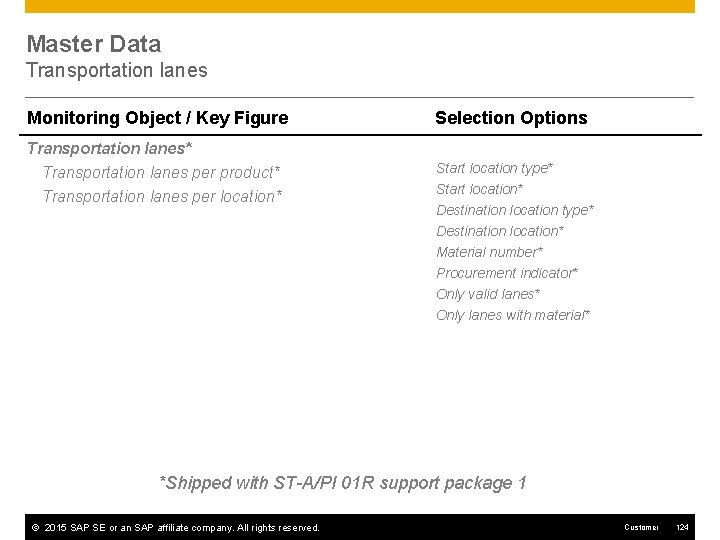
Master Data Transportation lanes Monitoring Object / Key Figure Selection Options Transportation lanes* Transportation lanes per product* Transportation lanes per location* Start location type* Start location* Destination location type* Destination location* Material number* Procurement indicator* Only valid lanes* Only lanes with material* *Shipped with ST-A/PI 01 R support package 1 © 2015 SAP SE or an SAP affiliate company. All rights reserved. Customer 124
SAP Extended Warehouse Management
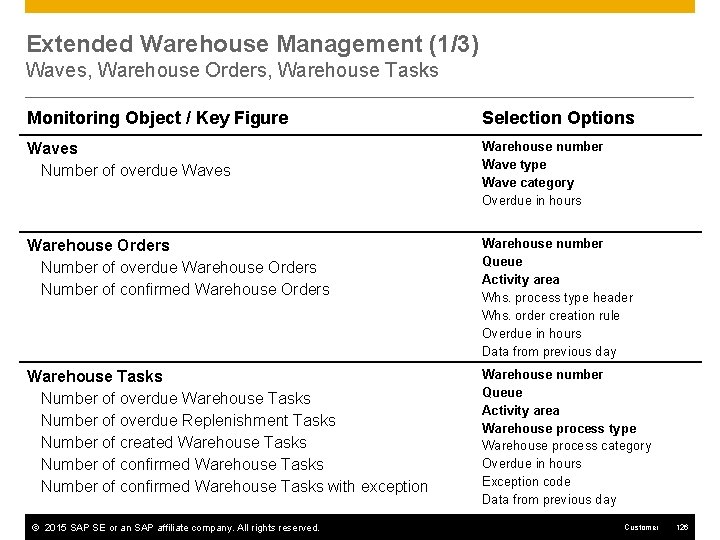
Extended Warehouse Management (1/3) Waves, Warehouse Orders, Warehouse Tasks Monitoring Object / Key Figure Selection Options Waves Number of overdue Waves Warehouse number Wave type Wave category Overdue in hours Warehouse Orders Number of overdue Warehouse Orders Number of confirmed Warehouse Orders Warehouse number Queue Activity area Whs. process type header Whs. order creation rule Overdue in hours Data from previous day Warehouse Tasks Number of overdue Replenishment Tasks Number of created Warehouse Tasks Number of confirmed Warehouse Tasks with exception Warehouse number Queue Activity area Warehouse process type Warehouse process category Overdue in hours Exception code Data from previous day © 2015 SAP SE or an SAP affiliate company. All rights reserved. Customer 126
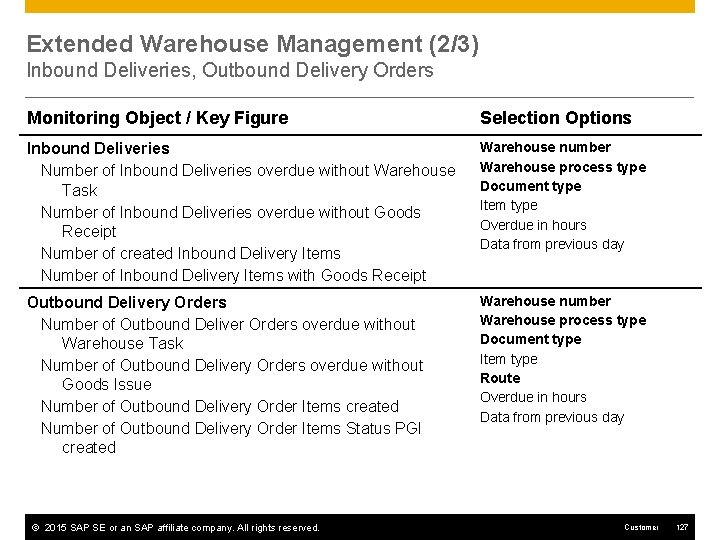
Extended Warehouse Management (2/3) Inbound Deliveries, Outbound Delivery Orders Monitoring Object / Key Figure Selection Options Inbound Deliveries Number of Inbound Deliveries overdue without Warehouse Task Number of Inbound Deliveries overdue without Goods Receipt Number of created Inbound Delivery Items Number of Inbound Delivery Items with Goods Receipt Warehouse number Warehouse process type Document type Item type Overdue in hours Data from previous day Outbound Delivery Orders Number of Outbound Deliver Orders overdue without Warehouse Task Number of Outbound Delivery Orders overdue without Goods Issue Number of Outbound Delivery Order Items created Number of Outbound Delivery Order Items Status PGI created Warehouse number Warehouse process type Document type Item type Route Overdue in hours Data from previous day © 2015 SAP SE or an SAP affiliate company. All rights reserved. Customer 127
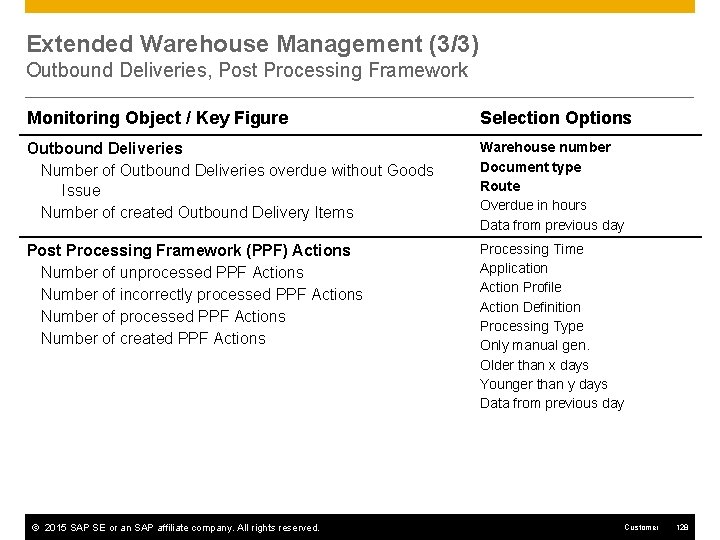
Extended Warehouse Management (3/3) Outbound Deliveries, Post Processing Framework Monitoring Object / Key Figure Selection Options Outbound Deliveries Number of Outbound Deliveries overdue without Goods Issue Number of created Outbound Delivery Items Warehouse number Document type Route Overdue in hours Data from previous day Post Processing Framework (PPF) Actions Number of unprocessed PPF Actions Number of incorrectly processed PPF Actions Number of created PPF Actions Processing Time Application Action Profile Action Definition Processing Type Only manual gen. Older than x days Younger than y days Data from previous day © 2015 SAP SE or an SAP affiliate company. All rights reserved. Customer 128

SAP Transportation Management
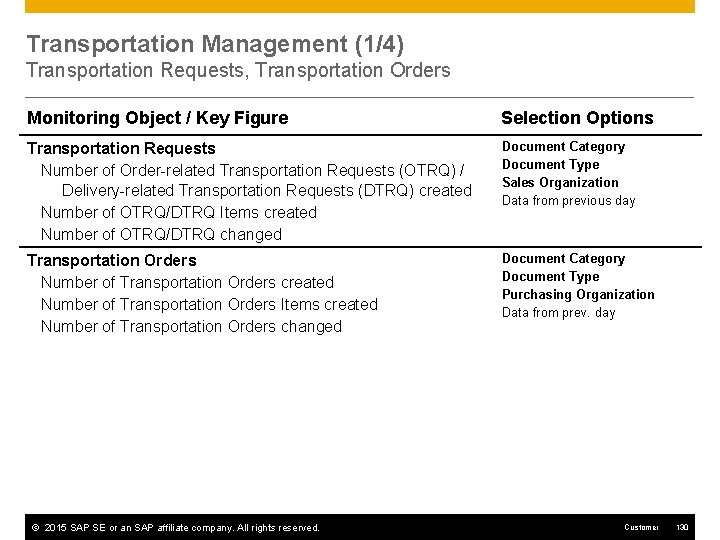
Transportation Management (1/4) Transportation Requests, Transportation Orders Monitoring Object / Key Figure Selection Options Transportation Requests Number of Order-related Transportation Requests (OTRQ) / Delivery-related Transportation Requests (DTRQ) created Number of OTRQ/DTRQ Items created Number of OTRQ/DTRQ changed Document Category Document Type Sales Organization Data from previous day Transportation Orders Number of Transportation Orders created Number of Transportation Orders Items created Number of Transportation Orders changed Document Category Document Type Purchasing Organization Data from prev. day © 2015 SAP SE or an SAP affiliate company. All rights reserved. Customer 130
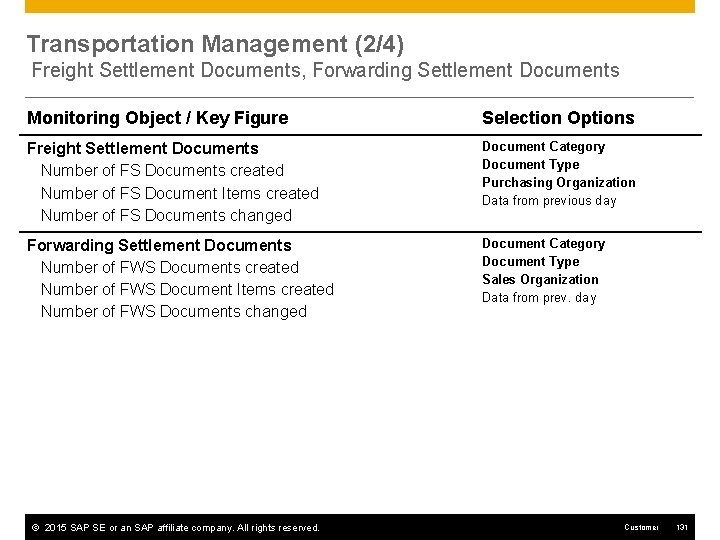
Transportation Management (2/4) Freight Settlement Documents, Forwarding Settlement Documents Monitoring Object / Key Figure Selection Options Freight Settlement Documents Number of FS Documents created Number of FS Document Items created Number of FS Documents changed Document Category Document Type Purchasing Organization Data from previous day Forwarding Settlement Documents Number of FWS Documents created Number of FWS Document Items created Number of FWS Documents changed Document Category Document Type Sales Organization Data from prev. day © 2015 SAP SE or an SAP affiliate company. All rights reserved. Customer 131
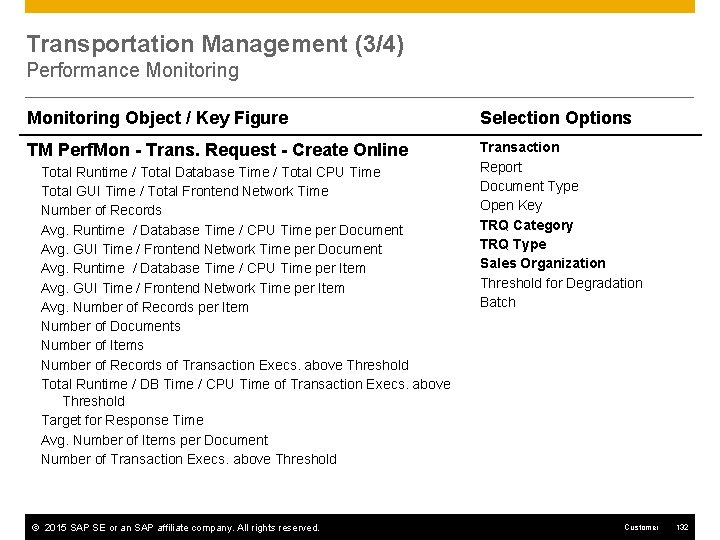
Transportation Management (3/4) Performance Monitoring Object / Key Figure Selection Options TM Perf. Mon - Trans. Request - Create Online Transaction Report Document Type Open Key TRQ Category TRQ Type Sales Organization Threshold for Degradation Batch Total Runtime / Total Database Time / Total CPU Time Total GUI Time / Total Frontend Network Time Number of Records Avg. Runtime / Database Time / CPU Time per Document Avg. GUI Time / Frontend Network Time per Document Avg. Runtime / Database Time / CPU Time per Item Avg. GUI Time / Frontend Network Time per Item Avg. Number of Records per Item Number of Documents Number of Items Number of Records of Transaction Execs. above Threshold Total Runtime / DB Time / CPU Time of Transaction Execs. above Threshold Target for Response Time Avg. Number of Items per Document Number of Transaction Execs. above Threshold © 2015 SAP SE or an SAP affiliate company. All rights reserved. Customer 132
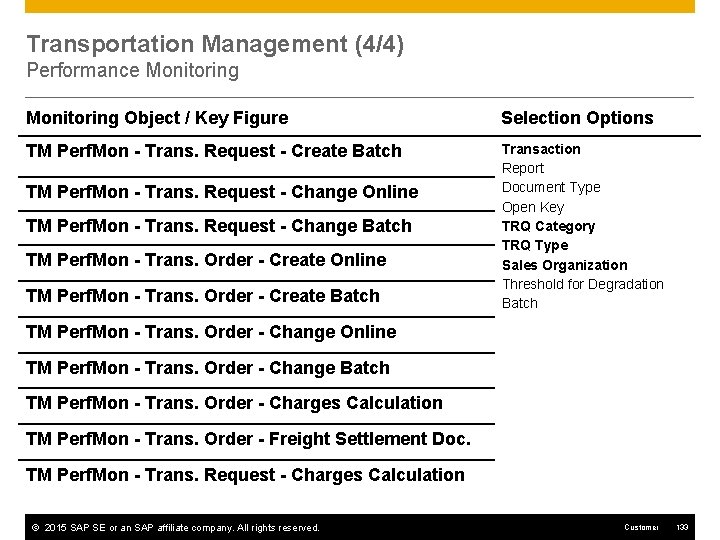
Transportation Management (4/4) Performance Monitoring Object / Key Figure Selection Options TM Perf. Mon - Trans. Request - Create Batch Transaction Report Document Type Open Key TRQ Category TRQ Type Sales Organization Threshold for Degradation Batch TM Perf. Mon - Trans. Request - Change Online TM Perf. Mon - Trans. Request - Change Batch TM Perf. Mon - Trans. Order - Create Online TM Perf. Mon - Trans. Order - Create Batch TM Perf. Mon - Trans. Order - Change Online TM Perf. Mon - Trans. Order - Change Batch TM Perf. Mon - Trans. Order - Charges Calculation TM Perf. Mon - Trans. Order - Freight Settlement Doc. TM Perf. Mon - Trans. Request - Charges Calculation © 2015 SAP SE or an SAP affiliate company. All rights reserved. Customer 133
Industry Specific Enhancements SAP Apparel and Footwear (IS-AFS) SAP for Automotive SAP for Banking SAP for Beverage (IS-BEV) SAP for Retail (IS-R) SAP for Utilities (IS-U)
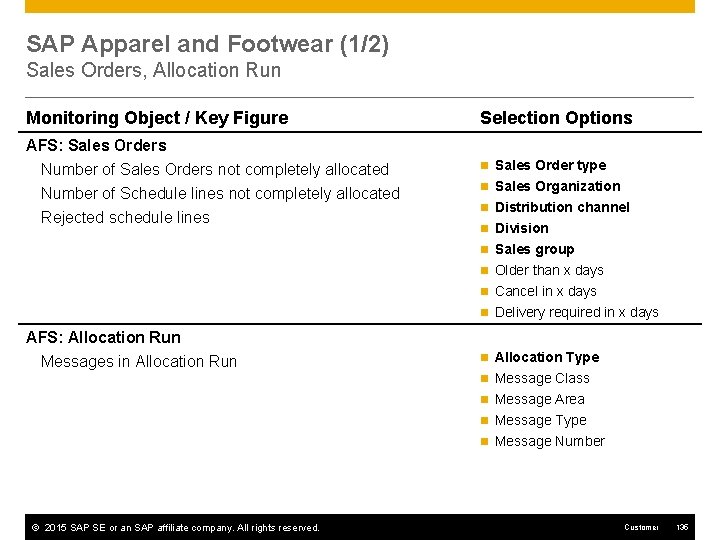
SAP Apparel and Footwear (1/2) Sales Orders, Allocation Run Monitoring Object / Key Figure Selection Options AFS: Sales Orders Number of Sales Orders not completely allocated Number of Schedule lines not completely allocated n Sales Order type Rejected schedule lines n Sales Organization n Distribution channel n Division n Sales group n Older than x days n Cancel in x days n Delivery required in x days AFS: Allocation Run Messages in Allocation Run n Allocation Type n Message Class n Message Area n Message Type n Message Number © 2015 SAP SE or an SAP affiliate company. All rights reserved. Customer 135
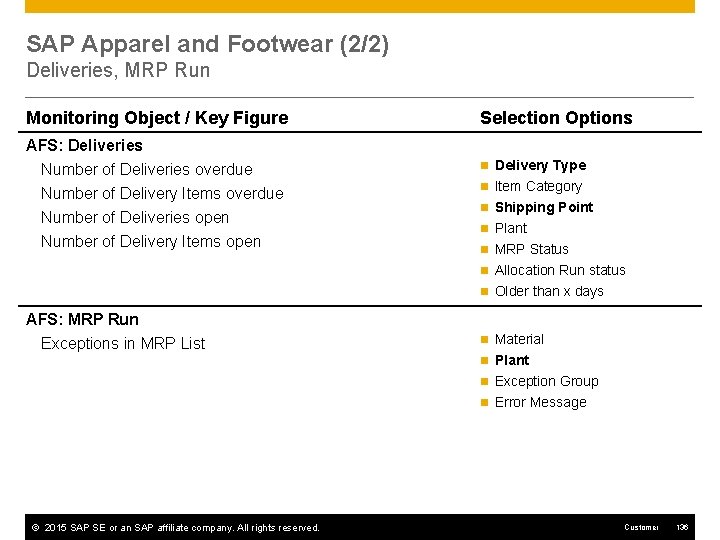
SAP Apparel and Footwear (2/2) Deliveries, MRP Run Monitoring Object / Key Figure Selection Options AFS: Deliveries Number of Deliveries overdue Number of Delivery Items overdue n Delivery Type Number of Deliveries open Number of Delivery Items open n Item Category n Shipping Point n Plant n MRP Status n Allocation Run status n Older than x days AFS: MRP Run Exceptions in MRP List n Material n Plant n Exception Group n Error Message © 2015 SAP SE or an SAP affiliate company. All rights reserved. Customer 136
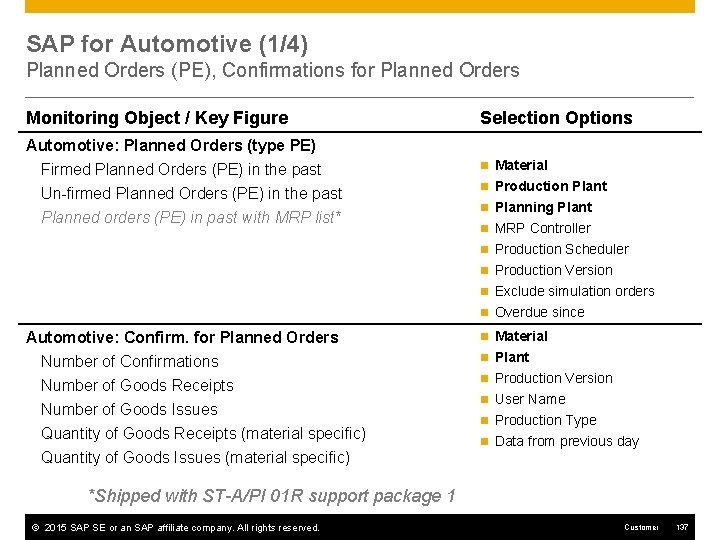
SAP for Automotive (1/4) Planned Orders (PE), Confirmations for Planned Orders Monitoring Object / Key Figure Selection Options Automotive: Planned Orders (type PE) Firmed Planned Orders (PE) in the past Un-firmed Planned Orders (PE) in the past n Material Planned orders (PE) in past with MRP list* n Production Plant n Planning Plant n MRP Controller n Production Scheduler n Production Version n Exclude simulation orders n Overdue since Automotive: Confirm. for Planned Orders Number of Confirmations Number of Goods Receipts Number of Goods Issues Quantity of Goods Receipts (material specific) Quantity of Goods Issues (material specific) n Material n Plant n Production Version n User Name n Production Type n Data from previous day *Shipped with ST-A/PI 01 R support package 1 © 2015 SAP SE or an SAP affiliate company. All rights reserved. Customer 137
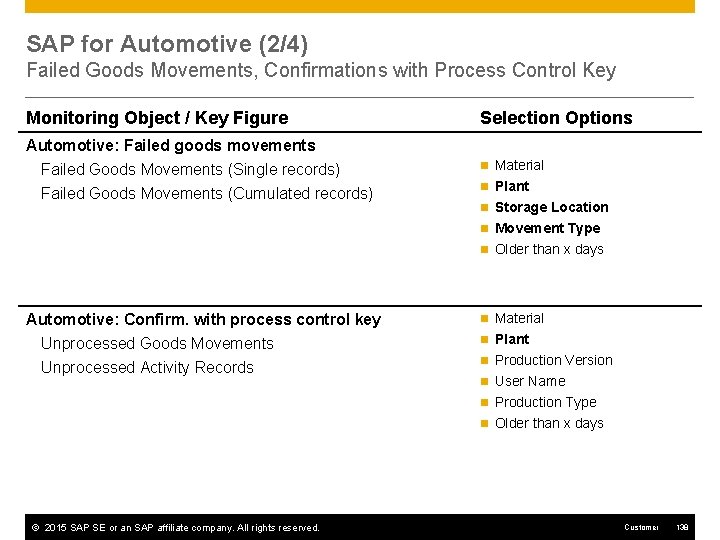
SAP for Automotive (2/4) Failed Goods Movements, Confirmations with Process Control Key Monitoring Object / Key Figure Selection Options Automotive: Failed goods movements Failed Goods Movements (Single records) Failed Goods Movements (Cumulated records) n Material n Plant n Storage Location n Movement Type n Older than x days Automotive: Confirm. with process control key Unprocessed Goods Movements Unprocessed Activity Records n Material n Plant n Production Version n User Name n Production Type n Older than x days © 2015 SAP SE or an SAP affiliate company. All rights reserved. Customer 138
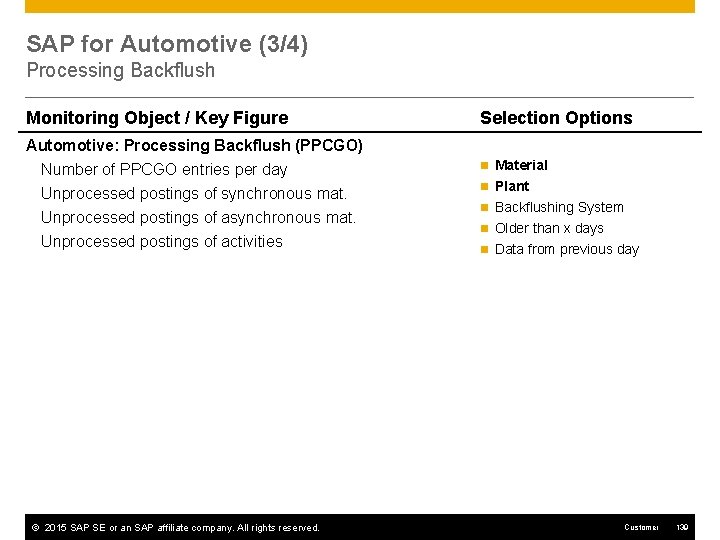
SAP for Automotive (3/4) Processing Backflush Monitoring Object / Key Figure Selection Options Automotive: Processing Backflush (PPCGO) Number of PPCGO entries per day Unprocessed postings of synchronous mat. n Material Unprocessed postings of asynchronous mat. Unprocessed postings of activities © 2015 SAP SE or an SAP affiliate company. All rights reserved. n Plant n Backflushing System n Older than x days n Data from previous day Customer 139
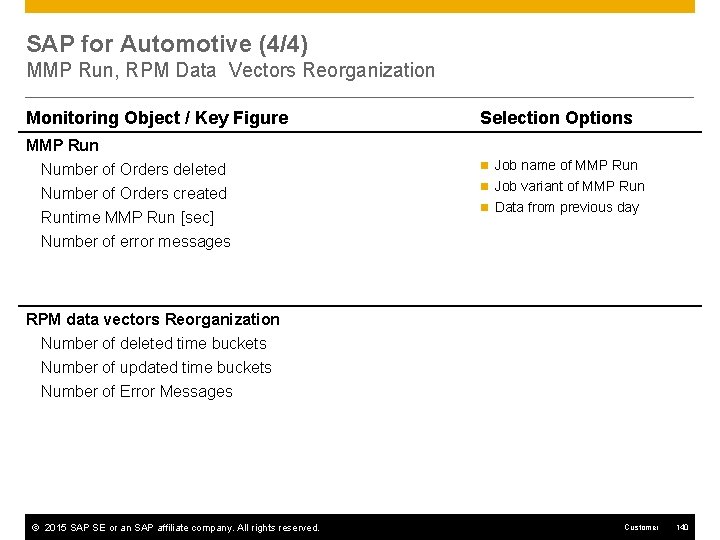
SAP for Automotive (4/4) MMP Run, RPM Data Vectors Reorganization Monitoring Object / Key Figure Selection Options MMP Run Number of Orders deleted Number of Orders created n Job name of MMP Runtime MMP Run [sec] n Job variant of MMP Run n Data from previous day Number of error messages RPM data vectors Reorganization Number of deleted time buckets Number of updated time buckets Number of Error Messages © 2015 SAP SE or an SAP affiliate company. All rights reserved. Customer 140
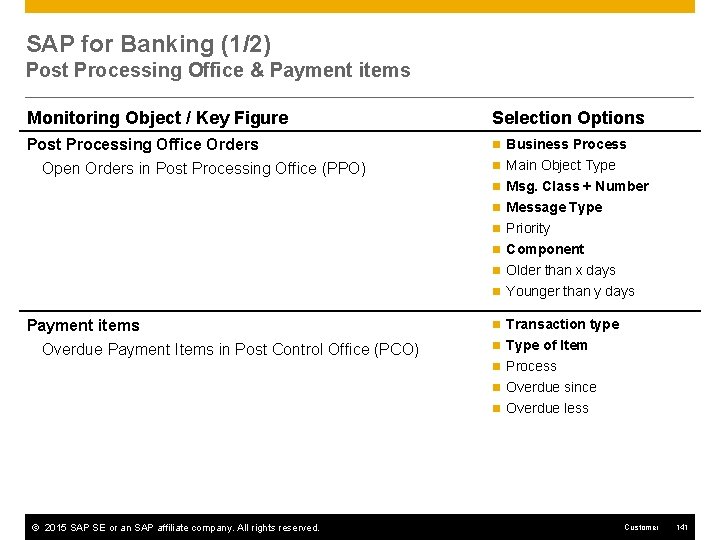
SAP for Banking (1/2) Post Processing Office & Payment items Monitoring Object / Key Figure Selection Options Post Processing Office Orders Open Orders in Post Processing Office (PPO) n Business Process n Main Object Type n Msg. Class + Number n Message Type n Priority n Component n Older than x days n Younger than y days Payment items Overdue Payment Items in Post Control Office (PCO) n Transaction type n Type of Item n Process n Overdue since n Overdue less © 2015 SAP SE or an SAP affiliate company. All rights reserved. Customer 141
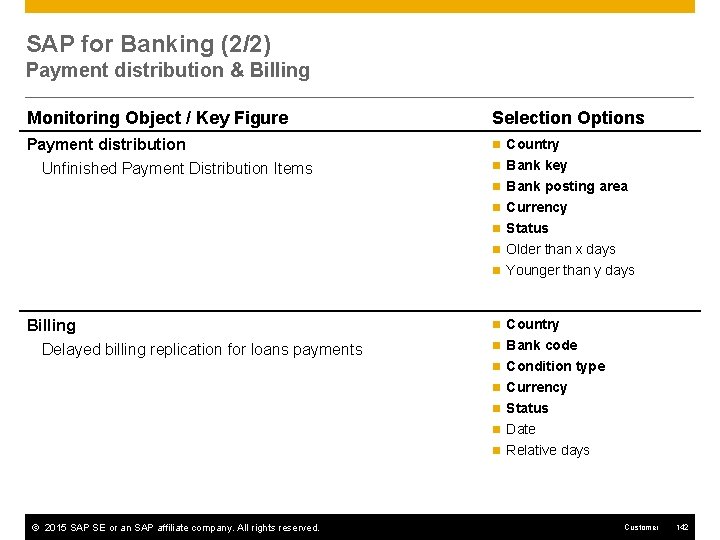
SAP for Banking (2/2) Payment distribution & Billing Monitoring Object / Key Figure Selection Options Payment distribution Unfinished Payment Distribution Items n Country n Bank key n Bank posting area n Currency n Status n Older than x days n Younger than y days Billing Delayed billing replication for loans payments n Country n Bank code n Condition type n Currency n Status n Date n Relative days © 2015 SAP SE or an SAP affiliate company. All rights reserved. Customer 142
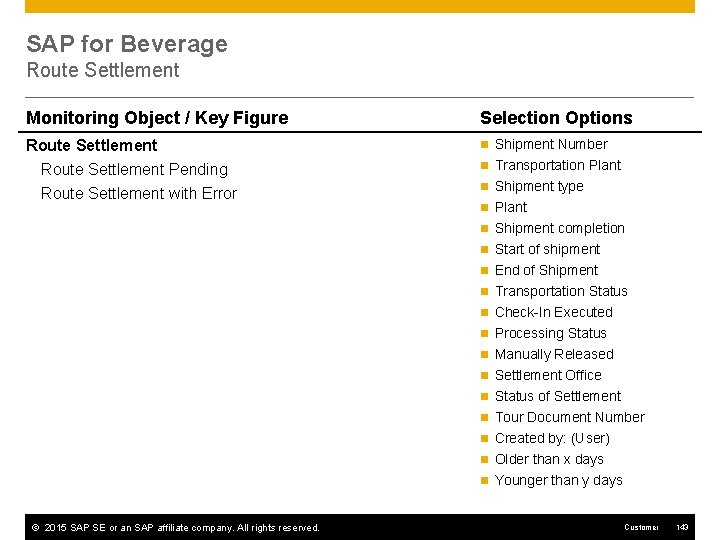
SAP for Beverage Route Settlement Monitoring Object / Key Figure Selection Options Route Settlement Pending Route Settlement with Error n Shipment Number n Transportation Plant n Shipment type n Plant n Shipment completion n Start of shipment n End of Shipment n Transportation Status n Check-In Executed n Processing Status n Manually Released n Settlement Office n Status of Settlement n Tour Document Number n Created by: (User) n Older than x days n Younger than y days © 2015 SAP SE or an SAP affiliate company. All rights reserved. Customer 143
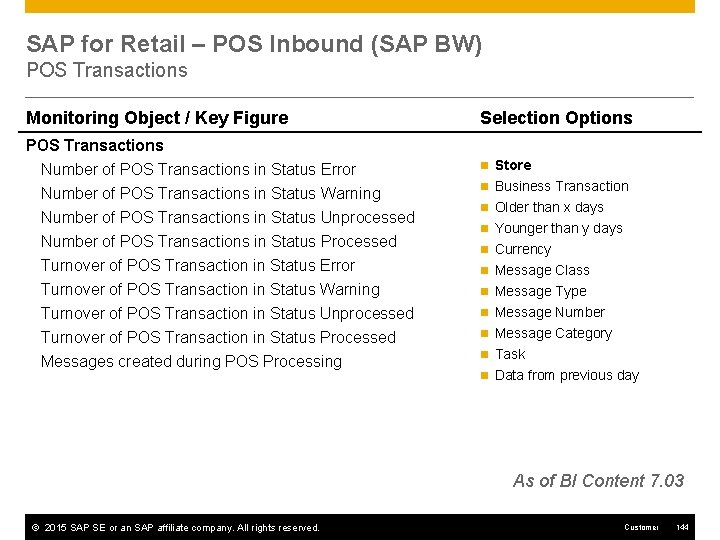
SAP for Retail – POS Inbound (SAP BW) POS Transactions Monitoring Object / Key Figure Selection Options POS Transactions Number of POS Transactions in Status Error Number of POS Transactions in Status Warning n Store Number of POS Transactions in Status Unprocessed Number of POS Transactions in Status Processed Turnover of POS Transaction in Status Error Turnover of POS Transaction in Status Warning Turnover of POS Transaction in Status Unprocessed Turnover of POS Transaction in Status Processed Messages created during POS Processing n Business Transaction n Older than x days n Younger than y days n Currency n Message Class n Message Type n Message Number n Message Category n Task n Data from previous day As of BI Content 7. 03 © 2015 SAP SE or an SAP affiliate company. All rights reserved. Customer 144
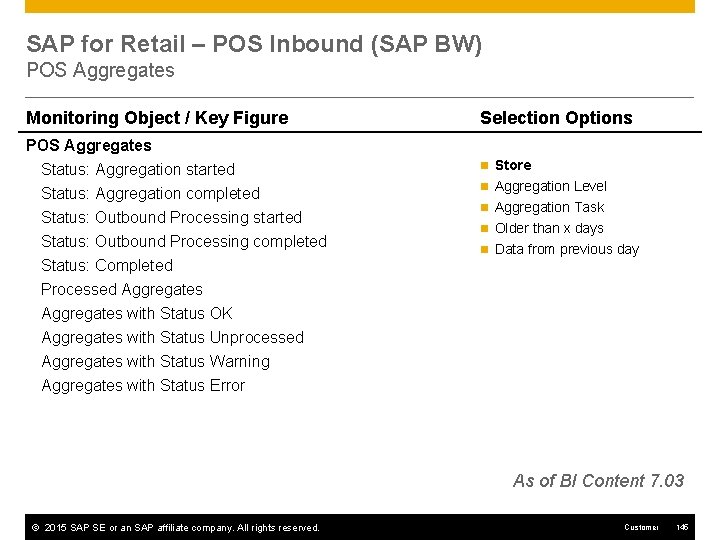
SAP for Retail – POS Inbound (SAP BW) POS Aggregates Monitoring Object / Key Figure Selection Options POS Aggregates Status: Aggregation started Status: Aggregation completed n Store Status: Outbound Processing started Status: Outbound Processing completed Status: Completed Processed Aggregates with Status OK Aggregates with Status Unprocessed Aggregates with Status Warning Aggregates with Status Error n Aggregation Level n Aggregation Task n Older than x days n Data from previous day As of BI Content 7. 03 © 2015 SAP SE or an SAP affiliate company. All rights reserved. Customer 145
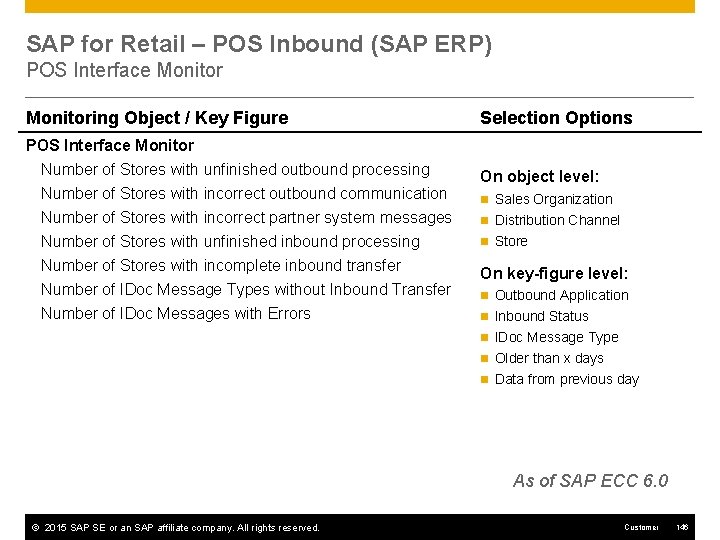
SAP for Retail – POS Inbound (SAP ERP) POS Interface Monitoring Object / Key Figure Selection Options POS Interface Monitor Number of Stores with unfinished outbound processing Number of Stores with incorrect outbound communication On object level: n Sales Organization Number of Stores with incorrect partner system messages n Distribution Channel Number of Stores with unfinished inbound processing n Store Number of Stores with incomplete inbound transfer Number of IDoc Message Types without Inbound Transfer Number of IDoc Messages with Errors On key-figure level: n Outbound Application n Inbound Status n IDoc Message Type n Older than x days n Data from previous day As of SAP ECC 6. 0 © 2015 SAP SE or an SAP affiliate company. All rights reserved. Customer 146
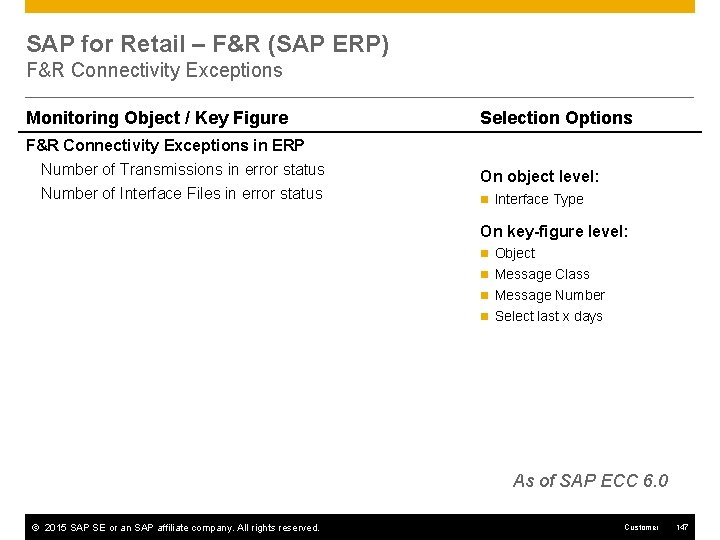
SAP for Retail – F&R (SAP ERP) F&R Connectivity Exceptions Monitoring Object / Key Figure Selection Options F&R Connectivity Exceptions in ERP Number of Transmissions in error status Number of Interface Files in error status On object level: n Interface Type On key-figure level: n Object n Message Class n Message Number n Select last x days As of SAP ECC 6. 0 © 2015 SAP SE or an SAP affiliate company. All rights reserved. Customer 147
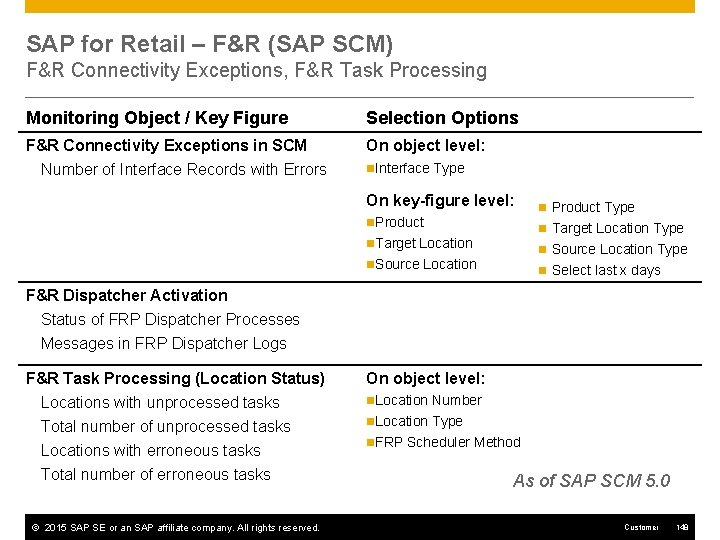
SAP for Retail – F&R (SAP SCM) F&R Connectivity Exceptions, F&R Task Processing Monitoring Object / Key Figure Selection Options F&R Connectivity Exceptions in SCM Number of Interface Records with Errors On object level: n. Interface Type On key-figure level: n. Product n Product Type n Target Location Type n. Target Location n Source Location Type n. Source Location n Select last x days F&R Dispatcher Activation Status of FRP Dispatcher Processes Messages in FRP Dispatcher Logs F&R Task Processing (Location Status) Locations with unprocessed tasks Total number of unprocessed tasks Locations with erroneous tasks Total number of erroneous tasks © 2015 SAP SE or an SAP affiliate company. All rights reserved. On object level: n. Location Number n. Location Type n. FRP Scheduler Method As of SAP SCM 5. 0 Customer 148
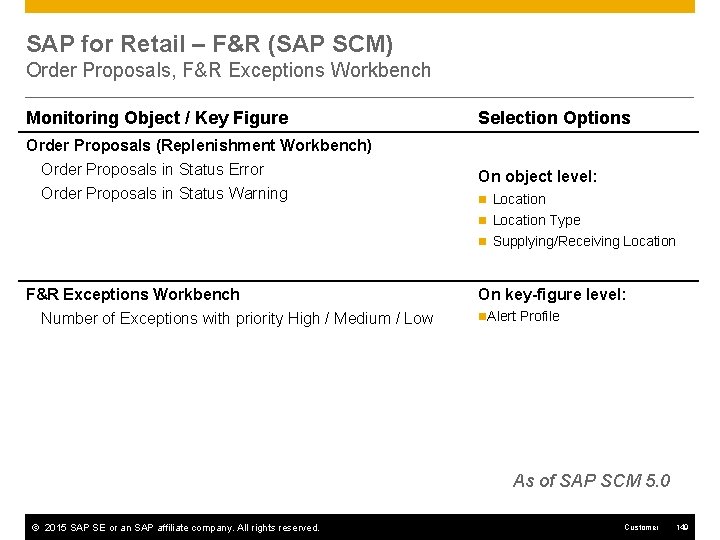
SAP for Retail – F&R (SAP SCM) Order Proposals, F&R Exceptions Workbench Monitoring Object / Key Figure Selection Options Order Proposals (Replenishment Workbench) Order Proposals in Status Error Order Proposals in Status Warning On object level: n Location Type n Supplying/Receiving Location F&R Exceptions Workbench Number of Exceptions with priority High / Medium / Low On key-figure level: n. Alert Profile As of SAP SCM 5. 0 © 2015 SAP SE or an SAP affiliate company. All rights reserved. Customer 149
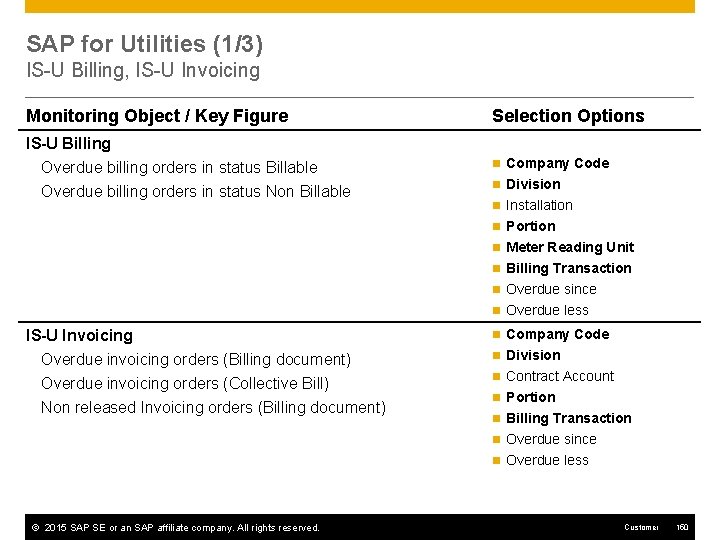
SAP for Utilities (1/3) IS-U Billing, IS-U Invoicing Monitoring Object / Key Figure Selection Options IS-U Billing Overdue billing orders in status Billable Overdue billing orders in status Non Billable n Company Code n Division n Installation n Portion n Meter Reading Unit n Billing Transaction n Overdue since n Overdue less IS-U Invoicing Overdue invoicing orders (Billing document) Overdue invoicing orders (Collective Bill) Non released Invoicing orders (Billing document) n Company Code n Division n Contract Account n Portion n Billing Transaction n Overdue since n Overdue less © 2015 SAP SE or an SAP affiliate company. All rights reserved. Customer 150
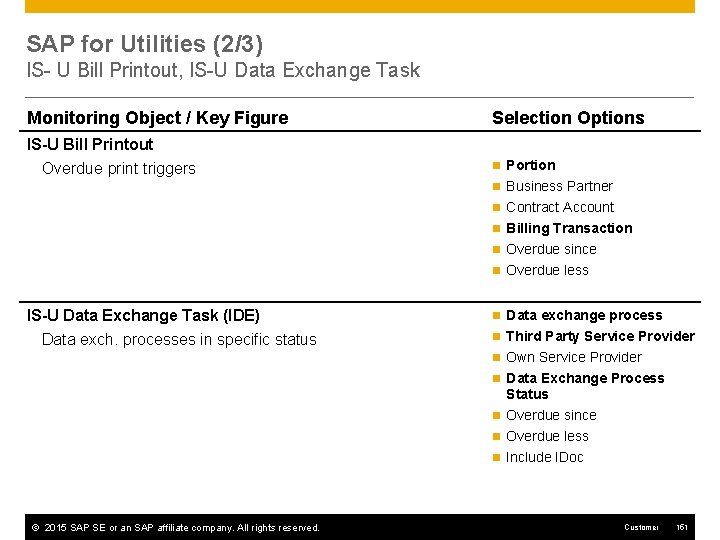
SAP for Utilities (2/3) IS- U Bill Printout, IS-U Data Exchange Task Monitoring Object / Key Figure Selection Options IS-U Bill Printout Overdue print triggers n Portion n Business Partner n Contract Account n Billing Transaction n Overdue since n Overdue less IS-U Data Exchange Task (IDE) Data exch. processes in specific status n Data exchange process n Third Party Service Provider n Own Service Provider n Data Exchange Process Status n Overdue since n Overdue less n Include IDoc © 2015 SAP SE or an SAP affiliate company. All rights reserved. Customer 151
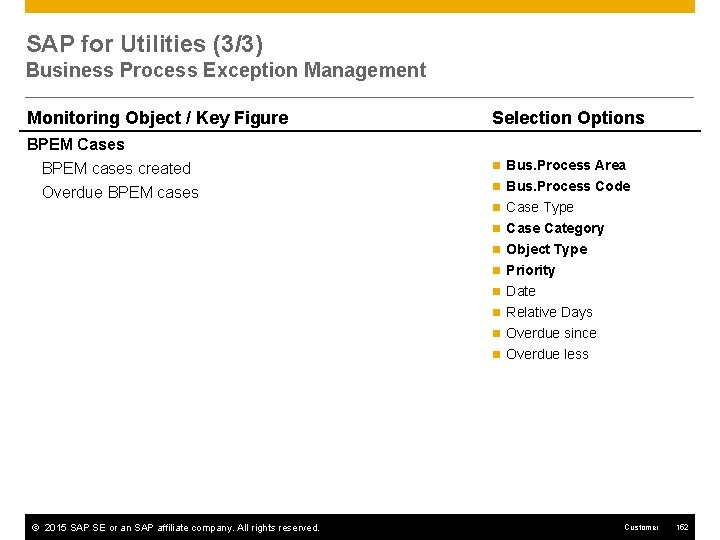
SAP for Utilities (3/3) Business Process Exception Management Monitoring Object / Key Figure Selection Options BPEM Cases BPEM cases created Overdue BPEM cases n Bus. Process Area n Bus. Process Code n Case Type n Case Category n Object Type n Priority n Date n Relative Days n Overdue since n Overdue less © 2015 SAP SE or an SAP affiliate company. All rights reserved. Customer 152
Mass Activity Monitoring IS – Utilities IS – Banking Deposits Management (FS-AM) Bank Analyzer Banking Services Payment Engine IS – Insurance IS – Telecommunications
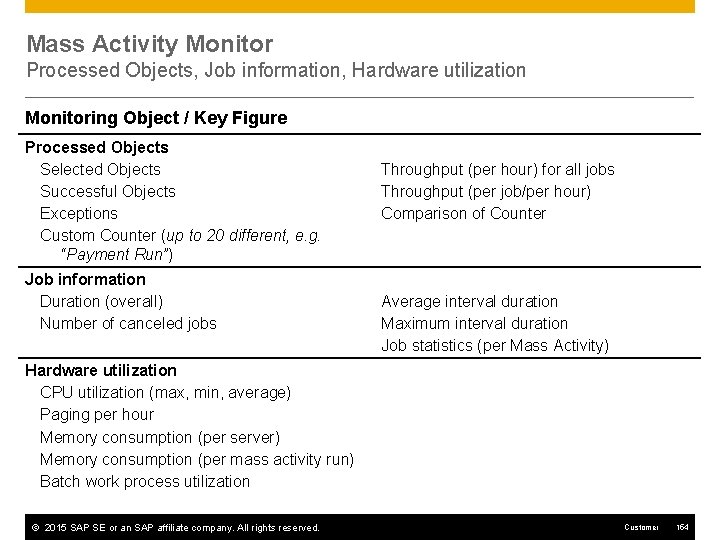
Mass Activity Monitor Processed Objects, Job information, Hardware utilization Monitoring Object / Key Figure Processed Objects Selected Objects Successful Objects Exceptions Custom Counter (up to 20 different, e. g. “Payment Run”) Job information Duration (overall) Number of canceled jobs Throughput (per hour) for all jobs Throughput (per job/per hour) Comparison of Counter Average interval duration Maximum interval duration Job statistics (per Mass Activity) Hardware utilization CPU utilization (max, min, average) Paging per hour Memory consumption (per server) Memory consumption (per mass activity run) Batch work process utilization © 2015 SAP SE or an SAP affiliate company. All rights reserved. Customer 154
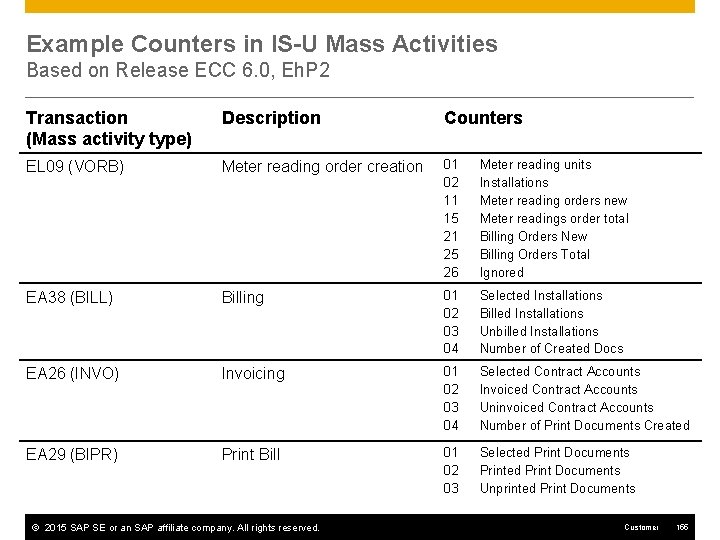
Example Counters in IS-U Mass Activities Based on Release ECC 6. 0, Eh. P 2 Transaction (Mass activity type) Description Counters EL 09 (VORB) Meter reading order creation 01 02 11 15 21 25 26 Meter reading units Installations Meter reading orders new Meter readings order total Billing Orders New Billing Orders Total Ignored EA 38 (BILL) Billing 01 02 03 04 Selected Installations Billed Installations Unbilled Installations Number of Created Docs EA 26 (INVO) Invoicing 01 02 03 04 Selected Contract Accounts Invoiced Contract Accounts Uninvoiced Contract Accounts Number of Print Documents Created EA 29 (BIPR) Print Bill 01 02 03 Selected Print Documents Printed Print Documents Unprinted Print Documents © 2015 SAP SE or an SAP affiliate company. All rights reserved. Customer 155
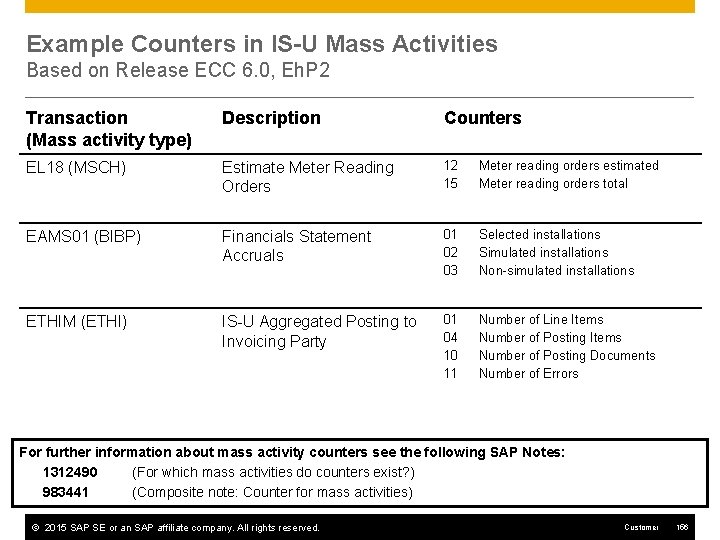
Example Counters in IS-U Mass Activities Based on Release ECC 6. 0, Eh. P 2 Transaction (Mass activity type) Description Counters EL 18 (MSCH) Estimate Meter Reading Orders 12 15 Meter reading orders estimated Meter reading orders total EAMS 01 (BIBP) Financials Statement Accruals 01 02 03 Selected installations Simulated installations Non-simulated installations ETHIM (ETHI) IS-U Aggregated Posting to Invoicing Party 01 04 10 11 Number of Line Items Number of Posting Documents Number of Errors For further information about mass activity counters see the following SAP Notes: 1312490 (For which mass activities do counters exist? ) 983441 (Composite note: Counter for mass activities) © 2015 SAP SE or an SAP affiliate company. All rights reserved. Customer 156
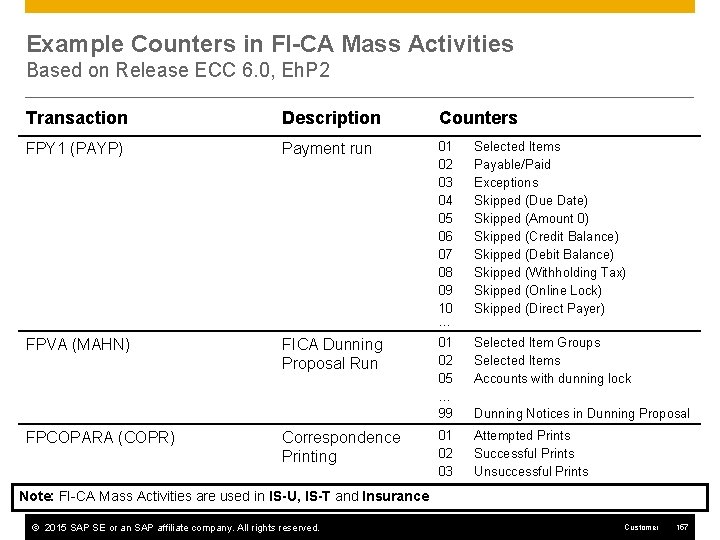
Example Counters in FI-CA Mass Activities Based on Release ECC 6. 0, Eh. P 2 Transaction Description Counters FPY 1 (PAYP) Payment run 01 02 03 04 05 06 07 08 09 10 … Selected Items Payable/Paid Exceptions Skipped (Due Date) Skipped (Amount 0) Skipped (Credit Balance) Skipped (Debit Balance) Skipped (Withholding Tax) Skipped (Online Lock) Skipped (Direct Payer) FPVA (MAHN) FICA Dunning Proposal Run 01 02 05 … 99 Selected Item Groups Selected Items Accounts with dunning lock 01 02 03 Attempted Prints Successful Prints Unsuccessful Prints FPCOPARA (COPR) Correspondence Printing Dunning Notices in Dunning Proposal Note: FI-CA Mass Activities are used in IS-U, IS-T and Insurance © 2015 SAP SE or an SAP affiliate company. All rights reserved. Customer 157
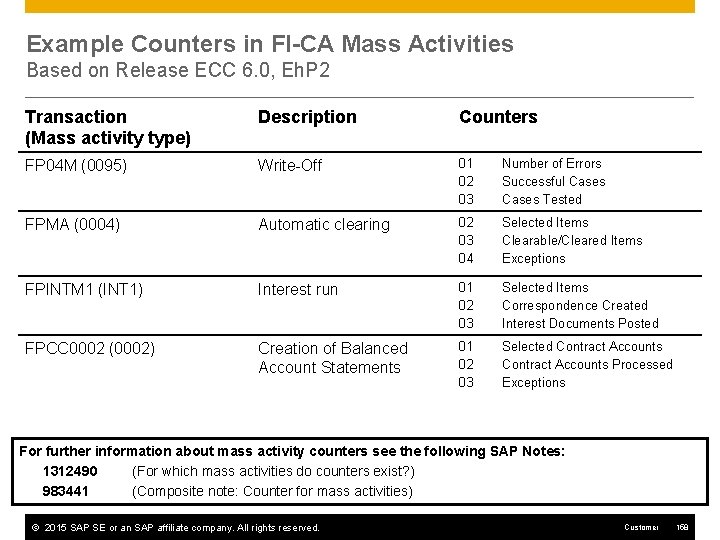
Example Counters in FI-CA Mass Activities Based on Release ECC 6. 0, Eh. P 2 Transaction (Mass activity type) Description Counters FP 04 M (0095) Write-Off 01 02 03 Number of Errors Successful Cases Tested FPMA (0004) Automatic clearing 02 03 04 Selected Items Clearable/Cleared Items Exceptions FPINTM 1 (INT 1) Interest run 01 02 03 Selected Items Correspondence Created Interest Documents Posted FPCC 0002 (0002) Creation of Balanced Account Statements 01 02 03 Selected Contract Accounts Processed Exceptions For further information about mass activity counters see the following SAP Notes: 1312490 (For which mass activities do counters exist? ) 983441 (Composite note: Counter for mass activities) © 2015 SAP SE or an SAP affiliate company. All rights reserved. Customer 158
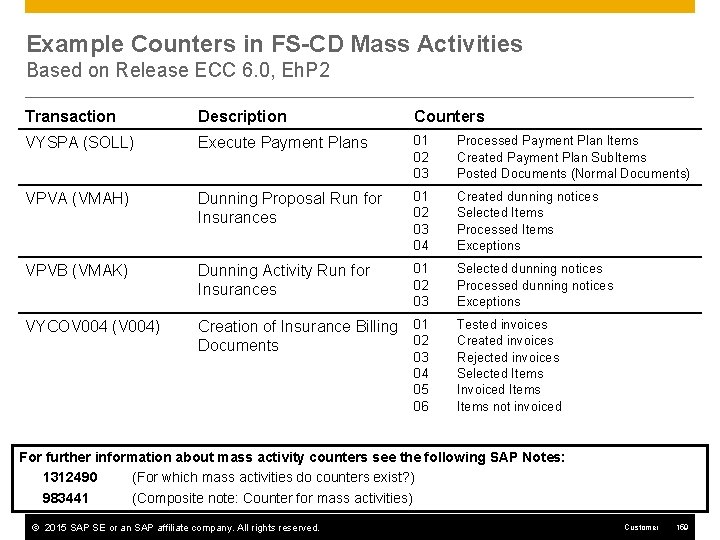
Example Counters in FS-CD Mass Activities Based on Release ECC 6. 0, Eh. P 2 Transaction Description Counters VYSPA (SOLL) Execute Payment Plans 01 02 03 Processed Payment Plan Items Created Payment Plan Sub. Items Posted Documents (Normal Documents) VPVA (VMAH) Dunning Proposal Run for Insurances 01 02 03 04 Created dunning notices Selected Items Processed Items Exceptions VPVB (VMAK) Dunning Activity Run for Insurances 01 02 03 Selected dunning notices Processed dunning notices Exceptions VYCOV 004 (V 004) Creation of Insurance Billing Documents 01 02 03 04 05 06 Tested invoices Created invoices Rejected invoices Selected Items Invoiced Items not invoiced For further information about mass activity counters see the following SAP Notes: 1312490 (For which mass activities do counters exist? ) 983441 (Composite note: Counter for mass activities) © 2015 SAP SE or an SAP affiliate company. All rights reserved. Customer 159
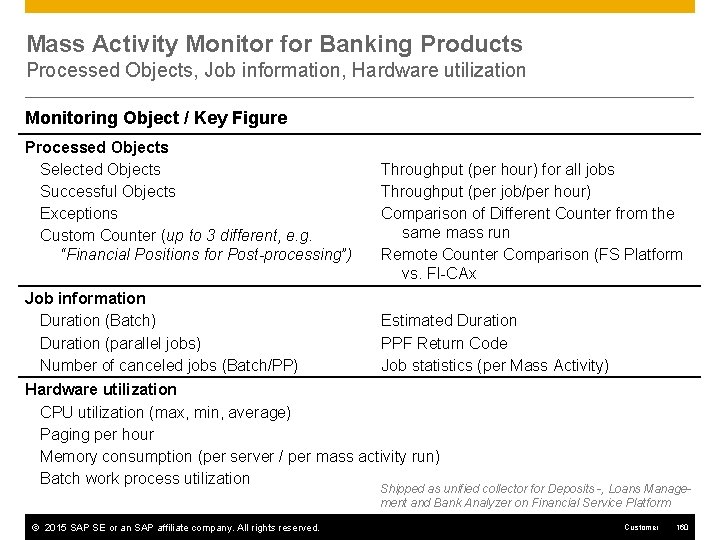
Mass Activity Monitor for Banking Products Processed Objects, Job information, Hardware utilization Monitoring Object / Key Figure Processed Objects Selected Objects Successful Objects Exceptions Custom Counter (up to 3 different, e. g. “Financial Positions for Post-processing”) Job information Duration (Batch) Duration (parallel jobs) Number of canceled jobs (Batch/PP) Throughput (per hour) for all jobs Throughput (per job/per hour) Comparison of Different Counter from the same mass run Remote Counter Comparison (FS Platform vs. FI-CAx Estimated Duration PPF Return Code Job statistics (per Mass Activity) Hardware utilization CPU utilization (max, min, average) Paging per hour Memory consumption (per server / per mass activity run) Batch work process utilization Shipped as unified collector for Deposits -, Loans Management and Bank Analyzer on Financial Service Platform © 2015 SAP SE or an SAP affiliate company. All rights reserved. Customer 160
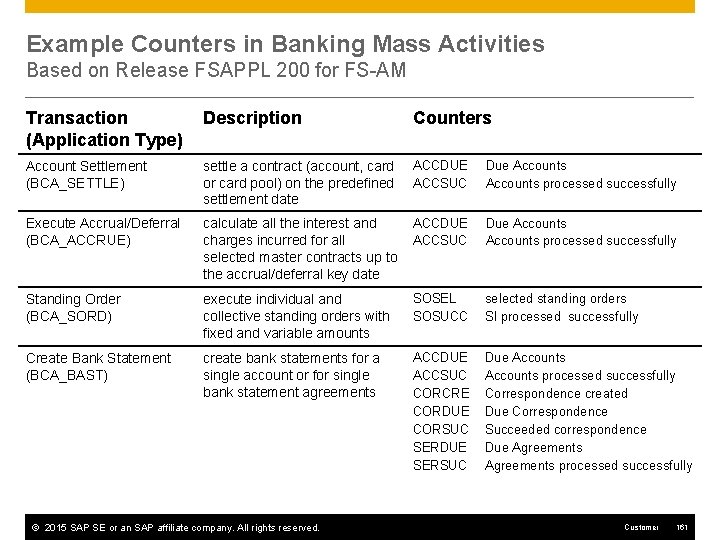
Example Counters in Banking Mass Activities Based on Release FSAPPL 200 for FS-AM Transaction (Application Type) Description Counters Account Settlement (BCA_SETTLE) settle a contract (account, card or card pool) on the predefined settlement date ACCDUE ACCSUC Due Accounts processed successfully Execute Accrual/Deferral (BCA_ACCRUE) calculate all the interest and charges incurred for all selected master contracts up to the accrual/deferral key date ACCDUE ACCSUC Due Accounts processed successfully Standing Order (BCA_SORD) execute individual and collective standing orders with fixed and variable amounts SOSEL SOSUCC selected standing orders SI processed successfully Create Bank Statement (BCA_BAST) create bank statements for a single account or for single bank statement agreements ACCDUE ACCSUC CORCRE CORDUE CORSUC SERDUE SERSUC Due Accounts processed successfully Correspondence created Due Correspondence Succeeded correspondence Due Agreements processed successfully © 2015 SAP SE or an SAP affiliate company. All rights reserved. Customer 161
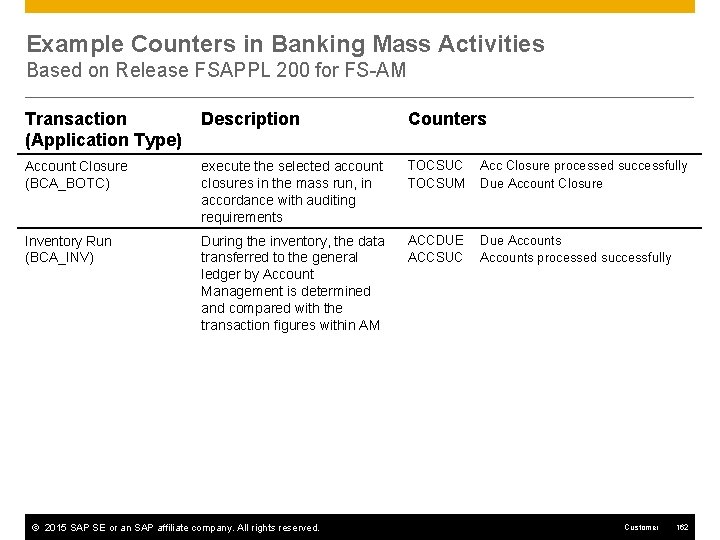
Example Counters in Banking Mass Activities Based on Release FSAPPL 200 for FS-AM Transaction (Application Type) Description Counters Account Closure (BCA_BOTC) execute the selected account closures in the mass run, in accordance with auditing requirements TOCSUC TOCSUM Acc Closure processed successfully Due Account Closure Inventory Run (BCA_INV) During the inventory, the data transferred to the general ledger by Account Management is determined and compared with the transaction figures within AM ACCDUE ACCSUC Due Accounts processed successfully © 2015 SAP SE or an SAP affiliate company. All rights reserved. Customer 162
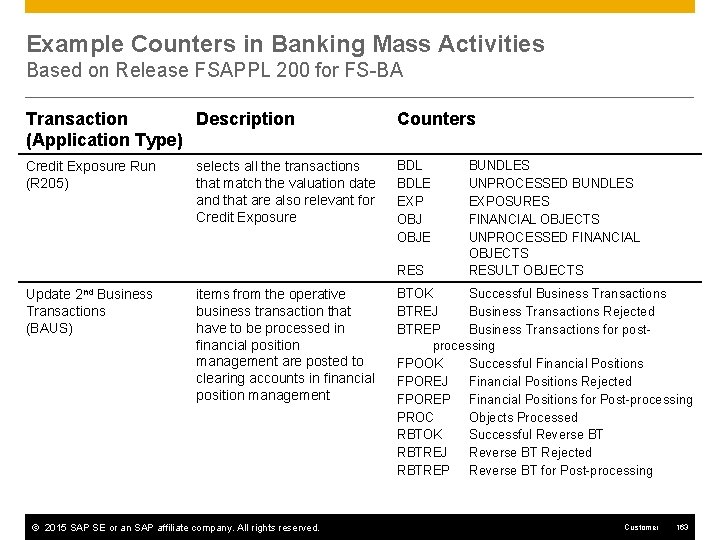
Example Counters in Banking Mass Activities Based on Release FSAPPL 200 for FS-BA Transaction Description (Application Type) Counters Credit Exposure Run (R 205) BDLE EXP OBJE selects all the transactions that match the valuation date and that are also relevant for Credit Exposure RES Update 2 nd Business Transactions (BAUS) items from the operative business transaction that have to be processed in financial position management are posted to clearing accounts in financial position management © 2015 SAP SE or an SAP affiliate company. All rights reserved. BUNDLES UNPROCESSED BUNDLES EXPOSURES FINANCIAL OBJECTS UNPROCESSED FINANCIAL OBJECTS RESULT OBJECTS BTOK Successful Business Transactions BTREJ Business Transactions Rejected BTREP Business Transactions for postprocessing FPOOK Successful Financial Positions FPOREJ Financial Positions Rejected FPOREP Financial Positions for Post-processing PROC Objects Processed RBTOK Successful Reverse BT RBTREJ Reverse BT Rejected RBTREP Reverse BT for Post-processing Customer 163
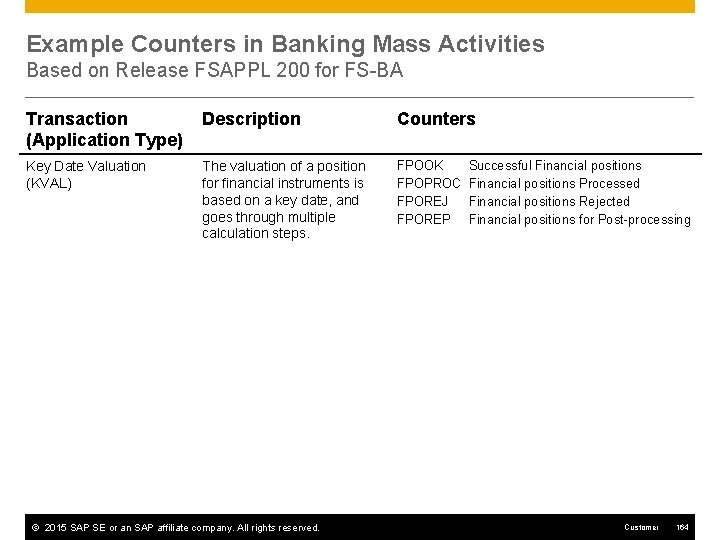
Example Counters in Banking Mass Activities Based on Release FSAPPL 200 for FS-BA Transaction (Application Type) Description Counters Key Date Valuation (KVAL) The valuation of a position for financial instruments is based on a key date, and goes through multiple calculation steps. FPOOK FPOPROC FPOREJ FPOREP © 2015 SAP SE or an SAP affiliate company. All rights reserved. Successful Financial positions Processed Financial positions Rejected Financial positions for Post-processing Customer 164
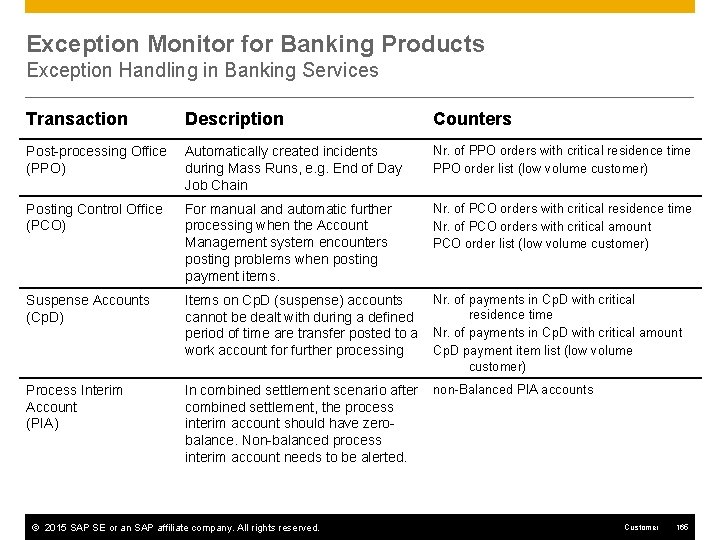
Exception Monitor for Banking Products Exception Handling in Banking Services Transaction Description Counters Post-processing Office (PPO) Automatically created incidents during Mass Runs, e. g. End of Day Job Chain Nr. of PPO orders with critical residence time PPO order list (low volume customer) Posting Control Office (PCO) For manual and automatic further processing when the Account Management system encounters posting problems when posting payment items. Nr. of PCO orders with critical residence time Nr. of PCO orders with critical amount PCO order list (low volume customer) Suspense Accounts (Cp. D) Items on Cp. D (suspense) accounts cannot be dealt with during a defined period of time are transfer posted to a work account for further processing Nr. of payments in Cp. D with critical residence time Nr. of payments in Cp. D with critical amount Cp. D payment item list (low volume customer) Process Interim Account (PIA) In combined settlement scenario after combined settlement, the process interim account should have zerobalance. Non-balanced process interim account needs to be alerted. non-Balanced PIA accounts © 2015 SAP SE or an SAP affiliate company. All rights reserved. Customer 165
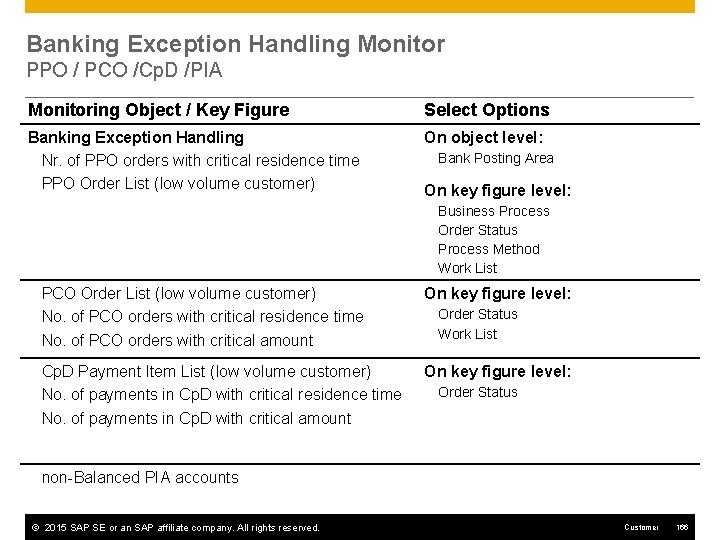
Banking Exception Handling Monitor PPO / PCO /Cp. D /PIA Monitoring Object / Key Figure Select Options Banking Exception Handling Nr. of PPO orders with critical residence time PPO Order List (low volume customer) On object level: Bank Posting Area On key figure level: Business Process Order Status Process Method Work List PCO Order List (low volume customer) No. of PCO orders with critical residence time No. of PCO orders with critical amount On key figure level: Cp. D Payment Item List (low volume customer) No. of payments in Cp. D with critical residence time No. of payments in Cp. D with critical amount On key figure level: Order Status Work List Order Status non-Balanced PIA accounts © 2015 SAP SE or an SAP affiliate company. All rights reserved. Customer 166
SAP Consolidation (SEM-BCS) SEM-BCS Tasks SEM-BCS BW Queries
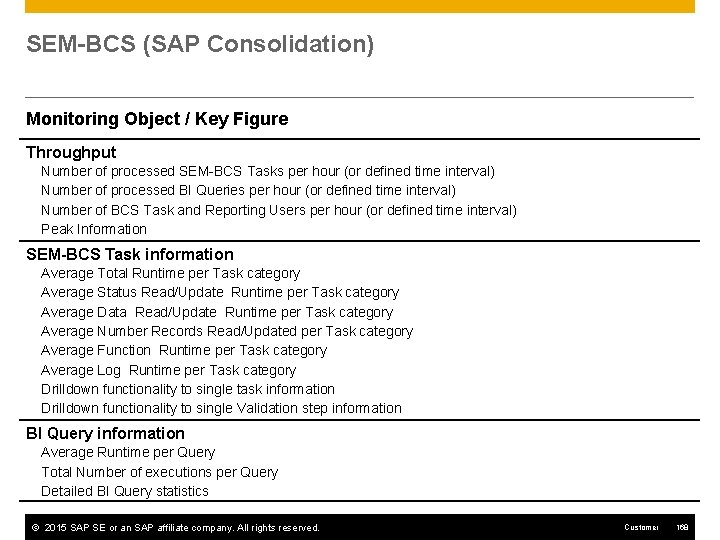
SEM-BCS (SAP Consolidation) Monitoring Object / Key Figure Throughput Number of processed SEM-BCS Tasks per hour (or defined time interval) Number of processed BI Queries per hour (or defined time interval) Number of BCS Task and Reporting Users per hour (or defined time interval) Peak Information SEM-BCS Task information Average Total Runtime per Task category Average Status Read/Update Runtime per Task category Average Data Read/Update Runtime per Task category Average Number Records Read/Updated per Task category Average Function Runtime per Task category Average Log Runtime per Task category Drilldown functionality to single task information Drilldown functionality to single Validation step information BI Query information Average Runtime per Query Total Number of executions per Query Detailed BI Query statistics © 2015 SAP SE or an SAP affiliate company. All rights reserved. Customer 168
Data Consistency Cockpit ERP Sales & Services ERP Financials SAP CRM SAP APO (Extended) Warehouse Management SAP for Retail (F&R) SAP Oil & Gas
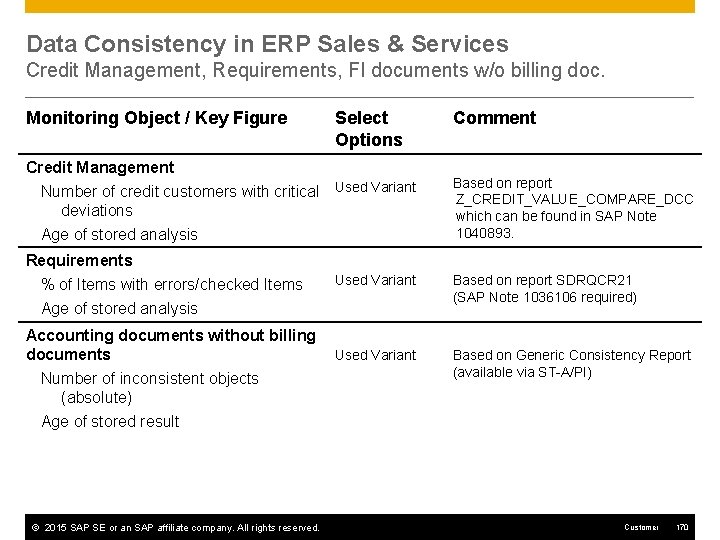
Data Consistency in ERP Sales & Services Credit Management, Requirements, FI documents w/o billing doc. Monitoring Object / Key Figure Select Options Credit Management Number of credit customers with critical Used Variant deviations Age of stored analysis Requirements % of Items with errors/checked Items Age of stored analysis Used Variant Accounting documents without billing Used Variant documents Number of inconsistent objects (absolute) Comment Based on report Z_CREDIT_VALUE_COMPARE_DCC which can be found in SAP Note 1040893. Based on report SDRQCR 21 (SAP Note 1036106 required) Based on Generic Consistency Report (available via ST-A/PI) Age of stored result © 2015 SAP SE or an SAP affiliate company. All rights reserved. Customer 170
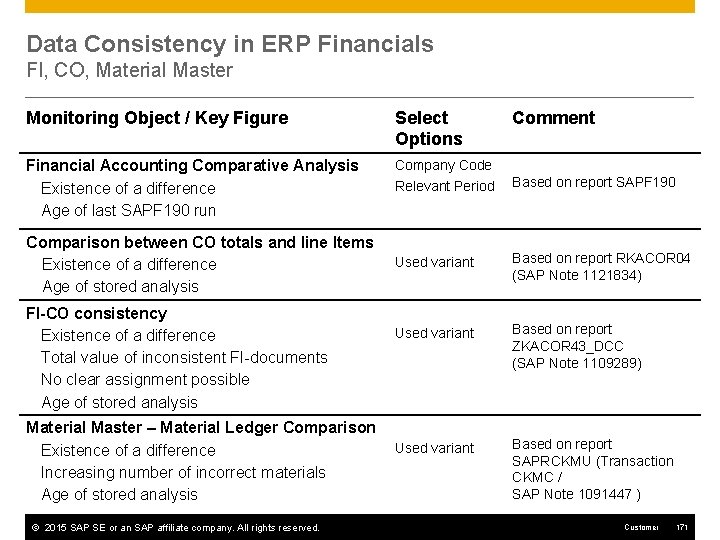
Data Consistency in ERP Financials FI, CO, Material Master Monitoring Object / Key Figure Select Options Financial Accounting Comparative Analysis Existence of a difference Age of last SAPF 190 run Company Code Comparison between CO totals and line Items Existence of a difference Age of stored analysis FI-CO consistency Existence of a difference Total value of inconsistent FI-documents No clear assignment possible Age of stored analysis Material Master – Material Ledger Comparison Existence of a difference Increasing number of incorrect materials Age of stored analysis © 2015 SAP SE or an SAP affiliate company. All rights reserved. Comment Relevant Period Based on report SAPF 190 Used variant Based on report RKACOR 04 (SAP Note 1121834) Used variant Based on report ZKACOR 43_DCC (SAP Note 1109289) Used variant Based on report SAPRCKMU (Transaction CKMC / SAP Note 1091447 ) Customer 171
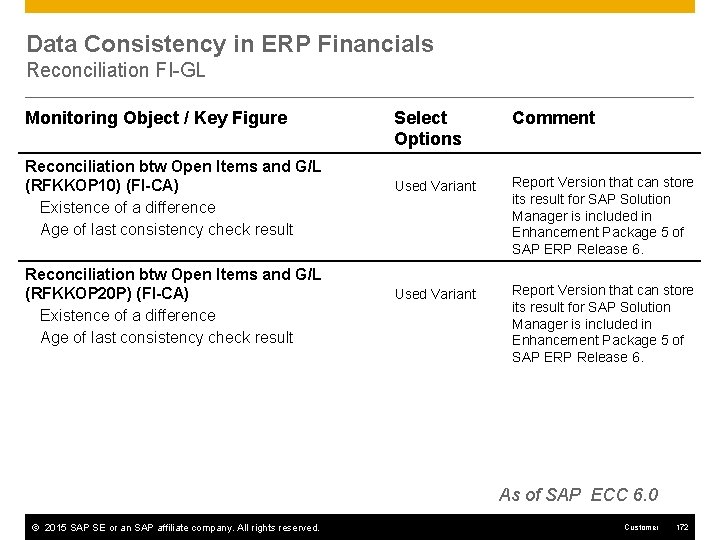
Data Consistency in ERP Financials Reconciliation FI-GL Monitoring Object / Key Figure Reconciliation btw Open Items and G/L (RFKKOP 10) (FI-CA) Existence of a difference Age of last consistency check result Reconciliation btw Open Items and G/L (RFKKOP 20 P) (FI-CA) Existence of a difference Age of last consistency check result Select Options Comment Used Variant Report Version that can store its result for SAP Solution Manager is included in Enhancement Package 5 of SAP ERP Release 6. As of SAP ECC 6. 0 © 2015 SAP SE or an SAP affiliate company. All rights reserved. Customer 172
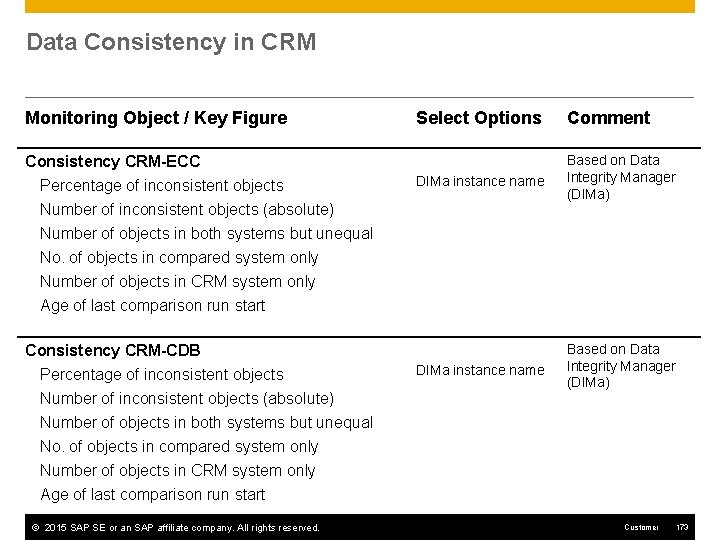
Data Consistency in CRM Monitoring Objects / Key Figures (1/2) Monitoring Object / Key Figure Consistency CRM-ECC Percentage of inconsistent objects Number of inconsistent objects (absolute) Select Options Comment DIMa instance name Based on Data Integrity Manager (DIMa) Number of objects in both systems but unequal No. of objects in compared system only Number of objects in CRM system only Age of last comparison run start Consistency CRM-CDB Percentage of inconsistent objects Number of inconsistent objects (absolute) Number of objects in both systems but unequal No. of objects in compared system only Number of objects in CRM system only Age of last comparison run start © 2015 SAP SE or an SAP affiliate company. All rights reserved. Customer 173
Data Consistency in CRM Marketing: BW-SEM Consistency Check Monitoring Object / Key Figure Select Options Comment Program name Based on report ZRSMRM_CRM_M KT_CHECK (SAP Note 816793) CRM Marketing: BW-SEM Consistency Check Statistic: CRM Marketing Elements (total) Statistic: BW Marketing Elements (marked as existing) Statistic: BW Marketing Elements (marked as deleted) Variant name Statistic: SEM Marketing Elements (total) Statistic: SEM Marketing Elements (non-zero plan data) Statistic: SEM Marketing Elements (zeroed-out plan data) Marketing Elements status: Total Marketing Elements status: OK (including deleted) Marketing Elements status: Not created in BW Marketing Elements status: Not deleted in SEM Marketing Elements status: Unknown Marketing Elements status: Sum of error status Age of last consistency check result © 2015 SAP SE or an SAP affiliate company. All rights reserved. Customer 174
Data Consistency in CRM Leasing Monitoring Object / Key Figure CRM Leasing: Billing Request Items in error Select Options Comment Used variant Based on CRM_FS_FIND_BRIS_ IN_ERROR Existence of a difference Number of differences Age of last CRM_FS_FIND_BRIS_IN_ERROR run CRM Leasing: Billing Request Items in error SAP Note 1135291 required (pilot release) Used variant Existence of a difference Number of differences Age of last CRM_FS_FIND_BRIS_IN_ERROR run Based on CRM_FS_FIND_BRIS_ IN_ERROR SAP Note 1135291 required (pilot release) Only available for BBPCRM 400 and 500 © 2015 SAP SE or an SAP affiliate company. All rights reserved. Customer 175
Data Consistency in APO CIF Delta, Live. Cache vs Database Monitoring Object / Key Figure Select Options Comment CIF Deltareport (APO-ECC) Number of inconsistencies Number of inconsistent planned orders Name for save Based on CIF Deltareport User Based on transaction OM 17 Number of inconsistent production orders Number of inconsistent sales orders Number of inconsistent purchase requisitions No. of inconsistent scheduling agreements Number of inconsistent stocks No. of inconsistencies in other objects Live. Cache - Database Total 17 key figures for specific object types 1 User defined key figure Age of most recent run © 2015 SAP SE or an SAP affiliate company. All rights reserved. Customer 176
Data Consistency in APO Sales and Delivery Requirements Monitoring Object / Key Figure Select Options Comment APO: Sales and Delivery Requirements % Requirement Items w. errors / Checked Req. -Items Used Variant Based on report /SAPAPO/SDRQCR 21 % Items in SD Order Tables w. errors / Checked items Report enhancement via SAP Note 1408190 required Age of last consistency check result © 2015 SAP SE or an SAP affiliate company. All rights reserved. Customer 177
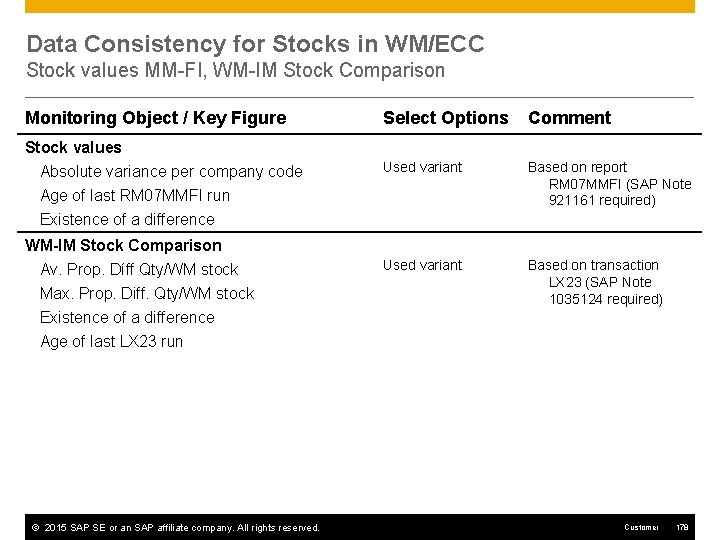
Data Consistency for Stocks in WM/ECC Stock values MM-FI, WM-IM Stock Comparison Monitoring Object / Key Figure Select Options Comment Stock values Absolute variance per company code Age of last RM 07 MMFI run Used variant Based on report RM 07 MMFI (SAP Note 921161 required) Used variant Based on transaction LX 23 (SAP Note 1035124 required) Existence of a difference WM-IM Stock Comparison Av. Prop. Díff Qty/WM stock Max. Prop. Diff. Qty/WM stock Existence of a difference Age of last LX 23 run © 2015 SAP SE or an SAP affiliate company. All rights reserved. Customer 178
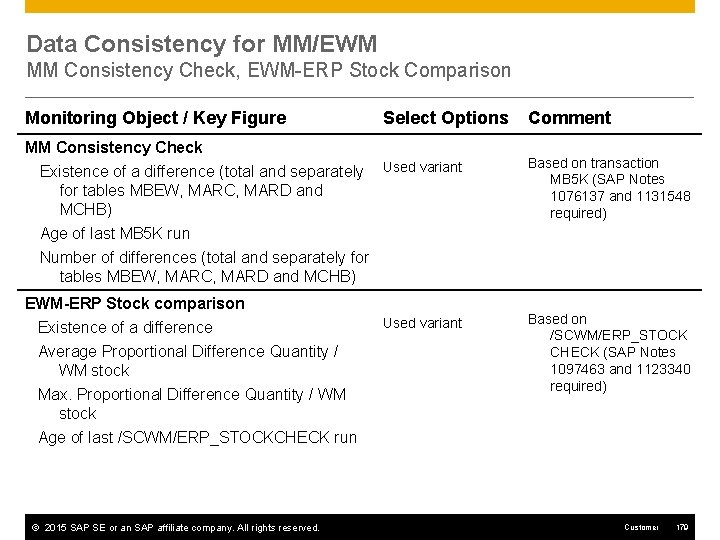
Data Consistency for MM/EWM MM Consistency Check, EWM-ERP Stock Comparison Monitoring Object / Key Figure MM Consistency Check Existence of a difference (total and separately for tables MBEW, MARC, MARD and MCHB) Select Options Comment Used variant Based on transaction MB 5 K (SAP Notes 1076137 and 1131548 required) Used variant Based on /SCWM/ERP_STOCK CHECK (SAP Notes 1097463 and 1123340 required) Age of last MB 5 K run Number of differences (total and separately for tables MBEW, MARC, MARD and MCHB) EWM-ERP Stock comparison Existence of a difference Average Proportional Difference Quantity / WM stock Max. Proportional Difference Quantity / WM stock Age of last /SCWM/ERP_STOCKCHECK run © 2015 SAP SE or an SAP affiliate company. All rights reserved. Customer 179
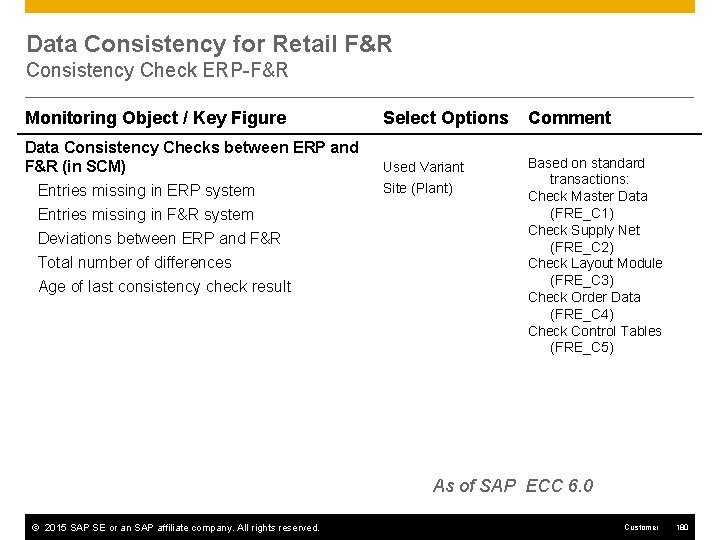
Data Consistency for Retail F&R Consistency Check ERP-F&R Monitoring Object / Key Figure Select Options Comment Data Consistency Checks between ERP and F&R (in SCM) Used Variant Based on standard transactions: Check Master Data (FRE_C 1) Check Supply Net (FRE_C 2) Check Layout Module (FRE_C 3) Check Order Data (FRE_C 4) Check Control Tables (FRE_C 5) Entries missing in ERP system Entries missing in F&R system Deviations between ERP and F&R Total number of differences Age of last consistency check result Site (Plant) As of SAP ECC 6. 0 © 2015 SAP SE or an SAP affiliate company. All rights reserved. Customer 180
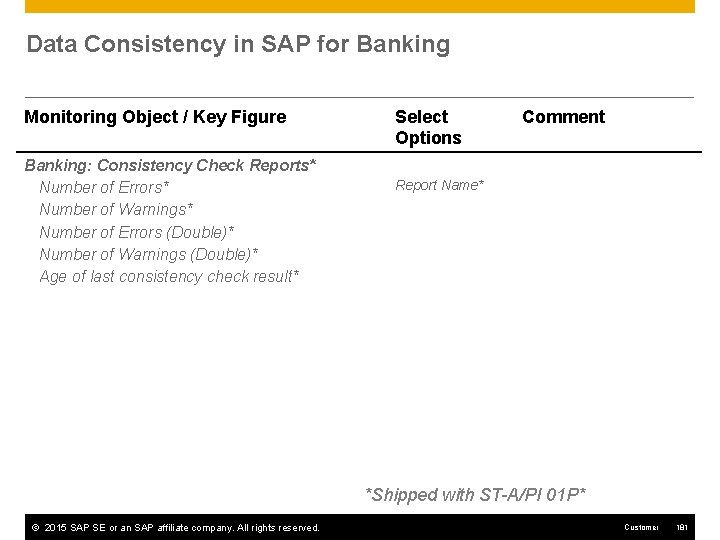
Data Consistency in SAP for Banking Monitoring Object / Key Figure Banking: Consistency Check Reports* Number of Errors* Number of Warnings* Number of Errors (Double)* Number of Warnings (Double)* Age of last consistency check result* Select Options Comment Report Name* *Shipped with ST-A/PI 01 P* © 2015 SAP SE or an SAP affiliate company. All rights reserved. Customer 181
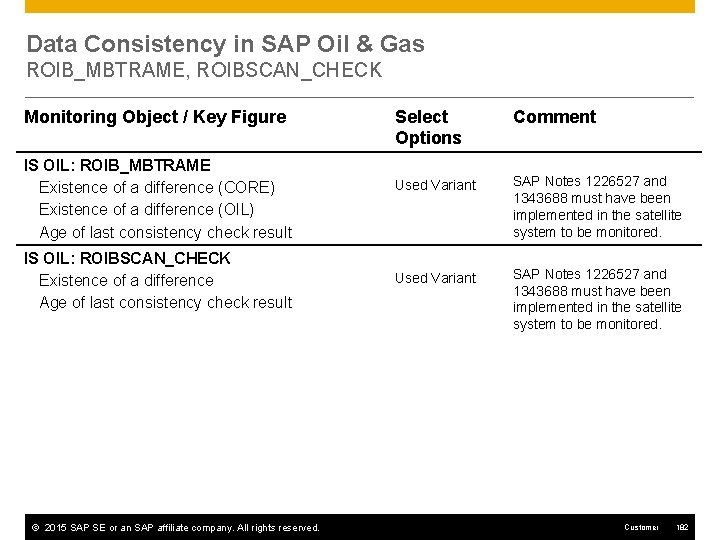
Data Consistency in SAP Oil & Gas ROIB_MBTRAME, ROIBSCAN_CHECK Monitoring Object / Key Figure IS OIL: ROIB_MBTRAME Existence of a difference (CORE) Existence of a difference (OIL) Age of last consistency check result IS OIL: ROIBSCAN_CHECK Existence of a difference Age of last consistency check result © 2015 SAP SE or an SAP affiliate company. All rights reserved. Select Options Comment Used Variant SAP Notes 1226527 and 1343688 must have been implemented in the satellite system to be monitored. Customer 182
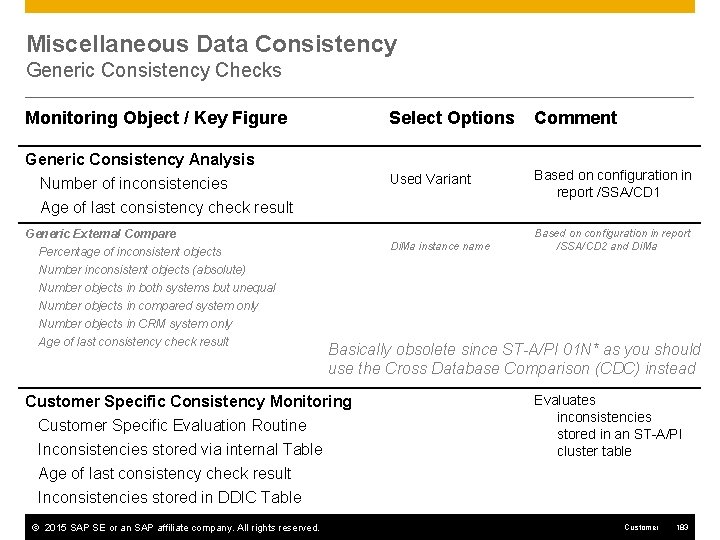
Miscellaneous Data Consistency Generic Consistency Checks Monitoring Object / Key Figure Select Options Comment Generic Consistency Analysis Number of inconsistencies Age of last consistency check result Used Variant Based on configuration in report /SSA/CD 1 Generic External Compare Percentage of inconsistent objects Di. Ma instance name Number inconsistent objects (absolute) Number objects in both systems but unequal Number objects in compared system only Number objects in CRM system only Age of last consistency check result Based on configuration in report /SSA/CD 2 and Di. Ma Basically obsolete since ST-A/PI 01 N* as you should use the Cross Database Comparison (CDC) instead Customer Specific Consistency Monitoring Customer Specific Evaluation Routine Inconsistencies stored via internal Table Evaluates inconsistencies stored in an ST-A/PI cluster table Age of last consistency check result Inconsistencies stored in DDIC Table © 2015 SAP SE or an SAP affiliate company. All rights reserved. Customer 183
© 2015 SAP SE. All rights reserved No part of this publication may be reproduced or transmitted in any form or for any purpose without the express permission of SAP SE. The information contained herein may be changed without prior notice. Some software products marketed by SAP SE and its distributors contain proprietary software components of other software vendors. Microsoft, Windows, Excel, Outlook, and Power. Point are registered trademarks of Microsoft Corporation. IBM, DB 2 Universal Database, System i 5, System p 5, System x, System z 10, System z 9, z 10, z 9, i. Series, p. Series, x. Series, z. Series, e. Server, z/VM, z/OS, i 5/OS, S/390, OS/400, AS/400, S/390 Parallel Enterprise Server, Power. VM, Power Architecture, POWER 6+, POWER 6, POWER 5+, POWER 5, POWER, Open. Power, Power. PC, Batch. Pipes, Blade. Center, System Storage, GPFS, HACMP, RETAIN, DB 2 Connect, RACF, Redbooks, OS/2, Parallel Sysplex, MVS/ESA, AIX, Intelligent Miner, Web. Sphere, Netfinity, Tivoli and Informix are trademarks or registered trademarks of IBM Corporation. Linux is the registered trademark of Linus Torvalds in the U. S. and other countries. Adobe, the Adobe logo, Acrobat, Post. Script, and Reader are either trademarks or registered trademarks of Adobe Systems Incorporated in the United States and/or other countries. Oracle is a registered trademark of Oracle Corporation. UNIX, X/Open, OSF/1, and Motif are registered trademarks of the Open Group. Citrix, ICA, Program Neighborhood, Meta. Frame, Win. Frame, Video. Frame, and Multi. Win are trademarks or registered trademarks of Citrix Systems, Inc. HTML, XHTML and W 3 C are trademarks or registered trademarks of W 3 C®, World Wide Web Consortium, Massachusetts Institute of Technology. Java is a registered trademark of Sun Microsystems, Inc. Java. Script is a registered trademark of Sun Microsystems, Inc. , used under license for technology invented and implemented by Netscape. SAP, R/3, SAP Net. Weaver, Duet, Partner. Edge, By. Design, SAP Business. Objects Explorer, Stream. Work, and other SAP products and services mentioned herein as well as their respective logos are trademarks or registered trademarks of SAP SE in Germany and other countries. © 2015 SAP SE or an SAP affiliate company. All rights reserved. Business Objects and the Business Objects logo, Business. Objects, Crystal Reports, Crystal Decisions, Web Intelligence, Xcelsius, and other Business Objects products and services mentioned herein as well as their respective logos are trademarks or registered trademarks of Business Objects Software Ltd. Business Objects is an SAP company. Sybase and Adaptive Server, i. Anywhere, Sybase 365, SQL Anywhere, and other Sybase products and services mentioned herein as well as their respective logos are trademarks or registered trademarks of Sybase, Inc. Sybase is an SAP company. All other product and service names mentioned are the trademarks of their respective companies. Data contained in this document serves informational purposes only. National product specifications may vary. The information in this document is proprietary to SAP. No part of this document may be reproduced, copied, or transmitted in any form or for any purpose without the express prior written permission of SAP SE. This document is a preliminary version and not subject to your license agreement or any other agreement with SAP. This document contains only intended strategies, developments, and functionalities of the SAP® product and is not intended to be binding upon SAP to any particular course of business, product strategy, and/or development. Please note that this document is subject to change and may be changed by SAP at any time without notice. SAP assumes no responsibility for errors or omissions in this document. SAP does not warrant the accuracy or completeness of the information, text, graphics, links, or other items contained within this material. This document is provided without a warranty of any kind, either express or implied, including but not limited to the implied warranties of merchantability, fitness for a particular purpose, or non-infringement. SAP shall have no liability for damages of any kind including without limitation direct, special, indirect, or consequential damages that may result from the use of these materials. This limitation shall not apply in cases of intent or gross negligence. The statutory liability for personal injury and defective products is not affected. SAP has no control over the information that you may access through the use of hot links contained in these materials and does not endorse your use of third-party Web pages nor provide any warranty whatsoever relating to third-party Web pages. Customer 184
- Slides: 184