
Kaushal Bharat System 30 January 2020 1 DDUGKY
Kaushal Bharat System 30 January 2020 1
DDUGKY Scheme Framework KAUSHAL BHARAT TBA Kaushal Bharat Benefits & Advantages Reports & Analytics IT Landscape & Integration
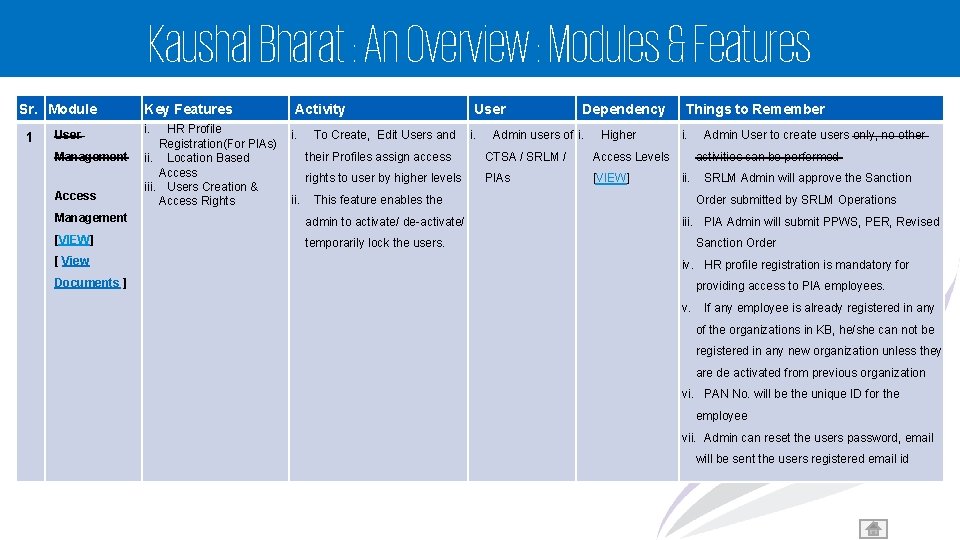
Kaushal Bharat : An Overview : Modules & Features Sr. Module 1 User Management Access Key Features i. HR Profile Registration(For PIAs) ii. Location Based Access iii. Users Creation & Access Rights Activity i. ii. To Create, Edit Users and i. Dependency Admin users of i. Higher their Profiles assign access CTSA / SRLM / Access Levels rights to user by higher levels PIAs [VIEW] Things to Remember i. admin to activate/ de-activate/ [VIEW] temporarily lock the users. Admin User to create users only, no other activities can be performed ii. This feature enables the Management [ View User SRLM Admin will approve the Sanction Order submitted by SRLM Operations iii. PIA Admin will submit PPWS, PER, Revised Sanction Order iv. HR profile registration is mandatory for Documents ] providing access to PIA employees. v. If any employee is already registered in any of the organizations in KB, he/she can not be registered in any new organization unless they are de activated from previous organization vi. PAN No. will be the unique ID for the employee vii. Admin can reset the users password, email will be sent the users registered email id 3
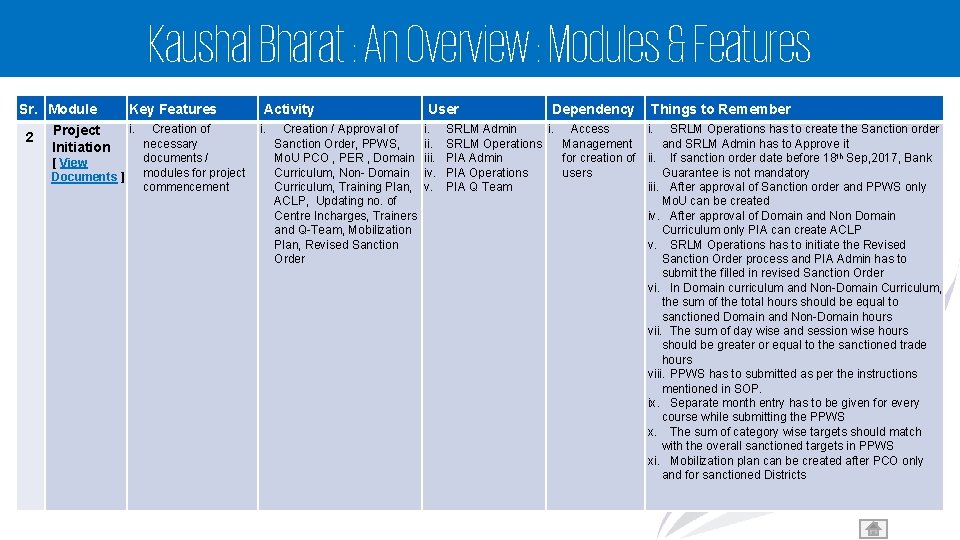
Kaushal Bharat : An Overview : Modules & Features Sr. Module 2 Project Initiation [ View Documents ] Key Features i. Creation of necessary documents / modules for project commencement Activity i. Creation / Approval of Sanction Order, PPWS, Mo. U PCO , PER , Domain Curriculum, Non- Domain Curriculum, Training Plan, ACLP, Updating no. of Centre Incharges, Trainers and Q-Team, Mobilization Plan, Revised Sanction Order User i. iii. iv. v. Dependency Things to Remember SRLM Admin i. Access i. SRLM Operations has to create the Sanction order SRLM Operations Management and SRLM Admin has to Approve it PIA Admin for creation of ii. If sanction order date before 18 th Sep, 2017, Bank PIA Operations users Guarantee is not mandatory PIA Q Team iii. After approval of Sanction order and PPWS only Mo. U can be created iv. After approval of Domain and Non Domain Curriculum only PIA can create ACLP v. SRLM Operations has to initiate the Revised Sanction Order process and PIA Admin has to submit the filled in revised Sanction Order vi. In Domain curriculum and Non-Domain Curriculum, the sum of the total hours should be equal to sanctioned Domain and Non-Domain hours vii. The sum of day wise and session wise hours should be greater or equal to the sanctioned trade hours viii. PPWS has to submitted as per the instructions mentioned in SOP. ix. Separate month entry has to be given for every course while submitting the PPWS x. The sum of category wise targets should match with the overall sanctioned targets in PPWS xi. Mobilization plan can be created after PCO only and for sanctioned Districts 4
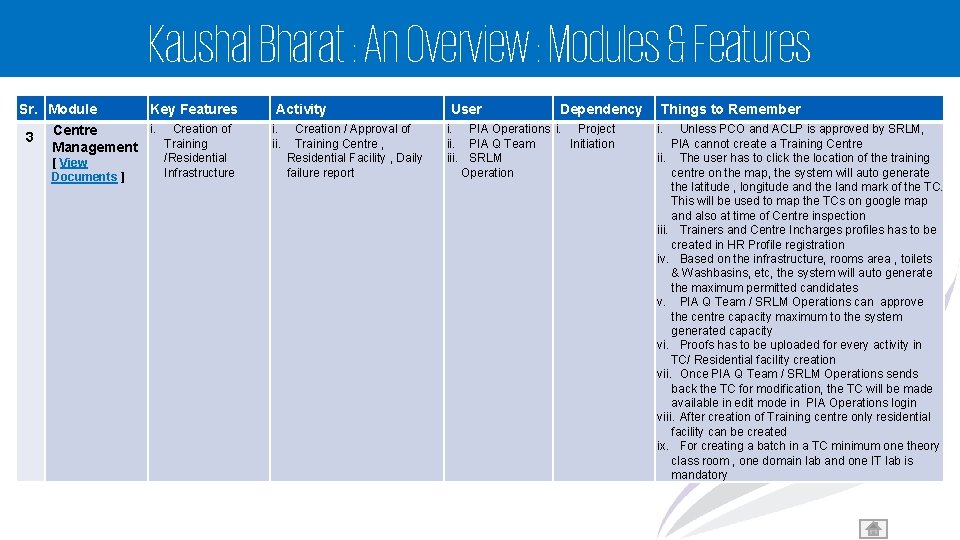
Kaushal Bharat : An Overview : Modules & Features Sr. Module 3 Key Features i. Creation of Centre Training Management [ View Documents ] /Residential Infrastructure Activity i. ii. Creation / Approval of Training Centre , Residential Facility , Daily failure report User Dependency i. PIA Operations i. Project ii. PIA Q Team Initiation iii. SRLM Operation Things to Remember i. Unless PCO and ACLP is approved by SRLM, PIA cannot create a Training Centre ii. The user has to click the location of the training centre on the map, the system will auto generate the latitude , longitude and the land mark of the TC. This will be used to map the TCs on google map and also at time of Centre inspection iii. Trainers and Centre Incharges profiles has to be created in HR Profile registration iv. Based on the infrastructure, rooms area , toilets & Washbasins, etc, the system will auto generate the maximum permitted candidates v. PIA Q Team / SRLM Operations can approve the centre capacity maximum to the system generated capacity vi. Proofs has to be uploaded for every activity in TC/ Residential facility creation vii. Once PIA Q Team / SRLM Operations sends back the TC for modification, the TC will be made available in edit mode in PIA Operations login viii. After creation of Training centre only residential facility can be created ix. For creating a batch in a TC minimum one theory class room , one domain lab and one IT lab is mandatory 5
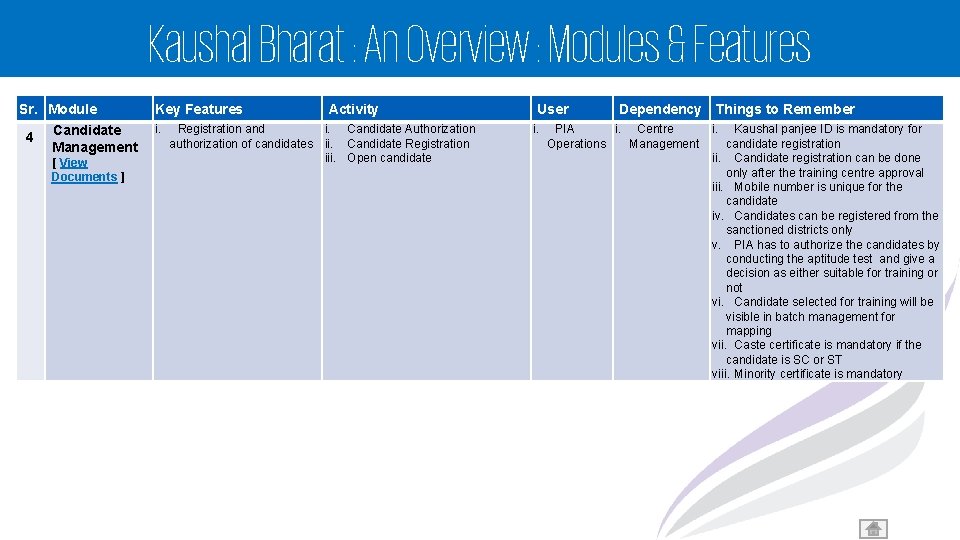
Kaushal Bharat : An Overview : Modules & Features Sr. Module 4 Candidate Management [ View Documents ] Key Features i. Activity Registration and i. Candidate Authorization authorization of candidates ii. Candidate Registration iii. Open candidate User i. Dependency Things to Remember PIA i. Centre Operations Management i. Kaushal panjee ID is mandatory for candidate registration ii. Candidate registration can be done only after the training centre approval iii. Mobile number is unique for the candidate iv. Candidates can be registered from the sanctioned districts only v. PIA has to authorize the candidates by conducting the aptitude test and give a decision as either suitable for training or not vi. Candidate selected for training will be visible in batch management for mapping vii. Caste certificate is mandatory if the candidate is SC or ST viii. Minority certificate is mandatory 6
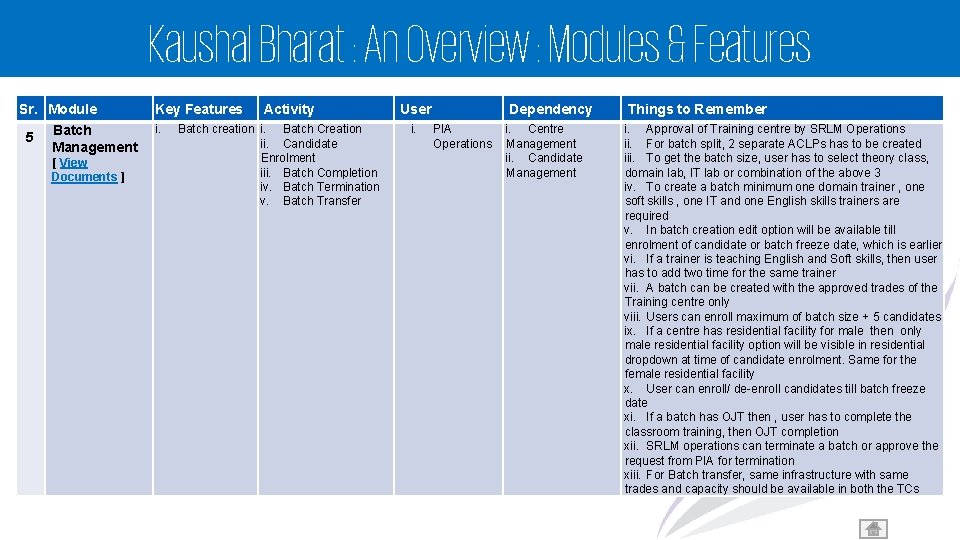
Kaushal Bharat : An Overview : Modules & Features Sr. Module 5 Batch Management [ View Documents ] Key Features i. Activity Batch creation i. Batch Creation ii. Candidate Enrolment iii. Batch Completion iv. Batch Termination v. Batch Transfer User i. Dependency PIA Operations i. Centre Management ii. Candidate Management Things to Remember i. Approval of Training centre by SRLM Operations ii. For batch split, 2 separate ACLPs has to be created iii. To get the batch size, user has to select theory class, domain lab, IT lab or combination of the above 3 iv. To create a batch minimum one domain trainer , one soft skills , one IT and one English skills trainers are required v. In batch creation edit option will be available till enrolment of candidate or batch freeze date, which is earlier vi. If a trainer is teaching English and Soft skills, then user has to add two time for the same trainer vii. A batch can be created with the approved trades of the Training centre only viii. Users can enroll maximum of batch size + 5 candidates ix. If a centre has residential facility for male then only male residential facility option will be visible in residential dropdown at time of candidate enrolment. Same for the female residential facility x. User can enroll/ de-enroll candidates till batch freeze date xi. If a batch has OJT then , user has to complete the classroom training, then OJT completion xii. SRLM operations can terminate a batch or approve the request from PIA for termination xiii. For Batch transfer, same infrastructure with same trades and capacity should be available in both the TCs 7
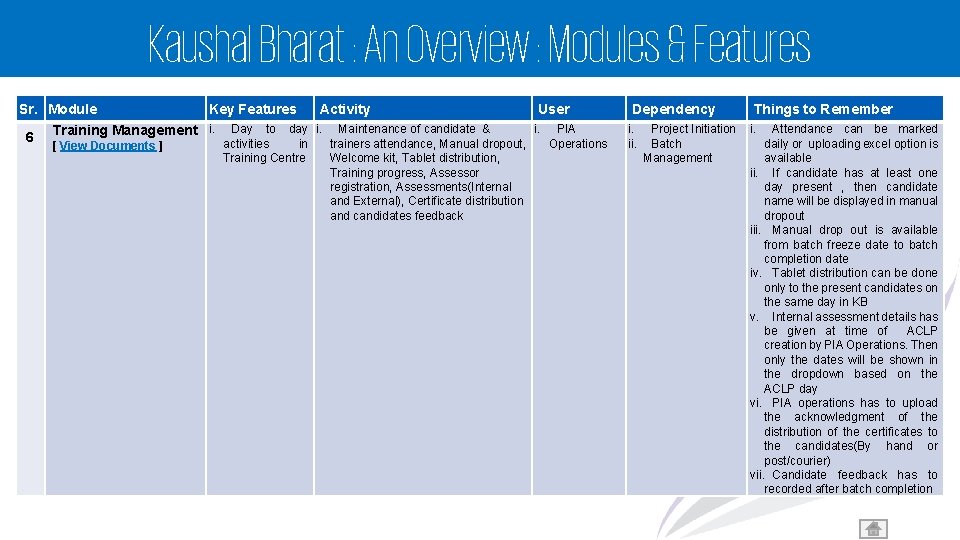
Kaushal Bharat : An Overview : Modules & Features Sr. Module 6 Key Features Training Management i. [ View Documents ] Activity User Day to day i. Maintenance of candidate & i. PIA activities in trainers attendance, Manual dropout, Operations Training Centre Welcome kit, Tablet distribution, Training progress, Assessor registration, Assessments(Internal and External), Certificate distribution and candidates feedback Dependency i. ii. Project Initiation Batch Management Things to Remember i. Attendance can be marked daily or uploading excel option is available ii. If candidate has at least one day present , then candidate name will be displayed in manual dropout iii. Manual drop out is available from batch freeze date to batch completion date iv. Tablet distribution can be done only to the present candidates on the same day in KB v. Internal assessment details has be given at time of ACLP creation by PIA Operations. Then only the dates will be shown in the dropdown based on the ACLP day vi. PIA operations has to upload the acknowledgment of the distribution of the certificates to the candidates(By hand or post/courier) vii. Candidate feedback has to recorded after batch completion 8
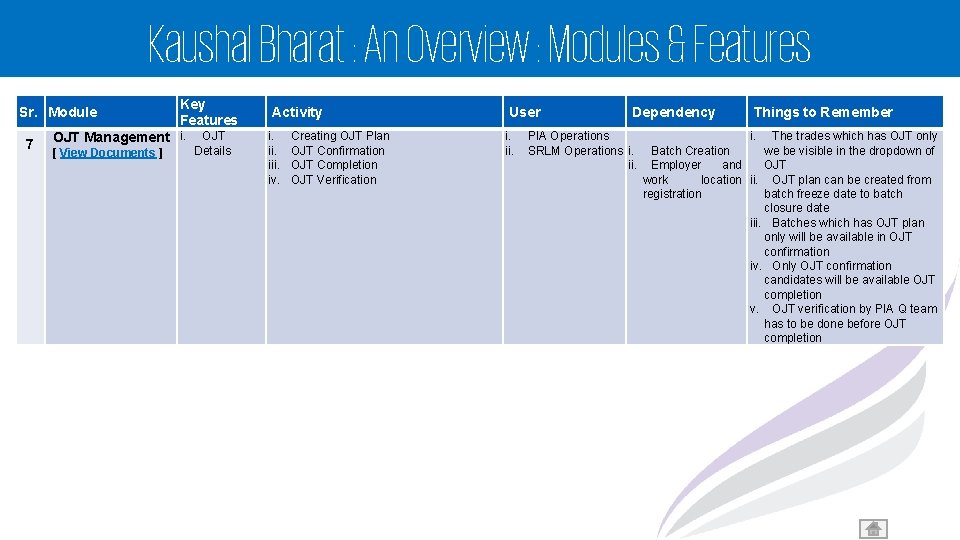
Kaushal Bharat : An Overview : Modules & Features Sr. Module 7 Key Features OJT Management i. [ View Documents ] OJT Details Activity i. iii. iv. Creating OJT Plan OJT Confirmation OJT Completion OJT Verification User i. ii. Dependency PIA Operations SRLM Operations i. ii. Things to Remember i. The trades which has OJT only Batch Creation we be visible in the dropdown of Employer and OJT work location ii. OJT plan can be created from registration batch freeze date to batch closure date iii. Batches which has OJT plan only will be available in OJT confirmation iv. Only OJT confirmation candidates will be available OJT completion v. OJT verification by PIA Q team has to be done before OJT completion 9
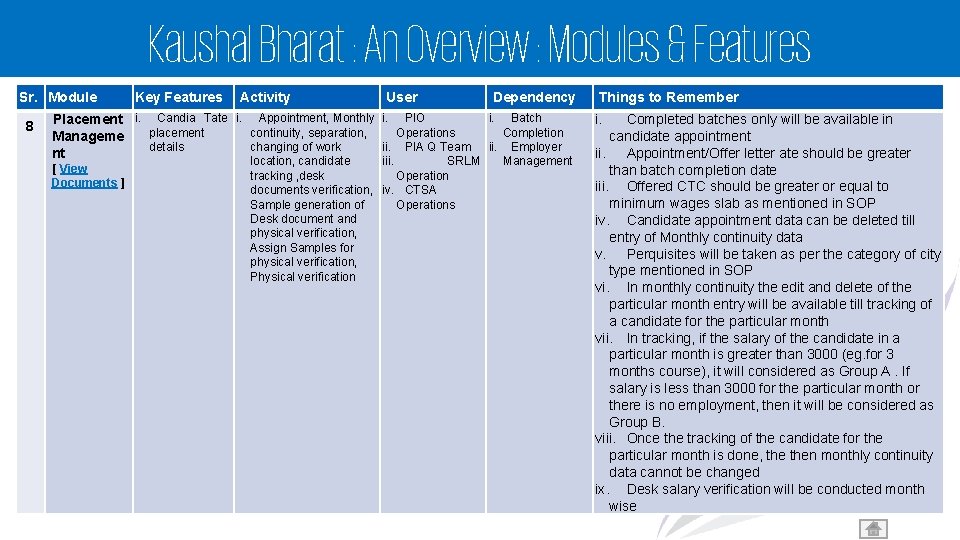
Kaushal Bharat : An Overview : Modules & Features Sr. Module 8 Key Features Activity User Placement i. Candia Tate i. Appointment, Monthly i. PIO placement continuity, separation, Operations Manageme details changing of work ii. PIA Q Team nt [ View Documents ] Dependency i. Batch Completion ii. Employer location, candidate iii. SRLM Management tracking , desk Operation documents verification, iv. CTSA Sample generation of Operations Desk document and physical verification, Assign Samples for physical verification, Physical verification Things to Remember i. Completed batches only will be available in candidate appointment ii. Appointment/Offer letter ate should be greater than batch completion date iii. Offered CTC should be greater or equal to minimum wages slab as mentioned in SOP iv. Candidate appointment data can be deleted till entry of Monthly continuity data v. Perquisites will be taken as per the category of city type mentioned in SOP vi. In monthly continuity the edit and delete of the particular month entry will be available till tracking of a candidate for the particular month vii. In tracking, if the salary of the candidate in a particular month is greater than 3000 (eg. for 3 months course), it will considered as Group A. If salary is less than 3000 for the particular month or there is no employment, then it will be considered as Group B. viii. Once the tracking of the candidate for the particular month is done, then monthly continuity data cannot be changed ix. Desk salary verification will be conducted month wise 10
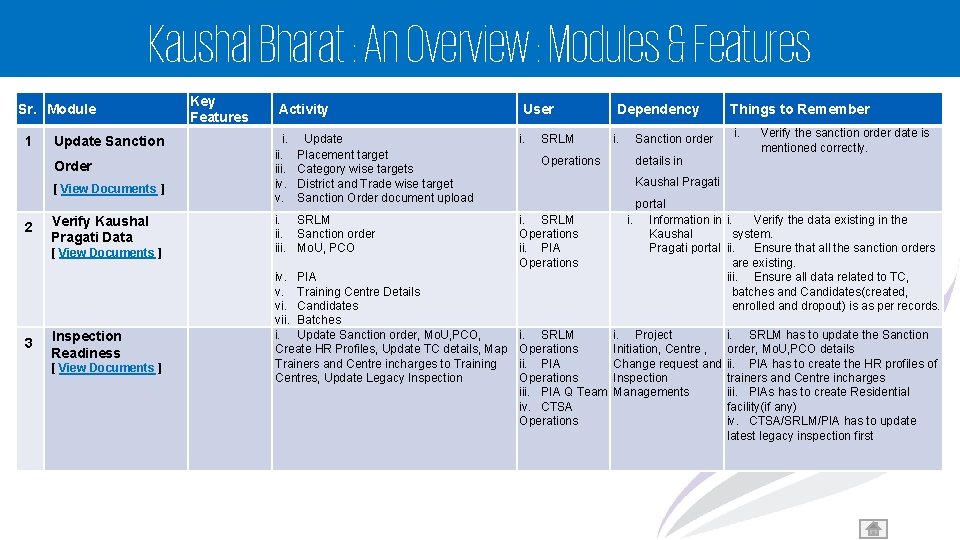
Kaushal Bharat : An Overview : Modules & Features Sr. Module 1 Update Sanction Order [ View Documents ] 2 Verify Kaushal Pragati Data [ View Documents ] 3 Inspection Readiness [ View Documents ] Key Features Activity i. iii. iv. v. Update Placement target Category wise targets District and Trade wise target Sanction Order document upload i. SRLM ii. Sanction order iii. Mo. U, PCO iv. PIA v. Training Centre Details vi. Candidates vii. Batches i. Update Sanction order, Mo. U, PCO, Create HR Profiles, Update TC details, Map Trainers and Centre incharges to Training Centres, Update Legacy Inspection User i. SRLM Operations Dependency i. Sanction order details in Things to Remember i. Verify the sanction order date is mentioned correctly. Kaushal Pragati i. SRLM Operations ii. PIA Operations iii. PIA Q Team iv. CTSA Operations portal i. Information in i. Verify the data existing in the Kaushal system. Pragati portal ii. Ensure that all the sanction orders are existing. iii. Ensure all data related to TC, batches and Candidates(created, enrolled and dropout) is as per records. i. Project Initiation, Centre , Change request and Inspection Managements i. SRLM has to update the Sanction order, Mo. U, PCO details ii. PIA has to create the HR profiles of trainers and Centre incharges iii. PIAs has to create Residential facility(if any) iv. CTSA/SRLM/PIA has to update latest legacy inspection first 11
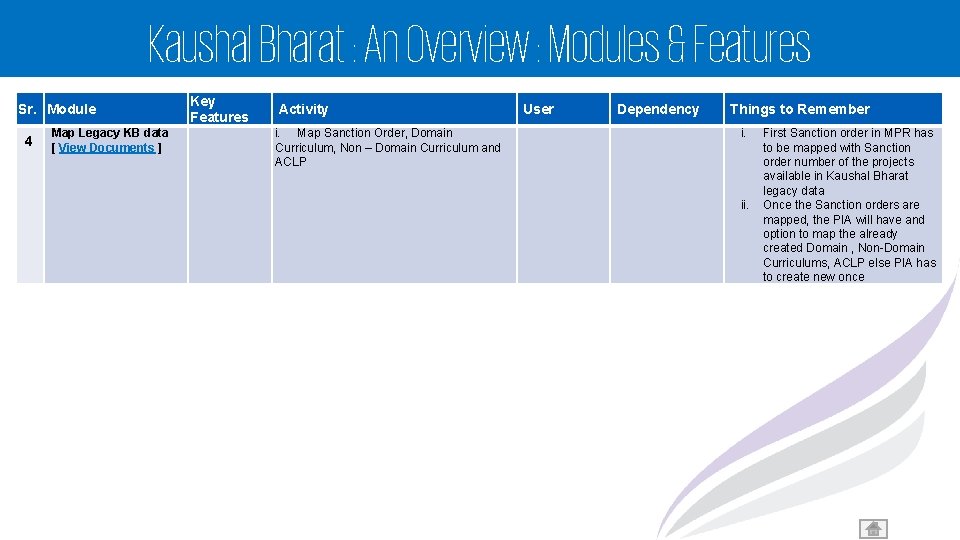
Kaushal Bharat : An Overview : Modules & Features Sr. Module 4 Map Legacy KB data [ View Documents ] Key Features Activity i. Map Sanction Order, Domain Curriculum, Non – Domain Curriculum and ACLP User Dependency Things to Remember i. ii. First Sanction order in MPR has to be mapped with Sanction order number of the projects available in Kaushal Bharat legacy data Once the Sanction orders are mapped, the PIA will have and option to map the already created Domain , Non-Domain Curriculums, ACLP else PIA has to create new once 12

Kaushal Bharat System
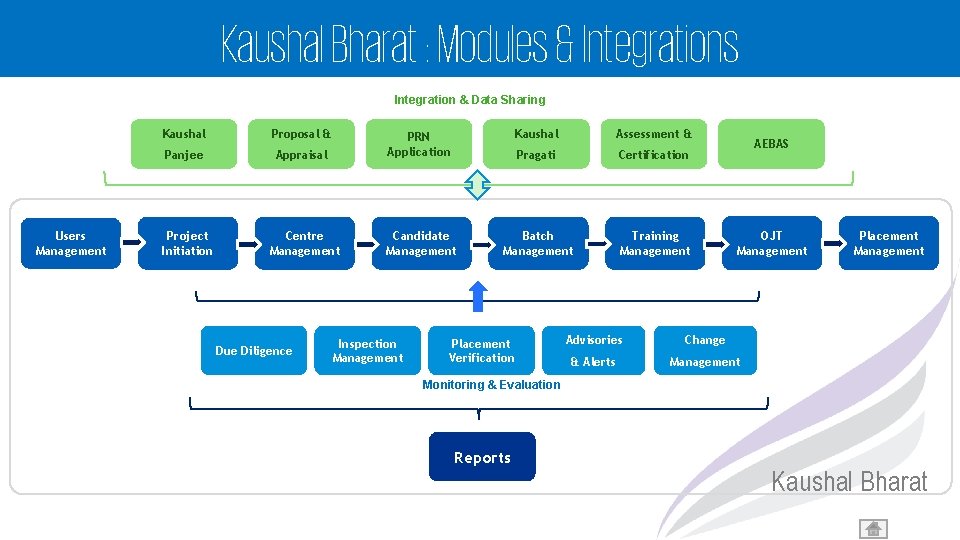
Kaushal Bharat : Modules & Integrations Integration & Data Sharing Users Management Kaushal Proposal & Panjee Project Initiation Kaushal Assessment & Appraisal PRN Application Pragati Certification Centre Management Candidate Management Batch Management Training Management Due Diligence Inspection Management Placement Verification AEBAS OJT Management Advisories Change & Alerts Management Placement Management Monitoring & Evaluation Reports Kaushal Bharat
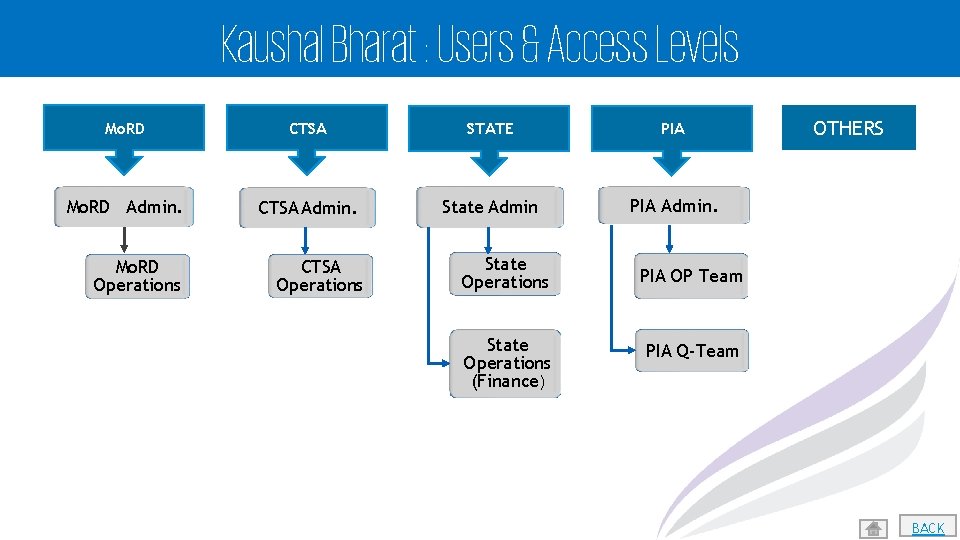
Kaushal Bharat : Users & Access Levels Mo. RD CTSA STATE PIA Mo. RD Admin. CTSA Admin. State Admin PIA Admin. Mo. RD Operations CTSA Operations State Operations (Finance) PIA OTHERS PIA OP Team PIA Q-Team 15 BACK
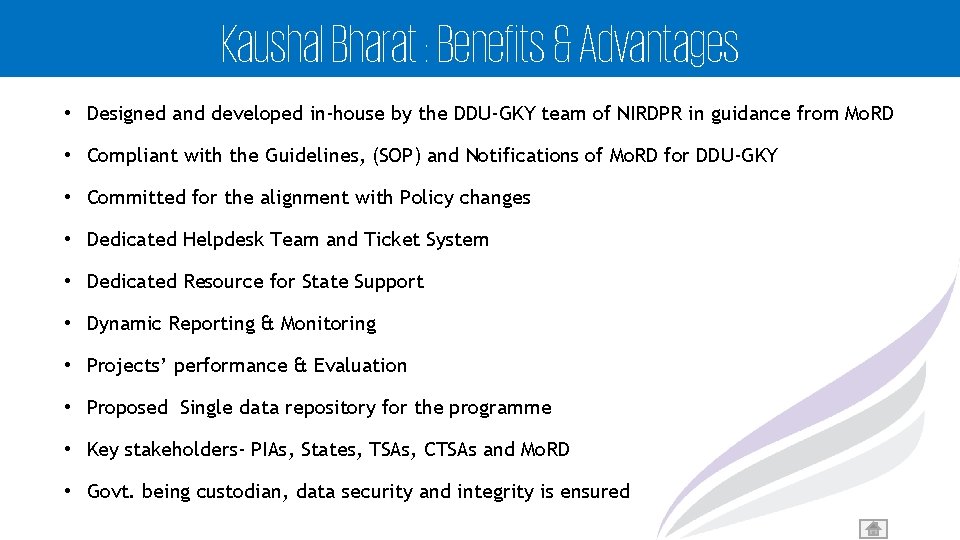
Kaushal Bharat : Benefits & Advantages • Designed and developed in-house by the DDU-GKY team of NIRDPR in guidance from Mo. RD • Compliant with the Guidelines, (SOP) and Notifications of Mo. RD for DDU-GKY • Committed for the alignment with Policy changes • Dedicated Helpdesk Team and Ticket System • Dedicated Resource for State Support • Dynamic Reporting & Monitoring • Projects’ performance & Evaluation • Proposed Single data repository for the programme • Key stakeholders- PIAs, States, TSAs, CTSAs and Mo. RD • Govt. being custodian, data security and integrity is ensured 16
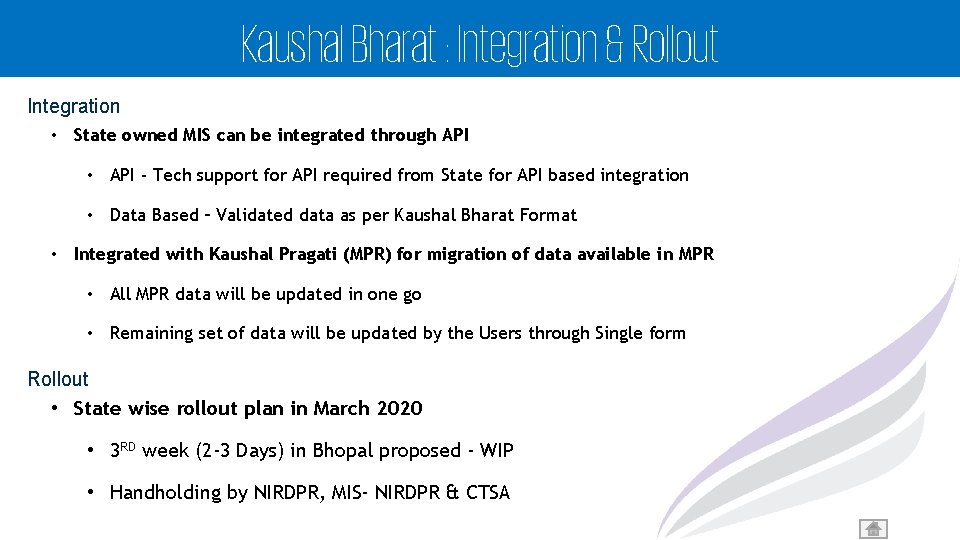
Kaushal Bharat : Integration & Rollout Integration • State owned MIS can be integrated through API • API - Tech support for API required from State for API based integration • Data Based – Validated data as per Kaushal Bharat Format • Integrated with Kaushal Pragati (MPR) for migration of data available in MPR • All MPR data will be updated in one go • Remaining set of data will be updated by the Users through Single form Rollout • State wise rollout plan in March 2020 • 3 RD week (2 -3 Days) in Bhopal proposed - WIP • Handholding by NIRDPR, MIS- NIRDPR & CTSA 17

Kaushal Bharat : Modules & Features
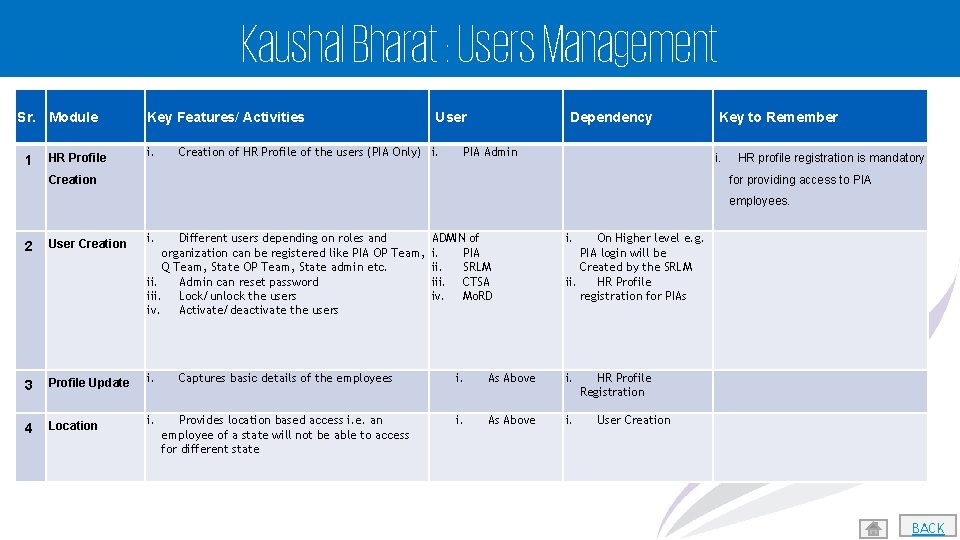
Kaushal Bharat : Users Management Sr. Module 1 HR Profile Key Features/ Activities i. User Creation of HR Profile of the users (PIA Only) i. Dependency PIA Admin Key to Remember i. Creation HR profile registration is mandatory for providing access to PIA employees. 2 User Creation i. 3 Profile Update i. 4 Location i. ADMIN of i. PIA ii. SRLM iii. CTSA iv. Mo. RD i. Captures basic details of the employees i. As Above i. Provides location based access i. e. an employee of a state will not be able to access for different state i. As Above i. Different users depending on roles and organization can be registered like PIA OP Team, Q Team, State OP Team, State admin etc. ii. Admin can reset password iii. Lock/unlock the users iv. Activate/deactivate the users On Higher level e. g. PIA login will be Created by the SRLM ii. HR Profile registration for PIAs HR Profile Registration User Creation 19 BACK
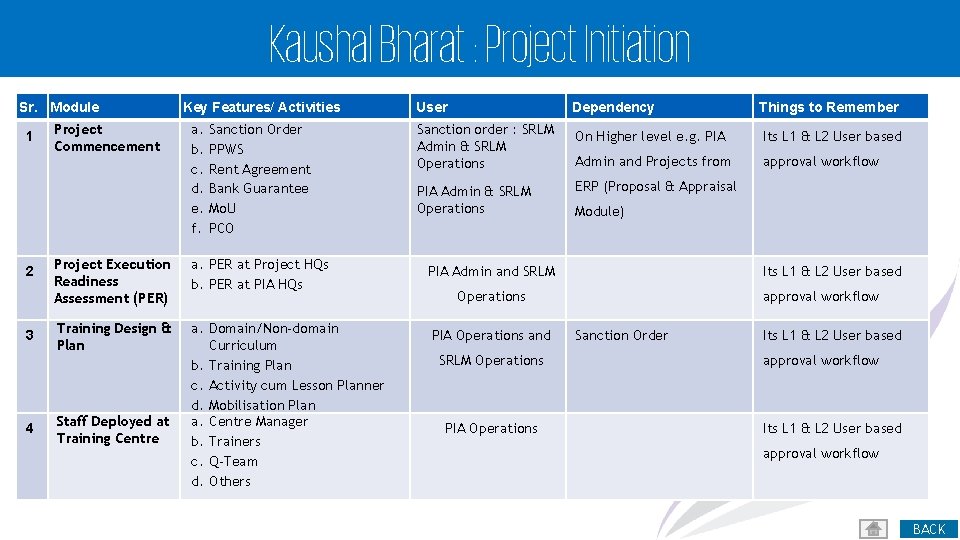
Kaushal Bharat : Project Initiation Sr. Module 1 2 3 4 Project Commencement Key Features/ Activities a. b. c. d. e. f. Sanction Order PPWS Rent Agreement Bank Guarantee Mo. U PCO Project Execution Readiness Assessment (PER) a. PER at Project HQs b. PER at PIA HQs Training Design & Plan a. Domain/Non-domain Curriculum b. Training Plan c. Activity cum Lesson Planner d. Mobilisation Plan a. Centre Manager b. Trainers c. Q-Team d. Others Staff Deployed at Training Centre User Dependency Things to Remember Sanction order : SRLM Admin & SRLM Operations On Higher level e. g. PIA Its L 1 & L 2 User based Admin and Projects from approval workflow PIA Admin & SRLM Operations ERP (Proposal & Appraisal Module) PIA Admin and SRLM Its L 1 & L 2 User based Operations PIA Operations and SRLM Operations PIA Operations approval workflow Sanction Order Its L 1 & L 2 User based approval workflow 20 BACK
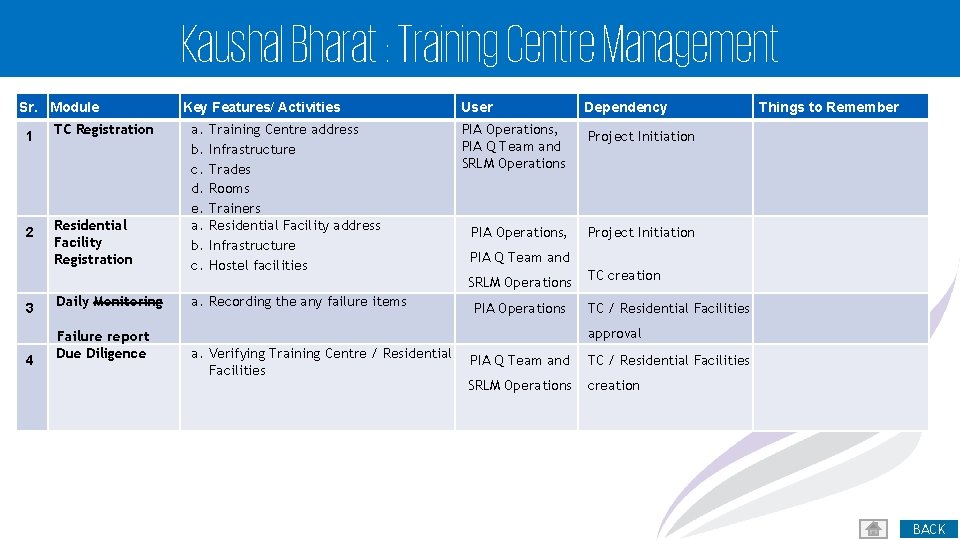
Kaushal Bharat : Training Centre Management Sr. Module 1 2 TC Registration Residential Facility Registration Key Features/ Activities a. b. c. d. e. a. b. c. Training Centre address Infrastructure Trades Rooms Trainers Residential Facility address Infrastructure Hostel facilities User Dependency PIA Operations, PIA Q Team and SRLM Operations Project Initiation PIA Operations, Project Initiation PIA Q Team and SRLM Operations 3 Daily Monitoring 4 Failure report Due Diligence a. Recording the any failure items Things to Remember PIA Operations TC creation TC / Residential Facilities approval a. Verifying Training Centre / Residential Facilities PIA Q Team and TC / Residential Facilities SRLM Operations creation 21 BACK
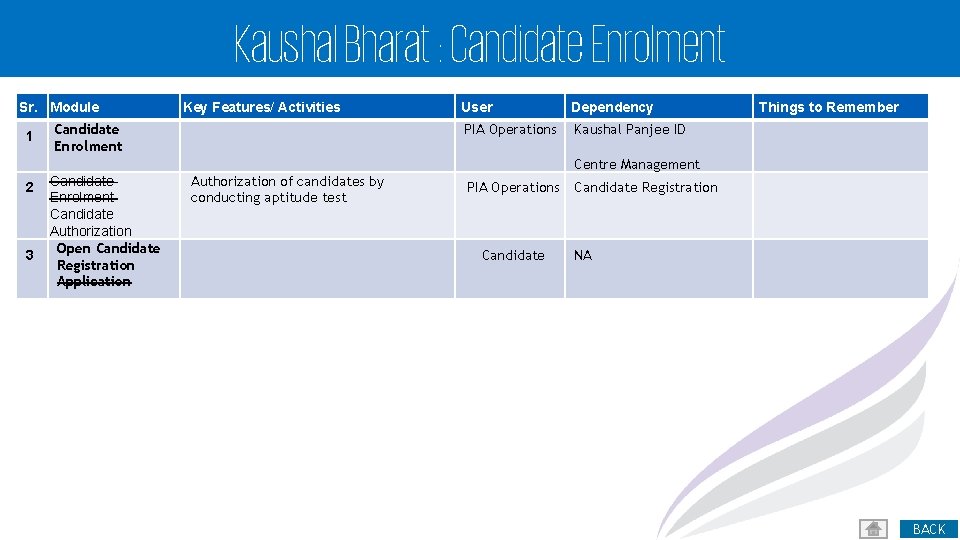
Kaushal Bharat : Candidate Enrolment Sr. Module 1 Key Features/ Activities Candidate Enrolment User Dependency PIA Operations Kaushal Panjee ID Things to Remember Centre Management 2 3 Candidate Enrolment Candidate Authorization Open Candidate Registration Application Authorization of candidates by conducting aptitude test PIA Operations Candidate Registration NA 22 BACK
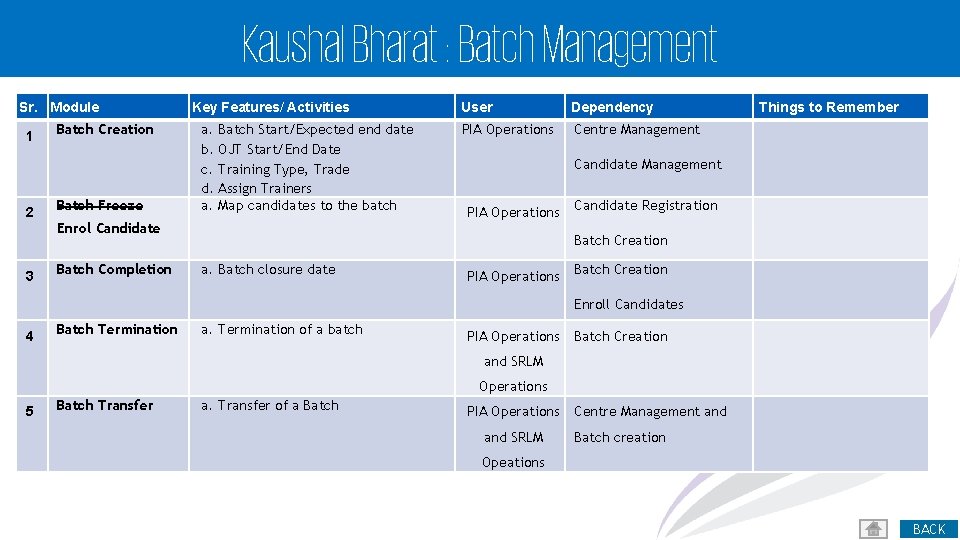
Kaushal Bharat : Batch Management Sr. Module 1 2 3 Batch Creation Batch Freeze Key Features/ Activities a. b. c. d. a. Batch Start/Expected end date OJT Start/End Date Training Type, Trade Assign Trainers Map candidates to the batch Enrol Candidate Batch Completion User Dependency PIA Operations Centre Management Things to Remember Candidate Management PIA Operations Candidate Registration Batch Creation a. Batch closure date PIA Operations Batch Creation Enroll Candidates 4 Batch Termination a. Termination of a batch PIA Operations Batch Creation and SRLM Operations 5 Batch Transfer a. Transfer of a Batch PIA Operations and SRLM Centre Management and Batch creation Opeations 23 BACK
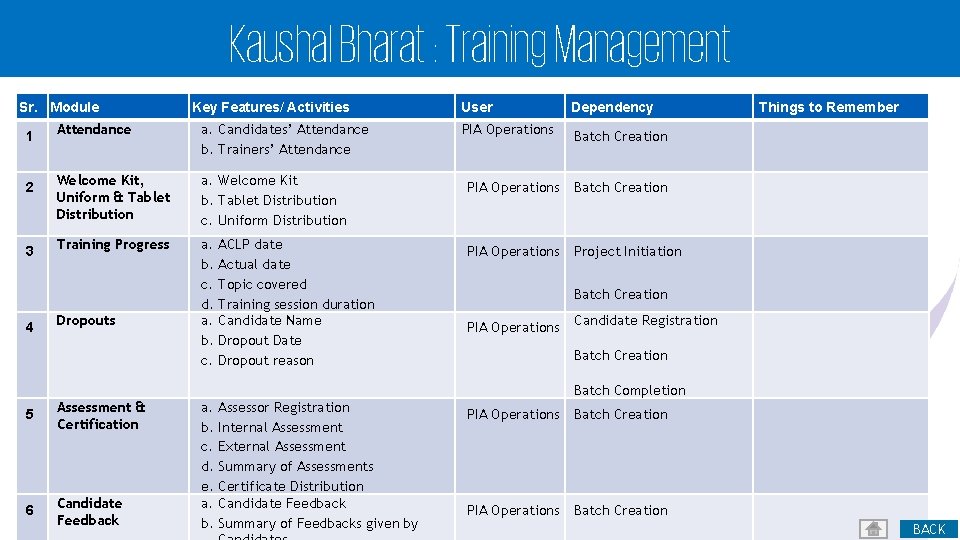
Kaushal Bharat : Training Management Sr. Module 1 2 3 4 Key Features/ Activities Attendance a. Candidates’ Attendance b. Trainers’ Attendance Welcome Kit, Uniform & Tablet Distribution a. Welcome Kit b. Tablet Distribution c. Uniform Distribution Training Progress a. b. c. d. a. b. c. Dropouts ACLP date Actual date Topic covered Training session duration Candidate Name Dropout Date Dropout reason User Dependency PIA Operations Batch Creation PIA Operations Project Initiation Things to Remember Batch Creation PIA Operations Candidate Registration Batch Creation Batch Completion 5 Assessment & Certification 6 Candidate Feedback a. b. c. d. e. a. b. Assessor Registration Internal Assessment External Assessment Summary of Assessments Certificate Distribution Candidate Feedback Summary of Feedbacks given by PIA Operations Batch Creation 24 BACK
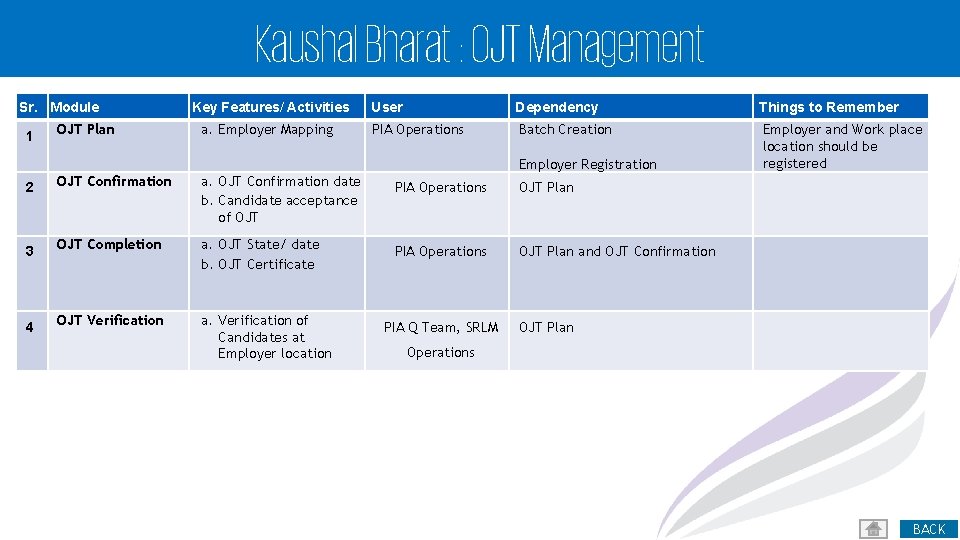
Kaushal Bharat : OJT Management Sr. Module 1 OJT Plan Key Features/ Activities a. Employer Mapping User Dependency Things to Remember PIA Operations Batch Creation Employer and Work place location should be registered Employer Registration 2 OJT Confirmation a. OJT Confirmation date b. Candidate acceptance of OJT 3 OJT Completion a. OJT State/ date b. OJT Certificate 4 OJT Verification a. Verification of Candidates at Employer location PIA Operations OJT Plan and OJT Confirmation PIA Q Team, SRLM OJT Plan Operations 25 BACK
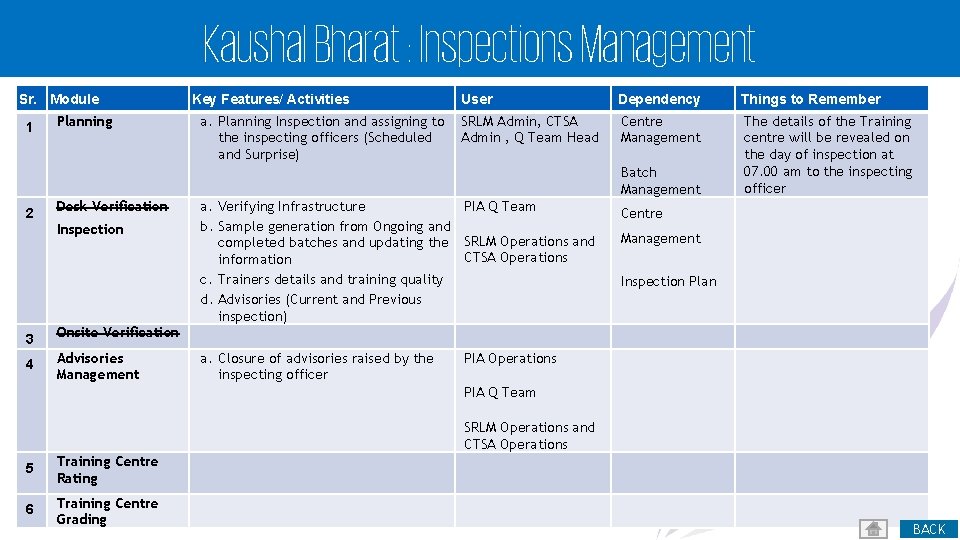
Kaushal Bharat : Inspections Management Sr. Module 1 Planning Key Features/ Activities a. Planning Inspection and assigning to the inspecting officers (Scheduled and Surprise) User Dependency Things to Remember SRLM Admin, CTSA Admin , Q Team Head Centre Management The details of the Training centre will be revealed on the day of inspection at 07. 00 am to the inspecting officer Batch Management 2 Desk Verification Inspection 3 Onsite Verification 4 Advisories Management a. Verifying Infrastructure PIA Q Team b. Sample generation from Ongoing and completed batches and updating the SRLM Operations and CTSA Operations information c. Trainers details and training quality d. Advisories (Current and Previous inspection) a. Closure of advisories raised by the inspecting officer Centre Management Inspection Plan PIA Operations PIA Q Team SRLM Operations and CTSA Operations 5 Training Centre Rating 6 Training Centre Grading 26 BACK
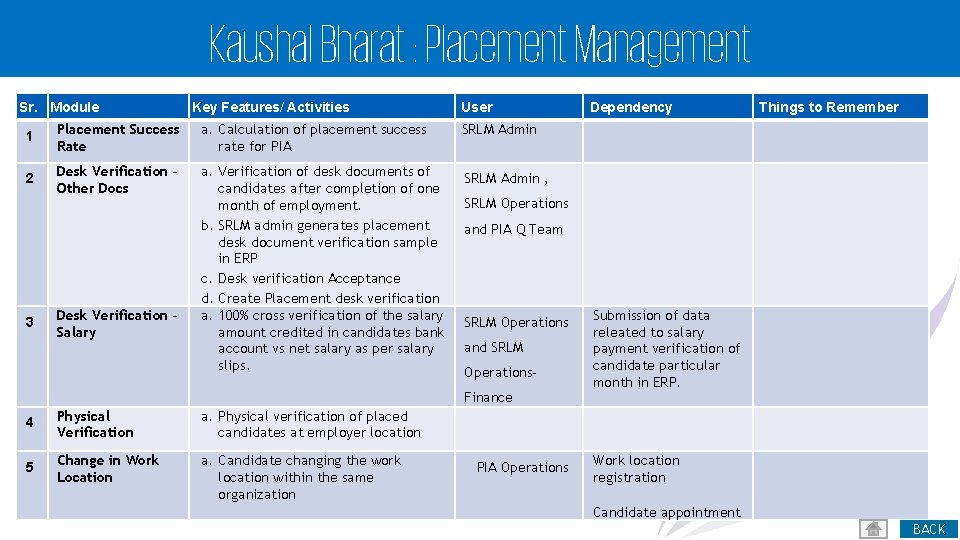
Kaushal Bharat : Placement Management Sr. Module Key Features/ Activities 1 Placement Success Rate a. Calculation of placement success rate for PIA 2 Desk Verification – Other Docs a. Verification of desk documents of candidates after completion of one month of employment. b. SRLM admin generates placement desk document verification sample in ERP c. Desk verification Acceptance d. Create Placement desk verification a. 100% cross verification of the salary amount credited in candidates bank account vs net salary as per salary slips. 3 Desk Verification – Salary User Physical Verification a. Physical verification of placed candidates at employer location 5 Change in Work Location a. Candidate changing the work location within the same organization Things to Remember SRLM Admin , SRLM Operations and PIA Q Team SRLM Operations and SRLM Operations. Finance 4 Dependency PIA Operations Submission of data releated to salary payment verification of candidate particular month in ERP. Work location registration Candidate appointment 27 BACK
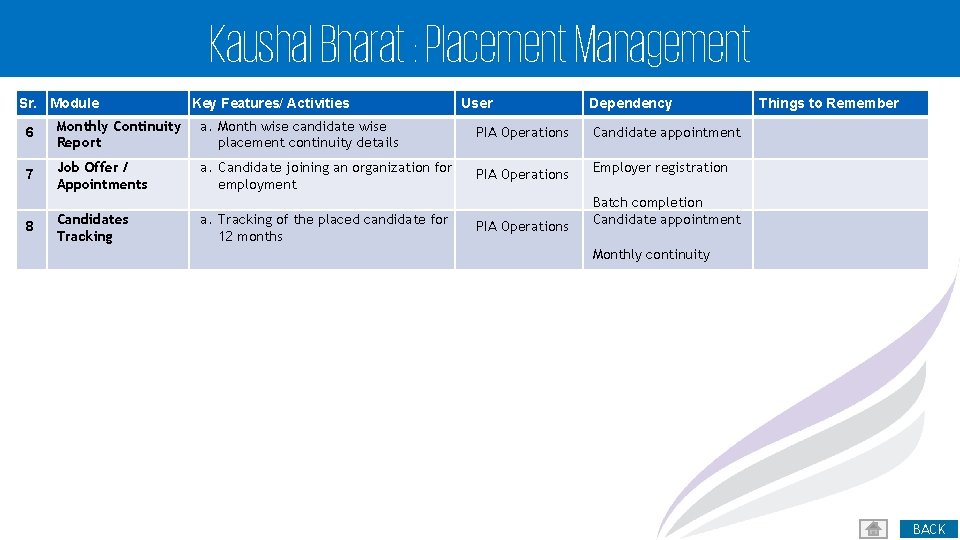
Kaushal Bharat : Placement Management Sr. Module Key Features/ Activities User Dependency 6 Monthly Continuity Report a. Month wise candidate wise placement continuity details PIA Operations Candidate appointment 7 Job Offer / Appointments a. Candidate joining an organization for employment PIA Operations Employer registration PIA Operations Batch completion Candidate appointment 8 Candidates Tracking a. Tracking of the placed candidate for 12 months Things to Remember Monthly continuity 28 BACK

Kaushal Bharat : Change Management
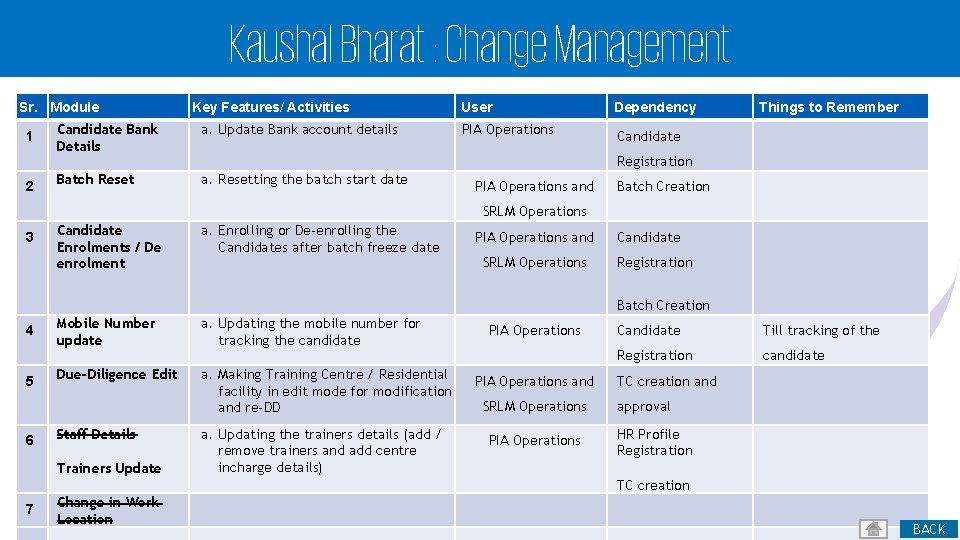
Kaushal Bharat : Change Management Sr. Module 1 2 Key Features/ Activities Candidate Bank Details a. Update Bank account details Batch Reset a. Resetting the batch start date User Dependency PIA Operations Candidate Things to Remember Registration PIA Operations and Batch Creation SRLM Operations 3 Candidate Enrolments / De enrolment a. Enrolling or De-enrolling the Candidates after batch freeze date PIA Operations and SRLM Operations Candidate Registration Batch Creation 4 5 6 Mobile Number update a. Updating the mobile number for tracking the candidate Due-Diligence Edit a. Making Training Centre / Residential facility in edit mode for modification and re-DD Staff Details Trainers Update a. Updating the trainers details (add / remove trainers and add centre incharge details) PIA Operations and SRLM Operations PIA Operations Candidate Till tracking of the Registration candidate TC creation and approval HR Profile Registration TC creation 7 Change in Work Location 30 BACK

Kaushal Bharat : Reports
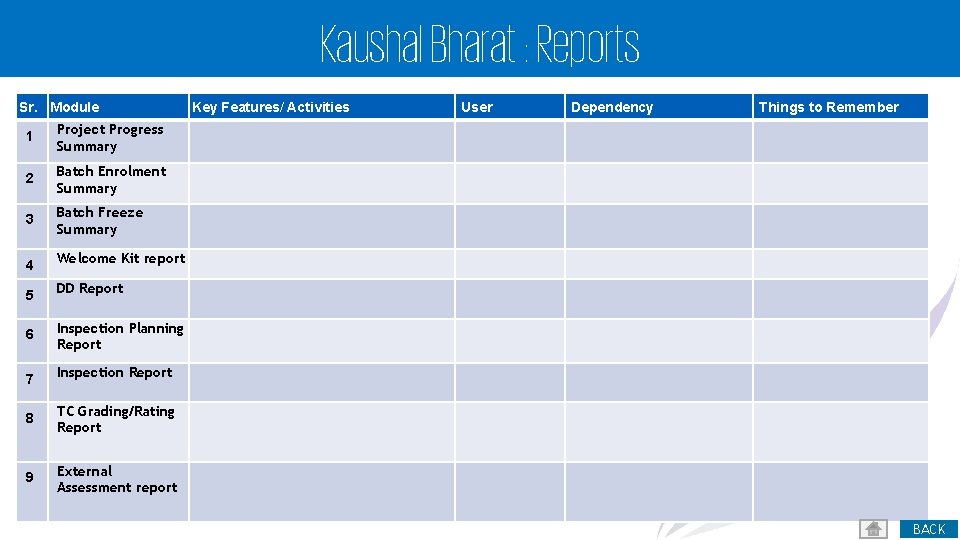
Kaushal Bharat : Reports Sr. Module 1 Project Progress Summary 2 Batch Enrolment Summary 3 Batch Freeze Summary 4 Welcome Kit report 5 DD Report 6 Inspection Planning Report 7 Inspection Report 8 TC Grading/Rating Report 9 External Assessment report Key Features/ Activities User Dependency Things to Remember 32 BACK
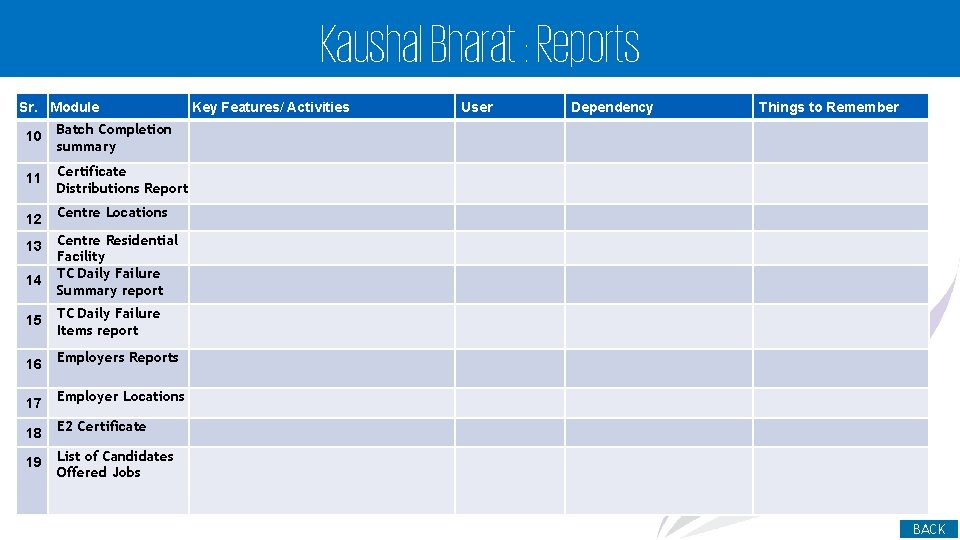
Kaushal Bharat : Reports Sr. Module 10 Batch Completion summary 11 Certificate Distributions Report 12 Centre Locations 13 14 Key Features/ Activities User Dependency Things to Remember Centre Residential Facility TC Daily Failure Summary report 15 TC Daily Failure Items report 16 Employers Reports 17 Employer Locations 18 E 2 Certificate 19 List of Candidates Offered Jobs 33 BACK
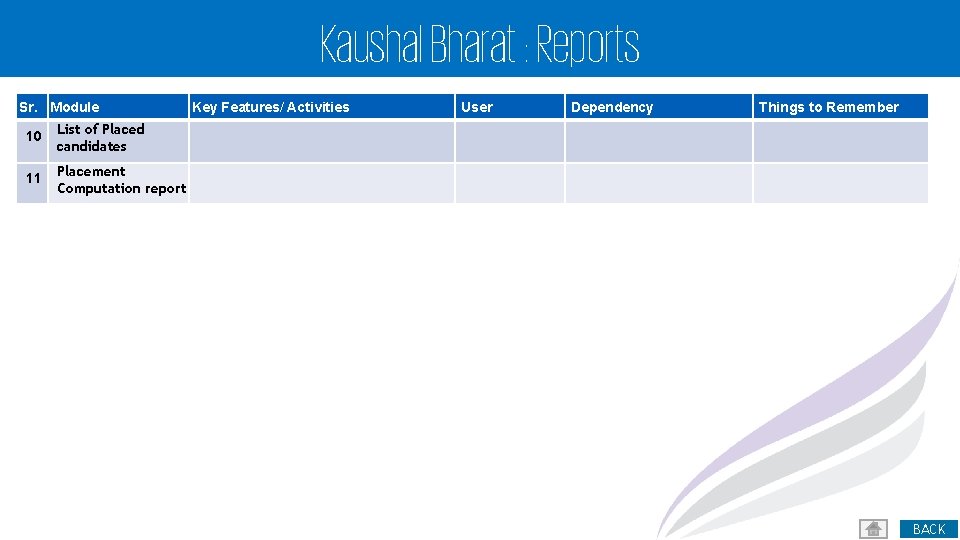
Kaushal Bharat : Reports Sr. Module 10 List of Placed candidates 11 Placement Computation report Key Features/ Activities User Dependency Things to Remember 34 BACK

Kaushal Bharat : Helpdesk & Support
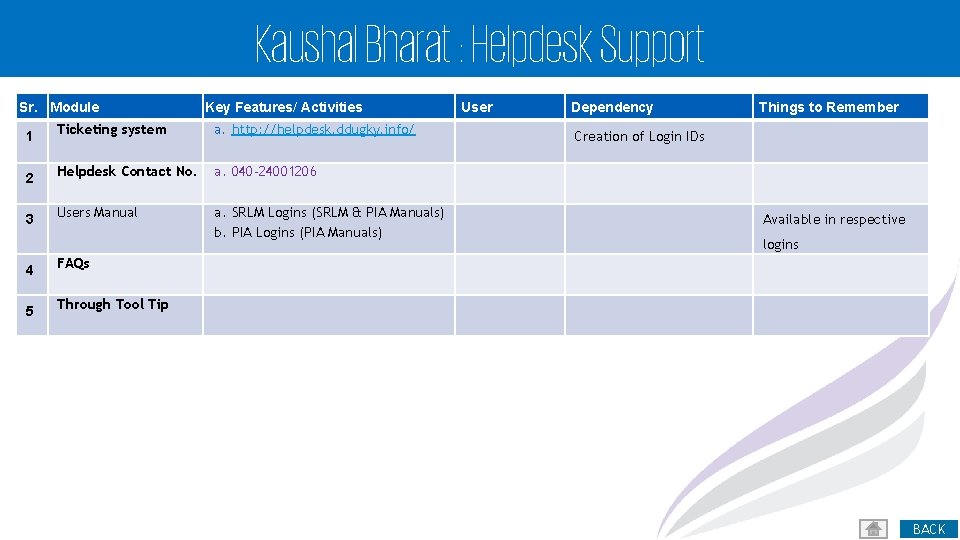
Kaushal Bharat : Helpdesk Support Sr. Module Key Features/ Activities 1 Ticketing system a. http: //helpdesk. ddugky. info/ 2 Helpdesk Contact No. a. 040 -24001206 3 Users Manual a. SRLM Logins (SRLM & PIA Manuals) b. PIA Logins (PIA Manuals) 4 FAQs 5 Through Tool Tip User Dependency Things to Remember Creation of Login IDs Available in respective logins 36 BACK

Kaushal Bharat : Video Conference Setup & Help
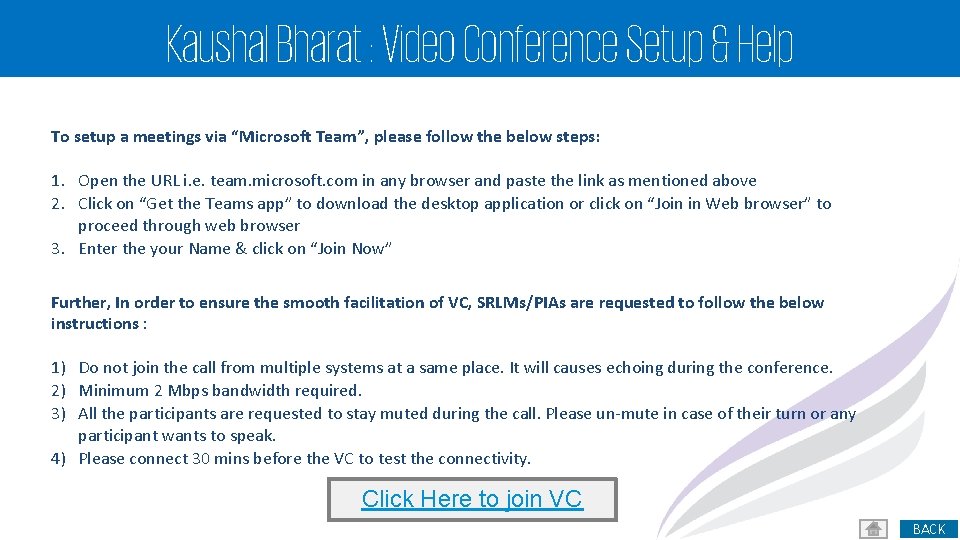
Kaushal Bharat : Video Conference Setup & Help To setup a meetings via “Microsoft Team”, please follow the below steps: 1. Open the URL i. e. team. microsoft. com in any browser and paste the link as mentioned above 2. Click on “Get the Teams app” to download the desktop application or click on “Join in Web browser” to proceed through web browser 3. Enter the your Name & click on “Join Now” Further, In order to ensure the smooth facilitation of VC, SRLMs/PIAs are requested to follow the below instructions : 1) Do not join the call from multiple systems at a same place. It will causes echoing during the conference. 2) Minimum 2 Mbps bandwidth required. 3) All the participants are requested to stay muted during the call. Please un-mute in case of their turn or any participant wants to speak. 4) Please connect 30 mins before the VC to test the connectivity. Click Here to join VC 38 BACK

Thank You! 39
- Slides: 39