
Joint Service Mountain Training Centre CCAT Presentation Sat
![Stage 6 ( Receiving emailed DT username) From: JSMTC-DT [mailto: jsmtc-dtclk@btconnect. com] Sent: 15](https://slidetodoc.com/presentation_image_h2/e03efcc82cd95788d798a9baacf166e7/image-27.jpg "Stage 6 ( Receiving emailed DT username) From: JSMTC-DT [mailto: jsmtc-dtclk@btconnect. com] Sent: 15")
- Slides: 59
Joint Service Mountain Training Centre CCAT Presentation Sat 18 Apr 15 Maj Steve Higgins OC Trg JSMTC Mr Brian O’Donnell DTA
Overview l Quick intro into the JSAT Scheme l Look at each scheme relevant to CCAT l Compare JS and NGB equivalents l Pre-course standards (routes, QMDs) l Distributed Training
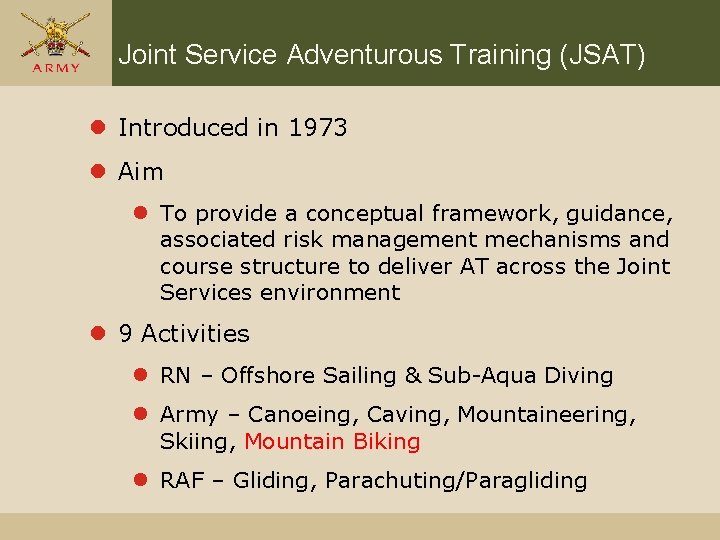
Joint Service Adventurous Training (JSAT) l Introduced in 1973 l Aim l To provide a conceptual framework, guidance, associated risk management mechanisms and course structure to deliver AT across the Joint Services environment l 9 Activities l RN – Offshore Sailing & Sub-Aqua Diving l Army – Canoeing, Caving, Mountaineering, Skiing, Mountain Biking l RAF – Gliding, Parachuting/Paragliding
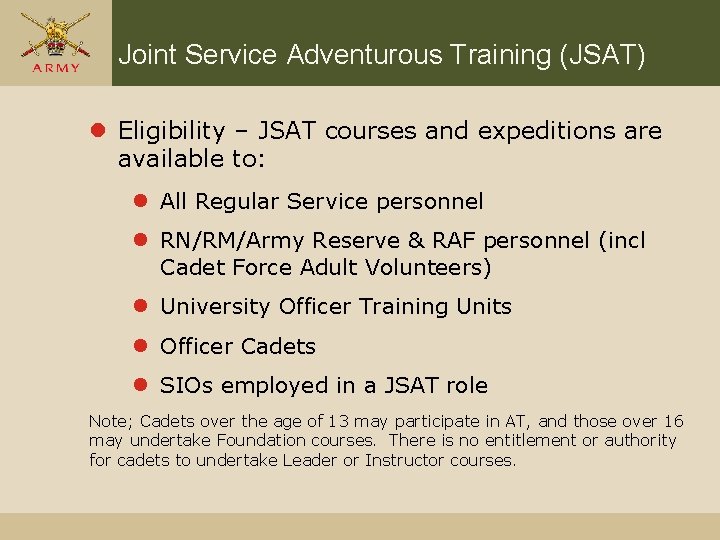
Joint Service Adventurous Training (JSAT) l Eligibility – JSAT courses and expeditions are available to: l All Regular Service personnel l RN/RM/Army Reserve & RAF personnel (incl Cadet Force Adult Volunteers) l University Officer Training Units l Officer Cadets l SIOs employed in a JSAT role Note; Cadets over the age of 13 may participate in AT, and those over 16 may undertake Foundation courses. There is no entitlement or authority for cadets to undertake Leader or Instructor courses.
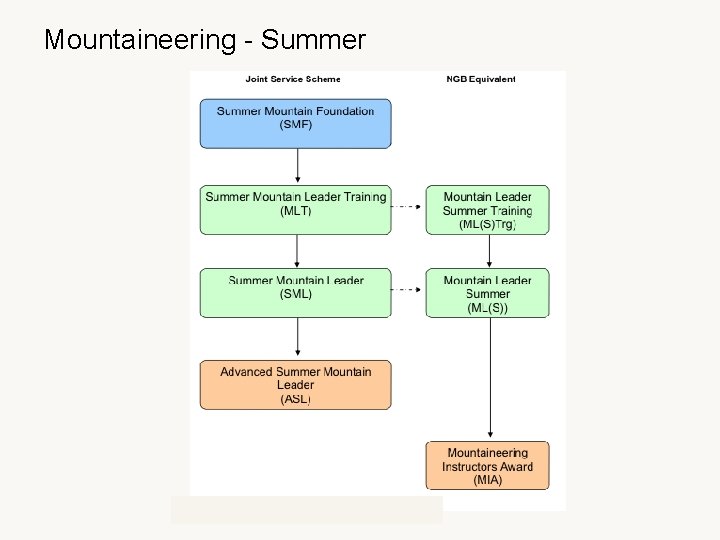
Mountaineering - Summer
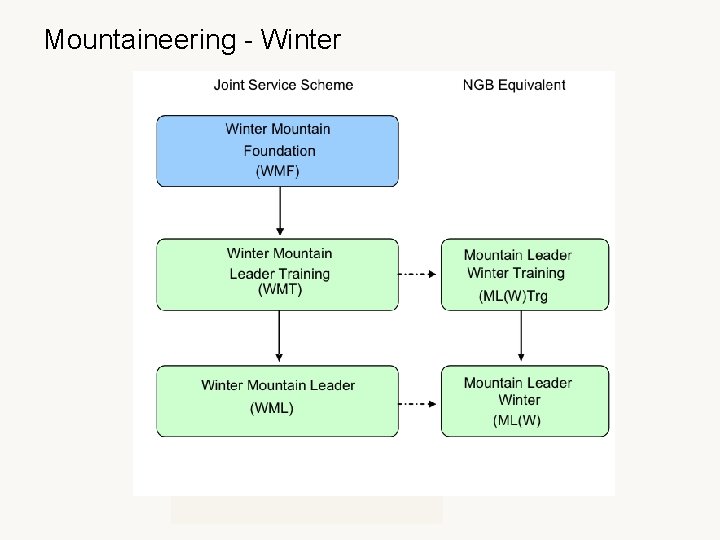
Mountaineering - Winter
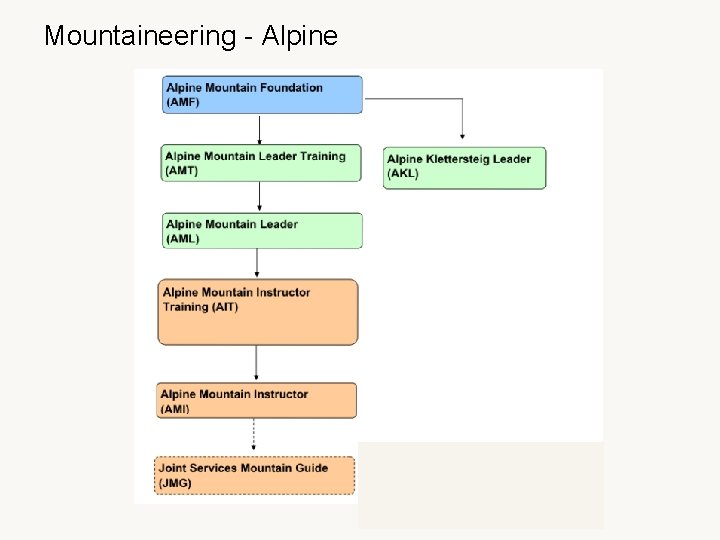
Mountaineering - Alpine
LAIT Presentation
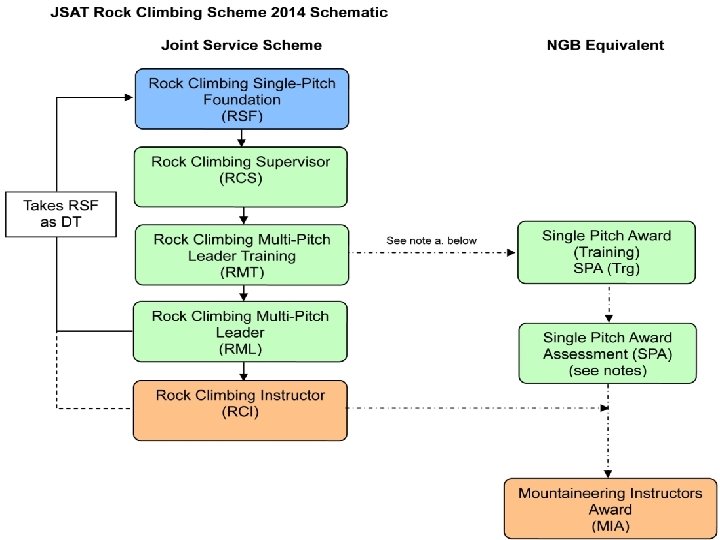
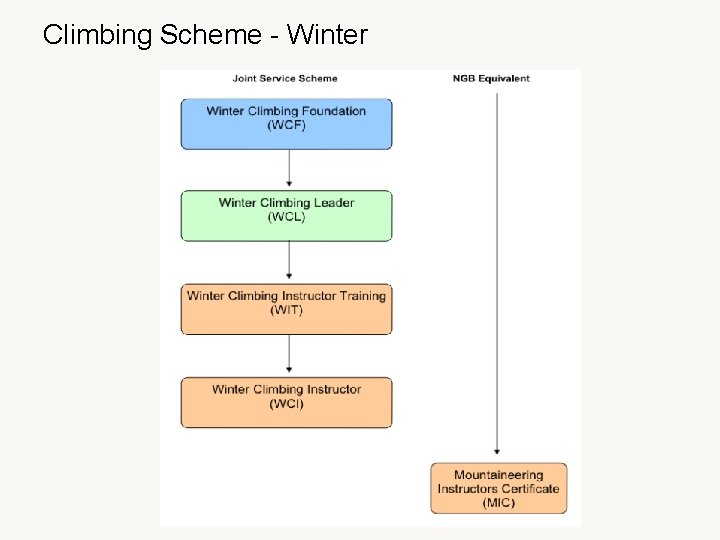
Climbing Scheme - Winter
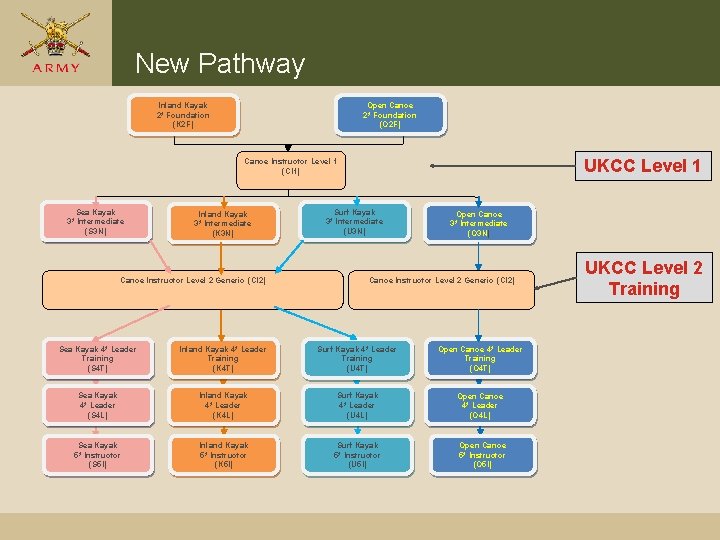
New Pathway Inland Kayak 2* Foundation (K 2 F) Open Canoe 2* Foundation (O 2 F) UKCC Level 1 Canoe Instructor Level 1 (CI 1) Sea Kayak 3* Intermediate (S 3 N) Inland Kayak 3* Intermediate (K 3 N) Canoe Instructor Level 2 Generic (CI 2) Surf Kayak 3* Intermediate (U 3 N) Open Canoe 3* Intermediate (O 3 N) Canoe Instructor Level 2 Generic (CI 2) Sea Kayak 4* Leader Training (S 4 T) Inland Kayak 4* Leader Training (K 4 T) Surf Kayak 4* Leader Training (U 4 T) Open Canoe 4* Leader Training (O 4 T) Sea Kayak 4* Leader (S 4 L) Inland Kayak 4* Leader (K 4 L) Surf Kayak 4* Leader (U 4 L) Open Canoe 4* Leader (O 4 L) Sea Kayak 5* Instructor (S 5 I) Inland Kayak 5* Instructor (K 5 I) Surf Kayak 5* Instructor (U 5 I) Open Canoe 5* Instructor (O 5 I) UKCC Level 2 Training
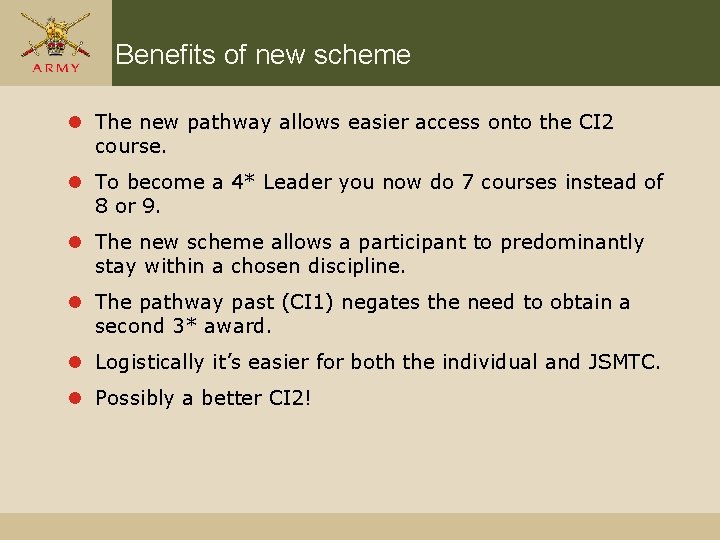
Benefits of new scheme l The new pathway allows easier access onto the CI 2 course. l To become a 4* Leader you now do 7 courses instead of 8 or 9. l The new scheme allows a participant to predominantly stay within a chosen discipline. l The pathway past (CI 1) negates the need to obtain a second 3* award. l Logistically it’s easier for both the individual and JSMTC. l Possibly a better CI 2!
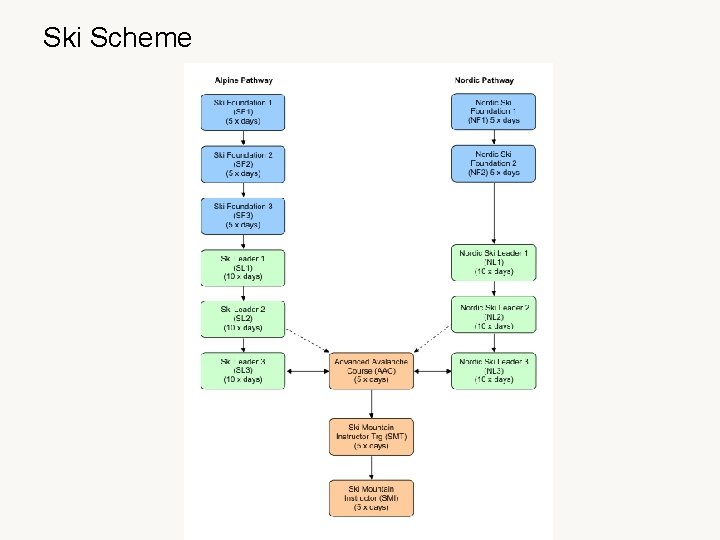
Ski Scheme
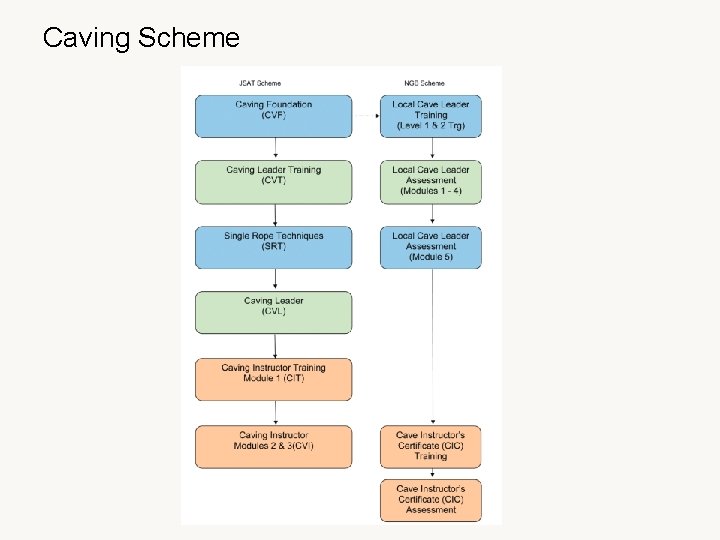
Caving Scheme
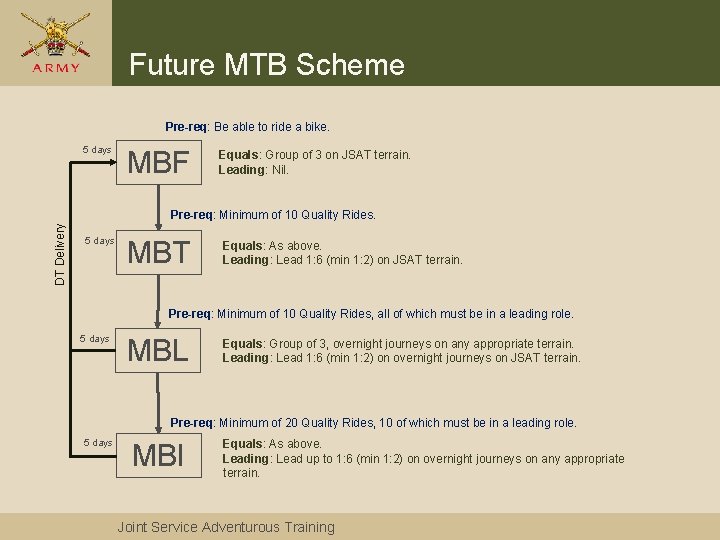
Future MTB Scheme Pre-req: Be able to ride a bike. 5 days MBF Equals: Group of 3 on JSAT terrain. Leading: Nil. DT Delivery Pre-req: Minimum of 10 Quality Rides. 5 days MBT Equals: As above. Leading: Lead 1: 6 (min 1: 2) on JSAT terrain. Pre-req: Minimum of 10 Quality Rides, all of which must be in a leading role. 5 days MBL Equals: Group of 3, overnight journeys on any appropriate terrain. Leading: Lead 1: 6 (min 1: 2) on overnight journeys on JSAT terrain. Pre-req: Minimum of 20 Quality Rides, 10 of which must be in a leading role. 5 days MBI Equals: As above. Leading: Lead up to 1: 6 (min 1: 2) on overnight journeys on any appropriate terrain. Joint Service Adventurous Training
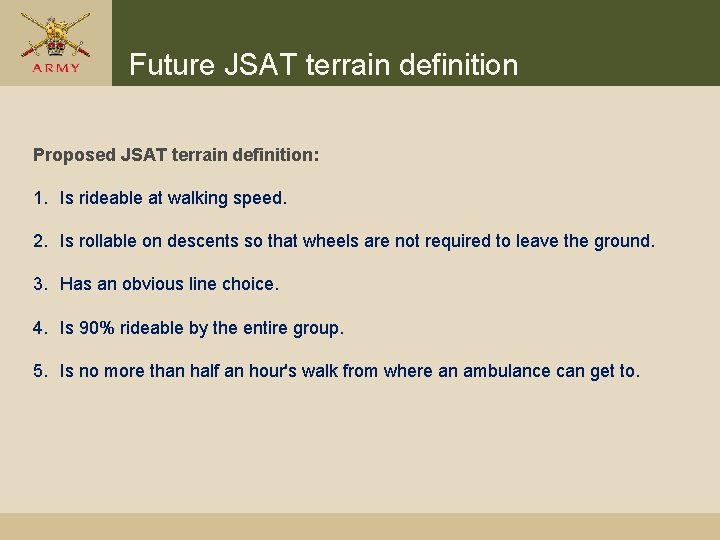
Future JSAT terrain definition Proposed JSAT terrain definition: 1. Is rideable at walking speed. 2. Is rollable on descents so that wheels are not required to leave the ground. 3. Has an obvious line choice. 4. Is 90% rideable by the entire group. 5. Is no more than half an hour's walk from where an ambulance can get to.
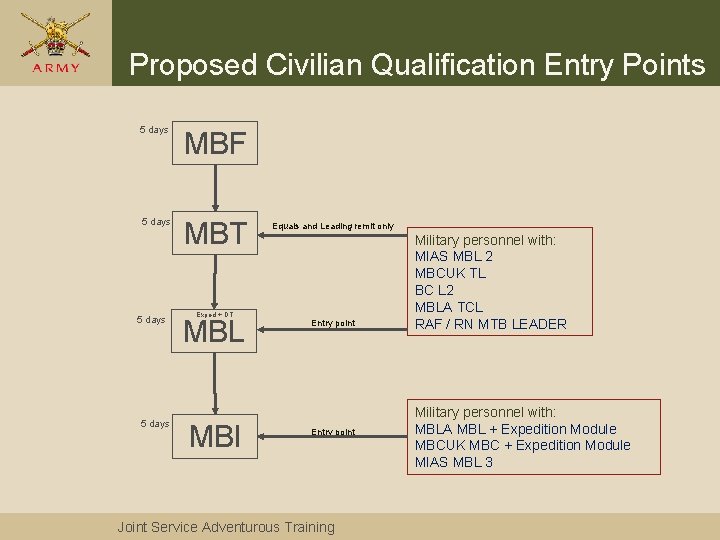
Proposed Civilian Qualification Entry Points 5 days MBF 5 days MBT 5 days Exped + DT MBL MBI Equals and Leading remit only Entry point Joint Service Adventurous Training Military personnel with: MIAS MBL 2 MBCUK TL BC L 2 MBLA TCL RAF / RN MTB LEADER Military personnel with: MBLA MBL + Expedition Module MBCUK MBC + Expedition Module MIAS MBL 3
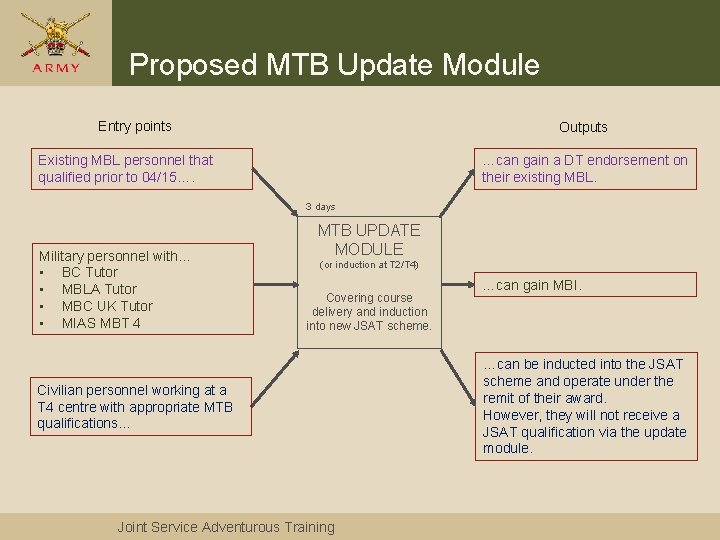
Proposed MTB Update Module Entry points Outputs Existing MBL personnel that qualified prior to 04/15…. …can gain a DT endorsement on their existing MBL. 3 days Military personnel with… • BC Tutor • MBLA Tutor • MBC UK Tutor • MIAS MBT 4 MTB UPDATE MODULE (or induction at T 2/T 4) Covering course delivery and induction into new JSAT scheme. Civilian personnel working at a T 4 centre with appropriate MTB qualifications… Joint Service Adventurous Training …can gain MBI. …can be inducted into the JSAT scheme and operate under the remit of their award. However, they will not receive a JSAT qualification via the update module.
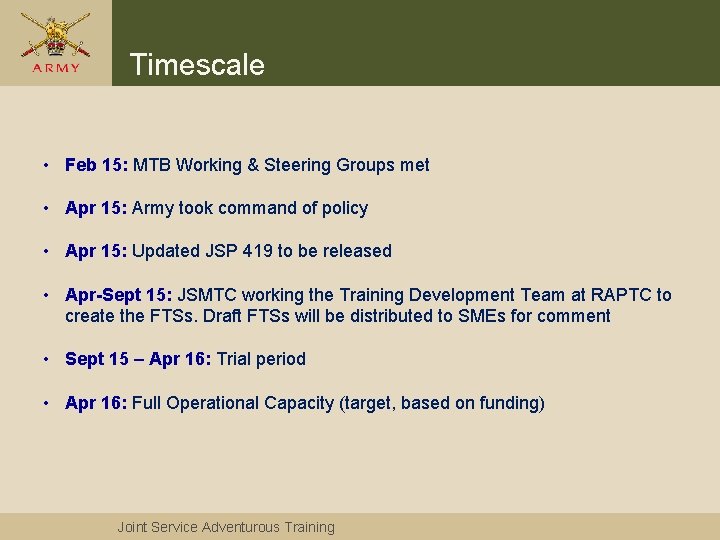
Timescale • Feb 15: MTB Working & Steering Groups met • Apr 15: Army took command of policy • Apr 15: Updated JSP 419 to be released • Apr-Sept 15: JSMTC working the Training Development Team at RAPTC to create the FTSs. Draft FTSs will be distributed to SMEs for comment • Sept 15 – Apr 16: Trial period • Apr 16: Full Operational Capacity (target, based on funding) Joint Service Adventurous Training
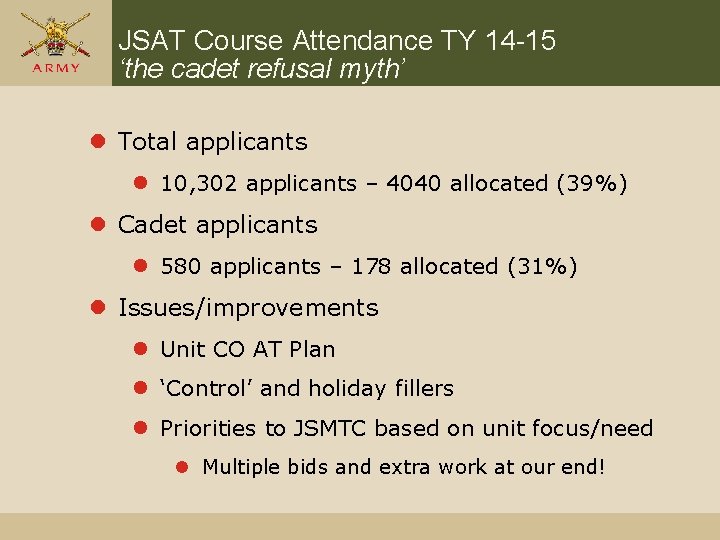
JSAT Course Attendance TY 14 -15 ‘the cadet refusal myth’ l Total applicants l 10, 302 applicants – 4040 allocated (39%) l Cadet applicants l 580 applicants – 178 allocated (31%) l Issues/improvements l Unit CO AT Plan l ‘Control’ and holiday fillers l Priorities to JSMTC based on unit focus/need l Multiple bids and extra work at our end!
Applying for an ATG (A) Online DT Account – for AT Instructor or AT Admin / Exercise leader
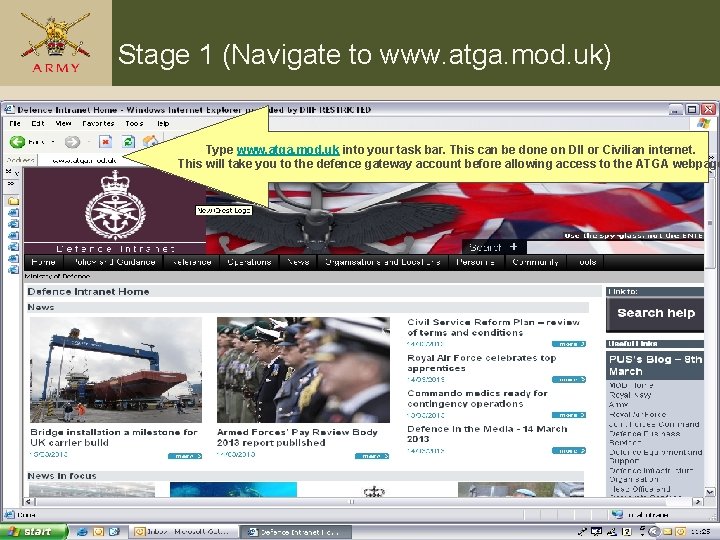
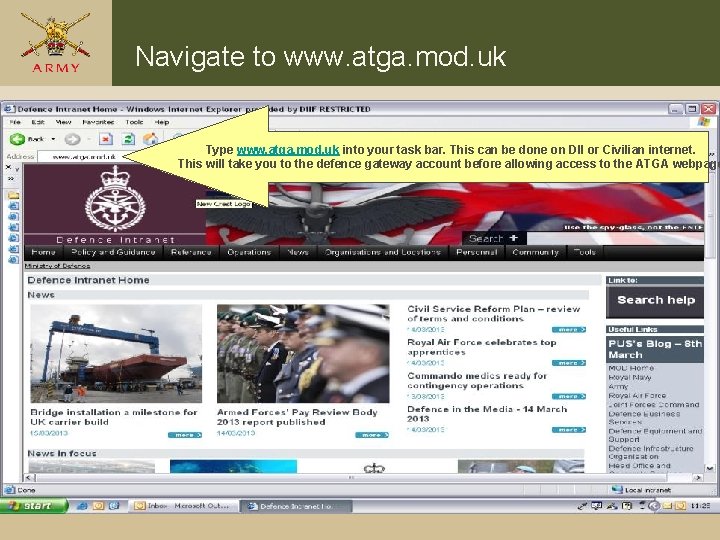
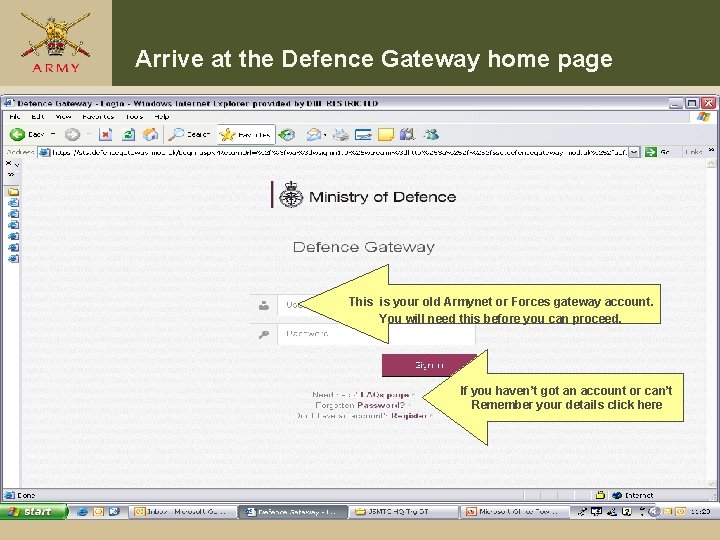
Stage 1 (Navigate to www. atga. mod. uk) Type www. atga. mod. uk into your task bar. This can be done on DII or Civilian internet. This will take you to the defence gateway account before allowing access to the ATGA webpage
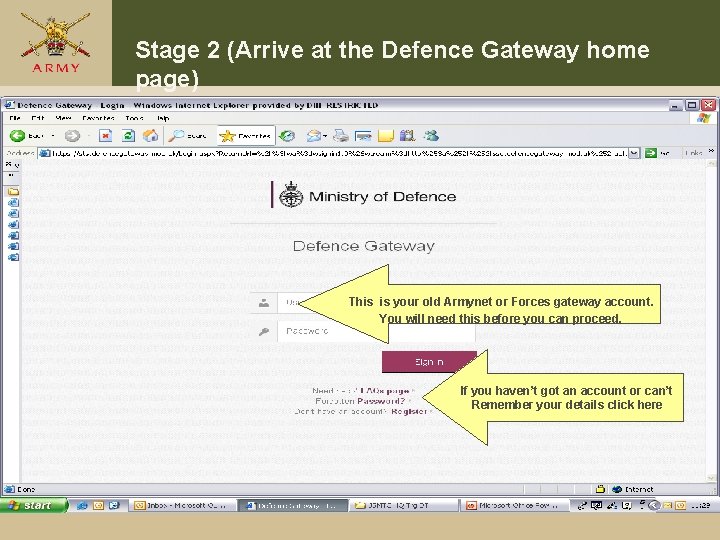
Stage 2 (Arrive at the Defence Gateway home page) This is your old Armynet or Forces gateway account. You will need this before you can proceed. If you haven’t got an account or can’t Remember your details click here
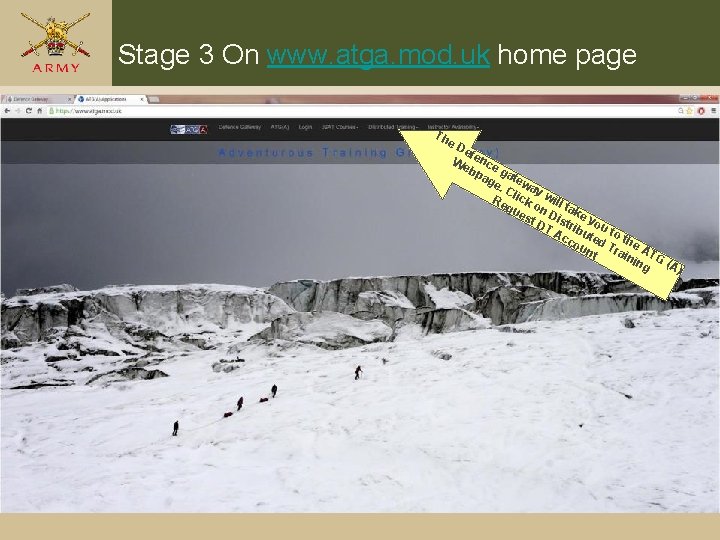
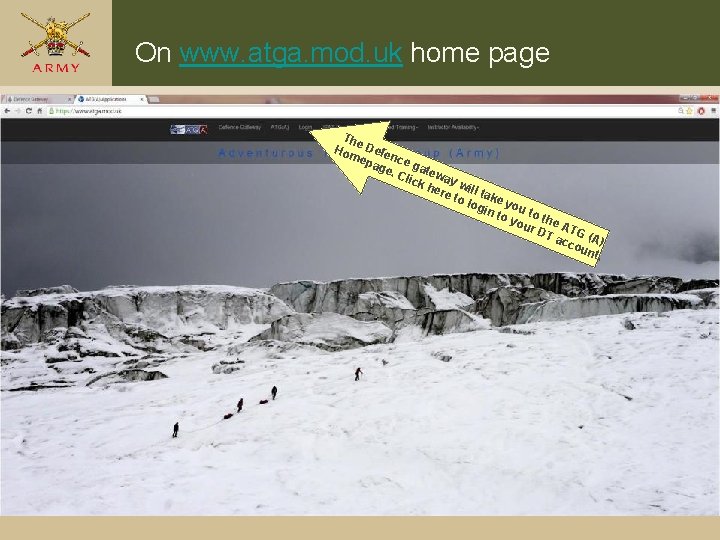
Stage 3 On www. atga. mod. uk home page Th e. D ef We ence bp g ag atew e. C ay Re lick will ta qu on es Dis ke y t. D T A tribu ou to cc ted the ou nt Trai ATG nin g (A)
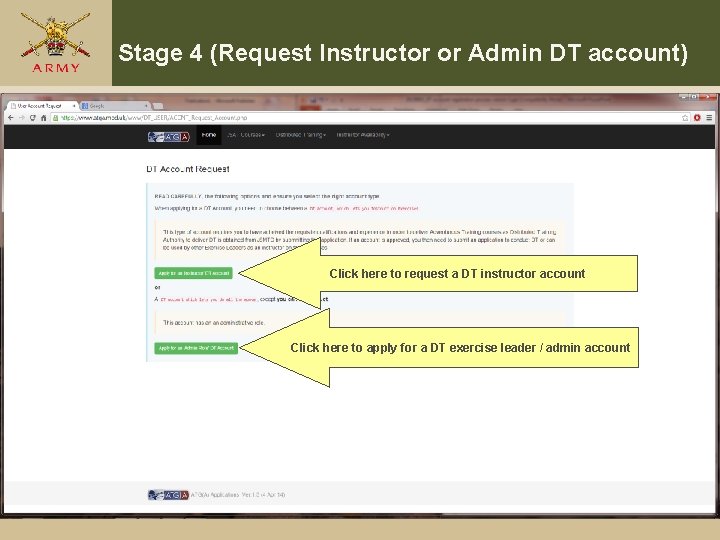
Stage 4 (Request Instructor or Admin DT account) Click here to request a DT instructor account Click here to apply for a DT exercise leader / admin account
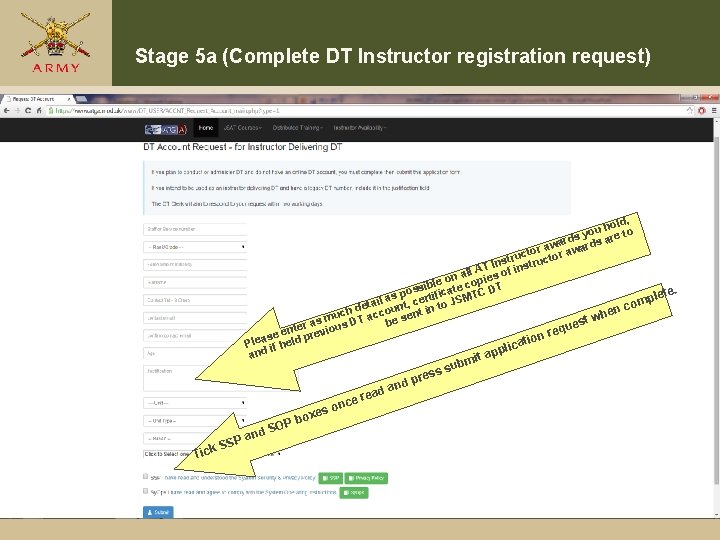
Stage 5 a (Complete DT Instructor registration request) old, h u yo e to ards ar w a ctor r aw structo n I T n all A ies of i n o le op ssib ficate c C DT. o p i lete MT as , cert p l S i J m a o det unt n to en c h uch T acco sent i w m D st as be que nter revious e e r e s p on Plea if held cati i l p d an it ap ubm n es o O ox Pb Tic S and P S k. S ead ce r an s ess d pr
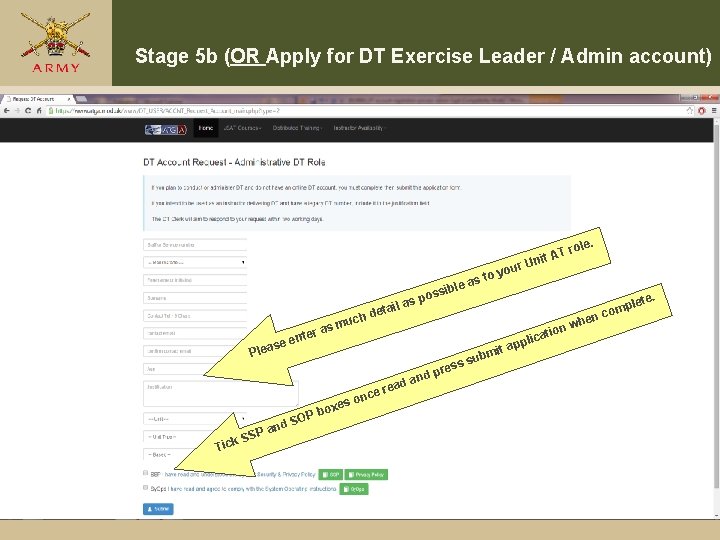
Stage 5 b (OR Apply for DT Exercise Leader / Admin account) ole. ur e sibl uch e en s Plea sm ter a il deta os as p SSP Tick and ce r s on e box hen plic ead SOP o yo as t AT r Unit pr and s ess it ap ubm nw atio pl com ete.
Stage 6 ( Receiving emailed DT username) From: JSMTC-DT [mailto: jsmtc-dtclk@btconnect. com] Sent: 15 March 2013 14: 56 r e be nam m To: ‘………………. . . com' r e e rem T Us e Subject: Release-Authorised: 20130315_ATG(A) DT ACCOUNT - USERNAME FOR as ) D Ple G (A AT ACCESSING THE ATG(A) DISTRIBUTED TRAINING APPLICATION ur o Y Your username for logging onto the ATG(A) DT Application is …………. . Your password (if applicable) will be sent in a separate email. Once you receive your password, you need to logon, then ensure you agree to the SSP and Sy. Ops (if not yet complete), to activate your account. Once you have both your username and password, you can logon at https: //www. atga. mod. uk - once through the Defence Gateway - by using the Login dialogue on the Top Menu. Once logged on, you may apply to conduct DT from the top menu item 'Apply for DT', which is under the top menu 'DT Applications'. DT Clerk ATG(A) NOTE: Contact details for the DT Clerk can be found at 'Contact Us' page at https: //www. atga. mod. uk/
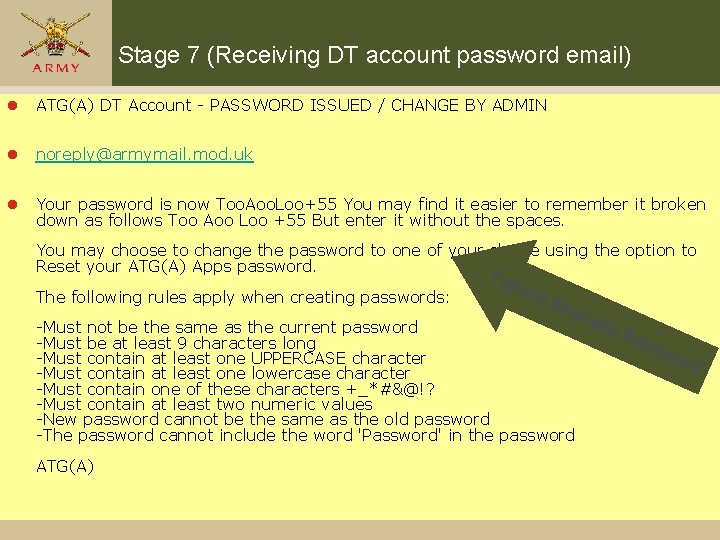
Stage 7 (Receiving DT account password email) l ATG(A) DT Account - PASSWORD ISSUED / CHANGE BY ADMIN l noreply@armymail. mod. uk l Your password is now Too. Aoo. Loo+55 You may find it easier to remember it broken down as follows Too Aoo Loo +55 But enter it without the spaces. You may choose to change the password to one of your choice using the option to Reset your ATG(A) Apps password. The following rules apply when creating passwords: Typ ica l Ex am -Must not be the same as the current password -Must be at least 9 characters long -Must contain at least one UPPERCASE character -Must contain at least one lowercase character -Must contain one of these characters +_*#&@!? -Must contain at least two numeric values -New password cannot be the same as the old password -The password cannot include the word 'Password' in the password ATG(A) ple Pas sw ord
Stage 8 (Registration complete) l Once you receive your username and password, if your AT instructor award is civilian or if it is military prior to 2012 please fax, or scan / email your certificate copies to JSMTC before registration to conduct courses is enabled. l Admin / Exercise Leader DT accounts are enabled without requirement for AT instructor qualifications. l If you experience any problems with this process please contact the DT office on 01248 7183 08/86, fax 01248 718311 or email jsmtc-hq-trgclkdt@mod. uk or jsmtchq-trgassurancemgr@mod. uk
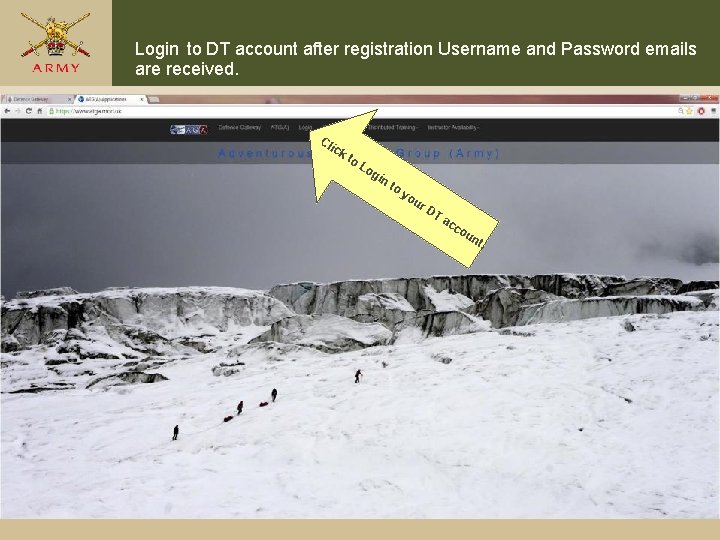
Login to DT account after registration Username and Password emails are received. Cl ick to Lo gin to yo ur DT ac co un t.
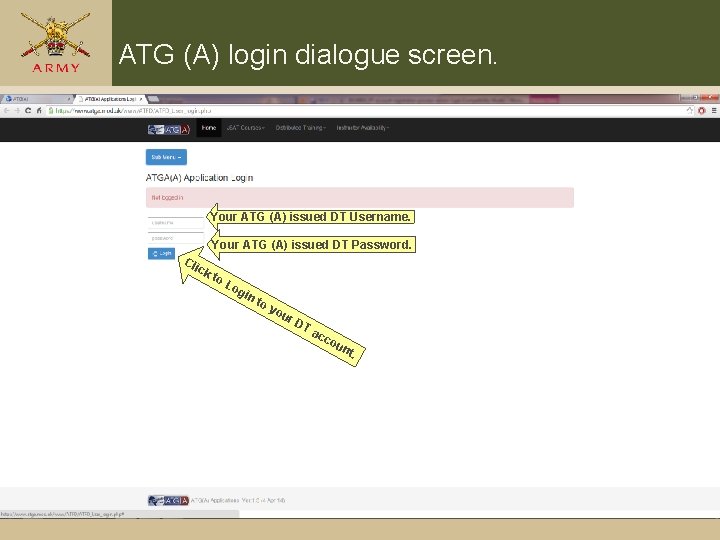
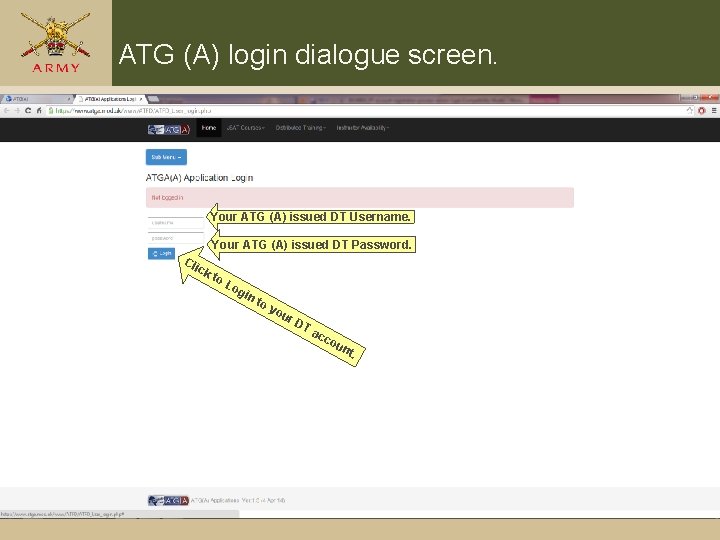
ATG (A) login dialogue screen. Your ATG (A) issued DT Username. Your ATG (A) issued DT Password. Cli ck to Lo g in to yo ur DT ac c ou n t.
Applying for authority to conduct JSAT DT
Navigate to www. atga. mod. uk Type www. atga. mod. uk into your task bar. This can be done on DII or Civilian internet. This will take you to the defence gateway account before allowing access to the ATGA webpage
Arrive at the Defence Gateway home page This is your old Armynet or Forces gateway account. You will need this before you can proceed. If you haven’t got an account or can’t Remember your details click here
On www. atga. mod. uk home page The Hom Defe epa nce g ge. a Clic teway kh ere will ta k to l ogi e you n to to you the A r. D T a TG (A ) cco unt.
ATG (A) login dialogue screen. Your ATG (A) issued DT Username. Your ATG (A) issued DT Password. Cli ck to Lo g in to yo ur DT ac c ou n t.
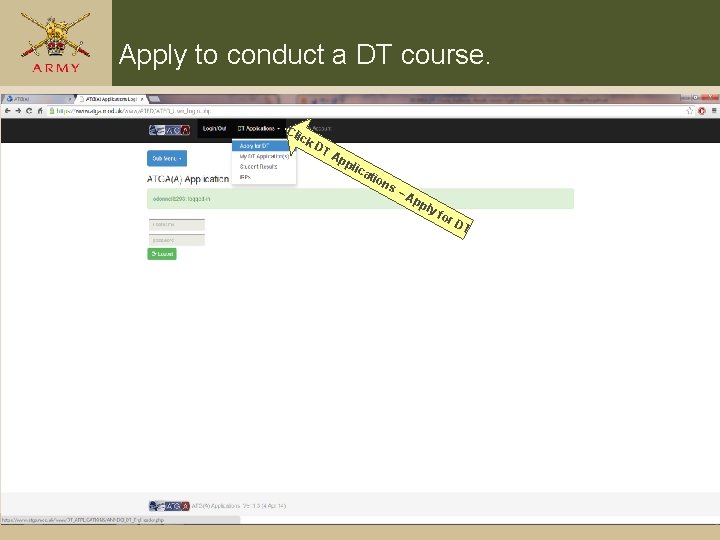
Apply to conduct a DT course. Cli ck DT Ap pli ca ti on s –A pp ly for DT
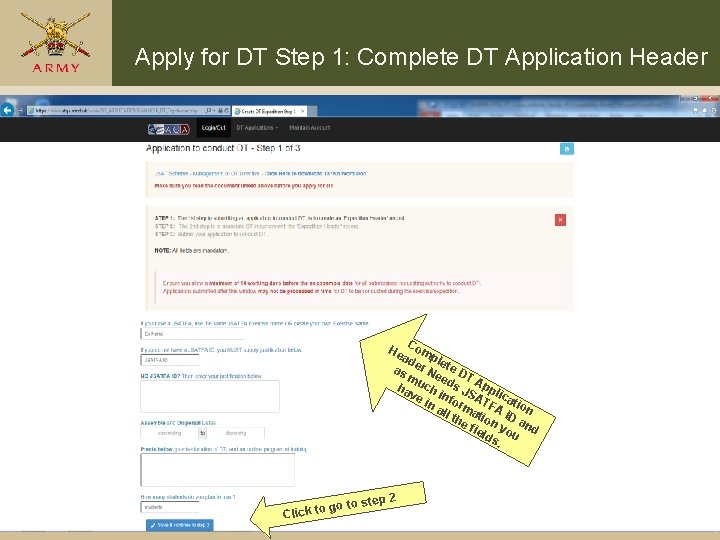
Apply for DT Step 1: Complete DT Application Header Co ad mple as er N te D TA m ee ha uch ds JS ppl i ve inf orm ATF catio in A all n the ation ID a fie yo nd lds u. He go Click to to step 2
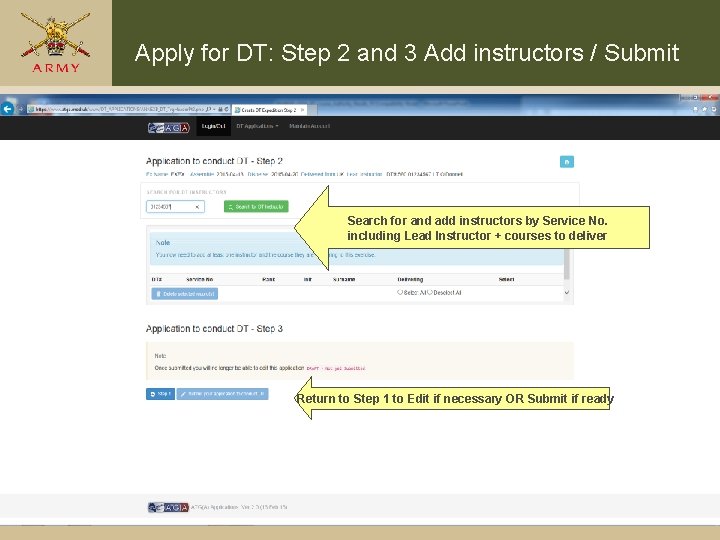
Apply for DT: Step 2 and 3 Add instructors / Submit Search for and add instructors by Service No. including Lead Instructor + courses to deliver Return to Step 1 to Edit if necessary OR Submit if ready
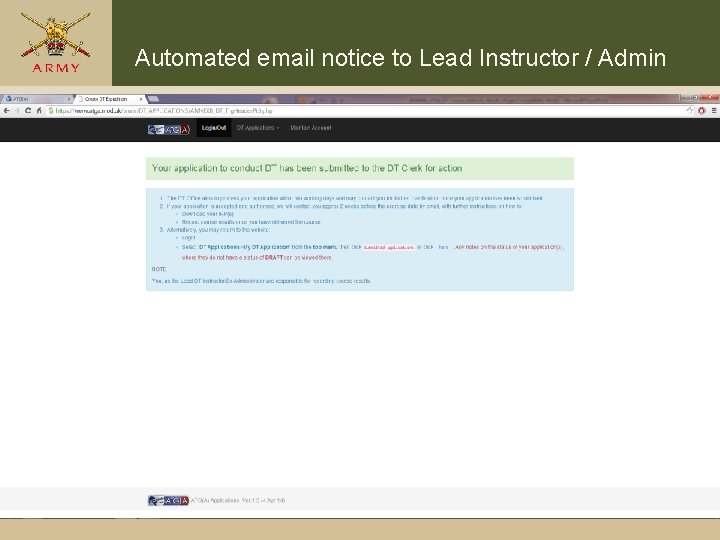
Automated email notice to Lead Instructor / Admin
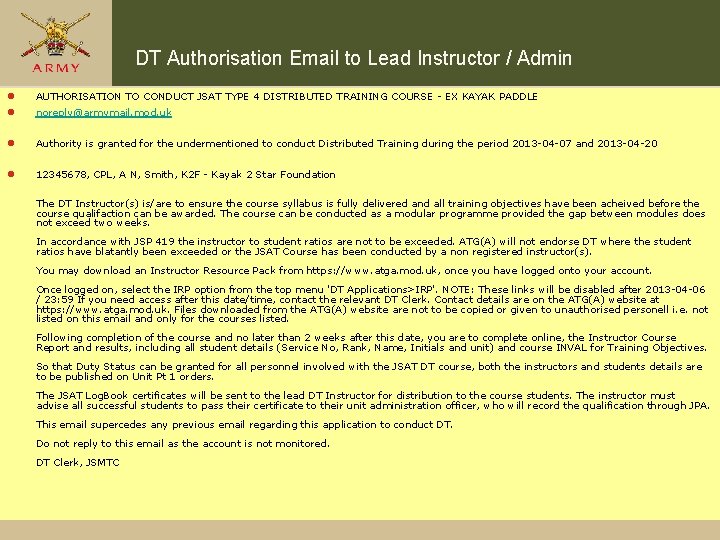
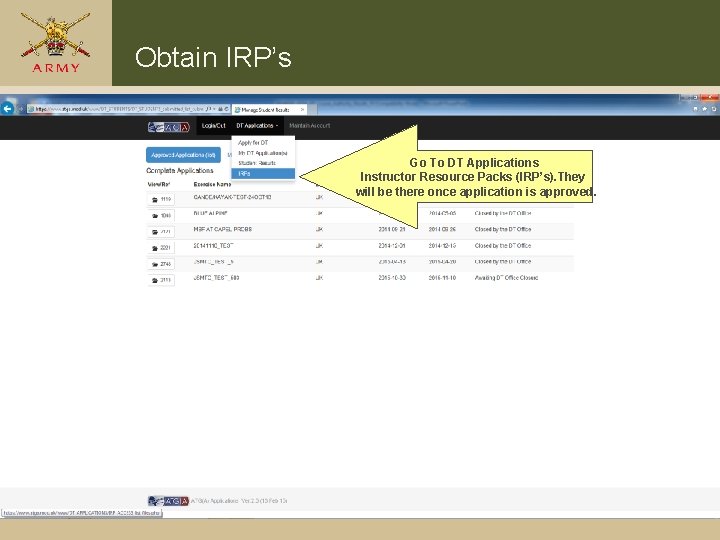
DT Authorisation Email to Lead Instructor / Admin l l AUTHORISATION TO CONDUCT JSAT TYPE 4 DISTRIBUTED TRAINING COURSE - EX KAYAK PADDLE l Authority is granted for the undermentioned to conduct Distributed Training during the period 2013 -04 -07 and 2013 -04 -20 l 12345678, CPL, A N, Smith, K 2 F - Kayak 2 Star Foundation noreply@armymail. mod. uk The DT Instructor(s) is/are to ensure the course syllabus is fully delivered and all training objectives have been acheived before the course qualifaction can be awarded. The course can be conducted as a modular programme provided the gap between modules does not exceed two weeks. In accordance with JSP 419 the instructor to student ratios are not to be exceeded. ATG(A) will not endorse DT where the student ratios have blatantly been exceeded or the JSAT Course has been conducted by a non registered instructor(s). You may download an Instructor Resource Pack from https: //www. atga. mod. uk, once you have logged onto your account. Once logged on, select the IRP option from the top menu 'DT Applications>IRP'. NOTE: These links will be disabled after 2013 -04 -06 / 23: 59 If you need access after this date/time, contact the relevant DT Clerk. Contact details are on the ATG(A) website at https: //www. atga. mod. uk. Files downloaded from the ATG(A) website are not to be copied or given to unauthorised personell i. e. not listed on this email and only for the courses listed. Following completion of the course and no later than 2 weeks after this date, you are to complete online, the Instructor Course Report and results, including all student details (Service No, Rank, Name, Initials and unit) and course INVAL for Training Objectives. So that Duty Status can be granted for all personnel involved with the JSAT DT course, both the instructors and students details are to be published on Unit Pt 1 orders. The JSAT Log. Book certificates will be sent to the lead DT Instructor for distribution to the course students. The instructor must advise all successful students to pass their certificate to their unit administration officer, who will record the qualification through JPA. This email supercedes any previous email regarding this application to conduct DT. Do not reply to this email as the account is not monitored. DT Clerk, JSMTC
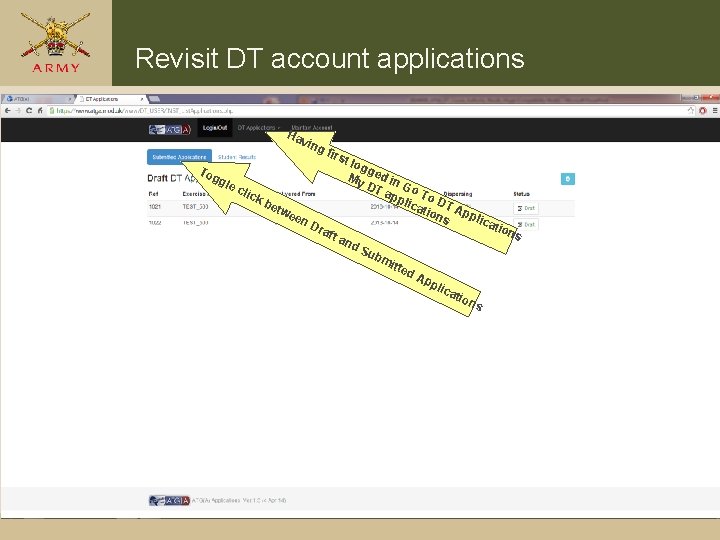
Revisit DT account applications Ha vin g fi rst log g gg My ed in le c DT G lick app o To lica DT be twe tion App en lica s Dra tion ft a s nd Su bm itte d. A pp lica tio ns To
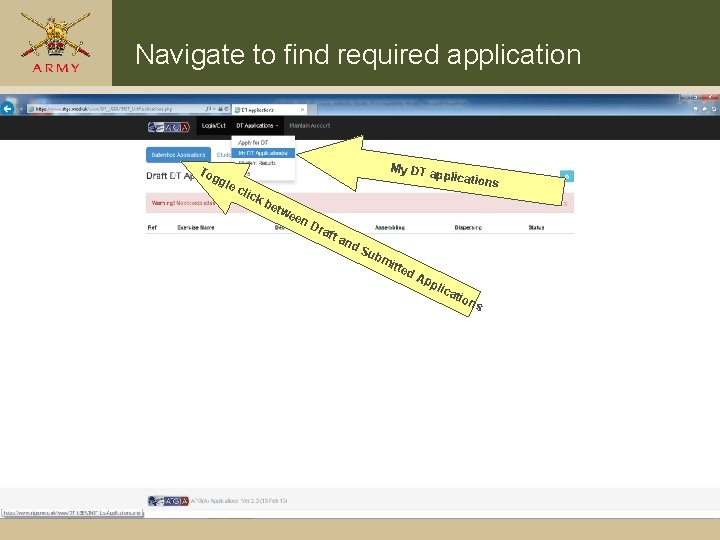
Navigate to find required application To gg My DT a p le c lick be twe en Dra ft a nd Su bm i tte d plication s Ap pli ca tio n s
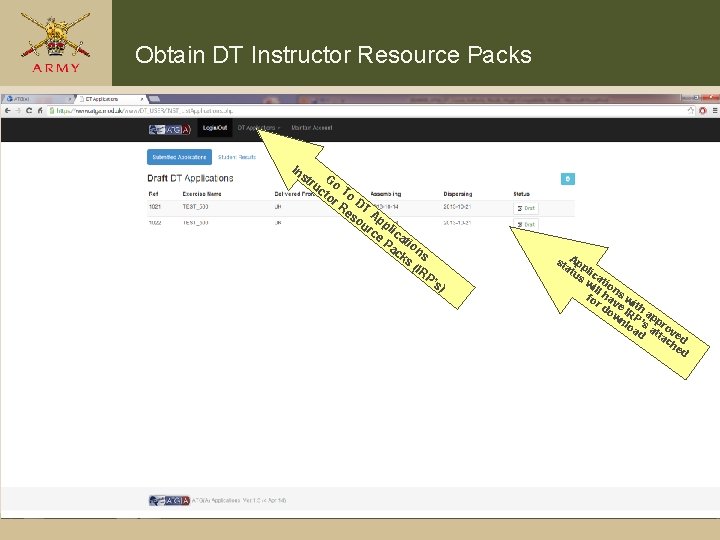
Obtain DT Instructor Resource Packs In st G ru o ct To or Re DT so Ap ur pli ce ca Pa tio ck ns s (IR P’ s) st App at li us ca wi tio ll n fo hav s w r d e ith ow IR a nl P’s ppr oa a ov d tta ed ch ed
Obtain IRP’s Go To DT Applications Instructor Resource Packs (IRP’s). They will be there once application is approved.
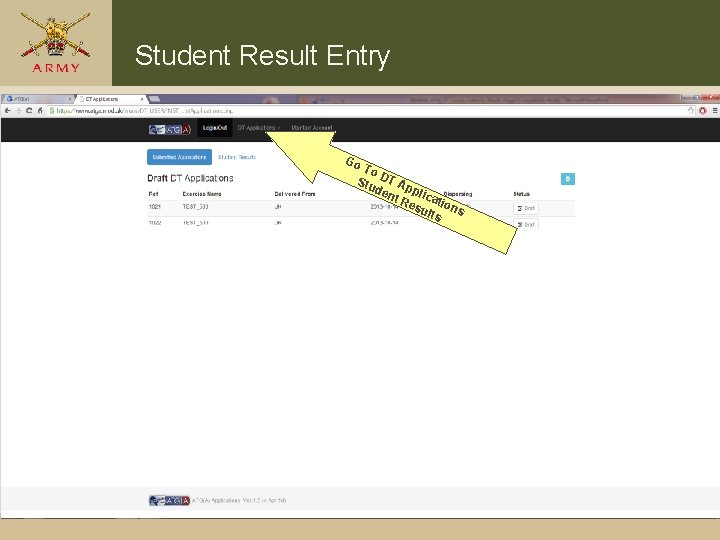
Student Result Entry Go To Stu DT Ap den p t R licati esu ons lts
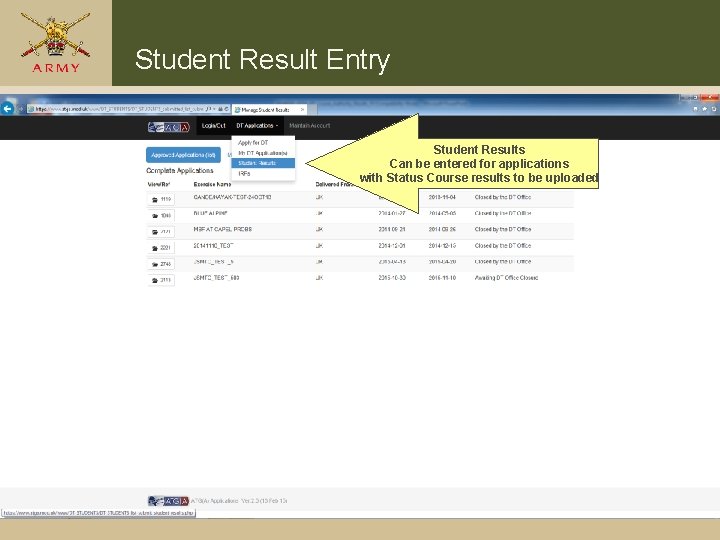
Student Result Entry Student Results Can be entered for applications with Status Course results to be uploaded
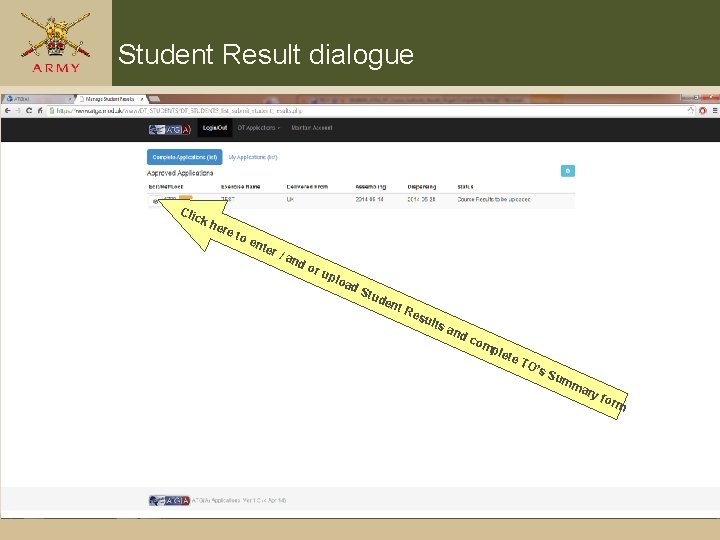
Student Result dialogue Cli ck her e to ent er / and or upl o ad Stu d ent Re sul ts a nd c om ple te TO ’s S um ma ry f o rm
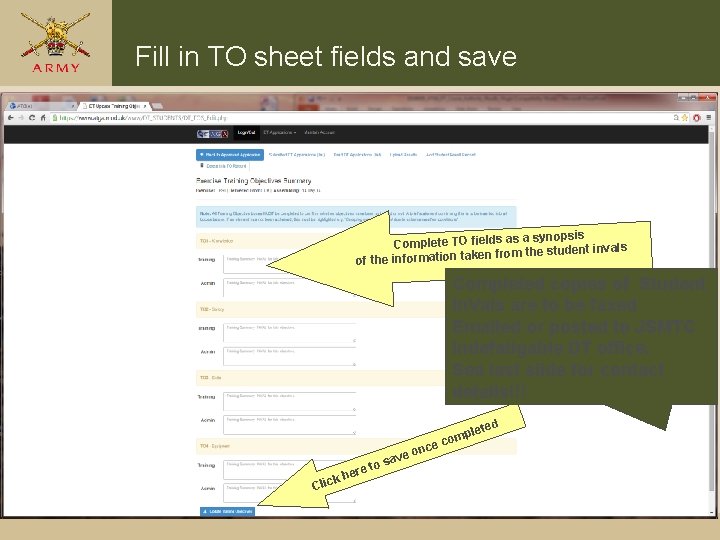
Fill in TO sheet fields and save a synopsis Complete TO fields as ls from the student inva n ke ta n io at rm fo in e of th Completed copies of Student In. Vals are to be faxed Emailed or posted to JSMTC Indefatigable DT office. See last slide for contact details!!! ed ce o re t C he lick e on sav plet com
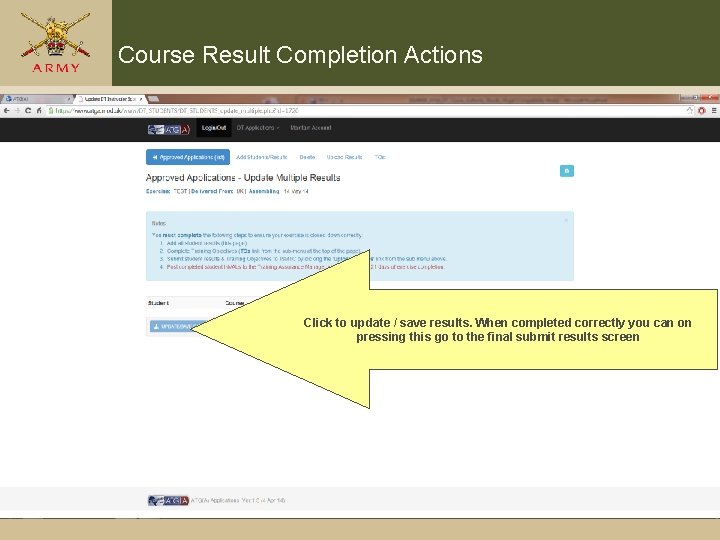
Course Result Completion Actions Click to update / save results. When completed correctly you can on pressing this go to the final submit results screen
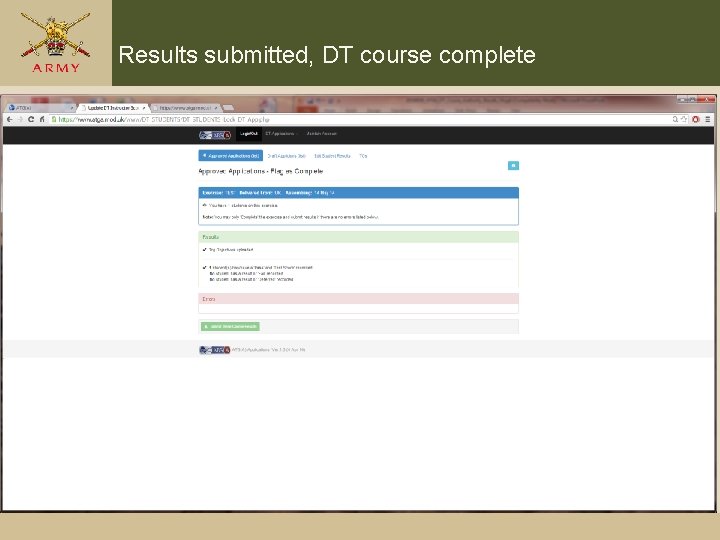
Results submitted, DT course complete
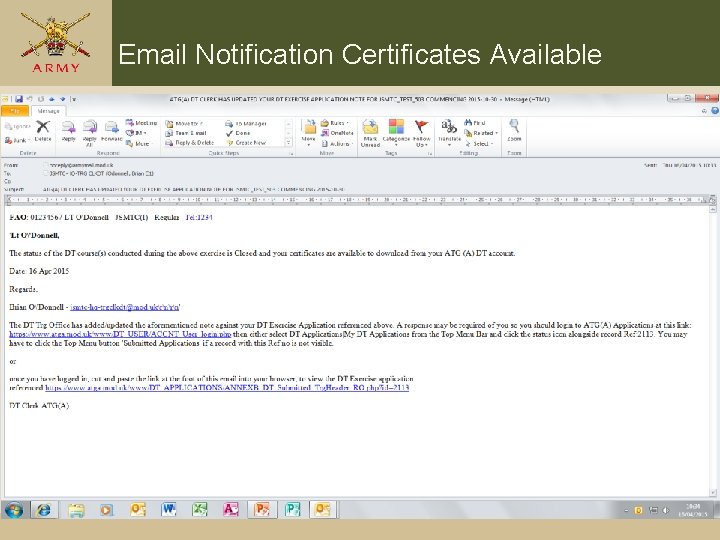
Email Notification Certificates Available
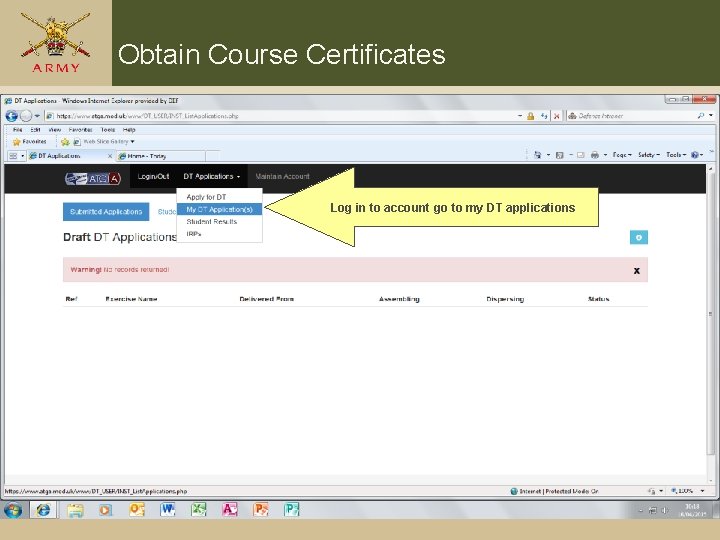
Obtain Course Certificates Log in to account go to my DT applications
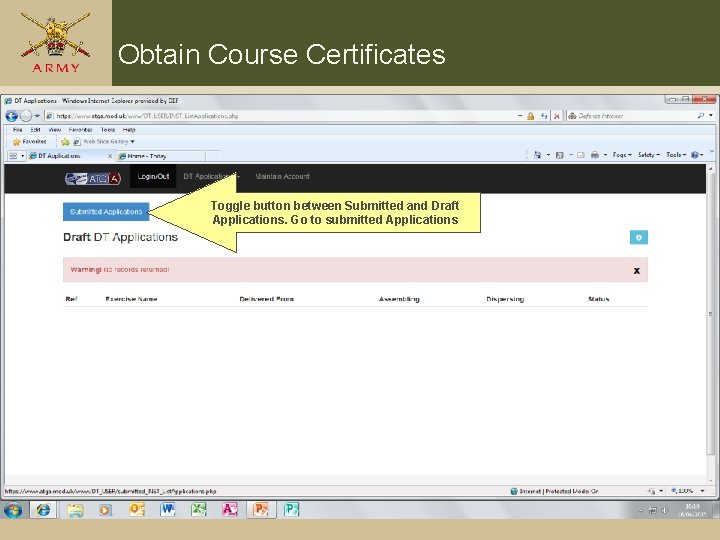
Obtain Course Certificates Toggle button between Submitted and Draft Applications. Go to submitted Applications
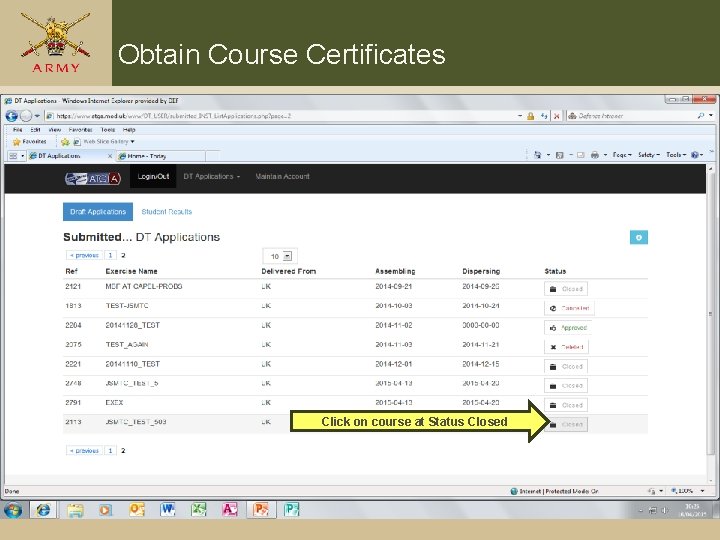
Obtain Course Certificates Click on course at Status Closed
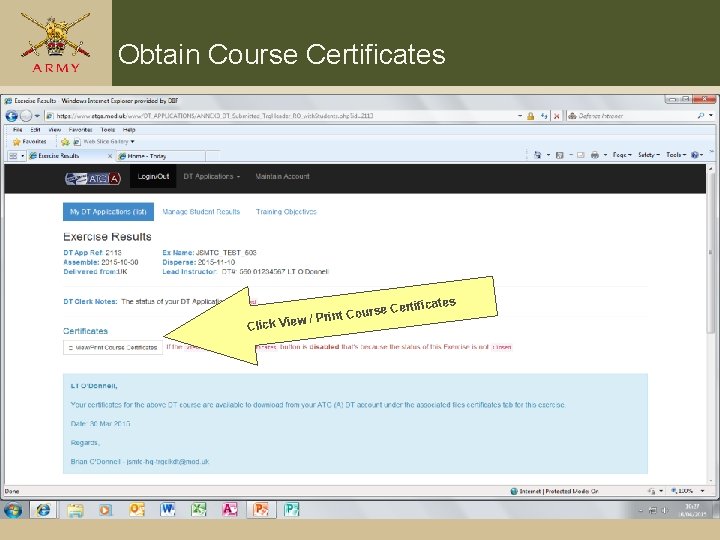
Obtain Course Certificates Clic se rint Cour P / w ie V k s Certificate
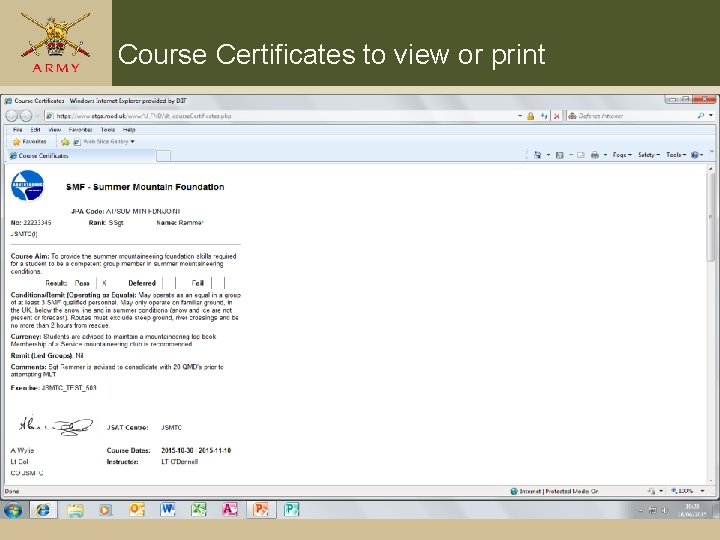
Course Certificates to view or print
Contact Details for In. Val submission l. Email Address: jsmtc-tam@btconnect. com l. Fax Number: 95581 7911 / 01248 718311 l. Postal Address: Distributed Training » » » JSMTC Indefatigable Plas Llanfair PG Anglesey LL 61 6 NT
Q&OA