
Java Script References A HTML Tutorial http archive
- Slides: 6
Java. Script References: A HTML Tutorial: http: //archive. ncsa. uiuc. edu/General/Internet/WWW/HTMLPrimer. html Java. Script Tutorial List: http: //www. pageresource. com/jscript/
What happens When a document loads • Java. Script is a programming language that is used to add interactivity to the web pages. • Java. Script is used – – Give users feed back as they navigate the web pages. – Validate the user input in forms. – Can open up new windows and display alert boxes. – Can timestamp documents.
• A Java. Script program is included in an HTML page, using the <SCRIPT> tag. • The browser software interprets the Java. Script commands from the HTML files and converts the code into actions. • Java. Script is case-sensitive. • Documents load into a Javascript-enabled browser in the same fashion as they do in other browsers – from top to bottom. • Two common actions of Javascript code – may direct the browser to lay out the elements on a page. – May prepare the browser to respond to user entries and actions that are part of the script. – Once a document is loaded, the page remains fixed in the memory
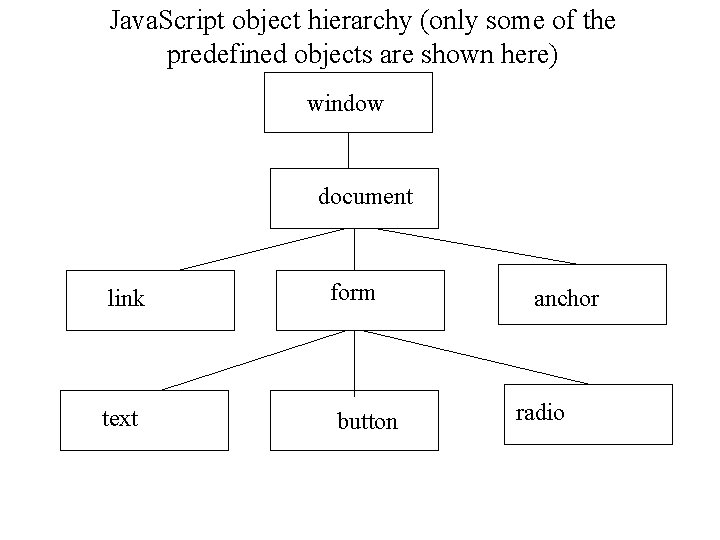
• Creating Java. Script Objects – Most of the Java. Script objects that a browser creates are established when an HTML document loads into the browser. – Objects are created in their load order. – A script in one frame cannot communicate to another frame’s objects until both frames load. – Built-in objects • Visible objects – browser objects • Date, Time and String manipulation, math calculation.
Java. Script object hierarchy (only some of the predefined objects are shown here) window document link text form button anchor radio
• See Examples under the sub-directories Set 1, Set 2 and Set 3.