
Java Script and Ajax Java Script Regular Expression
![Sample Regular Expression • Password 6 or more characters /^[a-z. A-Z 0 -9]{6, }$/](https://slidetodoc.com/presentation_image_h2/43ea7a290eb3c7c157b3768d80025f08/image-19.jpg "Sample Regular Expression • Password 6 or more characters /^[a-z. A-Z 0 -9]{6, }$/")
- Slides: 19
Java. Script and Ajax (Java. Script Regular Expression) Week 9 Web site: http: //fog. ccsf. edu/~hyip
Regular Expressions • A regular expression is simply a pattern that you can use to match against character combinations in strings. • In Java. Script, regular expressions are also objects like Strings and Numbers; their object name is Reg. Exp. As objects, they have properties and methods. The two methods you’ll use most often are exec() and test(), which are similar to the String methods match() and search() respectively. • In addition to its own methods, a regular expression can also be used with the string methods match(), search(), replace(), and split().
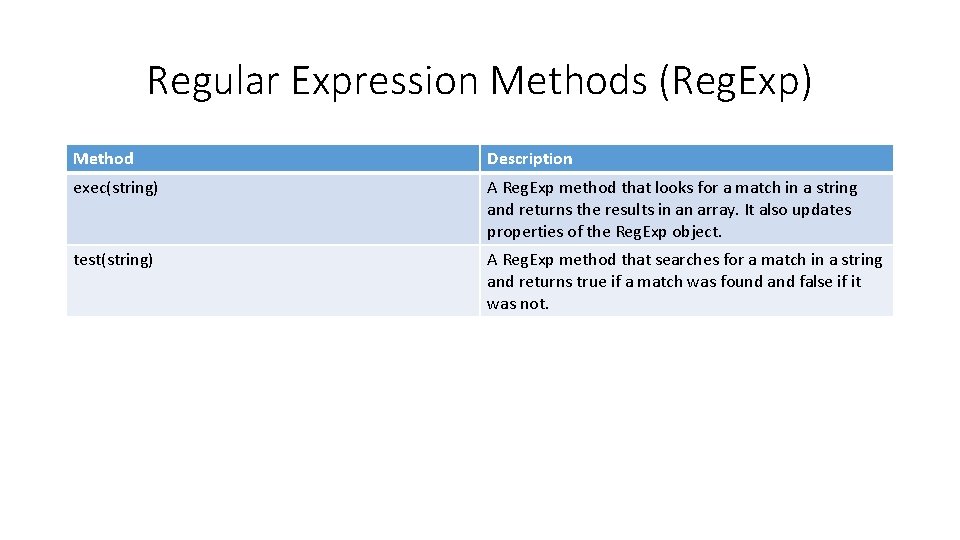
Regular Expression Methods (Reg. Exp) Method Description exec(string) A Reg. Exp method that looks for a match in a string and returns the results in an array. It also updates properties of the Reg. Exp object. test(string) A Reg. Exp method that searches for a match in a string and returns true if a match was found and false if it was not.
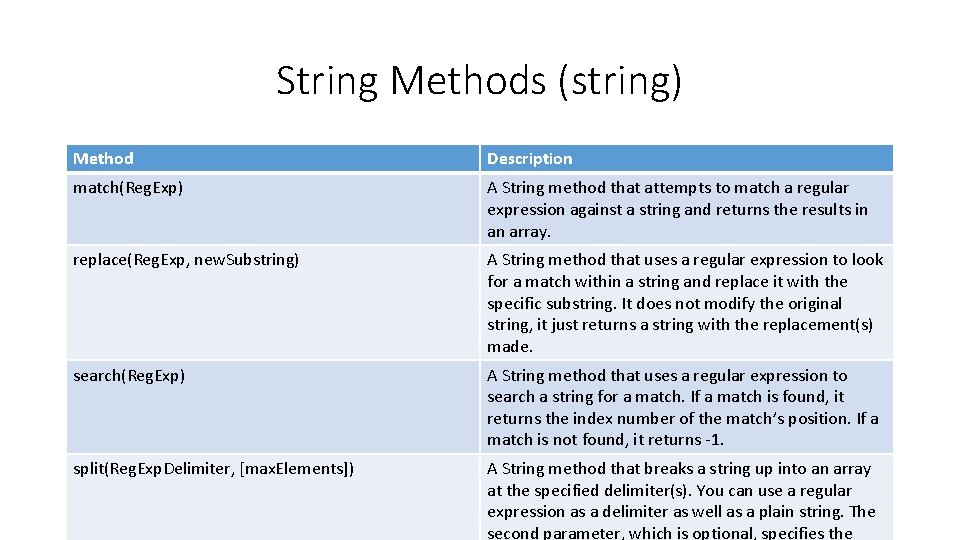
String Methods (string) Method Description match(Reg. Exp) A String method that attempts to match a regular expression against a string and returns the results in an array. replace(Reg. Exp, new. Substring) A String method that uses a regular expression to look for a match within a string and replace it with the specific substring. It does not modify the original string, it just returns a string with the replacement(s) made. search(Reg. Exp) A String method that uses a regular expression to search a string for a match. If a match is found, it returns the index number of the match’s position. If a match is not found, it returns -1. split(Reg. Exp. Delimiter, [max. Elements]) A String method that breaks a string up into an array at the specified delimiter(s). You can use a regular expression as a delimiter as well as a plain string. The second parameter, which is optional, specifies the
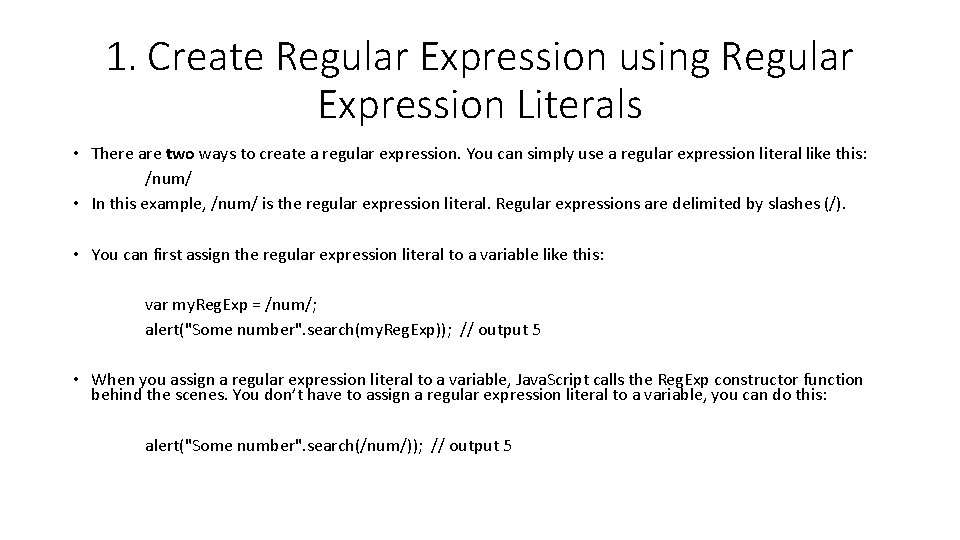
1. Create Regular Expression using Regular Expression Literals • There are two ways to create a regular expression. You can simply use a regular expression literal like this: /num/ • In this example, /num/ is the regular expression literal. Regular expressions are delimited by slashes (/). • You can first assign the regular expression literal to a variable like this: var my. Reg. Exp = /num/; alert("Some number". search(my. Reg. Exp)); // output 5 • When you assign a regular expression literal to a variable, Java. Script calls the Reg. Exp constructor function behind the scenes. You don’t have to assign a regular expression literal to a variable, you can do this: alert("Some number". search(/num/)); // output 5
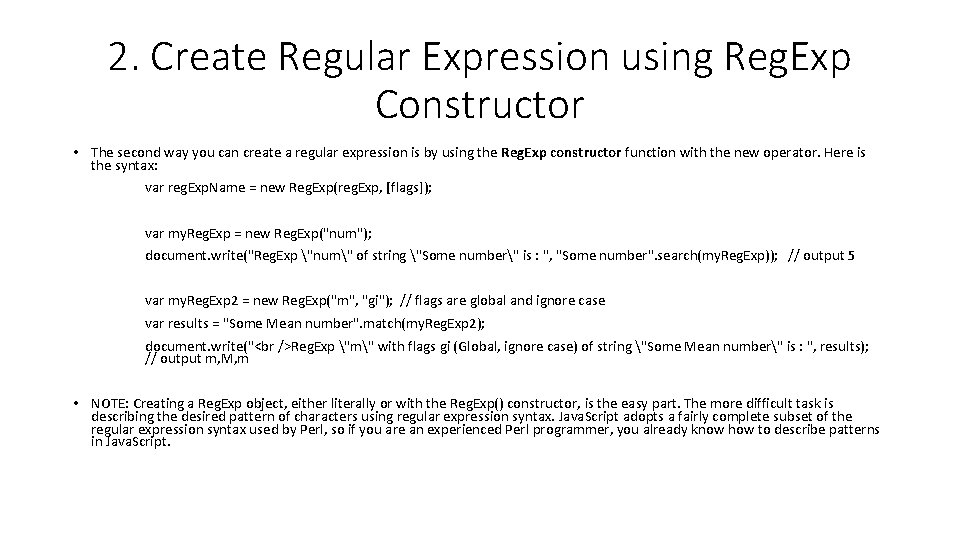
2. Create Regular Expression using Reg. Exp Constructor • The second way you can create a regular expression is by using the Reg. Exp constructor function with the new operator. Here is the syntax: var reg. Exp. Name = new Reg. Exp(reg. Exp, [flags]); var my. Reg. Exp = new Reg. Exp("num"); document. write("Reg. Exp "num" of string "Some number" is : ", "Some number". search(my. Reg. Exp)); // output 5 var my. Reg. Exp 2 = new Reg. Exp("m", "gi"); // flags are global and ignore case var results = "Some Mean number". match(my. Reg. Exp 2); document. write(" Reg. Exp "m" with flags gi (Global, ignore case) of string "Some Mean number" is : ", results); // output m, M, m • NOTE: Creating a Reg. Exp object, either literally or with the Reg. Exp() constructor, is the easy part. The more difficult task is describing the desired pattern of characters using regular expression syntax. Java. Script adopts a fairly complete subset of the regular expression syntax used by Perl, so if you are an experienced Perl programmer, you already know how to describe patterns in Java. Script.
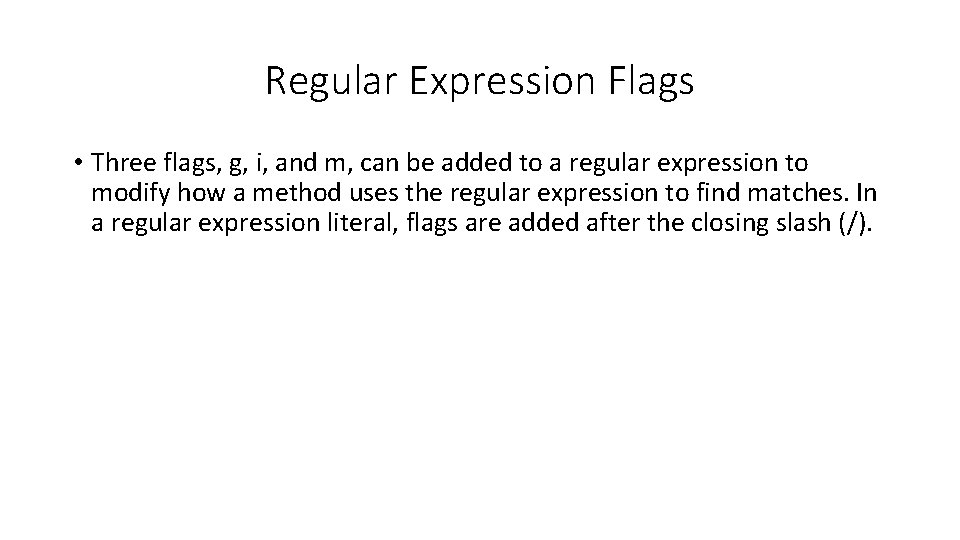
Regular Expression Flags • Three flags, g, i, and m, can be added to a regular expression to modify how a method uses the regular expression to find matches. In a regular expression literal, flags are added after the closing slash (/).
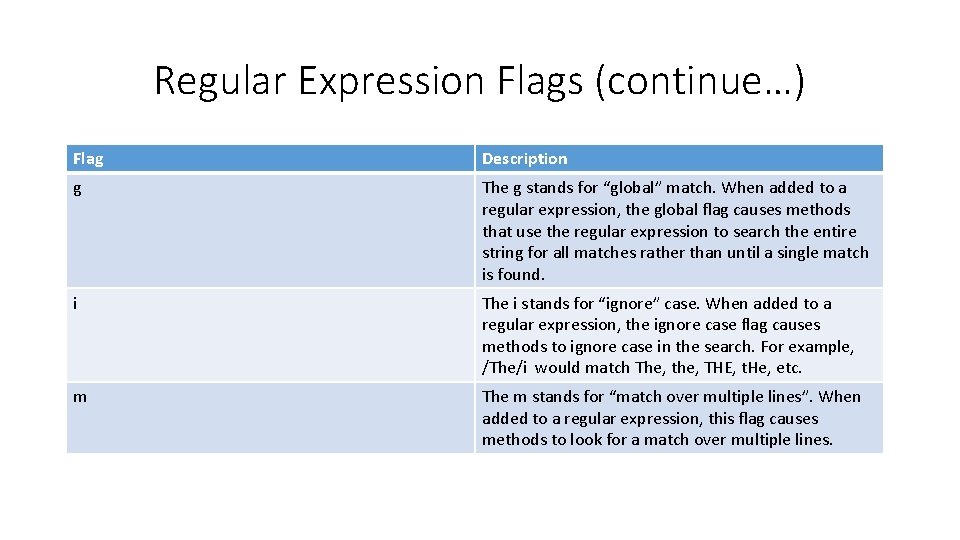
Regular Expression Flags (continue…) Flag Description g The g stands for “global” match. When added to a regular expression, the global flag causes methods that use the regular expression to search the entire string for all matches rather than until a single match is found. i The i stands for “ignore” case. When added to a regular expression, the ignore case flag causes methods to ignore case in the search. For example, /The/i would match The, the, THE, t. He, etc. m The m stands for “match over multiple lines”. When added to a regular expression, this flag causes methods to look for a match over multiple lines.
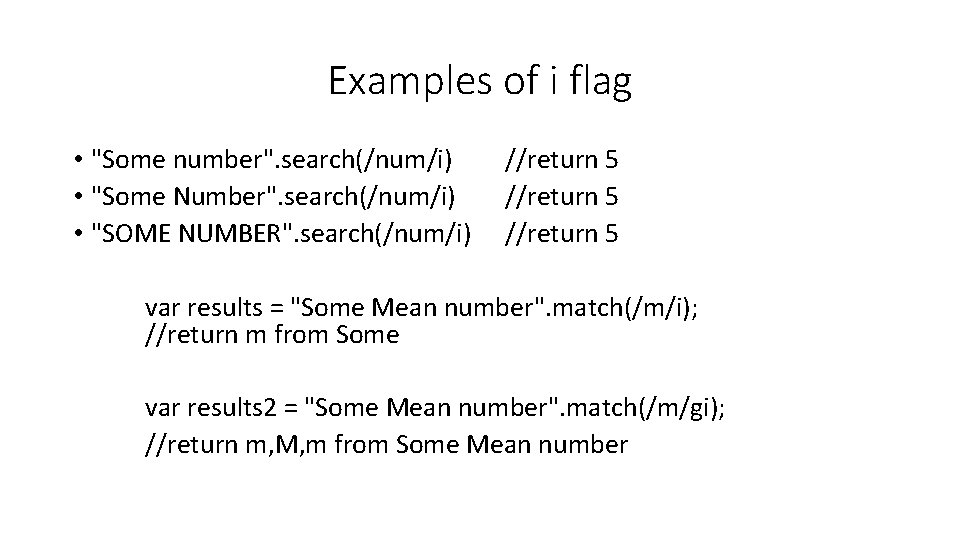
Examples of i flag • "Some number". search(/num/i) • "Some Number". search(/num/i) • "SOME NUMBER". search(/num/i) //return 5 var results = "Some Mean number". match(/m/i); //return m from Some var results 2 = "Some Mean number". match(/m/gi); //return m, M, m from Some Mean number
Regular Expression Metacharacters • A metacharacter is a character or character combination that is used to specify a pattern, a modifier, or how to process the characters that follow it.
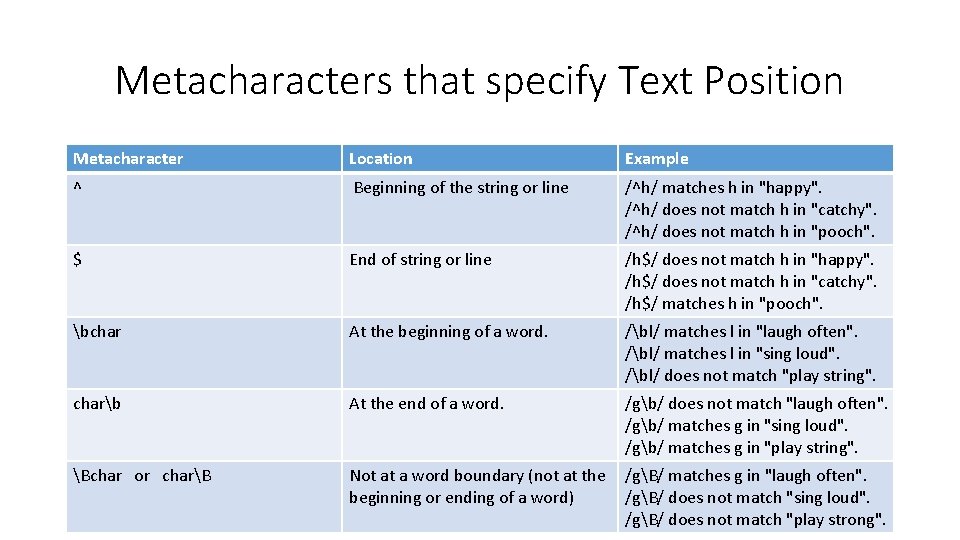
Metacharacters that specify Text Position Metacharacter Location Example ^ Beginning of the string or line /^h/ matches h in "happy". /^h/ does not match h in "catchy". /^h/ does not match h in "pooch". $ End of string or line /h$/ does not match h in "happy". /h$/ does not match h in "catchy". /h$/ matches h in "pooch". bchar At the beginning of a word. /bl/ matches l in "laugh often". /bl/ matches l in "sing loud". /bl/ does not match "play string". charb At the end of a word. /gb/ does not match "laugh often". /gb/ matches g in "sing loud". /gb/ matches g in "play string". Bchar or charB Not at a word boundary (not at the beginning or ending of a word) /gB/ matches g in "laugh often". /gB/ does not match "sing loud". /gB/ does not match "play strong".
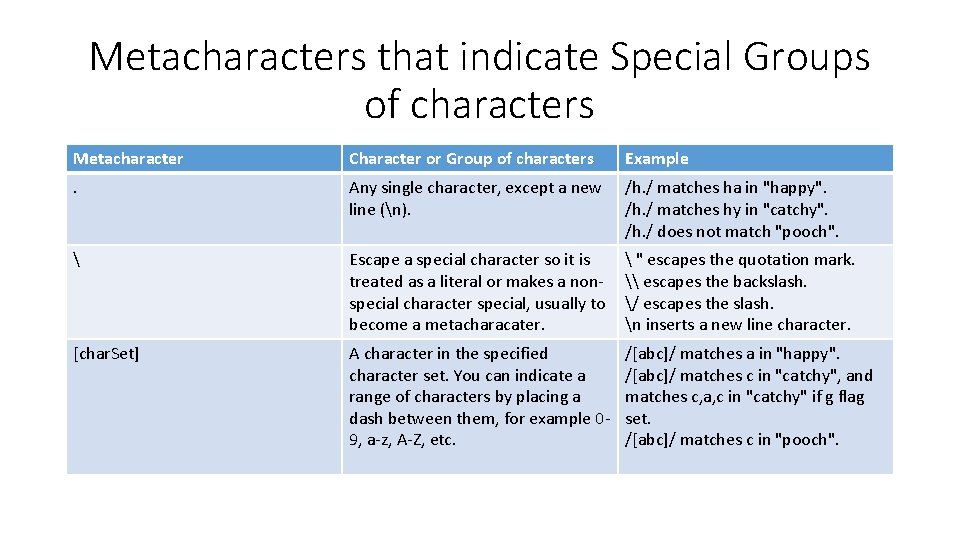
Metacharacters that indicate Special Groups of characters Metacharacter Character or Group of characters Example . Any single character, except a new line (n). /h. / matches ha in "happy". /h. / matches hy in "catchy". /h. / does not match "pooch". Escape a special character so it is treated as a literal or makes a nonspecial character special, usually to become a metacharacater. " escapes the quotation mark. \ escapes the backslash. / escapes the slash. n inserts a new line character. [char. Set] A character in the specified character set. You can indicate a range of characters by placing a dash between them, for example 09, a-z, A-Z, etc. /[abc]/ matches a in "happy". /[abc]/ matches c in "catchy", and matches c, a, c in "catchy" if g flag set. /[abc]/ matches c in "pooch".
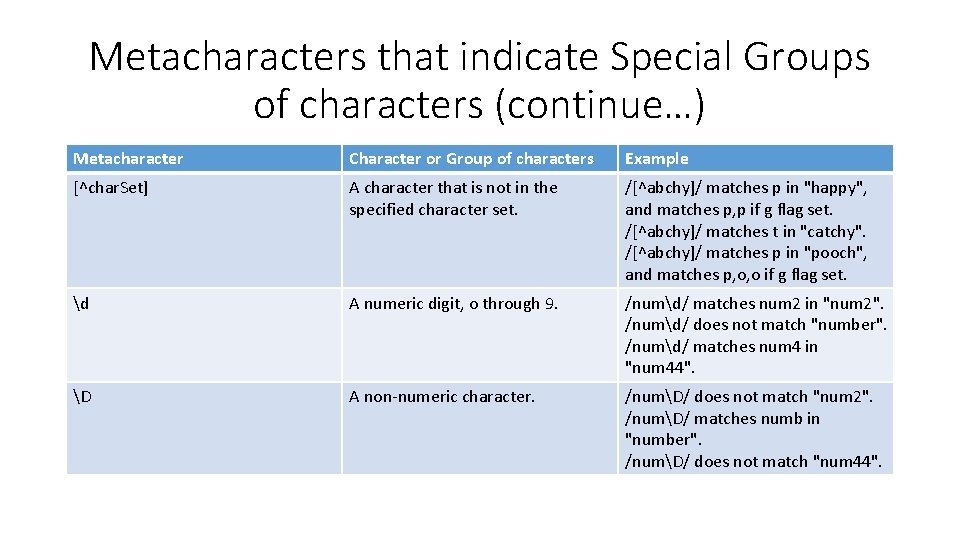
Metacharacters that indicate Special Groups of characters (continue…) Metacharacter Character or Group of characters Example [^char. Set] A character that is not in the specified character set. /[^abchy]/ matches p in "happy", and matches p, p if g flag set. /[^abchy]/ matches t in "catchy". /[^abchy]/ matches p in "pooch", and matches p, o, o if g flag set. d A numeric digit, o through 9. /numd/ matches num 2 in "num 2". /numd/ does not match "number". /numd/ matches num 4 in "num 44". D A non-numeric character. /numD/ does not match "num 2". /numD/ matches numb in "number". /numD/ does not match "num 44".
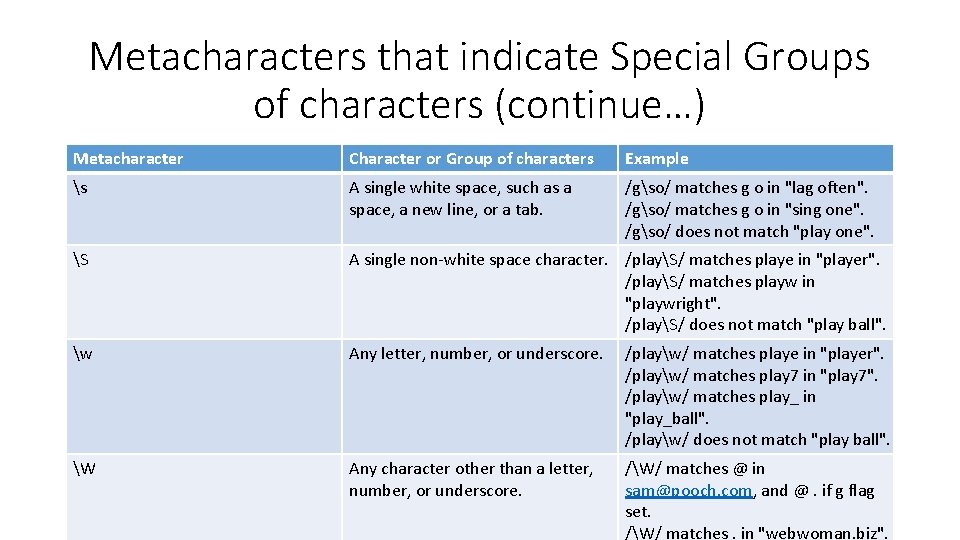
Metacharacters that indicate Special Groups of characters (continue…) Metacharacter Character or Group of characters Example s A single white space, such as a space, a new line, or a tab. /gso/ matches g o in "lag often". /gso/ matches g o in "sing one". /gso/ does not match "play one". S A single non-white space character. /playS/ matches playe in "player". /playS/ matches playw in "playwright". /playS/ does not match "play ball". w Any letter, number, or underscore. /playw/ matches playe in "player". /playw/ matches play 7 in "play 7". /playw/ matches play_ in "play_ball". /playw/ does not match "play ball". W Any character other than a letter, number, or underscore. /W/ matches @ in sam@pooch. com, and @. if g flag set. /W/ matches. in "webwoman. biz".
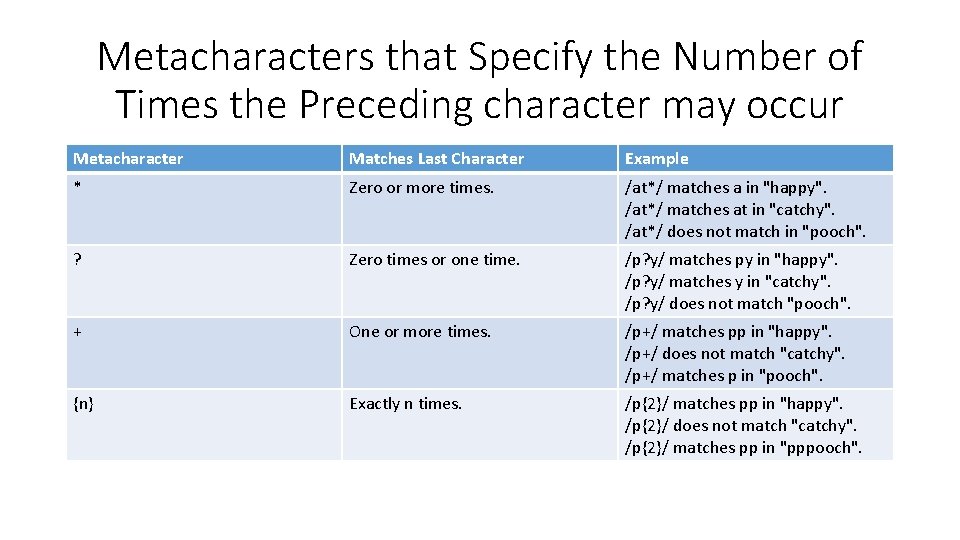
Metacharacters that Specify the Number of Times the Preceding character may occur Metacharacter Matches Last Character Example * Zero or more times. /at*/ matches a in "happy". /at*/ matches at in "catchy". /at*/ does not match in "pooch". ? Zero times or one time. /p? y/ matches py in "happy". /p? y/ matches y in "catchy". /p? y/ does not match "pooch". + One or more times. /p+/ matches pp in "happy". /p+/ does not match "catchy". /p+/ matches p in "pooch". {n} Exactly n times. /p{2}/ matches pp in "happy". /p{2}/ does not match "catchy". /p{2}/ matches pp in "pppooch".
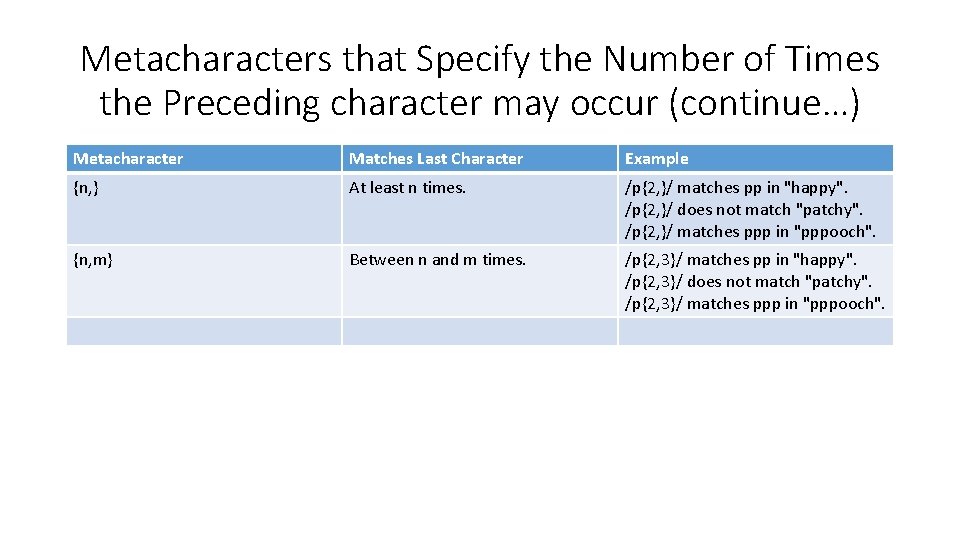
Metacharacters that Specify the Number of Times the Preceding character may occur (continue…) Metacharacter Matches Last Character Example {n, } At least n times. /p{2, }/ matches pp in "happy". /p{2, }/ does not match "patchy". /p{2, }/ matches ppp in "pppooch". {n, m} Between n and m times. /p{2, 3}/ matches pp in "happy". /p{2, 3}/ does not match "patchy". /p{2, 3}/ matches ppp in "pppooch".
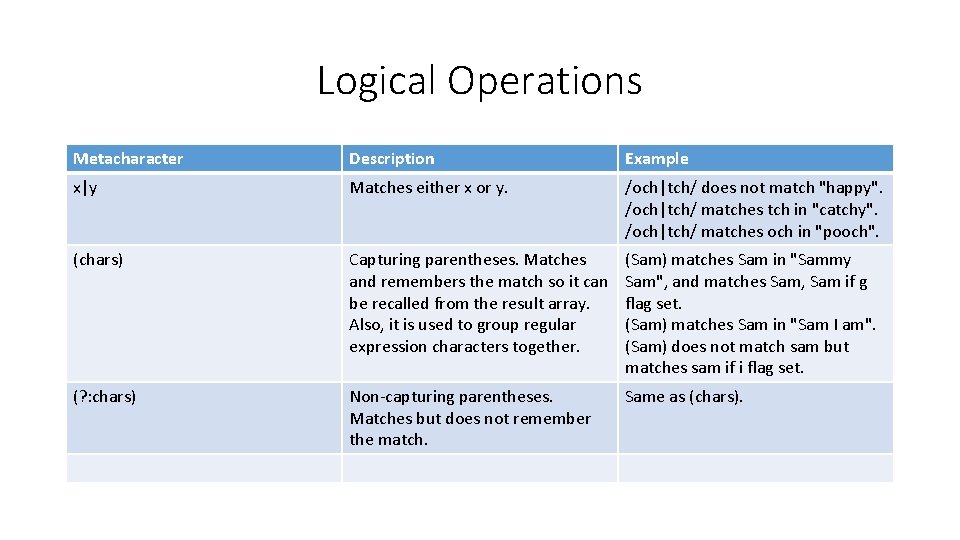
Logical Operations Metacharacter Description Example x|y Matches either x or y. /och|tch/ does not match "happy". /och|tch/ matches tch in "catchy". /och|tch/ matches och in "pooch". (chars) Capturing parentheses. Matches and remembers the match so it can be recalled from the result array. Also, it is used to group regular expression characters together. (Sam) matches Sam in "Sammy Sam", and matches Sam, Sam if g flag set. (Sam) matches Sam in "Sam I am". (Sam) does not match sam but matches sam if i flag set. (? : chars) Non-capturing parentheses. Matches but does not remember the match. Same as (chars).
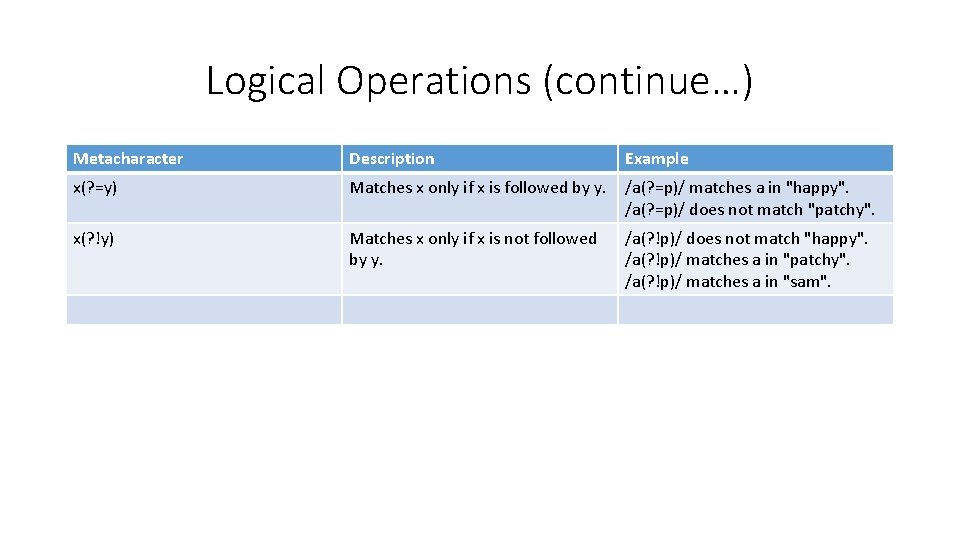
Logical Operations (continue…) Metacharacter Description Example x(? =y) Matches x only if x is followed by y. /a(? =p)/ matches a in "happy". /a(? =p)/ does not match "patchy". x(? !y) Matches x only if x is not followed by y. /a(? !p)/ does not match "happy". /a(? !p)/ matches a in "patchy". /a(? !p)/ matches a in "sam".
Sample Regular Expression • Password 6 or more characters /^[a-z. A-Z 0 -9]{6, }$/ • Zip code (99999 or 99999 -9999) /^d{5}([-]d{4})? $/ • Phone numbers (999 -9999) /^d{3}[-]d{4}$/ • Date (mm/dd/yyyy) /^[01]? d/[0 -3]d/d{4}$/ • Credit card (9999 -9999 -9999) /^d{4}[-]d{4}[-]d{4}$/ • Social Security numbers (999 -99 -9999) /^d{3}[-]d{2}[-]d{4}$/ • Email (a@a. com) /^(w+@)([a-z 0 -9]{1, }[. ][a-z]{2, })$/i