
Java Programming 3 e Concepts and Techniques Chapter
- Slides: 49
Java Programming, 3 e Concepts and Techniques Chapter 2 Creating a Java Application and Applet
Chapter Objectives • Write a simple Java application • Use Text. Pad • Understand the different types and uses of comments • Use proper naming conventions for classes and files Chapter 2: Creating a Java Application and Applet 2
Chapter Objectives • Identify the parts of a class header and method header • Code output • Use the println() method • Compile a Java program Chapter 2: Creating a Java Application and Applet 3
Chapter Objectives • Understand the common types of errors • Run a Java Program • Edit Java source code to insert escape characters and a system date • Print source code Chapter 2: Creating a Java Application and Applet 4
Chapter Objectives • Differentiate between an application and an applet • Create an applet from Java source code • Write code to display a graphic, text, color, and the date in an applet • Create an HTML host document • Run a Java applet Chapter 2: Creating a Java Application and Applet 5
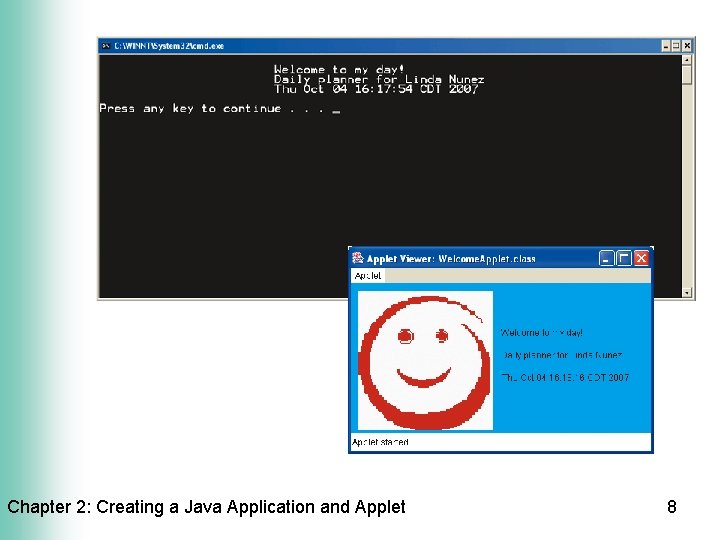
Introduction • Users enter data and instructions into a computer and receive feedback from the computer through a user interface • Programmers can create many types of user interfaces in Java • We will create a program with two types of user interfaces – Console application • Command line interface – Applet • Graphical user interface displayed in a browser Chapter 2: Creating a Java Application and Applet 6
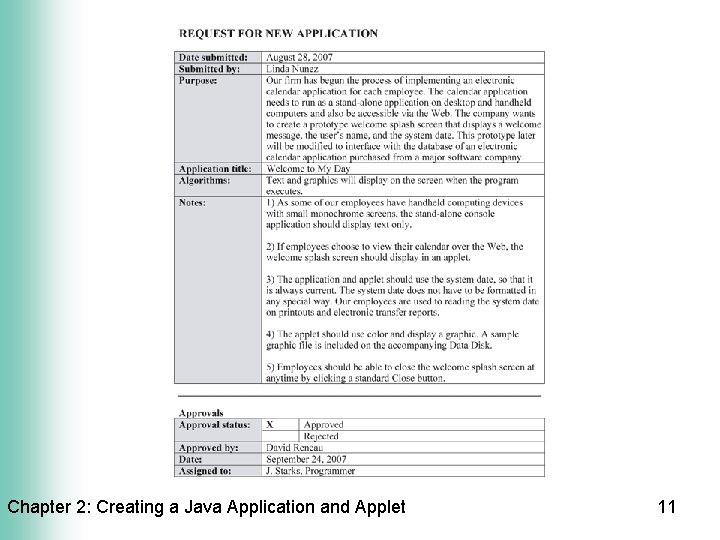
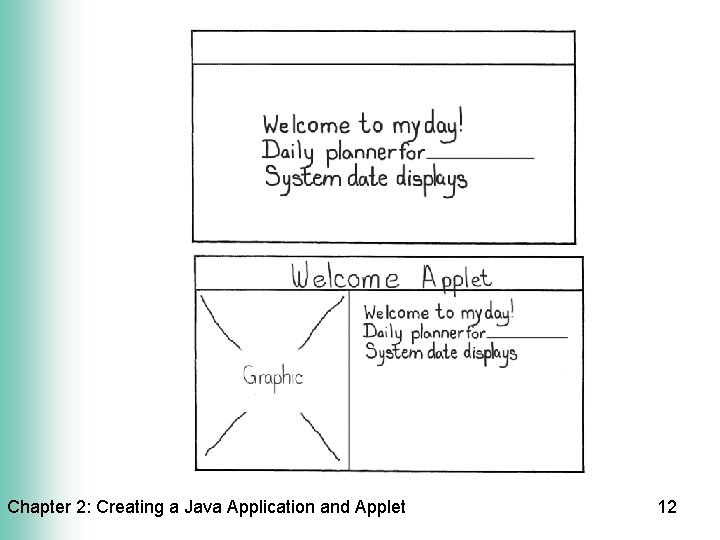
The Welcome to My Day Program • This program will display a splash screen – A splash screen is a screen that is displayed before the main program starts • The screen will contain a welcome message, user’s name, and system date – The console application will display text only – The applet will contain text, color, and a graphic Chapter 2: Creating a Java Application and Applet 7
Chapter 2: Creating a Java Application and Applet 8
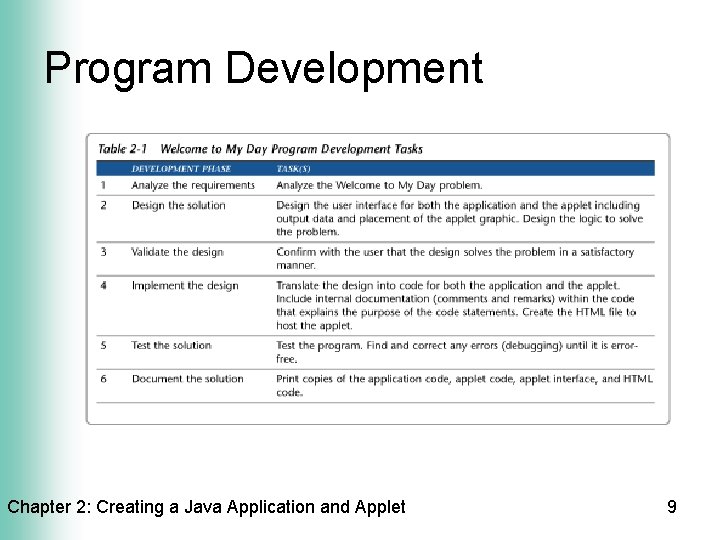
Program Development Chapter 2: Creating a Java Application and Applet 9
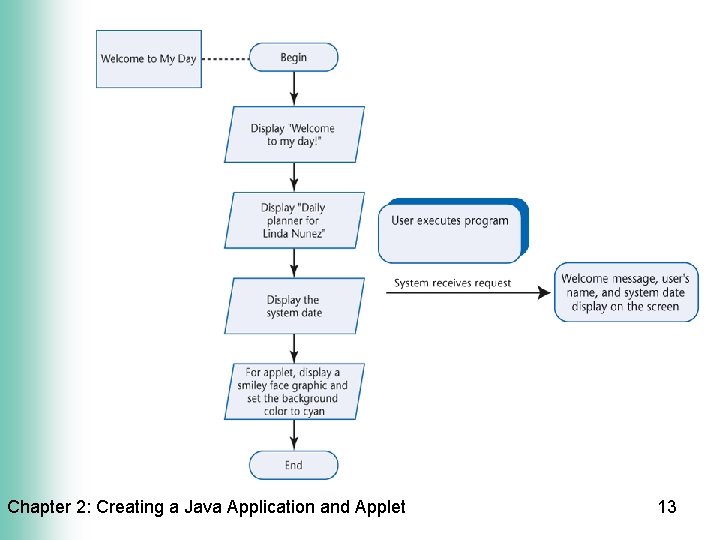
Analysis and Design • Verify that the requirements are specific enough • Design the user interface using a storyboard • Design the program logic using a flowchart and event diagram Chapter 2: Creating a Java Application and Applet 10
Chapter 2: Creating a Java Application and Applet 11
Chapter 2: Creating a Java Application and Applet 12
Chapter 2: Creating a Java Application and Applet 13
Using Text. Pad • Text. Pad has several window areas – Coding window – Selector window – Clip Library window • Text. Pad can display line numbers – Helpful for finding compiler errors • Text. Pad has color-coding capabilities – Save a document before entering code to enable Java related color-coding Chapter 2: Creating a Java Application and Applet 14
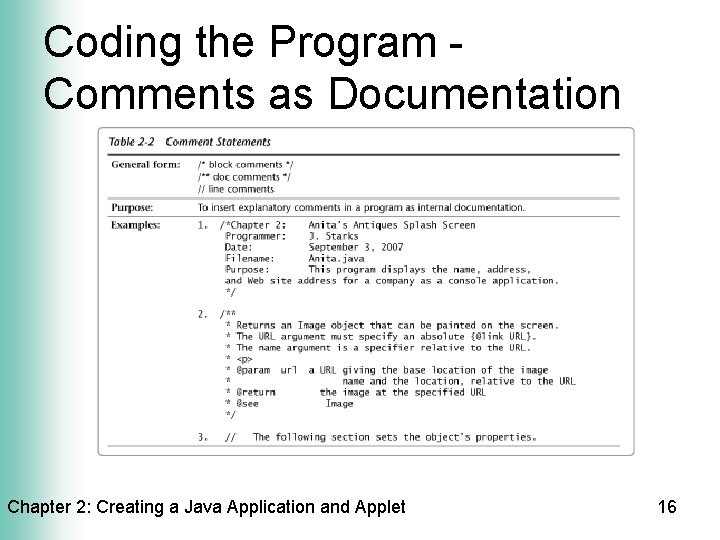
Coding the Program Comments as Documentation • Purpose of comments – Provides clear description when reviewing code – Helps programmer think clearly when coding • Placement of comments – Use a comment header to identify a file and its purpose – Place a comment at the beginning of code for each event and method – Place comments near portions of code that need clarification Chapter 2: Creating a Java Application and Applet 15
Coding the Program Comments as Documentation Chapter 2: Creating a Java Application and Applet 16
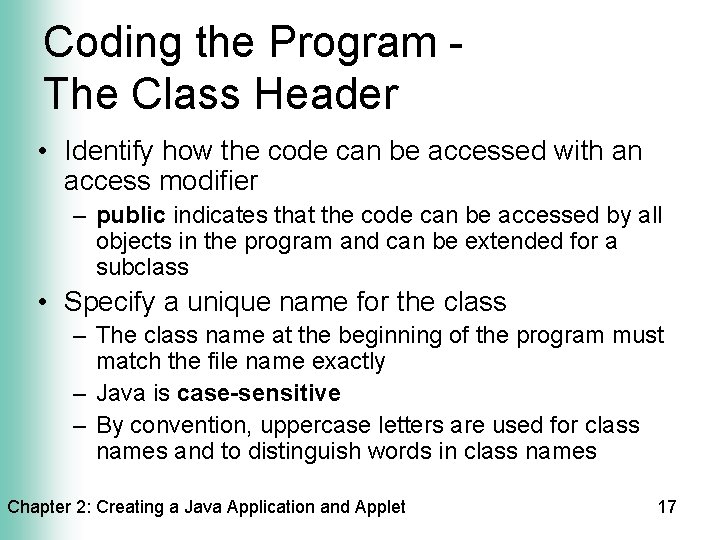
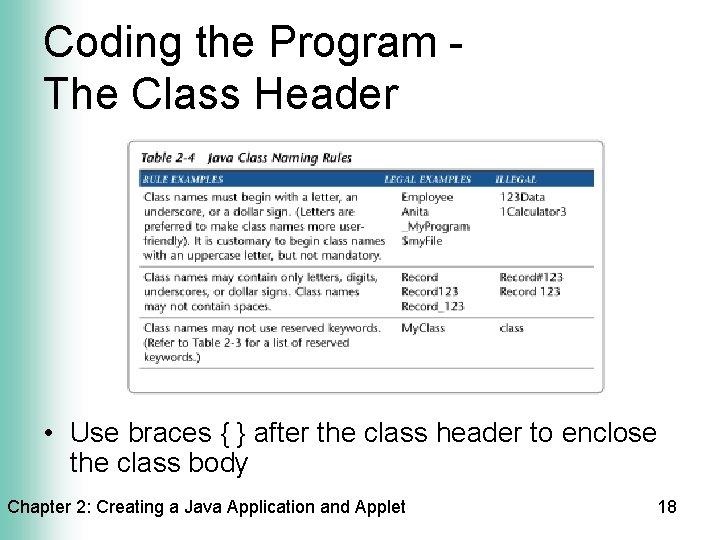
Coding the Program The Class Header • Identify how the code can be accessed with an access modifier – public indicates that the code can be accessed by all objects in the program and can be extended for a subclass • Specify a unique name for the class – The class name at the beginning of the program must match the file name exactly – Java is case-sensitive – By convention, uppercase letters are used for class names and to distinguish words in class names Chapter 2: Creating a Java Application and Applet 17
Coding the Program The Class Header • Use braces { } after the class header to enclose the class body Chapter 2: Creating a Java Application and Applet 18
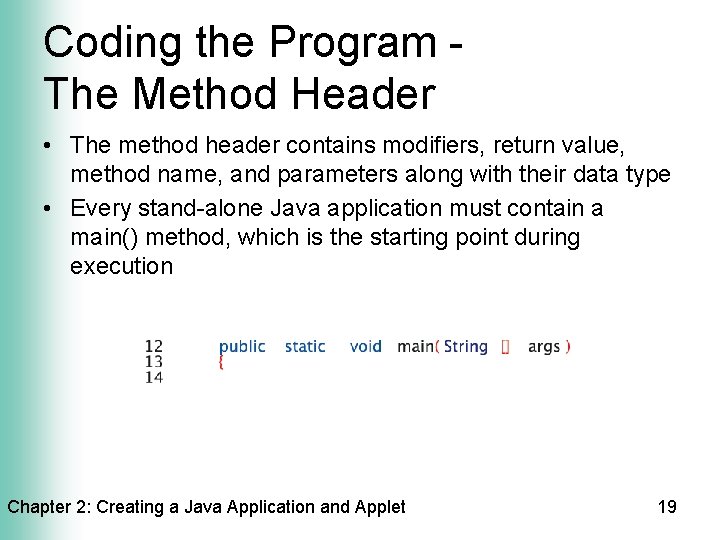
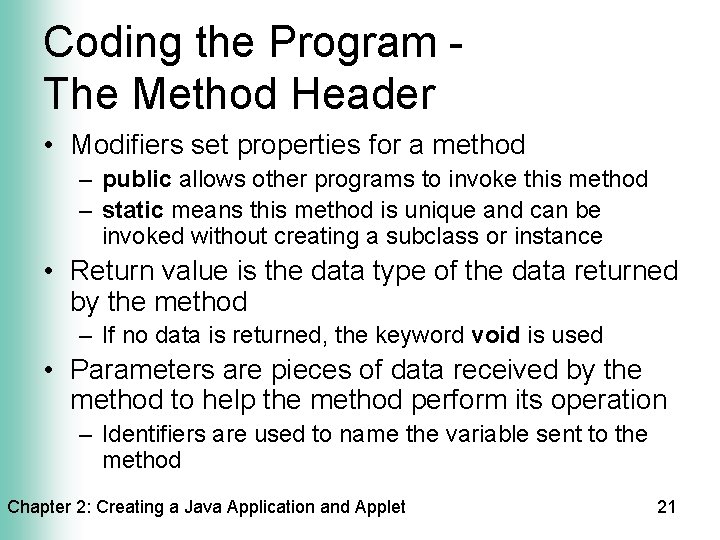
Coding the Program The Method Header • The method header contains modifiers, return value, method name, and parameters along with their data type • Every stand-alone Java application must contain a main() method, which is the starting point during execution Chapter 2: Creating a Java Application and Applet 19
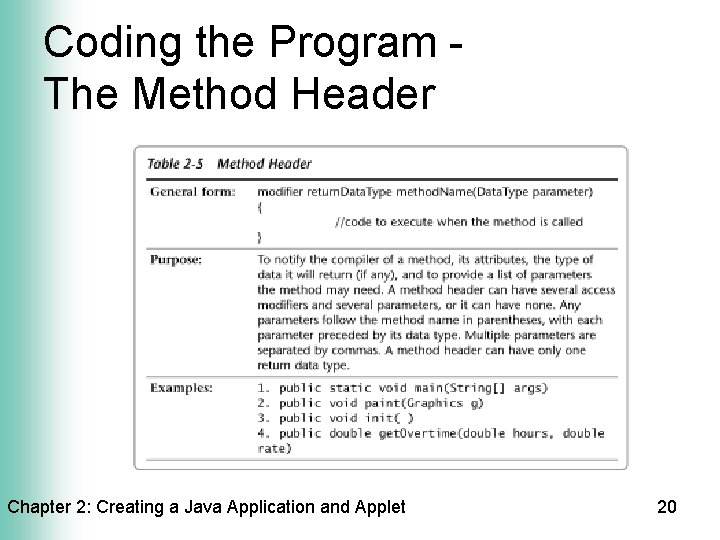
Coding the Program The Method Header Chapter 2: Creating a Java Application and Applet 20
Coding the Program The Method Header • Modifiers set properties for a method – public allows other programs to invoke this method – static means this method is unique and can be invoked without creating a subclass or instance • Return value is the data type of the data returned by the method – If no data is returned, the keyword void is used • Parameters are pieces of data received by the method to help the method perform its operation – Identifiers are used to name the variable sent to the method Chapter 2: Creating a Java Application and Applet 21
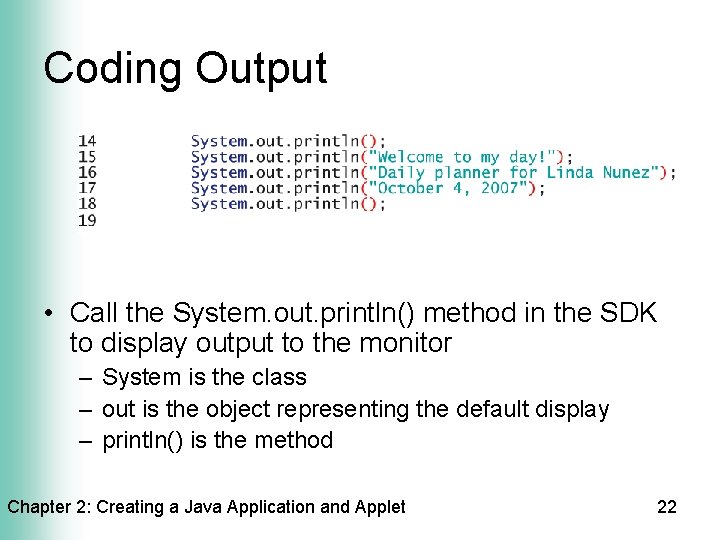
Coding Output • Call the System. out. println() method in the SDK to display output to the monitor – System is the class – out is the object representing the default display – println() is the method Chapter 2: Creating a Java Application and Applet 22
Coding Output • When calling a method, arguments are placed in parentheses – String literals are placed in quotation marks – Numeric literals and variables do not need quotation marks • Period delimiters separate the class, object, and method • Semicolons must be placed after every statement except headers and braces • Braces { } enclose the body of a method Chapter 2: Creating a Java Application and Applet 23
Testing the Solution • Compile the source code – javac. exe command • In Text. Pad, use the Compile Java command • At the command prompt, type javac filename. java – A new bytecode file for each class is created with a. class extension • If the compiler detects errors, fix the errors and compile again • If the compilation was successful, run the program Chapter 2: Creating a Java Application and Applet 24
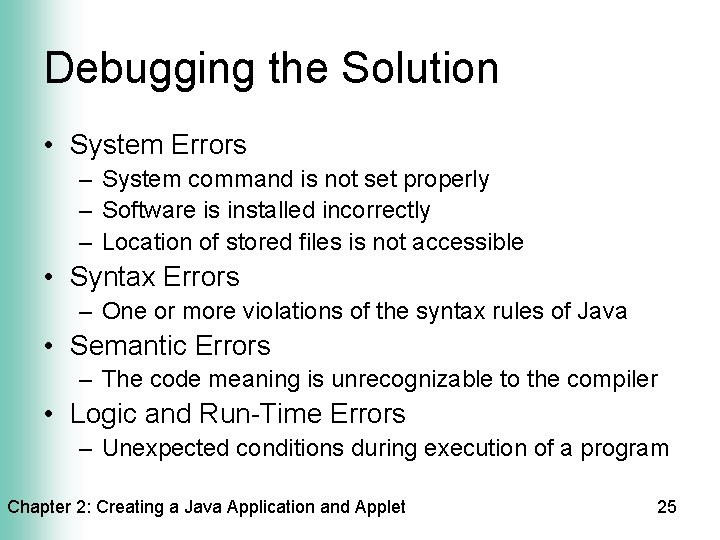
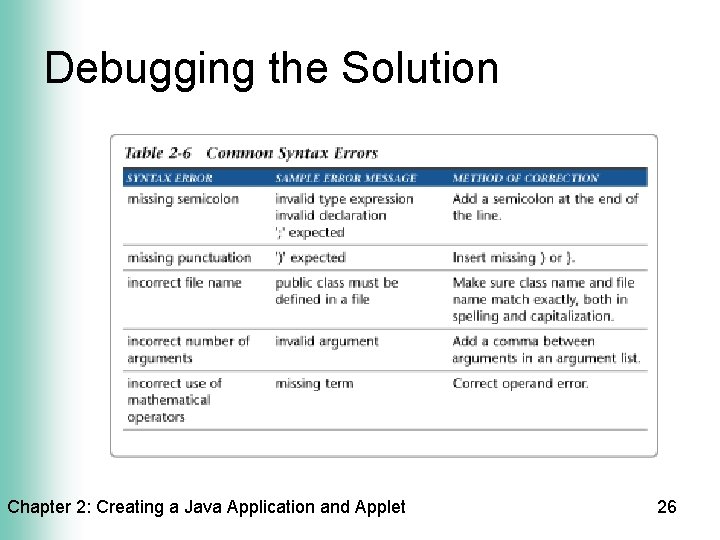
Debugging the Solution • System Errors – System command is not set properly – Software is installed incorrectly – Location of stored files is not accessible • Syntax Errors – One or more violations of the syntax rules of Java • Semantic Errors – The code meaning is unrecognizable to the compiler • Logic and Run-Time Errors – Unexpected conditions during execution of a program Chapter 2: Creating a Java Application and Applet 25
Debugging the Solution Chapter 2: Creating a Java Application and Applet 26
Running the Application • After compilation is successful, run the program to test for logic and run-time errors • Use the Run Java Application command in Text. Pad – Text. Pad automatically finds the class file with the same name • Use the java command from the command prompt – Syntax: java classname (no extension) Chapter 2: Creating a Java Application and Applet 27
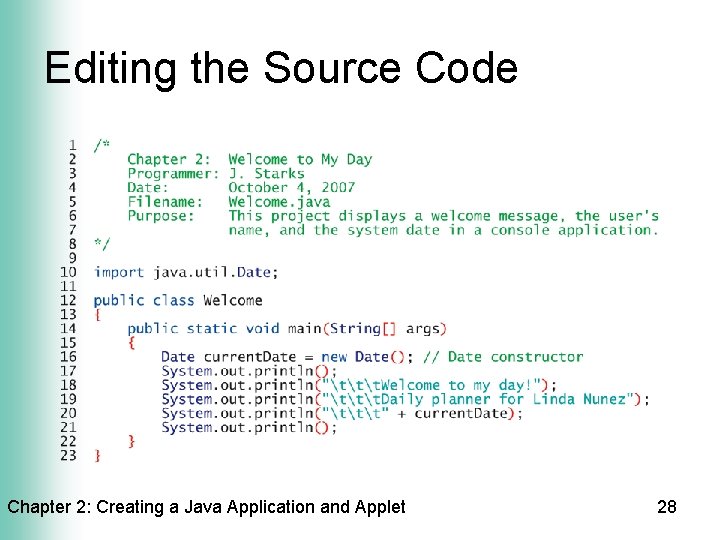
Editing the Source Code Chapter 2: Creating a Java Application and Applet 28
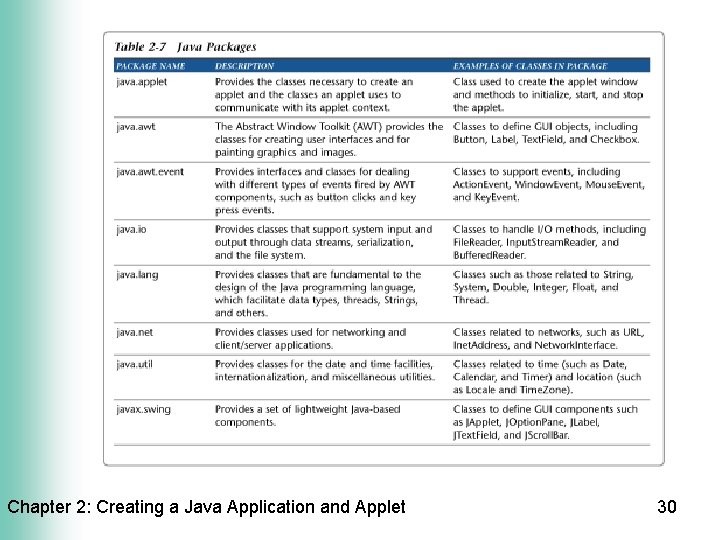
Import Packages • Use the import statement to access classes in the SDK – The java. lang package is automatically imported – Place the import statement before the class header – Use an asterisk (*) after the package name and period delimiter to import all necessary classes in the package Chapter 2: Creating a Java Application and Applet 29
Chapter 2: Creating a Java Application and Applet 30
Call a System Date Constructor • Use the Date class in the java. util package to access the system date • Store the Date in an object variable • Declare the object variable by calling the Date constructor – The constructor is a method denoted by the new keyword followed by the object type and parentheses – Declaration syntax: object. Type variable. Name = new object. Type(); Chapter 2: Creating a Java Application and Applet 31
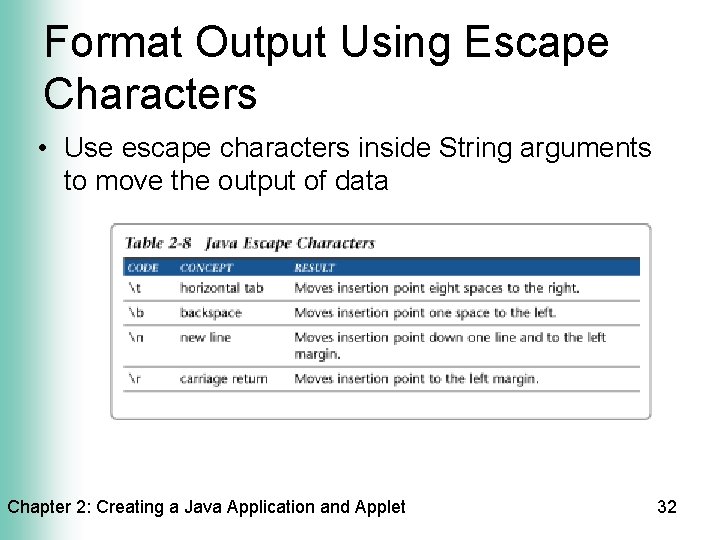
Format Output Using Escape Characters • Use escape characters inside String arguments to move the output of data Chapter 2: Creating a Java Application and Applet 32
Editing the Source Code - cont. • Recompile and run the application – The bytecode should be updated after any changes to the source code • Print a hard copy of the source code – The final step of the program development cycle is to document the solution • Quit Text. Pad by clicking on the Close button Chapter 2: Creating a Java Application and Applet 33
Moving to the Web • Characteristics of an applet – Applets run within a browser/viewer and are usually delivered to the client machine via the Web – Applets cannot use system resources or files on the client machine • Convert the application into an applet – Import two packages – Change the class name and extend the Applet class – Include a paint method to draw text and display color and a graphic Chapter 2: Creating a Java Application and Applet 34
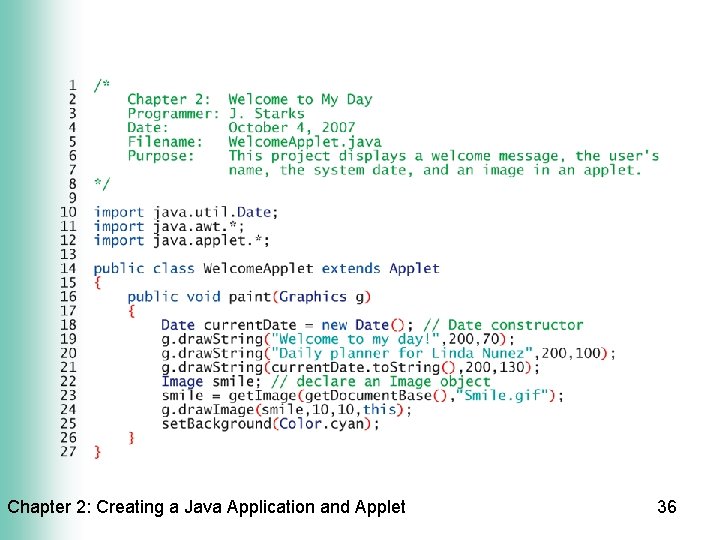
Import Applet Packages • Applet package (java. applet. *) – Allows applets to inherit attributes and methods • AWT package (java. awt. *) – Provides access to color, draw methods, and GUI elements Chapter 2: Creating a Java Application and Applet 35
Chapter 2: Creating a Java Application and Applet 36
Change the Class Name and Extend the Applet Class • Change the class name and file name to create a new applet file • Edit the comment header in the applet file • Add “extends Applet” in the class header to inherit from the superclass, Applet – Provides the init() method to load the applet in the browser window Chapter 2: Creating a Java Application and Applet 37
The paint() Method • Accepts a Graphics object as a parameter • The Graphics object is commonly referred to by the variable name g – The variable g is created and initialized in the init() method – The variable g is a reference variable, or a specific instance of an object • The return type is void Chapter 2: Creating a Java Application and Applet 38
The draw. String() Method • Displays text in the applet window • Accepts three arguments – The String data • If the data is not a String object, convert it to a String object using the to. String() method – The horizontal and vertical coordinates of the String • The coordinates are measured in pixels • Called by the Graphics object, g Chapter 2: Creating a Java Application and Applet 39
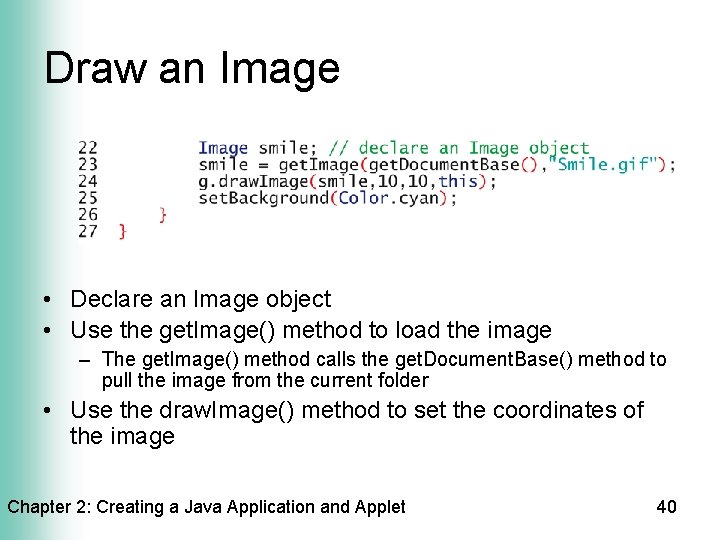
Draw an Image • Declare an Image object • Use the get. Image() method to load the image – The get. Image() method calls the get. Document. Base() method to pull the image from the current folder • Use the draw. Image() method to set the coordinates of the image Chapter 2: Creating a Java Application and Applet 40
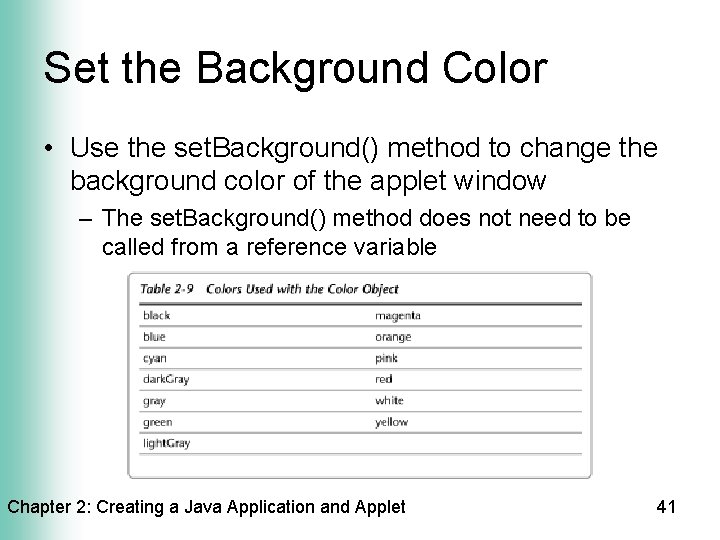
Set the Background Color • Use the set. Background() method to change the background color of the applet window – The set. Background() method does not need to be called from a reference variable Chapter 2: Creating a Java Application and Applet 41
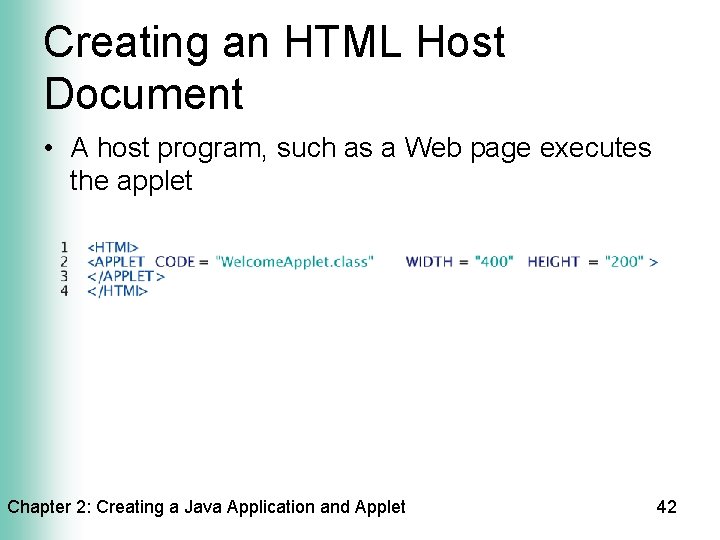
Creating an HTML Host Document • A host program, such as a Web page executes the applet Chapter 2: Creating a Java Application and Applet 42
Creating an HTML Host Document • The Web page contains HTML tags to define a section or format – A tag consists of a start tag, denoted by <> and an end tag, denoted by </> • The tag, <APPLET>…</APPLET>, informs the browser of the applet – The applet tag encloses the name of the bytecode applet file and the width and height of the applet window Chapter 2: Creating a Java Application and Applet 43
Running an Applet • An applet is run by opening the HTML host document • In Text. Pad, use the Run Java Applet command • At the command prompt, type appletviewer followed by the name of the host document • Use Applet Viewer to test the applet – Ignores irrelevant HTML code – Uses less memory than a browser – Does not have to be Java-enabled Chapter 2: Creating a Java Application and Applet 44
Chapter Summary • Write a simple Java application • Use Text. Pad • Understand the different types and uses of comments • Use proper naming conventions for classes and files Chapter 2: Creating a Java Application and Applet 45
Chapter Summary • Identify the parts of a class header and method header • Code output • Use the println() method • Compile a Java program Chapter 2: Creating a Java Application and Applet 46
Chapter Summary • Understand the common types of errors • Run a Java Program • Edit Java source code to insert escape characters and a system date • Print source code Chapter 2: Creating a Java Application and Applet 47
Chapter Summary • Differentiate between an application and an applet • Create an applet from Java source code • Write code to display a graphic, text, color, and the date in an applet • Create an HTML host document • Run a Java applet Chapter 2: Creating a Java Application and Applet 48
Java Programming, 3 e Concepts and Techniques Chapter 2 Complete