
Java FX Application Ordering System Pengfei Huang CSIS
- Slides: 1
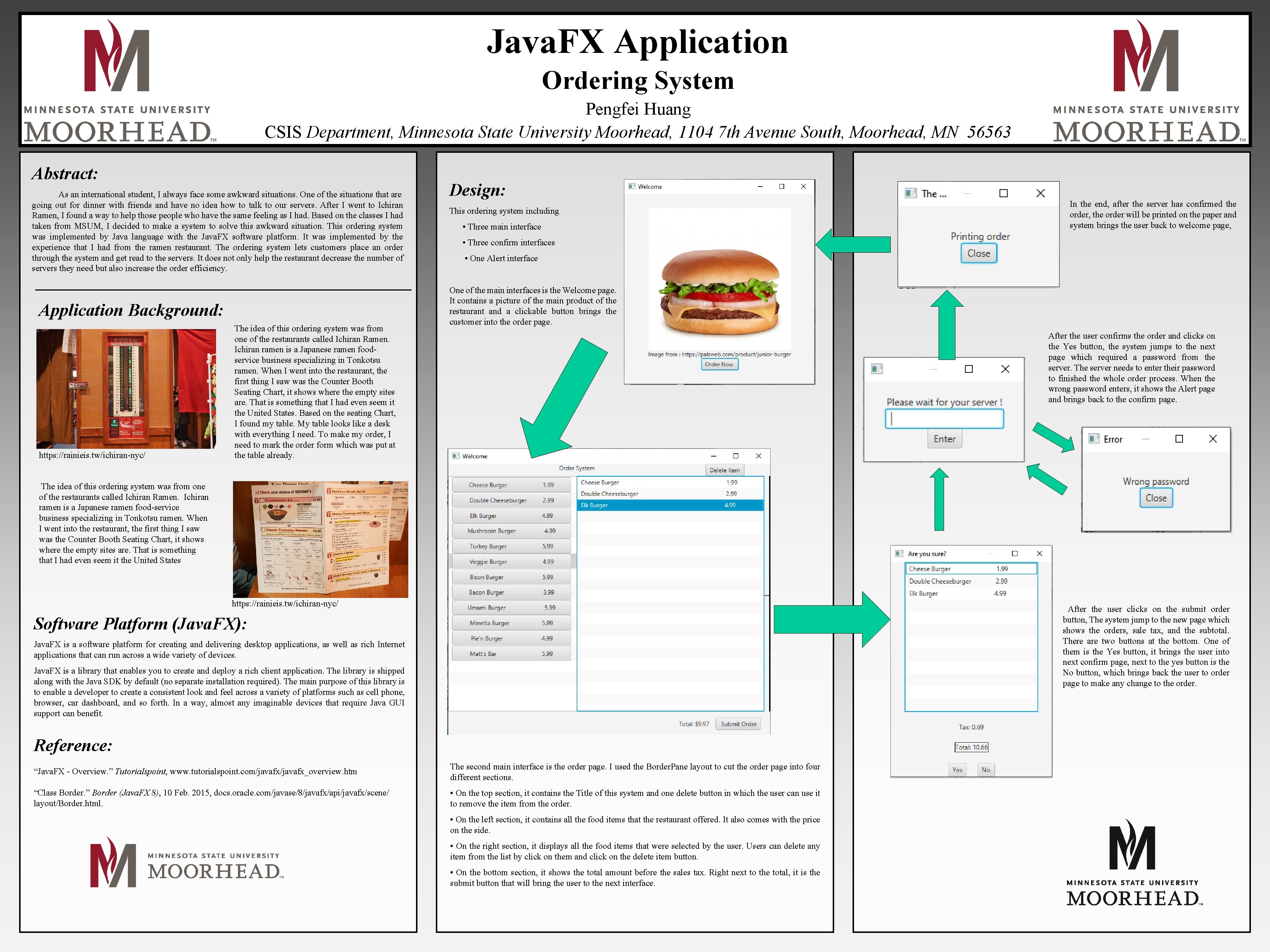
Java. FX Application Ordering System Pengfei Huang CSIS Department, Minnesota State University Moorhead, 1104 7 th Avenue South, Moorhead, MN 56563 Abstract: As an international student, I always face some awkward situations. One of the situations that are going out for dinner with friends and have no idea how to talk to our servers. After I went to Ichiran Ramen, I found a way to help those people who have the same feeling as I had. Based on the classes I had taken from MSUM, I decided to make a system to solve this awkward situation. This ordering system was implemented by Java language with the Java. FX software platform. It was implemented by the experience that I had from the ramen restaurant. The ordering system lets customers place an order through the system and get read to the servers. It does not only help the restaurant decrease the number of servers they need but also increase the order efficiency. Application Background: . https: //rainieis. tw/ichiran-nyc/ The idea of this ordering system was from one of the restaurants called Ichiran Ramen. Ichiran ramen is a Japanese ramen foodservice business specializing in Tonkotsu ramen. When I went into the restaurant, the first thing I saw was the Counter Booth Seating Chart, it shows where the empty sites are. That is something that I had even seem it the United States. Based on the seating Chart, I found my table. My table looks like a desk with everything I need. To make my order, I need to mark the order form which was put at the table already. Design: This ordering system including • Three main interface In the end, after the server has confirmed the order, the order will be printed on the paper and system brings the user back to welcome page, • Three confirm interfaces • One Alert interface One of the main interfaces is the Welcome page. It contains a picture of the main product of the restaurant and a clickable button brings the customer into the order page. After the user confirms the order and clicks on the Yes button, the system jumps to the next page which required a password from the server. The server needs to enter their password to finished the whole order process. When the wrong password enters, it shows the Alert page and brings back to the confirm page. The idea of this ordering system was from one of the restaurants called Ichiran Ramen. Ichiran ramen is a Japanese ramen food-service business specializing in Tonkotsu ramen. When I went into the restaurant, the first thing I saw was the Counter Booth Seating Chart, it shows where the empty sites are. That is something that I had even seem it the United States https: //rainieis. tw/ichiran-nyc/ After the user clicks on the submit order button, The system jump to the new page which shows the orders, sale tax, and the subtotal. There are two buttons at the bottom. One of them is the Yes button, it brings the user into next confirm page, next to the yes button is the No button, which brings back the user to order page to make any change to the order. Software Platform (Java. FX): Java. FX is a software platform for creating and delivering desktop applications, as well as rich Internet applications that can run across a wide variety of devices. Java. FX is a library that enables you to create and deploy a rich client application. The library is shipped along with the Java SDK by default (no separate installation required). The main purpose of this library is to enable a developer to create a consistent look and feel across a variety of platforms such as cell phone, browser, car dashboard, and so forth. In a way, almost any imaginable devices that require Java GUI support can benefit. Reference: “Java. FX - Overview. ” Tutorialspoint, www. tutorialspoint. com/javafx_overview. htm The second main interface is the order page. I used the Border. Pane layout to cut the order page into four different sections. “Class Border. ” Border (Java. FX 8), 10 Feb. 2015, docs. oracle. com/javase/8/javafx/api/javafx/scene/ layout/Border. html. • On the top section, it contains the Title of this system and one delete button in which the user can use it to remove the item from the order. • On the left section, it contains all the food items that the restaurant offered. It also comes with the price on the side. • On the right section, it displays all the food items that were selected by the user. Users can delete any item from the list by click on them and click on the delete item button. • On the bottom section, it shows the total amount before the sales tax. Right next to the total, it is the submit button that will bring the user to the next interface.