
Jav a The Art and Science of CHAPTER
- Slides: 44
Jav a The Art and Science of CHAPTER 3 ERIC S. ROBERTS An Introduction to Computer Science Expressions “What’s twice eleven? ” I said to Pooh. (“Twice what? ” said Pooh to Me. ) “I think that it ought to be twenty-two. ” “Just what I think myself, ” said Pooh. —A. A. Milne, Now We Are Six, 1927 CS 101 @ Özyeğin University Slides are adapted from the originals available at http: //www-cs-faculty. stanford. edu/~eroberts/books/Art. And. Science. Of. Java/ Chapter 3—Expressions
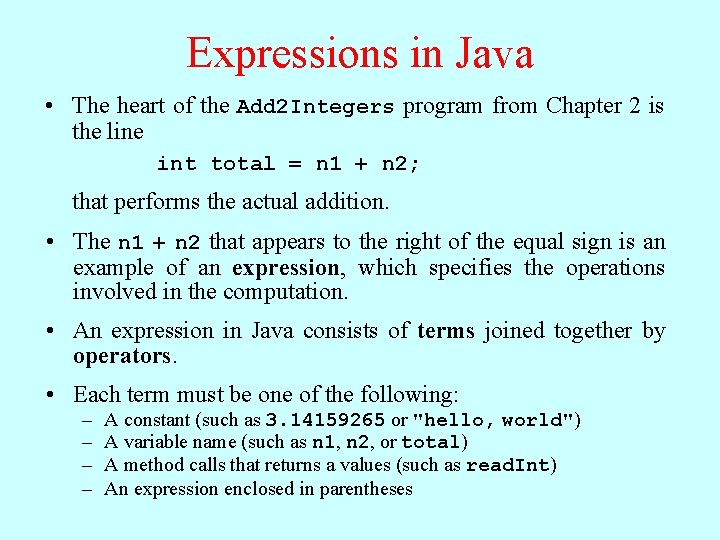
Expressions in Java • The heart of the Add 2 Integers program from Chapter 2 is the line int total = n 1 + n 2; that performs the actual addition. • The n 1 + n 2 that appears to the right of the equal sign is an example of an expression, which specifies the operations involved in the computation. • An expression in Java consists of terms joined together by operators. • Each term must be one of the following: – – A constant (such as 3. 14159265 or "hello, world") A variable name (such as n 1, n 2, or total) A method calls that returns a values (such as read. Int) An expression enclosed in parentheses
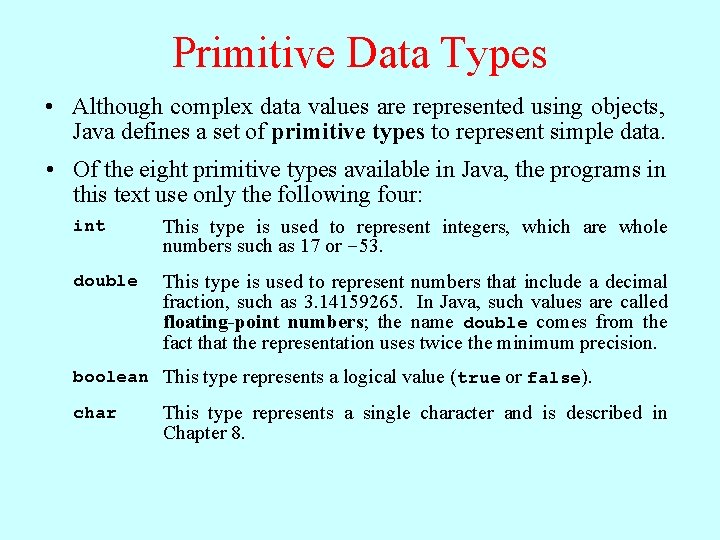
Primitive Data Types • Although complex data values are represented using objects, Java defines a set of primitive types to represent simple data. • Of the eight primitive types available in Java, the programs in this text use only the following four: int This type is used to represent integers, which are whole numbers such as 17 or – 53. double This type is used to represent numbers that include a decimal fraction, such as 3. 14159265. In Java, such values are called floating-point numbers; the name double comes from the fact that the representation uses twice the minimum precision. boolean This type represents a logical value (true or false). char This type represents a single character and is described in Chapter 8.
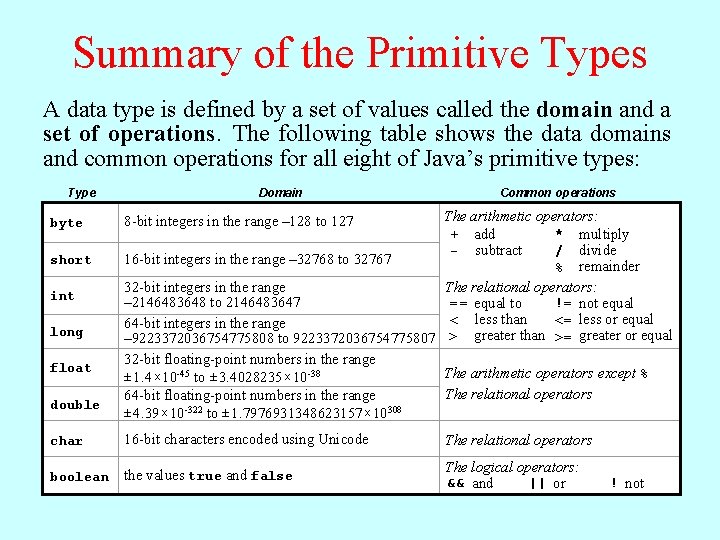
Summary of the Primitive Types A data type is defined by a set of values called the domain and a set of operations. The following table shows the data domains and common operations for all eight of Java’s primitive types: Type byte short int long float double Domain Common operations The arithmetic operators: * multiply + add / divide - subtract 16 -bit integers in the range – 32768 to 32767 % remainder 32 -bit integers in the range The relational operators: != not equal = = equal to – 2146483648 to 2146483647 <= less or equal < less than 64 -bit integers in the range – 9223372036754775808 to 9223372036754775807 > greater than >= greater or equal 32 -bit floating-point numbers in the range The arithmetic operators except % ± 1. 4 x 10 -45 to ± 3. 4028235 x 10 -38 The relational operators 64 -bit floating-point numbers in the range ± 4. 39 x 10 -322 to ± 1. 7976931348623157 x 10308 8 -bit integers in the range – 128 to 127 char 16 -bit characters encoded using Unicode The relational operators boolean the values true and false The logical operators: && and || or ! not
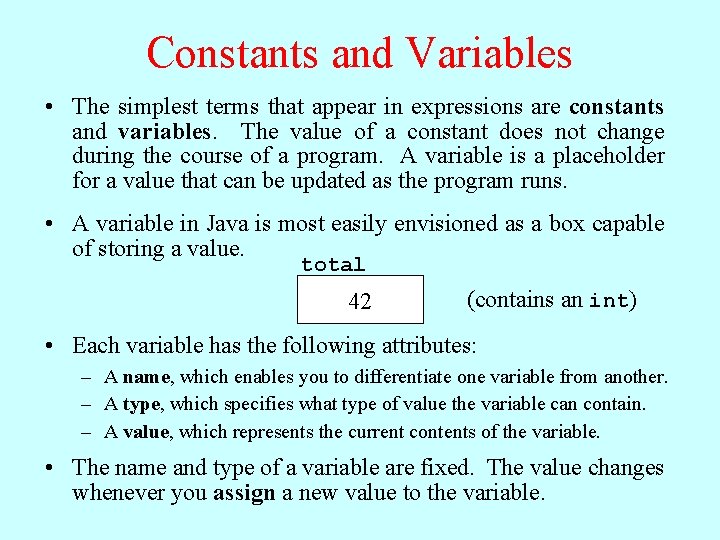
Constants and Variables • The simplest terms that appear in expressions are constants and variables. The value of a constant does not change during the course of a program. A variable is a placeholder for a value that can be updated as the program runs. The formatin of. Java a constant on its type: as a box capable • • A variable is mostdepends easily envisioned Integral aconstants of– storing value. consist of a sequence of digits, optionally preceded • • by a minus sign, as in 0, total 42, -1, or 1000000. – Floating-point constants include as in 3. 14159265 (contains an int) or 42 a decimal point, 10. 0. Floating-point constants can also be expressed in scientific notation by adding thefollowing letter E andattributes: an exponent after the digits of the Each variable has the number, so that 5. 646 E-8 represents the number 5. 646 x 10 -8. – A name, which enables you to differentiate one variable from another. – The two constants of type boolean are true and false. – A type, which specifies what type of value the variable can contain. – Character and string constants are discussed in detail in Chapter 8. – A which represents the to current the constant variable. consists Forvalue, the moment, all you need knowcontents is that a of string a sequence of characters enclosed double The quotation such Theofname and type of a variable areinfixed. valuemarks, changes as "hello, world". whenever you assign a new value to the variable.
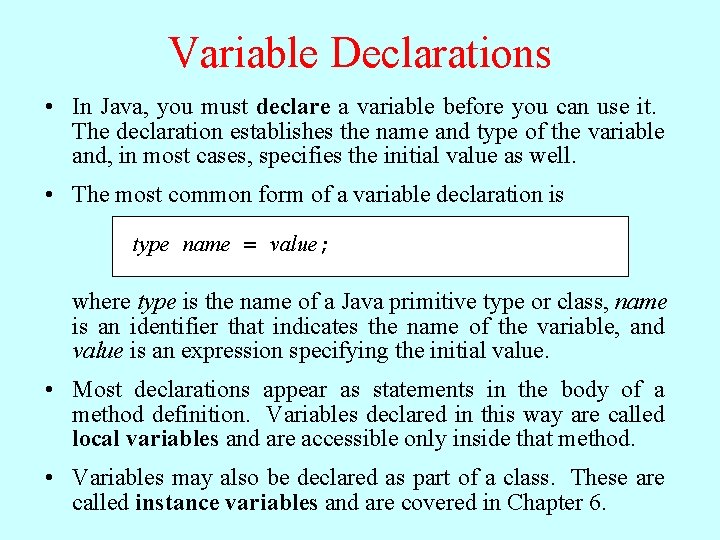
Variable Declarations • In Java, you must declare a variable before you can use it. The declaration establishes the name and type of the variable and, in most cases, specifies the initial value as well. • The most common form of a variable declaration is type name = value; where type is the name of a Java primitive type or class, name is an identifier that indicates the name of the variable, and value is an expression specifying the initial value. • Most declarations appear as statements in the body of a method definition. Variables declared in this way are called local variables and are accessible only inside that method. • Variables may also be declared as part of a class. These are called instance variables and are covered in Chapter 6.
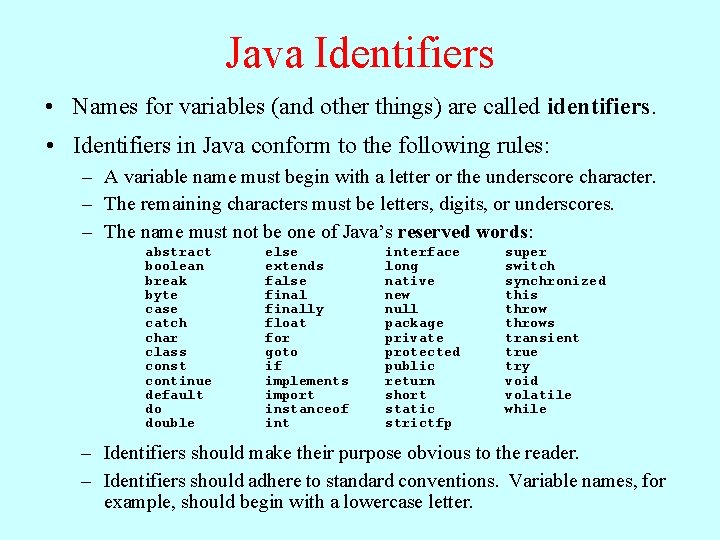
Java Identifiers • Names for variables (and other things) are called identifiers. • Identifiers in Java conform to the following rules: – A variable name must begin with a letter or the underscore character. – The remaining characters must be letters, digits, or underscores. – The name must not be one of Java’s reserved words: abstract boolean break byte case catch char class const continue default do double else extends false finally float for goto if implements import instanceof interface long native new null package private protected public return short static strictfp super switch synchronized this throws transient true try void volatile while – Identifiers should make their purpose obvious to the reader. – Identifiers should adhere to standard conventions. Variable names, for example, should begin with a lowercase letter.
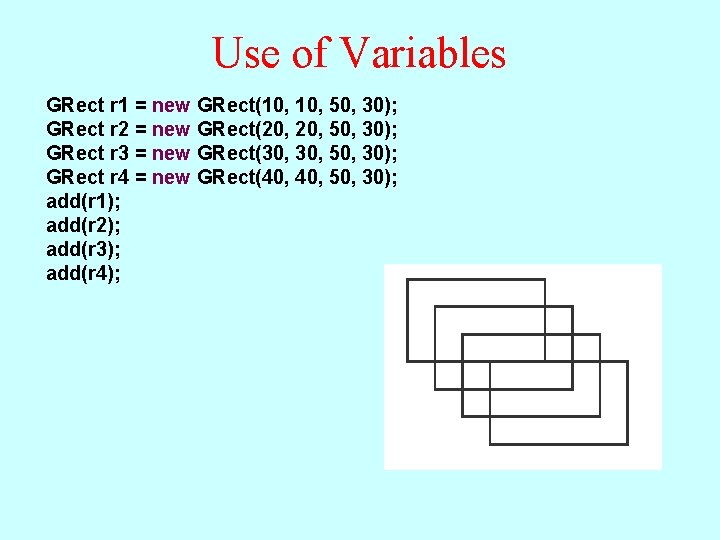
Use of Variables GRect r 1 = new GRect(10, 50, 30); GRect r 2 = new GRect(20, 50, 30); GRect r 3 = new GRect(30, 50, 30); GRect r 4 = new GRect(40, 50, 30); add(r 1); add(r 2); add(r 3); add(r 4);
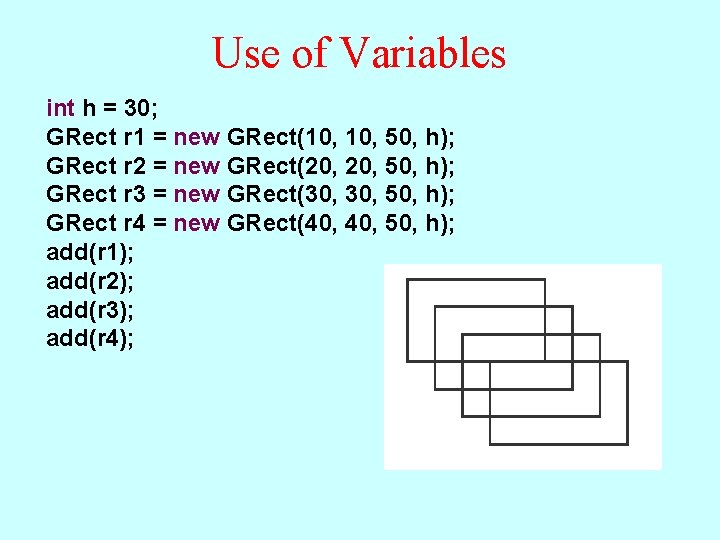
Use of Variables int h = 30; GRect r 1 = new GRect(10, 50, h); GRect r 2 = new GRect(20, 50, h); GRect r 3 = new GRect(30, 50, h); GRect r 4 = new GRect(40, 50, h); add(r 1); add(r 2); add(r 3); add(r 4);
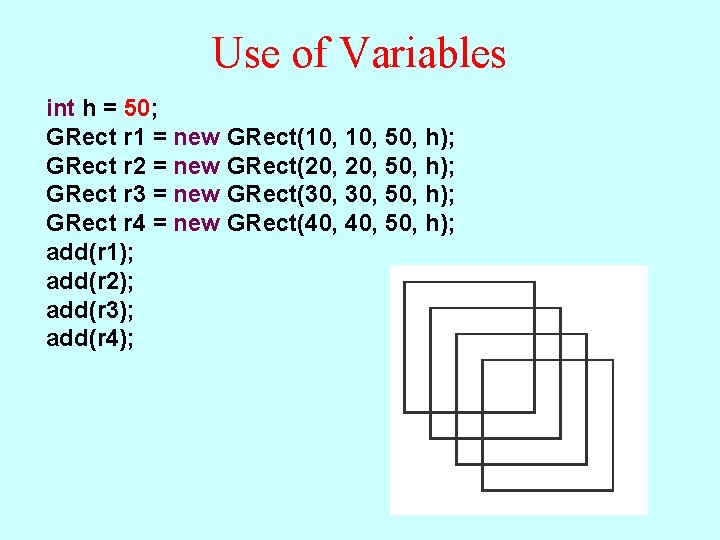
Use of Variables int h = 50; GRect r 1 = new GRect(10, 50, h); GRect r 2 = new GRect(20, 50, h); GRect r 3 = new GRect(30, 50, h); GRect r 4 = new GRect(40, 50, h); add(r 1); add(r 2); add(r 3); add(r 4);
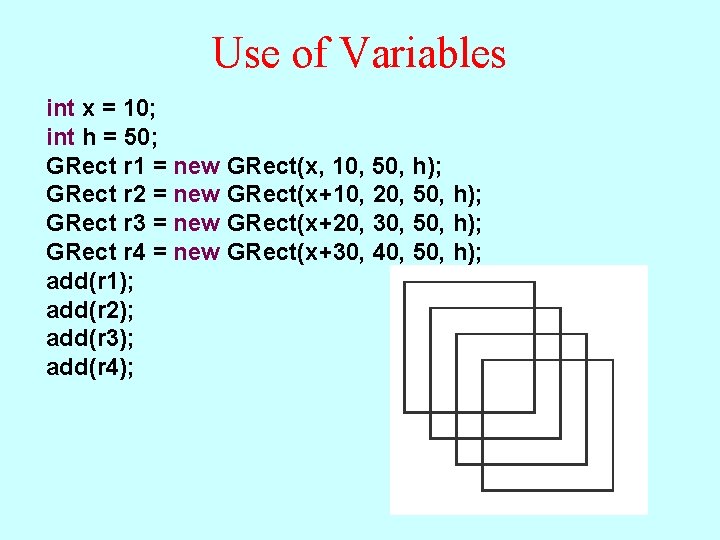
Use of Variables int x = 10; int h = 50; GRect r 1 = new GRect(x, 10, 50, h); GRect r 2 = new GRect(x+10, 20, 50, h); GRect r 3 = new GRect(x+20, 30, 50, h); GRect r 4 = new GRect(x+30, 40, 50, h); add(r 1); add(r 2); add(r 3); add(r 4);
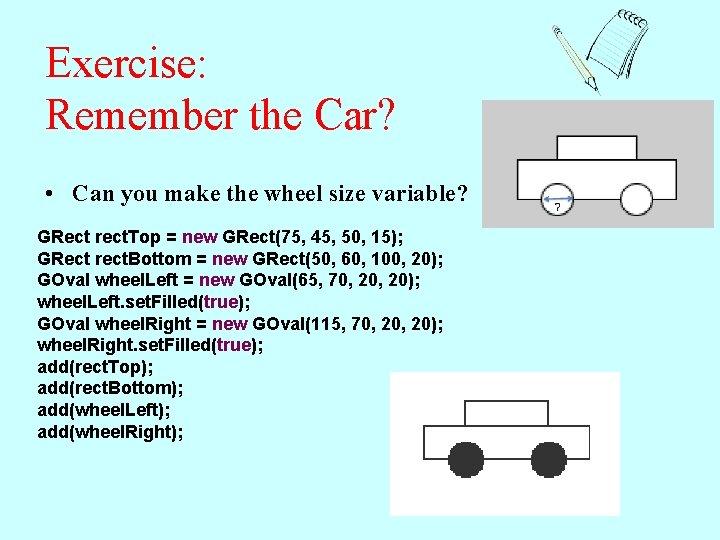
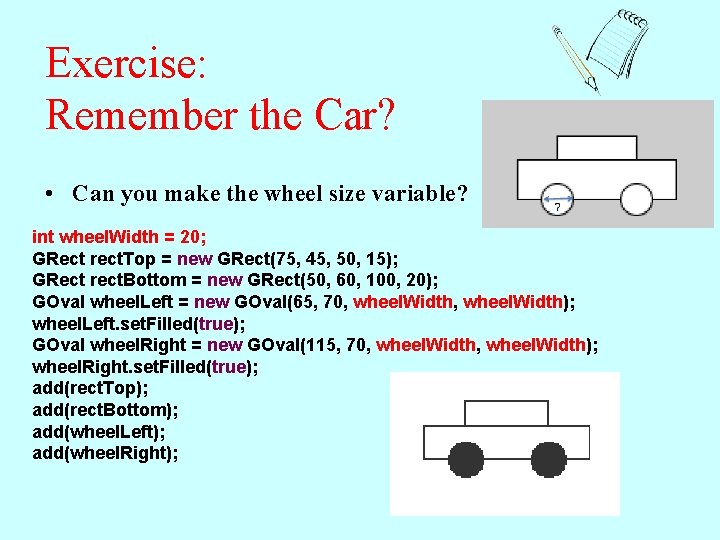
Exercise: Remember the Car? • Can you make the wheel size variable? GRect rect. Top = new GRect(75, 45, 50, 15); GRect rect. Bottom = new GRect(50, 60, 100, 20); GOval wheel. Left = new GOval(65, 70, 20); wheel. Left. set. Filled(true); GOval wheel. Right = new GOval(115, 70, 20); wheel. Right. set. Filled(true); add(rect. Top); add(rect. Bottom); add(wheel. Left); add(wheel. Right);
Exercise: Remember the Car? • Can you make the wheel size variable? int wheel. Width = 20; GRect rect. Top = new GRect(75, 45, 50, 15); GRect rect. Bottom = new GRect(50, 60, 100, 20); GOval wheel. Left = new GOval(65, 70, wheel. Width); wheel. Left. set. Filled(true); GOval wheel. Right = new GOval(115, 70, wheel. Width); wheel. Right. set. Filled(true); add(rect. Top); add(rect. Bottom); add(wheel. Left); add(wheel. Right);
Operators and Operands • As in most languages, Java programs specify computation in the form of arithmetic expressions that closely resemble expressions in mathematics. • The most common operators in Java are the ones that specify arithmetic computation: + Addition * Multiplication – Subtraction / Division % Remainder • Operators in Java usually appear between two subexpressions, which are called its operands. Operators that take two operands are called binary operators. • The - operator can also appear as a unary operator, as in the expression -x, which denotes the negative of x.
Assignment Statements • You can change the value of a variable in your program by using an assignment statement, which has the general form: variable = expression; • The effect of an assignment statement is to compute the value of the expression on the right side of the equal sign and assign that value to the variable that appears on the left. Thus, the assignment statement total = total + value; adds together the current values of the variables total and value and then stores that sum back in the variable total. • When you assign a new value to a variable, the old value of that variable is lost.
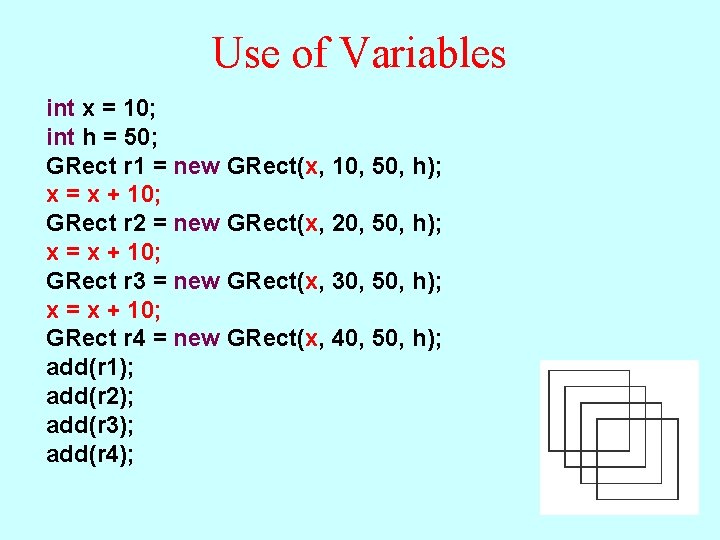
Use of Variables int x = 10; int h = 50; GRect r 1 = new GRect(x, 10, 50, h); x = x + 10; GRect r 2 = new GRect(x, 20, 50, h); x = x + 10; GRect r 3 = new GRect(x, 30, 50, h); x = x + 10; GRect r 4 = new GRect(x, 40, 50, h); add(r 1); add(r 2); add(r 3); add(r 4);
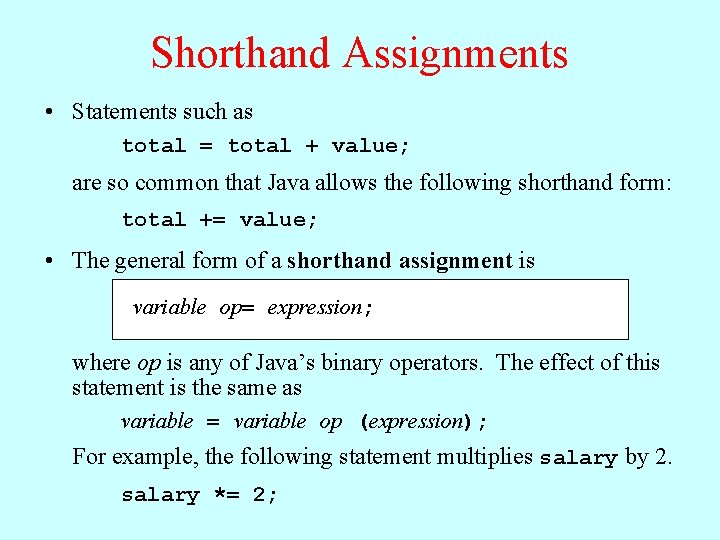
Shorthand Assignments • Statements such as total = total + value; are so common that Java allows the following shorthand form: total += value; • The general form of a shorthand assignment is variable op= expression; where op is any of Java’s binary operators. The effect of this statement is the same as variable = variable op (expression); For example, the following statement multiplies salary by 2. salary *= 2;
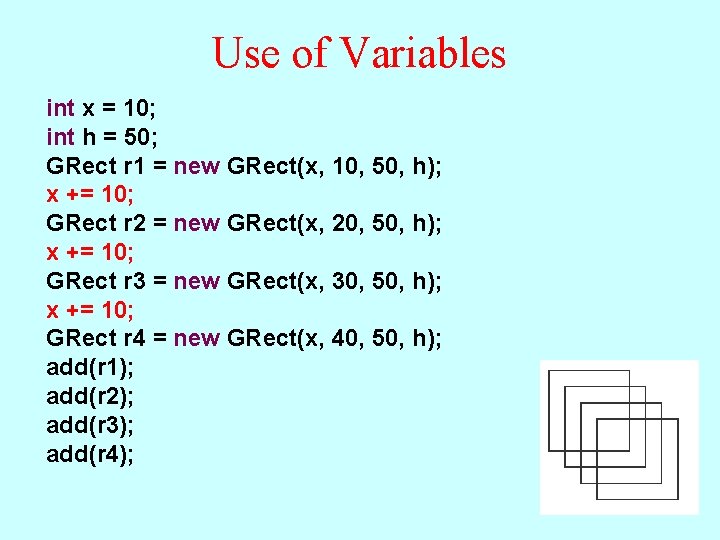
Use of Variables int x = 10; int h = 50; GRect r 1 = new GRect(x, 10, 50, h); x += 10; GRect r 2 = new GRect(x, 20, 50, h); x += 10; GRect r 3 = new GRect(x, 30, 50, h); x += 10; GRect r 4 = new GRect(x, 40, 50, h); add(r 1); add(r 2); add(r 3); add(r 4);
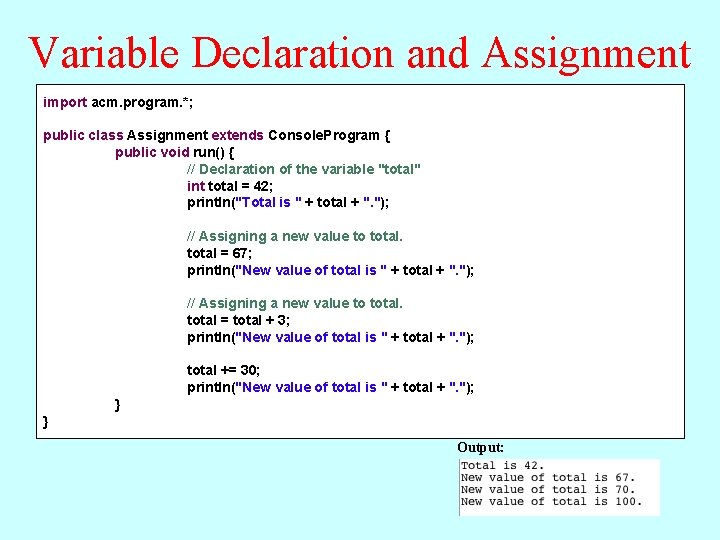
Variable Declaration and Assignment import acm. program. *; public class Assignment extends Console. Program { public void run() { // Declaration of the variable "total" int total = 42; println("Total is " + total + ". "); // Assigning a new value to total = 67; println("New value of total is " + total + ". "); // Assigning a new value to total = total + 3; println("New value of total is " + total + ". "); total += 30; println("New value of total is " + total + ". "); } } Output:
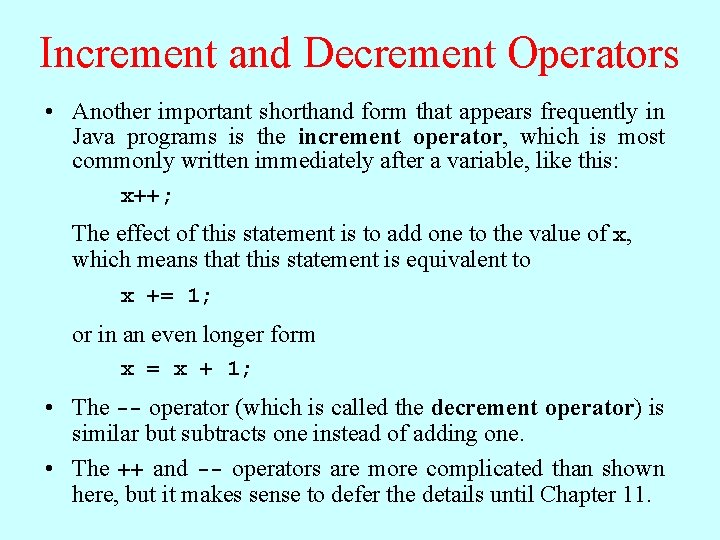
Increment and Decrement Operators • Another important shorthand form that appears frequently in Java programs is the increment operator, which is most commonly written immediately after a variable, like this: x++; The effect of this statement is to add one to the value of x, which means that this statement is equivalent to x += 1; or in an even longer form x = x + 1; • The -- operator (which is called the decrement operator) is similar but subtracts one instead of adding one. • The ++ and -- operators are more complicated than shown here, but it makes sense to defer the details until Chapter 11.
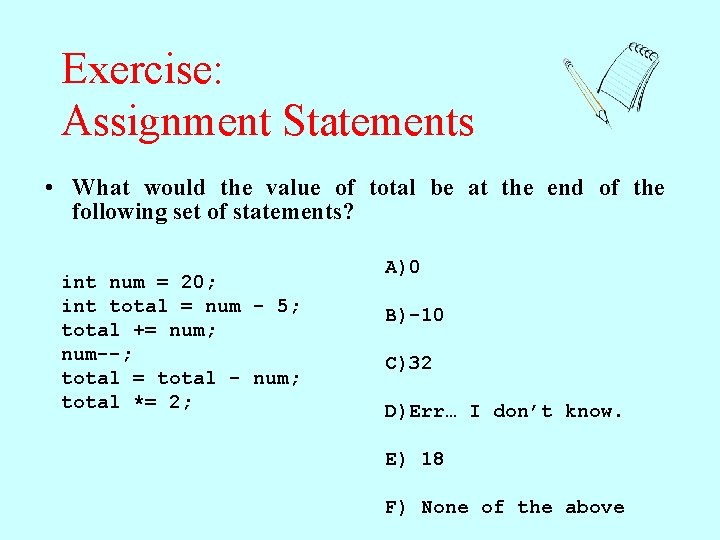
Exercise: Assignment Statements • What would the value of total be at the end of the following set of statements? int num = 20; int total = num - 5; total += num; num--; total = total - num; total *= 2; A)0 B)-10 C)32 D)Err… I don’t know. E) 18 F) None of the above
Designing for Change • While it is clearly necessary for you to write programs that the compiler can understand, good programmers are equally concerned with writing code that people can understand. • The importance of human readability arises from the fact that programs must be maintained over their life cycle. Typically, as much as 90 percent of the programming effort comes after the initial release of a system. • There are several useful techniques that you can adopt to increase readability: – Use names that clearly express the purpose of variables and methods – Use proper indentation to make the structure of your programs clear – Use named constants to enhance both readability and maintainability
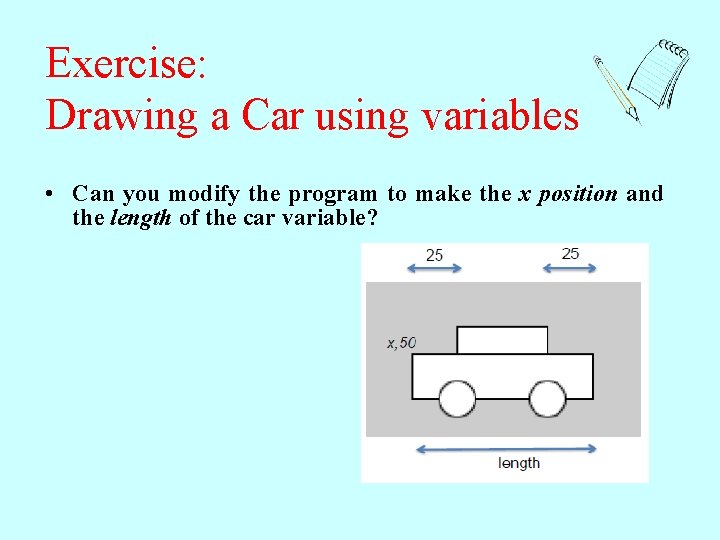
Exercise: Drawing a Car using variables • Can you modify the program to make the x position and the length of the car variable?
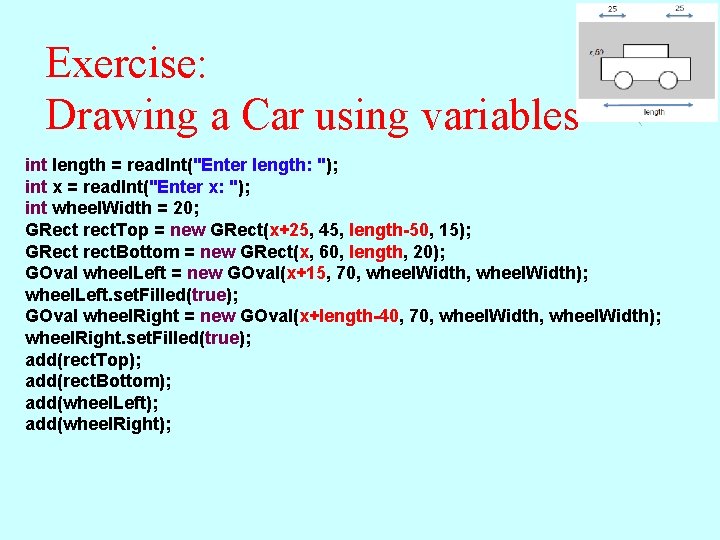
Exercise: Drawing a Car using variables int length = read. Int("Enter length: "); int x = read. Int("Enter x: "); int wheel. Width = 20; GRect rect. Top = new GRect(x+25, 45, length-50, 15); GRect rect. Bottom = new GRect(x, 60, length, 20); GOval wheel. Left = new GOval(x+15, 70, wheel. Width); wheel. Left. set. Filled(true); GOval wheel. Right = new GOval(x+length-40, 70, wheel. Width); wheel. Right. set. Filled(true); add(rect. Top); add(rect. Bottom); add(wheel. Left); add(wheel. Right);
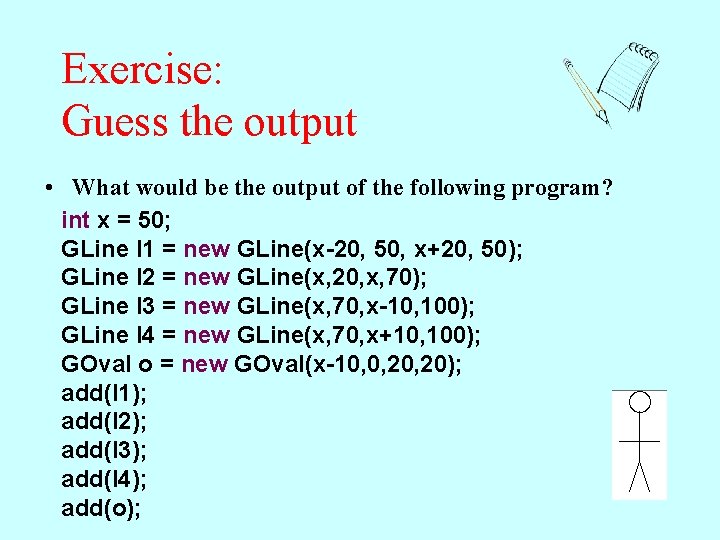
Exercise: Guess the output • What would be the output of the following program? int x = 50; GLine l 1 = new GLine(x-20, 50, x+20, 50); GLine l 2 = new GLine(x, 20, x, 70); GLine l 3 = new GLine(x, 70, x-10, 100); GLine l 4 = new GLine(x, 70, x+10, 100); GOval o = new GOval(x-10, 0, 20); add(l 1); add(l 2); add(l 3); add(l 4); add(o);
Division and Type Casts • Whenever you apply a binary operator to numeric values in Java, the result will be of type int if both operands are of type int, but will be a double if either operand is a double. • This rule has important consequences in the case of division. For example, the expression 14 / 5 seems as if it should have the value 2. 8, but because both operands are of type int, Java computes an integer result by throwing away the fractional part. The result is therefore 2. • If you want to obtain the mathematically correct result, you need to convert at least one operand to a double, as in (double) 14 / 5 The conversion is accomplished by means of a type cast, which consists of a type name in parentheses.
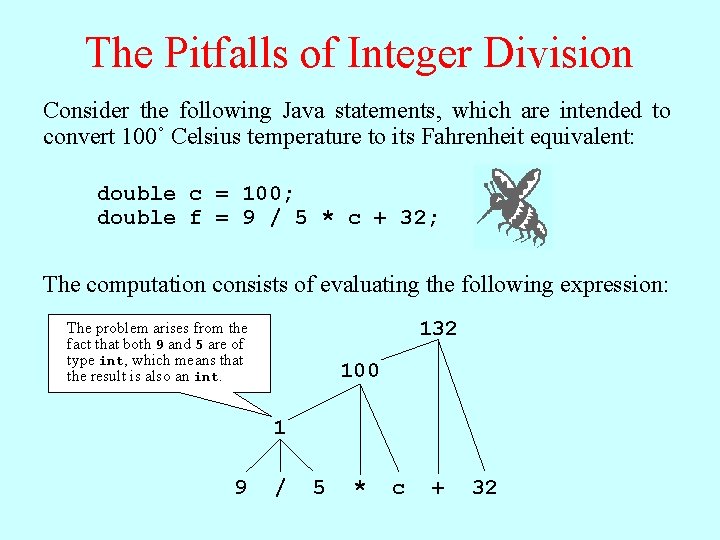
The Pitfalls of Integer Division Consider the following Java statements, which are intended to convert 100˚ Celsius temperature to its Fahrenheit equivalent: double c = 100; double f = 9 / 5 * c + 32; The computation consists of evaluating the following expression: 9 The problem arises from the fact that both 9 and 5 are of type int, which means that the result is also an int. / 5 * c 132 + 32 100 1 9 / 5 * c + 32
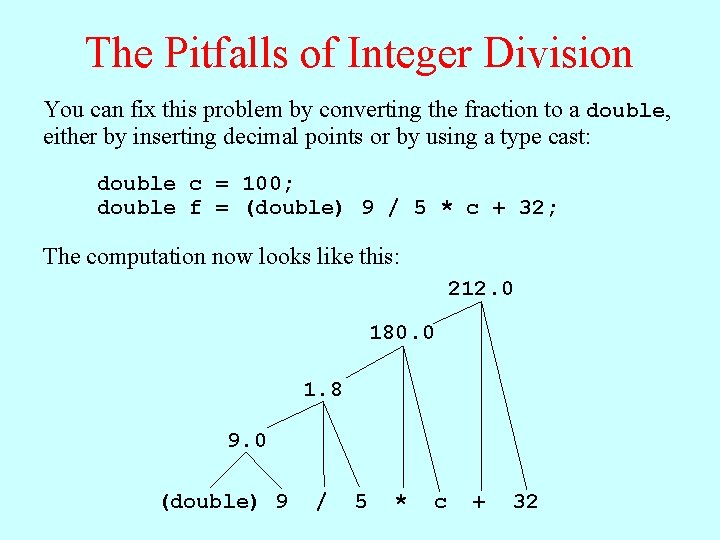
The Pitfalls of Integer Division You can fix this problem by converting the fraction to a double, either by inserting decimal points or by using a type cast: double c = 100; double f = (double) 9 / 5 * c + 32; The computation now looks like this: 212. 0 180. 0 1. 8 9. 0 (double) 9 / 5 * c + 32
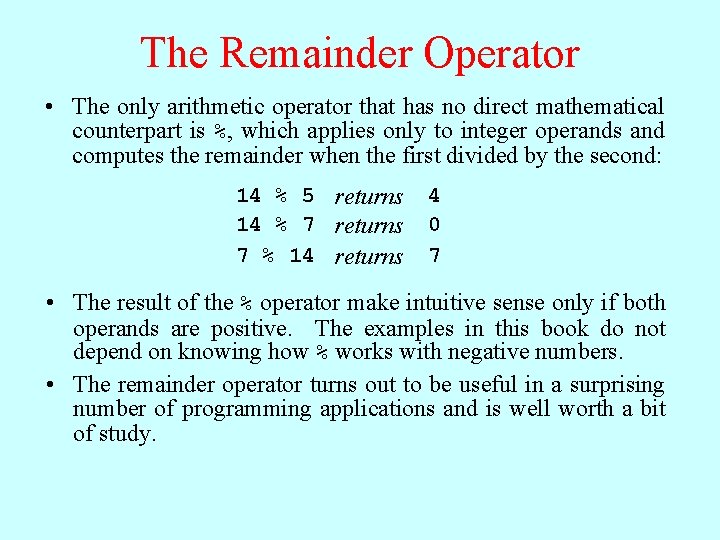
The Remainder Operator • The only arithmetic operator that has no direct mathematical counterpart is %, which applies only to integer operands and computes the remainder when the first divided by the second: 14 % 5 returns 14 % 7 returns 7 % 14 returns 4 0 7 • The result of the % operator make intuitive sense only if both operands are positive. The examples in this book do not depend on knowing how % works with negative numbers. • The remainder operator turns out to be useful in a surprising number of programming applications and is well worth a bit of study.
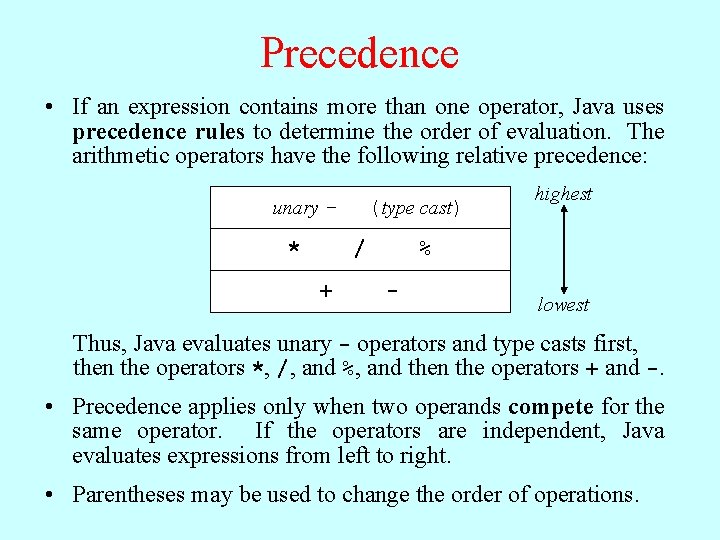
Precedence • If an expression contains more than one operator, Java uses precedence rules to determine the order of evaluation. The arithmetic operators have the following relative precedence: unary - * (type cast) / + highest % - lowest Thus, Java evaluates unary - operators and type casts first, then the operators *, /, and %, and then the operators + and -. • Precedence applies only when two operands compete for the same operator. If the operators are independent, Java evaluates expressions from left to right. • Parentheses may be used to change the order of operations.
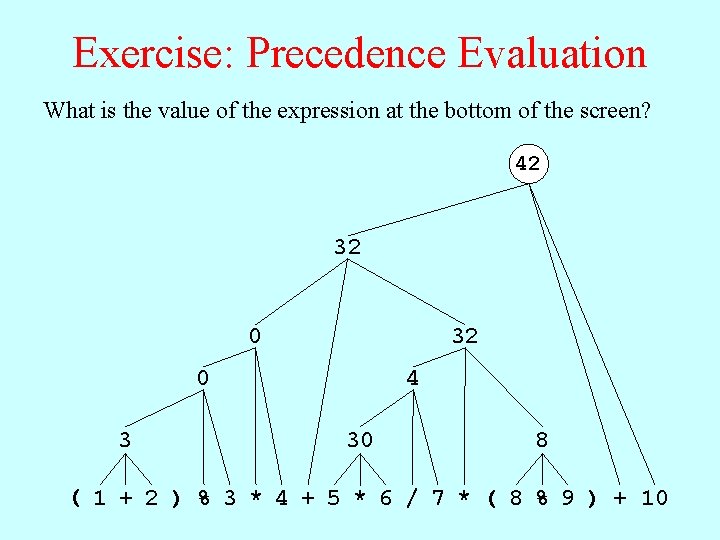
Exercise: Precedence Evaluation What is the value of the expression at the bottom of the screen? 42 32 0 3 4 30 8 ( 1 + 2 ) % 3 * 4 + 5 * 6 / 7 * ( 8 % 9 ) + 10
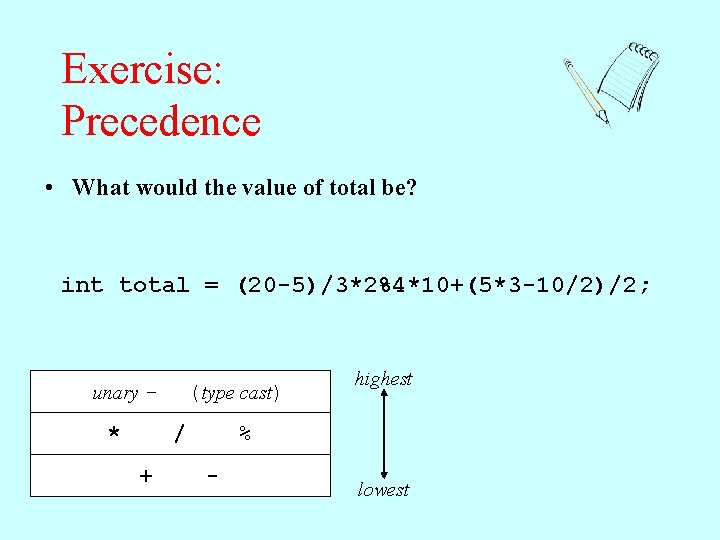
Exercise: Precedence • What would the value of total be? int total = (20 -5)/3*2%4*10+(5*3 -10/2)/2; unary - * (type cast) / + highest % - lowest
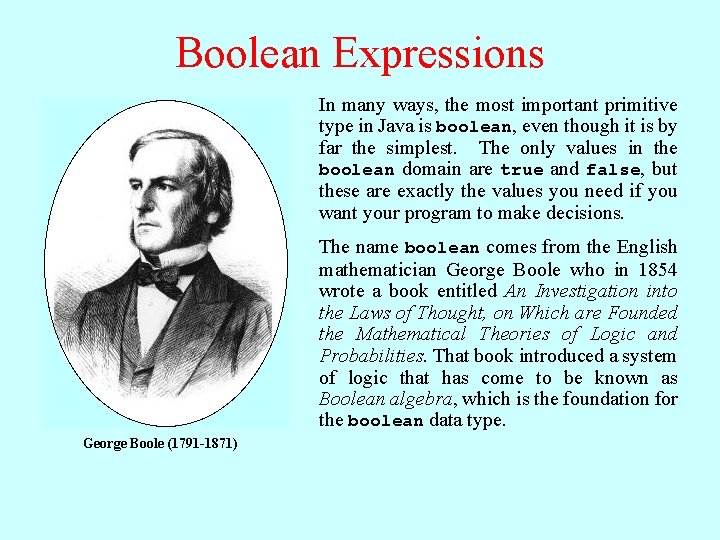
Boolean Expressions In many ways, the most important primitive type in Java is boolean, even though it is by far the simplest. The only values in the boolean domain are true and false, but these are exactly the values you need if you want your program to make decisions. The name boolean comes from the English mathematician George Boole who in 1854 wrote a book entitled An Investigation into the Laws of Thought, on Which are Founded the Mathematical Theories of Logic and Probabilities. That book introduced a system of logic that has come to be known as Boolean algebra, which is the foundation for the boolean data type. George Boole (1791 -1871)
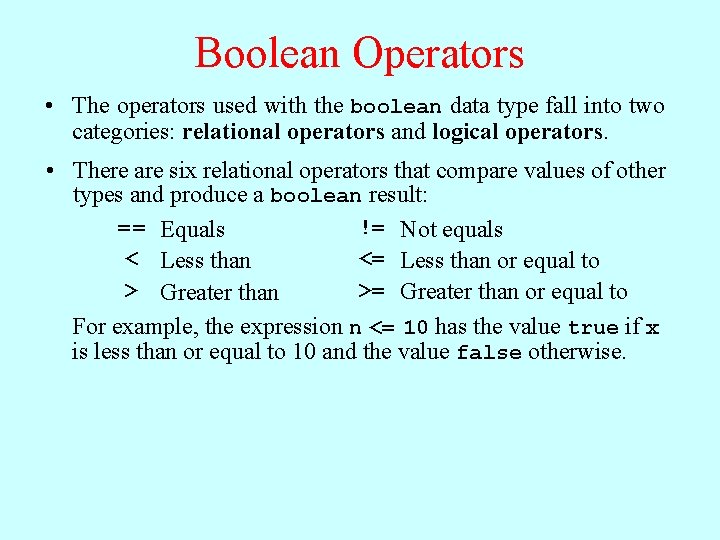
Boolean Operators • The operators used with the boolean data type fall into two categories: relational operators and logical operators. • There are six relational operators that compare values of other types and produce a boolean result: = = Equals != Not equals < Less than <= Less than or equal to >= Greater than or equal to > Greater than For example, the expression n <= 10 has the value true if x is less than or equal to 10 and the value false otherwise.
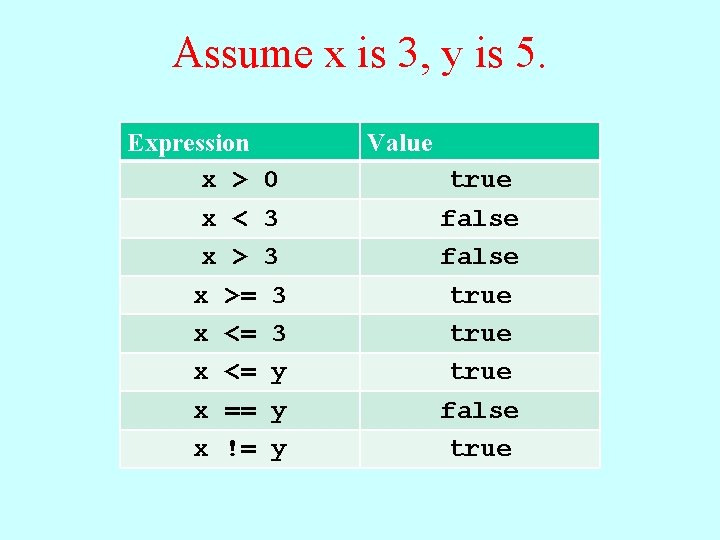
Assume x is 3, y is 5. Expression x > x < x >= x <= x == x != Value 0 3 3 y y y true false true
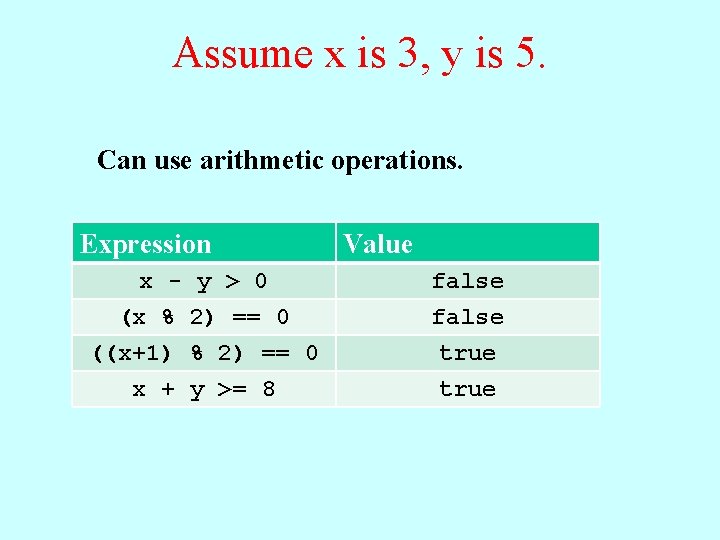
Assume x is 3, y is 5. Can use arithmetic operations. Expression x - y > 0 (x % 2) == 0 ((x+1) % 2) == 0 x + y >= 8 Value false true
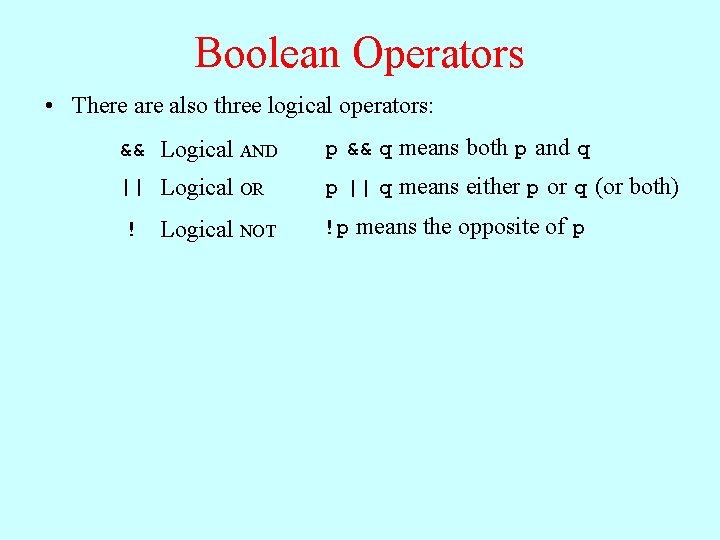
Boolean Operators • There also three logical operators: && Logical AND p && q means both p and q || Logical OR p || q means either p or q (or both) ! Logical NOT !p means the opposite of p
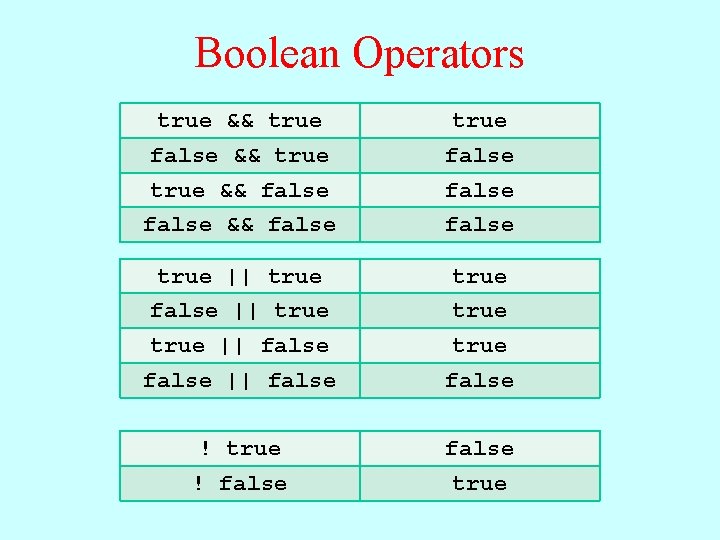
Boolean Operators true && true false true && false && false true || true false || true || false true false || false ! true false ! false true
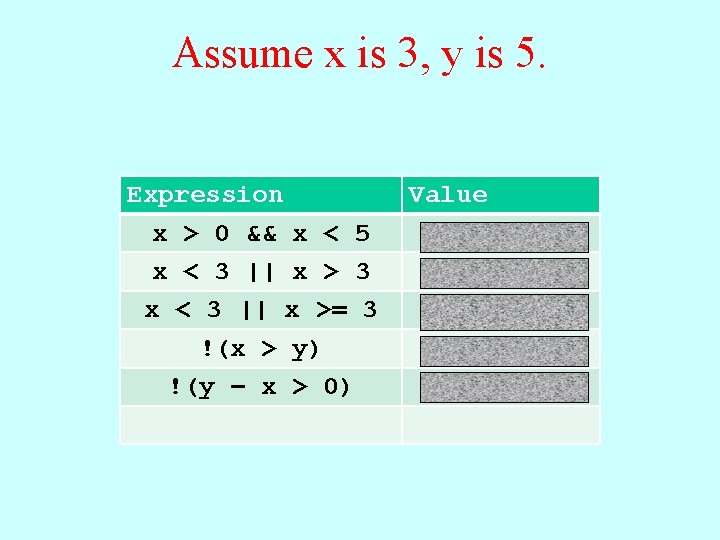
Assume x is 3, y is 5. Expression x > 0 && x < 5 x < 3 || x > 3 x < 3 || x >= 3 !(x > y) !(y – x > 0) Value true false
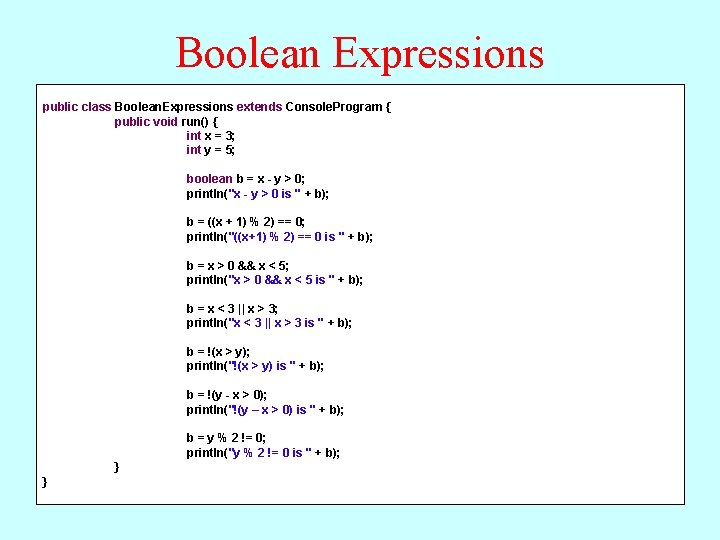
Boolean Expressions public class Boolean. Expressions extends Console. Program { public void run() { int x = 3; int y = 5; boolean b = x - y > 0; println("x - y > 0 is " + b); b = ((x + 1) % 2) == 0; println("((x+1) % 2) == 0 is " + b); b = x > 0 && x < 5; println("x > 0 && x < 5 is " + b); b = x < 3 || x > 3; println("x < 3 || x > 3 is " + b); b = !(x > y); println("!(x > y) is " + b); b = !(y - x > 0); println("!(y – x > 0) is " + b); b = y % 2 != 0; println("y % 2 != 0 is " + b); } }
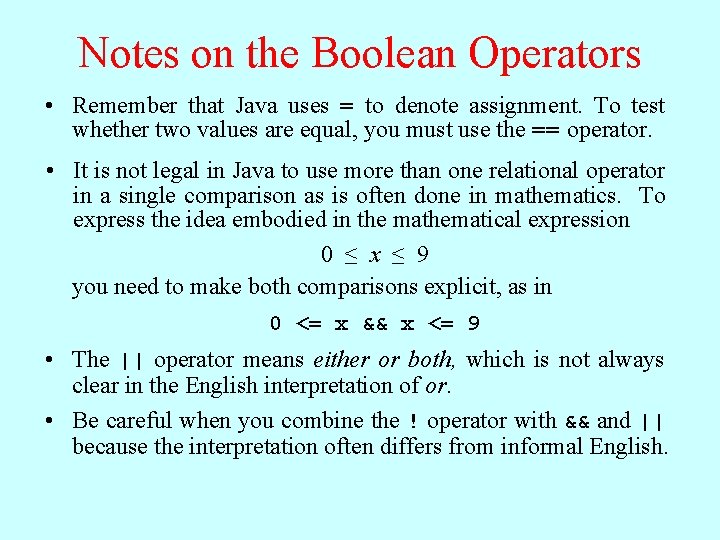
Notes on the Boolean Operators • Remember that Java uses = to denote assignment. To test whether two values are equal, you must use the == operator. • It is not legal in Java to use more than one relational operator in a single comparison as is often done in mathematics. To express the idea embodied in the mathematical expression 0 ≤ x ≤ 9 you need to make both comparisons explicit, as in 0 <= x && x <= 9 • The || operator means either or both, which is not always clear in the English interpretation of or. • Be careful when you combine the ! operator with && and || because the interpretation often differs from informal English.
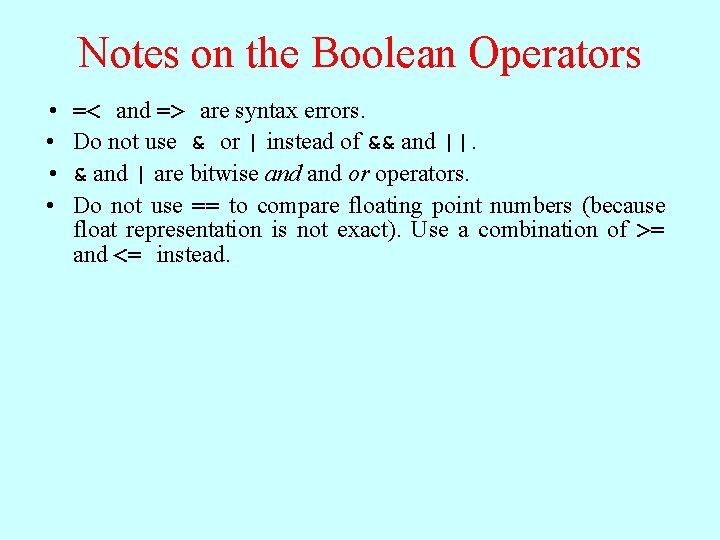
Notes on the Boolean Operators • • =< and => are syntax errors. Do not use & or | instead of && and ||. & and | are bitwise and or operators. Do not use == to compare floating point numbers (because float representation is not exact). Use a combination of >= and <= instead.
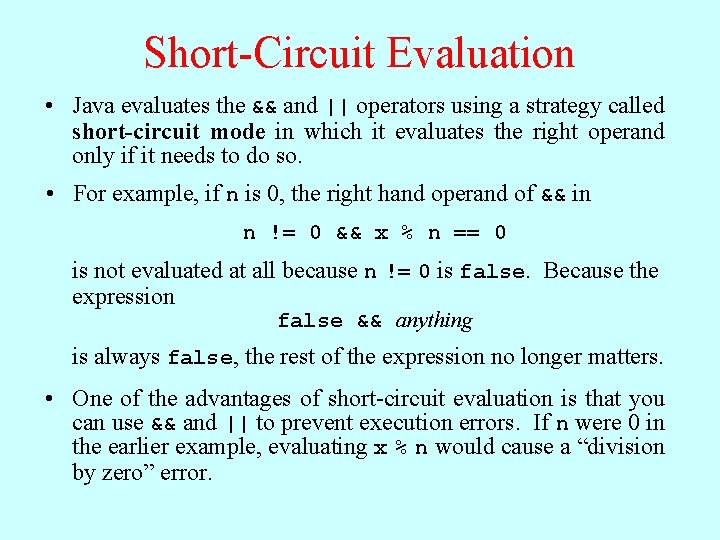
Short-Circuit Evaluation • Java evaluates the && and || operators using a strategy called short-circuit mode in which it evaluates the right operand only if it needs to do so. • For example, if n is 0, the right hand operand of && in n != 0 && x % n == 0 is not evaluated at all because n != 0 is false. Because the expression false && anything is always false, the rest of the expression no longer matters. • One of the advantages of short-circuit evaluation is that you can use && and || to prevent execution errors. If n were 0 in the earlier example, evaluating x % n would cause a “division by zero” error.
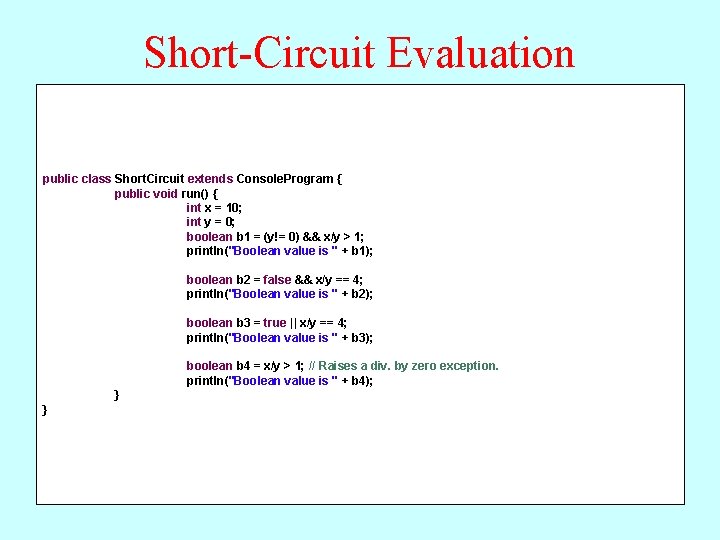
Short-Circuit Evaluation public class Short. Circuit extends Console. Program { public void run() { int x = 10; int y = 0; boolean b 1 = (y!= 0) && x/y > 1; println("Boolean value is " + b 1); boolean b 2 = false && x/y == 4; println("Boolean value is " + b 2); boolean b 3 = true || x/y == 4; println("Boolean value is " + b 3); boolean b 4 = x/y > 1; // Raises a div. by zero exception. println("Boolean value is " + b 4); } }