
IV BCI Software CH 20 Bio Sig An
IV. BCI Software CH 20. Bio. Sig : An Open-Source Software Library for BCI Research CH 21. BCI 2000 : A General-Purpose Software Platform for BCI 2010. 11. 19. JO, INAH

Introduction � Introduce two software packages for BCI ◦ Freely available ◦ Include a set of useful tools to process EEG signals for real-time BCI � Chapter 20 : Graz Bio. Sig toolbox. ◦ ◦ ◦ � Interface to many different data formats of EEG recordings Supports several-signal processing Artifact reduction Feature extraction Classification methods Chapter 21 : BCI 2000 toolbox ◦ ◦ ◦ Wadsworth center in Albany , the University of Tubingen. Mainly for real-time BCI application General data acquisition techniques and a general framework Freely available Windows platforms and C++ programming.

Chapter 20. Bio. Sig An Open-Source software Library for BCI research
1. Abstract � Common interface to many different data formats � Artifact processing, quality control � Adaptive signal processing, Feature extraction methods : very suitable for online and real-time processing. � Supports handling of missing values. � Includes several classification methods � Overview of the current status and an outline of future possibilities. � Licensed with the GNU General Public License. (GNU GPL or GPL) � Open development platform : ideal tool for research and development.
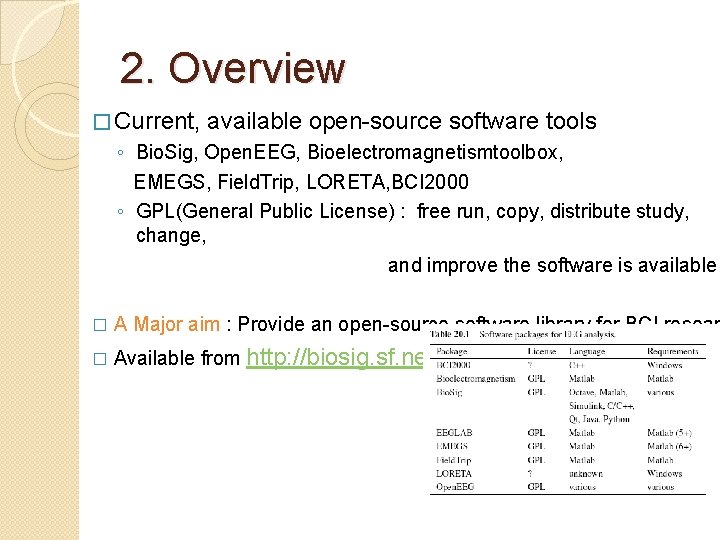
2. Overview � Current, available open-source software tools ◦ Bio. Sig, Open. EEG, Bioelectromagnetismtoolbox, EMEGS, Field. Trip, LORETA, BCI 2000 ◦ GPL(General Public License) : free run, copy, distribute study, change, and improve the software is available � A Major aim : Provide an open-source software library for BCI resear � Available from http: //biosig. sf. net
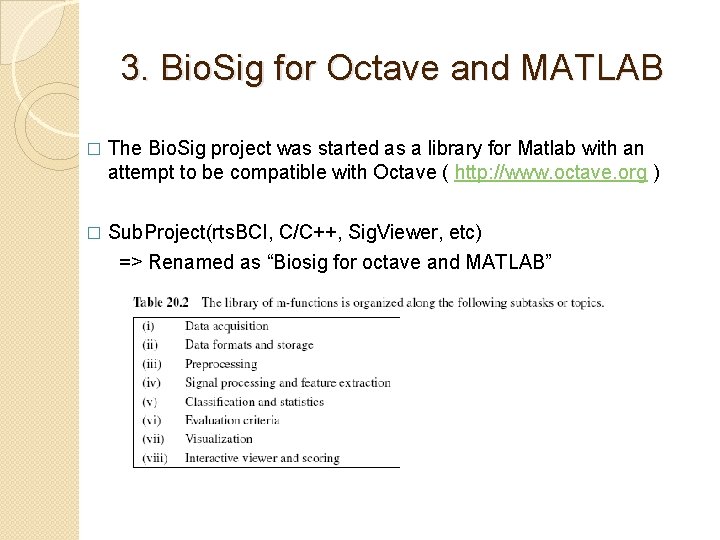
3. Bio. Sig for Octave and MATLAB � The Bio. Sig project was started as a library for Matlab with an attempt to be compatible with Octave ( http: //www. octave. org ) Sub. Project(rts. BCI, C/C++, Sig. Viewer, etc) => Renamed as “Biosig for octave and MATLAB” �
3 -1. Data Formats and Storage • • Currently more than 40 different data formats. Common interface to various data formats Automated detection of the file format Do not need to care • • which data format is actually used how the proper scaling of the amplitude values is obtained From where to obtain the sampling rate. Supports also simple preprocessing • selection of specific data channels, overflow detection • However, none of these data formats contains all the features needed for BCI research. • GDF(General Data Format): • Constructed with advantages of various data formats for biomedical signal processing
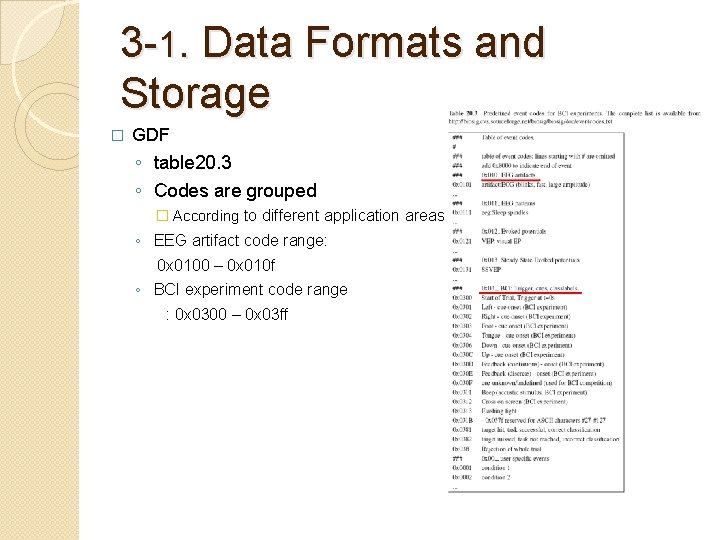
3 -1. Data Formats and Storage � GDF ◦ table 20. 3 ◦ Codes are grouped � According to different application areas ◦ EEG artifact code range: 0 x 0100 – 0 x 010 f ◦ BCI experiment code range : 0 x 0300 – 0 x 03 ff
3 -2. Preprocessing � Intermediate state between data access and feature extraction. � Functions ◦ Triggering the data : to extract data segments relative to a given trigger ◦ Extracting the trigger time points from a continuous trigger channel ◦ Advanced algorithms for artifact processing � quality control method(histogram analysis), � reducing EOG artifacts algorithm(based on regression analysis), � detecting muscle artifacts(based on inverse filtering)
3 -3. Signal Processing and Feature Extraction � Many signal processing methods are available � Tool for handling of missing data is rare. � Exception : TSA(time series analysis) toolbox, Na. N toolbox, part of Octave. Forge, distributed with Bio. Sig. ◦ Na. N toolbox � Represent missing values as not a number according to IEEE 754 � sumskipnan. m : skips all Na. Ns, and sums and counts all numerical values. � Return value SUM, COUNT : calculate the mean of the data. � expectation value of any statistic including covariance matrices and more advanced statistics. � more advanced ? Investigated. ◦ TSA(Time Series Analysis) toolbox � Many functions for parametric modeling(autoregressive estimator) � Burg and Levinson-Durbin algorithms for estimating autoregressive parameter � Adaptive autoregressive estimators like Kalman filtering � RLS, LMS algorithms � Multivariate autoregressive estimators like the Nuttal-strand method � Multichannel Levinson algorithm
3 -4. Classification � Various need for classifier ◦ Combines various features into a single output ◦ cross validation to prevent overfitting ◦ Time lag of classification should be as small as possible. ◦ Optimal time point for applying the classifier must be identified. � Wrapper function(findclassifier. m) ◦ First version : LDA for two classes ◦ Later : Quadratic classifier, svm for more than 2 classes ◦ Selection of the Proper time segment for estimating a classifier. � Data were triggered, seperability were calculated for each time segment. � Length of each segment can be varied from 1 to N samples � Typically, fixed segment length of a fraction of a second is used. � Cross validation : trial based LOOM(Leave-One-Out Method) ◦ Samples from the chosen segment of all but one trial ◦ This classifier used to all samples of testing trials. ◦ Repeated until each trial has been used once as test trial. ◦ used in the BCI competition 2005 on data Set I(rank 7), Iva(rank 8)
3 -5. Evaluation Criteria � Different evaluation criteria ◦ accuracy(error rate), information transfer, cohen’s kappa coefficient, others. ◦ Analyzing the time courses of the different criteria are provided. ◦ These functions were used for analyzing results of the BCI competition 2003(dataset. III), BCI competition 2005(dataset. IIIa, IIIb),
3 -6. Visualization � Plota. m(Wrapper funtion) ◦ for displaying various results. ◦ Generate a certain result depends on input data ◦ ex> outcome of findclassifer. m for two classes : time course of the error rate and SNR ◦ ex > outcome of findclassifier. m for N>2 classes : time course of the accuracy and the kappa coefficient. ◦ � Sview ◦ ◦ - Present the Raw EEG data in a compressed form on a single screen. Useful to get an overview of the available data Scoring of EEG data. Two packages : Sviewer, Sig. Viewer.
3 -7. SViewer : a viewing and scoring software � Written in Matlab � Common interface ◦ Can read any data format supported by Bio. Sig for Octave and Matlab � annotation, markers, event can be edited. � Not a stand-alone program

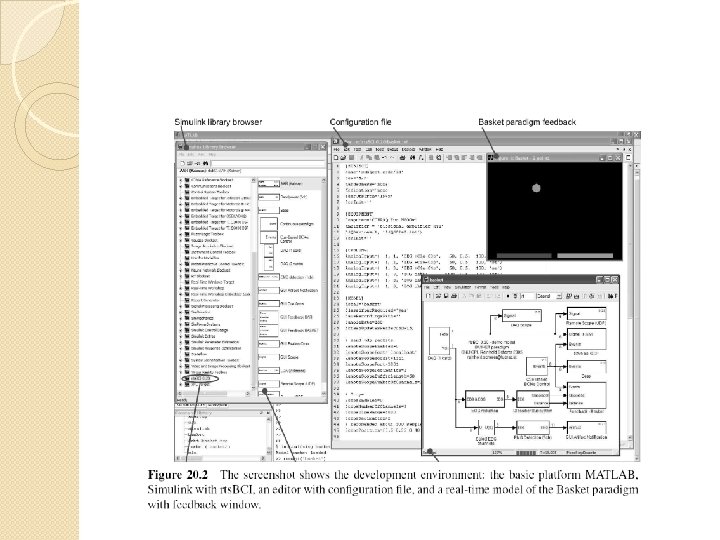
4. Real-time BCI System Based on MATLAB/Simulink-rts. BCI : framework for the development and rapid prototyping of real-time BCI system � To enable hard real-time computing on Windows platforms � ◦ ◦ � Real-time Windows Target(RTWT) Real-Time Workshop(RTW) Bio. Sig for Octave and Matlab(for data format handling) TCP/UDP/IP toolbox(for network communication support) Data Acquisition Card is required to sample the biosignals. Licensed under GNU GPL � Based on Matlab/Simulink, running on Microsoft Windows � Used toolbox � ◦ Real-time Windows Target(enable hard real-time computing on windows platforms) ◦ Real-Time Workshop(for the generation of stand-alone C code) ◦ Tunable parameters: INI file
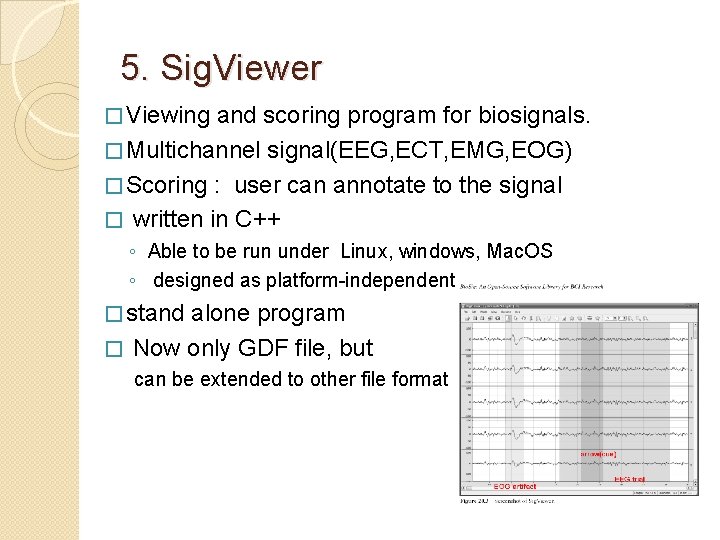
5. Sig. Viewer � Viewing and scoring program for biosignals. � Multichannel signal(EEG, ECT, EMG, EOG) � Scoring : user can annotate to the signal � written in C++ ◦ Able to be run under Linux, windows, Mac. OS ◦ designed as platform-independent � stand alone program � Now only GDF file, but can be extended to other file format
6. Bio. Pro. Feed Data acquisition module � Can be used with following 3 data acquisition hardware now � ◦ ◦ ◦ � G. mobilab from g. tec NI-60243 PCMCIA from National Instruments Modular. EEG from Open. EEG The name “Bio. Pro. Feed”Stand for ◦ Portable Biosignal acquisition ◦ Real-time processing ◦ Feedback generation framework Part of Bio. Sig project, it is a software framework for processing and storage unit. � Specifications � ◦ ◦ Platform independent Support different data acquisition hardware Real-time data processing should be possible Storage of the data in GDF format should be possible Runs on : Linux, Mac. Os, Windows XP with Cygwin � Autotools are used to build software framework �
7. Summary � Plan to improve Almost every part of Bio. Sig � Artifact processing, quality control should be evaluated offline -> online. � Additional signal processing, feature extraction methods need to be developed including the ability to handle missing value. � Further data formats should be supported in Sig. Viewer. � Biosig contains modules for data acquisition, BCI experiments with online feedback, viewing and scoring software for reviewing the raw data, functions for offline analysis of BCI data, obtaining a classifier. � Almost all components can be used with free software. � GNU GPL
Chap 21. BCI 2000 A General-Purpose software Platform for BCI
1. Abstract � BCI 2000 is a flexible general-purpose platform for brain-computer interface research � Aim : Reducing the complexity and cost of implementing BCI systems. � Joint Project : since 2000 Wadsworth center of the New York State Department of Health in Albany, New York Institute of Medical Psychology and Behavioral Neurobiology at the University of Tubingen, Germany. � Used in more than 110 Laboratories around the world � BCI 2000 Supports ◦ Variety of data acquisition systems ◦ Brain signals ◦ Feedback modalities � By reducing labor and cost => different BCI system, psychophysiological experiment � http: //www. bci 2000. org : freely available!
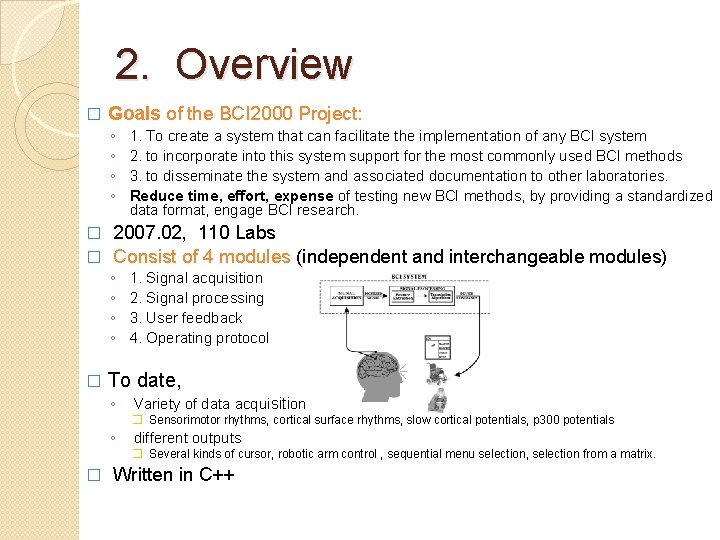
2. Overview � Goals of the BCI 2000 Project: ◦ ◦ 1. To create a system that can facilitate the implementation of any BCI system 2. to incorporate into this system support for the most commonly used BCI methods 3. to disseminate the system and associated documentation to other laboratories. Reduce time, effort, expense of testing new BCI methods, by providing a standardized data format, engage BCI research. 2007. 02, 110 Labs � Consist of 4 modules (independent and interchangeable modules) � ◦ ◦ � 1. Signal acquisition 2. Signal processing 3. User feedback 4. Operating protocol To date, ◦ Variety of data acquisition � Sensorimotor rhythms, cortical surface rhythms, slow cortical potentials, p 300 potentials ◦ different outputs � Several kinds of cursor, robotic arm control , sequential menu selection, selection from a matrix. � Written in C++
3. Dissemination of BCI 2000 Available free of charge for research and educational purposes � http: //www. bci 2000. org � � 2006, 01 70 Labs ◦ Use the existing BCI 2000 system without changing the software ◦ Implement new methods or system capabilities into BCI 2000 ◦ Use BCI 2000 as a real-time signal acquisition platform to develop systems for research not related to brain-computer interfaces. Example configurations, descriptive documentation, tutorial introductions. � Online bulletin board, question and answer �
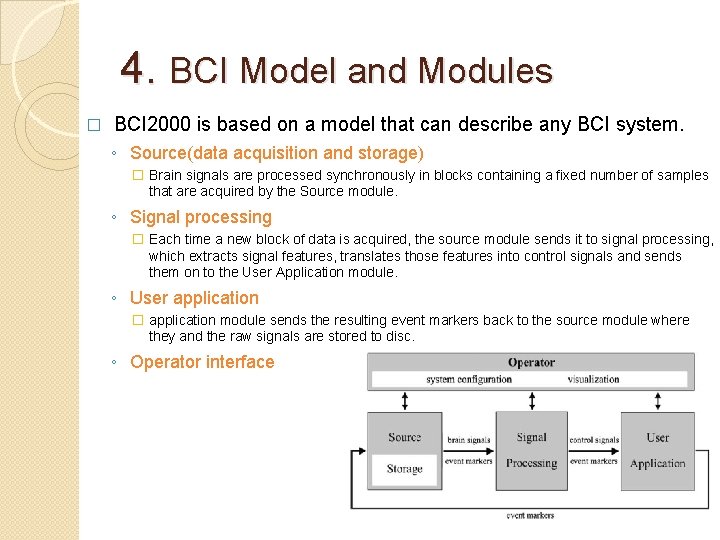
4. BCI Model and Modules � BCI 2000 is based on a model that can describe any BCI system. ◦ Source(data acquisition and storage) � Brain signals are processed synchronously in blocks containing a fixed number of samples that are acquired by the Source module. ◦ Signal processing � Each time a new block of data is acquired, the source module sends it to signal processing, which extracts signal features, translates those features into control signals and sends them on to the User Application module. ◦ User application � application module sends the resulting event markers back to the source module where they and the raw signals are stored to disc. ◦ Operator interface
4 -1. Module 1. Source Module and File Format � Digitizes and stores brain signals ◦ Passes them on without any further preprocessing to Signal Processing ◦ Consists of data acquisition component, data storage component � BCI 2000 file format �Consist of ASCII header, binary signal sample, event marker value. �Accommodate any number of signal channels, system parameters, event markers.
4 -2. Module 2. Signal Processing Module Converts signal from the brain into signals that control an output device. � Realized using a chain of signal filters. � ◦ Feature extraction (Three filters) � 1. A linear calibration routine that converts signals from A/D units into u. V � 2. A linear spatial filtering operation (calculating a matrix multiplication of the input signals with a spatial filtering matrix) � 3. Temporal filter (6) �Slow wave filter : process slow cortical potentials �Autoregressive spectral estimation �Spectral estimation based on the FFT �A general finite impulse response filter : process sensorimotor rhythms �A peak detection routine : extracts firing rates from neuronal action potentials �Filter that averages evoked responses(p 300) ◦ Feature Translation �Translates the extracted signal features into device independent control signals. ( 2 filters) �Linear classifier �Filter normalizes the output signals such that they have zero mean and a specific value
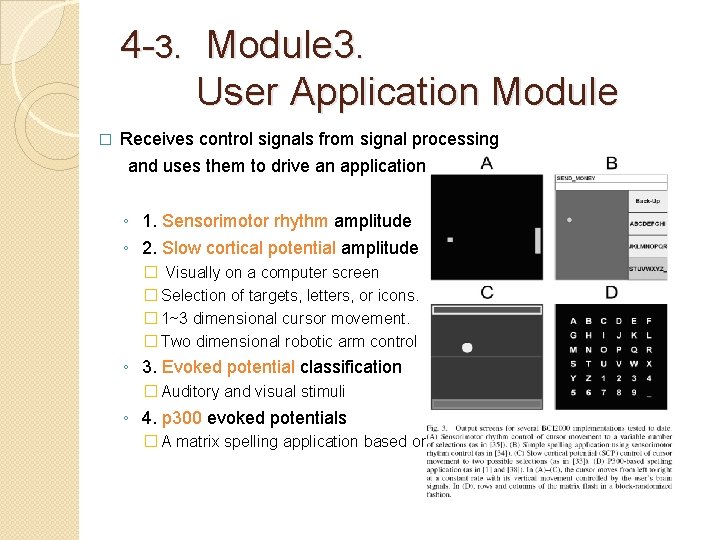
4 -3. Module 3. User Application Module � Receives control signals from signal processing and uses them to drive an application ◦ 1. Sensorimotor rhythm amplitude ◦ 2. Slow cortical potential amplitude � Visually on a computer screen � Selection of targets, letters, or icons. � 1~3 dimensional cursor movement. � Two dimensional robotic arm control ◦ 3. Evoked potential classification � Auditory and visual stimuli ◦ 4. p 300 evoked potentials � A matrix spelling application based on.
4 -4. Module 4. Operator Interface Module � Provides a graphical interface that displays ◦ Current system parameters ◦ Real-time analysis results communicated to it from other modules. � Allows investigator to start, stop, suspend, resume, reconfigure system operation. Monitor 1 : User feedback is displayed � Monitor 2 : Operator module’s graphical interface �
4 -5. System Variables � BCI 2000 incorporates three types of system variables : parameters, event markers, signals. ◦ System Parameters : do not change throughout a data file ◦ Event markers: record events that occur during operation, can change from one data sample to the next. ◦ System signals: functions of the user’s brain signals that are received and modified by the modules. � Each module can request that the operator module create any number of system parameters or event markers. ◦ EX> Source module : parameter for signal’s sampling rate. ◦ This parameter is constant during some defined period of online operation, and all other modules, and is recorded automatically in the data file. ◦ EX> Signal processing filter designed to detect artifacts : an event marker to mark artifacts in the signal ◦ EX> Application module : an event marker to record stimulus conditions.
4 -6. System Requirements and Real-Time Processing � Microsoft Windows 2000 or a more recent windows-based operating system. Any recent desktop or laptop computer, � One of the data acquisition devices that BCI 2000 supports � Real-Time Processing � ◦ windows is not a real-time operating system, thus does not guarantee specific timing of events ◦ System latency and latency jitter easily satisfied the real-time requirements of BCI operation. (latencies are well below 20 ms) ◦ Processor load was sufficiently low to guarantee reliable operation.
4 -7. Offline Analysis Tools � We currently provide tools ◦ To visualize signals in the time domain ◦ To get information on the configuration stored in a data file ◦ To convert data files to ASCII and Matlab � Mario ◦ sensorimotor rhythm , p 300 evoked potential � Created Framework ◦ To compile and link BCI 2000 signal processing components ◦ As command-line programs that read BCI 2000 parameter � BCI 2000 filters may also be compiled into dynamically loaded libraries(DLLs)
4 -8. Rapid Prototyping with MATLAB � Matlab code can �Act on blocks of brain signal data in real-time �Request its own parameters and event markers �Read and modify parameter and marker values �Report configuration and run-time errors
5. Future Development � Hardware support ◦ Data acquisition systems tend to be the most expensive components. ◦ Add support for additional devices. � Platform independence ◦ BCI 2000 depends on the Borland C++ compiler and the Borland VCL application framework. ◦ By moving toward platform independent libraries, and by replacing non-portable portion from the code base, ◦ More compatible with multiple compilers and operating systems � Clinical implementations ◦ To make BCI setup, operation, and analyses available to users who are not experts on BCI technology is critical. ◦ Less complex and flexible version is needed. ◦ Support simple menu selection using sensorimotor rhythms and p 300 -evoked potentials. � Integration with other software ◦ Interfacing BCI 2000 with such external software is an important goal of its future development.
6. Availability � More information is available at Web Site � BCI 2000 source code and executables is free for research and educational purposes � But Wadsworth requires a Material Transfer Agreement between a user’s institution and Wadsworth. (Prohibits commercial u se and limits liability. ) � Compilation of the full BCI 2000 source code requires ◦ version 5. 4 of the Borland C++ ◦ Version 6. 0 of the Borland VCL application framework is sufficient to build the offline signal processing environment.
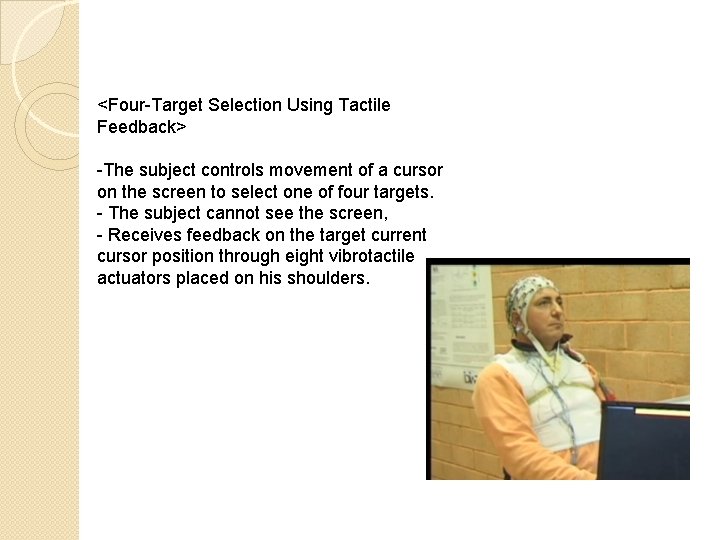
<Four-Target Selection Using Tactile Feedback> -The subject controls movement of a cursor on the screen to select one of four targets. - The subject cannot see the screen, - Receives feedback on the target current cursor position through eight vibrotactile actuators placed on his shoulders.
- Slides: 35