
IT Infrastructure Hardware September 16 2015 LEARNING GOALS
IT Infrastructure: Hardware September 16, 2015
LEARNING GOALS q Identify the major components of modern PCs q Explain the role of the components of a computer system; § § Explain input devices and how they operate. Describe output devices and how they operate. Describe I/O (secondary storage) devices and how they operate. Explain the role of the CPU and the RAM. q Explain how to improve computer’s performance q Describe various types of computers. 2
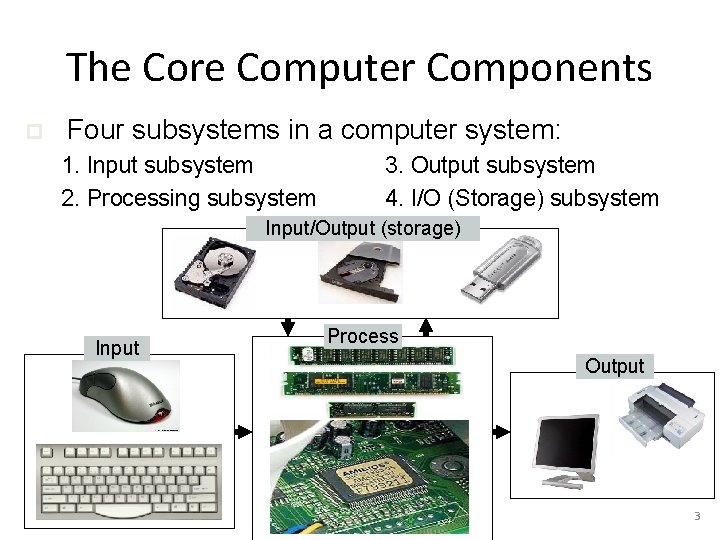
The Core Computer Components p Four subsystems in a computer system: 1. Input subsystem 2. Processing subsystem 3. Output subsystem 4. I/O (Storage) subsystem Input/Output (storage) Input Process Output 3
Input subsystem p Main functions: n n n p p Allowing the user to enter data Converting data into electronic form Transmitting data to the Processing subsystem Includes keyboard, mouse, etc. Question: Name five other input devices p p p ____________________________ ______________ 4
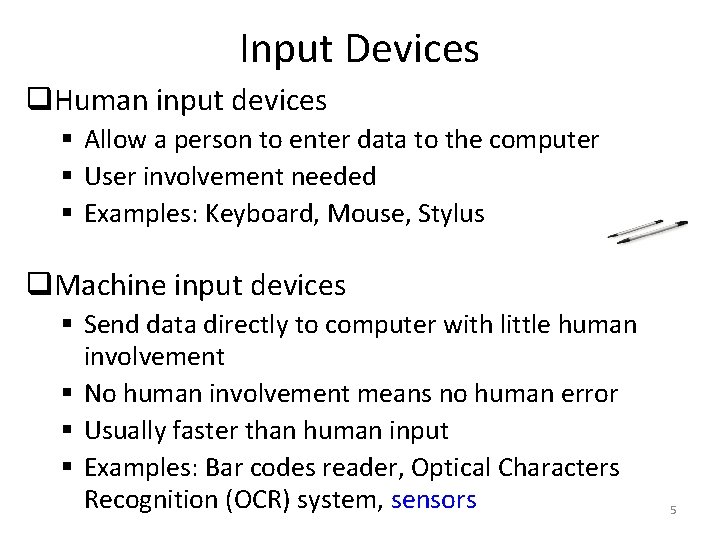
Input Devices q. Human input devices § Allow a person to enter data to the computer § User involvement needed § Examples: Keyboard, Mouse, Stylus q. Machine input devices § Send data directly to computer with little human involvement § No human involvement means no human error § Usually faster than human input § Examples: Bar codes reader, Optical Characters Recognition (OCR) system, sensors 5
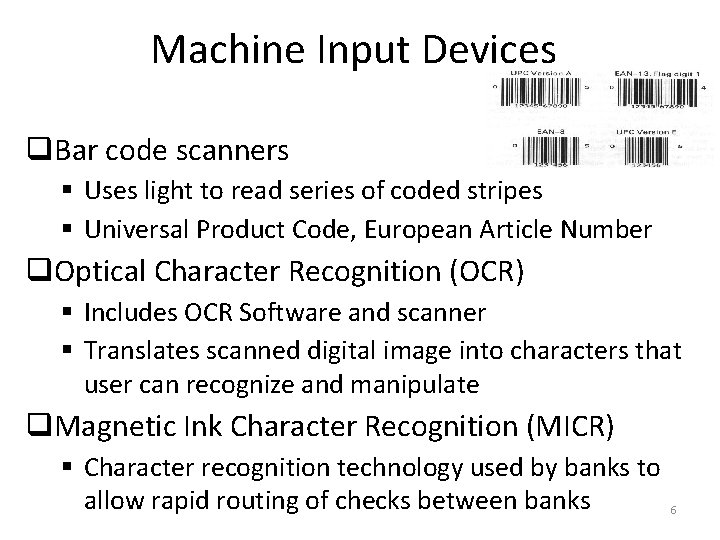
Machine Input Devices q. Bar code scanners § Uses light to read series of coded stripes § Universal Product Code, European Article Number q. Optical Character Recognition (OCR) § Includes OCR Software and scanner § Translates scanned digital image into characters that user can recognize and manipulate q. Magnetic Ink Character Recognition (MICR) § Character recognition technology used by banks to allow rapid routing of checks between banks 6
Output subsystem p p p Main function: Show processing results Includes monitor, printer, etc. Q: Name two other output devices p p ____________________________ 7
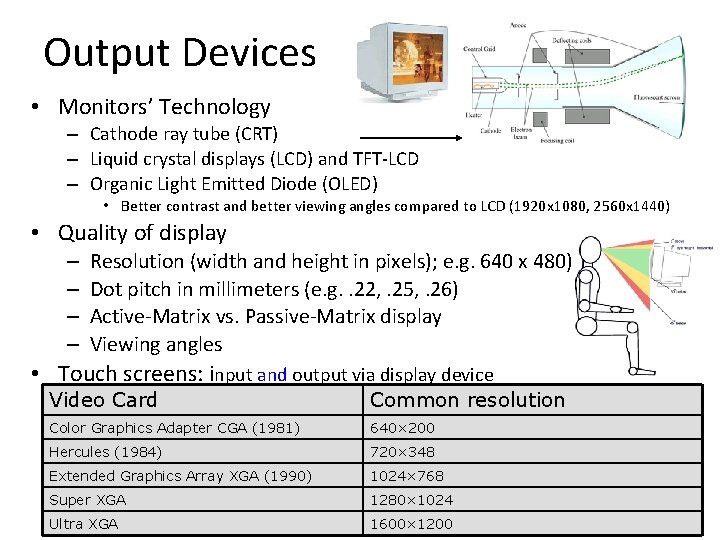
Output Devices • Monitors’ Technology – Cathode ray tube (CRT) – Liquid crystal displays (LCD) and TFT-LCD – Organic Light Emitted Diode (OLED) • Better contrast and better viewing angles compared to LCD (1920 x 1080, 2560 x 1440) • Quality of display – – Resolution (width and height in pixels); e. g. 640 x 480) Dot pitch in millimeters (e. g. . 22, . 25, . 26) Active-Matrix vs. Passive-Matrix display Viewing angles • Touch screens: input and output via display device Video Card Common resolution Color Graphics Adapter CGA (1981) 640× 200 Hercules (1984) 720× 348 Extended Graphics Array XGA (1990) 1024× 768 Super XGA 1280× 1024 Ultra XGA 1600× 1200 8
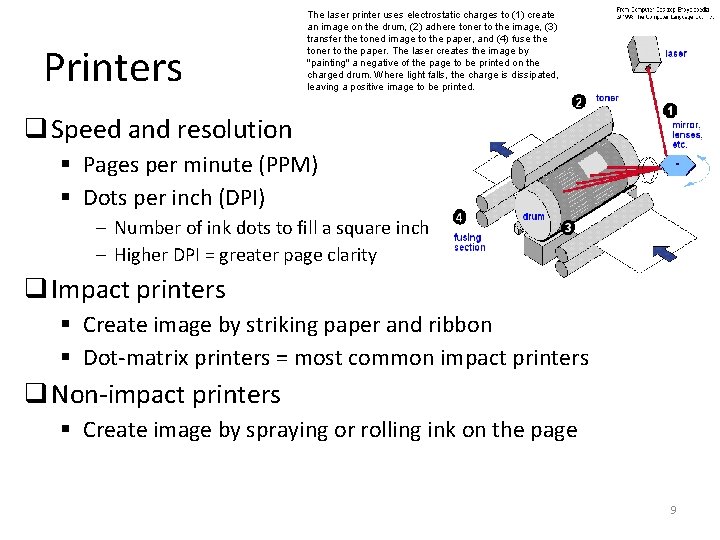
Printers The laser printer uses electrostatic charges to (1) create an image on the drum, (2) adhere toner to the image, (3) transfer the toned image to the paper, and (4) fuse the toner to the paper. The laser creates the image by "painting" a negative of the page to be printed on the charged drum. Where light falls, the charge is dissipated, leaving a positive image to be printed. q Speed and resolution § Pages per minute (PPM) § Dots per inch (DPI) – Number of ink dots to fill a square inch – Higher DPI = greater page clarity q Impact printers § Create image by striking paper and ribbon § Dot-matrix printers = most common impact printers q Non-impact printers § Create image by spraying or rolling ink on the page 9
Non-impact Printers q. Ink-jet technology printers § Spray ink on the paper § Quiet § Color is readily and cheaply available q. Laser printers § Laser heats drum which rolls ink (toner) on paper § Can be faster than ink-jet § More expensive than ink-jet 10
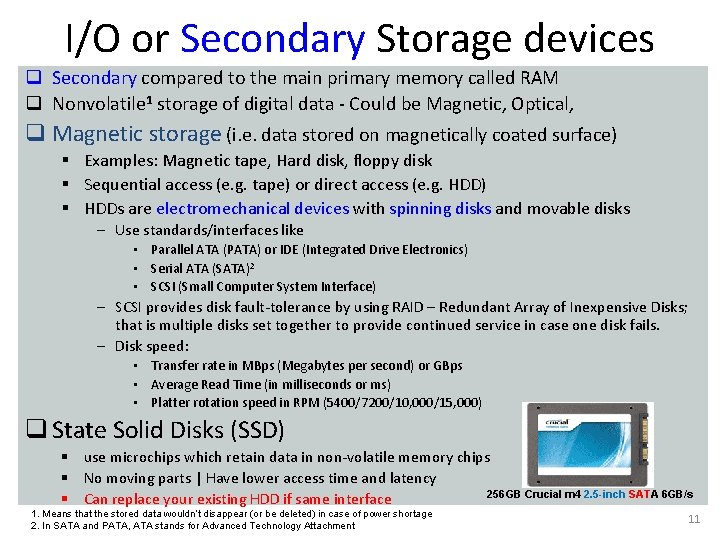
I/O or Secondary Storage devices q Secondary compared to the main primary memory called RAM q Nonvolatile 1 storage of digital data - Could be Magnetic, Optical, q Magnetic storage (i. e. data stored on magnetically coated surface) § Examples: Magnetic tape, Hard disk, floppy disk § Sequential access (e. g. tape) or direct access (e. g. HDD) § HDDs are electromechanical devices with spinning disks and movable disks – Use standards/interfaces like • Parallel ATA (PATA) or IDE (Integrated Drive Electronics) • Serial ATA (SATA)2 • SCSI (Small Computer System Interface) – SCSI provides disk fault-tolerance by using RAID – Redundant Array of Inexpensive Disks; that is multiple disks set together to provide continued service in case one disk fails. – Disk speed: • Transfer rate in MBps (Megabytes per second) or GBps • Average Read Time (in milliseconds or ms) • Platter rotation speed in RPM (5400/7200/10, 000/15, 000) q State Solid Disks (SSD) § use microchips which retain data in non-volatile memory chips § No moving parts | Have lower access time and latency 256 GB Crucial m 4 2. 5 -inch SATA 6 GB/s § Can replace your existing HDD if same interface 1. Means that the stored data wouldn’t disappear (or be deleted) in case of power shortage 2. In SATA and PATA, ATA stands for Advanced Technology Attachment 11
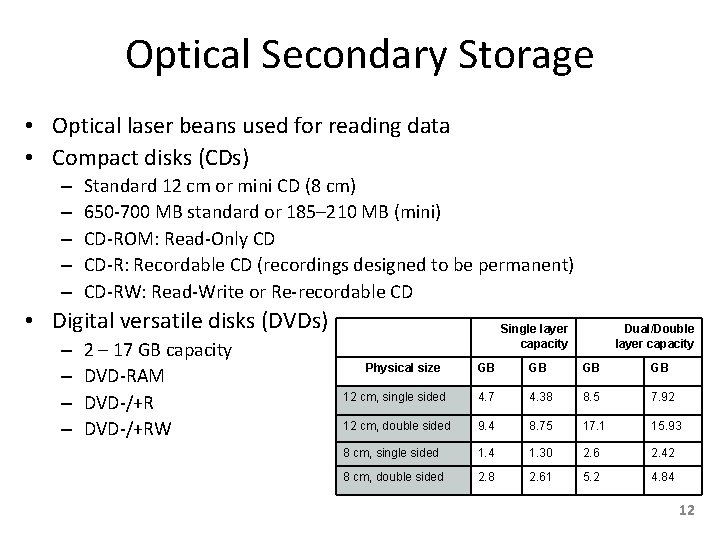
Optical Secondary Storage • Optical laser beans used for reading data • Compact disks (CDs) – – – Standard 12 cm or mini CD (8 cm) 650 -700 MB standard or 185– 210 MB (mini) CD-ROM: Read-Only CD CD-R: Recordable CD (recordings designed to be permanent) CD-RW: Read-Write or Re-recordable CD • Digital versatile disks (DVDs) – – 2 – 17 GB capacity DVD-RAM DVD-/+RW Single layer capacity Physical size Dual/Double layer capacity GB GB 12 cm, single sided 4. 7 4. 38 8. 5 7. 92 12 cm, double sided 9. 4 8. 75 17. 1 15. 93 8 cm, single sided 1. 4 1. 30 2. 6 2. 42 8 cm, double sided 2. 8 2. 61 5. 2 4. 84 12
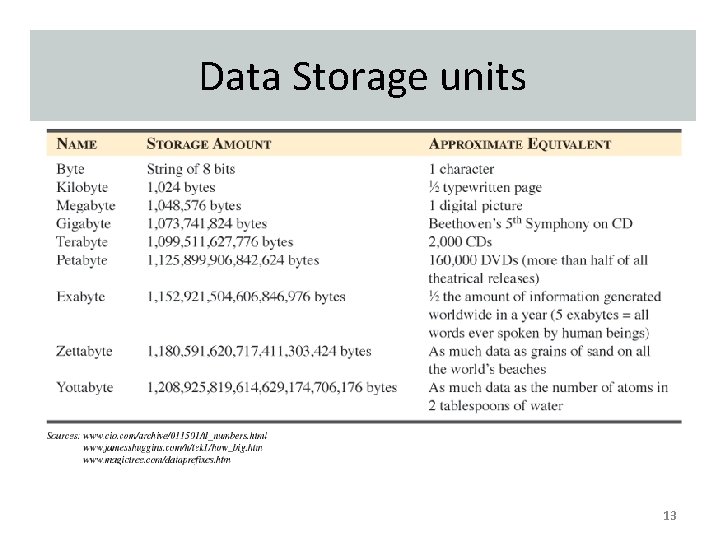
Data Storage units 13
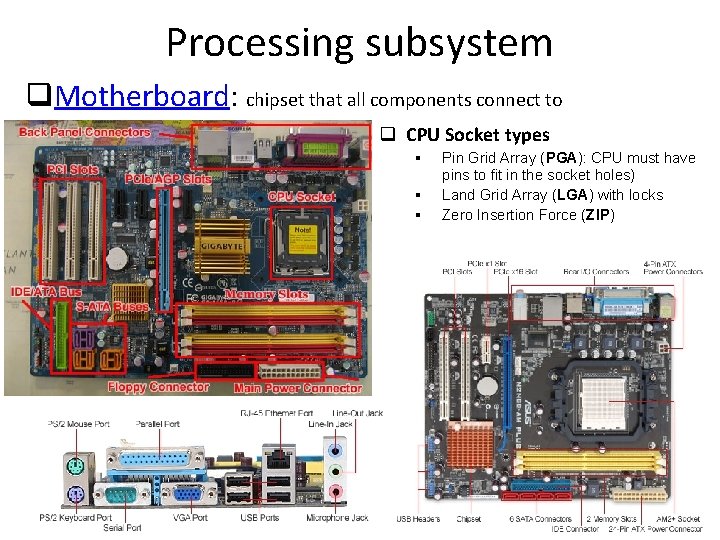
Processing subsystem q. Motherboard: chipset that all components connect to q CPU Socket types § § § Pin Grid Array (PGA): CPU must have pins to fit in the socket holes) Land Grid Array (LGA) with locks Zero Insertion Force (ZIP) 14
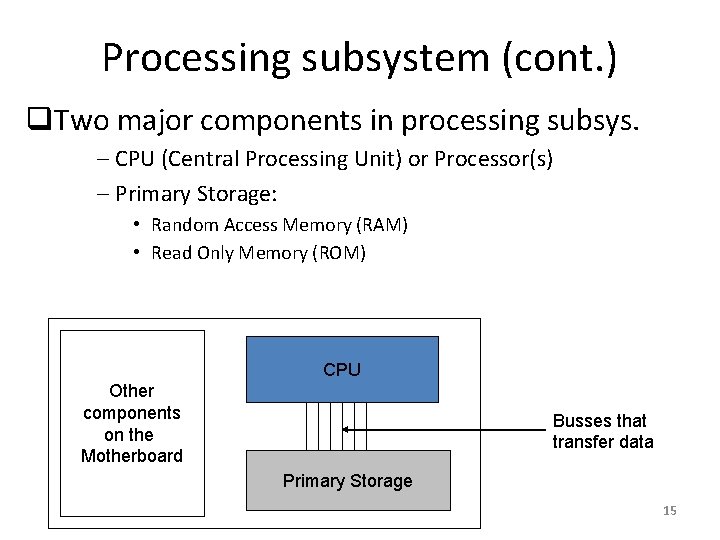
Processing subsystem (cont. ) q. Two major components in processing subsys. – CPU (Central Processing Unit) or Processor(s) – Primary Storage: • Random Access Memory (RAM) • Read Only Memory (ROM) CPU Other components on the Motherboard Busses that transfer data Primary Storage 15
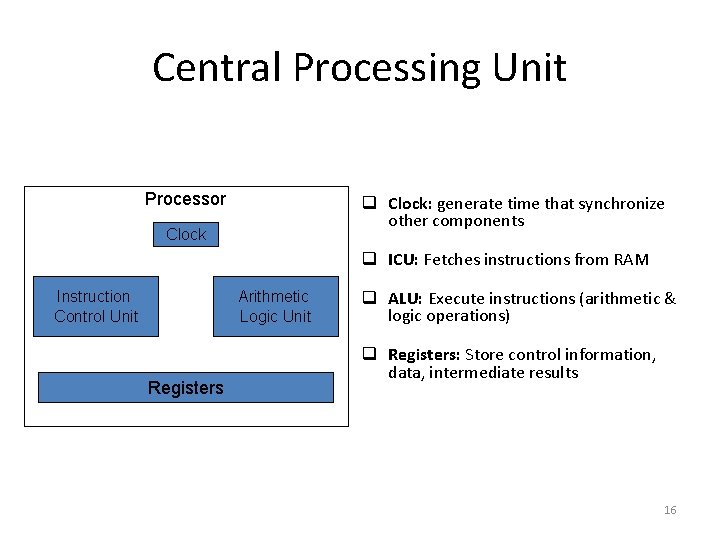
Central Processing Unit Processor q Clock: generate time that synchronize other components Clock q ICU: Fetches instructions from RAM Instruction Control Unit Arithmetic Logic Unit Registers q ALU: Execute instructions (arithmetic & logic operations) q Registers: Store control information, data, intermediate results 16
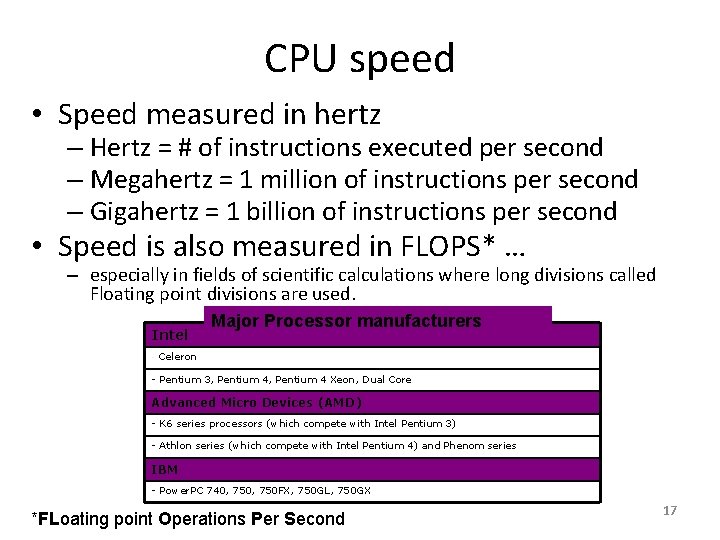
CPU speed • Speed measured in hertz – Hertz = # of instructions executed per second – Megahertz = 1 million of instructions per second – Gigahertz = 1 billion of instructions per second • Speed is also measured in FLOPS* … – especially in fields of scientific calculations where long divisions called Floating point divisions are used. Intel - Major Processor manufacturers Celeron - Pentium 3, Pentium 4 Xeon, Dual Core Advanced Micro Devices (AMD) - K 6 series processors (which compete with Intel Pentium 3) - Athlon series (which compete with Intel Pentium 4) and Phenom series IBM - Power. PC 740, 750 FX, 750 GL, 750 GX *FLoating point Operations Per Second 17
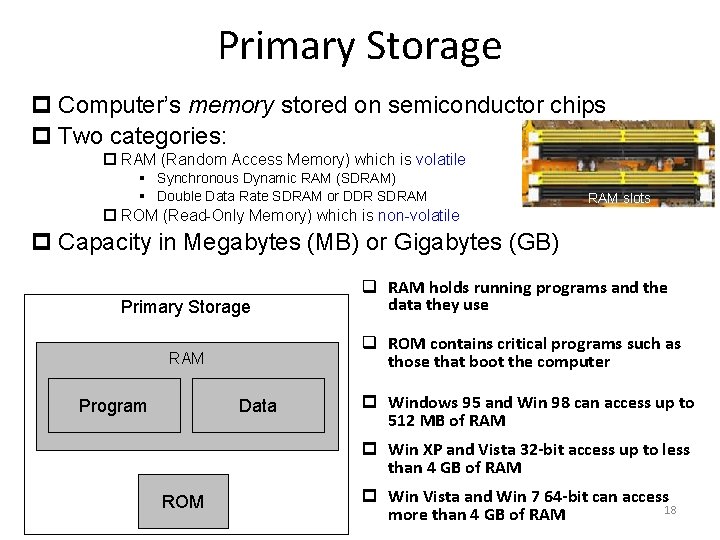
Primary Storage p Computer’s memory stored on semiconductor chips p Two categories: p RAM (Random Access Memory) which is volatile § Synchronous Dynamic RAM (SDRAM) § Double Data Rate SDRAM or DDR SDRAM p ROM (Read-Only Memory) which is non-volatile RAM slots p Capacity in Megabytes (MB) or Gigabytes (GB) Primary Storage q ROM contains critical programs such as those that boot the computer RAM Program q RAM holds running programs and the data they use Data p Windows 95 and Win 98 can access up to 512 MB of RAM p Win XP and Vista 32 -bit access up to less than 4 GB of RAM ROM p Win Vista and Win 7 64 -bit can access 18 more than 4 GB of RAM
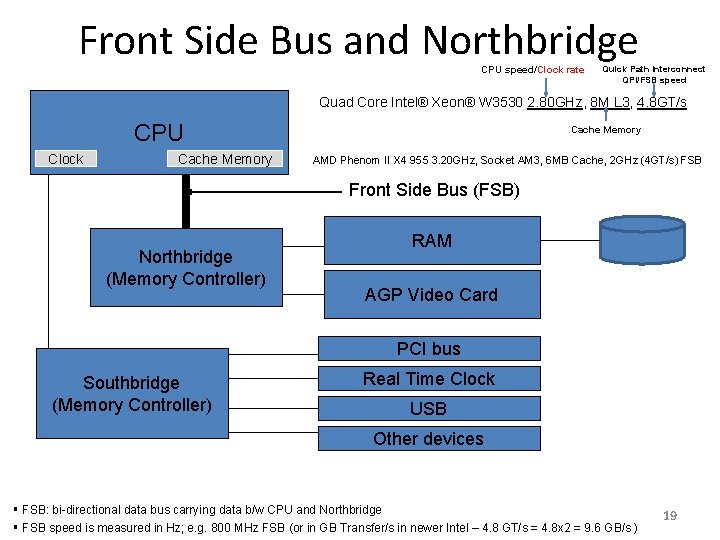
Front Side Bus and Northbridge CPU speed/Clock rate Quick Path Interconnect QPI/FSB speed Quad Core Intel® Xeon® W 3530 2. 80 GHz, 8 M L 3, 4. 8 GT/s CPU Clock Cache Memory AMD Phenom II X 4 955 3. 20 GHz, Socket AM 3, 6 MB Cache, 2 GHz (4 GT/s) FSB Front Side Bus (FSB) Northbridge (Memory Controller) RAM AGP Video Card PCI bus Southbridge (Memory Controller) Real Time Clock USB Other devices § FSB: bi-directional data bus carrying data b/w CPU and Northbridge § FSB speed is measured in Hz; e. g. 800 MHz FSB (or in GB Transfer/s in newer Intel – 4. 8 GT/s = 4. 8 x 2 = 9. 6 GB/s ) 19
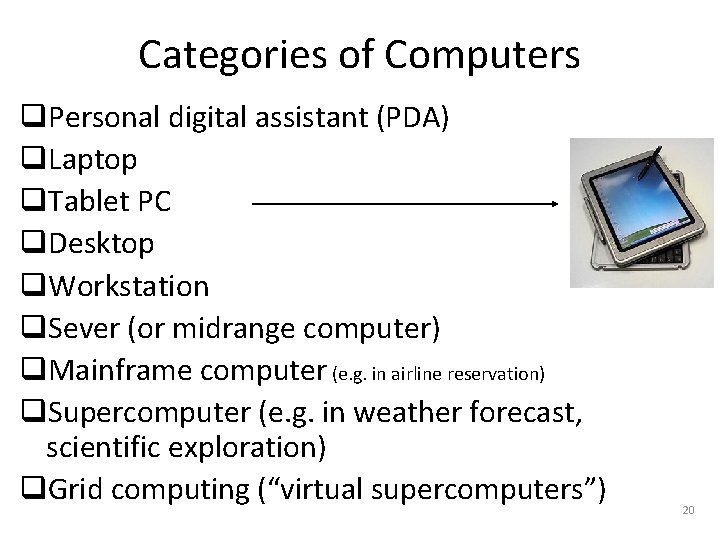
Categories of Computers q. Personal digital assistant (PDA) q. Laptop q. Tablet PC q. Desktop q. Workstation q. Sever (or midrange computer) q. Mainframe computer (e. g. in airline reservation) q. Supercomputer (e. g. in weather forecast, scientific exploration) q. Grid computing (“virtual supercomputers”) 20
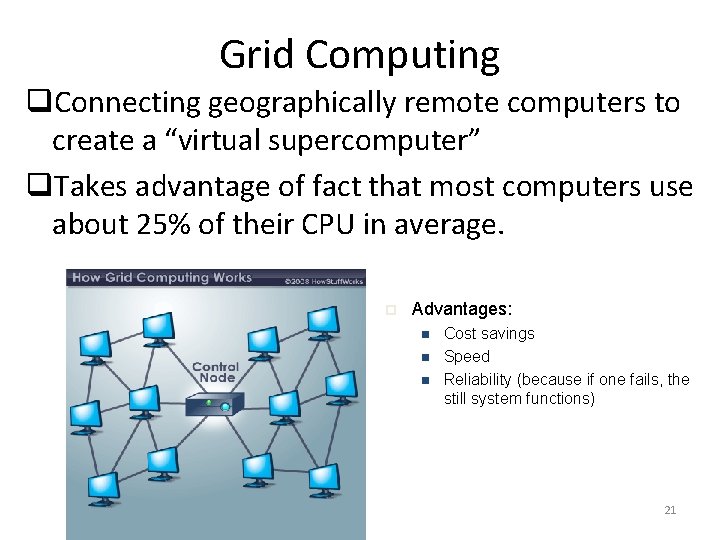
Grid Computing q. Connecting geographically remote computers to create a “virtual supercomputer” q. Takes advantage of fact that most computers use about 25% of their CPU in average. p Advantages: n n n Cost savings Speed Reliability (because if one fails, the still system functions) 21
Summary Questions Notes 1) Name five (3) computer input devices 2) Name three (3) computer output devices 3) What computer devices can be used for both input and output? What is the difference b/w impact printers and inkjet printers? 4) What is the difference between: (a) a Kilobyte and a Gigabyte? (b) a Megabyte and a Gigabyte? 5) Name the two main types of monitors used in today’s computer systems. 6) (a) Name main components of the Processing subsystem. (b) What is the function of the ALU? 7) Explain the difference between RAM and ROM. 8) Describe the various types of computers. 9) Distinguish between primary and secondary storage 22
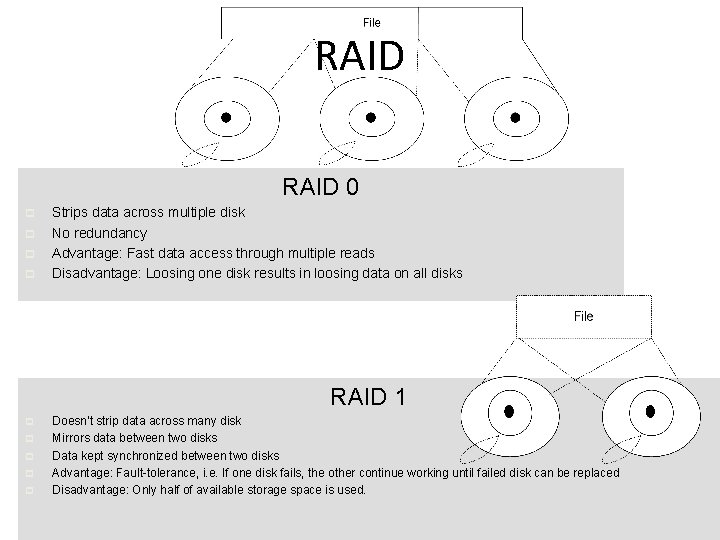
RAID 0 p p Strips data across multiple disk No redundancy Advantage: Fast data access through multiple reads Disadvantage: Loosing one disk results in loosing data on all disks RAID 1 p p p Doesn’t strip data across many disk Mirrors data between two disks Data kept synchronized between two disks Advantage: Fault-tolerance, i. e. If one disk fails, the other continue working until failed disk can be replaced Disadvantage: Only half of available storage space is used. 23
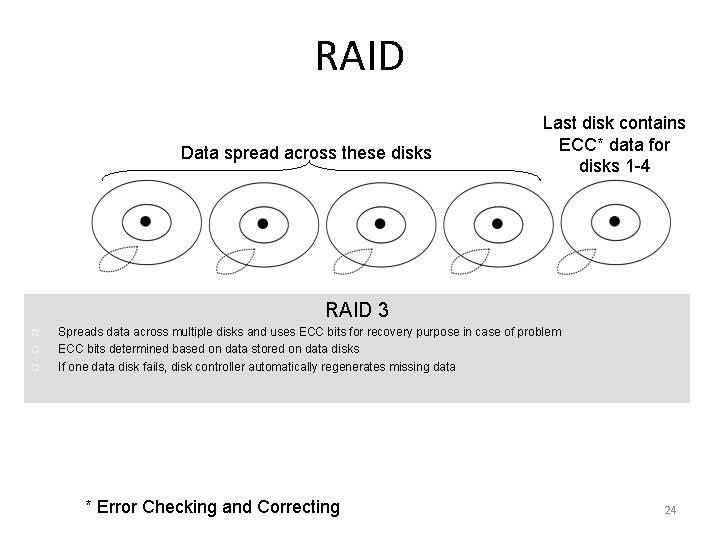
RAID Data spread across these disks Last disk contains ECC* data for disks 1 -4 RAID 3 p p p Spreads data across multiple disks and uses ECC bits for recovery purpose in case of problem ECC bits determined based on data stored on data disks If one data disk fails, disk controller automatically regenerates missing data * Error Checking and Correcting 24
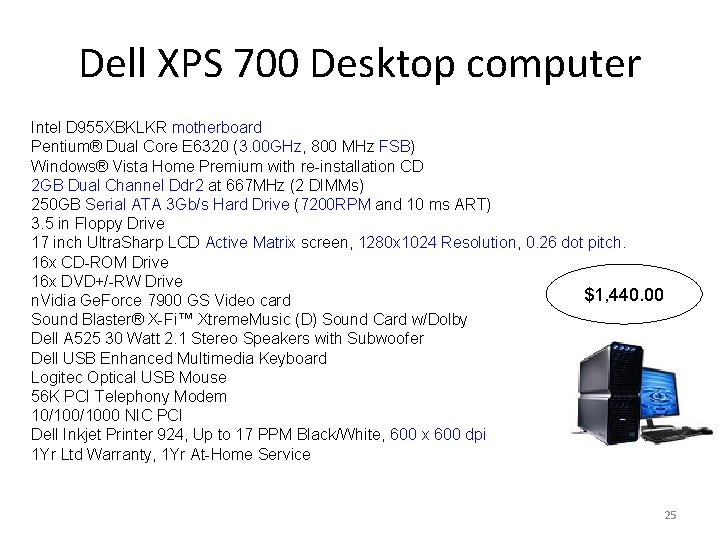
Dell XPS 700 Desktop computer Intel D 955 XBKLKR motherboard Pentium® Dual Core E 6320 (3. 00 GHz, 800 MHz FSB) Windows® Vista Home Premium with re-installation CD 2 GB Dual Channel Ddr 2 at 667 MHz (2 DIMMs) 250 GB Serial ATA 3 Gb/s Hard Drive (7200 RPM and 10 ms ART) 3. 5 in Floppy Drive 17 inch Ultra. Sharp LCD Active Matrix screen, 1280 x 1024 Resolution, 0. 26 dot pitch. 16 x CD-ROM Drive 16 x DVD+/-RW Drive $1, 440. 00 n. Vidia Ge. Force 7900 GS Video card Sound Blaster® X-Fi™ Xtreme. Music (D) Sound Card w/Dolby Dell A 525 30 Watt 2. 1 Stereo Speakers with Subwoofer Dell USB Enhanced Multimedia Keyboard Logitec Optical USB Mouse 56 K PCI Telephony Modem 10/1000 NIC PCI Dell Inkjet Printer 924, Up to 17 PPM Black/White, 600 x 600 dpi 1 Yr Ltd Warranty, 1 Yr At-Home Service 25
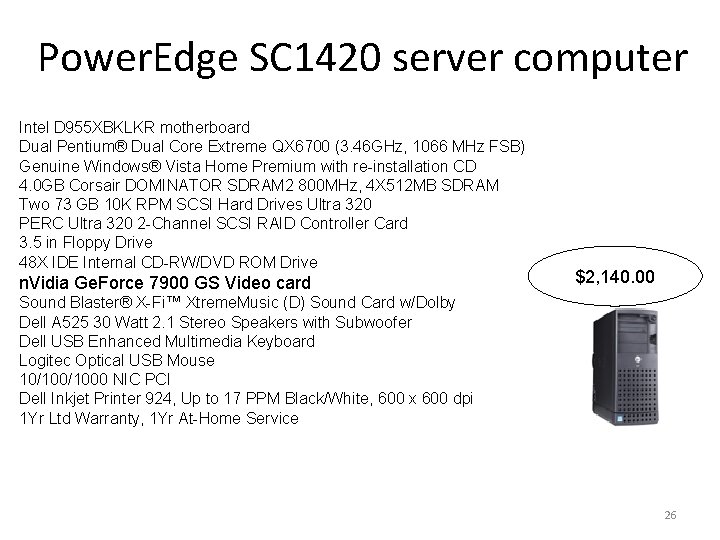
Power. Edge SC 1420 server computer Intel D 955 XBKLKR motherboard Dual Pentium® Dual Core Extreme QX 6700 (3. 46 GHz, 1066 MHz FSB) Genuine Windows® Vista Home Premium with re-installation CD 4. 0 GB Corsair DOMINATOR SDRAM 2 800 MHz, 4 X 512 MB SDRAM Two 73 GB 10 K RPM SCSI Hard Drives Ultra 320 PERC Ultra 320 2 -Channel SCSI RAID Controller Card 3. 5 in Floppy Drive 48 X IDE Internal CD-RW/DVD ROM Drive n. Vidia Ge. Force 7900 GS Video card $2, 140. 00 Sound Blaster® X-Fi™ Xtreme. Music (D) Sound Card w/Dolby Dell A 525 30 Watt 2. 1 Stereo Speakers with Subwoofer Dell USB Enhanced Multimedia Keyboard Logitec Optical USB Mouse 10/1000 NIC PCI Dell Inkjet Printer 924, Up to 17 PPM Black/White, 600 x 600 dpi 1 Yr Ltd Warranty, 1 Yr At-Home Service 26
- Slides: 26