
IT Infrastructure Architecture Infrastructure Building Blocks and Concepts
IT Infrastructure Architecture Infrastructure Building Blocks and Concepts Performance Concepts (chapter 5)
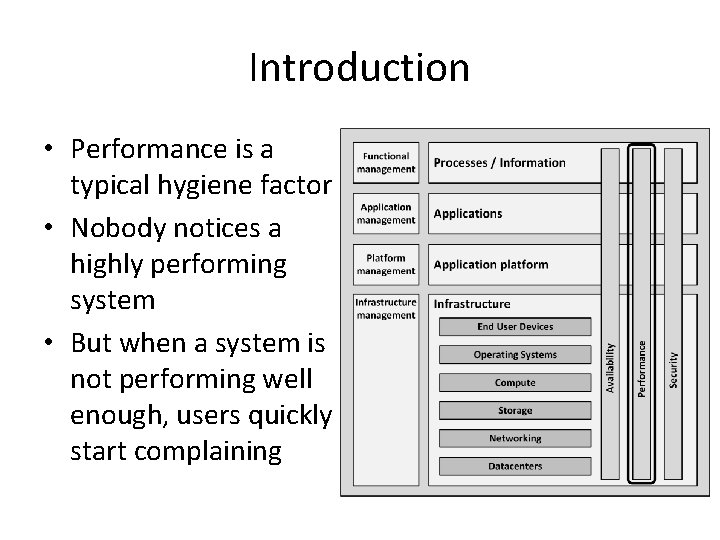
Introduction • Performance is a typical hygiene factor • Nobody notices a highly performing system • But when a system is not performing well enough, users quickly start complaining
Perceived performance • Perceived performance refers to how quickly a system appears to perform its task • In general, people tend to overestimate their own patience • People tend to value predictability in performance – When the performance of a system is fluctuating, users remember a bad experience – Even if the fluctuation is relatively rare
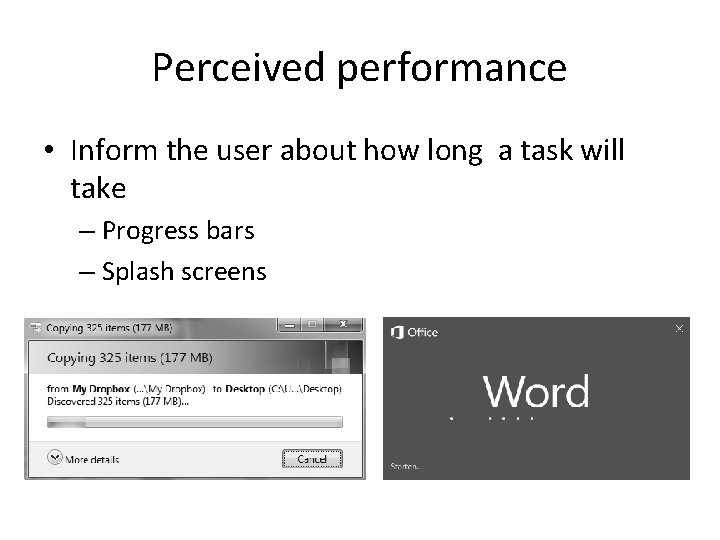
Perceived performance • Inform the user about how long a task will take – Progress bars – Splash screens
Performance during infrastructure design
Performance during infrastructure design • A solution must be designed, implemented, and supported to meet the performance requirements – Even under increasing load • Calculating performance of a system in the design phase is: – Extremely difficult – Very unreliable
Performance during infrastructure design • Performance must be considered: – When the system works as expected – When the system is in a special state, like: • • Failing parts Maintenance state Performing backup Running batch jobs • Some ways to do this are: – Benchmarking – Using vendor experience – Prototyping – User Profiling
Benchmarking • A benchmark uses a specific test program to assess the relative performance of an infrastructure component • Benchmarks compare: – Performance of various subsystems – Across different system architectures
Benchmarking • Benchmarks comparing the raw speed of parts of an infrastructure – Like the speed difference between processors or between disk drives – Not taking into account the typical usage of such components – Examples: • Floating Point Operations Per Second – FLOPS • Million Instructions Per Second – MIPS
Vendor experience • The best way to determine the performance of a system in the design phase: use the experience of vendors • They have a lot of experience running their products in various infrastructure configurations • Vendors can provide: – Tools – Figures – Best practices
Prototyping • Also known as proof of concept (Po. C) • Prototypes measure the performance of a system at an early stage • Building prototypes: – Hiring equipment from suppliers – Using datacenter capacity at a vendor’s premise – Using cloud computing resources • Focus on those parts of the system that pose the highest risk, as early as possible in the design process
User profiling • Predict the load a new software system will pose on the infrastructure before the software is actually built • Get a good indication of the expected usage of the system • Steps: – Define a number of typical user groups (personas) – Create a list of tasks personas will perform on the new system – Decompose tasks to infrastructure actions – Estimate the load per infrastructure action – Calculate the total load
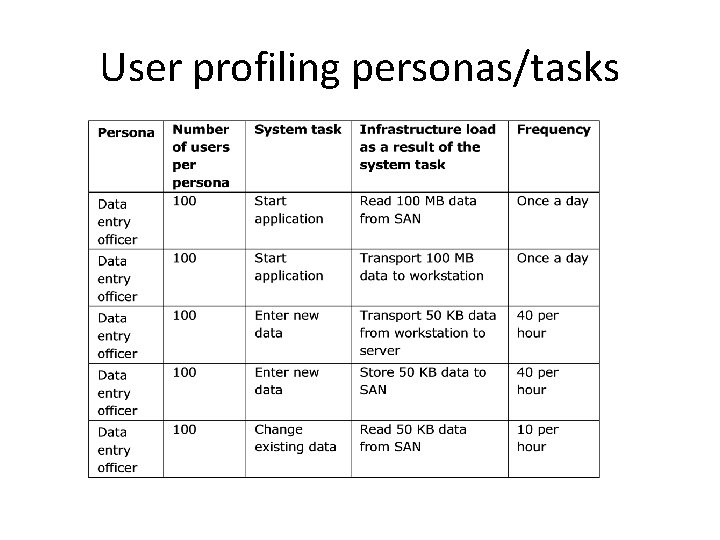
User profiling personas/tasks

User profiling Infrastructure load
Performance of a running system
Managing bottlenecks • The performance of a system is based on: – The performance of all its components – The interoperability of various components • A component causing the system to reach some limit is referred to as the bottleneck of the system • Every system has at least one bottleneck that limits performance • If the bottleneck does not negatively influence performance of the complete system under the highest expected load, it is OK
Performance testing • Load testing - shows how a system performs under the expected load • Stress testing - shows how a system reacts when it is under extreme load • Endurance testing - shows how a system behaves when it is used at the expected load for a long period of time
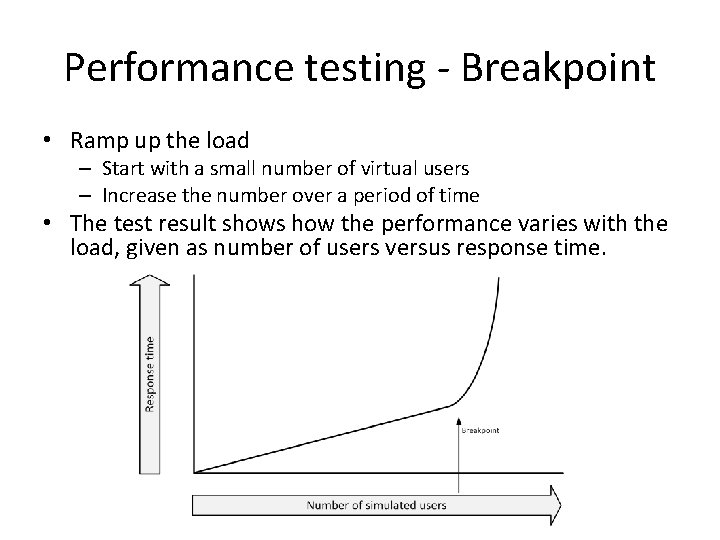
Performance testing - Breakpoint • Ramp up the load – Start with a small number of virtual users – Increase the number over a period of time • The test result shows how the performance varies with the load, given as number of users versus response time.
Performance testing • Performance testing software typically uses: – One or more servers to act as injectors • Each emulating a number of users • Each running a sequence of interactions – A test conductor • Coordinating tasks • Gathering metrics from each of the injectors • Collecting performance data for reporting purposes
Performance testing • Performance testing should be done in a production-like environment – Performance tests in a development environment usually lead to results that are highly unreliable – Even when underpowered test systems perform well enough to get good test results, the faster production system could show performance issues that did not occur in the tests • To reduce cost: – Use a temporary (hired) test environment
Performance patterns
Increasing performance on upper layers • 80% of the performance issues are due to badly behaving applications • Application performance can benefit from: – Database and application tuning – Prioritizing tasks – Working from memory as much as possible (as opposed to working with data on disk) – Making good use of queues and schedulers • Typically more effective than adding compute power
Disk caching • Disks are mechanical devices that are slow by nature • Caching can be implemented i: – Disks – Disk controllers – Operating system • All non-used memory in operating systems is used for disk cache • Over time, all memory gets filled with previously stored disk requests and prefetched disk blocks, speeding up applications. • Cache memory: – Stores all data recently read from disk – Stores some of the disk blocks following the recently read disk blocks
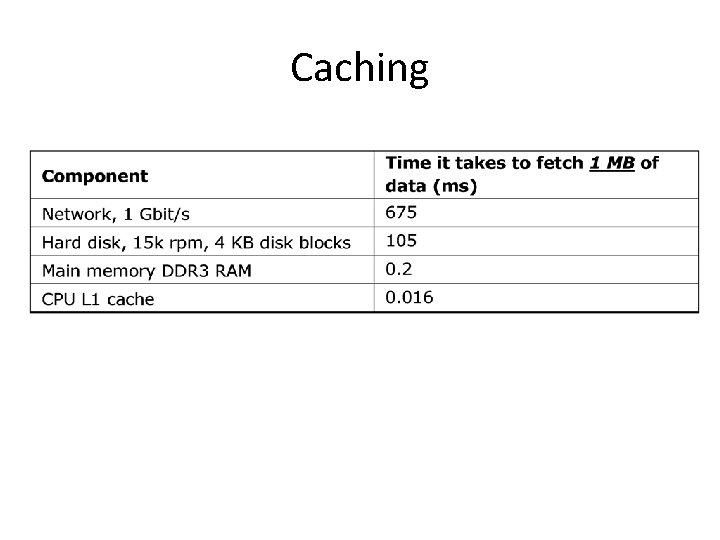
Caching
Web proxies • When users browse the internet, data can be cached in a web proxy server – A web proxy server is a type of cache – Earlier accessed data can be fetched from cache, instead of from the internet • Benefits: – Users get their data faster – All other users are provided more bandwidth to the internet, as the data does not have to be downloaded again
Operational data store • An Operational Data Store (ODS) is a read-only replica of a part of a database, for a specific use • Frequently used information is retrieved from a small ODS database – The main database is used less for retrieving information – The performance of the main database is not degraded
Front-end servers • Front-end servers serve data to end users – Typically web servers • To increase performance, store static data on the front-end servers – Pictures are a good candidate – Significantly lowers the amount of traffic to backend systems • In addition, a reverse proxy can be used – Automatically cache most requested data
In-memory databases • In special circumstances, entire databases can be run from memory instead of from disk • In-memory databases are used in situations where performance is crucial – Real-time SCADA systems – High performance online transaction processing (OLTP) systems • As an example, in 2011 SAP AG introduced HANA, an inmemory database for SAP systems • Special arrangements must be made to ensure data is not lost when a power failure occurs
Scalability • Scalability indicates the ease in with which a system can be modified, or components can be added, to handle increasing load • Two ways to scale a system: – Vertical scaling (scale up) - adding resources to a single component – Horizontal scaling (scale out) - adding more components to the infrastructure
Scalability – Vertical scaling • Adding more resources, for example: – Server: more memory, CPU’s – Network switch: adding more ports – Storage: Replace small disks by larger disks • Vertical scaling is easy to do • It quickly reaches a limit – The infrastructure component is “full”
Scalability – Horizontal scaling • Adding more components to the infrastructure, for example: – Adding servers to a web server farm – Adding disk cabinets to a storage system • In theory, horizontal scaling scales much better – Be aware of bottlenecks • Doubling the number of components does not necessarily double the performance • Horizontal scaling is the basis for cloud computing • Applications must be aware of scaling infrastructure components
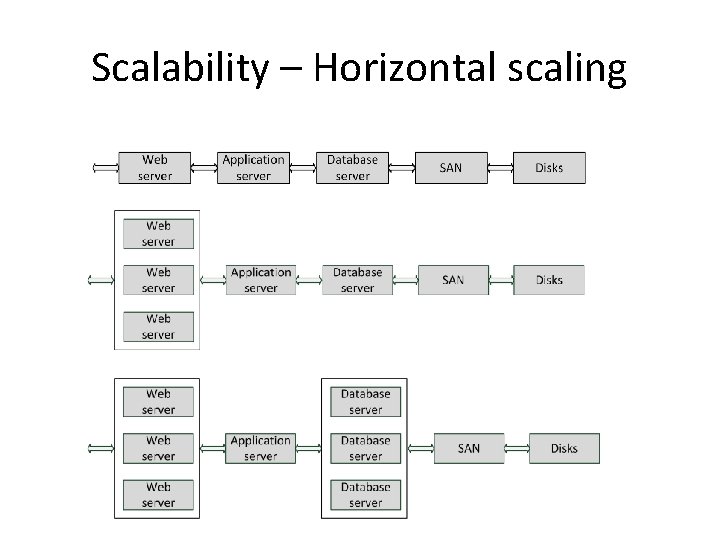
Scalability – Horizontal scaling
Load balancing • Load balancing uses multiple servers that perform identical tasks – Examples: • Web server farm • Mail server farm • FTP (File Transfer Protocol) server farm • A load balancer spreads the load over the available machines – Checks the current load on each server in the farm – Sends incoming requests to the least busy server •
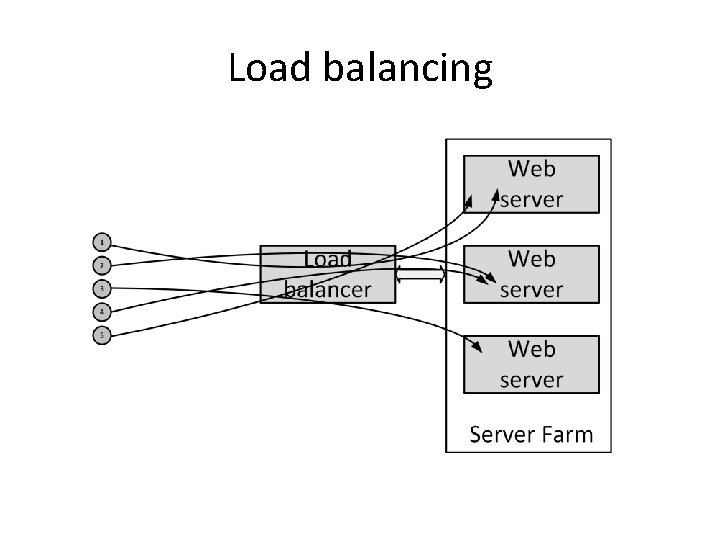
Load balancing
Load balancing • Advanced load balancers can spread the load based on: – The number of connections a server has – The measured response time of a server • The application running on a load balanced system must be able to cope with the fact that each request can be handled by a different server – The load balancer should contain the states of the application – The load balancing mechanism can arrange that a user’s session is always connected to the same server – If a server in the server farm goes down, its session information becomes inaccessible and sessions are lost
Load balancing • A load balancer increases availability – When a server in the server farm is unavailable, the load balancer notices this and ensures no requests are sent to the unavailable server until it is back online again • The availability of the load balancer itself is very important – Load balancers are typically setup in a failover configuration
Load balancing • Network load balancing: – Spread network load over multiple network connections – Most network switches support trunking • Multiple Ethernet connections are combined to get a virtual Ethernet connection providing higher throughput • The load is balanced over the connections by the network switch • Storage load balancing: – Using multiple disks to spread the load of reads and writes – Use multiple connections between servers and storage systems
High performance clusters • High performance clusters provide a vast amount of computing power by combining many computer systems • A large number of cheap off the-shelf servers can create one large supercomputer • Used for calculation-intensive systems – – Weather forecasts Geological research Nuclear research Pharmaceutical research • TOP 500. org

Grid Computing • A computer grid is a high performance cluster that consists of systems that are spread geographically • The limited bandwidth is the bottleneck • Examples: – SETI@HOME – CERN LHC Computing Grid (140 computing centers in 35 countries) • Broker firms exist for commercial exploitation of grids • Security is a concern when computers in the grid are not under control
Design for use • Performance critical applications should be designed as such • Tips: – Know what the system will be used for • A large data warehouse needs a different infrastructure design than an online transaction processing system or a web application • Interactive systems are different than batch oriented systems – When possible, try to spread the load of the system over the available time
Design for use – In some cases, special products must be used for certain systems • Real-time operating systems • In-memory databases • Specially designed file systems – Use standard implementation plans that are proven in practice • Follow the vendor's recommended implementation • Have the vendors check the design you created – Move rarely used data from the main systems to other systems • Moving old data to a large historical database can speed up a smaller sized database
Capacity management • Capacity management guarantees high performance of a system in the long term • To ensure performance stays within acceptable limits, performance must be monitored • Trend analyses can be used to predict performance degradation • Anticipate on business changes (like forthcoming marketing campaigns)
- Slides: 42