
IT 523 Digital Image Processing Prof Asim Banerjee
IT 523 Digital Image Processing Prof. Asim Banerjee Lecture 3 6 th August 2007 IT 523 - Digital Image Processing
1. Improvement … Human Interpretation • • • Involves selection of printing procedures and distribution of brightness levels Improvements on processing methods for transmitted digital pictures Application areas include – – – – Archeology Astronomy Biology Industrial Applications Law enforcements Medical Imaging Space program etc. IT 523 - Digital Image Processing 2
2. Processing…Machine Perception • • Focuses on procedures for extracting from an image information in a form suitable for computer processing NOTE : Often this information bears little resemblance to visual features that human beings use in interpreting the content of an image. Application areas include: – – Automatic Optical Character Recognition Machine vision for product assembly and inspection Military recognizance Automatic fingerprint matching etc. IT 523 - Digital Image Processing 3
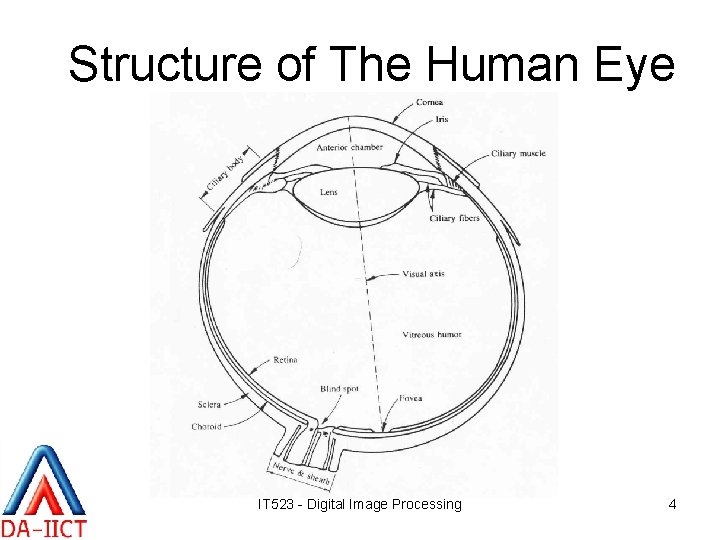
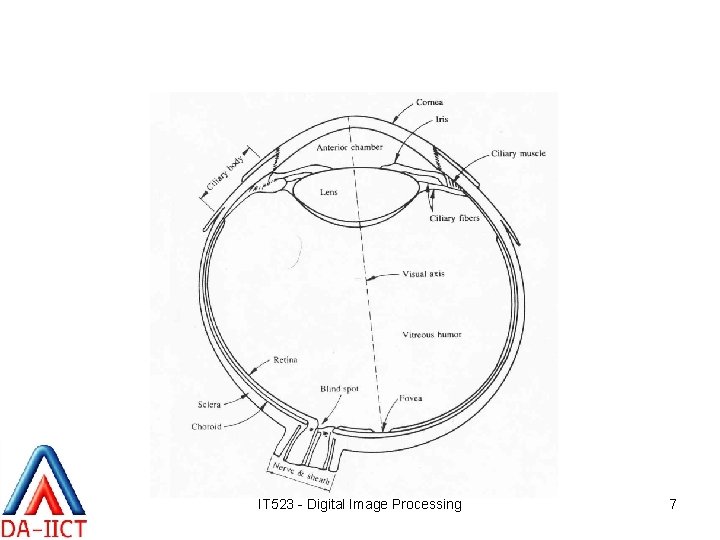
Structure of The Human Eye IT 523 - Digital Image Processing 4
Elements of HVP (1/2) • Structure of the human eye – • Image formation in the eye – – • Comprises of the cornea and sclera outer cover, the choroid and the retina The light from the object passes through the flexible lens The image is formed on the retina of the eye Brightness adaptation – – The range of intensity levels to which the system can adapt is enormous (~1010) Subjective brightness is a logarithmic function of the light intensity incident on the eye IT 523 - Digital Image Processing 5
Elements of HVP (2/2) • Brightness discrimination – – The total range of intensity levels the eye can discriminate simultaneously is rather small compared to the total adaptation range Ability to discriminate between two intensity values is not a simple function of intensity The visual system tends to undershoot or overshoot around boundary of regions of different intensities A region’s perceived brightness also depends on the intensity level of the surrounding region (simultaneous contrast) IT 523 - Digital Image Processing 6
IT 523 - Digital Image Processing 7
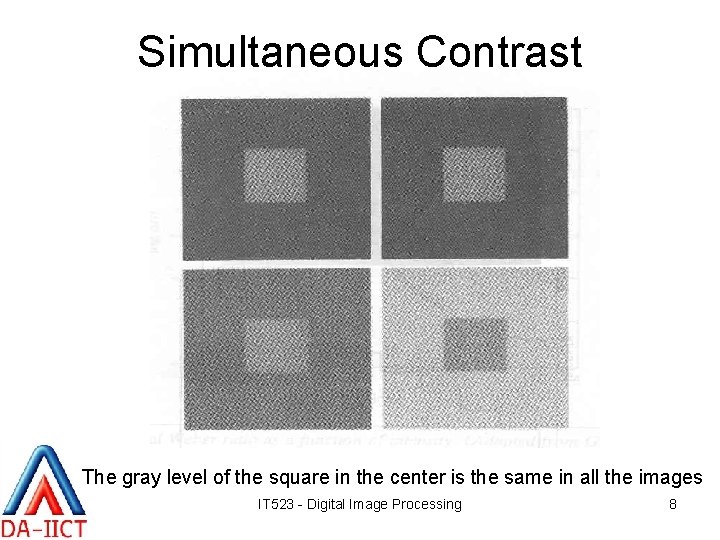
Simultaneous Contrast The gray level of the square in the center is the same in all the images IT 523 - Digital Image Processing 8
Assignment #1 Find out about the properties of the human visual system and state the possible usage of these properties in building DIP systems. Submit by: 5: 00 p. m. on Monday (13 th August 2007). IT 523 - Digital Image Processing 9
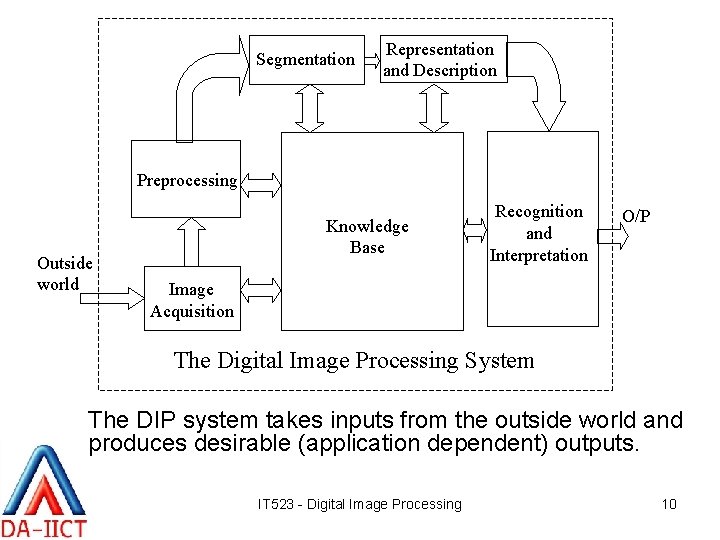
Segmentation Representation and Description Preprocessing Outside world Knowledge Base Recognition and Interpretation O/P Image Acquisition The Digital Image Processing System The DIP system takes inputs from the outside world and produces desirable (application dependent) outputs. IT 523 - Digital Image Processing 10
Image Acquisition • (1/2) Two elements are required to acquire a digital image – A physical device that is sensitive to a band in the electromagnetic spectrum (X-ray, Ultra Violet, Visible, Infrared) to produce an electrical signal proportional to the level of energy sensed (i. e. sensors or detectors) – A digitizer to convert this signal into digital form. NOTE: There are sensors available that directly give digital output. IT 523 - Digital Image Processing 11
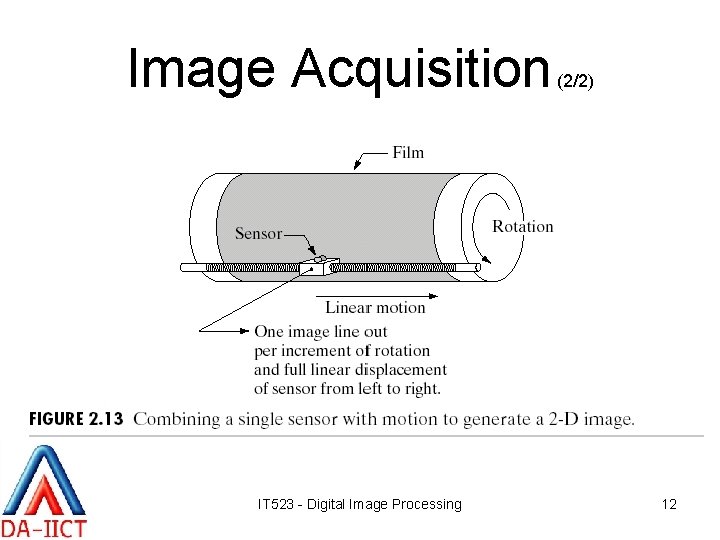
Image Acquisition IT 523 - Digital Image Processing (2/2) 12
Preprocessing • It improves the image in ways that increase the chances of success for the other processes • For example – Enhancing contrast – Removing noise – Isolating regions of interest (ROI). IT 523 - Digital Image Processing 13
Segmentation • It partitions an input image into its constituent parts or objects. NOTE: 1. Autonomous segmentation is one of the most difficult tasks in digital image processing. 2. Good segmentation ensures ease in achieving successful solution to an imaging problem. 3. Bad segmentation guarantee eventual failure to an imaging problem. IT 523 - Digital Image Processing 14
Representation & Description • Representation implies conversion of the data to a form suitable for computer processing e. g. boundary representation or complete region representation. • Description (or feature selection) deals with extracting features that result in some quantitative information of interest or features that can differentiate one class of objects from another. IT 523 - Digital Image Processing 15
Recognition & Interpretation • Recognition implies assigning of a label to an object based on information provided by its descriptors • Interpretation implies assigning of a meaning to an ensemble of recognized objects. IT 523 - Digital Image Processing 16
Image Knowledgebase • The knowledgebase stores the prior knowledge about the outside world (the problem domain) • The processing modules interact with the knowledgebase to aid in the processing. IT 523 - Digital Image Processing 17
Elements of DIP System (1/3) • Image acquisition – Scanners, video camera, CCD cameras, digitizers, etc. • Storage – Short term storage, on-line storage and archival storage • Processing – Small personal computers to dedicated processing hardware. IT 523 - Digital Image Processing 18
Elements of DIP System (2/3) • Communication – Local communication between the processing systems – Remote communication for transmission of images • Display – Monochrome Monitors to sophisticated display devices IT 523 - Digital Image Processing 19
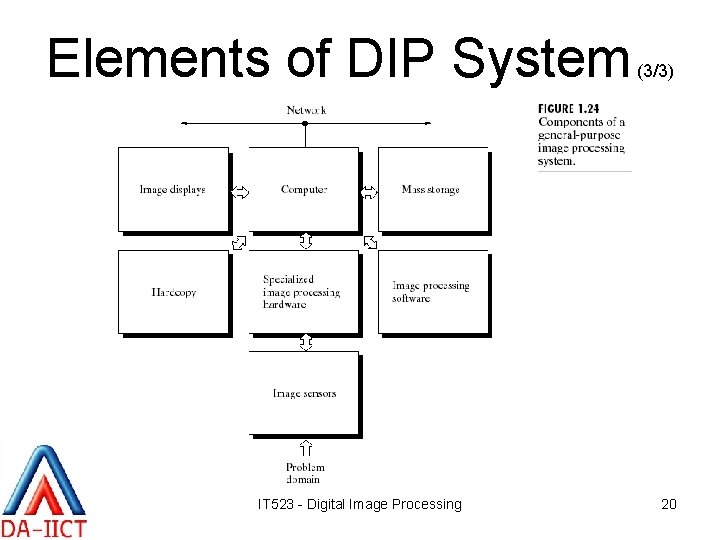
Elements of DIP System IT 523 - Digital Image Processing (3/3) 20

Image Sensing & Acquisition • The images of interest are generated by the combination of (1/4) those – An illumination source and – And the reflection or absorption of the energy from that source by the elements of the scene being imaged. • The principal arrangements detectors or sensors are: of the – Single imaging sensor – Line sensor – Array sensor. IT 523 - Digital Image Processing 21

Image Sensing & Acquisition (2/4) IT 523 - Digital Image Processing 22

Image Sensing & Acquisition (3/4) IT 523 - Digital Image Processing 23
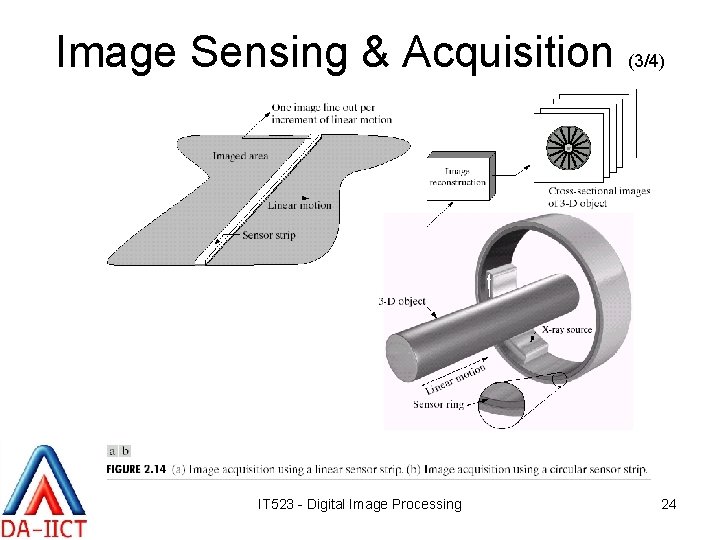
Image Sensing & Acquisition (3/4) IT 523 - Digital Image Processing 24

That’s all for now. IT 523 - Digital Image Processing 25
- Slides: 25