
IS 1500 Introduction to Web Development Java Script
IS 1500: Introduction to Web Development Java. Script: Form Validation & Exceptions Martin Schedlbauer, Ph. D. m. schedlbauer@neu. edu
Client-Side Scripting with Java. Script VALIDATING FORM INPUT IS 1500 Java. Script: Client-Side Forms 2
Validating Forms • The content of form elements should generally be validated via a Java. Script function to ensure that it contains the expected input. • For example: – Does a text field really contain a number or does it contain text? – Is the date valid? – Does the credit card number has 15 or 16 digits? – Does a mandatory field contain input or has it been left empty? – Is the input in the expected range? IS 1500 Java. Script: Client-Side Forms 3
Client-Side Validation • Take this scenario: – You are asking for a zip code as part of an address entry form. The user types in 021156 or Boston, MA – clearly both are wrong zip codes. If you don’t check the validity of the zip code format then you would send incorrect data to the server where it must be checked and then an error page would need to be returned. That adds a lot of extra processing time. It would be much better to check if the field contains the correctly formatted data. For example, check that the field contains exactly five digits. If it doesn’t then display an error on the client and don’t submit the form to the server for processing. IS 1500 Java. Script: Client-Side Forms 4

Client-Side Scripting with Java. Script VALIDATION PATTERNS IS 1500 Java. Script: Client-Side Forms 5
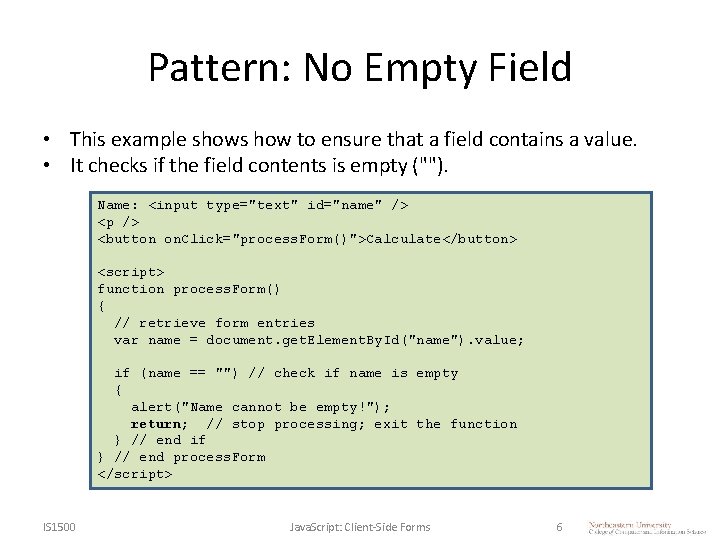
Pattern: No Empty Field • This example shows how to ensure that a field contains a value. • It checks if the field contents is empty (""). Name: <input type="text" id="name" /> <p /> <button on. Click="process. Form()">Calculate</button> <script> function process. Form() { // retrieve form entries var name = document. get. Element. By. Id("name"). value; if (name == "") // check if name is empty { alert("Name cannot be empty!"); return; // stop processing; exit the function } // end if } // end process. Form </script> IS 1500 Java. Script: Client-Side Forms 6
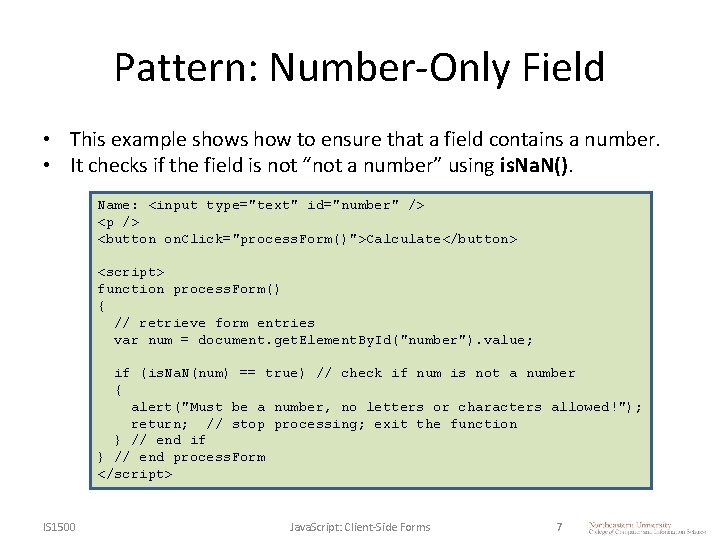
Pattern: Number-Only Field • This example shows how to ensure that a field contains a number. • It checks if the field is not “not a number” using is. Na. N(). Name: <input type="text" id="number" /> <p /> <button on. Click="process. Form()">Calculate</button> <script> function process. Form() { // retrieve form entries var num = document. get. Element. By. Id("number"). value; if (is. Na. N(num) == true) // check if num is not a number { alert("Must be a number, no letters or characters allowed!"); return; // stop processing; exit the function } // end if } // end process. Form </script> IS 1500 Java. Script: Client-Side Forms 7
Stopping a Function with return • When a function reaches a point where continuing is not reasonable because it does not have the correct input values, it must “return”. • The return statement exits the function immediately. • No code after the return is executed. IS 1500 Java. Script: Client-Side Forms 8

Summary, Review, & Questions… IS 1500 Java. Script: Client-Side Forms 9
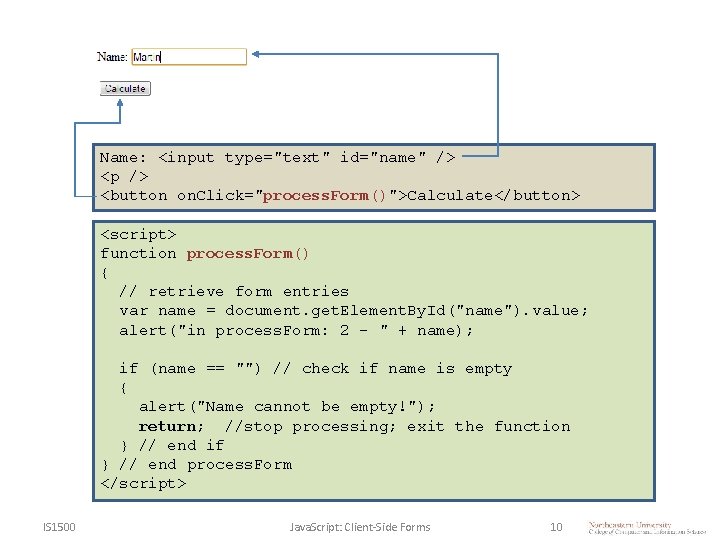
Name: <input type="text" id="name" /> <p /> <button on. Click="process. Form()">Calculate</button> <script> function process. Form() { // retrieve form entries var name = document. get. Element. By. Id("name"). value; alert("in process. Form: 2 - " + name); if (name == "") // check if name is empty { alert("Name cannot be empty!"); return; //stop processing; exit the function } // end if } // end process. Form </script> IS 1500 Java. Script: Client-Side Forms 10

- Slides: 11