
IPv 4 Addresses A Quick Guide What is

- Slides: 34
IPv 4 Addresses A Quick Guide
What is an IPv 4 Address • 32 bits separated by 4 groupings of 8 bits • 11111111 • 32 bits = 2^32 possible = 4. 2 Million IPv 4 Addresses • • Each octet can be up to 255 IP stands for Internet Protocol IP is the primary set of rules that transport data Network numbers are managed by ICANN • Internet Corporation for Assigned Names and Numbers
Where do you use IP addresses? • Everywhere • Computers, phones, light bulbs, even toothbrushes • Hunting • Finding the bad guy • Being the bad guy • Setting up networks • Technical exams
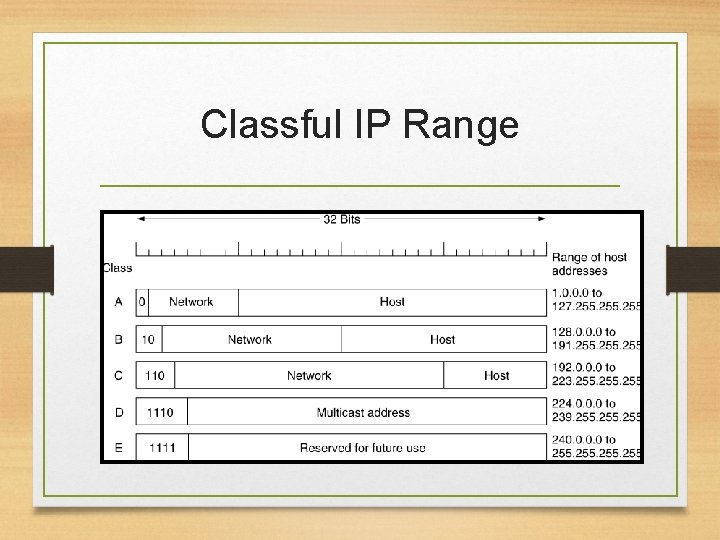
Classful IP Range
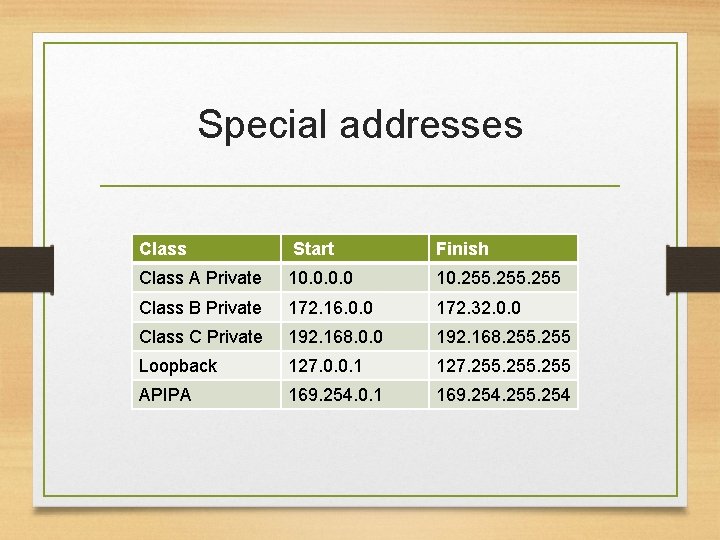
Special addresses Class Start Finish Class A Private 10. 0 10. 255 Class B Private 172. 16. 0. 0 172. 32. 0. 0 Class C Private 192. 168. 0. 0 192. 168. 255 Loopback 127. 0. 0. 1 127. 255 APIPA 169. 254. 0. 1 169. 254. 255. 254
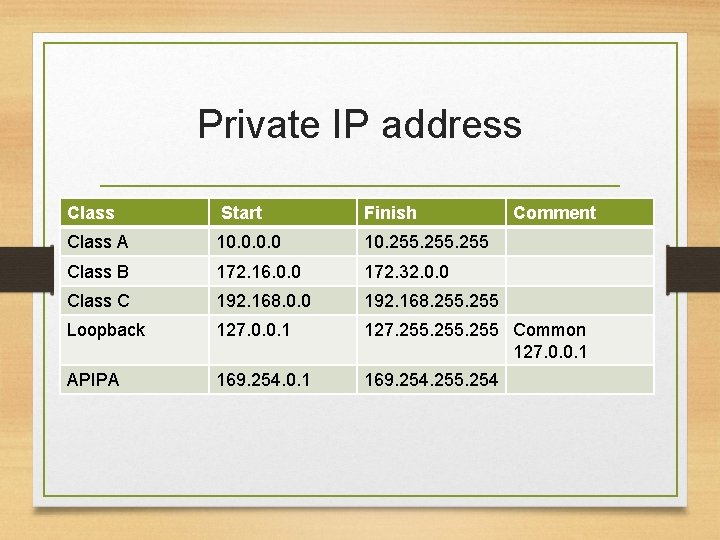
Private IP address • Reusable • Specific to individual networks • Companies, homes, and devices
Loopback • Often used for testing • Can send signals back to the device • Allows an administrator to act as if the local machine was remote
APIPA • Automatic Private IP Addressing • Ability to assign an IP address to a machine without an internet connection • Assigns default class B subnet • Computer can only communicate with nodes using APIPA range • Occurs when devices use DHCP (Dynamic Host Configuration Protocol) and no DHCP is available
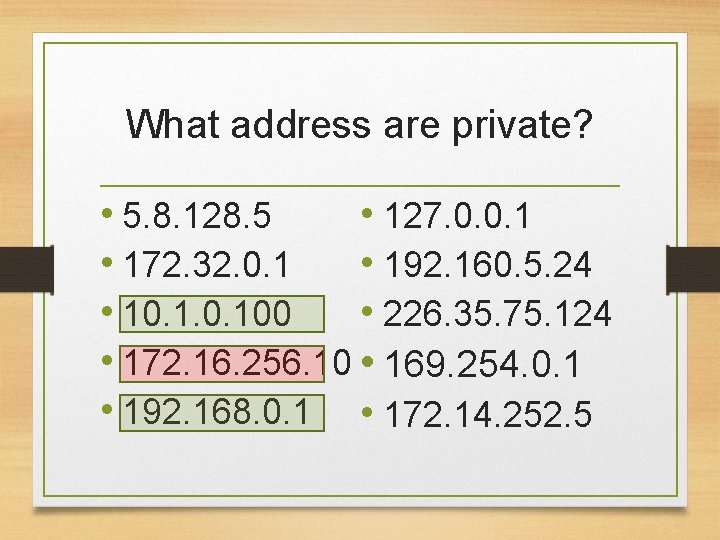
What address are private? • 5. 8. 128. 5 • 127. 0. 0. 1 • 172. 32. 0. 1 • 192. 160. 5. 24 • 10. 100 • 226. 35. 75. 124 • 172. 16. 256. 10 • 169. 254. 0. 1 • 192. 168. 0. 1 • 172. 14. 252. 5
Private IP address Class Start Finish Comment Class A 10. 0 10. 255 Class B 172. 16. 0. 0 172. 32. 0. 0 Class C 192. 168. 0. 0 192. 168. 255 Loopback 127. 0. 0. 1 127. 255 Common 127. 0. 0. 1 APIPA 169. 254. 0. 1 169. 254. 255. 254
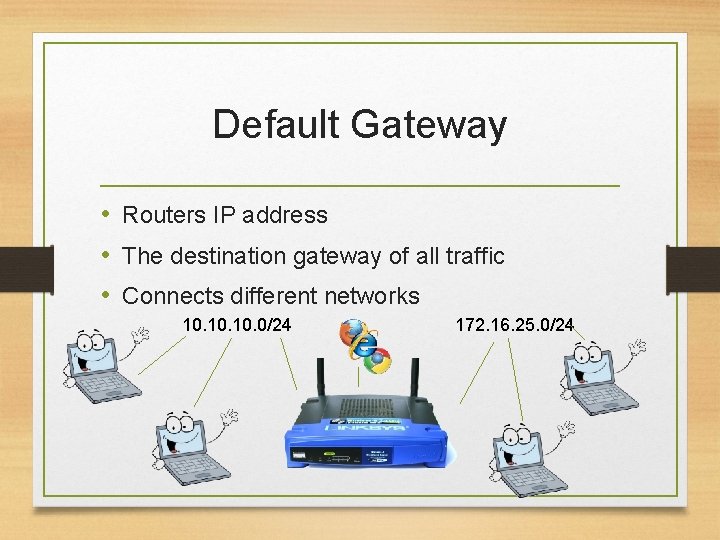
Default Gateway • Routers IP address • The destination gateway of all traffic • Connects different networks 10. 10. 0/24 172. 16. 25. 0/24
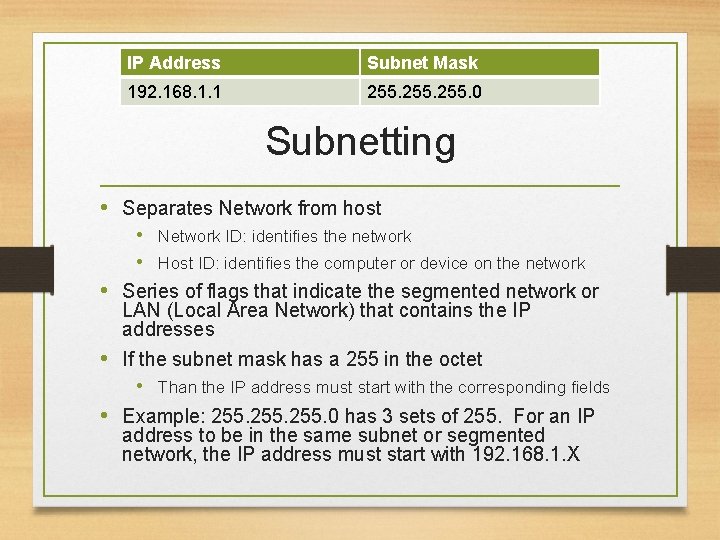
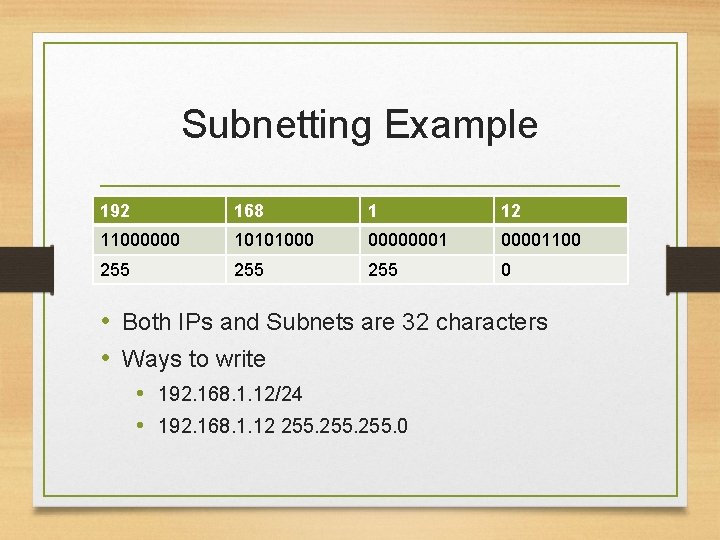
IP Address Subnet Mask 192. 168. 1. 1 255. 0 Subnetting • Separates Network from host • Network ID: identifies the network • Host ID: identifies the computer or device on the network • Series of flags that indicate the segmented network or LAN (Local Area Network) that contains the IP addresses • If the subnet mask has a 255 in the octet • Than the IP address must start with the corresponding fields • Example: 255. 0 has 3 sets of 255. For an IP address to be in the same subnet or segmented network, the IP address must start with 192. 168. 1. X
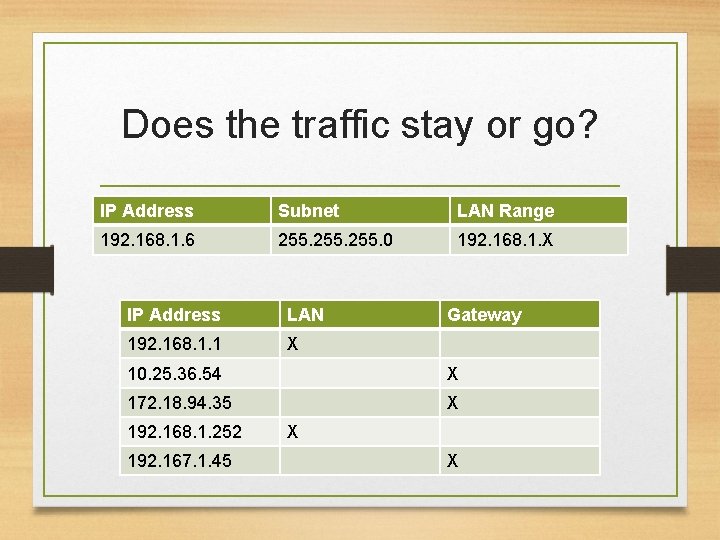
Does the traffic stay or go? IP Address Subnet LAN Range 192. 168. 1. 6 255. 0 192. 168. 1. X IP Address LAN 192. 168. 1. 1 X Gateway 10. 25. 36. 54 X 172. 18. 94. 35 X 192. 168. 1. 252 192. 167. 1. 45 X X
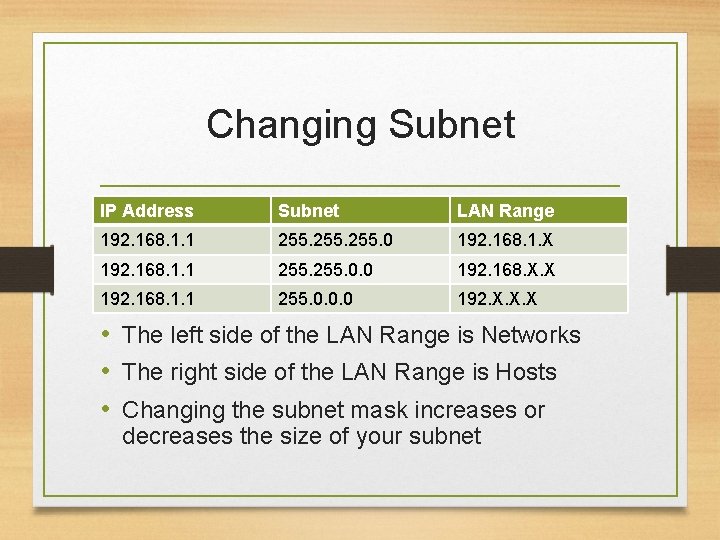
Changing Subnet IP Address Subnet LAN Range 192. 168. 1. 1 255. 0 192. 168. 1. X 192. 168. 1. 1 255. 0. 0 192. 168. X. X 192. 168. 1. 1 255. 0. 0. 0 192. X. X. X • The left side of the LAN Range is Networks • The right side of the LAN Range is Hosts • Changing the subnet mask increases or decreases the size of your subnet
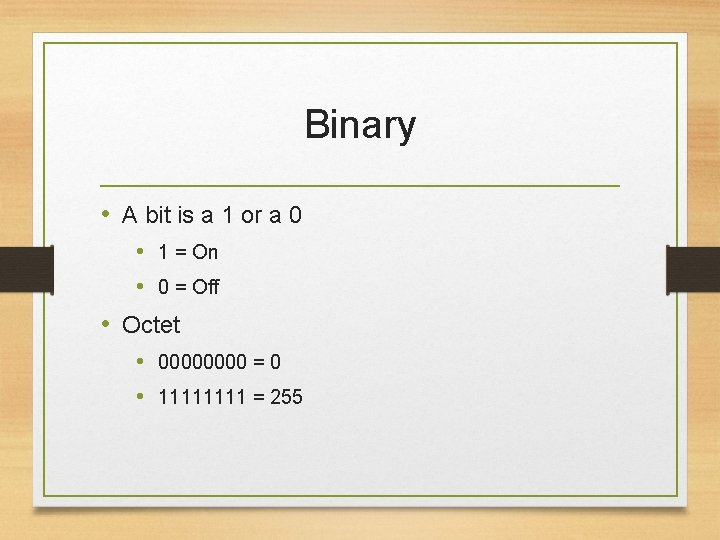
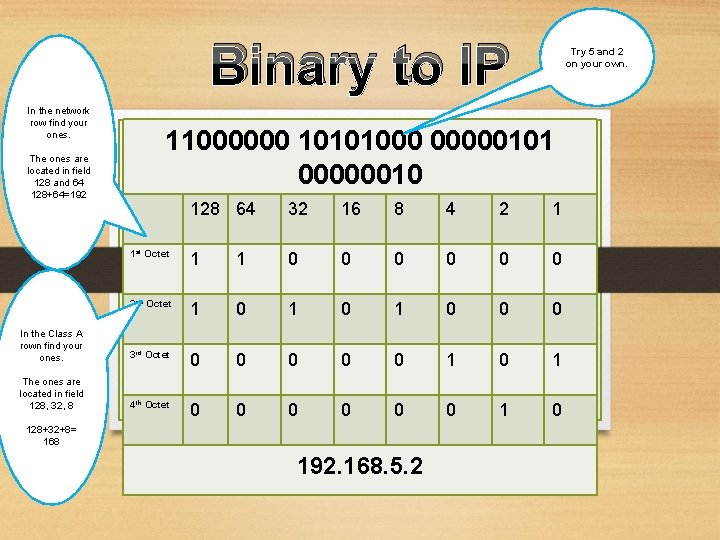
Binary • A bit is a 1 or a 0 • 1 = On • 0 = Off • Octet • 0000 = 0 • 1111 = 255
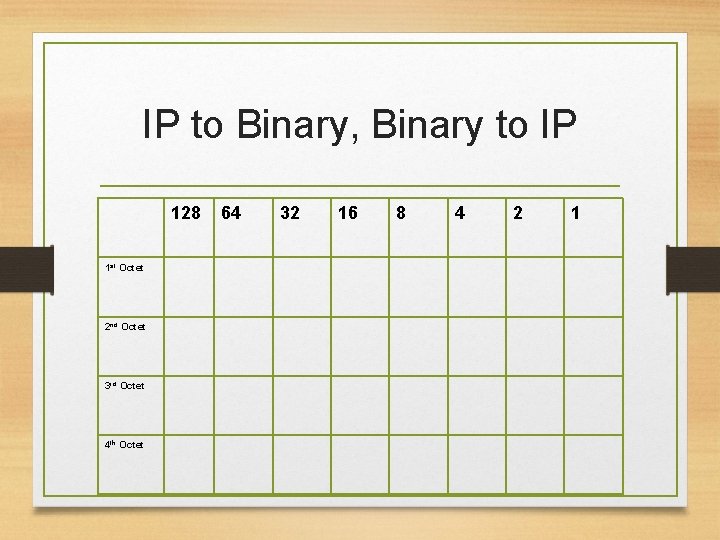
IP to Binary, Binary to IP 128 1 st Octet 2 nd Octet 3 rd Octet 4 th Octet 64 32 16 8 4 2 1
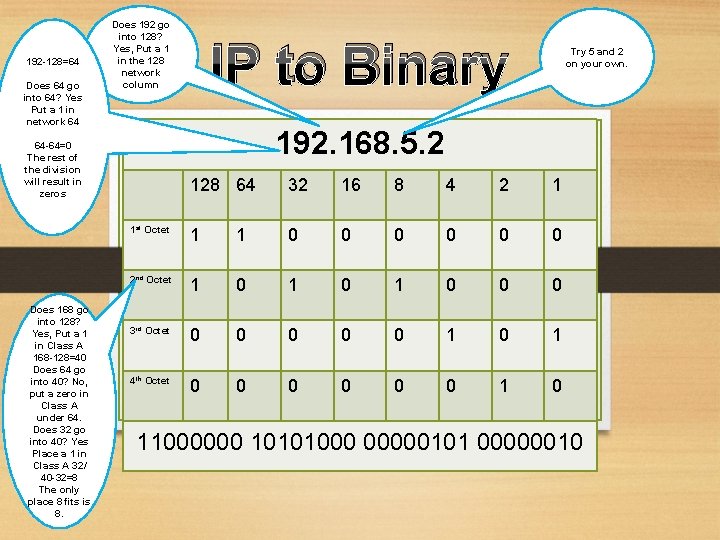
192 -128=64 Does 64 go into 64? Yes Put a 1 in network 64 Does 192 go into 128? Yes, Put a 1 in the 128 network column 192. 168. 5. 2 64 -64=0 The rest of the division will result in zeros Does 168 go into 128? Yes, Put a 1 in Class A 168 -128=40 Does 64 go into 40? No, put a zero in Class A under 64. Does 32 go into 40? Yes Place a 1 in Class A 32/ 40 -32=8 The only place 8 fits is 8. IP to Binary Try 5 and 2 on your own. 128 64 32 16 8 4 2 1 1 st Octet 1 1 0 0 0 2 nd Octet 1 0 1 0 0 0 3 rd Octet 0 0 0 1 4 th Octet 0 0 0 1 0 11000000 10101000 00000101 00000010
Binary to IP In the network row find your ones. The ones are located in field 128 and 64 128+64=192 Try 5 and 2 on your own. 11000000 10101000 00000101 00000010 128 64 32 16 8 4 2 1 1 st Octet 1 1 0 0 0 2 nd Octet 1 0 1 0 0 0 In the Class A rown find your ones. 3 rd Octet 0 0 0 1 The ones are located in field 128, 32, 8 4 th Octet 0 0 0 1 0 128+32+8= 168 192. 168. 5. 2
Subnetting Example 192 168 1 12 11000000 10101000 00000001100 255 255 0 • Both IPs and Subnets are 32 characters • Ways to write • 192. 168. 1. 12/24 • 192. 168. 1. 12 255. 0
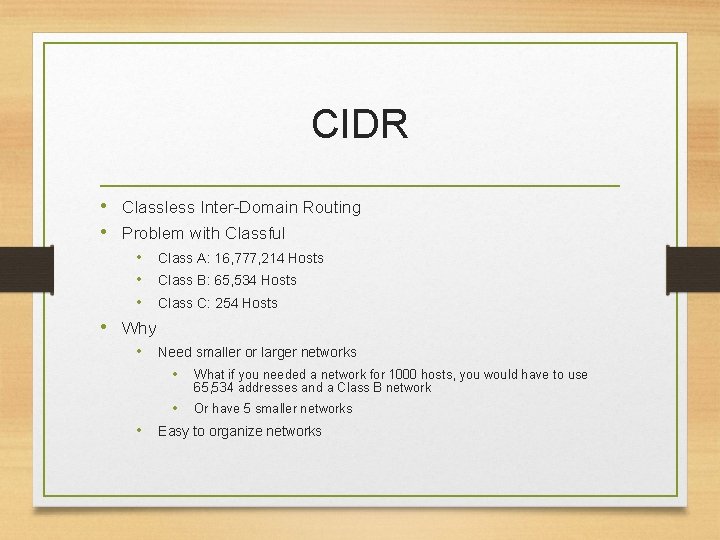
CIDR • Classless Inter-Domain Routing • Problem with Classful • • • Class A: 16, 777, 214 Hosts Class B: 65, 534 Hosts Class C: 254 Hosts • Why • • Need smaller or larger networks • What if you needed a network for 1000 hosts, you would have to use 65, 534 addresses and a Class B network • Or have 5 smaller networks Easy to organize networks
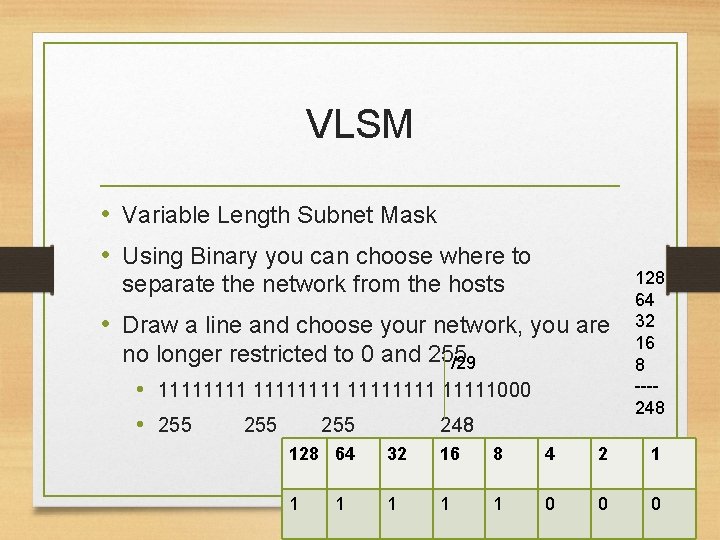
VLSM • Variable Length Subnet Mask • Using Binary you can choose where to separate the network from the hosts • Draw a line and choose your network, you are no longer restricted to 0 and 255 /29 • 11111111 11111000 • 255 255 248 128 64 32 16 8 ---248 128 64 32 16 8 4 2 1 1 1 0 0 0 1
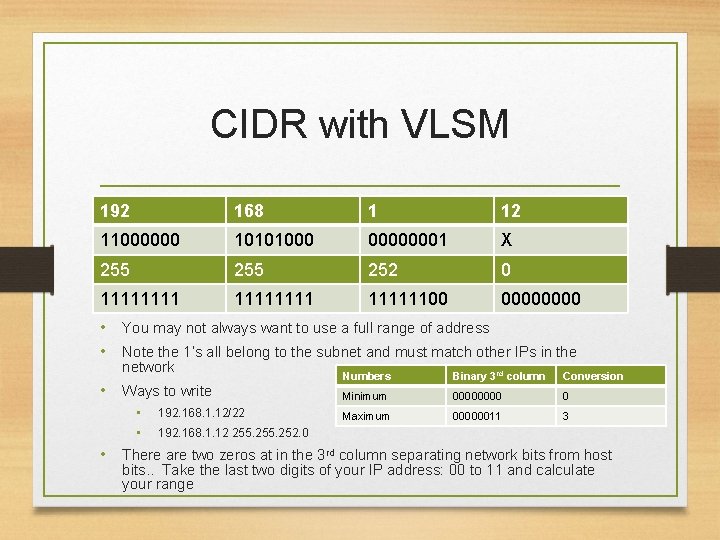
CIDR with VLSM 192 168 1 12 11000000 10101000 00000001 X 255 252 0 1111111100 0000 • You may not always want to use a full range of address • Note the 1’s all belong to the subnet and must match other IPs in the network • Ways to write • • 192. 168. 1. 12/22 Numbers Binary 3 rd column Conversion Minimum 0000 0 Maximum 00000011 3 192. 168. 1. 12 255. 252. 0 • There are two zeros at in the 3 rd column separating network bits from host bits. . Take the last two digits of your IP address: 00 to 11 and calculate your range
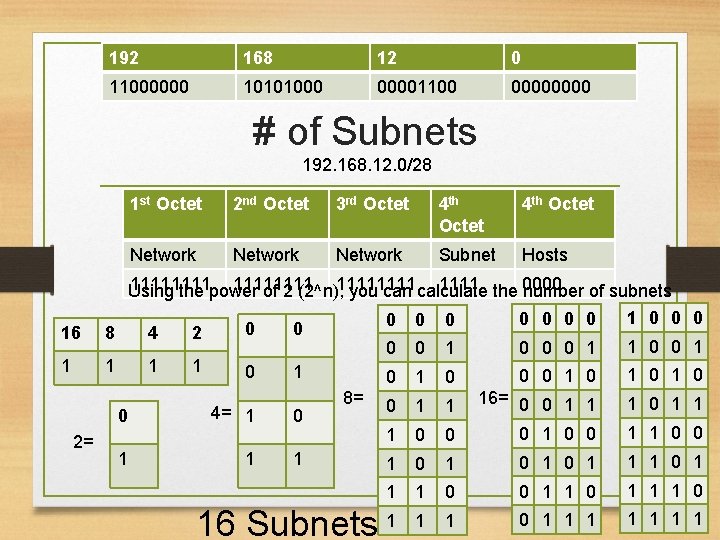
192 168 12 0 11000000 10101000 00001100 0000 # of Subnets 192. 168. 12. 0/28 1 st Octet 2 nd Octet 3 rd Octet 4 th Octet Network Subnet Hosts 11111111 the 0000 Using the power of 2 (2^n), 1111 you can calculate number of subnets 0 0 0 0 1 0 0 0 1 1 0 0 1 0 1 0 1 0 0 1 1 16= 0 0 1 1 1 0 0 0 1 1 0 0 1 0 1 1 1 0 0 1 1 1 0 16 Subnets 1 1 1 0 1 1 1 16 8 4 2 0 1 1 0 2= 0 1 0 4= 1 0 1 1 1 8=
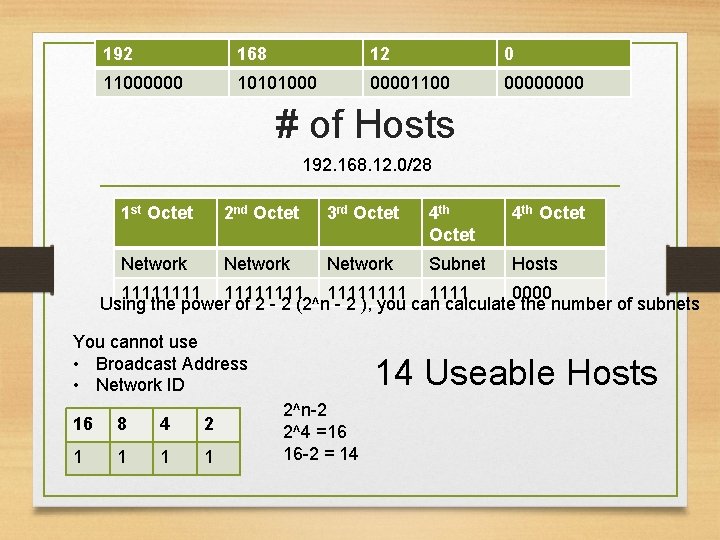
192 168 12 0 11000000 10101000 00001100 0000 # of Hosts 192. 168. 12. 0/28 1 st Octet 2 nd Octet 3 rd Octet 4 th Octet Network Subnet Hosts 11111111 1111 0000 Using the power of 2 - 2 (2^n - 2 ), you can calculate the number of subnets You cannot use • Broadcast Address • Network ID 16 8 4 2 1 1 14 Useable Hosts 2^n-2 2^4 =16 16 -2 = 14
Speed Run The Magic Box
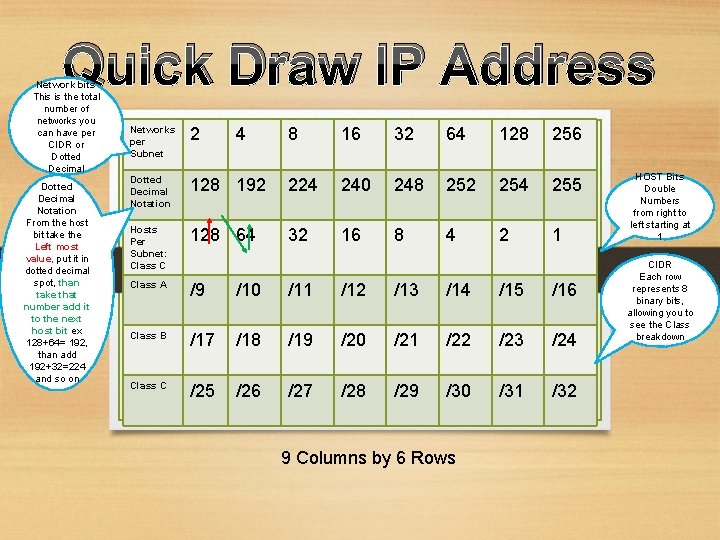
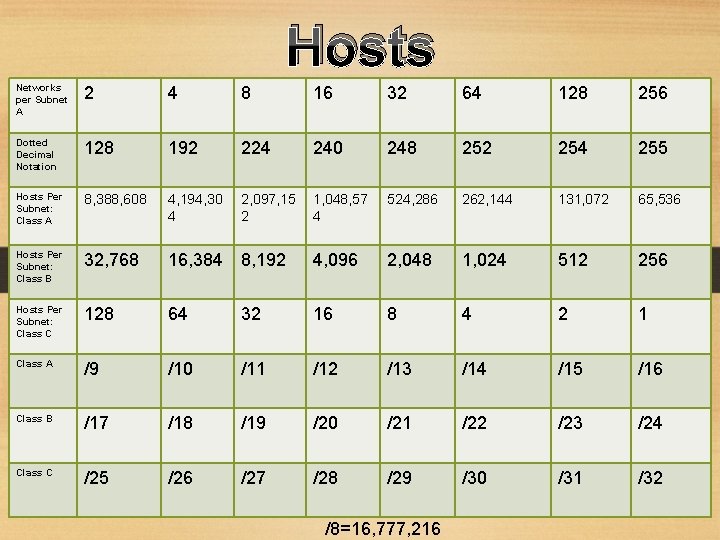
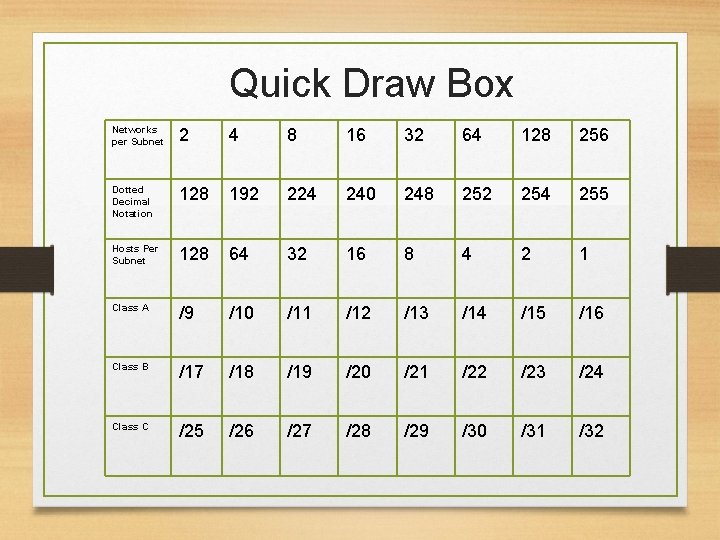
Quick Draw IP Address Network bits This is the total number of networks you can have per CIDR or Dotted Decimal Notation From the host bit take the Left most value, put it in dotted decimal spot, than take that number add it to the next host bit ex 128+64= 192, than add 192+32=224 and so on Networks per Subnet 2 Dotted Decimal Notation 4 8 16 32 64 128 256 128 192 224 240 248 252 254 255 Hosts Per Subnet: Class C 128 64 32 16 8 4 2 1 Class A /9 /10 /11 /12 /13 /14 /15 /16 Class B /17 /18 /19 /20 /21 /22 /23 /24 Class C /25 /26 /27 /28 /29 /30 /31 /32 9 Columns by 6 Rows HOST Bits Double Numbers from right to left starting at 1 CIDR Each row represents 8 binary bits, allowing you to see the Class breakdown
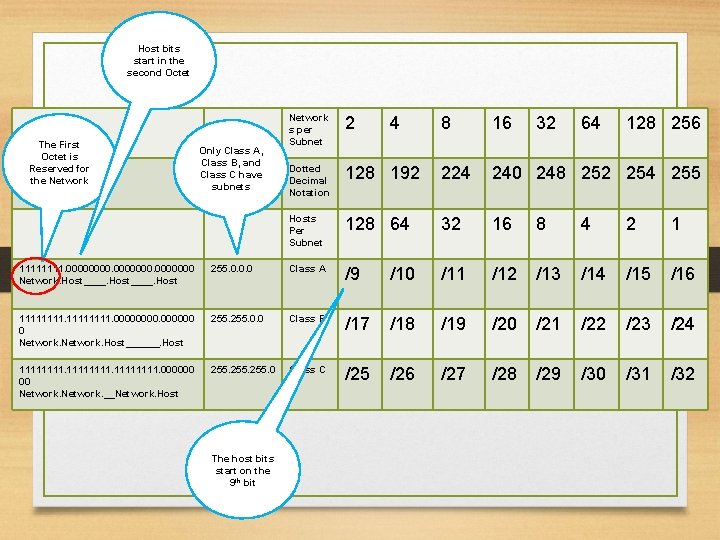
Host bits start in the second Octet The First Octet is Reserved for the Network 4 8 16 32 64 Default 2 Subnet Masks Only Class A, Class B, and Class C have subnets Network s per Subnet 128 256 Dotted Decimal Notation 128 192 224 240 248 252 254 255 Hosts Per Subnet 128 64 32 16 8 4 2 1 1111. 0000000 Network. Host____. Host 255. 0. 0. 0 Class A /9 /10 /11 /12 /13 /14 /15 /16 11111111. 000000 0 Network. Host______. Host 255. 0. 0 Class B /17 /18 /19 /20 /21 /22 /23 /24 11111111. 000000 00 Network. __Network. Host 255. 0 Class C /25 /26 /27 /28 /29 /30 /31 /32 The host bits start on the 9 th bit
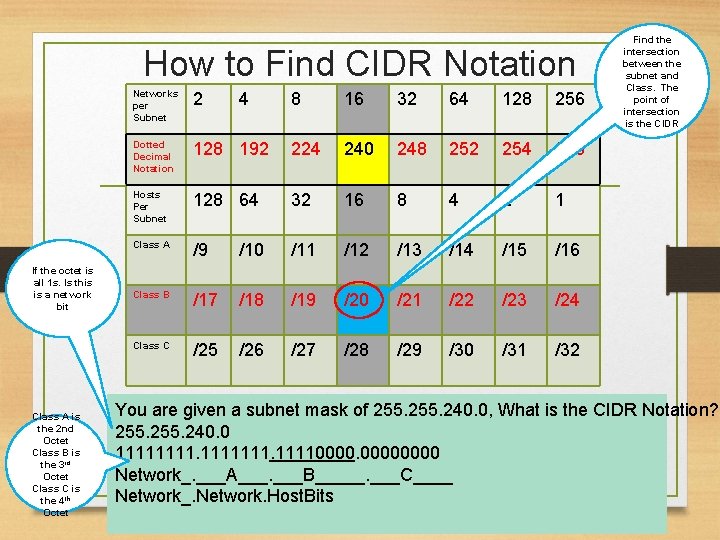
How to Find CIDR Notation If the octet is all 1 s. Is this is a network bit Class A is the 2 nd Octet Class B is the 3 rd Octet Class C is the 4 th Octet Networks per Subnet 2 Dotted Decimal Notation 4 8 16 32 64 128 256 128 192 224 240 248 252 254 255 Hosts Per Subnet 128 64 32 16 8 4 2 1 Class A /9 /10 /11 /12 /13 /14 /15 /16 Class B /17 /18 /19 /20 /21 /22 /23 /24 Class C /25 /26 /27 /28 /29 /30 /31 /32 Find the intersection between the subnet and Class. The point of intersection is the CIDR You are given a subnet mask of 255. 240. 0, What is the CIDR Notation? 255. 240. 0 1111111. 11110000 Network_. ___A___. ___B_____. ___C____ Network_. Network. Host. Bits
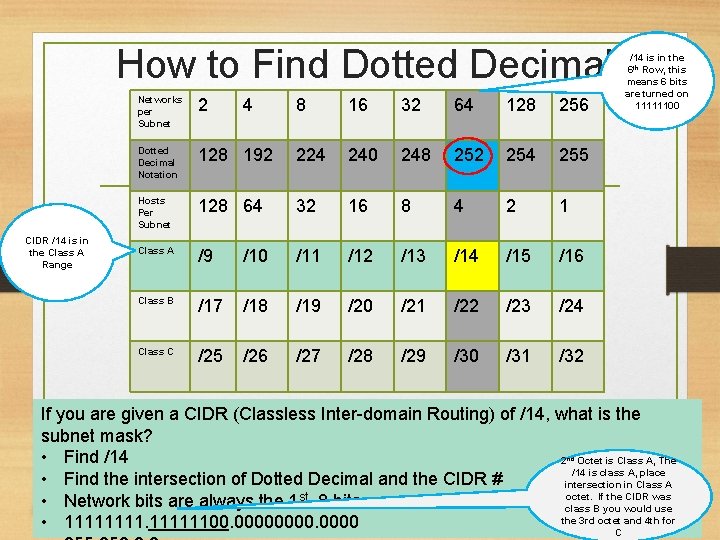
How to Find Dotted Decimal CIDR /14 is in the Class A Range Networks per Subnet 2 Dotted Decimal Notation 4 8 16 32 64 128 256 128 192 224 240 248 252 254 255 Hosts Per Subnet 128 64 32 16 8 4 2 1 Class A /9 /10 /11 /12 /13 /14 /15 /16 Class B /17 /18 /19 /20 /21 /22 /23 /24 Class C /25 /26 /27 /28 /29 /30 /31 /32 /14 is in the 6 th Row, this means 6 bits are turned on 11111100 If you are given a CIDR (Classless Inter-domain Routing) of /14, what is the subnet mask? • Find /14 2 Octet is Class A, The /14 is class A, place • Find the intersection of Dotted Decimal and the CIDR # intersection in Class A octet. If the CIDR was • Network bits are always the 1 st 8 bits class B you would use the 3 rd octet and 4 th for • 11111100. 0000 C nd
Hosts Networks per Subnet A 2 4 8 16 32 64 128 256 Dotted Decimal Notation 128 192 224 240 248 252 254 255 Hosts Per Subnet: Class A 8, 388, 608 4, 194, 30 4 2, 097, 15 2 1, 048, 57 4 524, 286 262, 144 131, 072 65, 536 Hosts Per Subnet: Class B 32, 768 16, 384 8, 192 4, 096 2, 048 1, 024 512 256 Hosts Per Subnet: Class C 128 64 32 16 8 4 2 1 Class A /9 /10 /11 /12 /13 /14 /15 /16 Class B /17 /18 /19 /20 /21 /22 /23 /24 Class C /25 /26 /27 /28 /29 /30 /31 /32 /8=16, 777, 216
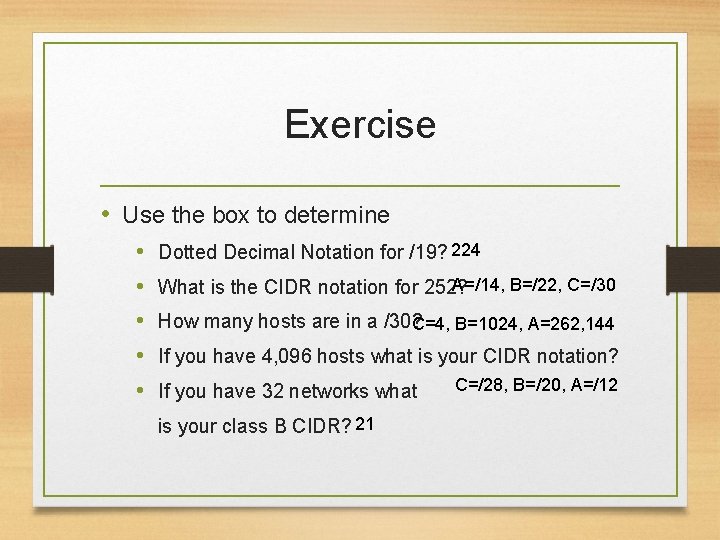
Exercise • Use the box to determine • • • Dotted Decimal Notation for /19? 224 A=/14, B=/22, C=/30 What is the CIDR notation for 252? How many hosts are in a /30? C=4, B=1024, A=262, 144 If you have 4, 096 hosts what is your CIDR notation? If you have 32 networks what is your class B CIDR? 21 C=/28, B=/20, A=/12
Quick Draw Box Networks per Subnet 2 4 8 16 32 64 128 256 Dotted Decimal Notation 128 192 224 240 248 252 254 255 Hosts Per Subnet 128 64 32 16 8 4 2 1 Class A /9 /10 /11 /12 /13 /14 /15 /16 Class B /17 /18 /19 /20 /21 /22 /23 /24 Class C /25 /26 /27 /28 /29 /30 /31 /32
Questions
Practice • • https: //www. lammle. com/ip-subnet-practice-page/ http: //packetlife. net/ https: //subnettingpractice. com/ https: //faculty. valleycollege. edu/rpowell/jscript/subn et 2. htm • https: //www. kirkwood. edu/pdf/uploaded/569/ip_add ressing_&_subnetting_workbook. pdf • https: //www. subnetting. net/Subnetting. aspx? mode =practice