
IP Routing Dynamic Routing Protocols Problem How are
IP Routing Dynamic Routing Protocols
Problem • How are routing tables kept up to date in a changing network? 2/124 Groep T Leuven – Information department 2003 -2004 - Information management 2
Definitions • Routing protocol – ex: OSPF, RIP, IGRP, BGP • Routed protocol – ex: IP, IPX, Apple. Talk 3/124 Groep T Leuven – Information department 2003 -2004 - Information management 3
Goals of a routing protocol • • • Dynamic learning of subnets Dynamic updating of the routing table Choosing the best route if more than one Notice when a route is no longer valid Remove invalid routes + add new ones if they exist • Small convergence time • Prevent routing loops 4/124 Groep T Leuven – Information department 2003 -2004 - Information management 4
Routing issues • • Path determination Metrics Convergence Load balancing 5/124 Groep T Leuven – Information department 2003 -2004 - Information management 5
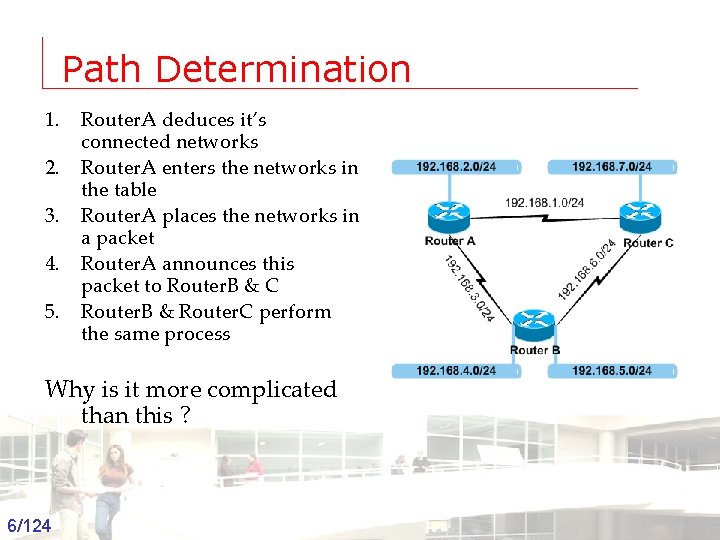
Path Determination 1. 2. 3. 4. 5. Router. A deduces it’s connected networks Router. A enters the networks in the table Router. A places the networks in a packet Router. A announces this packet to Router. B & C Router. B & Router. C perform the same process Why is it more complicated than this ? 6/124 Groep T Leuven – Information department 2003 -2004 - Information management 6
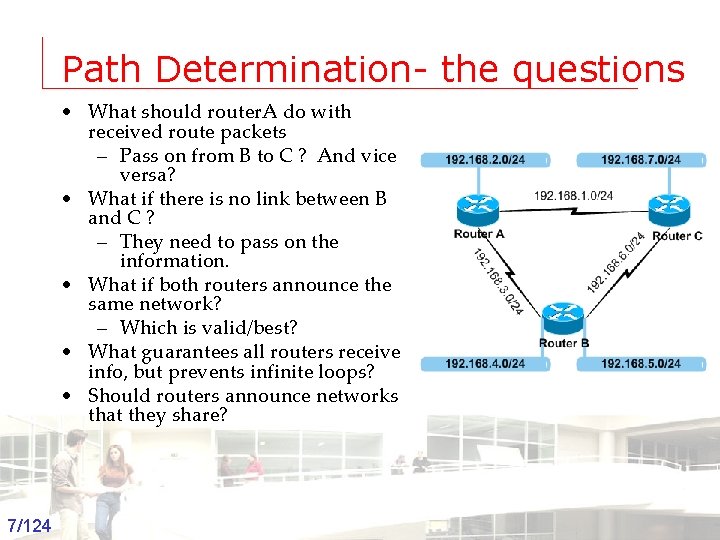
Path Determination- the questions • What should router. A do with received route packets – Pass on from B to C ? And vice versa? • What if there is no link between B and C ? – They need to pass on the information. • What if both routers announce the same network? – Which is valid/best? • What guarantees all routers receive info, but prevents infinite loops? • Should routers announce networks that they share? 7/124 Groep T Leuven – Information department 2003 -2004 - Information management 7
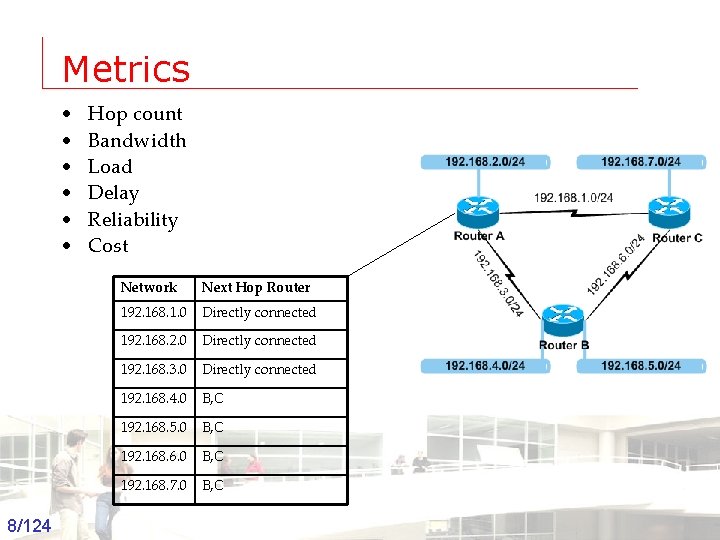
Metrics • • • Hop count Bandwidth Load Delay Reliability Cost Network Next Hop Router 192. 168. 1. 0 Directly connected 192. 168. 2. 0 Directly connected 192. 168. 3. 0 Directly connected 192. 168. 4. 0 B, C 192. 168. 5. 0 B, C 192. 168. 6. 0 B, C 192. 168. 7. 0 B, C 8/124 Groep T Leuven – Information department 2003 -2004 - Information management 8
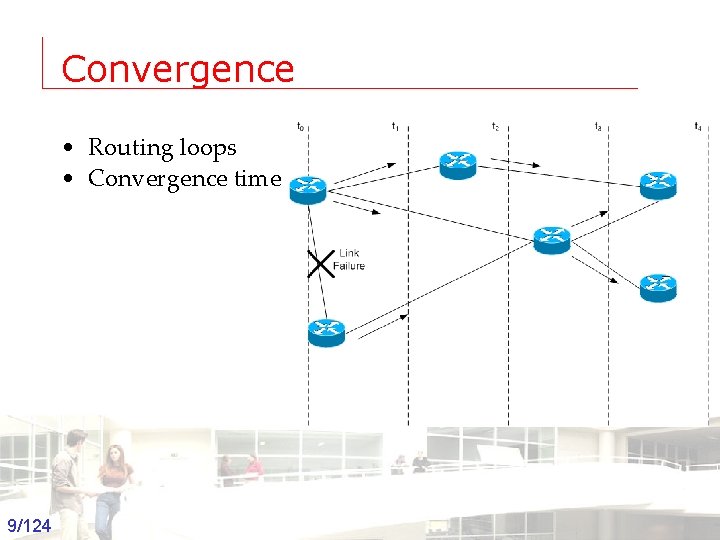
Convergence • Routing loops • Convergence time 9/124 Groep T Leuven – Information department 2003 -2004 - Information management 9
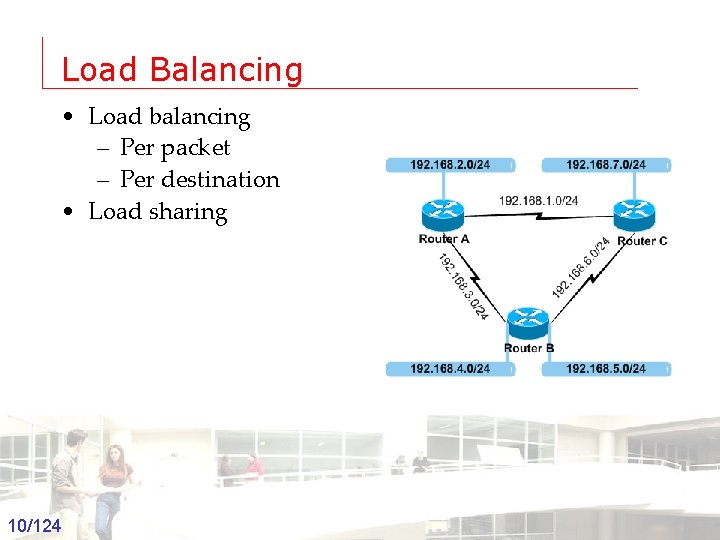
Load Balancing • Load balancing – Per packet – Per destination • Load sharing 10/124 Groep T Leuven – Information department 2003 -2004 - Information management 10
Overview • Static routing <--> Dynamic routing – How routing table is calculated • Exterior Gateway Protocols <--> Interior Gateway Protocols – Where the protocol is applied • Interior Gateway Protocols – Distance Vector <--> Link State 11/124 Groep T Leuven – Information department 2003 -2004 - Information management 11
Distance Vector Routing Protocols • Routes are announced as vectors of – (distance, direction) or (metric, next hop) • RIP, IGRP, EIGRP, Apple. Talk’s RTMP • Common caracteristics – Periodic updates – Neighbors – Broadcast updates – Full routing table updates 12/124 Groep T Leuven – Information department 2003 -2004 - Information management 12
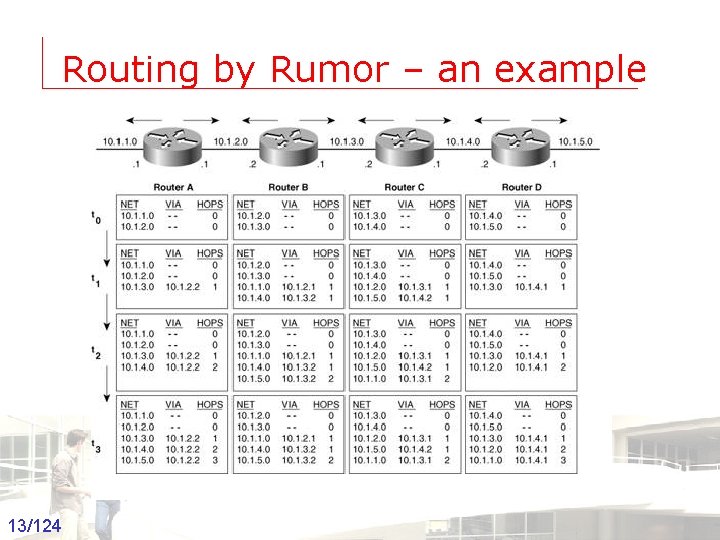
Routing by Rumor – an example 13/124 Groep T Leuven – Information department 2003 -2004 - Information management 13
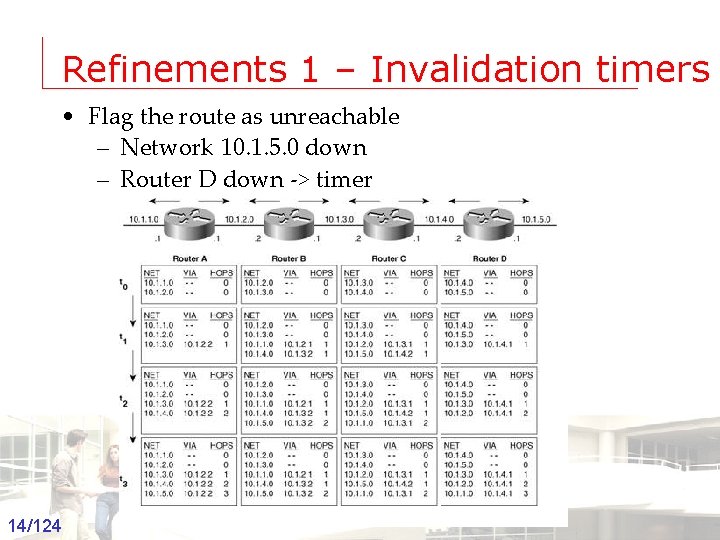
Refinements 1 – Invalidation timers • Flag the route as unreachable – Network 10. 1. 5. 0 down – Router D down -> timer 14/124 Groep T Leuven – Information department 2003 -2004 - Information management 14
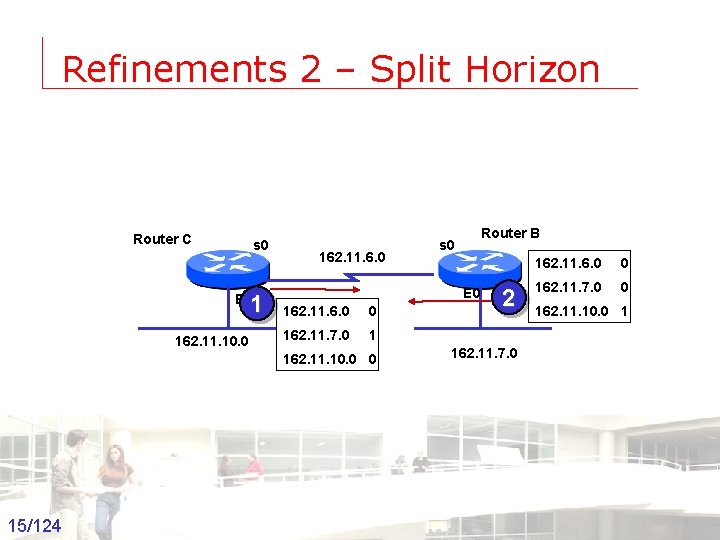
Refinements 2 – Split Horizon Router C s 0 1 E 0 162. 11. 10. 0 162. 11. 6. 0 E 0 162. 11. 6. 0 0 162. 11. 7. 0 1 162. 11. 10. 0 0 15/124 Groep T Leuven – Information department Router B s 0 2 162. 11. 6. 0 0 162. 11. 7. 0 0 162. 11. 10. 0 1 162. 11. 7. 0 2003 -2004 - Information management 15
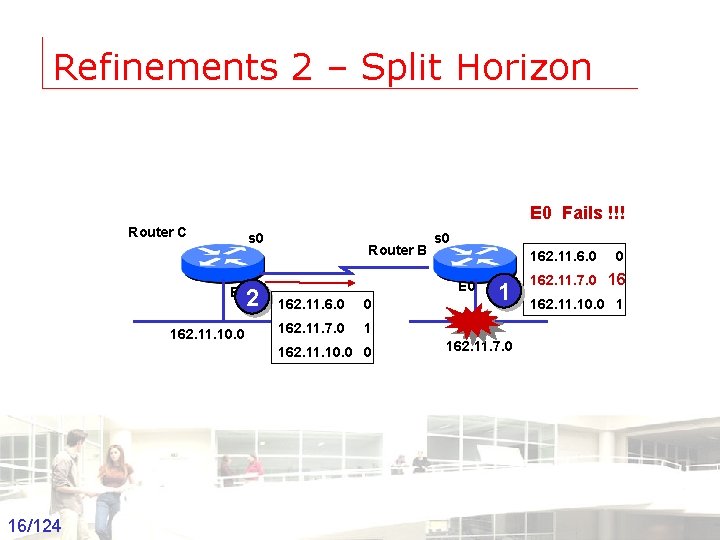
Refinements 2 – Split Horizon E 0 Fails !!! Router C s 0 2 E 0 162. 11. 10. 0 Router B 162. 11. 6. 0 E 0 162. 11. 6. 0 0 162. 11. 7. 0 1 162. 11. 10. 0 0 16/124 Groep T Leuven – Information department s 0 162. 11. 7. 0 16 162. 11. 10. 0 1 162. 11. 7. 0 2003 -2004 - Information management 16
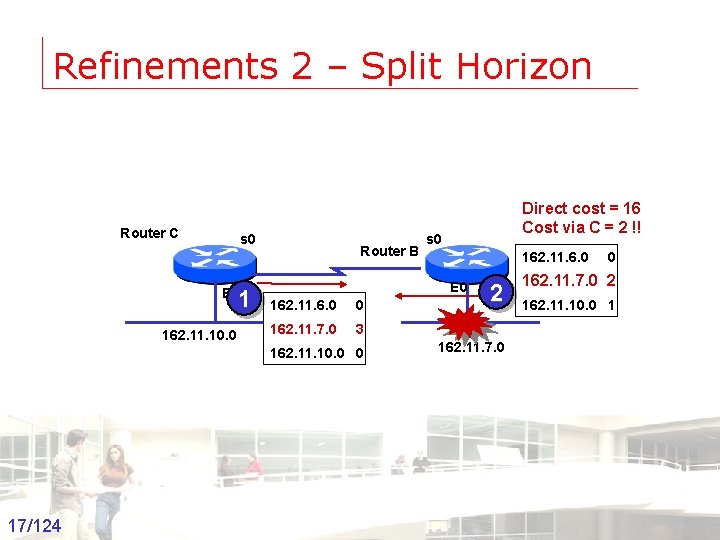
Refinements 2 – Split Horizon Router C s 0 1 E 0 162. 11. 10. 0 Router B s 0 162. 11. 6. 0 E 0 162. 11. 6. 0 0 162. 11. 7. 0 3 162. 11. 10. 0 0 17/124 Groep T Leuven – Information department Direct cost = 16 Cost via C = 2 !! 2 0 162. 11. 7. 0 2 162. 11. 10. 0 1 162. 11. 7. 0 2003 -2004 - Information management 17
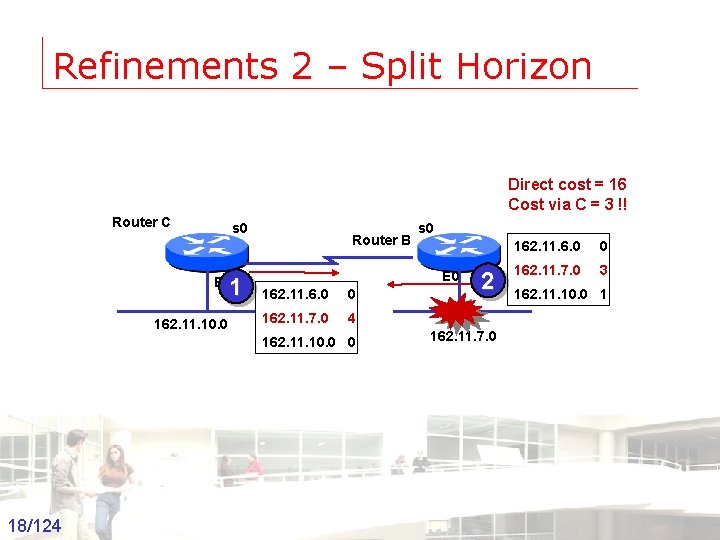
Refinements 2 – Split Horizon Direct cost = 16 Cost via C = 3 !! Router C s 0 1 E 0 162. 11. 10. 0 Router B E 0 162. 11. 6. 0 0 162. 11. 7. 0 4 162. 11. 10. 0 0 18/124 Groep T Leuven – Information department s 0 2 162. 11. 6. 0 0 162. 11. 7. 0 3 162. 11. 10. 0 1 162. 11. 7. 0 2003 -2004 - Information management 18
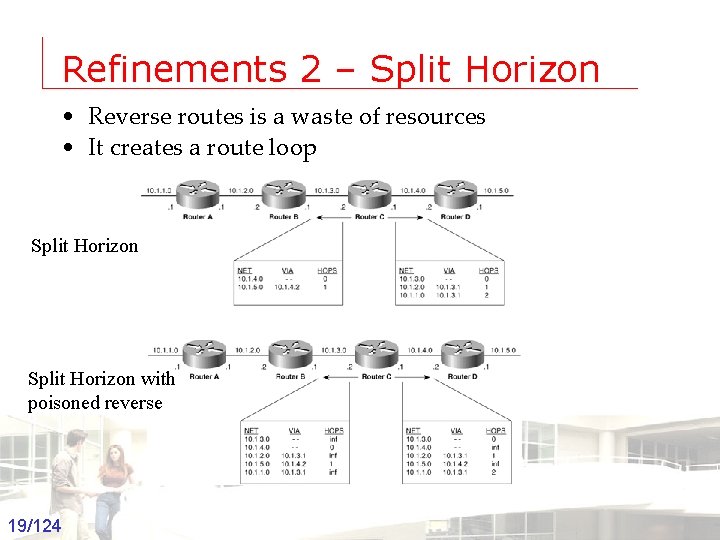
Refinements 2 – Split Horizon • Reverse routes is a waste of resources • It creates a route loop Split Horizon with poisoned reverse 19/124 Groep T Leuven – Information department 2003 -2004 - Information management 19
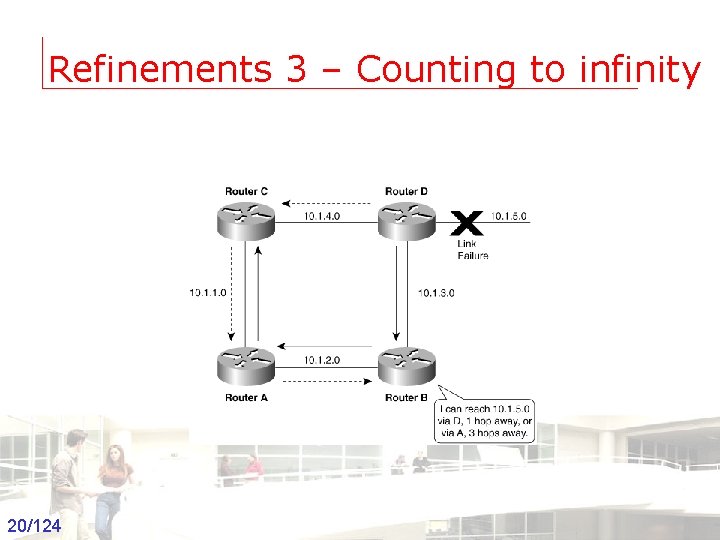
Refinements 3 – Counting to infinity 20/124 Groep T Leuven – Information department 2003 -2004 - Information management 20
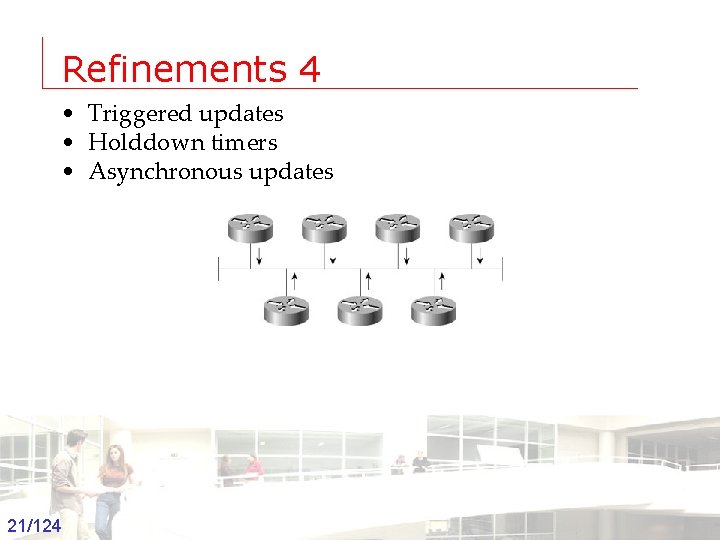
Refinements 4 • Triggered updates • Holddown timers • Asynchronous updates 21/124 Groep T Leuven – Information department 2003 -2004 - Information management 21
Link State Routing Protocols • • All routers have a complete picture of the network Routers have first hand information Based on Dijkstra’s shortest path algorithm Examples – OSPF – ISIS – DEC’s DNA Phase V – Novell’s NLSP 22/124 Groep T Leuven – Information department 2003 -2004 - Information management 22
Link state protocol – the process 1. Establish adjacency with neighbors • Hello protocol 2. Send LSA to neighbors + flood received LSA’s • The links connected to the router • The state of the link (up or down) • The metric of the router to the link • Neighbors on the link 3. Store the LSA in a database • Topological database 4. Compute the shortest path to each router using Dijkstra’s SPF algorithm • Enter information in routing table 23/124 Groep T Leuven – Information department 2003 -2004 - Information management 23
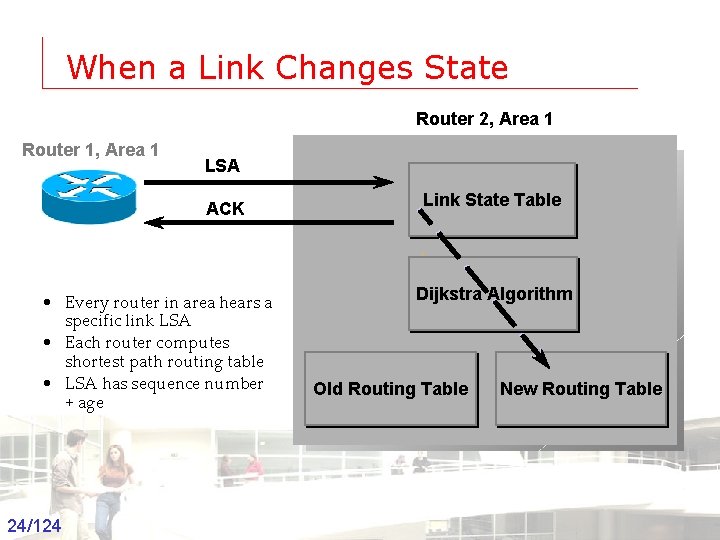
When a Link Changes State Router 2, Area 1 Router 1, Area 1 LSA ACK • Every router in area hears a specific link LSA • Each router computes shortest path routing table • LSA has sequence number + age 24/124 Groep T Leuven – Information department Link State Table Dijkstra Algorithm Old Routing Table New Routing Table 2003 -2004 - Information management 24
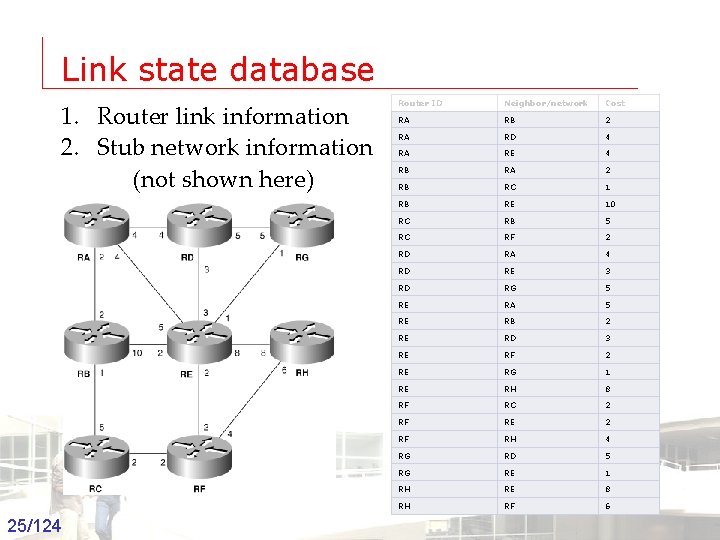
Link state database 1. Router link information 2. Stub network information (not shown here) 25/124 Groep T Leuven – Information department Router ID Neighbor/network Cost RA RB 2 RA RD 4 RA RE 4 RB RA 2 RB RC 1 RB RE 10 RC RB 5 RC RF 2 RD RA 4 RD RE 3 RD RG 5 RE RA 5 RE RB 2 RE RD 3 RE RF 2 RE RG 1 RE RH 8 RF RC 2 RF RE 2 RF RH 4 RG RD 5 RG RE 1 RH RE 8 RH RF 6 2003 -2004 - Information management 25
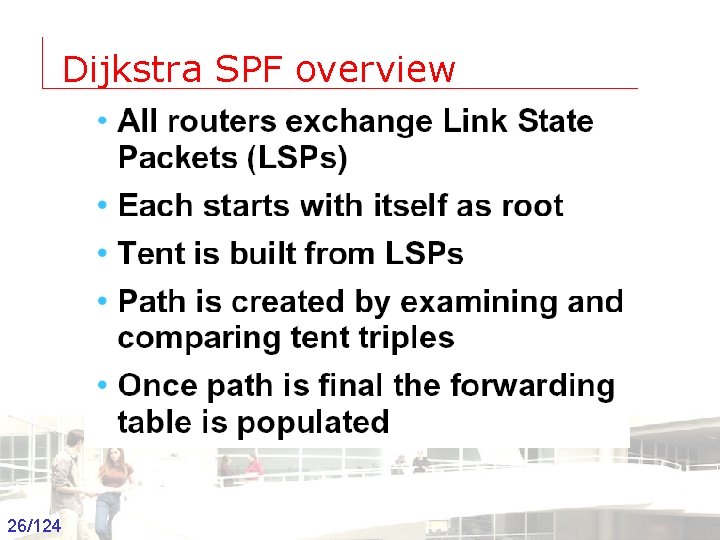
Dijkstra SPF overview 26/124 Groep T Leuven – Information department 2003 -2004 - Information management 26
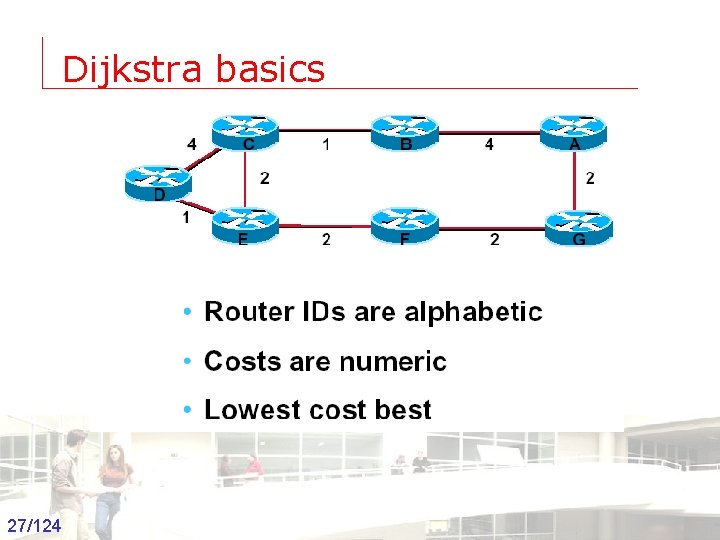
Dijkstra basics 27/124 Groep T Leuven – Information department 2003 -2004 - Information management 27
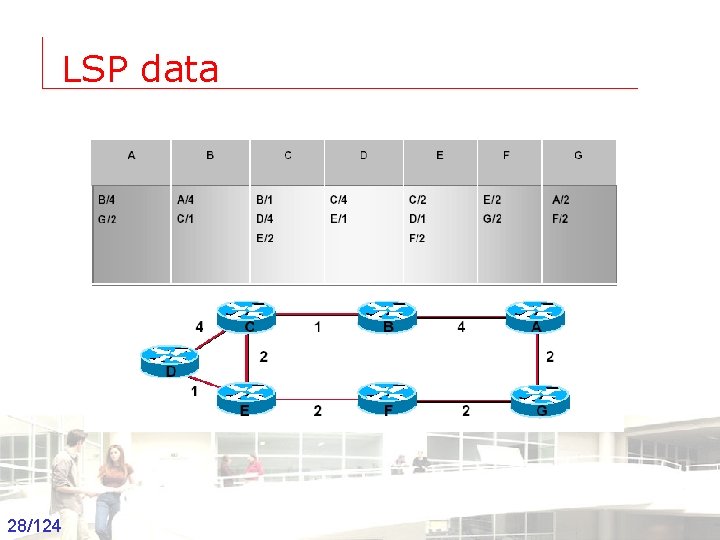
LSP data 28/124 Groep T Leuven – Information department 2003 -2004 - Information management 28
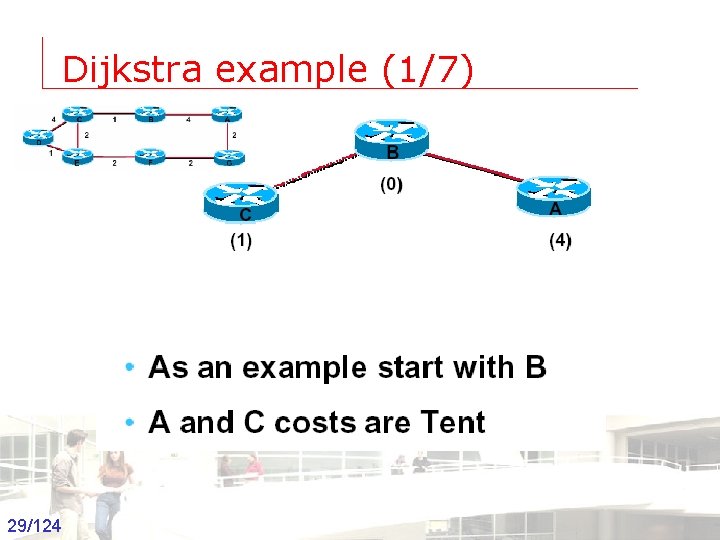
Dijkstra example (1/7) 29/124 Groep T Leuven – Information department 2003 -2004 - Information management 29
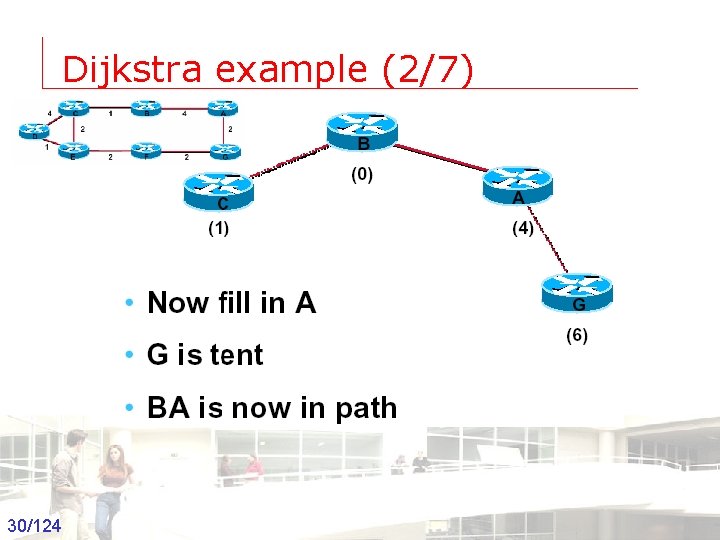
Dijkstra example (2/7) 30/124 Groep T Leuven – Information department 2003 -2004 - Information management 30
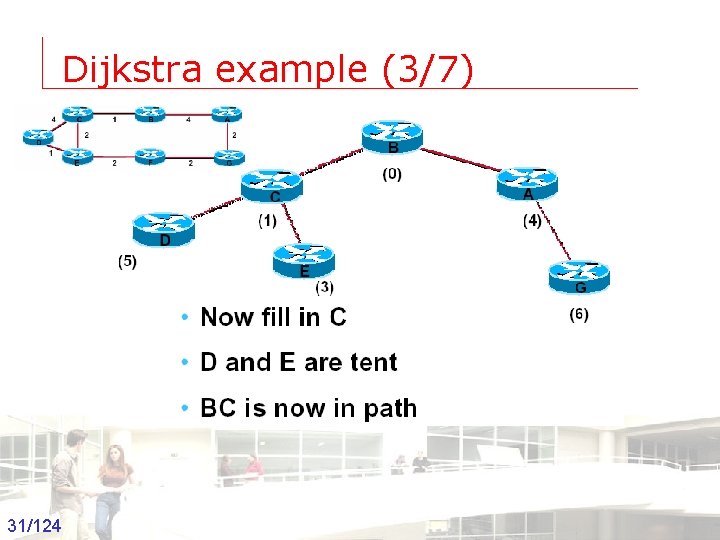
Dijkstra example (3/7) 31/124 Groep T Leuven – Information department 2003 -2004 - Information management 31
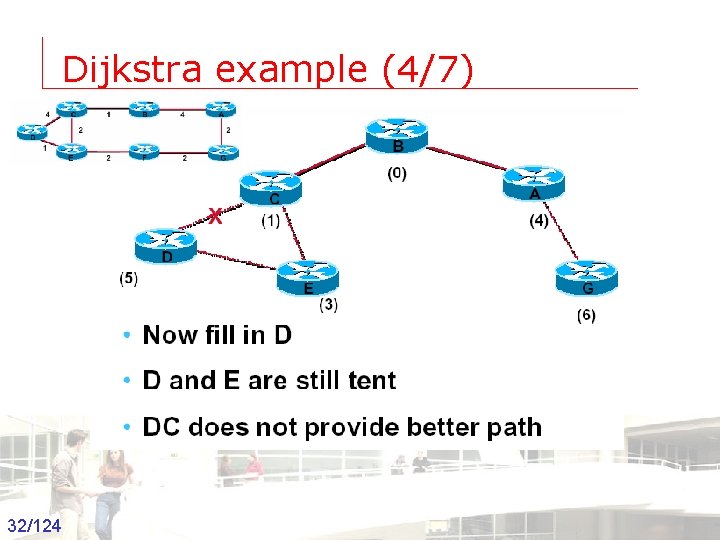
Dijkstra example (4/7) 32/124 Groep T Leuven – Information department 2003 -2004 - Information management 32
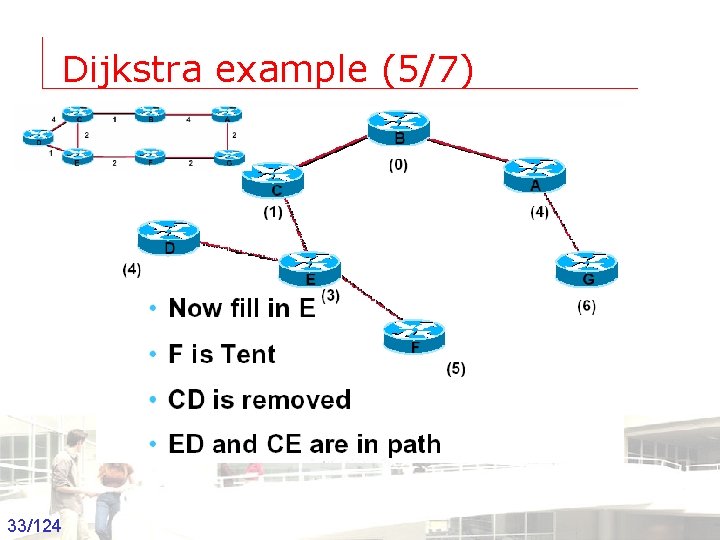
Dijkstra example (5/7) 33/124 Groep T Leuven – Information department 2003 -2004 - Information management 33
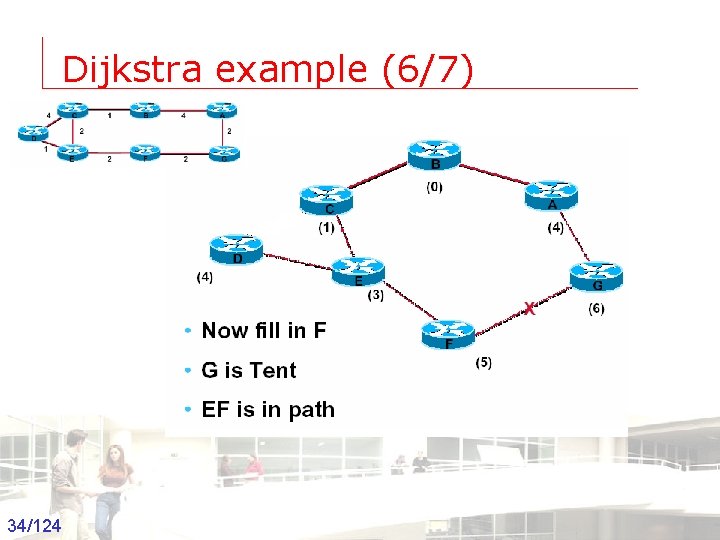
Dijkstra example (6/7) 34/124 Groep T Leuven – Information department 2003 -2004 - Information management 34
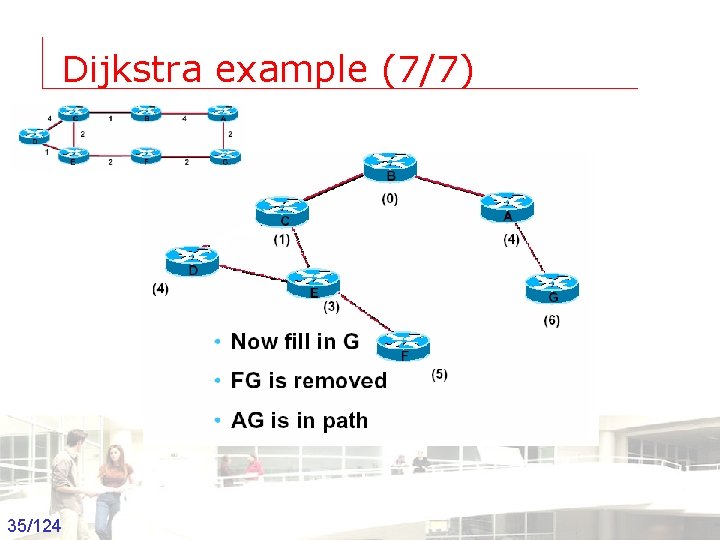
Dijkstra example (7/7) 35/124 Groep T Leuven – Information department 2003 -2004 - Information management 35
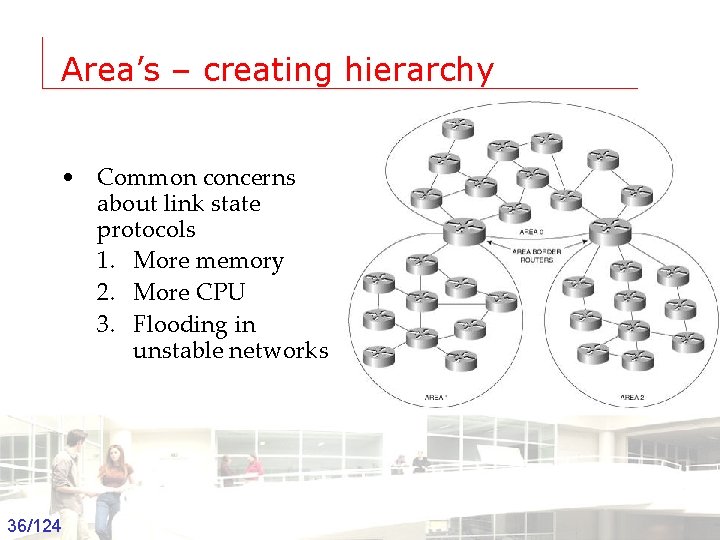
Area’s – creating hierarchy • Common concerns about link state protocols 1. More memory 2. More CPU 3. Flooding in unstable networks 36/124 Groep T Leuven – Information department 2003 -2004 - Information management 36
Interior and Exterior Gateway protocols • Networks and Routers under a single administrative authority • Each AS is assigned a number • AS numbers range form 1 to 65, 535 – Documented in RIPE, ARIN, APNIC, Afri. NIC and LACNIC – http: //www. ripe. net/whois? form_type 37/124 Groep T Leuven – Information department 2003 -2004 - Information management 37
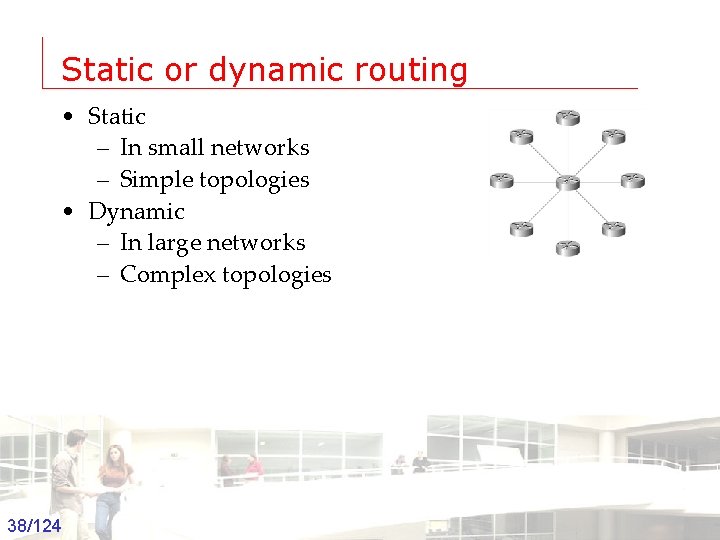
Static or dynamic routing • Static – In small networks – Simple topologies • Dynamic – In large networks – Complex topologies 38/124 Groep T Leuven – Information department 2003 -2004 - Information management 38
RIP v 1 • Directly connected subnets are known • Routing updates are broadcasted to neighbors on UDP port 520 • Listen to routing updates • Hop count is used as Metric • Routing info consists of subnet and metric • Periodic updates (25 - 30 sec) • A route is learned via neighbors • Failed route has a metric of infinite (=16) • Expiration timer 180 seconds 39/124 Groep T Leuven – Information department 2003 -2004 - Information management 39
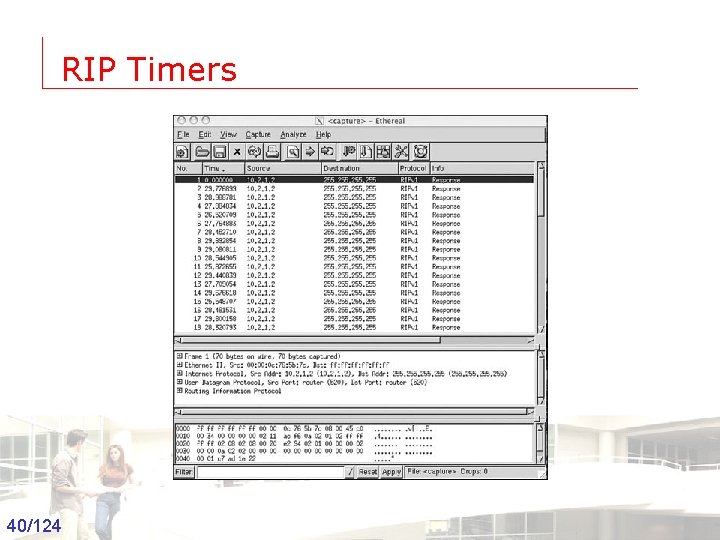
RIP Timers 40/124 Groep T Leuven – Information department 2003 -2004 - Information management 40
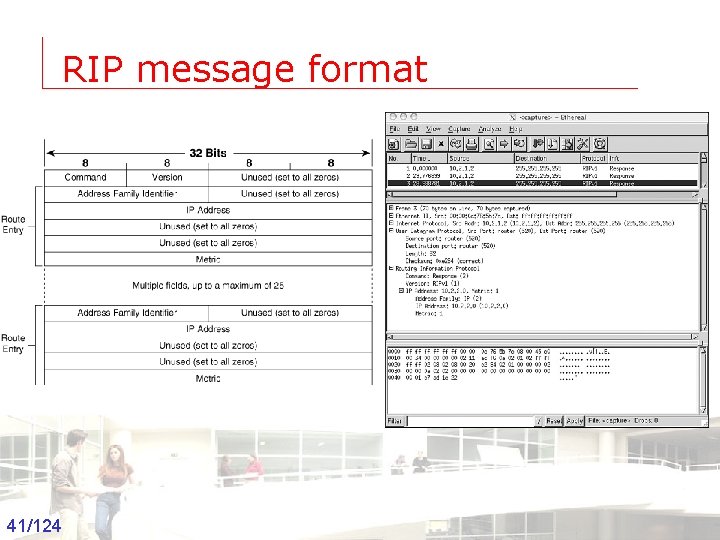
RIP message format 41/124 Groep T Leuven – Information department 2003 -2004 - Information management 41
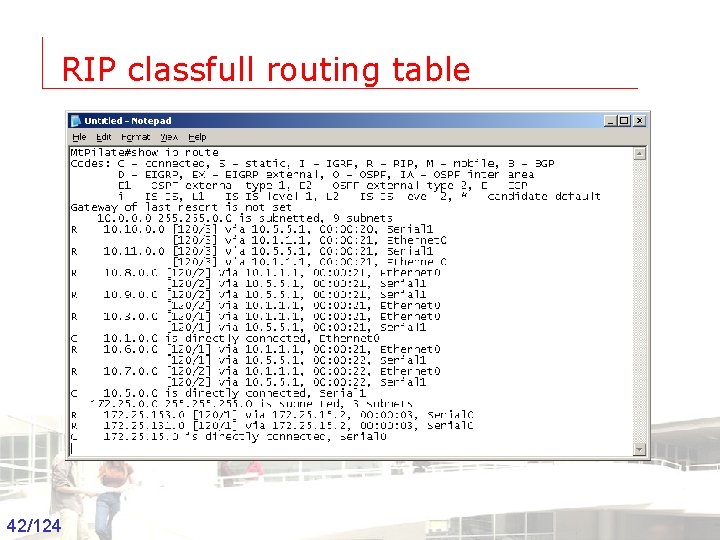
RIP classfull routing table 42/124 Groep T Leuven – Information department 2003 -2004 - Information management 42
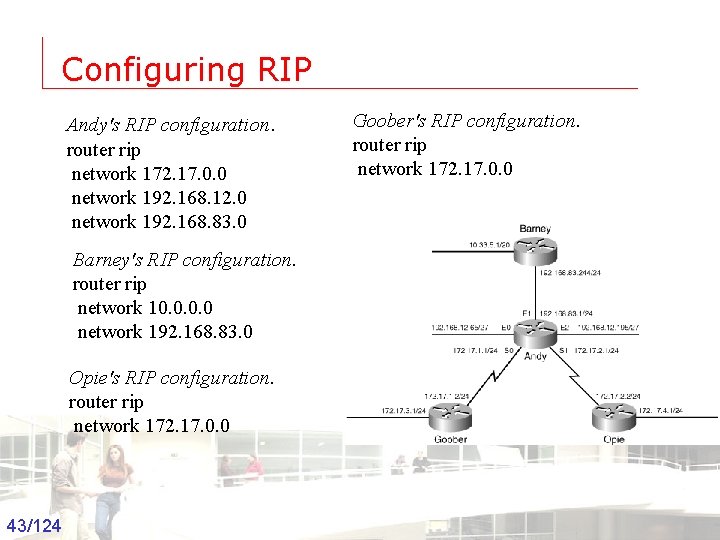
Configuring RIP Andy's RIP configuration. router rip network 172. 17. 0. 0 network 192. 168. 12. 0 network 192. 168. 83. 0 Goober's RIP configuration. router rip network 172. 17. 0. 0 Barney's RIP configuration. router rip network 10. 0 network 192. 168. 83. 0 Opie's RIP configuration. router rip network 172. 17. 0. 0 43/124 Groep T Leuven – Information department 2003 -2004 - Information management 43
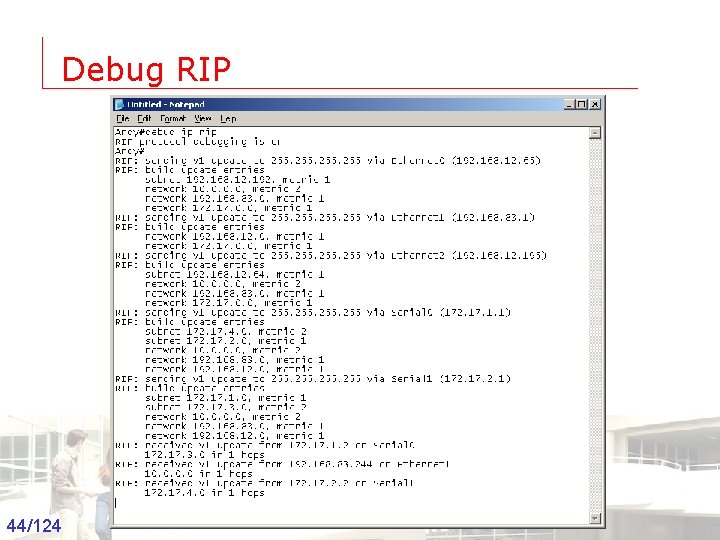
Debug RIP 44/124 Groep T Leuven – Information department 2003 -2004 - Information management 44
RIPv 2 Routing Protocols and Concepts
Objectives • Encounter and describe the limitations of RIPv 1’s limitations. • Apply the basic Routing Information Protocol Version 2 (RIPv 2) configuration commands and evaluate RIPv 2 classless routing updates. • Analyze router output to see RIPv 2 support for VLSM and CIDR • Identify RIPv 2 verification commands 46/124 Groep T Leuven – Information department 2003 -2004 - Information management 46
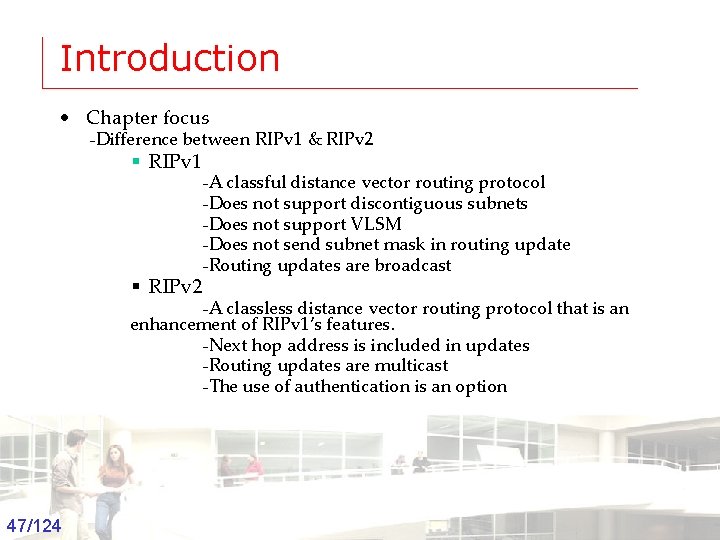
Introduction • Chapter focus -Difference between RIPv 1 & RIPv 2 § RIPv 1 § RIPv 2 -A classful distance vector routing protocol -Does not support discontiguous subnets -Does not support VLSM -Does not send subnet mask in routing update -Routing updates are broadcast -A classless distance vector routing protocol that is an enhancement of RIPv 1’s features. -Next hop address is included in updates -Routing updates are multicast -The use of authentication is an option 47/124 Groep T Leuven – Information department 2003 -2004 - Information management 47
Introduction • Similarities between RIPv 1 & RIPv 2 -Use of timers to prevent routing loops -Use of split horizon or split horizon with poison reverse -Use of triggered updates -Maximum hop count of 15 48/124 Groep T Leuven – Information department 2003 -2004 - Information management 48
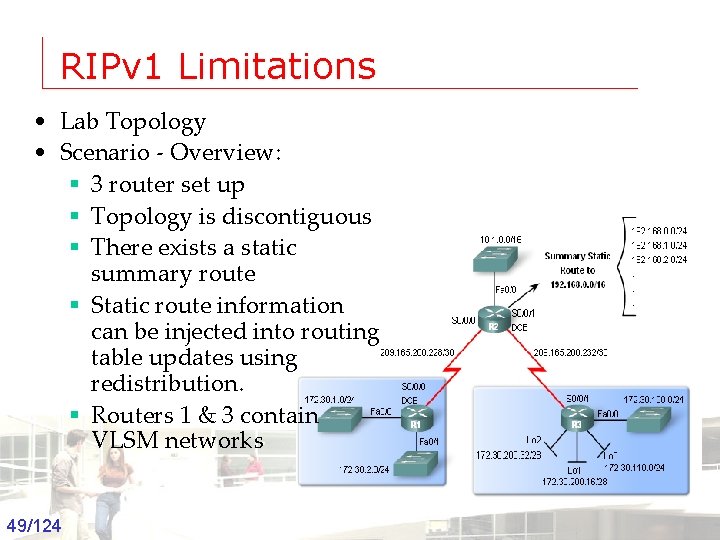
RIPv 1 Limitations • Lab Topology • Scenario - Overview: § 3 router set up § Topology is discontiguous § There exists a static summary route § Static route information can be injected into routing table updates using redistribution. § Routers 1 & 3 contain VLSM networks 49/124 Groep T Leuven – Information department 2003 -2004 - Information management 49
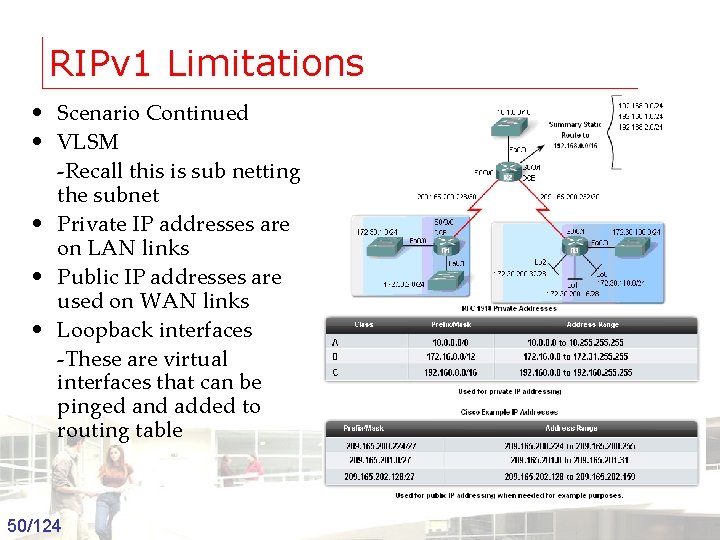
RIPv 1 Limitations • Scenario Continued • VLSM -Recall this is sub netting the subnet • Private IP addresses are on LAN links • Public IP addresses are used on WAN links • Loopback interfaces -These are virtual interfaces that can be pinged and added to routing table 50/124 Groep T Leuven – Information department 2003 -2004 - Information management 50
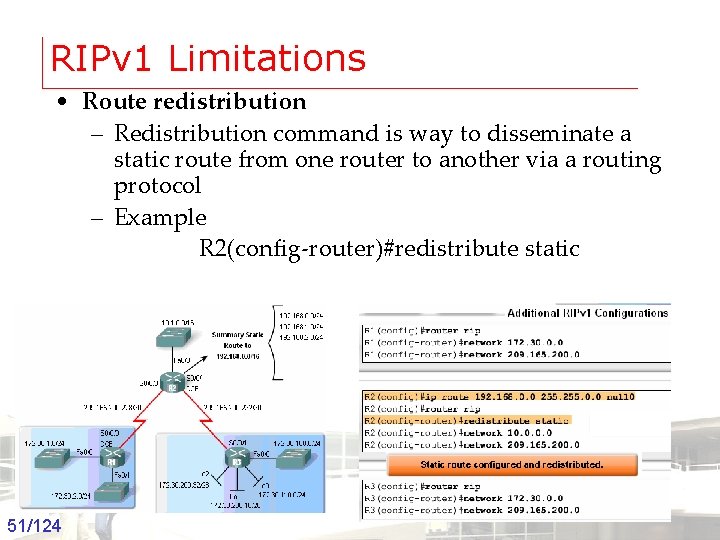
RIPv 1 Limitations • Route redistribution – Redistribution command is way to disseminate a static route from one router to another via a routing protocol – Example R 2(config-router)#redistribute static 51/124 Groep T Leuven – Information department 2003 -2004 - Information management 51
RIPv 1 Limitations • Verifying and Testing Connectivity – Use the following commands: § show ip interfaces brief § ping § traceroute 52/124 Groep T Leuven – Information department 2003 -2004 - Information management 52
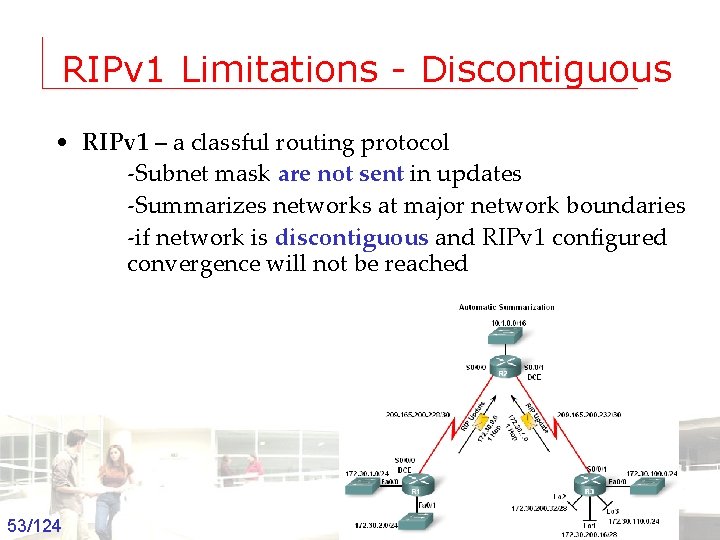
RIPv 1 Limitations - Discontiguous • RIPv 1 – a classful routing protocol -Subnet mask are not sent in updates -Summarizes networks at major network boundaries -if network is discontiguous and RIPv 1 configured convergence will not be reached 53/124 Groep T Leuven – Information department 2003 -2004 - Information management 53
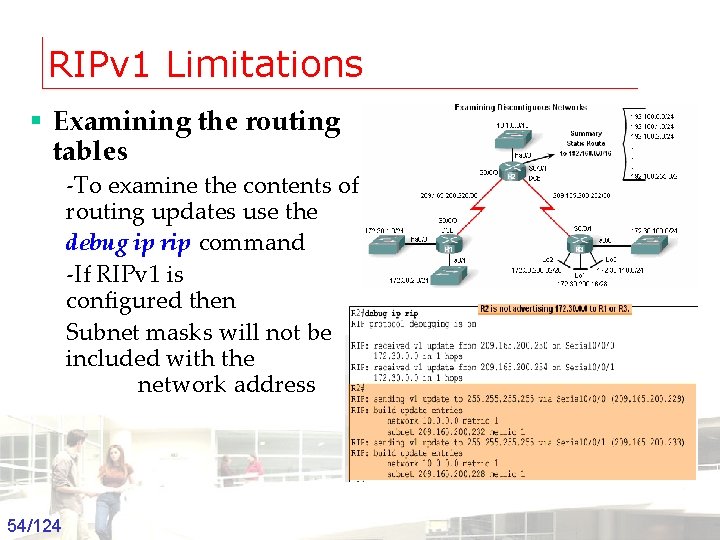
RIPv 1 Limitations § Examining the routing tables -To examine the contents of routing updates use the debug ip rip command -If RIPv 1 is configured then Subnet masks will not be included with the network address 54/124 Groep T Leuven – Information department 2003 -2004 - Information management 54
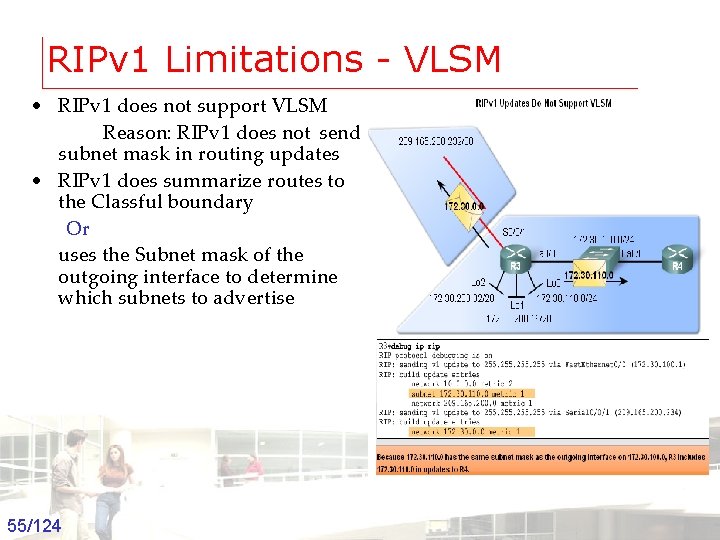
RIPv 1 Limitations - VLSM • RIPv 1 does not support VLSM Reason: RIPv 1 does not send subnet mask in routing updates • RIPv 1 does summarize routes to the Classful boundary Or uses the Subnet mask of the outgoing interface to determine which subnets to advertise 55/124 Groep T Leuven – Information department 2003 -2004 - Information management 55
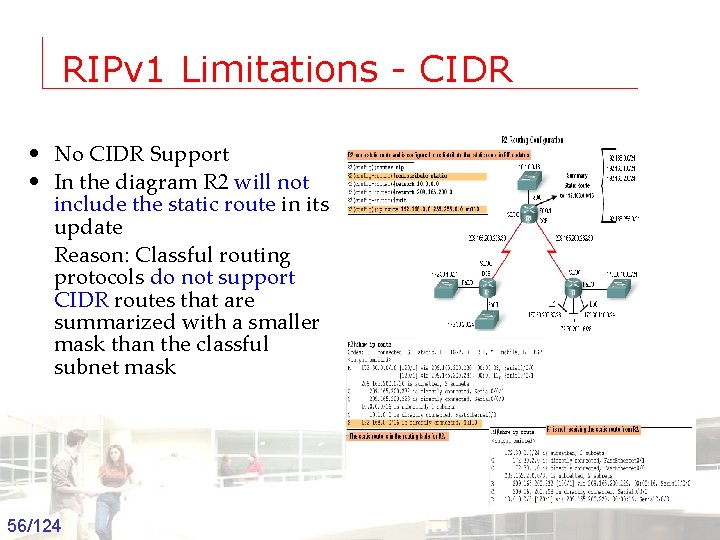
RIPv 1 Limitations - CIDR • No CIDR Support • In the diagram R 2 will not include the static route in its update Reason: Classful routing protocols do not support CIDR routes that are summarized with a smaller mask than the classful subnet mask 56/124 Groep T Leuven – Information department 2003 -2004 - Information management 56
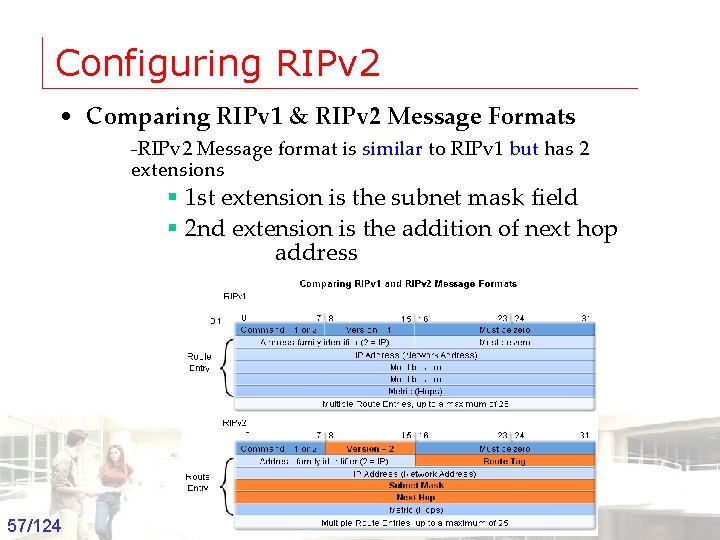
Configuring RIPv 2 • Comparing RIPv 1 & RIPv 2 Message Formats -RIPv 2 Message format is similar to RIPv 1 but has 2 extensions § 1 st extension is the subnet mask field § 2 nd extension is the addition of next hop address 57/124 Groep T Leuven – Information department 2003 -2004 - Information management 57
Configuring RIPv 2 • Enabling and Verifying RIPv 2 • Configuring RIP on a Cisco router By default it is running RIPv 1 58/124 Groep T Leuven – Information department 2003 -2004 - Information management 58
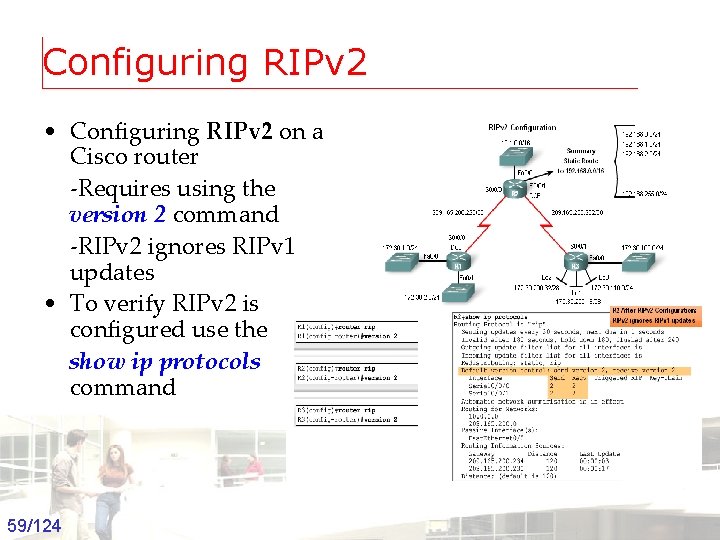
Configuring RIPv 2 • Configuring RIPv 2 on a Cisco router -Requires using the version 2 command -RIPv 2 ignores RIPv 1 updates • To verify RIPv 2 is configured use the show ip protocols command 59/124 Groep T Leuven – Information department 2003 -2004 - Information management 59

Configuring RIPv 2 • Auto-Summary & RIPv 2 • RIPv 2 will automatically summarize routes at major network boundaries and can also summarize routes with a subnet mask that is smaller than the classful subnet mask 60/124 Groep T Leuven – Information department 2003 -2004 - Information management 60
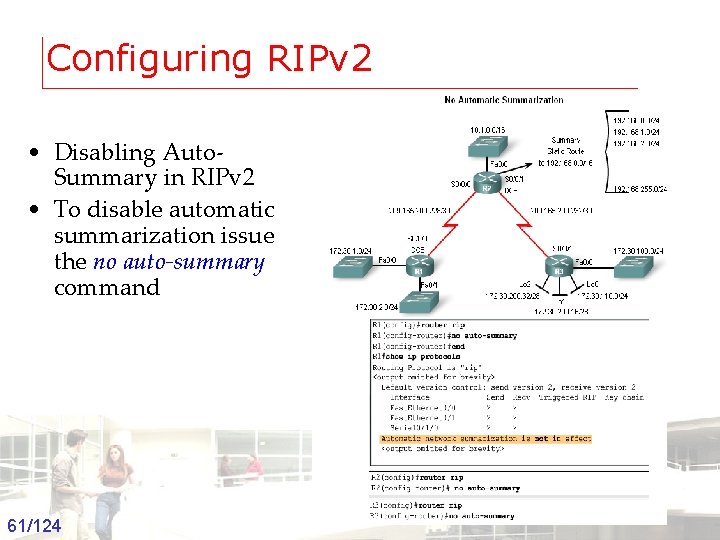
Configuring RIPv 2 • Disabling Auto. Summary in RIPv 2 • To disable automatic summarization issue the no auto-summary command 61/124 Groep T Leuven – Information department 2003 -2004 - Information management 61
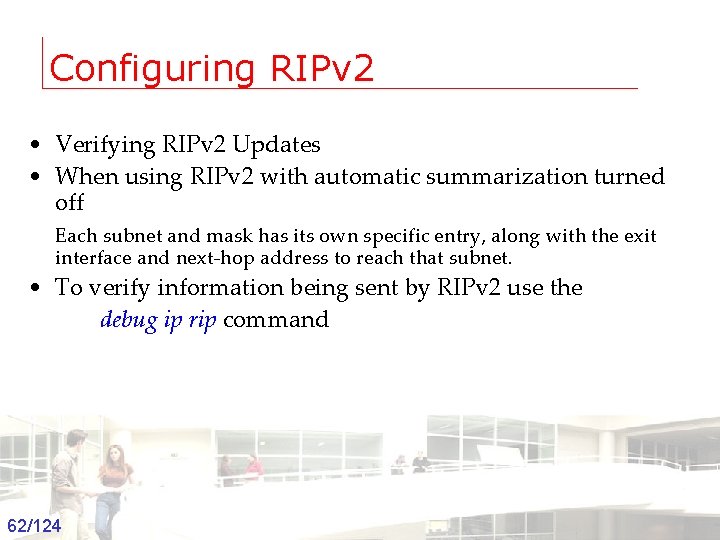
Configuring RIPv 2 • Verifying RIPv 2 Updates • When using RIPv 2 with automatic summarization turned off Each subnet and mask has its own specific entry, along with the exit interface and next-hop address to reach that subnet. • To verify information being sent by RIPv 2 use the debug ip rip command 62/124 Groep T Leuven – Information department 2003 -2004 - Information management 62
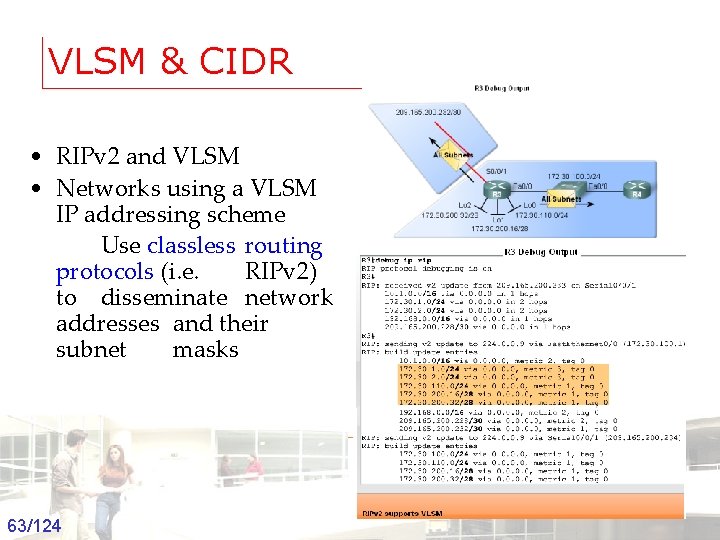
VLSM & CIDR • RIPv 2 and VLSM • Networks using a VLSM IP addressing scheme Use classless routing protocols (i. e. RIPv 2) to disseminate network addresses and their subnet masks 63/124 Groep T Leuven – Information department 2003 -2004 - Information management 63
VLSM & CIDR • CIDR uses Supernetting is a bunch of contiguous classful networks that is addressed as a single network. 64/124 Groep T Leuven – Information department 2003 -2004 - Information management 64
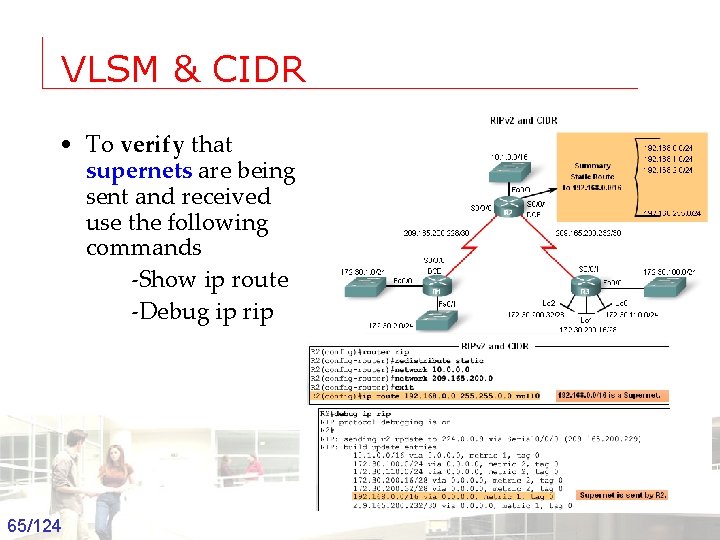
VLSM & CIDR • To verify that supernets are being sent and received use the following commands -Show ip route -Debug ip rip 65/124 Groep T Leuven – Information department 2003 -2004 - Information management 65
Verifying & Troubleshooting RIPv 2 • Basic Troubleshooting steps -Check the status of all links -Check cabling -Check IP address & subnet mask configuration -Remove any unneeded configuration commands • Commands used to verify properation of RIPv 2 – Show ip interfaces brief – Show ip protocols – Debug ip rip – Show ip route 66/124 Groep T Leuven – Information department 2003 -2004 - Information management 66
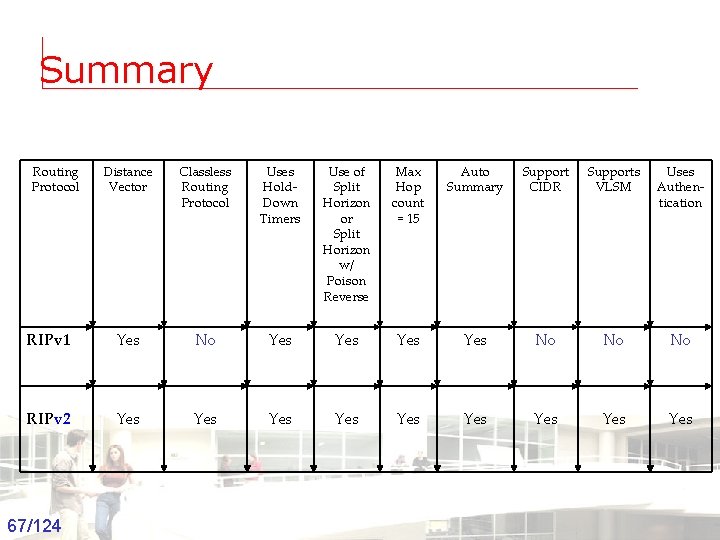
Summary Routing Protocol Distance Vector Classless Routing Protocol Uses Hold. Down Timers Use of Split Horizon or Split Horizon w/ Poison Reverse Max Hop count = 15 Auto Summary Support CIDR Supports VLSM Uses Authentication RIPv 1 Yes No Yes Yes No No No RIPv 2 Yes Yes Yes 67/124 Groep T Leuven – Information department 2003 -2004 - Information management 67
OSPF Routing Protocols and Concepts
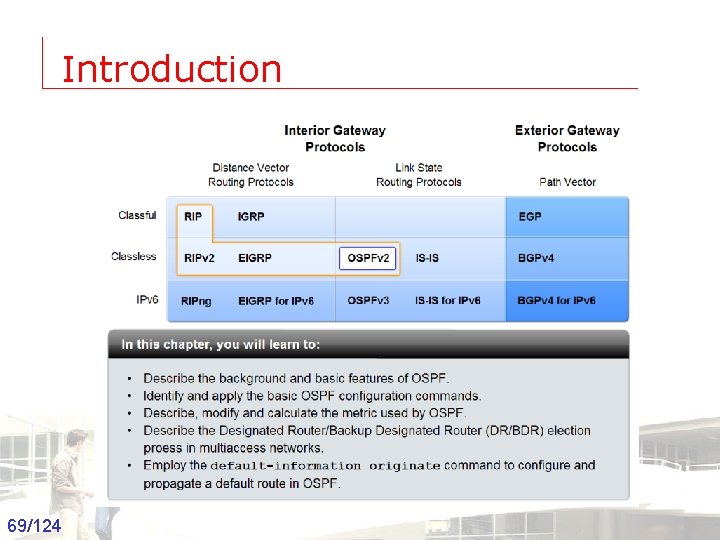
Introduction 69/124 Groep T Leuven – Information department 2003 -2004 - Information management 69
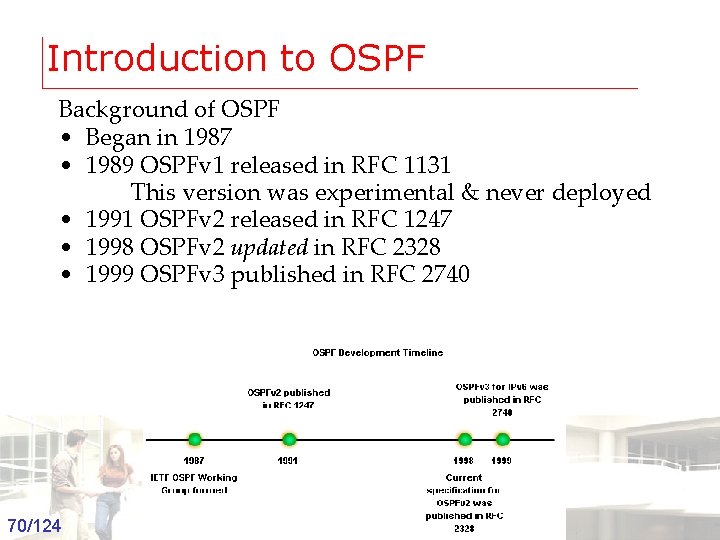
Introduction to OSPF Background of OSPF • Began in 1987 • 1989 OSPFv 1 released in RFC 1131 This version was experimental & never deployed • 1991 OSPFv 2 released in RFC 1247 • 1998 OSPFv 2 updated in RFC 2328 • 1999 OSPFv 3 published in RFC 2740 70/124 Groep T Leuven – Information department 2003 -2004 - Information management 70
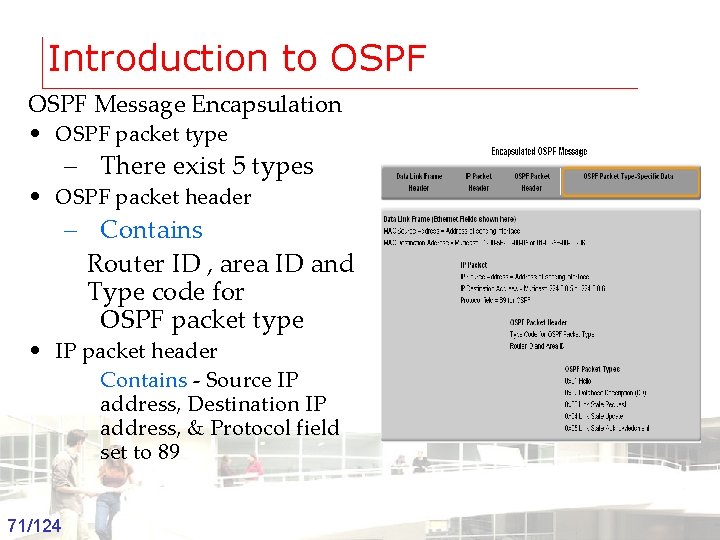
Introduction to OSPF Message Encapsulation • OSPF packet type – There exist 5 types • OSPF packet header – Contains Router ID , area ID and Type code for OSPF packet type • IP packet header Contains - Source IP address, Destination IP address, & Protocol field set to 89 71/124 Groep T Leuven – Information department 2003 -2004 - Information management 71
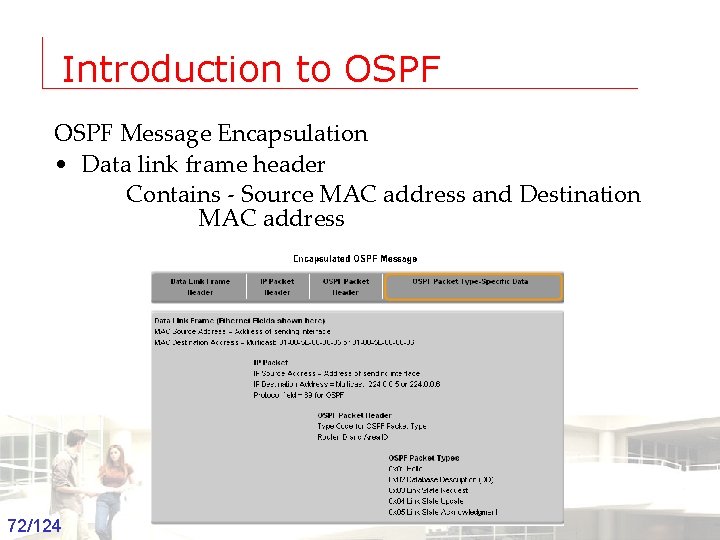
Introduction to OSPF Message Encapsulation • Data link frame header Contains - Source MAC address and Destination MAC address 72/124 Groep T Leuven – Information department 2003 -2004 - Information management 72
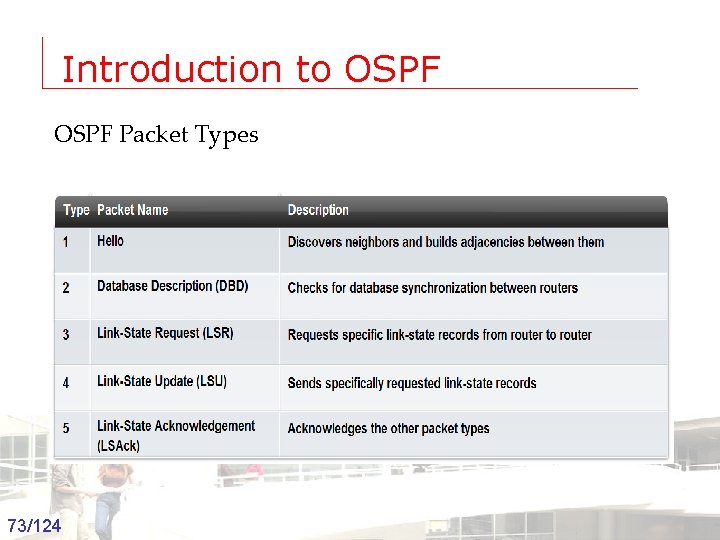
Introduction to OSPF Packet Types 73/124 Groep T Leuven – Information department 2003 -2004 - Information management 73
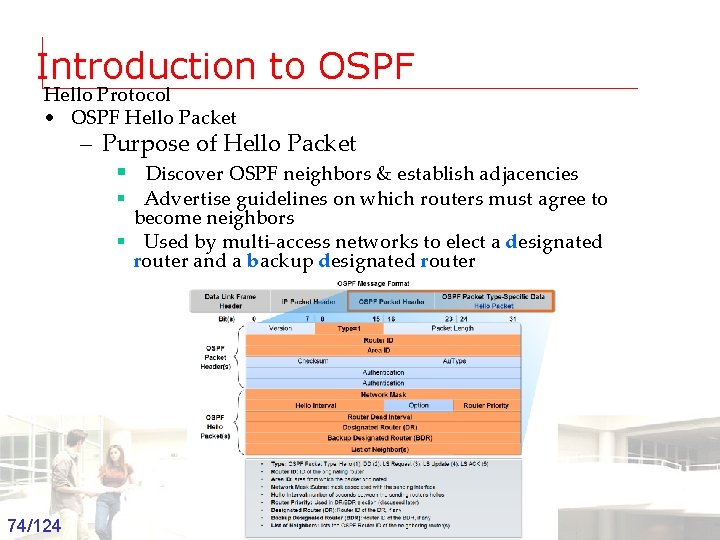
Introduction to OSPF Hello Protocol • OSPF Hello Packet – Purpose of Hello Packet § Discover OSPF neighbors & establish adjacencies § Advertise guidelines on which routers must agree to become neighbors § Used by multi-access networks to elect a designated router and a backup designated router 74/124 Groep T Leuven – Information department 2003 -2004 - Information management 74
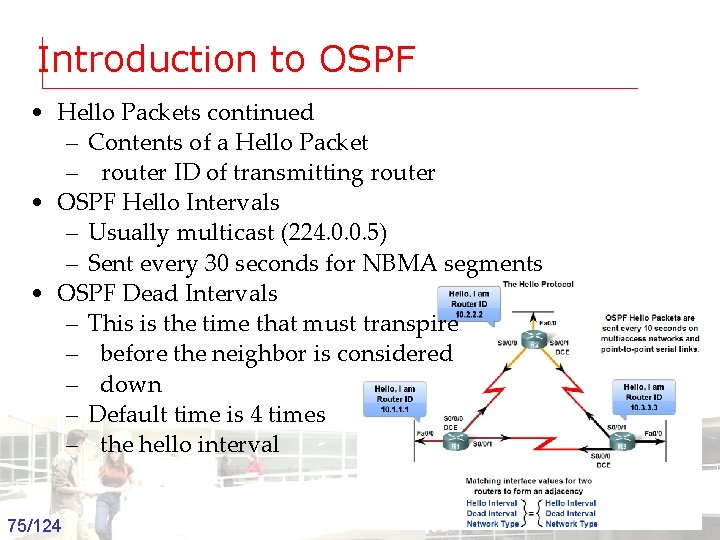
Introduction to OSPF • Hello Packets continued – Contents of a Hello Packet – router ID of transmitting router • OSPF Hello Intervals – Usually multicast (224. 0. 0. 5) – Sent every 30 seconds for NBMA segments • OSPF Dead Intervals – This is the time that must transpire – before the neighbor is considered – down – Default time is 4 times – the hello interval 75/124 Groep T Leuven – Information department 2003 -2004 - Information management 75
Introduction to OSPF • Hello protocol packets contain information that is used in electing -Designated Router (DR) § DR is responsible for updating all other OSPF routers -Backup Designated Router (BDR) § This router takes over DR’s responsibilities if DR fails 76/124 Groep T Leuven – Information department 2003 -2004 - Information management 76
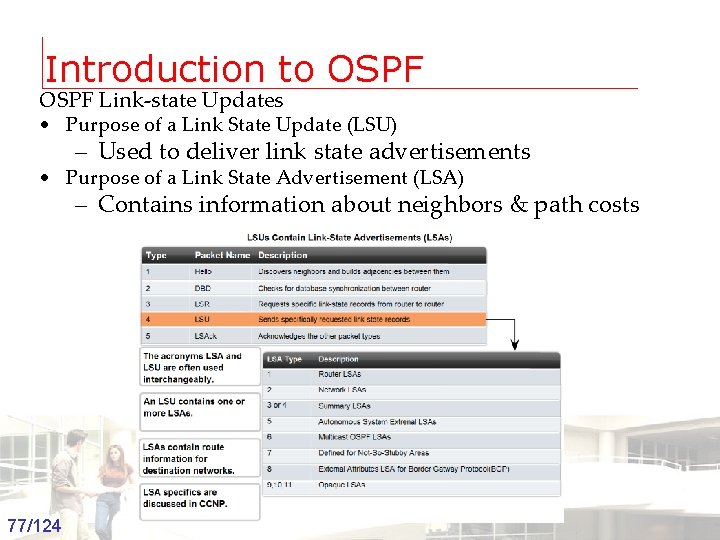
Introduction to OSPF Link-state Updates • Purpose of a Link State Update (LSU) – Used to deliver link state advertisements • Purpose of a Link State Advertisement (LSA) – Contains information about neighbors & path costs 77/124 Groep T Leuven – Information department 2003 -2004 - Information management 77
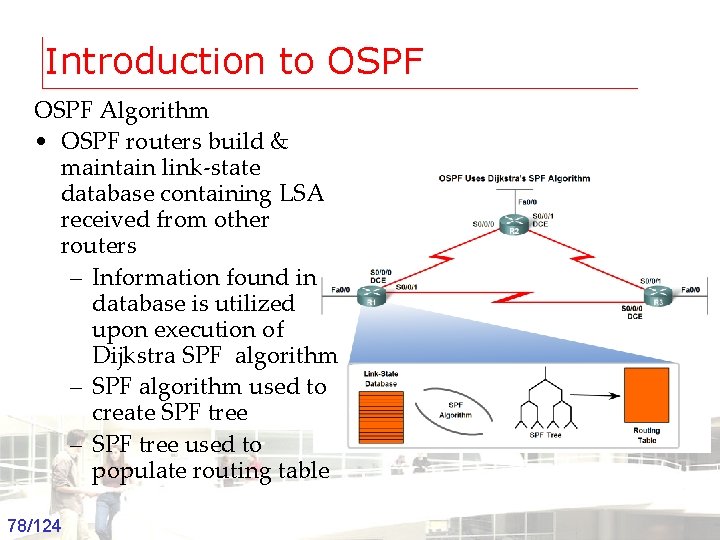
Introduction to OSPF Algorithm • OSPF routers build & maintain link-state database containing LSA received from other routers – Information found in database is utilized upon execution of Dijkstra SPF algorithm – SPF algorithm used to create SPF tree – SPF tree used to populate routing table 78/124 Groep T Leuven – Information department 2003 -2004 - Information management 78
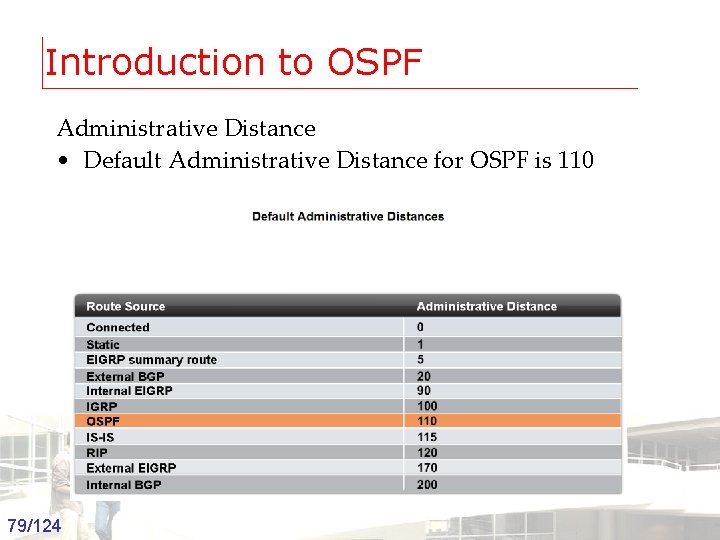
Introduction to OSPF Administrative Distance • Default Administrative Distance for OSPF is 110 79/124 Groep T Leuven – Information department 2003 -2004 - Information management 79
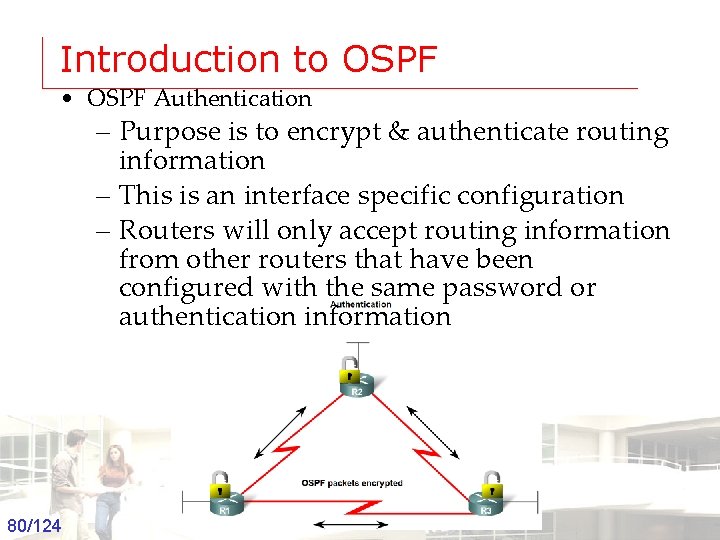
Introduction to OSPF • OSPF Authentication – Purpose is to encrypt & authenticate routing information – This is an interface specific configuration – Routers will only accept routing information from other routers that have been configured with the same password or authentication information 80/124 Groep T Leuven – Information department 2003 -2004 - Information management 80
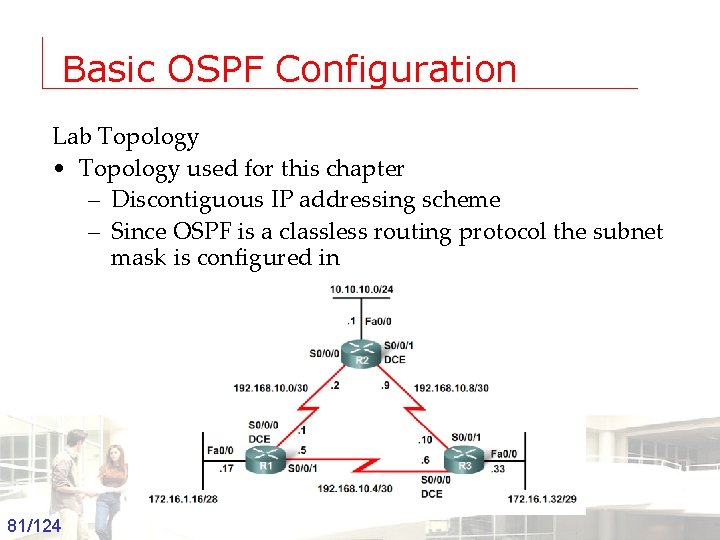
Basic OSPF Configuration Lab Topology • Topology used for this chapter – Discontiguous IP addressing scheme – Since OSPF is a classless routing protocol the subnet mask is configured in 81/124 Groep T Leuven – Information department 2003 -2004 - Information management 81
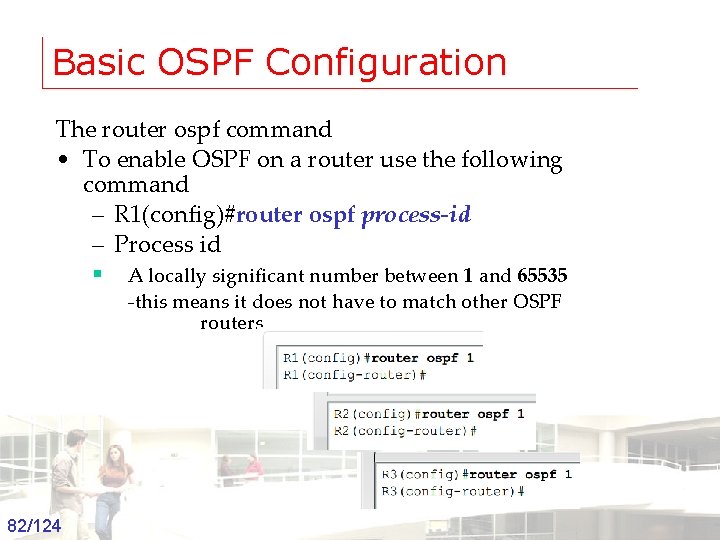
Basic OSPF Configuration The router ospf command • To enable OSPF on a router use the following command – R 1(config)#router ospf process-id – Process id § A locally significant number between 1 and 65535 -this means it does not have to match other OSPF routers 82/124 Groep T Leuven – Information department 2003 -2004 - Information management 82
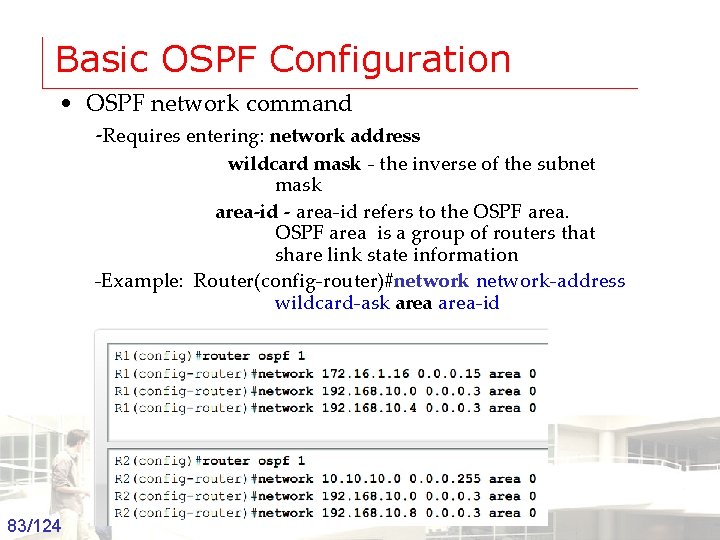
Basic OSPF Configuration • OSPF network command -Requires entering: network address wildcard mask - the inverse of the subnet mask area-id - area-id refers to the OSPF area is a group of routers that share link state information -Example: Router(config-router)#network-address wildcard-ask area-id 83/124 Groep T Leuven – Information department 2003 -2004 - Information management 83
Basic OSPF Configuration • Router ID – This is an IP address used to identify a router – 3 criteria for deriving the router ID § Use IP address configured with OSPF router-id command § -Takes precedence over loopback and physical interface addresses § If router-id command not used then router chooses highest IP address of any loopback interfaces § If no loopback interfaces are configured then the highest IP address on any active interface is used 84/124 Groep T Leuven – Information department 2003 -2004 - Information management 84
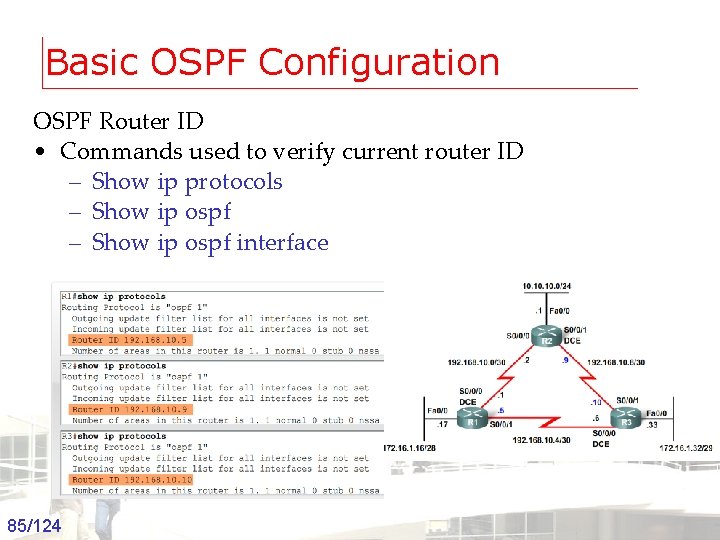
Basic OSPF Configuration OSPF Router ID • Commands used to verify current router ID – Show ip protocols – Show ip ospf interface 85/124 Groep T Leuven – Information department 2003 -2004 - Information management 85
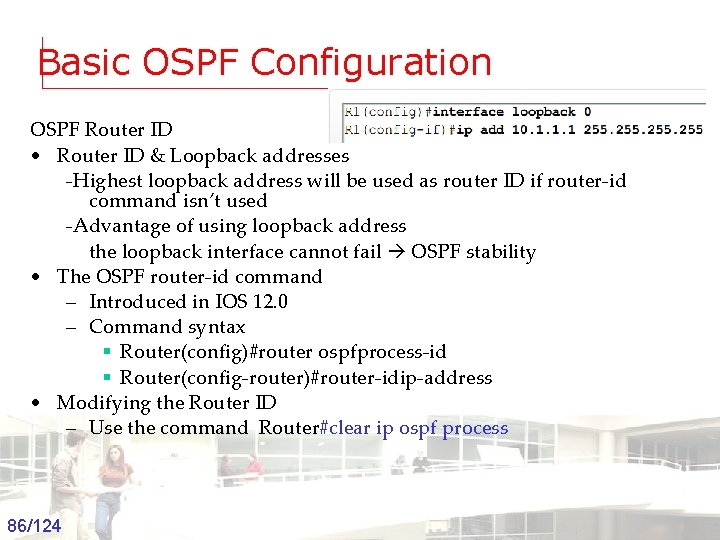
Basic OSPF Configuration OSPF Router ID • Router ID & Loopback addresses -Highest loopback address will be used as router ID if router-id command isn’t used -Advantage of using loopback address the loopback interface cannot fail OSPF stability • The OSPF router-id command – Introduced in IOS 12. 0 – Command syntax § Router(config)#router ospfprocess-id § Router(config-router)#router-idip-address • Modifying the Router ID – Use the command Router#clear ip ospf process 86/124 Groep T Leuven – Information department 2003 -2004 - Information management 86
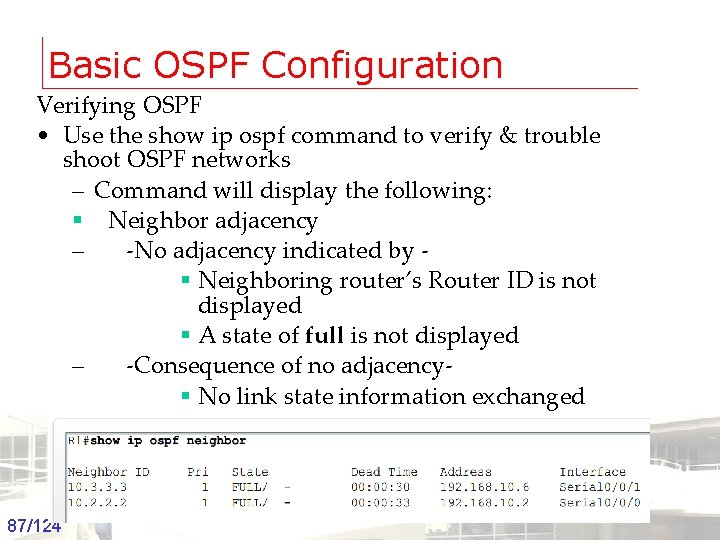
Basic OSPF Configuration Verifying OSPF • Use the show ip ospf command to verify & trouble shoot OSPF networks – Command will display the following: § Neighbor adjacency – -No adjacency indicated by § Neighboring router’s Router ID is not displayed § A state of full is not displayed – -Consequence of no adjacency§ No link state information exchanged § Inaccurate SPF trees & routing tables 87/124 Groep T Leuven – Information department 2003 -2004 - Information management 87
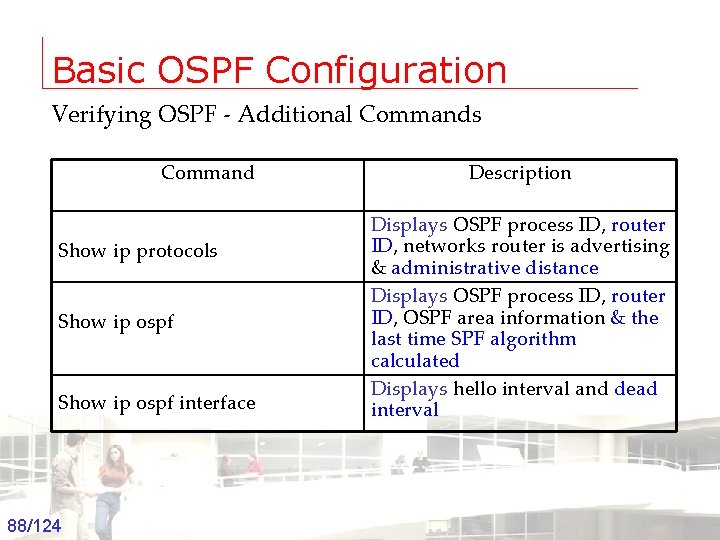
Basic OSPF Configuration Verifying OSPF - Additional Commands Command Show ip protocols Show ip ospf interface 88/124 Groep T Leuven – Information department Description Displays OSPF process ID, router ID, networks router is advertising & administrative distance Displays OSPF process ID, router ID, OSPF area information & the last time SPF algorithm calculated Displays hello interval and dead interval 2003 -2004 - Information management 88
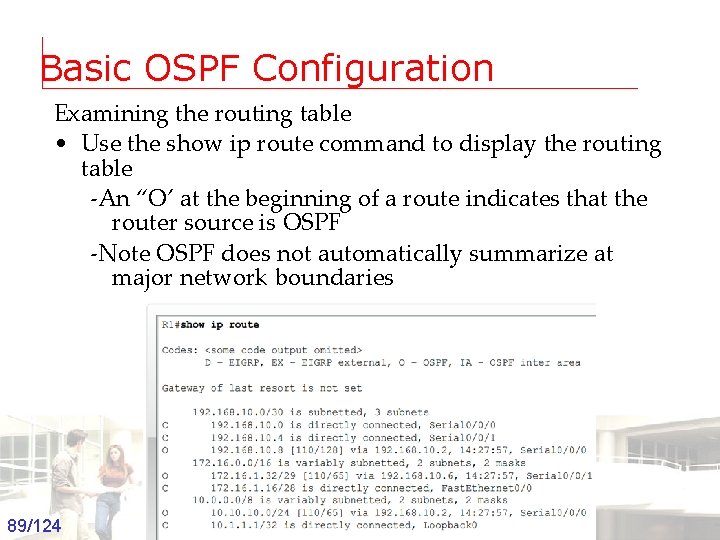
Basic OSPF Configuration Examining the routing table • Use the show ip route command to display the routing table -An “O’ at the beginning of a route indicates that the router source is OSPF -Note OSPF does not automatically summarize at major network boundaries 89/124 Groep T Leuven – Information department 2003 -2004 - Information management 89
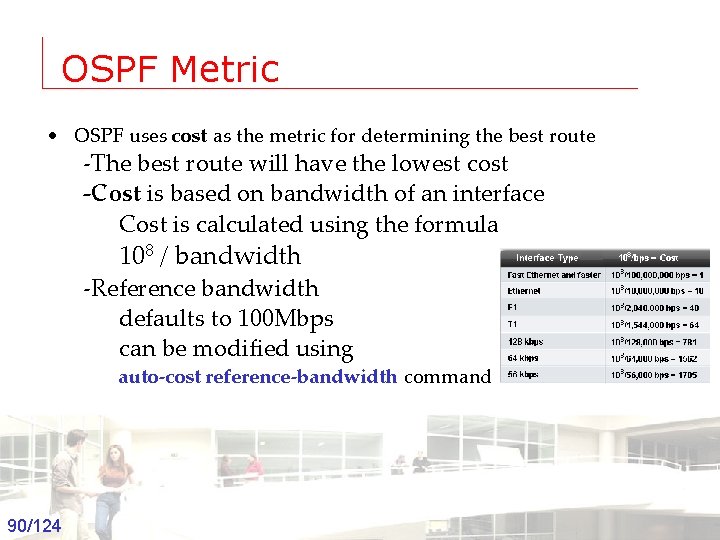
OSPF Metric • OSPF uses cost as the metric for determining the best route -The best route will have the lowest cost -Cost is based on bandwidth of an interface Cost is calculated using the formula 108 / bandwidth -Reference bandwidth defaults to 100 Mbps can be modified using auto-cost reference-bandwidth command 90/124 Groep T Leuven – Information department 2003 -2004 - Information management 90

OSPF Metric • COST of an OSPF route – Is the accumulated value from one router to the next 91/124 Groep T Leuven – Information department 2003 -2004 - Information management 91
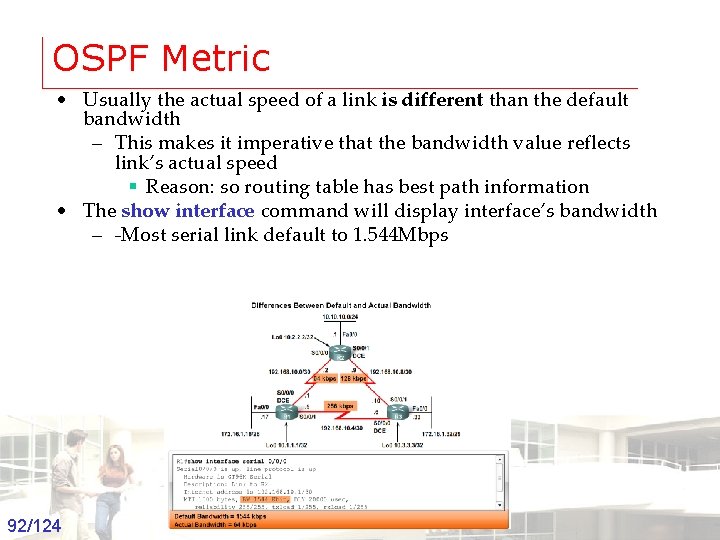
OSPF Metric • Usually the actual speed of a link is different than the default bandwidth – This makes it imperative that the bandwidth value reflects link’s actual speed § Reason: so routing table has best path information • The show interface command will display interface’s bandwidth – -Most serial link default to 1. 544 Mbps 92/124 Groep T Leuven – Information department 2003 -2004 - Information management 92
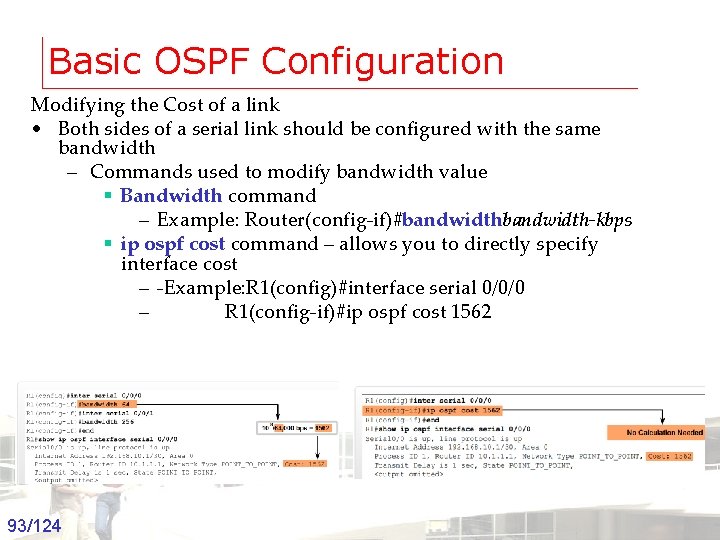
Basic OSPF Configuration Modifying the Cost of a link • Both sides of a serial link should be configured with the same bandwidth – Commands used to modify bandwidth value § Bandwidth command – Example: Router(config-if)#bandwidth-kbps § ip ospf cost command – allows you to directly specify interface cost – -Example: R 1(config)#interface serial 0/0/0 – R 1(config-if)#ip ospf cost 1562 93/124 Groep T Leuven – Information department 2003 -2004 - Information management 93
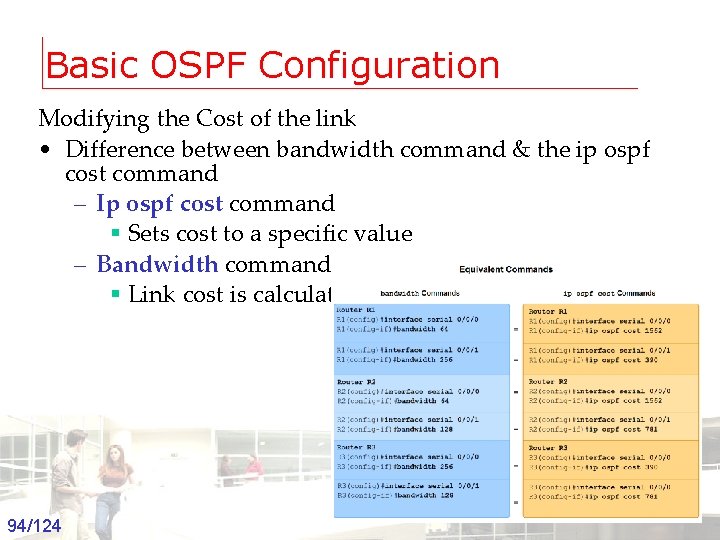
Basic OSPF Configuration Modifying the Cost of the link • Difference between bandwidth command & the ip ospf cost command – Ip ospf cost command § Sets cost to a specific value – Bandwidth command § Link cost is calculated 94/124 Groep T Leuven – Information department 2003 -2004 - Information management 94
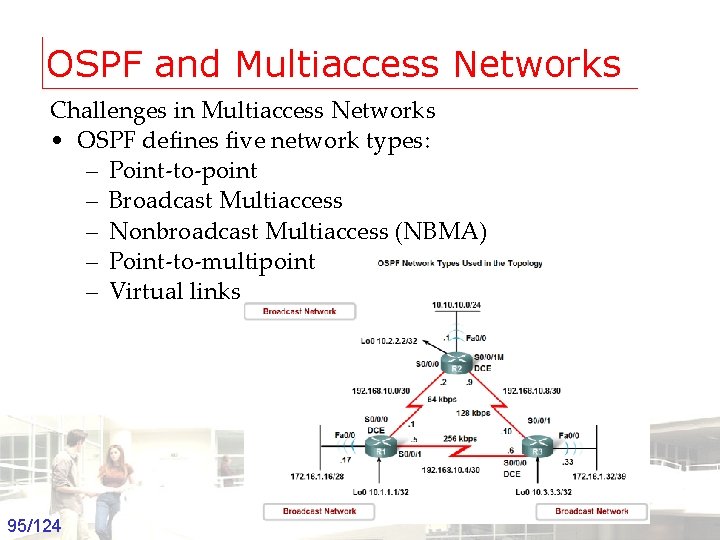
OSPF and Multiaccess Networks Challenges in Multiaccess Networks • OSPF defines five network types: – Point-to-point – Broadcast Multiaccess – Nonbroadcast Multiaccess (NBMA) – Point-to-multipoint – Virtual links 95/124 Groep T Leuven – Information department 2003 -2004 - Information management 95
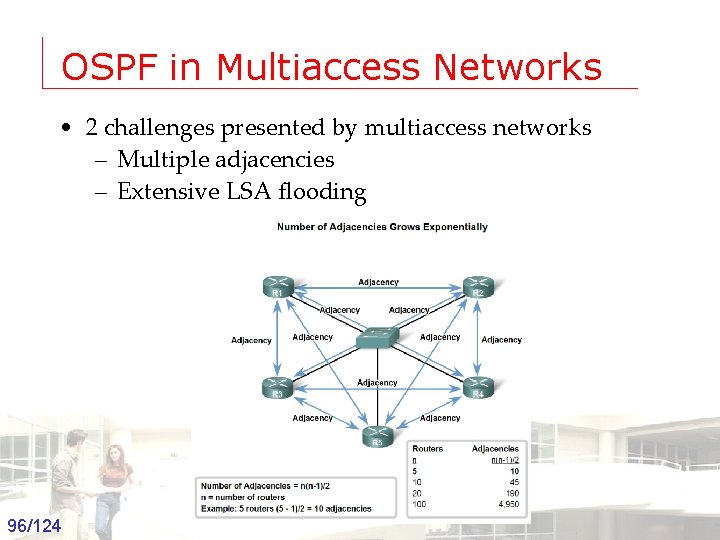
OSPF in Multiaccess Networks • 2 challenges presented by multiaccess networks – Multiple adjacencies – Extensive LSA flooding 96/124 Groep T Leuven – Information department 2003 -2004 - Information management 96
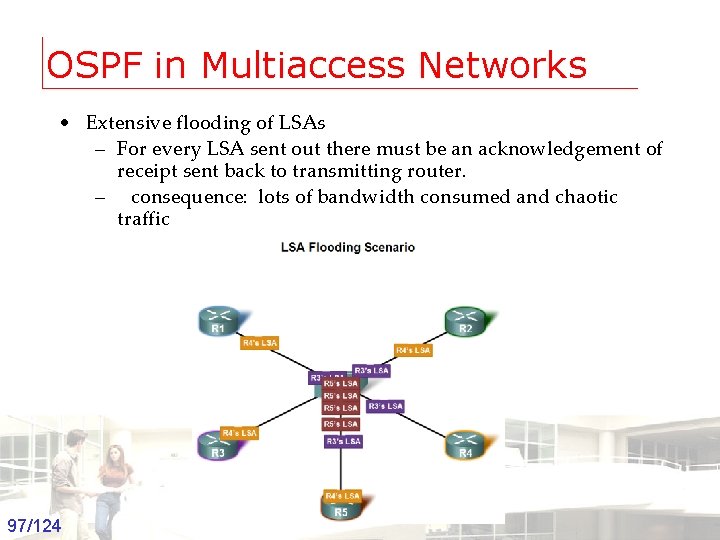
OSPF in Multiaccess Networks • Extensive flooding of LSAs – For every LSA sent out there must be an acknowledgement of receipt sent back to transmitting router. – consequence: lots of bandwidth consumed and chaotic traffic 97/124 Groep T Leuven – Information department 2003 -2004 - Information management 97
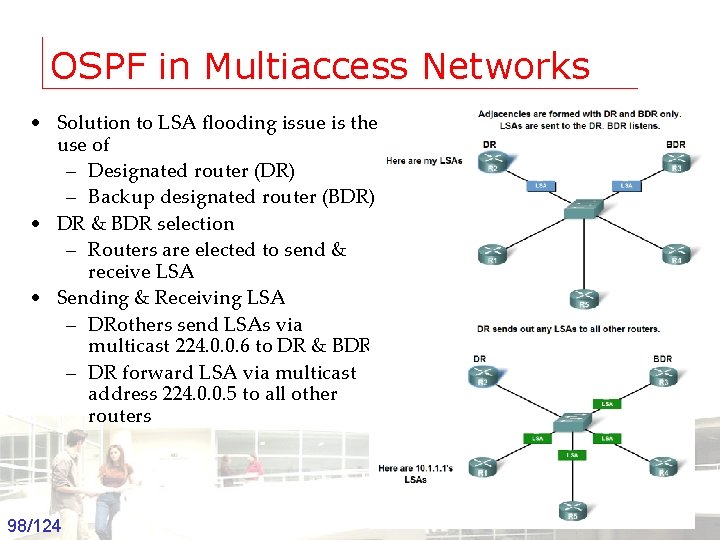
OSPF in Multiaccess Networks • Solution to LSA flooding issue is the use of – Designated router (DR) – Backup designated router (BDR) • DR & BDR selection – Routers are elected to send & receive LSA • Sending & Receiving LSA – DRothers send LSAs via multicast 224. 0. 0. 6 to DR & BDR – DR forward LSA via multicast address 224. 0. 0. 5 to all other routers 98/124 Groep T Leuven – Information department 2003 -2004 - Information management 98
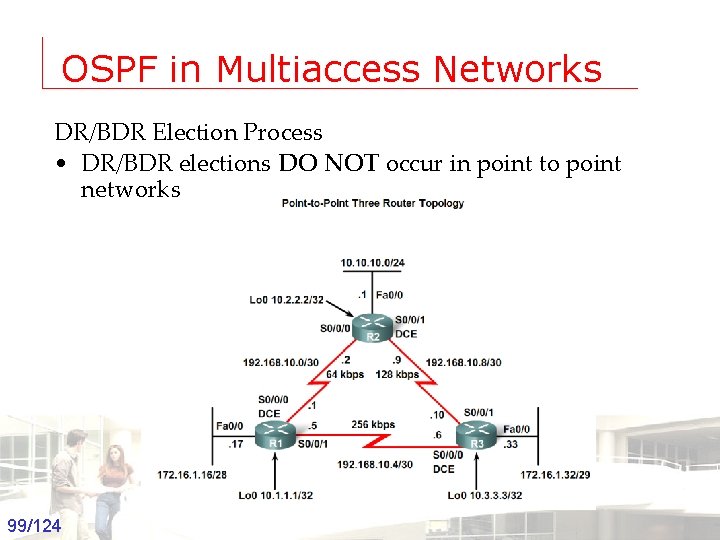
OSPF in Multiaccess Networks DR/BDR Election Process • DR/BDR elections DO NOT occur in point to point networks 99/124 Groep T Leuven – Information department 2003 -2004 - Information management 99
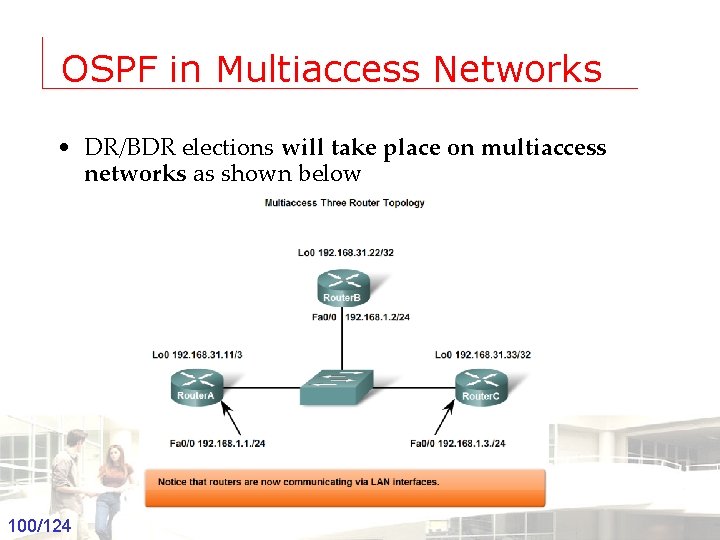
OSPF in Multiaccess Networks • DR/BDR elections will take place on multiaccess networks as shown below Groep T Leuven – Information department 100/124 2003 -2004 - Information management 100
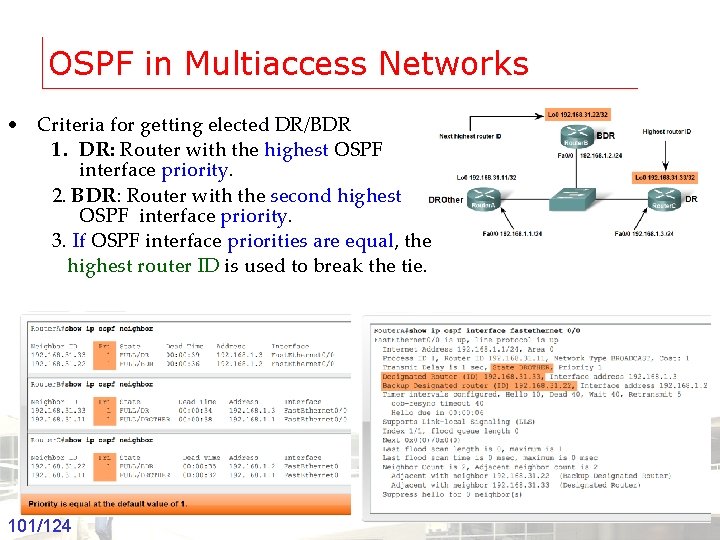
OSPF in Multiaccess Networks • Criteria for getting elected DR/BDR 1. DR: Router with the highest OSPF interface priority. 2. BDR: Router with the second highest OSPF interface priority. 3. If OSPF interface priorities are equal, the highest router ID is used to break the tie. Groep T Leuven – Information department 101/124 2003 -2004 - Information management 101
OSPF in Multiaccess Networks • Timing of DR/BDR Election – Occurs as soon as 1 st router has its interface enabled on multiaccess network § When a DR is elected it remains as the DR until one of the following occurs -The DR fails. -The OSPF process on the DR fails. -The multiaccess interface on the DR fails. Groep T Leuven – Information department 102/124 2003 -2004 - Information management 102
OSPF in Multiaccess Networks • Manipulating the election process -If you want to influence the election of DR & BDR then do one of the following Boot up the DR first, followed by the BDR, and then boot all other routers, OR Shut down the interface on all routers, followed by a no shutdown on the DR, then the BDR, and then all other routers. Groep T Leuven – Information department 103/124 2003 -2004 - Information management 103
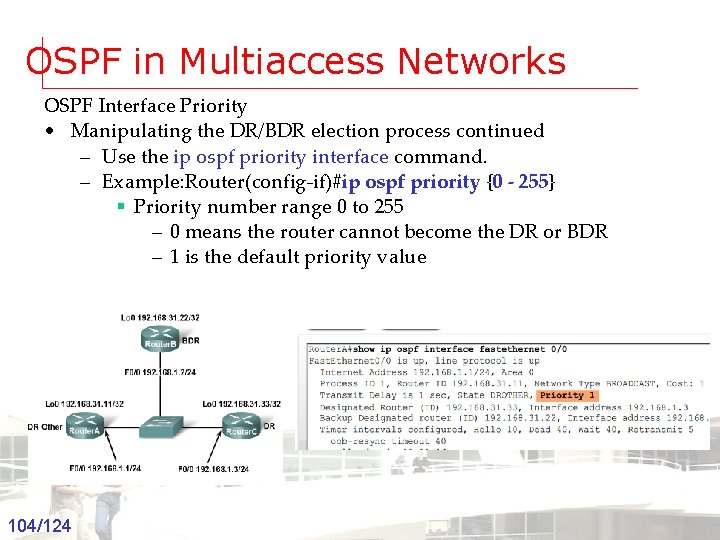
OSPF in Multiaccess Networks OSPF Interface Priority • Manipulating the DR/BDR election process continued – Use the ip ospf priority interface command. – Example: Router(config-if)#ip ospf priority {0 - 255} § Priority number range 0 to 255 – 0 means the router cannot become the DR or BDR – 1 is the default priority value Groep T Leuven – Information department 104/124 2003 -2004 - Information management 104
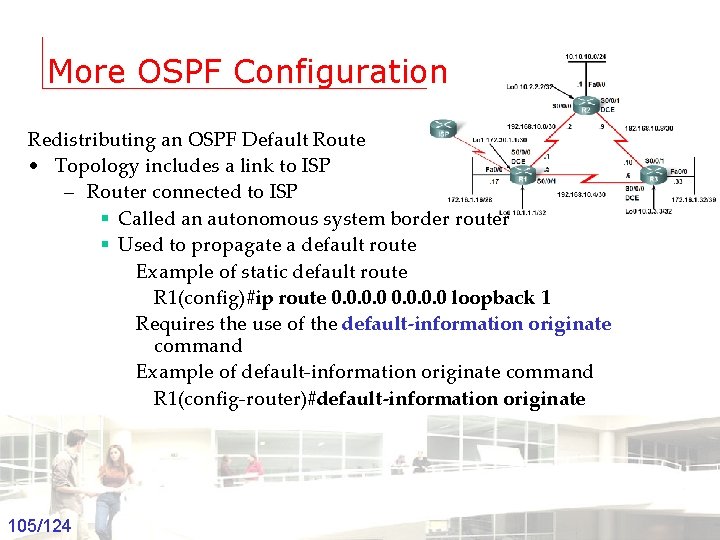
More OSPF Configuration Redistributing an OSPF Default Route • Topology includes a link to ISP – Router connected to ISP § Called an autonomous system border router § Used to propagate a default route Example of static default route R 1(config)#ip route 0. 0 loopback 1 Requires the use of the default-information originate command Example of default-information originate command R 1(config-router)#default-information originate Groep T Leuven – Information department 105/124 2003 -2004 - Information management 105
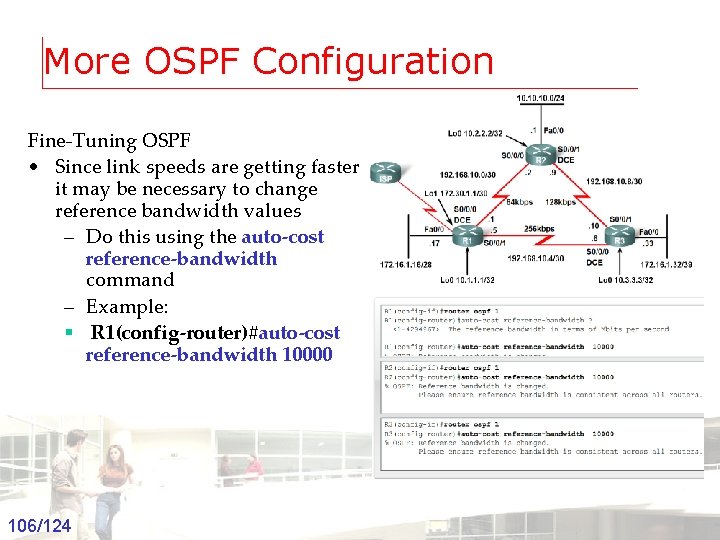
More OSPF Configuration Fine-Tuning OSPF • Since link speeds are getting faster it may be necessary to change reference bandwidth values – Do this using the auto-cost reference-bandwidth command – Example: § R 1(config-router)#auto-cost reference-bandwidth 10000 Groep T Leuven – Information department 106/124 2003 -2004 - Information management 106
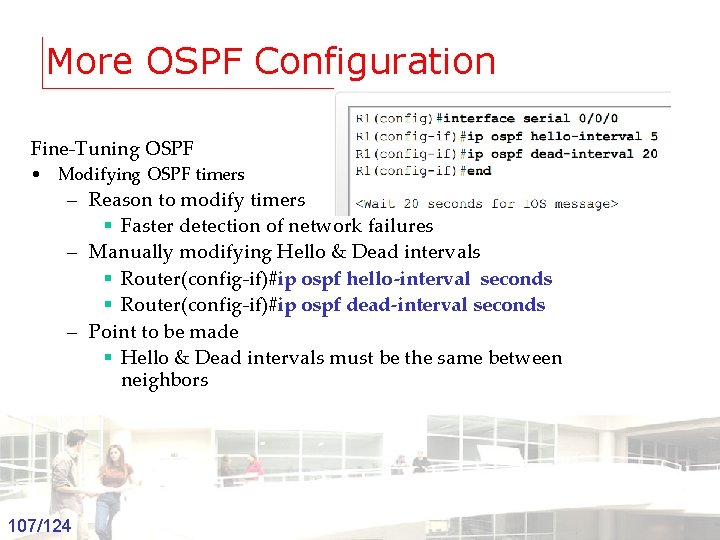
More OSPF Configuration Fine-Tuning OSPF • Modifying OSPF timers – Reason to modify timers § Faster detection of network failures – Manually modifying Hello & Dead intervals § Router(config-if)#ip ospf hello-interval seconds § Router(config-if)#ip ospf dead-interval seconds – Point to be made § Hello & Dead intervals must be the same between neighbors Groep T Leuven – Information department 107/124 2003 -2004 - Information management 107
Summary • RFC 2328 describes OSPF link state concepts and operations • OSPF Characteristics – A commonly deployed link state routing protocol – Employs DRs & BDRs on multi-access networks § DRs & BDRs are elected § DR & BDRs are used to transmit and receive LSAs – Uses 5 packet types: 1: HELLO 2: DATABASE DESCRIPTION 3: LINK STATE REQUEST 4: LINK STATE UPDATE 5: LINK STATE ACKNOWLEDGEMENT Groep T Leuven – Information department 108/124 2003 -2004 - Information management 108
Summary • OSPF Characteristics – Metric = cost § Lowest cost = best path • Configuration – Enable OSPF on a router using the following command § R 1(config)#router ospf process-id – use the network command to define which interfaces will participate in a given OSPF process § Router(config-router)#network-address wildcard-mask area-id Groep T Leuven – Information department 109/124 2003 -2004 - Information management 109
Summary • Verifying OSPF configuration – Use the following commands § show ip protocol § show ip route § show ip ospf interface § show ip ospf neighbor Groep T Leuven – Information department 110/124 2003 -2004 - Information management 110

Dynamic Routing protocols Border Gateway Protocol
Fundamentals of BGP Autonomous System • Networks and Routers under a single administrative authority • Each AS is assigned a number • AS numbers range form 1 to 65, 535 Groep T Leuven – Information department 112/124 2003 -2004 - Information management 112
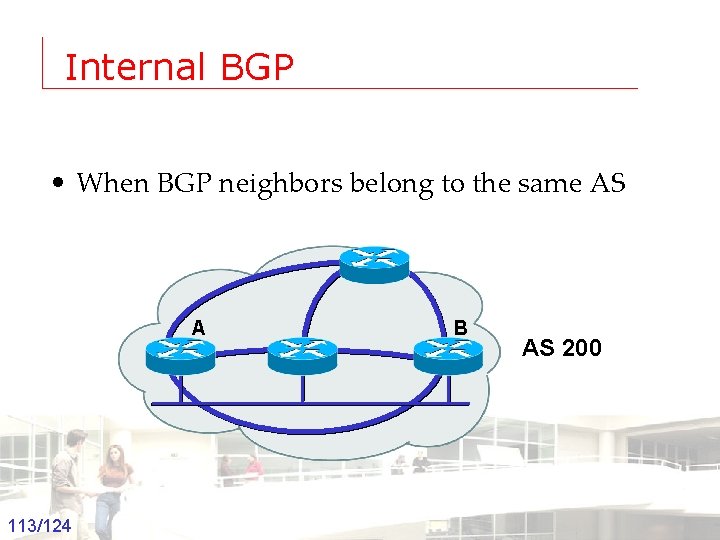
Internal BGP • When BGP neighbors belong to the same AS A Groep T Leuven – Information department 113/124 B AS 2003 -2004 - Information management 113
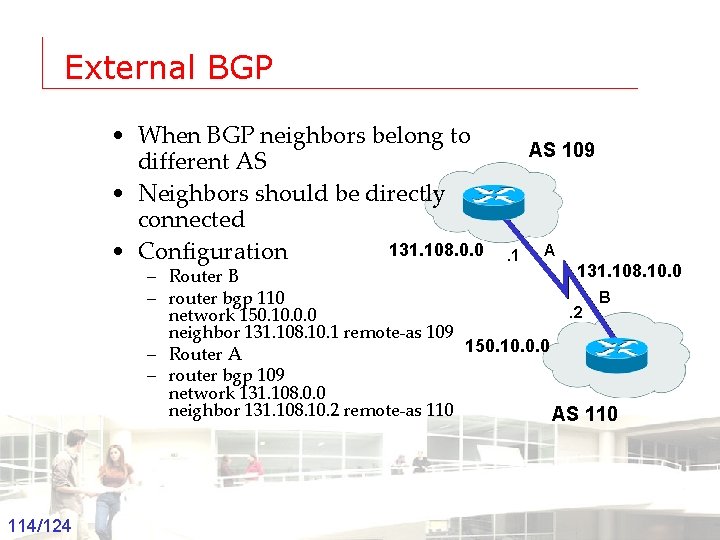
External BGP • When BGP neighbors belong to different AS • Neighbors should be directly connected 131. 108. 0. 0 • Configuration AS 109 . 1 A 131. 108. 10. 0 – Router B B – router bgp 110. 2 network 150. 10. 0. 0 neighbor 131. 108. 10. 1 remote-as 109 150. 10. 0. 0 – Router A – router bgp 109 network 131. 108. 0. 0 neighbor 131. 108. 10. 2 remote-as 110 AS 110 Groep T Leuven – Information department 114/124 2003 -2004 - Information management 114
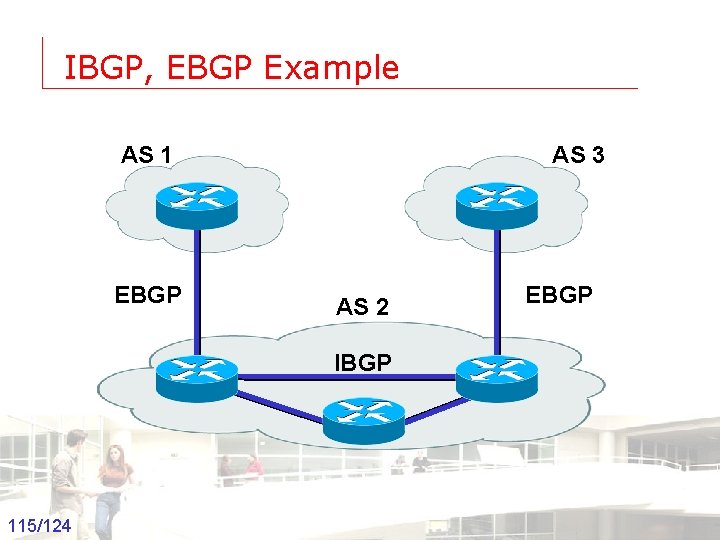
IBGP, EBGP Example AS 1 EBGP AS 3 AS 2 EBGP IBGP Groep T Leuven – Information department 115/124 2003 -2004 - Information management 115
Advertising Networks • Using the Network command • Redistributing static routes • Redistributing Dynamic routes Groep T Leuven – Information department 116/124 2003 -2004 - Information management 116
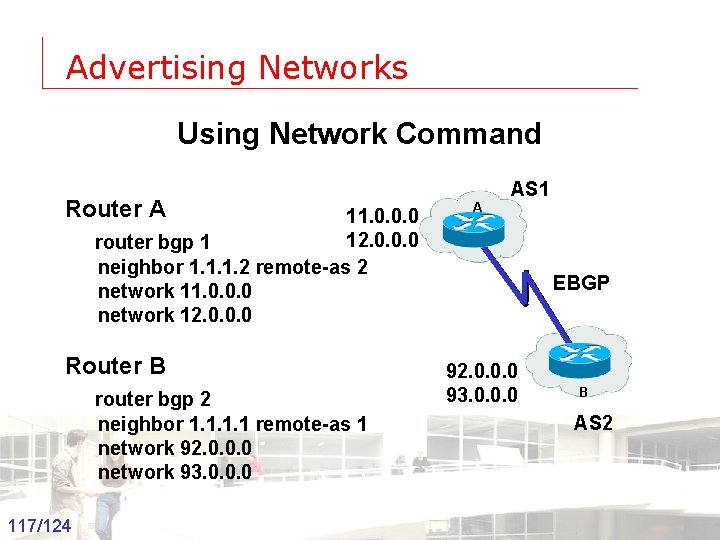
Advertising Networks Using Network Command Router A AS 1 11. 0. 0. 0 12. 0. 0. 0 router bgp 1 neighbor 1. 1. 1. 2 remote-as 2 network 11. 0. 0. 0 network 12. 0. 0. 0 Router B router bgp 2 neighbor 1. 1 remote-as 1 network 92. 0. 0. 0 network 93. 0. 0. 0 Groep T Leuven – Information department 117/124 A EBGP 92. 0. 0. 0 93. 0. 0. 0 B AS 2 2003 -2004 - Information management 117
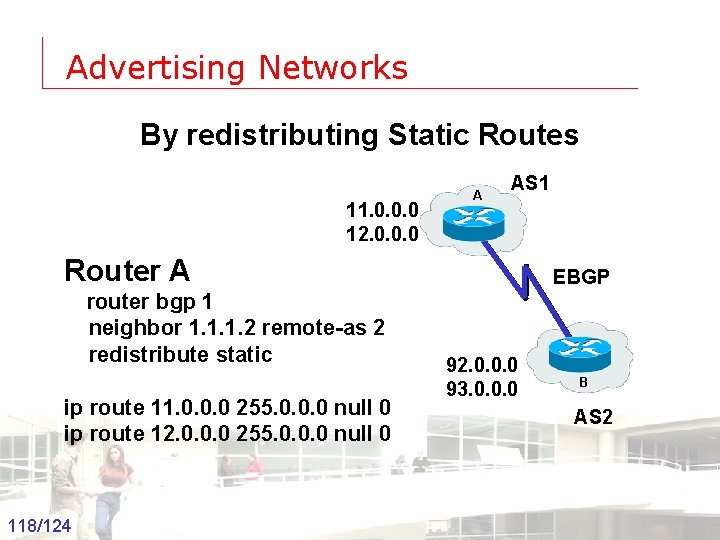
Advertising Networks By redistributing Static Routes 11. 0. 0. 0 12. 0. 0. 0 A AS 1 Router A EBGP router bgp 1 neighbor 1. 1. 1. 2 remote-as 2 redistribute static ip route 11. 0. 0. 0 255. 0. 0. 0 null 0 ip route 12. 0. 0. 0 255. 0. 0. 0 null 0 Groep T Leuven – Information department 118/124 92. 0. 0. 0 93. 0. 0. 0 2003 -2004 - Information management B AS 2 118
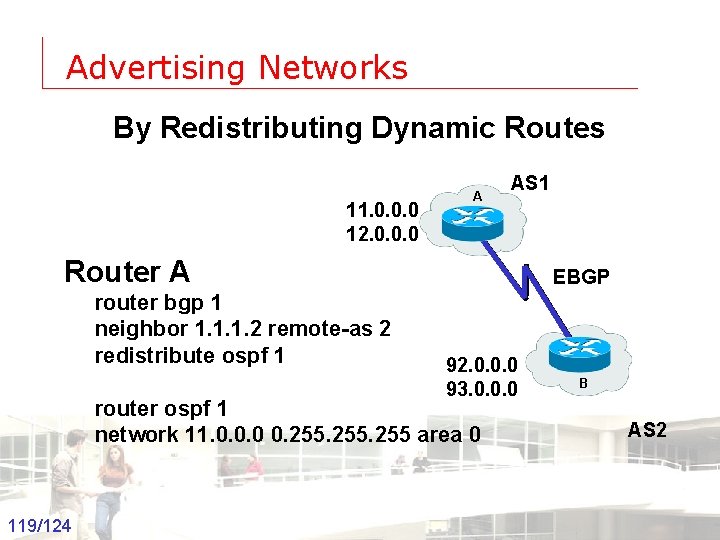
Advertising Networks By Redistributing Dynamic Routes 11. 0. 0. 0 12. 0. 0. 0 A AS 1 Router A EBGP router bgp 1 neighbor 1. 1. 1. 2 remote-as 2 redistribute ospf 1 92. 0. 0. 0 93. 0. 0. 0 router ospf 1 network 11. 0. 0. 0 0. 255 area 0 Groep T Leuven – Information department 119/124 2003 -2004 - Information management B AS 2 119
BGP Attributes • • • AS-path Next-hop Local preference MED Origin Communities Groep T Leuven – Information department 120/124 2003 -2004 - Information management 120
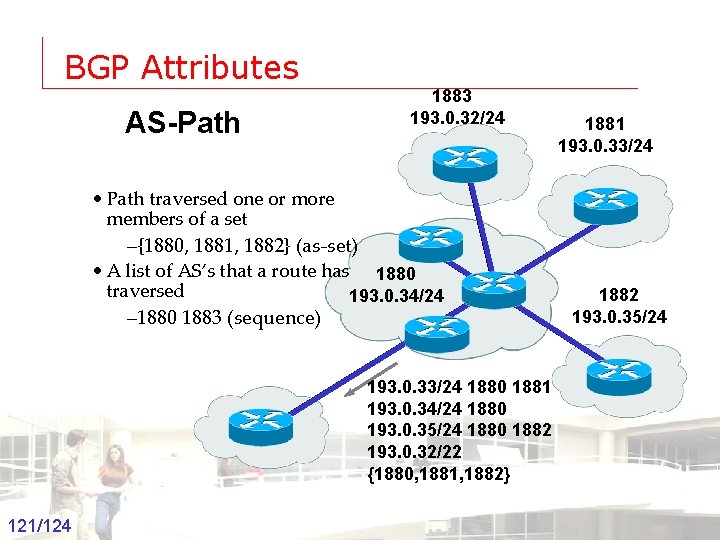
BGP Attributes AS-Path 1883 193. 0. 32/24 • Path traversed one or more members of a set –{1880, 1881, 1882} (as-set) • A list of AS’s that a route has 1880 traversed 193. 0. 34/24 – 1880 1883 (sequence) 1881 193. 0. 33/24 1882 193. 0. 35/24 193. 0. 33/24 1880 1881 193. 0. 34/24 1880 193. 0. 35/24 1880 1882 193. 0. 32/22 {1880, 1881, 1882} Groep T Leuven – Information department 121/124 2003 -2004 - Information management 121
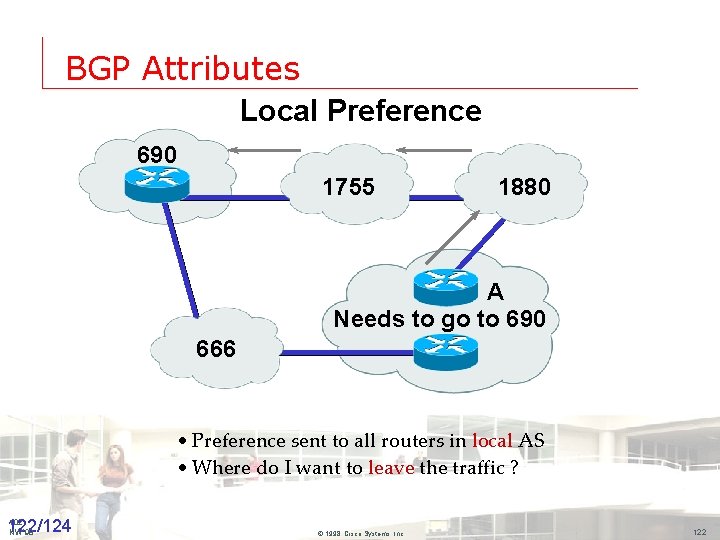
BGP Attributes Local Preference 690 1755 1880 A Needs to go to 690 666 • Preference sent to all routers in local AS • Where do I want to leave the traffic ? 102 Groep T Leuven – Information department 122/124 NW’ 98 2003 -2004 - Information management © 1998, Cisco Systems, Inc. 122
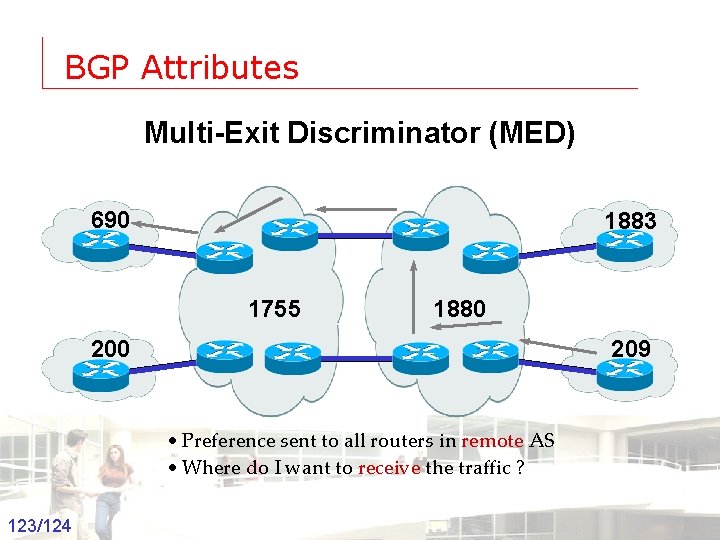
BGP Attributes Multi-Exit Discriminator (MED) 690 1883 1755 1880 209 200 • Preference sent to all routers in remote AS • Where do I want to receive the traffic ? Groep T Leuven – Information department 123/124 2003 -2004 - Information management 123
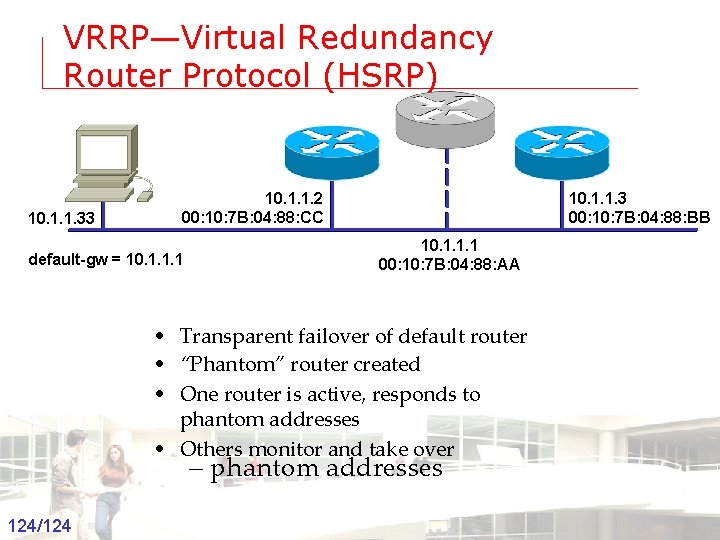
VRRP—Virtual Redundancy Router Protocol (HSRP) 10. 1. 1. 33 10. 1. 1. 2 00: 10: 7 B: 04: 88: CC 10. 1. 1. 3 00: 10: 7 B: 04: 88: BB 10. 1. 1. 1 00: 10: 7 B: 04: 88: AA default-gw = 10. 1. 1. 1 • Transparent failover of default router • “Phantom” router created • One router is active, responds to phantom addresses • Others monitor and take over – phantom addresses Groep T Leuven – Information department 124/124 2003 -2004 - Information management 124
- Slides: 124