
Introduction Two basic instruments used in geometry are
Introduction Two basic instruments used in geometry are the straightedge and the compass. A straightedge is a bar or strip of wood, plastic, or metal that has at least one long edge of reliable straightness, similar to a ruler, but without any measurement markings. A compass is an instrument for creating circles or transferring measurements. It consists of two pointed branches joined at the top by a pivot. It is believed that during early geometry, all geometric figures were created using just a straightedge and a compass. 1 1. 2. 1: Copying Segments and Angles
Introduction, continued Though technology and computers abound today to help us make sense of geometry problems, the straightedge and compass are still widely used to construct figures, or create precise geometric representations. Constructions allow you to draw accurate segments and angles, segment and angle bisectors, and parallel and perpendicular lines. 2 1. 2. 1: Copying Segments and Angles
Key Concepts • A geometric figure precisely created using only a straightedge and compass is called a construction. • A straightedge can be used with patty paper (tracing paper) or a reflecting device to create precise representations. • Constructions are different from drawings or sketches. • A drawing is a precise representation of a figure, created with measurement tools such as a protractor and a ruler. 3 1. 2. 1: Copying Segments and Angles
Key Concepts, continued • A sketch is a quickly done representation of a figure or a rough approximation of a figure. • When constructing figures, it is very important not to erase your markings. • Markings show that your figure was constructed and not measured and drawn. • An endpoint is either of two points that mark the ends of a line, or the point that marks the end of a ray. 4 1. 2. 1: Copying Segments and Angles
Key Concepts, continued • A line segment is a part of a line that is noted by two endpoints. • An angle is formed when two rays or line segments share a common endpoint. • A constructed figure and the original figure are congruent; they have the same shape, size, or angle. • Follow the steps outlined on the next few slides to copy a segment and an angle. 5 1. 2. 1: Copying Segments and Angles

Key Concepts, continued Copying a Segment Using a Compass 1. To copy , first make an endpoint on your paper. Label the endpoint C. 2. Put the sharp point of your compass on endpoint A. Open the compass until the pencil end touches endpoint B. 3. Without changing your compass setting, put the sharp point of your compass on endpoint C. Make a large arc. 4. Use your straightedge to connect endpoint C to any point on your arc. 5. Label the point of intersection of the arc and your segment D. Do not erase any of your markings. is congruent to . 6 1. 2. 1: Copying Segments and Angles
Key Concepts, continued Copying a Segment Using Patty Paper 1. To copy , place your sheet of patty paper over the segment. 2. Mark the endpoints of the segment on the patty paper. Label the endpoints C and D. 3. Use your straightedge to connect points C and D. is congruent to . 7 1. 2. 1: Copying Segments and Angles
Key Concepts, continued Copying an Angle Using a Compass 1. To copy ∠A, first make a point to represent the vertex A on your paper. Label the vertex E. 2. From point E, draw a ray of any length. This will be one side of the constructed angle. 3. Put the sharp point of the compass on vertex A of the original angle. Set the compass to any width that will cross both sides of the original angle. 4. Draw an arc across both sides of ∠A. Label where the arc intersects the angle as points B and C. (continued) 8 1. 2. 1: Copying Segments and Angles
Key Concepts, continued 5. Without changing the compass setting, put the sharp point of the compass on point E. Draw a large arc that intersects the ray. Label the point of intersection as F. 6. Put the sharp point of the compass on point B of the original angle and set the width of the compass so it touches point C. 7. Without changing the compass setting, put the sharp point of the compass on point F and make an arc that intersects the arc in step 5. Label the point of intersection as D. 8. Draw a ray from point E to point D. Do not erase any of your markings. ∠A is congruent to ∠E. 9 1. 2. 1: Copying Segments and Angles
Key Concepts, continued Copying an Angle Using Patty Paper 1. To copy ∠A, place your sheet of patty paper over the angle. 2. Mark the vertex of the angle. Label the vertex E. 3. Use your straightedge to trace each side of ∠A. ∠A is congruent to ∠E. 10 1. 2. 1: Copying Segments and Angles
Common Errors/Misconceptions • inappropriately changing the compass setting • moving the patty paper before completing the construction • attempting to measure lengths and angles with rulers and protractors 11 1. 2. 1: Copying Segments and Angles
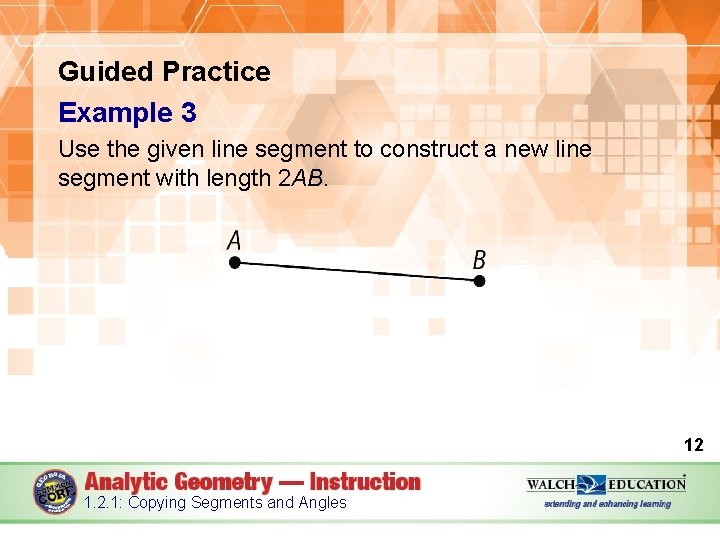
Guided Practice Example 3 Use the given line segment to construct a new line segment with length 2 AB. 12 1. 2. 1: Copying Segments and Angles
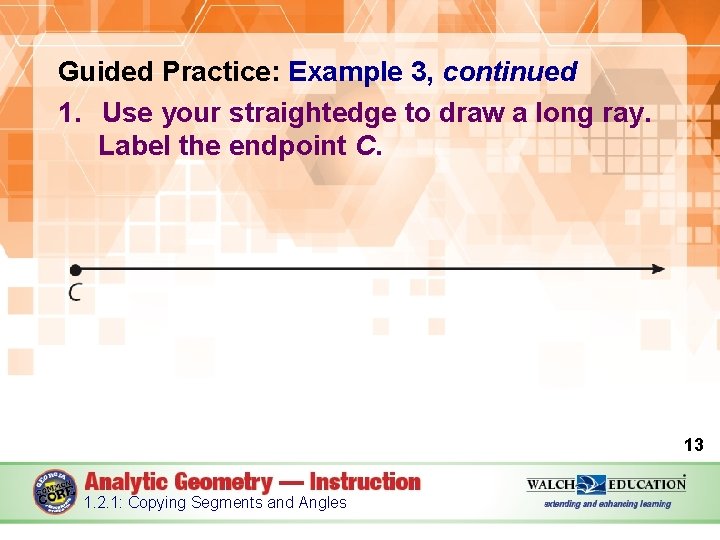
Guided Practice: Example 3, continued 1. Use your straightedge to draw a long ray. Label the endpoint C. 13 1. 2. 1: Copying Segments and Angles
Guided Practice: Example 3, continued 2. Put the sharp point of your compass on endpoint A of the original segment. Open the compass until the pencil end touches B. 14 1. 2. 1: Copying Segments and Angles
Guided Practice: Example 3, continued 3. Without changing your compass setting, put the sharp point of your compass on C and make a large arc that intersects your ray, as shown on the next slide. 15 1. 2. 1: Copying Segments and Angles
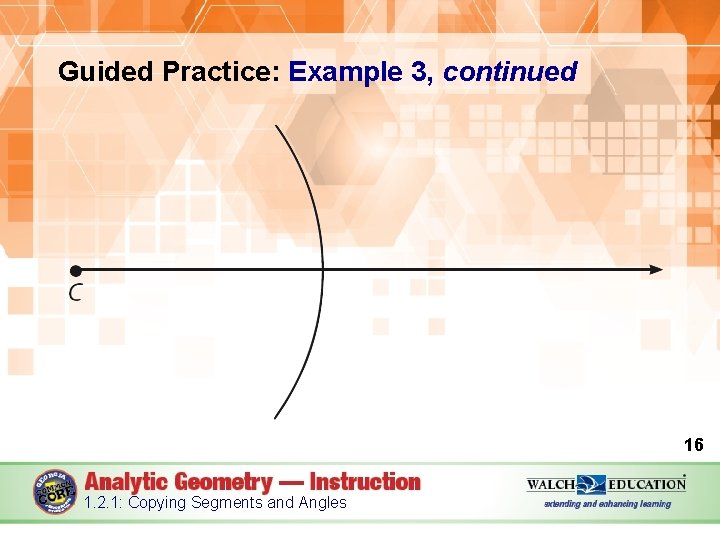
Guided Practice: Example 3, continued 16 1. 2. 1: Copying Segments and Angles
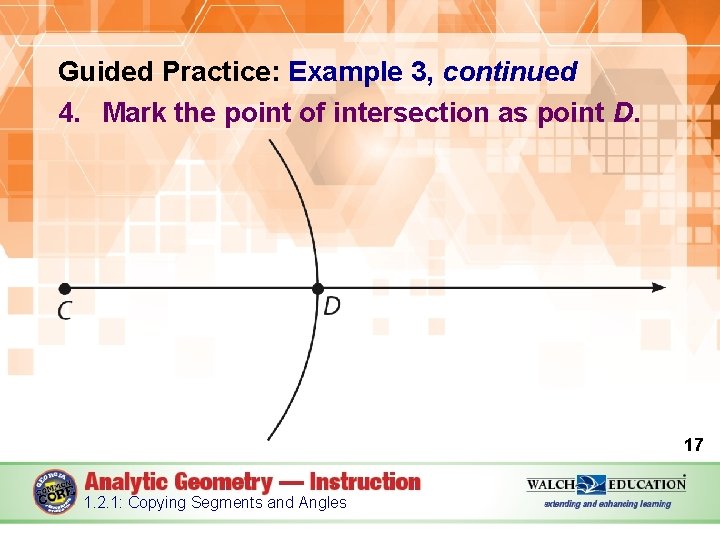
Guided Practice: Example 3, continued 4. Mark the point of intersection as point D. 17 1. 2. 1: Copying Segments and Angles
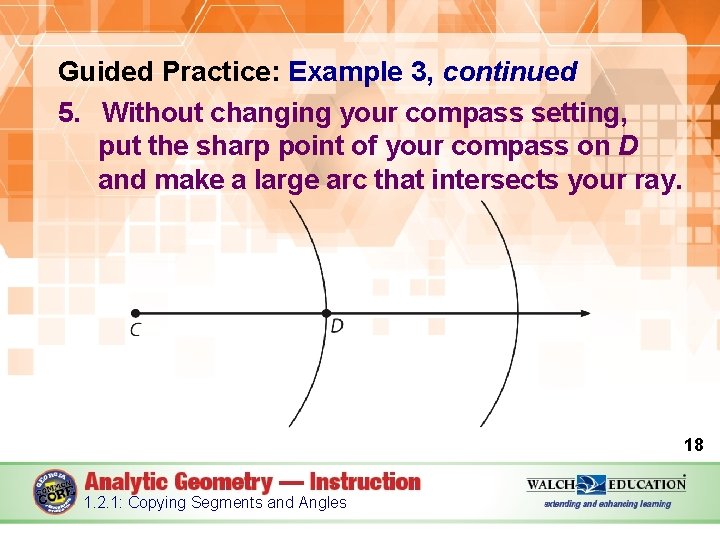
Guided Practice: Example 3, continued 5. Without changing your compass setting, put the sharp point of your compass on D and make a large arc that intersects your ray. 18 1. 2. 1: Copying Segments and Angles
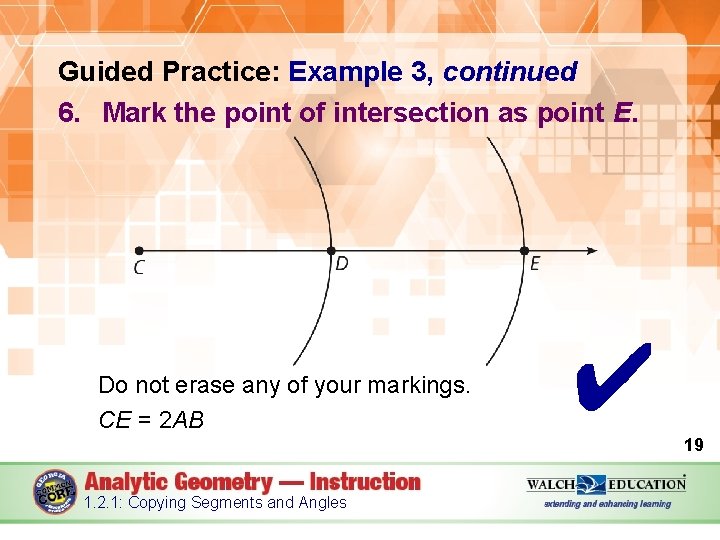
Guided Practice: Example 3, continued 6. Mark the point of intersection as point E. Do not erase any of your markings. CE = 2 AB ✔ 19 1. 2. 1: Copying Segments and Angles
Guided Practice: Example 3, continued 20 1. 2. 1: Copying Segments and Angles
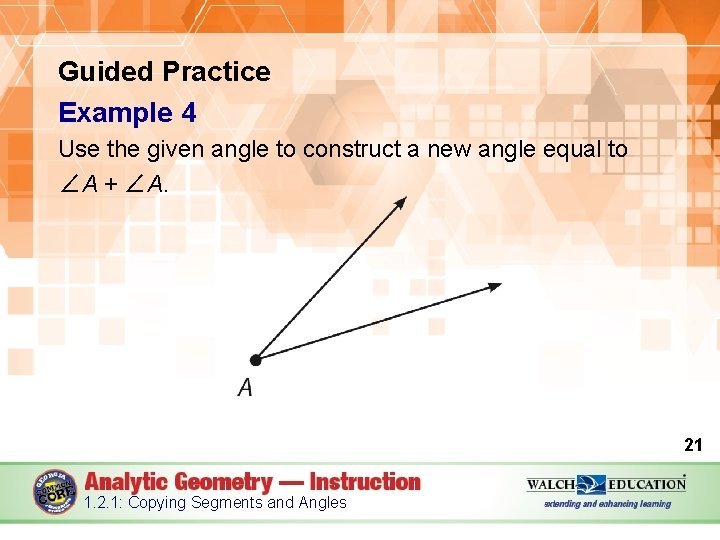
Guided Practice Example 4 Use the given angle to construct a new angle equal to ∠A + ∠A. 21 1. 2. 1: Copying Segments and Angles
Guided Practice: Example 4, continued 1. Follow the steps from Example 2 to copy ∠A. Label the vertex of the copied angle G. 22 1. 2. 1: Copying Segments and Angles
Guided Practice: Example 4, continued 2. Put the sharp point of the compass on vertex A of the original angle. Set the compass to any width that will cross both sides of the original angle. 23 1. 2. 1: Copying Segments and Angles
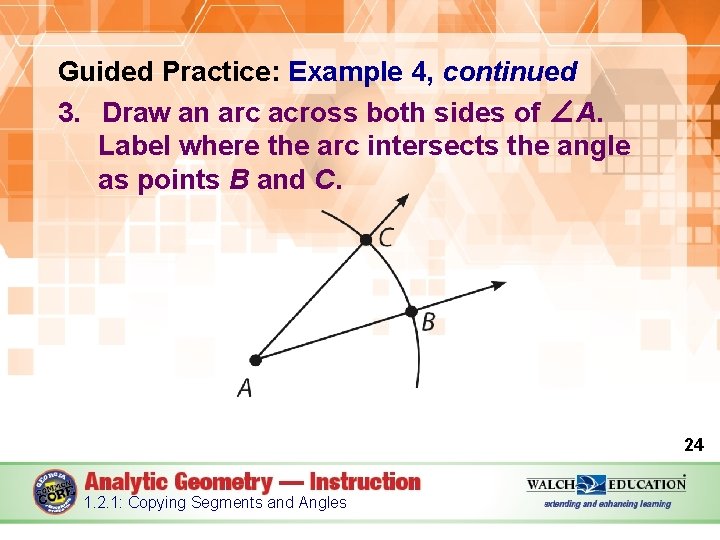
Guided Practice: Example 4, continued 3. Draw an arc across both sides of ∠A. Label where the arc intersects the angle as points B and C. 24 1. 2. 1: Copying Segments and Angles
Guided Practice: Example 4, continued 4. Without changing the compass setting, put the sharp point of the compass on G. Draw a large arc that intersects one side of your newly constructed angle. Label the point of intersection H, as shown on the next slide. 25 1. 2. 1: Copying Segments and Angles
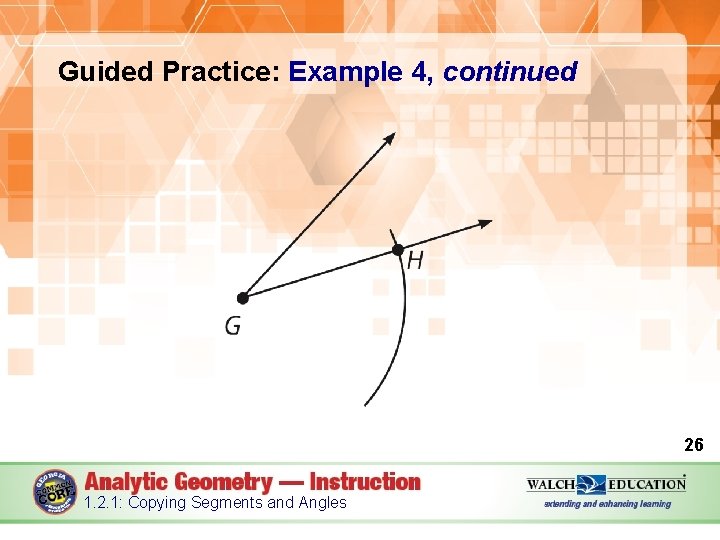
Guided Practice: Example 4, continued 26 1. 2. 1: Copying Segments and Angles
Guided Practice: Example 4, continued 5. Put the sharp point of the compass on C of the original angle and set the width of the compass so it touches B. 27 1. 2. 1: Copying Segments and Angles
Guided Practice: Example 4, continued 6. Without changing the compass setting, put the sharp point of the compass on point H and make an arc that intersects the arc created in step 4. Label the point of intersection as J, as shown on the next slide. 28 1. 2. 1: Copying Segments and Angles
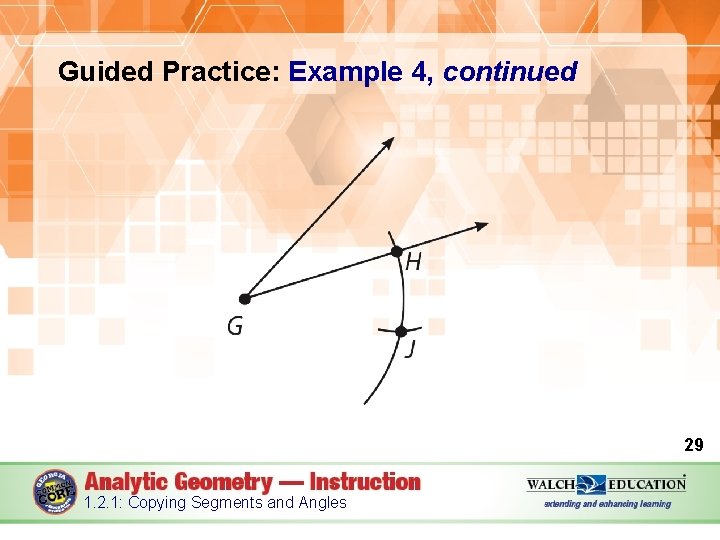
Guided Practice: Example 4, continued 29 1. 2. 1: Copying Segments and Angles
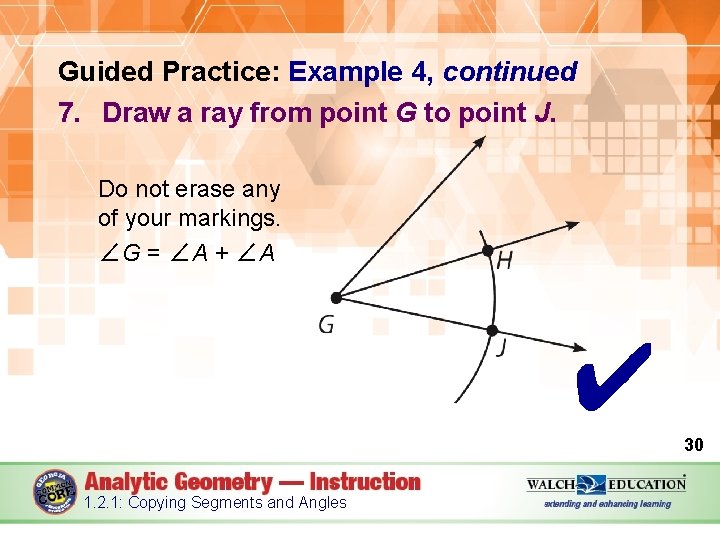
Guided Practice: Example 4, continued 7. Draw a ray from point G to point J. Do not erase any of your markings. ∠G = ∠A + ∠A ✔ 30 1. 2. 1: Copying Segments and Angles
Guided Practice: Example 4, continued 31 1. 2. 1: Copying Segments and Angles
- Slides: 31