
Introduction Tracker DB tutorial Overview Query JDBC Packages
Introduction Tracker DB tutorial
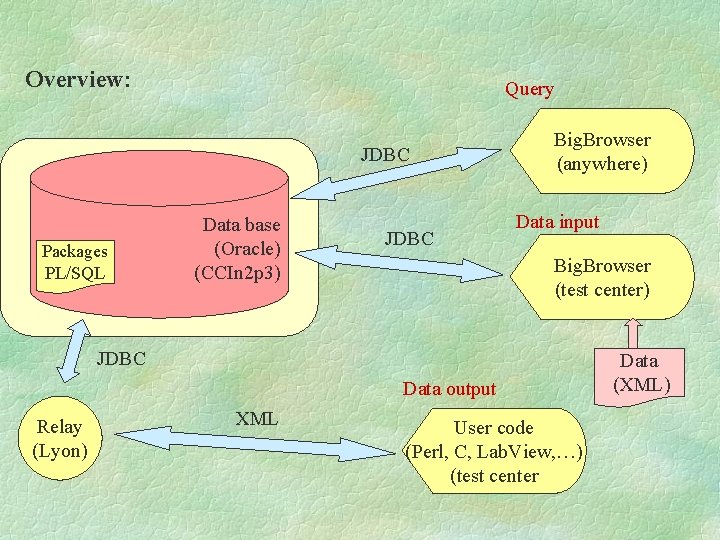
Overview: Query JDBC Packages PL/SQL Data base (Oracle) (CCIn 2 p 3) JDBC Big. Browser (anywhere) Data input Big. Browser (test center) JDBC Data output Relay (Lyon) XML User code (Perl, C, Lab. View, …) (test center Data (XML)
Action tables Tracker DB tutorial
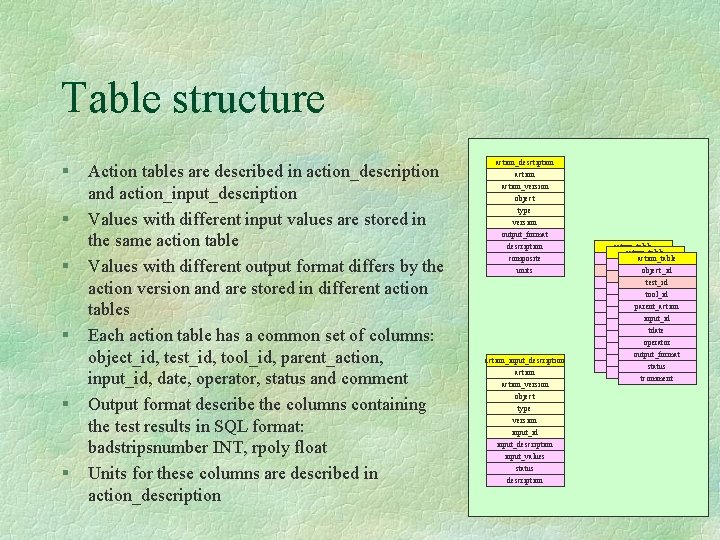
Table structure § § § Action tables are described in action_description and action_input_description Values with different input values are stored in the same action table Values with different output format differs by the action version and are stored in different action tables Each action table has a common set of columns: object_id, test_id, tool_id, parent_action, input_id, date, operator, status and comment Output format describe the columns containing the test results in SQL format: badstripsnumber INT, rpoly float Units for these columns are described in action_description action_desctiption action_version object type version output_format description composite units action_input_description action_version object type version input_id input_description input_values status description action_table object_id test_id tool_id parent_action input_id tdate operator output_format status tcomment
Simple actions § Action are described by a name, a version, the tested object (and is type) § The action table is named: action_actionversion_object_type § each table has a column named action_val containing a quality value
Composite actions § Simple actions can be grouped in consistent set containing all the information for the qualification of a part § The composite actions contains in output format pointers to the results of the simple ones, and a global quality value § You can have composites of composites § You can also have composites actions on all parts of a composite one (modules in a sector
Designing your tables § Define the outputs of your elementary actions § Define their units § Define the inputs values for your actions § Combine then in a composite action § Run the newaction script § Mail the result to Didier (or me)
The newaction script § Found at: ftp: //lyopcs 1. in 2 p 3. fr/cms/Tracker. DB ~cmstrkdb/public § At any step, ‘c’ to cancel, ‘h’ for help
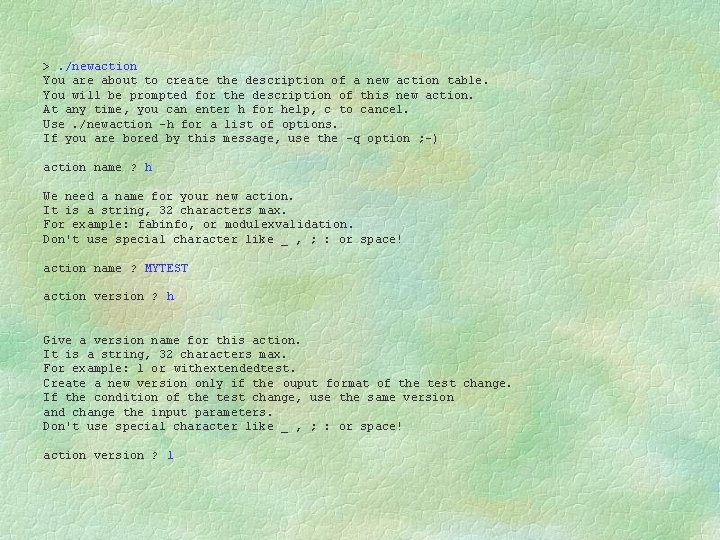
>. /newaction You are about to create the description of a new action table. You will be prompted for the description of this new action. At any time, you can enter h for help, c to cancel. Use. /newaction -h for a list of options. If you are bored by this message, use the -q option ; -) action name ? h We need a name for your new action. It is a string, 32 characters max. For example: fabinfo, or modulexvalidation. Don't use special character like _ , ; : or space! action name ? MYTEST action version ? h Give a version name for this action. It is a string, 32 characters max. For example: 1 or withextendedtest. Create a new version only if the ouput format of the test change. If the condition of the test change, use the same version and change the input parameters. Don't use special character like _ , ; : or space! action version ? 1
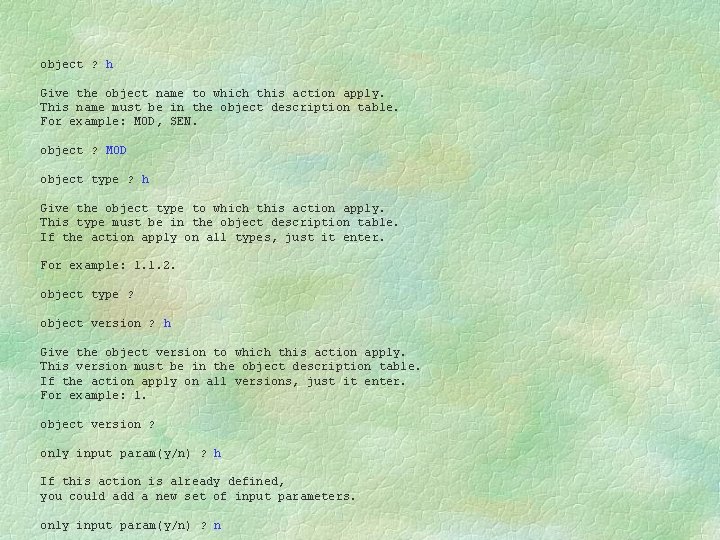
object ? h Give the object name to which this action apply. This name must be in the object description table. For example: MOD, SEN. object ? MOD object type ? h Give the object type to which this action apply. This type must be in the object description table. If the action apply on all types, just it enter. For example: 1. 1. 2. object type ? object version ? h Give the object version to which this action apply. This version must be in the object description table. If the action apply on all versions, just it enter. For example: 1. object version ? only input param(y/n) ? h If this action is already defined, you could add a new set of input parameters. only input param(y/n) ? n
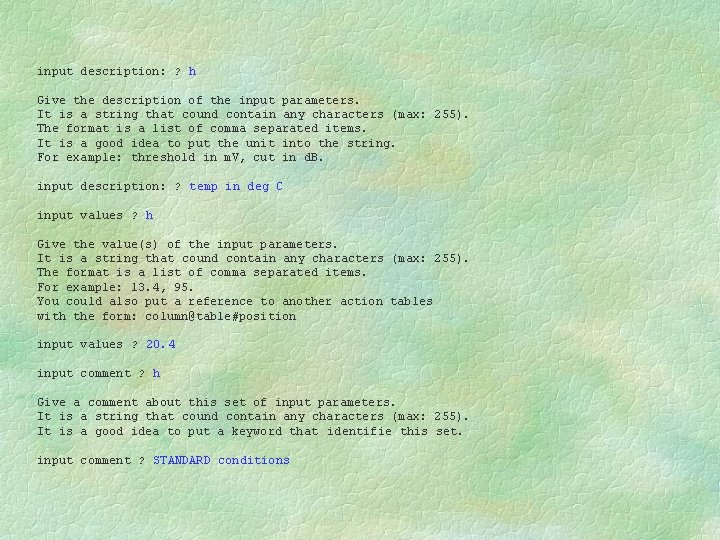
input description: ? h Give the description of the input parameters. It is a string that cound contain any characters (max: 255). The format is a list of comma separated items. It is a good idea to put the unit into the string. For example: threshold in m. V, cut in d. B. input description: ? temp in deg C input values ? h Give the value(s) of the input parameters. It is a string that cound contain any characters (max: 255). The format is a list of comma separated items. For example: 13. 4, 95. You could also put a reference to another action tables with the form: column@table#position input values ? 20. 4 input comment ? h Give a comment about this set of input parameters. It is a string that cound contain any characters (max: 255). It is a good idea to put a keyword that identifie this set. input comment ? STANDARD conditions
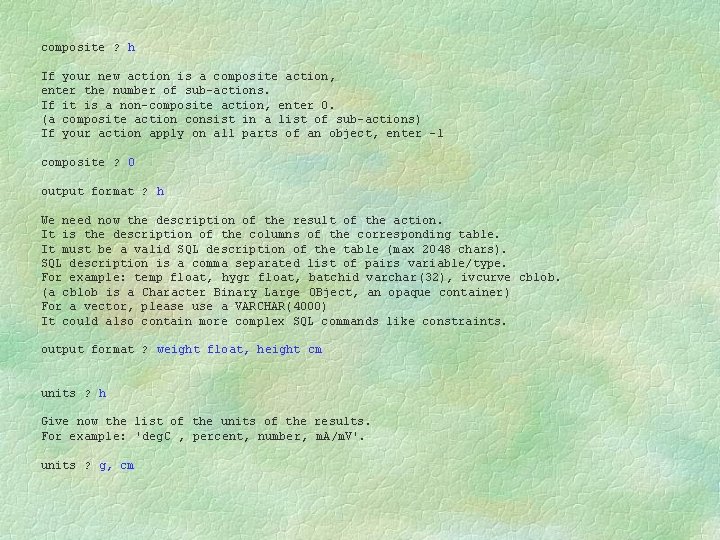
composite ? h If your new action is a composite action, enter the number of sub-actions. If it is a non-composite action, enter 0. (a composite action consist in a list of sub-actions) If your action apply on all parts of an object, enter -1 composite ? 0 output format ? h We need now the description of the result of the action. It is the description of the columns of the corresponding table. It must be a valid SQL description of the table (max 2048 chars). SQL description is a comma separated list of pairs variable/type. For example: temp float, hygr float, batchid varchar(32), ivcurve cblob. (a cblob is a Character Binary Large OBject, an opaque container) For a vector, please use a VARCHAR(4000) It could also contain more complex SQL commands like constraints. output format ? weight float, height cm units ? h Give now the list of the units of the results. For example: 'deg. C , percent, number, m. A/m. V'. units ? g, cm
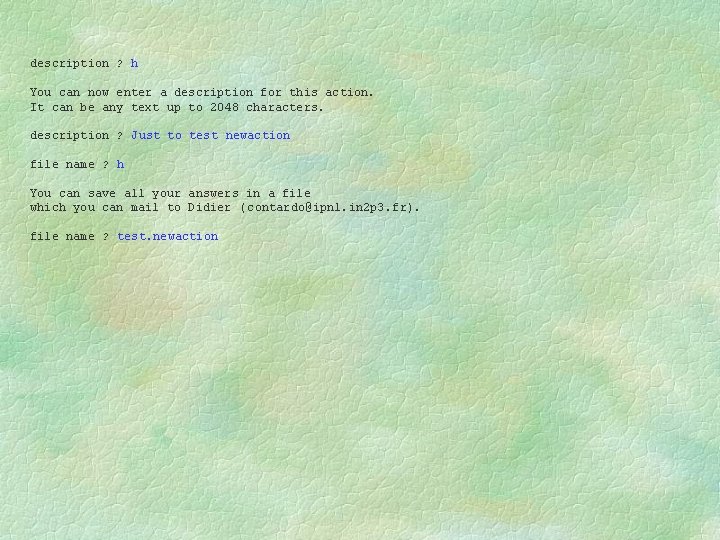
description ? h You can now enter a description for this action. It can be any text up to 2048 characters. description ? Just to test newaction file name ? h You can save all your answers in a file which you can mail to Didier ( contardo@ipnl. in 2 p 3. fr). file name ? test. newaction
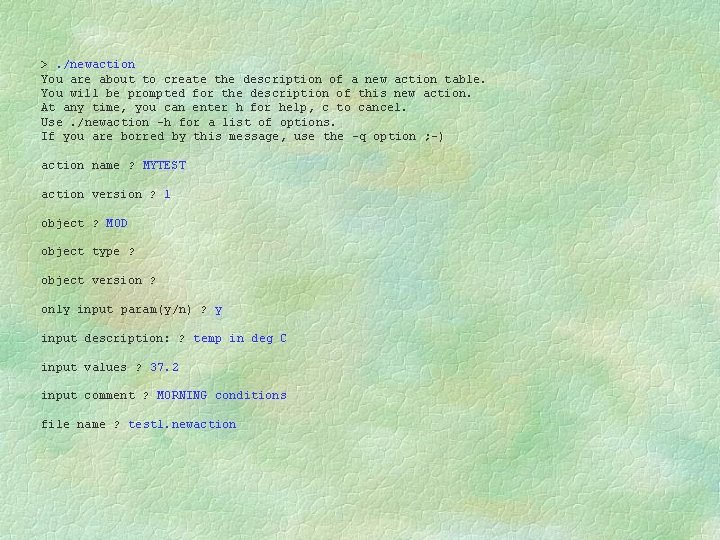
>. /newaction You are about to create the description of a new action table. You will be prompted for the description of this new action. At any time, you can enter h for help, c to cancel. Use. /newaction -h for a list of options. If you are borred by this message, use the -q option ; -) action name ? MYTEST action version ? 1 object ? MOD object type ? object version ? only input param(y/n) ? y input description: ? temp in deg C input values ? 37. 2 input comment ? MORNING conditions file name ? test 1. newaction
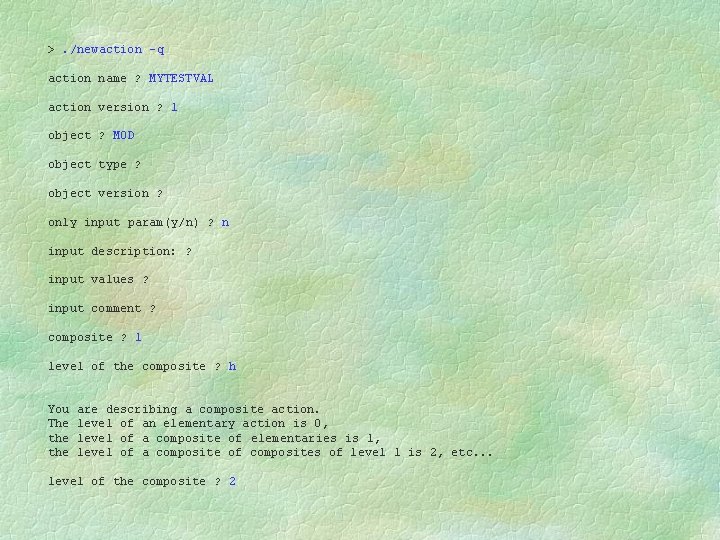
>. /newaction -q action name ? MYTESTVAL action version ? 1 object ? MOD object type ? object version ? only input param(y/n) ? n input description: ? input values ? input comment ? composite ? 1 level of the composite ? h You The the are describing a composite action. level of an elementary action is 0, level of a composite of elementaries is 1, level of a composite of composites of level 1 is 2, etc. . . level of the composite ? 2
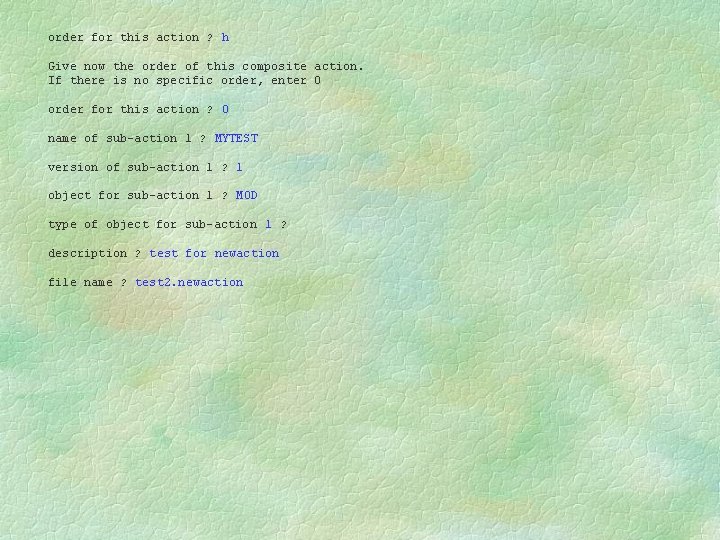
order for this action ? h Give now the order of this composite action. If there is no specific order, enter 0 order for this action ? 0 name of sub-action 1 ? MYTEST version of sub-action 1 ? 1 object for sub-action 1 ? MOD type of object for sub-action 1 ? description ? test for newaction file name ? test 2. newaction
The relay application Tracker DB tutorial
Relay application § Goal: querying the DB from anywhere, in any language § For example, list of bad strips before bonding § Wait on a socket: cmstrkdb. in 2 p 3. fr: 3615 § Usage: l l l open a tcp connection write the body of a SELECT in xml format read the answer in xml format
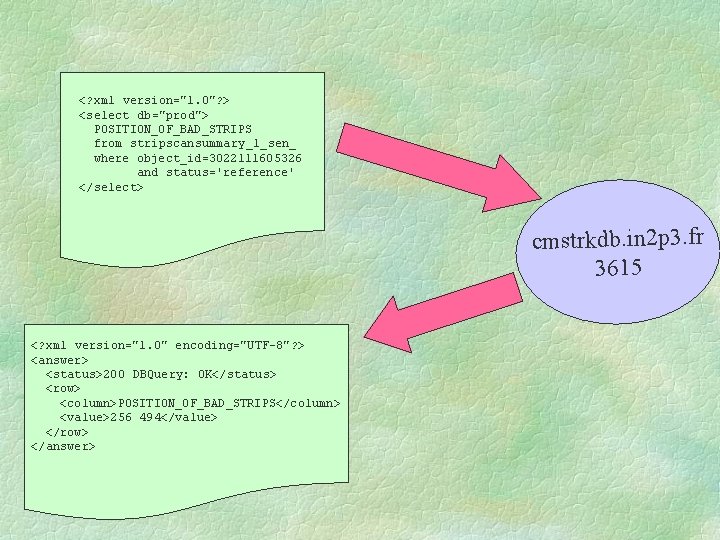
<? xml version="1. 0"? > <select db="prod"> POSITION_OF_BAD_STRIPS from stripscansummary_1_sen_ where object_id=3022111605326 and status='reference' </select> cmstrkdb. in 2 p 3. fr 3615 <? xml version="1. 0" encoding="UTF-8"? > <answer> <status>200 DBQuery: OK</status> <row> <column>POSITION_OF_BAD_STRIPS</column> <value>256 494</value> </row> </answer>
- Slides: 19