
Introduction to VSAM for Assembler Programmers Part Two

Introduction to VSAM for Assembler Programmers Part Two
How Does VSAM Find Logical Records? • Three ways: 1. Relative Byte Address 2. Relative Record Number 3. Key field
Relative Byte Address • VSAM records have a sequential ordering, and the bytes they contain are numbered starting from the first record to the last • Each offset to the first byte of a record is called a relative byte address (RBA) • The RBA of the first record is 0 • The RBA of the second record is equal to the length of the first record • Records can be accessed using an RBA • The RBA of a record is volatile and can change if records are added or deleted. If a record is read two times within the same application, the RBAs for that record might be different
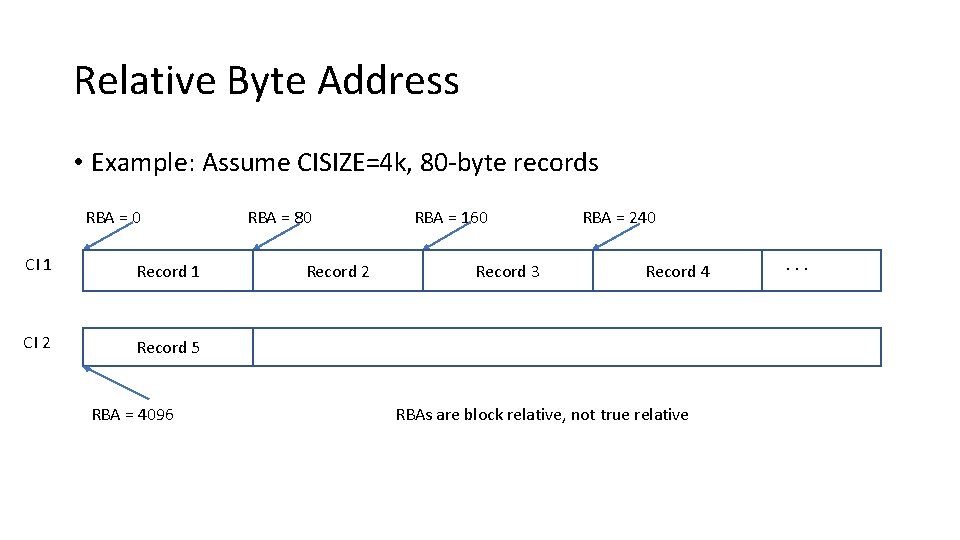
Relative Byte Address • Example: Assume CISIZE=4 k, 80 -byte records RBA = 0 CI 1 Record 1 CI 2 Record 5 RBA = 4096 RBA = 80 Record 2 RBA = 160 Record 3 RBA = 240 Record 4 RBAs are block relative, not true relative . . .
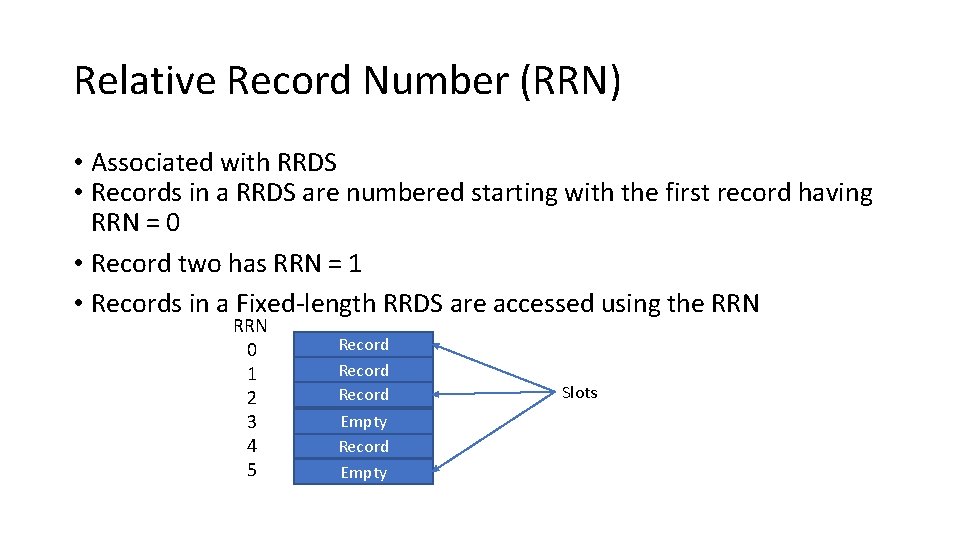
Relative Record Number (RRN) • Associated with RRDS • Records in a RRDS are numbered starting with the first record having RRN = 0 • Record two has RRN = 1 • Records in a Fixed-length RRDS are accessed using the RRN 0 1 2 3 4 5 Record Empty Slots
Keys • Keys are fields in KSDS datasets that are used to access records • Records can have multiple keys • The key associated with the base cluster is called the primary key • Keys associated with alternate indexes are called secondary keys • For a KSDS, each record must have a unique, embedded, fixed-length key in the same position of each record – the primary key • Alternate index keys don’t have to be unique • Key sizes range from 1 – 255 bytes, binary (all 0’s or all 1’s are valid)
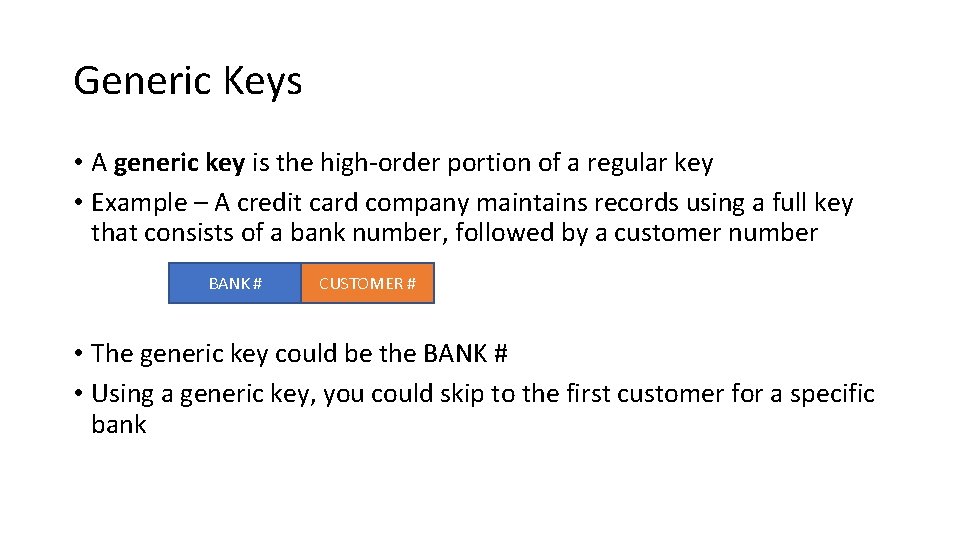
Generic Keys • A generic key is the high-order portion of a regular key • Example – A credit card company maintains records using a full key that consists of a bank number, followed by a customer number BANK # CUSTOMER # • The generic key could be the BANK # • Using a generic key, you could skip to the first customer for a specific bank
Key Sequenced Data Set (KSDS) • The most heavily used type of VSAM dataset • Allocated with IDCAMS DEFINE - parameter INDEXED • Records are initially added sequentially to an empty cluster in key sequence • Records can be added, deleted and updated (primary keys can’t be altered) • Records can be processed sequentially, skip-sequentially, or directly (by key or RBA),
Entry Sequenced Data Set (ESDS) • Created with IDCAMS DEFINE – parameter NONINDEXED • Records are sequenced by order of entry • New records are added at the end • Records can be updated, but the length can’t change • Records can’t be physically deleted (use a flag to mark it invalid)
Entry Sequenced Data Set (ESDS) • Records are usually accessed sequentially , but can also be accessed directly (by RBA) • RBA positioning is allowed before sequential processing, but no skipsequential processing can occur • When a record is loaded or added, VSAM returns the RBA
Fixed-Length Relative Record Data Set (RRDS) • Defined using IDCAMS DEFINE – parameter NUMBERED • The file consists of a collection of pre-formatted, fixed-length, logical record slots • Each slot has a unique RRN • Each logical record occupies a slot and is stored and retrieved by RRN • Slots can be empty or occupied • Can be processed sequentially, directly, or skip sequentially
Fixed-Length Relative Record Data Set (RRDS) • Processing by RBA or key is not supported • When processing sequentially, empty slots are skipped • Typically, a RRDS is processed directly using the RRN
Access Method Control Block (ACB) • Similar in function to a DCB for QSAM • Contains logical information about the VSAM dataset • Used by OPEN and CLOSE • Can be created by the ACB macro at assembly time, and by the GENCB macro at execution time https: //www. ibm. com/docs/en/zos/2. 4. 0? topic=instructions-introduction-vsam-programming
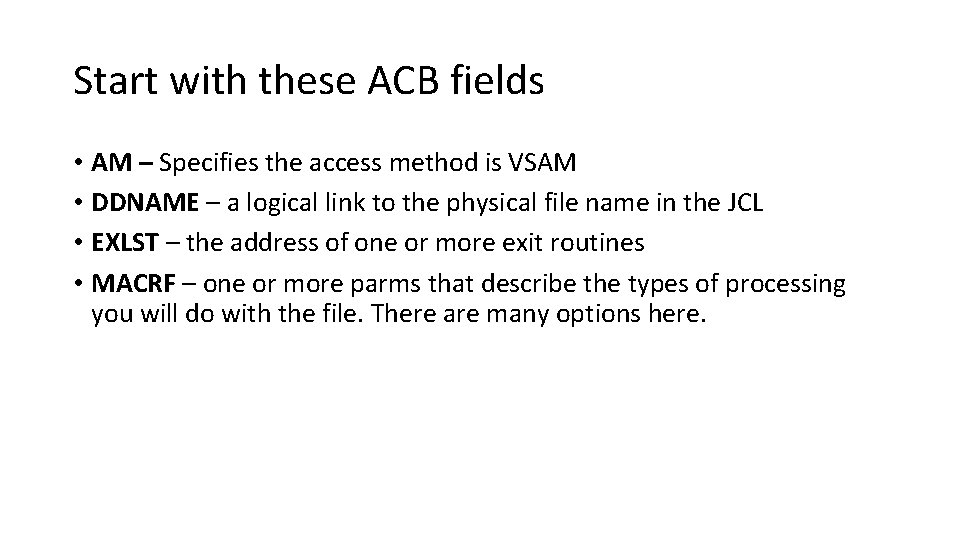
Start with these ACB fields • AM – Specifies the access method is VSAM • DDNAME – a logical link to the physical file name in the JCL • EXLST – the address of one or more exit routines • MACRF – one or more parms that describe the types of processing you will do with the file. There are many options here.
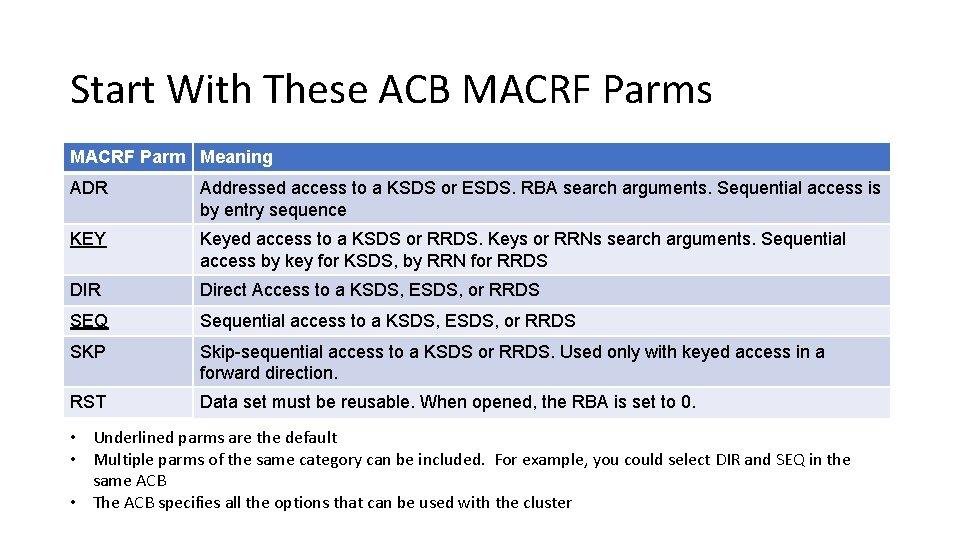
Start With These ACB MACRF Parms MACRF Parm Meaning ADR Addressed access to a KSDS or ESDS. RBA search arguments. Sequential access is by entry sequence KEY Keyed access to a KSDS or RRDS. Keys or RRNs search arguments. Sequential access by key for KSDS, by RRN for RRDS DIR Direct Access to a KSDS, ESDS, or RRDS SEQ Sequential access to a KSDS, ESDS, or RRDS SKP Skip-sequential access to a KSDS or RRDS. Used only with keyed access in a forward direction. RST Data set must be reusable. When opened, the RBA is set to 0. • Underlined parms are the default • Multiple parms of the same category can be included. For example, you could select DIR and SEQ in the same ACB • The ACB specifies all the options that can be used with the cluster
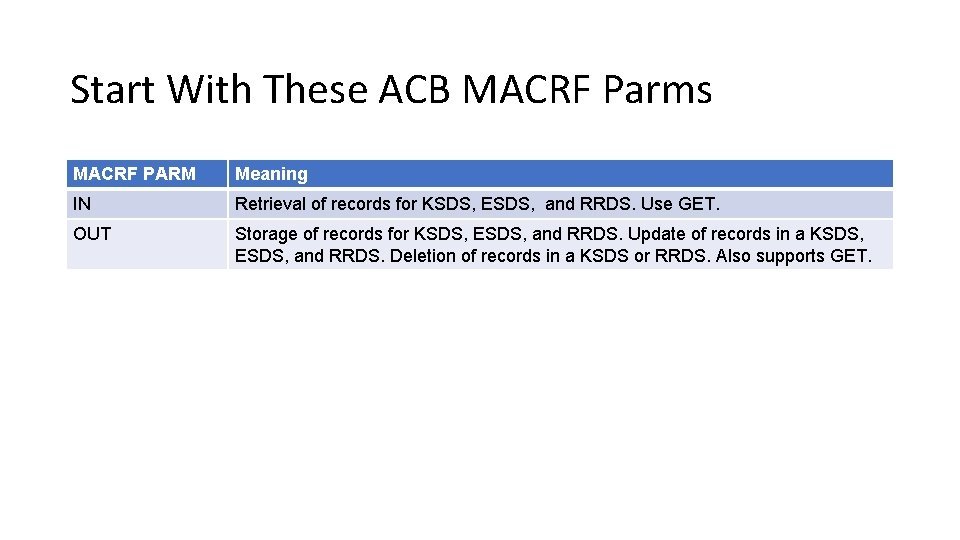
Start With These ACB MACRF Parms MACRF PARM Meaning IN Retrieval of records for KSDS, ESDS, and RRDS. Use GET. OUT Storage of records for KSDS, ESDS, and RRDS. Update of records in a KSDS, ESDS, and RRDS. Deletion of records in a KSDS or RRDS. Also supports GET.
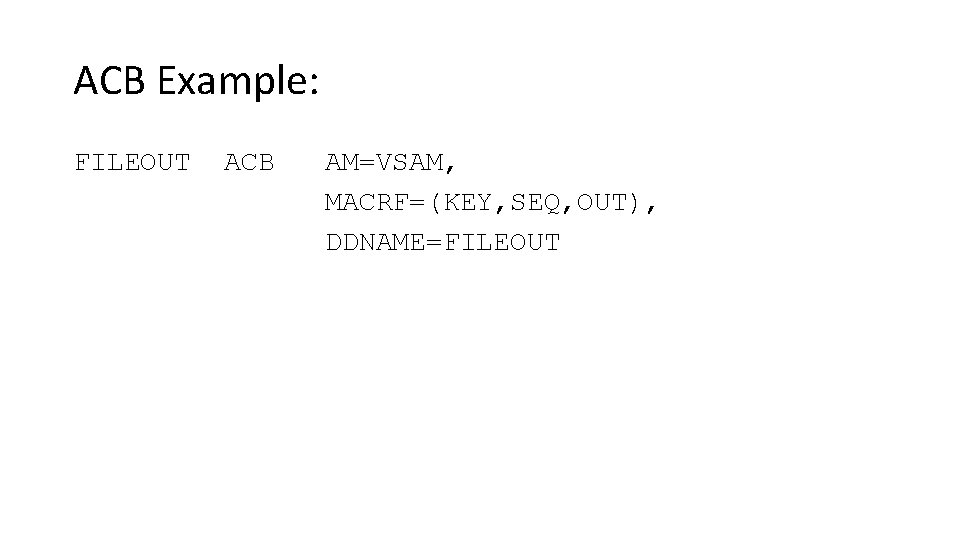
ACB Example: FILEOUT ACB AM=VSAM, MACRF=(KEY, SEQ, OUT), DDNAME=FILEOUT
Request Parameter List (RPL) • Used to generate a request parameter list. • A request that describes a specific GET or PUT operation • The options it contains should be compatible with the options described in the ACB • Lots of possible parameters • https: //www. ibm. com/docs/en/zos/2. 4. 0? topic=examplesrplgenerate-request-parameter-list-assembly-time
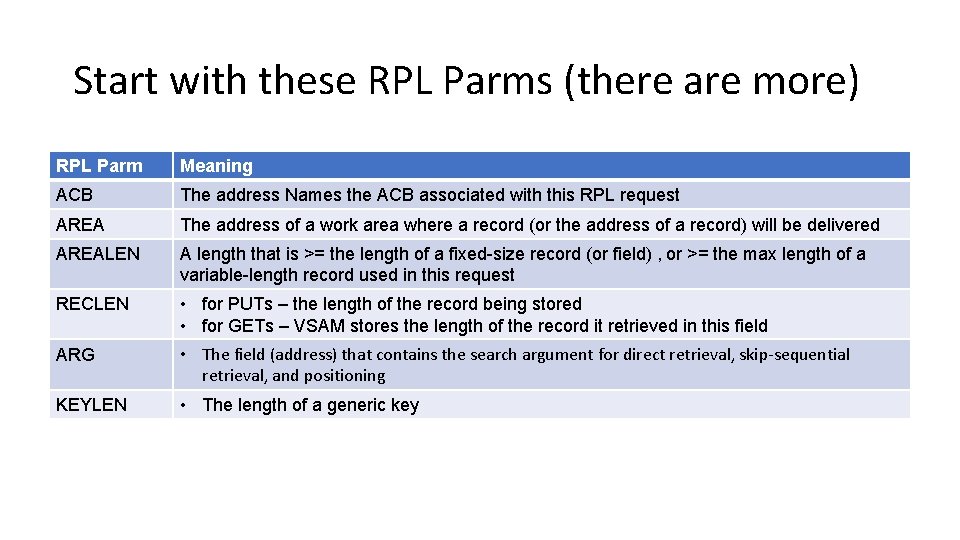
Start with these RPL Parms (there are more) RPL Parm Meaning ACB The address Names the ACB associated with this RPL request AREA The address of a work area where a record (or the address of a record) will be delivered AREALEN A length that is >= the length of a fixed-size record (or field) , or >= the max length of a variable-length record used in this request RECLEN • for PUTs – the length of the record being stored • for GETs – VSAM stores the length of the record it retrieved in this field ARG • The field (address) that contains the search argument for direct retrieval, skip-sequential retrieval, and positioning KEYLEN • The length of a generic key
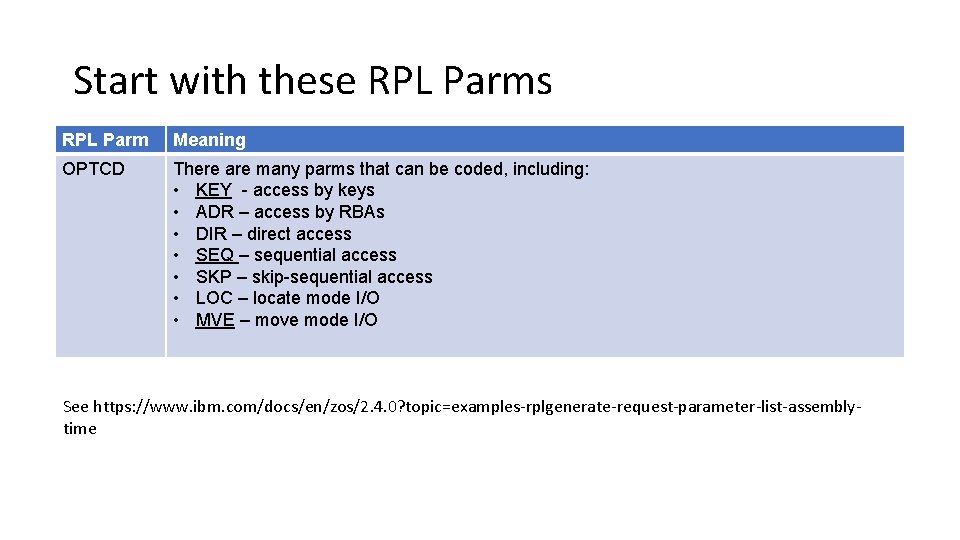
Start with these RPL Parms RPL Parm Meaning OPTCD There are many parms that can be coded, including: • KEY - access by keys • ADR – access by RBAs • DIR – direct access • SEQ – sequential access • SKP – skip-sequential access • LOC – locate mode I/O • MVE – move mode I/O See https: //www. ibm. com/docs/en/zos/2. 4. 0? topic=examples-rplgenerate-request-parameter-list-assemblytime
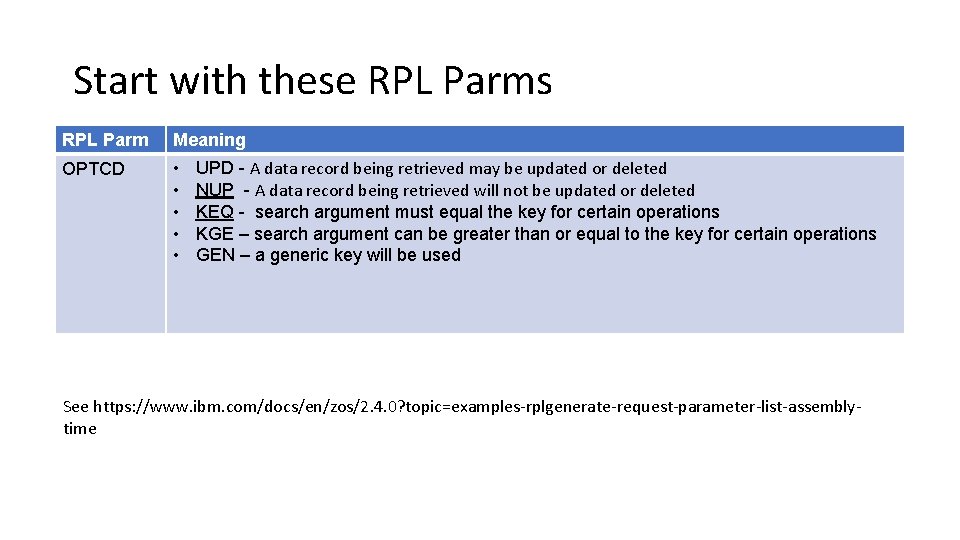
Start with these RPL Parms RPL Parm Meaning OPTCD • • • UPD - A data record being retrieved may be updated or deleted NUP - A data record being retrieved will not be updated or deleted KEQ - search argument must equal the key for certain operations KGE – search argument can be greater than or equal to the key for certain operations GEN – a generic key will be used See https: //www. ibm. com/docs/en/zos/2. 4. 0? topic=examples-rplgenerate-request-parameter-list-assemblytime
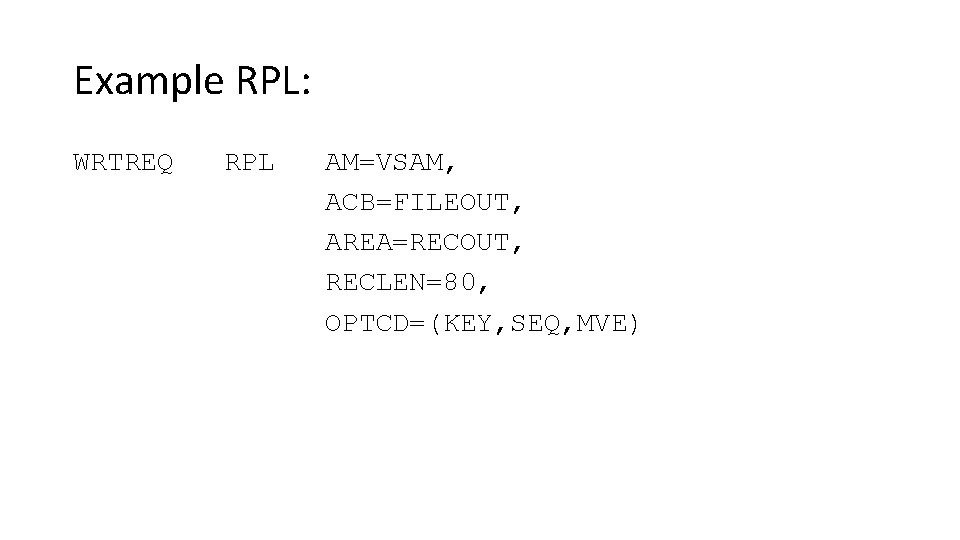
Example RPL: WRTREQ RPL AM=VSAM, ACB=FILEOUT, AREA=RECOUT, RECLEN=80, OPTCD=(KEY, SEQ, MVE)
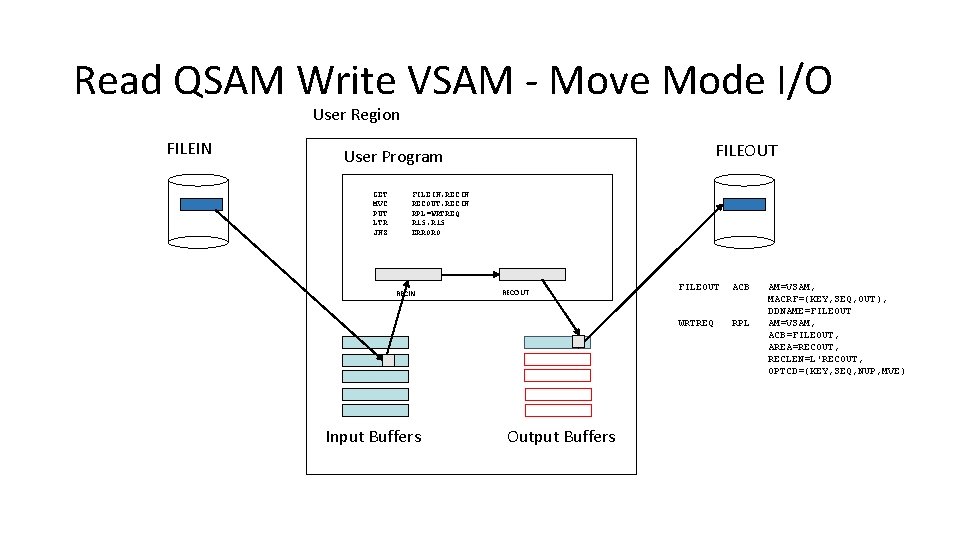
Read QSAM Write VSAM - Move Mode I/O User Region FILEIN FILEOUT User Program GET MVC PUT LTR JNZ FILEIN, RECIN RECOUT, RECIN RPL=WRTREQ R 15, R 15 ERRORO RECIN Input Buffers RECOUT Output Buffers FILEOUT ACB WRTREQ RPL AM=VSAM, MACRF=(KEY, SEQ, OUT), DDNAME=FILEOUT AM=VSAM, ACB=FILEOUT, AREA=RECOUT, RECLEN=L'RECOUT, OPTCD=(KEY, SEQ, NUP, MVE)
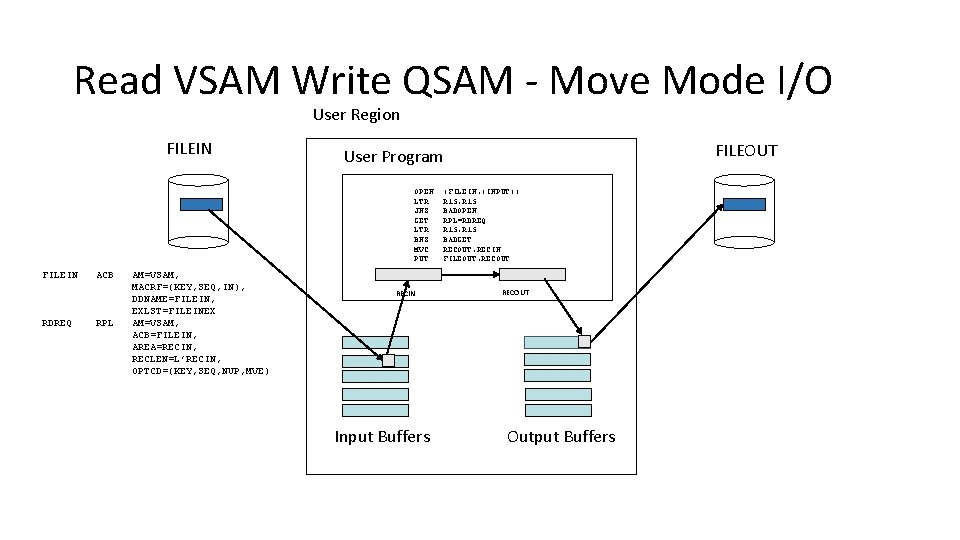
Read VSAM Write QSAM - Move Mode I/O User Region FILEIN OPEN LTR JNZ GET LTR BNZ MVC PUT FILEIN RDREQ ACB RPL AM=VSAM, MACRF=(KEY, SEQ, IN), DDNAME=FILEIN, EXLST=FILEINEX AM=VSAM, ACB=FILEIN, AREA=RECIN, RECLEN=L’RECIN, OPTCD=(KEY, SEQ, NUP, MVE) FILEOUT User Program RECIN Input Buffers (FILEIN, (INPUT)) R 15, R 15 BADOPEN RPL=RDREQ R 15, R 15 BADGET RECOUT, RECIN FILEOUT, RECOUT Output Buffers
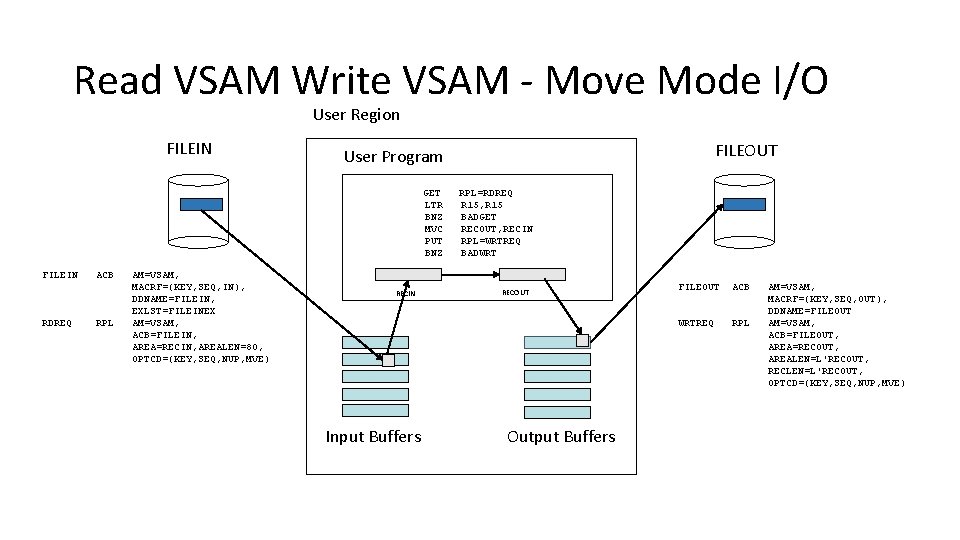
Read VSAM Write VSAM - Move Mode I/O User Region FILEIN GET LTR BNZ MVC PUT BNZ FILEIN RDREQ ACB RPL AM=VSAM, MACRF=(KEY, SEQ, IN), DDNAME=FILEIN, EXLST=FILEINEX AM=VSAM, ACB=FILEIN, AREA=RECIN, AREALEN=80, OPTCD=(KEY, SEQ, NUP, MVE) FILEOUT User Program RECIN Input Buffers RPL=RDREQ R 15, R 15 BADGET RECOUT, RECIN RPL=WRTREQ BADWRT RECOUT Output Buffers FILEOUT ACB WRTREQ RPL AM=VSAM, MACRF=(KEY, SEQ, OUT), DDNAME=FILEOUT AM=VSAM, ACB=FILEOUT, AREA=RECOUT, AREALEN=L'RECOUT, RECLEN=L'RECOUT, OPTCD=(KEY, SEQ, NUP, MVE)
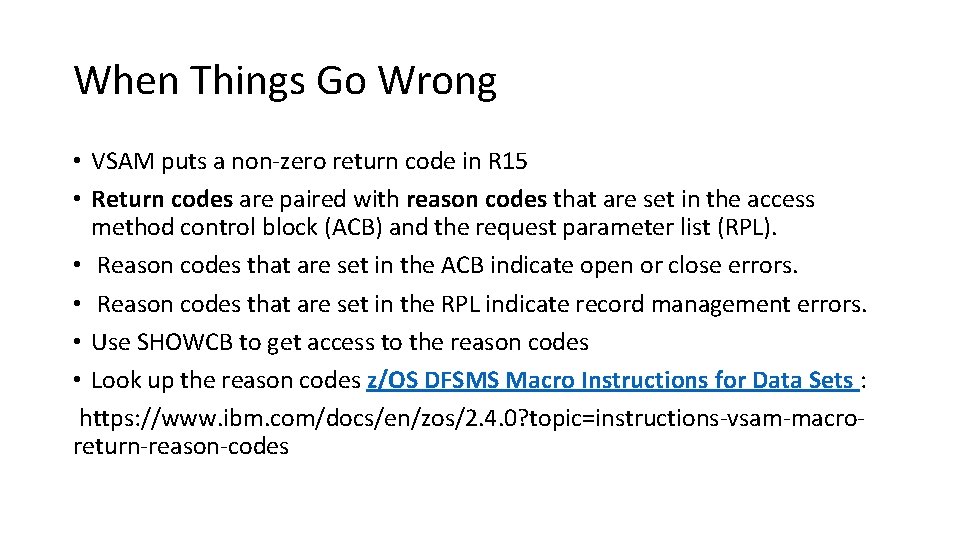
When Things Go Wrong • VSAM puts a non-zero return code in R 15 • Return codes are paired with reason codes that are set in the access method control block (ACB) and the request parameter list (RPL). • Reason codes that are set in the ACB indicate open or close errors. • Reason codes that are set in the RPL indicate record management errors. • Use SHOWCB to get access to the reason codes • Look up the reason codes z/OS DFSMS Macro Instructions for Data Sets : https: //www. ibm. com/docs/en/zos/2. 4. 0? topic=instructions-vsam-macroreturn-reason-codes
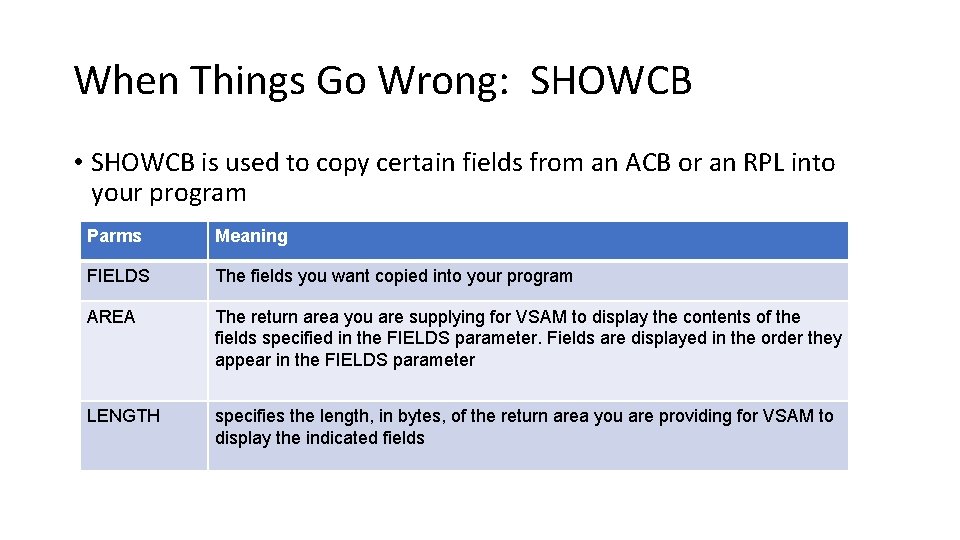
When Things Go Wrong: SHOWCB • SHOWCB is used to copy certain fields from an ACB or an RPL into your program Parms Meaning FIELDS The fields you want copied into your program AREA The return area you are supplying for VSAM to display the contents of the fields specified in the FIELDS parameter. Fields are displayed in the order they appear in the FIELDS parameter LENGTH specifies the length, in bytes, of the return area you are providing for VSAM to display the indicated fields
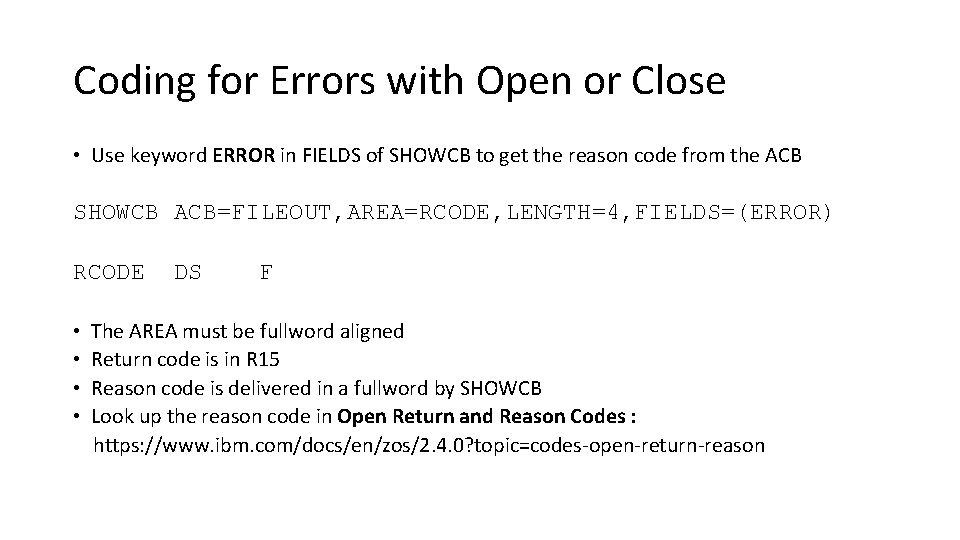
Coding for Errors with Open or Close • Use keyword ERROR in FIELDS of SHOWCB to get the reason code from the ACB SHOWCB ACB=FILEOUT, AREA=RCODE, LENGTH=4, FIELDS=(ERROR) RCODE • • DS F The AREA must be fullword aligned Return code is in R 15 Reason code is delivered in a fullword by SHOWCB Look up the reason code in Open Return and Reason Codes : https: //www. ibm. com/docs/en/zos/2. 4. 0? topic=codes-open-return-reason
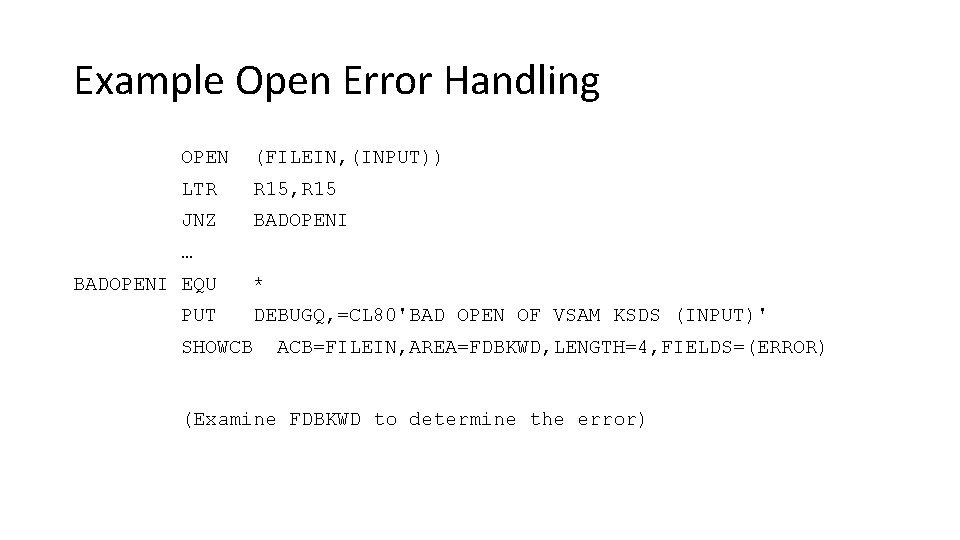
Example Open Error Handling OPEN (FILEIN, (INPUT)) LTR R 15, R 15 JNZ BADOPENI … BADOPENI EQU PUT * SHOWCB DEBUGQ, =CL 80'BAD OPEN OF VSAM KSDS (INPUT)' ACB=FILEIN, AREA=FDBKWD, LENGTH=4, FIELDS=(ERROR) (Examine FDBKWD to determine the error)
Test Your Error Handling Code for Open • Try commenting out the DD statement for a VSAM dataset • This produces a Return code of x’ 00000008’ and a reason code of X’ 00000080’
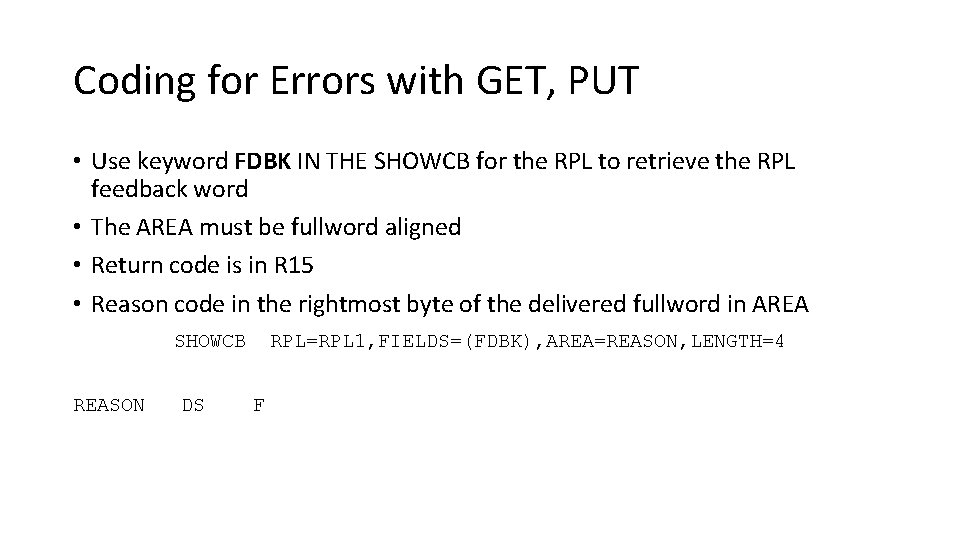
Coding for Errors with GET, PUT • Use keyword FDBK IN THE SHOWCB for the RPL to retrieve the RPL feedback word • The AREA must be fullword aligned • Return code is in R 15 • Reason code in the rightmost byte of the delivered fullword in AREA SHOWCB REASON DS RPL=RPL 1, FIELDS=(FDBK), AREA=REASON, LENGTH=4 F
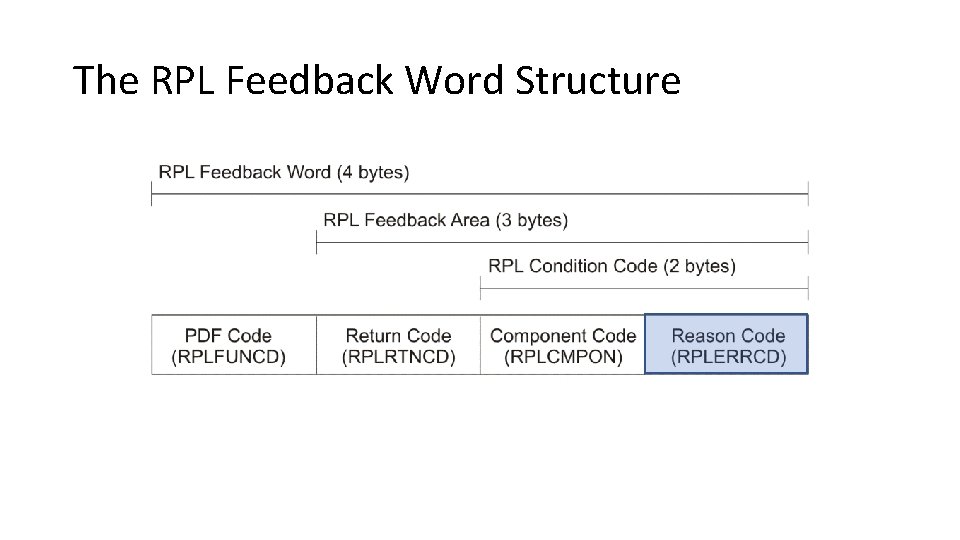
The RPL Feedback Word Structure
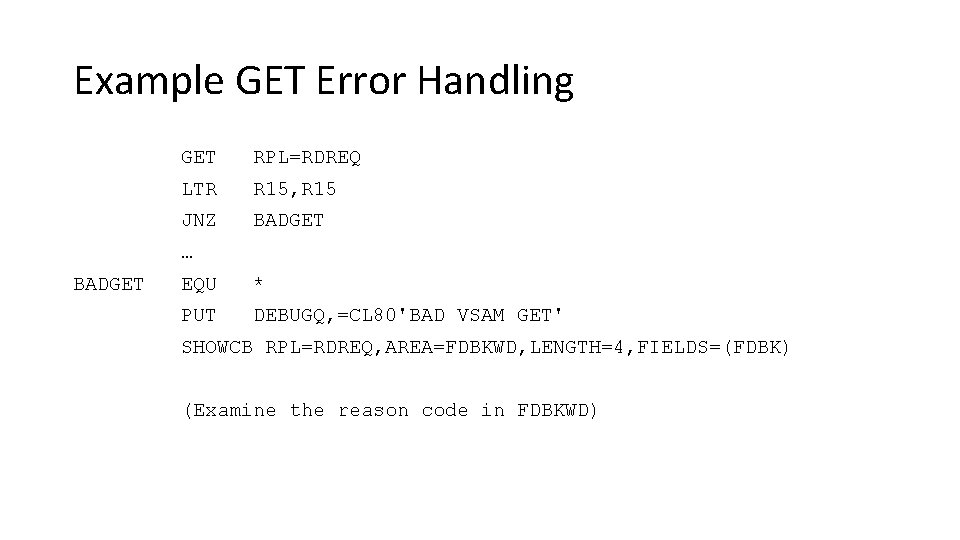
Example GET Error Handling GET RPL=RDREQ LTR R 15, R 15 JNZ BADGET … BADGET EQU * PUT DEBUGQ, =CL 80'BAD VSAM GET' SHOWCB RPL=RDREQ, AREA=FDBKWD, LENGTH=4, FIELDS=(FDBK) (Examine the reason code in FDBKWD)
Test Your Error Handling Code for GET • If you are reading a VSAM file sequentially, remove the EXLST in the ACB. This will generate an error at EOF. • Return code = x’ 00000008’, Reason code = x’ 00000004’ • Look up the reason code in Record Management Return and Reason Codes : https: //www. ibm. com/docs/en/zos/2. 4. 0? topic=codes-open-returnreason (follow Reason codes, Logical Errors)
Coding for Errors with Control Block Macros • Test register 0 for a control block manipulating macros (GENCB, MODCB, SHOWCB, and TESTCB). • Look up the return codes in Control Block Manipulation Macro Return and Reason Codes https: //www. ibm. com/docs/en/zos/2. 4. 0? topic=codes-control-blockmanipulation-macro-return-reason
- Slides: 35