
Introduction to using R for Linear Regression Chris



![Correlations > z <- cor(supermarket[, c("Turnover", "Area", "Perc. ABC", "Population")]) > round(z, 3) Turnover](https://slidetodoc.com/presentation_image_h2/9f1ff3322f08e23acd50183d64bbb85b/image-12.jpg "Correlations > z <- cor(supermarket[, c(\"Turnover\", \"Area\", \"Perc. ABC\", \"Population\")]) > round(z, 3) Turnover")
![Regression Structure has components Components > names(z) [1] "coefficients" "residuals" "effects" "rank" "fitted. values"](https://slidetodoc.com/presentation_image_h2/9f1ff3322f08e23acd50183d64bbb85b/image-19.jpg "Regression Structure has components Components > names(z) [1] \"coefficients\" \"residuals\" \"effects\" \"rank\" \"fitted. values\"")

![Predictions from linear regression > predict(z)[1: 5] 1 2 8915. 526 8480. 175 3](https://slidetodoc.com/presentation_image_h2/9f1ff3322f08e23acd50183d64bbb85b/image-27.jpg "Predictions from linear regression > predict(z)[1: 5] 1 2 8915. 526 8480. 175 3")
![Calculation of root mean square error using cross validation > > z. out [1]](https://slidetodoc.com/presentation_image_h2/9f1ff3322f08e23acd50183d64bbb85b/image-36.jpg "Calculation of root mean square error using cross validation > > z. out [1]")

- Slides: 37
Introduction to using R for Linear Regression Chris Robertson Strathclyde University, Glasgow, Scotland Health Protection Scotland, Glasgow, Scotland International Prevention Research Institute, Lyon, France Feb 2016 Linear Regression 1
Contents • • Viewing Data Summary and data objects Graphs Regression Diagnostic plots Model Selection Prediction and confidence intervals Feb 2016 Linear Regression 2
Supermarket Data • Can you predict the annual turnover of a supermarket from knowledge of the area in which the supermarket is to be located • Use to assist decisions about location of future supermarkets. Feb 2016 Linear Regression 3
Linear Regression Statistical modelling used to estimate the association between a numeric response variable and numeric and/or categorical explanatory variables Used for prediction of future values of the response Used to estimate the adjusted and independent effect of a variable on the response Feb 2016 Linear Regression 4
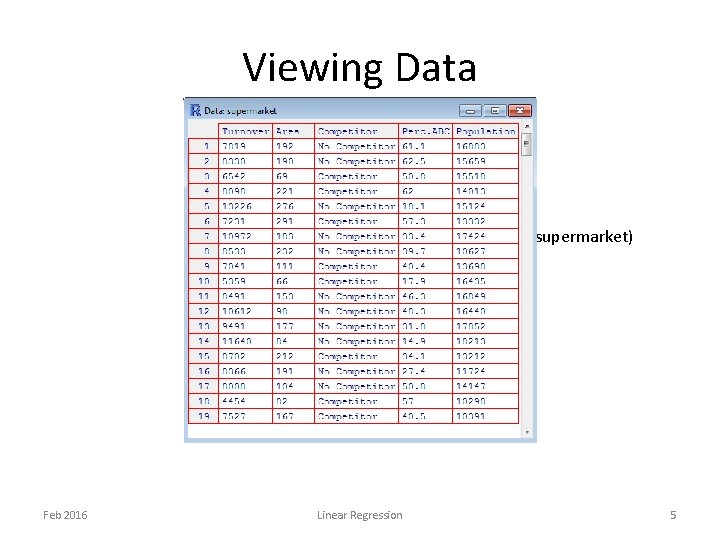
Viewing Data View(supermarket) Feb 2016 Linear Regression 5
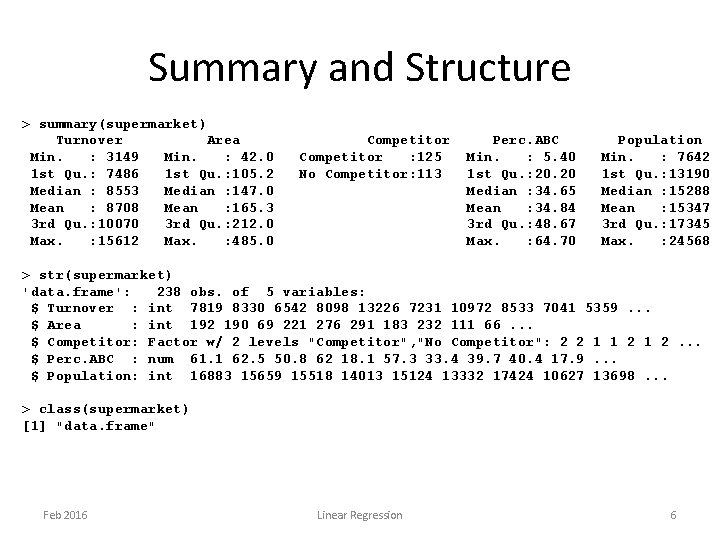
Summary and Structure > summary(supermarket) Turnover Area Min. : 3149 Min. : 42. 0 1 st Qu. : 7486 1 st Qu. : 105. 2 Median : 8553 Median : 147. 0 Mean : 8708 Mean : 165. 3 3 rd Qu. : 10070 3 rd Qu. : 212. 0 Max. : 15612 Max. : 485. 0 Competitor : 125 No Competitor: 113 Perc. ABC Min. : 5. 40 1 st Qu. : 20. 20 Median : 34. 65 Mean : 34. 84 3 rd Qu. : 48. 67 Max. : 64. 70 Population Min. : 7642 1 st Qu. : 13190 Median : 15288 Mean : 15347 3 rd Qu. : 17345 Max. : 24568 > str(supermarket) 'data. frame': 238 obs. of 5 variables: $ Turnover : int 7819 8330 6542 8098 13226 7231 10972 8533 7041 5359. . . $ Area : int 192 190 69 221 276 291 183 232 111 66. . . $ Competitor: Factor w/ 2 levels "Competitor", "No Competitor": 2 2 1 1 2. . . $ Perc. ABC : num 61. 1 62. 5 50. 8 62 18. 1 57. 3 33. 4 39. 7 40. 4 17. 9. . . $ Population: int 16883 15659 15518 14013 15124 13332 17424 10627 13698. . . > class(supermarket) [1] "data. frame" Feb 2016 Linear Regression 6
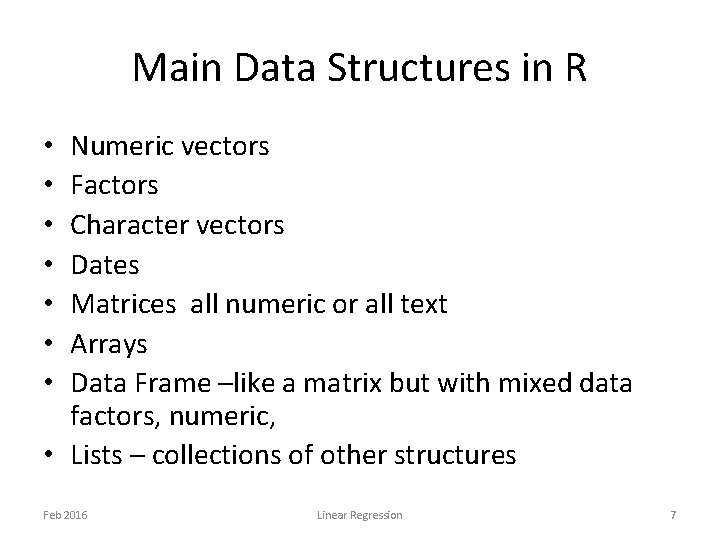
Main Data Structures in R Numeric vectors Factors Character vectors Dates Matrices all numeric or all text Arrays Data Frame –like a matrix but with mixed data factors, numeric, • Lists – collections of other structures • • Feb 2016 Linear Regression 7
Steps in Linear Regression Modelling • Plots • Fitting models one variable at a time then all variables together • Diagnostic plots to check assumptions • Model selection, if appropriate, – Variable selection • Predictions, if needed Feb 2016 Linear Regression 8
Assumptions in Linear Regression Modelling The effects are all additive on the response and that the associations between the response variable and all the explanatory variables in linear The errors between the model and the observed data are normally distributed The variance of the errors is constant The errors are independent of each other Feb 2016 Linear Regression 9
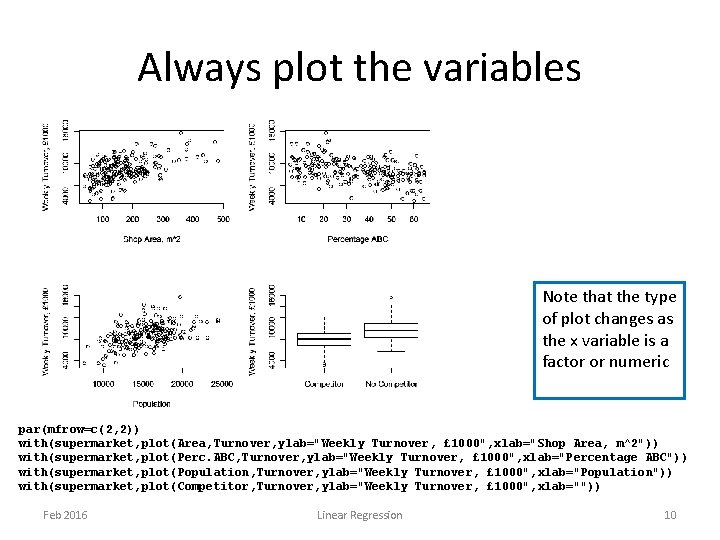
Always plot the variables Note that the type of plot changes as the x variable is a factor or numeric par(mfrow=c(2, 2)) with(supermarket, plot(Area, Turnover, ylab="Weekly Turnover, £ 1000", xlab="Shop Area, m^2")) with(supermarket, plot(Perc. ABC, Turnover, ylab="Weekly Turnover, £ 1000", xlab="Percentage ABC")) with(supermarket, plot(Population, Turnover, ylab="Weekly Turnover, £ 1000", xlab="Population")) with(supermarket, plot(Competitor, Turnover, ylab="Weekly Turnover, £ 1000", xlab="")) Feb 2016 Linear Regression 10
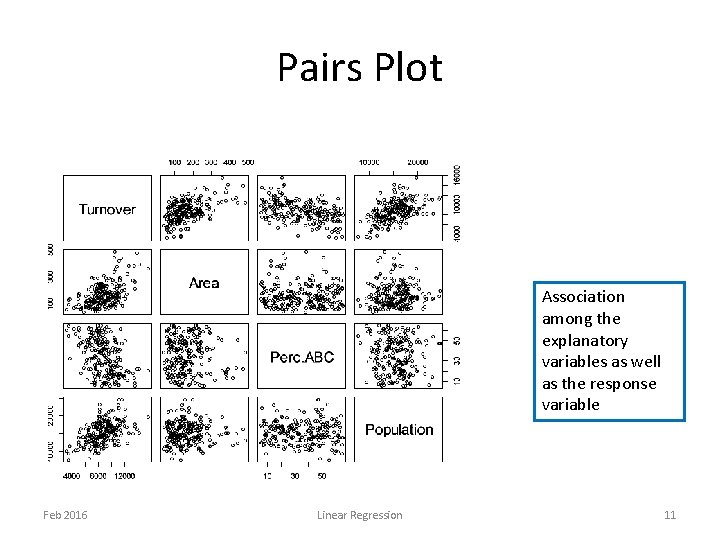
Pairs Plot Association among the explanatory variables as well as the response variable Feb 2016 Linear Regression 11
Correlations > z <- cor(supermarket[, c("Turnover", "Area", "Perc. ABC", "Population")]) > round(z, 3) Turnover Area Perc. ABC Population Turnover 1. 000 0. 492 -0. 430 0. 488 Area 0. 492 1. 000 -0. 004 0. 041 Perc. ABC -0. 430 -0. 004 1. 000 -0. 051 Population 0. 488 0. 041 -0. 051 1. 000 Independent variables are uncorrelated and all are correlated with the response variable Feb 2016 Linear Regression 12
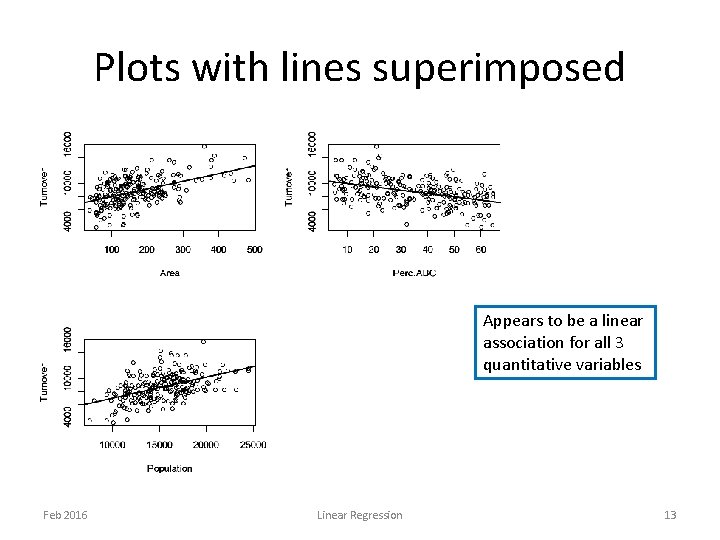
Plots with lines superimposed Appears to be a linear association for all 3 quantitative variables Feb 2016 Linear Regression 13
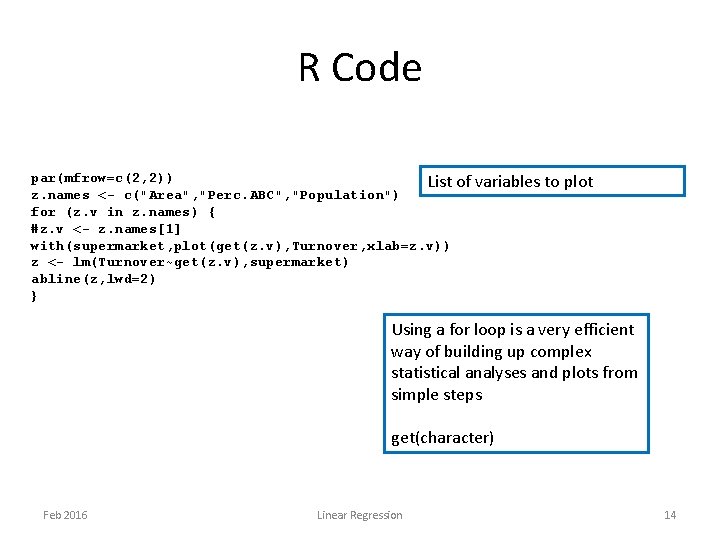
R Code par(mfrow=c(2, 2)) List of variables to plot z. names <- c("Area", "Perc. ABC", "Population") for (z. v in z. names) { #z. v <- z. names[1] with(supermarket, plot(get(z. v), Turnover, xlab=z. v)) z <- lm(Turnover~get(z. v), supermarket) abline(z, lwd=2) } Using a for loop is a very efficient way of building up complex statistical analyses and plots from simple steps get(character) Feb 2016 Linear Regression 14
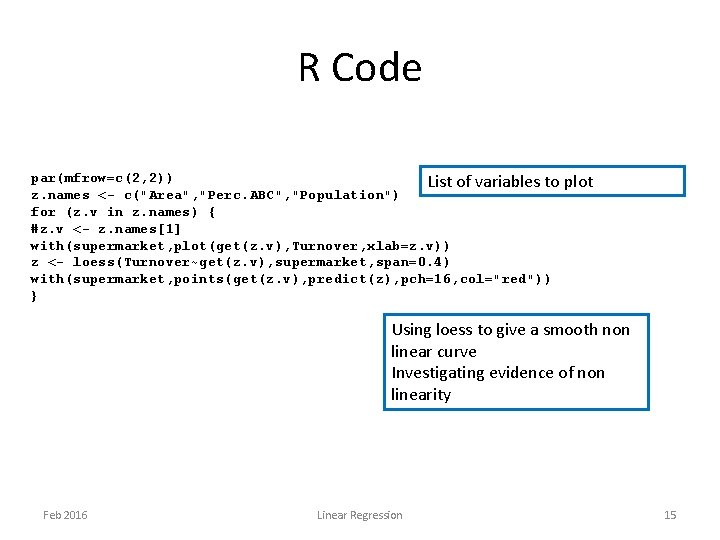
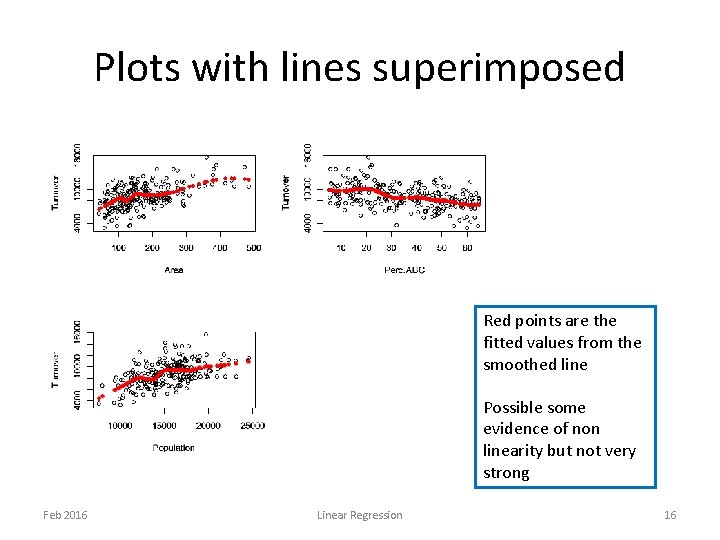
R Code par(mfrow=c(2, 2)) List of variables to plot z. names <- c("Area", "Perc. ABC", "Population") for (z. v in z. names) { #z. v <- z. names[1] with(supermarket, plot(get(z. v), Turnover, xlab=z. v)) z <- loess(Turnover~get(z. v), supermarket, span=0. 4) with(supermarket, points(get(z. v), predict(z), pch=16, col="red")) } Using loess to give a smooth non linear curve Investigating evidence of non linearity Feb 2016 Linear Regression 15
Plots with lines superimposed Red points are the fitted values from the smoothed line Possible some evidence of non linearity but not very strong Feb 2016 Linear Regression 16
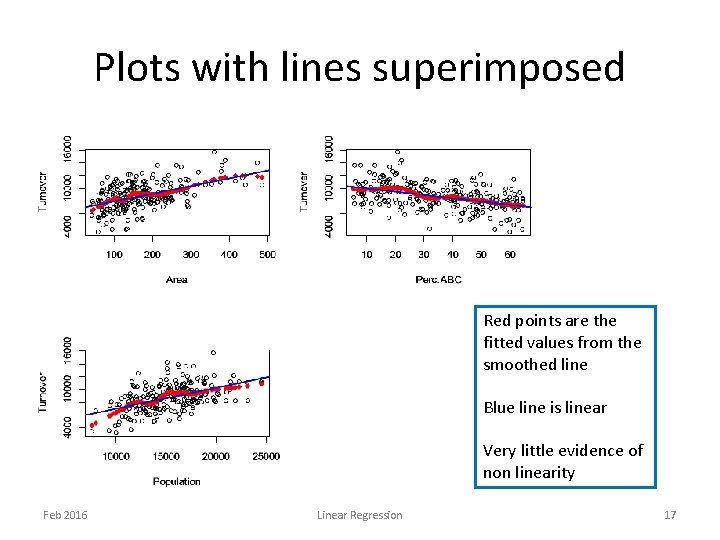
Plots with lines superimposed Red points are the fitted values from the smoothed line Blue line is linear Very little evidence of non linearity Feb 2016 Linear Regression 17
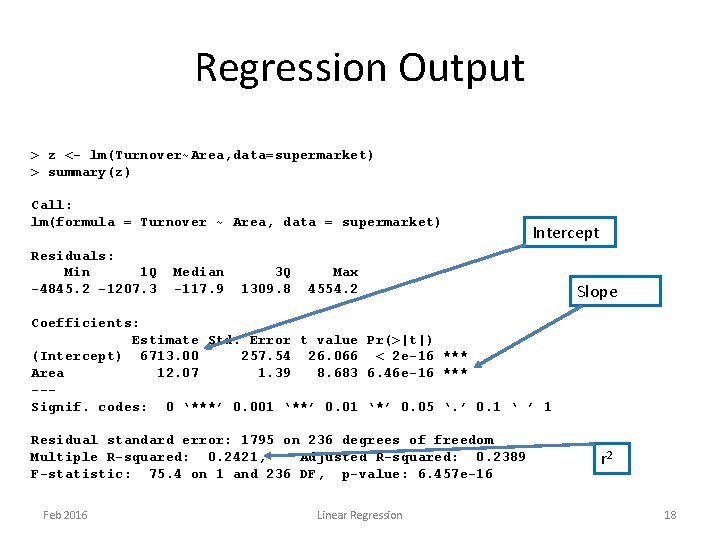
Regression Output > z <- lm(Turnover~Area, data=supermarket) > summary(z) Call: lm(formula = Turnover ~ Area, data = supermarket) Residuals: Min 1 Q -4845. 2 -1207. 3 Median -117. 9 3 Q 1309. 8 Intercept Max 4554. 2 Slope Coefficients: Estimate Std. Error t value Pr(>|t|) (Intercept) 6713. 00 257. 54 26. 066 < 2 e-16 *** Area 12. 07 1. 39 8. 683 6. 46 e-16 *** --Signif. codes: 0 ‘***’ 0. 001 ‘**’ 0. 01 ‘*’ 0. 05 ‘. ’ 0. 1 ‘ ’ 1 Residual standard error: 1795 on 236 degrees of freedom Multiple R-squared: 0. 2421, Adjusted R-squared: 0. 2389 F-statistic: 75. 4 on 1 and 236 DF, p-value: 6. 457 e-16 Feb 2016 Linear Regression r 2 18
Regression Structure has components Components > names(z) [1] "coefficients" "residuals" "effects" "rank" "fitted. values" "assign" [7] "qr" "df. residual" "xlevels" "call" "terms" "model" > names(summary(z)) [1] "call" "terms" "residuals" "coefficients" "aliased" "sigma" [7] "df" "r. squared" "adj. r. squared" "fstatistic" "cov. unscaled" > z$coefficients Coefficients (Intercept) Area 6712. 99929 12. 06899 > summary(z)$coefficients Table of coefficients and Estimate Std. Error t value Pr(>|t|) (Intercept) 6712. 99929 257. 542088 26. 065640 2. 049646 e-71 standard errors Area 12. 06899 1. 389935 8. 683131 6. 456847 e-16 > summary(z)$sigma [1] 1795. 207 s – residual standard error Feb 2016 Linear Regression 19
R objects Most R objects that are the result of fitting a statistical model are a list of named components The information in these components can be accessed Use names(object) or names(summary(object)) to see what they are Help on the R function also tells you the names of the components in the returned object Feb 2016 Linear Regression 20
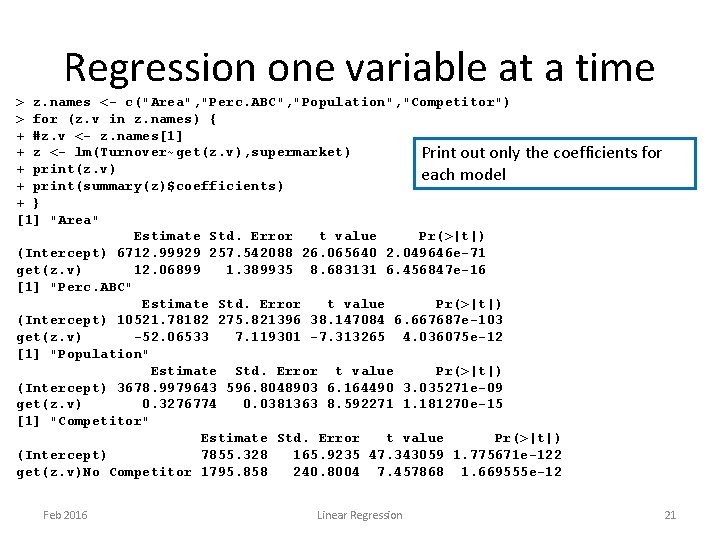
Regression one variable at a time > z. names <- c("Area", "Perc. ABC", "Population", "Competitor") > for (z. v in z. names) { + #z. v <- z. names[1] + z <- lm(Turnover~get(z. v), supermarket) Print out only the coefficients for + print(z. v) each model + print(summary(z)$coefficients) + } [1] "Area" Estimate Std. Error t value Pr(>|t|) (Intercept) 6712. 99929 257. 542088 26. 065640 2. 049646 e-71 get(z. v) 12. 06899 1. 389935 8. 683131 6. 456847 e-16 [1] "Perc. ABC" Estimate Std. Error t value Pr(>|t|) (Intercept) 10521. 78182 275. 821396 38. 147084 6. 667687 e-103 get(z. v) -52. 06533 7. 119301 -7. 313265 4. 036075 e-12 [1] "Population" Estimate Std. Error t value Pr(>|t|) (Intercept) 3678. 9979643 596. 8048903 6. 164490 3. 035271 e-09 get(z. v) 0. 3276774 0. 0381363 8. 592271 1. 181270 e-15 [1] "Competitor" Estimate Std. Error t value Pr(>|t|) (Intercept) 7855. 328 165. 9235 47. 343059 1. 775671 e-122 get(z. v)No Competitor 1795. 858 240. 8004 7. 457868 1. 669555 e-12 Feb 2016 Linear Regression 21
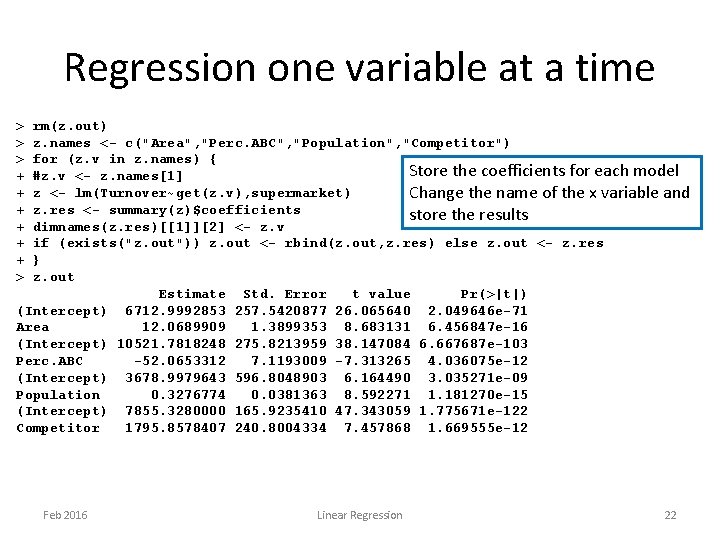
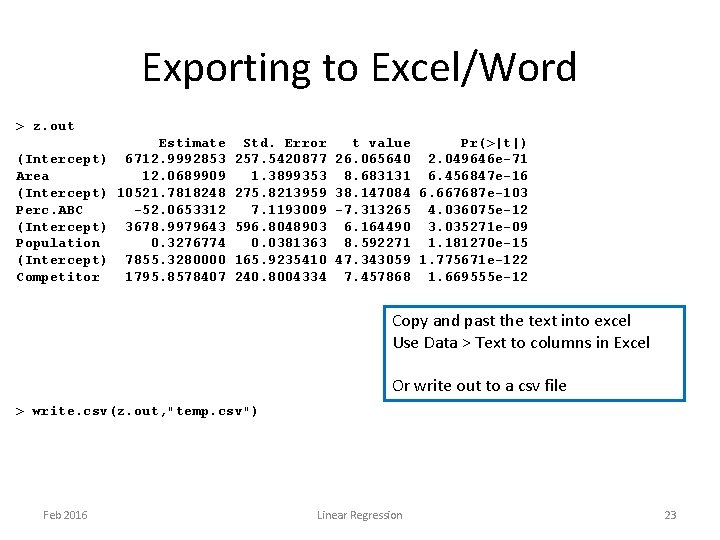
Regression one variable at a time > > > + + + > rm(z. out) z. names <- c("Area", "Perc. ABC", "Population", "Competitor") for (z. v in z. names) { Store the coefficients for each model #z. v <- z. names[1] z <- lm(Turnover~get(z. v), supermarket) Change the name of the x variable and z. res <- summary(z)$coefficients store the results dimnames(z. res)[[1]][2] <- z. v if (exists("z. out")) z. out <- rbind(z. out, z. res) else z. out <- z. res } z. out Estimate Std. Error t value Pr(>|t|) (Intercept) 6712. 9992853 257. 5420877 26. 065640 2. 049646 e-71 Area 12. 0689909 1. 3899353 8. 683131 6. 456847 e-16 (Intercept) 10521. 7818248 275. 8213959 38. 147084 6. 667687 e-103 Perc. ABC -52. 0653312 7. 1193009 -7. 313265 4. 036075 e-12 (Intercept) 3678. 9979643 596. 8048903 6. 164490 3. 035271 e-09 Population 0. 3276774 0. 0381363 8. 592271 1. 181270 e-15 (Intercept) 7855. 3280000 165. 9235410 47. 343059 1. 775671 e-122 Competitor 1795. 8578407 240. 8004334 7. 457868 1. 669555 e-12 Feb 2016 Linear Regression 22
Exporting to Excel/Word > z. out (Intercept) Area (Intercept) Perc. ABC (Intercept) Population (Intercept) Competitor Estimate 6712. 9992853 12. 0689909 10521. 7818248 -52. 0653312 3678. 9979643 0. 3276774 7855. 3280000 1795. 8578407 Std. Error 257. 5420877 1. 3899353 275. 8213959 7. 1193009 596. 8048903 0. 0381363 165. 9235410 240. 8004334 t value Pr(>|t|) 26. 065640 2. 049646 e-71 8. 683131 6. 456847 e-16 38. 147084 6. 667687 e-103 -7. 313265 4. 036075 e-12 6. 164490 3. 035271 e-09 8. 592271 1. 181270 e-15 47. 343059 1. 775671 e-122 7. 457868 1. 669555 e-12 Copy and past the text into excel Use Data > Text to columns in Excel Or write out to a csv file > write. csv(z. out, "temp. csv") Feb 2016 Linear Regression 23
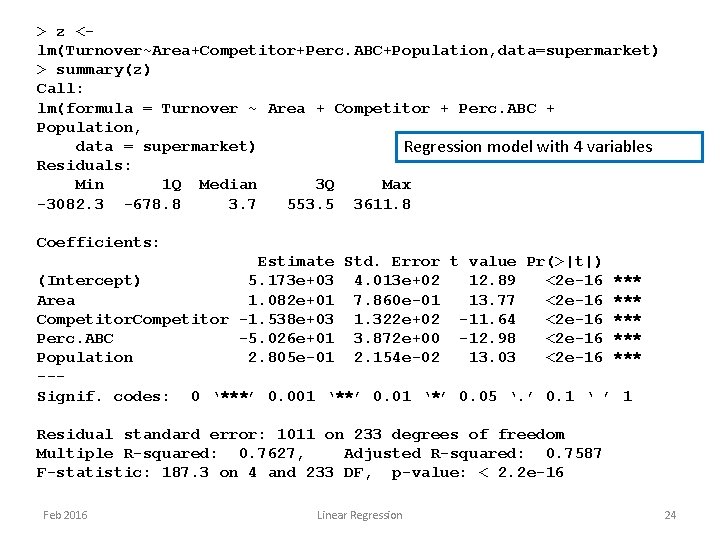
> z <lm(Turnover~Area+Competitor+Perc. ABC+Population, data=supermarket) > summary(z) Call: lm(formula = Turnover ~ Area + Competitor + Perc. ABC + Population, data = supermarket) Regression model with 4 variables Residuals: Min 1 Q Median 3 Q Max -3082. 3 -678. 8 3. 7 553. 5 3611. 8 Coefficients: Estimate Std. Error t value Pr(>|t|) (Intercept) 5. 173 e+03 4. 013 e+02 12. 89 <2 e-16 *** Area 1. 082 e+01 7. 860 e-01 13. 77 <2 e-16 *** Competitor -1. 538 e+03 1. 322 e+02 -11. 64 <2 e-16 *** Perc. ABC -5. 026 e+01 3. 872 e+00 -12. 98 <2 e-16 *** Population 2. 805 e-01 2. 154 e-02 13. 03 <2 e-16 *** --Signif. codes: 0 ‘***’ 0. 001 ‘**’ 0. 01 ‘*’ 0. 05 ‘. ’ 0. 1 ‘ ’ 1 Residual standard error: 1011 on 233 degrees of freedom Multiple R-squared: 0. 7627, Adjusted R-squared: 0. 7587 F-statistic: 187. 3 on 4 and 233 DF, p-value: < 2. 2 e-16 Feb 2016 Linear Regression 24
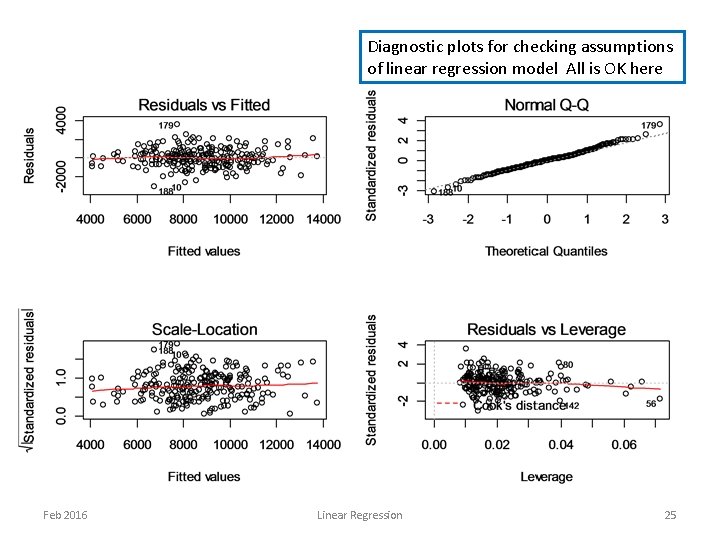
Diagnostic plots for checking assumptions of linear regression model All is OK here Feb 2016 Linear Regression 25
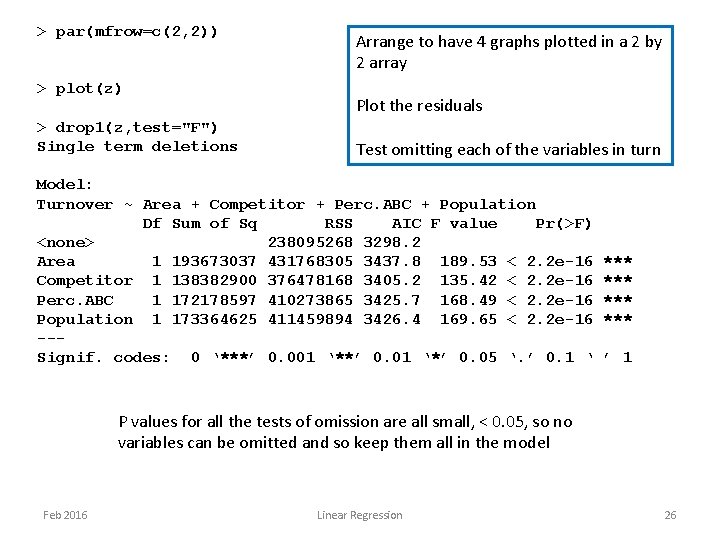
> par(mfrow=c(2, 2)) > plot(z) > drop 1(z, test="F") Single term deletions Arrange to have 4 graphs plotted in a 2 by 2 array Plot the residuals Test omitting each of the variables in turn Model: Turnover ~ Area + Competitor + Perc. ABC + Population Df Sum of Sq RSS AIC F value Pr(>F) <none> 238095268 3298. 2 Area 1 193673037 431768305 3437. 8 189. 53 < 2. 2 e-16 Competitor 1 138382900 376478168 3405. 2 135. 42 < 2. 2 e-16 Perc. ABC 1 172178597 410273865 3425. 7 168. 49 < 2. 2 e-16 Population 1 173364625 411459894 3426. 4 169. 65 < 2. 2 e-16 --Signif. codes: 0 ‘***’ 0. 001 ‘**’ 0. 01 ‘*’ 0. 05 ‘. ’ 0. 1 ‘ *** *** ’ 1 P values for all the tests of omission are all small, < 0. 05, so no variables can be omitted and so keep them all in the model Feb 2016 Linear Regression 26
Predictions from linear regression > predict(z)[1: 5] 1 2 8915. 526 8480. 175 3 6181. 358 4 5 6841. 070 11492. 114 > z. p <- predict(z, se. fit=TRUE) > names(z. p) [1] "fit" "se. fit" "residual. scale" > "df" > predict(z, interval="confidence")[1: 5, ] fit lwr upr 1 8915. 526 8634. 654 9196. 398 2 8480. 175 8198. 829 8761. 520 3 6181. 358 5922. 514 6440. 201 4 6841. 070 6546. 479 7135. 662 5 11492. 114 11211. 956 11772. 271 Feb 2016 Linear Regression Predict the mean response How to get the standard error of the predicted mean Confidence intervals for the predicted mean 27
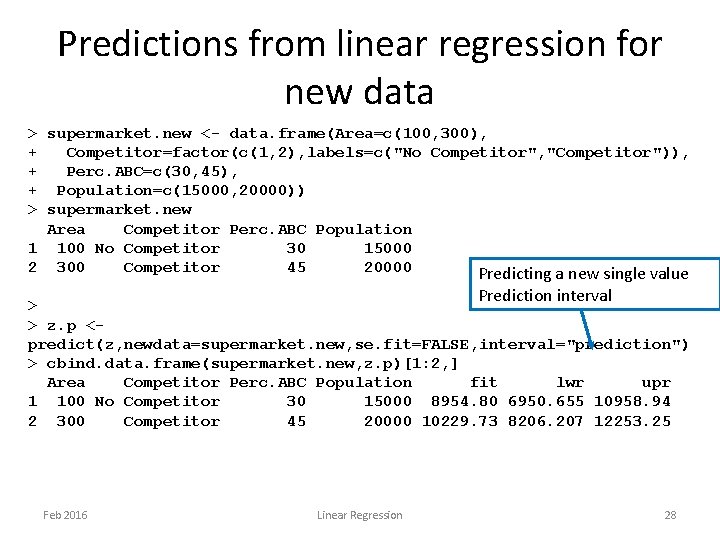
Predictions from linear regression for new data > supermarket. new <- data. frame(Area=c(100, 300), + Competitor=factor(c(1, 2), labels=c("No Competitor", "Competitor")), + Perc. ABC=c(30, 45), + Population=c(15000, 20000)) > supermarket. new Area Competitor Perc. ABC Population 1 100 No Competitor 30 15000 2 300 Competitor 45 20000 Predicting a new single value Prediction interval > > z. p <predict(z, newdata=supermarket. new, se. fit=FALSE, interval="prediction") > cbind. data. frame(supermarket. new, z. p)[1: 2, ] Area Competitor Perc. ABC Population fit lwr upr 1 100 No Competitor 30 15000 8954. 80 6950. 655 10958. 94 2 300 Competitor 45 20000 10229. 73 8206. 207 12253. 25 Feb 2016 Linear Regression 28
General Pattern of working • Commands are types in script files and run in blocks • Functions run to fit models and results stored in other structures – Generally in list structures • Results are interrogated in various ways – plotting, printing, tabulating, used in other functions. Feb 2016 Linear Regression 29
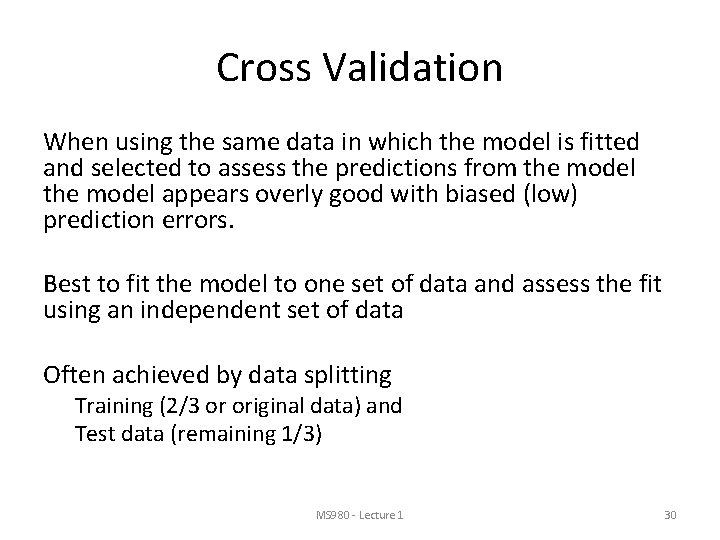
Cross Validation When using the same data in which the model is fitted and selected to assess the predictions from the model appears overly good with biased (low) prediction errors. Best to fit the model to one set of data and assess the fit using an independent set of data Often achieved by data splitting Training (2/3 or original data) and Test data (remaining 1/3) MS 980 - Lecture 1 30
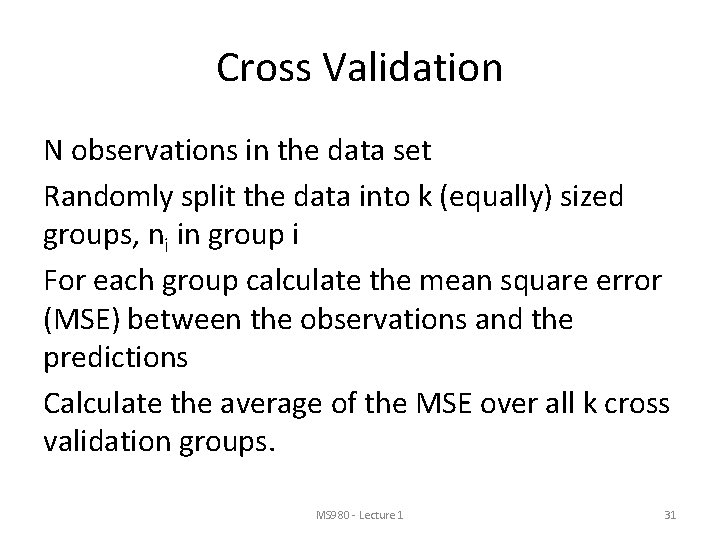
Cross Validation N observations in the data set Randomly split the data into k (equally) sized groups, ni in group i For each group calculate the mean square error (MSE) between the observations and the predictions Calculate the average of the MSE over all k cross validation groups. MS 980 - Lecture 1 31
Cross Validation If the data set is small then k=N and the model is fitted to N-1 data points and the prediction made for the one left out. This is also known as jack knife or leave one out cross validation. If N is very large then k can be in the region 10100. MS 980 - Lecture 1 32
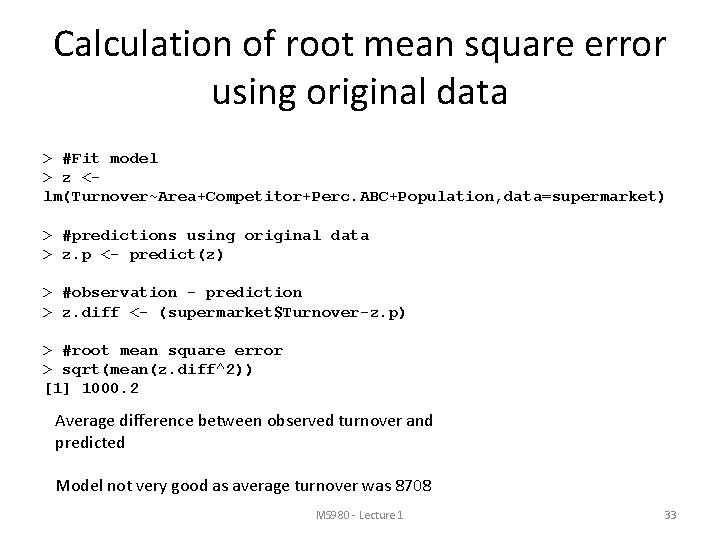
Calculation of root mean square error using original data > #Fit model > z <lm(Turnover~Area+Competitor+Perc. ABC+Population, data=supermarket) > #predictions using original data > z. p <- predict(z) > #observation - prediction > z. diff <- (supermarket$Turnover-z. p) > #root mean square error > sqrt(mean(z. diff^2)) [1] 1000. 2 Average difference between observed turnover and predicted Model not very good as average turnover was 8708 MS 980 - Lecture 1 33
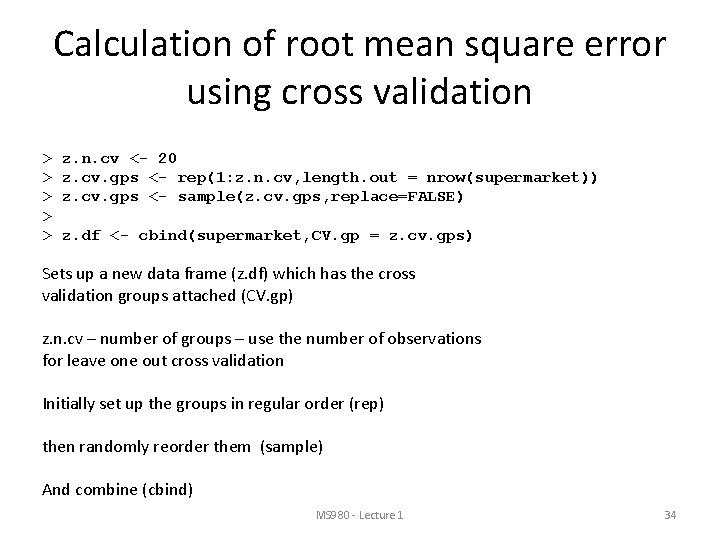
Calculation of root mean square error using cross validation > > > z. n. cv <- 20 z. cv. gps <- rep(1: z. n. cv, length. out = nrow(supermarket)) z. cv. gps <- sample(z. cv. gps, replace=FALSE) z. df <- cbind(supermarket, CV. gp = z. cv. gps) Sets up a new data frame (z. df) which has the cross validation groups attached (CV. gp) z. n. cv – number of groups – use the number of observations for leave one out cross validation Initially set up the groups in regular order (rep) then randomly reorder them (sample) And combine (cbind) MS 980 - Lecture 1 34
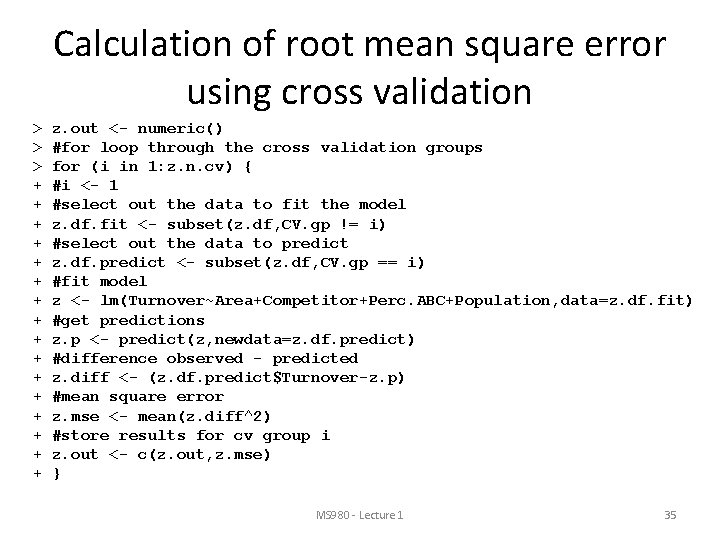
Calculation of root mean square error using cross validation > > > + + + + z. out <- numeric() #for loop through the cross validation groups for (i in 1: z. n. cv) { #i <- 1 #select out the data to fit the model z. df. fit <- subset(z. df, CV. gp != i) #select out the data to predict z. df. predict <- subset(z. df, CV. gp == i) #fit model z <- lm(Turnover~Area+Competitor+Perc. ABC+Population, data=z. df. fit) #get predictions z. p <- predict(z, newdata=z. df. predict) #difference observed - predicted z. diff <- (z. df. predict$Turnover-z. p) #mean square error z. mse <- mean(z. diff^2) #store results for cv group i z. out <- c(z. out, z. mse) } MS 980 - Lecture 1 35
Calculation of root mean square error using cross validation > > z. out [1] 390752. 2 362786. 6 953081. 0 1526380. 0 1768255. 3 1163652. 1 877679. 4 827223. 1 2156013. 5 1332361. 7 [11] 1170124. 4 918226. 6 1130880. 0 773128. 3 1161385. 8 1643201. 5 1033354. 5 567610. 9 422323. 8 678080. 5 > #root mean square error from cross validation > sqrt(mean(z. out)) [1] 1021. 188 Root mean square error using the original data only without cross validation was 1000. 3. this is biased downwards – too small as using the same data to fit and test the model Cross validation root mean square error is unbiased. MS 980 - Lecture 1 36
Summary • Quick Introduction to R • Sufficient to complete work in practical sessions • Much online help Feb 2016 Linear Regression 37