
Introduction To Threads 1 Topics Basic Concepts Distinction
Introduction To Threads 1
Topics • • Basic Concepts Distinction between threads and processes Potential Parallelism Specifying Potential Parallelism in a Concurrent Programming Environment 2
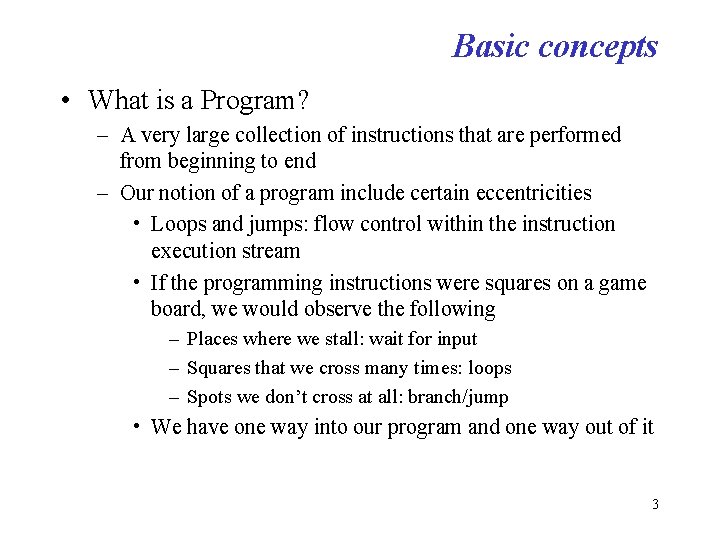
Basic concepts • What is a Program? – A very large collection of instructions that are performed from beginning to end – Our notion of a program include certain eccentricities • Loops and jumps: flow control within the instruction execution stream • If the programming instructions were squares on a game board, we would observe the following – Places where we stall: wait for input – Squares that we cross many times: loops – Spots we don’t cross at all: branch/jump • We have one way into our program and one way out of it 3
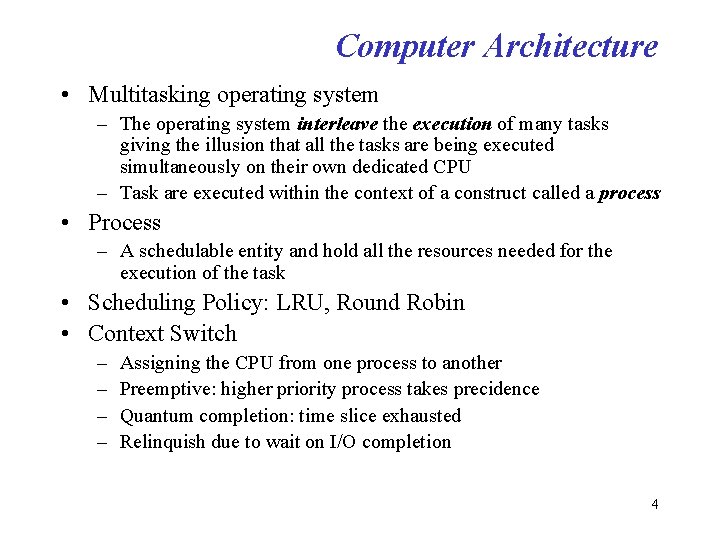
Computer Architecture • Multitasking operating system – The operating system interleave the execution of many tasks giving the illusion that all the tasks are being executed simultaneously on their own dedicated CPU – Task are executed within the context of a construct called a process • Process – A schedulable entity and hold all the resources needed for the execution of the task • Scheduling Policy: LRU, Round Robin • Context Switch – – Assigning the CPU from one process to another Preemptive: higher priority process takes precidence Quantum completion: time slice exhausted Relinquish due to wait on I/O completion 4
Effect of Multitasking • Program can be broken into a number sub tasks • If we can get the computer to executed some of the tasks at the same time, with no change in our program’s results – Overall task get as much processing as it needs – Overall task will complete in a shorter period of time • System with single processor – execution of the sub tasks will be interleaved • Multi-Processor system – Sub tasks will be executed in parallel on multiple CPUs 5
Landscape Before Threads • Processes were the only way to deliver the sub tasks to the processor or processors • Parent processes forked child processes to perform sub tasks • In this model, each sub task exist in its own process • Threads gives us an alternative to the process model – Why do we even need an alternative • Difficulty/complexity of working with process model • Process model is not very efficient 6
The Thread Model This model takes a process and divides it into two parts – The process: contains resources used across the whole program (process wide information) such as • global instructions • global data – Thread: contains information related to the execution state, such as • program counter: pointer to the current instruction being executed • Stack: store automatic variables for procedures and procedure return information 7
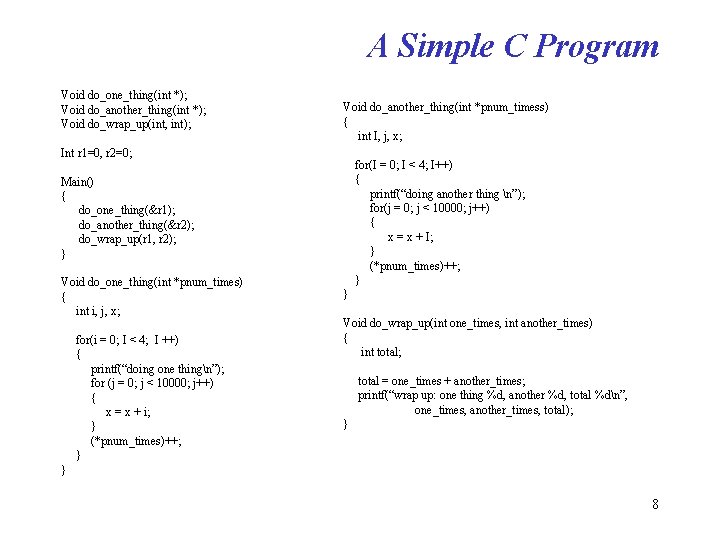
A Simple C Program Void do_one_thing(int *); Void do_another_thing(int *); Void do_wrap_up(int, int); Void do_another_thing(int *pnum_timess) { int I, j, x; Int r 1=0, r 2=0; for(I = 0; I < 4; I++) { printf(“doing another thing n”); for(j = 0; j < 10000; j++) { x = x + I; } (*pnum_times)++; } Main() { do_one_thing(&r 1); do_another_thing(&r 2); do_wrap_up(r 1, r 2); } Void do_one_thing(int *pnum_times) { int i, j, x; for(i = 0; I < 4; I ++) { printf(“doing one thingn”); for (j = 0; j < 10000; j++) { x = x + i; } (*pnum_times)++; } } Void do_wrap_up(int one_times, int another_times) { int total; total = one_times + another_times; printf(“wrap up: one thing %d, another %d, total %dn”, one_times, another_times, total); } } 8
Program Layout: Process Virtual Memory • A read-only area for program instructions (or “text” in Unix parlance) • A read-write area for global data (variables r 1 and r 2 in our program) • A heap area for memory that is dynamically allocated through malloc system calls • A stack on which the automatic variables of the current procedure are kept – Function arguments and other information needed to link to the calling procedure – Each of the procedure specific information is called a stack frame, one exists for each active procedure in the program 9
Program Layout: Process Virtual Memory Additional system resources needed to sustain this process, includes the following – Machine registers • Program counter(PC): points to the currently executing instruction • Stack Pointer (SP): points to the current stack frame – Process-specific tables maintained by the operating system to track system-supplied resources, such as • Open files (requiring file descriptors) • Communication end points (sockets) • Signals (interrupts): death of child, process termination, 10
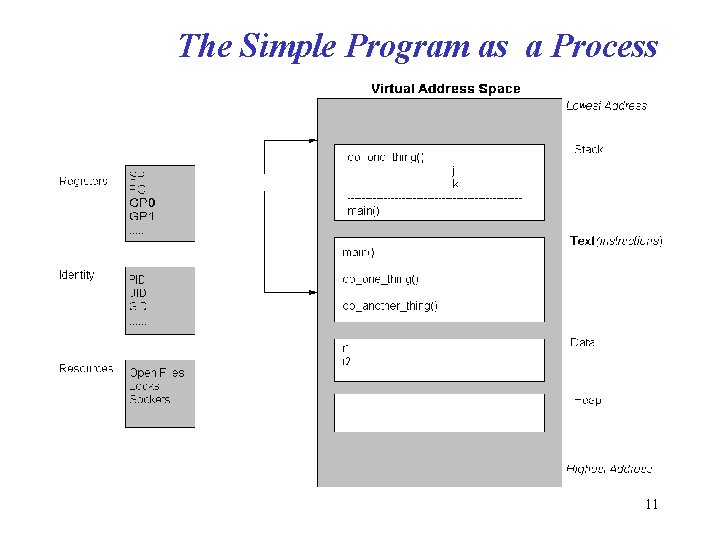
The Simple Program as a Process 11
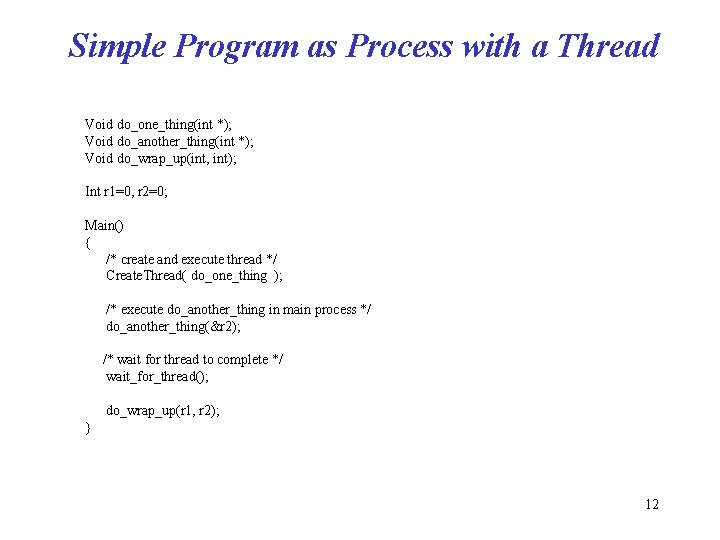
Simple Program as Process with a Thread Void do_one_thing(int *); Void do_another_thing(int *); Void do_wrap_up(int, int); Int r 1=0, r 2=0; Main() { /* create and execute thread */ Create. Thread( do_one_thing ); /* execute do_another_thing in main process */ do_another_thing(&r 2); /* wait for thread to complete */ wait_for_thread(); do_wrap_up(r 1, r 2); } 12
Simple Program as Process with a Thread • Machine registers have become part of the thread – Program counter – Stack pointer – General purpose registers • Everything else is part of the process – Operating system resources • Open files • Locks • Sockets, etc – Identifying information • PID, UID, GID 13
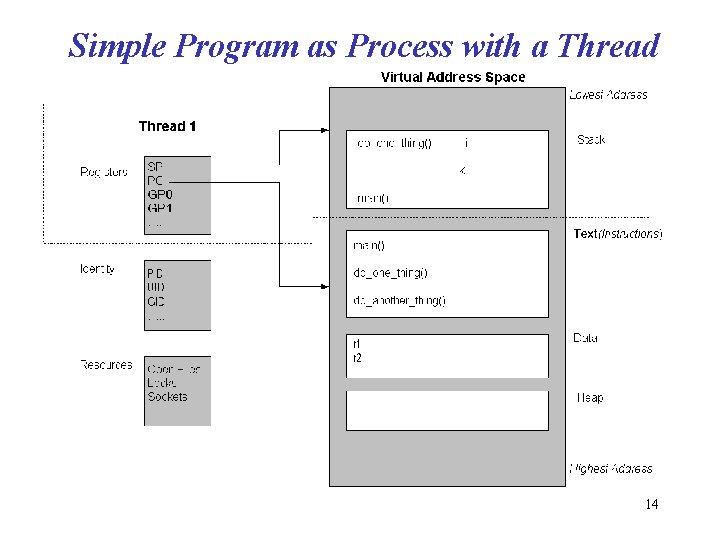
Simple Program as Process with a Thread 14
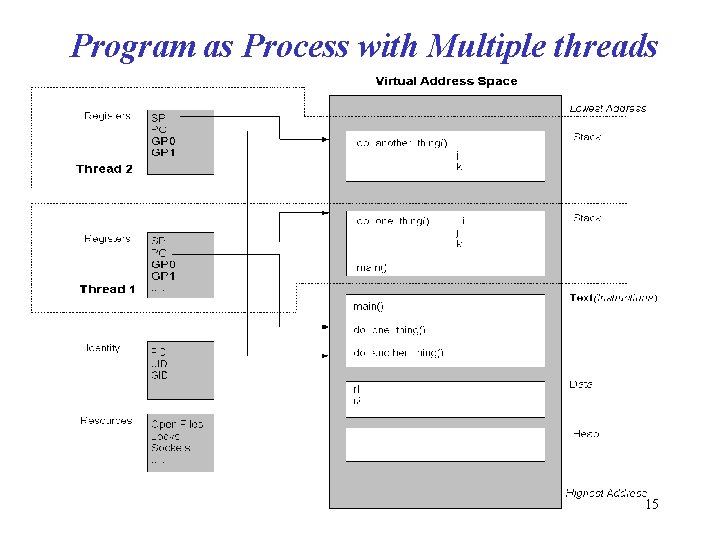
Program as Process with Multiple threads 15
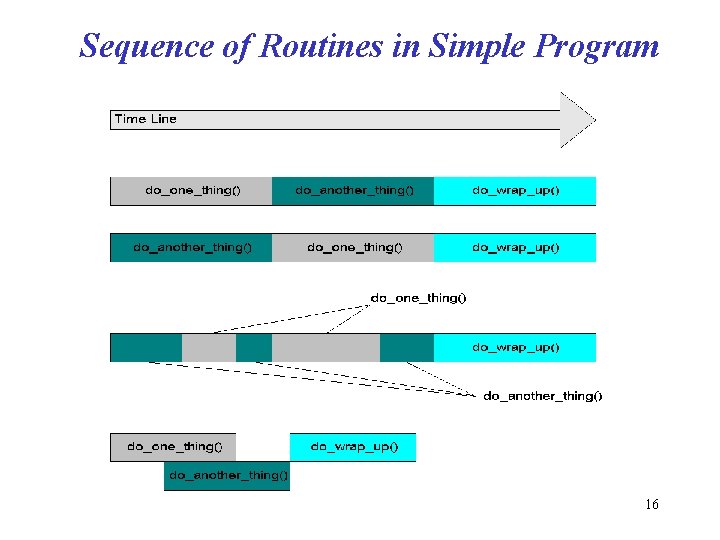
Sequence of Routines in Simple Program 16
What Are Pthreads • Pthreads is a standardized model for dividing a program into subtasks whose execution can be interleaved or run in parallel. • The “P” comes from POSIX (Portable Operating System Interface), the family of IEEE operating system interface standards in which Pthreads is defined (POSIX Section 1003. 1 c to be exact) 17
Potential Parallelism • The order of execution of sub tasks does not affect the resultant output of a program • We want to exploit potential parallelism to make our program run faster on a multiprocessor. That is, we want to execute sub tasks in parallel • Additional reasons for investigating potential parallelism include the following: – Overlapping I/O – Asynchronous Events – Real-Time Scheduling 18
Potential Parallelism: Concurrent Programming environment • Concurrent Programming Environments – These are programming environments that allow us to express potential parallelism • A concurrent programming environment lets us designate tasks that can run in parallel • It lets us specify how to handle communication and synchronization issues that result when concurrent tasks attempt to talk to each other and share data • Most concurrent programming tools and languages resulted from academic research and are hard to use – Pthread and Java are notable exceptions: They were developed for the purpose of expressing multithreading in you program 19
UNIX Concurrent Programming: Processes • The basic Unix environment supports a multi process concurrent programming interface • It allows user to create multiple processes and provides services that processes can use to communicate with each other in support of – Information sharing: shared memory, messages queues – Synchronizing access to shared resources: semaphores, messages queues 20
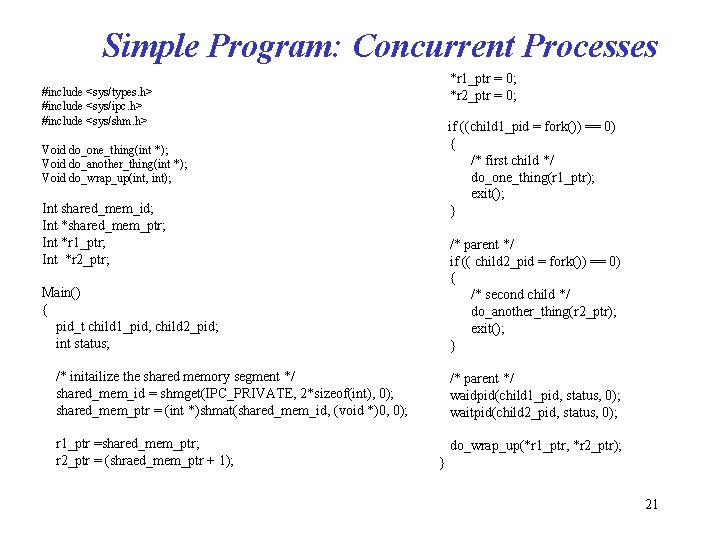
Simple Program: Concurrent Processes *r 1_ptr = 0; *r 2_ptr = 0; #include <sys/types. h> #include <sys/ipc. h> #include <sys/shm. h> if ((child 1_pid = fork()) == 0) { /* first child */ do_one_thing(r 1_ptr); exit(); } Void do_one_thing(int *); Void do_another_thing(int *); Void do_wrap_up(int, int); Int shared_mem_id; Int *shared_mem_ptr; Int *r 1_ptr; Int *r 2_ptr; /* parent */ if (( child 2_pid = fork()) == 0) { /* second child */ do_another_thing(r 2_ptr); exit(); } Main() { pid_t child 1_pid, child 2_pid; int status; /* initailize the shared memory segment */ shared_mem_id = shmget(IPC_PRIVATE, 2*sizeof(int), 0); shared_mem_ptr = (int *)shmat(shared_mem_id, (void *)0, 0); /* parent */ waidpid(child 1_pid, status, 0); waitpid(child 2_pid, status, 0); r 1_ptr =shared_mem_ptr; r 2_ptr = (shraed_mem_ptr + 1); do_wrap_up(*r 1_ptr, *r 2_ptr); } 21
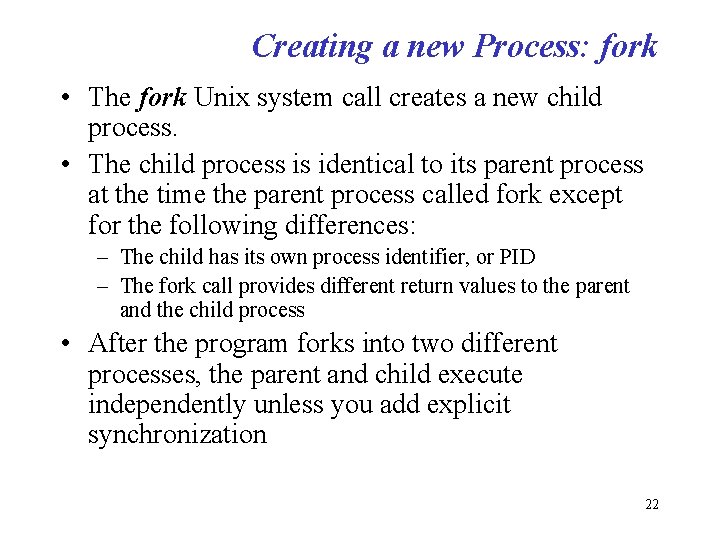
Creating a new Process: fork • The fork Unix system call creates a new child process. • The child process is identical to its parent process at the time the parent process called fork except for the following differences: – The child has its own process identifier, or PID – The fork call provides different return values to the parent and the child process • After the program forks into two different processes, the parent and child execute independently unless you add explicit synchronization 22
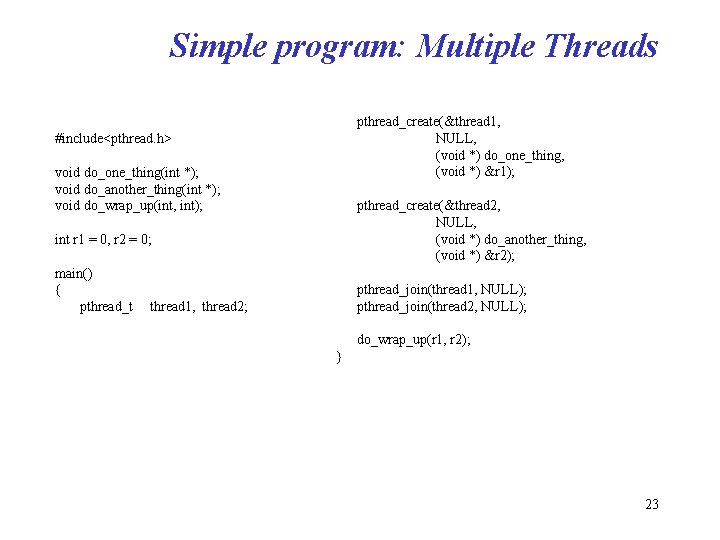
Simple program: Multiple Threads pthread_create(&thread 1, NULL, (void *) do_one_thing, (void *) &r 1); #include<pthread. h> void do_one_thing(int *); void do_another_thing(int *); void do_wrap_up(int, int); pthread_create(&thread 2, NULL, (void *) do_another_thing, (void *) &r 2); int r 1 = 0, r 2 = 0; main() { pthread_t pthread_join(thread 1, NULL); pthread_join(thread 2, NULL); thread 1, thread 2; do_wrap_up(r 1, r 2); } 23
Creating new thread: pthread_create • Use pthread_create as opposed to fork system call • Threads are peer: There is no parent/child relationship • We say a thread spawn another thread: both have exactly the same properties in the eyes of Pthreads • The main thread (first thread in the process) have slightly different properties 24
Parallel versus Concurrent Programming • Concurrent programming: in general refer to environments in which the tasks we define can occur in any order – One task can occur or after another, and some or all tasks can be performed at the same time • Parallel Programming: refer to simultaneous execution of concurrent tasks on different processors • All parallel programming is concurrent, but not vise versa 25
Why use Threads Over Processes • Both Thread and Process models provide concurrent program execution • Creating new process can be expensive – It takes time: calling into the OS kernel is needed – Can trigger process rescheduling activity: context switch – It takes up memory resource: entire process is replicated • Communication and synchronization is expensive – Requiring calling into the OS kernel 26
Why use Threads Over Processes, contd • Threads can be created without replicating an entire process • Most of the work of creating a thread is done in user space rather than the OS kernel • Thread can synchronize by monitoring a variable, as opposed to processes that require calling into the OS kernel • The benefits of the thread model results from staying inside the user address space of the program 27
Suitable Tasks for Threading • It is independent of other tasks – – • Does the task use separate resources from other tasks? Does its execution depend on the result of other tasks? Do other tasks depend on its results? We want to maximize concurrency and minimize the need for synchronization It can become blocked in potentially long wait – Can the task spend a long time in a suspended state? – A program can perform millions of integer instructions in the time it takes to perform a single I/O instruction – With a thread dedicated to I/O, the program could accomplish a lot more work in less time 28
Suitable Tasks for Threading, contd. • It can use a lot of CPU cycles – Does the task perform long computations: encryption, signal processing – Expensive computations that are independent of other activities are good candidates for threading • It must respond to asynchronous events – The task must handle event occurring at random intervals: network communications, interrupts from HW and the OS – You can use threads to encapsulate and synchronize the servicing of these events • Its work has greater or lesser importance than other work in the application – Scheduling considerations are often a good reason to threading a program. • Task must be performed in a given amount of time • Task must be run at specific times or intervals • Is the task more critical than others 29
Models for Threading Programs • Boss/Worker Model – Boss creates worker thread, assigns tasks, and possibly waits for it to finish – Boss is responsible for providing input to worker threads • Peer Model – All threads work concurrently on their tasks without a specific leader – Each thread is responsible for its own input • Pipeline Model – This model assumes a long stream of input – Every unit of input must be processed through a series of suboperations known as stages of the pipeline – Each processing stage can handle a different unit of input at a time 30
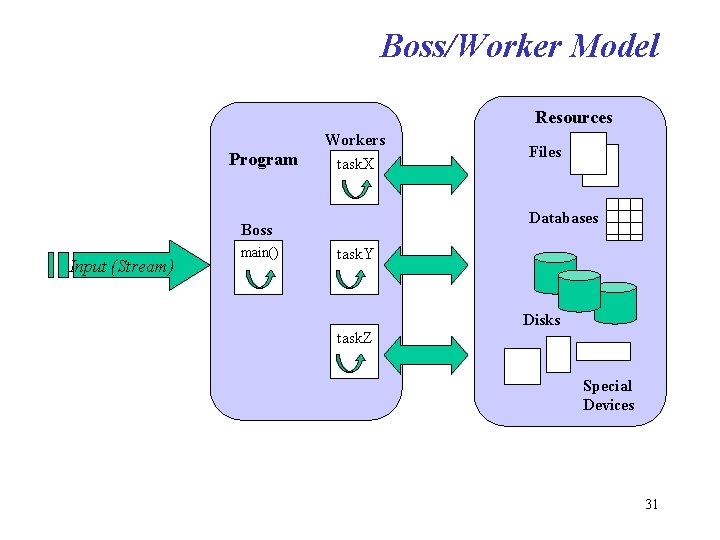
Boss/Worker Model Resources Program Workers task. X Databases Boss Input (Stream) main() Files task. Y Disks task. Z Special Devices 31
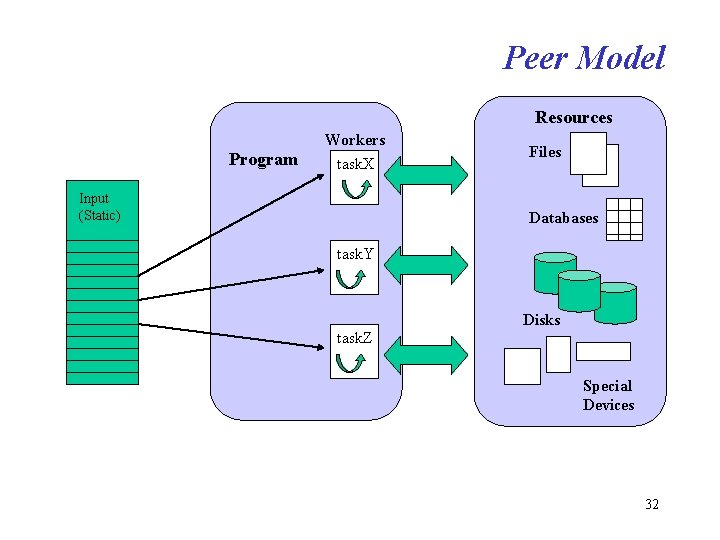
Peer Model Resources Program Workers task. X Input (Static) Files Databases task. Y Disks task. Z Special Devices 32
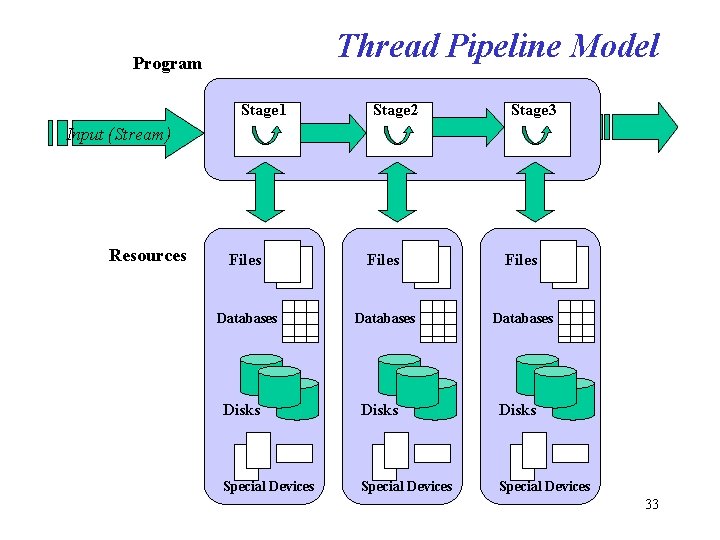
Thread Pipeline Model Program Stage 1 Stage 2 Stage 3 Input (Stream) Resources Files Databases Disks Special Devices 33
- Slides: 33