
Introduction to the Internet Lecture 1 Development of
- Slides: 26
Introduction to the Internet Lecture 1 Development of Internet Application 1501 CT - Sara Almudauh
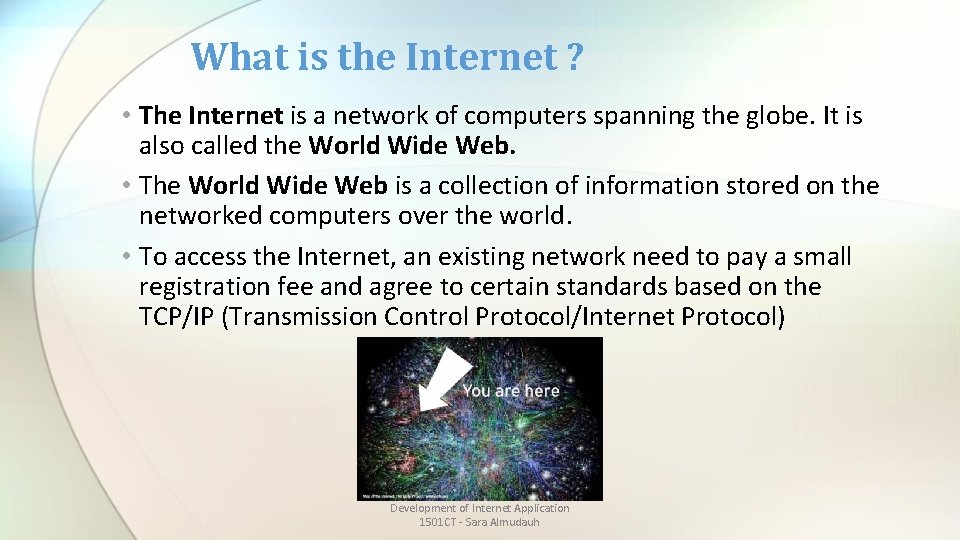
What is the Internet ? • The Internet is a network of computers spanning the globe. It is also called the World Wide Web. • The World Wide Web is a collection of information stored on the networked computers over the world. • To access the Internet, an existing network need to pay a small registration fee and agree to certain standards based on the TCP/IP (Transmission Control Protocol/Internet Protocol) Development of Internet Application 1501 CT - Sara Almudauh
The uses of the Internet • Send e-mail messages. • Send (upload) or receive (down load) files between computers. • Participate in discussion groups, such as mailing lists and newsgroups. • Surfing the web. Development of Internet Application 1501 CT - Sara Almudauh
Web or Internet? • They are not the same things. • The Internet is a collection of computers or networking devices connected together. • They have communication between each other. • The Web is a collection of documents that are interconnected by hyper-links. • These documents are accessed by web browsers and provided by web servers. Development of Internet Application 1501 CT - Sara Almudauh
Internet Service Provider (ISP) • A commercial organization with permanent connection to the Internet that sells temporary connections to subscribers. • Examples: • STC, ZAIN. Development of Internet Application 1501 CT - Sara Almudauh
Internet Terminology • Client • Any computer on the network that requests services from another computer on the network. • Server • Any computer that receives requests from client computers, processes and sends the output. • Web Page • Any page that is hosted on the Internet. • Home Page • Each Web site contains a home page (this is the original starting page) and may also contain additional pages. Development of Internet Application 1501 CT - Sara Almudauh
Internet Terminology Web Development • The process of creating, modifying web pages. Internet Browser • An Internet Browser is a software program that enables you to view Web pages on your computer. Browsers connect computers to the Internet, and allow people to “surf the Web. ” Ex: Internet Explorer Web Server • It is a program that waits for requests from the web browser. Ex: Apache. Development of Internet Application 1501 CT - Sara Almudauh
How does the Web work? • The web information is stored in the Web pages. ØIn HTML format. • The web pages are stored in the computers called Web servers. ØIn the Web server file system. • The computer reading the pages is called web clients with specific web browser. ØMost commonly Internet Explorer or Netscape. • The web server waits for the request from the web clients over the Internet. ØInternet Information Server (IIS) or Apache. Development of Internet Application 1501 CT - Sara Almudauh
Internet protocols Protocols • Rules that describe the methods used for clients and servers to communicate with each other over a network. • HTTP • Email Protocols • TCP/IP • FTP Development of Internet Application 1501 CT - Sara Almudauh
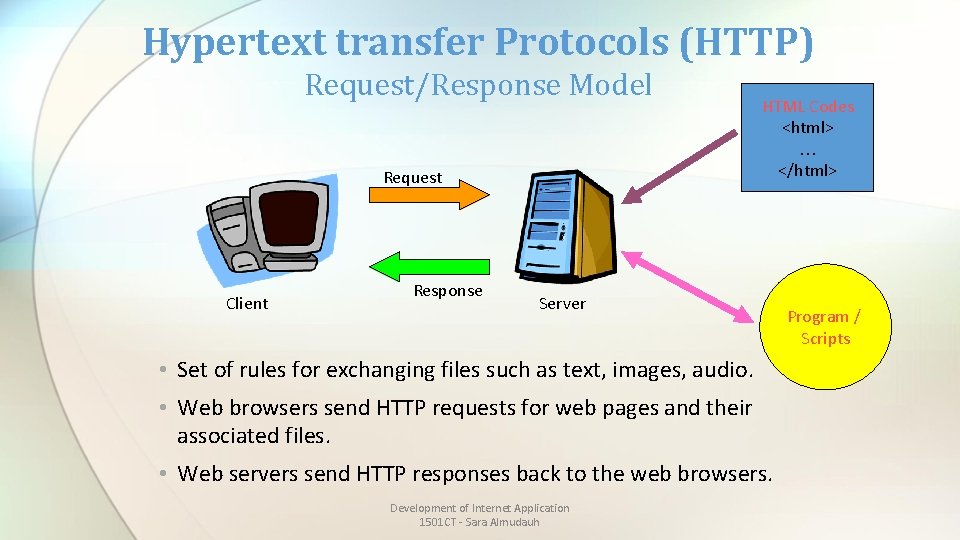
Hypertext transfer Protocols (HTTP) Request/Response Model Request Client Response HTML Codes <html> … </html> Server • Set of rules for exchanging files such as text, images, audio. • Web browsers send HTTP requests for web pages and their associated files. • Web servers send HTTP responses back to the web browsers. Development of Internet Application 1501 CT - Sara Almudauh Program / Scripts
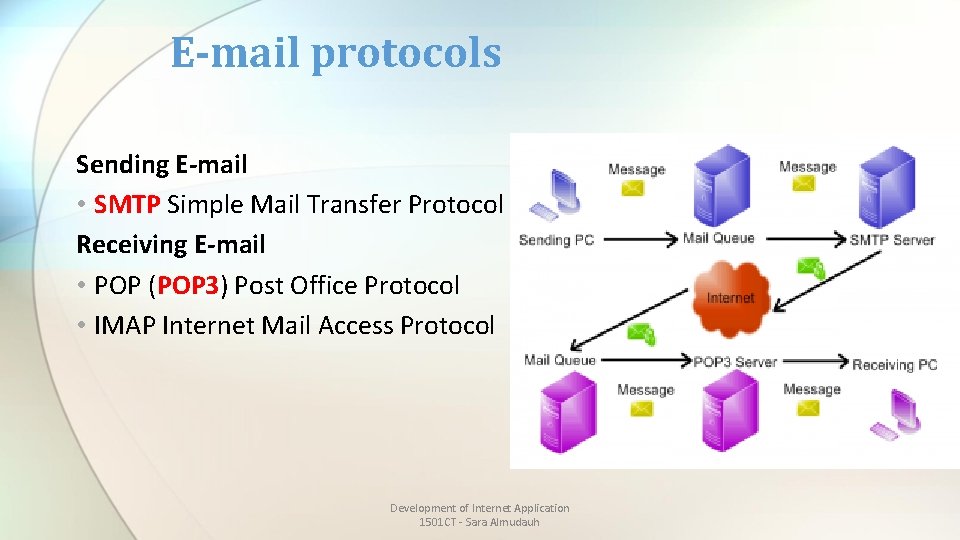
E-mail protocols Sending E-mail • SMTP Simple Mail Transfer Protocol Receiving E-mail • POP (POP 3) Post Office Protocol • IMAP Internet Mail Access Protocol Development of Internet Application 1501 CT - Sara Almudauh
Internet Protocol (IP) • A set of rules that controls how data is sent between computers on the Internet. • IP routes a packet to the correct destination address. • Once sent, the packet gets successively forwarded to the next closest router (a hardware device designed to move network traffic) until it reaches its destination. Development of Internet Application 1501 CT - Sara Almudauh
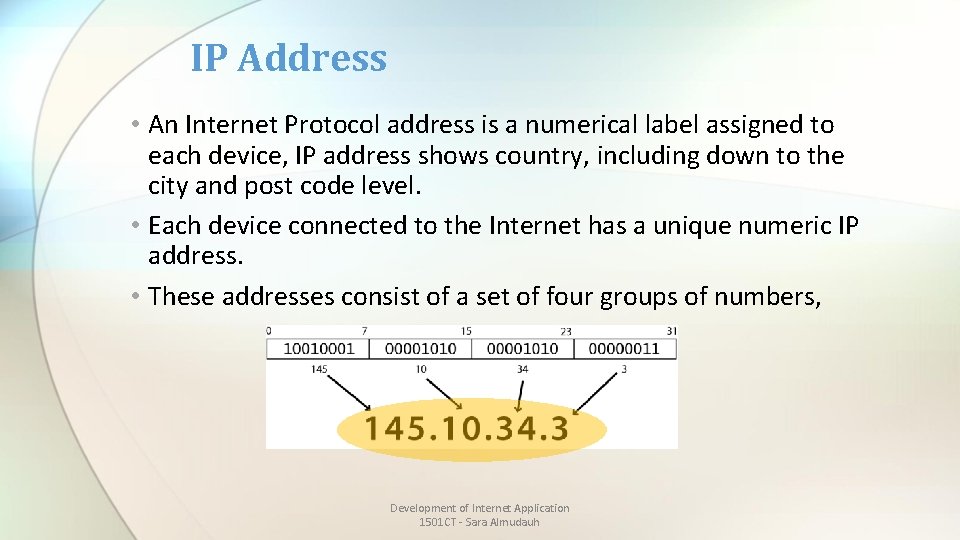
IP Address • An Internet Protocol address is a numerical label assigned to each device, IP address shows country, including down to the city and post code level. • Each device connected to the Internet has a unique numeric IP address. • These addresses consist of a set of four groups of numbers, Development of Internet Application 1501 CT - Sara Almudauh
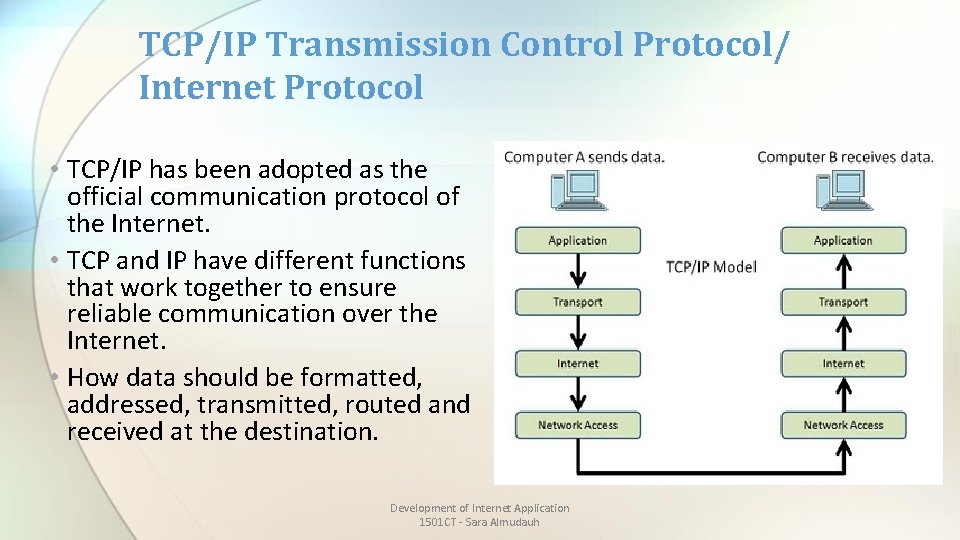
TCP/IP Transmission Control Protocol/ Internet Protocol • TCP/IP has been adopted as the official communication protocol of the Internet. • TCP and IP have different functions that work together to ensure reliable communication over the Internet. • How data should be formatted, addressed, transmitted, routed and received at the destination. Development of Internet Application 1501 CT - Sara Almudauh
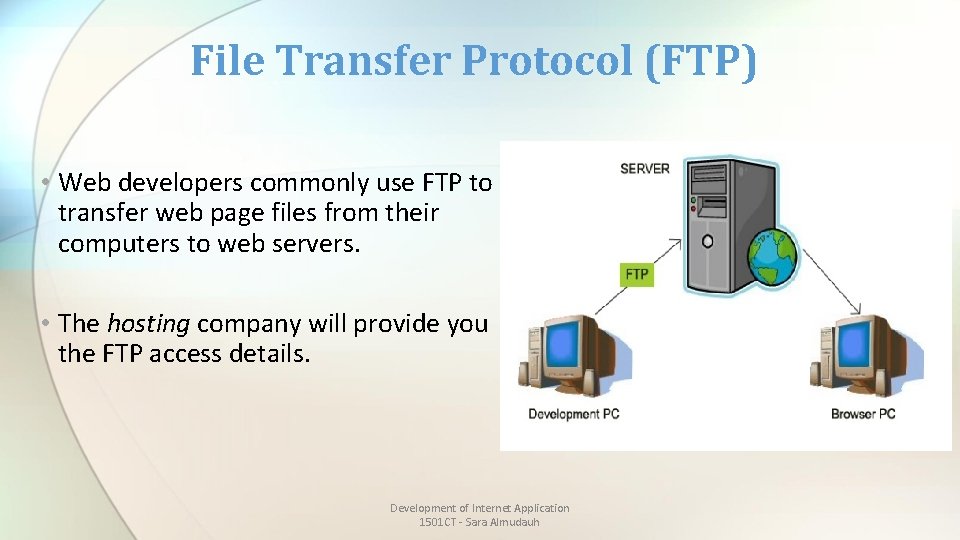
File Transfer Protocol (FTP) • Web developers commonly use FTP to transfer web page files from their computers to web servers. • The hosting company will provide you the FTP access details. Development of Internet Application 1501 CT - Sara Almudauh
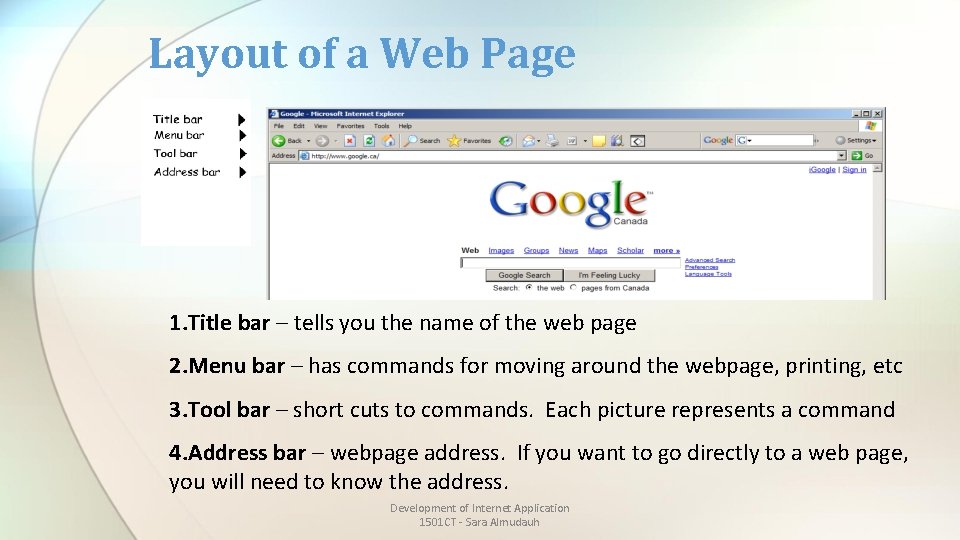
Layout of a Web Page 1. Title bar – tells you the name of the web page 2. Menu bar – has commands for moving around the webpage, printing, etc 3. Tool bar – short cuts to commands. Each picture represents a command 4. Address bar – webpage address. If you want to go directly to a web page, you will need to know the address. Development of Internet Application 1501 CT - Sara Almudauh
Domain Name What is “Domain Name”? • It is a unique name for your website. To get a domain name you have to register the name from domain name registration companies like e. Host. com. • Example: www. google. com Development of Internet Application 1501 CT - Sara Almudauh
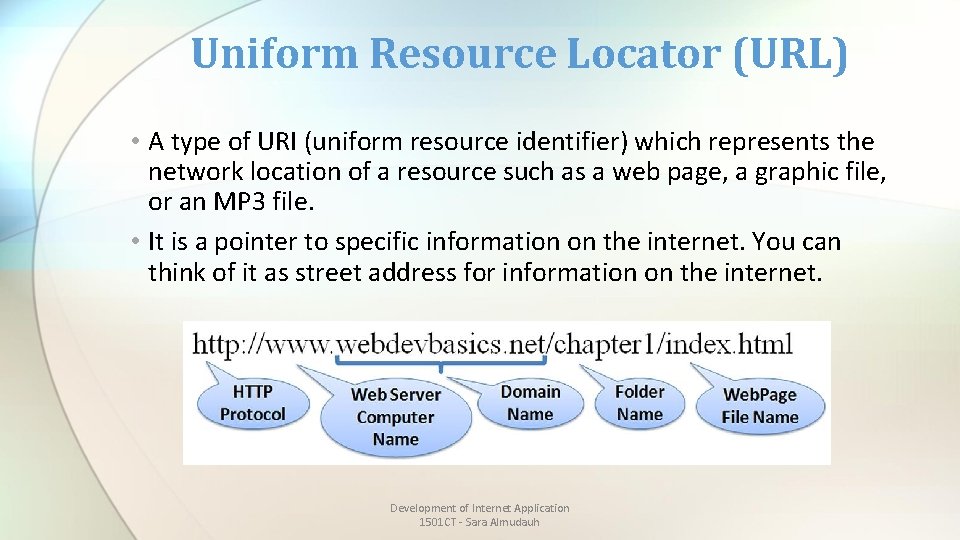
Uniform Resource Locator (URL) • A type of URI (uniform resource identifier) which represents the network location of a resource such as a web page, a graphic file, or an MP 3 file. • It is a pointer to specific information on the internet. You can think of it as street address for information on the internet. Development of Internet Application 1501 CT - Sara Almudauh
Parts of a Web Address (URL) • A web address is typically composed of four parts: • For example, the address http: //www. google. ca is made up of the following areas: • http: // This Web server uses Hypertext Transfer Protocol (HTTP). This is the most common protocol on the Internet. • www This site is on the World Wide Web. • google The Web server and site name. • ca This tells us it is a site in Canada. Development of Internet Application 1501 CT - Sara Almudauh
Top-Level Domain Name (TLD) • A top-level domain (TLD) identifies the right-most label of the domain name. • Endings of web page address (TLD) tells us a bit about the page. Types of TLDs: 2. Country code such as: 1. Common endings such as: • ca (Canada) • com (commercial) • uk (United Kingdom) • edu (educational institution) • sa (Saudi Arabia) • us (United States of • gov (government) America) • net (network) • au (Australia) • org (organization) Development of Internet Application 1501 CT - Sara Almudauh
How to Search the Internet Two basic ways 1. if you know the address of the web page (example: www. cbc. ca) 2. Using a search engine like Google to find the address. This is called a keyword search Development of Internet Application 1501 CT - Sara Almudauh
Markup Languages • A markup language is a computer language that use tags to define elements within a document. It is human-readable, meaning markup files contain standard words, rather than typical programming syntax. • Also it is: • A language designed to format text. • A markup language is just interpreted by the browser and not compiled. • E. g. HTML. XML, XHTML and MML Development of Internet Application 1501 CT - Sara Almudauh
Markup Languages • HTML – Hypertext Markup Language • The set of markup symbols or codes placed in a file intended for display on a web browser. • XML – e. Xtensible Markup Langauge • A text-based language designed to describe, deliver, and exchange structured information. • It is not intended to replace HTML -- it is intended to extend the power of HTML by separating data from presentation. • XHTML – e. Xtensible Hypertext Markup Language • It combines the formatting strengths of HTML 4. 0 and the data structure and extensibility strengths of XML. Development of Internet Application 1501 CT - Sara Almudauh
Markup Languages • HTML 5 • The next version of HTML 4 and XHTML 1 • http: //www. w 3. org/html/ • http: //www. html 5 doctor. com Development of Internet Application 1501 CT - Sara Almudauh
Extra Reading? • Top Ten Mistakes in Web Design: http: //www. nngroup. com/articles/top-10 -mistakes-web-design/ (See other series) • Web Accessibility: https: //en. wikipedia. org/wiki/Web_accessibility Development of Internet Application 1501 CT - Sara Almudauh
Questions !! Development of Internet Application 1501 CT - Sara Almudauh