
Introduction to the B 737 NG Vertical Situation
Introduction to the B 737 -NG Vertical Situation Display (VSD) This presentation requires Microsoft® Power. Point 2003® or XP®. Animation will be incorrect and part of the text will be unreadable when using an earlier version of Power. Point. You can download and install the free MS Power. Point 2003 Viewer® This free Viewer allows you to view all presentations created by Power. Point 97 till 2003 without interference to another Power. Point development program installed on your PC. The Viewer is supported by Windows 2000 SP 3 – Windows XP – Windows ME – Windows 98 SE (requires computer restart) – Windows Server 2003 If you have another Power. Point development program installed on your computer, this program will take precedence to the MS Power. Point 2003 Viewer. Therefore, you must : 1 - download this presentation to your computer 2 - from the Start Menu under All Programs, open the Microsoft Office Power. Point Viewer 2003 and open this presentation file. Captain Pat BOONE – Version 1. 1 - July 30, 2007 This presentation requires Microsoft Powerpoint 2003 -XP

Introduction to the B 737 -NG Vertical Situation Display (VSD) Thispurpose introduction to. VSD the VSD The of the is to covers present the following items : a clear graphical picture of the airplane’s vertical flight path for enhancing the flight crews’ vertical situation awareness. The VSD depicts the vertical situation of the airplane relative to the terrain throughout all phases of flight. The VSD also depicts the vertical situation of the airplane relative to the runway during final approach. • Altitudes • Waypoints • The VSD Climb / Descent complements the increased use of area navigation and RNP • constant-angle, Terrain approaches by providing immediate of the selected approach path and • validation Approach allowing full-time monitoring of the airplane relative to the selected glide path. • position Failure Flags Slide 2
Introduction to the B 737 -NG Vertical Situation Display (VSD) 18000 32000 24000 16000 VEKIN Altitudes ARVOL FL 180 B

Introduction to the B 737 -NG Vertical Situation Display (VSD) Altitudes The bottom of the Airplane symbol indicates the current airplane altitude with The Altitude Reference reference to the Altitude Scale is displayed on the Reference left side. Scale on the left. The scale changes auto(shown here is 4700 feet) MCP selected matically when altitude selecting is indicated in magenta another horizontal range. Altimeter info comes from above the Altitude Ref. ADIRU 1 Scale displayed For alland settings up to by a line. is 80 magenta NM, the dashed scale ratio fixed, so that a 3 degree approach will always appear the same. The BARO Minimums Pointer displays the barometric minimums selected on the EFIS control panel. (shown here is 1800 feet). VSD display - Altitudes 7000 8000 4000 0 0 10 20 The Vertical Flight Path Vector indicates current Horizontal Distance Scale is displayed at the green line flight path angle as a. The function of vertical speed. When and selecting RADIO, the bottom the VSD. range shown on the ground speed. The length of theofwhite line is. The fixed disappears and only the green pointer VSD is one half the range selected on the EFIS at one half of the horizontal range. remains, at the BARO altitude. control panel. . Slide 4
Introduction to the B 737 -NG Vertical Situation Display (VSD) 18000 32000 24000 16000 VEKIN ARVOL FL 180 B Waypoints

Introduction to the B 737 -NG Vertical Situation Display (VSD) Waypoints Different Altitude Constraint Symbols are displayed according to restrictions programmed in the FMC LEGS Page. The active Waypoint ID is displayed in magenta, all other waypoints from the FMC LEGS Page within the selected range are displayed white. 18000 32000 VEKIN ARVOL FL 180 B FI 25 L 1410 24000 16000 VSD display - Waypoints Slide 6

Introduction to the B 737 -NG Vertical Situation Display (VSD) Waypoints GS 261 TAS TUE 259 18: 03 Z 1. 0 NM Only waypoints within the cyan dashed Enroute Swath lines are displayed on the VSD. DME 04 CI 28 In this example DME 04 is outside the enroute swath and therefore not displayed on the VSD. The same goes for Terrain profiles. (see further) The enroute swath is 1 NM on each side of the airplane actual track line. VSD display - Waypoints During turns, the swath edge on the inside of the turn opens in the direction of the turn. The swath angle increases with the bank angle. TUE CI 28 DME 04 will now show on the VSD The enroute swath lines are inhibited on takeoff and in approach when the airplane is within 6 NM of the runway and less than 3000 ft above field elevation. Slide 7
Introduction to the B 737 -NG Vertical Situation Display (VSD) 18000 32000 24000 16000 VEKIN ARVOL FL 180 B Climb / Descent

Introduction to the B 737 -NG Vertical Situation Display (VSD) Climb / Descent Note : The MCP selected vertical speed line may show on one pilot’s VSD and not on the other pilot’s display, if that F/D side has [G/S] captured. 18000 32000 ARVOL FL 180 B VEKIN 24000 16000 0 10 The MCP selected Vertical Speed is displayed by a magenta dotted line. The line appears only when the V/S mode on the MCP is selected. You can use this line the same way as the “green banana” to adjust the required rate of climb or rate of descent. VSD display - Climb / Descent 20 18000 --1600 1200 250 500 Slide 9
Introduction to the B 737 -NG Vertical Situation Display (VSD) 18000 32000 24000 16000 VEKIN Terrain ARVOL FL 180 B
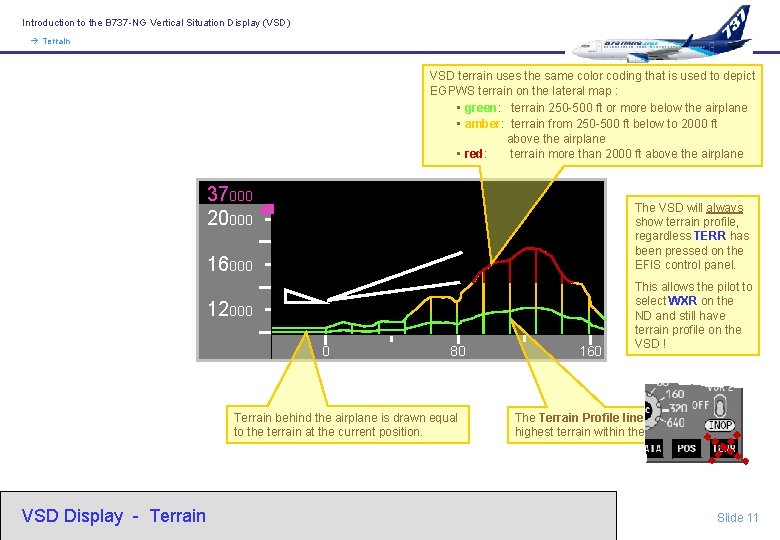
Introduction to the B 737 -NG Vertical Situation Display (VSD) Terrain VSD terrain uses the same color coding that is used to depict EGPWS terrain on the lateral map : • green: terrain 250 -500 ft or more below the airplane • amber: terrain from 250 -500 ft below to 2000 ft above the airplane • red: terrain more than 2000 ft above the airplane 37000 20000 The VSD will always show terrain profile, regardless TERR has been pressed on the EFIS control panel. 16000 12000 0 80 Terrain behind the airplane is drawn equal to the terrain at the current position. VSD Display - Terrain 160 This allows the pilot to select WXR on the ND and still have terrain profile on the VSD ! The Terrain Profile line represents the highest terrain within the enroute swath. Slide 11
Introduction to the B 737 -NG Vertical Situation Display (VSD) 18000 32000 24000 16000 VEKIN Approach ARVOL FL 180 B

Introduction to the B 737 -NG Vertical Situation Display (VSD) Approach The Range to Target Speed Dot (RTSD) indicates where the airplane will achieve the FMC or MCP target speed, both during acceleration and deceleration. The dot is blanked when the actual speed is within 5 knots of the target speed. 6000 FI 34 1280 CF 34 RW 34 136 8000 4000 0 0 In this example, the airplane will reach the target speed (270 knots) in 6 NM. VSD Display - Approach 10 20 The solid dot is replaced with an unfilled dot if target speed will not be achieved within length of the vertical flight path vector line. Slide 13
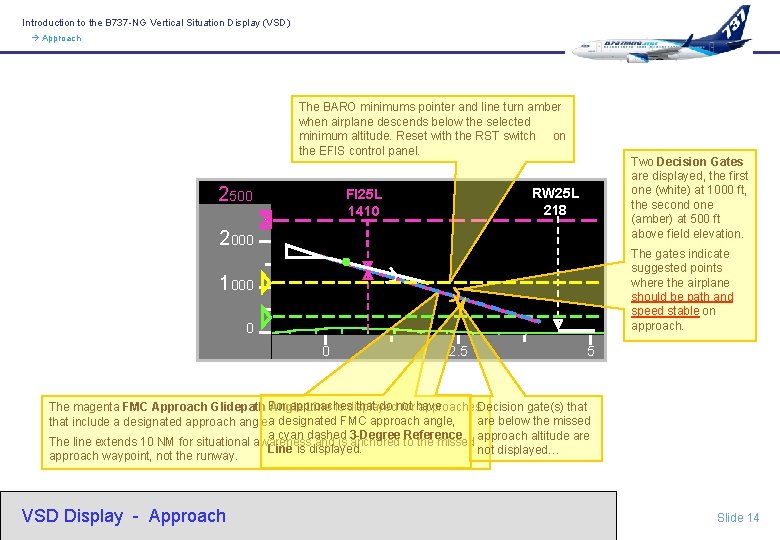
Introduction to the B 737 -NG Vertical Situation Display (VSD) Approach The BARO minimums pointer and line turn amber when airplane descends below the selected minimum altitude. Reset with the RST switch on the EFIS control panel. 2500 Two Decision Gates are displayed, the first one (white) at 1000 ft, the second one (amber) at 500 ft above field elevation. RW 25 L 218 FI 25 L 1410 2000 The gates indicate suggested points where the airplane should be path and speed stable on approach. 1000 0 0 2. 5 5 approaches that do not The magenta FMC Approach Glidepath For Angle Line is displayed for have approaches. Decision gate(s) that are below the missed that include a designated approach angle. a designated FMC approach angle, a cyan dashed 3 -Degree Reference approach altitude are The line extends 10 NM for situational awareness and is anchored to the missed Line is displayed. not displayed… approach waypoint, not the runway. VSD Display - Approach Slide 14
Introduction to the B 737 -NG Vertical Situation Display (VSD) 18000 32000 24000 16000 VEKIN ARVOL FL 180 B Failure Flags

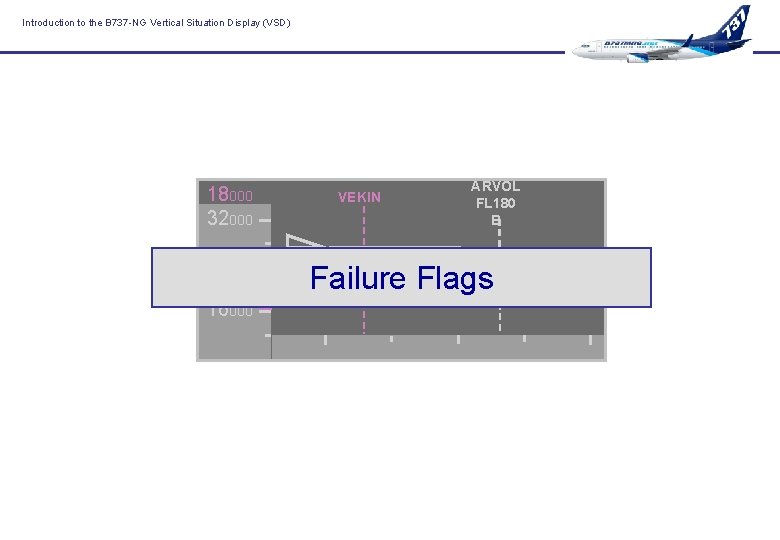
Introduction to the B 737 -NG Vertical Situation Display (VSD) Failure Flags MAP RANGE DISAGREE Indicates selected range on the EFIS control panel is different than the MAP display range. TERR RANGE DISAGREE Indicates selected range on the EFIS control panel is different than the Terrain display range. MAP/TERR RANGE DISAGREE Indicates selected range on the EFIS control panel is different than the MAP and Terrain display ranges. MOD RTE MAP / TERR RANGE DISAGREE VSD RWY DATA FMC runway data is not available. VSD Display - Failure Flags EGPWS terrain data is not available. Route Waypoints Modification Annunciation ; FMC active route is being modified. Only the active waypoint is displayed. VSD TERR INHIBIT Annunciation VSD feature has is replaced with VSD TERR INHIBIT when GPWS failed, the VSD control panel TERR INHIBIT cannot be displayed. switch is in the inhibit position. Slide 16
Introduction to the B 737 -NG Vertical Situation Display (VSD) That’s all, folks About : This presentation is not copyright protected. Training Captains may use this presentation and make changes for unlimited use within your airline. Pat BOONE is captain on Boeing 737 -767 and author of B 737 MRG. net - the pilot guide for B 737 non-normals. Slide 17
- Slides: 17