
Introduction to Scientific Computing with Python Adjusted from
![Slicing var[lower: upper] Slices extract a portion of a sequence by specifying a lower](https://slidetodoc.com/presentation_image_h2/ba7f4cef4c192fd82f40200093791c2a/image-14.jpg "Slicing var[lower: upper] Slices extract a portion of a sequence by specifying a lower")
![List methods in action >>> l = [10, 21, 23, 11, 24] # add](https://slidetodoc.com/presentation_image_h2/ba7f4cef4c192fd82f40200093791c2a/image-16.jpg "List methods in action >>> l = [10, 21, 23, 11, 24] # add")
![Assignment creates object references. >>> x = [0, 1, 2] x # y =](https://slidetodoc.com/presentation_image_h2/ba7f4cef4c192fd82f40200093791c2a/image-22.jpg "Assignment creates object references. >>> x = [0, 1, 2] x # y =")
![Modules EX 1. PY FROM SHELL # ex 1. py [ej@bull ej]$ python ex](https://slidetodoc.com/presentation_image_h2/ba7f4cef4c192fd82f40200093791c2a/image-32.jpg "Modules EX 1. PY FROM SHELL # ex 1. py [ej@bull ej]$ python ex")
![Reading files FILE INPUT EXAMPLE PRINTING THE RESULTS >>> results = [] >>> f](https://slidetodoc.com/presentation_image_h2/ba7f4cef4c192fd82f40200093791c2a/image-36.jpg "Reading files FILE INPUT EXAMPLE PRINTING THE RESULTS >>> results = [] >>> f")
![More compact version ITERATING ON A FILE AND LIST COMPREHENSIONS >>> results = []](https://slidetodoc.com/presentation_image_h2/ba7f4cef4c192fd82f40200093791c2a/image-37.jpg "More compact version ITERATING ON A FILE AND LIST COMPREHENSIONS >>> results = []")
![Array Operations SIMPLE ARRAY MATH >>> a = array([1, 2, 3, 4]) >>> b](https://slidetodoc.com/presentation_image_h2/ba7f4cef4c192fd82f40200093791c2a/image-46.jpg "Array Operations SIMPLE ARRAY MATH >>> a = array([1, 2, 3, 4]) >>> b")
![Introducing Numeric Arrays SIMPLE ARRAY CREATION >>> a = array([0, 1, 2, 3]) >>>](https://slidetodoc.com/presentation_image_h2/ba7f4cef4c192fd82f40200093791c2a/image-47.jpg "Introducing Numeric Arrays SIMPLE ARRAY CREATION >>> a = array([0, 1, 2, 3]) >>>")
![Multi-Dimensional Arrays MULTI-DIMENSIONAL ARRAYS >>> a = array([[ 0, 1, 2, 3], [10, 11,](https://slidetodoc.com/presentation_image_h2/ba7f4cef4c192fd82f40200093791c2a/image-48.jpg "Multi-Dimensional Arrays MULTI-DIMENSIONAL ARRAYS >>> a = array([[ 0, 1, 2, 3], [10, 11,")
![Array Slicing SLICING WORKS MUCH LIKE STANDARD PYTHON SLICING >>> a[0, 3: 5] array([3,](https://slidetodoc.com/presentation_image_h2/ba7f4cef4c192fd82f40200093791c2a/image-49.jpg "Array Slicing SLICING WORKS MUCH LIKE STANDARD PYTHON SLICING >>> a[0, 3: 5] array([3,")
![Special Functions scipy. special AIRY FUNCTIONS EXAMPLE >>> z = r_[-5: 100 j] >>>](https://slidetodoc.com/presentation_image_h2/ba7f4cef4c192fd82f40200093791c2a/image-76.jpg "Special Functions scipy. special AIRY FUNCTIONS EXAMPLE >>> z = r_[-5: 100 j] >>>")
![Integration scipy. integrate --- Example >>> def func(x): return integrate. quad(cos, 0, x)[0] >>>](https://slidetodoc.com/presentation_image_h2/ba7f4cef4c192fd82f40200093791c2a/image-82.jpg "Integration scipy. integrate --- Example >>> def func(x): return integrate. quad(cos, 0, x)[0] >>>")
- Slides: 87
Introduction to Scientific Computing with Python Adjusted from: http: //www. nanohub. org/resources/? id=99 Original Authors are: Eric Jones and Travis Oliphant Many excellent resources on the web >> google: "learn python" some good example: http: //www. diveintopython. org/toc/index. html http: //www. scipy. org/Documentation
Topics • Introduction to Python • Numeric Computing • Sci. Py and its libraries
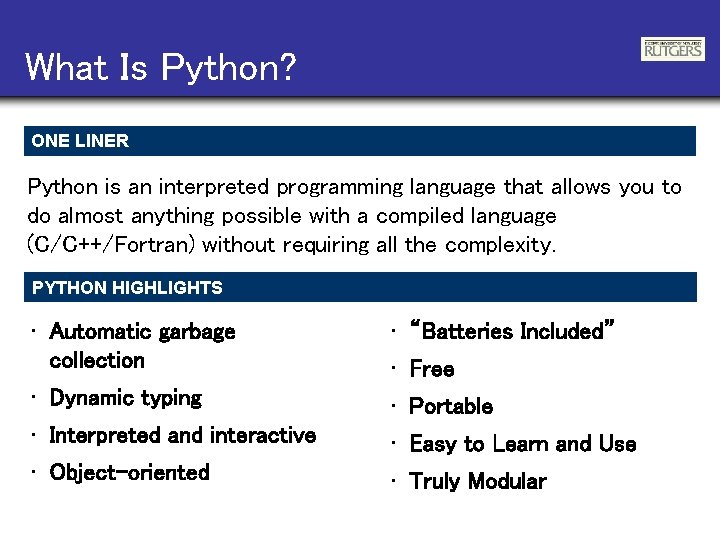
What Is Python? ONE LINER Python is an interpreted programming language that allows you to do almost anything possible with a compiled language (C/C++/Fortran) without requiring all the complexity. PYTHON HIGHLIGHTS • Automatic garbage collection • “Batteries Included” • Dynamic typing • Portable • Interpreted and interactive • Easy to Learn and Use • Object-oriented • Truly Modular • Free
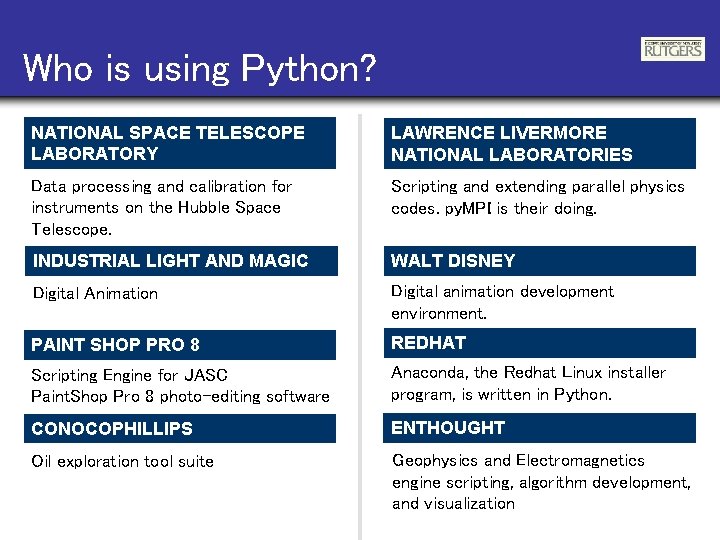
Who is using Python? NATIONAL SPACE TELESCOPE LABORATORY LAWRENCE LIVERMORE NATIONAL LABORATORIES Data processing and calibration for instruments on the Hubble Space Telescope. Scripting and extending parallel physics codes. py. MPI is their doing. INDUSTRIAL LIGHT AND MAGIC WALT DISNEY Digital Animation Digital animation development environment. PAINT SHOP PRO 8 REDHAT Scripting Engine for JASC Paint. Shop Pro 8 photo-editing software Anaconda, the Redhat Linux installer program, is written in Python. CONOCOPHILLIPS ENTHOUGHT Oil exploration tool suite Geophysics and Electromagnetics engine scripting, algorithm development, and visualization
Language Introduction
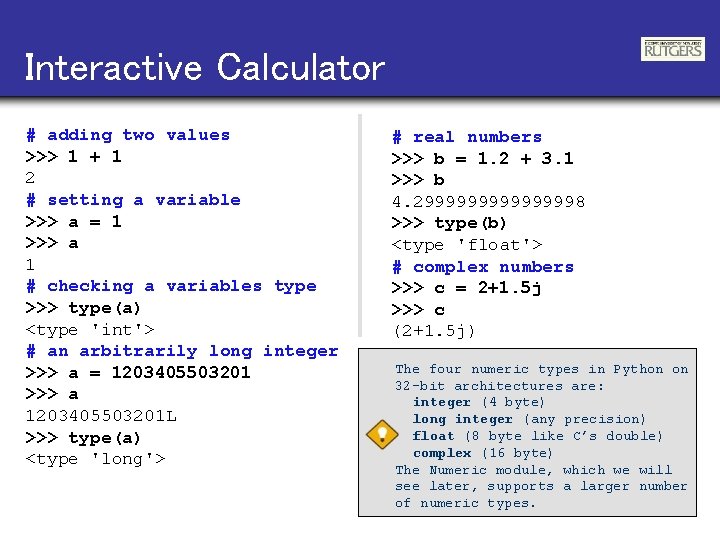
Interactive Calculator # adding two values >>> 1 + 1 2 # setting a variable >>> a = 1 >>> a 1 # checking a variables type >>> type(a) <type 'int'> # an arbitrarily long integer >>> a = 1203405503201 >>> a 1203405503201 L >>> type(a) <type 'long'> # real numbers >>> b = 1. 2 + 3. 1 >>> b 4. 299999998 >>> type(b) <type 'float'> # complex numbers >>> c = 2+1. 5 j >>> c (2+1. 5 j) The four numeric types in Python on 32 -bit architectures are: integer (4 byte) long integer (any precision) float (8 byte like C’s double) complex (16 byte) The Numeric module, which we will see later, supports a larger number of numeric types.
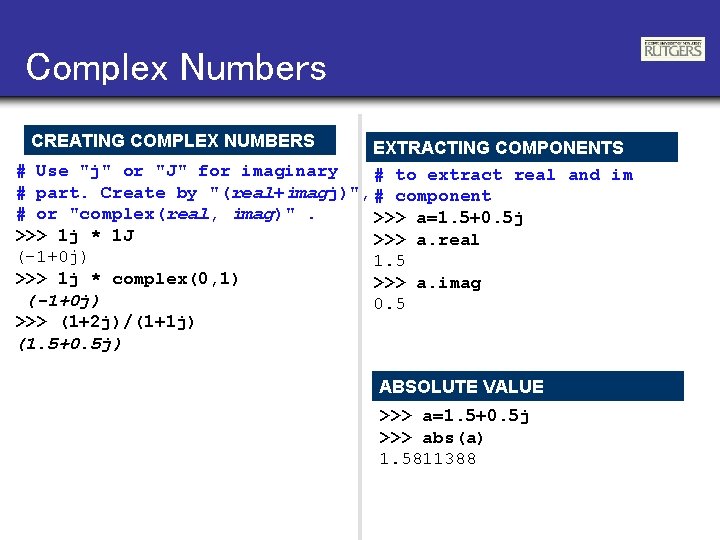
Complex Numbers CREATING COMPLEX NUMBERS EXTRACTING COMPONENTS # Use "j" or "J" for imaginary # to extract real and im # part. Create by "(real+imagj)", # component # or "complex(real, imag)". >>> a=1. 5+0. 5 j >>> 1 j * 1 J >>> a. real (-1+0 j) 1. 5 >>> 1 j * complex(0, 1) >>> a. imag (-1+0 j) 0. 5 >>> (1+2 j)/(1+1 j) (1. 5+0. 5 j) ABSOLUTE VALUE >>> a=1. 5+0. 5 j >>> abs(a) 1. 5811388
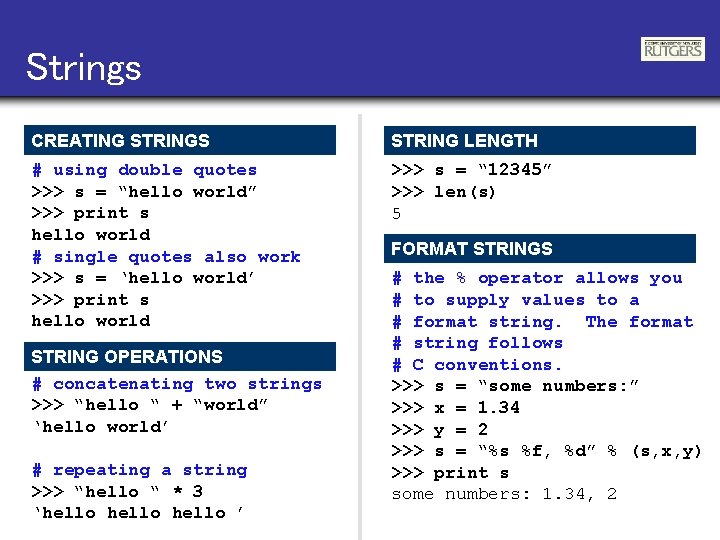
Strings CREATING STRINGS STRING LENGTH # using double quotes >>> s = “hello world” >>> print s hello world # single quotes also work >>> s = ‘hello world’ >>> print s hello world >>> s = “ 12345” >>> len(s) 5 STRING OPERATIONS # concatenating two strings >>> “hello “ + “world” ‘hello world’ # repeating a string >>> “hello “ * 3 ‘hello ’ FORMAT STRINGS # the % operator allows you # to supply values to a # format string. The format # string follows # C conventions. >>> s = “some numbers: ” >>> x = 1. 34 >>> y = 2 >>> s = “%s %f, %d” % (s, x, y) >>> print s some numbers: 1. 34, 2
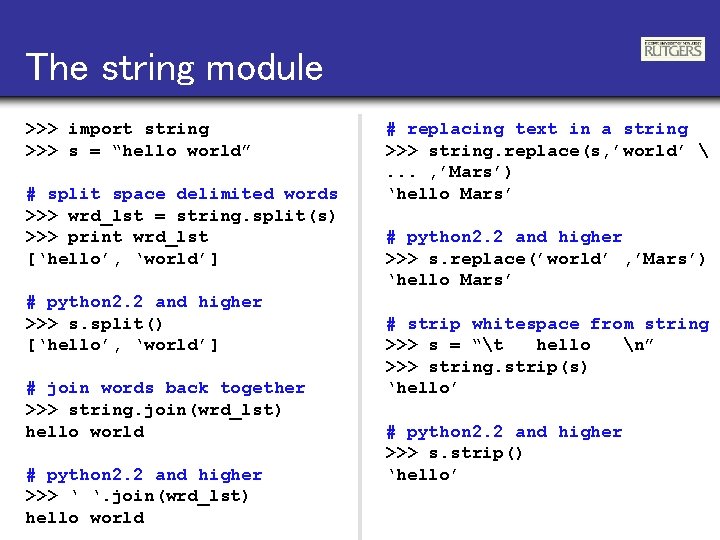
The string module >>> import string >>> s = “hello world” # split space delimited words >>> wrd_lst = string. split(s) >>> print wrd_lst [‘hello’, ‘world’] # python 2. 2 and higher >>> s. split() [‘hello’, ‘world’] # join words back together >>> string. join(wrd_lst) hello world # python 2. 2 and higher >>> ‘ ‘. join(wrd_lst) hello world # replacing text in a string >>> string. replace(s, ’world’ . . . , ’Mars’) ‘hello Mars’ # python 2. 2 and higher >>> s. replace(’world’ , ’Mars’) ‘hello Mars’ # strip whitespace from string >>> s = “t hello n” >>> string. strip(s) ‘hello’ # python 2. 2 and higher >>> s. strip() ‘hello’
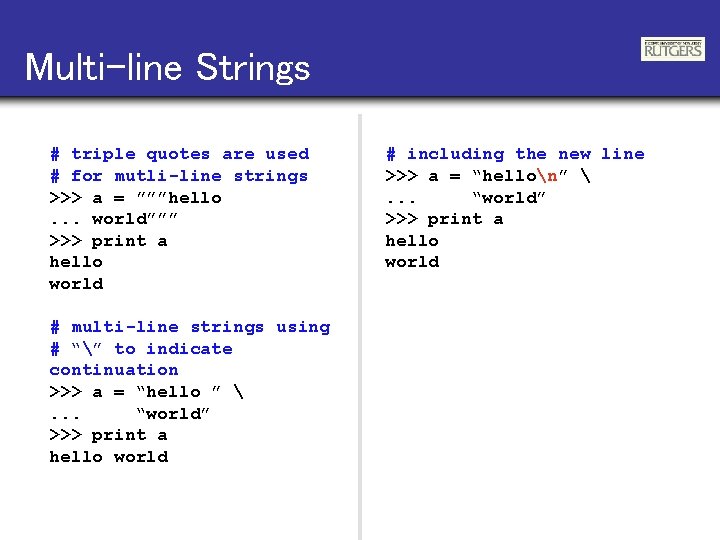
Multi-line Strings # triple quotes are used # for mutli-line strings >>> a = ”””hello. . . world””” >>> print a hello world # multi-line strings using # “” to indicate continuation >>> a = “hello ” . . . “world” >>> print a hello world # including the new line >>> a = “hellon” . . . “world” >>> print a hello world
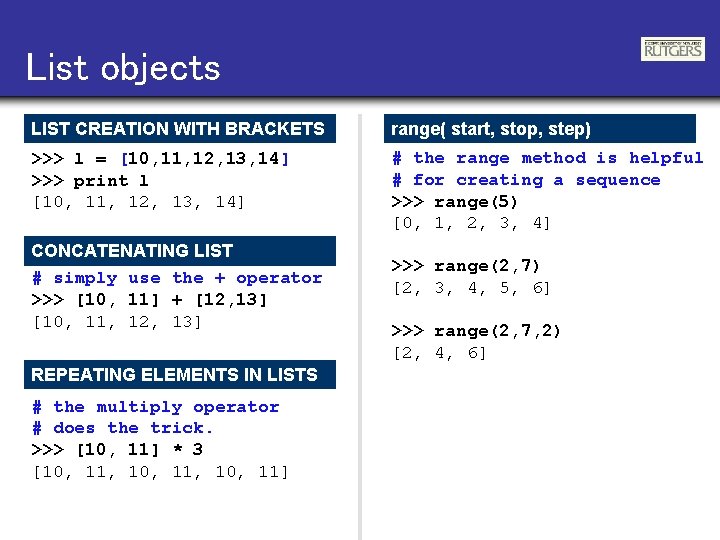
List objects LIST CREATION WITH BRACKETS range( start, stop, step) >>> l = [10, 11, 12, 13, 14] >>> print l [10, 11, 12, 13, 14] # the range method is helpful # for creating a sequence >>> range(5) [0, 1, 2, 3, 4] CONCATENATING LIST # simply use the + operator >>> [10, 11] + [12, 13] [10, 11, 12, 13] REPEATING ELEMENTS IN LISTS # the multiply operator # does the trick. >>> [10, 11] * 3 [10, 11, 10, 11] >>> range(2, 7) [2, 3, 4, 5, 6] >>> range(2, 7, 2) [2, 4, 6]
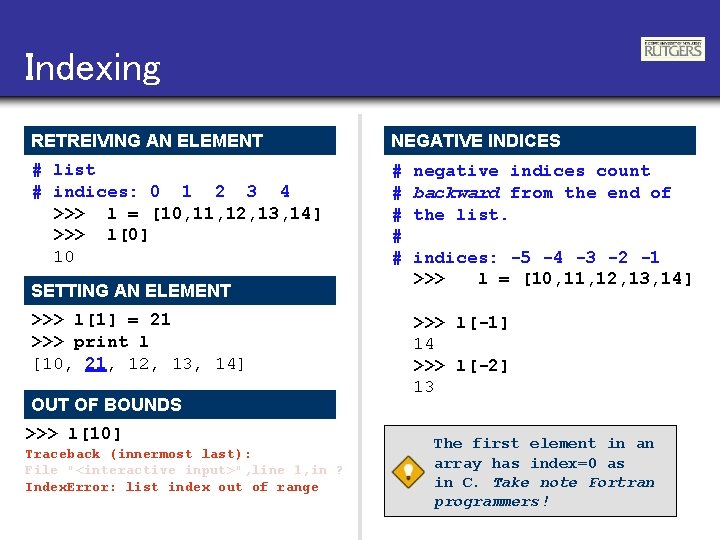
Indexing RETREIVING AN ELEMENT NEGATIVE INDICES # list # indices: 0 1 2 3 4 >>> l = [10, 11, 12, 13, 14] >>> l[0] 10 # # # SETTING AN ELEMENT >>> l[1] = 21 >>> print l [10, 21, 12, 13, 14] OUT OF BOUNDS >>> l[10] Traceback (innermost last): File "<interactive input>", line 1, in ? Index. Error: list index out of range negative indices count backward from the end of the list. indices: -5 -4 -3 -2 -1 >>> l = [10, 11, 12, 13, 14] >>> l[-1] 14 >>> l[-2] 13 The first element in an array has index=0 as in C. Take note Fortran programmers!
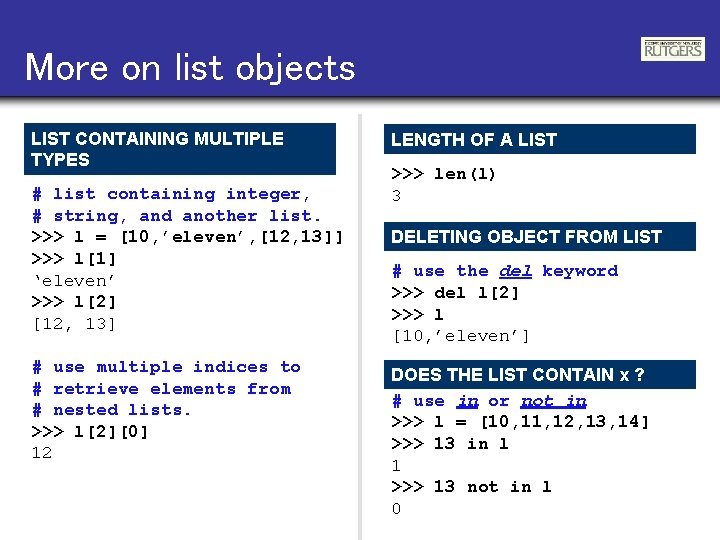
More on list objects LIST CONTAINING MULTIPLE TYPES # list containing integer, # string, and another list. >>> l = [10, ’eleven’, [12, 13]] >>> l[1] ‘eleven’ >>> l[2] [12, 13] # use multiple indices to # retrieve elements from # nested lists. >>> l[2][0] 12 LENGTH OF A LIST >>> len(l) 3 DELETING OBJECT FROM LIST # use the del keyword >>> del l[2] >>> l [10, ’eleven’] DOES THE LIST CONTAIN x ? # use in or not in >>> l = [10, 11, 12, 13, 14] >>> 13 in l 1 >>> 13 not in l 0
Slicing var[lower: upper] Slices extract a portion of a sequence by specifying a lower and upper bound. The extracted elements start at lower and go up to, but do not include, the upper element. Mathematically the range is [lower, upper). SLICING LISTS OMITTING INDICES # indices: 0 1 2 3 4 >>> l = [10, 11, 12, 13, 14] # [10, 11, 12, 13, 14] >>> l[1: 3] [11, 12] # negative indices work also >>> l[1: -2] [11, 12] >>> l[-4: 3] [11, 12] # omitted boundaries are # assumed to be the beginning # (or end) of the list. # grab first three elements >>> l[: 3] [10, 11, 12] # grab last two elements >>> l[-2: ] [13, 14]
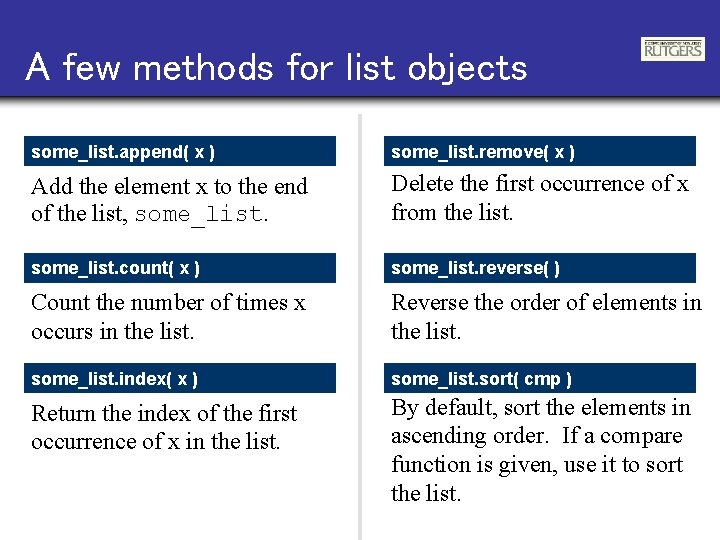
A few methods for list objects some_list. append( x ) some_list. remove( x ) Add the element x to the end of the list, some_list. Delete the first occurrence of x from the list. some_list. count( x ) some_list. reverse( ) Count the number of times x occurs in the list. Reverse the order of elements in the list. some_list. index( x ) some_list. sort( cmp ) Return the index of the first occurrence of x in the list. By default, sort the elements in ascending order. If a compare function is given, use it to sort the list.
List methods in action >>> l = [10, 21, 23, 11, 24] # add an element to the list >>> l. append(11) >>> print l [10, 21, 23, 11, 24, 11] # remove the first 11 >>> l. remove(11) >>> print l [10, 21, 23, 24, 11] # how many 11 s are there? >>> l. count(11) 2 # sort the list >>> l. sort() >>> print l [10, 11, 23, 24] # where does 11 first occur? >>> l. index(11) 3 # reverse the list >>> l. reverse() >>> print l [24, 23, 21, 10]
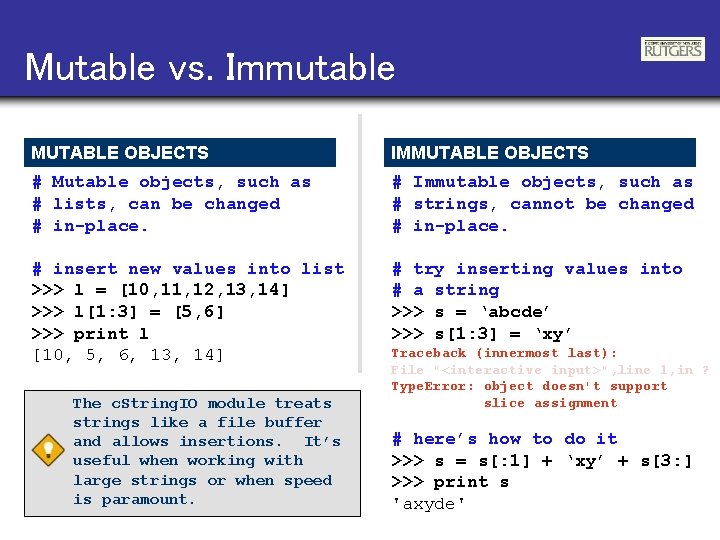
Mutable vs. Immutable MUTABLE OBJECTS IMMUTABLE OBJECTS # Mutable objects, such as # lists, can be changed # in-place. # Immutable objects, such as # strings, cannot be changed # in-place. # insert new values into list >>> l = [10, 11, 12, 13, 14] >>> l[1: 3] = [5, 6] >>> print l [10, 5, 6, 13, 14] # try inserting values into # a string >>> s = ‘abcde’ >>> s[1: 3] = ‘xy’ The c. String. IO module treats strings like a file buffer and allows insertions. It’s useful when working with large strings or when speed is paramount. Traceback (innermost last): File "<interactive input>", line 1, in ? Type. Error: object doesn't support slice assignment # here’s how to do it >>> s = s[: 1] + ‘xy’ + s[3: ] >>> print s 'axyde'
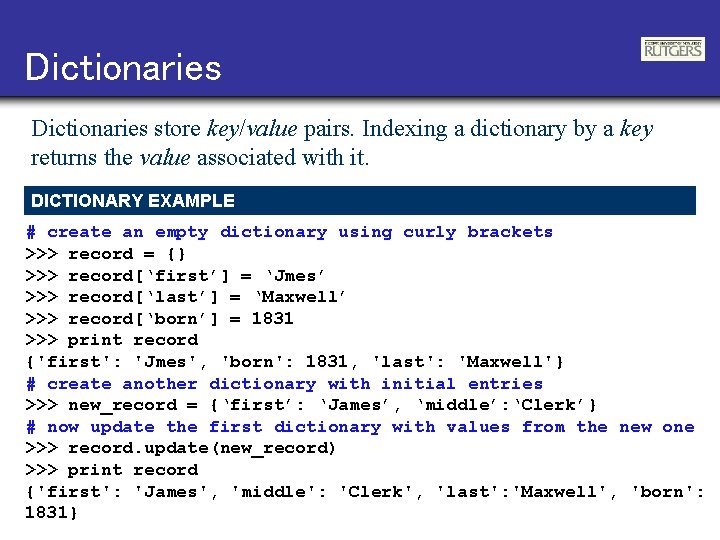
Dictionaries store key/value pairs. Indexing a dictionary by a key returns the value associated with it. DICTIONARY EXAMPLE # create an empty dictionary using curly brackets >>> record = {} >>> record[‘first’] = ‘Jmes’ >>> record[‘last’] = ‘Maxwell’ >>> record[‘born’] = 1831 >>> print record {'first': 'Jmes', 'born': 1831, 'last': 'Maxwell'} # create another dictionary with initial entries >>> new_record = {‘first’: ‘James’, ‘middle’: ‘Clerk’} # now update the first dictionary with values from the new one >>> record. update(new_record) >>> print record {'first': 'James', 'middle': 'Clerk', 'last': 'Maxwell', 'born': 1831}
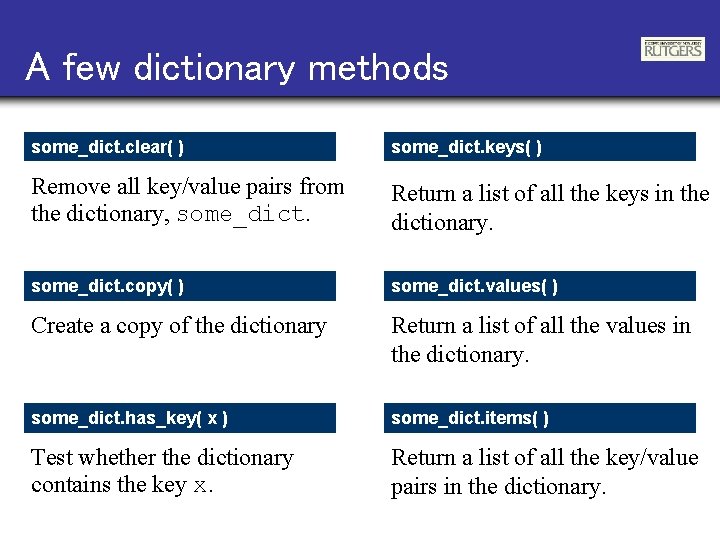
A few dictionary methods some_dict. clear( ) some_dict. keys( ) Remove all key/value pairs from the dictionary, some_dict. Return a list of all the keys in the dictionary. some_dict. copy( ) some_dict. values( ) Create a copy of the dictionary Return a list of all the values in the dictionary. some_dict. has_key( x ) some_dict. items( ) Test whether the dictionary contains the key x. Return a list of all the key/value pairs in the dictionary.
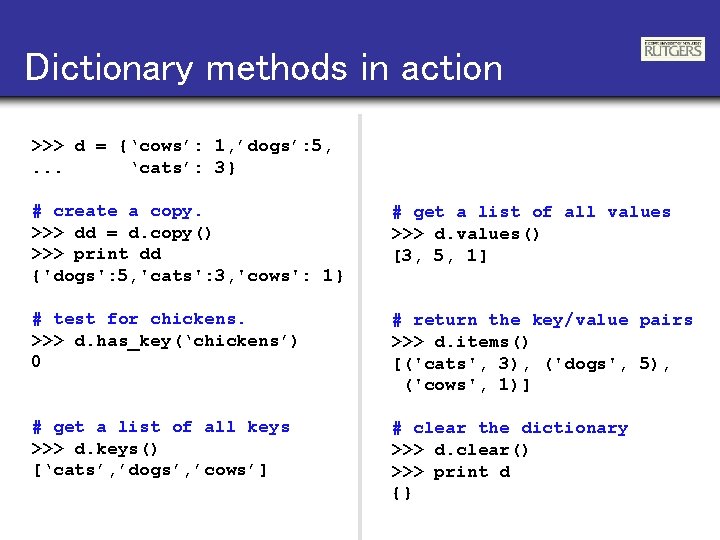
Dictionary methods in action >>> d = {‘cows’: 1, ’dogs’: 5, . . . ‘cats’: 3} # create a copy. >>> dd = d. copy() >>> print dd {'dogs': 5, 'cats': 3, 'cows': 1} # get a list of all values >>> d. values() [3, 5, 1] # test for chickens. >>> d. has_key(‘chickens’) 0 # return the key/value pairs >>> d. items() [('cats', 3), ('dogs', 5), ('cows', 1)] # get a list of all keys >>> d. keys() [‘cats’, ’dogs’, ’cows’] # clear the dictionary >>> d. clear() >>> print d {}
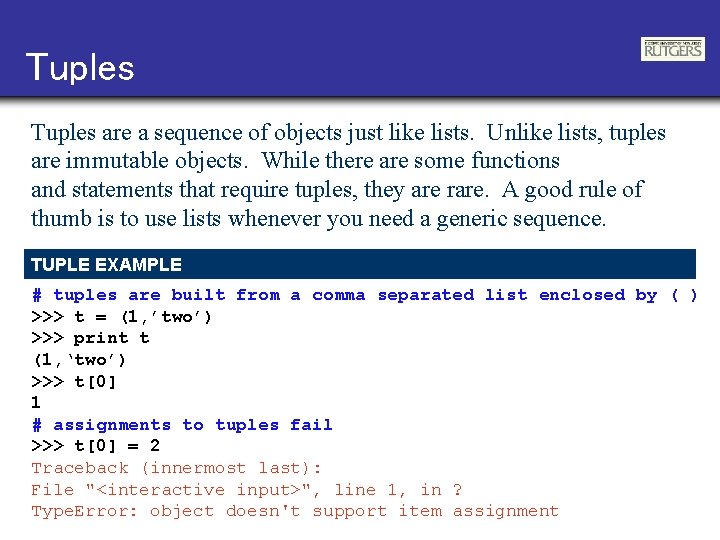
Tuples are a sequence of objects just like lists. Unlike lists, tuples are immutable objects. While there are some functions and statements that require tuples, they are rare. A good rule of thumb is to use lists whenever you need a generic sequence. TUPLE EXAMPLE # tuples are built from a comma separated list enclosed by ( ) >>> t = (1, ’two’) >>> print t (1, ‘two’) >>> t[0] 1 # assignments to tuples fail >>> t[0] = 2 Traceback (innermost last): File "<interactive input>", line 1, in ? Type. Error: object doesn't support item assignment
Assignment creates object references. >>> x = [0, 1, 2] x # y = x cause x and y to point # at the same list >>> y = x y # changes to y also change x >>> y[1] = 6 >>> print x [0, 6, 2] x # re-assigning y to a new list # decouples the two lists >>> y = [3, 4] x y y
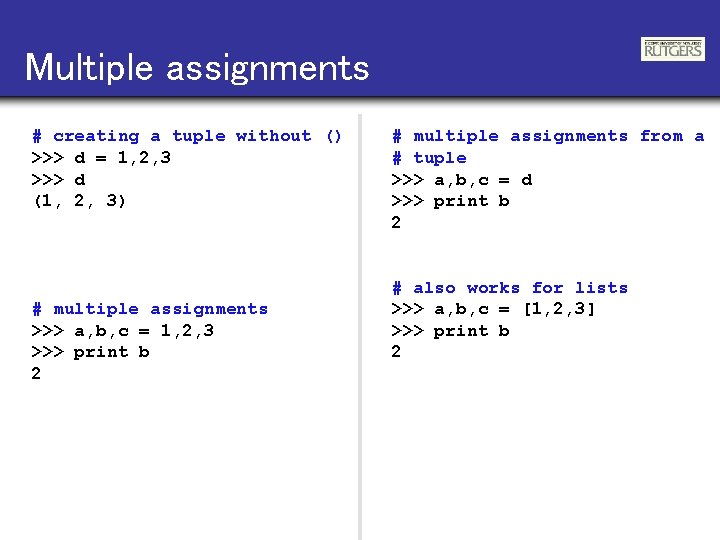
Multiple assignments # creating a tuple without () >>> d = 1, 2, 3 >>> d (1, 2, 3) # multiple assignments >>> a, b, c = 1, 2, 3 >>> print b 2 # multiple assignments from a # tuple >>> a, b, c = d >>> print b 2 # also works for lists >>> a, b, c = [1, 2, 3] >>> print b 2
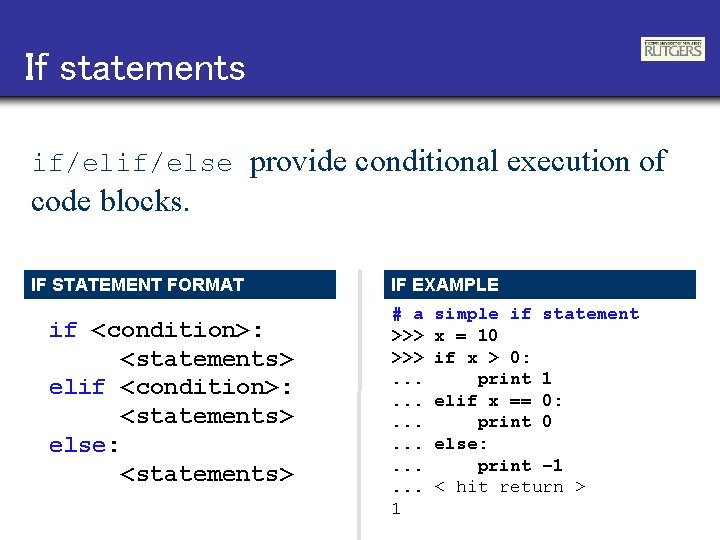
If statements if/else provide conditional execution of code blocks. IF STATEMENT FORMAT if <condition>: <statements> else: <statements> IF EXAMPLE # a >>>. . . . 1 simple if statement x = 10 if x > 0: print 1 elif x == 0: print 0 else: print – 1 < hit return >
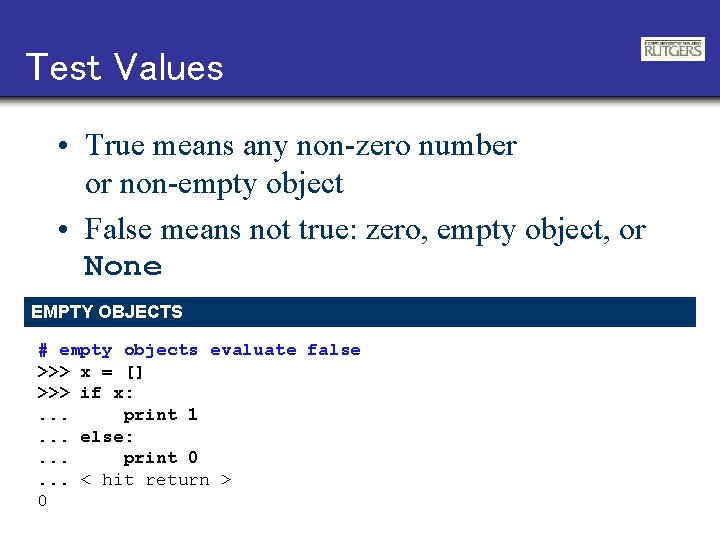
Test Values • True means any non-zero number or non-empty object • False means not true: zero, empty object, or None EMPTY OBJECTS # empty objects evaluate false >>> x = [] >>> if x: . . . print 1. . . else: . . . print 0. . . < hit return > 0
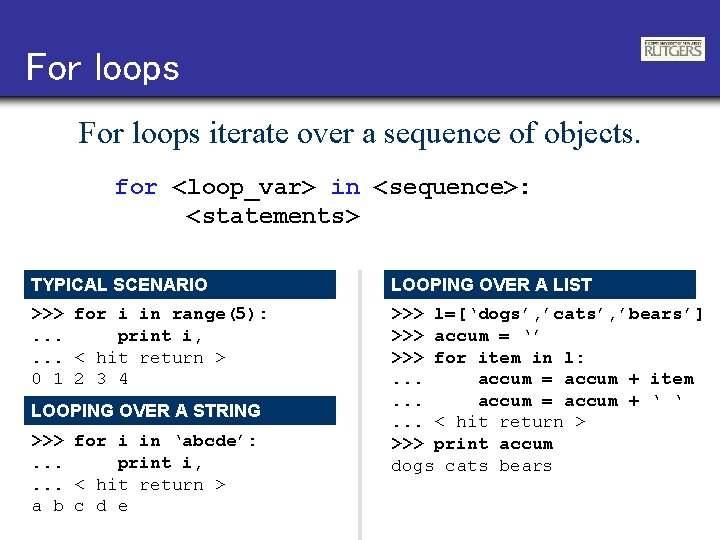
For loops iterate over a sequence of objects. for <loop_var> in <sequence>: <statements> TYPICAL SCENARIO LOOPING OVER A LIST >>> for i in range(5): . . . print i, . . . < hit return > 0 1 2 3 4 >>> l=[‘dogs’, ’cats’, ’bears’] >>> accum = ‘’ >>> for item in l: . . . accum = accum + item. . . accum = accum + ‘ ‘. . . < hit return > >>> print accum dogs cats bears LOOPING OVER A STRING >>> for i in ‘abcde’: . . . print i, . . . < hit return > a b c d e
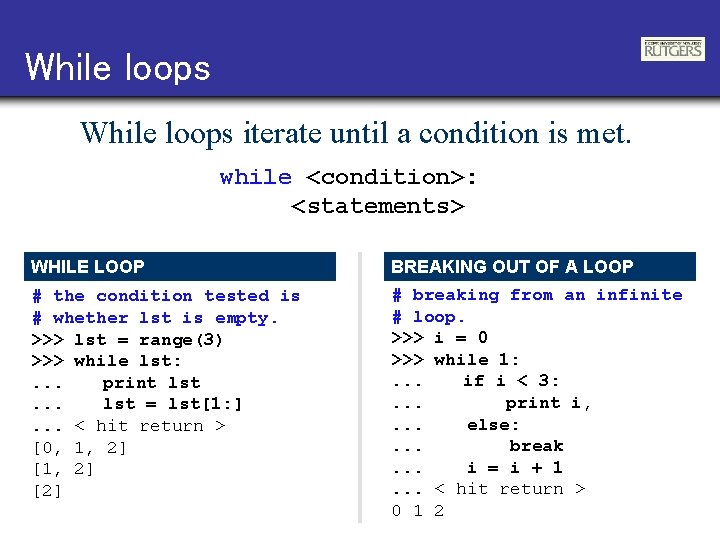
While loops iterate until a condition is met. while <condition>: <statements> WHILE LOOP # the condition tested is # whether lst is empty. >>> lst = range(3) >>> while lst: . . . print lst. . . lst = lst[1: ]. . . < hit return > [0, 1, 2] [2] BREAKING OUT OF A LOOP # breaking from an infinite # loop. >>> i = 0 >>> while 1: . . . if i < 3: . . . print i, . . . else: . . . break. . . i = i + 1. . . < hit return > 0 1 2
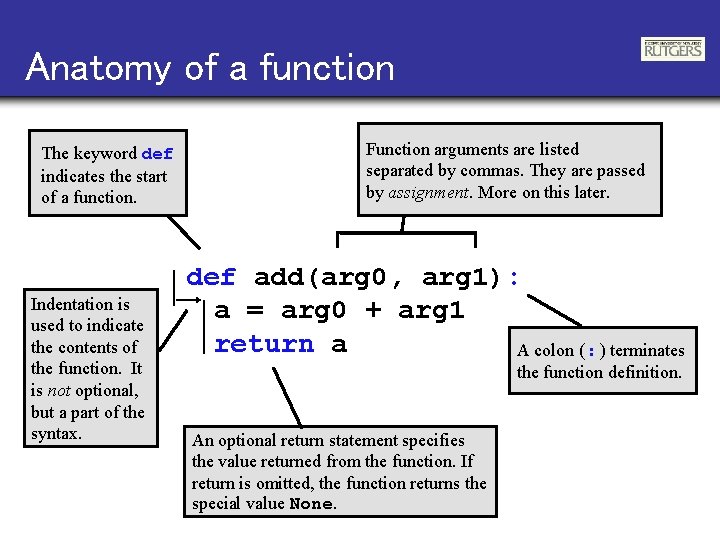
Anatomy of a function The keyword def indicates the start of a function. Indentation is used to indicate the contents of the function. It is not optional, but a part of the syntax. Function arguments are listed separated by commas. They are passed by assignment. More on this later. def add(arg 0, arg 1): a = arg 0 + arg 1 return a A colon ( : ) terminates the function definition. An optional return statement specifies the value returned from the function. If return is omitted, the function returns the special value None.
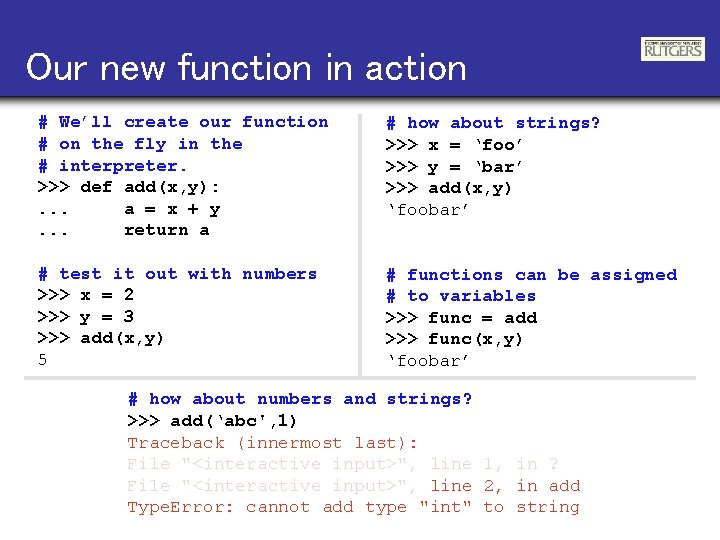
Our new function in action # We’ll create our function # on the fly in the # interpreter. >>> def add(x, y): . . . a = x + y. . . return a # how about strings? >>> x = ‘foo’ >>> y = ‘bar’ >>> add(x, y) ‘foobar’ # test it out with numbers >>> x = 2 >>> y = 3 >>> add(x, y) 5 # functions can be assigned # to variables >>> func = add >>> func(x, y) ‘foobar’ # how about numbers and strings? >>> add(‘abc', 1) Traceback (innermost last): File "<interactive input>", line 1, in ? File "<interactive input>", line 2, in add Type. Error: cannot add type "int" to string
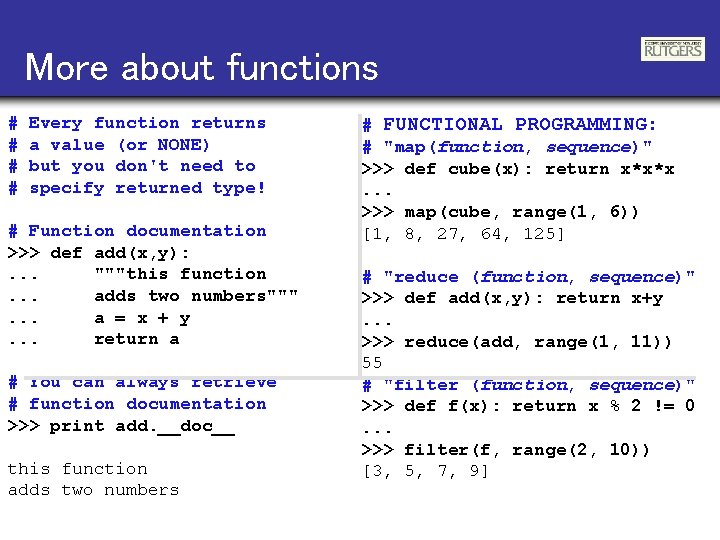
More about functions # # Every function returns a value (or NONE) but you don't need to specify returned type! # Function documentation >>> def add(x, y): . . . """this function. . . adds two numbers""". . . a = x + y. . . return a # You can always retrieve # function documentation >>> print add. __doc__ this function adds two numbers # FUNCTIONAL PROGRAMMING: # "map(function, sequence)" >>> def cube(x): return x*x*x. . . >>> map(cube, range(1, 6)) [1, 8, 27, 64, 125] # "reduce (function, sequence)" >>> def add(x, y): return x+y. . . >>> reduce(add, range(1, 11)) 55 # "filter (function, sequence)" >>> def f(x): return x % 2 != 0. . . >>> filter(f, range(2, 10)) [3, 5, 7, 9]
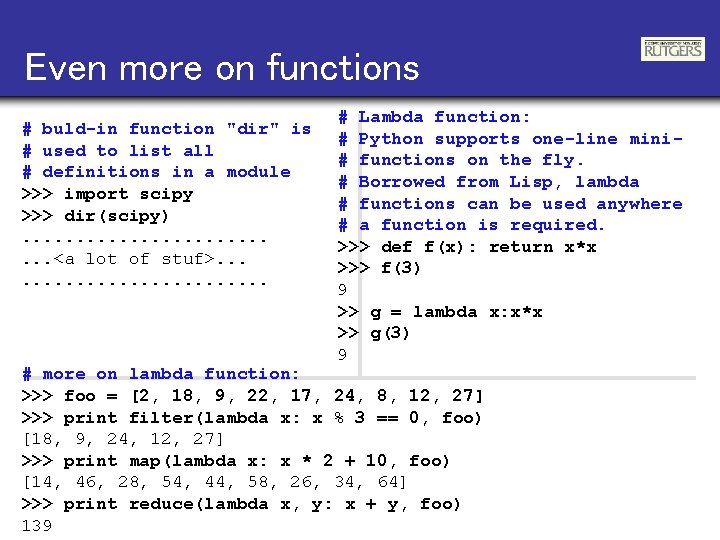
Even more on functions # buld-in function "dir" is # used to list all # definitions in a module >>> import scipy >>> dir(scipy). . . <a lot of stuf>. . . # Lambda function: # Python supports one-line mini# functions on the fly. # Borrowed from Lisp, lambda # functions can be used anywhere # a function is required. >>> def f(x): return x*x >>> f(3) 9 >> g = lambda x: x*x >> g(3) 9 # more on lambda function: >>> foo = [2, 18, 9, 22, 17, 24, 8, 12, 27] >>> print filter(lambda x: x % 3 == 0, foo) [18, 9, 24, 12, 27] >>> print map(lambda x: x * 2 + 10, foo) [14, 46, 28, 54, 44, 58, 26, 34, 64] >>> print reduce(lambda x, y: x + y, foo) 139
Modules EX 1. PY FROM SHELL # ex 1. py [ej@bull ej]$ python ex 1. py 6, 3. 1416 PI = 3. 1416 FROM INTERPRETER def sum(lst): tot = lst[0] for value in lst[1: ]: tot = tot + value return tot # load and execute the module >>> import ex 1 6, 3. 1416 # get/set a module variable. >>> ex 1. PI 3. 1415999999 >>> ex 1. PI = 3. 14159 >>> ex 1. PI 3. 14158999999 # call a module variable. >>> t = [2, 3, 4] >>> ex 1. sum(t) 9 l = [0, 1, 2, 3] print sum(l), PI
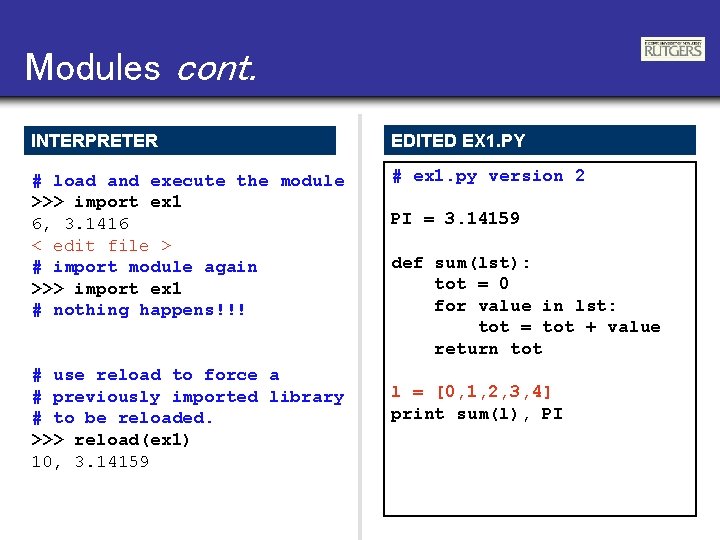
Modules cont. INTERPRETER EDITED EX 1. PY # load and execute the module >>> import ex 1 6, 3. 1416 < edit file > # import module again >>> import ex 1 # nothing happens!!! # ex 1. py version 2 # use reload to force a # previously imported library # to be reloaded. >>> reload(ex 1) 10, 3. 14159 PI = 3. 14159 def sum(lst): tot = 0 for value in lst: tot = tot + value return tot l = [0, 1, 2, 3, 4] print sum(l), PI
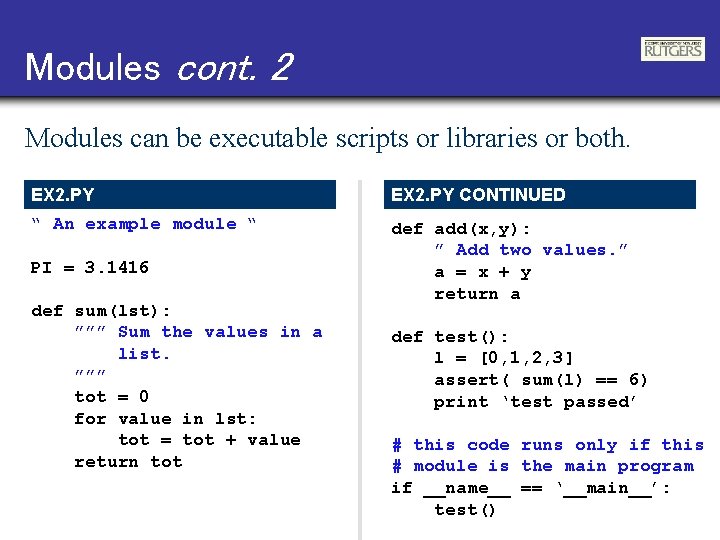
Modules cont. 2 Modules can be executable scripts or libraries or both. EX 2. PY CONTINUED “ An example module “ def add(x, y): ” Add two values. ” a = x + y return a PI = 3. 1416 def sum(lst): ””” Sum the values in a list. ””” tot = 0 for value in lst: tot = tot + value return tot def test(): l = [0, 1, 2, 3] assert( sum(l) == 6) print ‘test passed’ # this code runs only if this # module is the main program if __name__ == ‘__main__’: test()
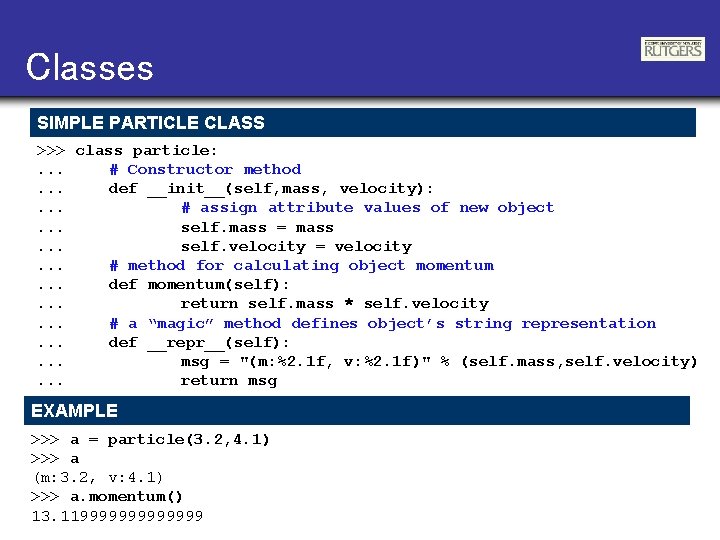
Classes SIMPLE PARTICLE CLASS >>> class particle: . . . # Constructor method. . . def __init__(self, mass, velocity): . . . # assign attribute values of new object. . . self. mass = mass. . . self. velocity = velocity. . . # method for calculating object momentum. . . def momentum(self): . . . return self. mass * self. velocity. . . # a “magic” method defines object’s string representation. . . def __repr__(self): . . . msg = "(m: %2. 1 f, v: %2. 1 f)" % (self. mass, self. velocity). . . return msg EXAMPLE >>> a = particle(3. 2, 4. 1) >>> a (m: 3. 2, v: 4. 1) >>> a. momentum() 13. 119999999
Reading files FILE INPUT EXAMPLE PRINTING THE RESULTS >>> results = [] >>> f = open(‘c: \rcs. txt’, ’r’) >>> for i in results: print i [100. 0, -20. 30…, -31. 20…] [200. 0, -22. 70…, -33. 60…] # read lines and discard header >>> lines = f. readlines()[1: ] >>> f. close() >>> for l in lines: . . . # split line into fields. . . fields = line. split(). . . # convert text to numbers. . . freq = float(fields[0]). . . vv = float(fields[1]). . . hh = float(fields[2]). . . # group & append to results. . . all = [freq, vv, hh]. . . results. append(all). . . < hit return > EXAMPLE FILE: RCS. TXT #freq (MHz) vv (d. B) hh (d. B) 100 -20. 3 -31. 2 200 -22. 7 -33. 6
More compact version ITERATING ON A FILE AND LIST COMPREHENSIONS >>> results = [] >>> f = open(‘c: \rcs. txt’, ’r’) >>> f. readline() ‘#freq (MHz) vv (d. B) hh (d. B)n' >>> for l in f: . . . all = [float(val) for val in l. split()]. . . results. append(all). . . < hit return > >>> for i in results: . . . print i. . . < hit return > EXAMPLE FILE: RCS. TXT #freq (MHz) 100 200 vv (d. B) -20. 3 -22. 7 hh (d. B) -31. 2 -33. 6
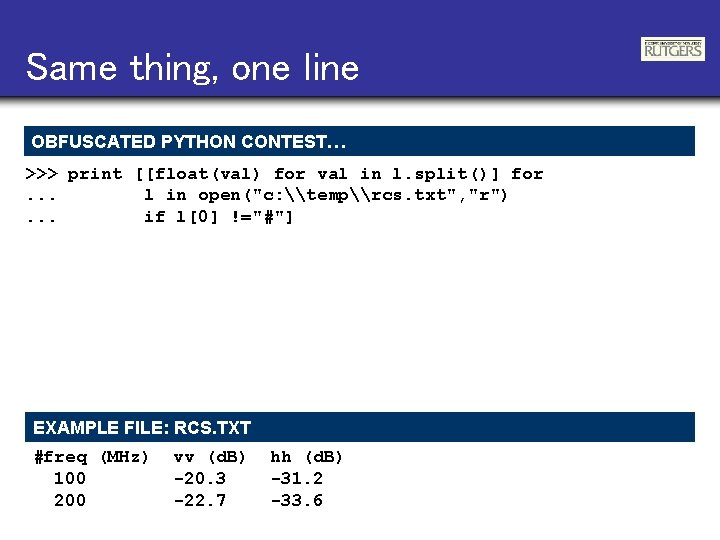
Same thing, one line OBFUSCATED PYTHON CONTEST… >>> print [[float(val) for val in l. split()] for. . . l in open("c: \temp\rcs. txt", "r"). . . if l[0] !="#"] EXAMPLE FILE: RCS. TXT #freq (MHz) 100 200 vv (d. B) -20. 3 -22. 7 hh (d. B) -31. 2 -33. 6
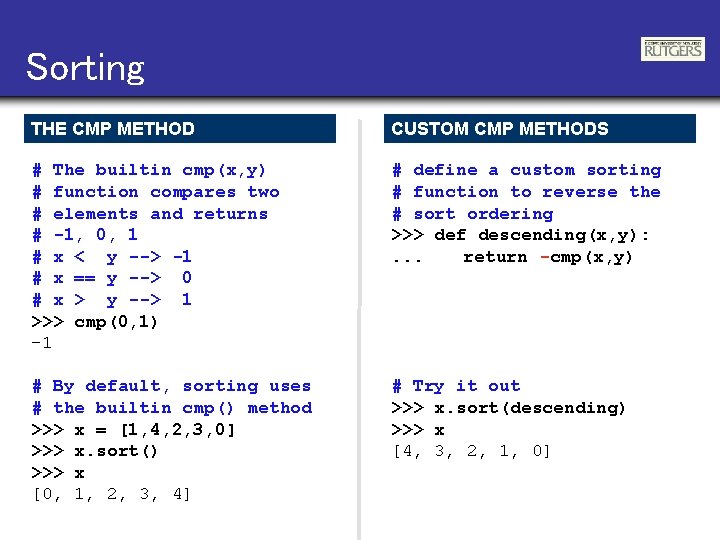
Sorting THE CMP METHOD CUSTOM CMP METHODS # The builtin cmp(x, y) # function compares two # elements and returns # -1, 0, 1 # x < y --> -1 # x == y --> 0 # x > y --> 1 >>> cmp(0, 1) -1 # define a custom sorting # function to reverse the # sort ordering >>> def descending(x, y): . . . return -cmp(x, y) # By default, sorting uses # the builtin cmp() method >>> x = [1, 4, 2, 3, 0] >>> x. sort() >>> x [0, 1, 2, 3, 4] # Try it out >>> x. sort(descending) >>> x [4, 3, 2, 1, 0]
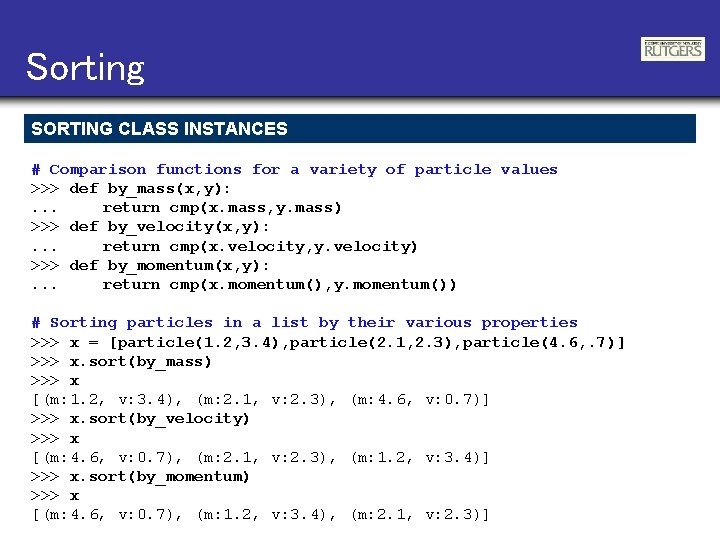
Sorting SORTING CLASS INSTANCES # Comparison functions for a variety of particle values >>> def by_mass(x, y): . . . return cmp(x. mass, y. mass) >>> def by_velocity(x, y): . . . return cmp(x. velocity, y. velocity) >>> def by_momentum(x, y): . . . return cmp(x. momentum(), y. momentum()) # Sorting particles in a list by their various properties >>> x = [particle(1. 2, 3. 4), particle(2. 1, 2. 3), particle(4. 6, . 7)] >>> x. sort(by_mass) >>> x [(m: 1. 2, v: 3. 4), (m: 2. 1, v: 2. 3), (m: 4. 6, v: 0. 7)] >>> x. sort(by_velocity) >>> x [(m: 4. 6, v: 0. 7), (m: 2. 1, v: 2. 3), (m: 1. 2, v: 3. 4)] >>> x. sort(by_momentum) >>> x [(m: 4. 6, v: 0. 7), (m: 1. 2, v: 3. 4), (m: 2. 1, v: 2. 3)]
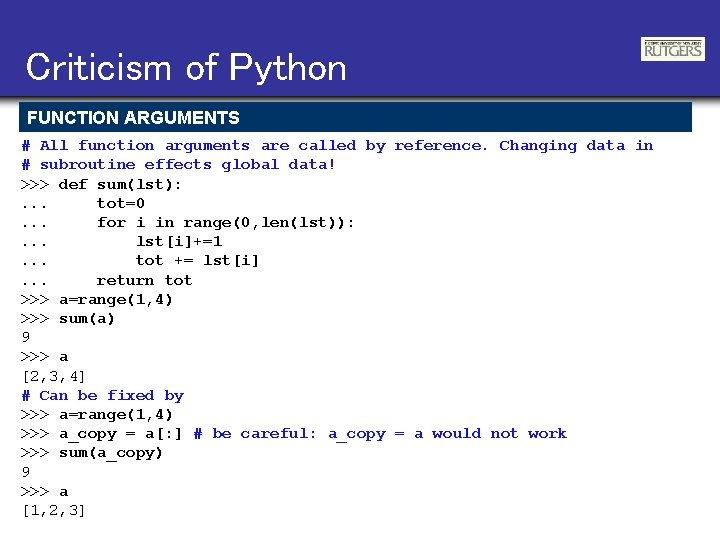
Criticism of Python FUNCTION ARGUMENTS # All function arguments are called by reference. Changing data in # subroutine effects global data! >>> def sum(lst): . . . tot=0. . . for i in range(0, len(lst)): . . . lst[i]+=1. . . tot += lst[i]. . . return tot >>> a=range(1, 4) >>> sum(a) 9 >>> a [2, 3, 4] # Can be fixed by >>> a=range(1, 4) >>> a_copy = a[: ] # be careful: a_copy = a would not work >>> sum(a_copy) 9 >>> a [1, 2, 3]
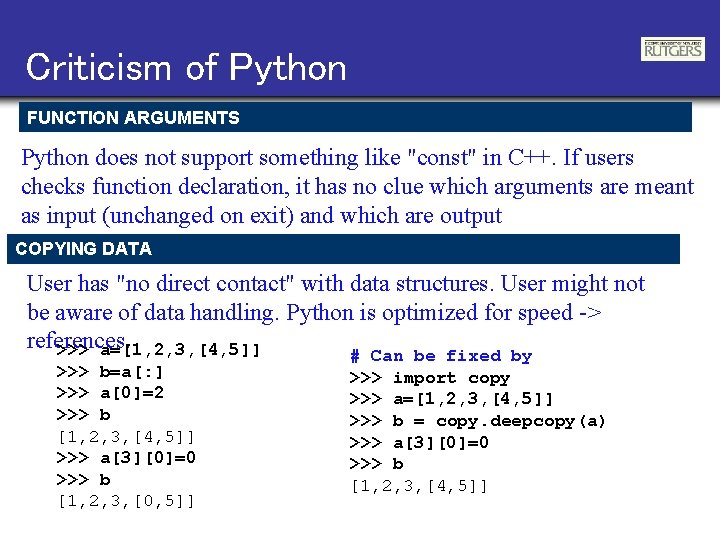
Criticism of Python FUNCTION ARGUMENTS Python does not support something like "const" in C++. If users checks function declaration, it has no clue which arguments are meant as input (unchanged on exit) and which are output COPYING DATA User has "no direct contact" with data structures. User might not be aware of data handling. Python is optimized for speed -> references. >>> a=[1, 2, 3, [4, 5]] >>> b=a[: ] >>> a[0]=2 >>> b [1, 2, 3, [4, 5]] >>> a[3][0]=0 >>> b [1, 2, 3, [0, 5]] # Can be fixed by >>> import copy >>> a=[1, 2, 3, [4, 5]] >>> b = copy. deepcopy(a) >>> a[3][0]=0 >>> b [1, 2, 3, [4, 5]]
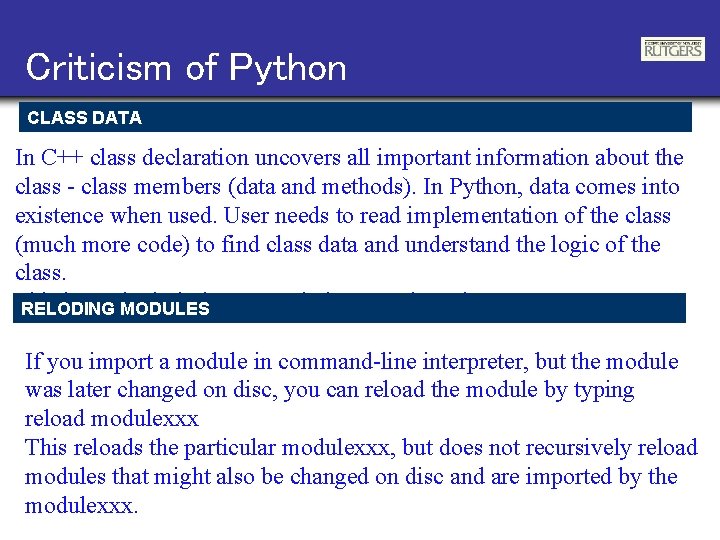
Criticism of Python CLASS DATA In C++ class declaration uncovers all important information about the class - class members (data and methods). In Python, data comes into existence when used. User needs to read implementation of the class (much more code) to find class data and understand the logic of the class. This is particularly RELODING MODULESimportant in large scale codes. If you import a module in command-line interpreter, but the module was later changed on disc, you can reload the module by typing reload modulexxx This reloads the particular modulexxx, but does not recursively reload modules that might also be changed on disc and are imported by the modulexxx.
Num. Py
Num. Py and Sci. Py In 2005 Numarray and Numeric were merged into common project called "Num. Py". On top of it, Sci. Py was build recently and spread very fast in scientific community. Home: http: //www. scipy. org/Sci. Py IMPORT NUMPY AND SCIPY >>> from numpy import * >>> import numpy >>> numpy. __version__ ’ 1. 0. 1’ or better >>> from scipy import * >>> import scipy >>> scipty. __version__ '0. 5. 2'
Array Operations SIMPLE ARRAY MATH >>> a = array([1, 2, 3, 4]) >>> b = array([2, 3, 4, 5]) >>> a + b array([3, 5, 7, 9]) Num. Py defines the following constants: pi = 3. 14159265359 e = 2. 7182846 MATH FUNCTIONS # Create array from 0 to 10 >>> x = arange(11. ) # multiply entire array by # scalar value >>> a = (2*pi)/10. >>> a 0. 628318530718 >>> a*x array([ 0. , 0. 628, …, 6. 283]) # apply functions to array. >>> y = sin(a*x)
Introducing Numeric Arrays SIMPLE ARRAY CREATION >>> a = array([0, 1, 2, 3]) >>> a array([0, 1, 2, 3]) CHECKING THE TYPE >>> type(a) <type 'array'> NUMERIC TYPE OF ELEMENTS >>> a. typecode() 'l‘ # ‘l’ = Int BYTES IN AN ARRAY ELEMENT >>> a. itemsize() 4 ARRAY SHAPE >>> a. shape (4, ) >>> shape(a) (4, ) CONVERT TO PYTHON LIST >>> a. tolist() [0, 1, 2, 3] ARRAY INDEXING >>> a[0] 0 >>> a[0] = 10 >>> a [10, 1, 2, 3]
Multi-Dimensional Arrays MULTI-DIMENSIONAL ARRAYS >>> a = array([[ 0, 1, 2, 3], [10, 11, 12, 13]]) >>> a array([[ 0, 1, 2, 3], [10, 11, 12, 13]]) (ROWS, COLUMNS) >>> shape(a) (2, 4) GET/SET ELEMENTS >>> a[1, 3] 13 column row >>> a[1, 3] = -1 >>> a array([[ 0, 1, 2, 3], [10, 11, 12, -1]]) ADDRESS FIRST ROW USINGLE INDEX >>> a[1] array([10, 11, 12, 13]) FLATTEN TO 1 D ARRAY >>> a. flat array(0, 1, 2, 3, 10, 11, 12, -1) >>> ravel(a) array(0, 1, 2, 3, 10, 11, 12, -1) A. FLAT AND RAVEL() REFERENCE ORIGINAL MEMORY >>> a. flat[5] = -2 >>> a array([[ 0, 1, 2, 3], [10, -2, 12, -1]])
Array Slicing SLICING WORKS MUCH LIKE STANDARD PYTHON SLICING >>> a[0, 3: 5] array([3, 4]) >>> a[4: , 4: ] array([[44, 45], [54, 55]]) >>> a[: , 2] array([2, 12, 22, 32, 42, 52]) STRIDES ARE ALSO POSSIBLE >>> a[2: : 2, : : 2] array([[20, 22, 24], [40, 42, 44]])
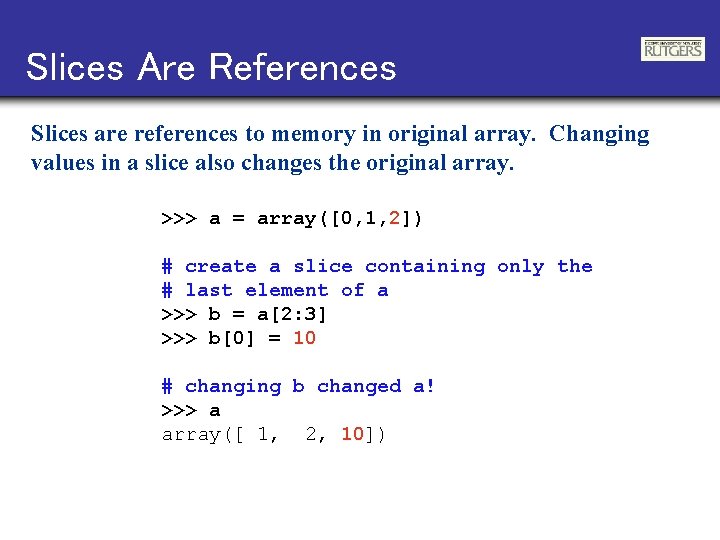
Slices Are References Slices are references to memory in original array. Changing values in a slice also changes the original array. >>> a = array([0, 1, 2]) # create a slice containing only the # last element of a >>> b = a[2: 3] >>> b[0] = 10 # changing b changed a! >>> a array([ 1, 2, 10])
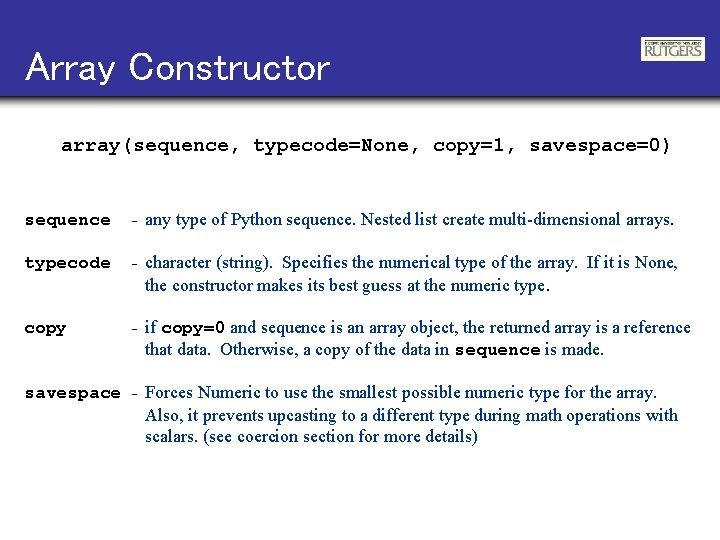
Array Constructor array(sequence, typecode=None, copy=1, savespace=0) sequence - any type of Python sequence. Nested list create multi-dimensional arrays. typecode - character (string). Specifies the numerical type of the array. If it is None, the constructor makes its best guess at the numeric type. copy - if copy=0 and sequence is an array object, the returned array is a reference that data. Otherwise, a copy of the data in sequence is made. savespace - Forces Numeric to use the smallest possible numeric type for the array. Also, it prevents upcasting to a different type during math operations with scalars. (see coercion section for more details)
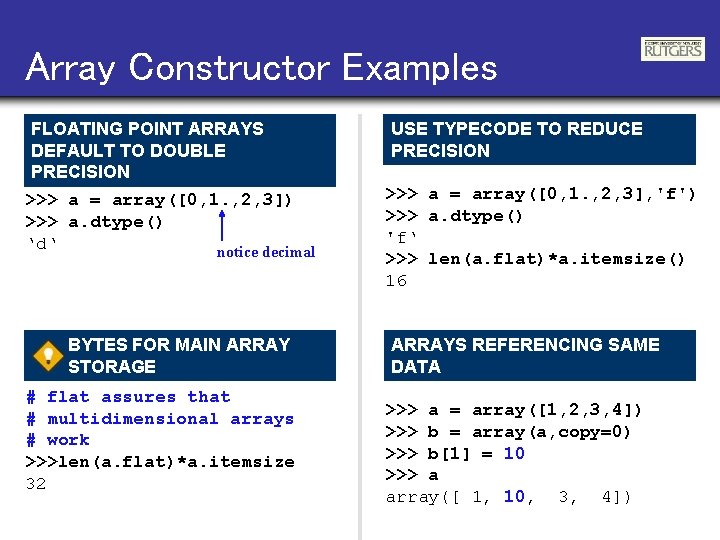
Array Constructor Examples FLOATING POINT ARRAYS DEFAULT TO DOUBLE PRECISION >>> a = array([0, 1. , 2, 3]) >>> a. dtype() ‘d‘ notice decimal BYTES FOR MAIN ARRAY STORAGE # flat assures that # multidimensional arrays # work >>>len(a. flat)*a. itemsize 32 USE TYPECODE TO REDUCE PRECISION >>> a = array([0, 1. , 2, 3], 'f') >>> a. dtype() 'f‘ >>> len(a. flat)*a. itemsize() 16 ARRAYS REFERENCING SAME DATA >>> a = array([1, 2, 3, 4]) >>> b = array(a, copy=0) >>> b[1] = 10 >>> a array([ 1, 10, 3, 4])
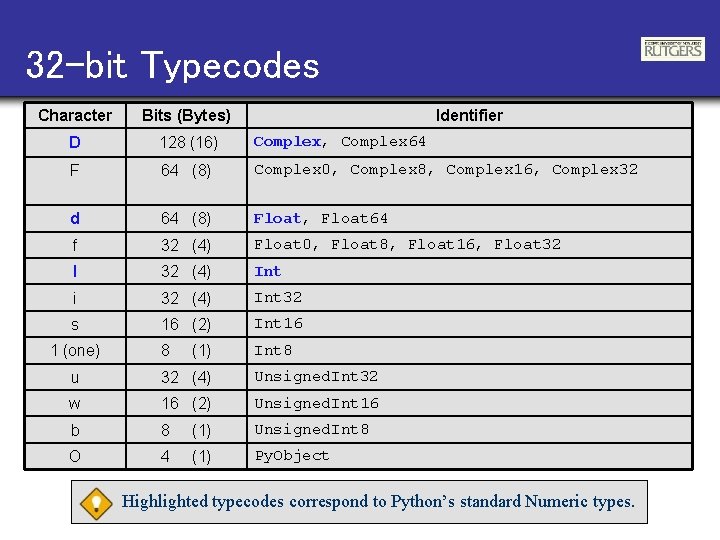
32 -bit Typecodes Character Bits (Bytes) D 128 (16) Complex, Complex 64 F 64 (8) Complex 0, Complex 8, Complex 16, Complex 32 d 64 (8) Float, Float 64 f 32 (4) Float 0, Float 8, Float 16, Float 32 l 32 (4) Int i 32 (4) Int 32 s 16 (2) Int 16 8 Int 8 1 (one) (1) Identifier u 32 (4) Unsigned. Int 32 w 16 (2) Unsigned. Int 16 b 8 (1) Unsigned. Int 8 O 4 (1) Py. Object Highlighted typecodes correspond to Python’s standard Numeric types.
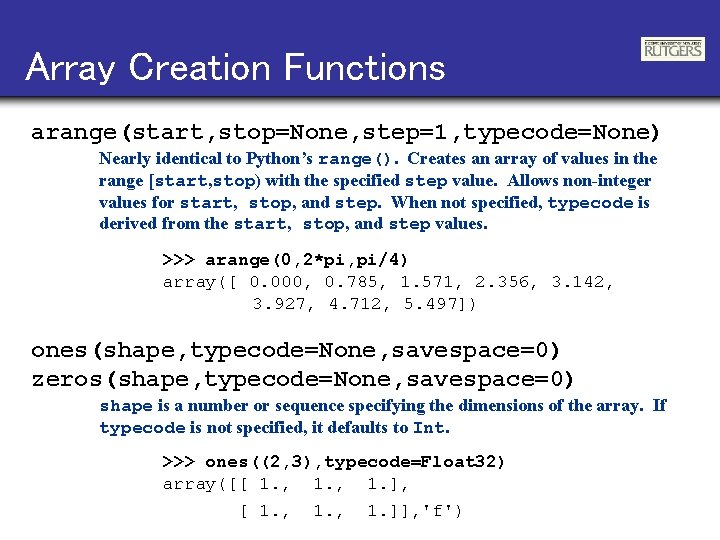
Array Creation Functions arange(start, stop=None, step=1, typecode=None) Nearly identical to Python’s range(). Creates an array of values in the range [start, stop) with the specified step value. Allows non-integer values for start, stop, and step. When not specified, typecode is derived from the start, stop, and step values. >>> arange(0, 2*pi, pi/4) array([ 0. 000, 0. 785, 1. 571, 2. 356, 3. 142, 3. 927, 4. 712, 5. 497]) ones(shape, typecode=None, savespace=0) zeros(shape, typecode=None, savespace=0) shape is a number or sequence specifying the dimensions of the array. If typecode is not specified, it defaults to Int. >>> ones((2, 3), typecode=Float 32) array([[ 1. , 1. ], [ 1. , 1. ]], 'f')
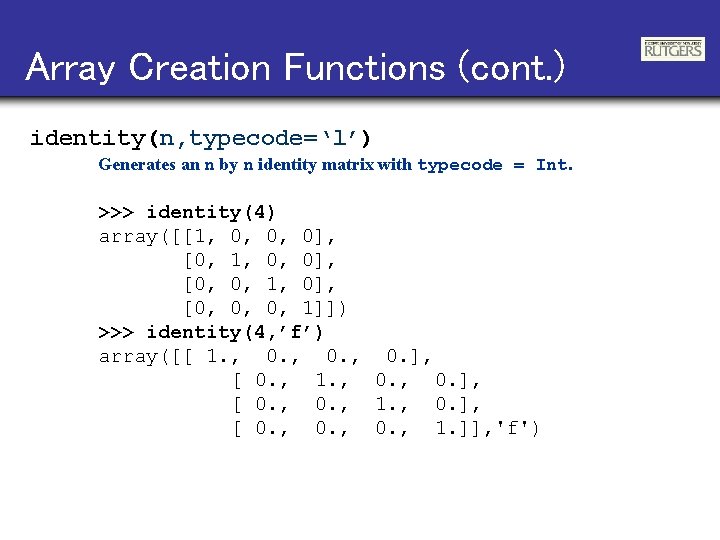
Array Creation Functions (cont. ) identity(n, typecode=‘l’) Generates an n by n identity matrix with typecode = Int. >>> identity(4) array([[1, 0, 0, 0], [0, 1, 0, 0], [0, 0, 1, 0], [0, 0, 0, 1]]) >>> identity(4, ’f’) array([[ 1. , 0. ], [ 0. , 1. ]], 'f')
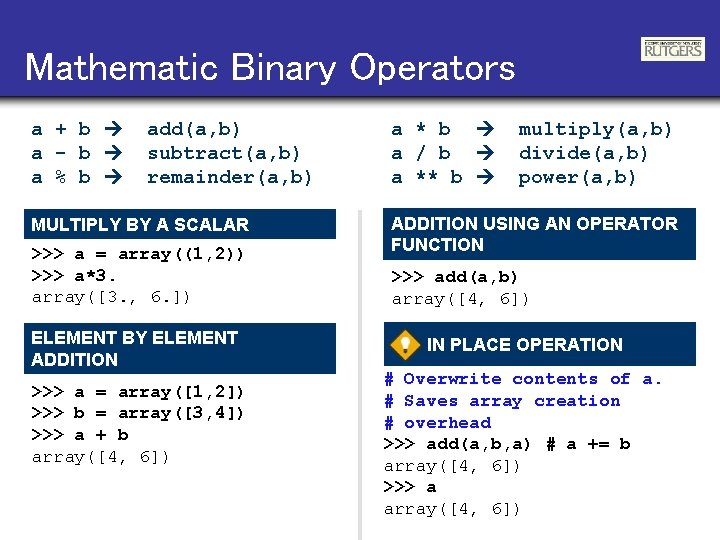
Mathematic Binary Operators a + b a - b a % b add(a, b) subtract(a, b) remainder(a, b) MULTIPLY BY A SCALAR >>> a = array((1, 2)) >>> a*3. array([3. , 6. ]) ELEMENT BY ELEMENT ADDITION >>> a = array([1, 2]) >>> b = array([3, 4]) >>> a + b array([4, 6]) a * b a / b a ** b multiply(a, b) divide(a, b) power(a, b) ADDITION USING AN OPERATOR FUNCTION >>> add(a, b) array([4, 6]) IN PLACE OPERATION # Overwrite contents of a. # Saves array creation # overhead >>> add(a, b, a) # a += b array([4, 6]) >>> a array([4, 6])
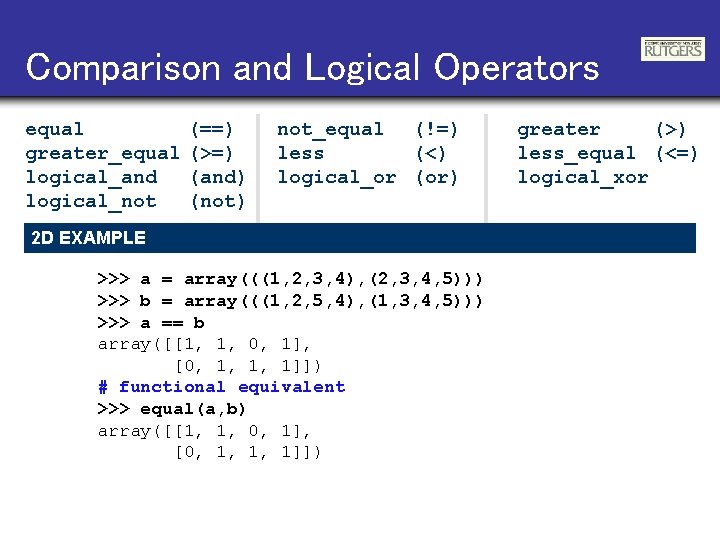
Comparison and Logical Operators equal greater_equal logical_and logical_not (==) (>=) (and) (not) not_equal (!=) less (<) logical_or (or) 2 D EXAMPLE >>> a = array(((1, 2, 3, 4), (2, 3, 4, 5))) >>> b = array(((1, 2, 5, 4), (1, 3, 4, 5))) >>> a == b array([[1, 1, 0, 1], [0, 1, 1, 1]]) # functional equivalent >>> equal(a, b) array([[1, 1, 0, 1], [0, 1, 1, 1]]) greater (>) less_equal (<=) logical_xor
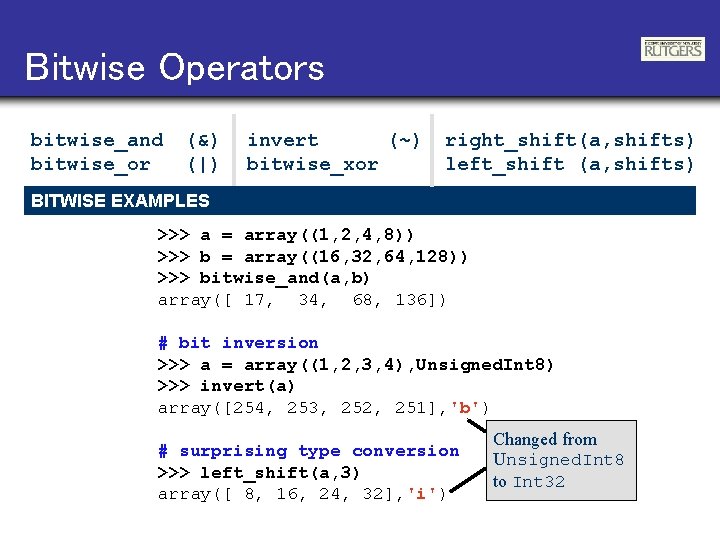
Bitwise Operators bitwise_and bitwise_or (&) (|) invert (~) bitwise_xor right_shift(a, shifts) left_shift (a, shifts) BITWISE EXAMPLES >>> a = array((1, 2, 4, 8)) >>> b = array((16, 32, 64, 128)) >>> bitwise_and(a, b) array([ 17, 34, 68, 136]) # bit inversion >>> a = array((1, 2, 3, 4), Unsigned. Int 8) >>> invert(a) array([254, 253, 252, 251], 'b') # surprising type conversion >>> left_shift(a, 3) array([ 8, 16, 24, 32], 'i') Changed from Unsigned. Int 8 to Int 32
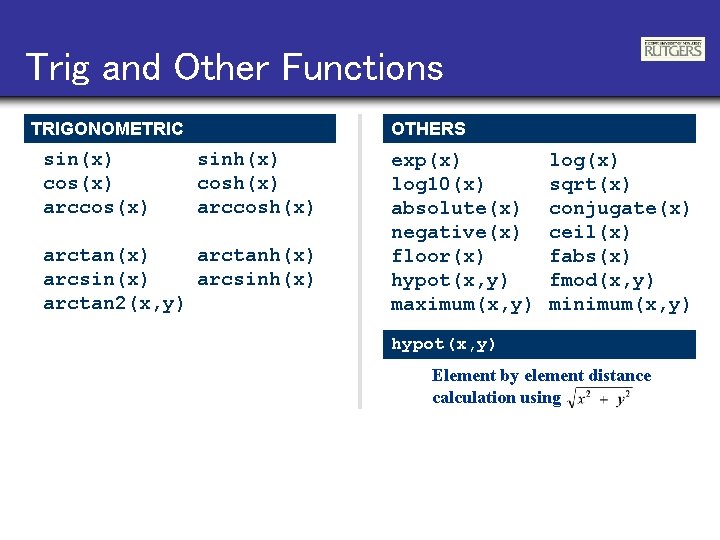
Trig and Other Functions TRIGONOMETRIC sin(x) cos(x) arccos(x) OTHERS sinh(x) cosh(x) arctan(x) arctanh(x) arcsinh(x) arctan 2(x, y) exp(x) log 10(x) absolute(x) negative(x) floor(x) hypot(x, y) maximum(x, y) log(x) sqrt(x) conjugate(x) ceil(x) fabs(x) fmod(x, y) minimum(x, y) hypot(x, y) Element by element distance calculation using
Sci. Py
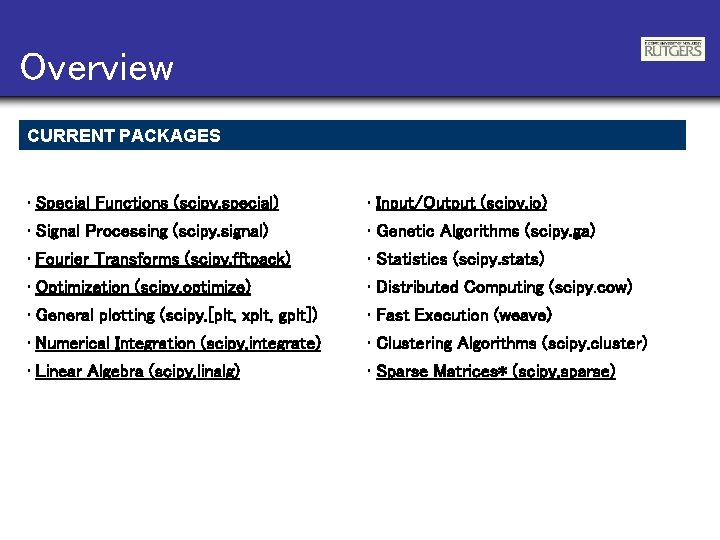
Overview CURRENT PACKAGES • Special Functions (scipy. special) • Input/Output (scipy. io) • Signal Processing (scipy. signal) • Genetic Algorithms (scipy. ga) • Fourier Transforms (scipy. fftpack) • Statistics (scipy. stats) • Optimization (scipy. optimize) • Distributed Computing (scipy. cow) • General plotting (scipy. [plt, xplt, gplt]) • Fast Execution (weave) • Numerical Integration (scipy. integrate) • Clustering Algorithms (scipy. cluster) • Linear Algebra (scipy. linalg) • Sparse Matrices* (scipy. sparse)
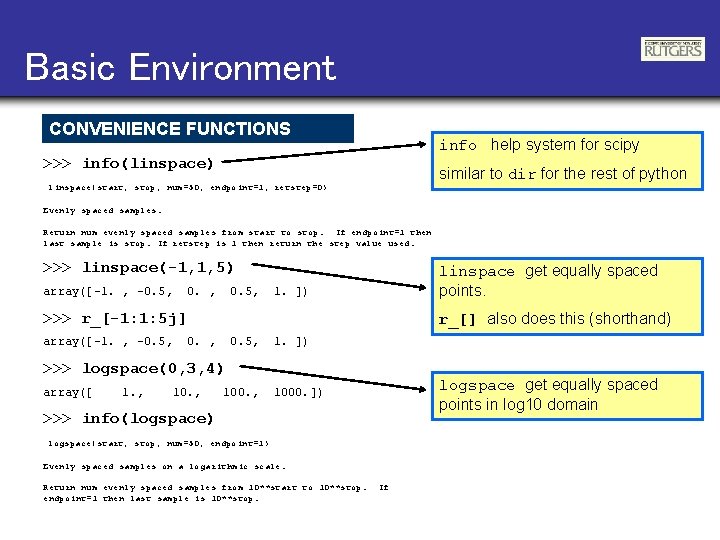
Basic Environment CONVENIENCE FUNCTIONS info help system for scipy >>> info(linspace) similar to dir for the rest of python linspace(start, stop, num=50, endpoint=1, retstep=0) Evenly spaced samples. Return num evenly spaced samples from start to stop. If endpoint=1 then last sample is stop. If retstep is 1 then return the step value used. >>> linspace(-1, 1, 5) array([-1. , -0. 5, linspace get equally spaced points. 1. ]) >>> r_[-1: 1: 5 j] array([-1. , -0. 5, r_[] also does this (shorthand) 0. , 0. 5, 1. ]) >>> logspace(0, 3, 4) array([ 1. , 100. , logspace get equally spaced points in log 10 domain 1000. ]) >>> info(logspace) logspace(start, stop, num=50, endpoint=1) Evenly spaced samples on a logarithmic scale. Return num evenly spaced samples from 10**start to 10**stop. endpoint=1 then last sample is 10**stop. If
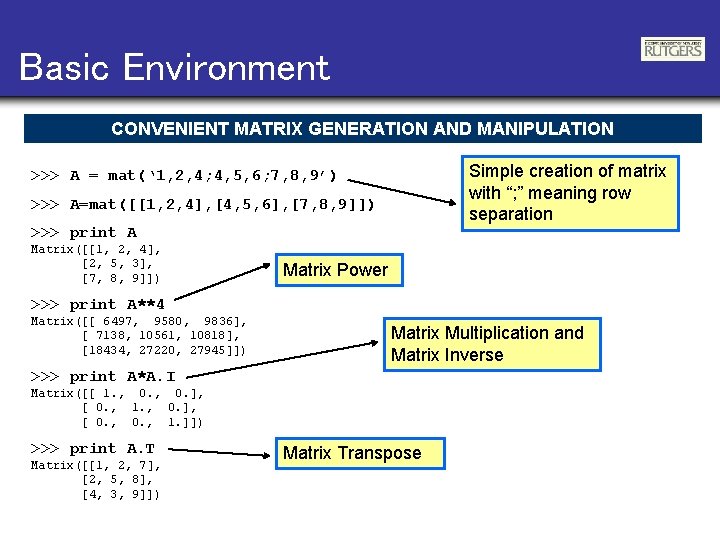
Basic Environment CONVENIENT MATRIX GENERATION AND MANIPULATION Simple creation of matrix with “; ” meaning row separation >>> A = mat(‘ 1, 2, 4; 4, 5, 6; 7, 8, 9’) >>> A=mat([[1, 2, 4], [4, 5, 6], [7, 8, 9]]) >>> print A Matrix([[1, 2, 4], [2, 5, 3], [7, 8, 9]]) Matrix Power >>> print A**4 Matrix([[ 6497, 9580, 9836], [ 7138, 10561, 10818], [18434, 27220, 27945]]) Matrix Multiplication and Matrix Inverse >>> print A*A. I Matrix([[ 1. , 0. ], [ 0. , 1. ]]) >>> print A. T Matrix([[1, 2, 7], [2, 5, 8], [4, 3, 9]]) Matrix Transpose
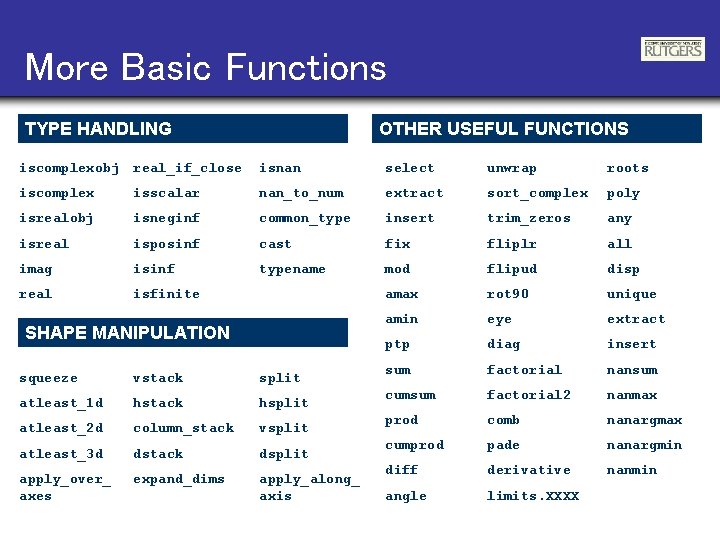
More Basic Functions TYPE HANDLING OTHER USEFUL FUNCTIONS iscomplexobj real_if_close isnan select unwrap roots iscomplex isscalar nan_to_num extract sort_complex poly isrealobj isneginf common_type insert trim_zeros any isreal isposinf cast fix fliplr all imag isinf typename mod flipud disp real isfinite amax rot 90 unique amin eye extract ptp diag insert sum factorial nansum cumsum factorial 2 nanmax prod comb nanargmax cumprod pade nanargmin diff derivative nanmin angle limits. XXXX SHAPE MANIPULATION squeeze vstack split atleast_1 d hstack hsplit atleast_2 d column_stack vsplit atleast_3 d dstack dsplit apply_over_ axes expand_dims apply_along_ axis
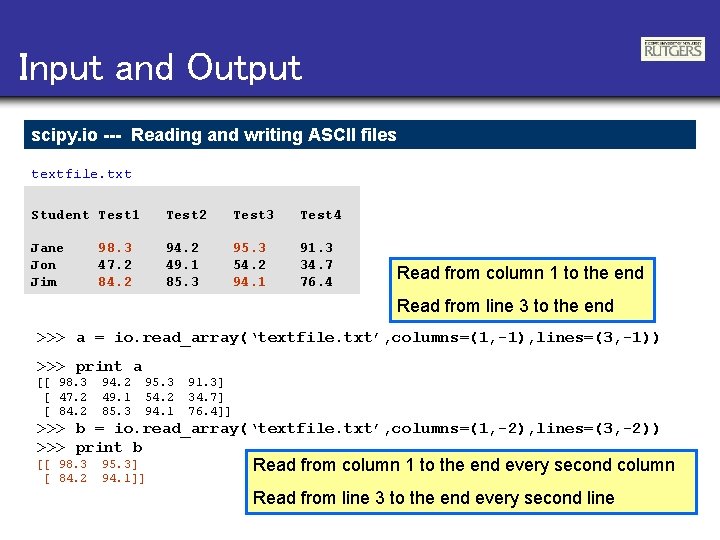
Input and Output scipy. io --- Reading and writing ASCII files textfile. txt Student Test 1 Test 2 Test 3 Test 4 Jane Jon Jim 94. 2 49. 1 85. 3 95. 3 54. 2 94. 1 91. 3 34. 7 76. 4 98. 3 47. 2 84. 2 Read from column 1 to the end Read from line 3 to the end >>> a = io. read_array(‘textfile. txt’, columns=(1, -1), lines=(3, -1)) >>> print a [[ 98. 3 [ 47. 2 [ 84. 2 94. 2 49. 1 85. 3 95. 3 54. 2 94. 1 91. 3] 34. 7] 76. 4]] >>> b = io. read_array(‘textfile. txt’, columns=(1, -2), lines=(3, -2)) >>> print b [[ 98. 3 [ 84. 2 95. 3] 94. 1]] Read from column 1 to the end every second column Read from line 3 to the end every second line
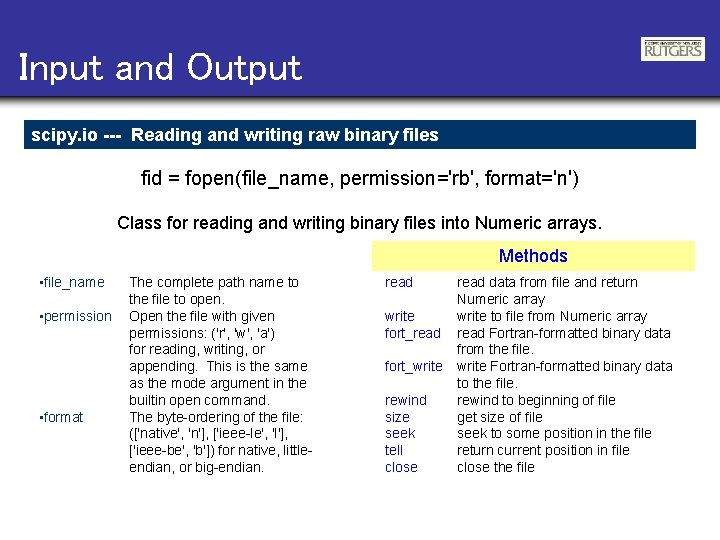
Input and Output scipy. io --- Reading and writing raw binary files fid = fopen(file_name, permission='rb', format='n') Class for reading and writing binary files into Numeric arrays. Methods • file_name • permission • format The complete path name to the file to open. Open the file with given permissions: ('r', 'w', 'a') for reading, writing, or appending. This is the same as the mode argument in the builtin open command. The byte-ordering of the file: (['native', 'n'], ['ieee-le', 'l'], ['ieee-be', 'b']) for native, littleendian, or big-endian. read write fort_read fort_write rewind size seek tell close read data from file and return Numeric array write to file from Numeric array read Fortran-formatted binary data from the file. write Fortran-formatted binary data to the file. rewind to beginning of file get size of file seek to some position in the file return current position in file close the file
Few examples Examples of Sci. Py use
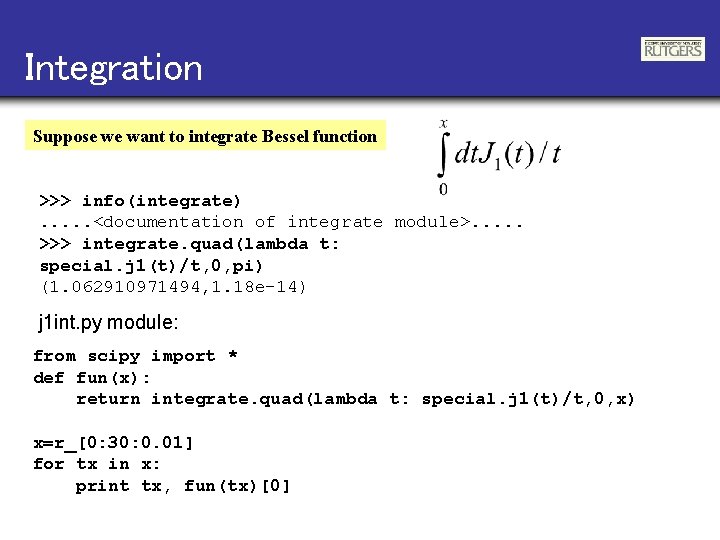
Integration Suppose we want to integrate Bessel function >>> info(integrate). . . <documentation of integrate module>. . . >>> integrate. quad(lambda t: special. j 1(t)/t, 0, pi) (1. 062910971494, 1. 18 e-14) j 1 int. py module: from scipy import * def fun(x): return integrate. quad(lambda t: special. j 1(t)/t, 0, x) x=r_[0: 30: 0. 01] for tx in x: print tx, fun(tx)[0]
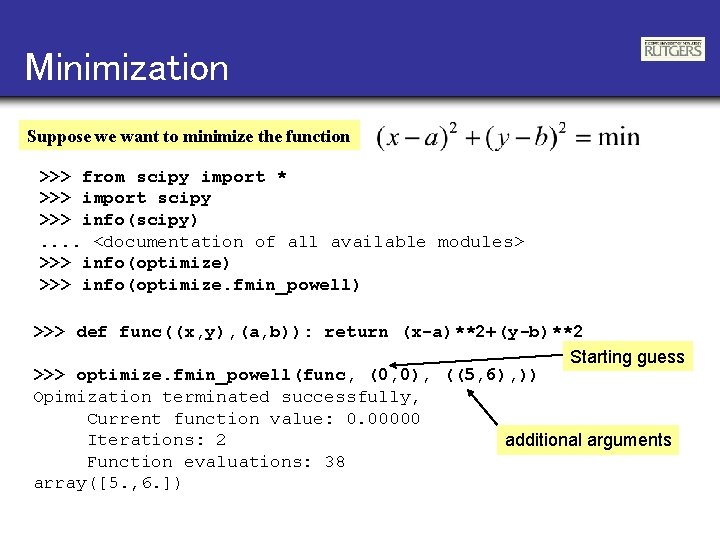
Minimization Suppose we want to minimize the function >>> from scipy import * >>> import scipy >>> info(scipy). . <documentation of all available modules> >>> info(optimize) >>> info(optimize. fmin_powell) >>> def func((x, y), (a, b)): return (x-a)**2+(y-b)**2 Starting guess >>> optimize. fmin_powell(func, (0, 0), ((5, 6), )) Opimization terminated successfully, Current function value: 0. 00000 Iterations: 2 additional arguments Function evaluations: 38 array([5. , 6. ])
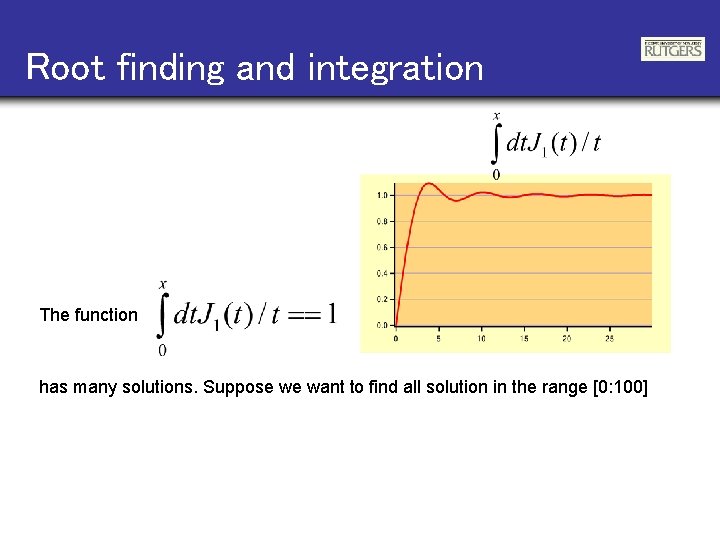
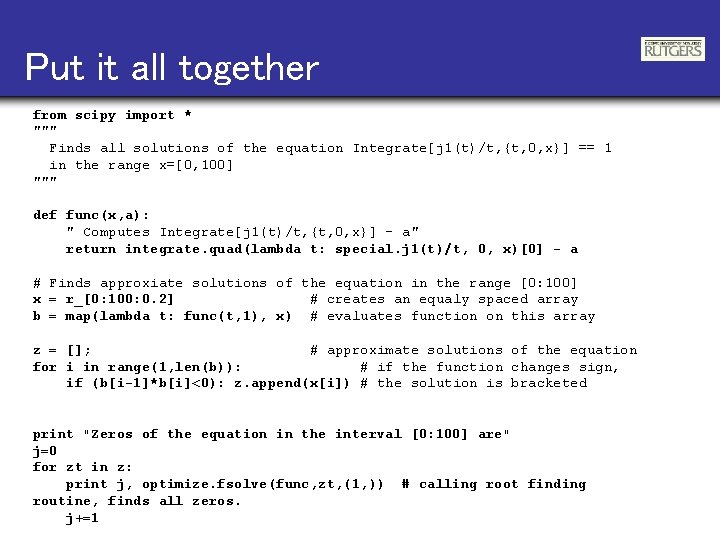
Root finding and integration The function has many solutions. Suppose we want to find all solution in the range [0: 100]
Put it all together from scipy import * """ Finds all solutions of the equation Integrate[j 1(t)/t, {t, 0, x}] == 1 in the range x=[0, 100] """ def func(x, a): " Computes Integrate[j 1(t)/t, {t, 0, x}] - a" return integrate. quad(lambda t: special. j 1(t)/t, 0, x)[0] - a # Finds approxiate solutions of the equation in the range [0: 100] x = r_[0: 100: 0. 2] # creates an equaly spaced array b = map(lambda t: func(t, 1), x) # evaluates function on this array z = []; # approximate solutions of the equation for i in range(1, len(b)): # if the function changes sign, if (b[i-1]*b[i]<0): z. append(x[i]) # the solution is bracketed print "Zeros of the equation in the interval [0: 100] are" j=0 for zt in z: print j, optimize. fsolve(func, zt, (1, )) # calling root finding routine, finds all zeros. j+=1
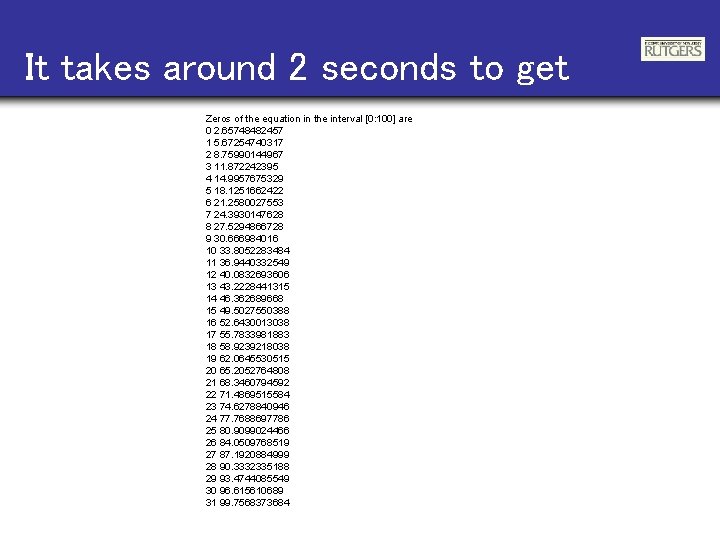
It takes around 2 seconds to get Zeros of the equation in the interval [0: 100] are 0 2. 65748482457 1 5. 67254740317 2 8. 75990144967 3 11. 872242395 4 14. 9957675329 5 18. 1251662422 6 21. 2580027553 7 24. 3930147628 8 27. 5294866728 9 30. 666984016 10 33. 8052283484 11 36. 9440332549 12 40. 0832693606 13 43. 2228441315 14 46. 362689668 15 49. 5027550388 16 52. 6430013038 17 55. 7833981883 18 58. 9239218038 19 62. 0645530515 20 65. 2052764808 21 68. 3460794592 22 71. 4869515584 23 74. 6278840946 24 77. 7688697786 25 80. 9099024466 26 84. 0509768519 27 87. 1920884999 28 90. 3332335188 29 93. 4744085549 30 96. 615610689 31 99. 7568373684
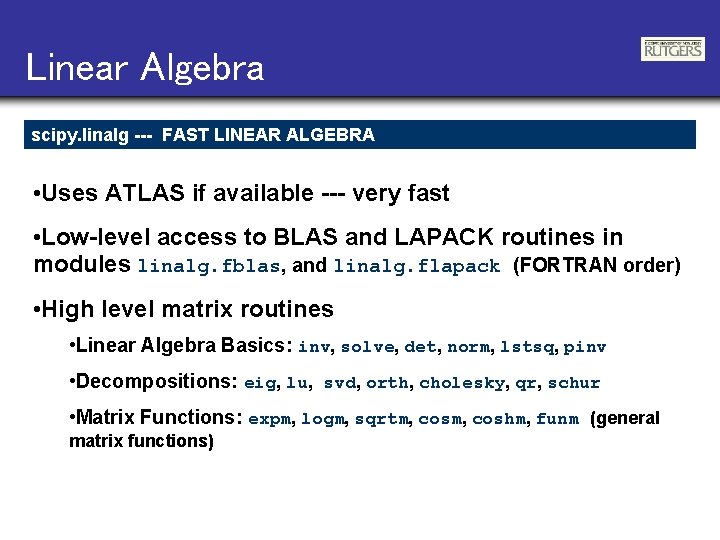
Linear Algebra scipy. linalg --- FAST LINEAR ALGEBRA • Uses ATLAS if available --- very fast • Low-level access to BLAS and LAPACK routines in modules linalg. fblas, and linalg. flapack (FORTRAN order) • High level matrix routines • Linear Algebra Basics: inv, solve, det, norm, lstsq, pinv • Decompositions: eig, lu, svd, orth, cholesky, qr, schur • Matrix Functions: expm, logm, sqrtm, coshm, funm (general matrix functions)
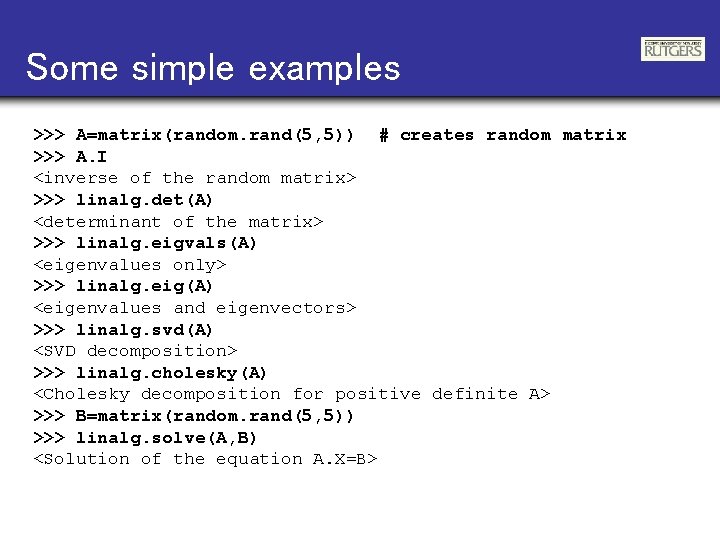
Some simple examples >>> A=matrix(random. rand(5, 5)) # creates random matrix >>> A. I <inverse of the random matrix> >>> linalg. det(A) <determinant of the matrix> >>> linalg. eigvals(A) <eigenvalues only> >>> linalg. eig(A) <eigenvalues and eigenvectors> >>> linalg. svd(A) <SVD decomposition> >>> linalg. cholesky(A) <Cholesky decomposition for positive definite A> >>> B=matrix(random. rand(5, 5)) >>> linalg. solve(A, B) <Solution of the equation A. X=B>
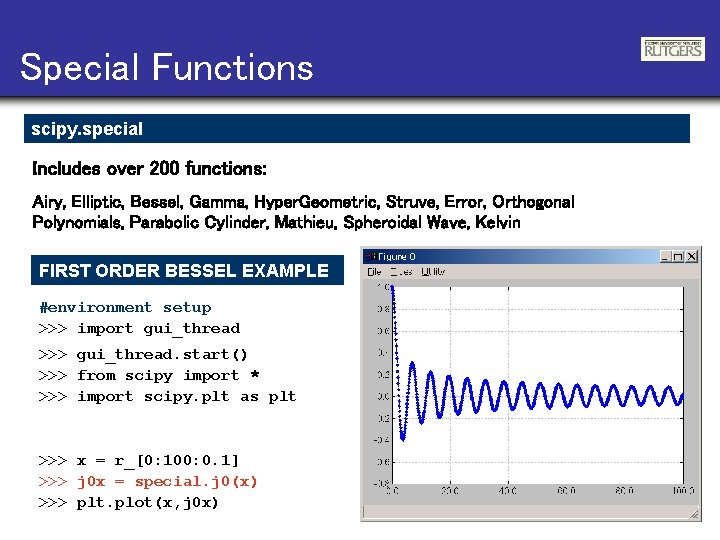
Special Functions scipy. special Includes over 200 functions: Airy, Elliptic, Bessel, Gamma, Hyper. Geometric, Struve, Error, Orthogonal Polynomials, Parabolic Cylinder, Mathieu, Spheroidal Wave, Kelvin FIRST ORDER BESSEL EXAMPLE #environment setup >>> import gui_thread >>> gui_thread. start() >>> from scipy import * >>> import scipy. plt as plt >>> x = r_[0: 100: 0. 1] >>> j 0 x = special. j 0(x) >>> plt. plot(x, j 0 x)
Special Functions scipy. special AIRY FUNCTIONS EXAMPLE >>> z = r_[-5: 100 j] >>> vals = special. airy(z) >>> xplt. figure(0, frame=1, color='blue') >>> xplt. matplot(z, vals) >>> xplt. legend(['Ai', 'Aip', ‘Bi‘, 'Bip'], color='blue') >>> xplt. xlabel('z', color='magenta') >>> xplt. title('Airy Functions and Derivatives‘)
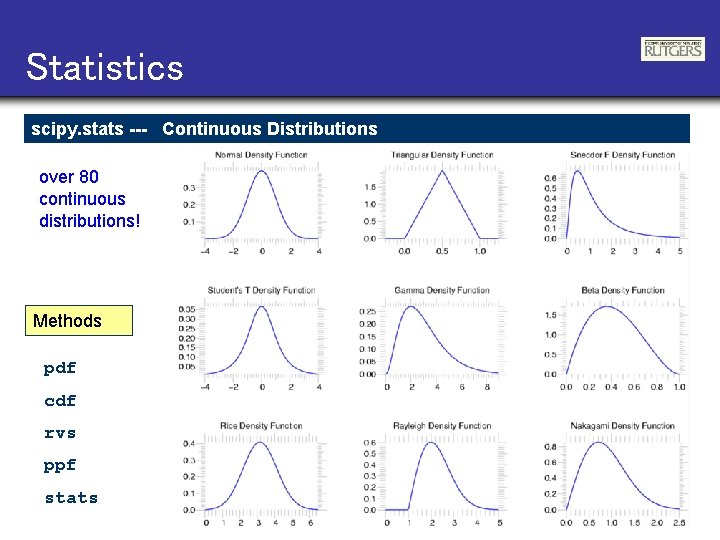
Statistics scipy. stats --- Continuous Distributions over 80 continuous distributions! Methods pdf cdf rvs ppf stats
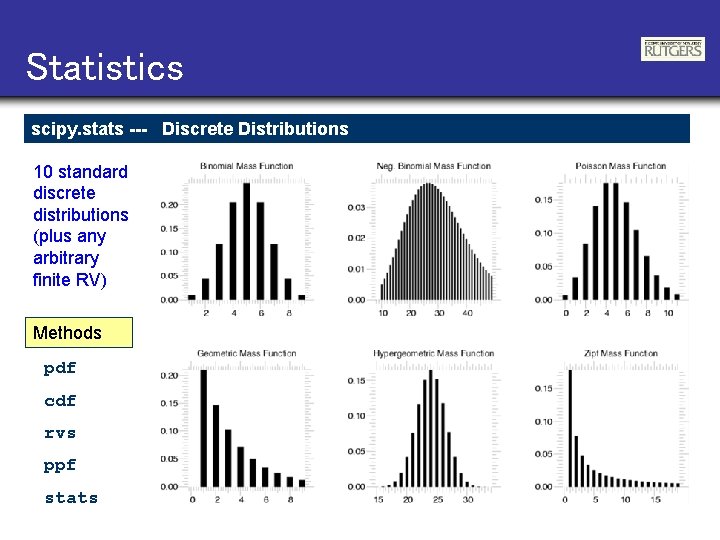
Statistics scipy. stats --- Discrete Distributions 10 standard discrete distributions (plus any arbitrary finite RV) Methods pdf cdf rvs ppf stats
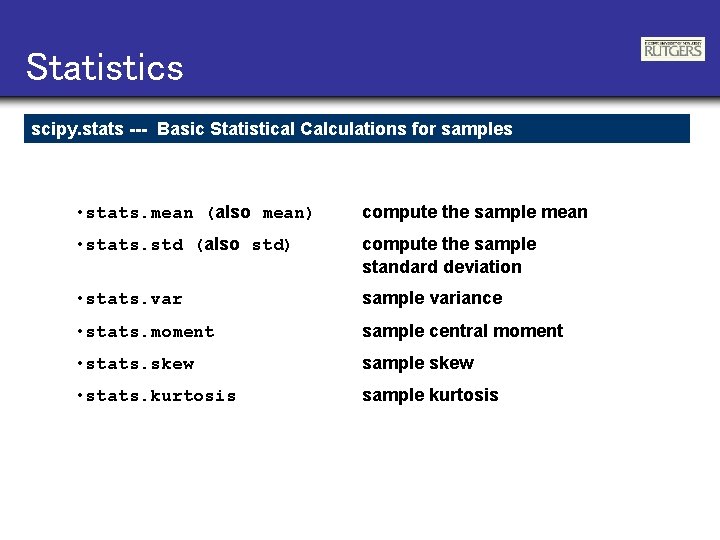
Statistics scipy. stats --- Basic Statistical Calculations for samples • stats. mean (also mean) compute the sample mean • stats. std (also std) compute the sample standard deviation • stats. var sample variance • stats. moment sample central moment • stats. skew sample skew • stats. kurtosis sample kurtosis
Interpolation scipy. interpolate --- General purpose Interpolation • 1 -d linear Interpolating Class • Constructs callable function from data points • Function takes vector of inputs and returns linear interpolants • 1 -d and 2 -d spline interpolation (FITPACK) • Splines up to order 5 • Parametric splines
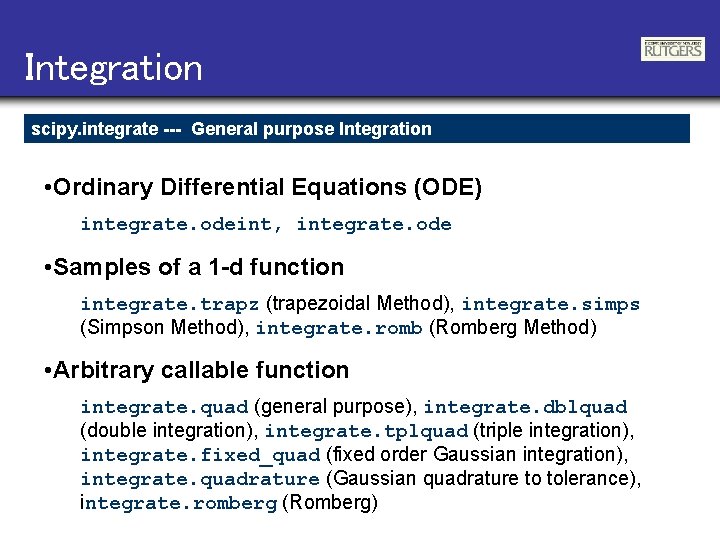
Integration scipy. integrate --- General purpose Integration • Ordinary Differential Equations (ODE) integrate. odeint, integrate. ode • Samples of a 1 -d function integrate. trapz (trapezoidal Method), integrate. simps (Simpson Method), integrate. romb (Romberg Method) • Arbitrary callable function integrate. quad (general purpose), integrate. dblquad (double integration), integrate. tplquad (triple integration), integrate. fixed_quad (fixed order Gaussian integration), integrate. quadrature (Gaussian quadrature to tolerance), integrate. romberg (Romberg)
Integration scipy. integrate --- Example >>> def func(x): return integrate. quad(cos, 0, x)[0] >>> vecfunc = vectorize(func) >>> >>> >>> x = r_[0: 2*pi: 100 j] x 2 = x[: : 5] y = sin(x) y 2 = vecfunc(x 2) xplt. plot(x, y, x 2, y 2, 'rx')
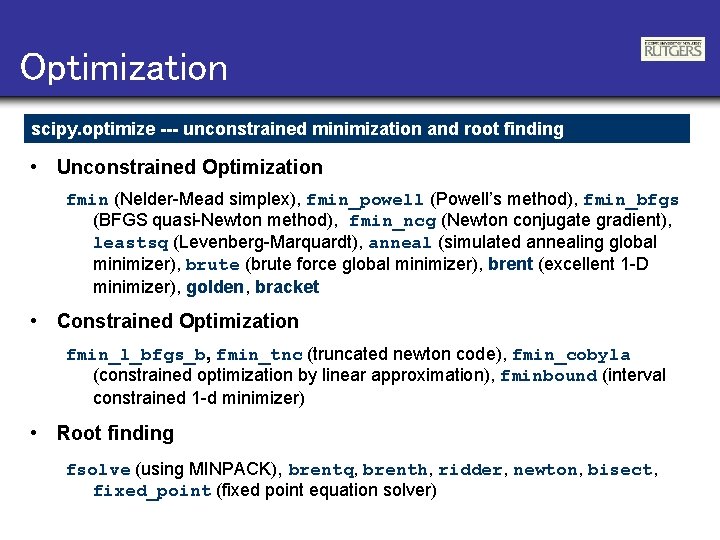
Optimization scipy. optimize --- unconstrained minimization and root finding • Unconstrained Optimization fmin (Nelder-Mead simplex), fmin_powell (Powell’s method), fmin_bfgs (BFGS quasi-Newton method), fmin_ncg (Newton conjugate gradient), leastsq (Levenberg-Marquardt), anneal (simulated annealing global minimizer), brute (brute force global minimizer), brent (excellent 1 -D minimizer), golden, bracket • Constrained Optimization fmin_l_bfgs_b, fmin_tnc (truncated newton code), fmin_cobyla (constrained optimization by linear approximation), fminbound (interval constrained 1 -d minimizer) • Root finding fsolve (using MINPACK), brentq, brenth, ridder, newton, bisect, fixed_point (fixed point equation solver)
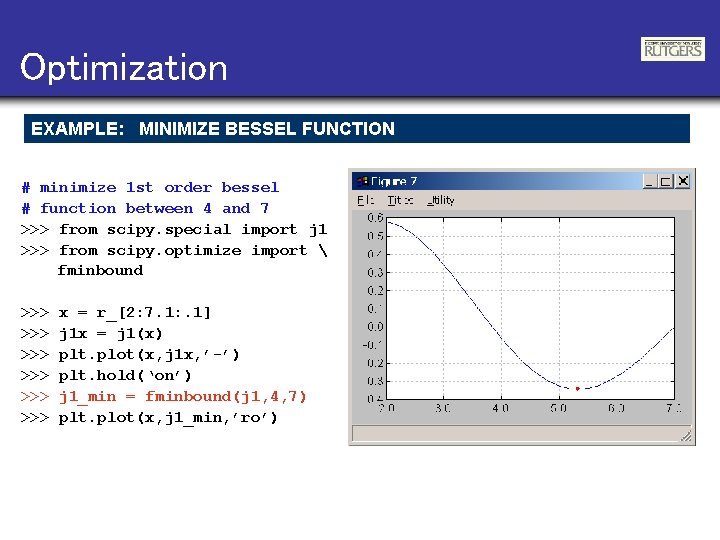
Optimization EXAMPLE: MINIMIZE BESSEL FUNCTION # minimize 1 st order bessel # function between 4 and 7 >>> from scipy. special import j 1 >>> from scipy. optimize import fminbound >>> >>> >>> x = r_[2: 7. 1: . 1] j 1 x = j 1(x) plt. plot(x, j 1 x, ’-’) plt. hold(‘on’) j 1_min = fminbound(j 1, 4, 7) plt. plot(x, j 1_min, ’ro’)
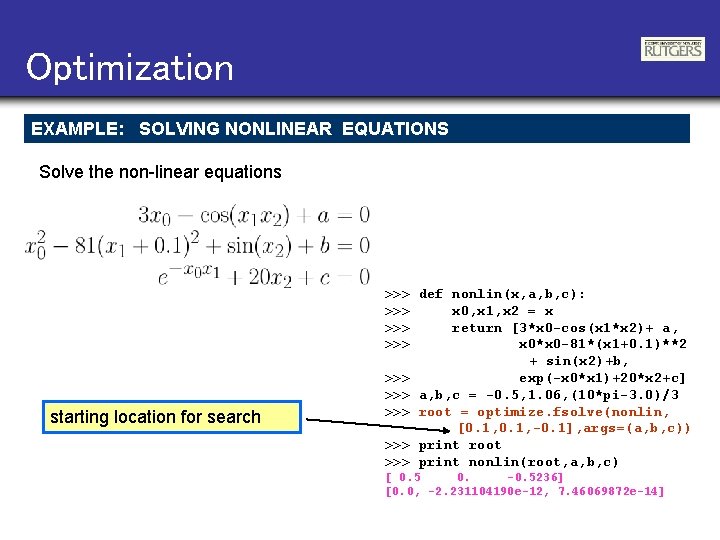
Optimization EXAMPLE: SOLVING NONLINEAR EQUATIONS Solve the non-linear equations starting location for search >>> def nonlin(x, a, b, c): >>> x 0, x 1, x 2 = x >>> return [3*x 0 -cos(x 1*x 2)+ a, >>> x 0*x 0 -81*(x 1+0. 1)**2 + sin(x 2)+b, >>> exp(-x 0*x 1)+20*x 2+c] >>> a, b, c = -0. 5, 1. 06, (10*pi-3. 0)/3 >>> root = optimize. fsolve(nonlin, [0. 1, -0. 1], args=(a, b, c)) >>> print root >>> print nonlin(root, a, b, c) [ 0. 5 0. -0. 5236] [0. 0, -2. 231104190 e-12, 7. 46069872 e-14]
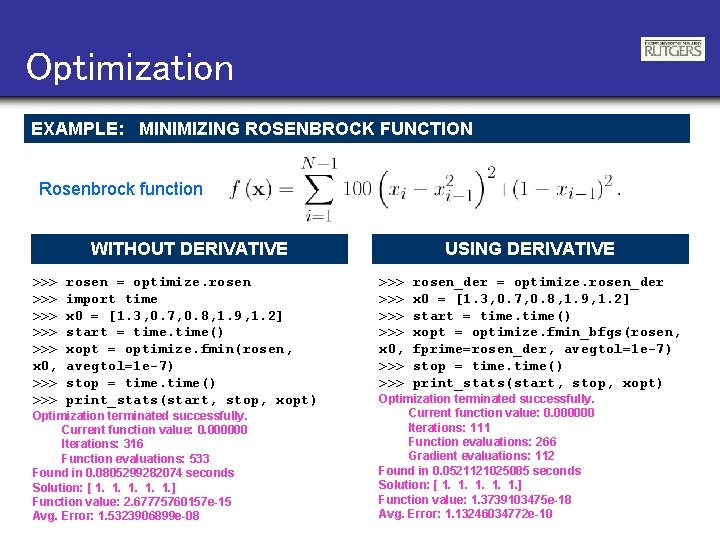
Optimization EXAMPLE: MINIMIZING ROSENBROCK FUNCTION Rosenbrock function WITHOUT DERIVATIVE >>> >>> >>> x 0, >>> rosen = optimize. rosen import time x 0 = [1. 3, 0. 7, 0. 8, 1. 9, 1. 2] start = time() xopt = optimize. fmin(rosen, avegtol=1 e-7) stop = time() print_stats(start, stop, xopt) Optimization terminated successfully. Current function value: 0. 000000 Iterations: 316 Function evaluations: 533 Found in 0. 0805299282074 seconds Solution: [ 1. 1. 1. ] Function value: 2. 67775760157 e-15 Avg. Error: 1. 5323906899 e-08 USING DERIVATIVE >>> >>> x 0, >>> rosen_der = optimize. rosen_der x 0 = [1. 3, 0. 7, 0. 8, 1. 9, 1. 2] start = time() xopt = optimize. fmin_bfgs(rosen, fprime=rosen_der, avegtol=1 e-7) stop = time() print_stats(start, stop, xopt) Optimization terminated successfully. Current function value: 0. 000000 Iterations: 111 Function evaluations: 266 Gradient evaluations: 112 Found in 0. 0521121025085 seconds Solution: [ 1. 1. 1. ] Function value: 1. 3739103475 e-18 Avg. Error: 1. 13246034772 e-10
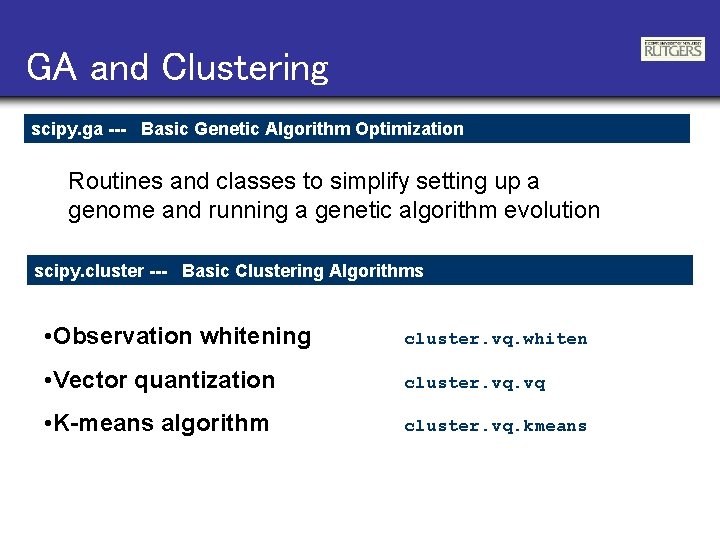
GA and Clustering scipy. ga --- Basic Genetic Algorithm Optimization Routines and classes to simplify setting up a genome and running a genetic algorithm evolution scipy. cluster --- Basic Clustering Algorithms • Observation whitening cluster. vq. whiten • Vector quantization cluster. vq • K-means algorithm cluster. vq. kmeans