
Introduction to School Age STAC Processing STAC Homepage

- Slides: 110
Introduction to School Age STAC Processing STAC Homepage: http: //www. oms. nysed. gov/stac/ 2019/2020
2019/2020 2 Outline of Slide Show • Section A - Introduction • Section H - Reapplying Continuing Placements for the Next School Year • Section B - Registering for the STAC Online (EFRT) System and the SED File Transfer Manager • Section I - Looking Up Information on the STAC Online (EFRT) System • Section C - Accessing the STAC Online (EFRT) System & Finding a STAC ID • Section J - School Age Payments • Section K - Navigating the SED File Transfer Manager and Retrieving Available Reports • Section L - List. Serv and NYSED Contacts • Section D - Pre-Approval: Private Placement Certifications, Initial Eligibility, Initial Applications • Section E - Entering Service Approvals • Section F – High Cost Worksheets • Section G – Verifying Service Approvals
2019/2020 SECTION A Introduction 3
2019/2020 4 STAC System to Track and Account for Children (STAC) The STAC and Medicaid Unit is the unit within the NYS Education Department responsible for processing requests for Commissioner's approval for reimbursement. This includes reimbursement approval for the costs of providing services to preschool and school-age students placed in special education programs at public and SED-approved private schools, special-act school districts, BOCES, and at state-supported and state-operated schools for the deaf and blind. It also includes reimbursement approvals for students who have been determined to be homeless or runaway youth and for education services provided to incarcerated youth. The STAC Unit collects data needed for processing reimbursements on over 270, 000 placements each year. This data includes: Who is arranging placement of the child What provider will deliver the services Which district has financial responsibility Prior approvals and private placement certifications Verification that services were delivered State Aid Reimbursements based on STAC verifications
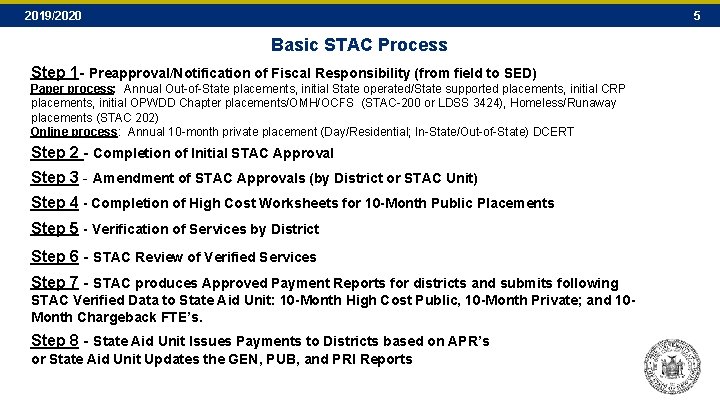
2019/2020 5 Basic STAC Process Step 1 - Preapproval/Notification of Fiscal Responsibility (from field to SED) Paper process: Annual Out-of-State placements, initial State operated/State supported placements, initial CRP placements, initial OPWDD Chapter placements/OMH/OCFS (STAC-200 or LDSS 3424), Homeless/Runaway placements (STAC 202) Online process: Annual 10 -month private placement (Day/Residential; In-State/Out-of-State) DCERT Step 2 - Completion of Initial STAC Approval Step 3 - Amendment of STAC Approvals (by District or STAC Unit) Step 4 - Completion of High Cost Worksheets for 10 -Month Public Placements Step 5 - Verification of Services by District Step 6 - STAC Review of Verified Services Step 7 - STAC produces Approved Payment Reports for districts and submits following STAC Verified Data to State Aid Unit: 10 -Month High Cost Public, 10 -Month Private; and 10 Month Chargeback FTE’s. Step 8 - State Aid Unit Issues Payments to Districts based on APR’s or State Aid Unit Updates the GEN, PUB, and PRI Reports
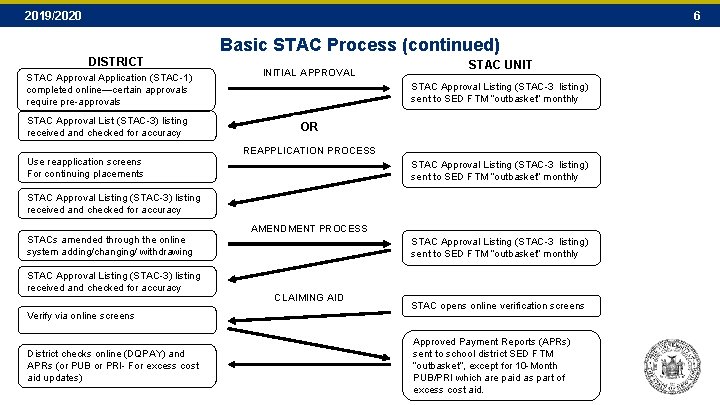
2019/2020 6 Basic STAC Process (continued) DISTRICT STAC Approval Application (STAC-1) completed online—certain approvals require pre-approvals STAC Approval List (STAC-3) listing received and checked for accuracy Use reapplication screens For continuing placements INITIAL APPROVAL STAC UNIT STAC Approval Listing (STAC-3 listing) sent to SED FTM “outbasket” monthly OR REAPPLICATION PROCESS STAC Approval Listing (STAC-3 listing) sent to SED FTM “outbasket” monthly STAC Approval Listing (STAC-3) listing received and checked for accuracy STACs amended through the online system adding/changing/ withdrawing STAC Approval Listing (STAC-3) listing received and checked for accuracy Verify via online screens AMENDMENT PROCESS STAC Approval Listing (STAC-3 listing) sent to SED FTM “outbasket” monthly CLAIMING AID STAC opens online verification screens District checks online (DQPAY) and APRs (or PUB or PRI- For excess cost aid updates) Approved Payment Reports (APRs) sent to school district SED FTM “outbasket”, except for 10 -Month PUB/PRI which are paid as part of excess cost aid.
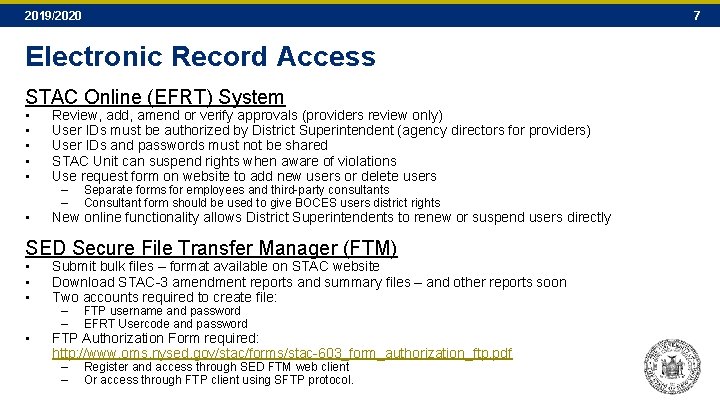
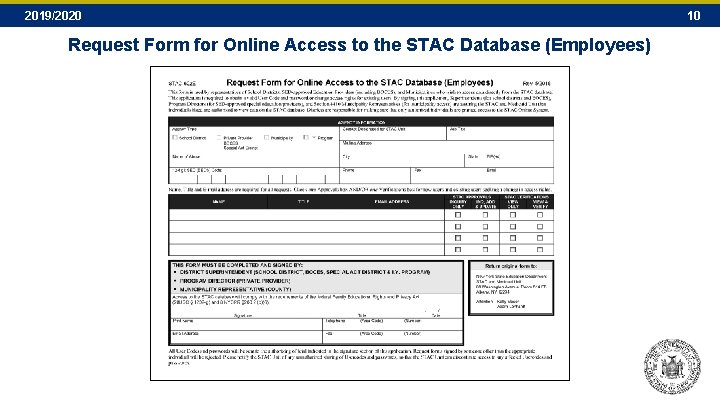
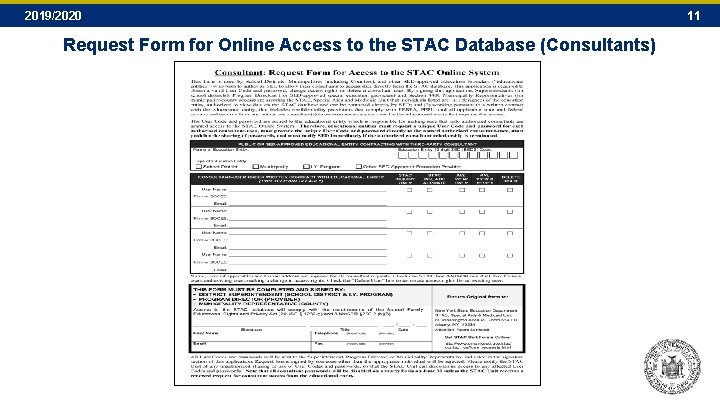
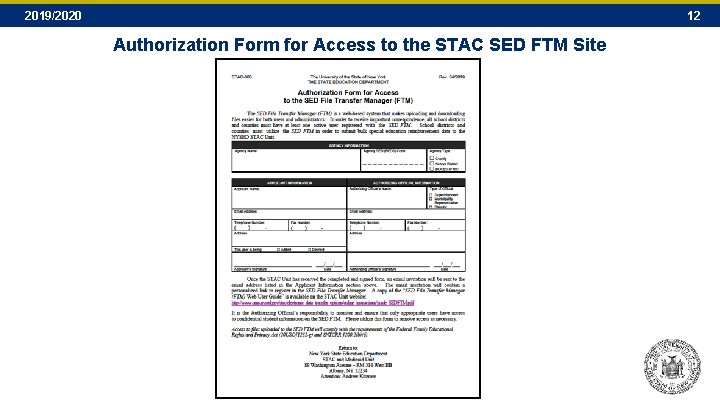
2019/2020 7 Electronic Record Access STAC Online (EFRT) System • • • Review, add, amend or verify approvals (providers review only) User IDs must be authorized by District Superintendent (agency directors for providers) User IDs and passwords must not be shared STAC Unit can suspend rights when aware of violations Use request form on website to add new users or delete users • New online functionality allows District Superintendents to renew or suspend users directly – – Separate forms for employees and third-party consultants Consultant form should be used to give BOCES users district rights SED Secure File Transfer Manager (FTM) • • • Submit bulk files – format available on STAC website Download STAC-3 amendment reports and summary files – and other reports soon Two accounts required to create file: • FTP Authorization Form required: http: //www. oms. nysed. gov/stac/forms/stac-603_form_authorization_ftp. pdf – – FTP username and password EFRT Usercode and password – – Register and access through SED FTM web client Or access through FTP client using SFTP protocol.
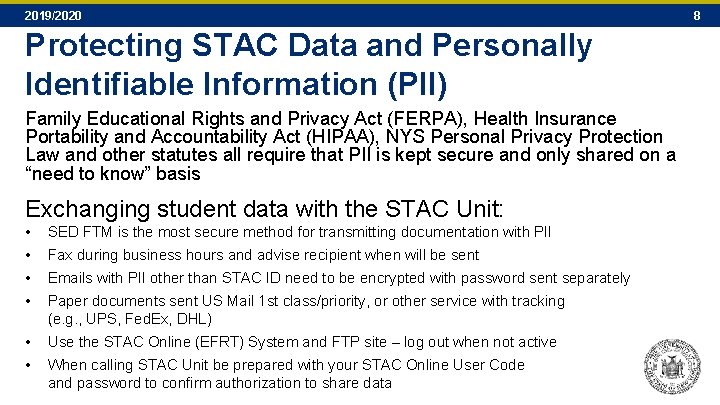
2019/2020 Protecting STAC Data and Personally Identifiable Information (PII) Family Educational Rights and Privacy Act (FERPA), Health Insurance Portability and Accountability Act (HIPAA), NYS Personal Privacy Protection Law and other statutes all require that PII is kept secure and only shared on a “need to know” basis Exchanging student data with the STAC Unit: • • SED FTM is the most secure method for transmitting documentation with PII • • Use the STAC Online (EFRT) System and FTP site – log out when not active Fax during business hours and advise recipient when will be sent Emails with PII other than STAC ID need to be encrypted with password sent separately Paper documents sent US Mail 1 st class/priority, or other service with tracking (e. g. , UPS, Fed. Ex, DHL) When calling STAC Unit be prepared with your STAC Online User Code and password to confirm authorization to share data 8
2019/2020 SECTION B Registering for the STAC Online (EFRT) System and the SED File Transfer Manager 9
2019/2020 Request Form for Online Access to the STAC Database (Employees) 10
2019/2020 Request Form for Online Access to the STAC Database (Consultants) 11
2019/2020 12 Authorization Form for Access to the STAC SED FTM Site
2019/2020 SECTION C Accessing the STAC Online (EFRT) System & Finding a STAC ID 13
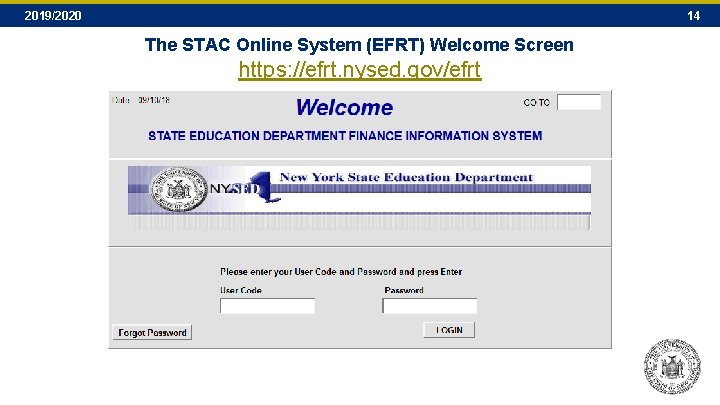
2019/2020 14 The STAC Online System (EFRT) Welcome Screen https: //efrt. nysed. gov/efrt
2019/2020 15 Locating / Creating a STAC ID
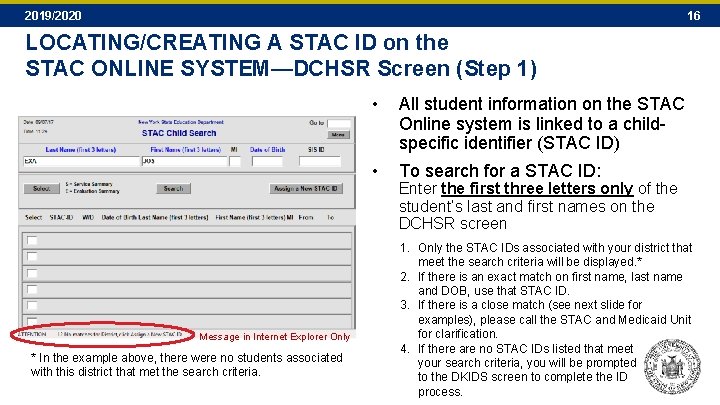
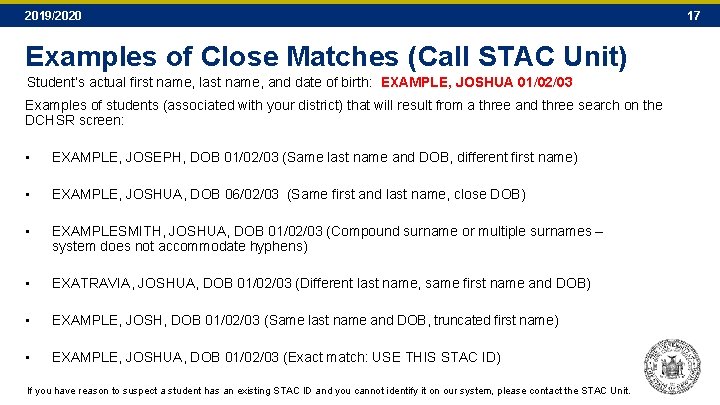
2019/2020 16 LOCATING/CREATING A STAC ID on the STAC ONLINE SYSTEM—DCHSR Screen (Step 1) Message in Internet Explorer Only * In the example above, there were no students associated with this district that met the search criteria. • All student information on the STAC Online system is linked to a childspecific identifier (STAC ID) • To search for a STAC ID: Enter the first three letters only of the student’s last and first names on the DCHSR screen 1. Only the STAC IDs associated with your district that meet the search criteria will be displayed. * 2. If there is an exact match on first name, last name and DOB, use that STAC ID. 3. If there is a close match (see next slide for examples), please call the STAC and Medicaid Unit for clarification. 4. If there are no STAC IDs listed that meet your search criteria, you will be prompted to the DKIDS screen to complete the ID process.
2019/2020 Examples of Close Matches (Call STAC Unit) Student’s actual first name, last name, and date of birth: EXAMPLE, JOSHUA 01/02/03 Examples of students (associated with your district) that will result from a three and three search on the DCHSR screen: • EXAMPLE, JOSEPH, DOB 01/02/03 (Same last name and DOB, different first name) • EXAMPLE, JOSHUA, DOB 06/02/03 (Same first and last name, close DOB) • EXAMPLESMITH, JOSHUA, DOB 01/02/03 (Compound surname or multiple surnames – system does not accommodate hyphens) • EXATRAVIA, JOSHUA, DOB 01/02/03 (Different last name, same first name and DOB) • EXAMPLE, JOSH, DOB 01/02/03 (Same last name and DOB, truncated first name) • EXAMPLE, JOSHUA, DOB 01/02/03 (Exact match: USE THIS STAC ID) If you have reason to suspect a student has an existing STAC ID and you cannot identify it on our system, please contact the STAC Unit. 17
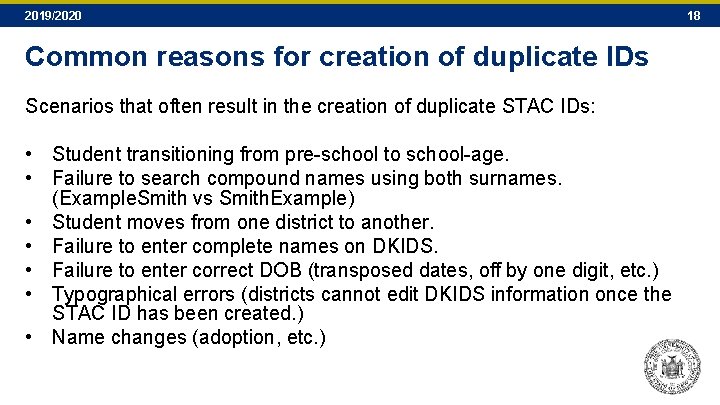
2019/2020 Common reasons for creation of duplicate IDs Scenarios that often result in the creation of duplicate STAC IDs: • Student transitioning from pre-school to school-age. • Failure to search compound names using both surnames. (Example. Smith vs Smith. Example) • Student moves from one district to another. • Failure to enter complete names on DKIDS. • Failure to enter correct DOB (transposed dates, off by one digit, etc. ) • Typographical errors (districts cannot edit DKIDS information once the STAC ID has been created. ) • Name changes (adoption, etc. ) 18
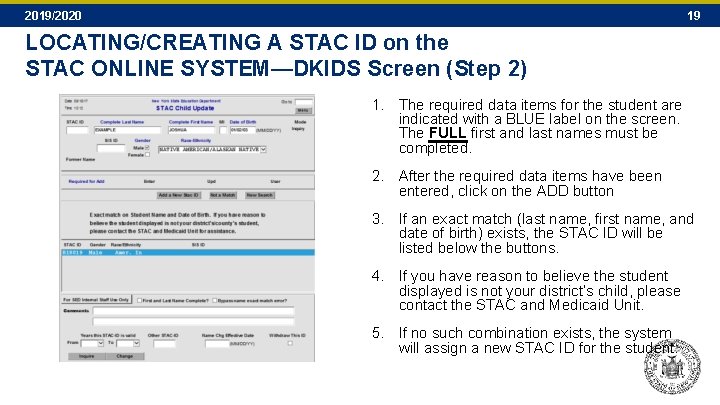
2019/2020 19 LOCATING/CREATING A STAC ID on the STAC ONLINE SYSTEM—DKIDS Screen (Step 2) 1. The required data items for the student are indicated with a BLUE label on the screen. The FULL first and last names must be completed. 2. After the required data items have been entered, click on the ADD button 3. If an exact match (last name, first name, and date of birth) exists, the STAC ID will be listed below the buttons. 4. If you have reason to believe the student displayed is not your district’s child, please contact the STAC and Medicaid Unit. 5. If no such combination exists, the system will assign a new STAC ID for the student.
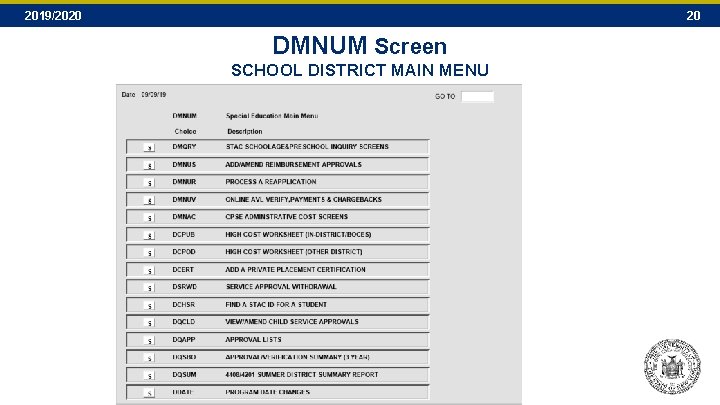
2019/2020 20 DMNUM Screen SCHOOL DISTRICT MAIN MENU
2019/2020 21 STAC Submission/Verification Timeframe Examples • Prior to Submission of STAC reimbursement approval – – • Less than one year (from program end date) – – – • Homeless - Online OPWDD Chapter – Paper Private Excess Cost (**one year for current year funding) - Online Public Excess Cost (**one year for current year funding) – Online Two Years (from program end date) – – – • Incarcerated Youth – Online (07/01 -08/31) (09/01 -06/30) § 4201 State Supported (September – June) - Online State Operated – by Provider One Year (from program end date) – – • Private Placement Certification – Online (10 -month only) Notice of District Responsibility (STAC-200, LDSS 3424, STAC-202) – (Paper process) Private Excess Cost (**two years for prior year funding) - Online Public Excess Cost (**two years for prior year funding) – Online CRP – Children’s Residential Project – by Provider and District Three Years (from 10 -month program end date) – – 4408 Summer (Public and Private) - Online Summer Related Services - Online § 4201 State Supported Summer Transportation – Online § 4410 Preschool- Online **Current Year Funding While Public and Private Excess (High) Cost records can be verified for payment for up to two years after the end of the school year, current year funding is only paid based on prior school year records verified by 06/30 (within one year of the SY close). A record verified in the second year is processed as a prior year adjustment. Actual payment of Aid for a prior year adjustments can take more than 10 years. Only those records verified in the first year will be paid on a current year basis.
2019/2020 SECTION D Pre-Approval: Private Placement Certifications, Initial Eligibility, Initial Applications 22
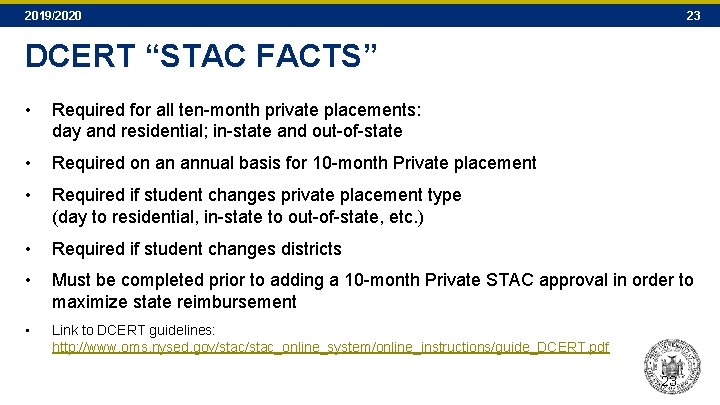
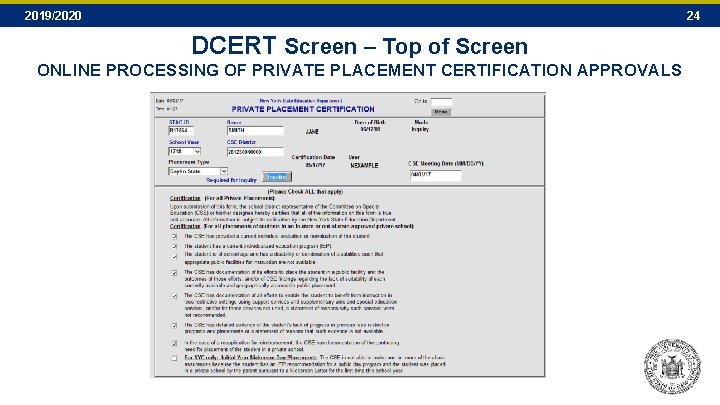
2019/2020 23 DCERT “STAC FACTS” • Required for all ten-month private placements: day and residential; in-state and out-of-state • Required on an annual basis for 10 -month Private placement • Required if student changes private placement type (day to residential, in-state to out-of-state, etc. ) • Required if student changes districts • Must be completed prior to adding a 10 -month Private STAC approval in order to maximize state reimbursement • Link to DCERT guidelines: http: //www. oms. nysed. gov/stac_online_system/online_instructions/guide_DCERT. pdf 23
2019/2020 24 DCERT Screen – Top of Screen ONLINE PROCESSING OF PRIVATE PLACEMENT CERTIFICATION APPROVALS
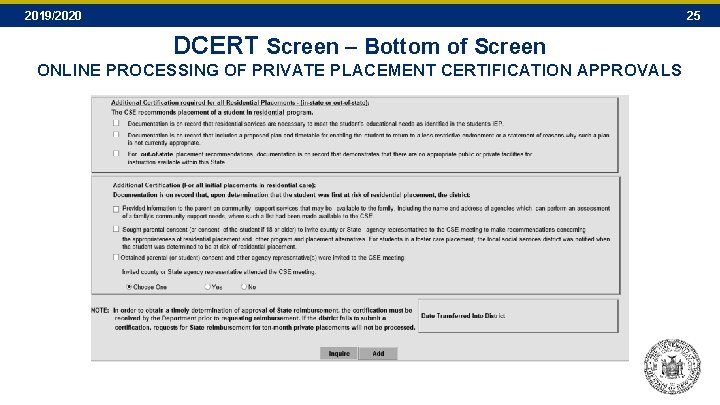
2019/2020 25 DCERT Screen – Bottom of Screen ONLINE PROCESSING OF PRIVATE PLACEMENT CERTIFICATION APPROVALS
2019/2020 SECTION E Entering Service Approvals 26
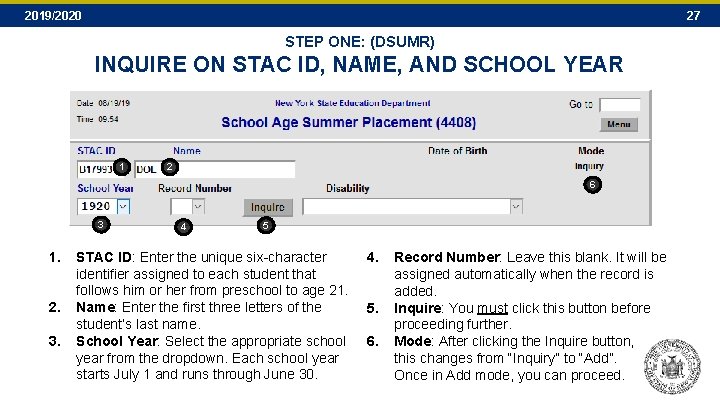
2019/2020 27 STEP ONE: (DSUMR) INQUIRE ON STAC ID, NAME, AND SCHOOL YEAR 1 2 6 3 1. 2. 3. 4 5 STAC ID: Enter the unique six-character identifier assigned to each student that follows him or her from preschool to age 21. Name: Enter the first three letters of the student’s last name. School Year: Select the appropriate school year from the dropdown. Each school year starts July 1 and runs through June 30. 4. 5. 6. Record Number: Leave this blank. It will be assigned automatically when the record is added. Inquire: You must click this button before proceeding further. Mode: After clicking the Inquire button, this changes from “Inquiry” to “Add”. Once in Add mode, you can proceed.
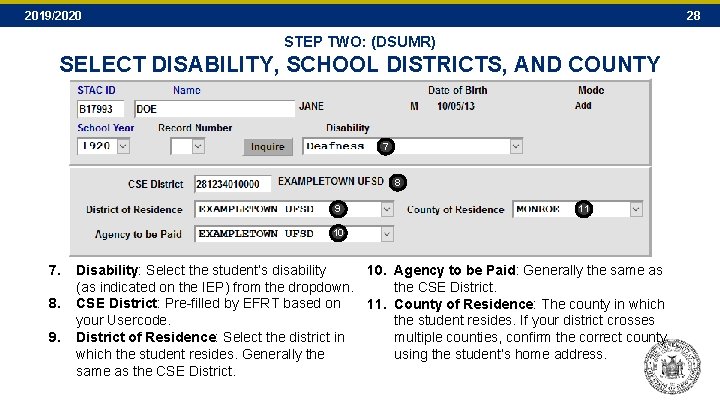
2019/2020 28 STEP TWO: (DSUMR) SELECT DISABILITY, SCHOOL DISTRICTS, AND COUNTY 7 8 9 11 10 7. 8. 9. Disability: Select the student’s disability 10. Agency to be Paid: Generally the same as (as indicated on the IEP) from the dropdown. the CSE District: Pre-filled by EFRT based on 11. County of Residence: The county in which your Usercode. the student resides. If your district crosses District of Residence: Select the district in multiple counties, confirm the correct county which the student resides. Generally the using the student’s home address. same as the CSE District.
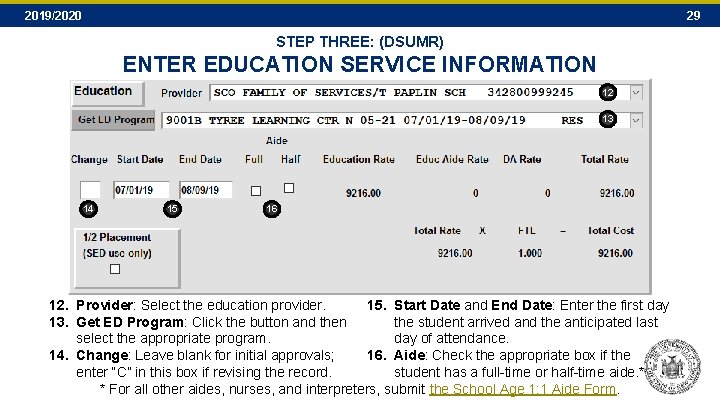
2019/2020 29 STEP THREE: (DSUMR) ENTER EDUCATION SERVICE INFORMATION 12 13 14 15 16 12. Provider: Select the education provider. 15. Start Date and End Date: Enter the first day 13. Get ED Program: Click the button and then the student arrived and the anticipated last select the appropriate program. day of attendance. 14. Change: Leave blank for initial approvals; 16. Aide: Check the appropriate box if the enter “C” in this box if revising the record. student has a full-time or half-time aide. * * For all other aides, nurses, and interpreters, submit the School Age 1: 1 Aide Form.
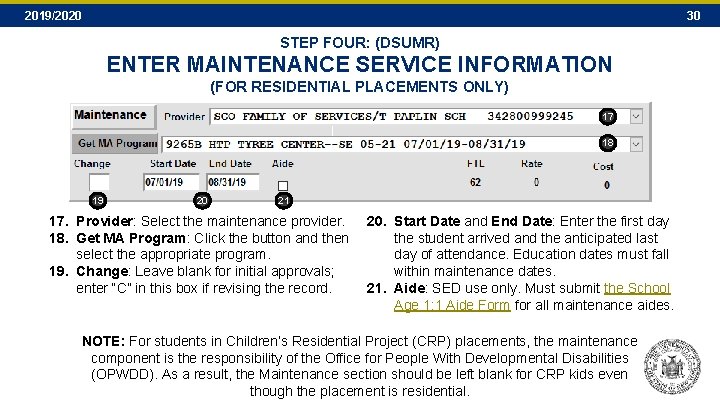
2019/2020 30 STEP FOUR: (DSUMR) ENTER MAINTENANCE SERVICE INFORMATION (FOR RESIDENTIAL PLACEMENTS ONLY) 17 18 19 20 21 17. Provider: Select the maintenance provider. 20. Start Date and End Date: Enter the first day 18. Get MA Program: Click the button and then the student arrived and the anticipated last select the appropriate program. day of attendance. Education dates must fall 19. Change: Leave blank for initial approvals; within maintenance dates. enter “C” in this box if revising the record. 21. Aide: SED use only. Must submit the School Age 1: 1 Aide Form for all maintenance aides. NOTE: For students in Children’s Residential Project (CRP) placements, the maintenance component is the responsibility of the Office for People With Developmental Disabilities (OPWDD). As a result, the Maintenance section should be left blank for CRP kids even though the placement is residential.
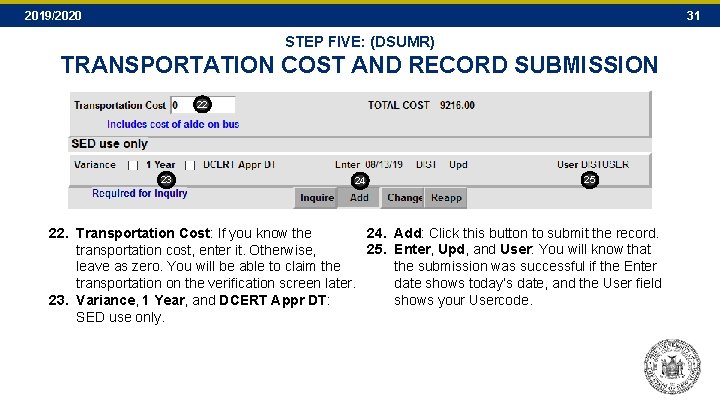
2019/2020 31 STEP FIVE: (DSUMR) TRANSPORTATION COST AND RECORD SUBMISSION 22 23 24 25 24. Add: Click this button to submit the record. 22. Transportation Cost: If you know the 25. Enter, Upd, and User: You will know that transportation cost, enter it. Otherwise, the submission was successful if the Enter leave as zero. You will be able to claim the date shows today’s date, and the User field transportation on the verification screen later. shows your Usercode. 23. Variance, 1 Year, and DCERT Appr DT: SED use only.
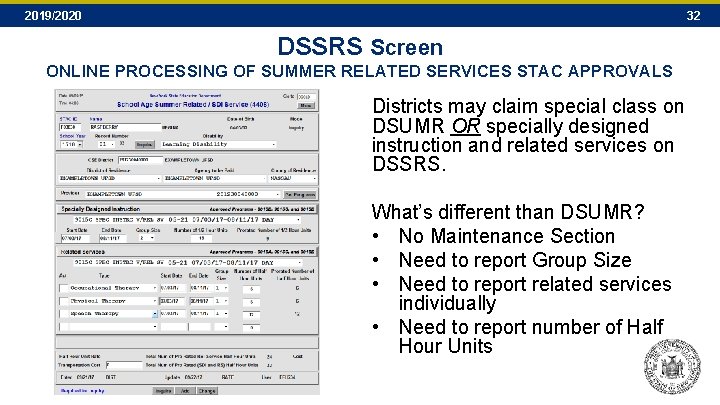
2019/2020 32 DSSRS Screen ONLINE PROCESSING OF SUMMER RELATED SERVICES STAC APPROVALS Districts may claim special class on DSUMR OR specially designed instruction and related services on DSSRS. What’s different than DSUMR? • No Maintenance Section • Need to report Group Size • Need to report related services individually • Need to report number of Half Hour Units
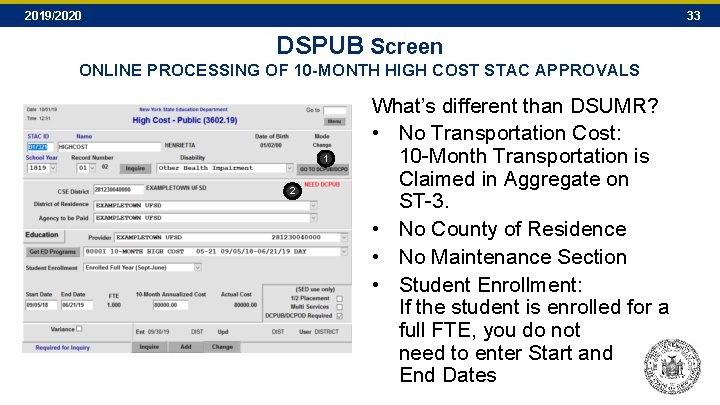
2019/2020 33 DSPUB Screen ONLINE PROCESSING OF 10 -MONTH HIGH COST STAC APPROVALS 1 2 What’s different than DSUMR? • No Transportation Cost: 10 -Month Transportation is Claimed in Aggregate on ST-3. • No County of Residence • No Maintenance Section • Student Enrollment: If the student is enrolled for a full FTE, you do not need to enter Start and End Dates
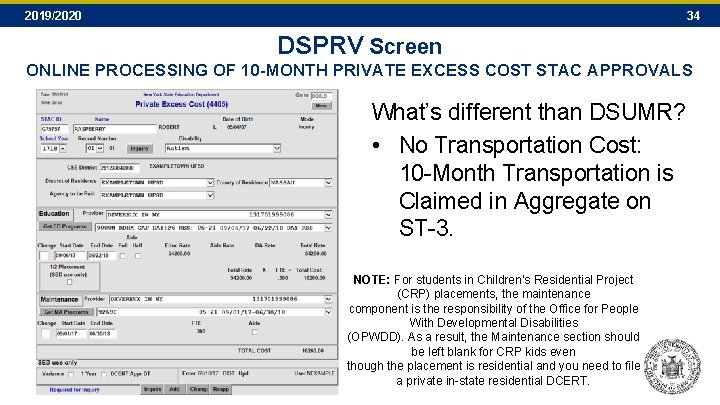
2019/2020 34 DSPRV Screen ONLINE PROCESSING OF 10 -MONTH PRIVATE EXCESS COST STAC APPROVALS What’s different than DSUMR? • No Transportation Cost: 10 -Month Transportation is Claimed in Aggregate on ST-3. NOTE: For students in Children’s Residential Project (CRP) placements, the maintenance component is the responsibility of the Office for People With Developmental Disabilities (OPWDD). As a result, the Maintenance section should be left blank for CRP kids even though the placement is residential and you need to file a private in-state residential DCERT.
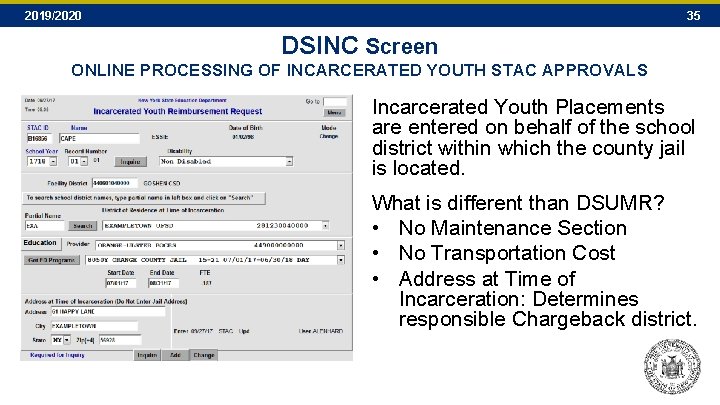
2019/2020 35 DSINC Screen ONLINE PROCESSING OF INCARCERATED YOUTH STAC APPROVALS Incarcerated Youth Placements are entered on behalf of the school district within which the county jail is located. What is different than DSUMR? • No Maintenance Section • No Transportation Cost • Address at Time of Incarceration: Determines responsible Chargeback district.
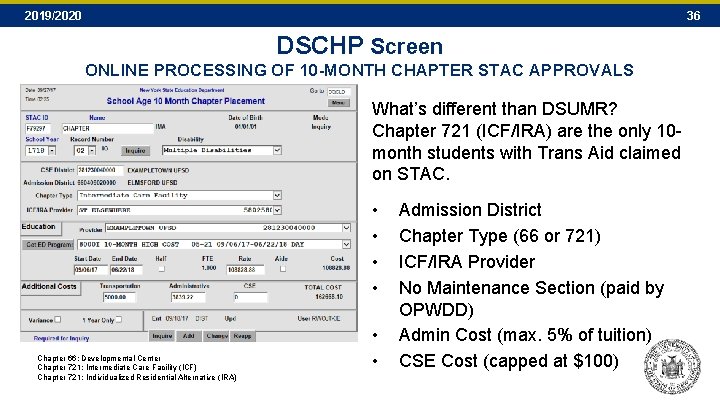
2019/2020 36 DSCHP Screen ONLINE PROCESSING OF 10 -MONTH CHAPTER STAC APPROVALS What’s different than DSUMR? Chapter 721 (ICF/IRA) are the only 10 month students with Trans Aid claimed on STAC. • • Chapter 66: Developmental Center Chapter 721: Intermediate Care Facility (ICF) Chapter 721: Individualized Residential Alternative (IRA) • • Admission District Chapter Type (66 or 721) ICF/IRA Provider No Maintenance Section (paid by OPWDD) Admin Cost (max. 5% of tuition) CSE Cost (capped at $100)
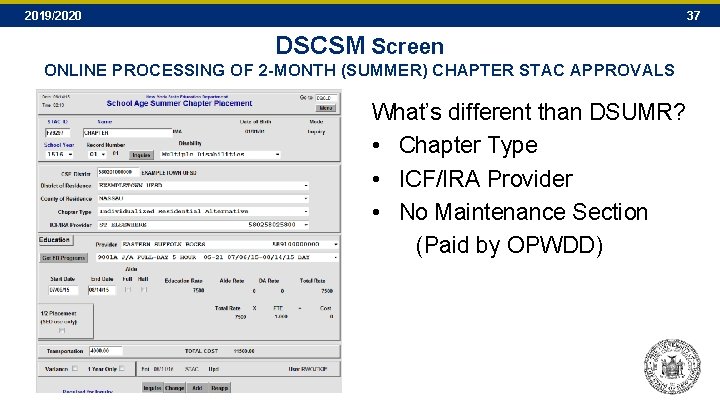
2019/2020 37 DSCSM Screen ONLINE PROCESSING OF 2 -MONTH (SUMMER) CHAPTER STAC APPROVALS What’s different than DSUMR? • Chapter Type • ICF/IRA Provider • No Maintenance Section (Paid by OPWDD)
2019/2020 SECTION F High Cost Worksheets 38
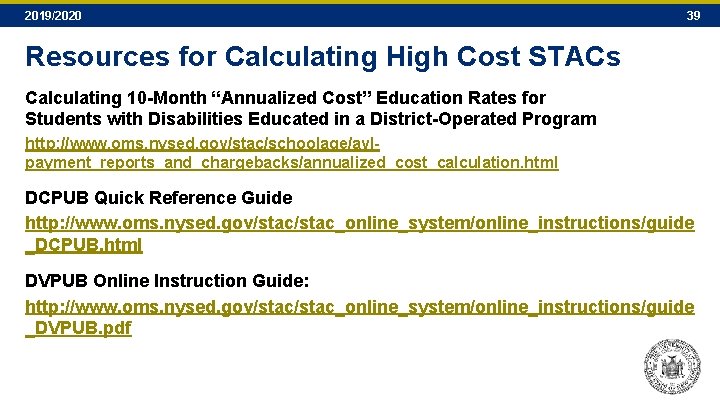
2019/2020 39 Resources for Calculating High Cost STACs Calculating 10 -Month “Annualized Cost” Education Rates for Students with Disabilities Educated in a District-Operated Program http: //www. oms. nysed. gov/stac/schoolage/avlpayment_reports_and_chargebacks/annualized_cost_calculation. html DCPUB Quick Reference Guide http: //www. oms. nysed. gov/stac_online_system/online_instructions/guide _DCPUB. html DVPUB Online Instruction Guide: http: //www. oms. nysed. gov/stac_online_system/online_instructions/guide _DVPUB. pdf
2019/2020 40 DCPUB Screen This screen serves two purposes for In-District and BOCES placements: 1. It’s a tool for school districts to use when calculating the actual 10 -Month Annualized Costs for their students. While the screen must be completed for some students, it can be completed for any student educated in-district or by a BOCES. 2. It’s a tool for the State Education Department to use when reviewing and validating claims for timely reimbursement.
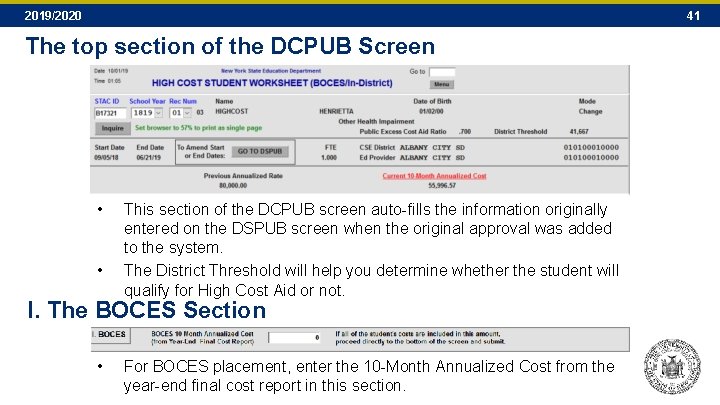
2019/2020 41 The top section of the DCPUB Screen • • This section of the DCPUB screen auto-fills the information originally entered on the DSPUB screen when the original approval was added to the system. The District Threshold will help you determine whether the student will qualify for High Cost Aid or not. I. The BOCES Section • For BOCES placement, enter the 10 -Month Annualized Cost from the year-end final cost report in this section.
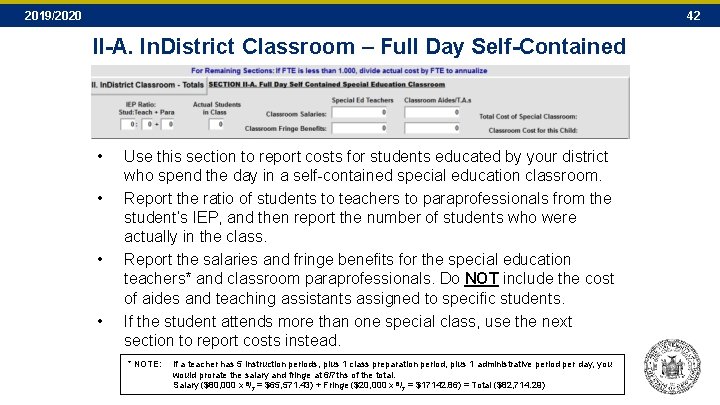
2019/2020 42 II-A. In. District Classroom – Full Day Self-Contained • • Use this section to report costs for students educated by your district who spend the day in a self-contained special education classroom. Report the ratio of students to teachers to paraprofessionals from the student’s IEP, and then report the number of students who were actually in the class. Report the salaries and fringe benefits for the special education teachers* and classroom paraprofessionals. Do NOT include the cost of aides and teaching assistants assigned to specific students. If the student attends more than one special class, use the next section to report costs instead. * NOTE: If a teacher has 5 instruction periods, plus 1 class preparation period, plus 1 administrative period per day, you would prorate the salary and fringe at 6/7 ths of the total. Salary ($80, 000 x 6/7 = $65, 571. 43) + Fringe ($20, 000 x 6/7 = $17142. 86) = Total ($82, 714. 29)
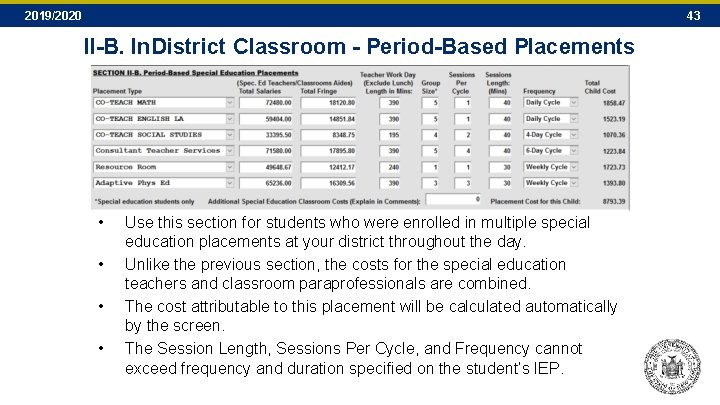
2019/2020 43 II-B. In. District Classroom - Period-Based Placements • • Use this section for students who were enrolled in multiple special education placements at your district throughout the day. Unlike the previous section, the costs for the special education teachers and classroom paraprofessionals are combined. The cost attributable to this placement will be calculated automatically by the screen. The Session Length, Sessions Per Cycle, and Frequency cannot exceed frequency and duration specified on the student’s IEP.
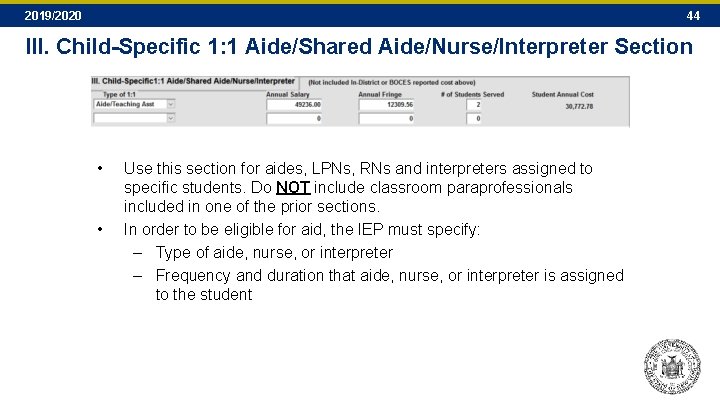
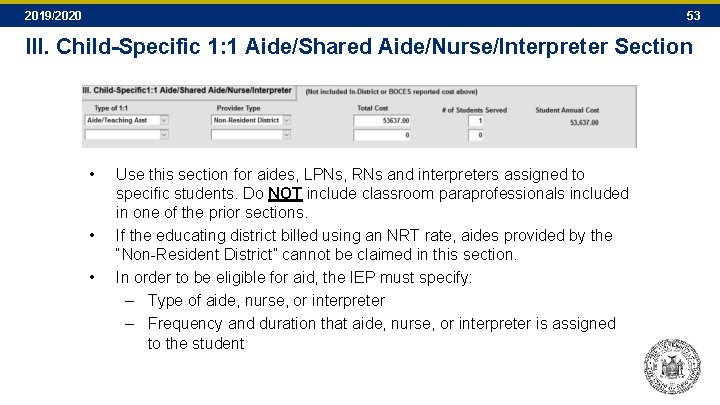
2019/2020 44 III. Child-Specific 1: 1 Aide/Shared Aide/Nurse/Interpreter Section • • Use this section for aides, LPNs, RNs and interpreters assigned to specific students. Do NOT include classroom paraprofessionals included in one of the prior sections. In order to be eligible for aid, the IEP must specify: – Type of aide, nurse, or interpreter – Frequency and duration that aide, nurse, or interpreter is assigned to the student
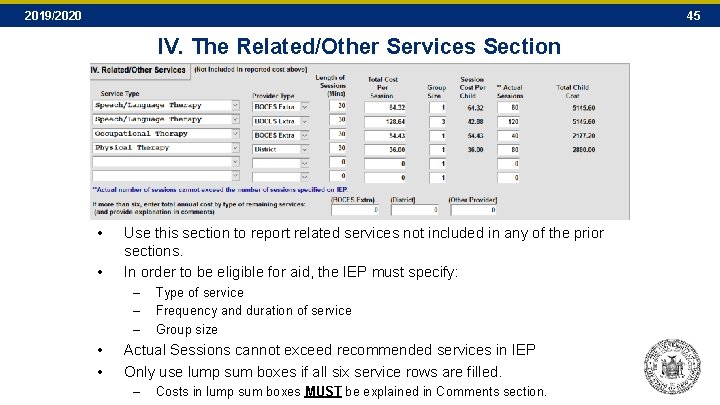
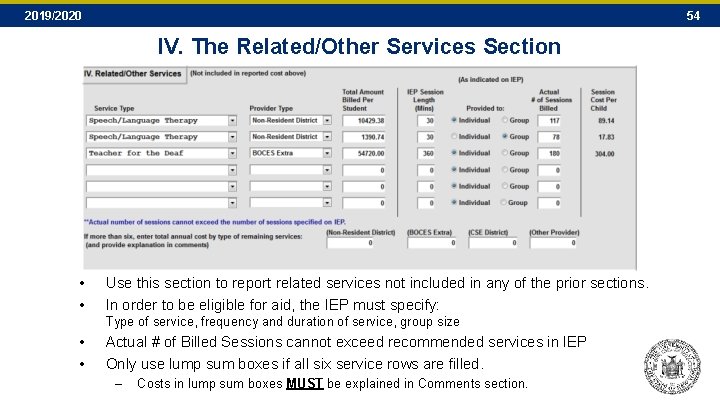
2019/2020 45 IV. The Related/Other Services Section • • Use this section to report related services not included in any of the prior sections. In order to be eligible for aid, the IEP must specify: – – – • • Type of service Frequency and duration of service Group size Actual Sessions cannot exceed recommended services in IEP Only use lump sum boxes if all six service rows are filled. – Costs in lump sum boxes MUST be explained in Comments section.
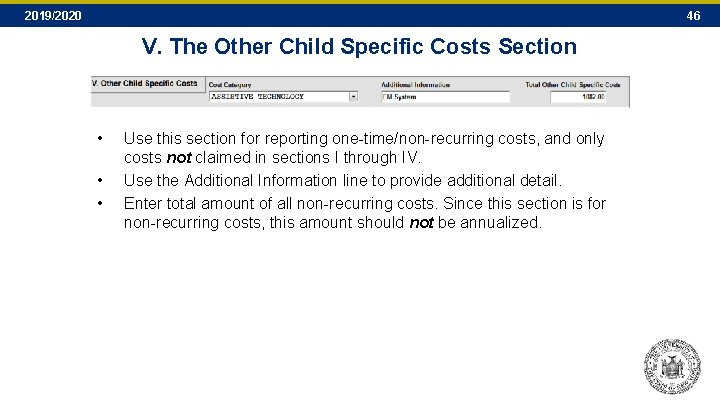
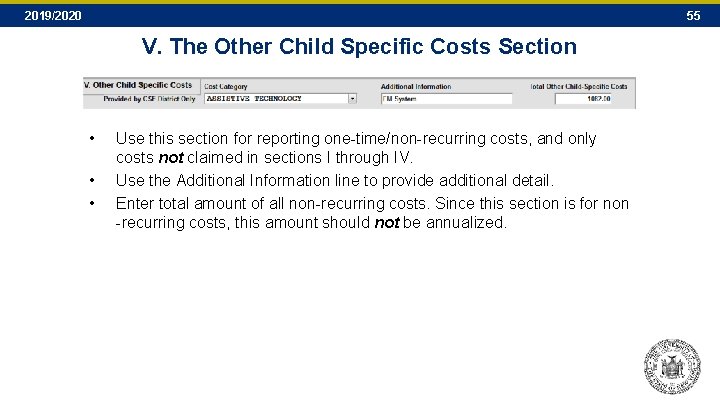
2019/2020 46 V. The Other Child Specific Costs Section • • • Use this section for reporting one-time/non-recurring costs, and only costs not claimed in sections I through IV. Use the Additional Information line to provide additional detail. Enter total amount of all non-recurring costs. Since this section is for non-recurring costs, this amount should not be annualized.
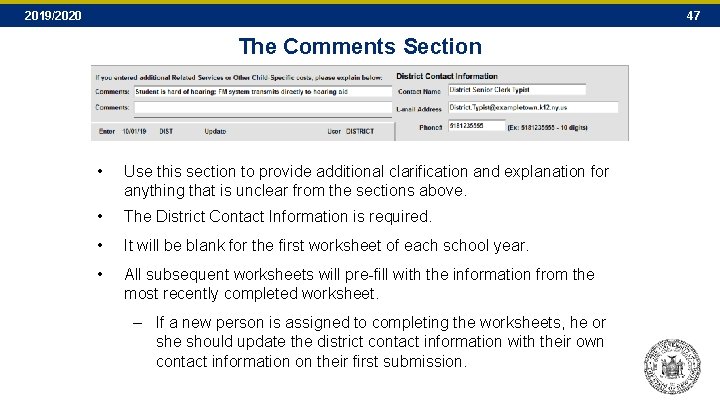
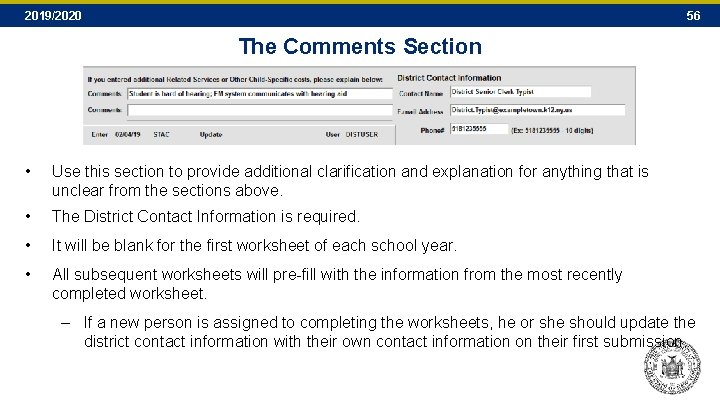
2019/2020 47 The Comments Section • Use this section to provide additional clarification and explanation for anything that is unclear from the sections above. • The District Contact Information is required. • It will be blank for the first worksheet of each school year. • All subsequent worksheets will pre-fill with the information from the most recently completed worksheet. – If a new person is assigned to completing the worksheets, he or she should update the district contact information with their own contact information on their first submission.
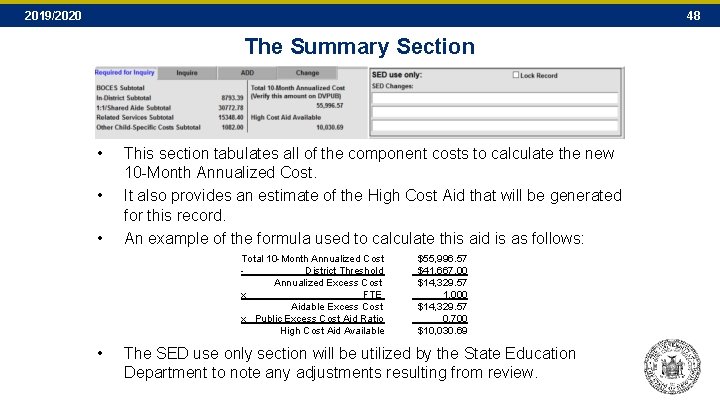
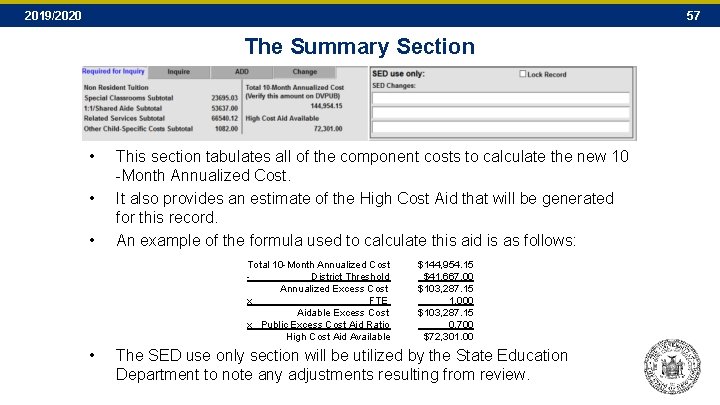
2019/2020 48 The Summary Section • • • This section tabulates all of the component costs to calculate the new 10 -Month Annualized Cost. It also provides an estimate of the High Cost Aid that will be generated for this record. An example of the formula used to calculate this aid is as follows: Total 10 -Month Annualized Cost - District Threshold Annualized Excess Cost x FTE Aidable Excess Cost x Public Excess Cost Aid Ratio High Cost Aid Available • $55, 996. 57 $41, 667. 00 $14, 329. 57 1. 000 $14, 329. 57 0. 700 $10, 030. 69 The SED use only section will be utilized by the State Education Department to note any adjustments resulting from review.
2019/2020 49 DCPOD Screen This screen serves two purposes for “Other District” placements: 1. It provides a standard method for reporting and breaking down costs for students educated by another district, where the other district billed using actual costs. 2. It provides information about Actual Nonresident Tuition Report (NRT) rates for students educated by another district, where the other district billed using the NRT rate.
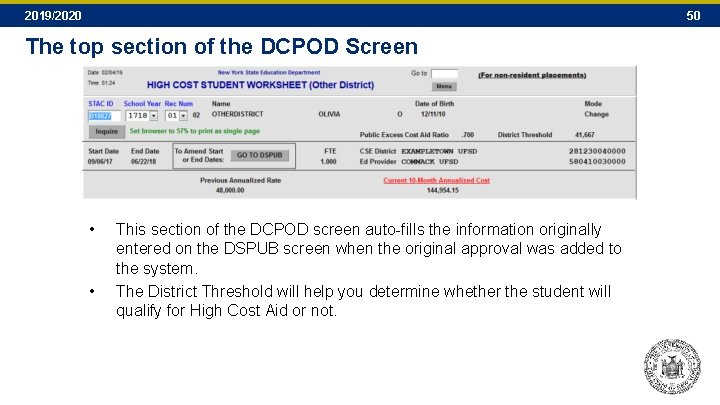
2019/2020 50 The top section of the DCPOD Screen • • This section of the DCPOD screen auto-fills the information originally entered on the DSPUB screen when the original approval was added to the system. The District Threshold will help you determine whether the student will qualify for High Cost Aid or not.
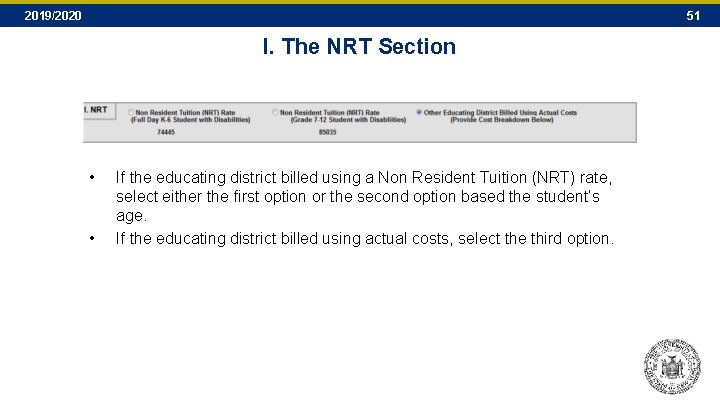
2019/2020 51 I. The NRT Section • • If the educating district billed using a Non Resident Tuition (NRT) rate, select either the first option or the second option based the student’s age. If the educating district billed using actual costs, select the third option.
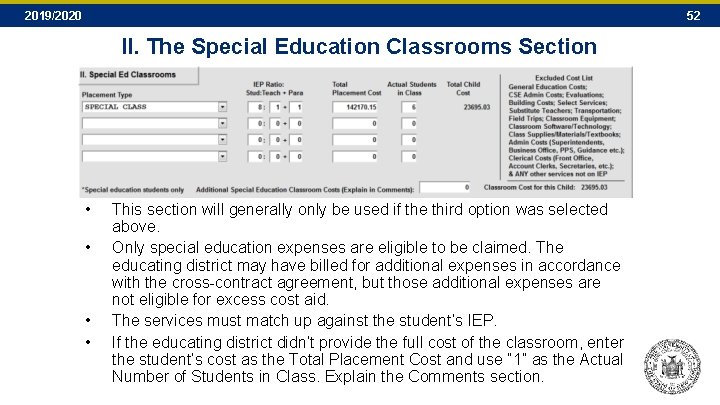
2019/2020 52 II. The Special Education Classrooms Section • • This section will generally only be used if the third option was selected above. Only special education expenses are eligible to be claimed. The educating district may have billed for additional expenses in accordance with the cross-contract agreement, but those additional expenses are not eligible for excess cost aid. The services must match up against the student’s IEP. If the educating district didn’t provide the full cost of the classroom, enter the student’s cost as the Total Placement Cost and use “ 1” as the Actual Number of Students in Class. Explain the Comments section.
2019/2020 53 III. Child-Specific 1: 1 Aide/Shared Aide/Nurse/Interpreter Section • • • Use this section for aides, LPNs, RNs and interpreters assigned to specific students. Do NOT include classroom paraprofessionals included in one of the prior sections. If the educating district billed using an NRT rate, aides provided by the “Non-Resident District” cannot be claimed in this section. In order to be eligible for aid, the IEP must specify: – Type of aide, nurse, or interpreter – Frequency and duration that aide, nurse, or interpreter is assigned to the student
2019/2020 54 IV. The Related/Other Services Section • • Use this section to report related services not included in any of the prior sections. In order to be eligible for aid, the IEP must specify: Type of service, frequency and duration of service, group size • • Actual # of Billed Sessions cannot exceed recommended services in IEP Only use lump sum boxes if all six service rows are filled. – Costs in lump sum boxes MUST be explained in Comments section.
2019/2020 55 V. The Other Child Specific Costs Section • • • Use this section for reporting one-time/non-recurring costs, and only costs not claimed in sections I through IV. Use the Additional Information line to provide additional detail. Enter total amount of all non-recurring costs. Since this section is for non -recurring costs, this amount should not be annualized.
2019/2020 56 The Comments Section • Use this section to provide additional clarification and explanation for anything that is unclear from the sections above. • The District Contact Information is required. • It will be blank for the first worksheet of each school year. • All subsequent worksheets will pre-fill with the information from the most recently completed worksheet. – If a new person is assigned to completing the worksheets, he or she should update the district contact information with their own contact information on their first submission.
2019/2020 57 The Summary Section • • • This section tabulates all of the component costs to calculate the new 10 -Month Annualized Cost. It also provides an estimate of the High Cost Aid that will be generated for this record. An example of the formula used to calculate this aid is as follows: Total 10 -Month Annualized Cost - District Threshold Annualized Excess Cost x FTE Aidable Excess Cost x Public Excess Cost Aid Ratio High Cost Aid Available • $144, 954. 15 $41, 667. 00 $103, 287. 15 1. 000 $103, 287. 15 0. 700 $72, 301. 00 The SED use only section will be utilized by the State Education Department to note any adjustments resulting from review.
2019/2020 SECTION G VERIFYING SERVICE APPROVALS 58
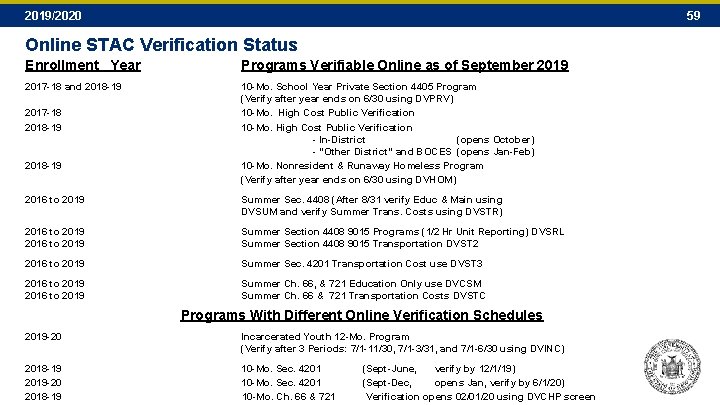
2019/2020 59 Online STAC Verification Status Enrollment Year Programs Verifiable Online as of September 2019 2017 -18 and 2018 -19 10 -Mo. School Year Private Section 4405 Program (Verify after year ends on 6/30 using DVPRV) 10 -Mo. High Cost Public Verification 10 -Mo. High Cost Public Verification - In-District (opens October) - “Other District” and BOCES (opens Jan-Feb) 10 -Mo. Nonresident & Runaway Homeless Program (Verify after year ends on 6/30 using DVHOM) 2017 -18 2018 -19 2016 to 2019 Summer Sec. 4408 (After 8/31 verify Educ & Main using DVSUM and verify Summer Trans. Costs using DVSTR) 2016 to 2019 Summer Section 4408 9015 Programs (1/2 Hr Unit Reporting) DVSRL Summer Section 4408 9015 Transportation DVST 2 2016 to 2019 Summer Sec. 4201 Transportation Cost use DVST 3 2016 to 2019 Summer Ch. 66, & 721 Education Only use DVCSM Summer Ch. 66 & 721 Transportation Costs DVSTC Programs With Different Online Verification Schedules 2019 -20 Incarcerated Youth 12 -Mo. Program (Verify after 3 Periods: 7/1 -11/30, 7/1 -3/31, and 7/1 -6/30 using DVINC) 2018 -19 10 -Mo. Sec. 4201 (Sept-June, verify by 12/1/19) 2019 -20 10 -Mo. Sec. 4201 (Sept-Dec, opens Jan, verify by 6/1/20) 2018 -19 10 -Mo. Ch. 66 & 721 Verification opens 02/01/20 using DVCHP screen
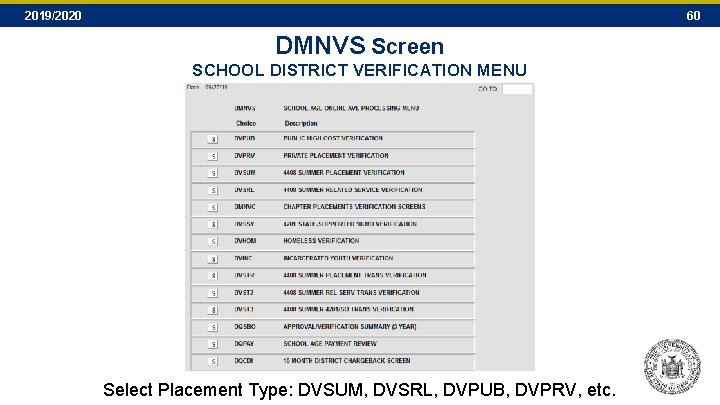
2019/2020 60 DMNVS Screen SCHOOL DISTRICT VERIFICATION MENU Select Placement Type: DVSUM, DVSRL, DVPUB, DVPRV, etc.
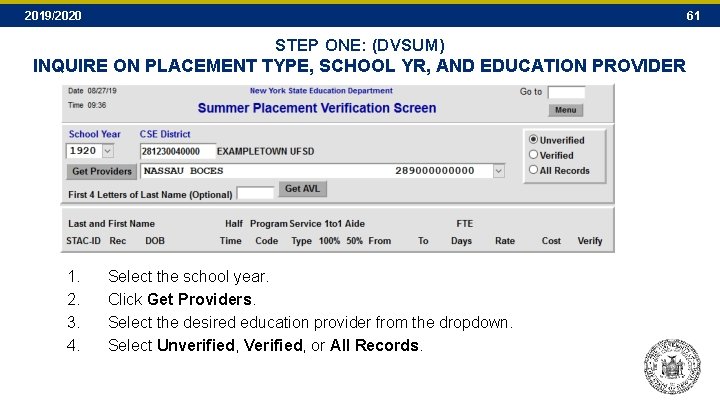
2019/2020 61 STEP ONE: (DVSUM) INQUIRE ON PLACEMENT TYPE, SCHOOL YR, AND EDUCATION PROVIDER 1. 2. 3. 4. Select the school year. Click Get Providers. Select the desired education provider from the dropdown. Select Unverified, Verified, or All Records.
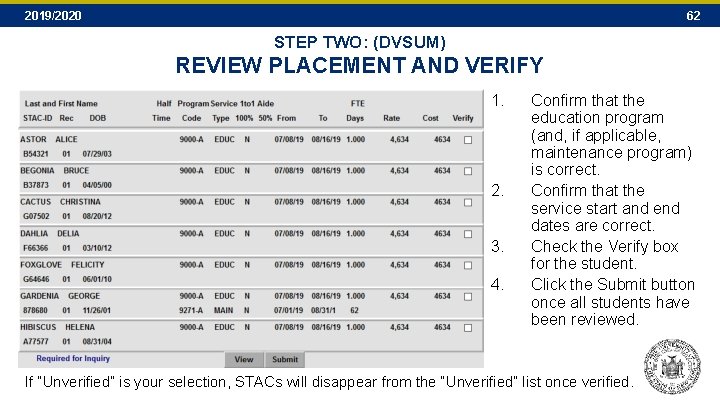
2019/2020 62 STEP TWO: (DVSUM) REVIEW PLACEMENT AND VERIFY 1. 2. 3. 4. Confirm that the education program (and, if applicable, maintenance program) is correct. Confirm that the service start and end dates are correct. Check the Verify box for the student. Click the Submit button once all students have been reviewed. If “Unverified” is your selection, STACs will disappear from the “Unverified” list once verified.
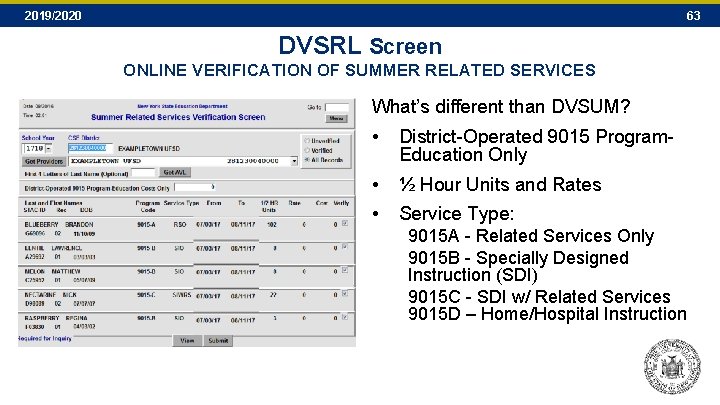
2019/2020 63 DVSRL Screen ONLINE VERIFICATION OF SUMMER RELATED SERVICES What’s different than DVSUM? • District-Operated 9015 Program. Education Only • ½ Hour Units and Rates • Service Type: 9015 A - Related Services Only 9015 B - Specially Designed Instruction (SDI) 9015 C - SDI w/ Related Services 9015 D – Home/Hospital Instruction
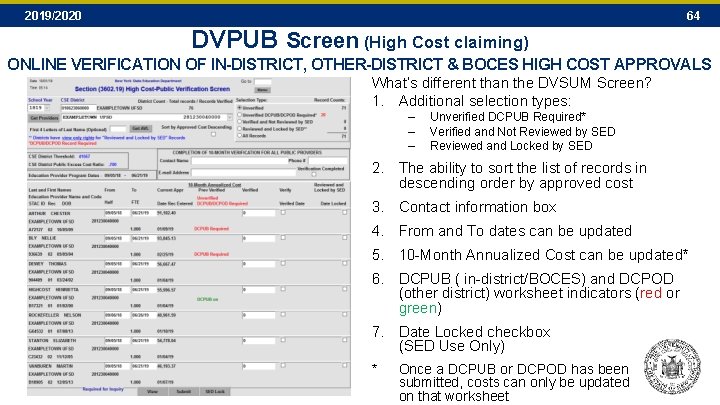
2019/2020 64 DVPUB Screen (High Cost claiming) ONLINE VERIFICATION OF IN-DISTRICT, OTHER-DISTRICT & BOCES HIGH COST APPROVALS What’s different than the DVSUM Screen? 1. Additional selection types: – – – Unverified DCPUB Required* Verified and Not Reviewed by SED Reviewed and Locked by SED 2. The ability to sort the list of records in descending order by approved cost 3. Contact information box 4. From and To dates can be updated 5. 10 -Month Annualized Cost can be updated* 6. DCPUB ( in-district/BOCES) and DCPOD (other district) worksheet indicators (red or green) 7. Date Locked checkbox (SED Use Only) * Once a DCPUB or DCPOD has been submitted, costs can only be updated on that worksheet
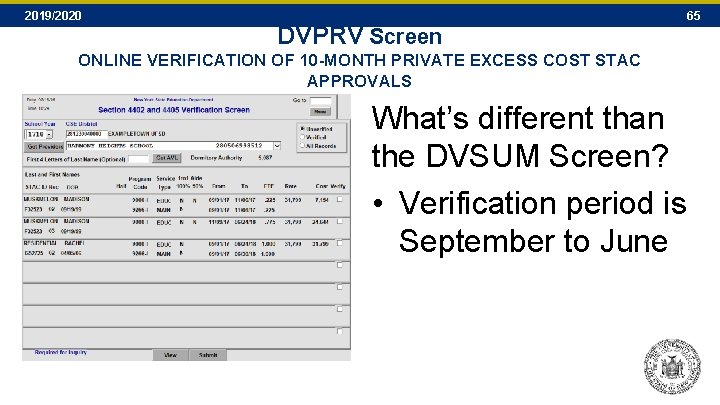
2019/2020 DVPRV Screen 65 ONLINE VERIFICATION OF 10 -MONTH PRIVATE EXCESS COST STAC APPROVALS What’s different than the DVSUM Screen? • Verification period is September to June
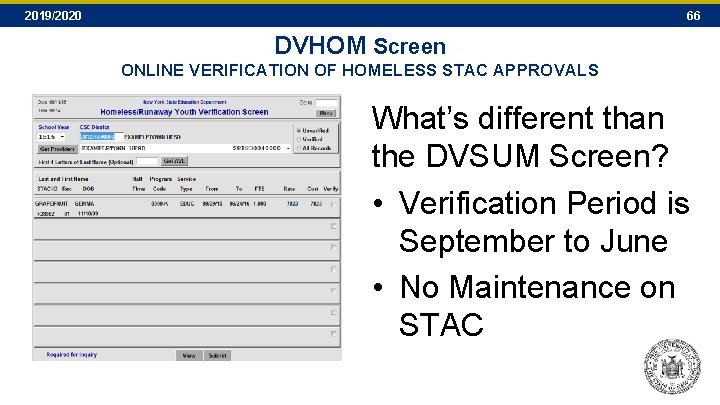
2019/2020 66 DVHOM Screen ONLINE VERIFICATION OF HOMELESS STAC APPROVALS What’s different than the DVSUM Screen? • Verification Period is September to June • No Maintenance on STAC
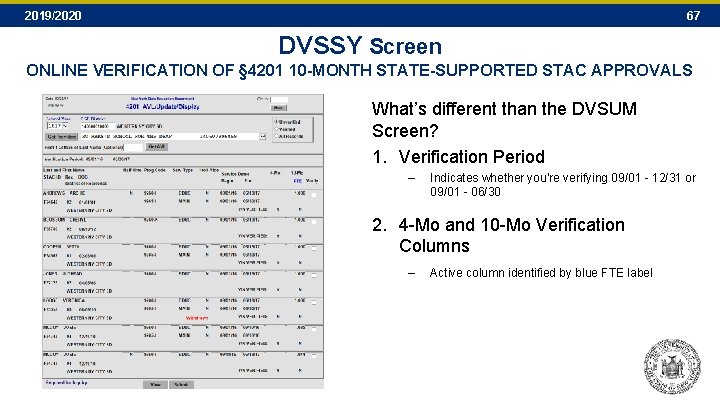
2019/2020 67 DVSSY Screen ONLINE VERIFICATION OF § 4201 10 -MONTH STATE-SUPPORTED STAC APPROVALS What’s different than the DVSUM Screen? 1. Verification Period – Indicates whether you’re verifying 09/01 - 12/31 or 09/01 - 06/30 2. 4 -Mo and 10 -Mo Verification Columns – Active column identified by blue FTE label
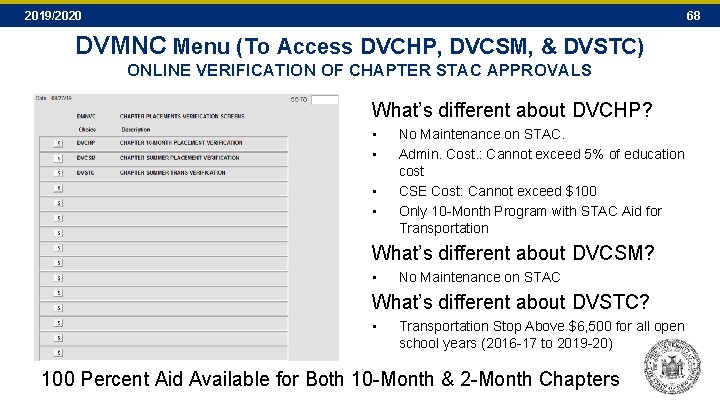
2019/2020 68 DVMNC Menu (To Access DVCHP, DVCSM, & DVSTC) ONLINE VERIFICATION OF CHAPTER STAC APPROVALS What’s different about DVCHP? • • No Maintenance on STAC. Admin. Cost. : Cannot exceed 5% of education cost CSE Cost: Cannot exceed $100 Only 10 -Month Program with STAC Aid for Transportation What’s different about DVCSM? • No Maintenance on STAC What’s different about DVSTC? • Transportation Stop Above $6, 500 for all open school years (2016 -17 to 2019 -20) 100 Percent Aid Available for Both 10 -Month & 2 -Month Chapters
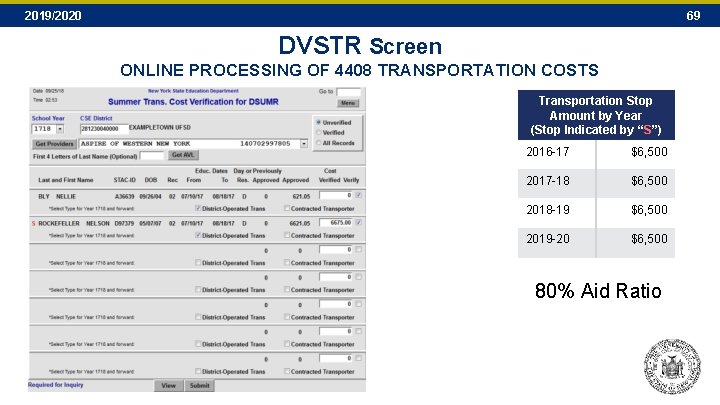
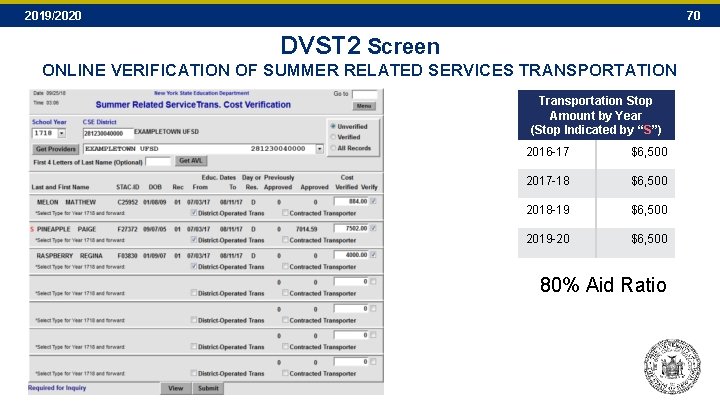
2019/2020 69 DVSTR Screen ONLINE PROCESSING OF 4408 TRANSPORTATION COSTS Transportation Stop Amount by Year (Stop Indicated by “S”) 2016 -17 $6, 500 2017 -18 $6, 500 2018 -19 $6, 500 2019 -20 $6, 500 80% Aid Ratio
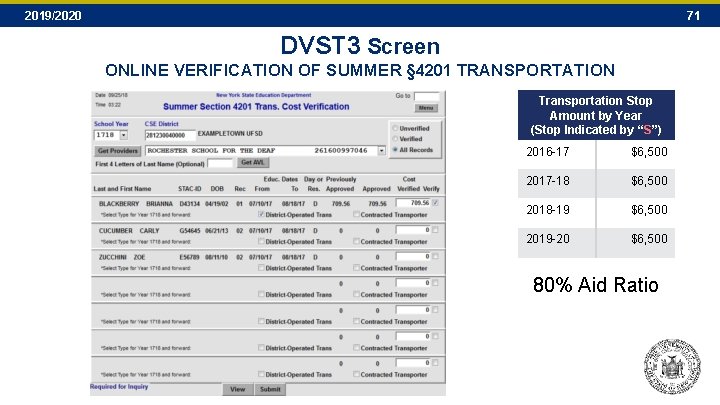
2019/2020 70 DVST 2 Screen ONLINE VERIFICATION OF SUMMER RELATED SERVICES TRANSPORTATION Transportation Stop Amount by Year (Stop Indicated by “S”) 2016 -17 $6, 500 2017 -18 $6, 500 2018 -19 $6, 500 2019 -20 $6, 500 80% Aid Ratio
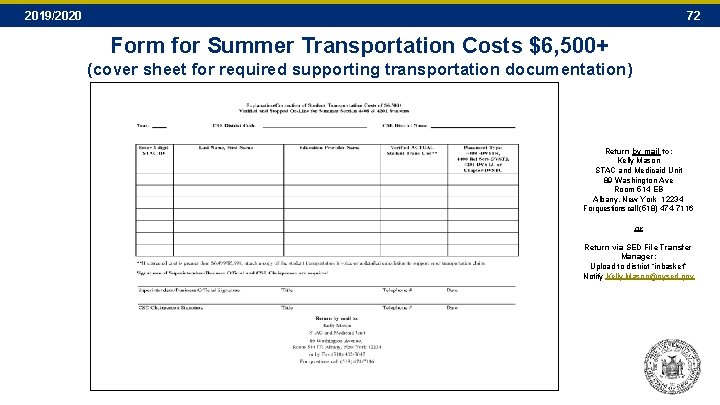
2019/2020 71 DVST 3 Screen ONLINE VERIFICATION OF SUMMER § 4201 TRANSPORTATION Transportation Stop Amount by Year (Stop Indicated by “S”) 2016 -17 $6, 500 2017 -18 $6, 500 2018 -19 $6, 500 2019 -20 $6, 500 80% Aid Ratio
2019/2020 72 Form for Summer Transportation Costs $6, 500+ (cover sheet for required supporting transportation documentation) Return by mail to: Kelly Mason STAC and Medicaid Unit 89 Washington Ave Room 514 EB Albany, New York 12234 For questions call (518) 474 -7116 or Return via SED File Transfer Manager: Upload to district “inbasket” Notify Kelly. Mason@nysed. gov
2019/2020 SECTION H Reapplying Continuing Placements for the Next School Year 73
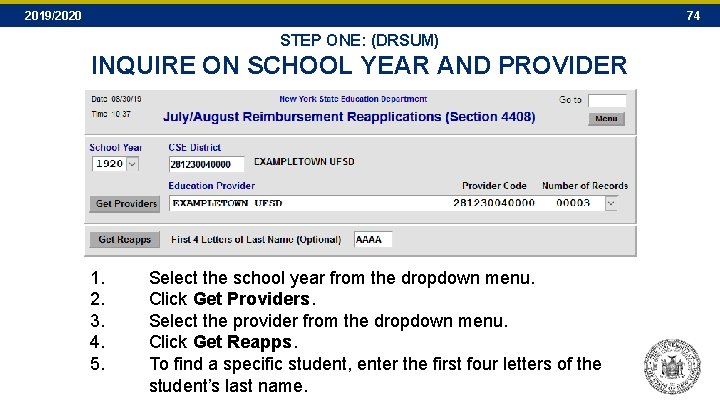
2019/2020 74 STEP ONE: (DRSUM) INQUIRE ON SCHOOL YEAR AND PROVIDER 1. 2. 3. 4. 5. Select the school year from the dropdown menu. Click Get Providers. Select the provider from the dropdown menu. Click Get Reapps. To find a specific student, enter the first four letters of the student’s last name.
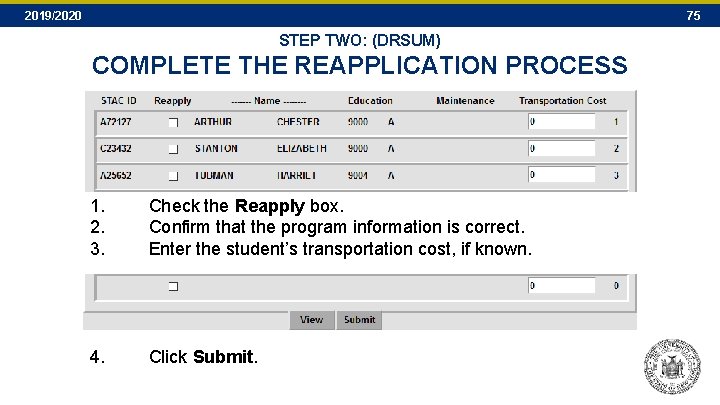
2019/2020 75 STEP TWO: (DRSUM) COMPLETE THE REAPPLICATION PROCESS 1. 2. 3. Check the Reapply box. Confirm that the program information is correct. Enter the student’s transportation cost, if known. 4. Click Submit.
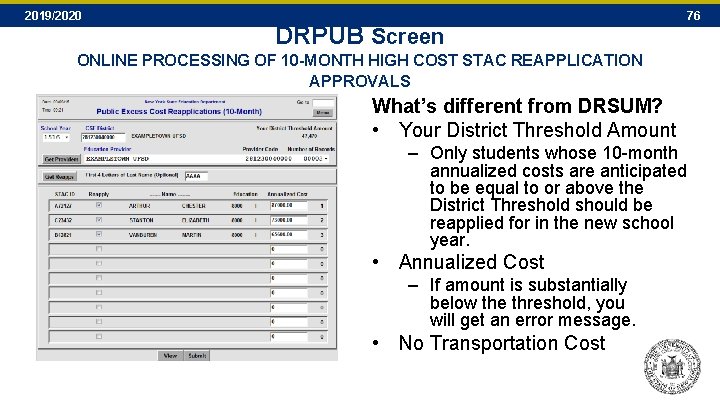
2019/2020 DRPUB Screen 76 ONLINE PROCESSING OF 10 -MONTH HIGH COST STAC REAPPLICATION APPROVALS What’s different from DRSUM? • Your District Threshold Amount – Only students whose 10 -month annualized costs are anticipated to be equal to or above the District Threshold should be reapplied for in the new school year. • Annualized Cost – If amount is substantially below the threshold, you will get an error message. • No Transportation Cost
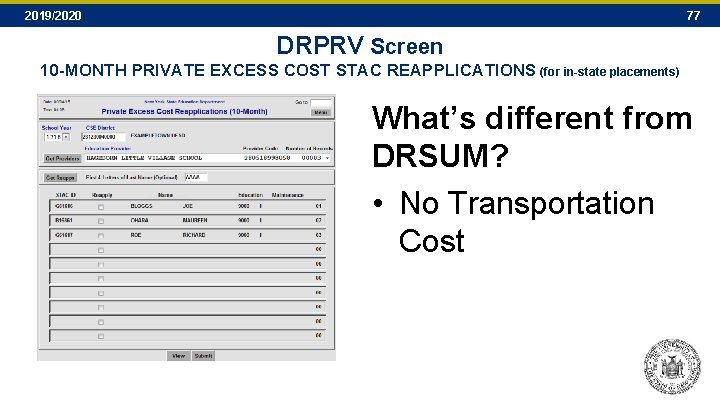
2019/2020 77 DRPRV Screen 10 -MONTH PRIVATE EXCESS COST STAC REAPPLICATIONS (for in-state placements) What’s different from DRSUM? • No Transportation Cost
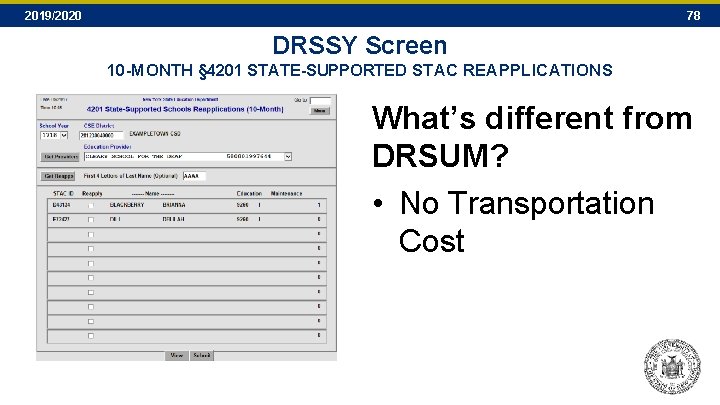
2019/2020 78 DRSSY Screen 10 -MONTH § 4201 STATE-SUPPORTED STAC REAPPLICATIONS What’s different from DRSUM? • No Transportation Cost
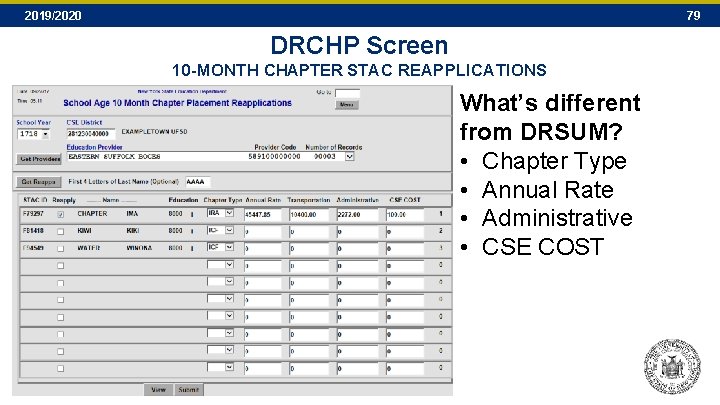
2019/2020 79 DRCHP Screen 10 -MONTH CHAPTER STAC REAPPLICATIONS What’s different from DRSUM? • Chapter Type • Annual Rate • Administrative • CSE COST
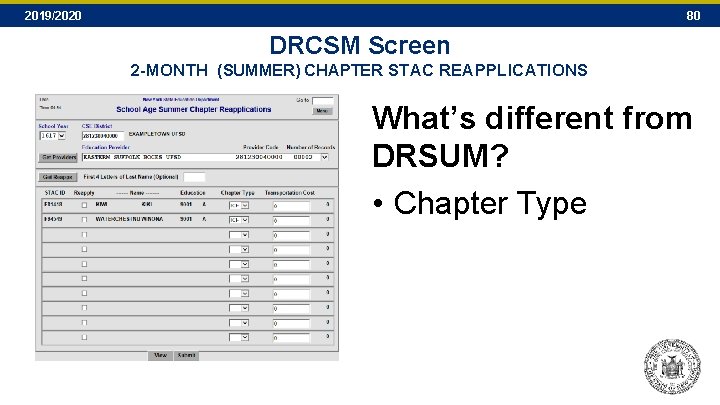
2019/2020 80 DRCSM Screen 2 -MONTH (SUMMER) CHAPTER STAC REAPPLICATIONS What’s different from DRSUM? • Chapter Type
2019/2020 SECTION I Looking Up Information on the STAC Online (EFRT) System 81
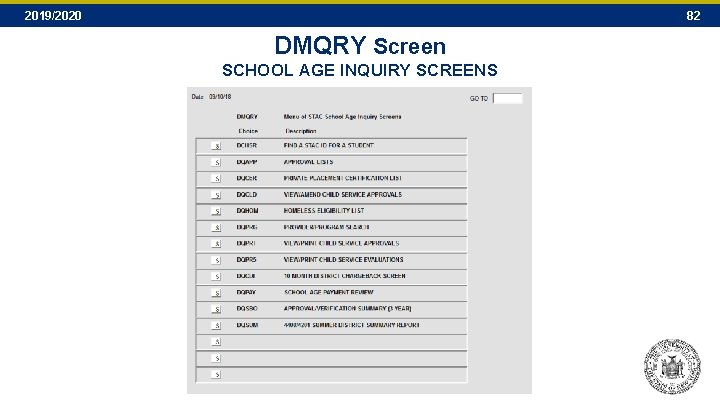
2019/2020 82 DMQRY Screen SCHOOL AGE INQUIRY SCREENS
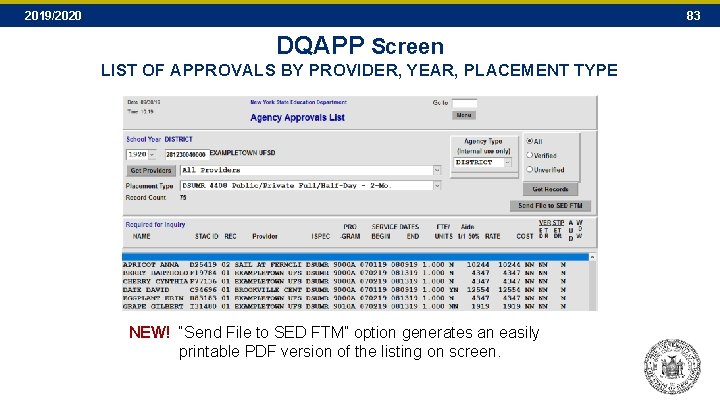
2019/2020 83 DQAPP Screen LIST OF APPROVALS BY PROVIDER, YEAR, PLACEMENT TYPE NEW! “Send File to SED FTM” option generates an easily printable PDF version of the listing on screen.
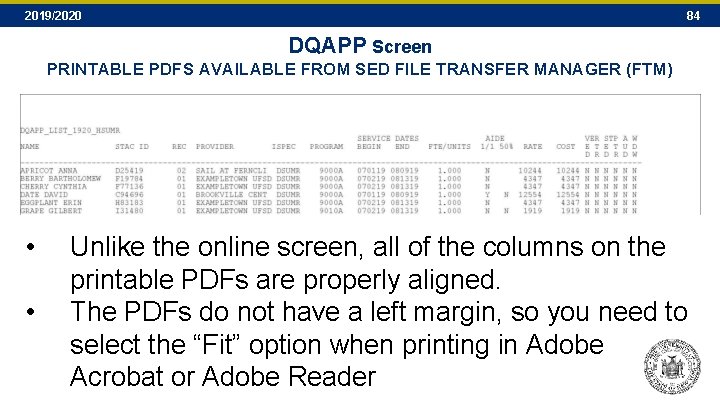
2019/2020 84 DQAPP Screen PRINTABLE PDFS AVAILABLE FROM SED FILE TRANSFER MANAGER (FTM) • • Unlike the online screen, all of the columns on the printable PDFs are properly aligned. The PDFs do not have a left margin, so you need to select the “Fit” option when printing in Adobe Acrobat or Adobe Reader
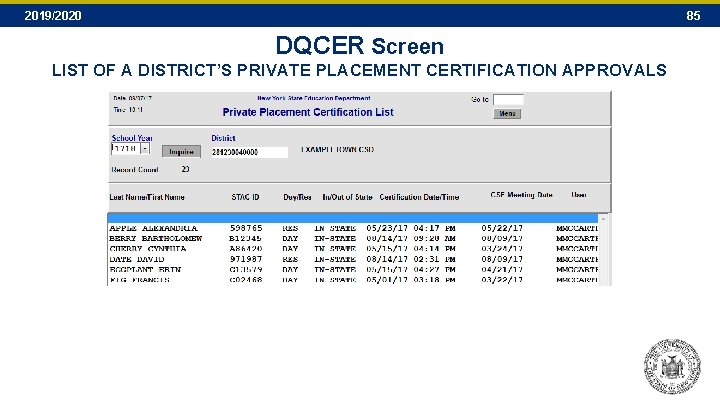
2019/2020 85 DQCER Screen LIST OF A DISTRICT’S PRIVATE PLACEMENT CERTIFICATION APPROVALS
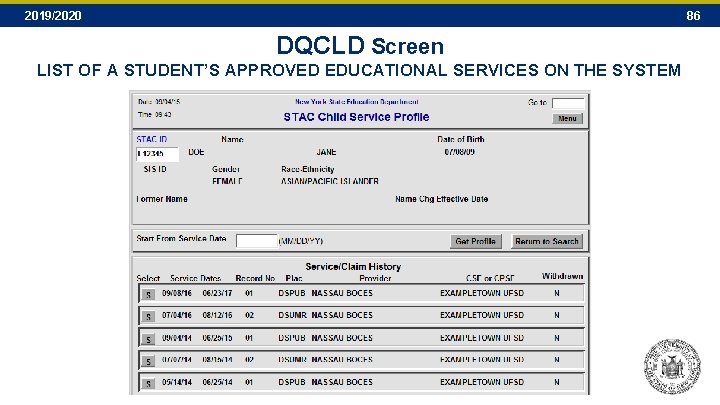
2019/2020 86 DQCLD Screen LIST OF A STUDENT’S APPROVED EDUCATIONAL SERVICES ON THE SYSTEM
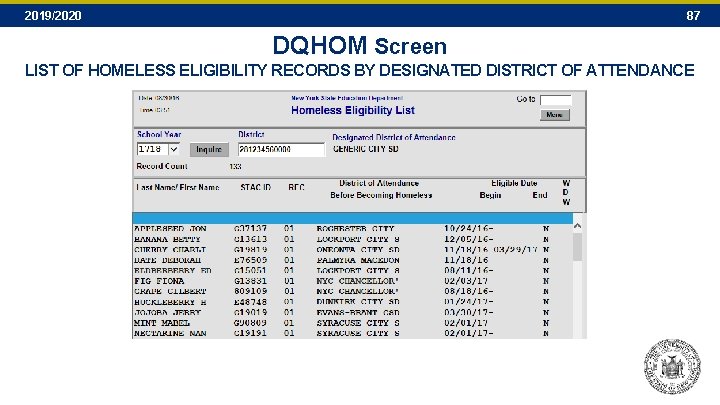
2019/2020 87 DQHOM Screen LIST OF HOMELESS ELIGIBILITY RECORDS BY DESIGNATED DISTRICT OF ATTENDANCE
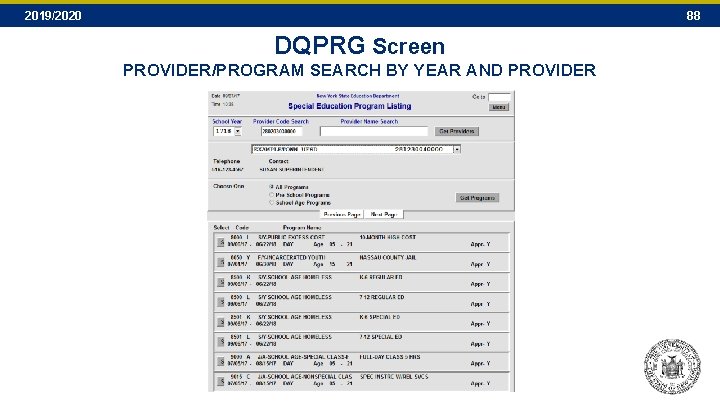
2019/2020 88 DQPRG Screen PROVIDER/PROGRAM SEARCH BY YEAR AND PROVIDER
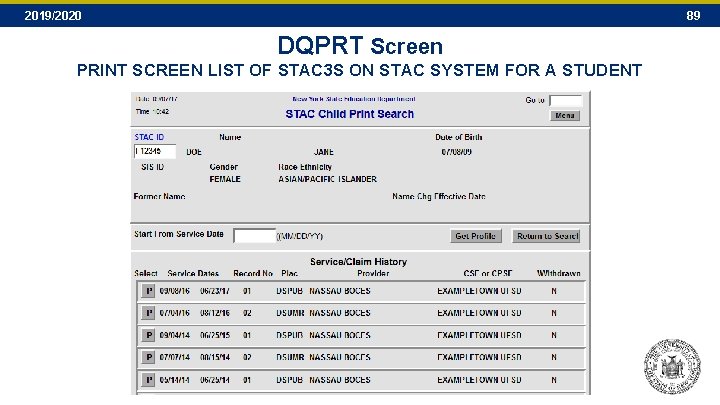
2019/2020 89 DQPRT Screen PRINT SCREEN LIST OF STAC 3 S ON STAC SYSTEM FOR A STUDENT
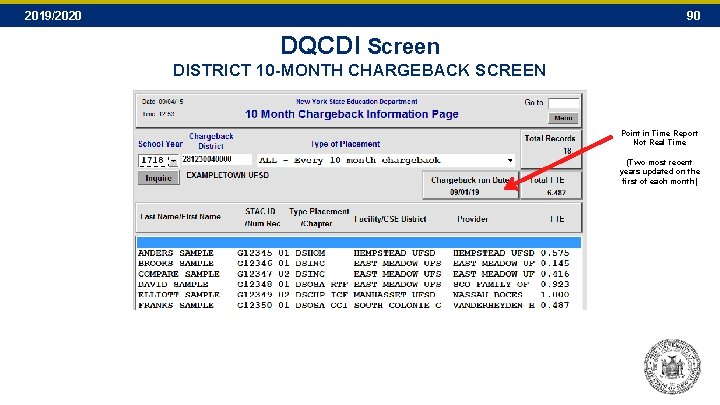
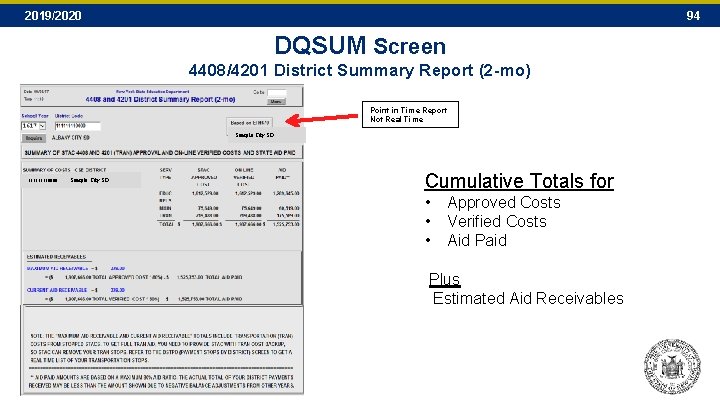
2019/2020 90 DQCDI Screen DISTRICT 10 -MONTH CHARGEBACK SCREEN Point in Time Report Not Real Time (Two most recent years updated on the first of each month)
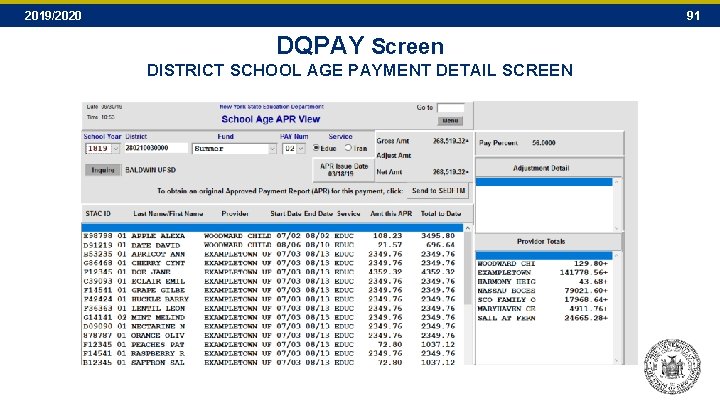
2019/2020 91 DQPAY Screen DISTRICT SCHOOL AGE PAYMENT DETAIL SCREEN
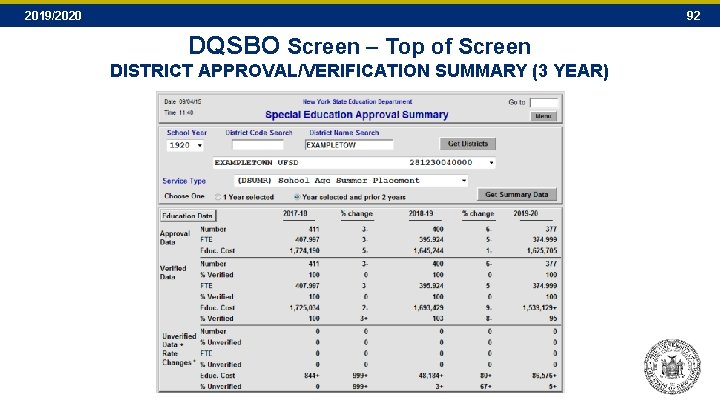
2019/2020 92 DQSBO Screen – Top of Screen DISTRICT APPROVAL/VERIFICATION SUMMARY (3 YEAR)
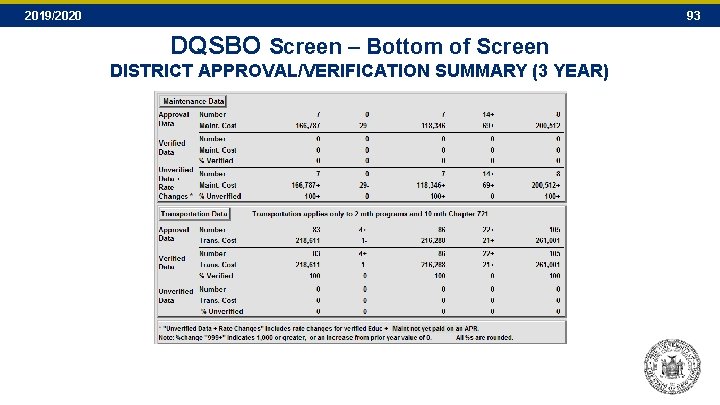
2019/2020 93 DQSBO Screen – Bottom of Screen DISTRICT APPROVAL/VERIFICATION SUMMARY (3 YEAR)
2019/2020 94 DQSUM Screen 4408/4201 District Summary Report (2 -mo) Point in Time Report Not Real Time Sample City SD 11110000 Sample City SD Cumulative Totals for • • • Approved Costs Verified Costs Aid Paid Plus Estimated Aid Receivables
2019/2020 SECTION J School Age Payments 95
2019/2020 96 SUMMER 4408 — Full-Day and ½ Day • Statute of Limitations: Three years. Summer 2019 (2019 -20 year) will close out for STACing and verification 06/30/23 • Education Rates: SED’s Rate Setting Unit (518 -474 -3227) sets full-day and half-day rates • Maintenance Rates: Set by NYC Office of Children & Family Services • State Aid: Aid ratio is 80% of education, maintenance and transportation costs • County Role : County of Residence incurs 10% chargeback, recouped against 4410 preschool • Payment: Current year placements (Summer 2019) receive a maximum of 56% aid in current State fiscal year ending 03/31/20 • 1: 1 Full and Half Time Education Aides: Full time and half time education aides can be entered online either at the time an approval is entered or at a later date by amending an existing approval. • All 1: 1 Maintenance Aides, RNs, LPNs, and Interpreters, and 1: 1 Education Aides (other than full/half-time): • If a previously verified record is amended in any way (education/maintenance) the district must re-verify both education/maintenance (DVSUM) and transportation (DVSTR) School districts must complete a 1: 1 aide form and submit to the STAC Unit for processing http: //www. oms. nysed. gov/stac/schoolage/1 to 1_aides/1 -1_aide_form. pdf
2019/2020 97 SUMMER RELATED SERVICES — 9015 Programs • Statute of Limitations: Three years. Summer 2019 (2019 -20 year) will close out for STACing and verification on 06/30/23 • Program Code: 9015 A through D • State Aid: Aid ratio is 80% of verified costs • Payment: Current Summer placements aidable in current State fiscal year with maximum initial aid at 56% • 1: 1 education/maintenance: No 1: 1 aides allowed with related services approvals
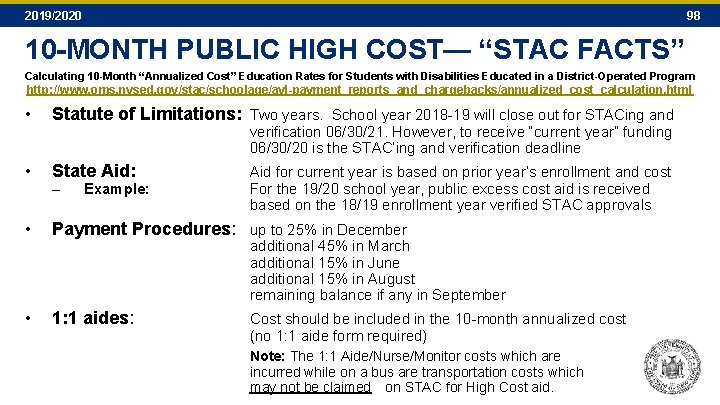
2019/2020 98 10 -MONTH PUBLIC HIGH COST— “STAC FACTS” Calculating 10 -Month “Annualized Cost” Education Rates for Students with Disabilities Educated in a District-Operated Program http: //www. oms. nysed. gov/stac/schoolage/avl-payment_reports_and_chargebacks/annualized_cost_calculation. html • Statute of Limitations: Two years. School year 2018 -19 will close out for STACing and • State Aid: verification 06/30/21. However, to receive “current year” funding 06/30/20 is the STAC’ing and verification deadline – Example: Aid for current year is based on prior year’s enrollment and cost For the 19/20 school year, public excess cost aid is received based on the 18/19 enrollment year verified STAC approvals • Payment Procedures: up to 25% in December • 1: 1 aides: additional 45% in March additional 15% in June additional 15% in August remaining balance if any in September Cost should be included in the 10 -month annualized cost (no 1: 1 aide form required) Note: The 1: 1 Aide/Nurse/Monitor costs which are incurred while on a bus are transportation costs which may not be claimed on STAC for High Cost aid.
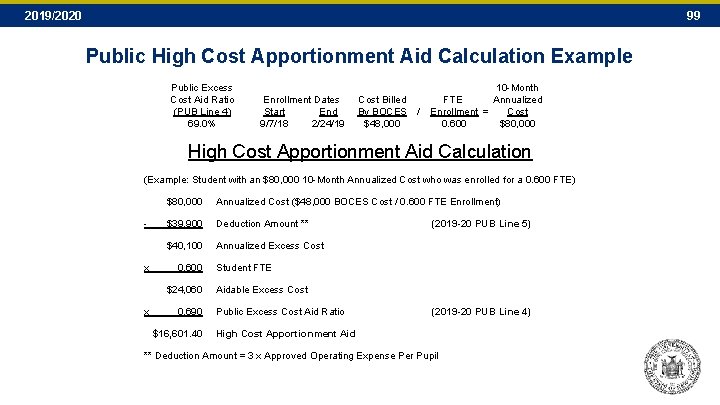
2019/2020 99 Public High Cost Apportionment Aid Calculation Example Public Excess Cost Aid Ratio (PUB Line 4) 69. 0% Enrollment Dates Start End 9/7/18 2/24/19 Cost Billed By BOCES / $48, 000 10 -Month FTE Annualized Enrollment = Cost 0. 600 $80, 000 High Cost Apportionment Aid Calculation (Example: Student with an $80, 000 10 -Month Annualized Cost who was enrolled for a 0. 600 FTE) - x $80, 000 Annualized Cost ($48, 000 BOCES Cost / 0. 600 FTE Enrollment) $39, 900 Deduction Amount ** $40, 100 Annualized Excess Cost 0. 600 $24, 060 x 0. 690 $16, 601. 40 (2019 -20 PUB Line 5) Student FTE Aidable Excess Cost Public Excess Cost Aid Ratio (2019 -20 PUB Line 4) High Cost Apportionment Aid ** Deduction Amount = 3 x Approved Operating Expense Per Pupil
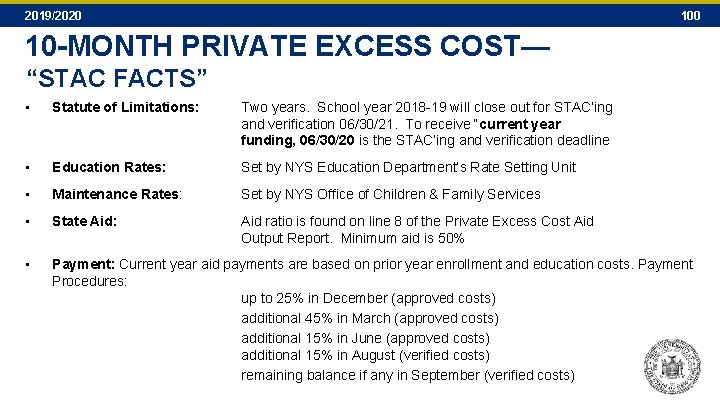
2019/2020 10 -MONTH PRIVATE EXCESS COST— “STAC FACTS” • Statute of Limitations: Two years. School year 2018 -19 will close out for STAC’ing and verification 06/30/21. To receive “current year funding, 06/30/20 is the STAC’ing and verification deadline • Education Rates: Set by NYS Education Department’s Rate Setting Unit • Maintenance Rates: Set by NYS Office of Children & Family Services • State Aid: Aid ratio is found on line 8 of the Private Excess Cost Aid Output Report. Minimum aid is 50% • Payment: Current year aid payments are based on prior year enrollment and education costs. Payment Procedures: up to 25% in December (approved costs) additional 45% in March (approved costs) additional 15% in June (approved costs) additional 15% in August (verified costs) remaining balance if any in September (verified costs)
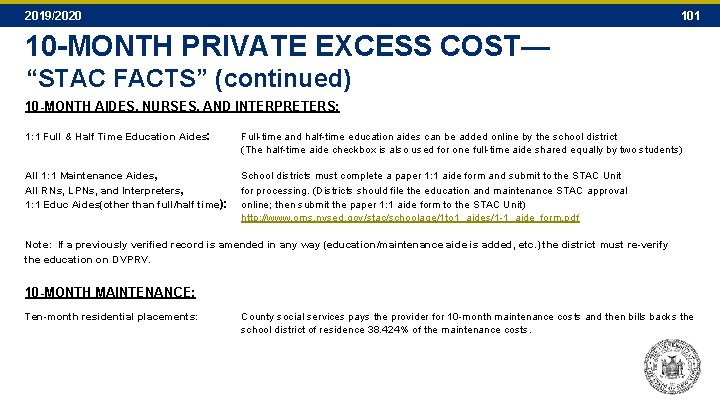
2019/2020 101 10 -MONTH PRIVATE EXCESS COST— “STAC FACTS” (continued) 10 -MONTH AIDES, NURSES, AND INTERPRETERS: 1: 1 Full & Half Time Education Aides: Full-time and half-time education aides can be added online by the school district (The half-time aide checkbox is also used for one full-time aide shared equally by two students) All 1: 1 Maintenance Aides, All RNs, LPNs, and Interpreters, 1: 1 Educ Aides(other than full/half time): School districts must complete a paper 1: 1 aide form and submit to the STAC Unit for processing. (Districts should file the education and maintenance STAC approval online; then submit the paper 1: 1 aide form to the STAC Unit) http: //www. oms. nysed. gov/stac/schoolage/1 to 1_aides/1 -1_aide_form. pdf Note: If a previously verified record is amended in any way (education/maintenance aide is added, etc. ) the district must re-verify the education on DVPRV. 10 -MONTH MAINTENANCE: Ten-month residential placements: County social services pays the provider for 10 -month maintenance costs and then bills backs the school district of residence 38. 424% of the maintenance costs.
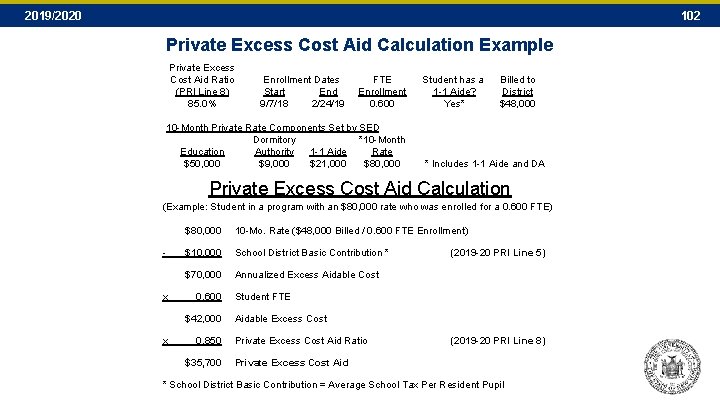
2019/2020 102 Private Excess Cost Aid Calculation Example Private Excess Cost Aid Ratio (PRI Line 8) 85. 0% Enrollment Dates Start End 9/7/18 2/24/19 FTE Enrollment 0. 600 10 -Month Private Rate Components Set by SED Dormitory *10 -Month Education Authority 1 -1 Aide Rate $50, 000 $9, 000 $21, 000 $80, 000 Student has a 1 -1 Aide? Yes* Billed to District $48, 000 * Includes 1 -1 Aide and DA Private Excess Cost Aid Calculation (Example: Student in a program with an $80, 000 rate who was enrolled for a 0. 600 FTE) $80, 000 10 -Mo. Rate ($48, 000 Billed / 0. 600 FTE Enrollment) - x $10, 000 School District Basic Contribution * $70, 000 Annualized Excess Aidable Cost 0. 600 $42, 000 x 0. 850 $35, 700 (2019 -20 PRI Line 5) Student FTE Aidable Excess Cost Private Excess Cost Aid Ratio (2019 -20 PRI Line 8) Private Excess Cost Aid * School District Basic Contribution = Average School Tax Per Resident Pupil
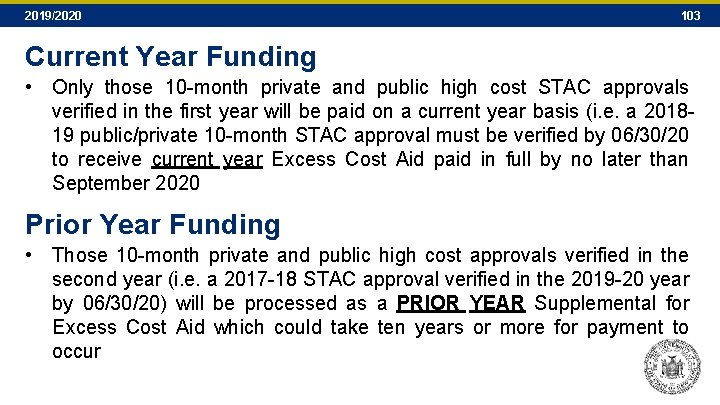
2019/2020 103 Current Year Funding • Only those 10 -month private and public high cost STAC approvals verified in the first year will be paid on a current year basis (i. e. a 201819 public/private 10 -month STAC approval must be verified by 06/30/20 to receive current year Excess Cost Aid paid in full by no later than September 2020 Prior Year Funding • Those 10 -month private and public high cost approvals verified in the second year (i. e. a 2017 -18 STAC approval verified in the 2019 -20 year by 06/30/20) will be processed as a PRIOR YEAR Supplemental for Excess Cost Aid which could take ten years or more for payment to occur
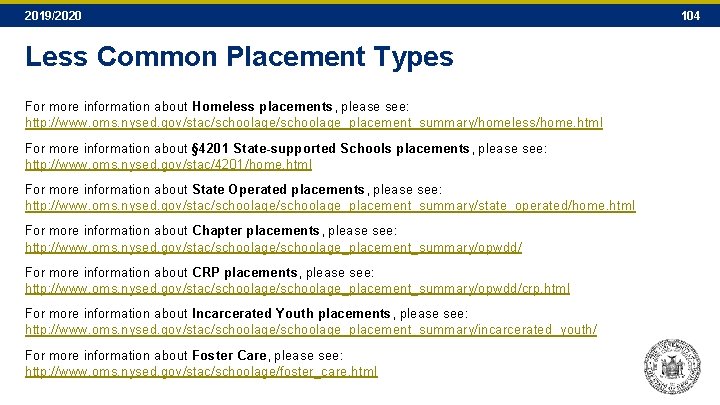
2019/2020 Less Common Placement Types For more information about Homeless placements, please see: http: //www. oms. nysed. gov/stac/schoolage_placement_summary/homeless/home. html For more information about § 4201 State-supported Schools placements, please see: http: //www. oms. nysed. gov/stac/4201/home. html For more information about State Operated placements, please see: http: //www. oms. nysed. gov/stac/schoolage_placement_summary/state_operated/home. html For more information about Chapter placements, please see: http: //www. oms. nysed. gov/stac/schoolage_placement_summary/opwdd/ For more information about CRP placements, please see: http: //www. oms. nysed. gov/stac/schoolage_placement_summary/opwdd/crp. html For more information about Incarcerated Youth placements, please see: http: //www. oms. nysed. gov/stac/schoolage_placement_summary/incarcerated_youth/ For more information about Foster Care, please see: http: //www. oms. nysed. gov/stac/schoolage/foster_care. html 104
2019/2020 SECTION K Navigating the SED File Transfer Manager and Retrieving Available Reports 105
2019/2020 106 What’s on the SED File Transfer Manager? • Your Shared Folder – School Districts and BOCES: STAC###### (STAC followed by six-digit SED code) – Municipalities (Preschool): STACXXXX (STAC followed by the first four letters of the municipality name) – Municipalities & Providers: STAC###### (STAC followed by full 12 -digit SED code) • When you click on your shared folder, you should then be able to see its contents, the three folders: – “archive”: Old documents from prior FTP server. – “inbasket”: Uploaded by outsiders. Data coming in to the STAC Unit. – “outbasket”: Uploaded by STAC Unit. Data sent out by the STAC Unit.
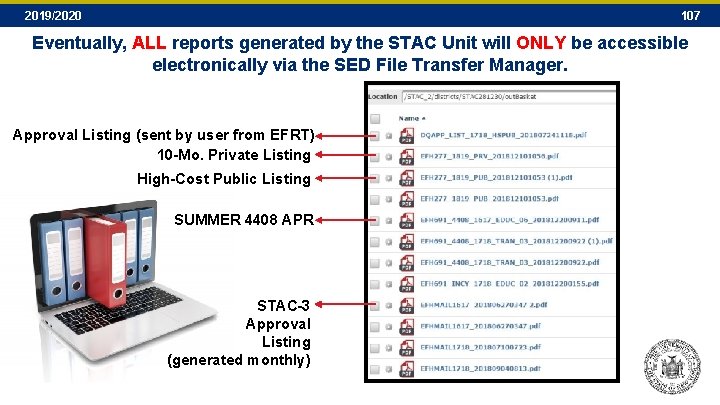
2019/2020 107 Eventually, ALL reports generated by the STAC Unit will ONLY be accessible electronically via the SED File Transfer Manager. Approval Listing (sent by user from EFRT) 10 -Mo. Private Listing High-Cost Public Listing SUMMER 4408 APR STAC-3 Approval Listing (generated monthly)
2019/2020 SECTION L STAC School-Age List. Serv and NYSED Contacts 108
2019/2020 109 Subscribe to the STAC List. Serv Register to Receive Information from the STAC and Medicaid Unit You can receive notification by electronic mail of the latest memoranda and other updates by subscribing to one or more of our LISTSERVs: – SCHOOL-AGE (ages 5 -21) – PRESCHOOL (ages 3 -5) – PROVIDER (SED-Approved Education Providers) http: //www. oms. nysed. gov/stac/listserv/ listserv_schoolage_registration. html http: //www. oms. nysed. gov/stac/listserv/ listserv_provider_registration. html To Subscribe to the School-Age List. Serv: • To begin a subscription, please send an e-mail message to LISTSERV@LISTSERV. NYSED. GOV • The body of the message must read: • You will receive a welcome message when you subscribe. Please save this message for future reference, especially if this is the first time you are subscribing to an electronic mailing list. • Many Spam Filters and Virus software may block messages from LISTSERVs. Once you have subscribed, please notify your technical support staff that these notices with attachments will be coming from STACSCHAGE@LISTSERV. NYSED. GOV. To Unsubscribe: • – MEDICAID IN EDUCATION (P/SSHSP) http: //www. oms. nysed. gov/medicaid/ listserv_registration. html SUBSCRIBE STACSCHAGE firstname lastname • If at any time you want to stop receiving announcements, you may be removed from the list by sending the following command to LISTSERV@LISTSERV. NYSED. GOV The body of the message must read: SIGNOFF STACSCHAGE GLOBAL
2019/2020 110 NYS EDUCATION DEPARTMENT CONTACTS STAC & Medicaid Unit 518 -474 -7116 • • School Age Payment Issues: School Age STAC Reimbursement Approvals: • General STAC Unit e-mail address: Ed Truax Adam Lenhardt Kelly Mason Andrew Kitzrow Tom Hitchcock OMSSTAC@NYSED. GOV Rate Setting Unit 518 -474 -3227 Special Education Policy Unit 518 -473 -2878 Non-District Unit 518 -473 -1185 • Out of State Placements, State Supported Schools, CRP Placements State Aid Unit 518 -474 -2977