
Introduction to Routing and Packet Forwarding CCNA 2












- Slides: 41
Introduction to Routing and Packet Forwarding CCNA 2 Routing Protocols and Concepts – Chapter 1 Ver 1, 12/09/2012 Kode : CIJ 340, Jaringan Komputer Lanjut FASILKOM
Objectives • Identify a router as a computer with an OS and hardware designed for the routing process. • Demonstrate the ability to configure devices and apply addresses. • Describe the structure of a routing table. • Describe how a router determines a path and switches packets Ver 1, 12/09/2012 Kode : CIJ 340, Jaringan Komputer Lanjut FASILKOM
Router as a Computer • Describe the basic purpose of a router – -Computers that specialize in sending packets over the data network. They are responsible for interconnecting networks by selecting the best path for a packet to travel and forwarding packets to their destination • Routers are the network center – -Routers generally have 2 connections: • -WAN connection (Connection to ISP) • -LAN connection Ver 1, 12/09/2012 Kode : CIJ 340, Jaringan Komputer Lanjut FASILKOM
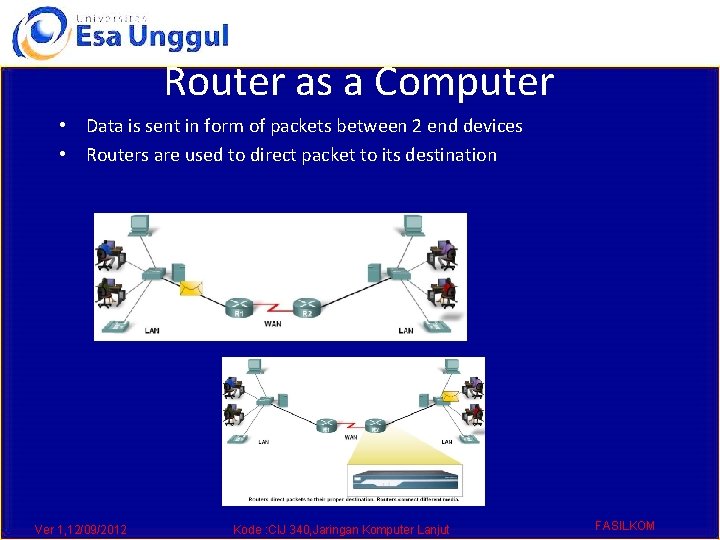
Router as a Computer • Data is sent in form of packets between 2 end devices • Routers are used to direct packet to its destination Ver 1, 12/09/2012 Kode : CIJ 340, Jaringan Komputer Lanjut FASILKOM
Router as a Computer • Routers examine a packet’s destination IP address and determine the best path by enlisting the aid of a routing table Ver 1, 12/09/2012 Kode : CIJ 340, Jaringan Komputer Lanjut FASILKOM
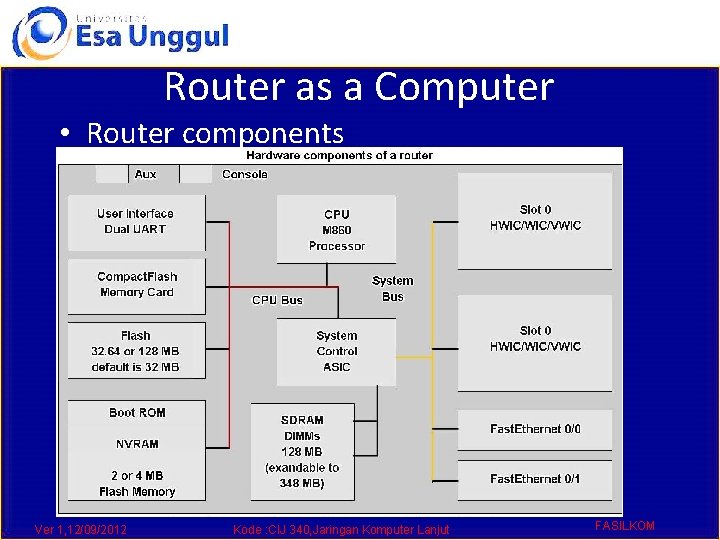
Router as a Computer • Router components and their functions” § CPU - Executes operating system instructions § Random access memory (RAM) - Contains the running copy of configuration file. Stores routing table. RAM contents lost when power is off § Read-only memory (ROM) - Holds diagnostic software used when router is powered up. Stores the router’s bootstrap program. § Non-volatile RAM (NVRAM) - Stores startup configuration. This may include IP addresses (Routing protocol, Hostname of router) § Flash memory - Contains the operating system (Cisco IOS) § Interfaces - There exist multiple physical interfaces that are used to connect network. Examples of interface types: • -Ethernet / fast Ethernet interfaces • -Serial interfaces • -Management interfaces Ver 1, 12/09/2012 Kode : CIJ 340, Jaringan Komputer Lanjut FASILKOM
Router as a Computer • Router components Ver 1, 12/09/2012 Kode : CIJ 340, Jaringan Komputer Lanjut FASILKOM
Router as a Computer • Major phases to the router boot-up process § Test router hardware • Power-On Self Test (POST) • Execute bootstrap loader § Locate & load Cisco IOS software • -Locate IOS • -Load IOS § Locate & load startup configuration file or enter setup mode • -Bootstrap program looks for configuration file Ver 1, 12/09/2012 Kode : CIJ 340, Jaringan Komputer Lanjut FASILKOM
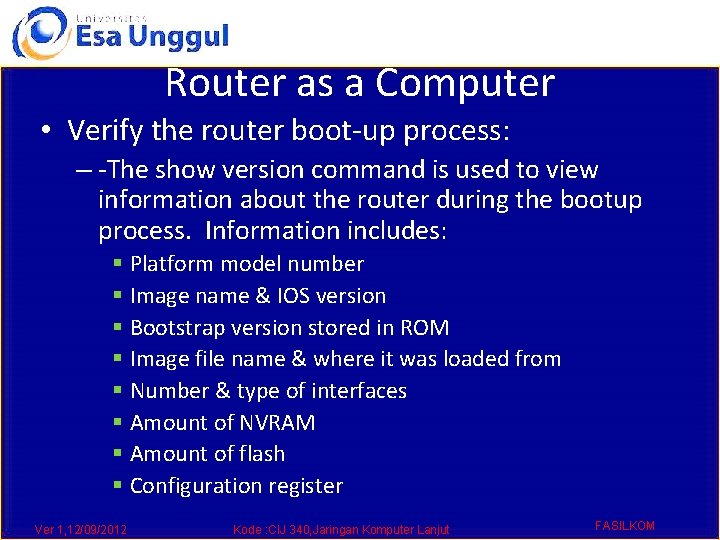
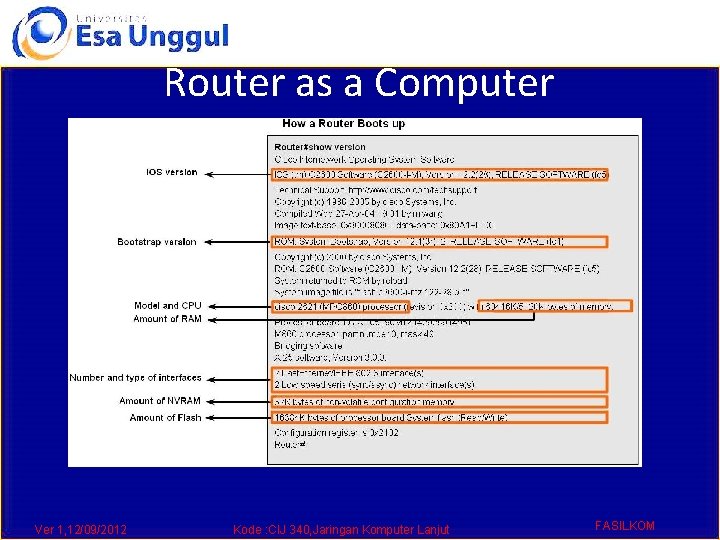
Router as a Computer • Verify the router boot-up process: – -The show version command is used to view information about the router during the bootup process. Information includes: § Platform model number § Image name & IOS version § Bootstrap version stored in ROM § Image file name & where it was loaded from § Number & type of interfaces § Amount of NVRAM § Amount of flash § Configuration register Ver 1, 12/09/2012 Kode : CIJ 340, Jaringan Komputer Lanjut FASILKOM
Router as a Computer Ver 1, 12/09/2012 Kode : CIJ 340, Jaringan Komputer Lanjut FASILKOM
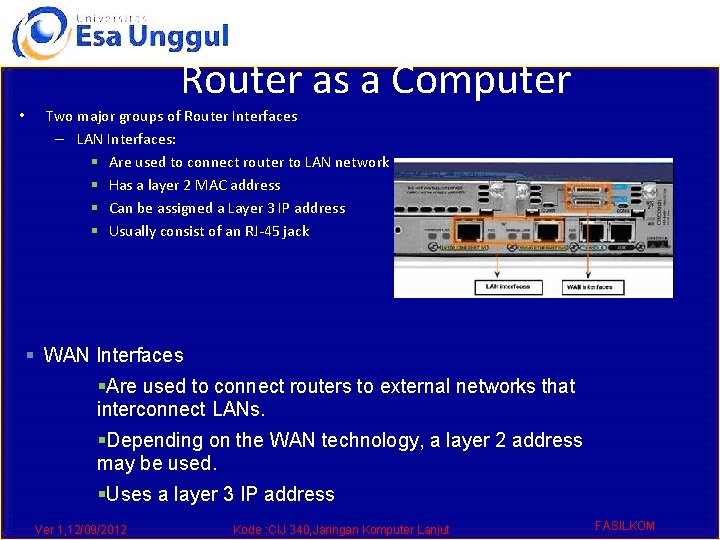
Router as a Computer • Router Interface is a physical connector that enables a router to send or receive packets • Each interface connects to a separate network • Consist of socket or jack found on the outside of a router • Types of router interfaces: – -Ethernet – -Fastethernet – -Serial – -DSL – -ISDN – -Cable Ver 1, 12/09/2012 Kode : CIJ 340, Jaringan Komputer Lanjut FASILKOM
Router as a Computer • Two major groups of Router Interfaces – LAN Interfaces: § Are used to connect router to LAN network § Has a layer 2 MAC address § Can be assigned a Layer 3 IP address § Usually consist of an RJ-45 jack § WAN Interfaces §Are used to connect routers to external networks that interconnect LANs. §Depending on the WAN technology, a layer 2 address may be used. §Uses a layer 3 IP address Ver 1, 12/09/2012 Kode : CIJ 340, Jaringan Komputer Lanjut FASILKOM
Router as a Computer • Routers and the Network Layer – Routers use destination IP address to forward packets § The path a packet takes is determined after a router consults information in the routing table. § After router determines the best path § Packet is encapsulated into a frame § Frame is then placed on network medium in form of Bits Ver 1, 12/09/2012 Kode : CIJ 340, Jaringan Komputer Lanjut FASILKOM
Router as a Computer • Routers Operate at Layers 1, 2 & 3 § § Router receives a stream of encoded bits Bits are decoded and passed to layer 2 Router de-encapsulates the frame Remaining packet passed up to layer 3 -Routing decision made at this layer by examining destination IP address § Packet is then re-encapsulated & sent outbound interface Ver 1, 12/09/2012 Kode : CIJ 340, Jaringan Komputer Lanjut FASILKOM
Configure Devices and Apply Addresses • • Implementing Basic Addressing Schemes When designing a new network or mapping an existing network you must provide the following information in the form of a document: – -Topology drawing that Illustrates physical connectivity – Address table that provides the following information: § Device name § Interfaces used § IP addresses § Default gateway Ver 1, 12/09/2012 Kode : CIJ 340, Jaringan Komputer Lanjut FASILKOM
• • • Configure Devices and Apply Addresses Basic Router Configuration A basic router configuration should contain the following: – -Router name - Host name should be unique – -Banner - At a minimum, banner should warn against unauthorized use – -Passwords - Use strong passwords – -Interface configurations - Specify interface type, IP address and subnet mask. Describe purpose of interface. Issue no shutdown command. If DCE serial interface issue clock rate command. After entering in the basic configuration the following tasks should be completed – -Verify basic configuration and router operations. – -Save the changes on a router Ver 1, 12/09/2012 Kode : CIJ 340, Jaringan Komputer Lanjut FASILKOM
Configure Devices and Apply Addresses Ver 1, 12/09/2012 Kode : CIJ 340, Jaringan Komputer Lanjut FASILKOM
Configure Devices and Apply Addresses • Verify Basic Router Configuration – -Issue the show running-config command – -Save the basic router configuration by Issuing the copy running-config startup-config command – -Additional commands that will enable you to further verify router configuration are: § Show running-config - Displays configuration currently in RAM § Show startup-config - Displays configuration file NVRAM § Show IP route - Displays routing table § Show interfaces - Displays all interface configurations § Show IP int brief - Displays abbreviated interface configuration information Ver 1, 12/09/2012 Kode : CIJ 340, Jaringan Komputer Lanjut FASILKOM
Routing Table Structure • Routing Table is stored in ram and contains information about: § Directly connected networks - this occurs when a device is connected to another router interface § Remotely connected networks - this is a network that is not directly connected to a particular router § Detailed information about the networks include source of information, network address & subnet mask, and Ip address of next-hop router • Show ip route command is used to view a routing table Ver 1, 12/09/2012 Kode : CIJ 340, Jaringan Komputer Lanjut FASILKOM
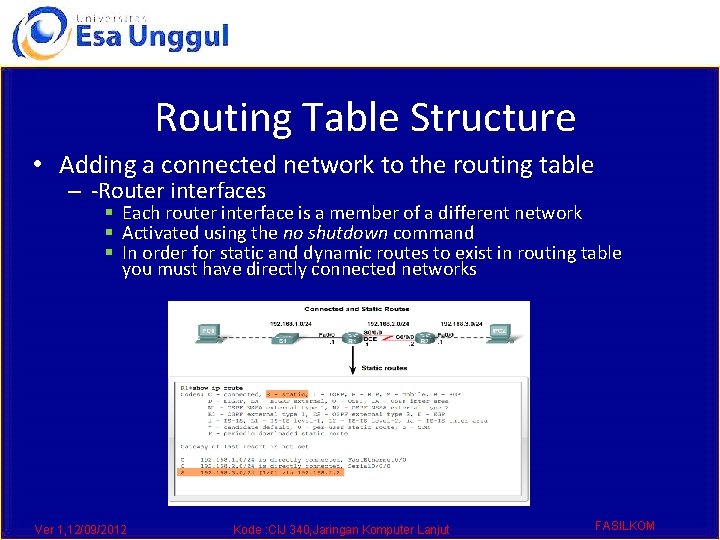
Routing Table Structure • Adding a connected network to the routing table – -Router interfaces § Each router interface is a member of a different network § Activated using the no shutdown command § In order for static and dynamic routes to exist in routing table you must have directly connected networks Ver 1, 12/09/2012 Kode : CIJ 340, Jaringan Komputer Lanjut FASILKOM
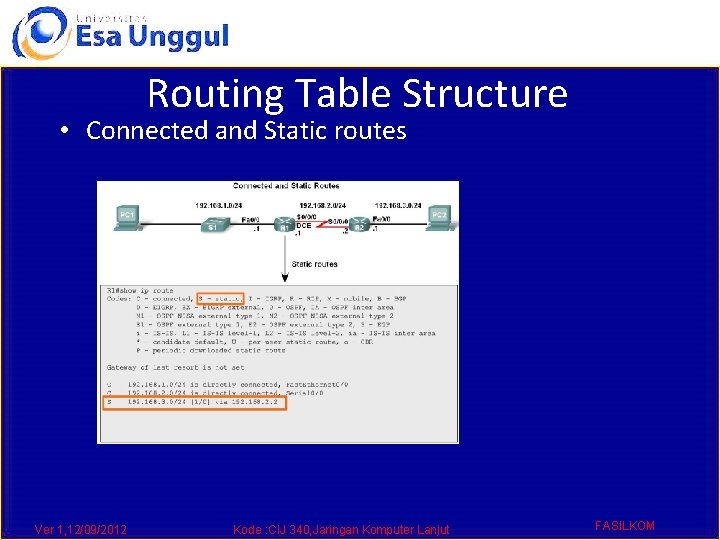
Routing Table Structure • Static routes in the routing table – -Includes: network address and subnet mask and IP address of next hop router or exit interface – -Denoted with the code S in the routing table – -Routing tables must contain directly connected networks used to connect remote networks before static or dynamic routing can be used • When to use static routes – -When network only consists of a few routers – -Network is connected to internet only through one ISP – -Hub & spoke topology is used on a large network Ver 1, 12/09/2012 Kode : CIJ 340, Jaringan Komputer Lanjut FASILKOM
Routing Table Structure • Connected and Static routes Ver 1, 12/09/2012 Kode : CIJ 340, Jaringan Komputer Lanjut FASILKOM
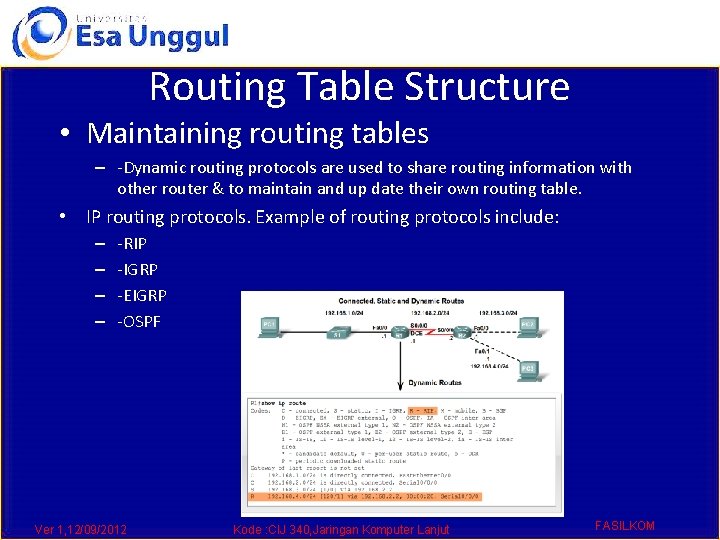
Routing Table Structure • Dynamic routing protocols – -Used to add remote networks to a routing table – -Are used to discover networks – -Are used to update and maintain routing tables • Automatic network discovery – -Routers are able discover new networks by sharing routing table information Ver 1, 12/09/2012 Kode : CIJ 340, Jaringan Komputer Lanjut FASILKOM
Routing Table Structure • Maintaining routing tables – -Dynamic routing protocols are used to share routing information with other router & to maintain and up date their own routing table. • IP routing protocols. Example of routing protocols include: – – -RIP -IGRP -EIGRP -OSPF Ver 1, 12/09/2012 Kode : CIJ 340, Jaringan Komputer Lanjut FASILKOM
Routing Table Structure • Routing Table Principles – -3 principles regarding routing tables: § Every router makes its decisions alone, based on the information it has in its routing table. § Different routing table may contain different information § A routing table can tell how to get to a destination but not how to get back Ver 1, 12/09/2012 Kode : CIJ 340, Jaringan Komputer Lanjut FASILKOM
Routing Table Structure • Effects of the 3 Routing Table Principles • -Packets are forwarded through the network from one router to another, on a hop by hop basis. • -Packets can take path “X” to a destination but return via path “Y” (Asymmetric routing). Ver 1, 12/09/2012 Kode : CIJ 340, Jaringan Komputer Lanjut FASILKOM
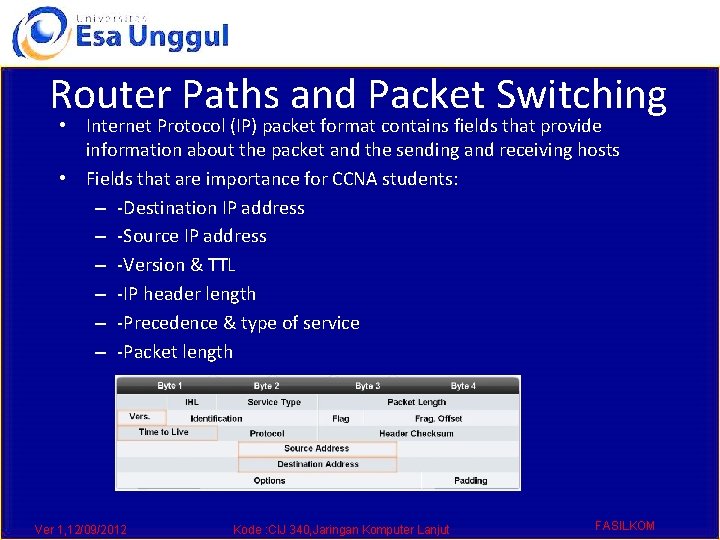
Router Paths and Packet Switching • Internet Protocol (IP) packet format contains fields that provide information about the packet and the sending and receiving hosts • Fields that are importance for CCNA students: – -Destination IP address – -Source IP address – -Version & TTL – -IP header length – -Precedence & type of service – -Packet length Ver 1, 12/09/2012 Kode : CIJ 340, Jaringan Komputer Lanjut FASILKOM
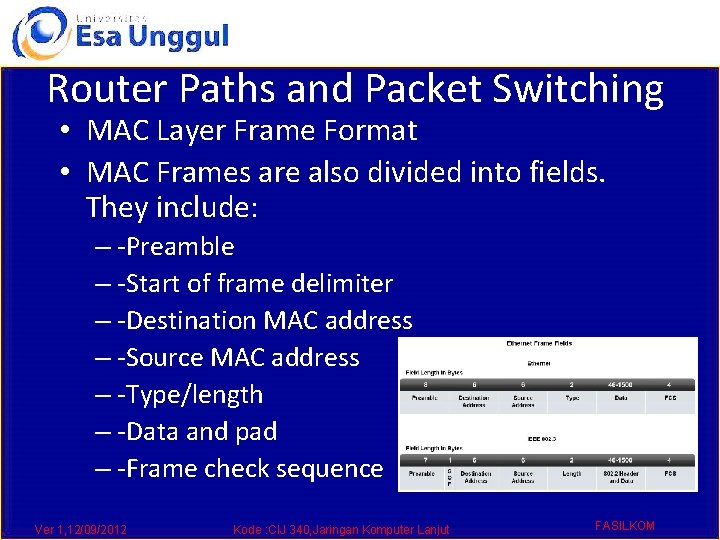
Router Paths and Packet Switching • MAC Layer Frame Format • MAC Frames are also divided into fields. They include: – -Preamble – -Start of frame delimiter – -Destination MAC address – -Source MAC address – -Type/length – -Data and pad – -Frame check sequence Ver 1, 12/09/2012 Kode : CIJ 340, Jaringan Komputer Lanjut FASILKOM
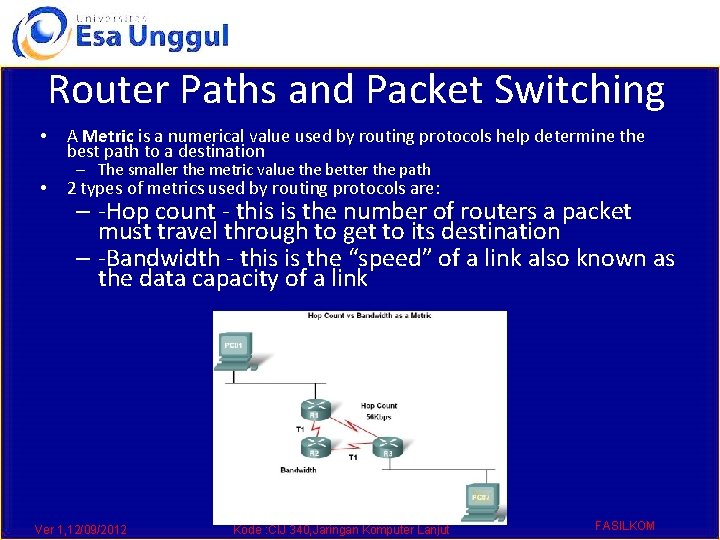
Router Paths and Packet Switching • • A Metric is a numerical value used by routing protocols help determine the best path to a destination – The smaller the metric value the better the path 2 types of metrics used by routing protocols are: – -Hop count - this is the number of routers a packet must travel through to get to its destination – -Bandwidth - this is the “speed” of a link also known as the data capacity of a link Ver 1, 12/09/2012 Kode : CIJ 340, Jaringan Komputer Lanjut FASILKOM
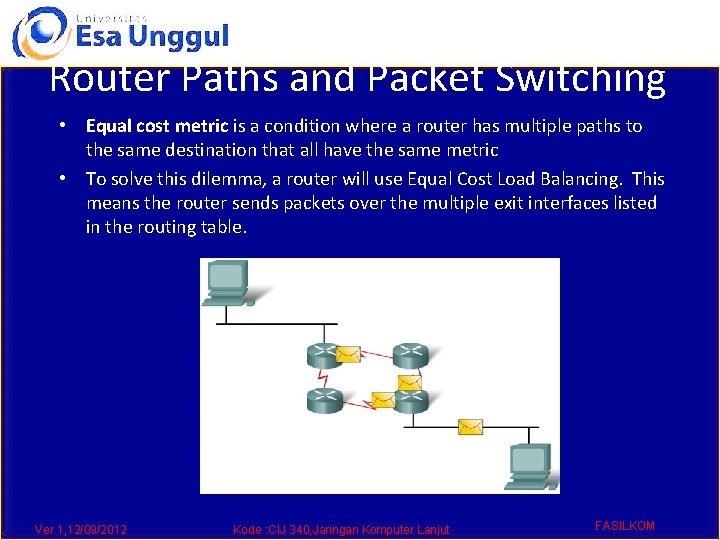
Router Paths and Packet Switching • Equal cost metric is a condition where a router has multiple paths to the same destination that all have the same metric • To solve this dilemma, a router will use Equal Cost Load Balancing. This means the router sends packets over the multiple exit interfaces listed in the routing table. Ver 1, 12/09/2012 Kode : CIJ 340, Jaringan Komputer Lanjut FASILKOM
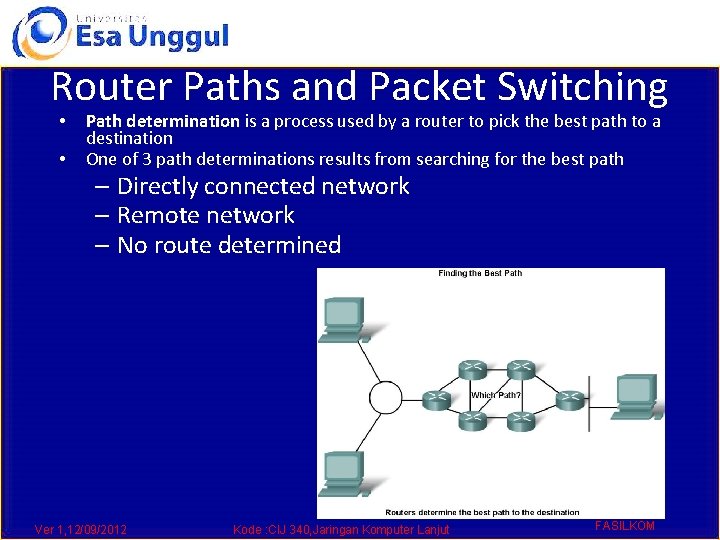
Router Paths and Packet Switching • • Path determination is a process used by a router to pick the best path to a destination One of 3 path determinations results from searching for the best path – Directly connected network – Remote network – No route determined Ver 1, 12/09/2012 Kode : CIJ 340, Jaringan Komputer Lanjut FASILKOM
Router Paths and Packet Switching • Switching Function of Router is the process used by a router to switch a packet from an incoming interface to an outgoing interface on the same router. – -A packet received by a router will do the following: § Strips off layer 2 headers. § Examines destination IP address located in Layer 3 header to find best route to destination. § Re-encapsulates layer 3 packet into layer 2 frame. § Forwards frame out exit interface. Ver 1, 12/09/2012 Kode : CIJ 340, Jaringan Komputer Lanjut FASILKOM
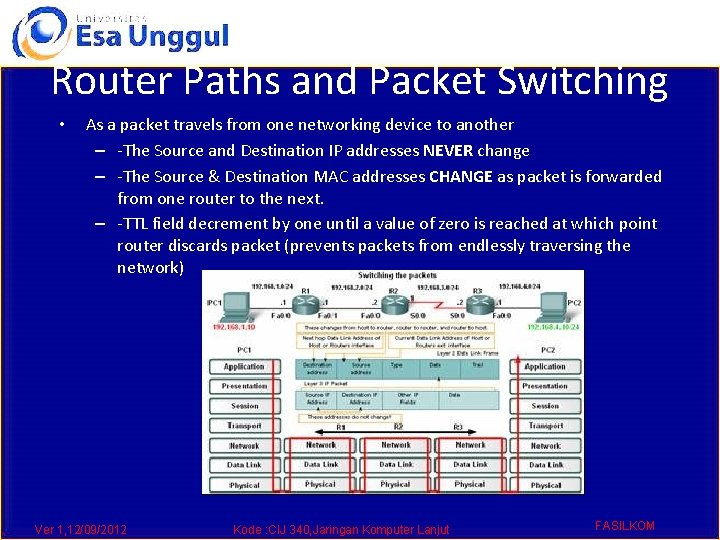
Router Paths and Packet Switching • As a packet travels from one networking device to another – -The Source and Destination IP addresses NEVER change – -The Source & Destination MAC addresses CHANGE as packet is forwarded from one router to the next. – -TTL field decrement by one until a value of zero is reached at which point router discards packet (prevents packets from endlessly traversing the network) Ver 1, 12/09/2012 Kode : CIJ 340, Jaringan Komputer Lanjut FASILKOM
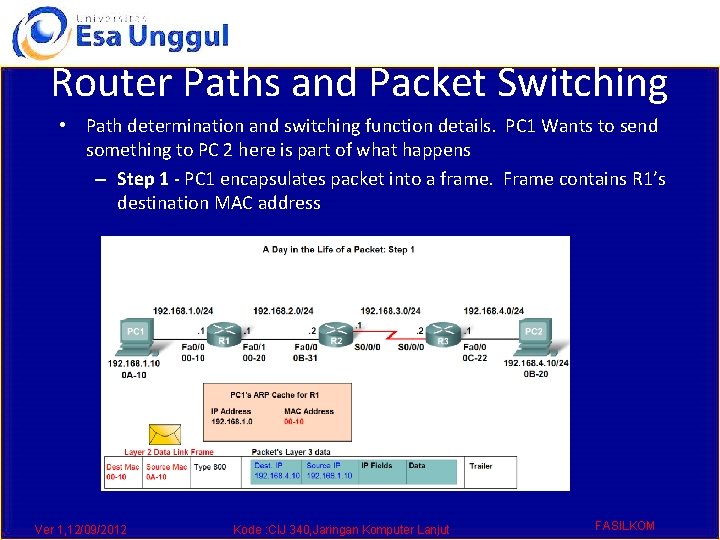
Router Paths and Packet Switching • Path determination and switching function details. PC 1 Wants to send something to PC 2 here is part of what happens – Step 1 - PC 1 encapsulates packet into a frame. Frame contains R 1’s destination MAC address Ver 1, 12/09/2012 Kode : CIJ 340, Jaringan Komputer Lanjut FASILKOM
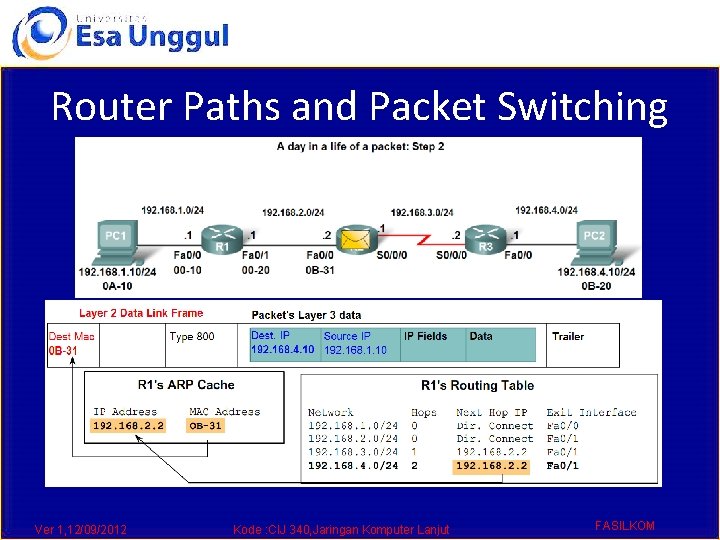
Router Paths and Packet Switching – Step 2 - R 1 receives Ethernet frame. § R 1 sees that destination MAC address matches its own MAC. § R 1 then strips off Ethernet frame. § R 1 Examines destination IP. § R 1 consults routing table looking for destination IP. § After finding destination IP in routing table, R 1 now looks up next hop IP address. § R 1 re-encapsulates IP packet with a new Ethernet frame. § R 1 forwards Ethernet packet out Fa 0/1 interface. Ver 1, 12/09/2012 Kode : CIJ 340, Jaringan Komputer Lanjut FASILKOM
Router Paths and Packet Switching Ver 1, 12/09/2012 Kode : CIJ 340, Jaringan Komputer Lanjut FASILKOM
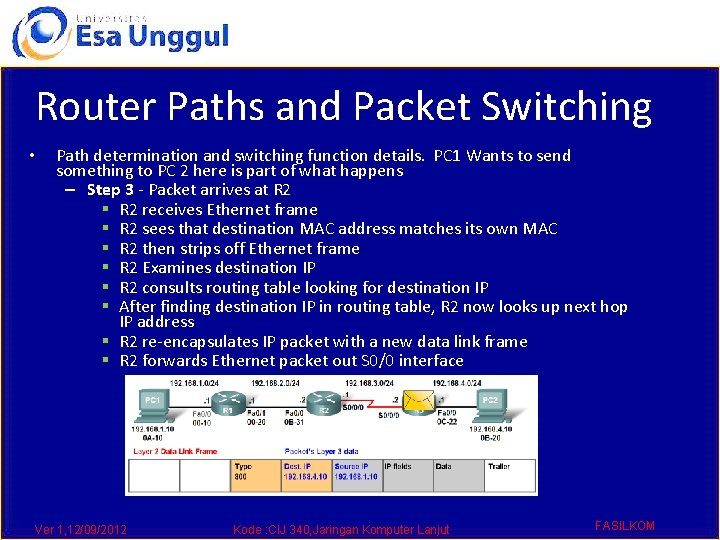
Router Paths and Packet Switching • Path determination and switching function details. PC 1 Wants to send something to PC 2 here is part of what happens – Step 3 - Packet arrives at R 2 § R 2 receives Ethernet frame § R 2 sees that destination MAC address matches its own MAC § R 2 then strips off Ethernet frame § R 2 Examines destination IP § R 2 consults routing table looking for destination IP § After finding destination IP in routing table, R 2 now looks up next hop IP address § R 2 re-encapsulates IP packet with a new data link frame § R 2 forwards Ethernet packet out S 0/0 interface Ver 1, 12/09/2012 Kode : CIJ 340, Jaringan Komputer Lanjut FASILKOM
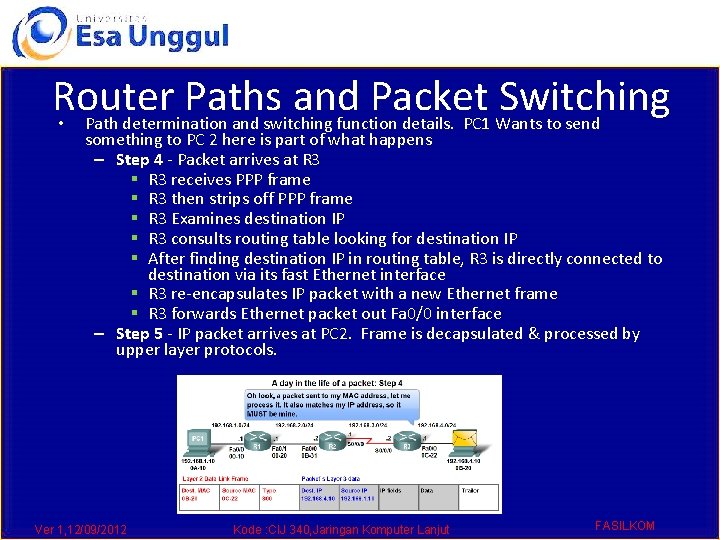
Router Paths and Packet Switching • Path determination and switching function details. PC 1 Wants to send something to PC 2 here is part of what happens – Step 4 - Packet arrives at R 3 § R 3 receives PPP frame § R 3 then strips off PPP frame § R 3 Examines destination IP § R 3 consults routing table looking for destination IP § After finding destination IP in routing table, R 3 is directly connected to destination via its fast Ethernet interface § R 3 re-encapsulates IP packet with a new Ethernet frame § R 3 forwards Ethernet packet out Fa 0/0 interface – Step 5 - IP packet arrives at PC 2. Frame is decapsulated & processed by upper layer protocols. Ver 1, 12/09/2012 Kode : CIJ 340, Jaringan Komputer Lanjut FASILKOM
• • Summary Routers are computers that specialize in sending data over a network. Routers are composed of: – -Hardware i. e. CPU, Memory, System bus, Interfaces – -Software used to direct the routing process § IOS § Configuration file • Routers need to be configured. Basic configuration consists of: • Routing tables contain the following information – -Router name – -Router banner – -Password(s) – -Interface configurations i. e. IP address and subnet mask – -Directly connected networks – -Remotely connected networks – -Network addresses and subnet masks – -IP address of next hop address Ver 1, 12/09/2012 Kode : CIJ 340, Jaringan Komputer Lanjut FASILKOM
Summary • Routers determine a packets path to its destination by doing the following § Receiving an encapsulated frame & examining destination MAC address. § If the MAC address matches then Frame is deencapsulated so that router can examine the destination IP address. § If destination IP address is in routing table or there is a static route then Router determines next hop IP address. Router will re-encapsulate packet with appropriate layer 2 frame and send it out to next destination. § Process continues until packet reaches destination. § Note - only the MAC addresses will change the source and destination IP addresses do not change. Ver 1, 12/09/2012 Kode : CIJ 340, Jaringan Komputer Lanjut FASILKOM
Ver 1, 12/09/2012 Kode : CIJ 340, Jaringan Komputer Lanjut FASILKOM