
Introduction to Programming in C Seventh Edition Chapter

- Slides: 77
Introduction to Programming in C++ Seventh Edition Chapter 13: Strings
Objectives • • • Utilize string memory locations in a program Get string input using the getline function Ignore characters using the ignore function Determine the number of characters in a string Access the characters in a string Search a string An Introduction to Programming with C++, Seventh Edition 2
Objectives (cont’d. ) • • • Remove characters from a string Replace characters in a string Insert characters within a string Duplicate characters within a string Concatenate strings An Introduction to Programming with C++, Seventh Edition 3
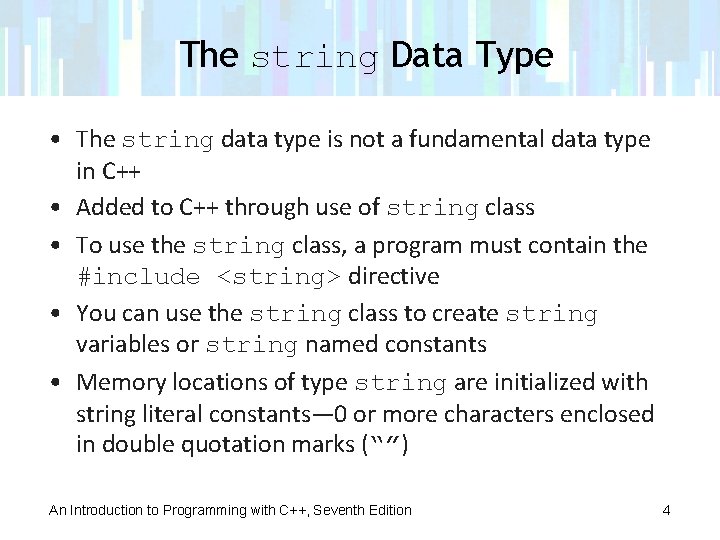
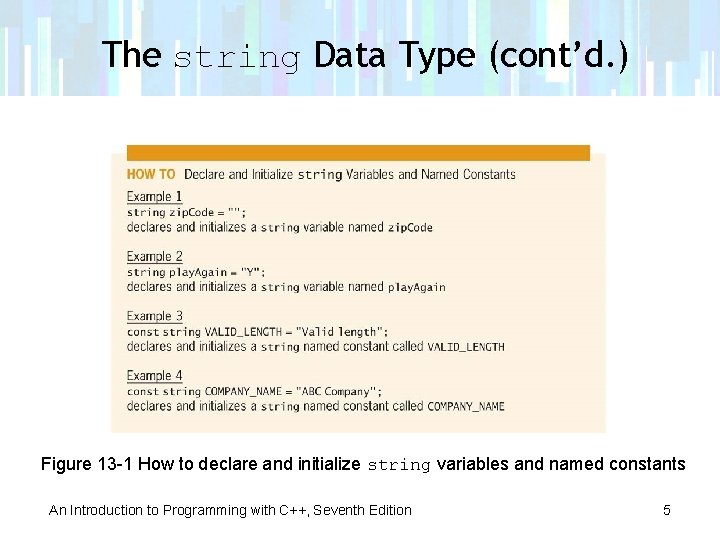
The string Data Type • The string data type is not a fundamental data type in C++ • Added to C++ through use of string class • To use the string class, a program must contain the #include <string> directive • You can use the string class to create string variables or string named constants • Memory locations of type string are initialized with string literal constants— 0 or more characters enclosed in double quotation marks (“”) An Introduction to Programming with C++, Seventh Edition 4
The string Data Type (cont’d. ) Figure 13 -1 How to declare and initialize string variables and named constants An Introduction to Programming with C++, Seventh Edition 5
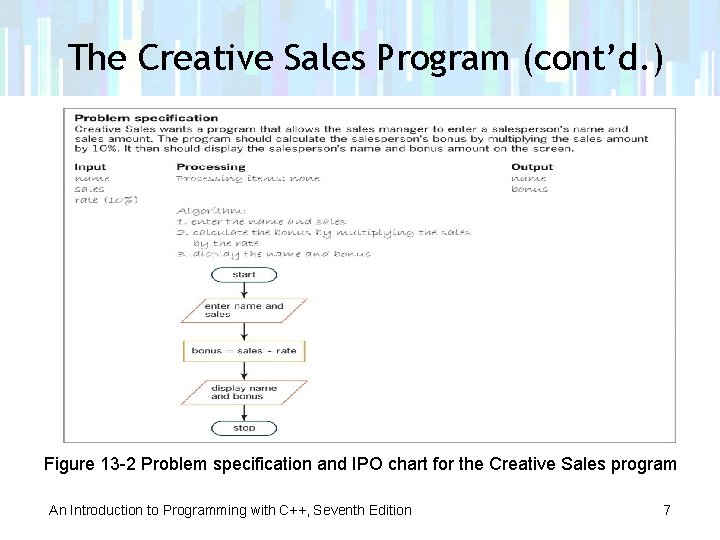
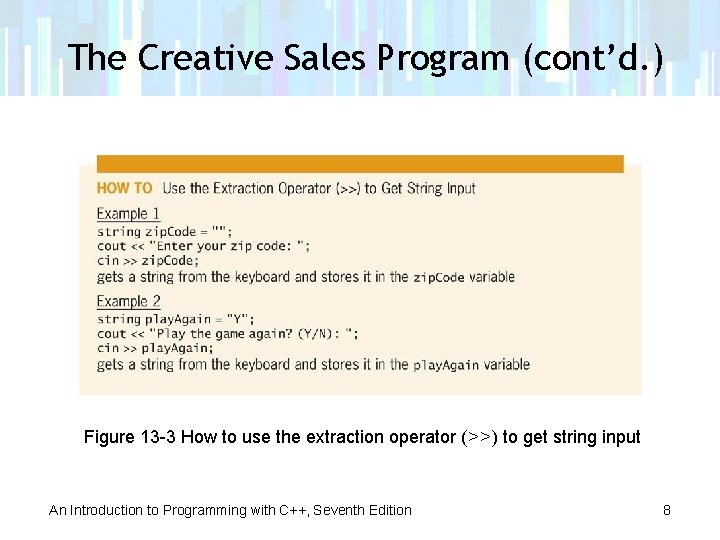
The Creative Sales Program • Program gets a salesperson’s name and sales amount from keyboard • Calculates salesperson’s bonus and displays salesperson’s name and bonus amount • Extraction operator can be used to get string input from keyboard • Stops reading characters when it encounters a whitespace character (blank, tab, or newline character) An Introduction to Programming with C++, Seventh Edition 6
The Creative Sales Program (cont’d. ) Figure 13 -2 Problem specification and IPO chart for the Creative Sales program An Introduction to Programming with C++, Seventh Edition 7
The Creative Sales Program (cont’d. ) Figure 13 -3 How to use the extraction operator (>>) to get string input An Introduction to Programming with C++, Seventh Edition 8
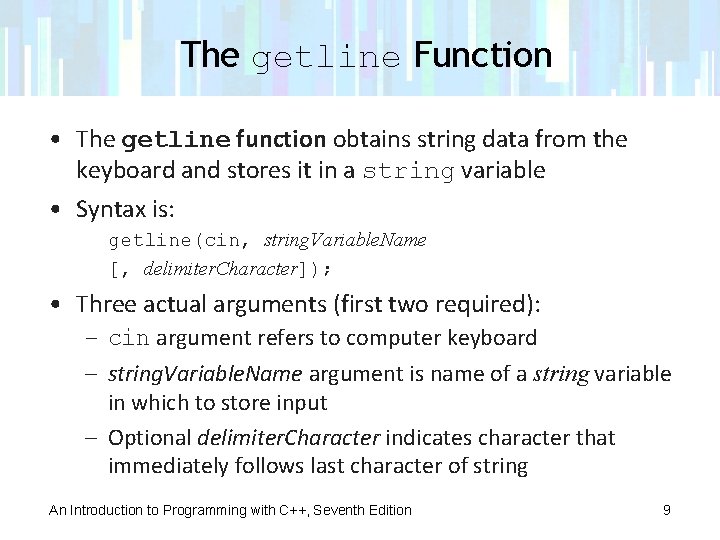
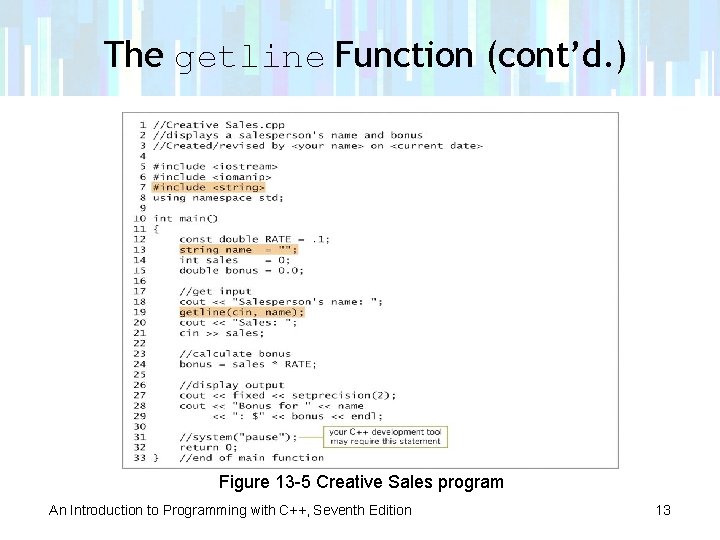
The getline Function • The getline function obtains string data from the keyboard and stores it in a string variable • Syntax is: getline(cin, string. Variable. Name [, delimiter. Character]); • Three actual arguments (first two required): – cin argument refers to computer keyboard – string. Variable. Name argument is name of a string variable in which to store input – Optional delimiter. Character indicates character that immediately follows last character of string An Introduction to Programming with C++, Seventh Edition 9
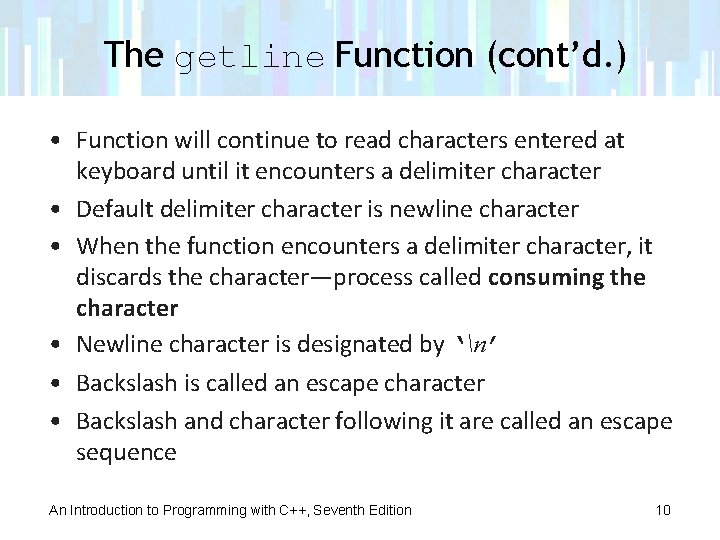
The getline Function (cont’d. ) • Function will continue to read characters entered at keyboard until it encounters a delimiter character • Default delimiter character is newline character • When the function encounters a delimiter character, it discards the character—process called consuming the character • Newline character is designated by ‘n’ • Backslash is called an escape character • Backslash and character following it are called an escape sequence An Introduction to Programming with C++, Seventh Edition 10
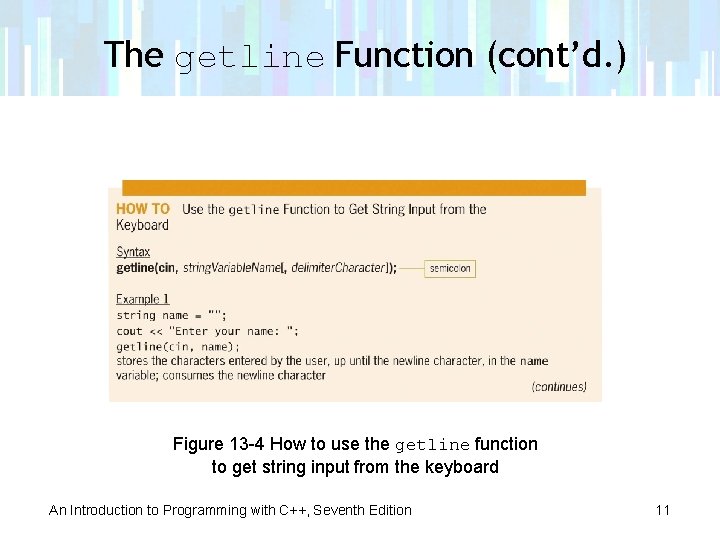
The getline Function (cont’d. ) Figure 13 -4 How to use the getline function to get string input from the keyboard An Introduction to Programming with C++, Seventh Edition 11
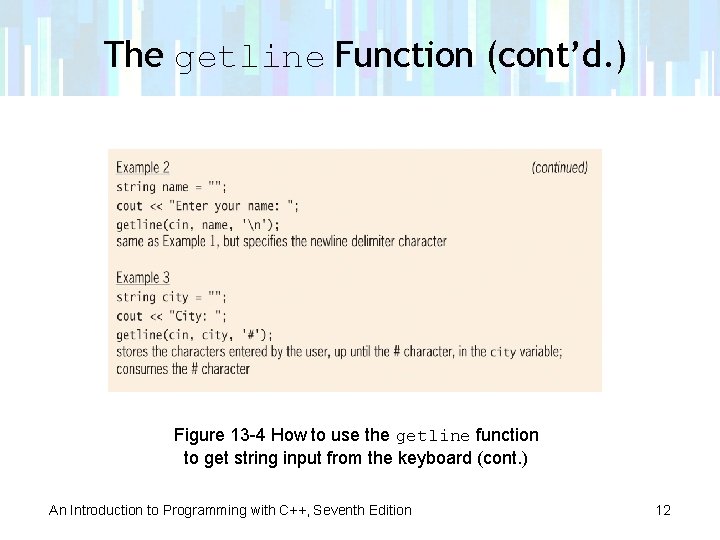
The getline Function (cont’d. ) Figure 13 -4 How to use the getline function to get string input from the keyboard (cont. ) An Introduction to Programming with C++, Seventh Edition 12
The getline Function (cont’d. ) Figure 13 -5 Creative Sales program An Introduction to Programming with C++, Seventh Edition 13
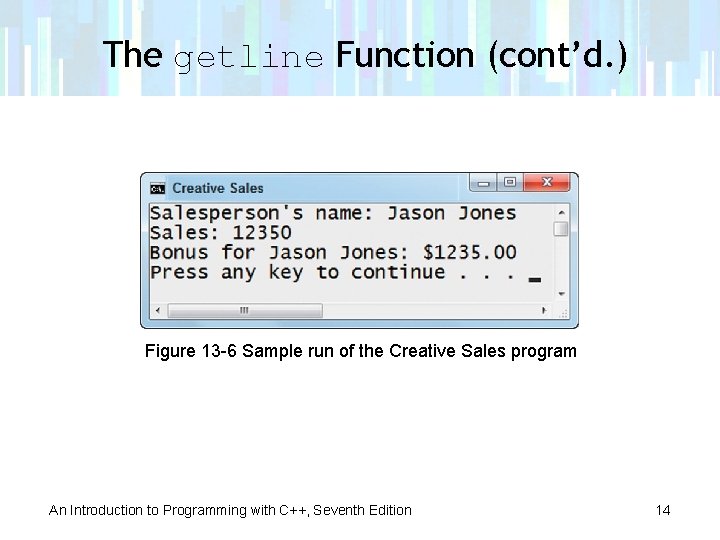
The getline Function (cont’d. ) Figure 13 -6 Sample run of the Creative Sales program An Introduction to Programming with C++, Seventh Edition 14
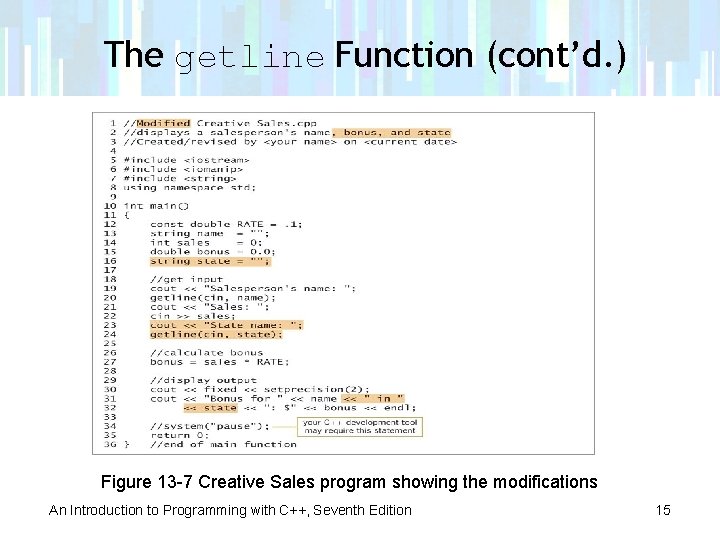
The getline Function (cont’d. ) Figure 13 -7 Creative Sales program showing the modifications An Introduction to Programming with C++, Seventh Edition 15
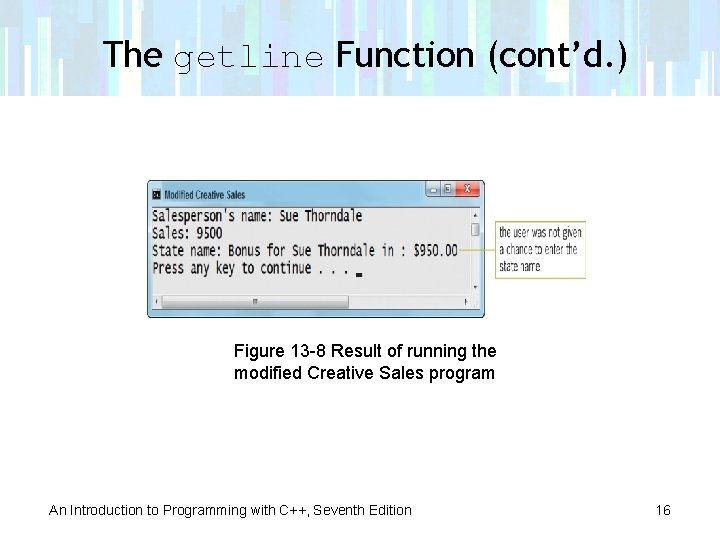
The getline Function (cont’d. ) Figure 13 -8 Result of running the modified Creative Sales program An Introduction to Programming with C++, Seventh Edition 16
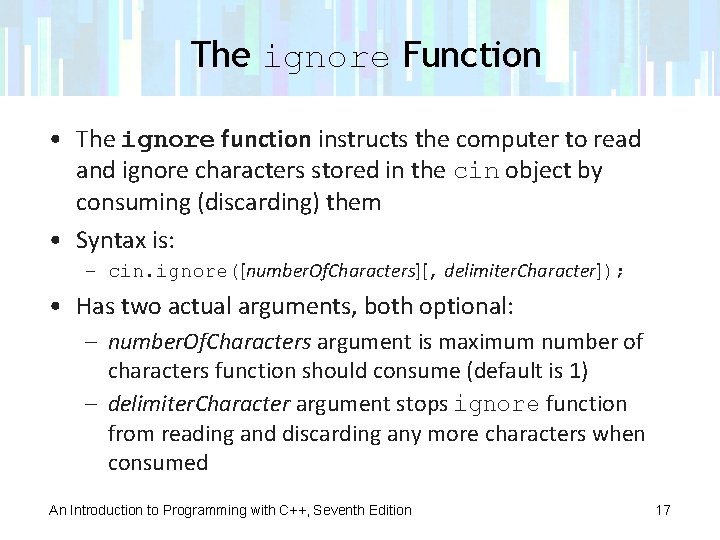
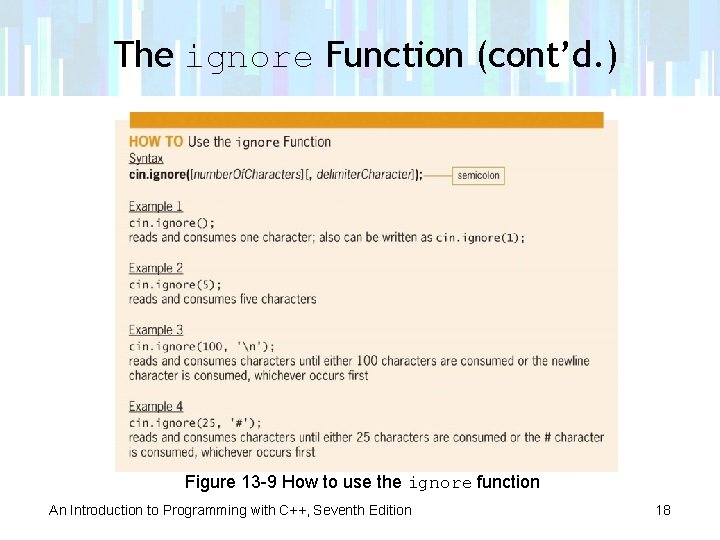
The ignore Function • The ignore function instructs the computer to read and ignore characters stored in the cin object by consuming (discarding) them • Syntax is: – cin. ignore([number. Of. Characters][, delimiter. Character]); • Has two actual arguments, both optional: – number. Of. Characters argument is maximum number of characters function should consume (default is 1) – delimiter. Character argument stops ignore function from reading and discarding any more characters when consumed An Introduction to Programming with C++, Seventh Edition 17
The ignore Function (cont’d. ) Figure 13 -9 How to use the ignore function An Introduction to Programming with C++, Seventh Edition 18
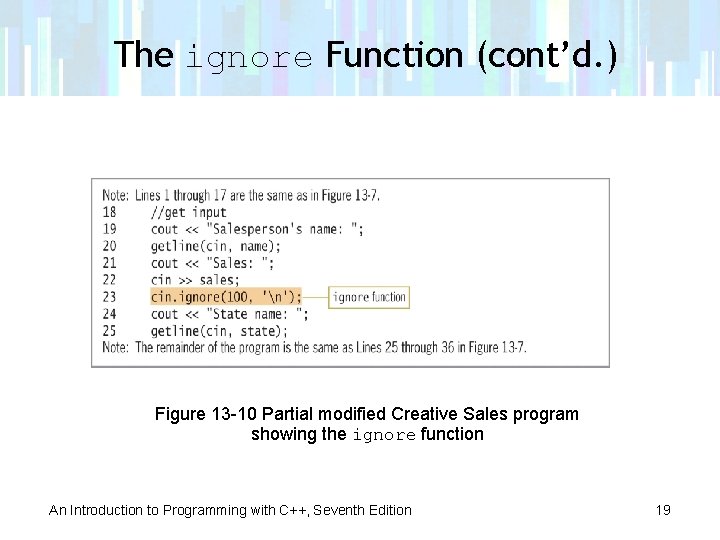
The ignore Function (cont’d. ) Figure 13 -10 Partial modified Creative Sales program showing the ignore function An Introduction to Programming with C++, Seventh Edition 19
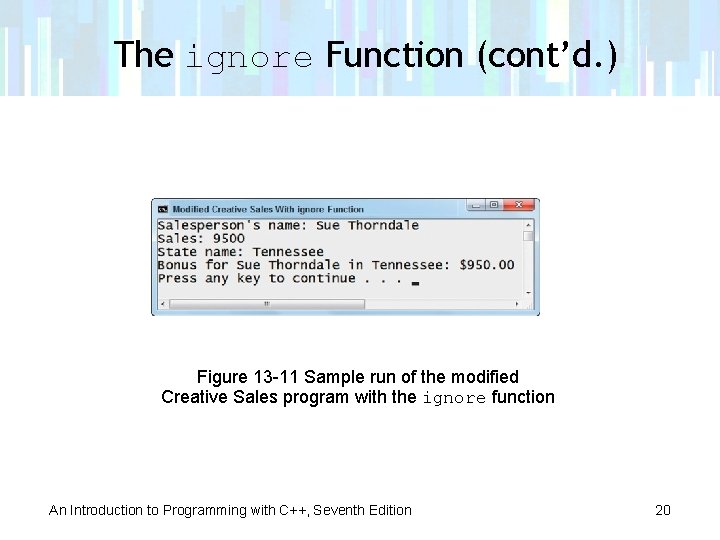
The ignore Function (cont’d. ) Figure 13 -11 Sample run of the modified Creative Sales program with the ignore function An Introduction to Programming with C++, Seventh Edition 20
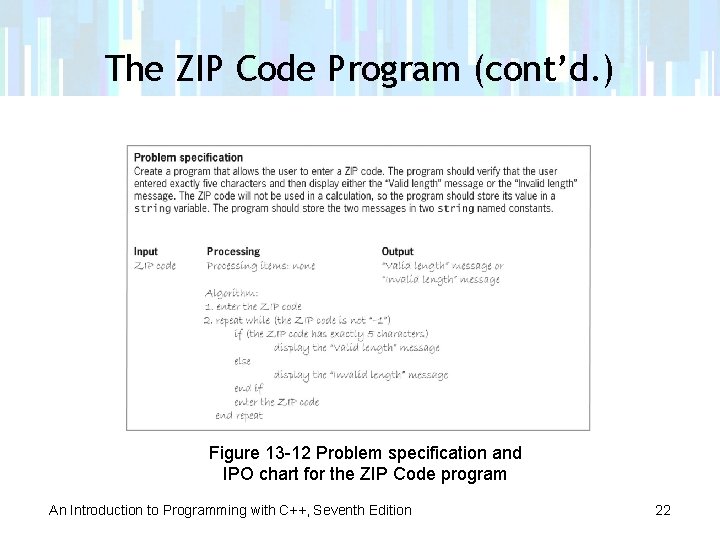
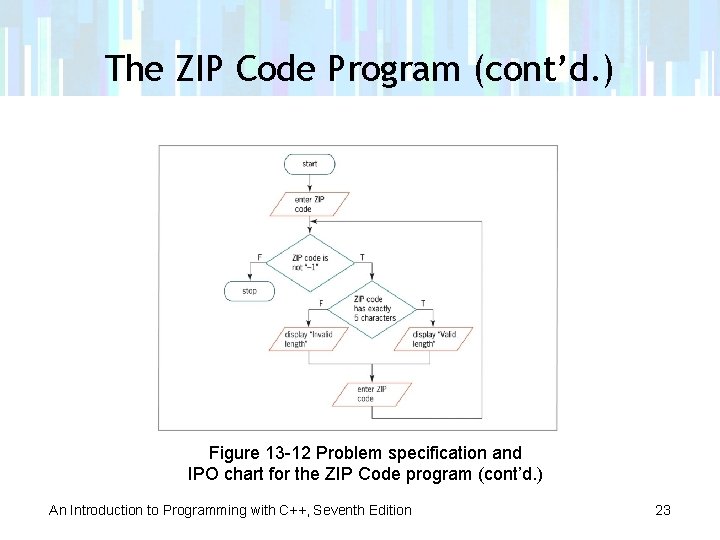
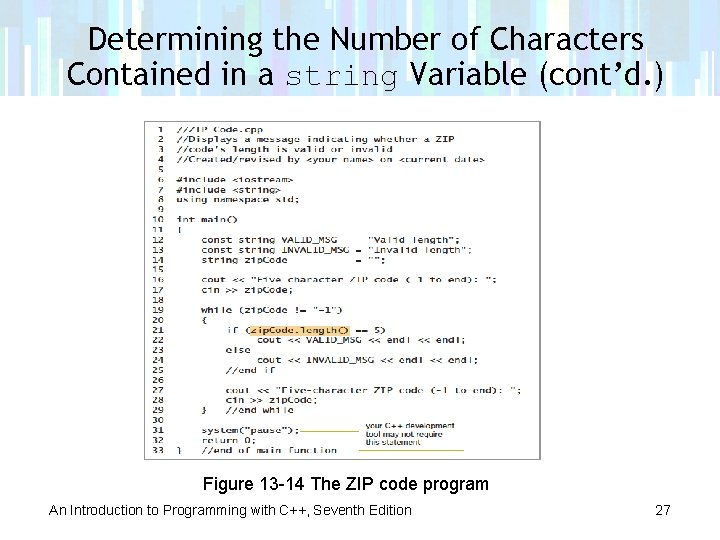
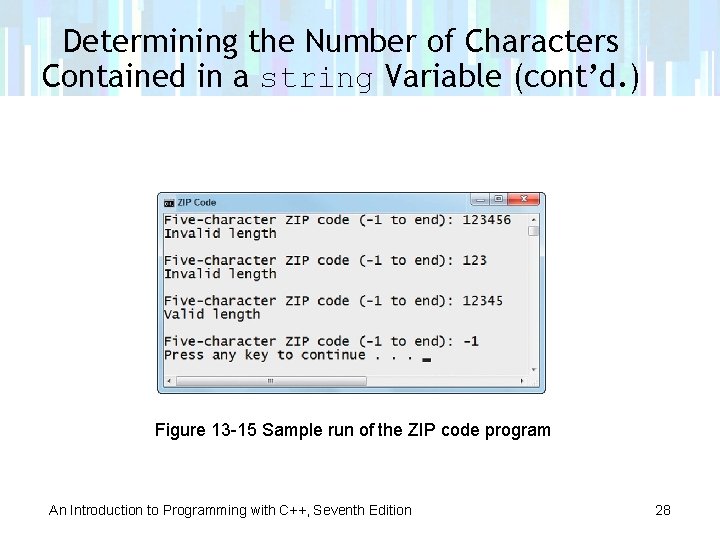
The ZIP Code Program • Program reads in a string from the user and verifies that it contains exactly five characters • If string contains exactly five characters, program displays “Valid length” • Otherwise, displays “Invalid length” An Introduction to Programming with C++, Seventh Edition 21
The ZIP Code Program (cont’d. ) Figure 13 -12 Problem specification and IPO chart for the ZIP Code program An Introduction to Programming with C++, Seventh Edition 22
The ZIP Code Program (cont’d. ) Figure 13 -12 Problem specification and IPO chart for the ZIP Code program (cont’d. ) An Introduction to Programming with C++, Seventh Edition 23
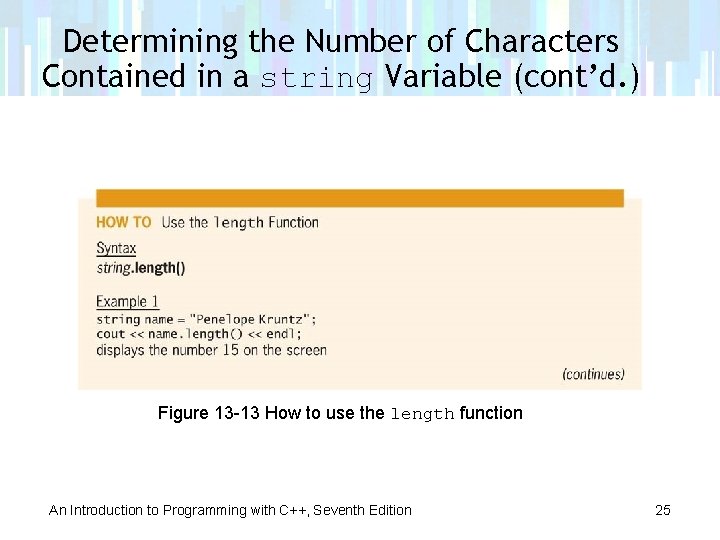
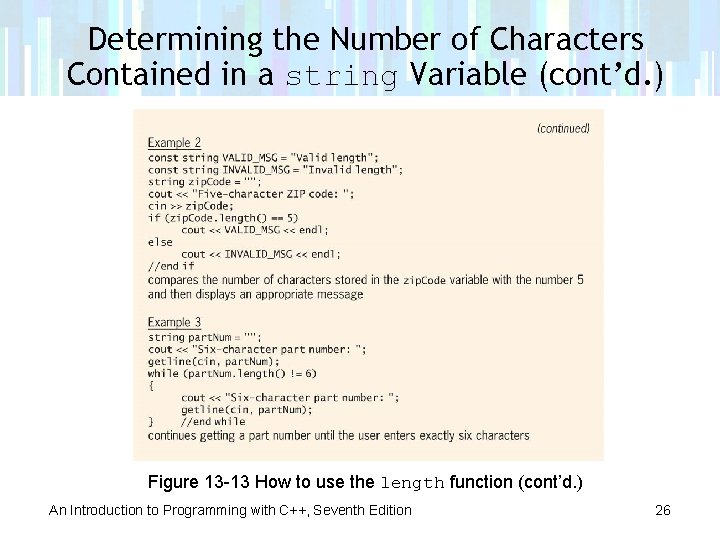
Determining the Number of Characters in a string Variable • You use string class’s length function to determine the number of characters in a string variable • Syntax is: – string. length() • Returns number of characters contained in string An Introduction to Programming with C++, Seventh Edition 24
Determining the Number of Characters Contained in a string Variable (cont’d. ) Figure 13 -13 How to use the length function An Introduction to Programming with C++, Seventh Edition 25
Determining the Number of Characters Contained in a string Variable (cont’d. ) Figure 13 -13 How to use the length function (cont’d. ) An Introduction to Programming with C++, Seventh Edition 26
Determining the Number of Characters Contained in a string Variable (cont’d. ) Figure 13 -14 The ZIP code program An Introduction to Programming with C++, Seventh Edition 27
Determining the Number of Characters Contained in a string Variable (cont’d. ) Figure 13 -15 Sample run of the ZIP code program An Introduction to Programming with C++, Seventh Edition 28
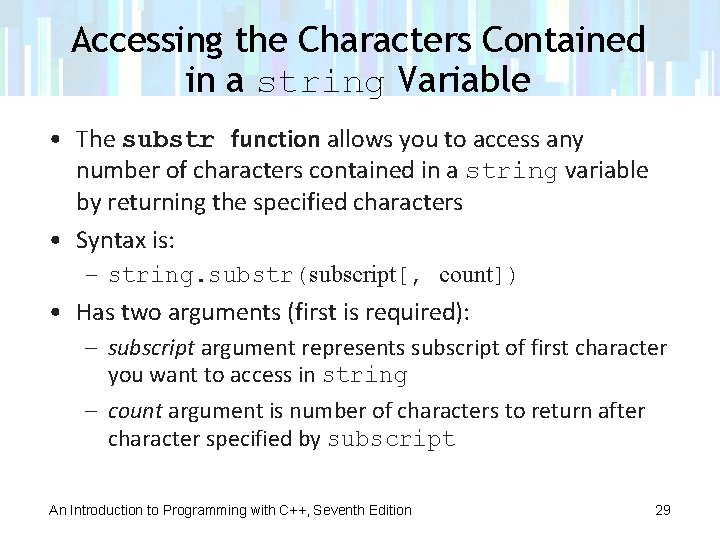
Accessing the Characters Contained in a string Variable • The substr function allows you to access any number of characters contained in a string variable by returning the specified characters • Syntax is: – string. substr(subscript[, count]) • Has two arguments (first is required): – subscript argument represents subscript of first character you want to access in string – count argument is number of characters to return after character specified by subscript An Introduction to Programming with C++, Seventh Edition 29
Accessing the Characters Contained in a string Variable (cont’d. ) • If you omit count argument, function returns all characters from subscript position through end of string • A string is equivalent to a one-dimensional array of characters • Each character has a unique subscript that indicates character’s position in the string An Introduction to Programming with C++, Seventh Edition 30
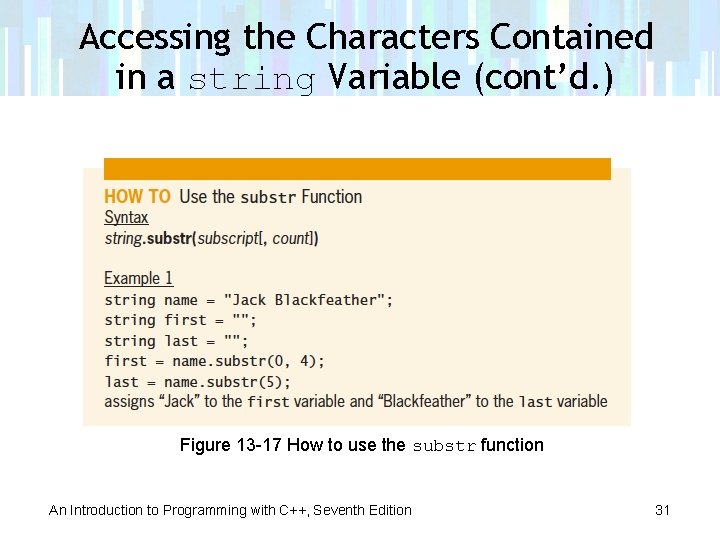
Accessing the Characters Contained in a string Variable (cont’d. ) Figure 13 -17 How to use the substr function An Introduction to Programming with C++, Seventh Edition 31
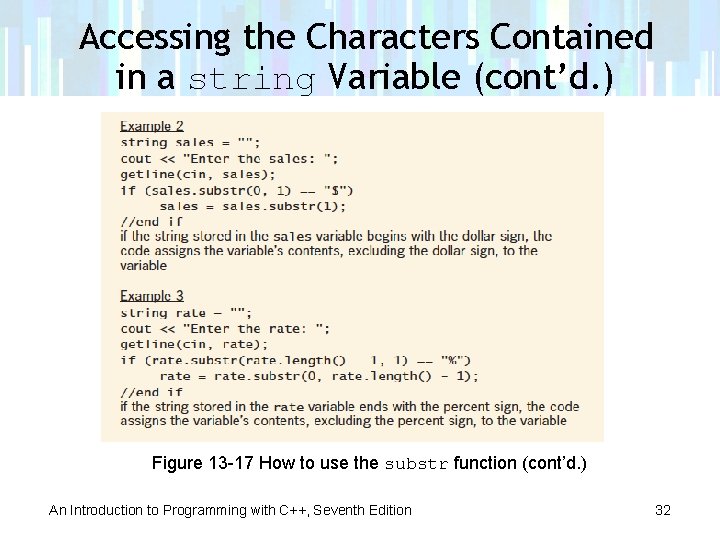
Accessing the Characters Contained in a string Variable (cont’d. ) Figure 13 -17 How to use the substr function (cont’d. ) An Introduction to Programming with C++, Seventh Edition 32
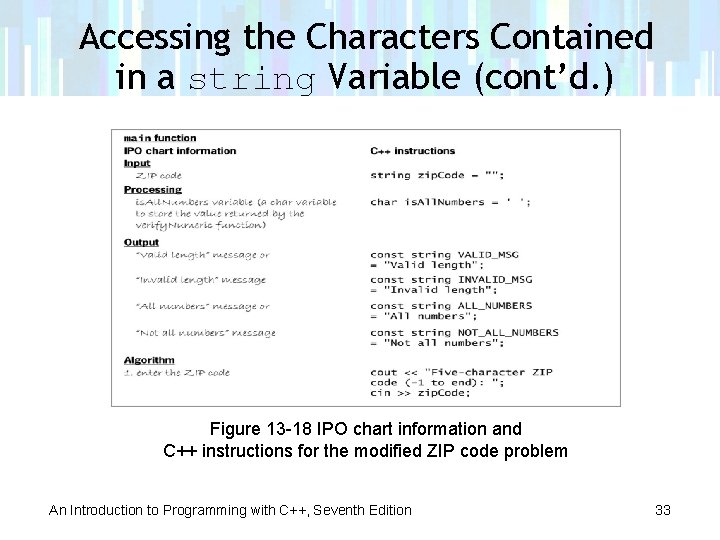
Accessing the Characters Contained in a string Variable (cont’d. ) Figure 13 -18 IPO chart information and C++ instructions for the modified ZIP code problem An Introduction to Programming with C++, Seventh Edition 33
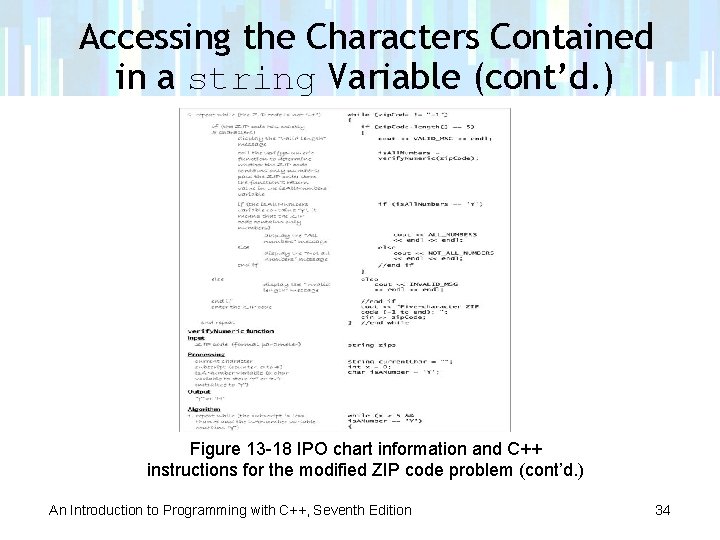
Accessing the Characters Contained in a string Variable (cont’d. ) Figure 13 -18 IPO chart information and C++ instructions for the modified ZIP code problem (cont’d. ) An Introduction to Programming with C++, Seventh Edition 34
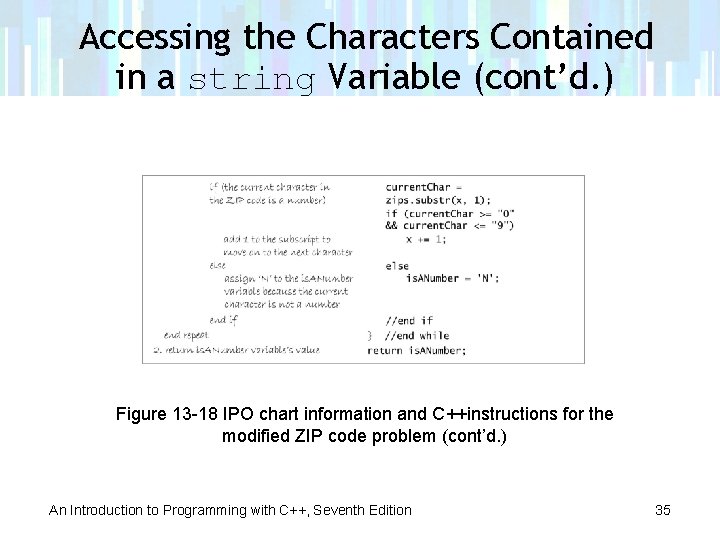
Accessing the Characters Contained in a string Variable (cont’d. ) Figure 13 -18 IPO chart information and C++instructions for the modified ZIP code problem (cont’d. ) An Introduction to Programming with C++, Seventh Edition 35
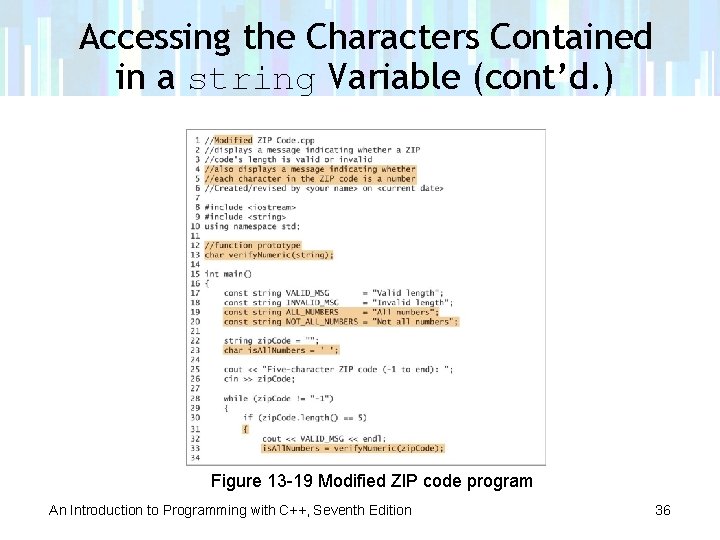
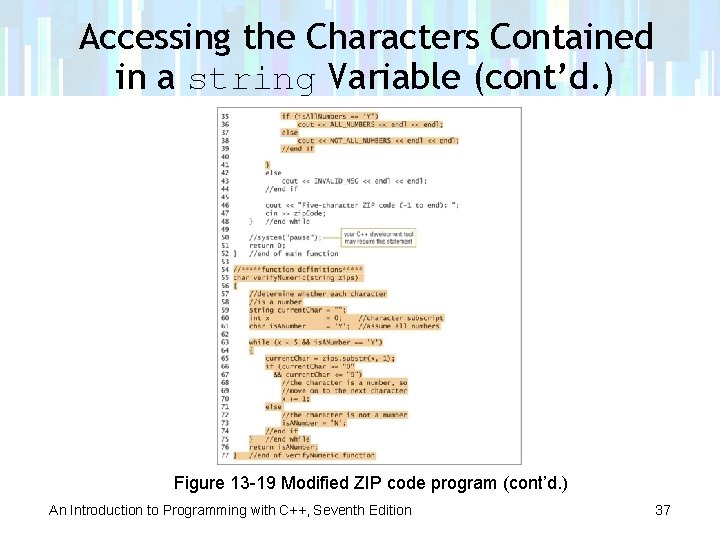
Accessing the Characters Contained in a string Variable (cont’d. ) Figure 13 -19 Modified ZIP code program An Introduction to Programming with C++, Seventh Edition 36
Accessing the Characters Contained in a string Variable (cont’d. ) Figure 13 -19 Modified ZIP code program (cont’d. ) An Introduction to Programming with C++, Seventh Edition 37
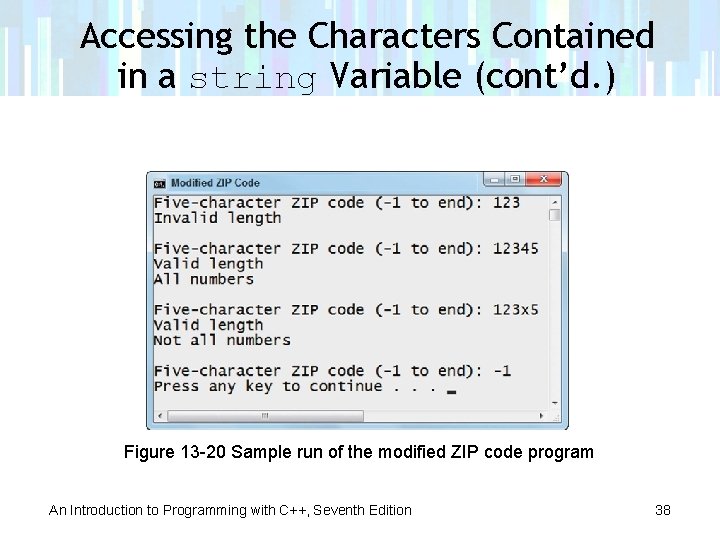
Accessing the Characters Contained in a string Variable (cont’d. ) Figure 13 -20 Sample run of the modified ZIP code program An Introduction to Programming with C++, Seventh Edition 38
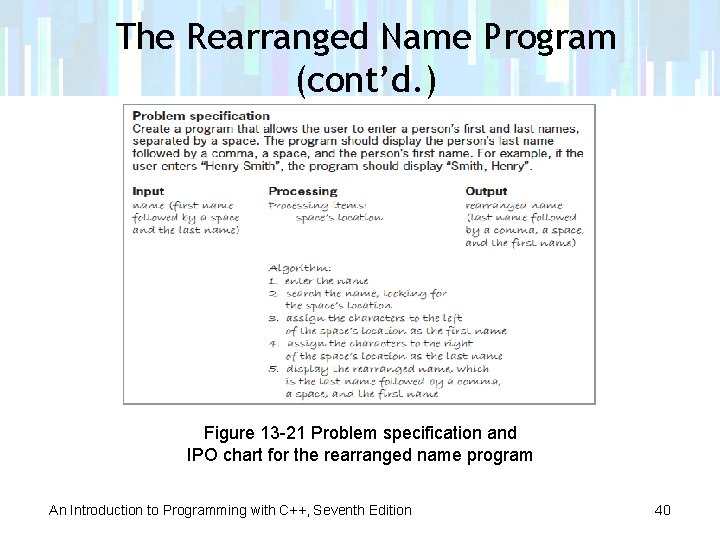
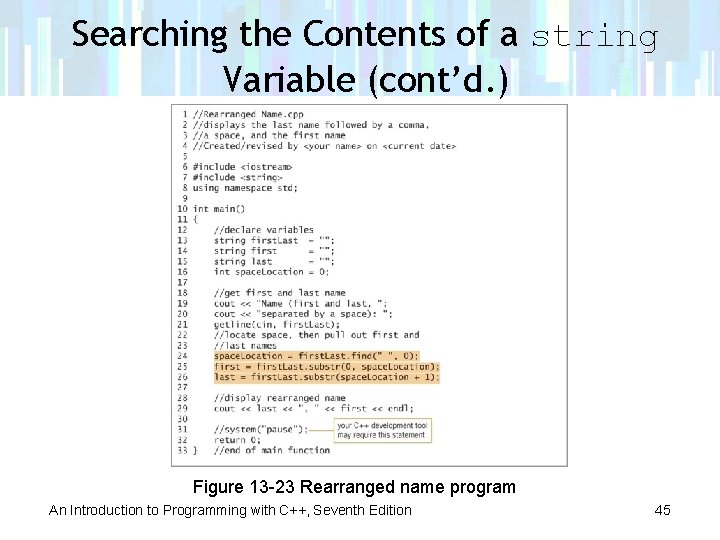
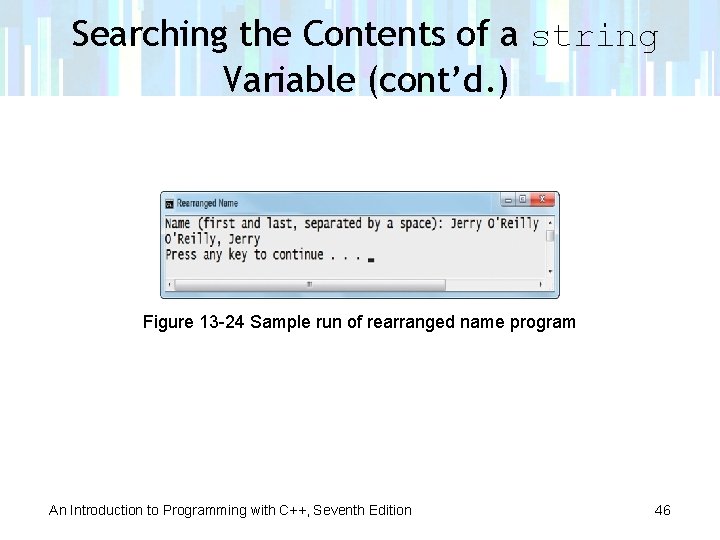
The Rearranged Name Program • Program allows user to enter a person’s first and last names, separated by a space • Displays the person’s last name followed by a comma, a space, and the person’s first name • Searches the input string for the space that separates the first and last names An Introduction to Programming with C++, Seventh Edition 39
The Rearranged Name Program (cont’d. ) Figure 13 -21 Problem specification and IPO chart for the rearranged name program An Introduction to Programming with C++, Seventh Edition 40
Searching the Contents of a string Variable • You use the find function to search contents of a string variable to determine whether it contains a specific sequence of characters • Syntax is: – string. find(search. String, subscript) – search. String argument is a string for which you are searching within string – subscript argument specifies starting position for the search An Introduction to Programming with C++, Seventh Edition 41
Searching the Contents of a string Variable (cont’d. ) • find function performs a case-sensitive search (uppercase and lowercase letters are not equivalent) – When search. String is contained within string, function returns an integer that indicates beginning position of search. String within string – Function returns -1 when search. String is not contained within string An Introduction to Programming with C++, Seventh Edition 42
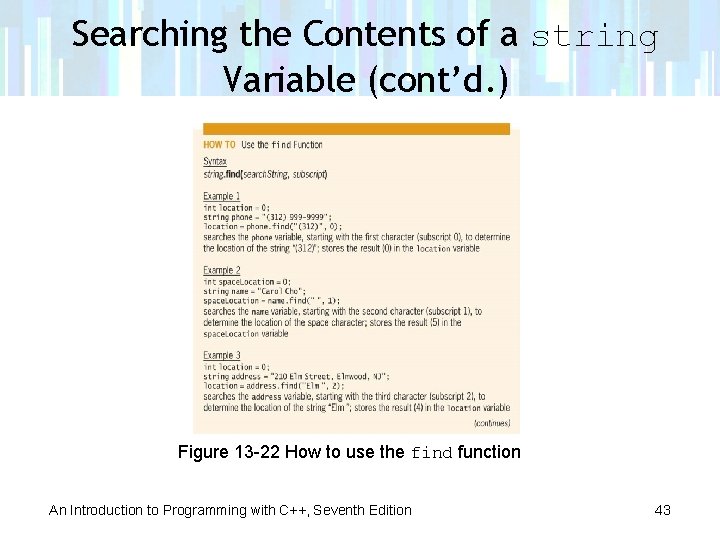
Searching the Contents of a string Variable (cont’d. ) Figure 13 -22 How to use the find function An Introduction to Programming with C++, Seventh Edition 43
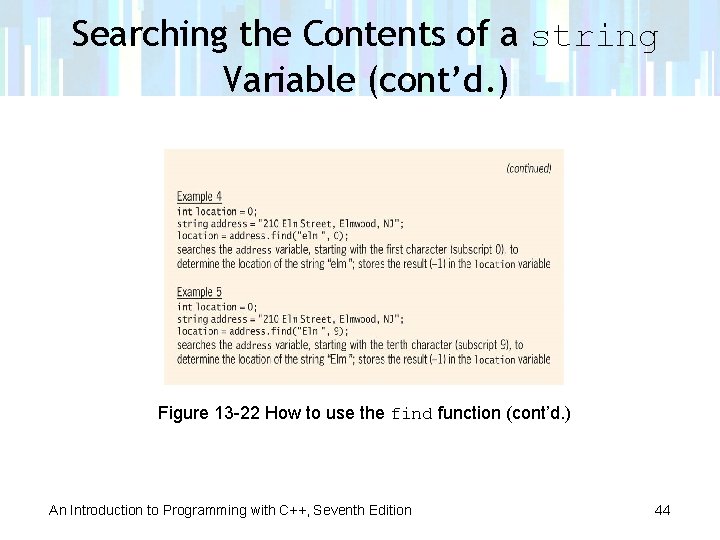
Searching the Contents of a string Variable (cont’d. ) Figure 13 -22 How to use the find function (cont’d. ) An Introduction to Programming with C++, Seventh Edition 44
Searching the Contents of a string Variable (cont’d. ) Figure 13 -23 Rearranged name program An Introduction to Programming with C++, Seventh Edition 45
Searching the Contents of a string Variable (cont’d. ) Figure 13 -24 Sample run of rearranged name program An Introduction to Programming with C++, Seventh Edition 46
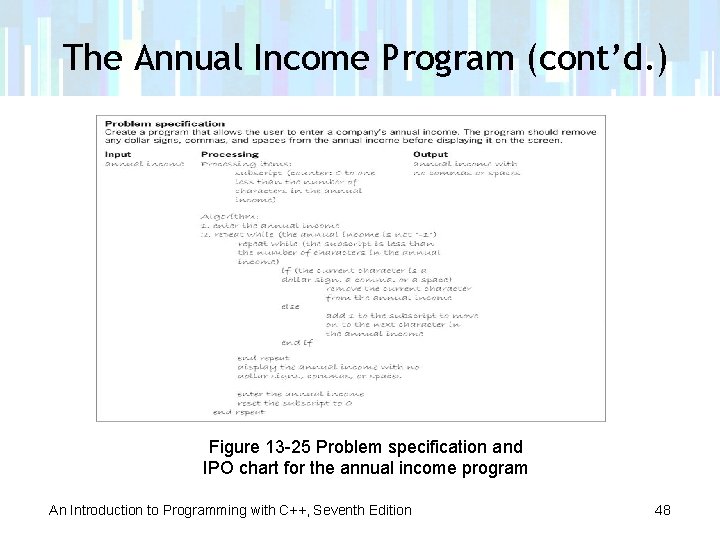
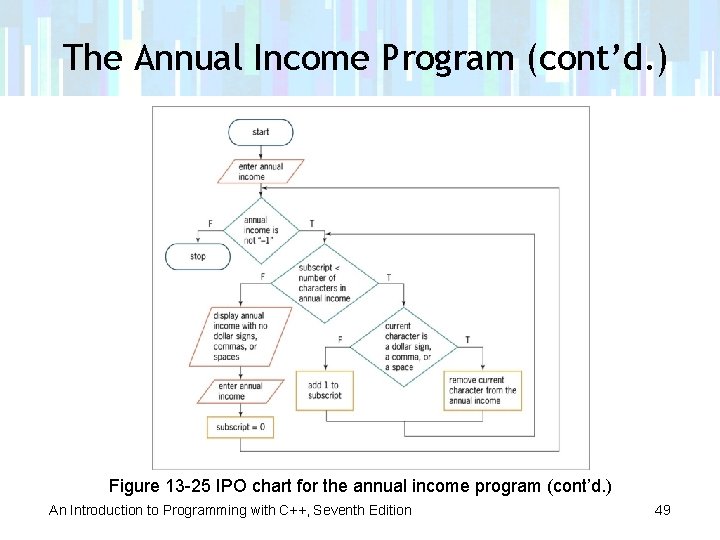
The Annual Income Program • Program allows the user to enter a company’s annual income • Removes any commas and spaces from user’s entry before displaying annual income An Introduction to Programming with C++, Seventh Edition 47
The Annual Income Program (cont’d. ) Figure 13 -25 Problem specification and IPO chart for the annual income program An Introduction to Programming with C++, Seventh Edition 48
The Annual Income Program (cont’d. ) Figure 13 -25 IPO chart for the annual income program (cont’d. ) An Introduction to Programming with C++, Seventh Edition 49
Removing Characters from a string Variable • You can use the erase function to remove one or more characters from a string variable • Syntax is: – string. erase(subscript[, count]); – subscript is position of first character you want to remove – Optional count argument is an integer that specifies number of characters you want removed – If you omit count, function removes all characters from subscript through end of string An Introduction to Programming with C++, Seventh Edition 50
Removing Characters from a string Variable (cont’d. ) Figure 13 -26 How to use the erase function An Introduction to Programming with C++, Seventh Edition 51
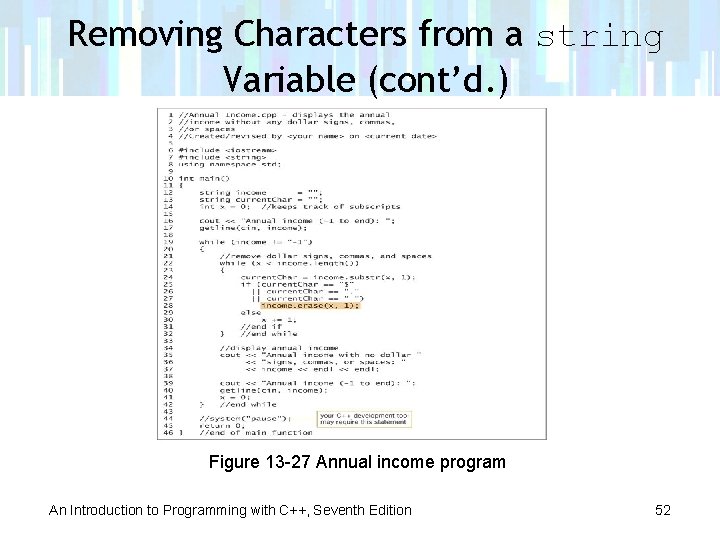
Removing Characters from a string Variable (cont’d. ) Figure 13 -27 Annual income program An Introduction to Programming with C++, Seventh Edition 52
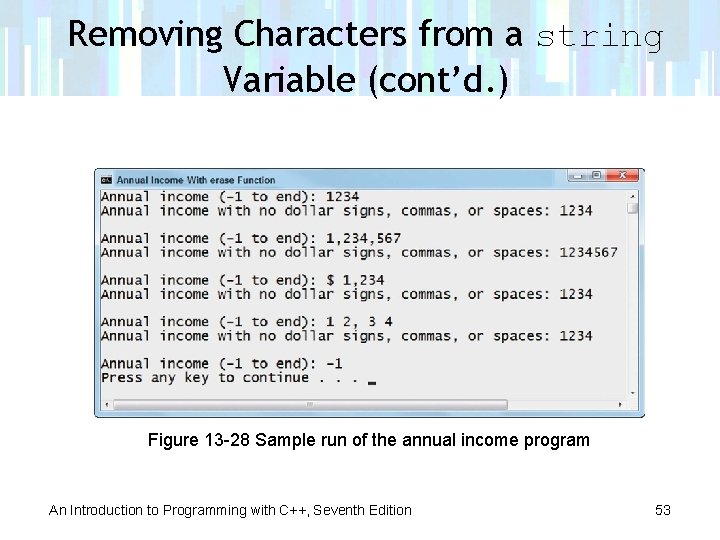
Removing Characters from a string Variable (cont’d. ) Figure 13 -28 Sample run of the annual income program An Introduction to Programming with C++, Seventh Edition 53
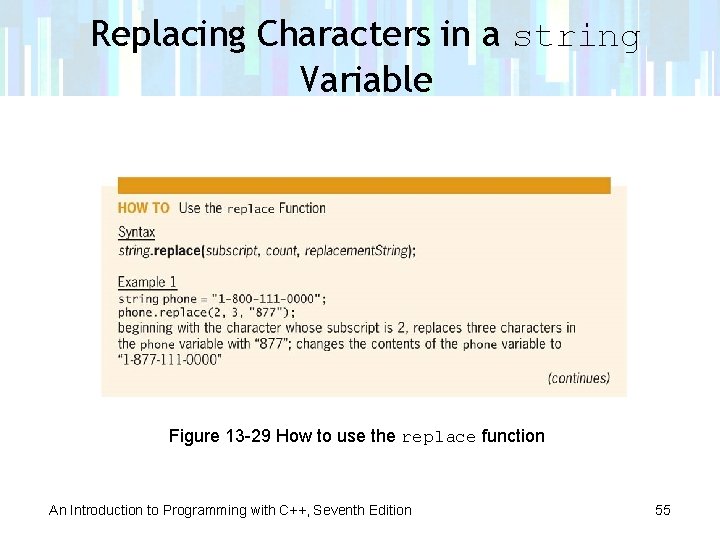
Replacing Characters in a string Variable • The replace function replaces one sequence of characters in a string variable with another • Syntax is: – string. replace(subscript, count, replacement. String); – subscript argument specifies where to begin replacing characters in string – count argument indicates number of characters to replace – replacement. String argument contains replacement characters An Introduction to Programming with C++, Seventh Edition 54
Replacing Characters in a string Variable Figure 13 -29 How to use the replace function An Introduction to Programming with C++, Seventh Edition 55
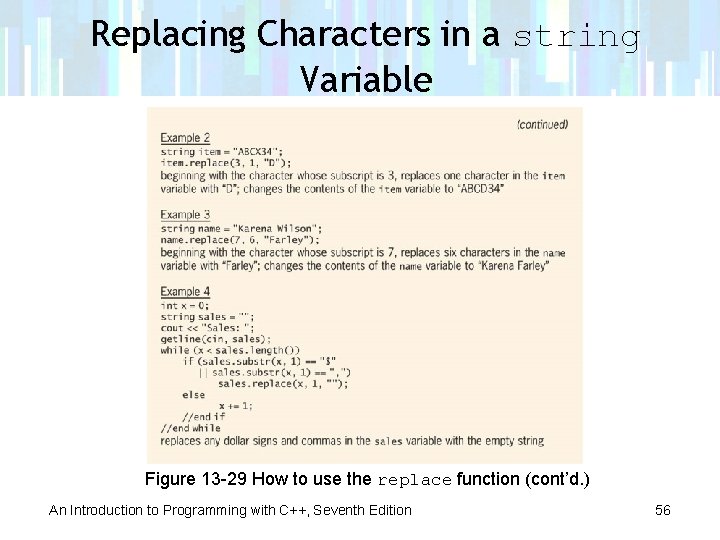
Replacing Characters in a string Variable Figure 13 -29 How to use the replace function (cont’d. ) An Introduction to Programming with C++, Seventh Edition 56
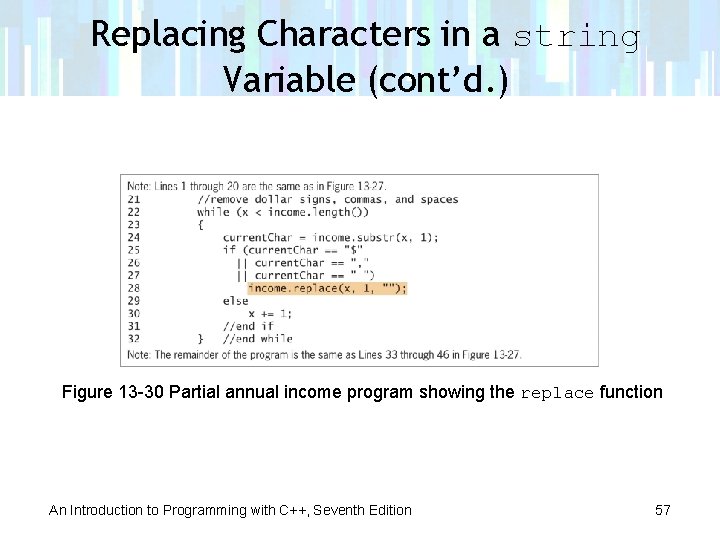
Replacing Characters in a string Variable (cont’d. ) Figure 13 -30 Partial annual income program showing the replace function An Introduction to Programming with C++, Seventh Edition 57
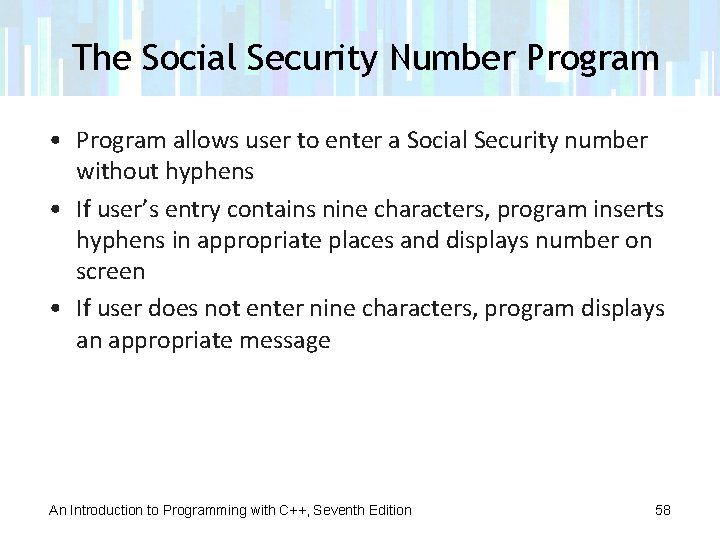
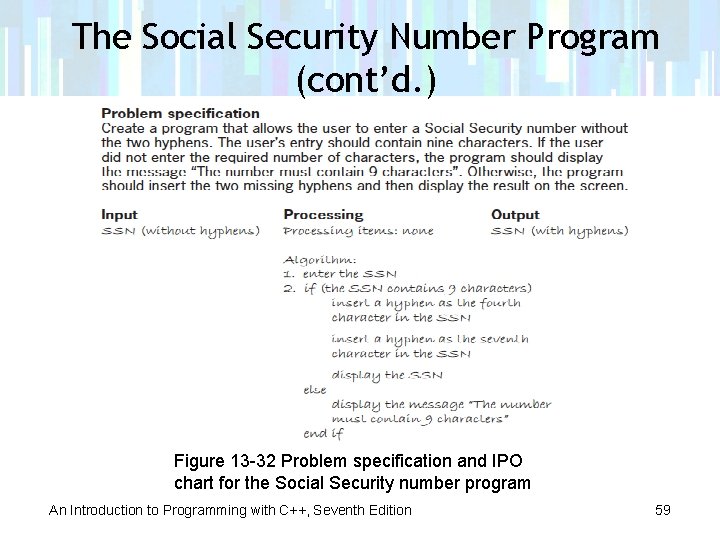
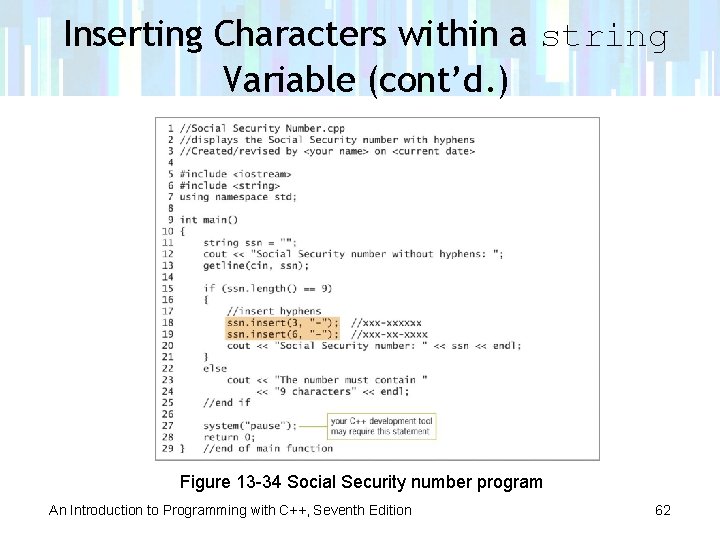
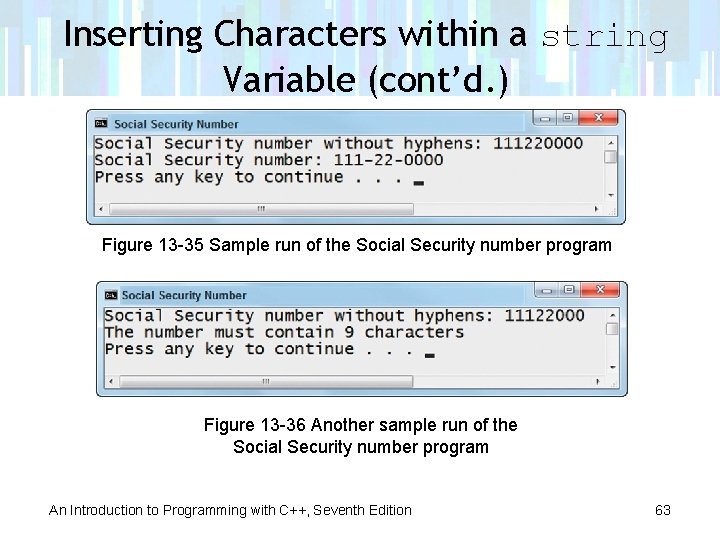
The Social Security Number Program • Program allows user to enter a Social Security number without hyphens • If user’s entry contains nine characters, program inserts hyphens in appropriate places and displays number on screen • If user does not enter nine characters, program displays an appropriate message An Introduction to Programming with C++, Seventh Edition 58
The Social Security Number Program (cont’d. ) Figure 13 -32 Problem specification and IPO chart for the Social Security number program An Introduction to Programming with C++, Seventh Edition 59
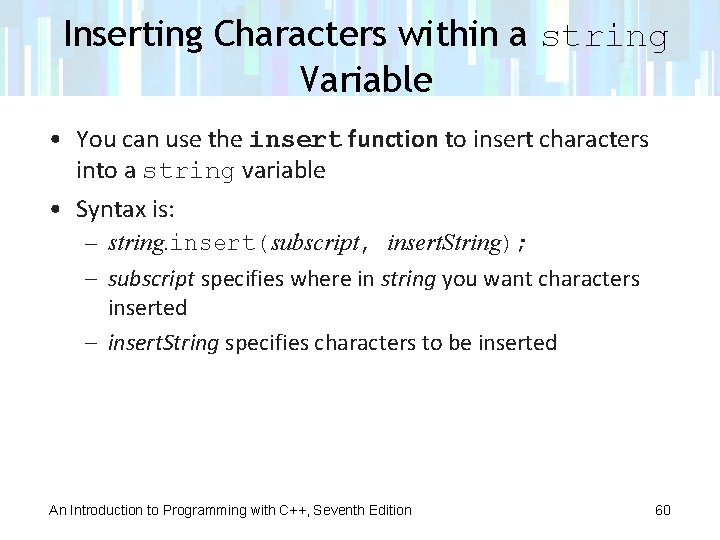
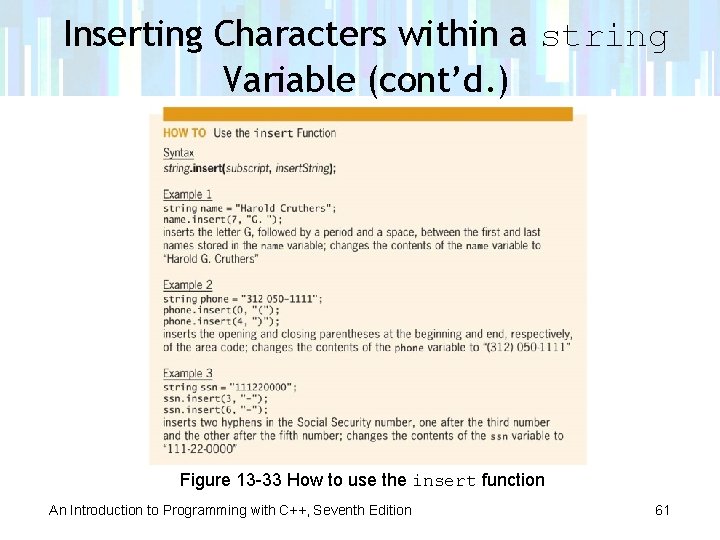
Inserting Characters within a string Variable • You can use the insert function to insert characters into a string variable • Syntax is: – string. insert(subscript, insert. String); – subscript specifies where in string you want characters inserted – insert. String specifies characters to be inserted An Introduction to Programming with C++, Seventh Edition 60
Inserting Characters within a string Variable (cont’d. ) Figure 13 -33 How to use the insert function An Introduction to Programming with C++, Seventh Edition 61
Inserting Characters within a string Variable (cont’d. ) Figure 13 -34 Social Security number program An Introduction to Programming with C++, Seventh Edition 62
Inserting Characters within a string Variable (cont’d. ) Figure 13 -35 Sample run of the Social Security number program Figure 13 -36 Another sample run of the Social Security number program An Introduction to Programming with C++, Seventh Edition 63
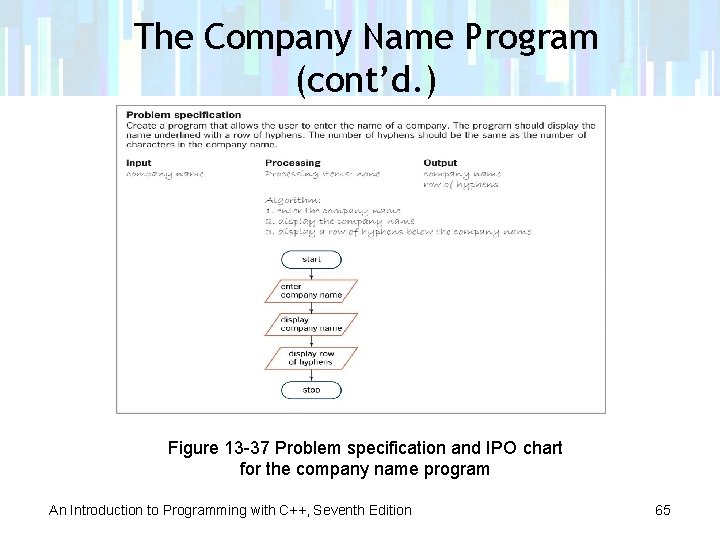
The Company Name Program • Program allows user to enter name of a company • Displays name with a row of hyphens below it An Introduction to Programming with C++, Seventh Edition 64
The Company Name Program (cont’d. ) Figure 13 -37 Problem specification and IPO chart for the company name program An Introduction to Programming with C++, Seventh Edition 65
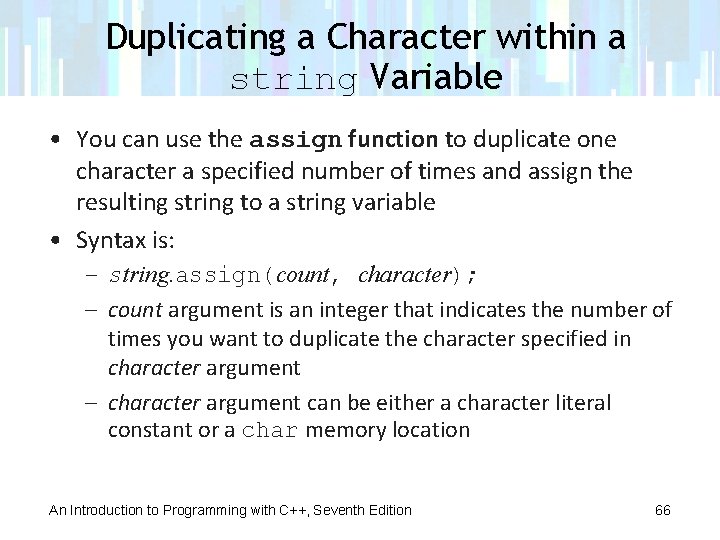
Duplicating a Character within a string Variable • You can use the assign function to duplicate one character a specified number of times and assign the resulting string to a string variable • Syntax is: – string. assign(count, character); – count argument is an integer that indicates the number of times you want to duplicate the character specified in character argument – character argument can be either a character literal constant or a char memory location An Introduction to Programming with C++, Seventh Edition 66
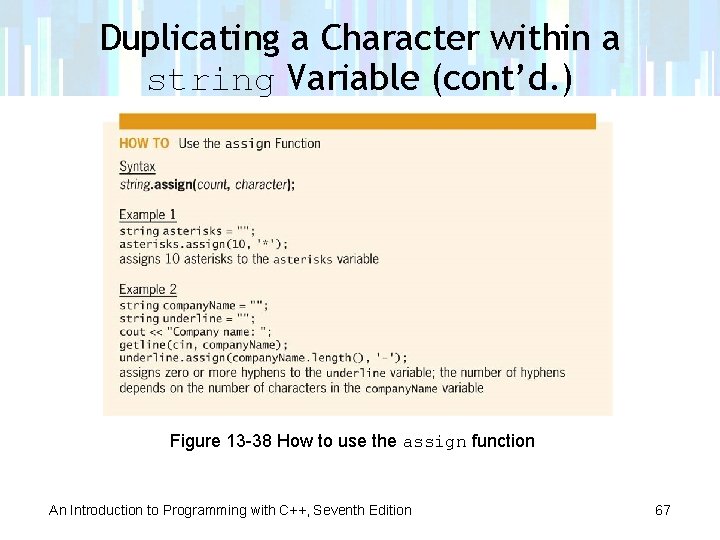
Duplicating a Character within a string Variable (cont’d. ) Figure 13 -38 How to use the assign function An Introduction to Programming with C++, Seventh Edition 67
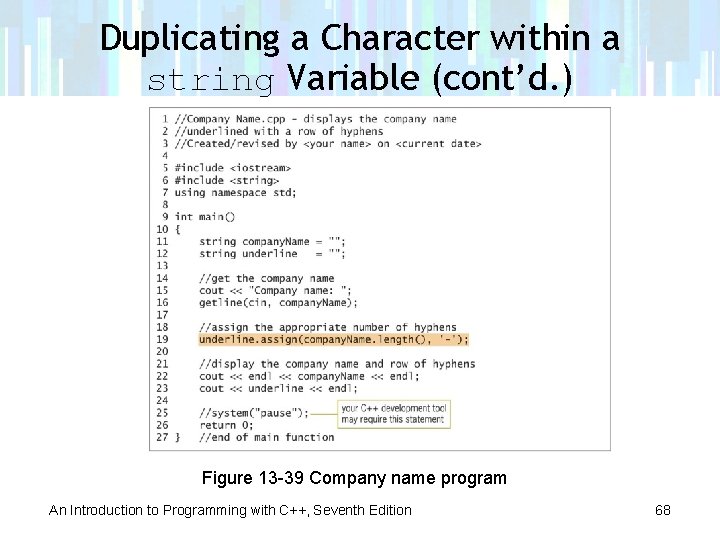
Duplicating a Character within a string Variable (cont’d. ) Figure 13 -39 Company name program An Introduction to Programming with C++, Seventh Edition 68
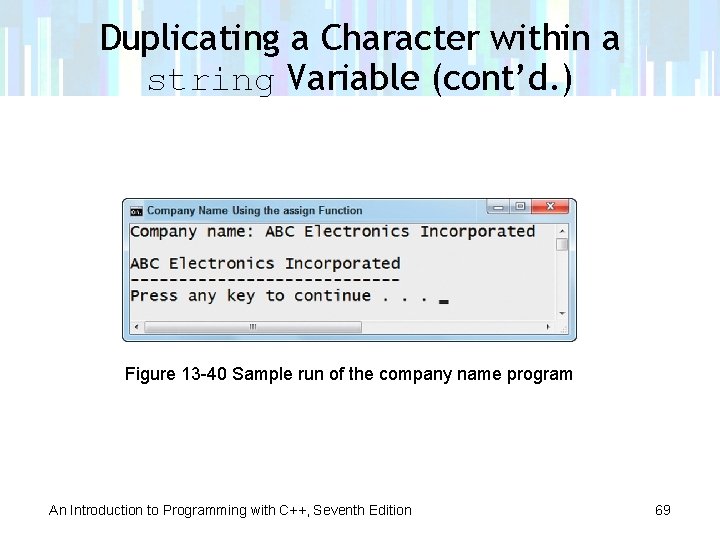
Duplicating a Character within a string Variable (cont’d. ) Figure 13 -40 Sample run of the company name program An Introduction to Programming with C++, Seventh Edition 69
Concatenating Strings • String concatenation refers to the process of connecting (linking) strings together • You concatenate strings using the concatenation operator (+ sign) An Introduction to Programming with C++, Seventh Edition 70
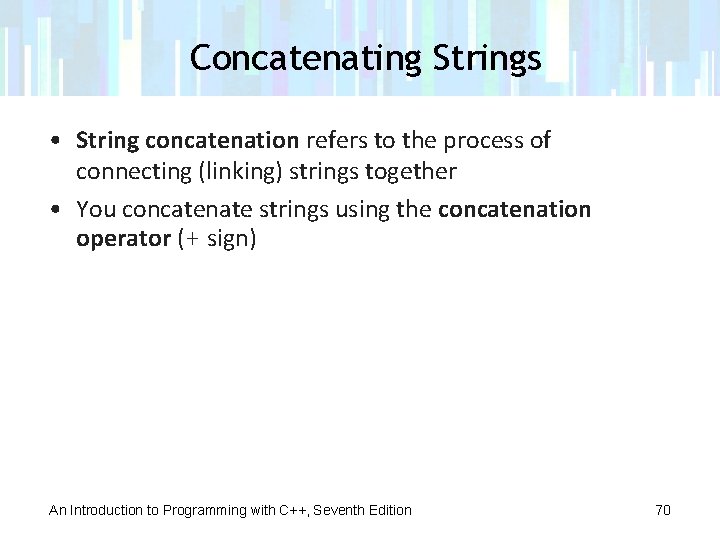
Concatenating Strings (cont’d. ) Figure 13 -41 How to use the concatenation operator An Introduction to Programming with C++, Seventh Edition 71
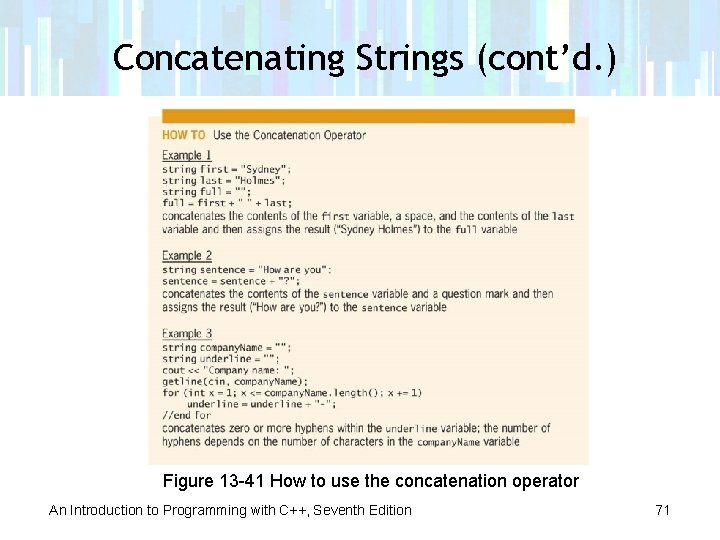
Concatenating Strings (cont’d. ) Figure 13 -42 Partial company name program showing string concatenation An Introduction to Programming with C++, Seventh Edition 72
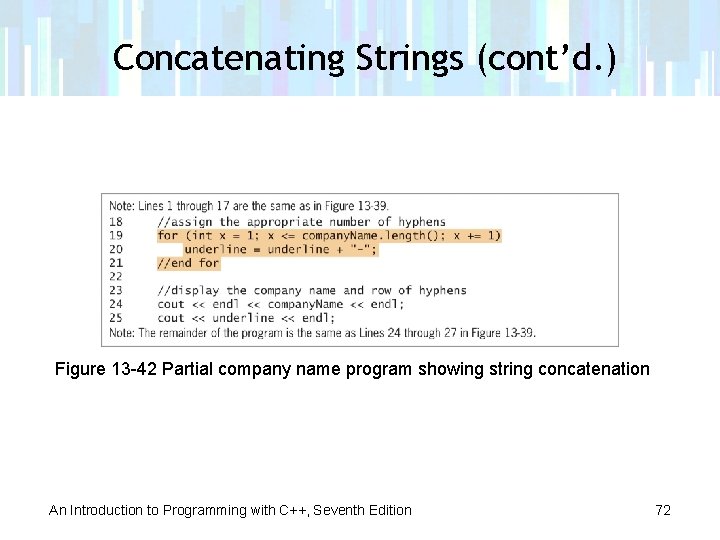
Concatenating Strings (cont’d. ) Figure 13 -43 Sample run of the company name program using string concatenation An Introduction to Programming with C++, Seventh Edition 73
Summary • The string data type was added to the C++ language using the string class • Memory locations whose data type is string are initialized using string literal constants (0 or more characters enclosed in double quotation marks) • You can use the extraction operator to get a string from the user at the keyboard if the string does not contain a white-space character An Introduction to Programming with C++, Seventh Edition 74
Summary (cont’d. ) • The getline function gets a string of characters entered at the keyboard and stores them in a string variable • The string can contain any characters, including whitespace characters • The getline function reads and stores characters from the keyboard until it encounters a delimiter character, which it consumes (discards) • The default delimiter character is the newline character An Introduction to Programming with C++, Seventh Edition 75
Summary (cont’d. ) • The computer stores characters entered at the keyboard in the cin object • Both the extraction operator and the getline function remove characters from cin • The extraction operator leaves the newline character in cin, while the getline function consumes the newline character • The ignore function reads and then consumes characters entered at the keyboard An Introduction to Programming with C++, Seventh Edition 76
Summary (cont’d. ) • The ignore function stops reading and consuming characters when it consumes either a specified number of characters or a delimiter character • The default number of characters to consume is 1 • The assign, erase, insert, and replace functions are self-contained statements that change the value of a string variable • The concatenation operator (+) is used to join (link) strings together An Introduction to Programming with C++, Seventh Edition 77