
Introduction to Programming Department of Computer Science and

- Slides: 34
Introduction to Programming Department of Computer Science and Information Systems Lecturer: Steve Maybank sjmaybank@dcs. bbk. ac. uk Autumn 2019 and Spring 2020 Week 5: Strings and Output Birkbeck College, U. London 1
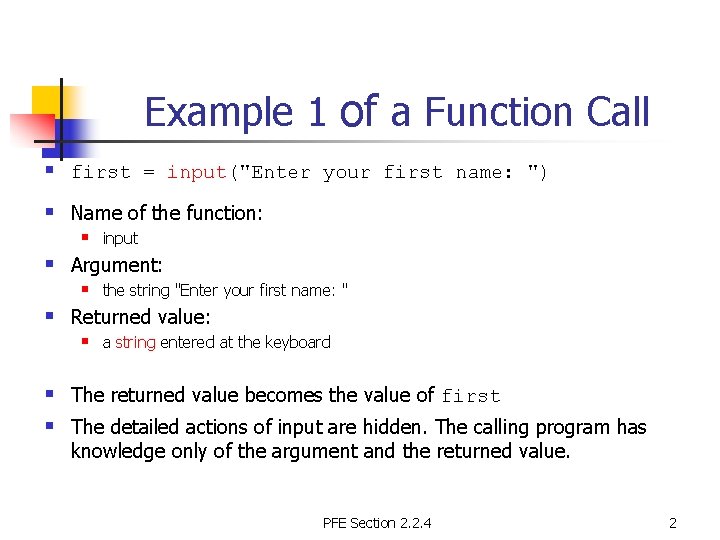
Example 1 of a Function Call § first = input("Enter your first name: ") § Name of the function: § § § input Argument: § the string "Enter your first name: " Returned value: § a string entered at the keyboard § The returned value becomes the value of first § The detailed actions of input are hidden. The calling program has knowledge only of the argument and the returned value. PFE Section 2. 2. 4 2
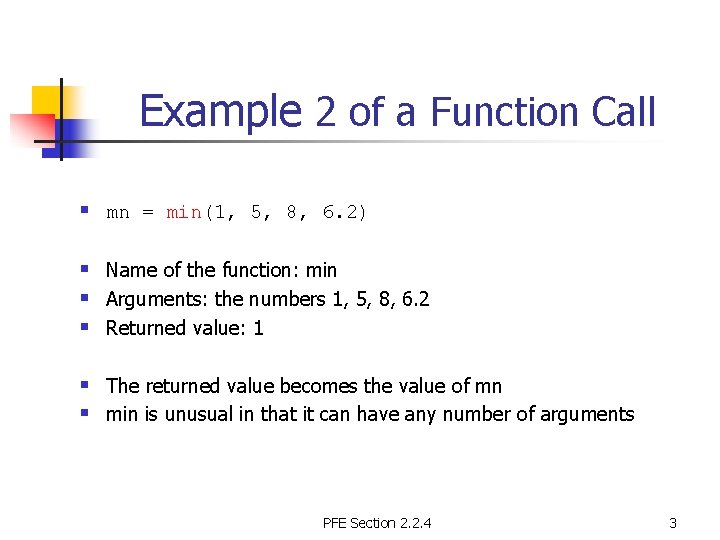
Example 2 of a Function Call § mn = min(1, 5, 8, 6. 2) § Name of the function: min § Arguments: the numbers 1, 5, 8, 6. 2 § Returned value: 1 § The returned value becomes the value of mn § min is unusual in that it can have any number of arguments PFE Section 2. 2. 4 3
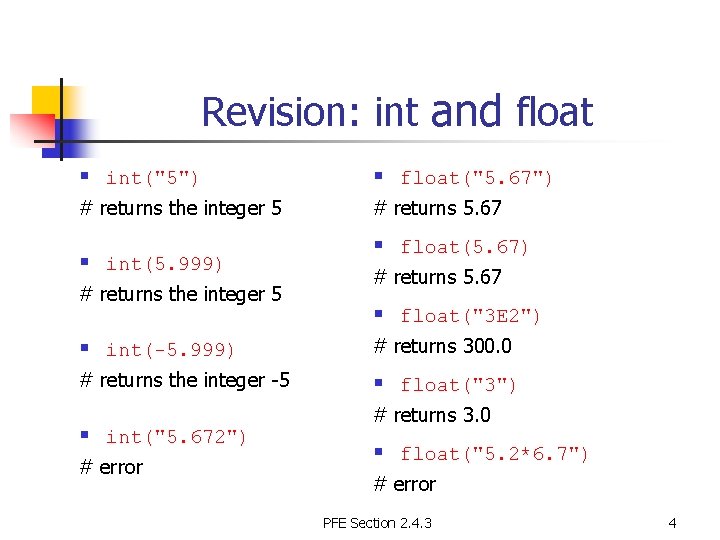
Revision: int and float § int("5") § float("5. 67") # returns the integer 5 # returns 5. 67 § int(5. 999) # returns the integer 5 § float(5. 67) # returns 5. 67 § float("3 E 2") § int(-5. 999) # returns 300. 0 # returns the integer -5 § float("3") § int("5. 672") # error # returns 3. 0 § float("5. 2*6. 7") # error PFE Section 2. 4. 3 4
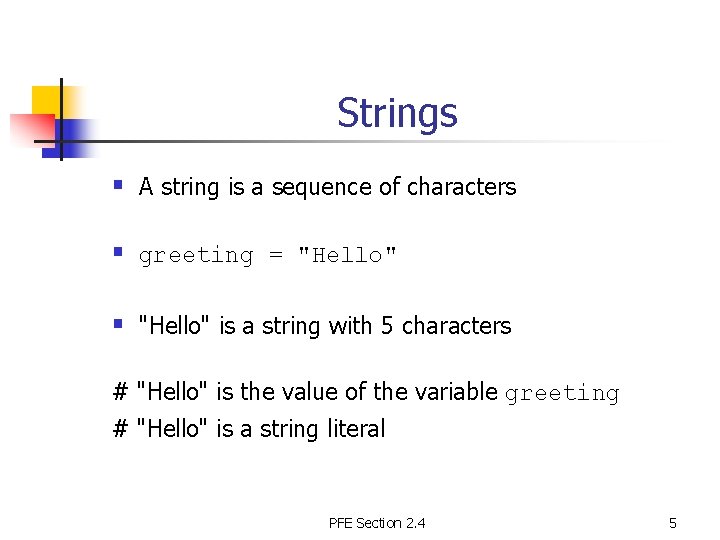
Strings § A string is a sequence of characters § greeting = "Hello" § "Hello" is a string with 5 characters # "Hello" is the value of the variable greeting # "Hello" is a string literal PFE Section 2. 4 5
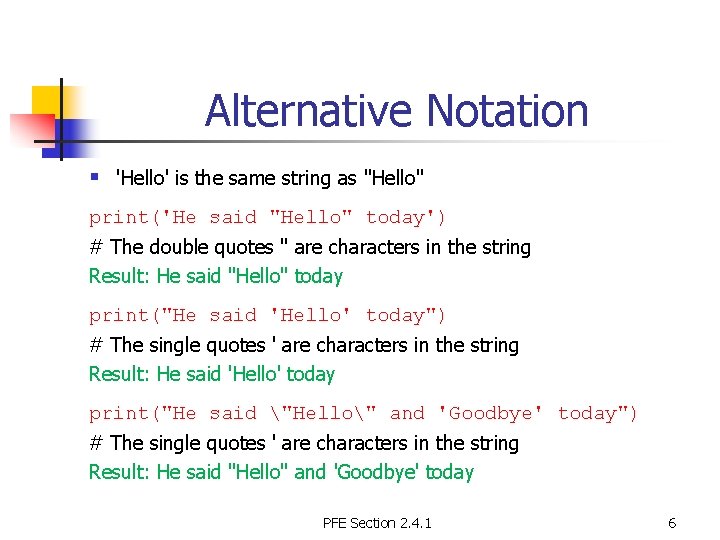
Alternative Notation § 'Hello' is the same string as "Hello" print('He said "Hello" today') # The double quotes " are characters in the string Result: He said "Hello" today print("He said 'Hello' today") # The single quotes ' are characters in the string Result: He said 'Hello' today print("He said "Hello" and 'Goodbye' today") # The single quotes ' are characters in the string Result: He said "Hello" and 'Goodbye' today PFE Section 2. 4. 1 6
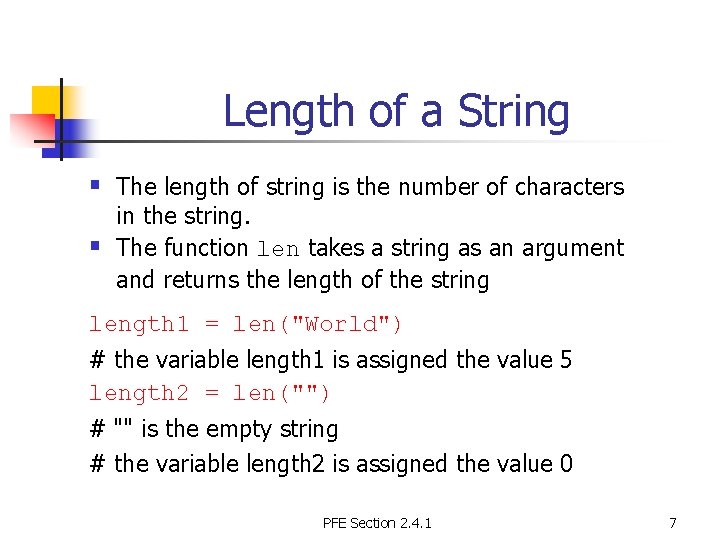
Length of a String § The length of string is the number of characters § in the string. The function len takes a string as an argument and returns the length of the string length 1 = len("World") # the variable length 1 is assigned the value 5 length 2 = len("") # "" is the empty string # the variable length 2 is assigned the value 0 PFE Section 2. 4. 1 7
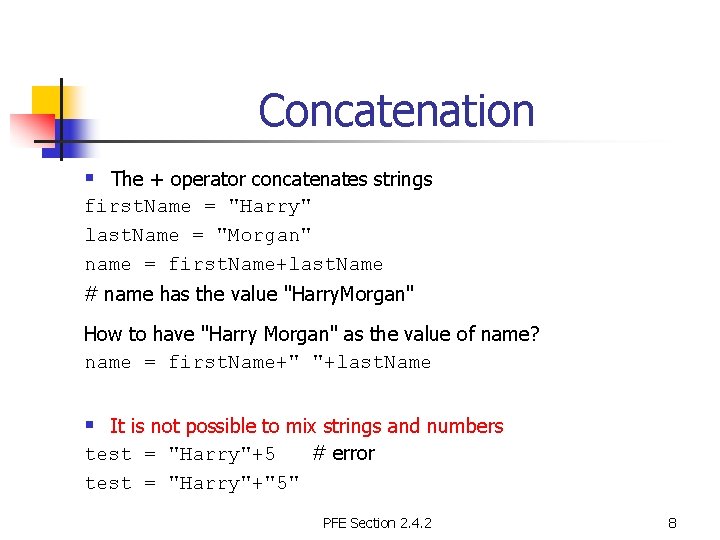
Concatenation § The + operator concatenates strings first. Name = "Harry" last. Name = "Morgan" name = first. Name+last. Name # name has the value "Harry. Morgan" How to have "Harry Morgan" as the value of name? name = first. Name+" "+last. Name § It is not possible to mix strings and numbers test = "Harry"+5 # error test = "Harry"+"5" PFE Section 2. 4. 2 8
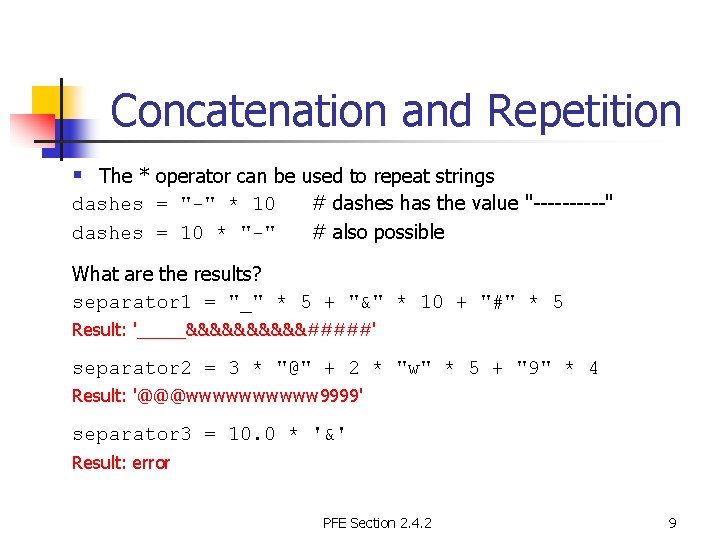
Concatenation and Repetition § The * operator can be used to repeat strings dashes = "-" * 10 dashes = 10 * "-" # dashes has the value "-----" # also possible What are the results? separator 1 = "_" * 5 + "&" * 10 + "#" * 5 Result: '_____&&&&&#####' separator 2 = 3 * "@" + 2 * "w" * 5 + "9" * 4 Result: '@@@wwwww 9999' separator 3 = 10. 0 * '&' Result: error PFE Section 2. 4. 2 9
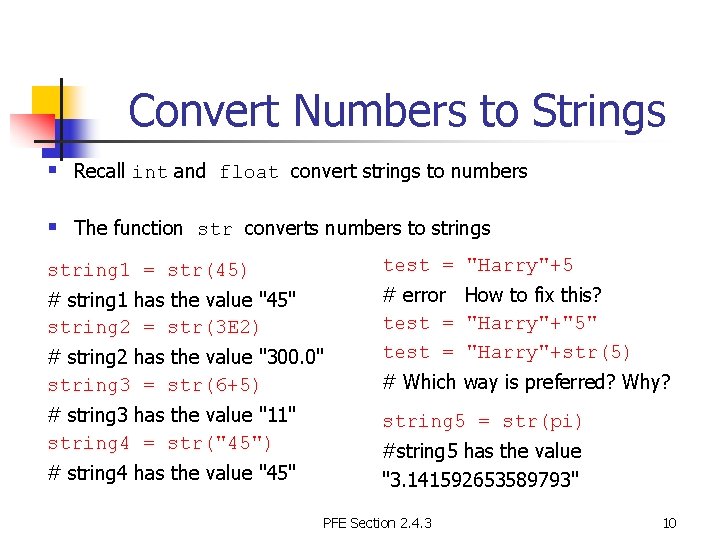
Convert Numbers to Strings § Recall int and float convert strings to numbers § The function str converts numbers to strings string 1 = str(45) test = "Harry"+5 # string 1 has the value "45" string 2 = str(3 E 2) # error How to fix this? test = "Harry"+"5" test = "Harry"+str(5) # string 2 has the value "300. 0" string 3 = str(6+5) # string 3 has the value "11" string 4 = str("45") # string 4 has the value "45" # Which way is preferred? Why? string 5 = str(pi) #string 5 has the value "3. 141592653589793" PFE Section 2. 4. 3 10
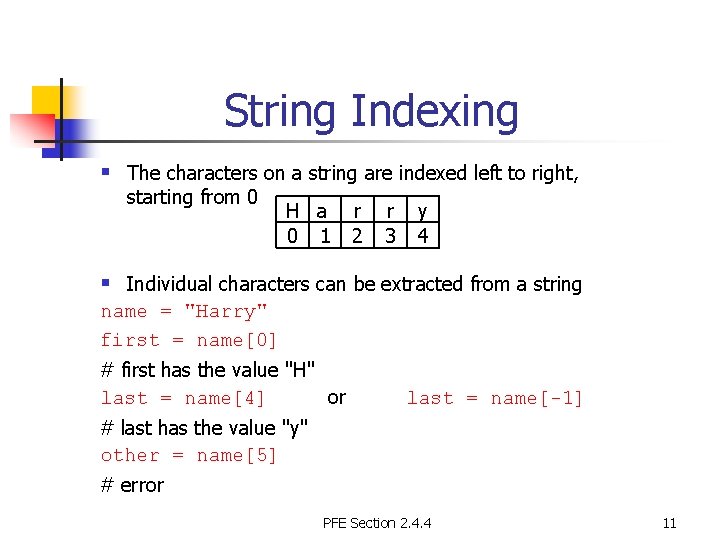
String Indexing § The characters on a string are indexed left to right, starting from 0 H a r 0 1 2 r 3 y 4 § Individual characters can be extracted from a string name = "Harry" first = name[0] # first has the value "H" last = name[4] or last = name[-1] # last has the value "y" other = name[5] # error PFE Section 2. 4. 4 11
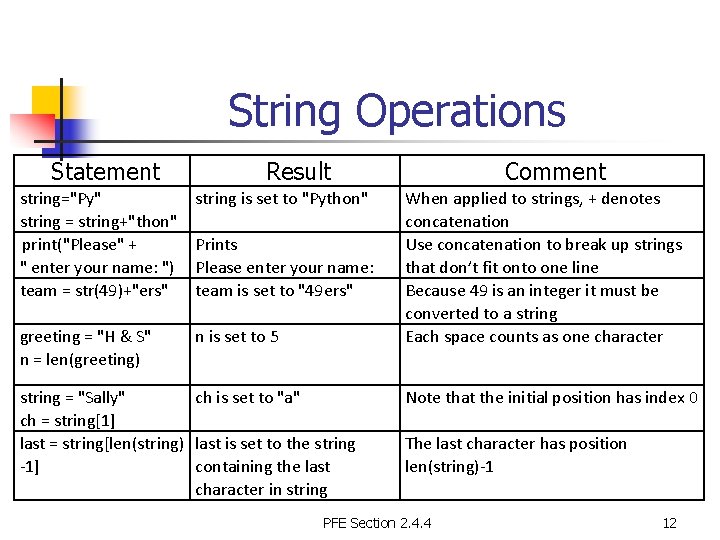
String Operations Statement Result string="Py" string = string+"thon" print("Please" + " enter your name: ") team = str(49)+"ers" string is set to "Python" greeting = "H & S" n = len(greeting) n is set to 5 Prints Please enter your name: team is set to "49 ers" string = "Sally" ch is set to "a" ch = string[1] last = string[len(string) last is set to the string -1] containing the last character in string Comment When applied to strings, + denotes concatenation Use concatenation to break up strings that don’t fit onto one line Because 49 is an integer it must be converted to a string Each space counts as one character Note that the initial position has index 0 The last character has position len(string)-1 PFE Section 2. 4. 4 12
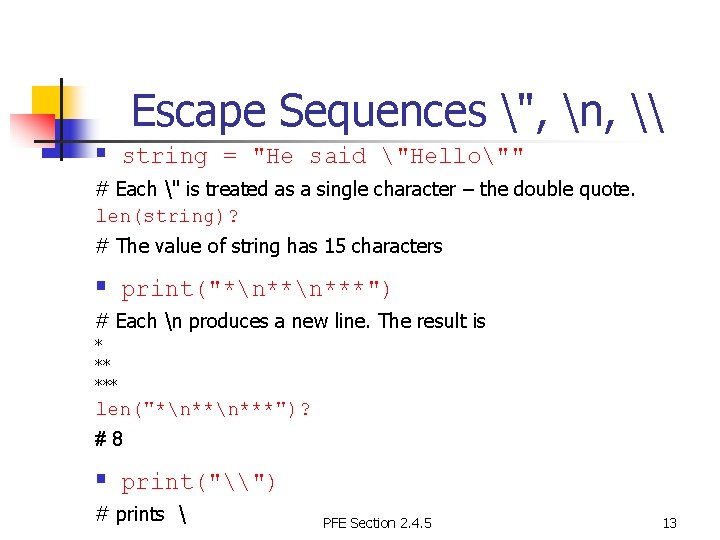
Escape Sequences ", n, \ § string = "He said "Hello"" # Each " is treated as a single character – the double quote. len(string)? # The value of string has 15 characters § print("*n***") # Each n produces a new line. The result is * ** *** len("*n***")? #8 § print("\") # prints PFE Section 2. 4. 5 13
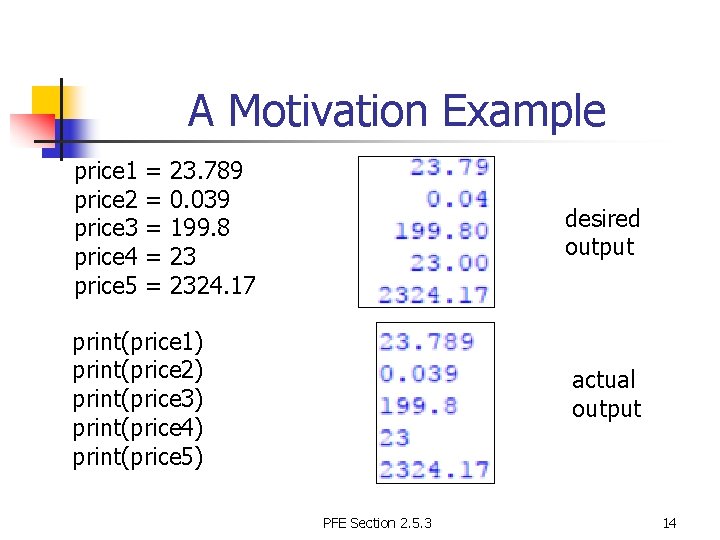
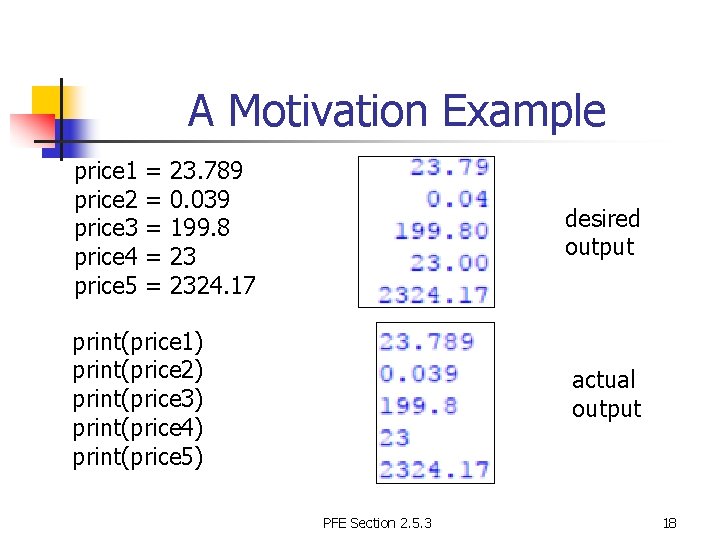
A Motivation Example price 1 = 23. 789 price 2 = 0. 039 price 3 = 199. 8 price 4 = 23 price 5 = 2324. 17 desired output print(price 1) print(price 2) print(price 3) print(price 4) print(price 5) actual output PFE Section 2. 5. 3 14
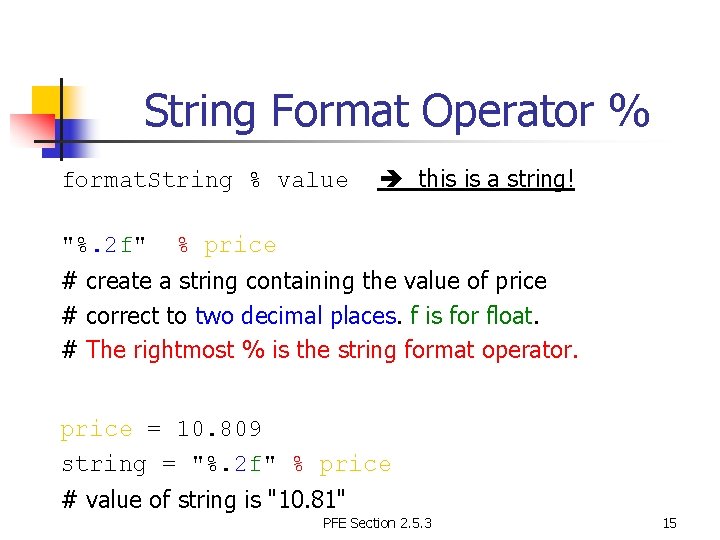
String Format Operator % format. String % value "%. 2 f" this is a string! % price # create a string containing the value of price # correct to two decimal places. f is for float. # The rightmost % is the string format operator. price = 10. 809 string = "%. 2 f" % price # value of string is "10. 81" PFE Section 2. 5. 3 15
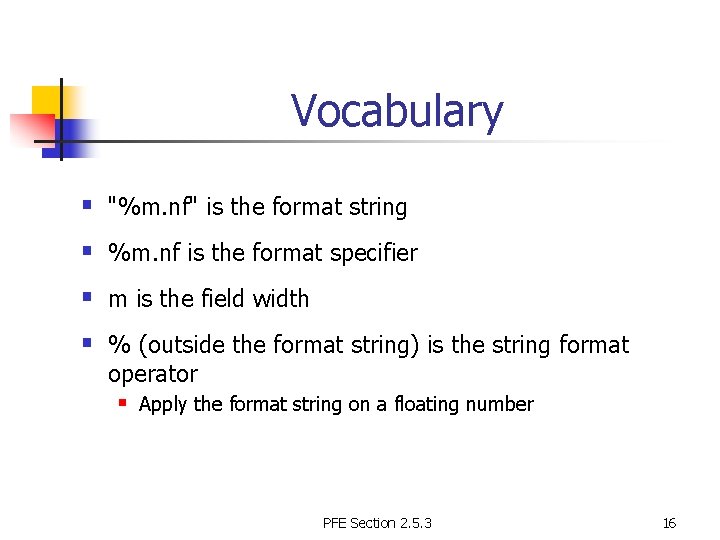
Vocabulary § "%m. nf" is the format string § %m. nf is the format specifier § m is the field width § % (outside the format string) is the string format operator § Apply the format string on a floating number PFE Section 2. 5. 3 16
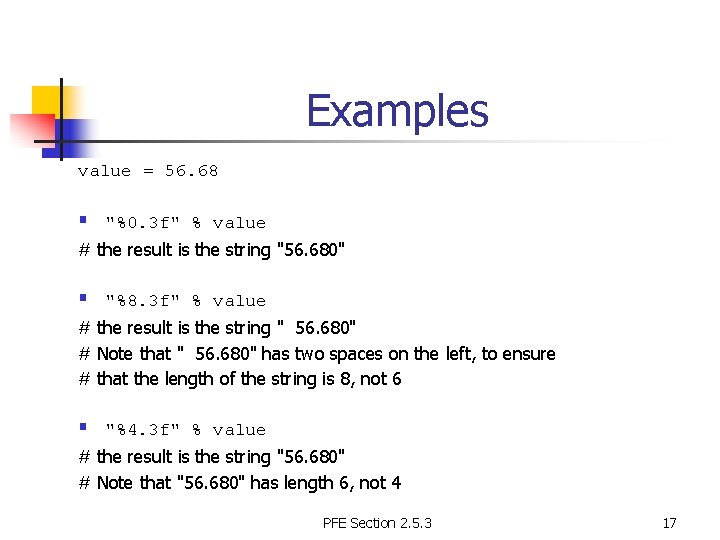
Examples value = 56. 68 § "%0. 3 f" % value # the result is the string "56. 680" § "%8. 3 f" % value # the result is the string " 56. 680" # Note that " 56. 680" has two spaces on the left, to ensure # that the length of the string is 8, not 6 § "%4. 3 f" % value # the result is the string "56. 680" # Note that "56. 680" has length 6, not 4 PFE Section 2. 5. 3 17
A Motivation Example price 1 = 23. 789 price 2 = 0. 039 price 3 = 199. 8 price 4 = 23 price 5 = 2324. 17 desired output print(price 1) print(price 2) print(price 3) print(price 4) print(price 5) actual output PFE Section 2. 5. 3 18
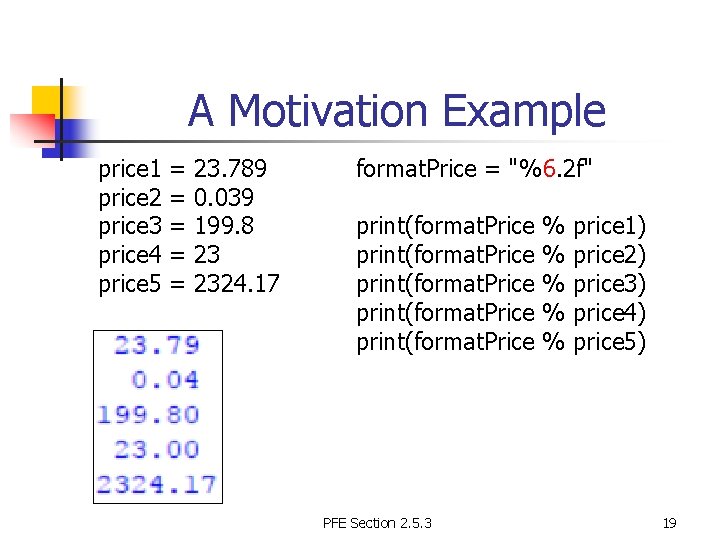
A Motivation Example price 1 = 23. 789 price 2 = 0. 039 price 3 = 199. 8 price 4 = 23 price 5 = 2324. 17 format. Price = "%6. 2 f" print(format. Price % price 1) print(format. Price % price 2) print(format. Price % price 3) print(format. Price % price 4) print(format. Price % price 5) PFE Section 2. 5. 3 19
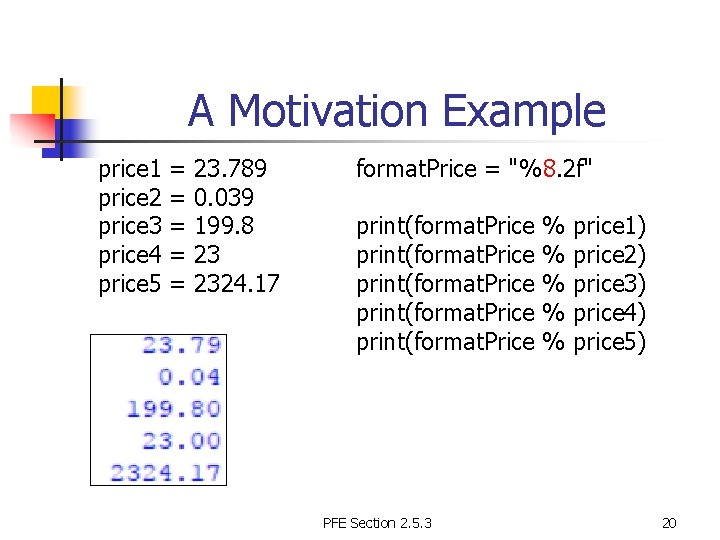
A Motivation Example price 1 = 23. 789 price 2 = 0. 039 price 3 = 199. 8 price 4 = 23 price 5 = 2324. 17 format. Price = "%8. 2 f" print(format. Price % price 1) print(format. Price % price 2) print(format. Price % price 3) print(format. Price % price 4) print(format. Price % price 5) PFE Section 2. 5. 3 20
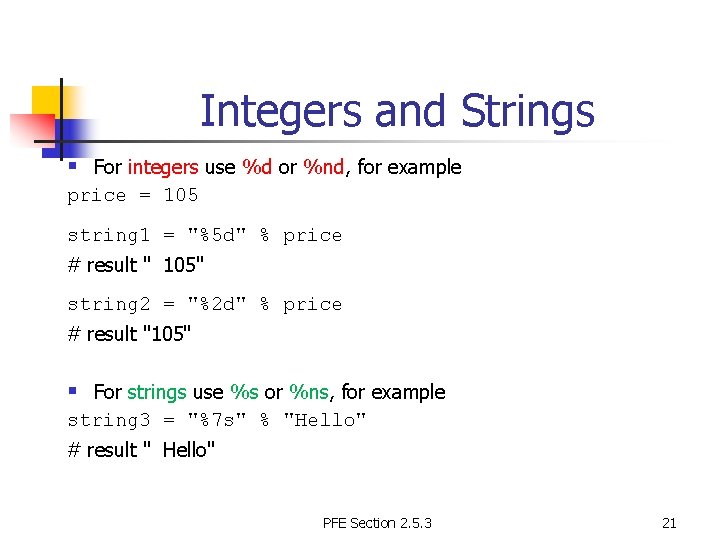
Integers and Strings § For integers use %d or %nd, for example price = 105 string 1 = "%5 d" % price # result " 105" string 2 = "%2 d" % price # result "105" § For strings use %s or %ns, for example string 3 = "%7 s" % "Hello" # result " Hello" PFE Section 2. 5. 3 21
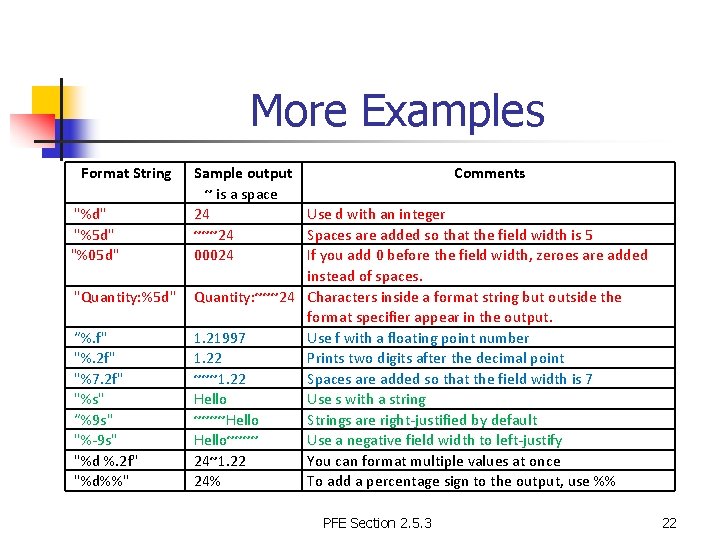
More Examples Format String Sample output Comments ~ is a space "%d" 24 Use d with an integer "%5 d" ~~~24 Spaces are added so that the field width is 5 "%05 d" 00024 If you add 0 before the field width, zeroes are added instead of spaces. "Quantity: %5 d" Quantity: ~~~24 Characters inside a format string but outside the format specifier appear in the output. “%. f" 1. 21997 Use f with a floating point number "%. 2 f" 1. 22 Prints two digits after the decimal point "%7. 2 f" ~~~1. 22 Spaces are added so that the field width is 7 "%s" Hello Use s with a string “%9 s" ~~~~Hello Strings are right-justified by default "%-9 s" Hello~~~~ Use a negative field width to left-justify "%d %. 2 f" 24~1. 22 You can format multiple values at once "%d%%" 24% To add a percentage sign to the output, use %% PFE Section 2. 5. 3 22
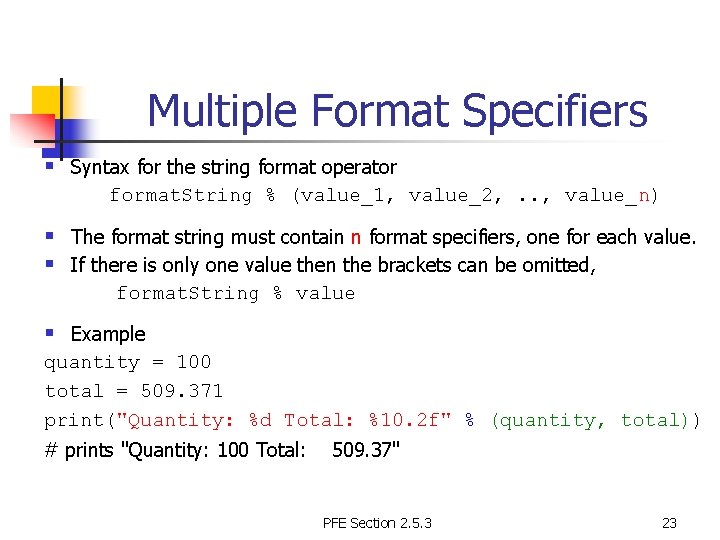
Multiple Format Specifiers § Syntax for the string format operator format. String % (value_1, value_2, . . , value_n) § The format string must contain n format specifiers, one for each value. § If there is only one value then the brackets can be omitted, format. String % value § Example quantity = 100 total = 509. 371 print("Quantity: %d Total: %10. 2 f" % (quantity, total)) # prints "Quantity: 100 Total: 509. 37" PFE Section 2. 5. 3 23
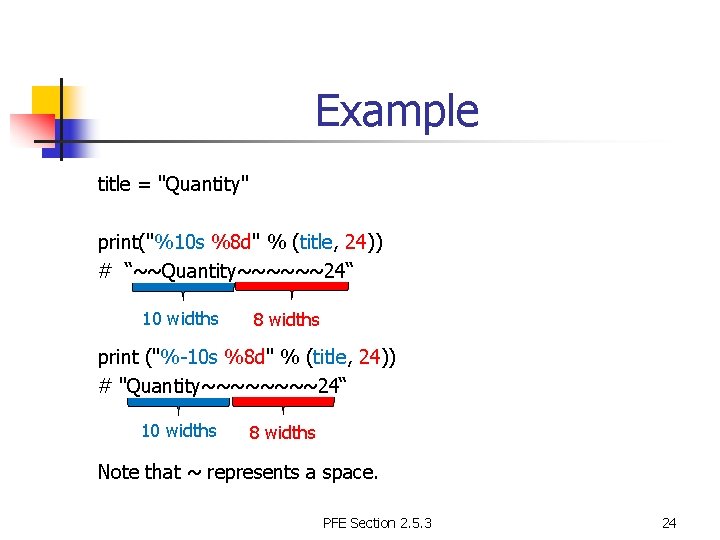
Example title = "Quantity" print("%10 s %8 d" % (title, 24)) # “~~Quantity~~~~~~24“ 10 widths 8 widths print ("%-10 s %8 d" % (title, 24)) # "Quantity~~~~24“ 10 widths 8 widths Note that ~ represents a space. PFE Section 2. 5. 3 24
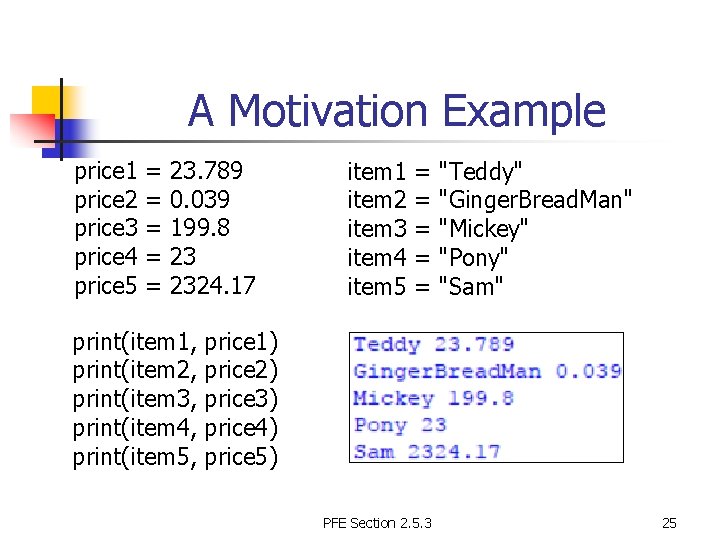
A Motivation Example price 1 = 23. 789 price 2 = 0. 039 price 3 = 199. 8 price 4 = 23 price 5 = 2324. 17 item 1 = "Teddy" item 2 = "Ginger. Bread. Man" item 3 = "Mickey" item 4 = "Pony" item 5 = "Sam" print(item 1, price 1) print(item 2, price 2) print(item 3, price 3) print(item 4, price 4) print(item 5, price 5) PFE Section 2. 5. 3 25
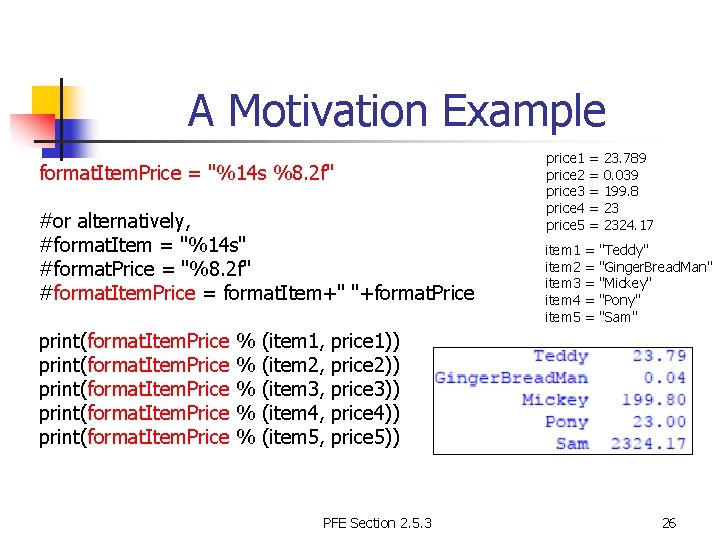
A Motivation Example format. Item. Price = "%14 s %8. 2 f" #or alternatively, #format. Item = "%14 s" #format. Price = "%8. 2 f" #format. Item. Price = format. Item+" "+format. Price price 1 = 23. 789 price 2 = 0. 039 price 3 = 199. 8 price 4 = 23 price 5 = 2324. 17 item 1 = "Teddy" item 2 = "Ginger. Bread. Man" item 3 = "Mickey" item 4 = "Pony" item 5 = "Sam" print(format. Item. Price % (item 1, price 1)) print(format. Item. Price % (item 2, price 2)) print(format. Item. Price % (item 3, price 3)) print(format. Item. Price % (item 4, price 4)) print(format. Item. Price % (item 5, price 5)) PFE Section 2. 5. 3 26
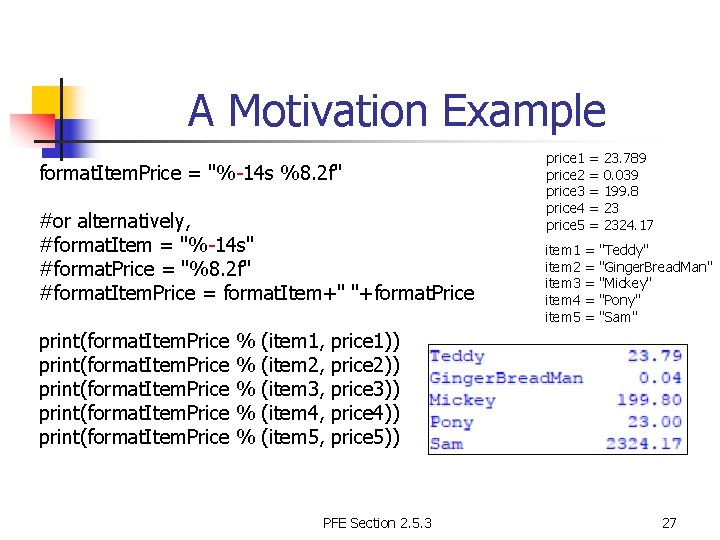
A Motivation Example format. Item. Price = "%-14 s %8. 2 f" #or alternatively, #format. Item = "%-14 s" #format. Price = "%8. 2 f" #format. Item. Price = format. Item+" "+format. Price price 1 = 23. 789 price 2 = 0. 039 price 3 = 199. 8 price 4 = 23 price 5 = 2324. 17 item 1 = "Teddy" item 2 = "Ginger. Bread. Man" item 3 = "Mickey" item 4 = "Pony" item 5 = "Sam" print(format. Item. Price % (item 1, price 1)) print(format. Item. Price % (item 2, price 2)) print(format. Item. Price % (item 3, price 3)) print(format. Item. Price % (item 4, price 4)) print(format. Item. Price % (item 5, price 5)) PFE Section 2. 5. 3 27
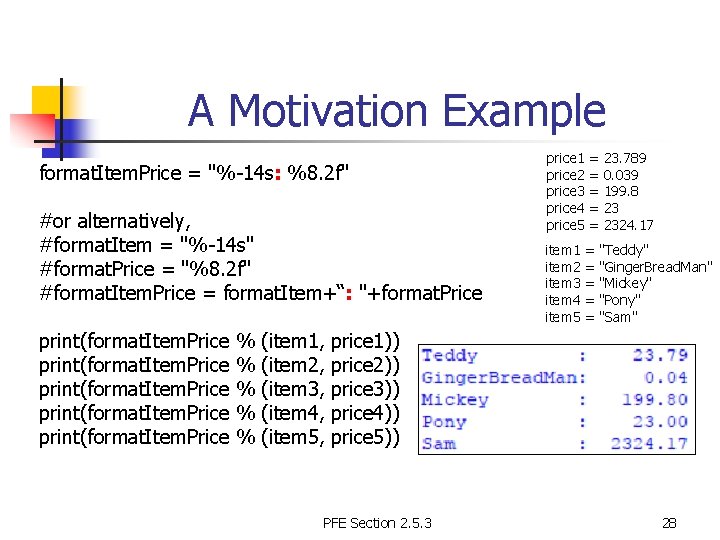
A Motivation Example format. Item. Price = "%-14 s: %8. 2 f" #or alternatively, #format. Item = "%-14 s" #format. Price = "%8. 2 f" #format. Item. Price = format. Item+“: "+format. Price price 1 = 23. 789 price 2 = 0. 039 price 3 = 199. 8 price 4 = 23 price 5 = 2324. 17 item 1 = "Teddy" item 2 = "Ginger. Bread. Man" item 3 = "Mickey" item 4 = "Pony" item 5 = "Sam" print(format. Item. Price % (item 1, price 1)) print(format. Item. Price % (item 2, price 2)) print(format. Item. Price % (item 3, price 3)) print(format. Item. Price % (item 4, price 4)) print(format. Item. Price % (item 5, price 5)) PFE Section 2. 5. 3 28
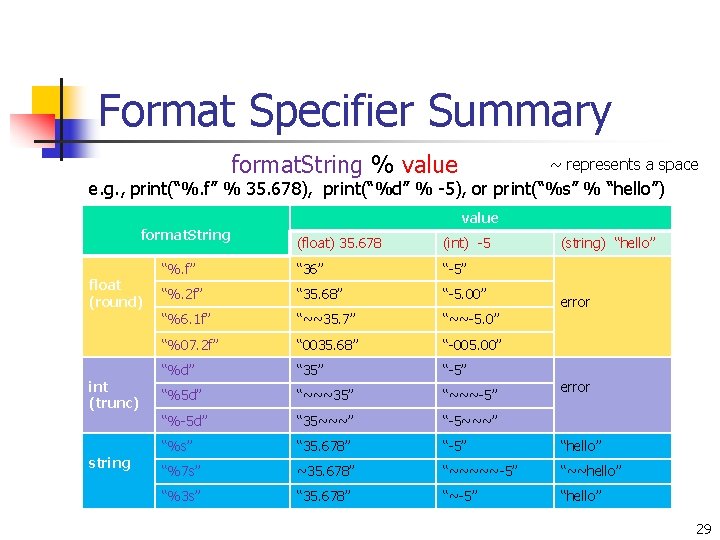
Format Specifier Summary format. String % value ~ represents a space e. g. , print(“%. f” % 35. 678), print(“%d” % -5), or print(“%s” % “hello”) format. String float (round) int (trunc) string value (float) 35. 678 (int) -5 (string) “hello” “%. f” “ 36” “-5” “%. 2 f” “ 35. 68” “-5. 00” “%6. 1 f” “~~35. 7” “~~-5. 0” “%07. 2 f” “ 0035. 68” “-005. 00” “%d” “ 35” “-5” “%5 d” “~~~35” “~~~-5” “%-5 d” “ 35~~~” “-5~~~” “%s” “ 35. 678” “-5” “hello” “%7 s” ~35. 678” “~~~~~-5” “~~hello” “%3 s” “ 35. 678” “~-5” “hello” error 29
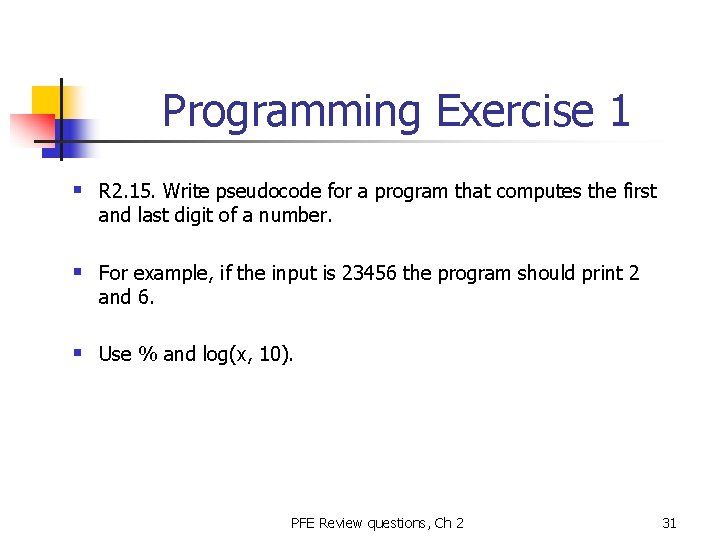
Programming Exercise 1 § R 2. 15. Write pseudocode for a program that computes the first and last digit of a number. § For example, if the input is 23456 the program should print 2 and 6. § Use % and log(x, 10). PFE Review questions, Ch 2 31
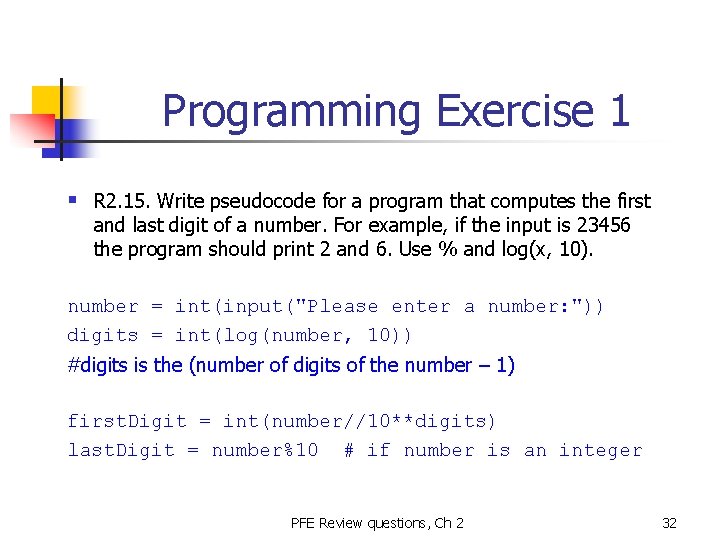
Programming Exercise 1 § R 2. 15. Write pseudocode for a program that computes the first and last digit of a number. For example, if the input is 23456 the program should print 2 and 6. Use % and log(x, 10). number = int(input("Please enter a number: ")) digits = int(log(number, 10)) #digits is the (number of digits of the number – 1) first. Digit = int(number//10**digits) last. Digit = number%10 # if number is an integer PFE Review questions, Ch 2 32
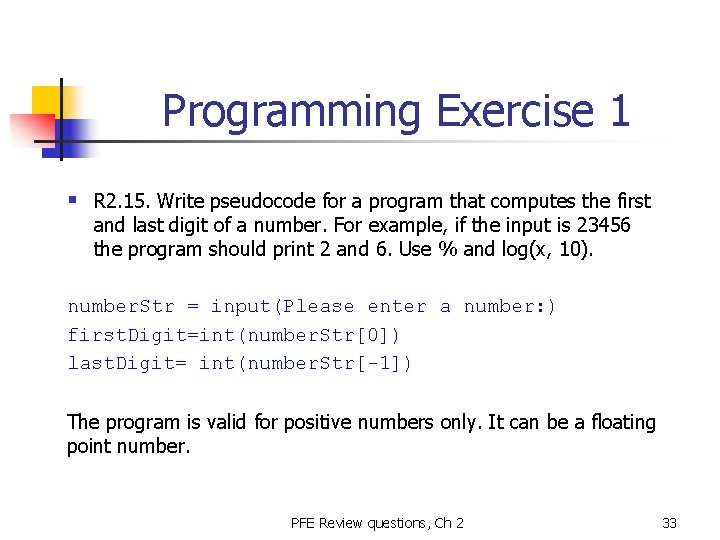
Programming Exercise 1 § R 2. 15. Write pseudocode for a program that computes the first and last digit of a number. For example, if the input is 23456 the program should print 2 and 6. Use % and log(x, 10). number. Str = input(Please enter a number: ) first. Digit=int(number. Str[0]) last. Digit= int(number. Str[-1]) The program is valid for positive numbers only. It can be a floating point number. PFE Review questions, Ch 2 33
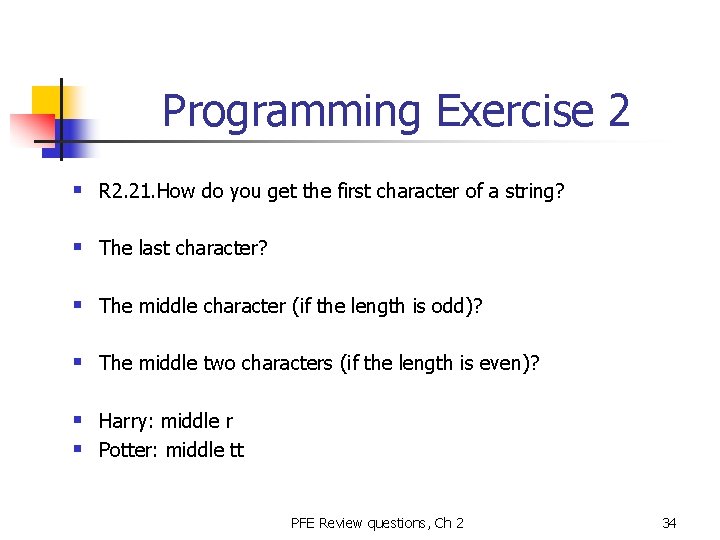
Programming Exercise 2 § R 2. 21. How do you get the first character of a string? § The last character? § The middle character (if the length is odd)? § The middle two characters (if the length is even)? § Harry: middle r § Potter: middle tt PFE Review questions, Ch 2 34
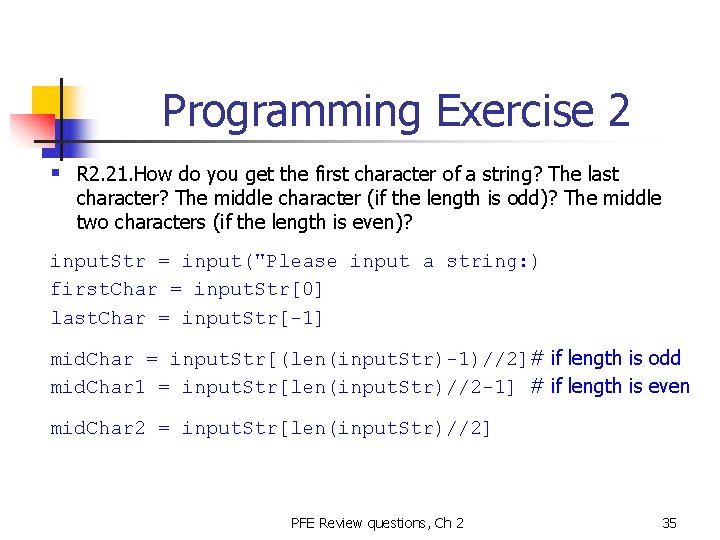
Programming Exercise 2 § R 2. 21. How do you get the first character of a string? The last character? The middle character (if the length is odd)? The middle two characters (if the length is even)? input. Str = input("Please input a string: ) first. Char = input. Str[0] last. Char = input. Str[-1] mid. Char = input. Str[(len(input. Str)-1)//2]# if length is odd mid. Char 1 = input. Str[len(input. Str)//2 -1] # if length is even mid. Char 2 = input. Str[len(input. Str)//2] PFE Review questions, Ch 2 35