
Introduction to Platform Administrative Web Service Interface June
Introduction to Platform Administrative Web Service Interface June 2012 © 2012 Cisco and/or its affiliates. All rights reserved. Cisco Public 1
• What is PAWS? • Getting Started with PAWS • Typical Use Cases • Resources • Result Codes & Error Handling • Coding Examples • Sample Application Demo • Wrap Up © 2012 Cisco and/or its affiliates. All rights reserved. Cisco Public 2 2

What is PAWS? © 2012 Cisco and/or its affiliates. All rights reserved. Cisco Public 3
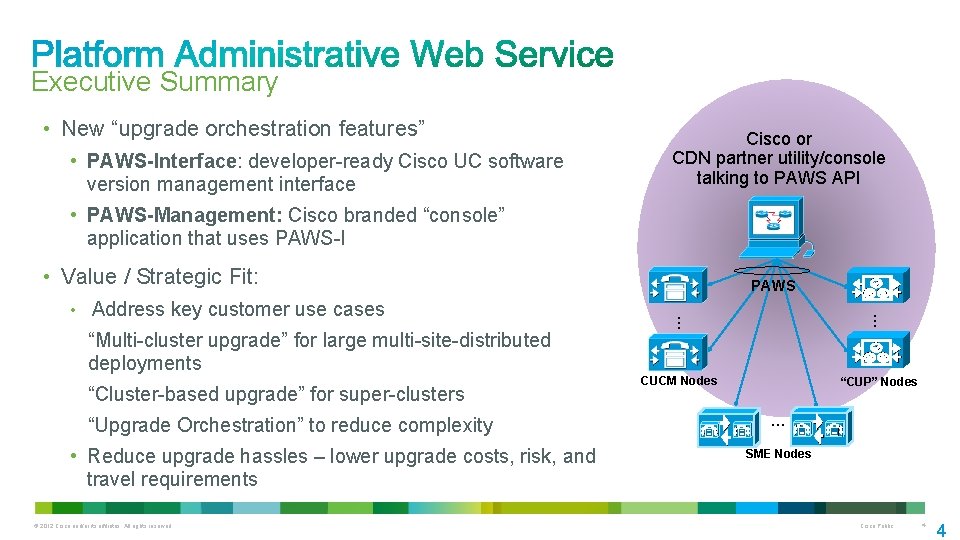
Executive Summary • New “upgrade orchestration features” • PAWS-Interface: developer-ready Cisco UC software version management interface Cisco or CDN partner utility/console talking to PAWS API • PAWS-Management: Cisco branded “console” application that uses PAWS-I • Value / Strategic Fit: “Multi-cluster upgrade” for large multi-site-distributed deployments “Cluster-based upgrade” for super-clusters “Upgrade Orchestration” to reduce complexity • Reduce upgrade hassles – lower upgrade costs, risk, and travel requirements © 2012 Cisco and/or its affiliates. All rights reserved. … … • Address key customer use cases PAWS CUCM Nodes “CUP” Nodes … SME Nodes Cisco Public 4 4
• Allows applications to initiate and monitor upgrades on multiple UC Clusters from a single management client via the PAWS-I API • Facilitates large scale deployments/upgrades • New public interface in Unified CM 9. 0(1) • XML/SOAP based on AXIS 2. 0 • WSDL in doc/literal format which aligns with the Unified CM Administrative and Service XML interfaces as well as the UC Gateway Services interface • Native support for Visual Studio 2010 &. Net v 2/3/4 © 2012 Cisco and/or its affiliates. All rights reserved. Cisco Public 5
• Inspect & Inventory Hardware Model, Active/Inactive Version, and Install Options Installed Products Unified Communication Manager (CUCM) IM/Presence Services (IM/Presence) Session Manager Enterprise (SME) Upgrade State (error, cancelled, downloading, installing, etc) • Upgrade Test install/upgrade file for validity Filter a list of install/upgrade files Prepare Upgrade (Download Upgrade Files) Start Upgrade • Switch Version / Restart Server © 2012 Cisco and/or its affiliates. All rights reserved. Cisco Public 6
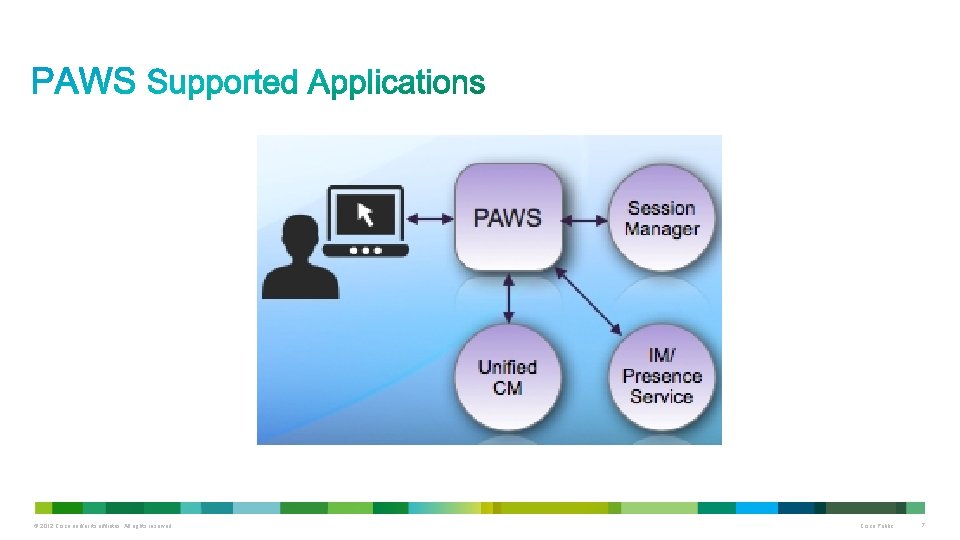
© 2012 Cisco and/or its affiliates. All rights reserved. Cisco Public 7
Solution Bundle • Cisco's web-based application which uses the PAWS Interface • Centralizes inventory & version management of Cisco UC • Supports Session Manager Enterprise, Unified CM, and IM/Presence Service Additional UC applications will be supported in a future release • PAWS-Management (PAWS-M) will be bundled with Hosted versions of Unified CM Enterprise, Session Manager Enterprise, and IM/Presence Services in our 9. 0(1) release • PAWS-M is bundled with Hosted UC in 8. 6(1) © 2012 Cisco and/or its affiliates. All rights reserved. Cisco Public 8
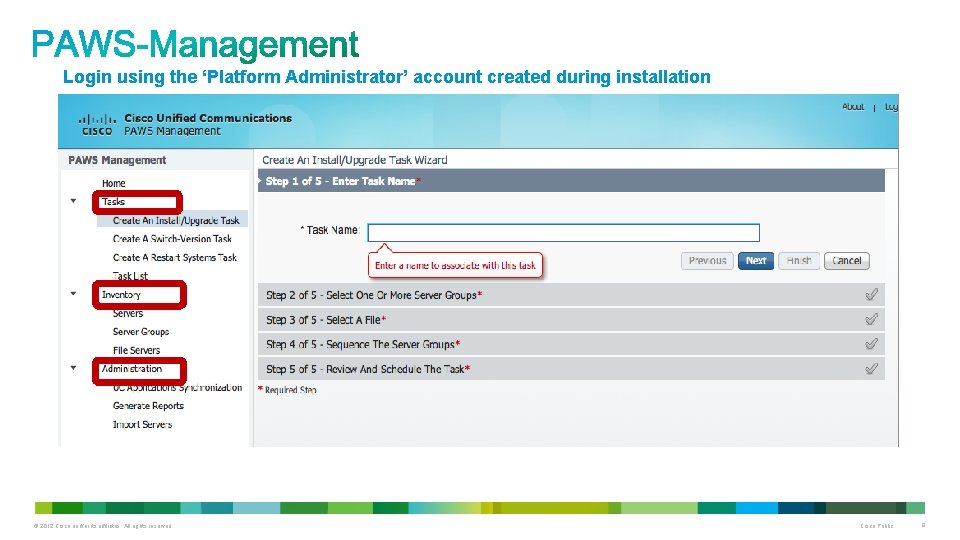
Login using the ‘Platform Administrator’ account created during installation © 2012 Cisco and/or its affiliates. All rights reserved. Cisco Public 9
• PAWS will be a public interface in the UC 9. 0(1) release • Enables Cisco UC software version management to be integrated with third-party Serviceability consoles • New Developer Portal http: //developer. cisco. com/web/paws-developer Launch June 2012 Developer Guide & API Reference Resources used for a typical upgrade Request/Response code examples Sample application Discussion Forums © 2012 Cisco and/or its affiliates. All rights reserved. Cisco Public 10
• Does not reduce elapsed time to “write the bits” Minor time savings from task concurrency if you sequence tasks correctly • Does not do platform migrations e. g. MCS to MCS, MCS to UCS, UCS to UCS • Does not handle IP address or hostname changes • Does not auto-poll or download upgrade files from cisco. com • Does not auto-distribute upgrade files to app nodes • Does not auto-update … programming has to be “started”; then the PAWS-enabled application automates it © 2012 Cisco and/or its affiliates. All rights reserved. Cisco Public 11
© 2012 Cisco and/or its affiliates. All rights reserved. Cisco Public 12
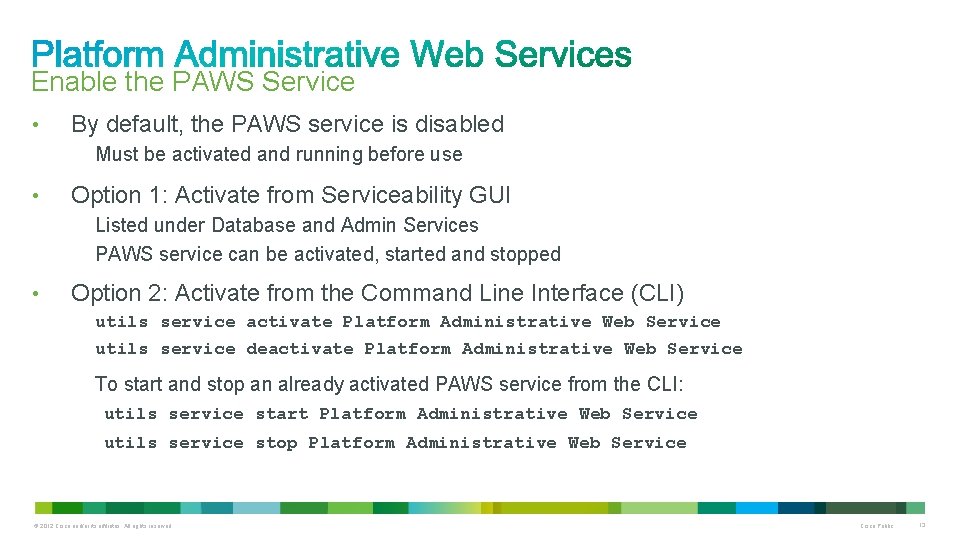
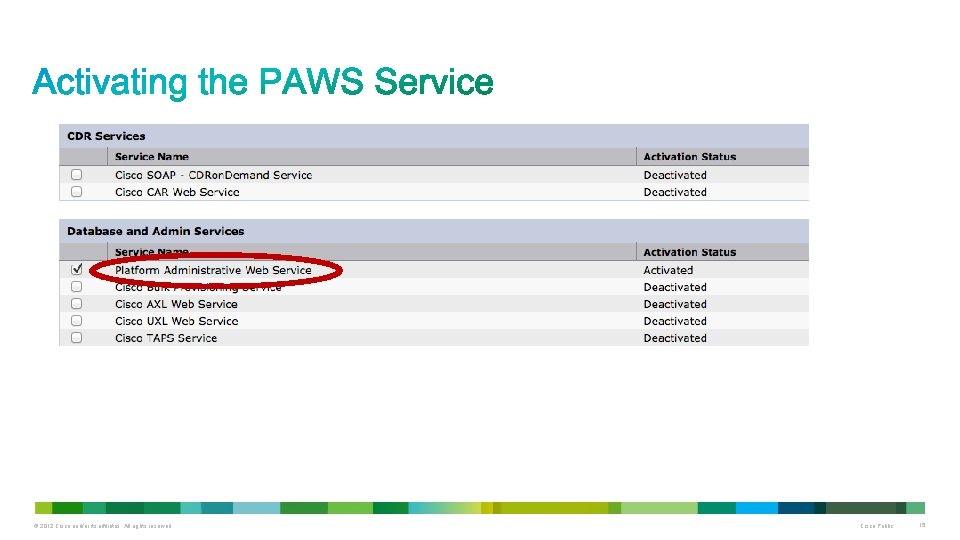
Enable the PAWS Service • By default, the PAWS service is disabled Must be activated and running before use • Option 1: Activate from Serviceability GUI Listed under Database and Admin Services PAWS service can be activated, started and stopped • Option 2: Activate from the Command Line Interface (CLI) utils service activate Platform Administrative Web Service utils service deactivate Platform Administrative Web Service To start and stop an already activated PAWS service from the CLI: utils service start Platform Administrative Web Service utils service stop Platform Administrative Web Service © 2012 Cisco and/or its affiliates. All rights reserved. Cisco Public 13
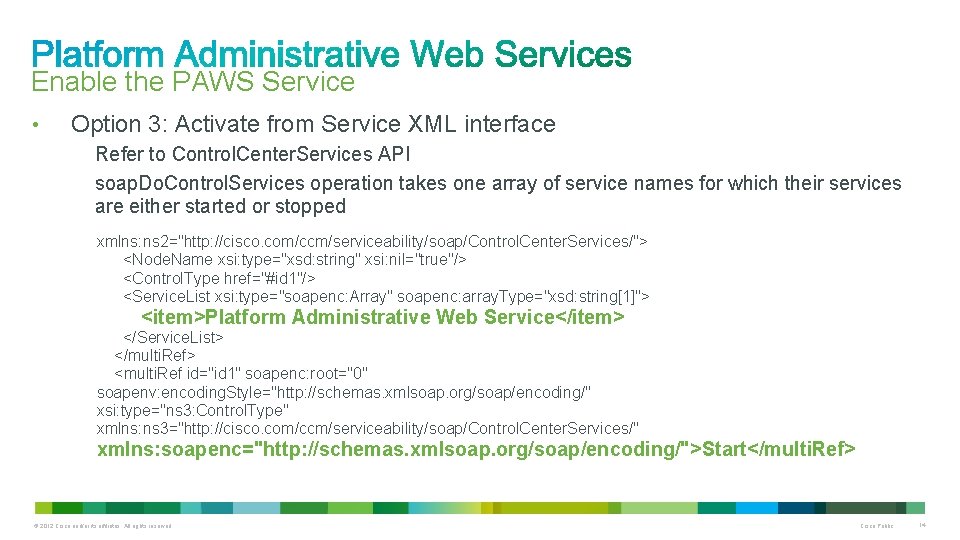
Enable the PAWS Service • Option 3: Activate from Service XML interface Refer to Control. Center. Services API soap. Do. Control. Services operation takes one array of service names for which their services are either started or stopped xmlns: ns 2="http: //cisco. com/ccm/serviceability/soap/Control. Center. Services/"> <Node. Name xsi: type="xsd: string" xsi: nil="true"/> <Control. Type href="#id 1"/> <Service. List xsi: type="soapenc: Array" soapenc: array. Type="xsd: string[1]"> <item>Platform Administrative Web Service</item> </Service. List> </multi. Ref> <multi. Ref id="id 1" soapenc: root="0" soapenv: encoding. Style="http: //schemas. xmlsoap. org/soap/encoding/" xsi: type="ns 3: Control. Type" xmlns: ns 3="http: //cisco. com/ccm/serviceability/soap/Control. Center. Services/" xmlns: soapenc="http: //schemas. xmlsoap. org/soap/encoding/">Start</multi. Ref> © 2012 Cisco and/or its affiliates. All rights reserved. Cisco Public 14
© 2012 Cisco and/or its affiliates. All rights reserved. Cisco Public 15
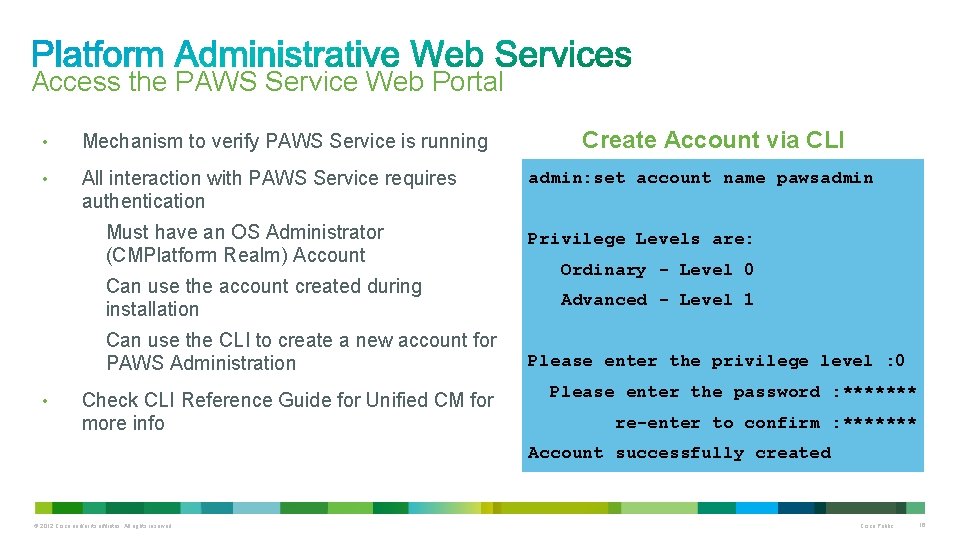
Access the PAWS Service Web Portal • Mechanism to verify PAWS Service is running • All interaction with PAWS Service requires authentication admin: set account name pawsadmin Must have an OS Administrator (CMPlatform Realm) Account Privilege Levels are: Can use the account created during installation Advanced - Level 1 Can use the CLI to create a new account for PAWS Administration • Create Account via CLI Check CLI Reference Guide for Unified CM for more info Ordinary - Level 0 Please enter the privilege level : 0 Please enter the password : ******* re-enter to confirm : ******* Account successfully created © 2012 Cisco and/or its affiliates. All rights reserved. Cisco Public 16
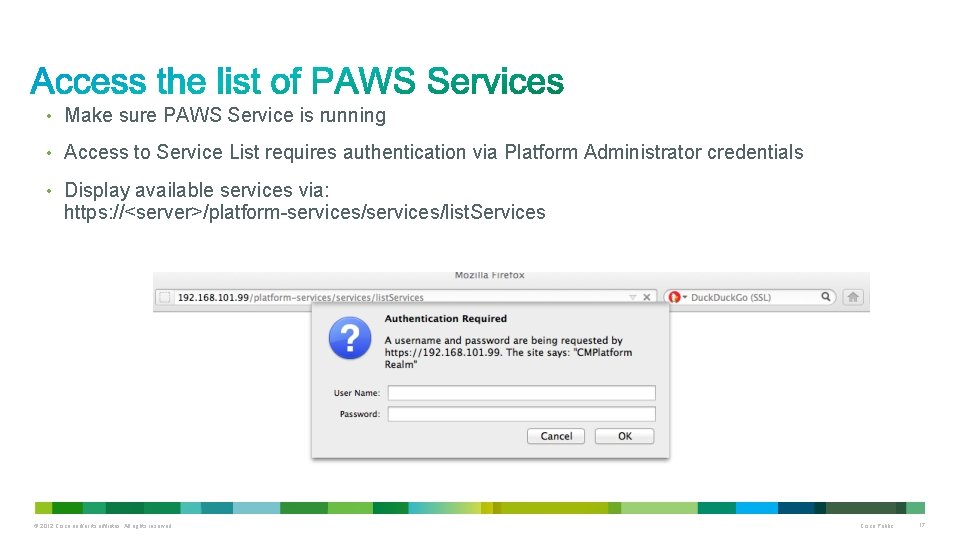
• Make sure PAWS Service is running • Access to Service List requires authentication via Platform Administrator credentials • Display available services via: https: //<server>/platform-services/list. Services © 2012 Cisco and/or its affiliates. All rights reserved. Cisco Public 17
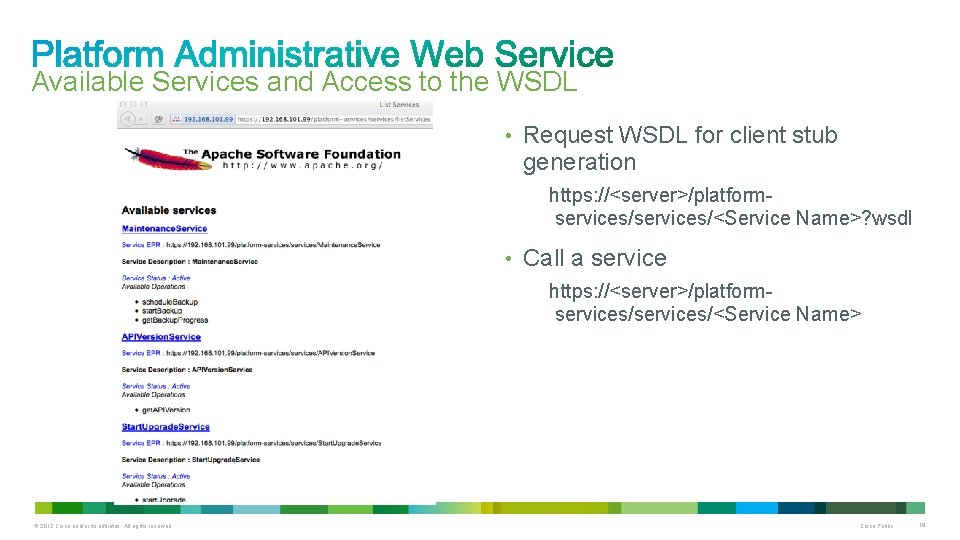
Available Services and Access to the WSDL • Request WSDL for client stub generation https: //<server>/platformservices/<Service Name>? wsdl • Call a service https: //<server>/platformservices/<Service Name> © 2012 Cisco and/or its affiliates. All rights reserved. Cisco Public 18
Support for Synchronous and Asynchronous Calls • Each PAWS service can be invoked either: Synchronously – In a Blocking client manner Asynchronously – In a Non-Blocking client/server manner • Each PAWS service implements an asynchronous IN-OUT message exchange protocol (MEP) • MEP is SOAP-based and must use well-formed SOAP messages © 2012 Cisco and/or its affiliates. All rights reserved. Cisco Public 19
Using Synchronous Calls • Client application POSTs a request and waits for a response • Synchronous Calls Open a socket to requested service Wait for a response before closing the socket Can waste server resources during lengthy operations • Request can “timeout” while waiting for a response when requests take a long time to complete Downloading an upgrade file Running a server upgrade © 2012 Cisco and/or its affiliates. All rights reserved. Cisco Public 20
Using Asynchronous Calls • Client application POSTs a request and response is sent to a ‘callback server’ • Asynchronous calls Do not wait for a response to close the socket Contain a WS-Addressing endpoint reference (reply-to URL) Acknowledged with HTTP 202 return code before calling desired service • Once the service completes, a response is sent to the provided endpoint Responses include result code, messages, and any available results Message. ID in request is returned with the response to relate the request and response messages • Maximum of 3 concurrent requests are allowed on a given server Additional requests queued up to 60 seconds before being rejected • Callback server must be available or the response is lost © 2012 Cisco and/or its affiliates. All rights reserved. Cisco Public 21
• Key to selecting between Synchronous and Asynchronous behavior is the <wsa: Reply. To> element <wsa: Reply. To> request always includes <wsa: Address> of a “callback” server • Synchronous callback Provide the synchronous callback address: <wsa: Address>http: //www. w 3. org/2005/08/addressing/anonymous</wsa: Address> • Asynchronous callback Provide the address of your application’s callback server: <wsa: Address>http: //<server>: <port>/servlet/WSACall. Back. Handler</wsa: Address> © 2012 Cisco and/or its affiliates. All rights reserved. Cisco Public 22
Which one should you use? • Applications can use any Resource synchronously or asynchronously Choice depends upon application requirements and programmer comfort • Following Resources should typically be called asynchronously: Upgrade. Filter. Service: upgrade. Filter Upgrade. Progress. Stage. Service: get. Upgrade. Progress Cancel. Upgrade. Service: cancel. Upgrade Prepare. Upgrade. Service: prepare. Remote. Upgrade Start. Upgrade. Service: start. Upgrade © 2012 Cisco and/or its affiliates. All rights reserved. Cisco Public 23
• APIVersion. Service Single Resource: get. APIVersion Can be called synchronously or asynchronously Good idea to validate API Version before proceeding • Currently available API Version: API Version 5. 0. 1. 0 is first public version in UC Manager 9. 0 • Upcoming slides show the difference between using get. APIVersion synchronously and asynchronously © 2012 Cisco and/or its affiliates. All rights reserved. Cisco Public 24
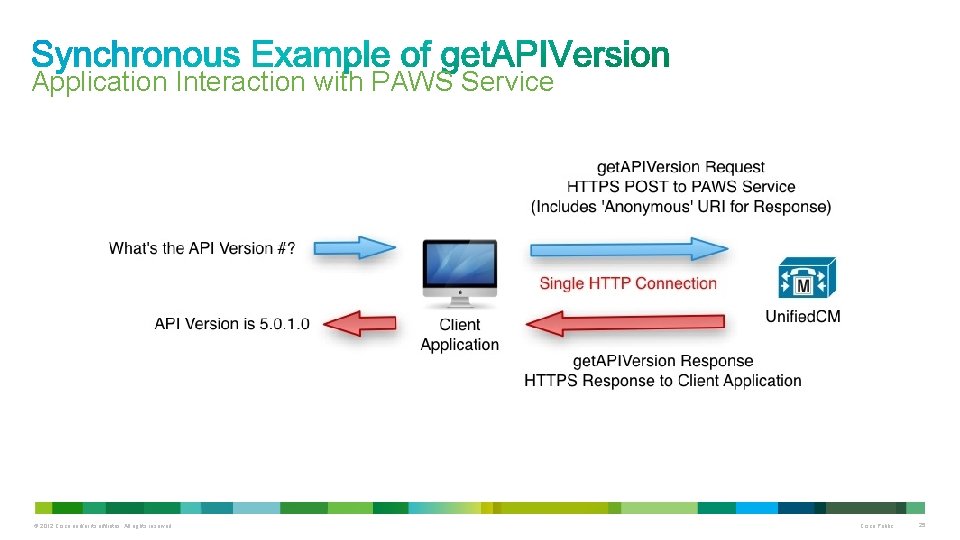
Application Interaction with PAWS Service © 2012 Cisco and/or its affiliates. All rights reserved. Cisco Public 25
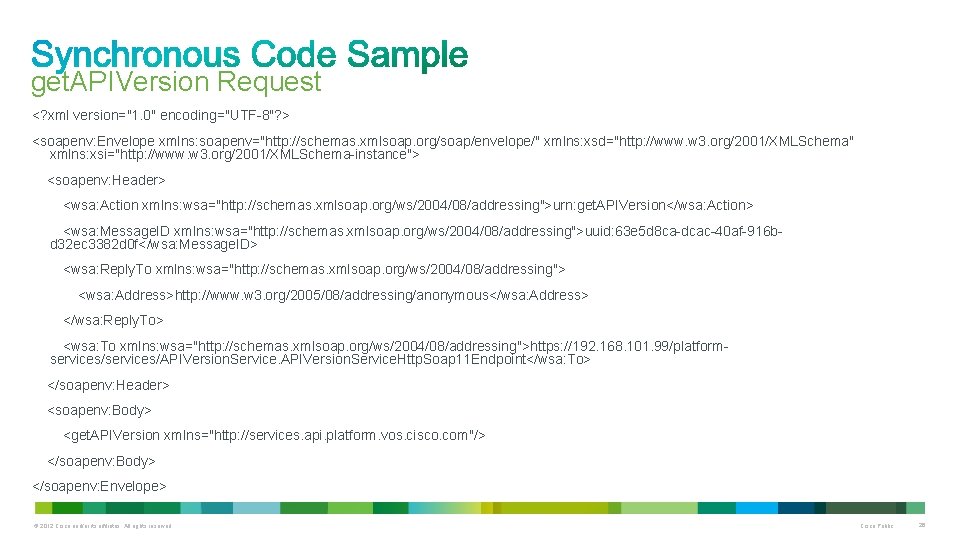
get. APIVersion Request <? xml version="1. 0" encoding="UTF-8"? > <soapenv: Envelope xmlns: soapenv="http: //schemas. xmlsoap. org/soap/envelope/" xmlns: xsd="http: //www. w 3. org/2001/XMLSchema" xmlns: xsi="http: //www. w 3. org/2001/XMLSchema-instance"> <soapenv: Header> <wsa: Action xmlns: wsa="http: //schemas. xmlsoap. org/ws/2004/08/addressing">urn: get. APIVersion</wsa: Action> <wsa: Message. ID xmlns: wsa="http: //schemas. xmlsoap. org/ws/2004/08/addressing">uuid: 63 e 5 d 8 ca-dcac-40 af-916 bd 32 ec 3382 d 0 f</wsa: Message. ID> <wsa: Reply. To xmlns: wsa="http: //schemas. xmlsoap. org/ws/2004/08/addressing"> <wsa: Address>http: //www. w 3. org/2005/08/addressing/anonymous</wsa: Address> </wsa: Reply. To> <wsa: To xmlns: wsa="http: //schemas. xmlsoap. org/ws/2004/08/addressing">https: //192. 168. 101. 99/platformservices/APIVersion. Service. Http. Soap 11 Endpoint</wsa: To> </soapenv: Header> <soapenv: Body> <get. APIVersion xmlns="http: //services. api. platform. vos. cisco. com"/> </soapenv: Body> </soapenv: Envelope> © 2012 Cisco and/or its affiliates. All rights reserved. Cisco Public 26
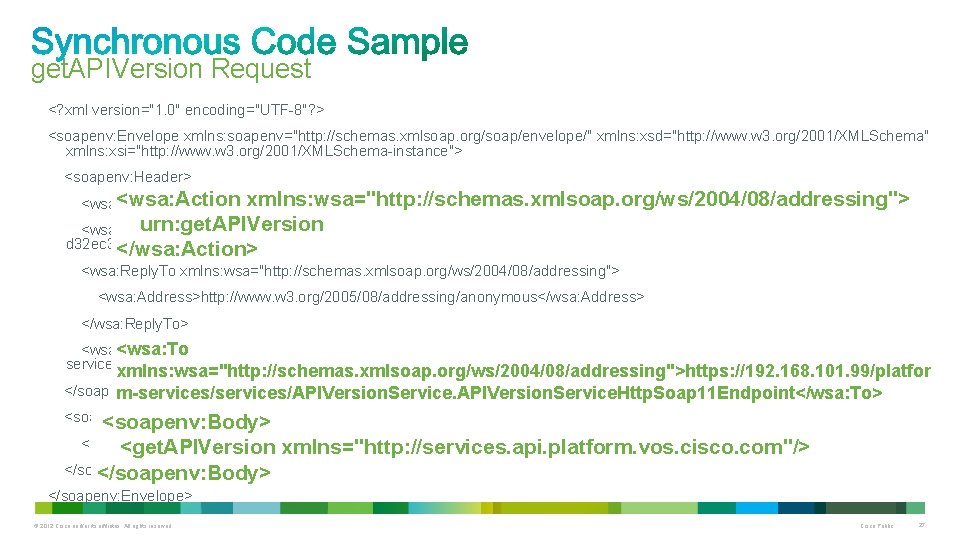
get. APIVersion Request <? xml version="1. 0" encoding="UTF-8"? > <soapenv: Envelope xmlns: soapenv="http: //schemas. xmlsoap. org/soap/envelope/" xmlns: xsd="http: //www. w 3. org/2001/XMLSchema" xmlns: xsi="http: //www. w 3. org/2001/XMLSchema-instance"> <soapenv: Header> <wsa: Action xmlns: wsa="http: //schemas. xmlsoap. org/ws/2004/08/addressing"> <wsa: Action xmlns: wsa="http: //schemas. xmlsoap. org/ws/2004/08/addressing">urn: get. APIVersion</wsa: Action> urn: get. APIVersion <wsa: Message. ID xmlns: wsa="http: //schemas. xmlsoap. org/ws/2004/08/addressing">uuid: 63 e 5 d 8 ca-dcac-40 af-916 bd 32 ec 3382 d 0 f</wsa: Message. ID> </wsa: Action> <wsa: Reply. To xmlns: wsa="http: //schemas. xmlsoap. org/ws/2004/08/addressing"> <wsa: Address>http: //www. w 3. org/2005/08/addressing/anonymous</wsa: Address> </wsa: Reply. To> <wsa: To xmlns: wsa="http: //schemas. xmlsoap. org/ws/2004/08/addressing">https: //192. 168. 101. 99/platform<wsa: To services/APIVersion. Service. Http. Soap 11 Endpoint</wsa: To> xmlns: wsa="http: //schemas. xmlsoap. org/ws/2004/08/addressing">https: //192. 168. 101. 99/platfor </soapenv: Header> m-services/APIVersion. Service. Http. Soap 11 Endpoint</wsa: To> <soapenv: Body> <get. APIVersion xmlns="http: //services. api. platform. vos. cisco. com"/> </soapenv: Body> </soapenv: Envelope> © 2012 Cisco and/or its affiliates. All rights reserved. Cisco Public 27
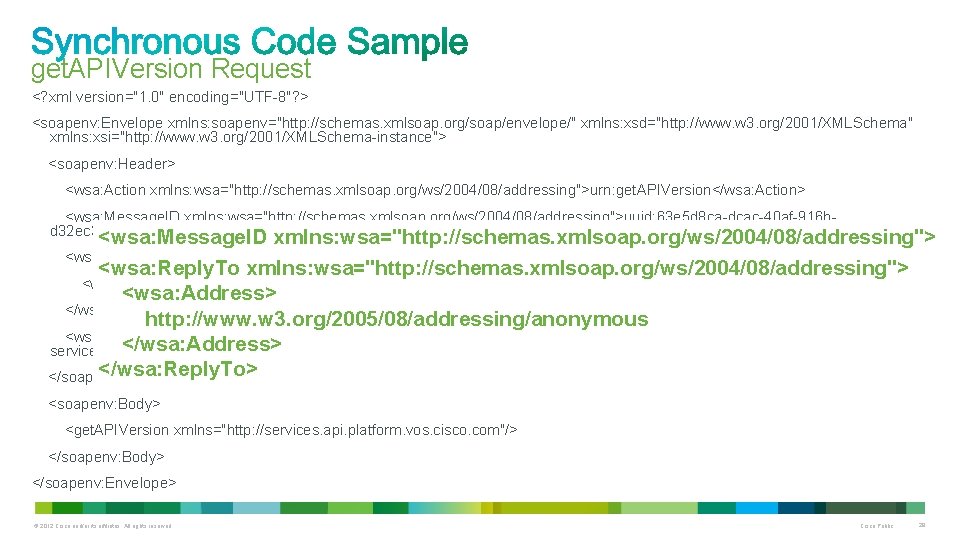
get. APIVersion Request <? xml version="1. 0" encoding="UTF-8"? > <soapenv: Envelope xmlns: soapenv="http: //schemas. xmlsoap. org/soap/envelope/" xmlns: xsd="http: //www. w 3. org/2001/XMLSchema" xmlns: xsi="http: //www. w 3. org/2001/XMLSchema-instance"> <soapenv: Header> <wsa: Action xmlns: wsa="http: //schemas. xmlsoap. org/ws/2004/08/addressing">urn: get. APIVersion</wsa: Action> <wsa: Message. ID xmlns: wsa="http: //schemas. xmlsoap. org/ws/2004/08/addressing">uuid: 63 e 5 d 8 ca-dcac-40 af-916 bd 32 ec 3382 d 0 f</wsa: Message. ID> <wsa: Message. ID xmlns: wsa="http: //schemas. xmlsoap. org/ws/2004/08/addressing"> <wsa: Reply. To xmlns: wsa="http: //schemas. xmlsoap. org/ws/2004/08/addressing"> uuid: 63 e 5 d 8 ca-dcac-40 af-916 b-d 32 ec 3382 d 0 f <wsa: Reply. To xmlns: wsa="http: //schemas. xmlsoap. org/ws/2004/08/addressing"> <wsa: Address>http: //www. w 3. org/2005/08/addressing/anonymous</wsa: Address> </wsa: Message. ID> <wsa: Address> </wsa: Reply. To> http: //www. w 3. org/2005/08/addressing/anonymous <wsa: To xmlns: wsa="http: //schemas. xmlsoap. org/ws/2004/08/addressing">https: //192. 168. 101. 99/platform</wsa: Address> services/APIVersion. Service. Http. Soap 11 Endpoint</wsa: To> </wsa: Reply. To> </soapenv: Header> <soapenv: Body> <get. APIVersion xmlns="http: //services. api. platform. vos. cisco. com"/> </soapenv: Body> </soapenv: Envelope> © 2012 Cisco and/or its affiliates. All rights reserved. Cisco Public 28
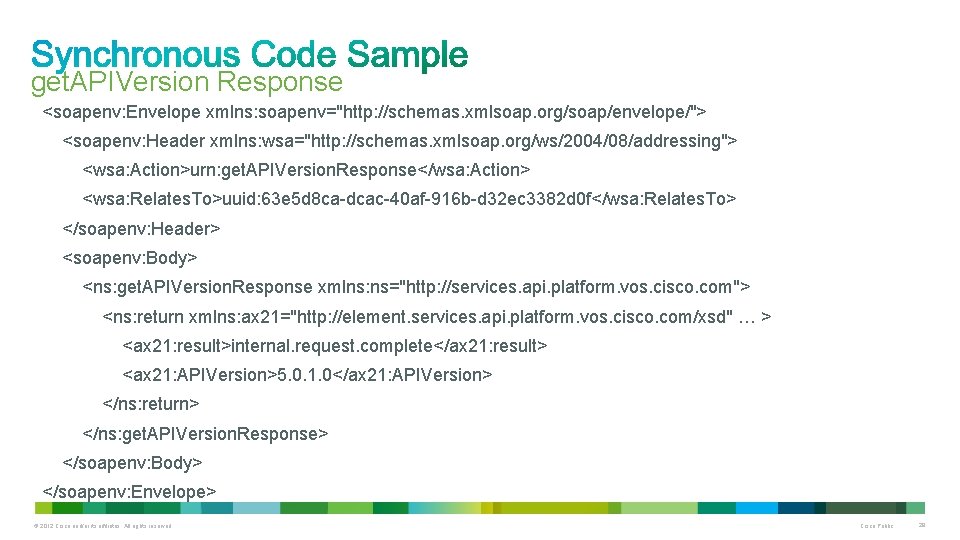
get. APIVersion Response <soapenv: Envelope xmlns: soapenv="http: //schemas. xmlsoap. org/soap/envelope/"> <soapenv: Header xmlns: wsa="http: //schemas. xmlsoap. org/ws/2004/08/addressing"> <wsa: Action>urn: get. APIVersion. Response</wsa: Action> <wsa: Relates. To>uuid: 63 e 5 d 8 ca-dcac-40 af-916 b-d 32 ec 3382 d 0 f</wsa: Relates. To> </soapenv: Header> <soapenv: Body> <ns: get. APIVersion. Response xmlns: ns="http: //services. api. platform. vos. cisco. com"> <ns: return xmlns: ax 21="http: //element. services. api. platform. vos. cisco. com/xsd" … > <ax 21: result>internal. request. complete</ax 21: result> <ax 21: APIVersion>5. 0. 1. 0</ax 21: APIVersion> </ns: return> </ns: get. APIVersion. Response> </soapenv: Body> </soapenv: Envelope> © 2012 Cisco and/or its affiliates. All rights reserved. Cisco Public 29
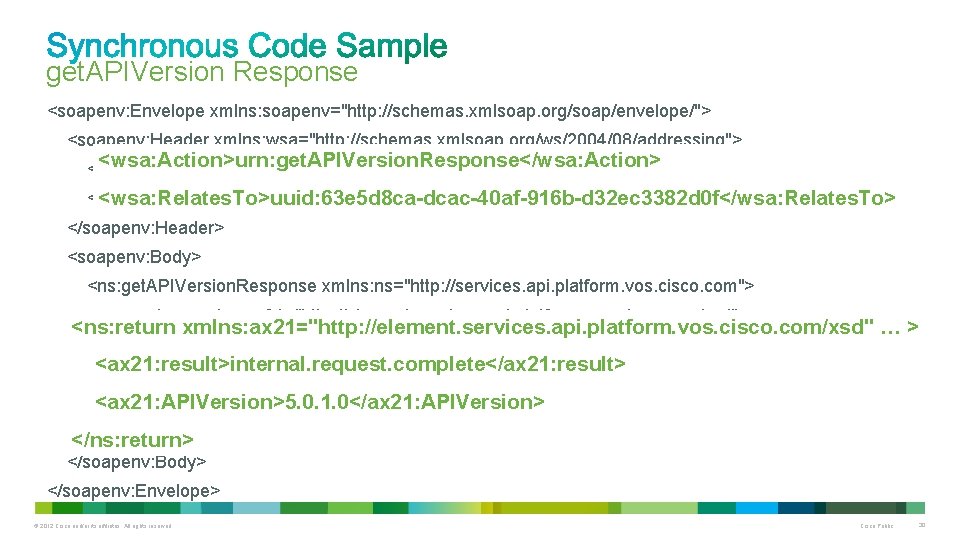
get. APIVersion Response <soapenv: Envelope xmlns: soapenv="http: //schemas. xmlsoap. org/soap/envelope/"> <soapenv: Header xmlns: wsa="http: //schemas. xmlsoap. org/ws/2004/08/addressing"> <wsa: Action>urn: get. APIVersion. Response</wsa: Action> <wsa: Relates. To>uuid: 63 e 5 d 8 ca-dcac-40 af-916 b-d 32 ec 3382 d 0 f</wsa: Relates. To> </soapenv: Header> <soapenv: Body> <ns: get. APIVersion. Response xmlns: ns="http: //services. api. platform. vos. cisco. com"> <ns: return xmlns: ax 21="http: //element. services. api. platform. vos. cisco. com/xsd" … > <ax 21: result>internal. request. complete</ax 21: result> <ax 21: APIVersion>5. 0. 1. 0</ax 21: APIVersion> </ns: return> </ns: get. APIVersion. Response> </ns: return> </soapenv: Body> </soapenv: Envelope> © 2012 Cisco and/or its affiliates. All rights reserved. Cisco Public 30
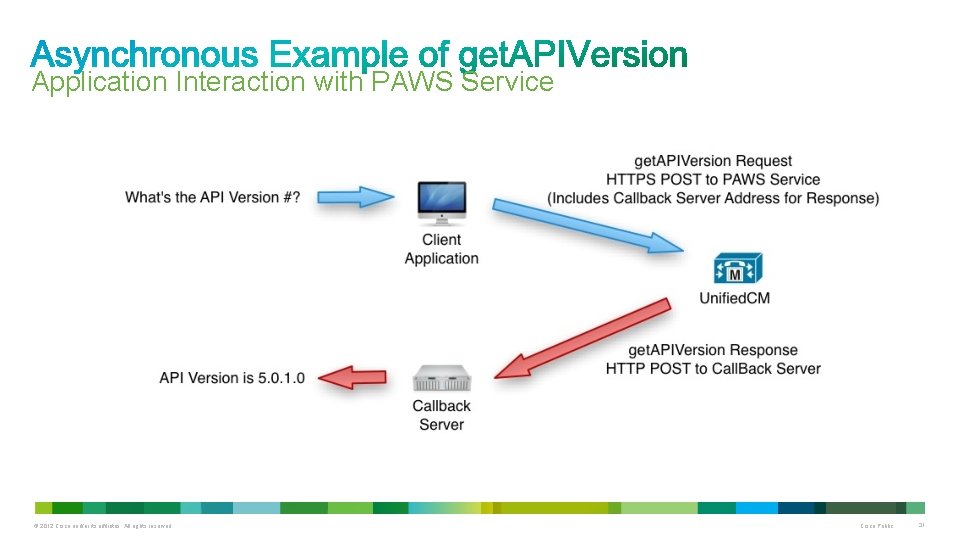
Application Interaction with PAWS Service © 2012 Cisco and/or its affiliates. All rights reserved. Cisco Public 31
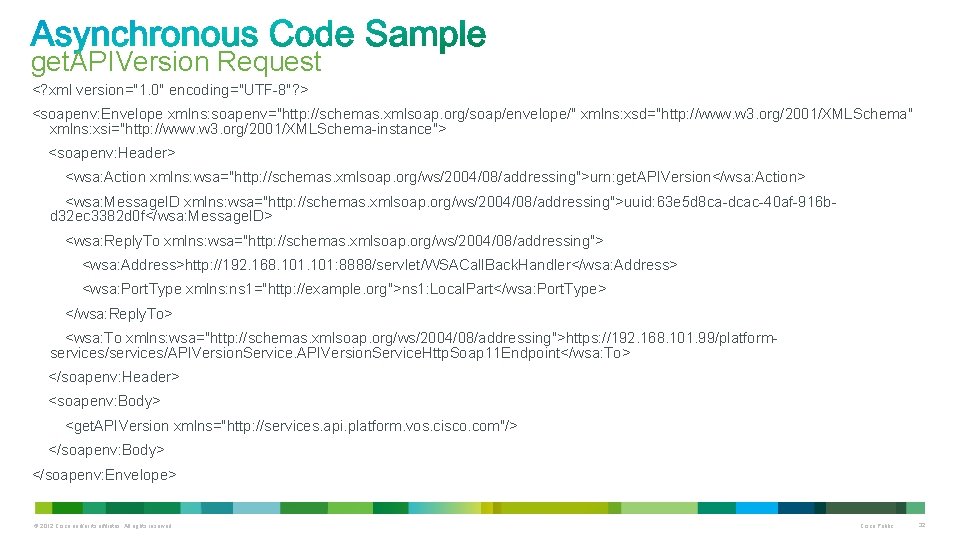
get. APIVersion Request <? xml version="1. 0" encoding="UTF-8"? > <soapenv: Envelope xmlns: soapenv="http: //schemas. xmlsoap. org/soap/envelope/" xmlns: xsd="http: //www. w 3. org/2001/XMLSchema" xmlns: xsi="http: //www. w 3. org/2001/XMLSchema-instance"> <soapenv: Header> <wsa: Action xmlns: wsa="http: //schemas. xmlsoap. org/ws/2004/08/addressing">urn: get. APIVersion</wsa: Action> <wsa: Message. ID xmlns: wsa="http: //schemas. xmlsoap. org/ws/2004/08/addressing">uuid: 63 e 5 d 8 ca-dcac-40 af-916 bd 32 ec 3382 d 0 f</wsa: Message. ID> <wsa: Reply. To xmlns: wsa="http: //schemas. xmlsoap. org/ws/2004/08/addressing"> <wsa: Address>http: //192. 168. 101: 8888/servlet/WSACall. Back. Handler</wsa: Address> <wsa: Port. Type xmlns: ns 1="http: //example. org">ns 1: Local. Part</wsa: Port. Type> </wsa: Reply. To> <wsa: To xmlns: wsa="http: //schemas. xmlsoap. org/ws/2004/08/addressing">https: //192. 168. 101. 99/platformservices/APIVersion. Service. Http. Soap 11 Endpoint</wsa: To> </soapenv: Header> <soapenv: Body> <get. APIVersion xmlns="http: //services. api. platform. vos. cisco. com"/> </soapenv: Body> </soapenv: Envelope> © 2012 Cisco and/or its affiliates. All rights reserved. Cisco Public 32
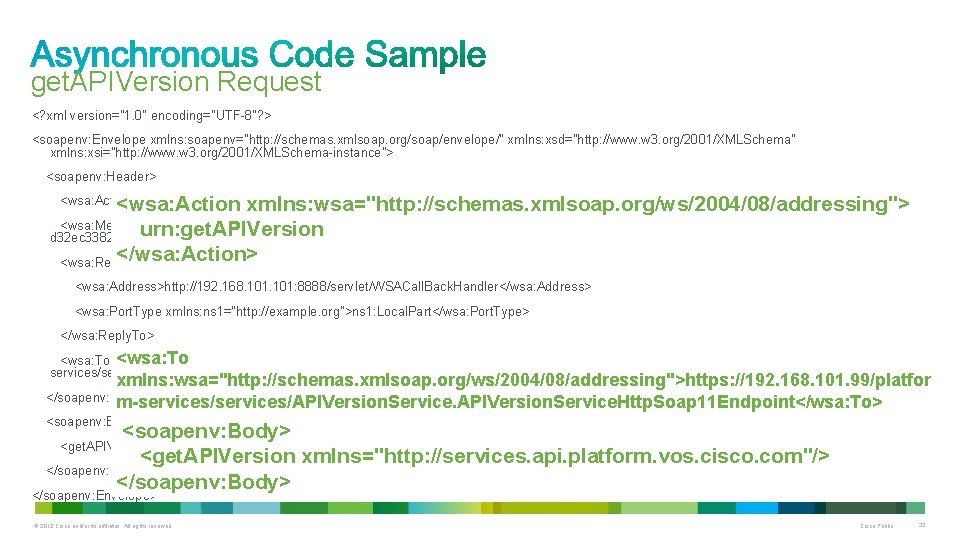
get. APIVersion Request <? xml version="1. 0" encoding="UTF-8"? > <soapenv: Envelope xmlns: soapenv="http: //schemas. xmlsoap. org/soap/envelope/" xmlns: xsd="http: //www. w 3. org/2001/XMLSchema" xmlns: xsi="http: //www. w 3. org/2001/XMLSchema-instance"> <soapenv: Header> <wsa: Action xmlns: wsa="http: //schemas. xmlsoap. org/ws/2004/08/addressing"> <wsa: Message. ID xmlns: wsa="http: //schemas. xmlsoap. org/ws/2004/08/addressing">uuid: 63 e 5 d 8 ca-dcac-40 af-916 burn: get. APIVersion d 32 ec 3382 d 0 f</wsa: Message. ID> </wsa: Action> <wsa: Reply. To xmlns: wsa="http: //schemas. xmlsoap. org/ws/2004/08/addressing"> <wsa: Action xmlns: wsa="http: //schemas. xmlsoap. org/ws/2004/08/addressing">urn: get. APIVersion</wsa: Action> <wsa: Address>http: //192. 168. 101: 8888/servlet/WSACall. Back. Handler</wsa: Address> <wsa: Port. Type xmlns: ns 1="http: //example. org">ns 1: Local. Part</wsa: Port. Type> </wsa: Reply. To> <wsa: To xmlns: wsa="http: //schemas. xmlsoap. org/ws/2004/08/addressing">https: //192. 168. 101. 99/platformservices/APIVersion. Service. Http. Soap 11 Endpoint</wsa: To> xmlns: wsa="http: //schemas. xmlsoap. org/ws/2004/08/addressing">https: //192. 168. 101. 99/platfor </soapenv: Header> m-services/APIVersion. Service. Http. Soap 11 Endpoint</wsa: To> <soapenv: Body> <get. APIVersion xmlns="http: //services. api. platform. vos. cisco. com"/> </soapenv: Body> <get. APIVersion xmlns="http: //services. api. platform. vos. cisco. com"/> </soapenv: Envelope> © 2012 Cisco and/or its affiliates. All rights reserved. Cisco Public 33
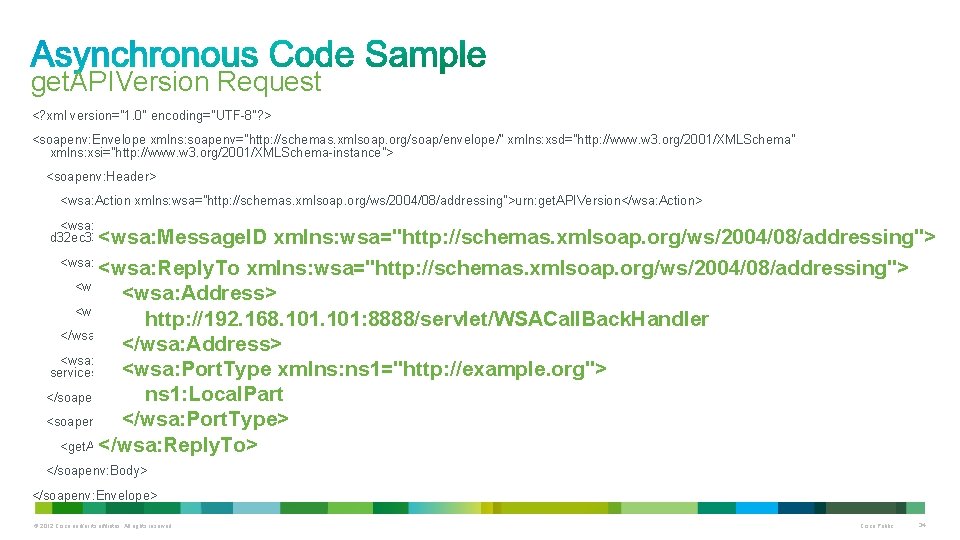
get. APIVersion Request <? xml version="1. 0" encoding="UTF-8"? > <soapenv: Envelope xmlns: soapenv="http: //schemas. xmlsoap. org/soap/envelope/" xmlns: xsd="http: //www. w 3. org/2001/XMLSchema" xmlns: xsi="http: //www. w 3. org/2001/XMLSchema-instance"> <soapenv: Header> <wsa: Action xmlns: wsa="http: //schemas. xmlsoap. org/ws/2004/08/addressing">urn: get. APIVersion</wsa: Action> <wsa: Message. ID xmlns: wsa="http: //schemas. xmlsoap. org/ws/2004/08/addressing">uuid: 63 e 5 d 8 ca-dcac-40 af-916 bd 32 ec 3382 d 0 f</wsa: Message. ID> <wsa: Message. ID xmlns: wsa="http: //schemas. xmlsoap. org/ws/2004/08/addressing"> <wsa: Reply. To xmlns: wsa="http: //schemas. xmlsoap. org/ws/2004/08/addressing"> uuid: 63 e 5 d 8 ca-dcac-40 af-916 b-d 32 ec 3382 d 0 f <wsa: Reply. To xmlns: wsa="http: //schemas. xmlsoap. org/ws/2004/08/addressing"> <wsa: Address>http: //192. 168. 101: 8888/servlet/WSACall. Back. Handler</wsa: Address> </wsa: Message. ID> <wsa: Address> <wsa: Port. Type xmlns: ns 1="http: //example. org">ns 1: Local. Part</wsa: Port. Type> http: //192. 168. 101: 8888/servlet/WSACall. Back. Handler </wsa: Reply. To> </wsa: Address> <wsa: To xmlns: wsa="http: //schemas. xmlsoap. org/ws/2004/08/addressing">https: //192. 168. 101. 99/platform<wsa: Port. Type xmlns: ns 1="http: //example. org"> services/APIVersion. Service. Http. Soap 11 Endpoint</wsa: To> ns 1: Local. Part </soapenv: Header> <soapenv: Body> </wsa: Port. Type> <get. APIVersion xmlns="http: //services. api. platform. vos. cisco. com"/> </wsa: Reply. To> </soapenv: Body> </soapenv: Envelope> © 2012 Cisco and/or its affiliates. All rights reserved. Cisco Public 34
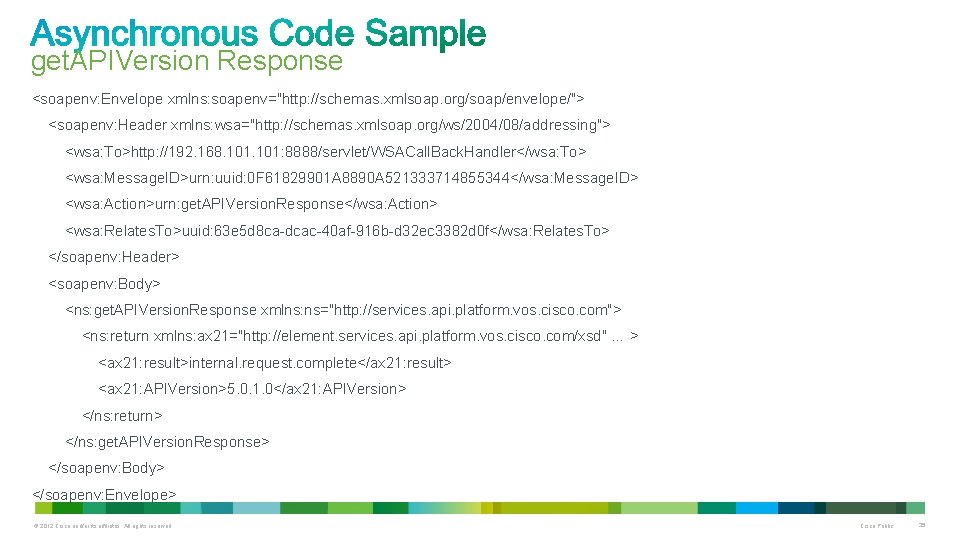
get. APIVersion Response <soapenv: Envelope xmlns: soapenv="http: //schemas. xmlsoap. org/soap/envelope/"> <soapenv: Header xmlns: wsa="http: //schemas. xmlsoap. org/ws/2004/08/addressing"> <wsa: To>http: //192. 168. 101: 8888/servlet/WSACall. Back. Handler</wsa: To> <wsa: Message. ID>urn: uuid: 0 F 61829901 A 8890 A 521333714855344</wsa: Message. ID> <wsa: Action>urn: get. APIVersion. Response</wsa: Action> <wsa: Relates. To>uuid: 63 e 5 d 8 ca-dcac-40 af-916 b-d 32 ec 3382 d 0 f</wsa: Relates. To> </soapenv: Header> <soapenv: Body> <ns: get. APIVersion. Response xmlns: ns="http: //services. api. platform. vos. cisco. com"> <ns: return xmlns: ax 21="http: //element. services. api. platform. vos. cisco. com/xsd" … > <ax 21: result>internal. request. complete</ax 21: result> <ax 21: APIVersion>5. 0. 1. 0</ax 21: APIVersion> </ns: return> </ns: get. APIVersion. Response> </soapenv: Body> </soapenv: Envelope> © 2012 Cisco and/or its affiliates. All rights reserved. Cisco Public 35
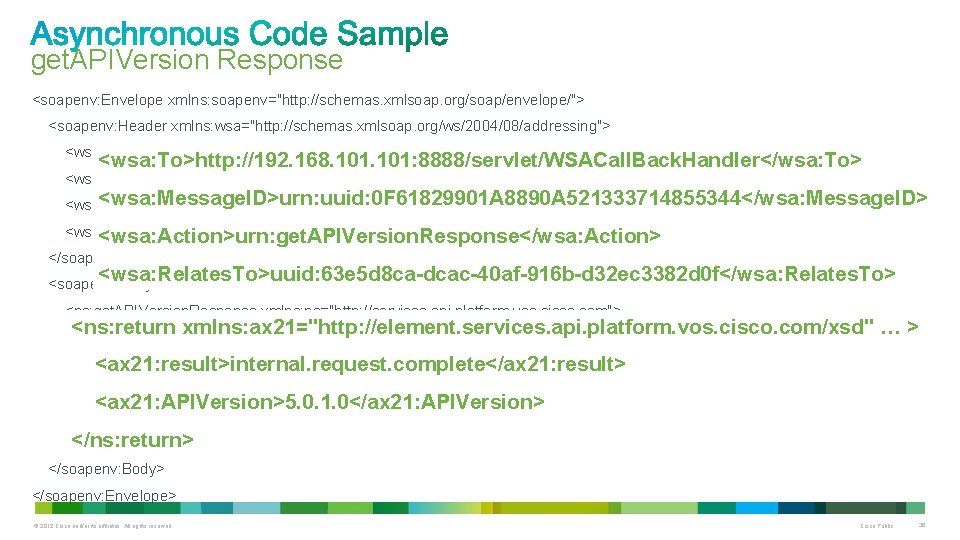
get. APIVersion Response <soapenv: Envelope xmlns: soapenv="http: //schemas. xmlsoap. org/soap/envelope/"> <soapenv: Header xmlns: wsa="http: //schemas. xmlsoap. org/ws/2004/08/addressing"> <wsa: To>http: //192. 168. 101: 8888/servlet/WSACall. Back. Handler</wsa: To> <wsa: Message. ID>urn: uuid: 0 F 61829901 A 8890 A 521333714855344</wsa: Message. ID> <wsa: Action>urn: get. APIVersion. Response</wsa: Action> <wsa: Relates. To>uuid: 63 e 5 d 8 ca-dcac-40 af-916 b-d 32 ec 3382 d 0 f</wsa: Relates. To> <wsa: Action>urn: get. APIVersion. Response</wsa: Action> </soapenv: Header> <wsa: Relates. To>uuid: 63 e 5 d 8 ca-dcac-40 af-916 b-d 32 ec 3382 d 0 f</wsa: Relates. To> <soapenv: Body> <ns: get. APIVersion. Response xmlns: ns="http: //services. api. platform. vos. cisco. com"> <ns: return xmlns: ax 21="http: //element. services. api. platform. vos. cisco. com/xsd" … > <ax 21: result>internal. request. complete</ax 21: result> <ax 21: APIVersion>5. 0. 1. 0</ax 21: APIVersion> </ns: return> </ns: get. APIVersion. Response> </soapenv: Body> </soapenv: Envelope> © 2012 Cisco and/or its affiliates. All rights reserved. Cisco Public 36
© 2012 Cisco and/or its affiliates. All rights reserved. Cisco Public 37
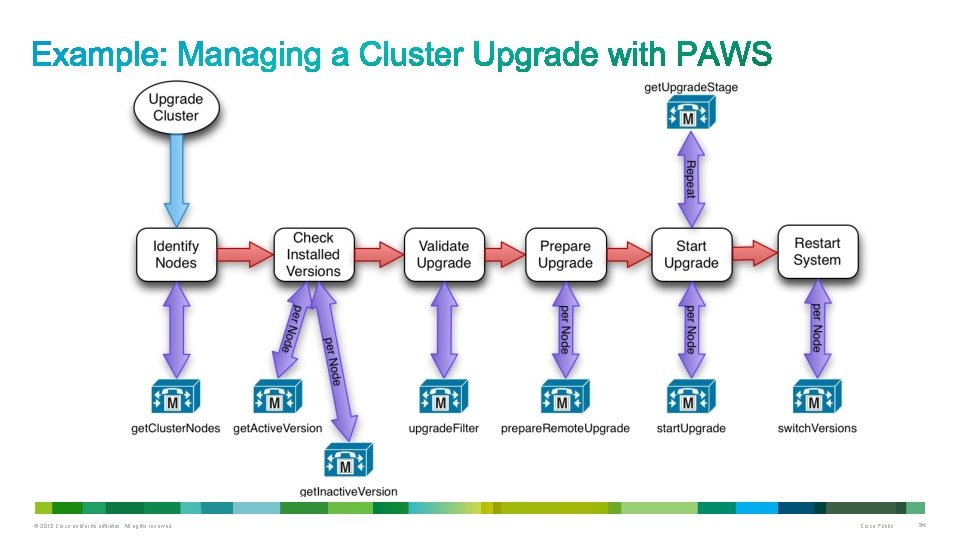
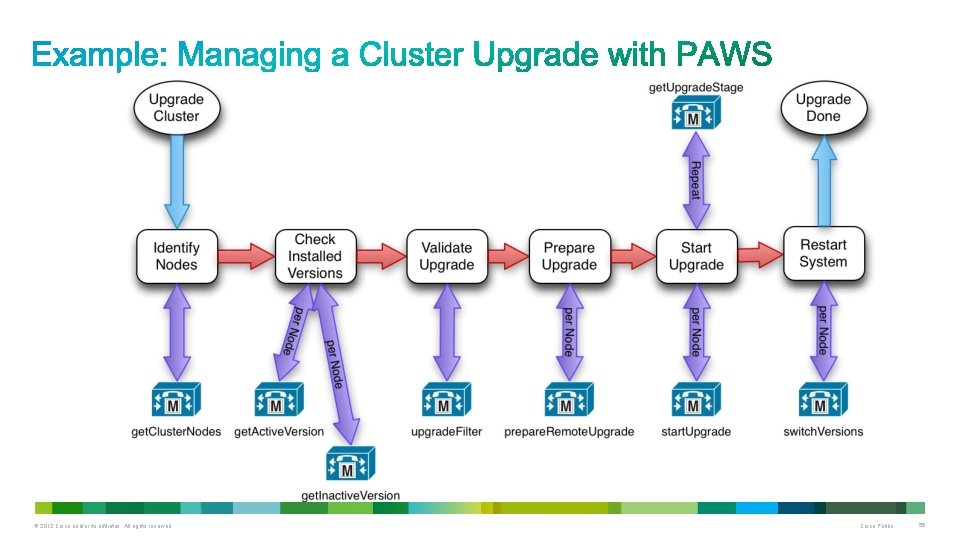
• Discovering cluster nodes • Downloading and Verifying that upgrade files are on each server • Managing backup jobs • Restarting server nodes • Performing upgrades © 2012 Cisco and/or its affiliates. All rights reserved. Cisco Public 38
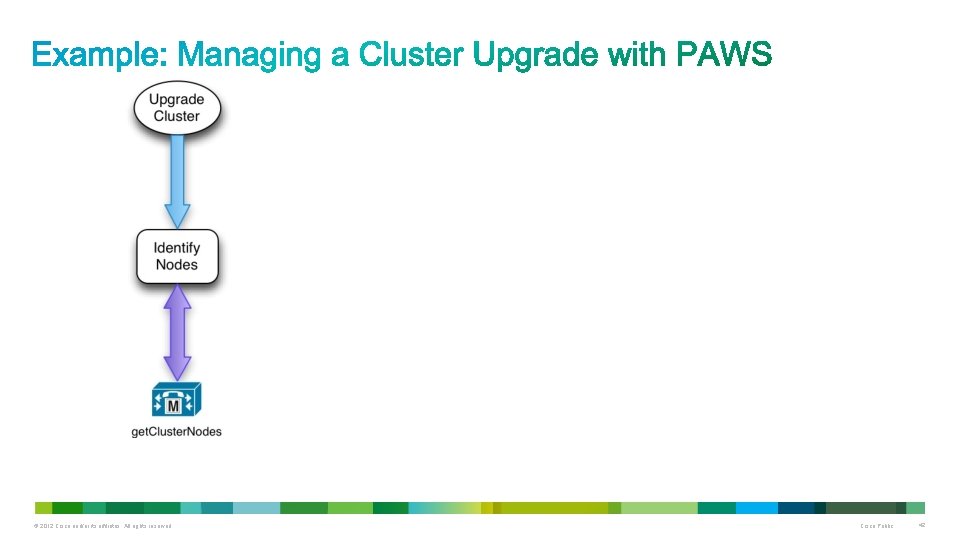
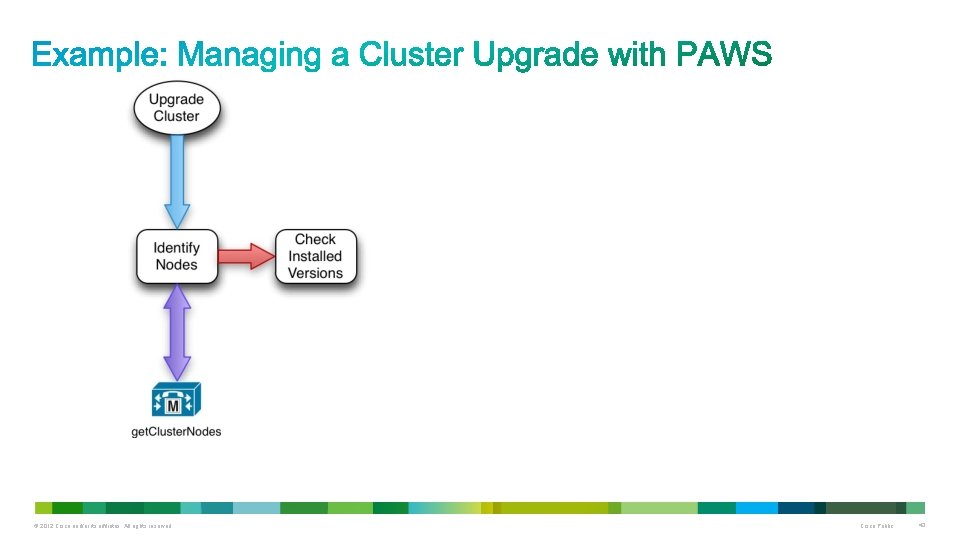
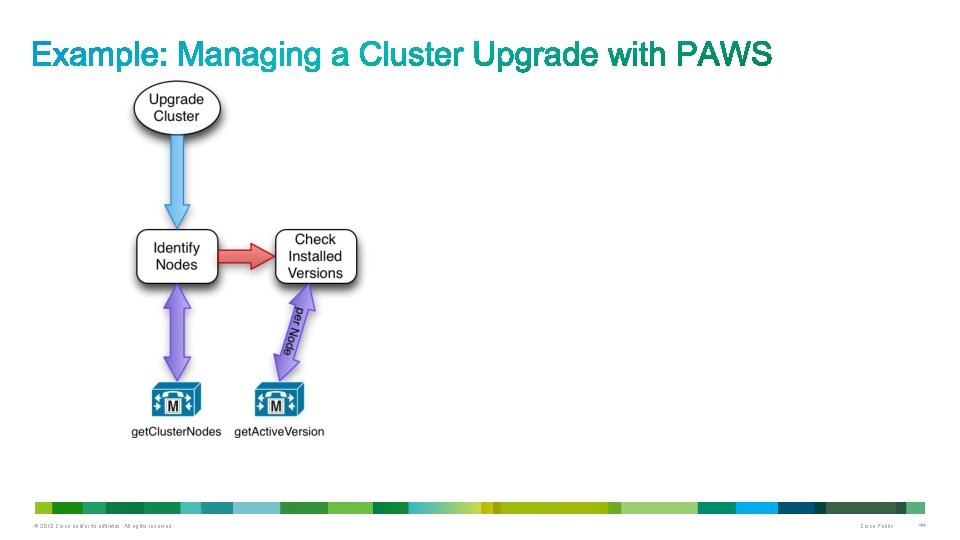
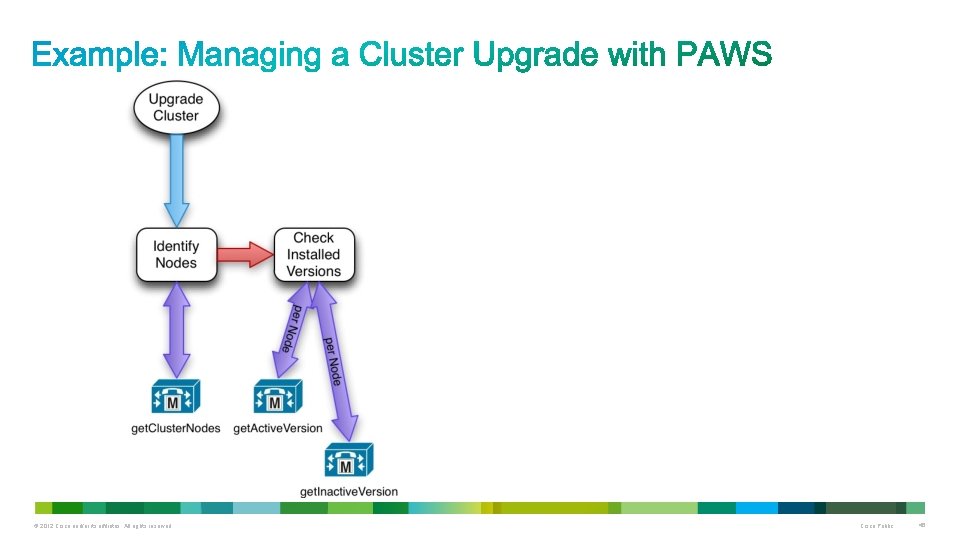
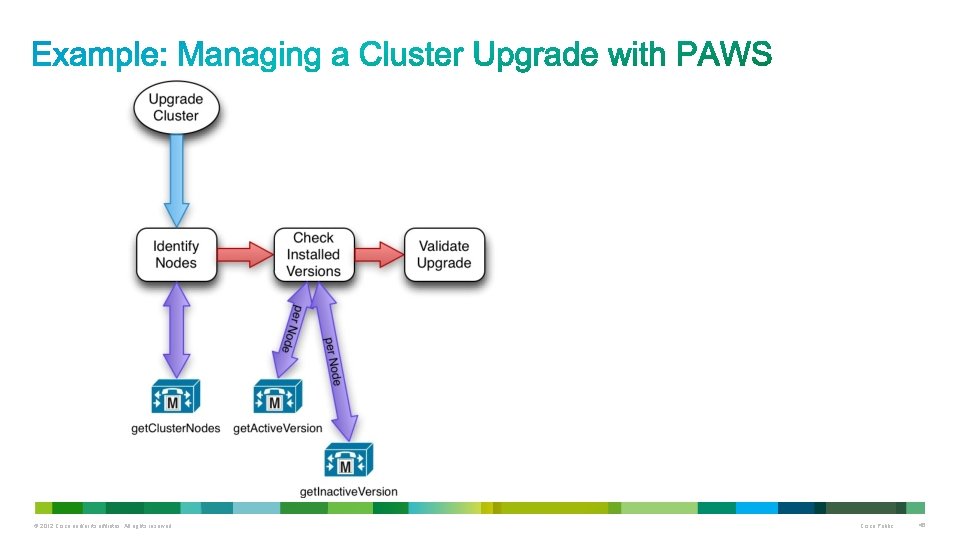
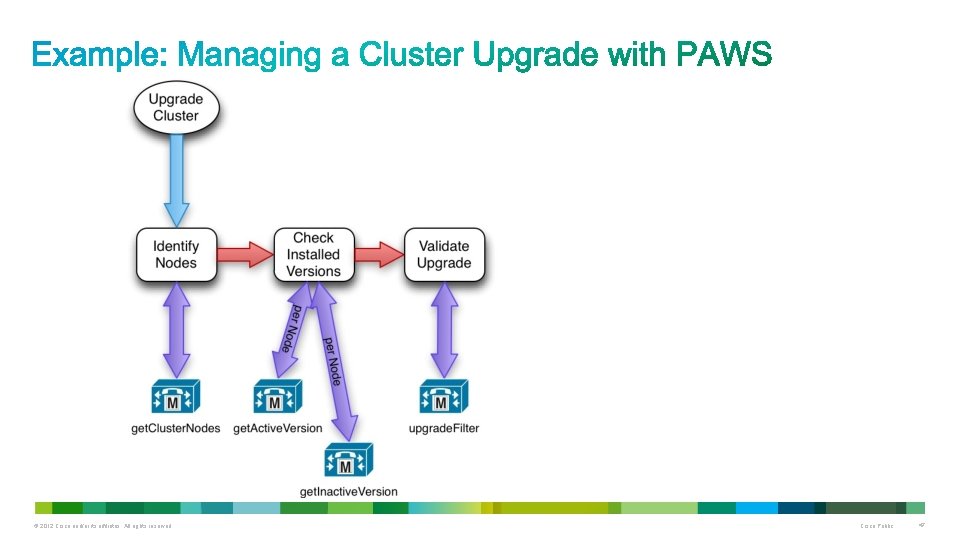
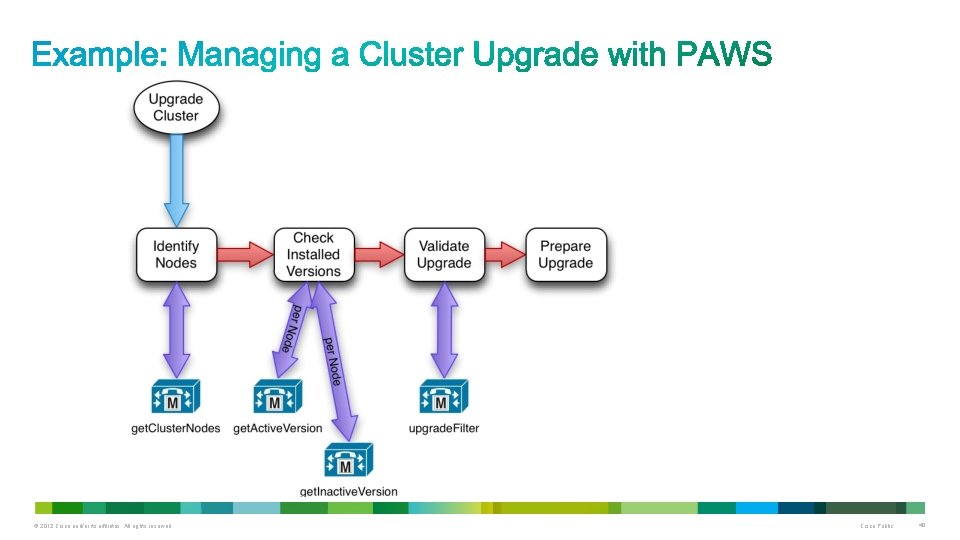
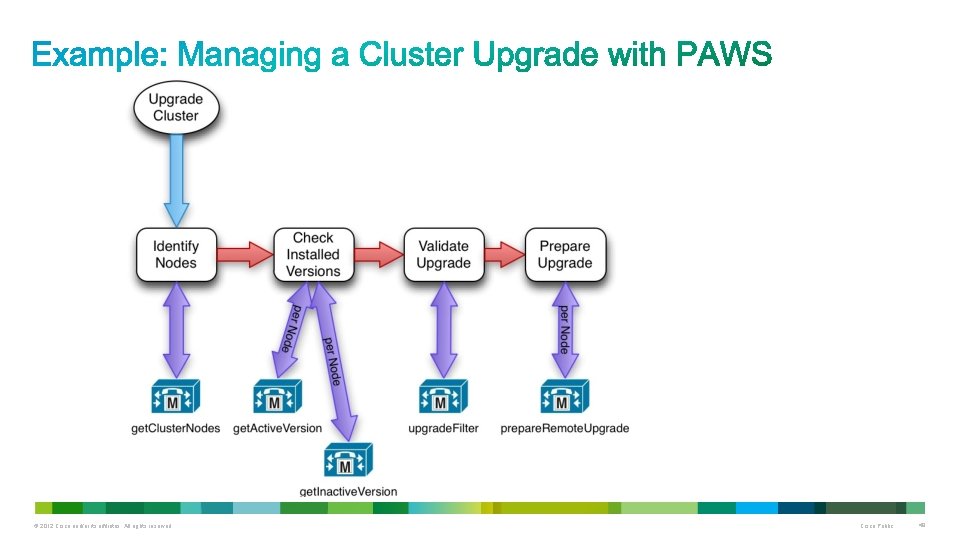
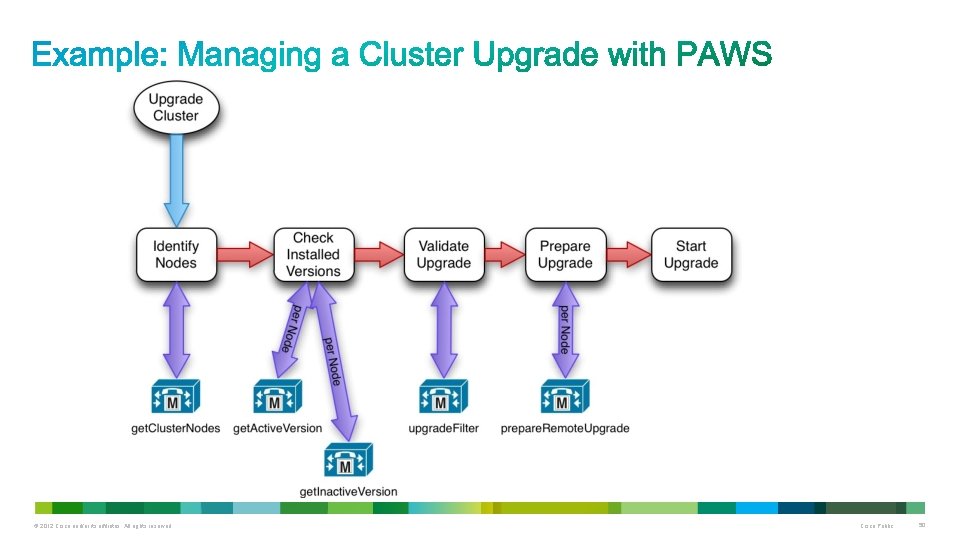
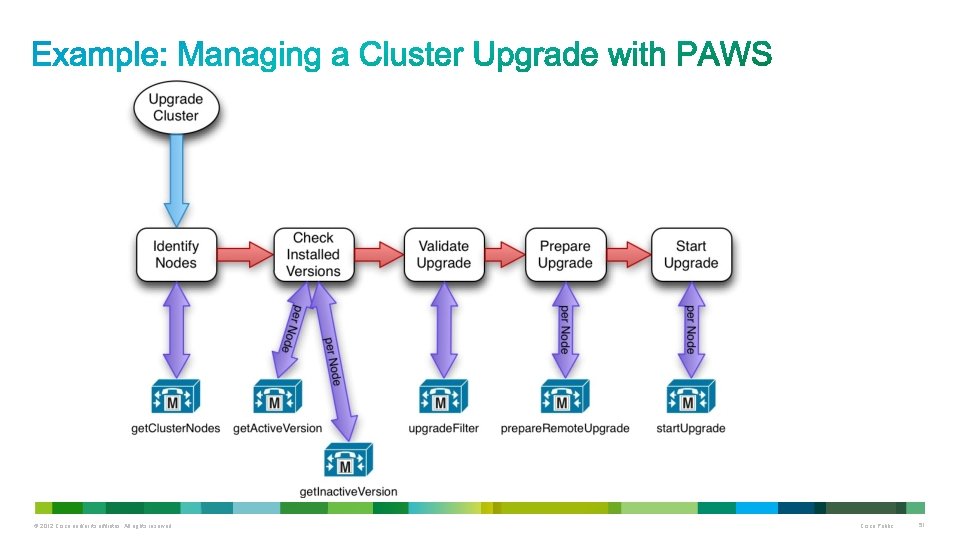
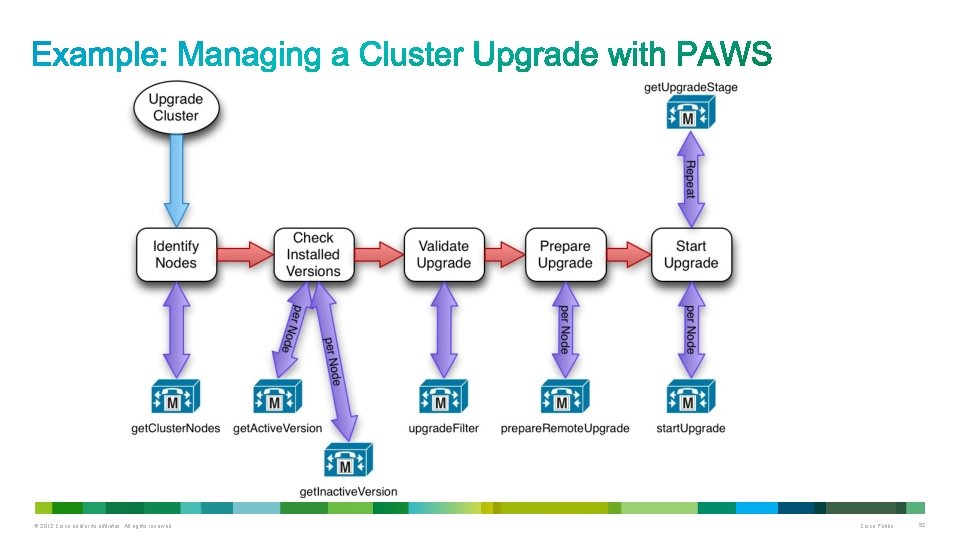
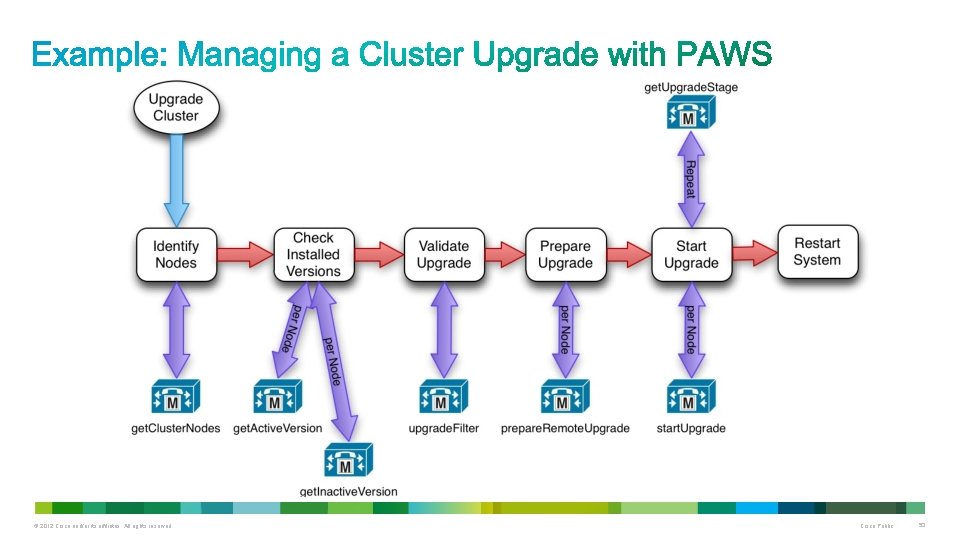
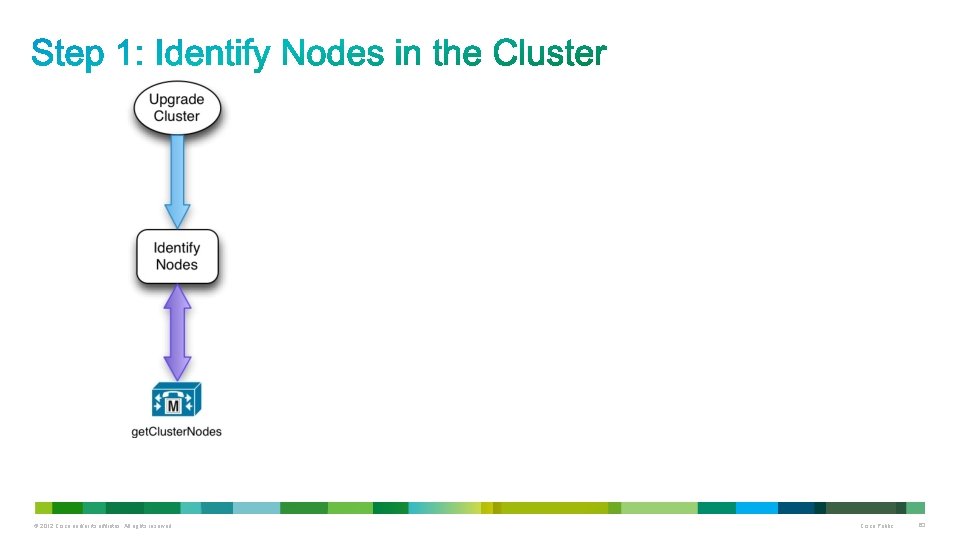
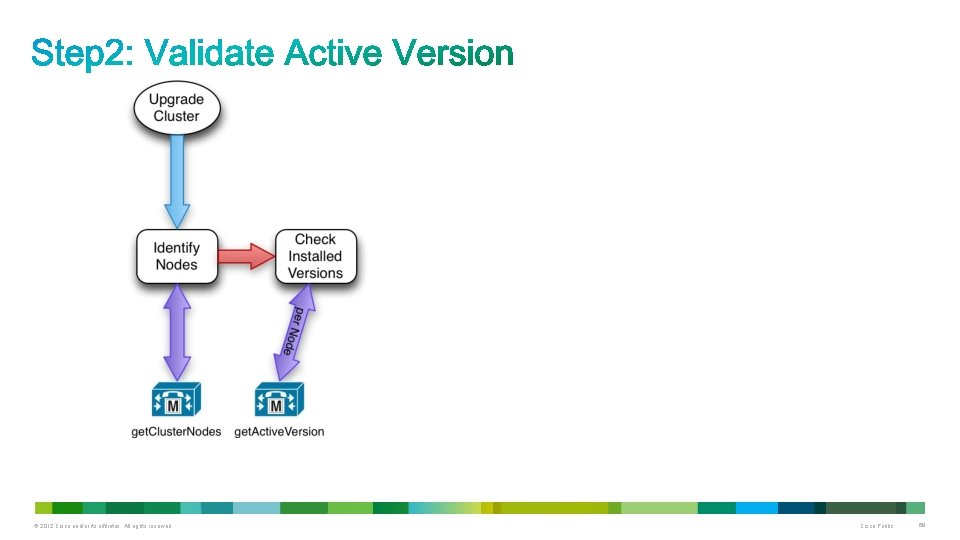
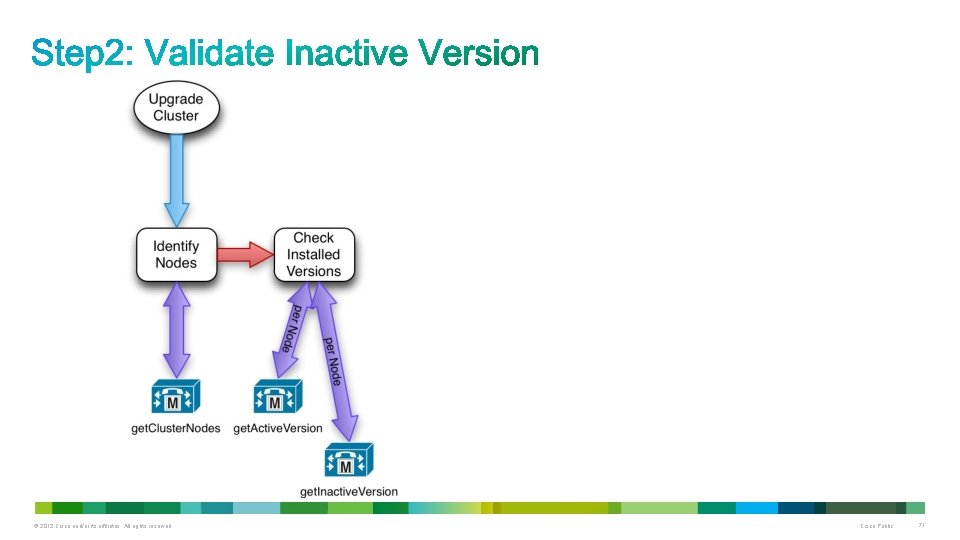
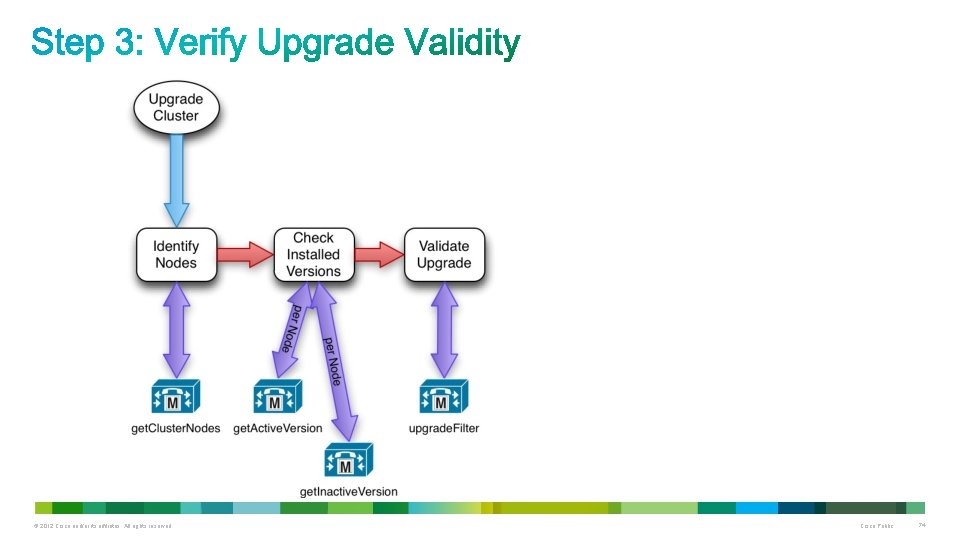
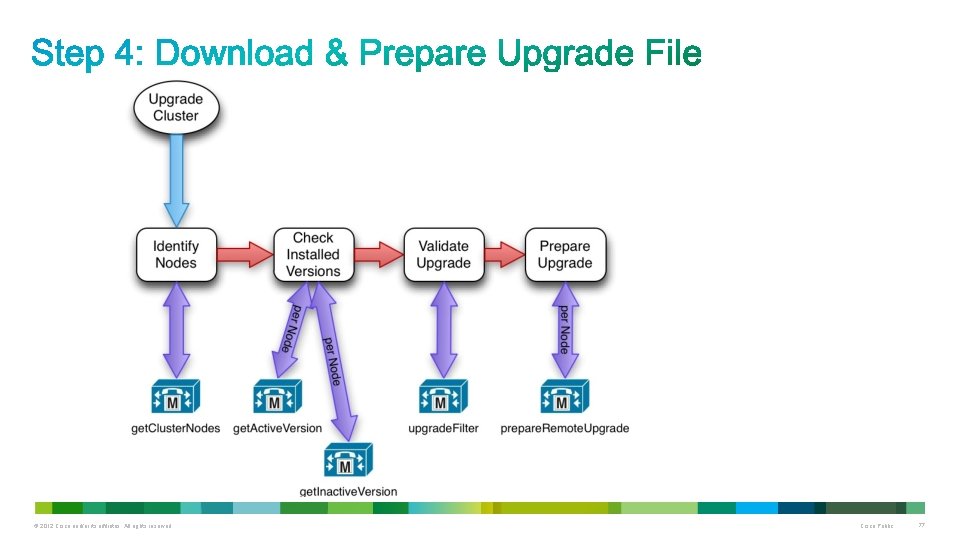
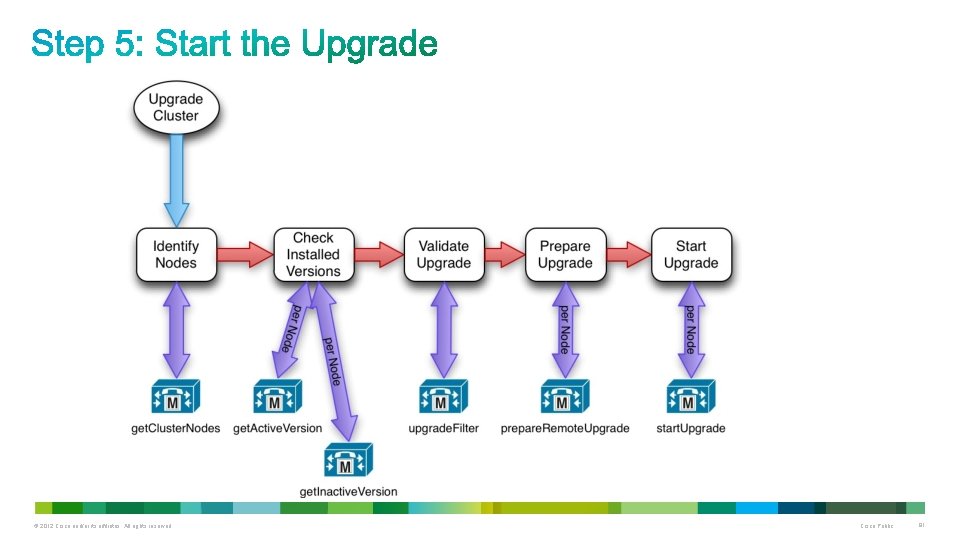
Managing A Cluster Upgrade (Streamlined) 1. Identify nodes in the cluster 2. Validate installed versions of Unified CM 3. Verify upgrade validity 4. Download and prepare upgrade file on server 5. Start the upgrade 6. Check status of upgrade 7. Switch to upgraded software version © 2012 Cisco and/or its affiliates. All rights reserved. Cisco Public 39
© 2012 Cisco and/or its affiliates. All rights reserved. Cisco Public 40
© 2012 Cisco and/or its affiliates. All rights reserved. Cisco Public 41
© 2012 Cisco and/or its affiliates. All rights reserved. Cisco Public 42
© 2012 Cisco and/or its affiliates. All rights reserved. Cisco Public 43
© 2012 Cisco and/or its affiliates. All rights reserved. Cisco Public 44
© 2012 Cisco and/or its affiliates. All rights reserved. Cisco Public 45
© 2012 Cisco and/or its affiliates. All rights reserved. Cisco Public 46
© 2012 Cisco and/or its affiliates. All rights reserved. Cisco Public 47
© 2012 Cisco and/or its affiliates. All rights reserved. Cisco Public 48
© 2012 Cisco and/or its affiliates. All rights reserved. Cisco Public 49
© 2012 Cisco and/or its affiliates. All rights reserved. Cisco Public 50
© 2012 Cisco and/or its affiliates. All rights reserved. Cisco Public 51
© 2012 Cisco and/or its affiliates. All rights reserved. Cisco Public 52
© 2012 Cisco and/or its affiliates. All rights reserved. Cisco Public 53
© 2012 Cisco and/or its affiliates. All rights reserved. Cisco Public 54
© 2012 Cisco and/or its affiliates. All rights reserved. Cisco Public 55
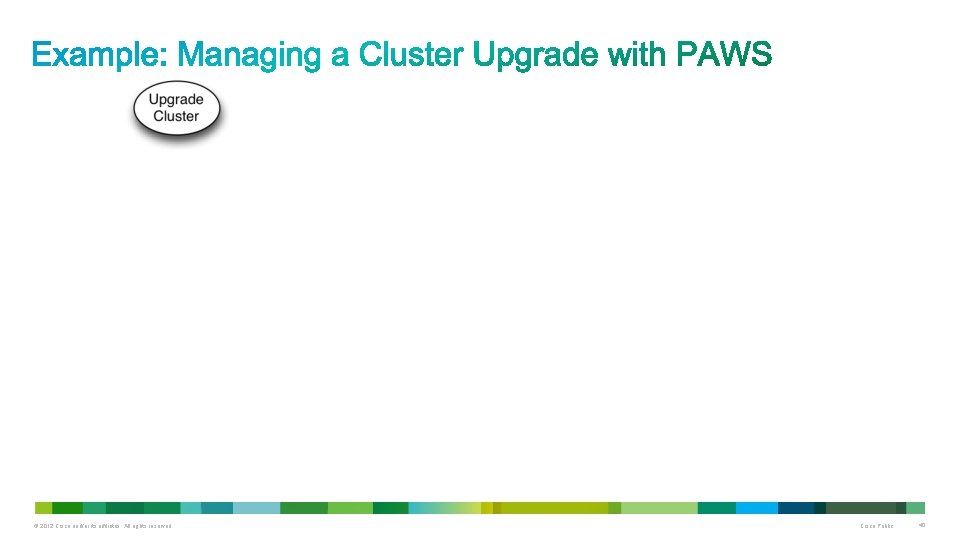
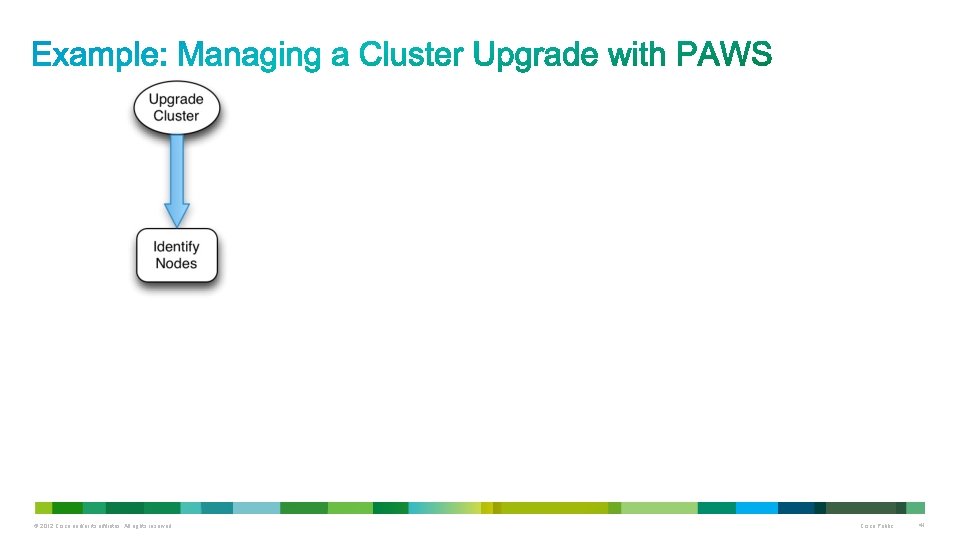
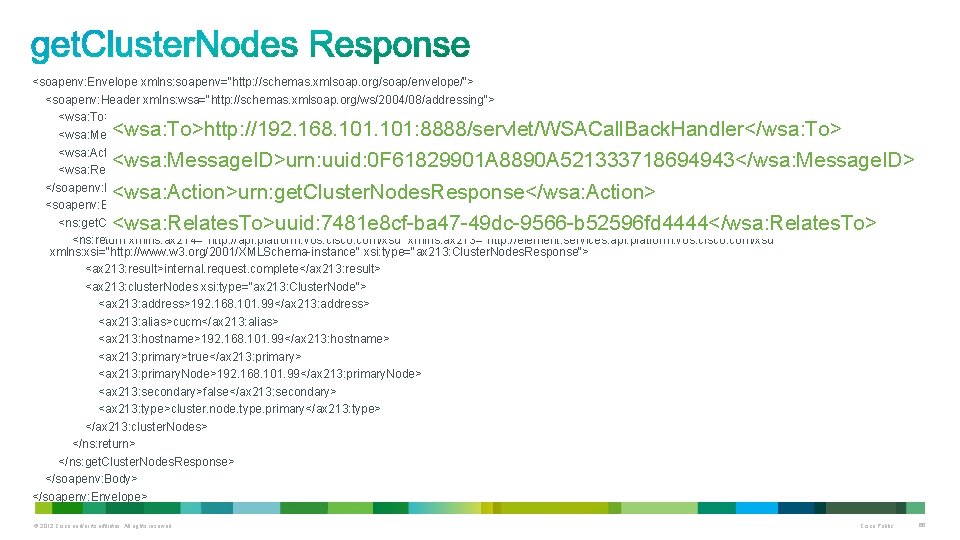
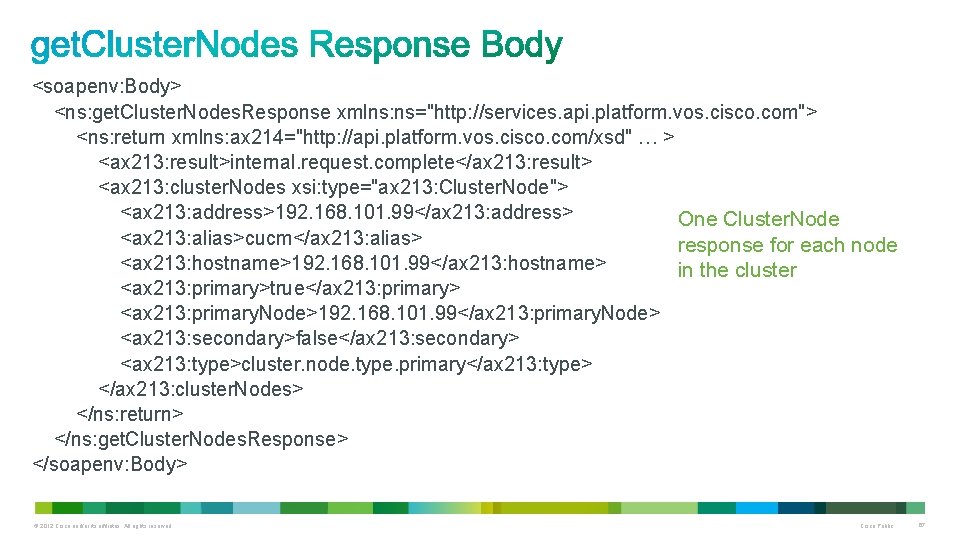
Identify Nodes in the Cluster • Cluster. Node. Service provides two interfaces get. Cluster. Nodes returns details on all nodes in the cluster get. My. Cluster. Node returns details on the node the request is made to • Each node in the cluster has a Cluster. Node element in the response • Cluster. Node element includes the following (plus additional fields): address - IP address of the node alias - an alpha-numeric identifier for the node hostname - the URL of the node's host server type - cluster. node. type. primary or cluster. node. type. secondary © 2012 Cisco and/or its affiliates. All rights reserved. Cisco Public 56
Validate Installed Version • Version. Information. Service provides two interfaces get. Active. Version get. Inactive. Version • Service response includes either a get. Active. Version. Response or a get. Inactive. Version. Response element • Response Element includes: Version installed on the server For example: 8. 6. 0. 98000 -9005 Version will be “empty” if no inactive version is present © 2012 Cisco and/or its affiliates. All rights reserved. Cisco Public 57
Verify Upgrade Validity • Upgrade. Filter. Service provides one interface: upgrade. Filter • Two possible responses: A list of valid files from the list provided in the request A message indicating that none of the files in the request are present • Successful response element includes: Valid file name(s) For example, UCSInstall_UCOS_8. 6. 0. 96000 -9007. iso © 2012 Cisco and/or its affiliates. All rights reserved. Cisco Public 58
Download and Prepare Upgrade • Prepare. Remote. Upgrade. Service provides one interface: prepare. Remote. Upgrade • Downloads and prepares an upgrade or COP file for installation • Responses can indicate a success or a failure Failures will include information indicating the source of the failure Responses will generally echo back the parameters sent in the request • Query the status of Request with Upgrade. Stage. Service © 2012 Cisco and/or its affiliates. All rights reserved. Cisco Public 59
Start the Upgrade • Start. Upgrade. Service provides one interface start. Upgrade • Request must include a ‘Session ID’ which should be used to ensure that only one upgrade process is being managed at once. • Responses can indicate a success or a failure Failures will include information indicating the source of the failure Responses will generally echo back the parameters sent in the request © 2012 Cisco and/or its affiliates. All rights reserved. Cisco Public 60
Check Status of Upgrade • Upgrade. Stage. Service provides one interface get. Upgrade. Stage • Returns the current overall upgrade or COP file installation stage • Stages include (not a complete list here): Cancelled Completed Configuring Downloading Error Installing © 2012 Cisco and/or its affiliates. All rights reserved. Cisco Public 61
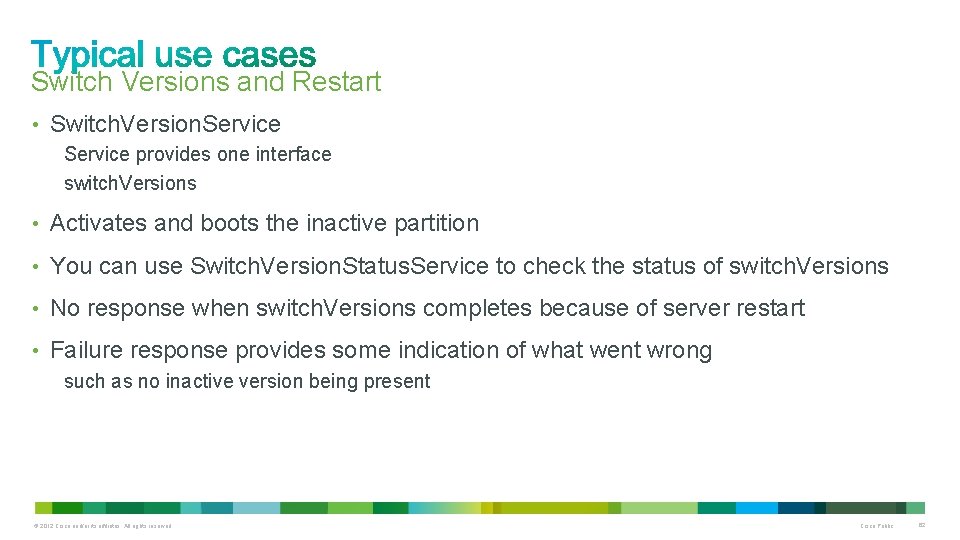
Switch Versions and Restart • Switch. Version. Service provides one interface switch. Versions • Activates and boots the inactive partition • You can use Switch. Version. Status. Service to check the status of switch. Versions • No response when switch. Versions completes because of server restart • Failure response provides some indication of what went wrong such as no inactive version being present © 2012 Cisco and/or its affiliates. All rights reserved. Cisco Public 62
© 2012 Cisco and/or its affiliates. All rights reserved. Cisco Public 63
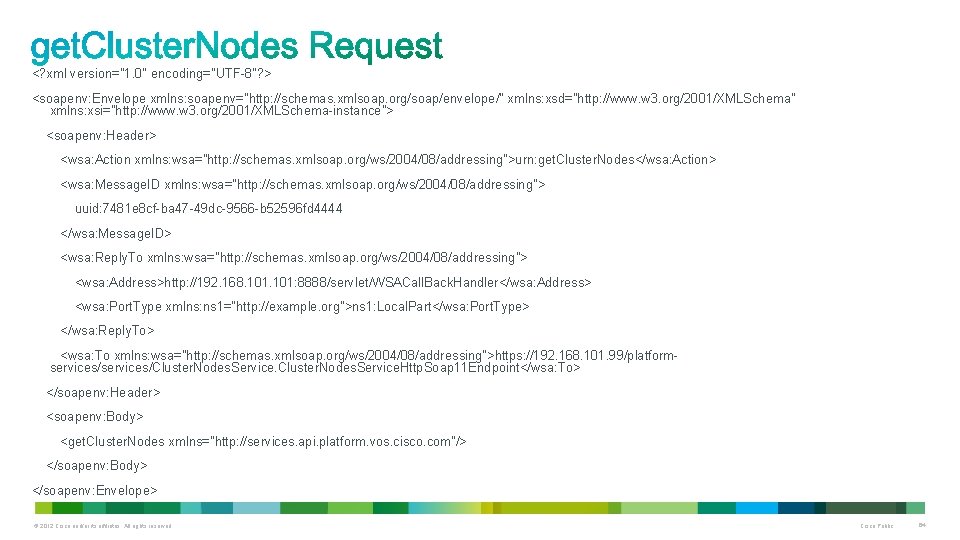
<? xml version="1. 0" encoding="UTF-8"? > <soapenv: Envelope xmlns: soapenv="http: //schemas. xmlsoap. org/soap/envelope/" xmlns: xsd="http: //www. w 3. org/2001/XMLSchema" xmlns: xsi="http: //www. w 3. org/2001/XMLSchema-instance"> <soapenv: Header> <wsa: Action xmlns: wsa="http: //schemas. xmlsoap. org/ws/2004/08/addressing">urn: get. Cluster. Nodes</wsa: Action> <wsa: Message. ID xmlns: wsa="http: //schemas. xmlsoap. org/ws/2004/08/addressing"> uuid: 7481 e 8 cf-ba 47 -49 dc-9566 -b 52596 fd 4444 </wsa: Message. ID> <wsa: Reply. To xmlns: wsa="http: //schemas. xmlsoap. org/ws/2004/08/addressing"> <wsa: Address>http: //192. 168. 101: 8888/servlet/WSACall. Back. Handler</wsa: Address> <wsa: Port. Type xmlns: ns 1="http: //example. org">ns 1: Local. Part</wsa: Port. Type> </wsa: Reply. To> <wsa: To xmlns: wsa="http: //schemas. xmlsoap. org/ws/2004/08/addressing">https: //192. 168. 101. 99/platformservices/Cluster. Nodes. Service. Http. Soap 11 Endpoint</wsa: To> </soapenv: Header> <soapenv: Body> <get. Cluster. Nodes xmlns="http: //services. api. platform. vos. cisco. com"/> </soapenv: Body> </soapenv: Envelope> © 2012 Cisco and/or its affiliates. All rights reserved. Cisco Public 64
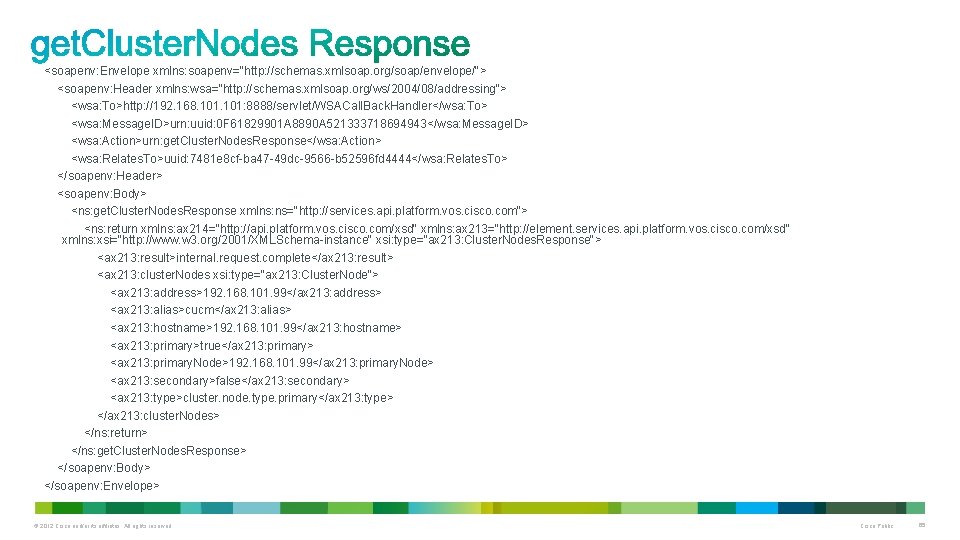
<soapenv: Envelope xmlns: soapenv="http: //schemas. xmlsoap. org/soap/envelope/"> <soapenv: Header xmlns: wsa="http: //schemas. xmlsoap. org/ws/2004/08/addressing"> <wsa: To>http: //192. 168. 101: 8888/servlet/WSACall. Back. Handler</wsa: To> <wsa: Message. ID>urn: uuid: 0 F 61829901 A 8890 A 521333718694943</wsa: Message. ID> <wsa: Action>urn: get. Cluster. Nodes. Response</wsa: Action> <wsa: Relates. To>uuid: 7481 e 8 cf-ba 47 -49 dc-9566 -b 52596 fd 4444</wsa: Relates. To> </soapenv: Header> <soapenv: Body> <ns: get. Cluster. Nodes. Response xmlns: ns="http: //services. api. platform. vos. cisco. com"> <ns: return xmlns: ax 214="http: //api. platform. vos. cisco. com/xsd" xmlns: ax 213="http: //element. services. api. platform. vos. cisco. com/xsd" xmlns: xsi="http: //www. w 3. org/2001/XMLSchema-instance" xsi: type="ax 213: Cluster. Nodes. Response"> <ax 213: result>internal. request. complete</ax 213: result> <ax 213: cluster. Nodes xsi: type="ax 213: Cluster. Node"> <ax 213: address>192. 168. 101. 99</ax 213: address> <ax 213: alias>cucm</ax 213: alias> <ax 213: hostname>192. 168. 101. 99</ax 213: hostname> <ax 213: primary>true</ax 213: primary> <ax 213: primary. Node>192. 168. 101. 99</ax 213: primary. Node> <ax 213: secondary>false</ax 213: secondary> <ax 213: type>cluster. node. type. primary</ax 213: type> </ax 213: cluster. Nodes> </ns: return> </ns: get. Cluster. Nodes. Response> </soapenv: Body> </soapenv: Envelope> © 2012 Cisco and/or its affiliates. All rights reserved. Cisco Public 65
<soapenv: Envelope xmlns: soapenv="http: //schemas. xmlsoap. org/soap/envelope/"> <soapenv: Header xmlns: wsa="http: //schemas. xmlsoap. org/ws/2004/08/addressing"> <wsa: To>http: //192. 168. 101: 8888/servlet/WSACall. Back. Handler</wsa: To> <wsa: Message. ID>urn: uuid: 0 F 61829901 A 8890 A 521333718694943</wsa: Message. ID> <wsa: Action>urn: get. Cluster. Nodes. Response</wsa: Action> <wsa: Relates. To>uuid: 7481 e 8 cf-ba 47 -49 dc-9566 -b 52596 fd 4444</wsa: Relates. To> </soapenv: Header> <soapenv: Body> <ns: get. Cluster. Nodes. Response xmlns: ns="http: //services. api. platform. vos. cisco. com"> <ns: return xmlns: ax 214="http: //api. platform. vos. cisco. com/xsd" xmlns: ax 213="http: //element. services. api. platform. vos. cisco. com/xsd" xmlns: xsi="http: //www. w 3. org/2001/XMLSchema-instance" xsi: type="ax 213: Cluster. Nodes. Response"> <ax 213: result>internal. request. complete</ax 213: result> <ax 213: cluster. Nodes xsi: type="ax 213: Cluster. Node"> <ax 213: address>192. 168. 101. 99</ax 213: address> <ax 213: alias>cucm</ax 213: alias> <ax 213: hostname>192. 168. 101. 99</ax 213: hostname> <ax 213: primary>true</ax 213: primary> <ax 213: primary. Node>192. 168. 101. 99</ax 213: primary. Node> <ax 213: secondary>false</ax 213: secondary> <ax 213: type>cluster. node. type. primary</ax 213: type> </ax 213: cluster. Nodes> </ns: return> </ns: get. Cluster. Nodes. Response> </soapenv: Body> </soapenv: Envelope> <wsa: To>http: //192. 168. 101: 8888/servlet/WSACall. Back. Handler</wsa: To> <wsa: Message. ID>urn: uuid: 0 F 61829901 A 8890 A 521333718694943</wsa: Message. ID> <wsa: Action>urn: get. Cluster. Nodes. Response</wsa: Action> <wsa: Relates. To>uuid: 7481 e 8 cf-ba 47 -49 dc-9566 -b 52596 fd 4444</wsa: Relates. To> © 2012 Cisco and/or its affiliates. All rights reserved. Cisco Public 66
<soapenv: Body> <ns: get. Cluster. Nodes. Response xmlns: ns="http: //services. api. platform. vos. cisco. com"> <ns: return xmlns: ax 214="http: //api. platform. vos. cisco. com/xsd" … > <ax 213: result>internal. request. complete</ax 213: result> <ax 213: cluster. Nodes xsi: type="ax 213: Cluster. Node"> <ax 213: address>192. 168. 101. 99</ax 213: address> One Cluster. Node <ax 213: alias>cucm</ax 213: alias> response for each node <ax 213: hostname>192. 168. 101. 99</ax 213: hostname> in the cluster <ax 213: primary>true</ax 213: primary> <ax 213: primary. Node>192. 168. 101. 99</ax 213: primary. Node> <ax 213: secondary>false</ax 213: secondary> <ax 213: type>cluster. node. type. primary</ax 213: type> </ax 213: cluster. Nodes> </ns: return> </ns: get. Cluster. Nodes. Response> </soapenv: Body> © 2012 Cisco and/or its affiliates. All rights reserved. Cisco Public 67
© 2012 Cisco and/or its affiliates. All rights reserved. Cisco Public 68
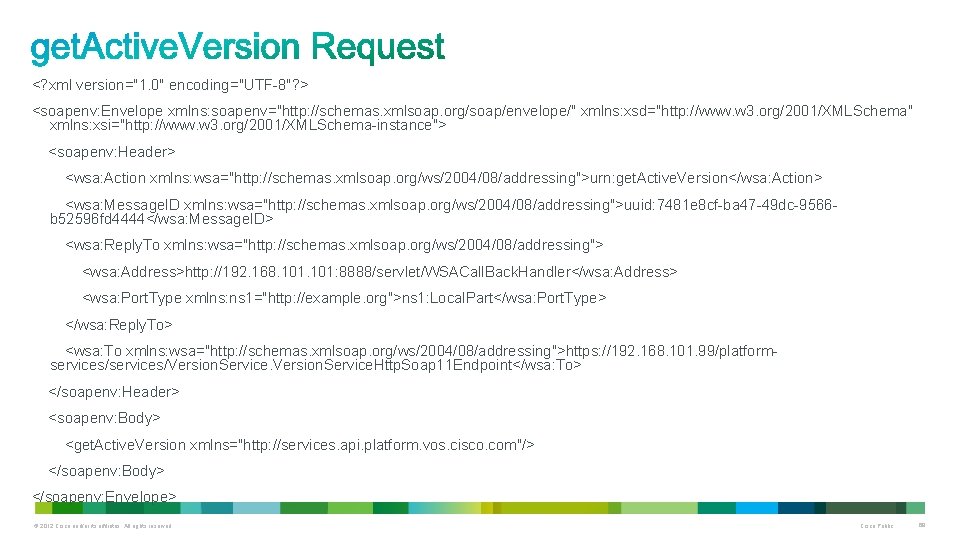
<? xml version="1. 0" encoding="UTF-8"? > <soapenv: Envelope xmlns: soapenv="http: //schemas. xmlsoap. org/soap/envelope/" xmlns: xsd="http: //www. w 3. org/2001/XMLSchema" xmlns: xsi="http: //www. w 3. org/2001/XMLSchema-instance"> <soapenv: Header> <wsa: Action xmlns: wsa="http: //schemas. xmlsoap. org/ws/2004/08/addressing">urn: get. Active. Version</wsa: Action> <wsa: Message. ID xmlns: wsa="http: //schemas. xmlsoap. org/ws/2004/08/addressing">uuid: 7481 e 8 cf-ba 47 -49 dc-9566 b 52596 fd 4444</wsa: Message. ID> <wsa: Reply. To xmlns: wsa="http: //schemas. xmlsoap. org/ws/2004/08/addressing"> <wsa: Address>http: //192. 168. 101: 8888/servlet/WSACall. Back. Handler</wsa: Address> <wsa: Port. Type xmlns: ns 1="http: //example. org">ns 1: Local. Part</wsa: Port. Type> </wsa: Reply. To> <wsa: To xmlns: wsa="http: //schemas. xmlsoap. org/ws/2004/08/addressing">https: //192. 168. 101. 99/platformservices/Version. Service. Http. Soap 11 Endpoint</wsa: To> </soapenv: Header> <soapenv: Body> <get. Active. Version xmlns="http: //services. api. platform. vos. cisco. com"/> </soapenv: Body> </soapenv: Envelope> © 2012 Cisco and/or its affiliates. All rights reserved. Cisco Public 69
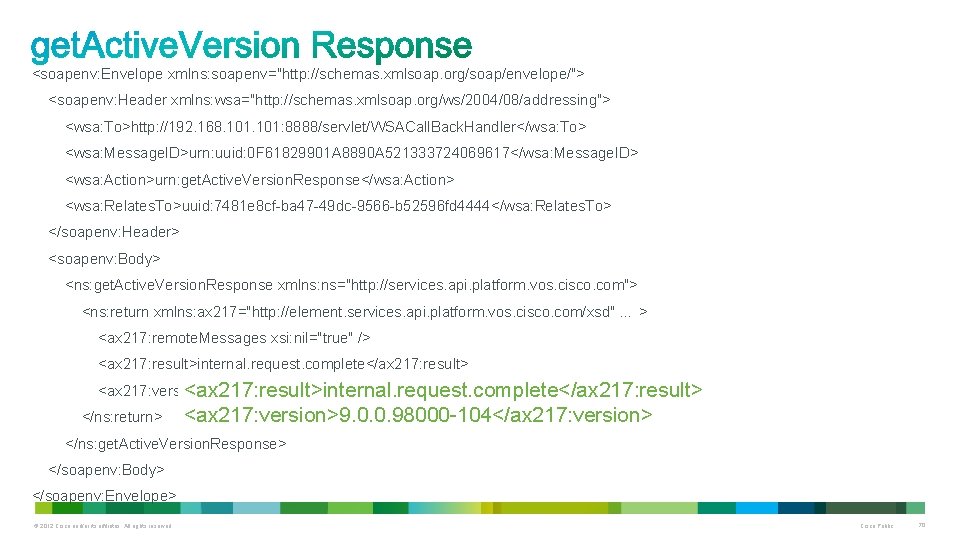
<soapenv: Envelope xmlns: soapenv="http: //schemas. xmlsoap. org/soap/envelope/"> <soapenv: Header xmlns: wsa="http: //schemas. xmlsoap. org/ws/2004/08/addressing"> <wsa: To>http: //192. 168. 101: 8888/servlet/WSACall. Back. Handler</wsa: To> <wsa: Message. ID>urn: uuid: 0 F 61829901 A 8890 A 521333724069617</wsa: Message. ID> <wsa: Action>urn: get. Active. Version. Response</wsa: Action> <wsa: Relates. To>uuid: 7481 e 8 cf-ba 47 -49 dc-9566 -b 52596 fd 4444</wsa: Relates. To> </soapenv: Header> <soapenv: Body> <ns: get. Active. Version. Response xmlns: ns="http: //services. api. platform. vos. cisco. com"> <ns: return xmlns: ax 217="http: //element. services. api. platform. vos. cisco. com/xsd" … > <ax 217: remote. Messages xsi: nil="true" /> <ax 217: result>internal. request. complete</ax 217: result> <ax 217: version>9. 0. 0. 98000 -104</ax 217: version> <ax 217: result>internal. request. complete</ax 217: result> </ns: return> <ax 217: version>9. 0. 0. 98000 -104</ax 217: version> </ns: get. Active. Version. Response> </soapenv: Body> </soapenv: Envelope> © 2012 Cisco and/or its affiliates. All rights reserved. Cisco Public 70
© 2012 Cisco and/or its affiliates. All rights reserved. Cisco Public 71
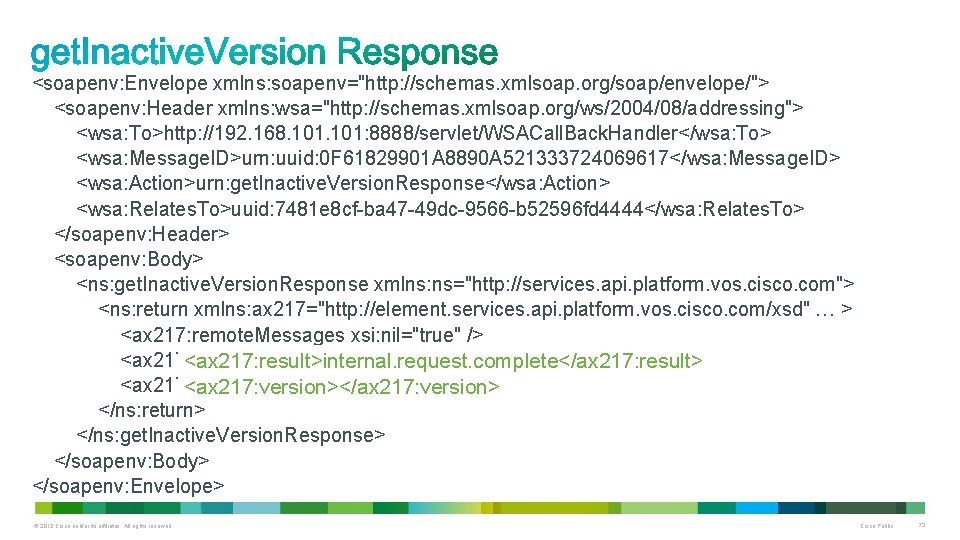
<soapenv: Envelope xmlns: soapenv="http: //schemas. xmlsoap. org/soap/envelope/"> <soapenv: Header xmlns: wsa="http: //schemas. xmlsoap. org/ws/2004/08/addressing"> <wsa: To>http: //192. 168. 101: 8888/servlet/WSACall. Back. Handler</wsa: To> <wsa: Message. ID>urn: uuid: 0 F 61829901 A 8890 A 521333724069617</wsa: Message. ID> <wsa: Action>urn: get. Inactive. Version. Response</wsa: Action> <wsa: Relates. To>uuid: 7481 e 8 cf-ba 47 -49 dc-9566 -b 52596 fd 4444</wsa: Relates. To> </soapenv: Header> <soapenv: Body> <ns: get. Inactive. Version. Response xmlns: ns="http: //services. api. platform. vos. cisco. com"> <ns: return xmlns: ax 217="http: //element. services. api. platform. vos. cisco. com/xsd" … > <ax 217: remote. Messages xsi: nil="true" /> <ax 217: result>internal. request. complete</ax 217: result> <ax 217: version></ax 217: version> </ns: return> </ns: get. Inactive. Version. Response> </soapenv: Body> </soapenv: Envelope> © 2012 Cisco and/or its affiliates. All rights reserved. Cisco Public 73
© 2012 Cisco and/or its affiliates. All rights reserved. Cisco Public 74
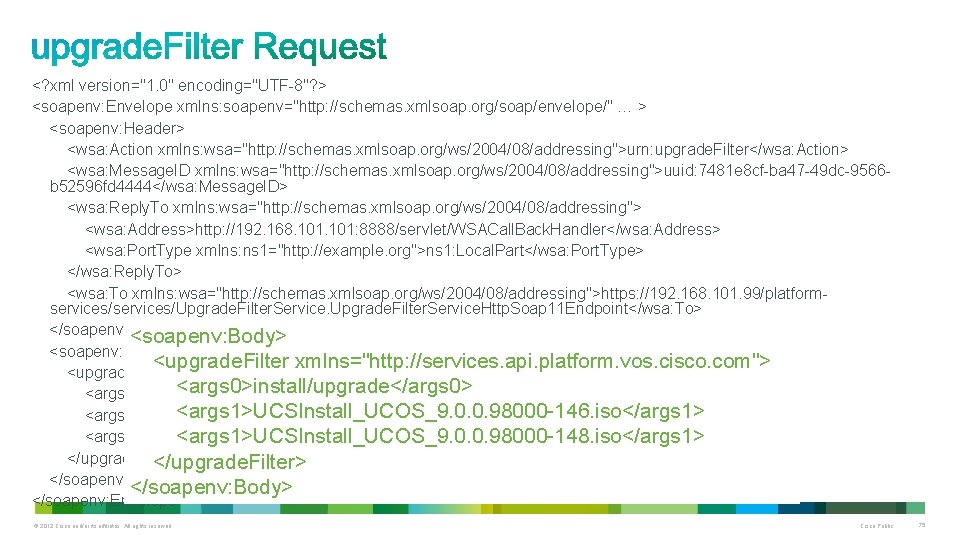
<? xml version="1. 0" encoding="UTF-8"? > <soapenv: Envelope xmlns: soapenv="http: //schemas. xmlsoap. org/soap/envelope/" … > <soapenv: Header> <wsa: Action xmlns: wsa="http: //schemas. xmlsoap. org/ws/2004/08/addressing">urn: upgrade. Filter</wsa: Action> <wsa: Message. ID xmlns: wsa="http: //schemas. xmlsoap. org/ws/2004/08/addressing">uuid: 7481 e 8 cf-ba 47 -49 dc-9566 b 52596 fd 4444</wsa: Message. ID> <wsa: Reply. To xmlns: wsa="http: //schemas. xmlsoap. org/ws/2004/08/addressing"> <wsa: Address>http: //192. 168. 101: 8888/servlet/WSACall. Back. Handler</wsa: Address> <wsa: Port. Type xmlns: ns 1="http: //example. org">ns 1: Local. Part</wsa: Port. Type> </wsa: Reply. To> <wsa: To xmlns: wsa="http: //schemas. xmlsoap. org/ws/2004/08/addressing">https: //192. 168. 101. 99/platformservices/Upgrade. Filter. Service. Http. Soap 11 Endpoint</wsa: To> </soapenv: Header> <soapenv: Body> <upgrade. Filter xmlns="http: //services. api. platform. vos. cisco. com"> <args 0>install/upgrade</args 0> <args 1>UCSInstall_UCOS_9. 0. 0. 98000 -146. iso</args 1> <args 1>UCSInstall_UCOS_9. 0. 0. 98000 -148. iso</args 1> </upgrade. Filter> </soapenv: Body> </soapenv: Envelope> © 2012 Cisco and/or its affiliates. All rights reserved. Cisco Public 75
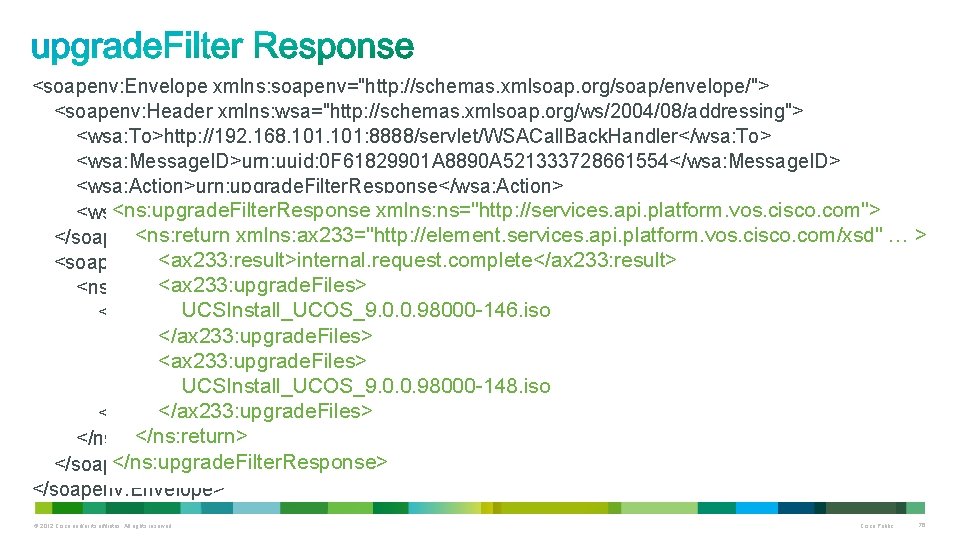
<soapenv: Envelope xmlns: soapenv="http: //schemas. xmlsoap. org/soap/envelope/"> <soapenv: Header xmlns: wsa="http: //schemas. xmlsoap. org/ws/2004/08/addressing"> <wsa: To>http: //192. 168. 101: 8888/servlet/WSACall. Back. Handler</wsa: To> <wsa: Message. ID>urn: uuid: 0 F 61829901 A 8890 A 521333728661554</wsa: Message. ID> <wsa: Action>urn: upgrade. Filter. Response</wsa: Action> <ns: upgrade. Filter. Response xmlns: ns="http: //services. api. platform. vos. cisco. com"> <wsa: Relates. To>uuid: 7481 e 8 cf-ba 47 -49 dc-9566 -b 52596 fd 4444</wsa: Relates. To> <ns: return xmlns: ax 233="http: //element. services. api. platform. vos. cisco. com/xsd" … > </soapenv: Header> <ax 233: result>internal. request. complete</ax 233: result> <soapenv: Body> <ax 233: upgrade. Files> <ns: upgrade. Filter. Response xmlns: ns="http: //services. api. platform. vos. cisco. com"> UCSInstall_UCOS_9. 0. 0. 98000 -146. iso <ns: return xmlns: ax 233="http: //element. services. api. platform. vos. cisco. com/xsd" … > </ax 233: upgrade. Files> <ax 233: result>internal. request. complete</ax 233: result> <ax 233: upgrade. Files>UCSInstall_UCOS_9. 0. 0. 98000 -146. iso</ax 233: upgrade. Files> UCSInstall_UCOS_9. 0. 0. 98000 -148. iso <ax 233: upgrade. Files>UCSInstall_UCOS_9. 0. 0. 98000 -148. iso</ax 233: upgrade. Files> </ns: return> </ns: upgrade. Filter. Response> </soapenv: Body> </soapenv: Envelope> © 2012 Cisco and/or its affiliates. All rights reserved. Cisco Public 76
© 2012 Cisco and/or its affiliates. All rights reserved. Cisco Public 77
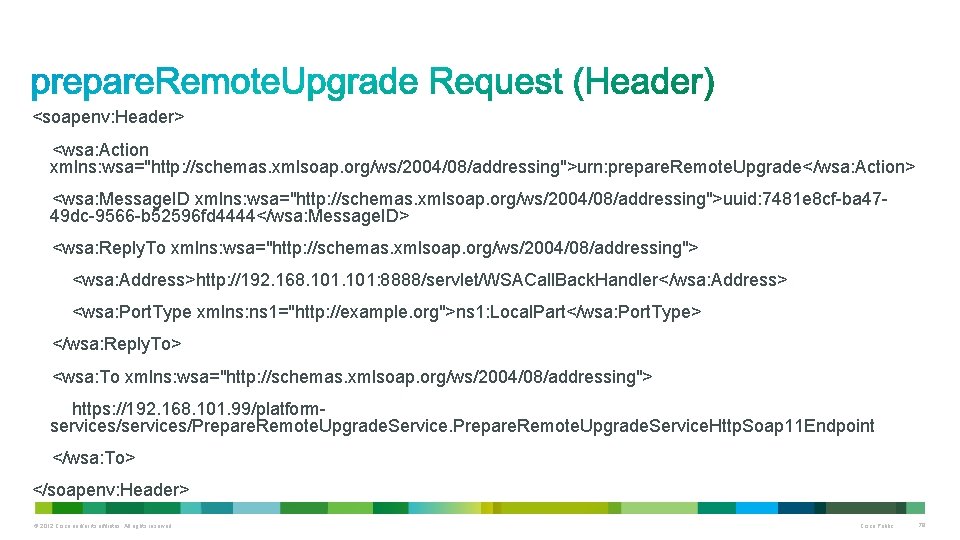
<soapenv: Header> <wsa: Action xmlns: wsa="http: //schemas. xmlsoap. org/ws/2004/08/addressing">urn: prepare. Remote. Upgrade</wsa: Action> <wsa: Message. ID xmlns: wsa="http: //schemas. xmlsoap. org/ws/2004/08/addressing">uuid: 7481 e 8 cf-ba 4749 dc-9566 -b 52596 fd 4444</wsa: Message. ID> <wsa: Reply. To xmlns: wsa="http: //schemas. xmlsoap. org/ws/2004/08/addressing"> <wsa: Address>http: //192. 168. 101: 8888/servlet/WSACall. Back. Handler</wsa: Address> <wsa: Port. Type xmlns: ns 1="http: //example. org">ns 1: Local. Part</wsa: Port. Type> </wsa: Reply. To> <wsa: To xmlns: wsa="http: //schemas. xmlsoap. org/ws/2004/08/addressing"> https: //192. 168. 101. 99/platformservices/Prepare. Remote. Upgrade. Service. Http. Soap 11 Endpoint </wsa: To> </soapenv: Header> © 2012 Cisco and/or its affiliates. All rights reserved. Cisco Public 78
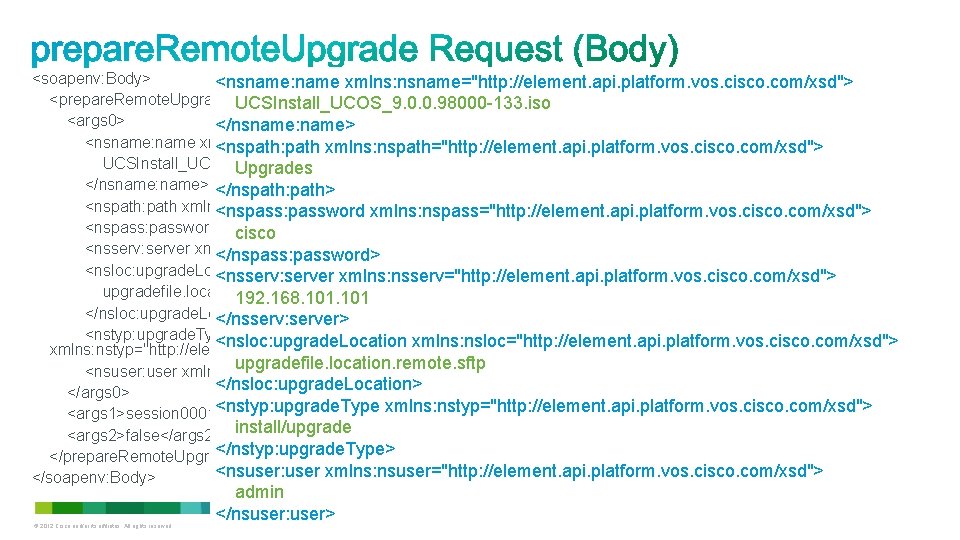
<soapenv: Body> <nsname: name xmlns: nsname="http: //element. api. platform. vos. cisco. com/xsd"> <prepare. Remote. Upgrade xmlns="http: //services. api. platform. vos. cisco. com"> UCSInstall_UCOS_9. 0. 0. 98000 -133. iso <args 0> </nsname: name> <nsname: name xmlns: nsname="http: //element. api. platform. vos. cisco. com/xsd"> <nspath: path xmlns: nspath="http: //element. api. platform. vos. cisco. com/xsd"> UCSInstall_UCOS_9. 0. 0. 98000 -133. iso Upgrades </nsname: name> </nspath: path> <nspath: path xmlns: nspath="http: //element. api. platform. vos. cisco. com/xsd">Upgrades</nspath: path> <nspass: password xmlns: nspass="http: //element. api. platform. vos. cisco. com/xsd"> <nspass: password xmlns: nspass="http: //element. api. platform. vos. cisco. com/xsd">cisco</nspass: password> cisco <nsserv: server xmlns: nsserv="http: //element. api. platform. vos. cisco. com/xsd">192. 168. 101</nsserv: server> </nspass: password> <nsloc: upgrade. Location xmlns: nsloc="http: //element. api. platform. vos. cisco. com/xsd"> <nsserv: server xmlns: nsserv="http: //element. api. platform. vos. cisco. com/xsd"> upgradefile. location. remote. sftp 192. 168. 101 </nsloc: upgrade. Location> </nsserv: server> <nstyp: upgrade. Type <nsloc: upgrade. Location xmlns: nsloc="http: //element. api. platform. vos. cisco. com/xsd"> xmlns: nstyp="http: //element. api. platform. vos. cisco. com/xsd">install/upgrade</nstyp: upgrade. Type> upgradefile. location. remote. sftp <nsuser: user xmlns: nsuser="http: //element. api. platform. vos. cisco. com/xsd">admin</nsuser: user> </nsloc: upgrade. Location> </args 0> <nstyp: upgrade. Type xmlns: nstyp="http: //element. api. platform. vos. cisco. com/xsd"> <args 1>session 0001</args 1> <args 2>false</args 2> install/upgrade </nstyp: upgrade. Type> </prepare. Remote. Upgrade> <nsuser: user xmlns: nsuser="http: //element. api. platform. vos. cisco. com/xsd"> </soapenv: Body> © 2012 Cisco and/or its affiliates. All rights reserved. admin </nsuser: user> Cisco Public 79
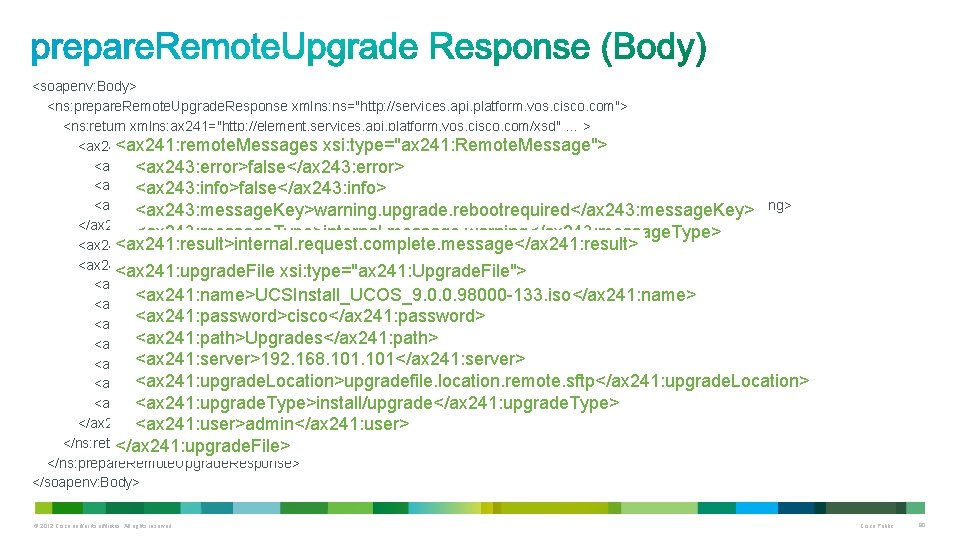
<soapenv: Body> <ns: prepare. Remote. Upgrade. Response xmlns: ns="http: //services. api. platform. vos. cisco. com"> <ns: return xmlns: ax 241="http: //element. services. api. platform. vos. cisco. com/xsd" … > <ax 241: remote. Messages xsi: type="ax 241: Remote. Message"> <ax 243: error>false</ax 243: error><ax 243: info>false</ax 243: info> <ax 243: error>false</ax 243: error> <ax 243: message. Key>warning. upgrade. rebootrequired</ax 243: message. Key> <ax 243: info>false</ax 243: info> <ax 243: message. Type>internal. message. warning</ax 243: message. Type><ax 243: warning>true</ax 243: warning> <ax 243: message. Key>warning. upgrade. rebootrequired</ax 243: message. Key> </ax 241: remote. Messages> <ax 243: message. Type>internal. message. warning</ax 243: message. Type> <ax 241: result>internal. request. complete. message</ax 241: result> <ax 243: warning>true</ax 243: warning> <ax 241: upgrade. File xsi: type="ax 241: Upgrade. File"> </ax 241: remote. Messages> <ax 241: name>UCSInstall_UCOS_9. 0. 0. 98000 -133. iso</ax 241: name> <ax 241: password>cisco</ax 241: password> <ax 241: path>Upgrades</ax 241: path> <ax 241: server>192. 168. 101</ax 241: server> <ax 241: upgrade. Location>upgradefile. location. remote. sftp</ax 241: upgrade. Location> <ax 241: upgrade. Type>install/upgrade</ax 241: upgrade. Type> <ax 241: user>admin</ax 241: user> <ax 241: upgrade. Type>install/upgrade</ax 241: upgrade. Type> </ax 241: upgrade. File> <ax 241: user>admin</ax 241: user> </ns: return> </ax 241: upgrade. File> </ns: prepare. Remote. Upgrade. Response> </soapenv: Body> © 2012 Cisco and/or its affiliates. All rights reserved. Cisco Public 80
© 2012 Cisco and/or its affiliates. All rights reserved. Cisco Public 81
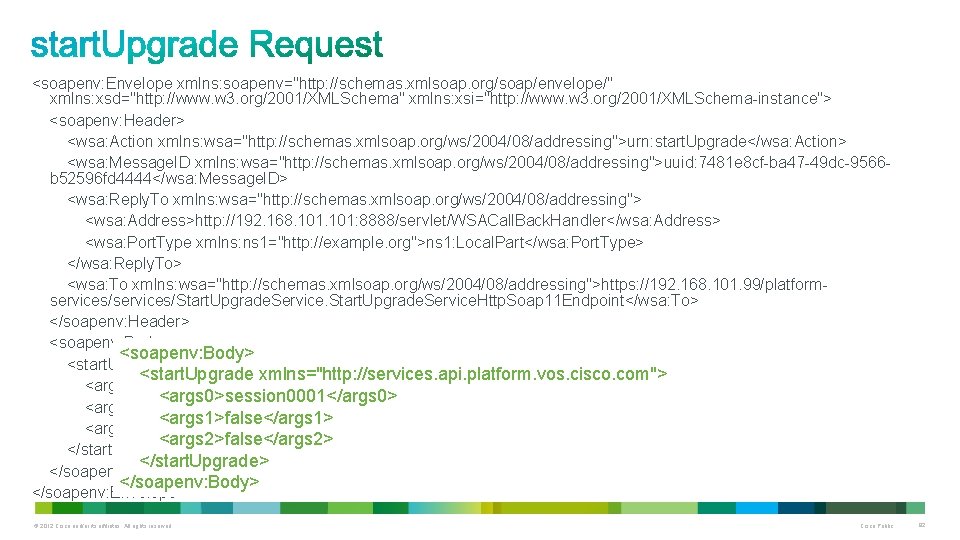
<soapenv: Envelope xmlns: soapenv="http: //schemas. xmlsoap. org/soap/envelope/" xmlns: xsd="http: //www. w 3. org/2001/XMLSchema" xmlns: xsi="http: //www. w 3. org/2001/XMLSchema-instance"> <soapenv: Header> <wsa: Action xmlns: wsa="http: //schemas. xmlsoap. org/ws/2004/08/addressing">urn: start. Upgrade</wsa: Action> <wsa: Message. ID xmlns: wsa="http: //schemas. xmlsoap. org/ws/2004/08/addressing">uuid: 7481 e 8 cf-ba 47 -49 dc-9566 b 52596 fd 4444</wsa: Message. ID> <wsa: Reply. To xmlns: wsa="http: //schemas. xmlsoap. org/ws/2004/08/addressing"> <wsa: Address>http: //192. 168. 101: 8888/servlet/WSACall. Back. Handler</wsa: Address> <wsa: Port. Type xmlns: ns 1="http: //example. org">ns 1: Local. Part</wsa: Port. Type> </wsa: Reply. To> <wsa: To xmlns: wsa="http: //schemas. xmlsoap. org/ws/2004/08/addressing">https: //192. 168. 101. 99/platformservices/Start. Upgrade. Service. Http. Soap 11 Endpoint</wsa: To> </soapenv: Header> <soapenv: Body> <start. Upgrade xmlns="http: //services. api. platform. vos. cisco. com"> <args 0>session 0001</args 0> <args 1>false</args 1> <args 2>false</args 2> </start. Upgrade> </soapenv: Body> </soapenv: Envelope> © 2012 Cisco and/or its affiliates. All rights reserved. Cisco Public 82
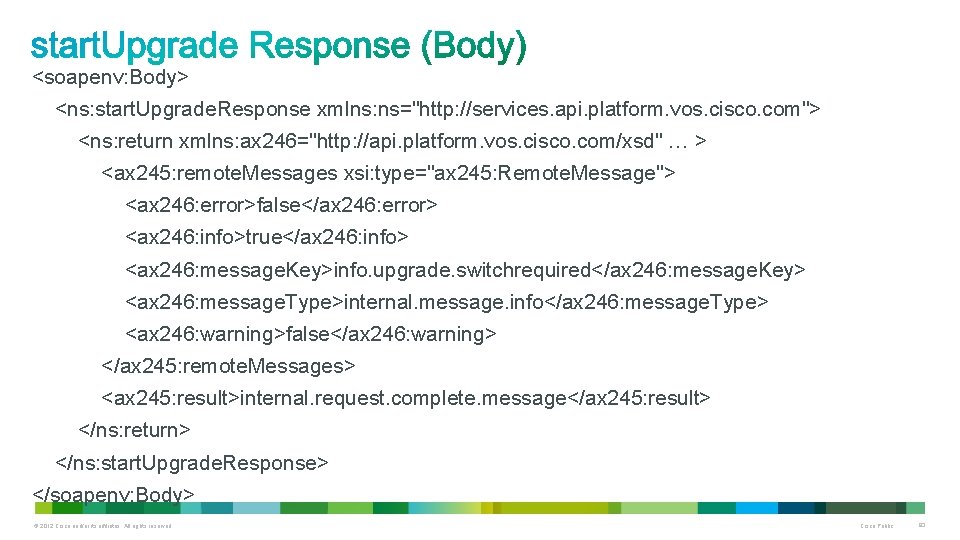
<soapenv: Body> <ns: start. Upgrade. Response xmlns: ns="http: //services. api. platform. vos. cisco. com"> <ns: return xmlns: ax 246="http: //api. platform. vos. cisco. com/xsd" … > <ax 245: remote. Messages xsi: type="ax 245: Remote. Message"> <ax 246: error>false</ax 246: error> <ax 246: info>true</ax 246: info> <ax 246: message. Key>info. upgrade. switchrequired</ax 246: message. Key> <ax 246: message. Type>internal. message. info</ax 246: message. Type> <ax 246: warning>false</ax 246: warning> </ax 245: remote. Messages> <ax 245: result>internal. request. complete. message</ax 245: result> </ns: return> </ns: start. Upgrade. Response> </soapenv: Body> © 2012 Cisco and/or its affiliates. All rights reserved. Cisco Public 83
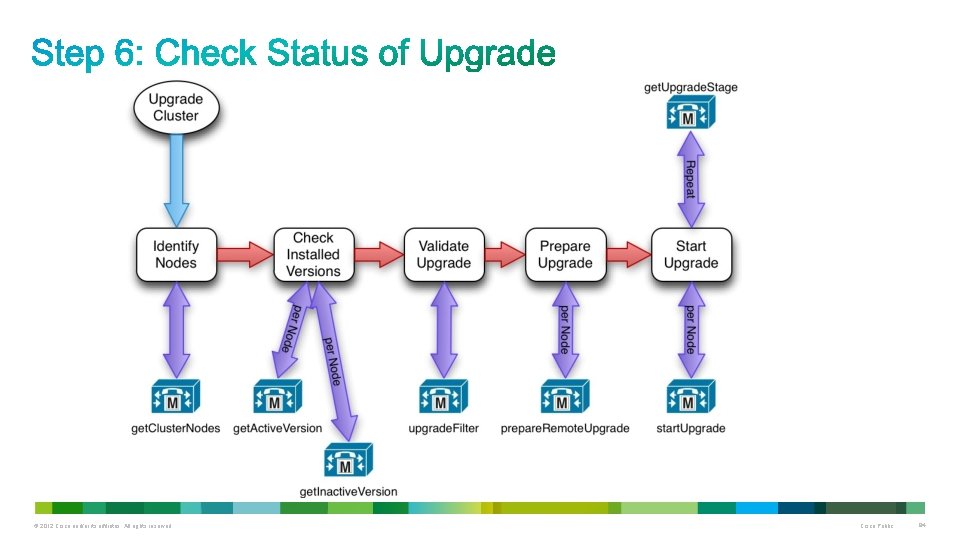
© 2012 Cisco and/or its affiliates. All rights reserved. Cisco Public 84
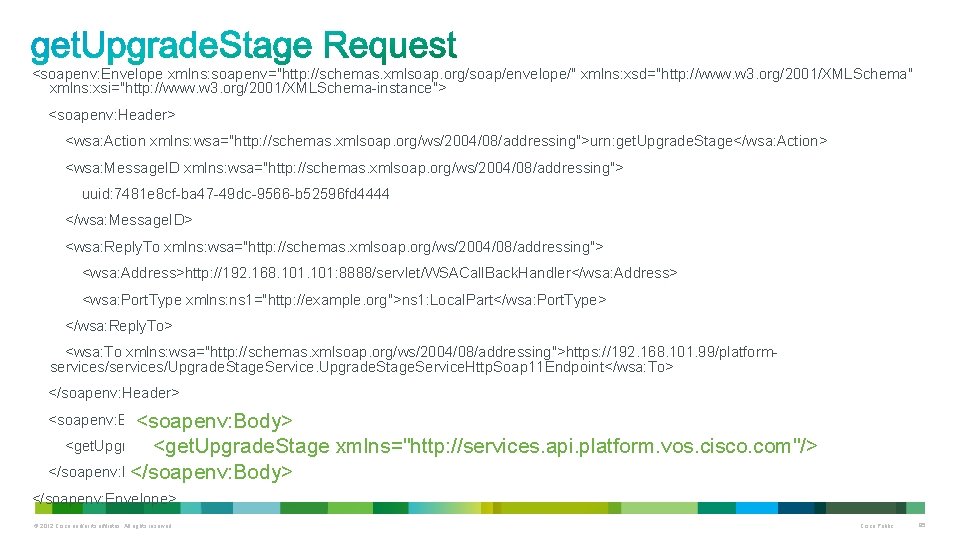
<soapenv: Envelope xmlns: soapenv="http: //schemas. xmlsoap. org/soap/envelope/" xmlns: xsd="http: //www. w 3. org/2001/XMLSchema" xmlns: xsi="http: //www. w 3. org/2001/XMLSchema-instance"> <soapenv: Header> <wsa: Action xmlns: wsa="http: //schemas. xmlsoap. org/ws/2004/08/addressing">urn: get. Upgrade. Stage</wsa: Action> <wsa: Message. ID xmlns: wsa="http: //schemas. xmlsoap. org/ws/2004/08/addressing"> uuid: 7481 e 8 cf-ba 47 -49 dc-9566 -b 52596 fd 4444 </wsa: Message. ID> <wsa: Reply. To xmlns: wsa="http: //schemas. xmlsoap. org/ws/2004/08/addressing"> <wsa: Address>http: //192. 168. 101: 8888/servlet/WSACall. Back. Handler</wsa: Address> <wsa: Port. Type xmlns: ns 1="http: //example. org">ns 1: Local. Part</wsa: Port. Type> </wsa: Reply. To> <wsa: To xmlns: wsa="http: //schemas. xmlsoap. org/ws/2004/08/addressing">https: //192. 168. 101. 99/platformservices/Upgrade. Stage. Service. Http. Soap 11 Endpoint</wsa: To> </soapenv: Header> <soapenv: Body> <get. Upgrade. Stage xmlns="http: //services. api. platform. vos. cisco. com"/> </soapenv: Body> </soapenv: Envelope> © 2012 Cisco and/or its affiliates. All rights reserved. Cisco Public 85
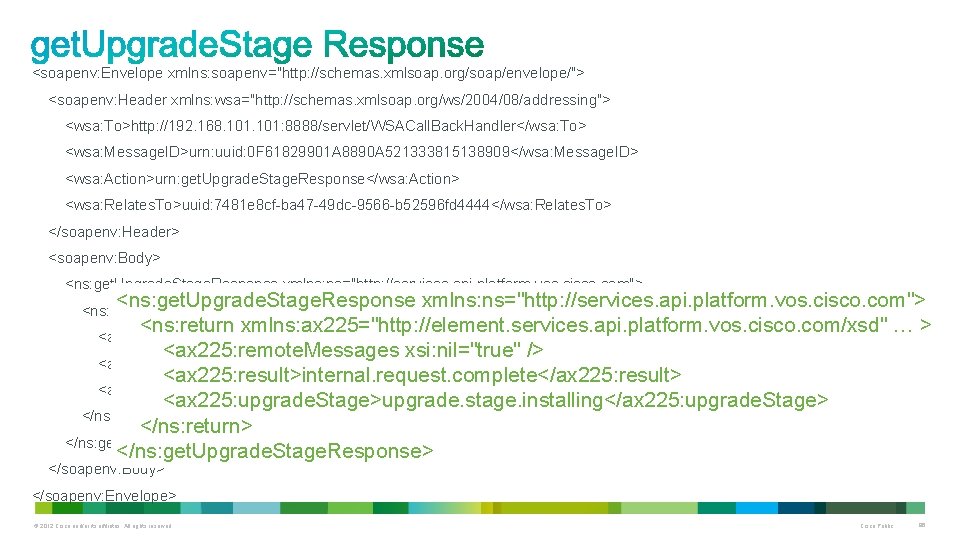
<soapenv: Envelope xmlns: soapenv="http: //schemas. xmlsoap. org/soap/envelope/"> <soapenv: Header xmlns: wsa="http: //schemas. xmlsoap. org/ws/2004/08/addressing"> <wsa: To>http: //192. 168. 101: 8888/servlet/WSACall. Back. Handler</wsa: To> <wsa: Message. ID>urn: uuid: 0 F 61829901 A 8890 A 521333815138909</wsa: Message. ID> <wsa: Action>urn: get. Upgrade. Stage. Response</wsa: Action> <wsa: Relates. To>uuid: 7481 e 8 cf-ba 47 -49 dc-9566 -b 52596 fd 4444</wsa: Relates. To> </soapenv: Header> <soapenv: Body> <ns: get. Upgrade. Stage. Response xmlns: ns="http: //services. api. platform. vos. cisco. com"> <ns: return xmlns: ax 225="http: //element. services. api. platform. vos. cisco. com/xsd" … > <ax 225: remote. Messages xsi: nil="true" /> <ax 225: result>internal. request. complete</ax 225: result> <ax 225: upgrade. Stage>upgrade. stage. installing</ax 225: upgrade. Stage> </ns: return> </ns: get. Upgrade. Stage. Response> <ns: return xmlns: ax 225="http: //element. services. api. platform. vos. cisco. com/xsd" … > </soapenv: Body> </soapenv: Envelope> © 2012 Cisco and/or its affiliates. All rights reserved. Cisco Public 86
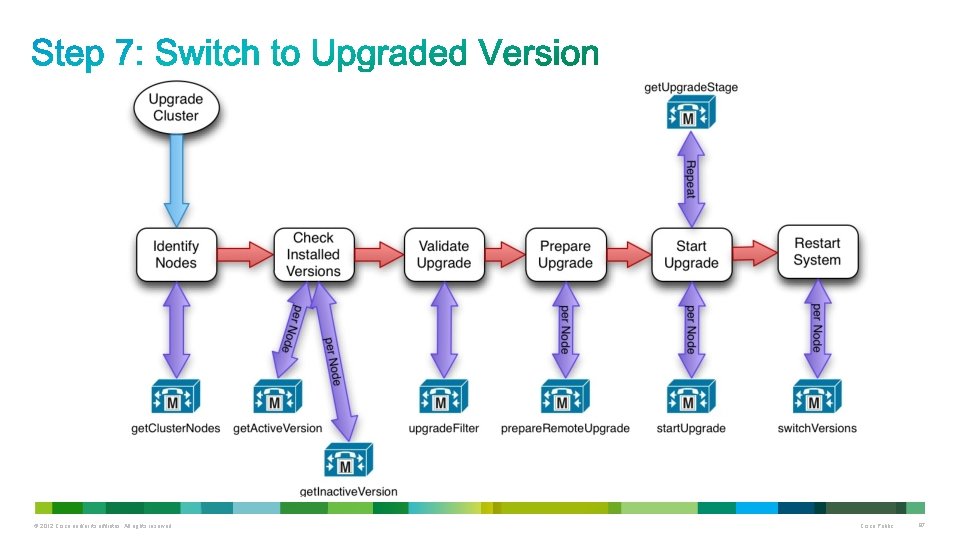
© 2012 Cisco and/or its affiliates. All rights reserved. Cisco Public 87
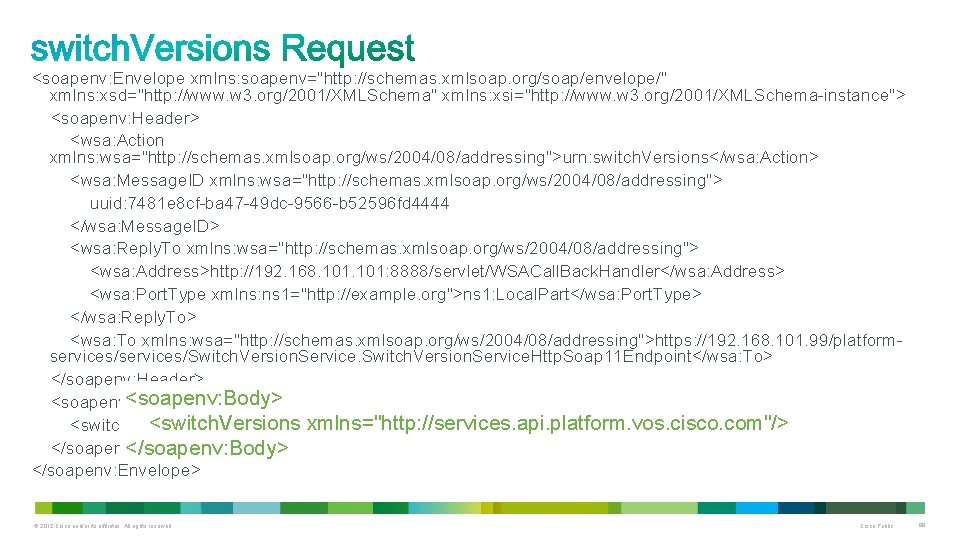
<soapenv: Envelope xmlns: soapenv="http: //schemas. xmlsoap. org/soap/envelope/" xmlns: xsd="http: //www. w 3. org/2001/XMLSchema" xmlns: xsi="http: //www. w 3. org/2001/XMLSchema-instance"> <soapenv: Header> <wsa: Action xmlns: wsa="http: //schemas. xmlsoap. org/ws/2004/08/addressing">urn: switch. Versions</wsa: Action> <wsa: Message. ID xmlns: wsa="http: //schemas. xmlsoap. org/ws/2004/08/addressing"> uuid: 7481 e 8 cf-ba 47 -49 dc-9566 -b 52596 fd 4444 </wsa: Message. ID> <wsa: Reply. To xmlns: wsa="http: //schemas. xmlsoap. org/ws/2004/08/addressing"> <wsa: Address>http: //192. 168. 101: 8888/servlet/WSACall. Back. Handler</wsa: Address> <wsa: Port. Type xmlns: ns 1="http: //example. org">ns 1: Local. Part</wsa: Port. Type> </wsa: Reply. To> <wsa: To xmlns: wsa="http: //schemas. xmlsoap. org/ws/2004/08/addressing">https: //192. 168. 101. 99/platformservices/Switch. Version. Service. Http. Soap 11 Endpoint</wsa: To> </soapenv: Header> <soapenv: Body> <switch. Versions xmlns="http: //services. api. platform. vos. cisco. com"/> </soapenv: Body> </soapenv: Envelope> © 2012 Cisco and/or its affiliates. All rights reserved. Cisco Public 88
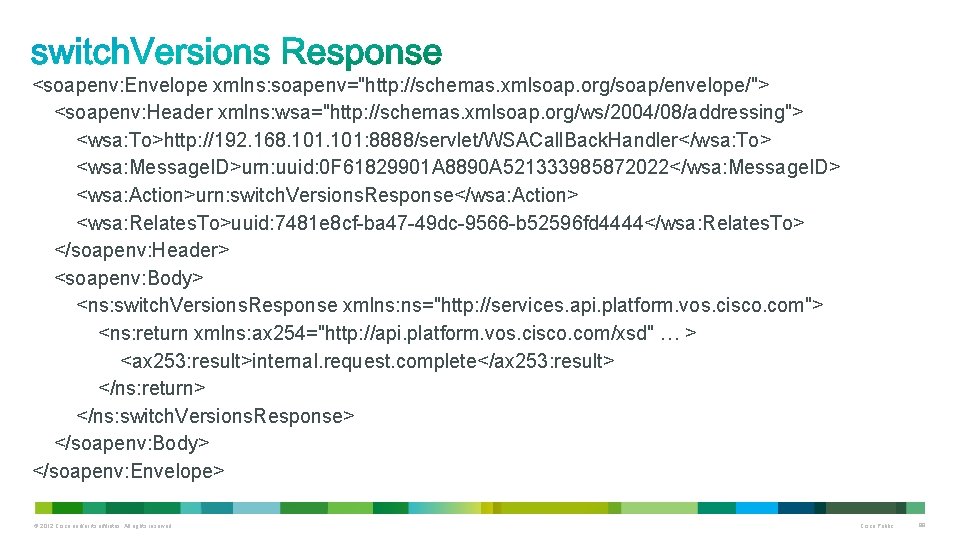
<soapenv: Envelope xmlns: soapenv="http: //schemas. xmlsoap. org/soap/envelope/"> <soapenv: Header xmlns: wsa="http: //schemas. xmlsoap. org/ws/2004/08/addressing"> <wsa: To>http: //192. 168. 101: 8888/servlet/WSACall. Back. Handler</wsa: To> <wsa: Message. ID>urn: uuid: 0 F 61829901 A 8890 A 521333985872022</wsa: Message. ID> <wsa: Action>urn: switch. Versions. Response</wsa: Action> <wsa: Relates. To>uuid: 7481 e 8 cf-ba 47 -49 dc-9566 -b 52596 fd 4444</wsa: Relates. To> </soapenv: Header> <soapenv: Body> <ns: switch. Versions. Response xmlns: ns="http: //services. api. platform. vos. cisco. com"> <ns: return xmlns: ax 254="http: //api. platform. vos. cisco. com/xsd" … > <ax 253: result>internal. request. complete</ax 253: result> </ns: return> </ns: switch. Versions. Response> </soapenv: Body> </soapenv: Envelope> © 2012 Cisco and/or its affiliates. All rights reserved. Cisco Public 89
Available PAWS Resources © 2012 Cisco and/or its affiliates. All rights reserved. Cisco Public 90
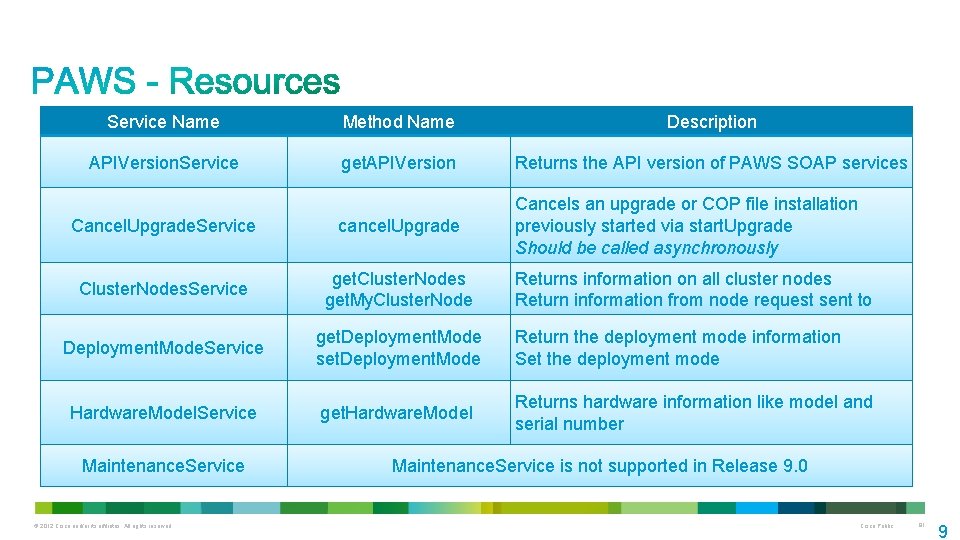
Service Name Method Name Description APIVersion. Service get. APIVersion Returns the API version of PAWS SOAP services Cancel. Upgrade. Service cancel. Upgrade Cancels an upgrade or COP file installation previously started via start. Upgrade Should be called asynchronously Cluster. Nodes. Service get. Cluster. Nodes get. My. Cluster. Node Returns information on all cluster nodes Return information from node request sent to Deployment. Mode. Service get. Deployment. Mode set. Deployment. Mode Return the deployment mode information Set the deployment mode Hardware. Model. Service get. Hardware. Model Returns hardware information like model and serial number Maintenance. Service © 2012 Cisco and/or its affiliates. All rights reserved. Maintenance. Service is not supported in Release 9. 0 Cisco Public 91 9
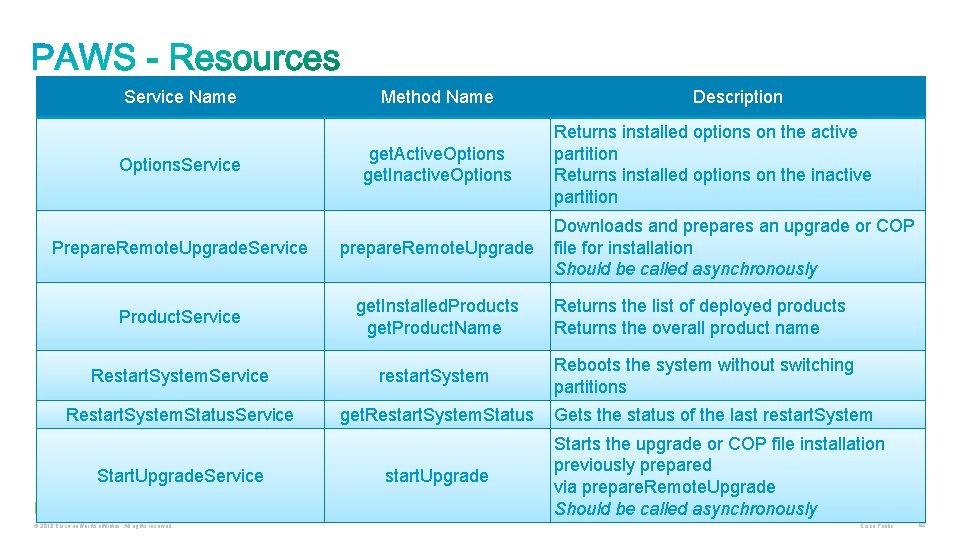
Service Name Options. Service Method Name get. Active. Options get. Inactive. Options Prepare. Remote. Upgrade. Service prepare. Remote. Upgrade Product. Service get. Installed. Products get. Product. Name Restart. System. Service restart. System Restart. System. Status. Service get. Restart. System. Status Start. Upgrade. Service © 2012 Cisco and/or its affiliates. All rights reserved. start. Upgrade Description Returns installed options on the active partition Returns installed options on the inactive partition Downloads and prepares an upgrade or COP file for installation Should be called asynchronously Returns the list of deployed products Returns the overall product name Reboots the system without switching partitions Gets the status of the last restart. System Starts the upgrade or COP file installation previously prepared via prepare. Remote. Upgrade Should be called asynchronously Cisco Public 92
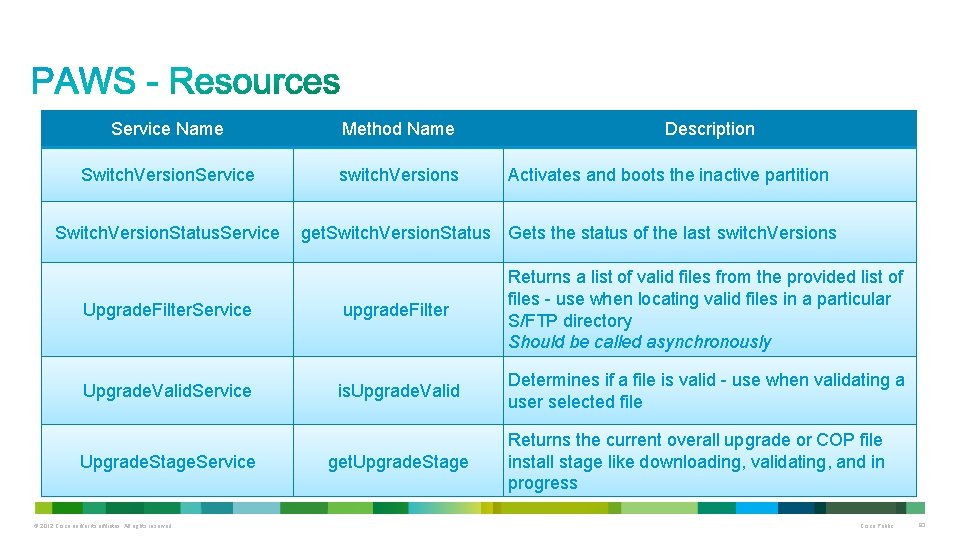
Service Name Method Name Switch. Version. Service switch. Versions Switch. Version. Status. Service Description Activates and boots the inactive partition get. Switch. Version. Status Gets the status of the last switch. Versions Upgrade. Filter. Service upgrade. Filter Returns a list of valid files from the provided list of files - use when locating valid files in a particular S/FTP directory Should be called asynchronously Upgrade. Valid. Service is. Upgrade. Valid Determines if a file is valid - use when validating a user selected file Upgrade. Stage. Service © 2012 Cisco and/or its affiliates. All rights reserved. get. Upgrade. Stage Returns the current overall upgrade or COP file install stage like downloading, validating, and in progress Cisco Public 93
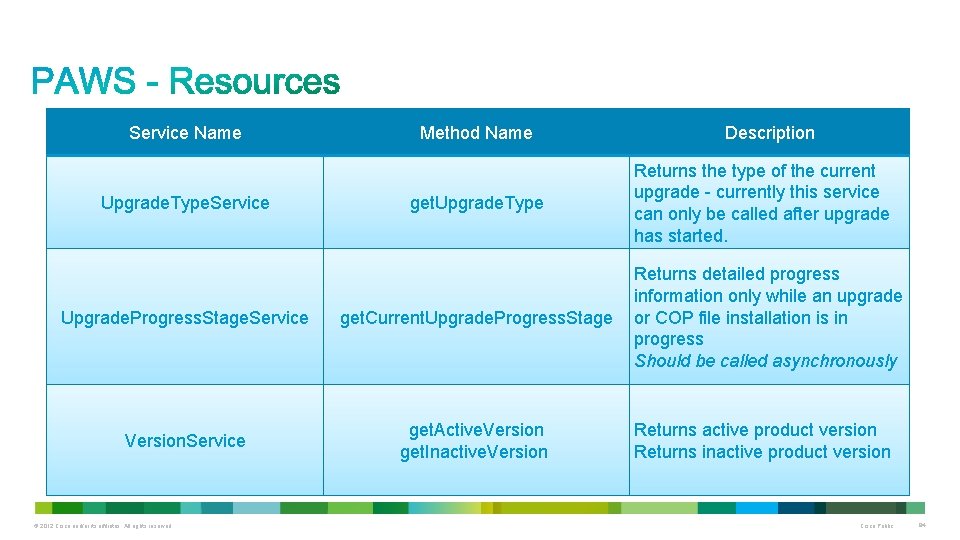
Service Name Upgrade. Type. Service Method Name get. Upgrade. Type Upgrade. Progress. Stage. Service get. Current. Upgrade. Progress. Stage Version. Service get. Active. Version get. Inactive. Version © 2012 Cisco and/or its affiliates. All rights reserved. Description Returns the type of the current upgrade - currently this service can only be called after upgrade has started. Returns detailed progress information only while an upgrade or COP file installation is in progress Should be called asynchronously Returns active product version Returns inactive product version Cisco Public 94
PAWS Result Codes and Error Handling © 2012 Cisco and/or its affiliates. All rights reserved. Cisco Public 95
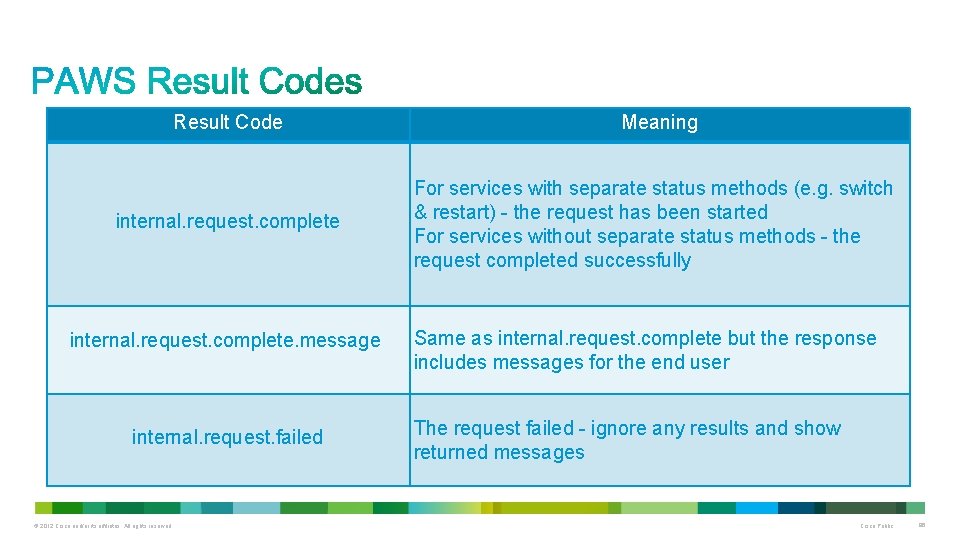
Result Code Meaning internal. request. complete For services with separate status methods (e. g. switch & restart) - the request has been started For services without separate status methods - the request completed successfully internal. request. complete. message internal. request. failed © 2012 Cisco and/or its affiliates. All rights reserved. Same as internal. request. complete but the response includes messages for the end user The request failed - ignore any results and show returned messages Cisco Public 96
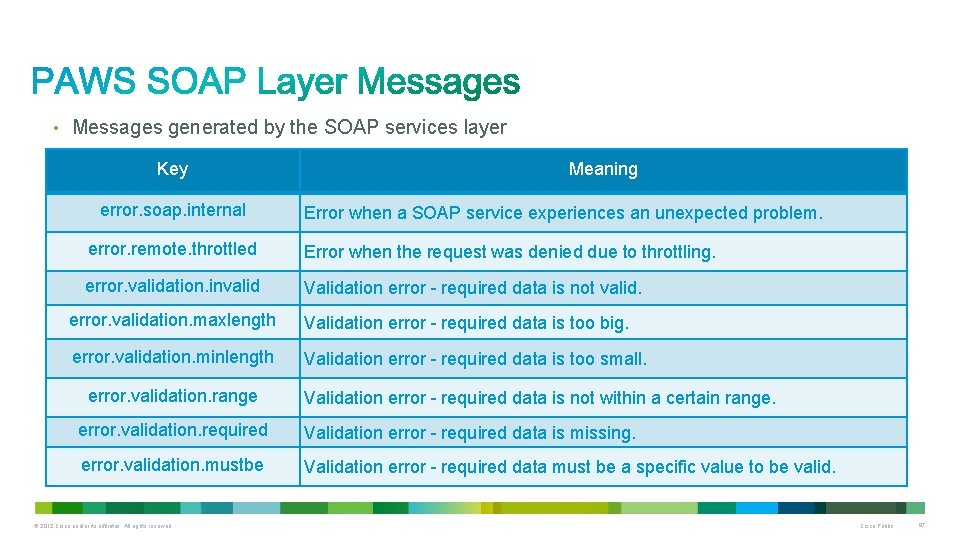
• Messages generated by the SOAP services layer Key error. soap. internal Meaning Error when a SOAP service experiences an unexpected problem. error. remote. throttled Error when the request was denied due to throttling. error. validation. invalid Validation error - required data is not valid. error. validation. maxlength Validation error - required data is too big. error. validation. minlength Validation error - required data is too small. error. validation. range Validation error - required data is not within a certain range. error. validation. required Validation error - required data is missing. error. validation. mustbe Validation error - required data must be a specific value to be valid. © 2012 Cisco and/or its affiliates. All rights reserved. Cisco Public 97
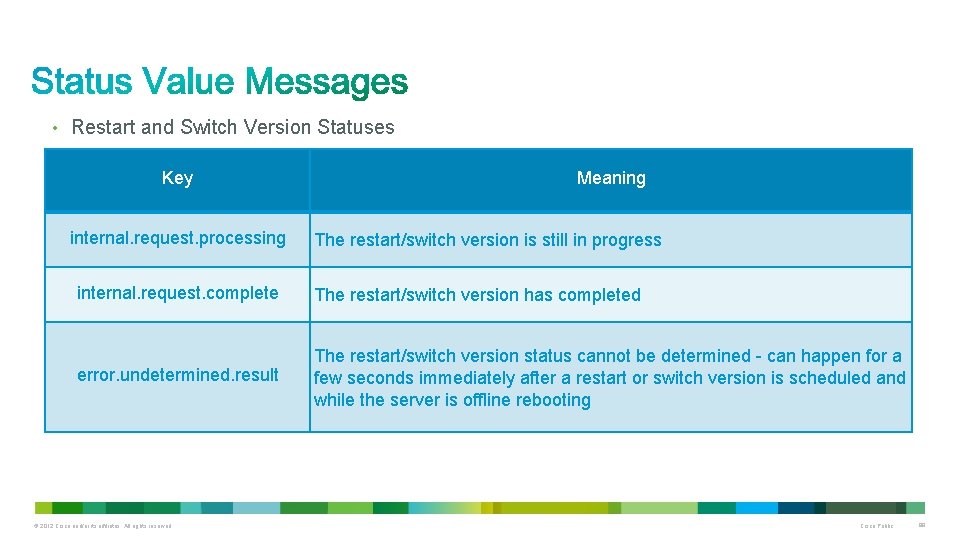
• Restart and Switch Version Statuses Key internal. request. processing Meaning The restart/switch version is still in progress internal. request. complete The restart/switch version has completed error. undetermined. result The restart/switch version status cannot be determined - can happen for a few seconds immediately after a restart or switch version is scheduled and while the server is offline rebooting © 2012 Cisco and/or its affiliates. All rights reserved. Cisco Public 98
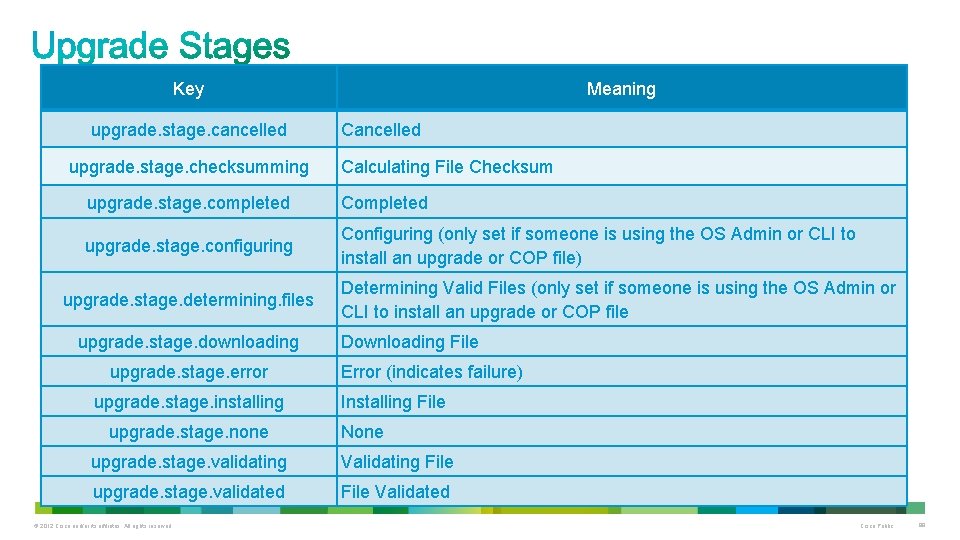
Key upgrade. stage. cancelled upgrade. stage. checksumming Meaning Cancelled Calculating File Checksum upgrade. stage. completed Completed upgrade. stage. configuring Configuring (only set if someone is using the OS Admin or CLI to install an upgrade or COP file) upgrade. stage. determining. files upgrade. stage. downloading upgrade. stage. error upgrade. stage. installing upgrade. stage. none Determining Valid Files (only set if someone is using the OS Admin or CLI to install an upgrade or COP file Downloading File Error (indicates failure) Installing File None upgrade. stage. validating Validating File upgrade. stage. validated File Validated © 2012 Cisco and/or its affiliates. All rights reserved. Cisco Public 99

Coding Examples © 2012 Cisco and/or its affiliates. All rights reserved. Cisco Public 100
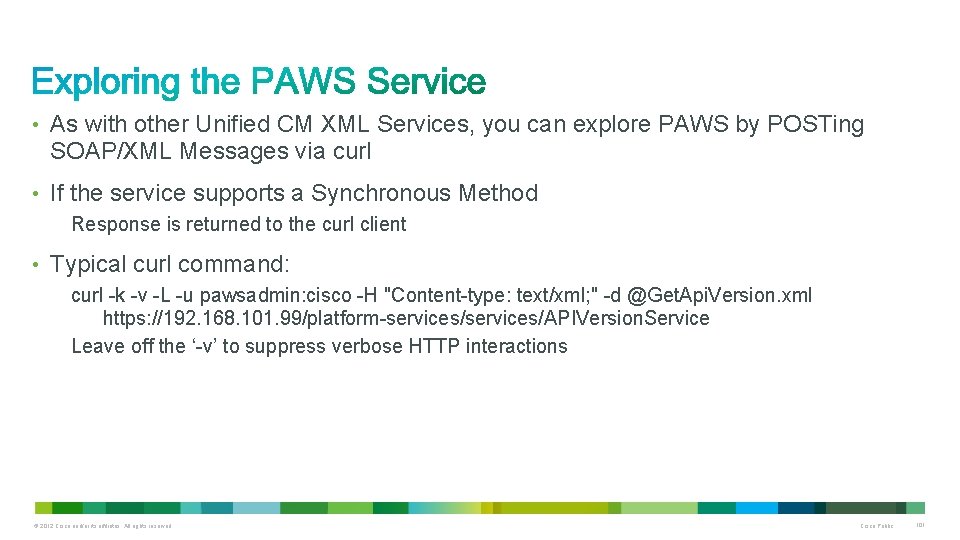
• As with other Unified CM XML Services, you can explore PAWS by POSTing SOAP/XML Messages via curl • If the service supports a Synchronous Method Response is returned to the curl client • Typical curl command: curl -k -v -L -u pawsadmin: cisco -H "Content-type: text/xml; " -d @Get. Api. Version. xml https: //192. 168. 101. 99/platform-services/APIVersion. Service Leave off the ‘-v’ to suppress verbose HTTP interactions © 2012 Cisco and/or its affiliates. All rights reserved. Cisco Public 101
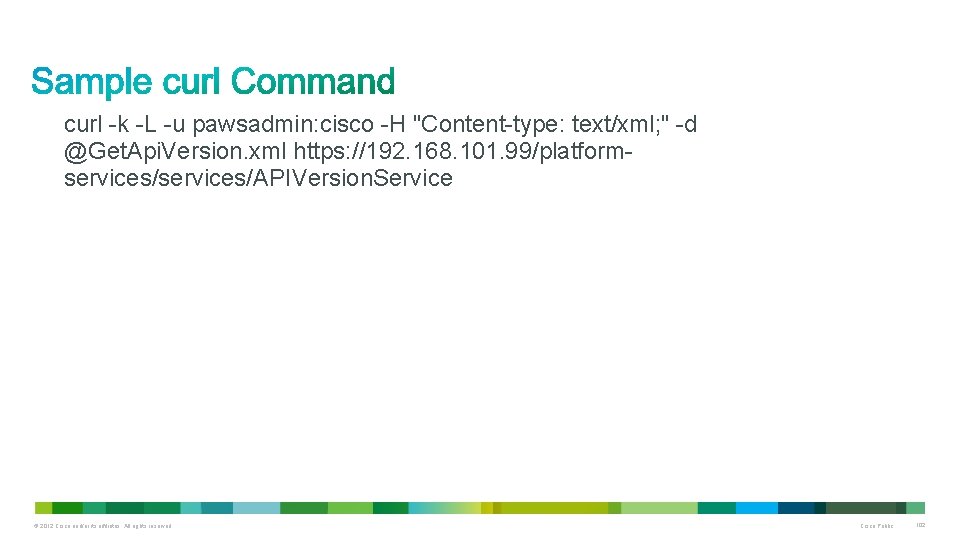
curl -k -L -u pawsadmin: cisco -H "Content-type: text/xml; " -d @Get. Api. Version. xml https: //192. 168. 101. 99/platformservices/APIVersion. Service © 2012 Cisco and/or its affiliates. All rights reserved. Cisco Public 102
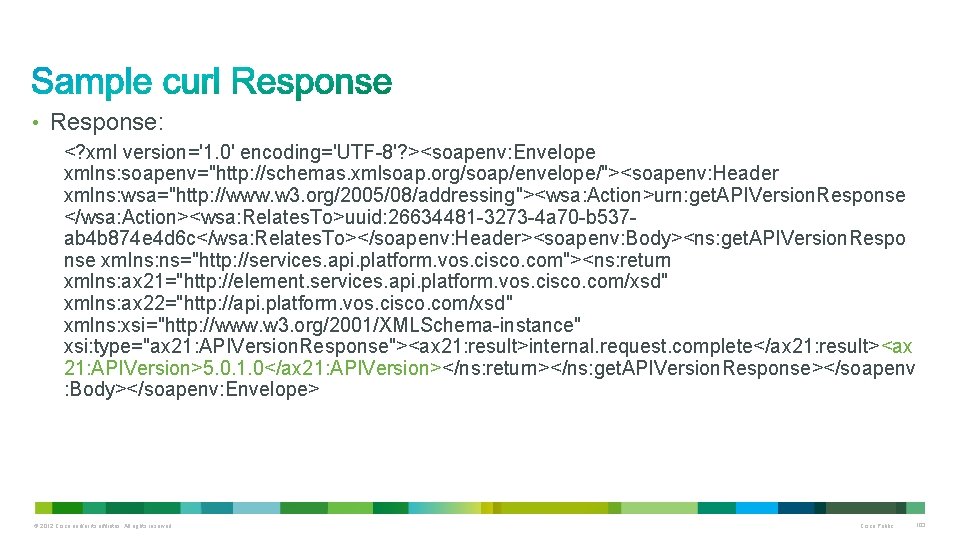
• Response: <? xml version='1. 0' encoding='UTF-8'? ><soapenv: Envelope xmlns: soapenv="http: //schemas. xmlsoap. org/soap/envelope/"><soapenv: Header xmlns: wsa="http: //www. w 3. org/2005/08/addressing"><wsa: Action>urn: get. APIVersion. Response </wsa: Action><wsa: Relates. To>uuid: 26634481 -3273 -4 a 70 -b 537 ab 4 b 874 e 4 d 6 c</wsa: Relates. To></soapenv: Header><soapenv: Body><ns: get. APIVersion. Respo nse xmlns: ns="http: //services. api. platform. vos. cisco. com"><ns: return xmlns: ax 21="http: //element. services. api. platform. vos. cisco. com/xsd" xmlns: ax 22="http: //api. platform. vos. cisco. com/xsd" xmlns: xsi="http: //www. w 3. org/2001/XMLSchema-instance" xsi: type="ax 21: APIVersion. Response"><ax 21: result>internal. request. complete</ax 21: result><ax 21: APIVersion>5. 0. 1. 0</ax 21: APIVersion></ns: return></ns: get. APIVersion. Response></soapenv : Body></soapenv: Envelope> © 2012 Cisco and/or its affiliates. All rights reserved. Cisco Public 103
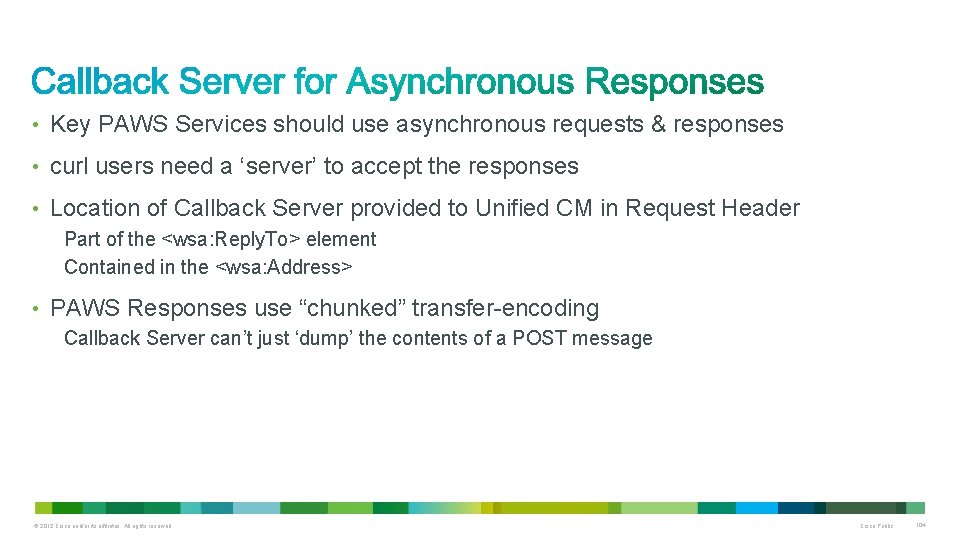
• Key PAWS Services should use asynchronous requests & responses • curl users need a ‘server’ to accept the responses • Location of Callback Server provided to Unified CM in Request Header Part of the <wsa: Reply. To> element Contained in the <wsa: Address> • PAWS Responses use “chunked” transfer-encoding Callback Server can’t just ‘dump’ the contents of a POST message © 2012 Cisco and/or its affiliates. All rights reserved. Cisco Public 104
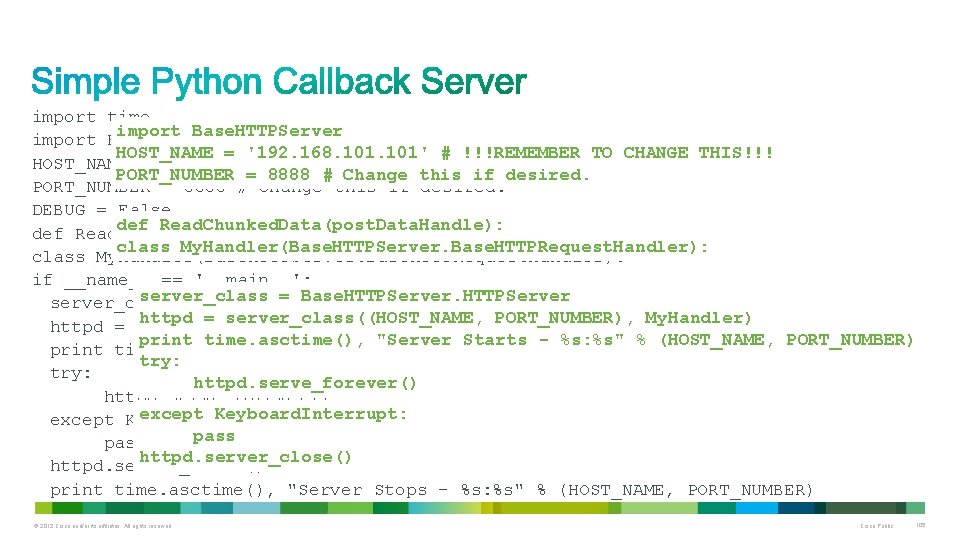
import time import Base. HTTPServer HOST_NAME = '192. 168. 101' # !!!REMEMBER TO CHANGE THIS!!! PORT_NUMBER = 8888 # Change this if desired. DEBUG = False def Read. Chunked. Data(post. Data. Handle): class My. Handler(Base. HTTPServer. Base. HTTPRequest. Handler): if __name__ == '__main__': server_class = Base. HTTPServer httpd = server_class((HOST_NAME, PORT_NUMBER), My. Handler) print time. asctime(), "Server Starts - %s: %s" % (HOST_NAME, PORT_NUMBER) try: httpd. serve_forever() except Keyboard. Interrupt: pass httpd. server_close() print time. asctime(), "Server Stops - %s: %s" % (HOST_NAME, PORT_NUMBER) © 2012 Cisco and/or its affiliates. All rights reserved. Cisco Public 105
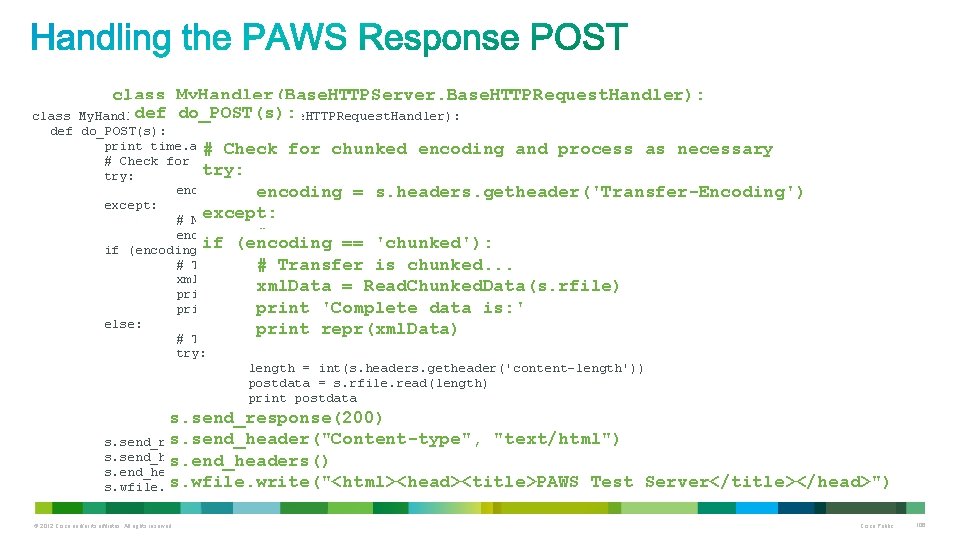
class My. Handler(Base. HTTPServer. Base. HTTPRequest. Handler): def do_POST(s): My. Handler(Base. HTTPServer. Base. HTTPRequest. Handler): class def do_POST(s): print time. asctime(), "do_POST" # Check for chunked encoding and process as necessary try: encoding = s. headers. getheader('Transfer-Encoding') except: # Noexcept: Transfer encoding, set to null encoding = # No Transfer encoding, set to null '' if (encoding == 'chunked'): encoding = '' # Transfer is chunked. . . xml. Data = Read. Chunked. Data(s. rfile) print 'Complete data is: ' print repr(xml. Data) else: print repr(xml. Data) # Traditional POST Data. . . try: length = int(s. headers. getheader('content-length')) postdata = s. rfile. read(length) print postdata except: s. send_response(200) pass s. send_header("Content-type", "text/html") s. send_response(200) s. send_header("Content-type", s. end_headers() "text/html") s. end_headers() s. wfile. write("<html><head><title>PAWS Test Server</title></head>") s. wfile. write("<html><head><title>PAWS Async Test Server</title></head>") © 2012 Cisco and/or its affiliates. All rights reserved. Cisco Public 106
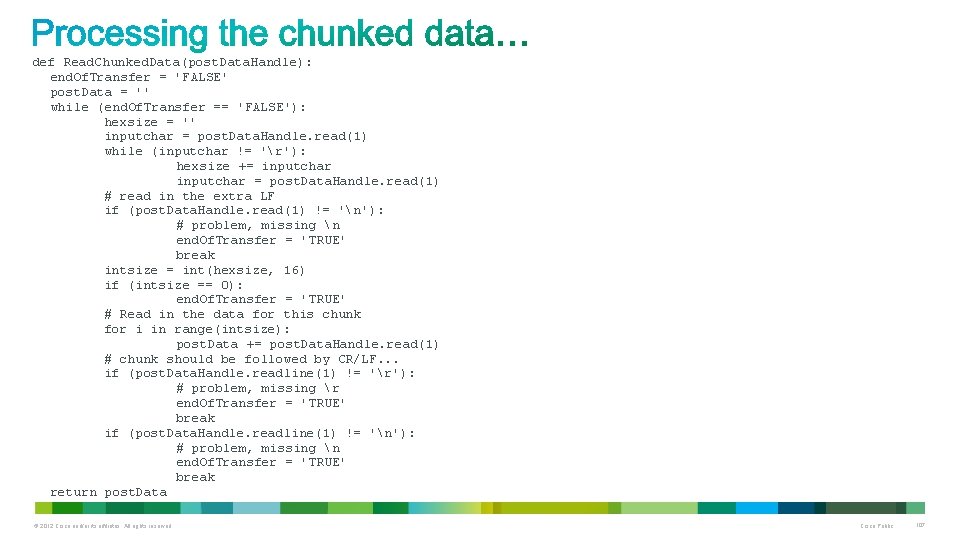
def Read. Chunked. Data(post. Data. Handle): end. Of. Transfer = 'FALSE' post. Data = '' while (end. Of. Transfer == 'FALSE'): hexsize = '' inputchar = post. Data. Handle. read(1) while (inputchar != 'r'): hexsize += inputchar = post. Data. Handle. read(1) # read in the extra LF if (post. Data. Handle. read(1) != 'n'): # problem, missing n end. Of. Transfer = 'TRUE' break intsize = int(hexsize, 16) if (intsize == 0): end. Of. Transfer = 'TRUE' # Read in the data for this chunk for i in range(intsize): post. Data += post. Data. Handle. read(1) # chunk should be followed by CR/LF. . . if (post. Data. Handle. readline(1) != 'r'): # problem, missing r end. Of. Transfer = 'TRUE' break if (post. Data. Handle. readline(1) != 'n'): # problem, missing n end. Of. Transfer = 'TRUE' break return post. Data © 2012 Cisco and/or its affiliates. All rights reserved. Cisco Public 107
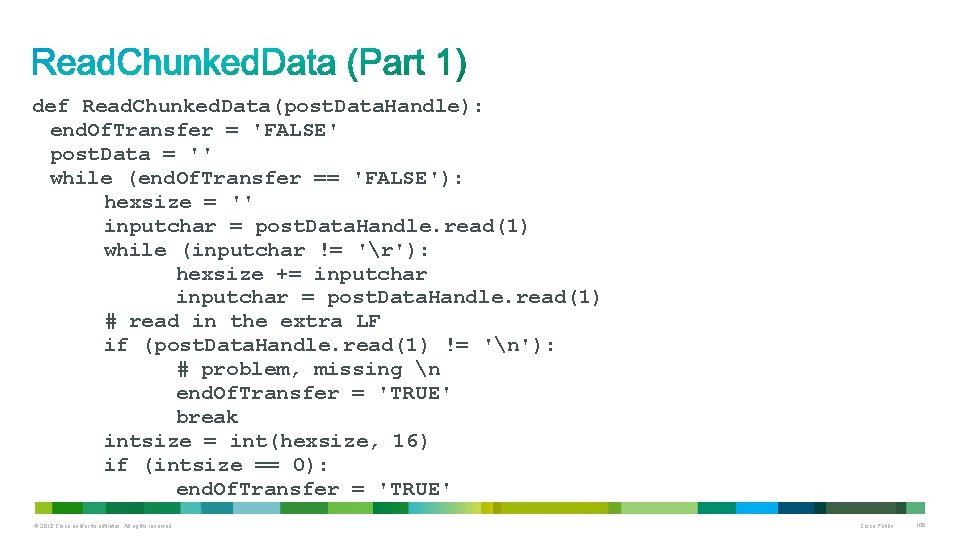
def Read. Chunked. Data(post. Data. Handle): end. Of. Transfer = 'FALSE' post. Data = '' while (end. Of. Transfer == 'FALSE'): hexsize = '' inputchar = post. Data. Handle. read(1) while (inputchar != 'r'): hexsize += inputchar = post. Data. Handle. read(1) # read in the extra LF if (post. Data. Handle. read(1) != 'n'): # problem, missing n end. Of. Transfer = 'TRUE' break intsize = int(hexsize, 16) if (intsize == 0): end. Of. Transfer = 'TRUE' © 2012 Cisco and/or its affiliates. All rights reserved. Cisco Public 108
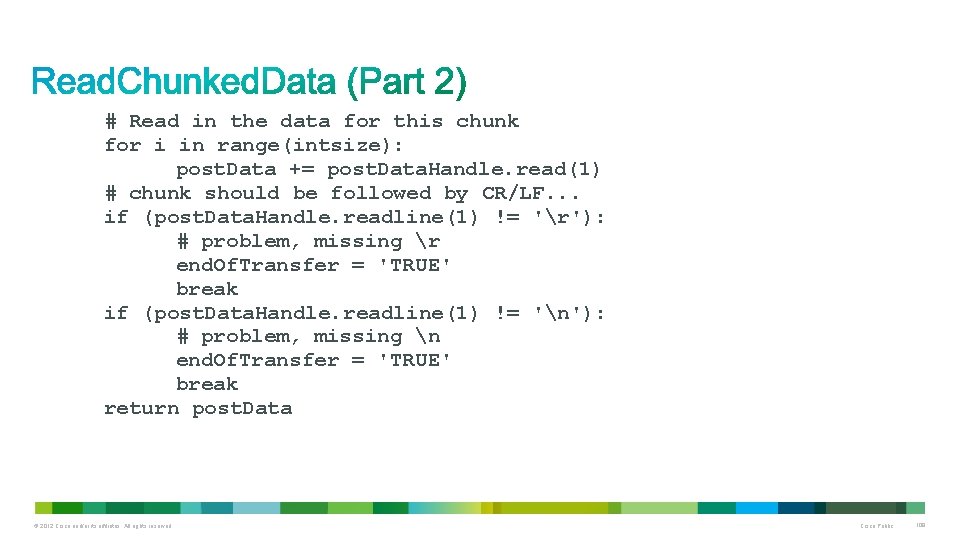
# Read in the data for this chunk for i in range(intsize): post. Data += post. Data. Handle. read(1) # chunk should be followed by CR/LF. . . if (post. Data. Handle. readline(1) != 'r'): # problem, missing r end. Of. Transfer = 'TRUE' break if (post. Data. Handle. readline(1) != 'n'): # problem, missing n end. Of. Transfer = 'TRUE' break return post. Data © 2012 Cisco and/or its affiliates. All rights reserved. Cisco Public 109
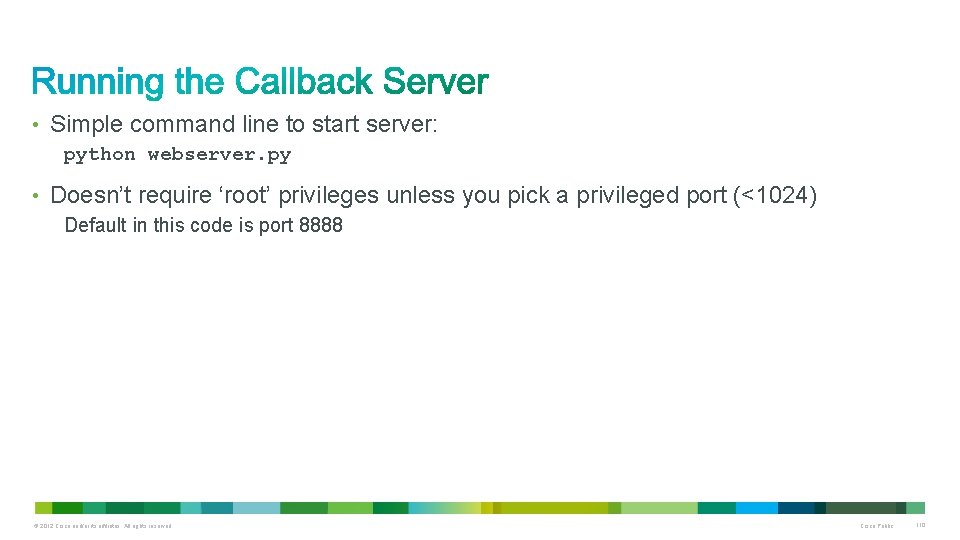
• Simple command line to start server: python webserver. py • Doesn’t require ‘root’ privileges unless you pick a privileged port (<1024) Default in this code is port 8888 © 2012 Cisco and/or its affiliates. All rights reserved. Cisco Public 110
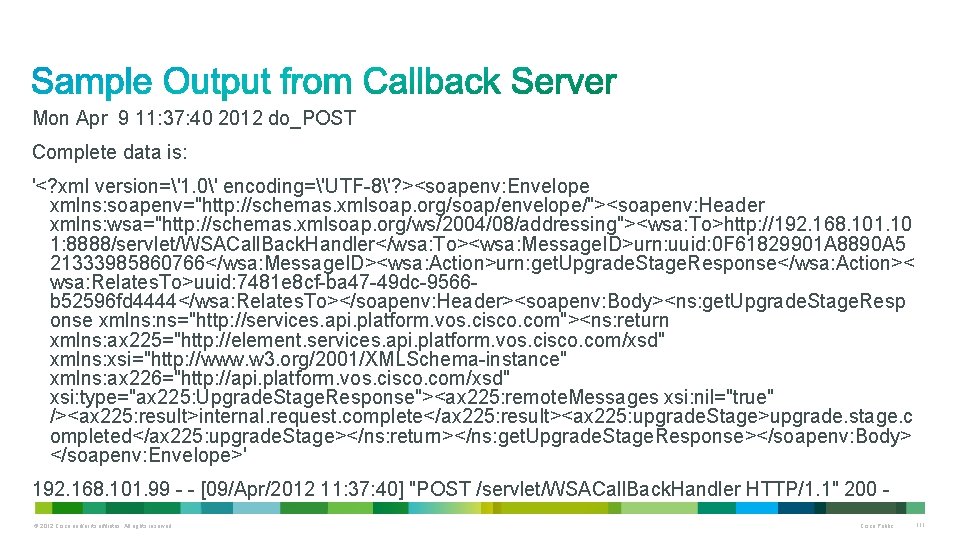
Mon Apr 9 11: 37: 40 2012 do_POST Complete data is: '<? xml version='1. 0' encoding='UTF-8'? ><soapenv: Envelope xmlns: soapenv="http: //schemas. xmlsoap. org/soap/envelope/"><soapenv: Header xmlns: wsa="http: //schemas. xmlsoap. org/ws/2004/08/addressing"><wsa: To>http: //192. 168. 101. 10 1: 8888/servlet/WSACall. Back. Handler</wsa: To><wsa: Message. ID>urn: uuid: 0 F 61829901 A 8890 A 5 21333985860766</wsa: Message. ID><wsa: Action>urn: get. Upgrade. Stage. Response</wsa: Action>< wsa: Relates. To>uuid: 7481 e 8 cf-ba 47 -49 dc-9566 b 52596 fd 4444</wsa: Relates. To></soapenv: Header><soapenv: Body><ns: get. Upgrade. Stage. Resp onse xmlns: ns="http: //services. api. platform. vos. cisco. com"><ns: return xmlns: ax 225="http: //element. services. api. platform. vos. cisco. com/xsd" xmlns: xsi="http: //www. w 3. org/2001/XMLSchema-instance" xmlns: ax 226="http: //api. platform. vos. cisco. com/xsd" xsi: type="ax 225: Upgrade. Stage. Response"><ax 225: remote. Messages xsi: nil="true" /><ax 225: result>internal. request. complete</ax 225: result><ax 225: upgrade. Stage>upgrade. stage. c ompleted</ax 225: upgrade. Stage></ns: return></ns: get. Upgrade. Stage. Response></soapenv: Body> </soapenv: Envelope>' 192. 168. 101. 99 - - [09/Apr/2012 11: 37: 40] "POST /servlet/WSACall. Back. Handler HTTP/1. 1" 200 © 2012 Cisco and/or its affiliates. All rights reserved. Cisco Public 111

• PAWS Service can produce trace logs for troubleshooting • Ensure logging is enabled through Cisco Unified Serviceability Within the "Database and Admin Services", choose "Platform Administrative Web Service" In the “Debug Trace Level” box, select Debug • Use RTMT or the CLI to transfer log files for analysis From the CLI: file get activelog tomcat/logs/platform-api/log 4 j/* © 2012 Cisco and/or its affiliates. All rights reserved. Cisco Public 112

© 2012 Cisco and/or its affiliates. All rights reserved. Cisco Public 113
• PAWS-I: New public interface in Unified CM 9. 0(1) • Applications can remotely manage the Platform of multiple UC Clusters • XML/SOAP based on AXIS 2. 0 • Resources called synchronously or asynchronously • PAWS-M: Cisco console which uses PAWS-I © 2012 Cisco and/or its affiliates. All rights reserved. Cisco Public 114
• Where do I go for more information? http: //developer. cisco. com/web/paws-developer/ • How do I stay informed? Subscribe to the PAWS Blog http: //developer. cisco. com/web/paws-developer/blogs © 2012 Cisco and/or its affiliates. All rights reserved. Cisco Public 115

Thank you.
- Slides: 115