
Introduction To PHP Static vs Dynamic websites A
Introduction. To. PHP Static vs. Dynamic websites A static website is created using HTML pages which have been written in a fixed way to instruct the browser how to render the page. (What you see it what you get). Static websites are used to display fixed information which most often does not need to be updated on a regular basis. As the Web evolved, sites became more complex and were expected to display dynamic information which could not have been “hard coded” in HTML. Such as: Search results Number of visitors User login Message boards
Introduction. To. PHP Dynamic websites The solution was to generate the HTML “on-the-fly” based on parameters and specifications. For example, If a user asks to see search results, a unique page would be generated specifically for him. The user would get an HTML page, but an HTML page that was tailored made for him. Since there is no way of knowing every possible search result for every possible key word, the final page is being assembled using a server-side script. The server-side script constructs the page and then it is being sent back to the client. This mean that the page result. html will look different each time based on the given specifications.
Introduction. To. PHP Dynamic websites Every client makes a request for a page. The server checks what the client has asked for and based on that constructs a page for him based on an existing template. The template is a page which contains HTML code and server-side code that will end up as HTML code as well, but a different HTML each time.
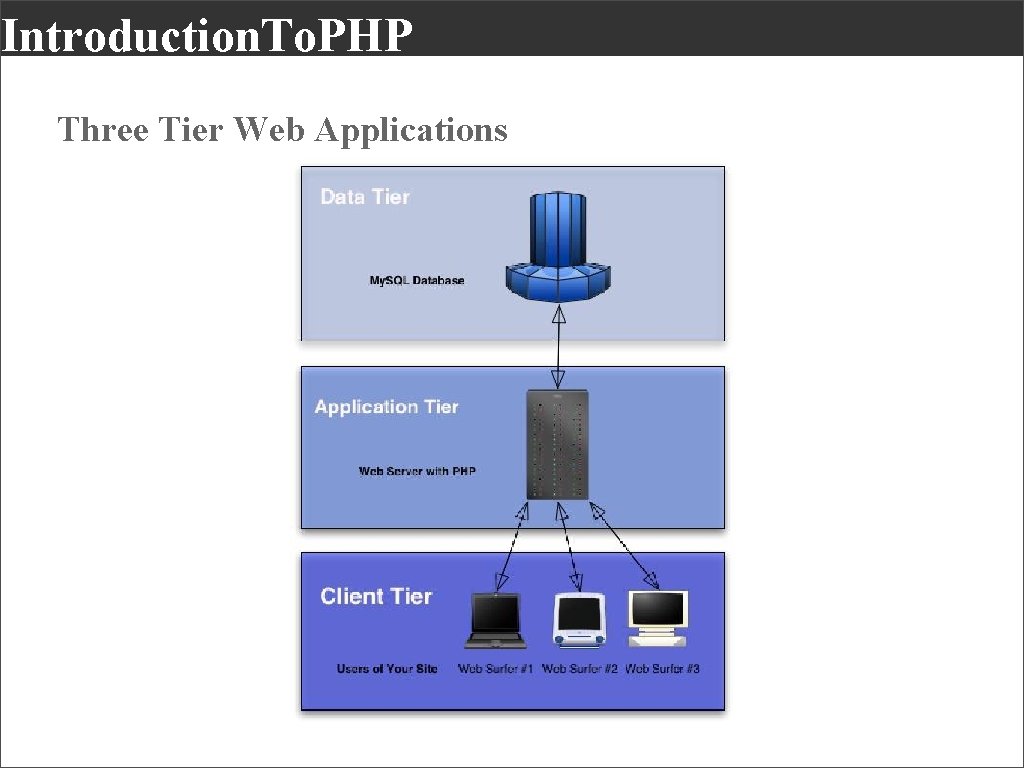
Introduction. To. PHP Three Tier Web Applications
Introduction. To. PHP Benefits Of Dynamic Content The ability to customize pages for any given user. Greater ease of modification and update. Extended functionality (login, transactions, communication etc. ). Automating the site and allowing it to support itself. Less pages to manually create.
Introduction. To. PHP Server-Side Scripting In order to generate dynamic pages we use a server-side scripting language. There are different types of server-side scripting languages such as PHP, ASP. NET, Cold. Fusion, Java. Server Pages, Perl and others. Each scripting languages is being interpreted by an application, just as Flash is used to make sense of Action. Script and have the code do things. The application which interprets the server-side script is installed on the sever just like any other application.
Introduction. To. PHP Server-Side Scripting Server-side scripting languages are also operating systems dependent. PHP for example is being interpreted by an application called Apache which runs on a UNIX operating system. Each server-side scripting languages supports basic programming concepts such as variables, arrays, functions, loops, conditional statement and others. They also contain more specific elements such as special objects, commands used to communicate with the server and a database and much more.
Introduction. To. PHP Server-Side Scripting & Databases When there is a need to store and retrieve information (user names, items in stock etc. ) a database will be used to contain the data. Sever-side script can communicate to a database using a structured query language (SQL) which manipulates the database (add, remove, update etc. ) More on that next week.
Introduction. To. PHP What is PHP? PHP stands for PHP: Hypertext Preprocessor PHP is a server-side scripting language, like ASP PHP scripts are executed on the server PHP supports many databases (My. SQL, Informix, Oracle, Sybase, Solid, Postgre. SQL, Generic ODBC, etc. ) PHP is an open source software (OSS) This means its free to use and isnʼt being controlled by a single entity. It is being developed by a group of developers PHP syntax resembles that of Java. Script and Action. Script in different ways. PHP is free to download and use
Introduction. To. PHP What is PHP? PHP stands for PHP: Hypertext Preprocessor PHP is a server-side scripting language, like ASP PHP scripts are executed on the server PHP supports many databases (My. SQL, Informix, Oracle, Sybase, Solid, Postgre. SQL, Generic ODBC, etc. ) PHP is an open source software (OSS) This means its free to use and isnʼt being controlled by a single entity. It is being developed by a group of developers PHP syntax resembles that of Java. Script and Action. Script in different ways. PHP is free to download and use
Introduction. To. PHP What is PHP? PHP files may contain text, HTML tags and scripts. PHP files are returned to the browser as plain HTML. PHP files have a file extension of ". php", ". php 3", or ". phtml". PHP can be written in any text editor. PHP script will be located inside special tags, much like Java. Script e. g. <? php //php script here ? > PHP code can be located any where in the page. PHP is case sensitive. Every variable in PHP will have the $ symbol as a prefix e. g. $my. Name =“John”; Every line of code MUST be terminated with a ; symbol.
Introduction. To. PHP What is My. SQL? My. SQL is a small database server My. SQL is ideal for small and medium applications My. SQL supports standard SQL My. SQL compiles on a number of platforms My. SQL is free to download and use PHP + My. SQL PHP combined with My. SQL is cross-platform (means that you can develop in Windows and serve on a Unix platform).
Introduction. To. PHP Why PHP? PHP runs on different platforms (Windows, Linux, Unix, etc. ) PHP is compatible with almost all servers used today (Apache, IIS, etc. ) PHP is FREE to download from the official PHP resource: www. php. net PHP is easy to learn and runs efficiently on the server side
Introduction. To. PHP What do You Need? Hosting - www. media 72. co. uk You can use any hosting company you choose, but they must have at least: 1 SQL database & PHP Code Editor - www. panic. com/coda Ability to test locally - www. mamp. info
- Slides: 14