
Introduction to Para Tools Thread Spotter Para Tools
- Slides: 36
Introduction to Para. Tools Thread. Spotter Para. Tools, Inc. Open. SHMEM@bwtech 8 September 2017 Baltimore, MD
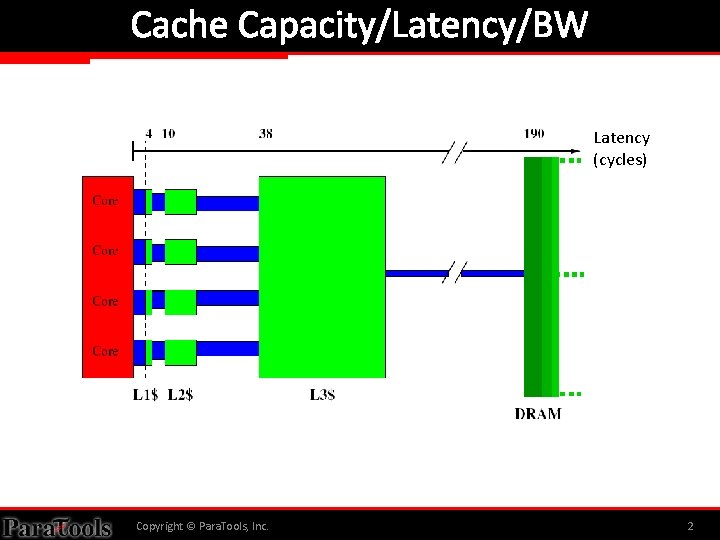
Cache Capacity/Latency/BW Latency (cycles) Copyright © Para. Tools, Inc. 2
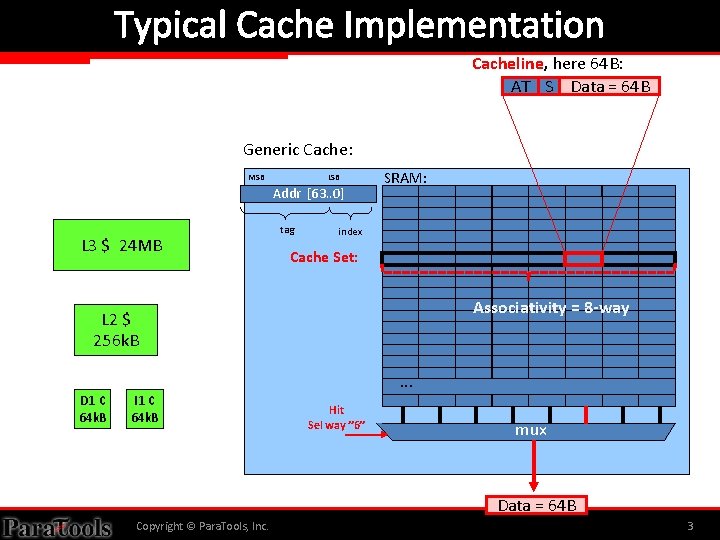
Typical Cache Implementation Cacheline, here 64 B: AT S Data = 64 B Generic Cache: MSB LSB Addr [63. . 0] L 3 $ 24 MB tag SRAM: index Cache Set: L 2 $ 256 k. B C Associativity = 8 -way . . . D 1 ¢ 64 k. B I 1 ¢ 64 k. B Hit Sel way ” 6” mux Data = 64 B Copyright © Para. Tools, Inc. 3
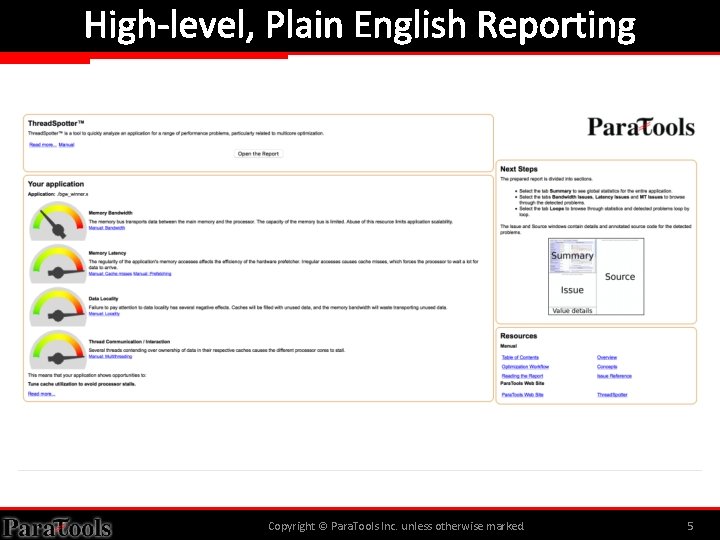
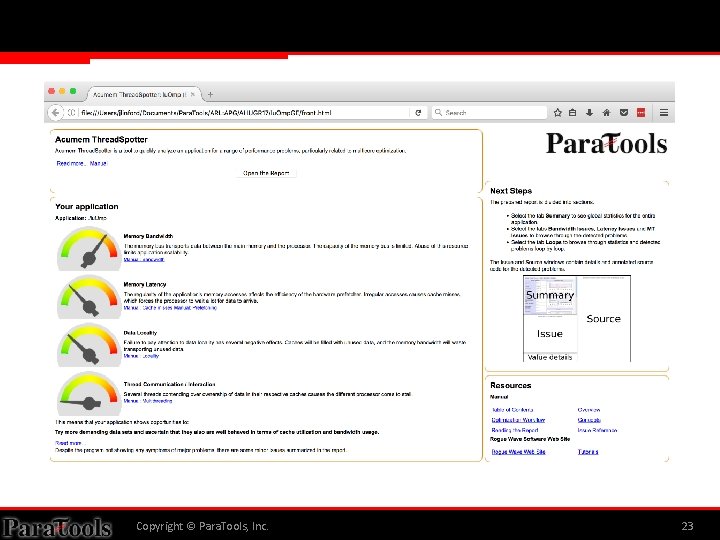
Para. Tools Thread. Spotter • Shrinking cache memory per core is causing some applications to spend over half their runtime waiting for data to arrive in cache. • Para. Tools Thread. Spotter can: – Analyze memory bandwidth and latency, data locality and thread communications. – Identify specific issues and pinpoints troublesome areas in source code. – Provide guidance towards a resolution. • Supports mixed language distributed memory applications like CREATE-AV HELIOS and KESTREL. – Integrates with the TAU Performance System®. Copyright © Para. Tools, Inc. 4
High-level, Plain English Reporting Copyright © Para. Tools Inc. unless otherwise marked. 5
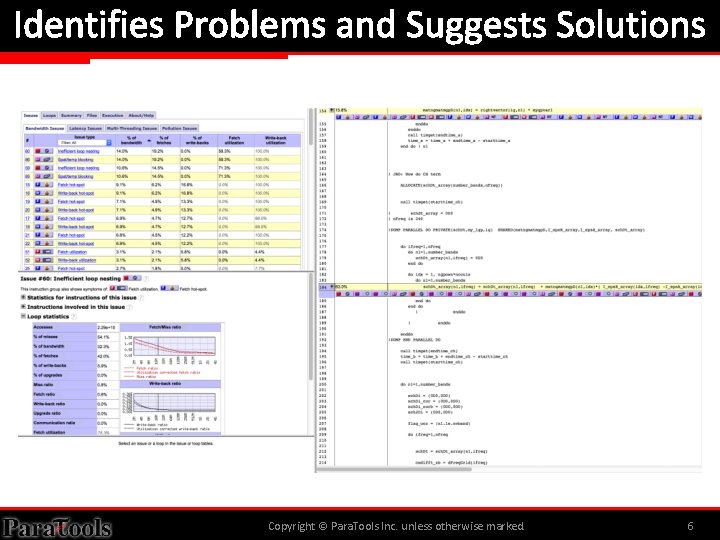
Identifies Problems and Suggests Solutions Copyright © Para. Tools Inc. unless otherwise marked. 6
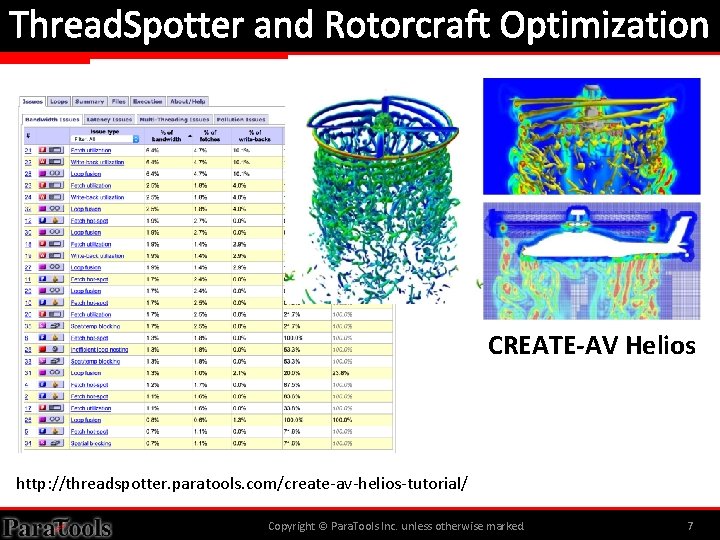
Thread. Spotter and Rotorcraft Optimization CREATE-AV Helios http: //threadspotter. paratools. com/create-av-helios-tutorial/ Copyright © Para. Tools Inc. unless otherwise marked. 7
Para. Tools, Inc. THREADSPOTTER REPORTS Copyright © Para. Tools, Inc. 8
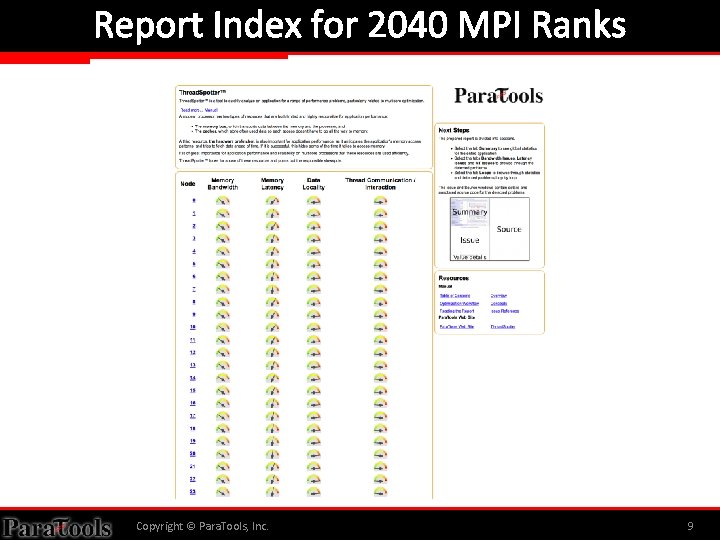
Report Index for 2040 MPI Ranks Copyright © Para. Tools, Inc. 9
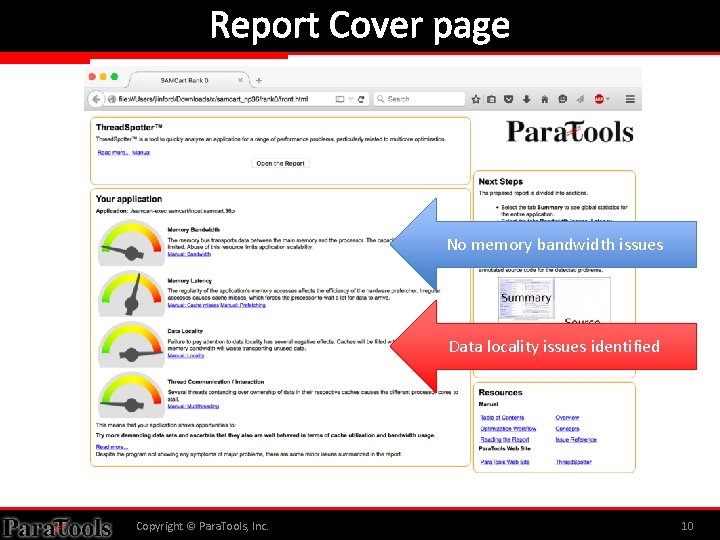
Report Cover page No memory bandwidth issues Data locality issues identified Copyright © Para. Tools, Inc. 10
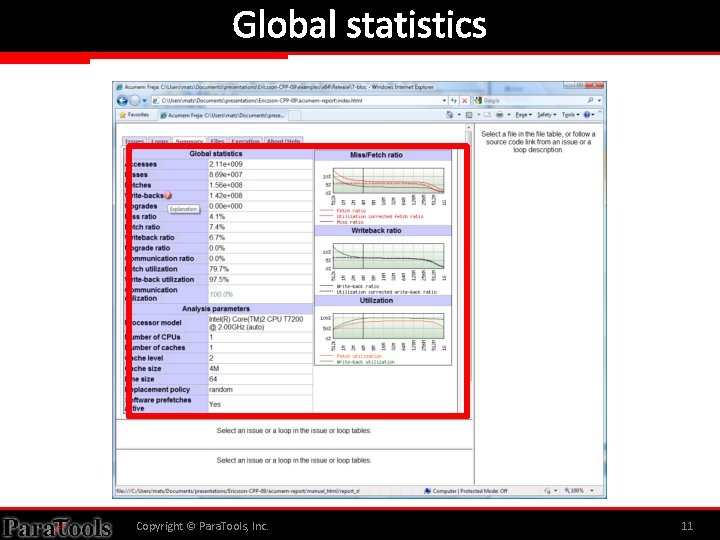
Global statistics Copyright © Para. Tools, Inc. 11
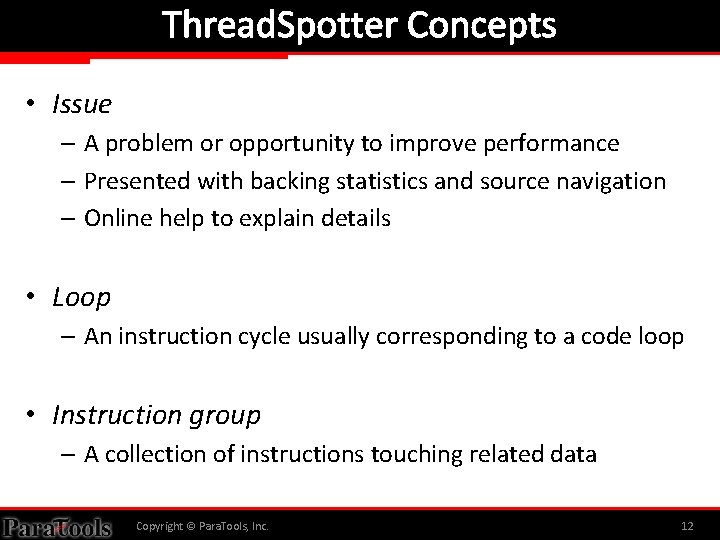
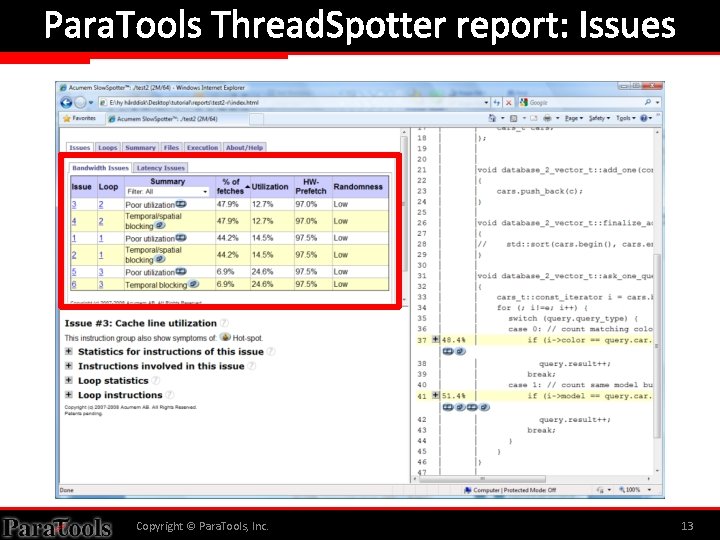
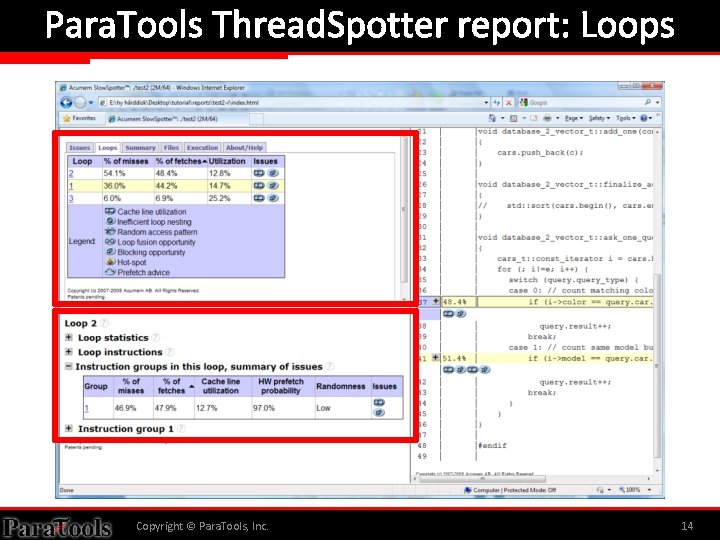
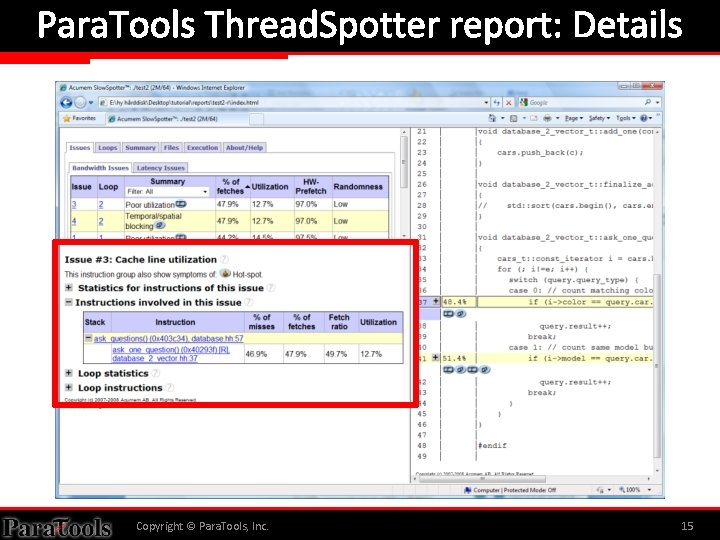
Thread. Spotter Concepts • Issue – A problem or opportunity to improve performance – Presented with backing statistics and source navigation – Online help to explain details • Loop – An instruction cycle usually corresponding to a code loop • Instruction group – A collection of instructions touching related data Copyright © Para. Tools, Inc. 12
Para. Tools Thread. Spotter report: Issues Copyright © Para. Tools, Inc. 13
Para. Tools Thread. Spotter report: Loops Copyright © Para. Tools, Inc. 14
Para. Tools Thread. Spotter report: Details Copyright © Para. Tools, Inc. 15
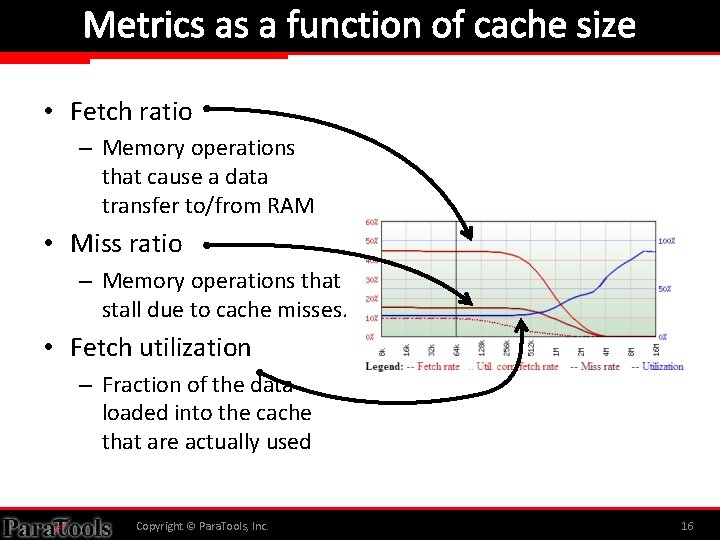
Metrics as a function of cache size • Fetch ratio – Memory operations that cause a data transfer to/from RAM • Miss ratio – Memory operations that stall due to cache misses. • Fetch utilization – Fraction of the data loaded into the cache that are actually used Copyright © Para. Tools, Inc. 16
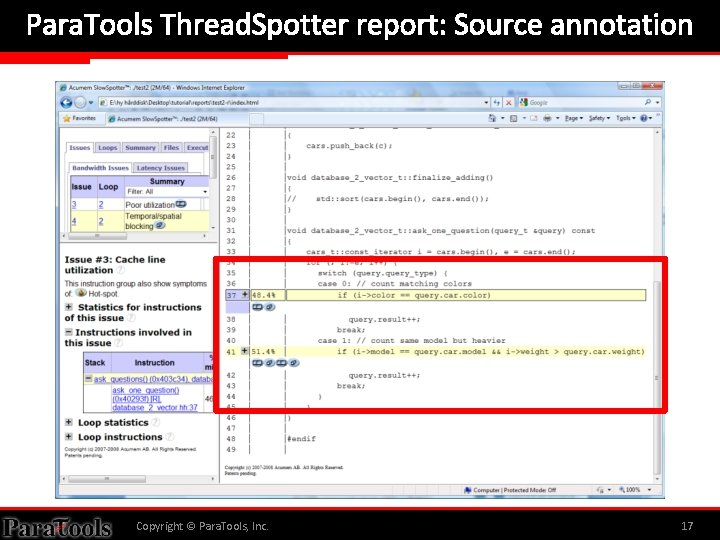
Para. Tools Thread. Spotter report: Source annotation Copyright © Para. Tools, Inc. 17
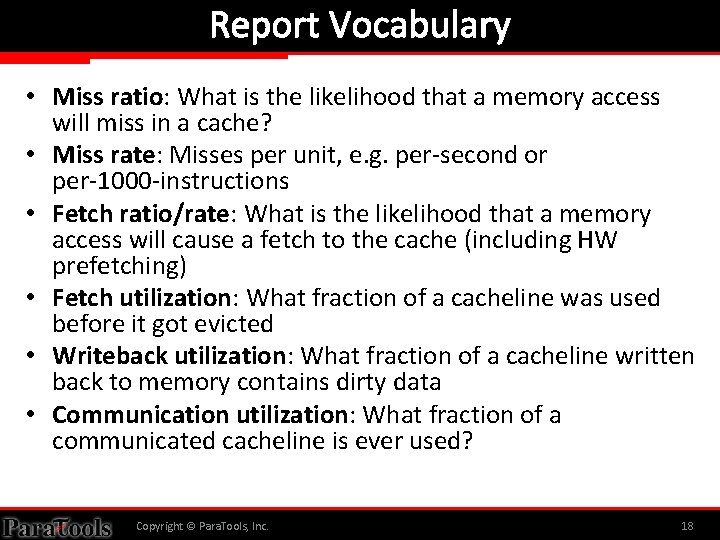
Report Vocabulary • Miss ratio: What is the likelihood that a memory access will miss in a cache? • Miss rate: Misses per unit, e. g. per-second or per-1000 -instructions • Fetch ratio/rate: What is the likelihood that a memory access will cause a fetch to the cache (including HW prefetching) • Fetch utilization: What fraction of a cacheline was used before it got evicted • Writeback utilization: What fraction of a cacheline written back to memory contains dirty data • Communication utilization: What fraction of a communicated cacheline is ever used? Copyright © Para. Tools, Inc. 18
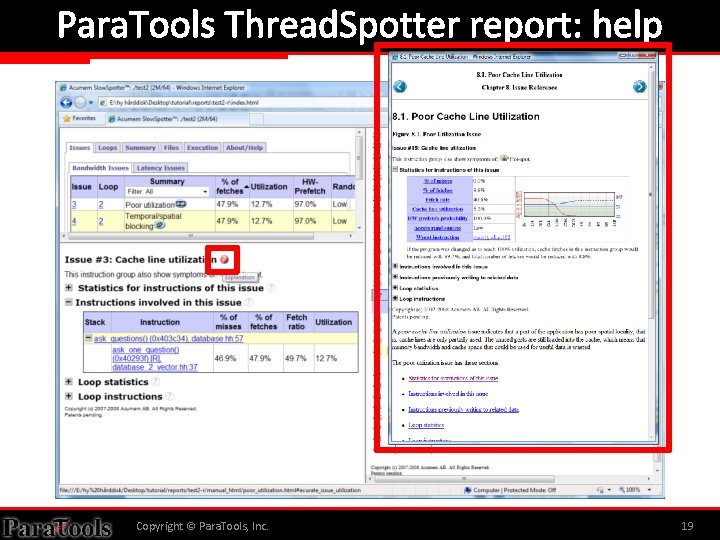
Para. Tools Thread. Spotter report: help Copyright © Para. Tools, Inc. 19
Para. Tools, Inc. EXAMPLE: TEMPORAL BLOCKING Gaussian Elimination with Pivoting Copyright © Para. Tools, Inc. 20
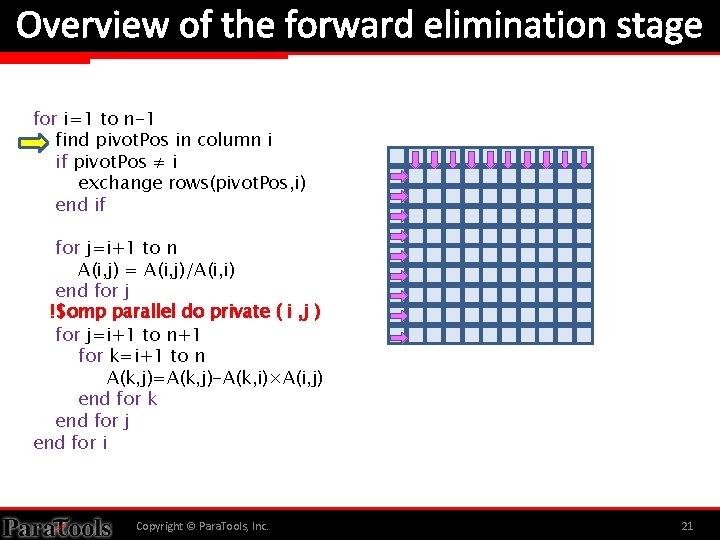
Overview of the forward elimination stage for i=1 to n-1 find pivot. Pos in column i if pivot. Pos ≠ i exchange rows(pivot. Pos, i) end if for j=i+1 to n A(i, j) = A(i, j)/A(i, i) end for j !$omp parallel do private ( i , j ) for j=i+1 to n+1 for k=i+1 to n A(k, j)=A(k, j)-A(k, i)×A(i, j) end for k end for j end for i Copyright © Para. Tools, Inc. 21
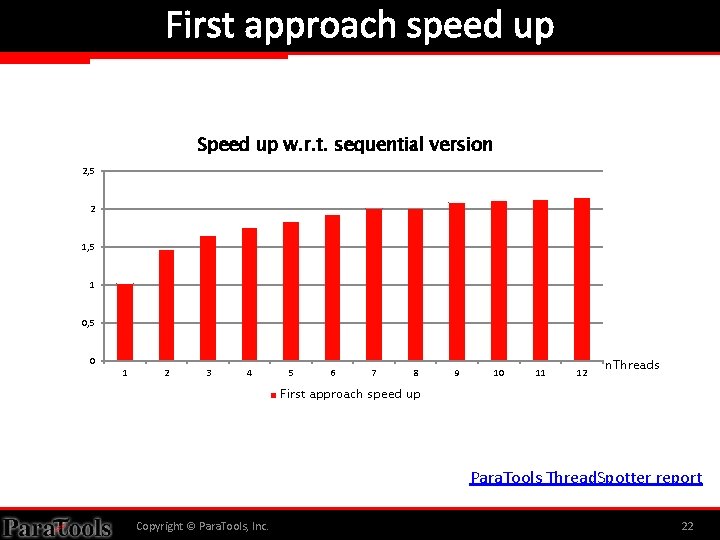
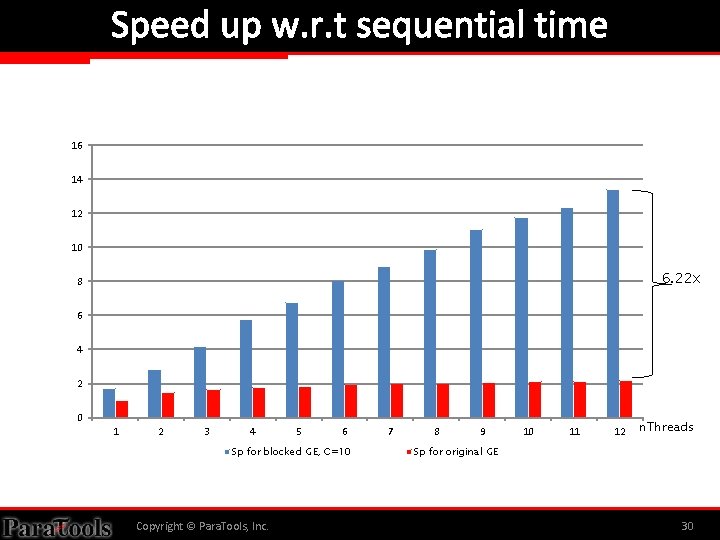
First approach speed up Speed up w. r. t. sequential version 2, 5 2 1, 5 1 0, 5 0 1 2 3 4 5 6 7 8 9 10 11 12 n. Threads First approach speed up Para. Tools Thread. Spotter report Copyright © Para. Tools, Inc. 22
Copyright © Para. Tools, Inc. 23
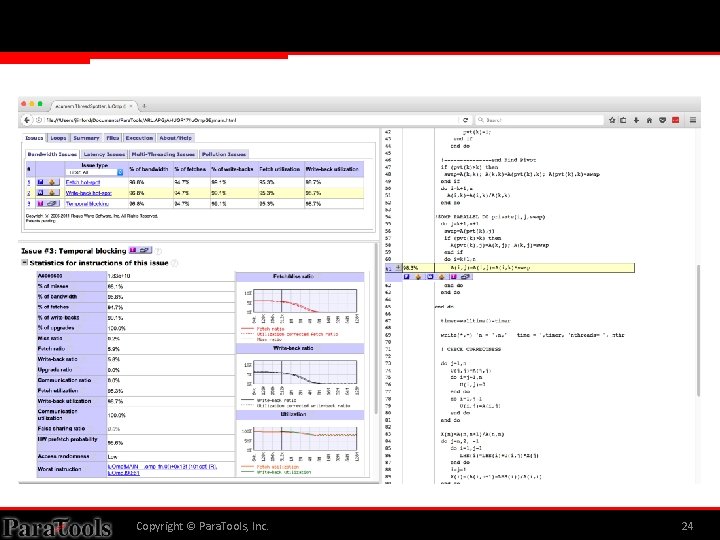
Copyright © Para. Tools, Inc. 24
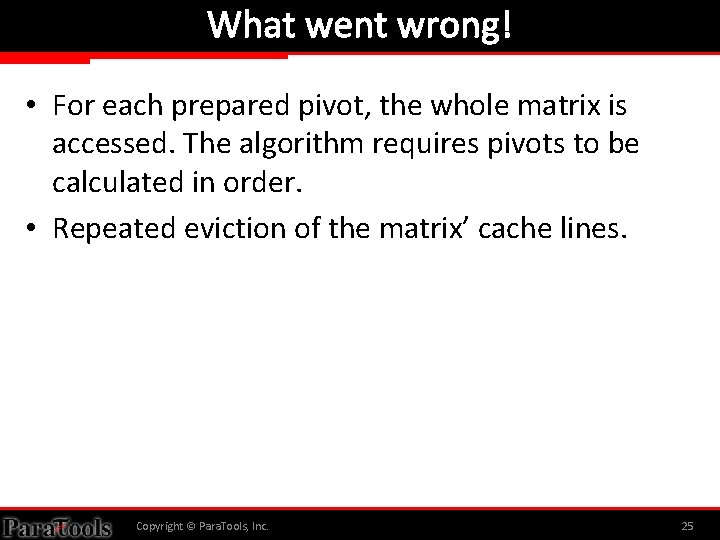
What went wrong! • For each prepared pivot, the whole matrix is accessed. The algorithm requires pivots to be calculated in order. • Repeated eviction of the matrix’ cache lines. Copyright © Para. Tools, Inc. 25
What went wrong! • For each prepared pivot, the whole matrix is accessed. The algorithm requires pivots to be calculated in order. • Repeated eviction of the matrix’ cache lines. Copyright © Para. Tools, Inc. 26
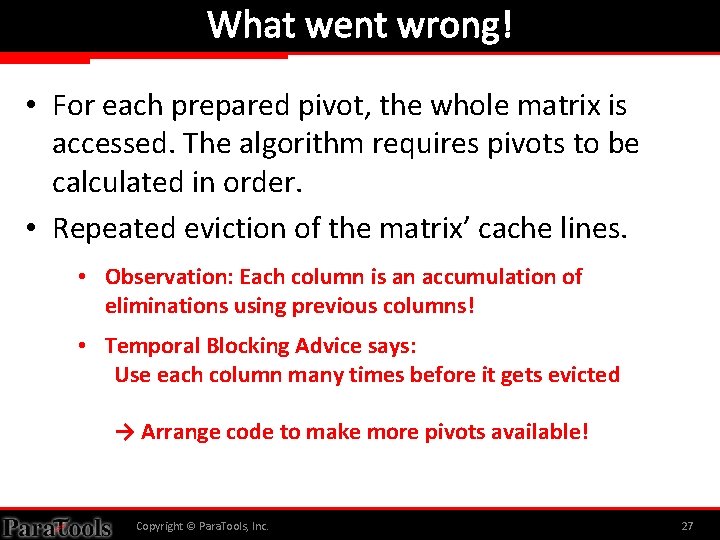
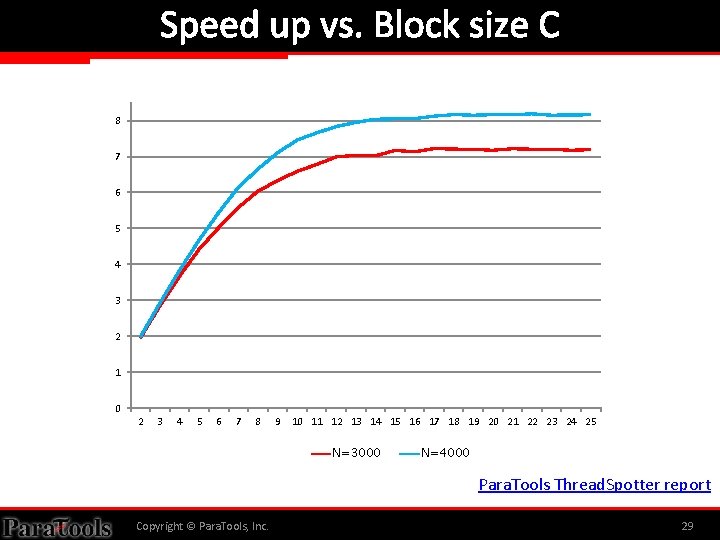
What went wrong! • For each prepared pivot, the whole matrix is accessed. The algorithm requires pivots to be calculated in order. • Repeated eviction of the matrix’ cache lines. • Observation: Each column is an accumulation of eliminations using previous columns! • Temporal Blocking Advice says: Use each column many times before it gets evicted → Arrange code to make more pivots available! Copyright © Para. Tools, Inc. 27
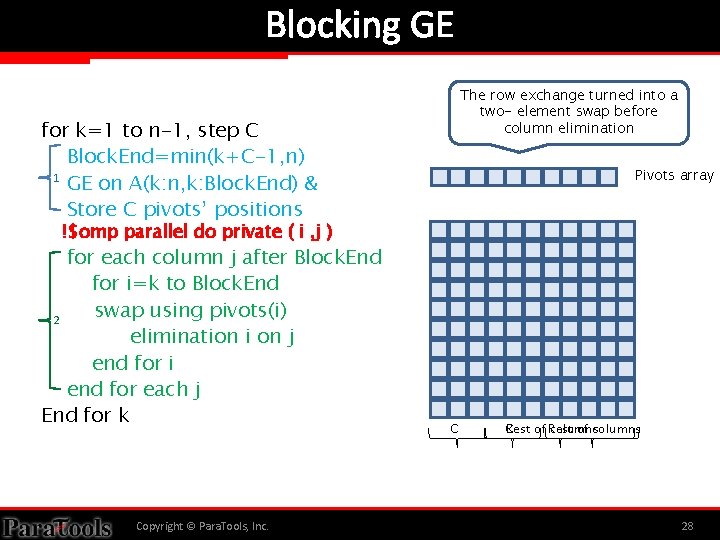
Blocking GE The row exchange turned into a two- element swap before column elimination for k=1 to n-1, step C Block. End=min(k+C-1, n) 1 GE on A(k: n, k: Block. End) & Store C pivots’ positions Pivots array !$omp parallel do private ( i , j ) for each column j after Block. End for i=k to Block. End swap using pivots(i) 2 elimination i on j end for i end for each j End for k Copyright © Para. Tools, Inc. C Rest C of Rest columns of columns 28
Speed up vs. Block size C 8 7 6 5 4 3 2 1 0 2 3 4 5 6 7 8 9 10 11 12 13 14 15 16 17 18 19 20 21 22 23 24 25 N=3000 N=4000 Para. Tools Thread. Spotter report Copyright © Para. Tools, Inc. 29
Speed up w. r. t sequential time 16 14 12 10 6. 22 x 8 6 4 2 0 1 2 3 4 5 6 Sp for blocked GE, C=10 Copyright © Para. Tools, Inc. 7 8 9 10 11 12 n. Threads Sp for original GE 30
Para. Tools, Inc. COMMAND LINE USAGE Copyright © Para. Tools, Inc. 31
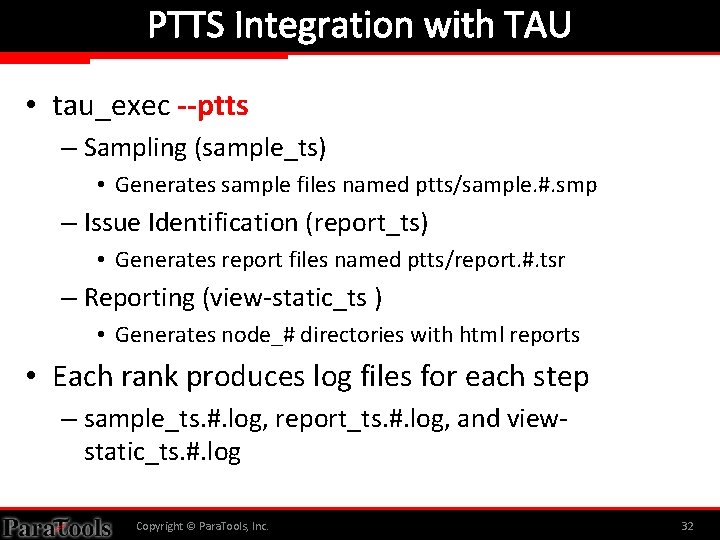
PTTS Integration with TAU • tau_exec --ptts – Sampling (sample_ts) • Generates sample files named ptts/sample. #. smp – Issue Identification (report_ts) • Generates report files named ptts/report. #. tsr – Reporting (view-static_ts ) • Generates node_# directories with html reports • Each rank produces log files for each step – sample_ts. #. log, report_ts. #. log, and viewstatic_ts. #. log Copyright © Para. Tools, Inc. 32
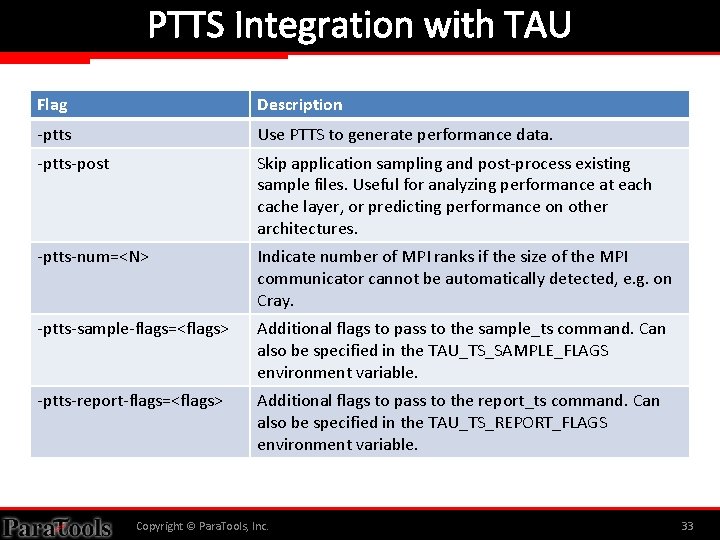
PTTS Integration with TAU Flag Description -ptts Use PTTS to generate performance data. -ptts-post Skip application sampling and post-process existing sample files. Useful for analyzing performance at each cache layer, or predicting performance on other architectures. -ptts-num=<N> Indicate number of MPI ranks if the size of the MPI communicator cannot be automatically detected, e. g. on Cray. -ptts-sample-flags=<flags> Additional flags to pass to the sample_ts command. Can also be specified in the TAU_TS_SAMPLE_FLAGS environment variable. -ptts-report-flags=<flags> Additional flags to pass to the report_ts command. Can also be specified in the TAU_TS_REPORT_FLAGS environment variable. Copyright © Para. Tools, Inc. 33
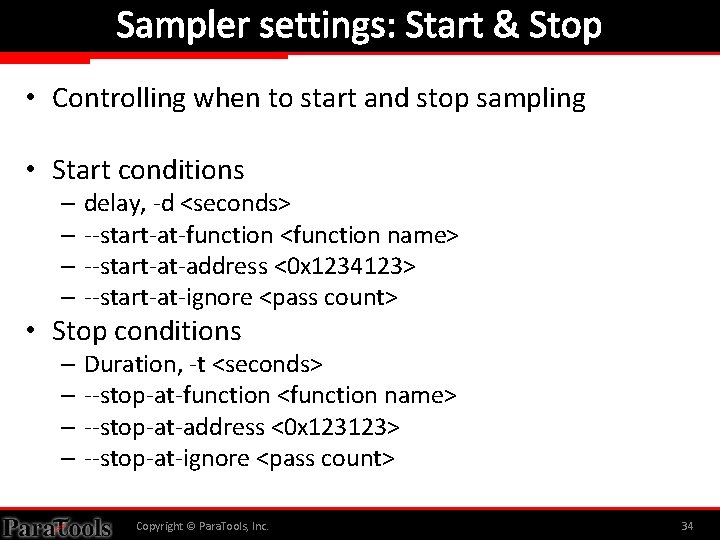
Sampler settings: Start & Stop • Controlling when to start and stop sampling • Start conditions – delay, -d <seconds> – --start-at-function <function name> – --start-at-address <0 x 1234123> – --start-at-ignore <pass count> • Stop conditions – Duration, -t <seconds> – --stop-at-function <function name> – --stop-at-address <0 x 123123> – --stop-at-ignore <pass count> Copyright © Para. Tools, Inc. 34
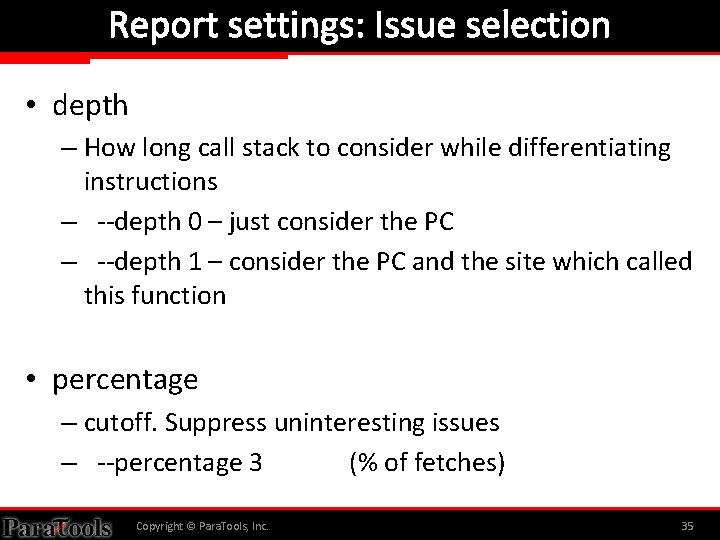
Report settings: Issue selection • depth – How long call stack to consider while differentiating instructions – --depth 0 – just consider the PC – --depth 1 – consider the PC and the site which called this function • percentage – cutoff. Suppress uninteresting issues – --percentage 3 (% of fetches) Copyright © Para. Tools, Inc. 35
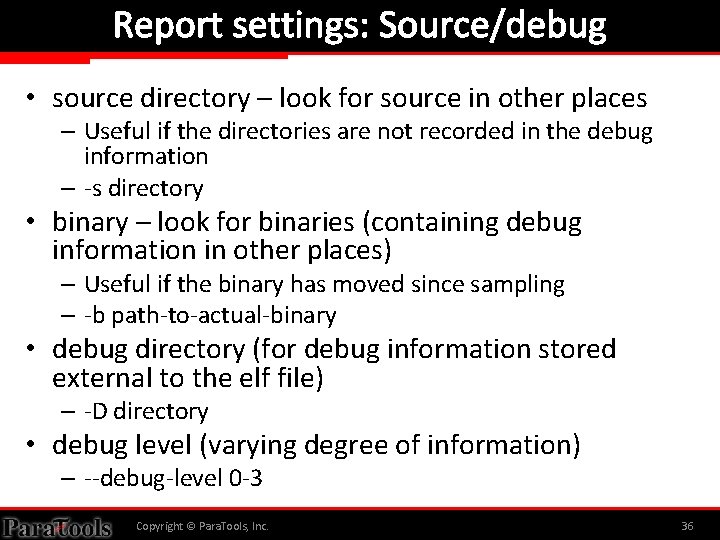
Report settings: Source/debug • source directory – look for source in other places – Useful if the directories are not recorded in the debug information – -s directory • binary – look for binaries (containing debug information in other places) – Useful if the binary has moved since sampling – -b path-to-actual-binary • debug directory (for debug information stored external to the elf file) – -D directory • debug level (varying degree of information) – --debug-level 0 -3 Copyright © Para. Tools, Inc. 36