
Introduction to Open GL What is Open GL
- Slides: 47
Introduction to Open. GL
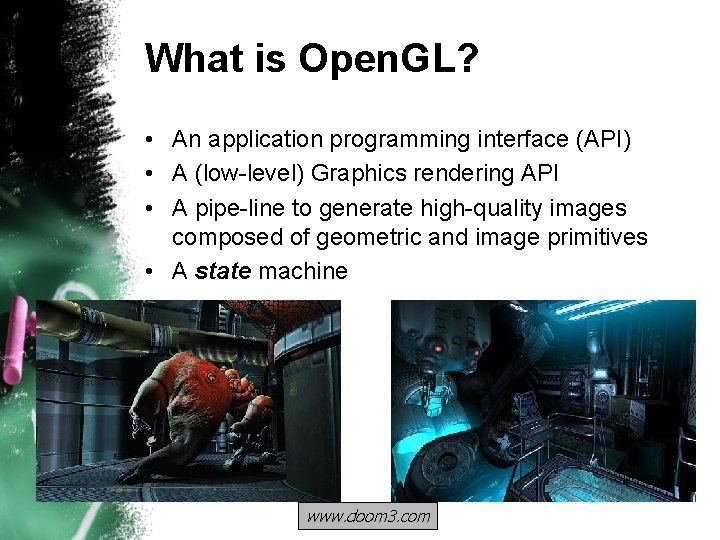
What is Open. GL? • An application programming interface (API) • A (low-level) Graphics rendering API • A pipe-line to generate high-quality images composed of geometric and image primitives • A state machine www. doom 3. com
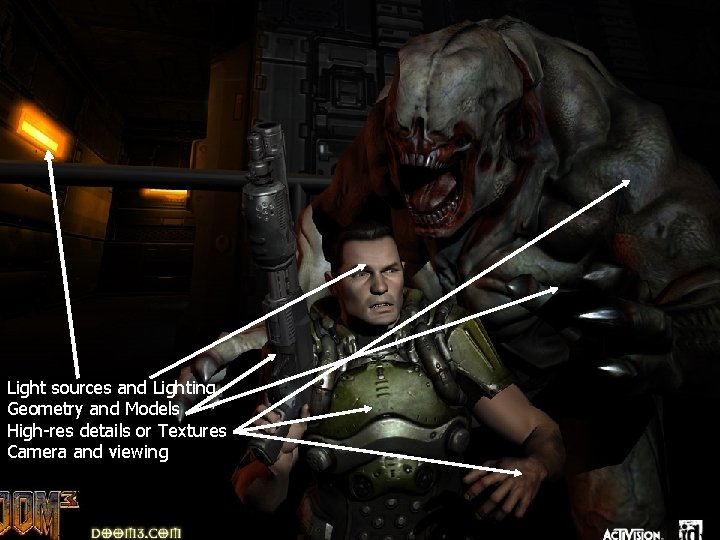
Light sources and Lighting Geometry and Models High-res details or Textures Camera and viewing
A 3 D graphics API • Separates code – Opengl 32. dll on Windows – Vendors package their own version of this library with the graphics card – Windows 2000 supports a softwareonly version of Open. GL 1. 1 out of the box
A low-level 3 D graphics API • An interface to hardware – The library knows how to interface with the card drivers to get the hardware to handle the graphics. – Anything not done in hardware is done in software
A low-level 3 D graphics API • Primitive-based – Objects consist of points, linesegments, and polygons – Open. GL is not aware of any connections between primitives – Exception • The GLU libraries include quadric and NURBS “objects” that encapsulate primitives for you
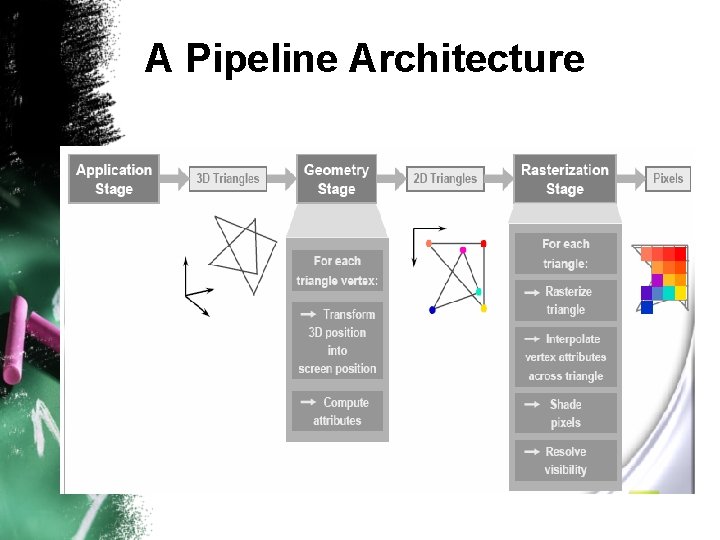
A Pipeline Architecture
A state machine • Functions are global and change the state of the Open. GL environment • State can be pushed onto stacks and popped back off • Open. GL properties remain as you set them until you set them again
Open. GL Is Not • A modeling language • Compiled directly into your code • Object-oriented
Getting Started - Syntax • Open. GL core functions are prefixed with gl • Open. GL utility functions are prefixed with glu • Open. GL typedef defined types are prefixed with GL • Open. GL constants are all caps and prefixed with GL_
History of the 3 D graphics industry • 1960 s: – Line drawings, hidden lines, parametric surfaces (Bsplines…) – Automated drafting & machining for car, airplane, and ships manufacturers • 1970’s: – Mainframes, Vector tubes (HP…) – Software: Solids, (CSG), Ray Tracing, Z-buffer for hidden lines • 1980 s: – Graphics workstations ($50 K-$1 M): Frame buffers, rasterizers , GL, Phigs – VR: CAVEs and head-mounted displays – CAD/CAM & GIS: CATIA, SDRC, PTC – Sun, HP, IBM, SGI, E&S, DEC
History of the 3 D graphics industry • 1990 s: – PCs ($2 K): Graphics boards, Open. GL, Java 3 D – CAD+Videogames+Animations: Auto. CAD, Solid. Works…, Alias-Wavefront – Intel, many board vendors • 2000 s: – Laptops, PDAs, Cell Phones: Parallel graphic chips – Everything will be graphics, 3 D, animated, interactive – Nvidia, Sony, Nokia
Why Open. GL? • Cross-platform. • Better / easier to teach. – Academically oriented textbooks, etc. – Has existed long before other API’s. • Hardware-based device drivers widely supported. • Captures the low-level pipeline.
Other API’s? • Microsoft’s Direct 3 D (Direct. X) – Also captures the low-level pipeline. – I expect you to pick up a book and easily transition from Open. GL to Direct 3 D. • Java 3 D – – A scenegraph-based API. Object oriented. Sits on top of Open. GL. Learning Open. GL will assist your understanding.
Other API’s • PHIGS / PHIGS-Plus – THE official standard (ANSI, ISO). – National and international standards bodies could not keep pace with the rapid growth in graphics hardware functionality. – Not necessarily interested in advancing the field. – I was on the ANSI PHIGS-Plus committee in the late 1980’s.
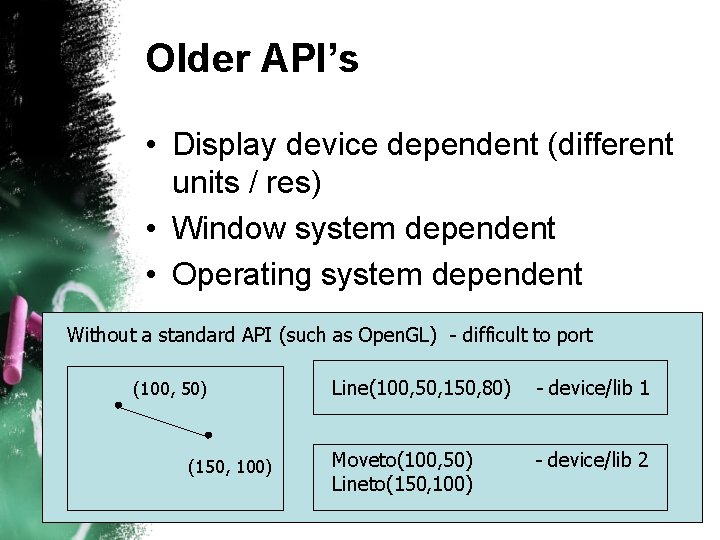
Older API’s • Display device dependent (different units / res) • Window system dependent • Operating system dependent Without a standard API (such as Open. GL) - difficult to port (100, 50) (150, 100) Line(100, 50, 150, 80) - device/lib 1 Moveto(100, 50) Lineto(150, 100) - device/lib 2
Open. GL Basics • Open. GL’s primary functions – – Geometric description of objects. Composition or lay-out of objects. Color specification and lighting calculations Rasterization or sampling – calculating the pixel color and depth values from the above mathematical descriptions. • Open. GL can render: – Geometric primitives – Bitmaps and Images (Raster primitives)
Computer Graphics v. Open. GL • Computer Graphics – Object or model creation – Data management / optimization – Mapping from abstract of mathematical entities to low-level geometric primitives – Specifying and controlling the environment (lighting, appearance, etc. ) – Dynamic or time-varying behavior. – User-interaction / user interfaces for the above. • Bottom-line: Open. GL is usually a small part of your application => porting not that hard.
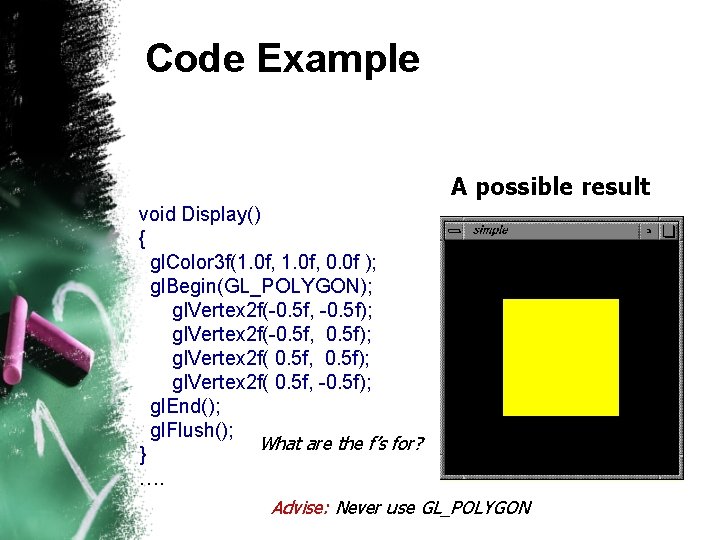
Code Example A possible result void Display() { gl. Color 3 f(1. 0 f, 0. 0 f ); gl. Begin(GL_POLYGON); gl. Vertex 2 f(-0. 5 f, -0. 5 f); gl. Vertex 2 f(-0. 5 f, 0. 5 f); gl. Vertex 2 f( 0. 5 f, -0. 5 f); gl. End(); gl. Flush(); What are the f’s for? } …. Advise: Never use GL_POLYGON
Specifying Geometric primitives • Primitives are specified using – – gl. Begin(prim. Type); // define your vertices here … gl. End(); • prim. Type: GL_POINTS, GL_LINES, GL_TRIANGLES, GL_QUADS, …
Open. GL: Front/Back Rendering • Each polygon has two sides, front and back • Open. GL can render the two differently • The ordering of vertices in the list determines which is the front side: – When looking at the front side, the vertices go counterclockwise • This is basically the right-hand rule • Note that this still holds after perspective projection
Open. GL: Drawing Triangles • You can draw multiple triangles between gl. Begin(GL_TRIANGLES) and gl. End(): – – – float v 1[3], v 2[3], v 3[3], v 4[3]; . . . gl. Begin(GL_TRIANGLES); gl. Vertex 3 fv(v 1); gl. Vertex 3 fv(v 2); gl. Vertex 3 fv(v 3); gl. Vertex 3 fv(v 1); gl. Vertex 3 fv(v 3); gl. Vertex 3 fv(v 4); gl. End(); • The same vertex is used (sent, transformed, colored) many times (6 on average)
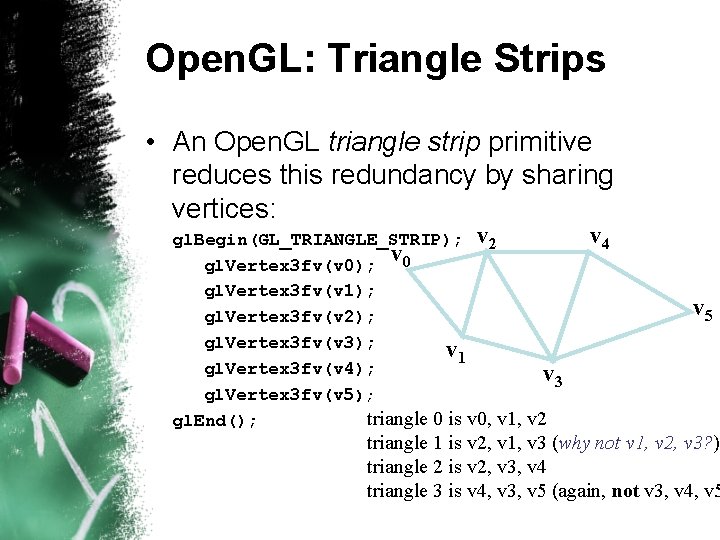
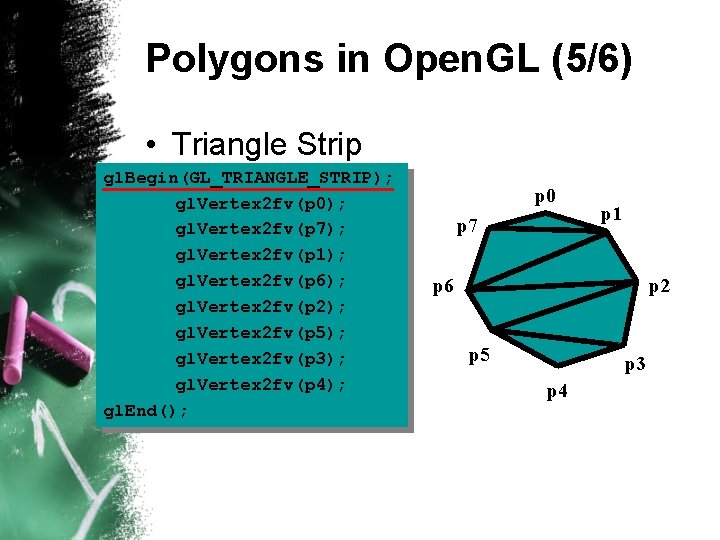
Open. GL: Triangle Strips • An Open. GL triangle strip primitive reduces this redundancy by sharing vertices: gl. Begin(GL_TRIANGLE_STRIP); v 2 v gl. Vertex 3 fv(v 0); 0 gl. Vertex 3 fv(v 1); gl. Vertex 3 fv(v 2); gl. Vertex 3 fv(v 3); v 1 gl. Vertex 3 fv(v 4); v 3 gl. Vertex 3 fv(v 5); triangle 0 is v 0, v 1, v 2 gl. End(); v 4 v 5 triangle 1 is v 2, v 1, v 3 (why not v 1, v 2, v 3? ) triangle 2 is v 2, v 3, v 4 triangle 3 is v 4, v 3, v 5 (again, not v 3, v 4, v 5
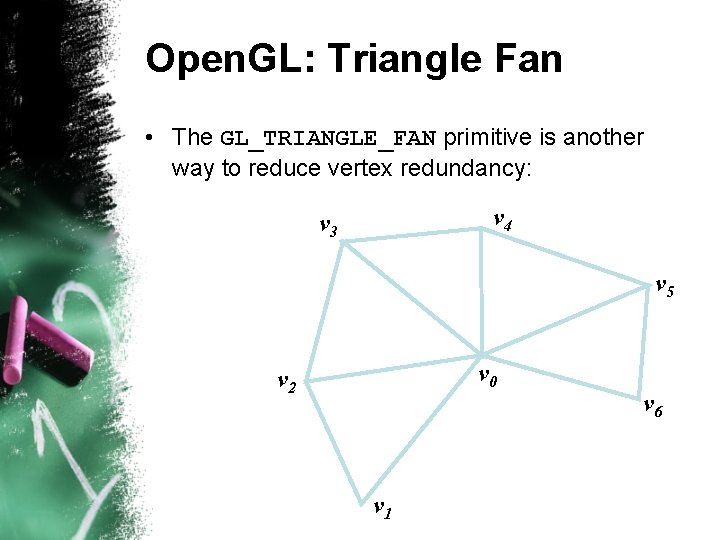
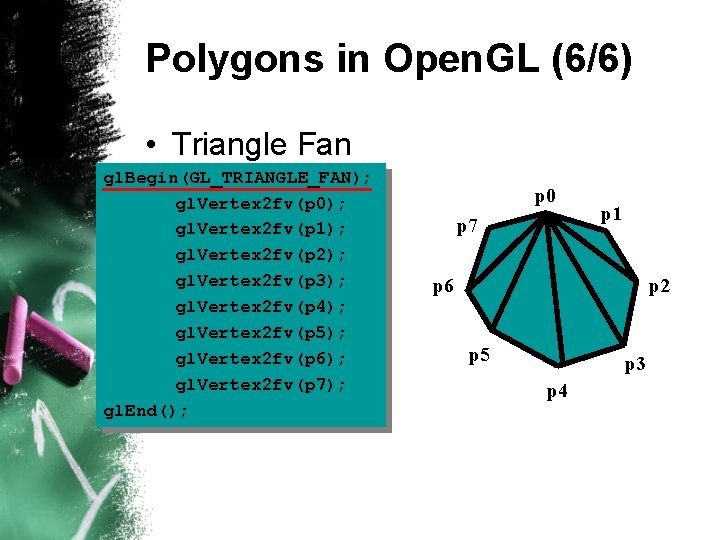
Open. GL: Triangle Fan • The GL_TRIANGLE_FAN primitive is another way to reduce vertex redundancy: v 4 v 3 v 5 v 0 v 2 v 1 v 6
Open. GL: Other Primitives • You can draw other primitives using: – GL_POINTS – GL_LINE_STRIP – GL_LINE_LOOP – GL_QUADS –…
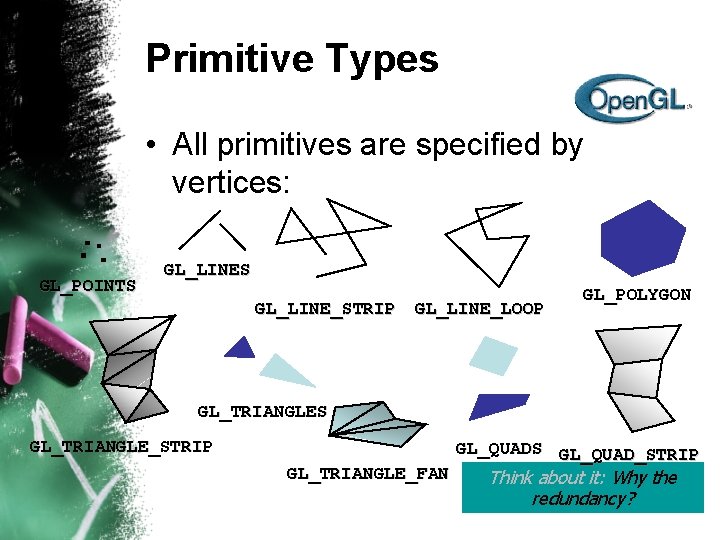
Primitive Types • All primitives are specified by vertices: GL_POINTS GL_LINE_STRIP GL_LINE_LOOP GL_POLYGON GL_TRIANGLES GL_TRIANGLE_STRIP GL_TRIANGLE_FAN GL_QUADS GL_QUAD_STRIP Think about it: Why the redundancy?
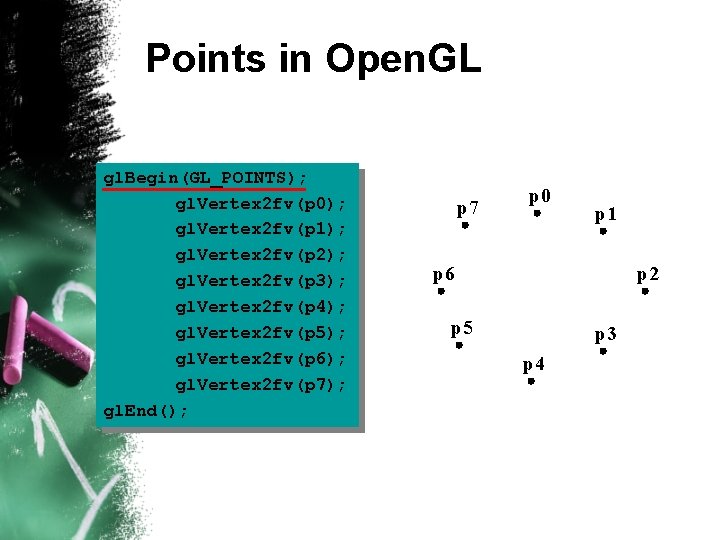
Points in Open. GL gl. Begin(GL_POINTS); gl. Vertex 2 fv(p 0); gl. Vertex 2 fv(p 1); gl. Vertex 2 fv(p 2); gl. Vertex 2 fv(p 3); gl. Vertex 2 fv(p 4); gl. Vertex 2 fv(p 5); gl. Vertex 2 fv(p 6); gl. Vertex 2 fv(p 7); gl. End(); p 7 p 0 p 1 p 6 p 2 p 5 p 3 p 4
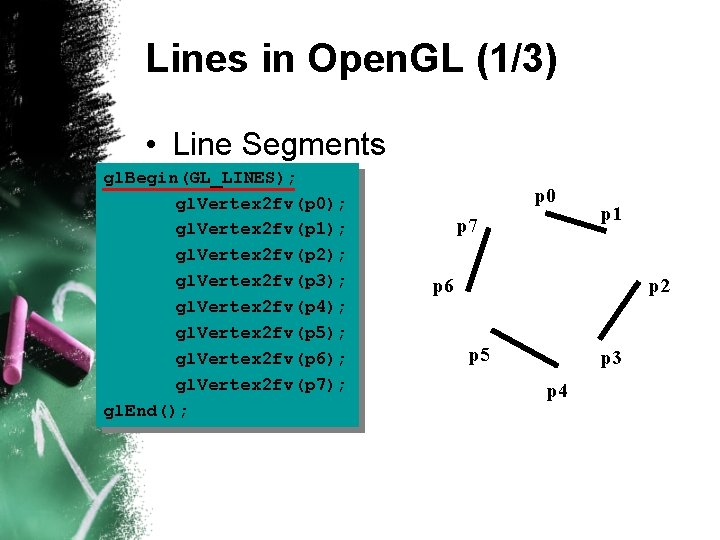
Lines in Open. GL (1/3) • Line Segments gl. Begin(GL_LINES); gl. Vertex 2 fv(p 0); gl. Vertex 2 fv(p 1); gl. Vertex 2 fv(p 2); gl. Vertex 2 fv(p 3); gl. Vertex 2 fv(p 4); gl. Vertex 2 fv(p 5); gl. Vertex 2 fv(p 6); gl. Vertex 2 fv(p 7); gl. End(); p 0 p 7 p 1 p 6 p 2 p 5 p 3 p 4
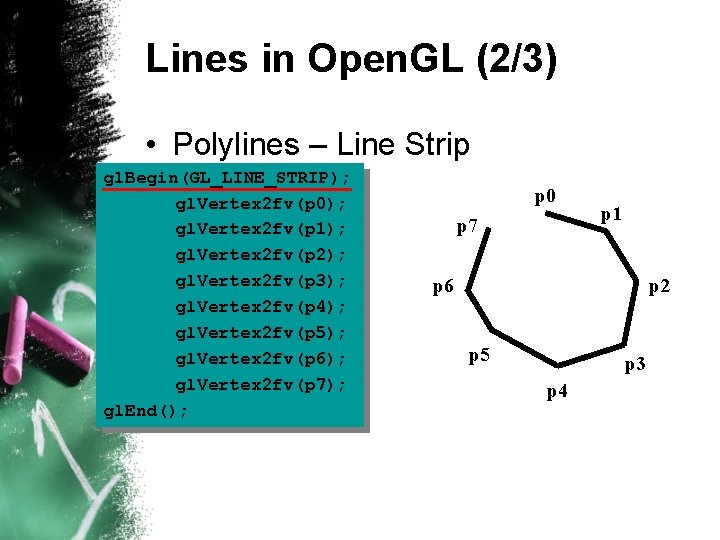
Lines in Open. GL (2/3) • Polylines – Line Strip gl. Begin(GL_LINE_STRIP); gl. Vertex 2 fv(p 0); gl. Vertex 2 fv(p 1); gl. Vertex 2 fv(p 2); gl. Vertex 2 fv(p 3); gl. Vertex 2 fv(p 4); gl. Vertex 2 fv(p 5); gl. Vertex 2 fv(p 6); gl. Vertex 2 fv(p 7); gl. End(); p 0 p 7 p 1 p 6 p 2 p 5 p 3 p 4
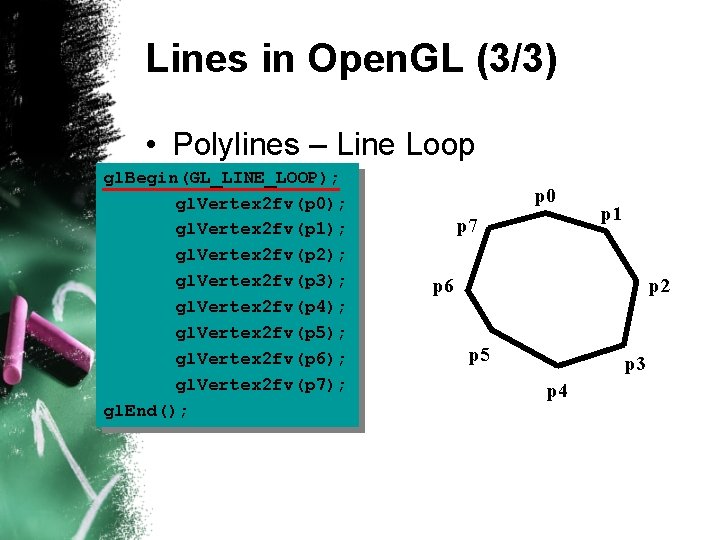
Lines in Open. GL (3/3) • Polylines – Line Loop gl. Begin(GL_LINE_LOOP); gl. Vertex 2 fv(p 0); gl. Vertex 2 fv(p 1); gl. Vertex 2 fv(p 2); gl. Vertex 2 fv(p 3); gl. Vertex 2 fv(p 4); gl. Vertex 2 fv(p 5); gl. Vertex 2 fv(p 6); gl. Vertex 2 fv(p 7); gl. End(); p 0 p 7 p 1 p 6 p 2 p 5 p 3 p 4
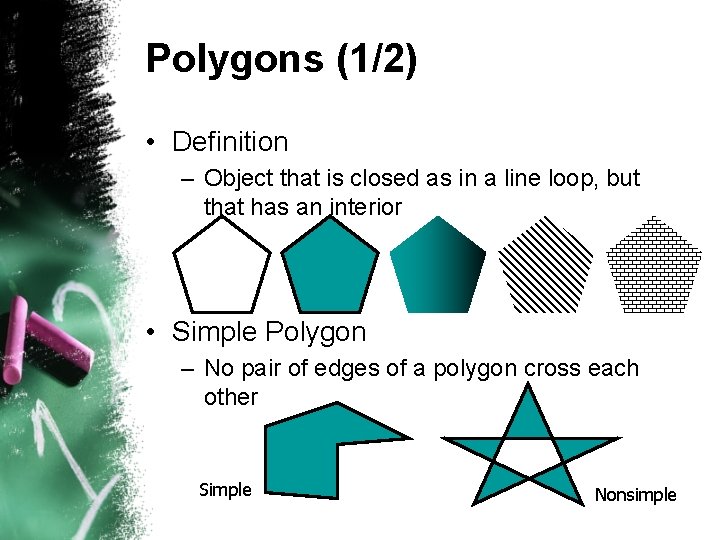
Polygons (1/2) • Definition – Object that is closed as in a line loop, but that has an interior • Simple Polygon – No pair of edges of a polygon cross each other Simple Nonsimple
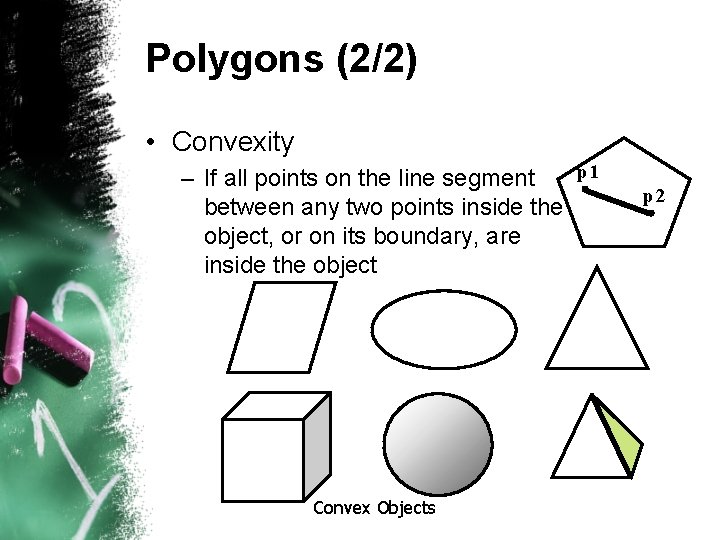
Polygons (2/2) • Convexity p 1 – If all points on the line segment between any two points inside the object, or on its boundary, are inside the object Convex Objects p 2
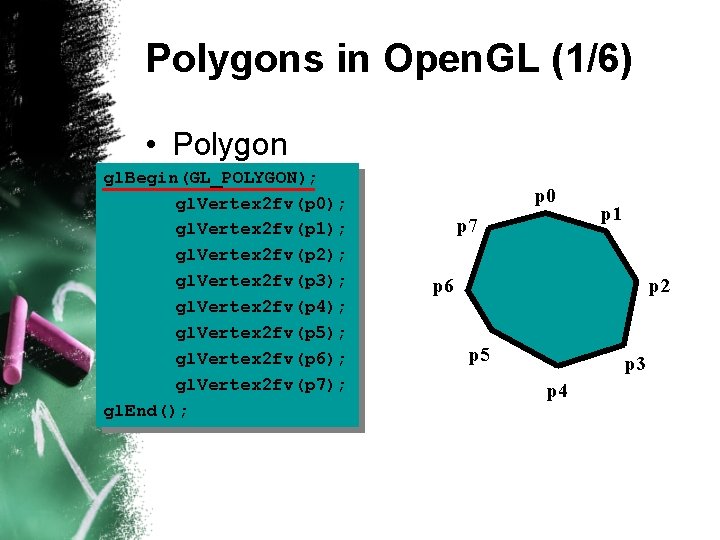
Polygons in Open. GL (1/6) • Polygon gl. Begin(GL_POLYGON); gl. Vertex 2 fv(p 0); gl. Vertex 2 fv(p 1); gl. Vertex 2 fv(p 2); gl. Vertex 2 fv(p 3); gl. Vertex 2 fv(p 4); gl. Vertex 2 fv(p 5); gl. Vertex 2 fv(p 6); gl. Vertex 2 fv(p 7); gl. End(); p 0 p 7 p 1 p 6 p 2 p 5 p 3 p 4
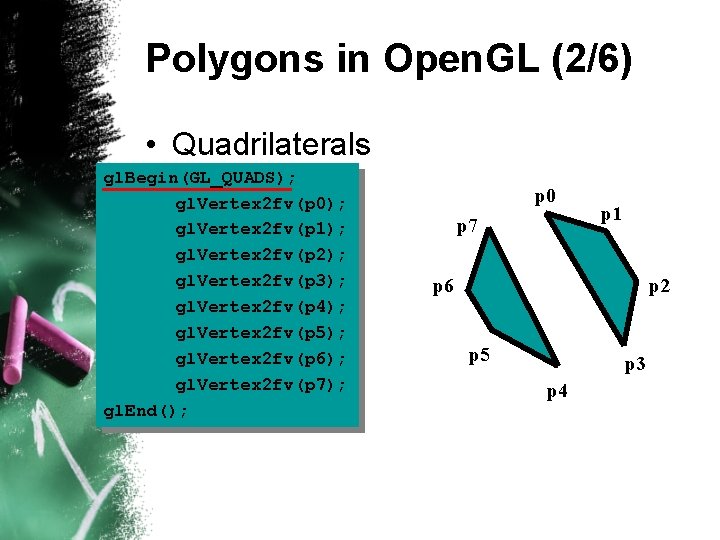
Polygons in Open. GL (2/6) • Quadrilaterals gl. Begin(GL_QUADS); gl. Vertex 2 fv(p 0); gl. Vertex 2 fv(p 1); gl. Vertex 2 fv(p 2); gl. Vertex 2 fv(p 3); gl. Vertex 2 fv(p 4); gl. Vertex 2 fv(p 5); gl. Vertex 2 fv(p 6); gl. Vertex 2 fv(p 7); gl. End(); p 0 p 7 p 1 p 6 p 2 p 5 p 3 p 4
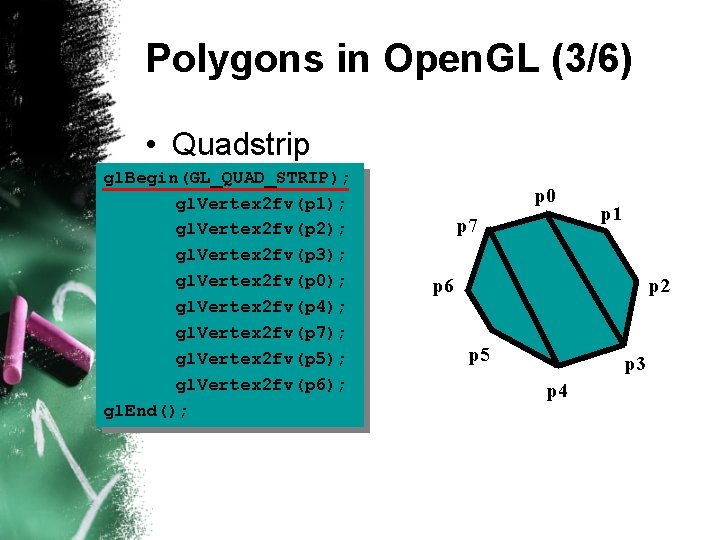
Polygons in Open. GL (3/6) • Quadstrip gl. Begin(GL_QUAD_STRIP); gl. Vertex 2 fv(p 1); gl. Vertex 2 fv(p 2); gl. Vertex 2 fv(p 3); gl. Vertex 2 fv(p 0); gl. Vertex 2 fv(p 4); gl. Vertex 2 fv(p 7); gl. Vertex 2 fv(p 5); gl. Vertex 2 fv(p 6); gl. End(); p 0 p 7 p 1 p 6 p 2 p 5 p 3 p 4
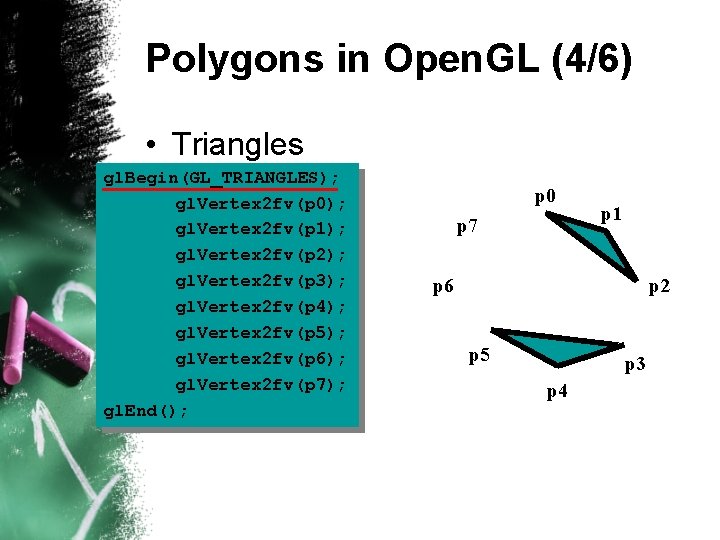
Polygons in Open. GL (4/6) • Triangles gl. Begin(GL_TRIANGLES); gl. Vertex 2 fv(p 0); gl. Vertex 2 fv(p 1); gl. Vertex 2 fv(p 2); gl. Vertex 2 fv(p 3); gl. Vertex 2 fv(p 4); gl. Vertex 2 fv(p 5); gl. Vertex 2 fv(p 6); gl. Vertex 2 fv(p 7); gl. End(); p 0 p 7 p 1 p 6 p 2 p 5 p 3 p 4
Polygons in Open. GL (5/6) • Triangle Strip gl. Begin(GL_TRIANGLE_STRIP); gl. Vertex 2 fv(p 0); gl. Vertex 2 fv(p 7); gl. Vertex 2 fv(p 1); gl. Vertex 2 fv(p 6); gl. Vertex 2 fv(p 2); gl. Vertex 2 fv(p 5); gl. Vertex 2 fv(p 3); gl. Vertex 2 fv(p 4); gl. End(); p 0 p 7 p 1 p 6 p 2 p 5 p 3 p 4
Polygons in Open. GL (6/6) • Triangle Fan gl. Begin(GL_TRIANGLE_FAN); gl. Vertex 2 fv(p 0); gl. Vertex 2 fv(p 1); gl. Vertex 2 fv(p 2); gl. Vertex 2 fv(p 3); gl. Vertex 2 fv(p 4); gl. Vertex 2 fv(p 5); gl. Vertex 2 fv(p 6); gl. Vertex 2 fv(p 7); gl. End(); p 0 p 7 p 1 p 6 p 2 p 5 p 3 p 4
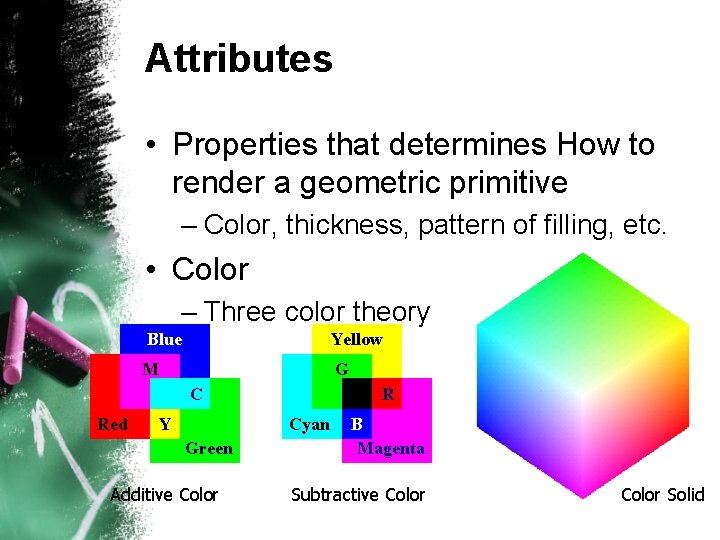
Attributes • Properties that determines How to render a geometric primitive – Color, thickness, pattern of filling, etc. • Color – Three color theory Blue Yellow M G C Red R Cyan Y Green Additive Color B Magenta Subtractive Color Solid
Open. GL’s State Machine • All rendering attributes are encapsulated in the Open. GL State – rendering styles – shading – lighting – texture mapping
Manipulating Open. GL State • Appearance is controlled by current state – for each ( primitive to render ) { • • – update Open. GL state render primitive } • Manipulating vertex attributes is the most common way to manipulate state • gl. Color*() / gl. Index*() • gl. Normal*() • gl. Tex. Coord*()
Controlling current state • Setting State • gl. Point. Size( size ); • gl. Line. Stipple( repeat, pattern ); • gl. Shade. Model( GL_SMOOTH ); • Enabling Features • gl. Enable( GL_LIGHTING ); • gl. Disable( GL_TEXTURE_2 D );
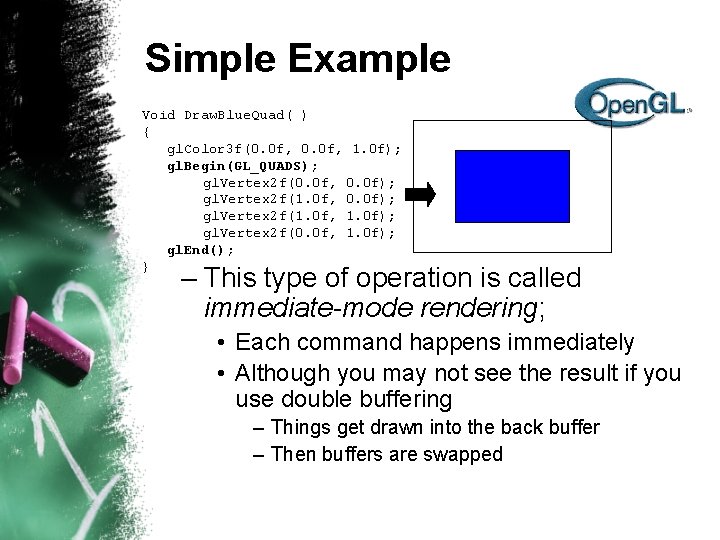
Simple Example Void Draw. Blue. Quad( ) { gl. Color 3 f(0. 0 f, 1. 0 f); gl. Begin(GL_QUADS); gl. Vertex 2 f(0. 0 f, 0. 0 f); gl. Vertex 2 f(1. 0 f, 1. 0 f); gl. Vertex 2 f(0. 0 f, 1. 0 f); gl. End(); } – This type of operation is called immediate-mode rendering; • Each command happens immediately • Although you may not see the result if you use double buffering – Things get drawn into the back buffer – Then buffers are swapped
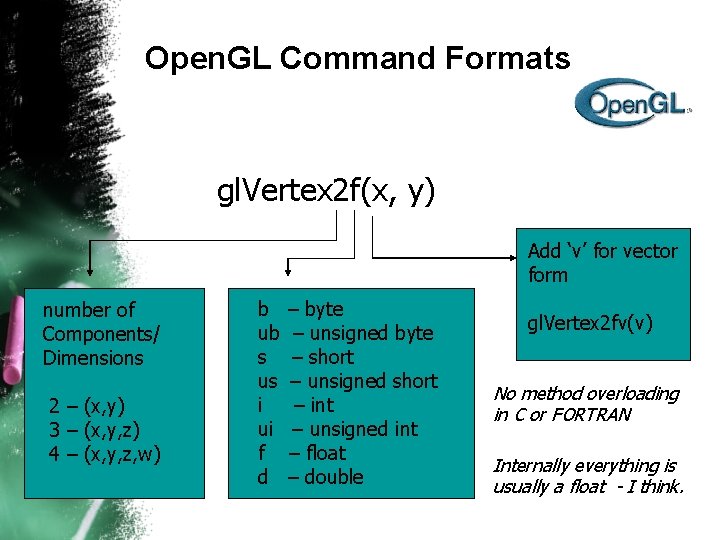
Open. GL Command Formats gl. Vertex 2 f(x, y) Add ‘v’ for vector form number of Components/ Dimensions 2 – (x, y) 3 – (x, y, z) 4 – (x, y, z, w) b ub s us i ui f d – byte – unsigned byte – short – unsigned short – int – unsigned int – float – double gl. Vertex 2 fv(v) No method overloading in C or FORTRAN Internally everything is usually a float - I think.
Open. GL: Specifying Color • Can specify other properties such as color – To produce a single aqua-colored triangle: gl. Color 3 f(0. 1, 0. 5, 1. 0); gl. Vertex 3 fv(v 1); gl. Vertex 3 fv(v 2); – To produce a smoothly shaded triangle: gl. Color 3 f(1, 0, 0); gl. Vertex 3 fv(v 0); gl. Color 3 f(0, 1, 0); gl. Vertex 3 fv(v 1); gl. Color 3 f(0, 0, 1); gl. Vertex 3 fv(v 2); – In Open. GL, colors can also have a fourth component (opacity or 1 -transparency) • Generally want = 1. 0 (opaque);
Window system independent • Open. GL is window system independent – No window management functions – create windows, resize windows, event handling, etc – This is to ensure the application’s portability – Creates some headaches though – a pure Open. GL program won’t work anywhere.
More APIs are needed • • X window system: GLX Apple Macintosh: AGL Microsoft Windows: WGL Additional libraries are needed to create Graphical User Interface (GUI) elements, such as sliders, buttons, menus, etc. • Problem – you need to learn and implement them all to write truly portable software