
Introduction to Object Modeling Objectoriented analysis OOA an
Introduction to Object Modeling Object-oriented analysis (OOA) – an approach used to 1. study existing objects to see if they can be reused or adapted for new uses 2. define new or modified objects that will be combined with existing objects into a useful business computing application Object modeling – a technique for identifying objects within the systems environment and the relationships between those objects. 1
Introduction to the UML Unified Modeling Language (UML) – a set of modeling conventions that is used to specify or describe a software system in terms of objects. • The UML does not prescribe a method for developing systems—only a notation that is now widely accepted as a standard for object modeling. 2
Objects & Attributes Object – something that is or is capable of being seen, touched, or otherwise sensed, and about which users store data and associate behavior. • • Person, place, thing, or event Employee, customer, instructor, student Warehouse, office, building, room Product, vehicle, computer, videotape Attribute – the data that represent characteristics of interest about an object. 3
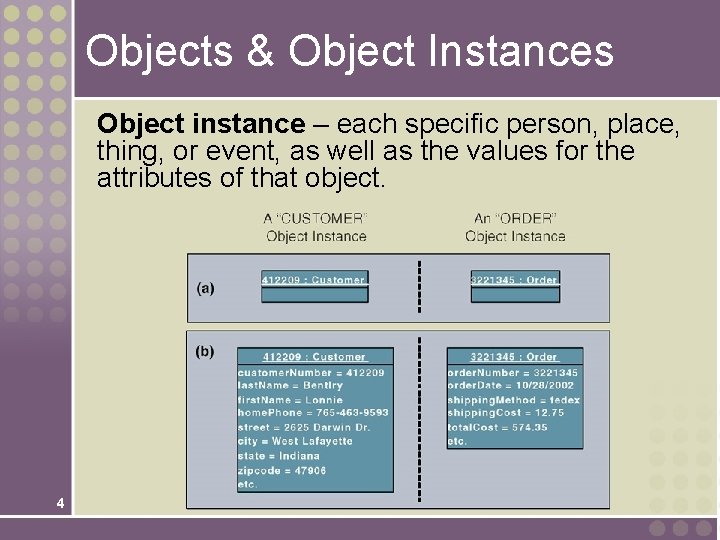
Objects & Object Instances Object instance – each specific person, place, thing, or event, as well as the values for the attributes of that object. 4
Behavior & Encapsulation Behavior – the set of things that the object can do that correspond to functions that act on the object’s data (or attributes). • In object-oriented circles, an object’s behavior is commonly referred to as a method, operation, or service. Encapsulation – the packaging of several items together into one unit. 5
Object Classes Object Class – a set of objects that share common attributes and behavior. Sometimes referred to as a class. 6
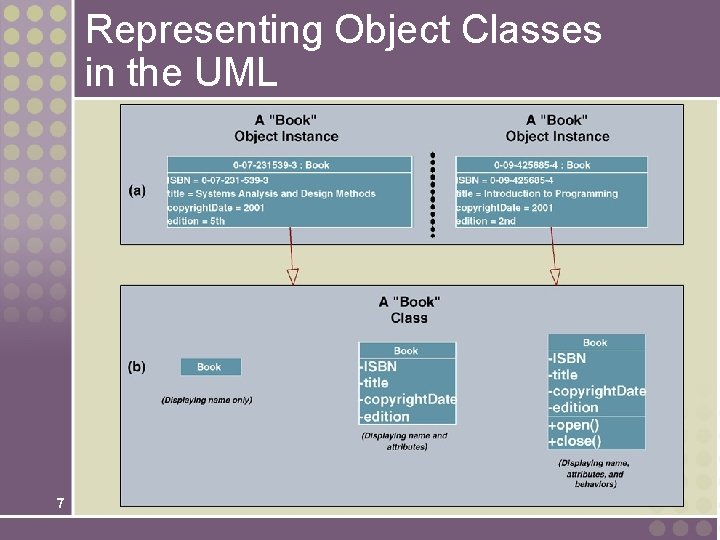
Representing Object Classes in the UML 7
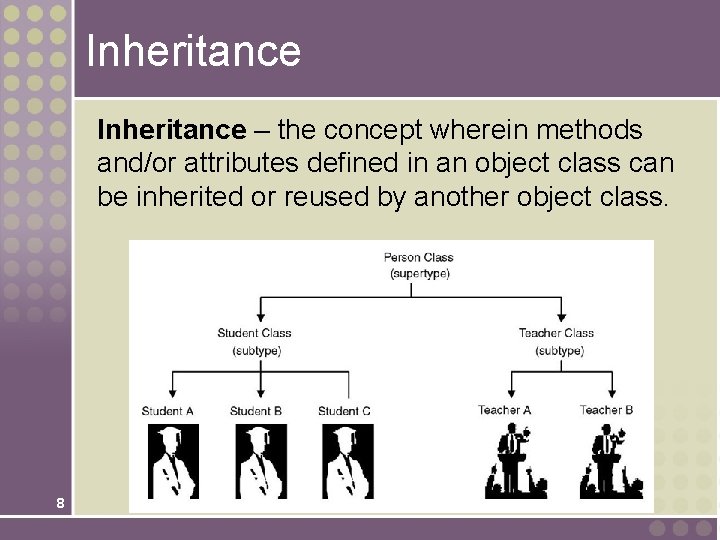
Inheritance – the concept wherein methods and/or attributes defined in an object class can be inherited or reused by another object class. 8
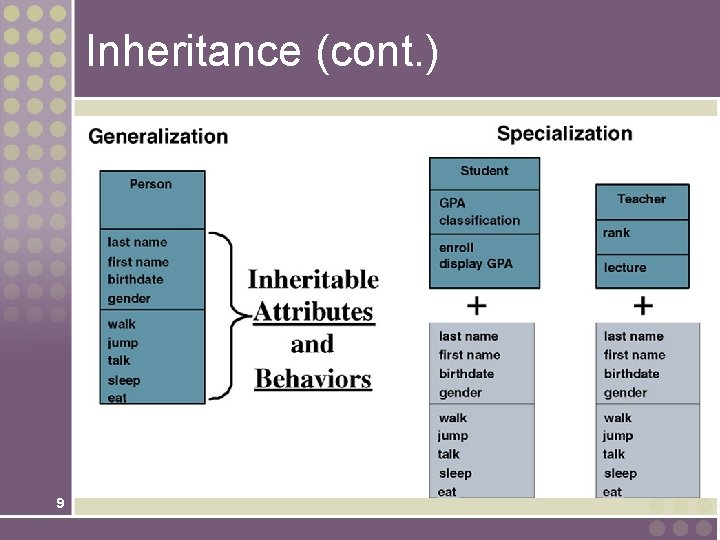
Inheritance (cont. ) 9
Generalization/Specialization, Supertype, and Subtype Generalization/specialization – technique wherein attributes and behaviors common to several types of object classes are grouped (or abstracted) into their own class, called a supertype. Supertype – an entity that contains attributes and behaviors that are common to one or more class subtypes. Also referred to as abstract or parent class. Subtype – an object class that inherits attributes and behaviors from a supertype class and may contain other attributes and behaviors unique to it. Also referred to as a child class and, if it exists at the lowest level of the inheritance hierarchy, as concrete class. 10
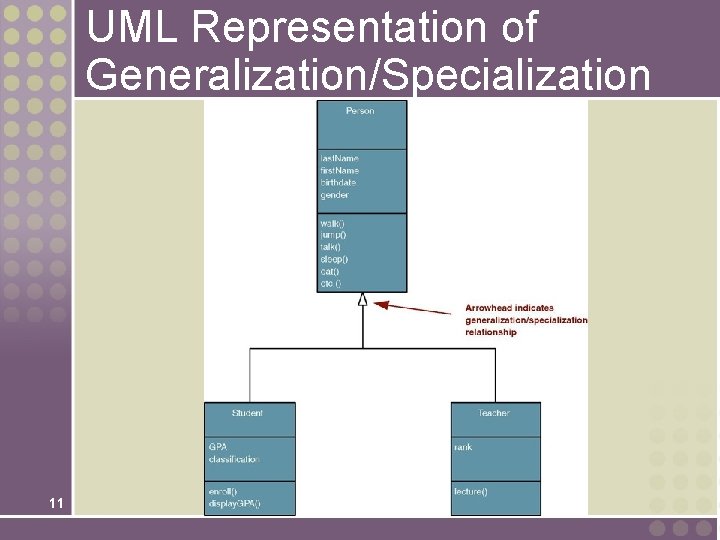
UML Representation of Generalization/Specialization 11
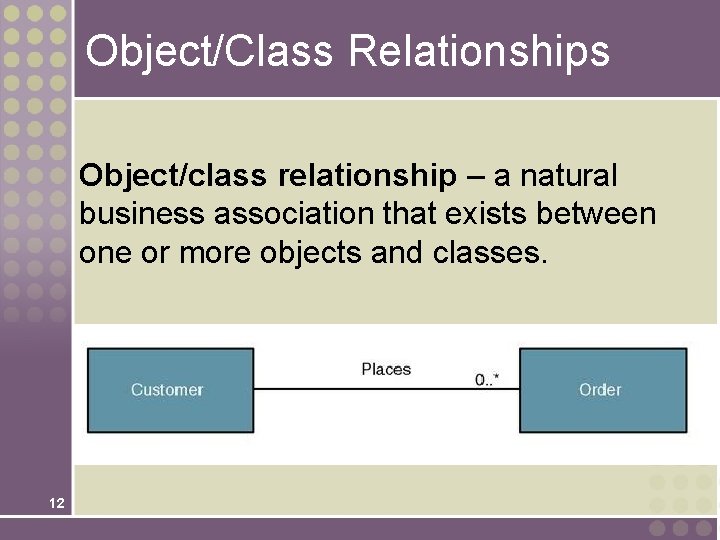
Object/Class Relationships Object/class relationship – a natural business association that exists between one or more objects and classes. 12
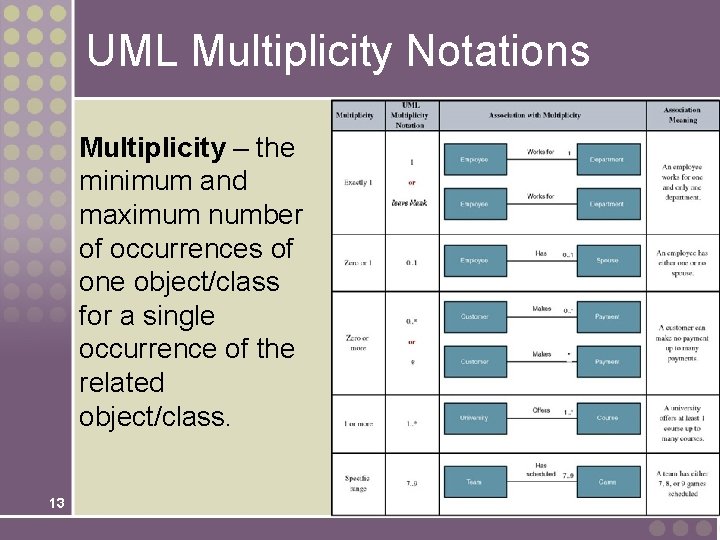
UML Multiplicity Notations Multiplicity – the minimum and maximum number of occurrences of one object/class for a single occurrence of the related object/class. 13
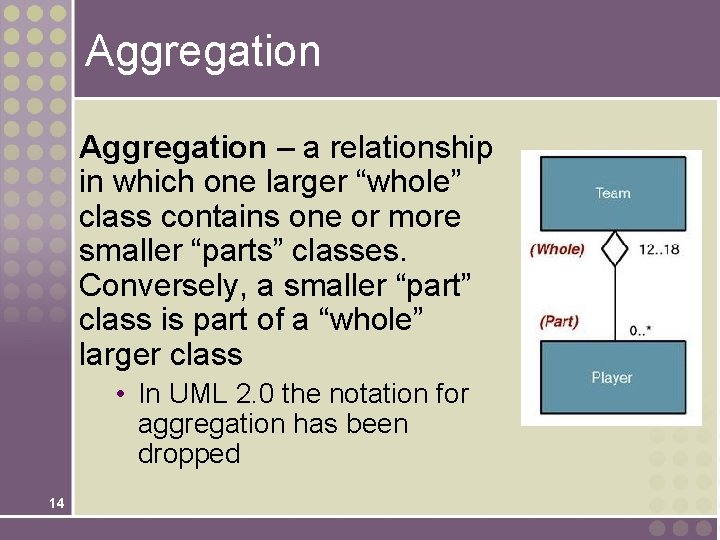
Aggregation – a relationship in which one larger “whole” class contains one or more smaller “parts” classes. Conversely, a smaller “part” class is part of a “whole” larger class • In UML 2. 0 the notation for aggregation has been dropped 14
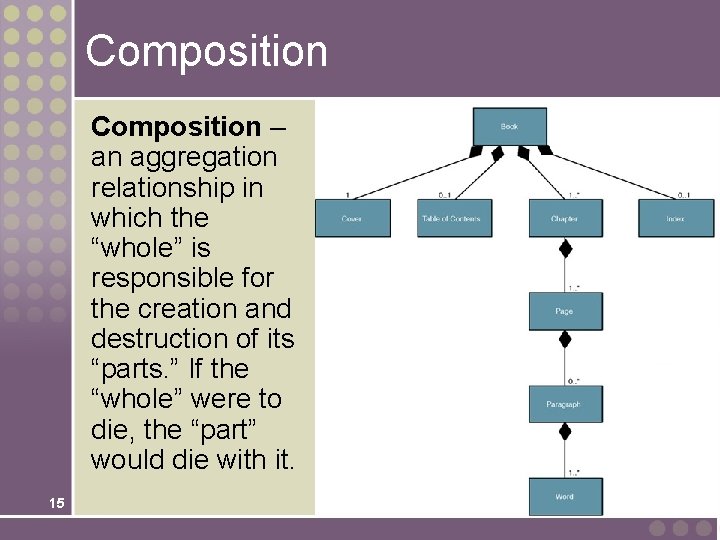
Composition – an aggregation relationship in which the “whole” is responsible for the creation and destruction of its “parts. ” If the “whole” were to die, the “part” would die with it. 15
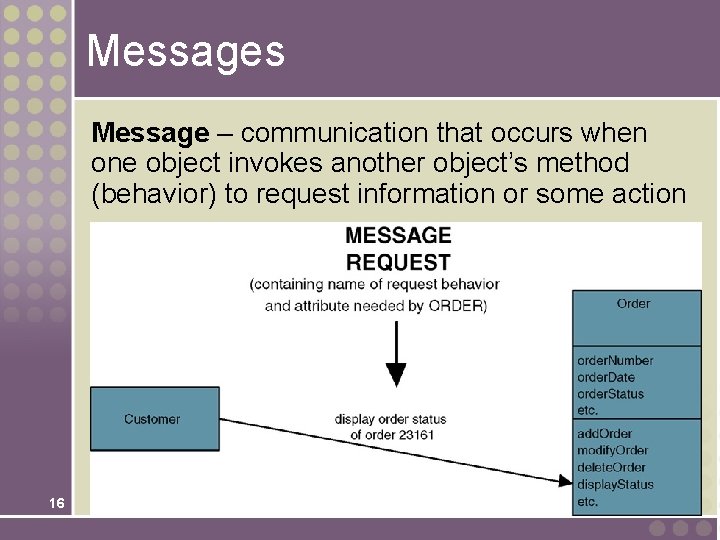
Messages Message – communication that occurs when one object invokes another object’s method (behavior) to request information or some action 16
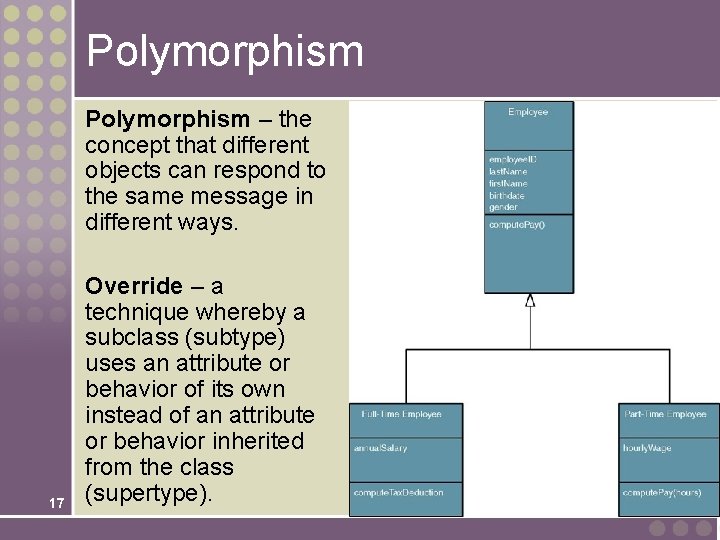
Polymorphism – the concept that different objects can respond to the same message in different ways. 17 Override – a technique whereby a subclass (subtype) uses an attribute or behavior of its own instead of an attribute or behavior inherited from the class (supertype).
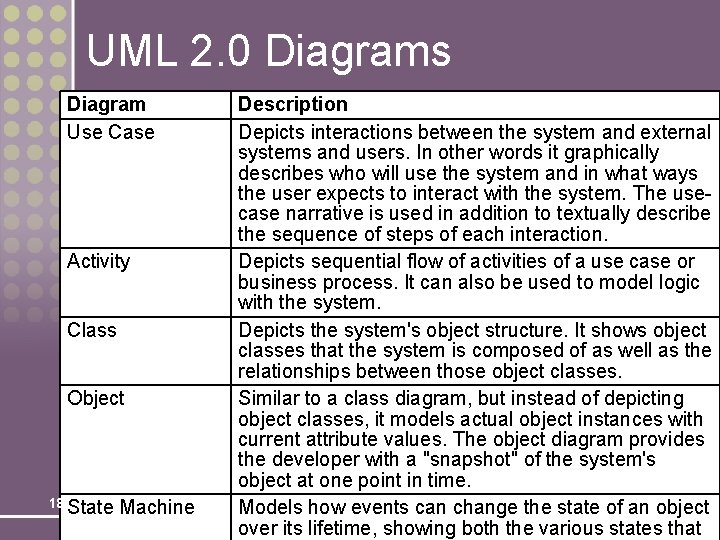
UML 2. 0 Diagrams Diagram Use Case Activity Class Object 18 State Machine Description Depicts interactions between the system and external systems and users. In other words it graphically describes who will use the system and in what ways the user expects to interact with the system. The usecase narrative is used in addition to textually describe the sequence of steps of each interaction. Depicts sequential flow of activities of a use case or business process. It can also be used to model logic with the system. Depicts the system's object structure. It shows object classes that the system is composed of as well as the relationships between those object classes. Similar to a class diagram, but instead of depicting object classes, it models actual object instances with current attribute values. The object diagram provides the developer with a "snapshot" of the system's object at one point in time. Models how events can change the state of an object over its lifetime, showing both the various states that
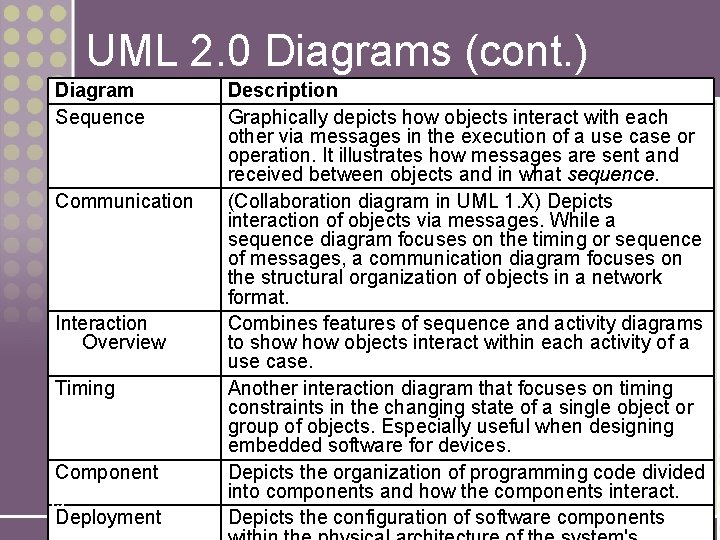
UML 2. 0 Diagrams (cont. ) Diagram Sequence Communication Interaction Overview Timing Component 19 Deployment Description Graphically depicts how objects interact with each other via messages in the execution of a use case or operation. It illustrates how messages are sent and received between objects and in what sequence. (Collaboration diagram in UML 1. X) Depicts interaction of objects via messages. While a sequence diagram focuses on the timing or sequence of messages, a communication diagram focuses on the structural organization of objects in a network format. Combines features of sequence and activity diagrams to show objects interact within each activity of a use case. Another interaction diagram that focuses on timing constraints in the changing state of a single object or group of objects. Especially useful when designing embedded software for devices. Depicts the organization of programming code divided into components and how the components interact. Depicts the configuration of software components
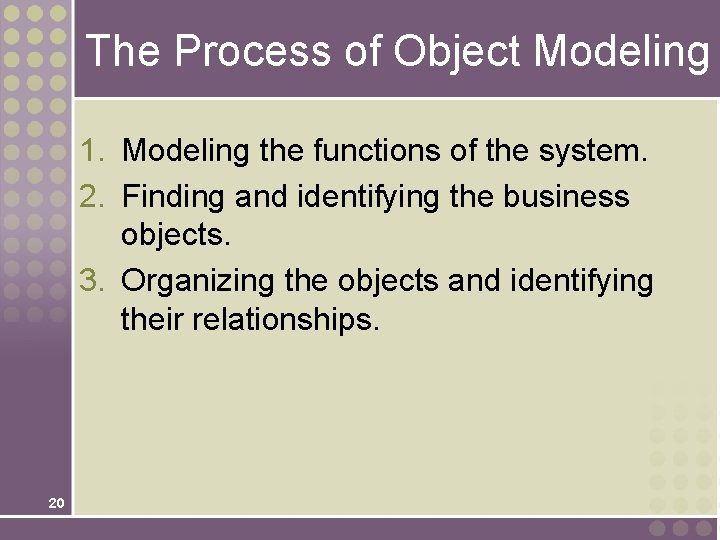
The Process of Object Modeling 1. Modeling the functions of the system. 2. Finding and identifying the business objects. 3. Organizing the objects and identifying their relationships. 20
Construction the Analysis Use-Case Model System analysis use case – a use case that documents the interaction between the system user and the system. It is highly detailed in describing what is required but is free of most implementation details and constraints. 1. Identify, define, and document new actors. 2. Identify, define, and document new use cases. 3. Identify any reuse possibilities. 4. Refine the use-case model diagram (if necessary). 21 5. Document system analysis use-case narratives.
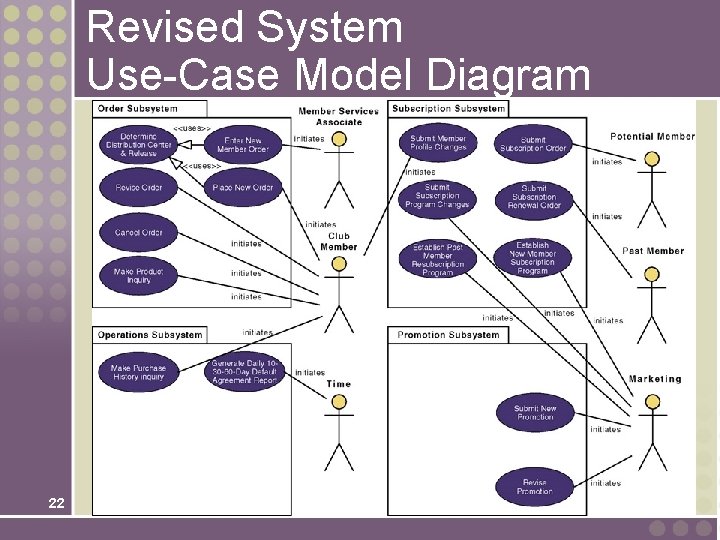
Revised System Use-Case Model Diagram 22
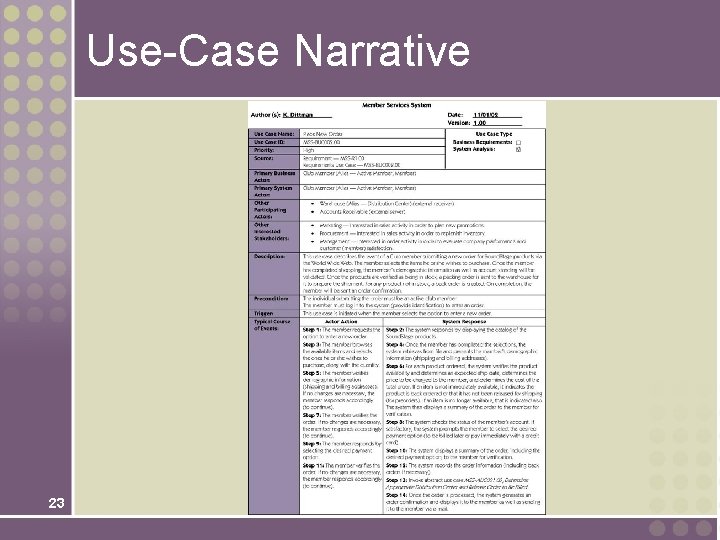
Use-Case Narrative 23
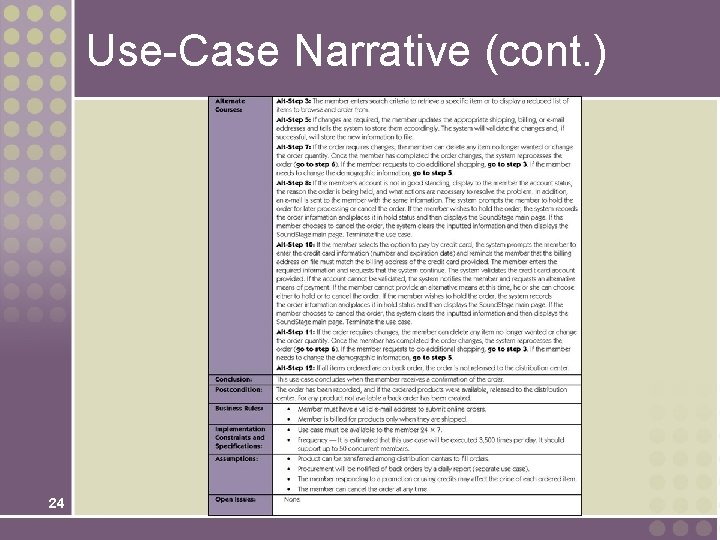
Use-Case Narrative (cont. ) 24
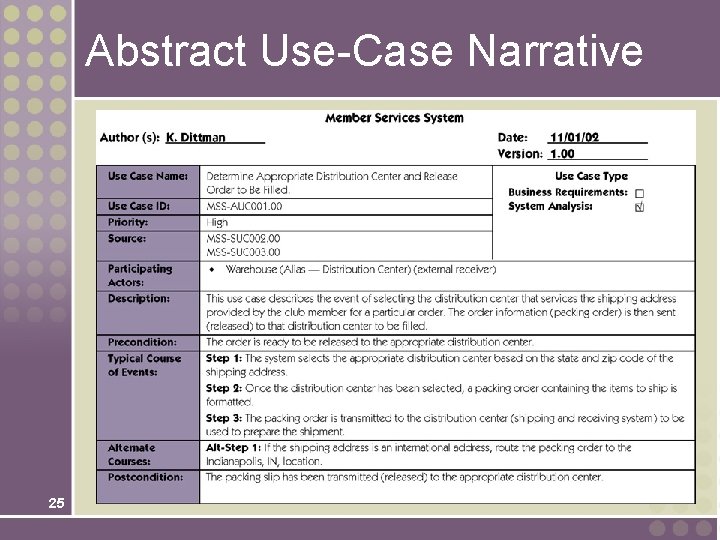
Abstract Use-Case Narrative 25
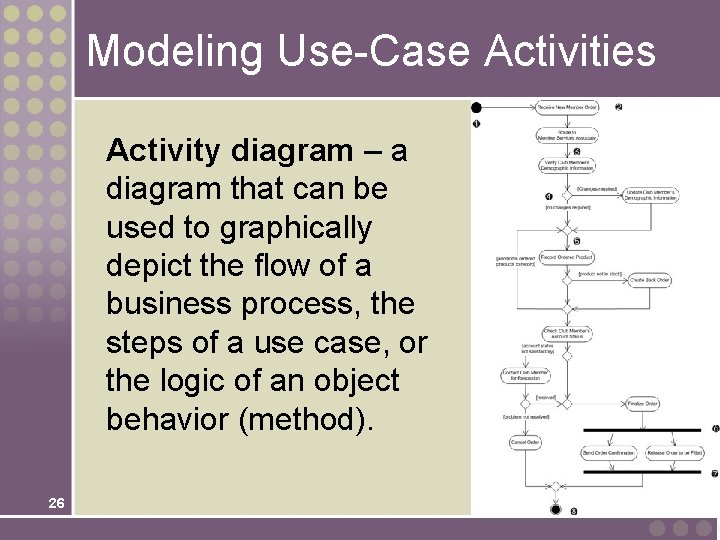
Modeling Use-Case Activities Activity diagram – a diagram that can be used to graphically depict the flow of a business process, the steps of a use case, or the logic of an object behavior (method). 26
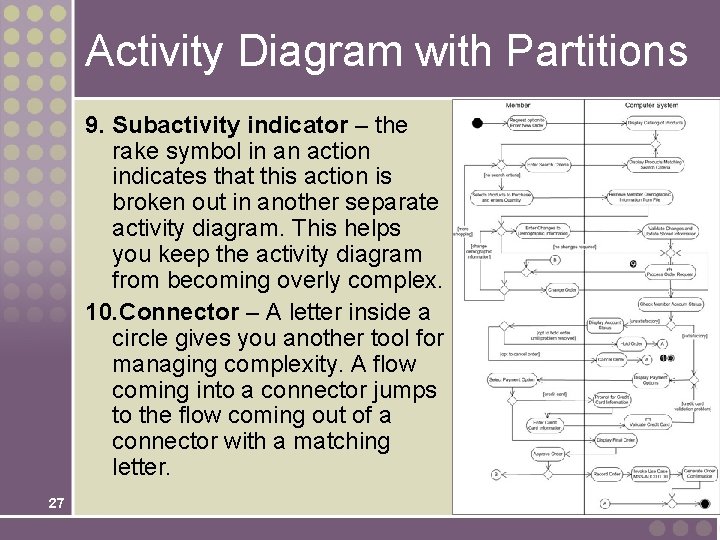
Activity Diagram with Partitions 9. Subactivity indicator – the rake symbol in an action indicates that this action is broken out in another separate activity diagram. This helps you keep the activity diagram from becoming overly complex. 10. Connector – A letter inside a circle gives you another tool for managing complexity. A flow coming into a connector jumps to the flow coming out of a connector with a matching letter. 27
Drawing System Sequence Diagrams System sequence diagram - a diagram that depicts the interaction between an actor and the system for a use case scenario. • helps identify high-level messages that enter and exit the system 28
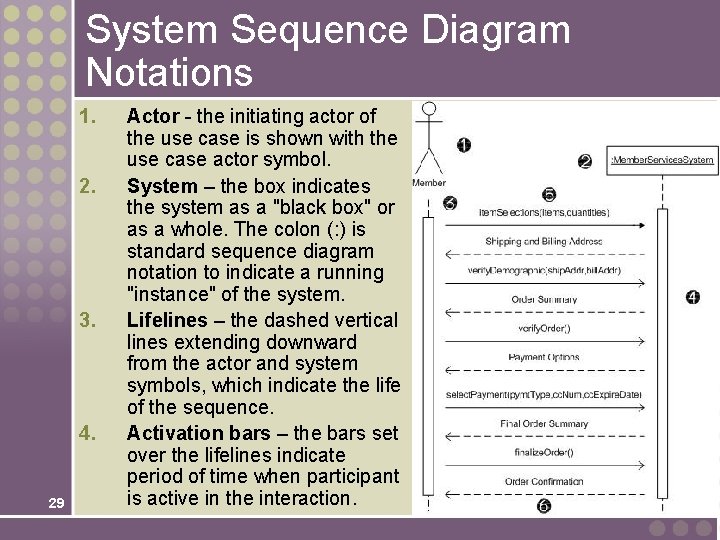
System Sequence Diagram Notations 1. 2. 3. 4. 29 Actor - the initiating actor of the use case is shown with the use case actor symbol. System – the box indicates the system as a "black box" or as a whole. The colon (: ) is standard sequence diagram notation to indicate a running "instance" of the system. Lifelines – the dashed vertical lines extending downward from the actor and system symbols, which indicate the life of the sequence. Activation bars – the bars set over the lifelines indicate period of time when participant is active in the interaction.
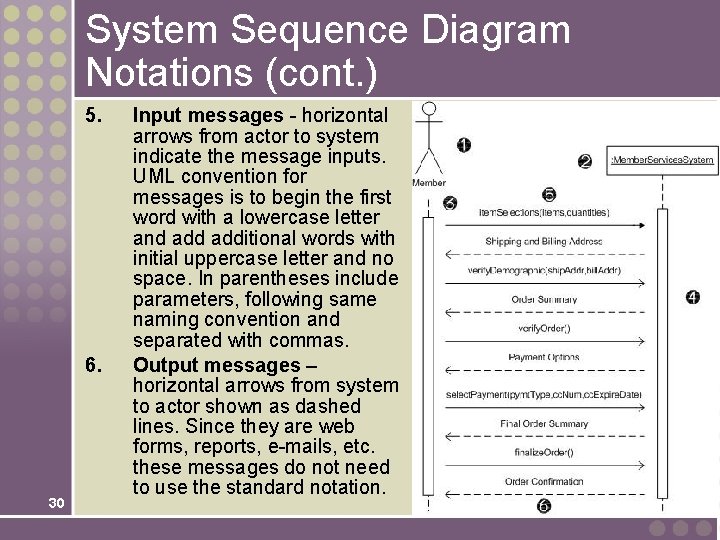
System Sequence Diagram Notations (cont. ) 5. 6. 30 Input messages - horizontal arrows from actor to system indicate the message inputs. UML convention for messages is to begin the first word with a lowercase letter and additional words with initial uppercase letter and no space. In parentheses include parameters, following same naming convention and separated with commas. Output messages – horizontal arrows from system to actor shown as dashed lines. Since they are web forms, reports, e-mails, etc. these messages do not need to use the standard notation.
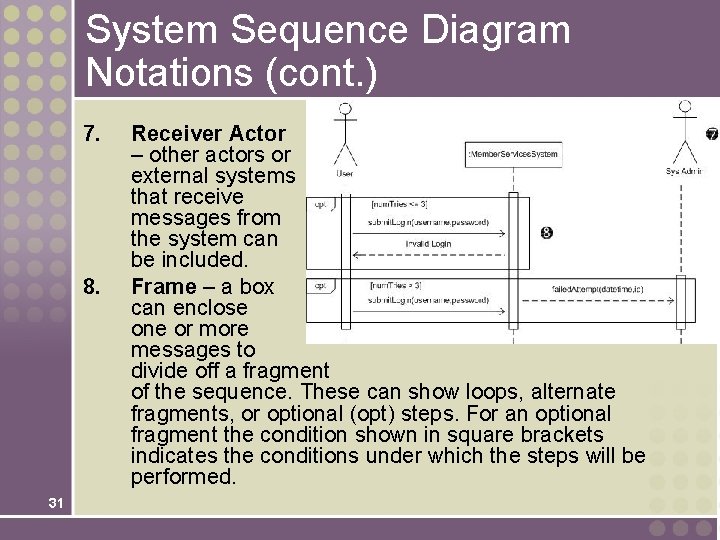
System Sequence Diagram Notations (cont. ) 7. 8. 31 Receiver Actor – other actors or external systems that receive messages from the system can be included. Frame – a box can enclose one or more messages to divide off a fragment of the sequence. These can show loops, alternate fragments, or optional (opt) steps. For an optional fragment the condition shown in square brackets indicates the conditions under which the steps will be performed.
Finding and Identifying the Business Objects 1. Find the Potential Objects • Review each use case to find nouns that correspond to business entities or events. 2. Select the Proposed Objects • 32 Not all nouns represent business objects. • Is it a synonym of another object? • Is it outside the scope of the system? • Is it a role without unique behavior, or an external role? • Is it unclear or in need of focus? • Is it an action or an attribute that describes another object?
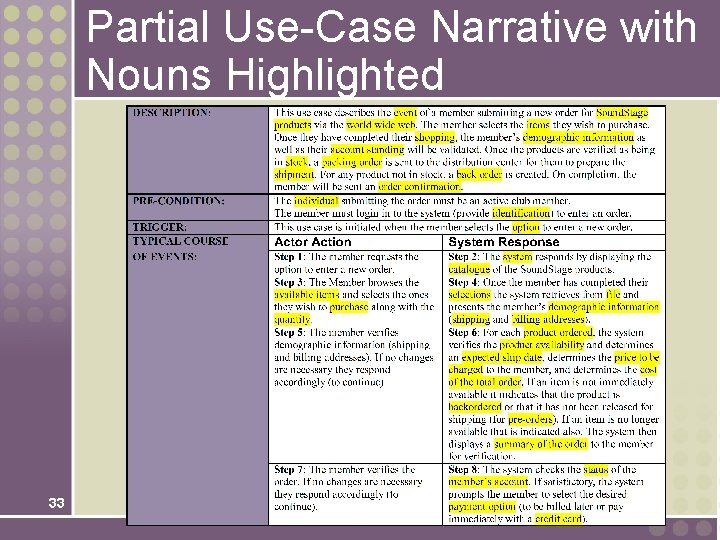
Partial Use-Case Narrative with Nouns Highlighted 33
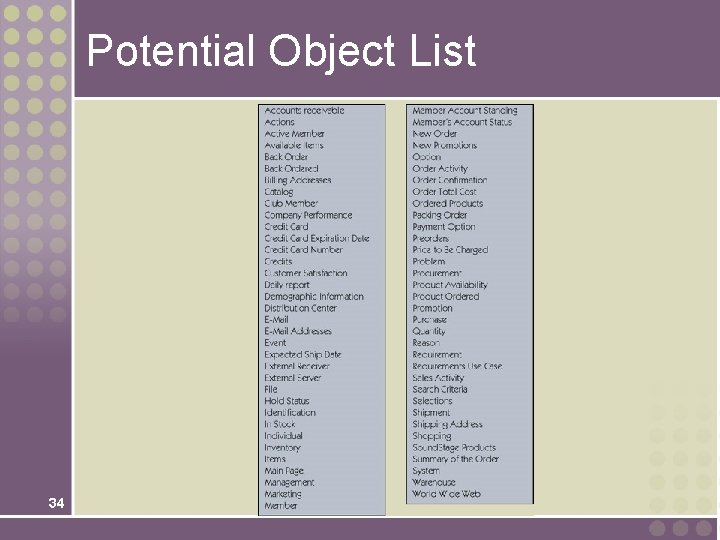
Potential Object List 34
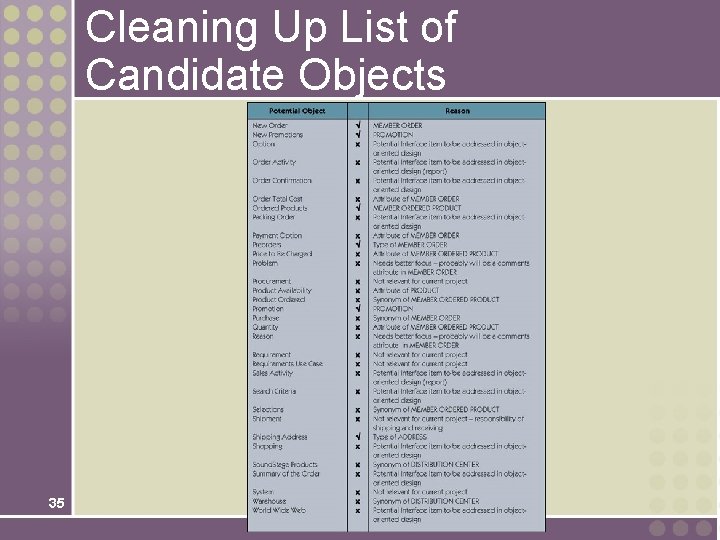
Cleaning Up List of Candidate Objects 35
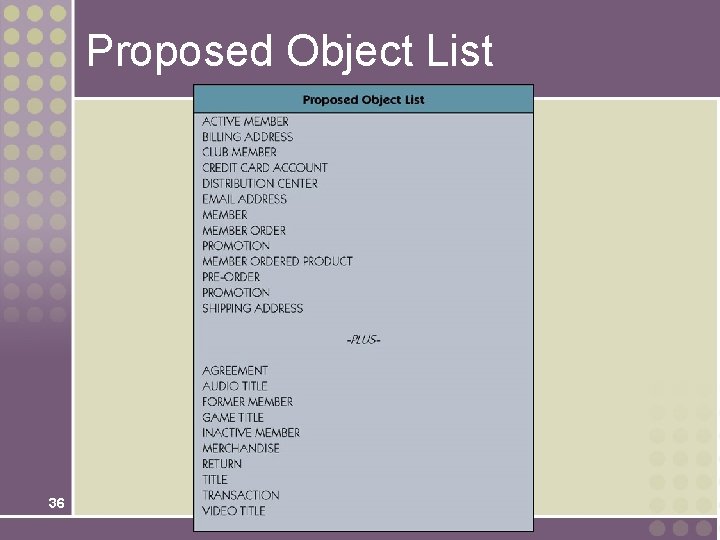
Proposed Object List 36
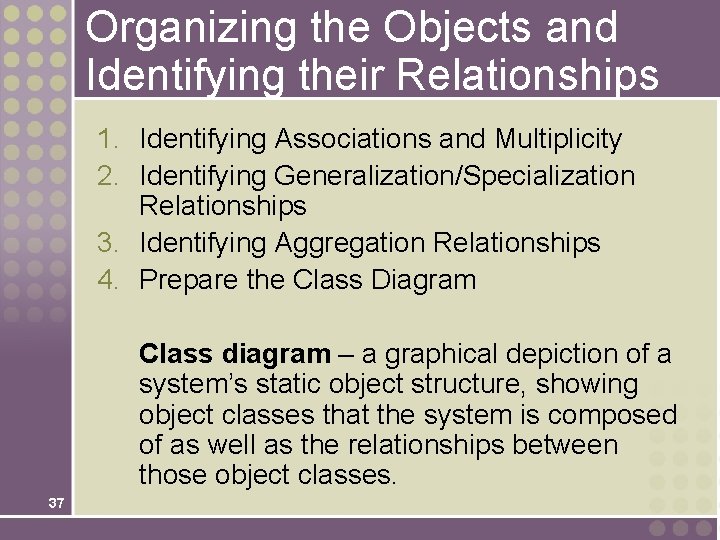
Organizing the Objects and Identifying their Relationships 1. Identifying Associations and Multiplicity 2. Identifying Generalization/Specialization Relationships 3. Identifying Aggregation Relationships 4. Prepare the Class Diagram Class diagram – a graphical depiction of a system’s static object structure, showing object classes that the system is composed of as well as the relationships between those object classes. 37
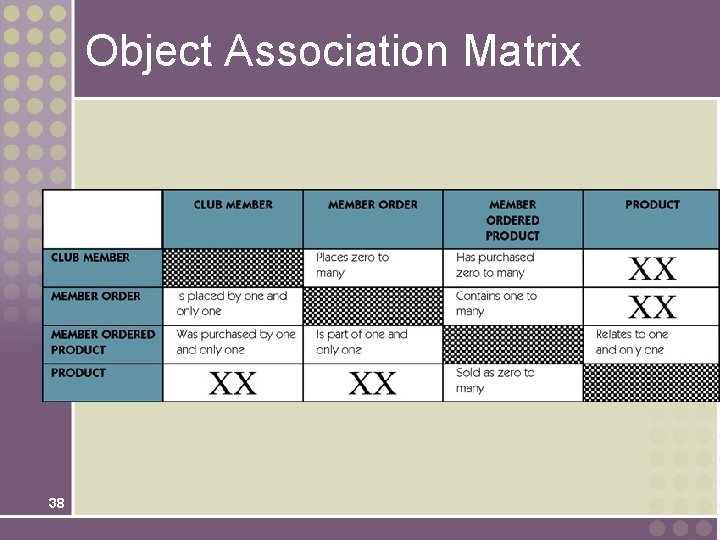
Object Association Matrix 38
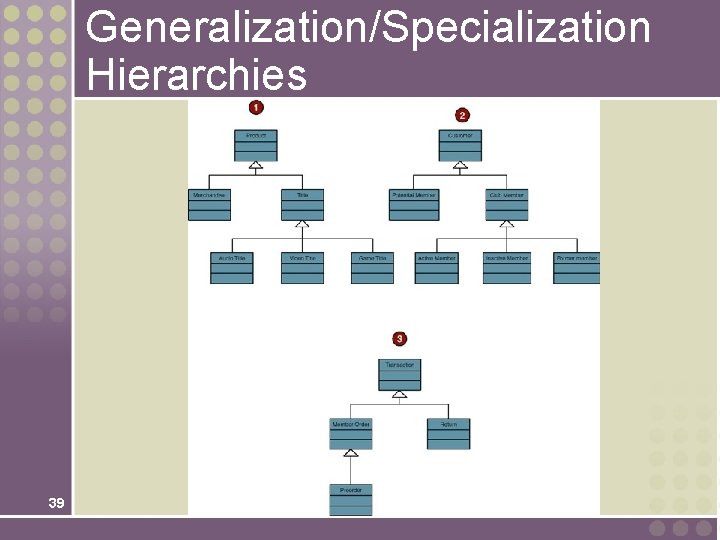
Generalization/Specialization Hierarchies 39
Persistent and Transient Object Classes Persistent class – a class that describes an object that outlives the execution of the program that created it. • Stored permanently as in a database Transient object class – a class that describes an object that is created temporarily by the program and lives only during that program’s execution. 40
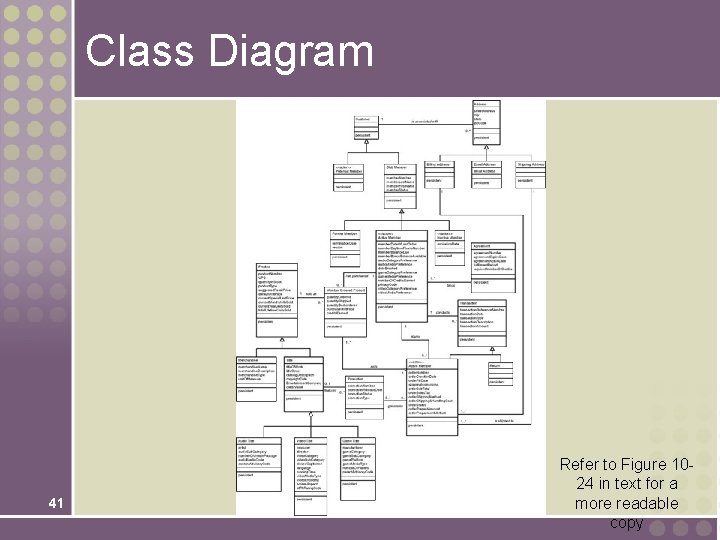
Class Diagram 41 Refer to Figure 1024 in text for a more readable copy
- Slides: 41