
Introduction to NGS Data Analysis Group dundee ac






![DAG Workflows: dag-wf-rename-fastq (dag-wf) ningal: ~ $ dag-wf-rename-fastq Usage: dag-wf-rename-files [-i inputdir] [-m mapping_file]](https://slidetodoc.com/presentation_image_h/9c8f2b9b08cc0c03a310f81d4386139c/image-53.jpg "DAG Workflows: dag-wf-rename-fastq (dag-wf) ningal: ~ $ dag-wf-rename-fastq Usage: dag-wf-rename-files [-i inputdir] [-m mapping_file]")
![DAG Workflows: workflow setup (dag-wf) ningal: ~ $ dag-wf-setup Usage: dag-wf-setup [-n name] [-d](https://slidetodoc.com/presentation_image_h/9c8f2b9b08cc0c03a310f81d4386139c/image-55.jpg "DAG Workflows: workflow setup (dag-wf) ningal: ~ $ dag-wf-setup Usage: dag-wf-setup [-n name] [-d")
![DAG Workflows: Sample naming • Single ended libraries: • [samplename]. fastq. gz • [samplename].](https://slidetodoc.com/presentation_image_h/9c8f2b9b08cc0c03a310f81d4386139c/image-59.jpg "DAG Workflows: Sample naming • Single ended libraries: • [samplename]. fastq. gz • [samplename].")


- Slides: 68
Introduction to NGS Data Analysis Group dundee. ac. uk
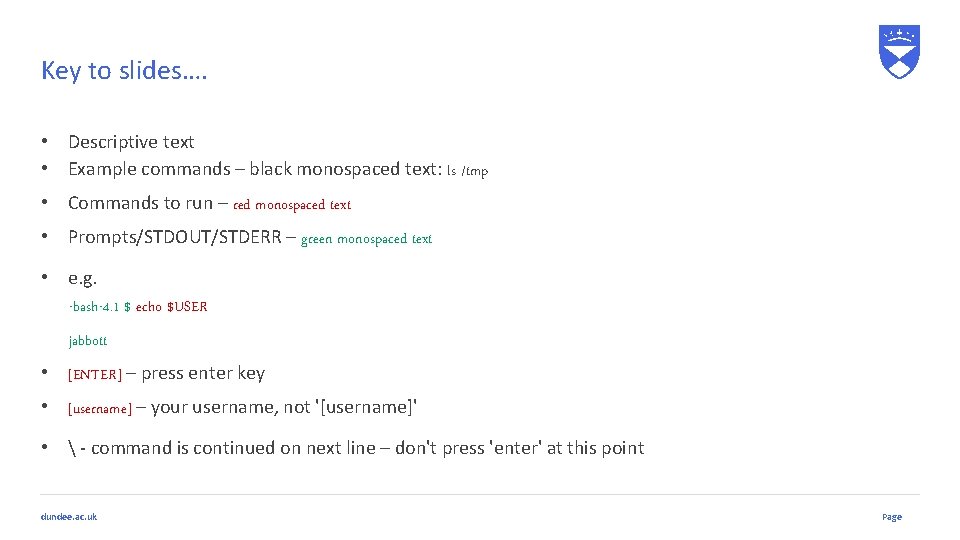
Key to slides…. • Descriptive text • Example commands – black monospaced text: ls /tmp • Commands to run – red monospaced text • Prompts/STDOUT/STDERR – green monospaced text • e. g. -bash-4. 1 $ echo $USER jabbott • [ENTER] – press enter key • [username] – your username, not '[username]' • - command is continued on next line – don't press 'enter' at this point dundee. ac. uk Page
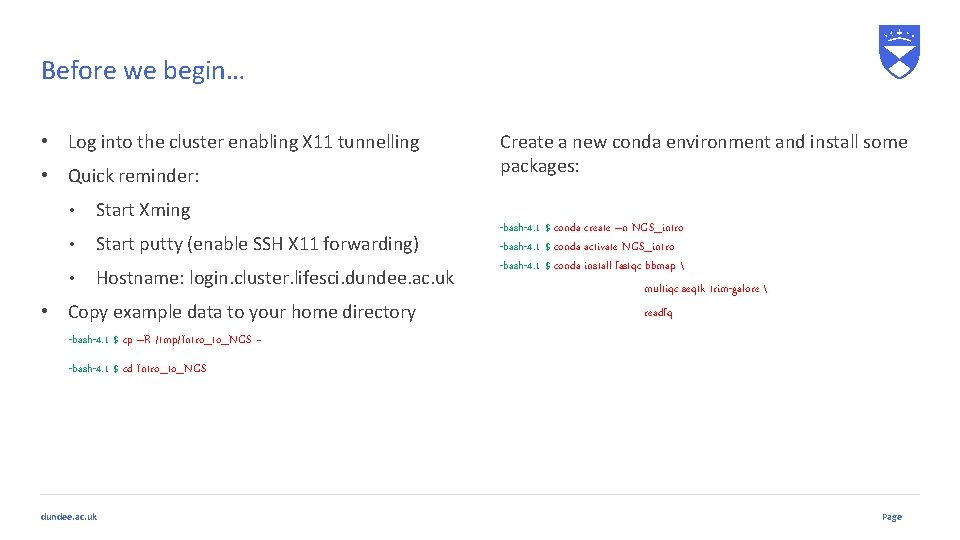
Before we begin… • Log into the cluster enabling X 11 tunnelling • Quick reminder: • Start Xming • Start putty (enable SSH X 11 forwarding) • Hostname: login. cluster. lifesci. dundee. ac. uk • Copy example data to your home directory Create a new conda environment and install some packages: -bash-4. 1 $ conda create –n NGS_intro -bash-4. 1 $ conda activate NGS_intro -bash-4. 1 $ conda install fastqc bbmap multiqc seqtk trim-galore readfq -bash-4. 1 $ cp –R /tmp/Intro_to_NGS ~ -bash-4. 1 $ cd Intro_to_NGS dundee. ac. uk Page
An Abridged History of Sequencing dundee. ac. uk
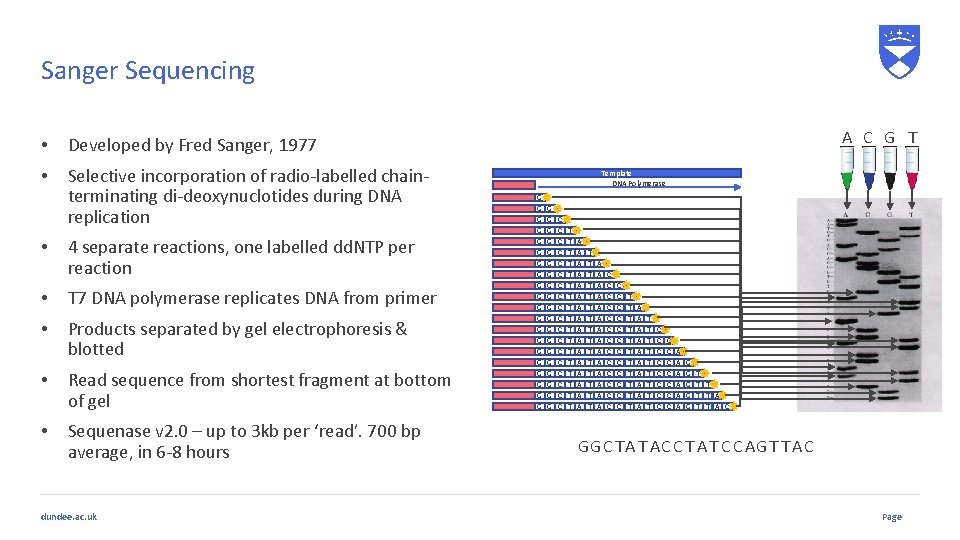
Sanger Sequencing • Developed by Fred Sanger, 1977 • Selective incorporation of radio-labelled chainterminating di-deoxynuclotides during DNA replication • 4 separate reactions, one labelled dd. NTP per reaction • T 7 DNA polymerase replicates DNA from primer • Products separated by gel electrophoresis & blotted • Read sequence from shortest fragment at bottom of gel • Sequenase v 2. 0 – up to 3 kb per ‘read’. 700 bp average, in 6 -8 hours dundee. ac. uk A C G T Template DNA Polymerase G G G G G G G G G G C C C C C T T T T T A A A A T T T T A A A A C C C C C C C T T T A A A A A T T T T T C C C C A A A G G G T T T A C GGC TA T AC C T A T C C AG T T AC Page
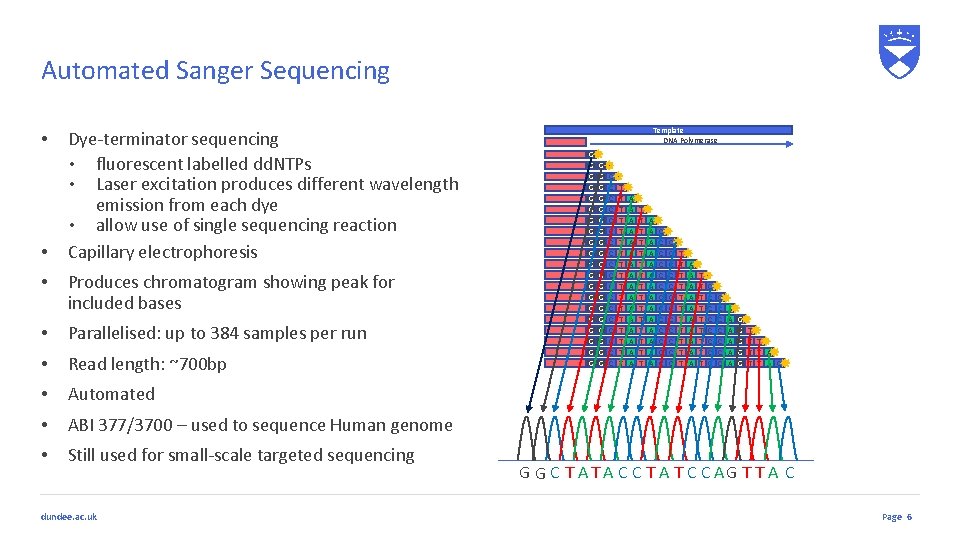
Automated Sanger Sequencing • • • Dye-terminator sequencing • fluorescent labelled dd. NTPs • Laser excitation produces different wavelength emission from each dye • allow use of single sequencing reaction Capillary electrophoresis Produces chromatogram showing peak for included bases • Parallelised: up to 384 samples per run • Read length: ~700 bp • Automated • ABI 377/3700 – used to sequence Human genome • Still used for small-scale targeted sequencing dundee. ac. uk Template DNA Polymerase G G G G G G G G G G C C C C C T T T T T A A A A T T T T A A A A C C C C C C C T T T A A A A A T T T T T C C C C A A A G G G T T T A C G G C T A C C T A T C C AG T T A C Page 6
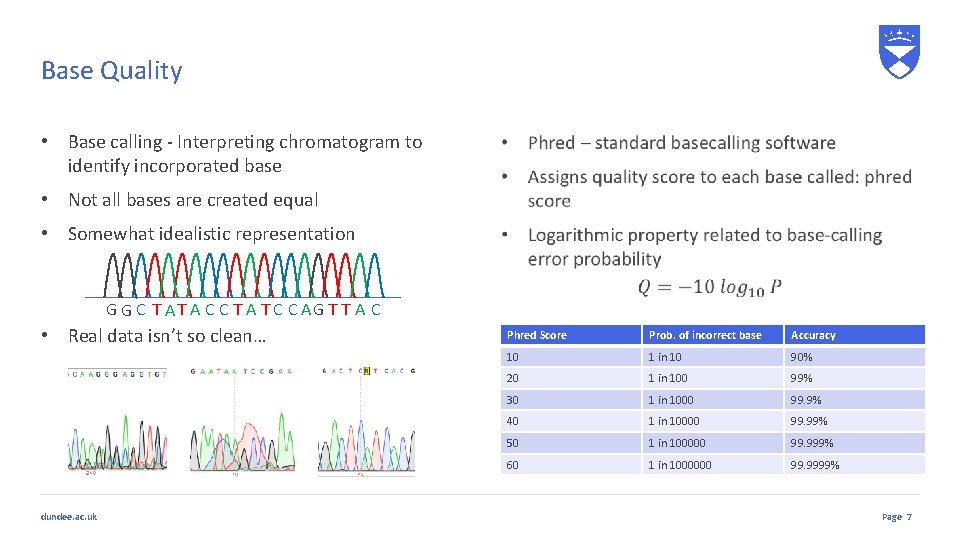
Base Quality • Base calling - Interpreting chromatogram to identify incorporated base • Not all bases are created equal • Somewhat idealistic representation G G C T A C C T A T C C AG T T A C • Real data isn’t so clean… dundee. ac. uk Phred Score Prob. of incorrect base Accuracy 10 1 in 10 90% 20 1 in 100 99% 30 1 in 1000 99. 9% 40 1 in 10000 99. 99% 50 1 in 100000 99. 999% 60 1 in 1000000 99. 9999% Page 7
Current Sequencing Approaches dundee. ac. uk
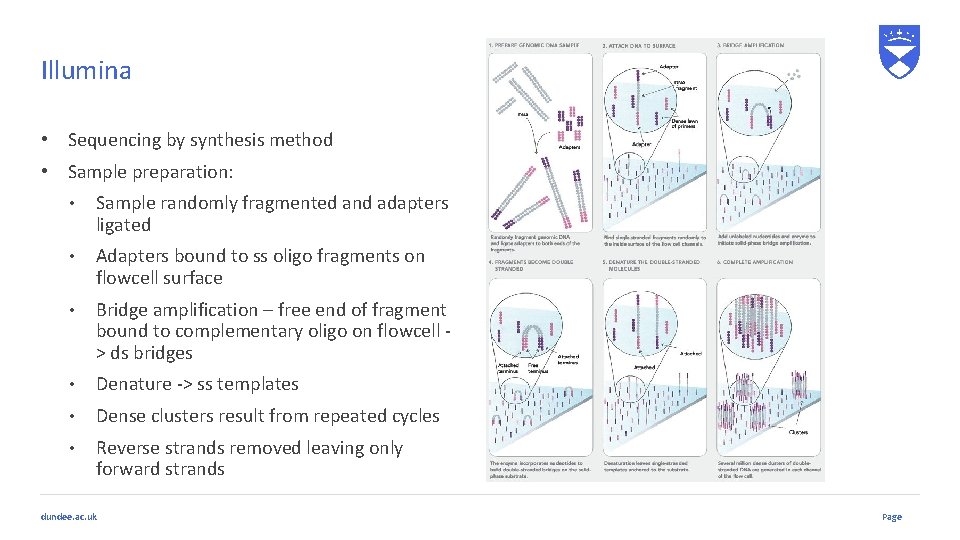
Illumina • Sequencing by synthesis method • Sample preparation: • Sample randomly fragmented and adapters ligated • Adapters bound to ss oligo fragments on flowcell surface • Bridge amplification – free end of fragment bound to complementary oligo on flowcell > ds bridges • Denature -> ss templates • Dense clusters result from repeated cycles • Reverse strands removed leaving only forward strands dundee. ac. uk Page
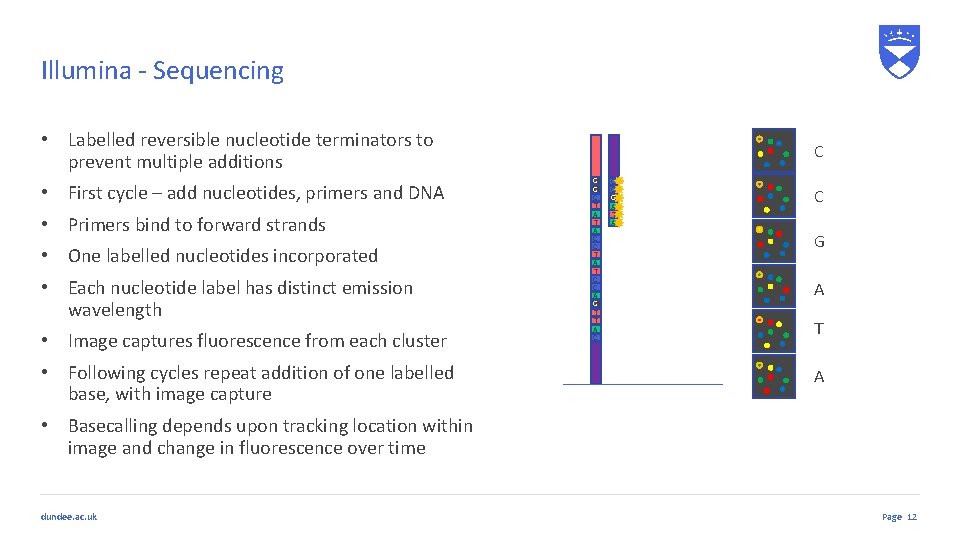
Illumina - Sequencing • Labelled reversible nucleotide terminators to prevent multiple additions • First cycle – add nucleotides, primers and DNA • Primers bind to forward strands • One labelled nucleotides incorporated • Each nucleotide label has distinct emission wavelength • Image captures fluorescence from each cluster • Following cycles repeat addition of one labelled base, with image capture C G G C T A C C T A T C C A G T T A C C C G A T A • Basecalling depends upon tracking location within image and change in fluorescence over time dundee. ac. uk Page 12
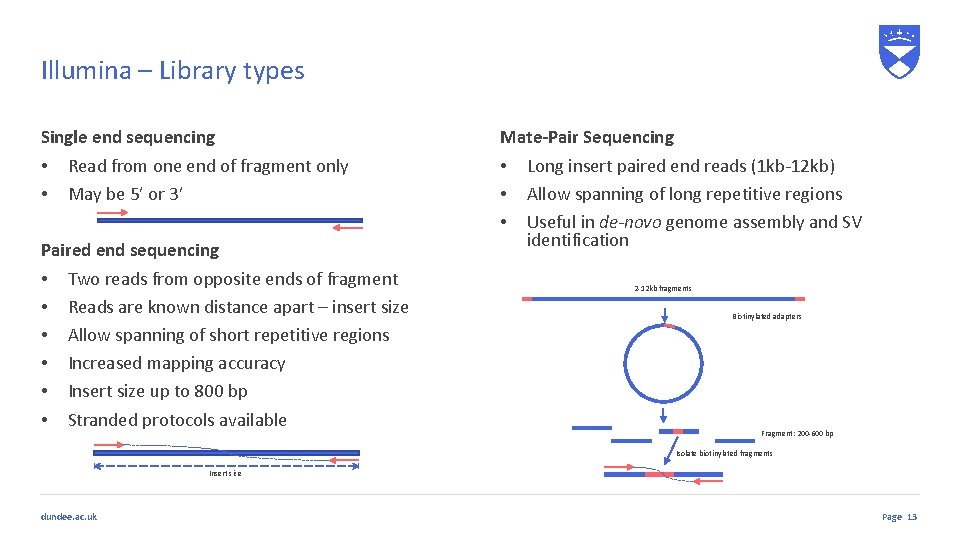
Illumina – Library types Single end sequencing • Read from one end of fragment only • May be 5’ or 3’ Paired end sequencing • Two reads from opposite ends of fragment • Reads are known distance apart – insert size • Allow spanning of short repetitive regions • Increased mapping accuracy • Insert size up to 800 bp • Stranded protocols available Mate-Pair Sequencing • Long insert paired end reads (1 kb-12 kb) • Allow spanning of long repetitive regions • Useful in de-novo genome assembly and SV identification 2 -12 kb fragments Biotinylated adapters Fragment: 200 -600 bp Isolate biotinylated fragments Insert size dundee. ac. uk Page 13
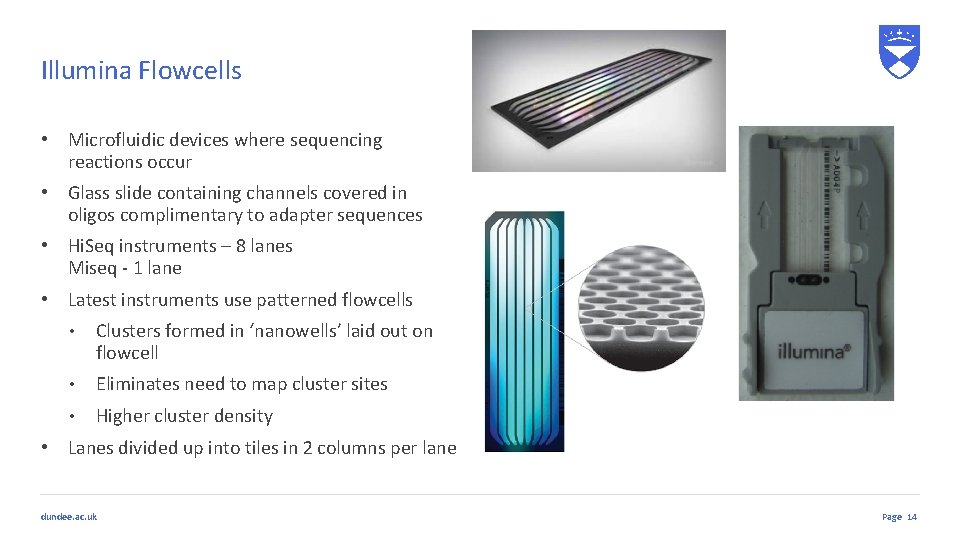
Illumina Flowcells • Microfluidic devices where sequencing reactions occur • Glass slide containing channels covered in oligos complimentary to adapter sequences • Hi. Seq instruments – 8 lanes Miseq - 1 lane • Latest instruments use patterned flowcells • Clusters formed in ‘nanowells’ laid out on flowcell • Eliminates need to map cluster sites • Higher cluster density • Lanes divided up into tiles in 2 columns per lane dundee. ac. uk Page 14
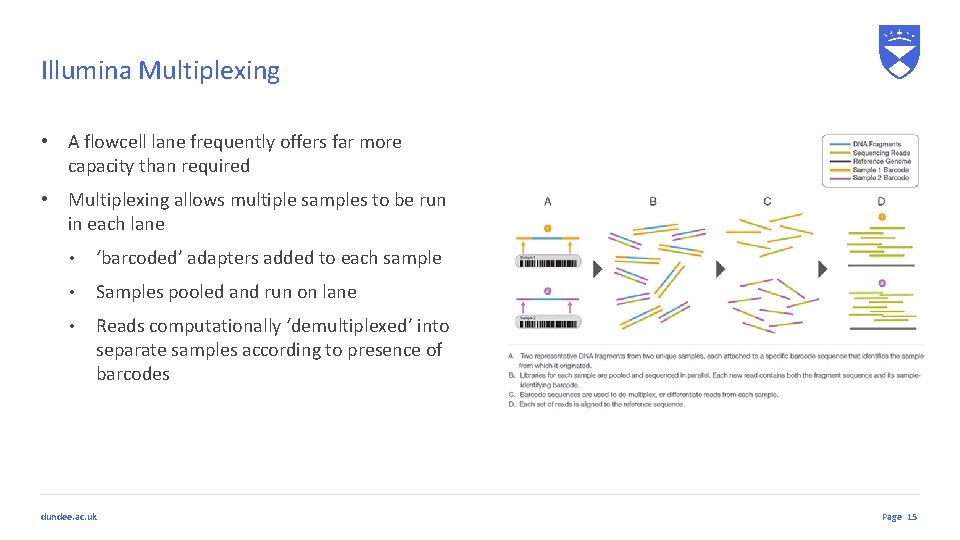
Illumina Multiplexing • A flowcell lane frequently offers far more capacity than required • Multiplexing allows multiple samples to be run in each lane • ‘barcoded’ adapters added to each sample • Samples pooled and run on lane • Reads computationally ‘demultiplexed’ into separate samples according to presence of barcodes dundee. ac. uk Page 15
Long Read Technologies • Short read sequencing produces vast data volumes • Backward step compared to Sanger sequencing • De-novo assembly limited • RNA sequencing – splice detection harder • SV detection more difficult • Long reads generated from single molecules help • Resolve repeats in de-novo assembly • Sequence entire RNA molecules to reveal splicing • Aid SV identification • Downsides • High error rates dundee. ac. uk Page 16
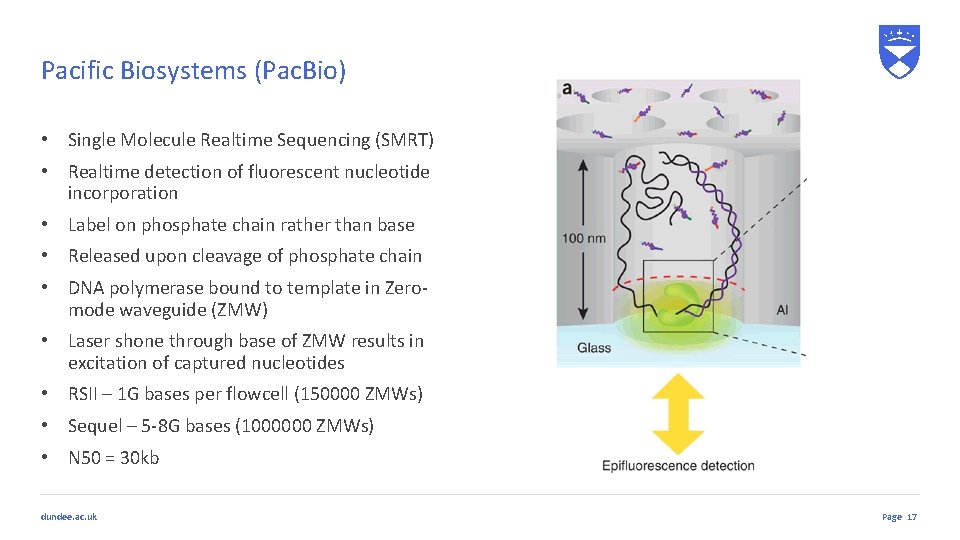
Pacific Biosystems (Pac. Bio) • Single Molecule Realtime Sequencing (SMRT) • Realtime detection of fluorescent nucleotide incorporation • Label on phosphate chain rather than base • Released upon cleavage of phosphate chain • DNA polymerase bound to template in Zeromode waveguide (ZMW) • Laser shone through base of ZMW results in excitation of captured nucleotides • RSII – 1 G bases per flowcell (150000 ZMWs) • Sequel – 5 -8 G bases (1000000 ZMWs) • N 50 = 30 kb dundee. ac. uk Page 17
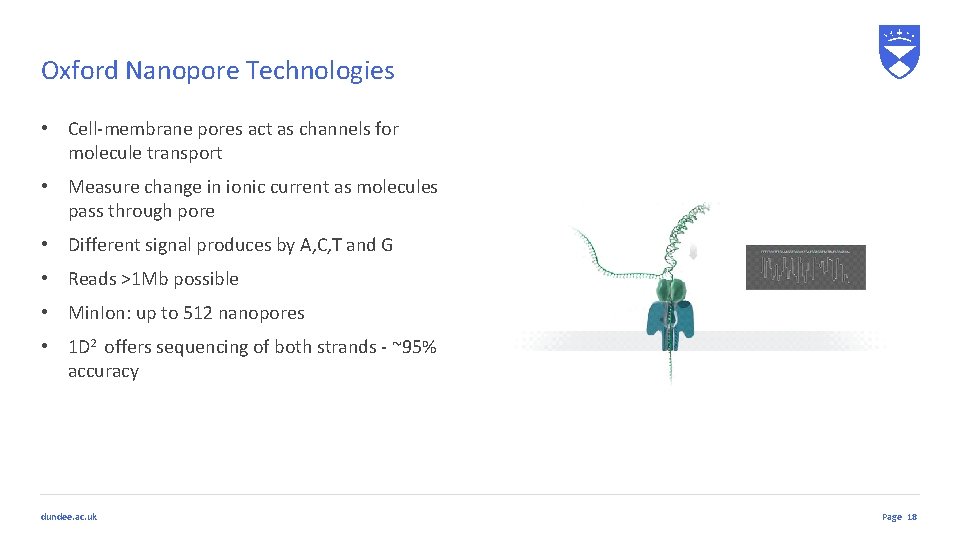
Oxford Nanopore Technologies • Cell-membrane pores act as channels for molecule transport • Measure change in ionic current as molecules pass through pore • Different signal produces by A, C, T and G • Reads >1 Mb possible • Min. Ion: up to 512 nanopores • 1 D 2 offers sequencing of both strands - ~95% accuracy dundee. ac. uk Page 18
File Formats dundee. ac. uk
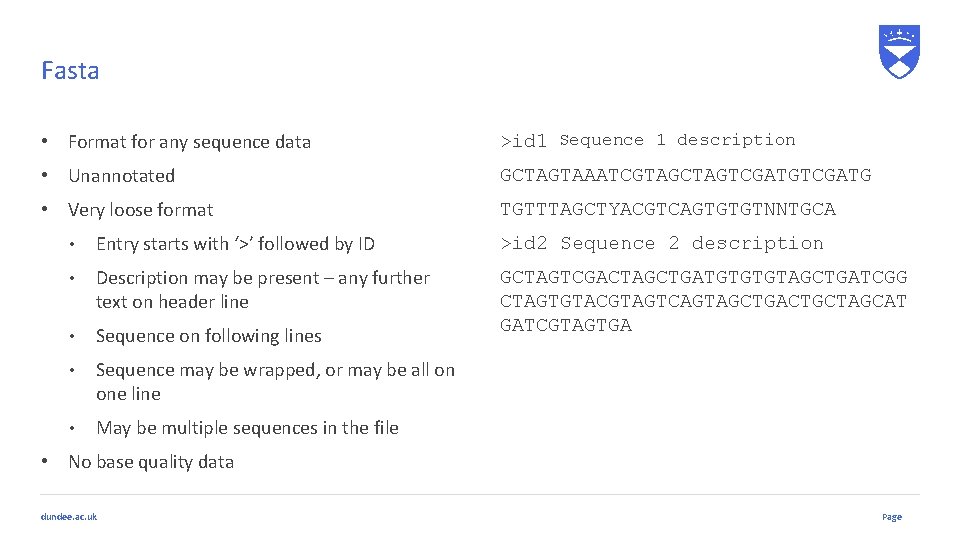
Fasta • Format for any sequence data >id 1 Sequence 1 description • Unannotated GCTAGTAAATCGTAGCTAGTCGATG • Very loose format TGTTTAGCTYACGTCAGTGTGTNNTGCA • Entry starts with ‘>’ followed by ID >id 2 Sequence 2 description • Description may be present – any further text on header line • Sequence on following lines GCTAGTCGACTAGCTGATGTGTGTAGCTGATCGG CTAGTGTACGTAGTCAGTAGCTGACTGCTAGCAT GATCGTAGTGA • Sequence may be wrapped, or may be all on one line • May be multiple sequences in the file • No base quality data dundee. ac. uk Page
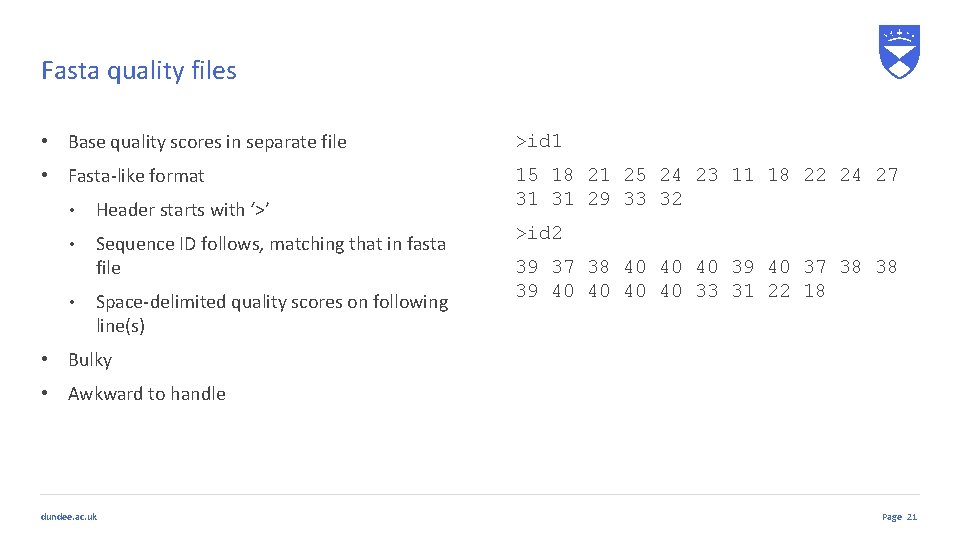
Fasta quality files • Base quality scores in separate file >id 1 • Fasta-like format 15 18 21 25 24 23 11 18 22 24 27 31 31 29 33 32 • Header starts with ‘>’ • Sequence ID follows, matching that in fasta file • Space-delimited quality scores on following line(s) >id 2 39 37 38 40 40 40 39 40 37 38 38 39 40 40 33 31 22 18 • Bulky • Awkward to handle dundee. ac. uk Page 21
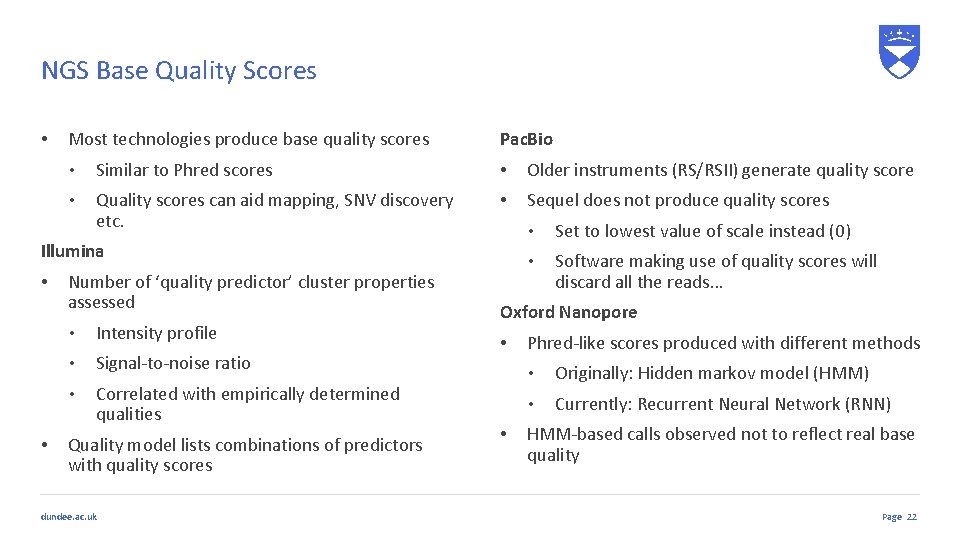
NGS Base Quality Scores • Most technologies produce base quality scores Pac. Bio • Similar to Phred scores • Older instruments (RS/RSII) generate quality score • Quality scores can aid mapping, SNV discovery etc. • Sequel does not produce quality scores Illumina • • Number of ‘quality predictor’ cluster properties assessed • Intensity profile • Signal-to-noise ratio • Correlated with empirically determined qualities Quality model lists combinations of predictors with quality scores dundee. ac. uk • Set to lowest value of scale instead (0) • Software making use of quality scores will discard all the reads… Oxford Nanopore • • Phred-like scores produced with different methods • Originally: Hidden markov model (HMM) • Currently: Recurrent Neural Network (RNN) HMM-based calls observed not to reflect real base quality Page 22
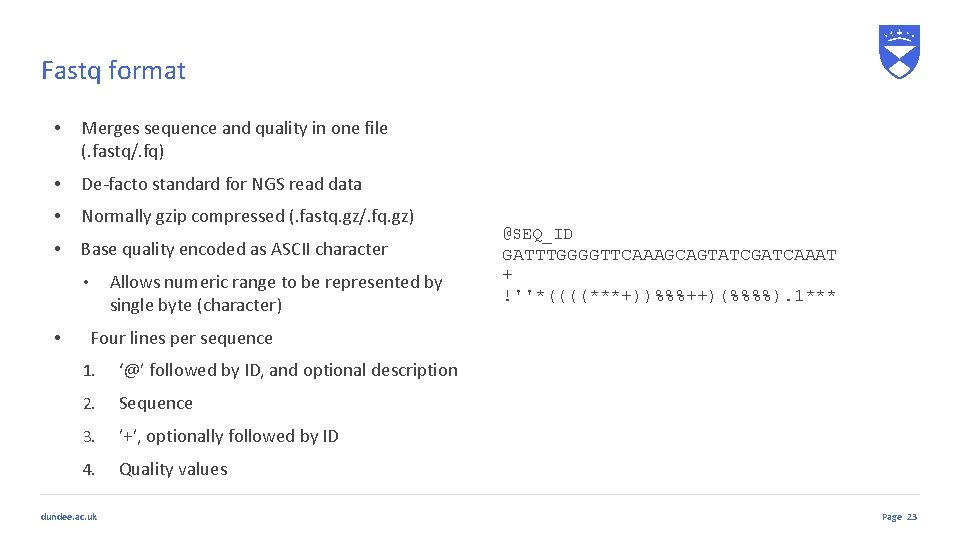
Fastq format • Merges sequence and quality in one file (. fastq/. fq) • De-facto standard for NGS read data • Normally gzip compressed (. fastq. gz/. fq. gz) • Base quality encoded as ASCII character Allows numeric range to be represented by single byte (character) • • @SEQ_ID GATTTGGGGTTCAAAGCAGTATCGATCAAAT + !''*((((***+))%%%++)(%%%%). 1*** Four lines per sequence 1. ‘@’ followed by ID, and optional description 2. Sequence 3. ’+’, optionally followed by ID 4. Quality values dundee. ac. uk Page 23
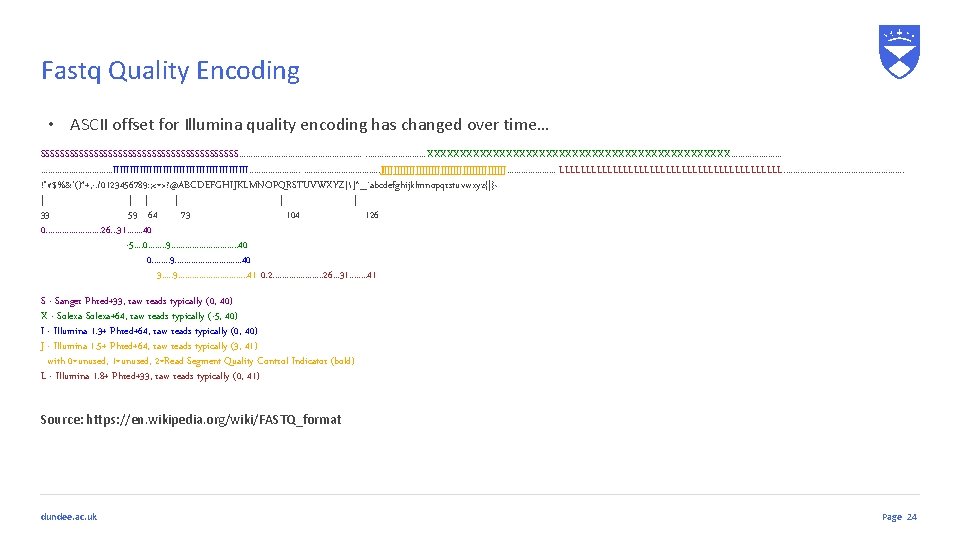
Fastq Quality Encoding • ASCII offset for Illumina quality encoding has changed over time… SSSSSSSSSSSSSSSSSSSSS. . . . . XXXXXXXXXXXXXXXXXXXXXXX. . . . IIIIIIIIIIIIIIIIIIIII. . . . JJJJJJJJJJJJJJJJJJJJ. . . . . LLLLLLLLLLLLLLLLLLLLL. . . . !"#$%&'()*+, -. /0123456789: ; <=>? @ABCDEFGHIJKLMNOPQRSTUVWXYZ[]^_`abcdefghijklmnopqrstuvwxyz{|}~ | | | 33 59 64 73 104 126 0. . . 26. . . 31. . . . 40 -5. . 0. . . . 9. . . . 40 3. . . 9. . . . 41 0. 2. . . . . 26. . . 31. . . . 41 S - Sanger Phred+33, raw reads typically (0, 40) X - Solexa+64, raw reads typically (-5, 40) I - Illumina 1. 3+ Phred+64, raw reads typically (0, 40) J - Illumina 1. 5+ Phred+64, raw reads typically (3, 41) with 0=unused, 1=unused, 2=Read Segment Quality Control Indicator (bold) L - Illumina 1. 8+ Phred+33, raw reads typically (0, 41) Source: https: //en. wikipedia. org/wiki/FASTQ_format dundee. ac. uk Page 24
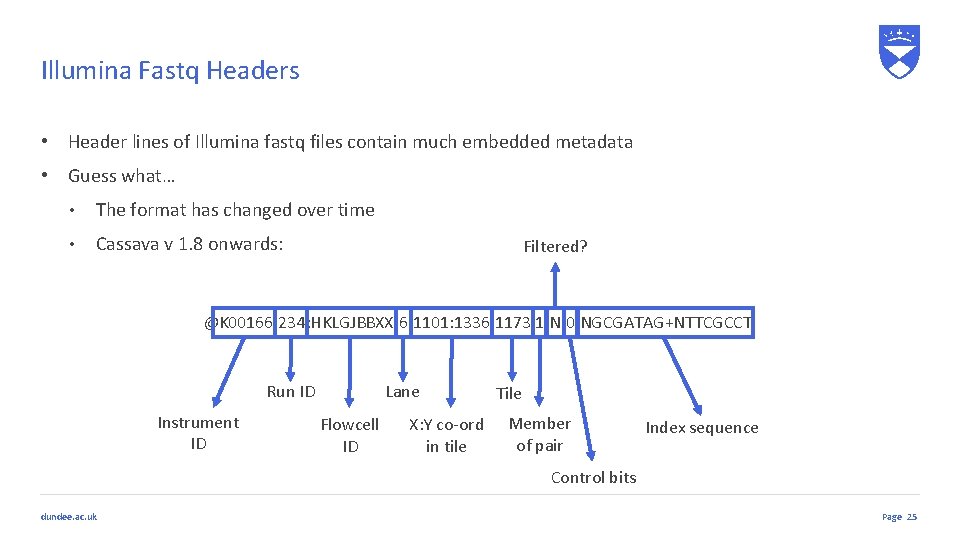
Illumina Fastq Headers • Header lines of Illumina fastq files contain much embedded metadata • Guess what… • The format has changed over time • Cassava v 1. 8 onwards: Filtered? @K 00166: 234: HKLGJBBXX: 6: 1101: 1336: 1173 1: N: 0: NGCGATAG+NTTCGCCT Run ID Instrument ID Lane Flowcell ID X: Y co-ord in tile Tile Member of pair Index sequence Control bits dundee. ac. uk Page 25
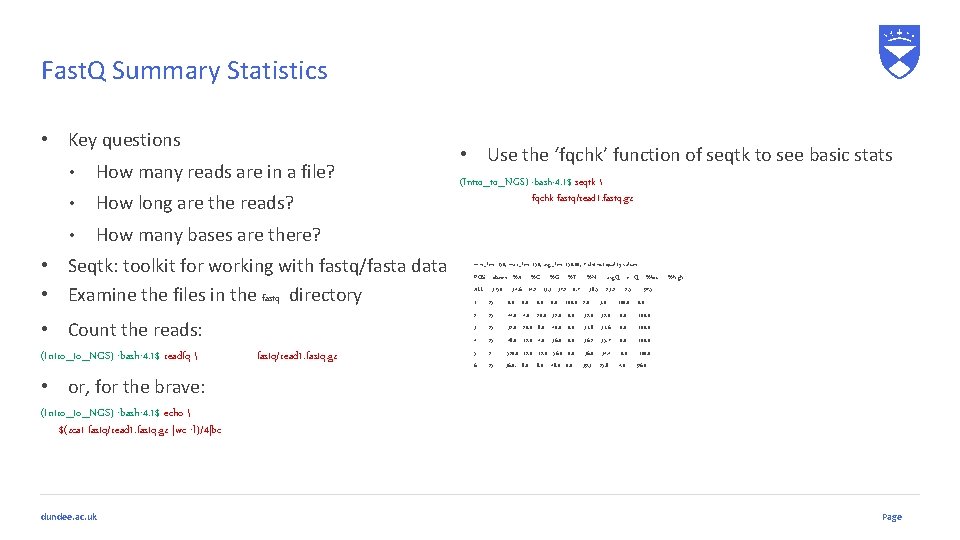
Fast. Q Summary Statistics • Key questions • How many reads are in a file? • How long are the reads? • How many bases are there? • Seqtk: toolkit for working with fastq/fasta data • Examine the files in the fastq directory • Count the reads: (Intro_to_NGS) -bash-4. 1$ readfq fastq/read 1. fastq. gz • Use the ‘fqchk’ function of seqtk to see basic stats (Intro_to_NGS) -bash-4. 1$ seqtk fqchk fastq/read 1. fastq. gz min_len: 150; max_len: 150; avg_len: 150. 00; 7 distinct quality values POS #bases %A ALL 3750 %C %G %T 34. 6 14. 2 13. 3 37. 2 0. 7 %N avg. Q err. Q %low 38. 5 23. 2 3. 0 2. 5 %high 97. 5 1 25 0. 0 100. 0 2 25 44. 0 20. 0 32. 0 100. 0 3 25 32. 0 20. 0 8. 0 40. 0 31. 8 31. 6 0. 0 100. 0 4 25 48. 0 12. 0 4. 0 36. 0 0. 0 36. 2 35. 7 0. 0 100. 0 5 2 520. 0 12. 0 56. 0 0. 0 36. 0 34. 4 0. 0 100. 0 6 25 36. 0. 8. 0 48. 0 0. 0 39. 3 25. 8 4. 0 96. 0 • or, for the brave: (Intro_to_NGS) -bash-4. 1$ echo $(zcat fastq/read 1. fastq. gz |wc -l)/4|bc dundee. ac. uk Page
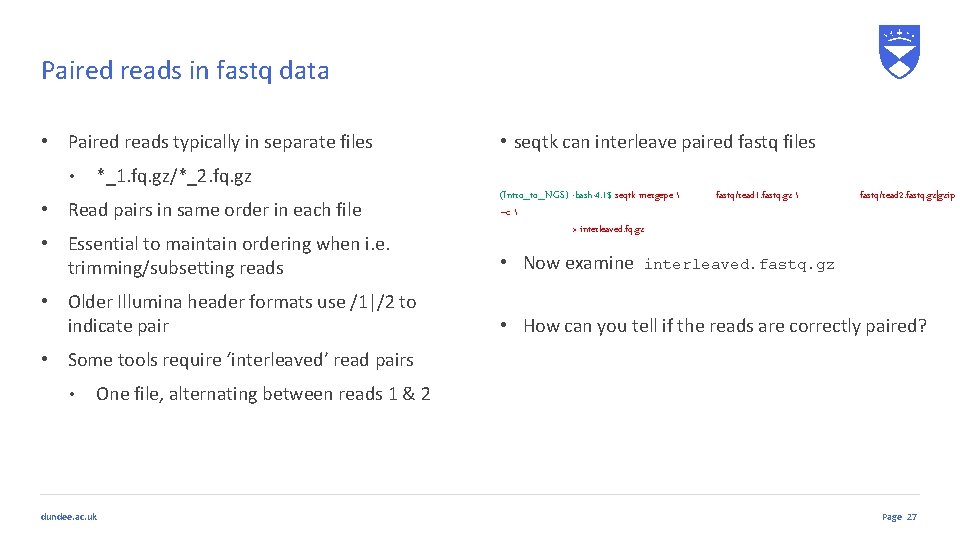
Paired reads in fastq data • Paired reads typically in separate files • • seqtk can interleave paired fastq files *_1. fq. gz/*_2. fq. gz • Read pairs in same order in each file • Essential to maintain ordering when i. e. trimming/subsetting reads • Older Illumina header formats use /1|/2 to indicate pair (Intro_to_NGS) -bash-4. 1$ seqtk mergepe –c > interleaved. fq. gz • Now examine fastq/read 1. fastq. gz fastq/read 2. fastq. gz|gzip interleaved. fastq. gz • How can you tell if the reads are correctly paired? • Some tools require ‘interleaved’ read pairs • One file, alternating between reads 1 & 2 dundee. ac. uk Page 27
Quality Assessment dundee. ac. uk
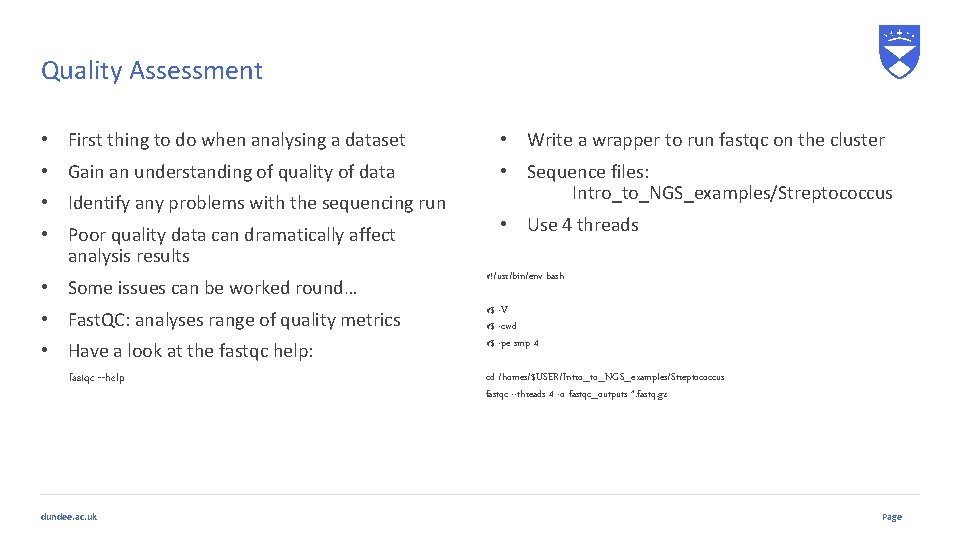
Quality Assessment • First thing to do when analysing a dataset • Write a wrapper to run fastqc on the cluster • Gain an understanding of quality of data • Sequence files: Intro_to_NGS_examples/Streptococcus • Identify any problems with the sequencing run • Poor quality data can dramatically affect analysis results • Use 4 threads • Some issues can be worked round… #!/usr/bin/env bash • Fast. QC: analyses range of quality metrics #$ -V #$ -cwd #$ -pe smp 4 • Have a look at the fastqc help: fastqc --help dundee. ac. uk cd /homes/$USER/Intro_to_NGS_examples/Streptococcus fastqc --threads 4 -o fastqc_outputs *. fastq. gz Page
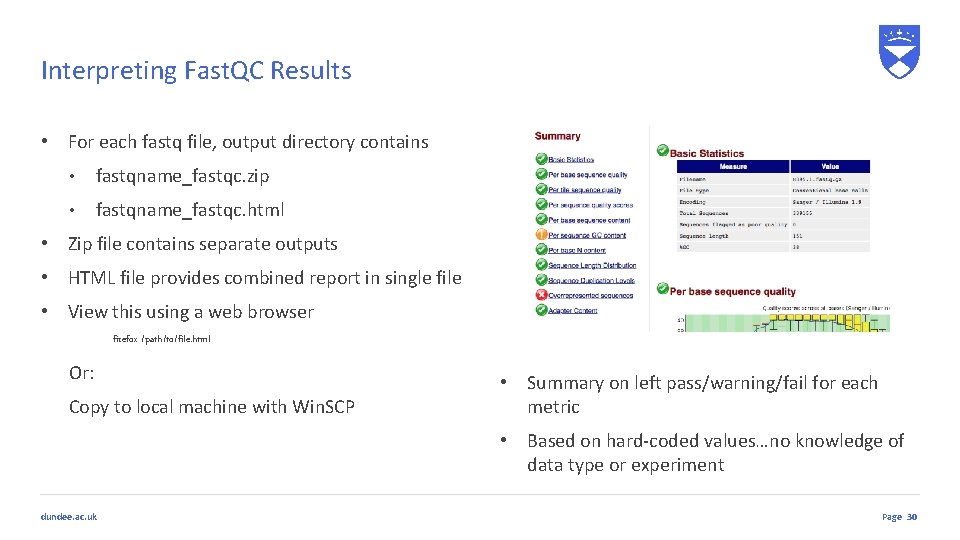
Interpreting Fast. QC Results • For each fastq file, output directory contains • fastqname_fastqc. zip • fastqname_fastqc. html • Zip file contains separate outputs • HTML file provides combined report in single file • View this using a web browser firefox /path/to/file. html Or: Copy to local machine with Win. SCP • Summary on left pass/warning/fail for each metric • Based on hard-coded values…no knowledge of data type or experiment dundee. ac. uk Page 30
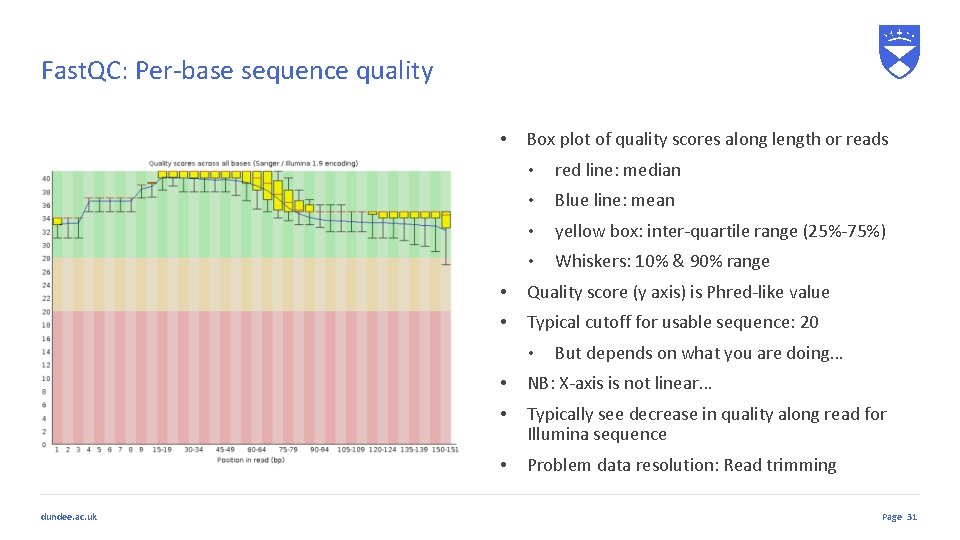
Fast. QC: Per-base sequence quality • Box plot of quality scores along length or reads • red line: median • Blue line: mean • yellow box: inter-quartile range (25%-75%) • Whiskers: 10% & 90% range • Quality score (y axis) is Phred-like value • Typical cutoff for usable sequence: 20 • dundee. ac. uk But depends on what you are doing… • NB: X-axis is not linear… • Typically see decrease in quality along read for Illumina sequence • Problem data resolution: Read trimming Page 31
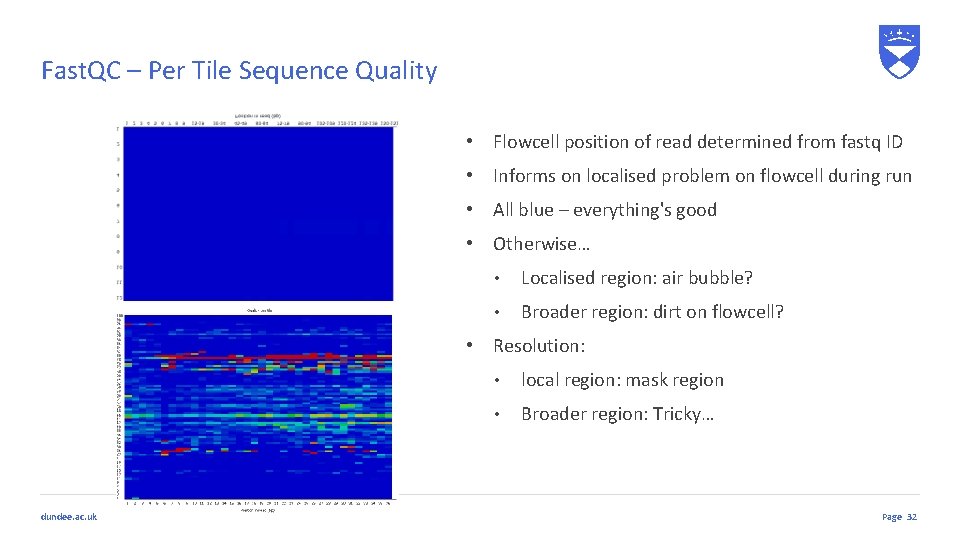
Fast. QC – Per Tile Sequence Quality • Flowcell position of read determined from fastq ID • Informs on localised problem on flowcell during run • All blue – everything's good • Otherwise… • Localised region: air bubble? • Broader region: dirt on flowcell? • Resolution: dundee. ac. uk • local region: mask region • Broader region: Tricky… Page 32
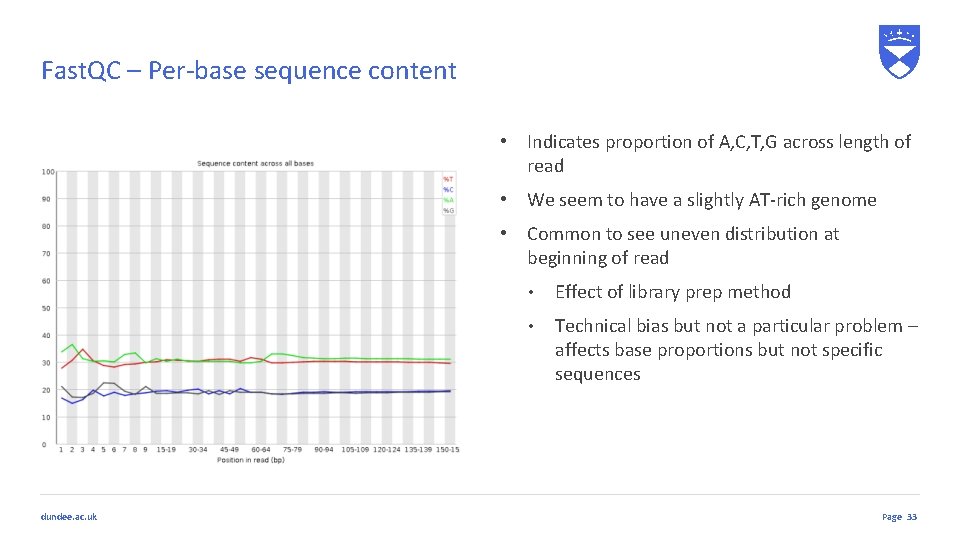
Fast. QC – Per-base sequence content • Indicates proportion of A, C, T, G across length of read • We seem to have a slightly AT-rich genome • Common to see uneven distribution at beginning of read dundee. ac. uk • Effect of library prep method • Technical bias but not a particular problem – affects base proportions but not specific sequences Page 33
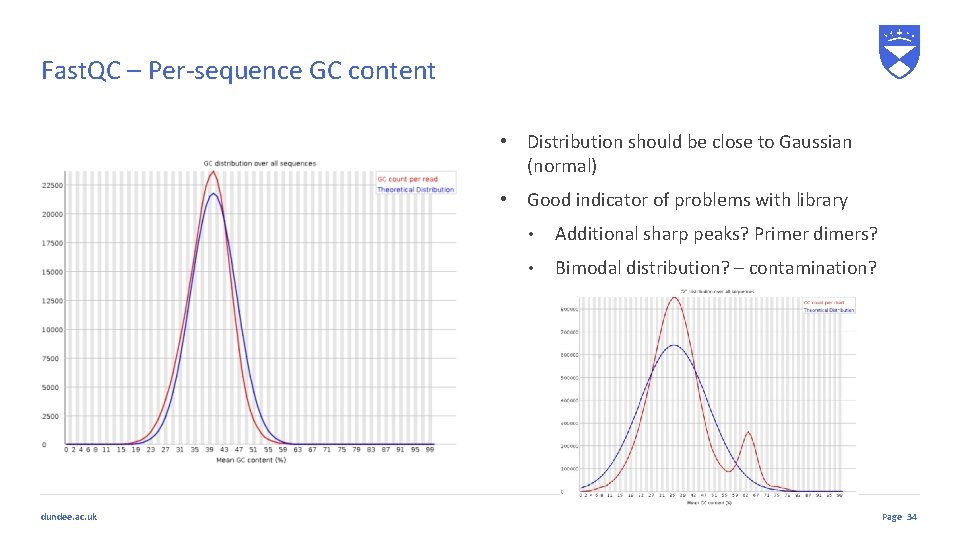
Fast. QC – Per-sequence GC content • Distribution should be close to Gaussian (normal) • Good indicator of problems with library dundee. ac. uk • Additional sharp peaks? Primer dimers? • Bimodal distribution? – contamination? Page 34
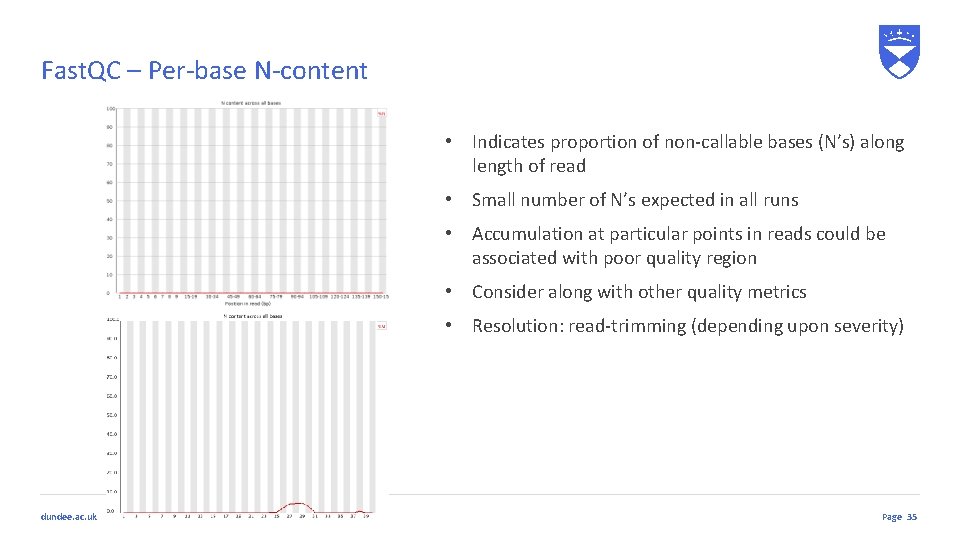
Fast. QC – Per-base N-content • Indicates proportion of non-callable bases (N’s) along length of read • Small number of N’s expected in all runs • Accumulation at particular points in reads could be associated with poor quality region • Consider along with other quality metrics • Resolution: read-trimming (depending upon severity) dundee. ac. uk Page 35
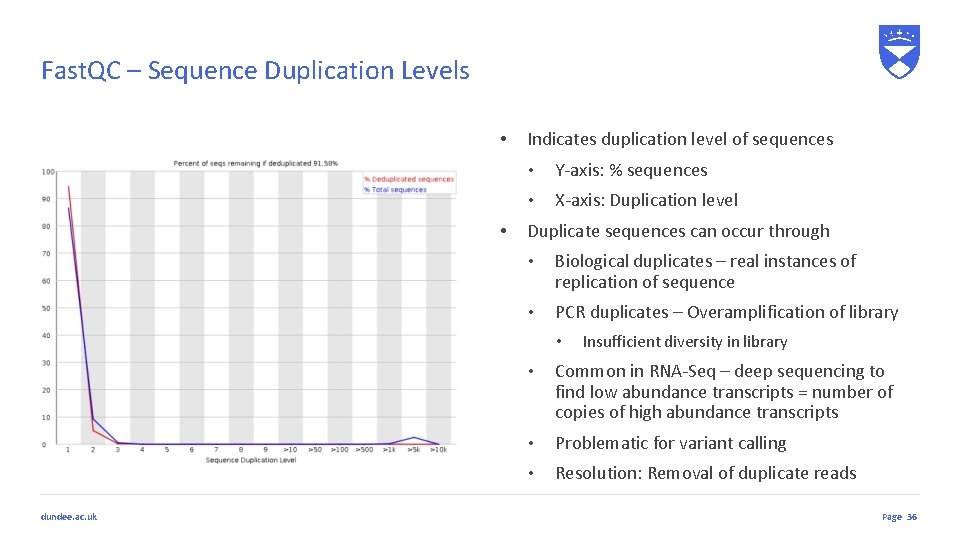
Fast. QC – Sequence Duplication Levels • • Indicates duplication level of sequences • Y-axis: % sequences • X-axis: Duplication level Duplicate sequences can occur through • Biological duplicates – real instances of replication of sequence • PCR duplicates – Overamplification of library • dundee. ac. uk Insufficient diversity in library • Common in RNA-Seq – deep sequencing to find low abundance transcripts = number of copies of high abundance transcripts • Problematic for variant calling • Resolution: Removal of duplicate reads Page 36
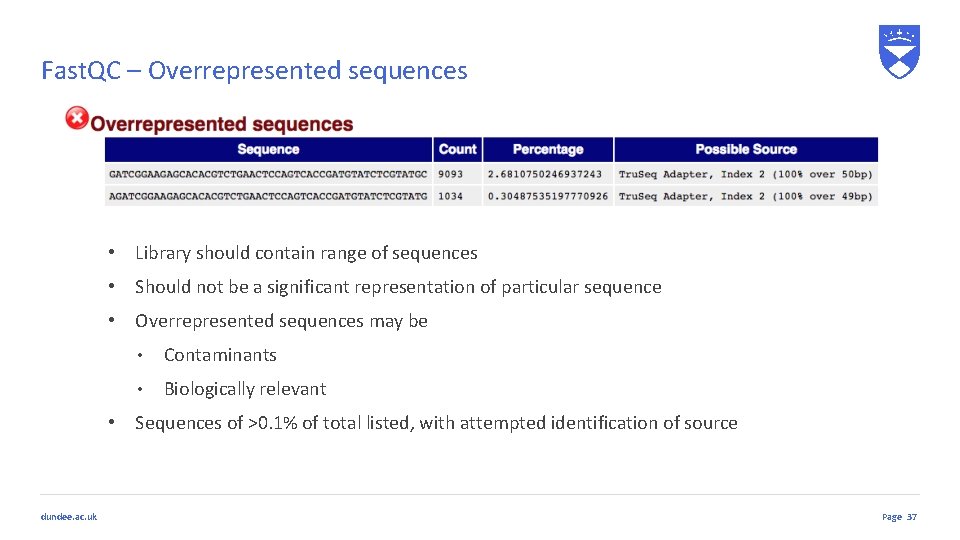
Fast. QC – Overrepresented sequences • Library should contain range of sequences • Should not be a significant representation of particular sequence • Overrepresented sequences may be • Contaminants • Biologically relevant • Sequences of >0. 1% of total listed, with attempted identification of source dundee. ac. uk Page 37
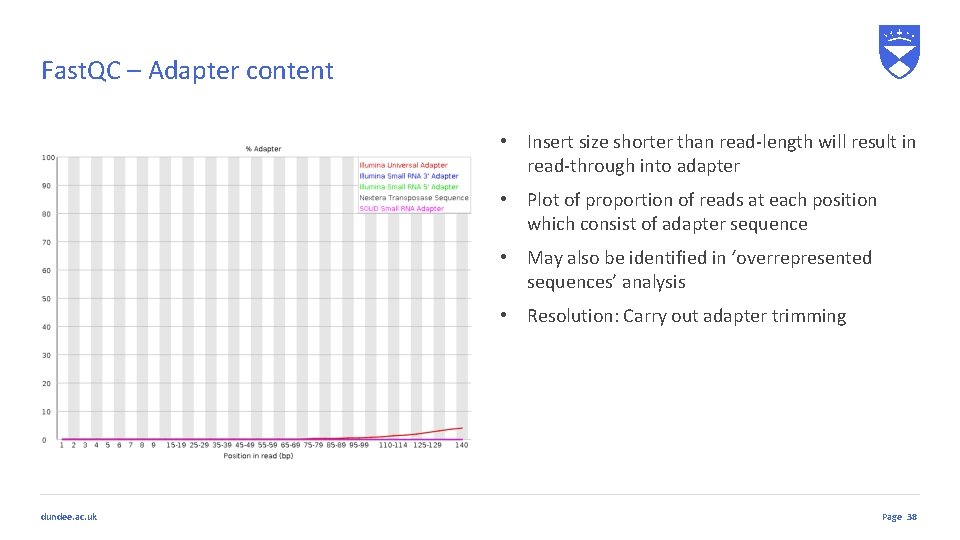
Fast. QC – Adapter content • Insert size shorter than read-length will result in read-through into adapter • Plot of proportion of reads at each position which consist of adapter sequence • May also be identified in ‘overrepresented sequences’ analysis • Resolution: Carry out adapter trimming dundee. ac. uk Page 38
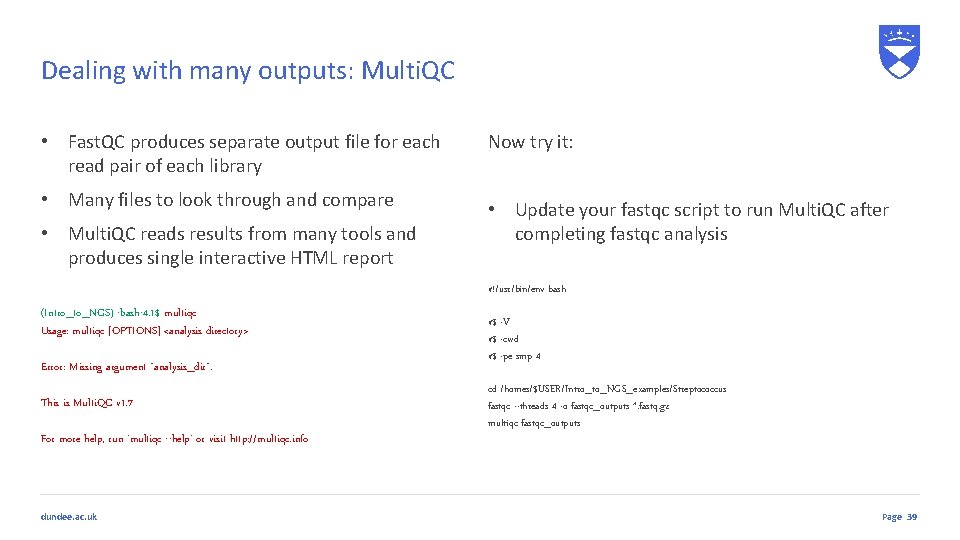
Dealing with many outputs: Multi. QC • Fast. QC produces separate output file for each read pair of each library Now try it: • Many files to look through and compare • Update your fastqc script to run Multi. QC after completing fastqc analysis • Multi. QC reads results from many tools and produces single interactive HTML report #!/usr/bin/env bash (Intro_to_NGS) -bash-4. 1$ multiqc Usage: multiqc [OPTIONS] <analysis directory> Error: Missing argument "analysis_dir". This is Multi. QC v 1. 7 For more help, run 'multiqc --help' or visit http: //multiqc. info dundee. ac. uk #$ -V #$ -cwd #$ -pe smp 4 cd /homes/$USER/Intro_to_NGS_examples/Streptococcus fastqc --threads 4 -o fastqc_outputs *. fastq. gz multiqc fastqc_outputs Page 39
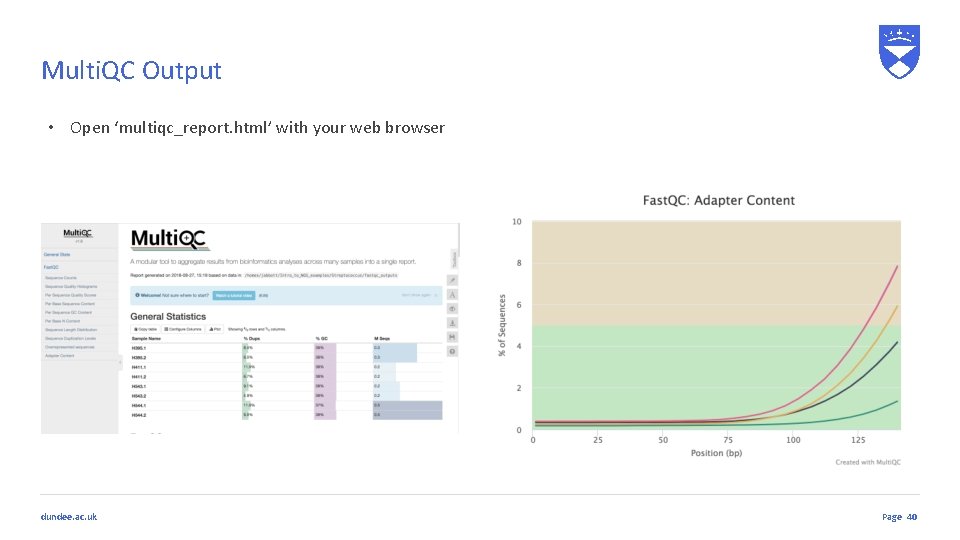
Multi. QC Output • Open ‘multiqc_report. html’ with your web browser dundee. ac. uk Page 40
Read Trimming dundee. ac. uk
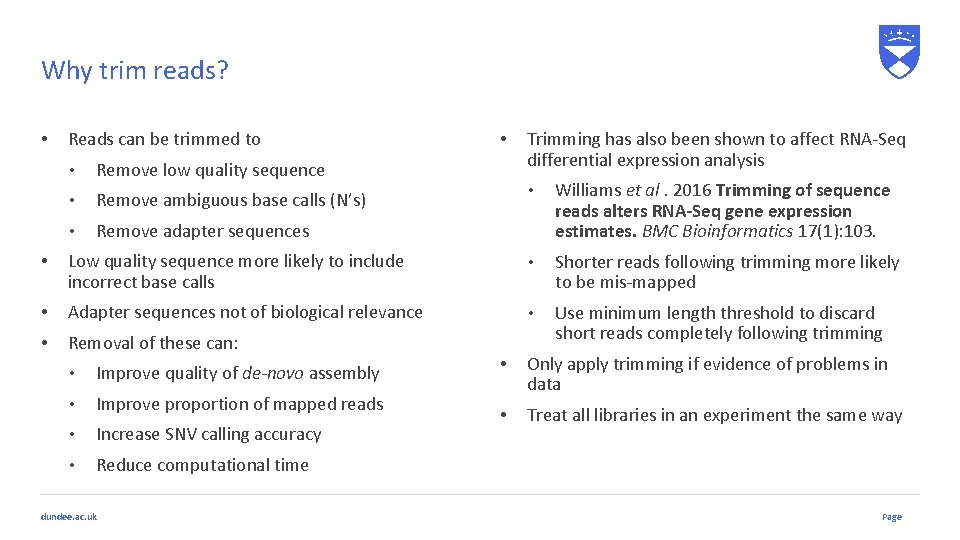
Why trim reads? • Reads can be trimmed to • Remove low quality sequence • Remove ambiguous base calls (N’s) • Remove adapter sequences • Trimming has also been shown to affect RNA-Seq differential expression analysis • Williams et al. 2016 Trimming of sequence reads alters RNA-Seq gene expression estimates. BMC Bioinformatics 17(1): 103. • Low quality sequence more likely to include incorrect base calls • Shorter reads following trimming more likely to be mis-mapped • Adapter sequences not of biological relevance • • Removal of these can: Use minimum length threshold to discard short reads completely following trimming • Improve quality of de-novo assembly • Improve proportion of mapped reads • Increase SNV calling accuracy • Reduce computational time dundee. ac. uk • Only apply trimming if evidence of problems in data • Treat all libraries in an experiment the same way Page
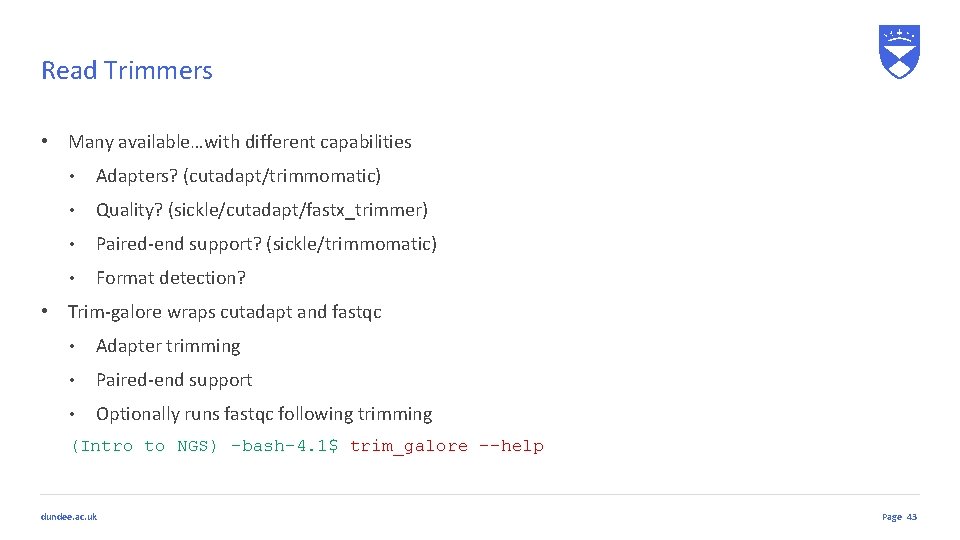
Read Trimmers • Many available…with different capabilities • Adapters? (cutadapt/trimmomatic) • Quality? (sickle/cutadapt/fastx_trimmer) • Paired-end support? (sickle/trimmomatic) • Format detection? • Trim-galore wraps cutadapt and fastqc • Adapter trimming • Paired-end support • Optionally runs fastqc following trimming (Intro to NGS) -bash-4. 1$ trim_galore --help dundee. ac. uk Page 43
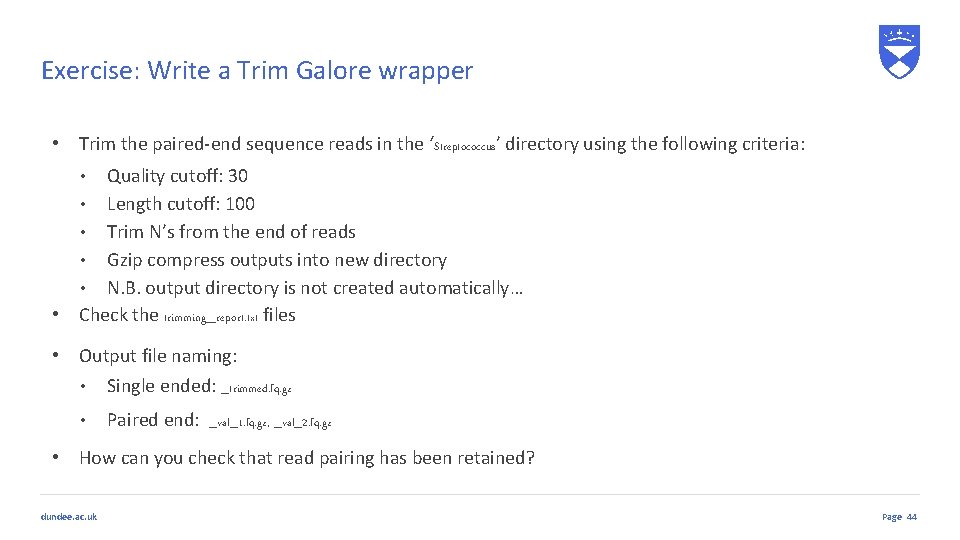
Exercise: Write a Trim Galore wrapper • Trim the paired-end sequence reads in the ‘Streptococcus’ directory using the following criteria: Quality cutoff: 30 • Length cutoff: 100 • Trim N’s from the end of reads • Gzip compress outputs into new directory • N. B. output directory is not created automatically… • Check the trimming_report. txt files • • Output file naming: • Single ended: _trimmed. fq. gz • Paired end: _val_1. fq. gz, _val_2. fq. gz • How can you check that read pairing has been retained? dundee. ac. uk Page 44
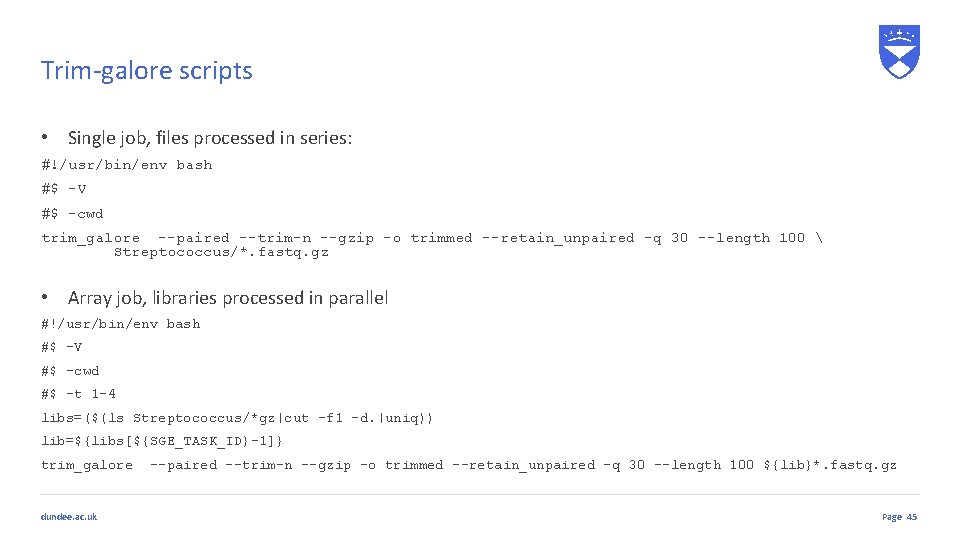
Trim-galore scripts • Single job, files processed in series: #!/usr/bin/env bash #$ -V #$ -cwd trim_galore --paired --trim-n --gzip -o trimmed --retain_unpaired -q 30 --length 100 Streptococcus/*. fastq. gz • Array job, libraries processed in parallel #!/usr/bin/env bash #$ -V #$ -cwd #$ -t 1 -4 libs=($(ls Streptococcus/*gz|cut -f 1 -d. |uniq)) lib=${libs[${SGE_TASK_ID}-1]} trim_galore dundee. ac. uk --paired --trim-n --gzip -o trimmed --retain_unpaired -q 30 --length 100 ${lib}*. fastq. gz Page 45
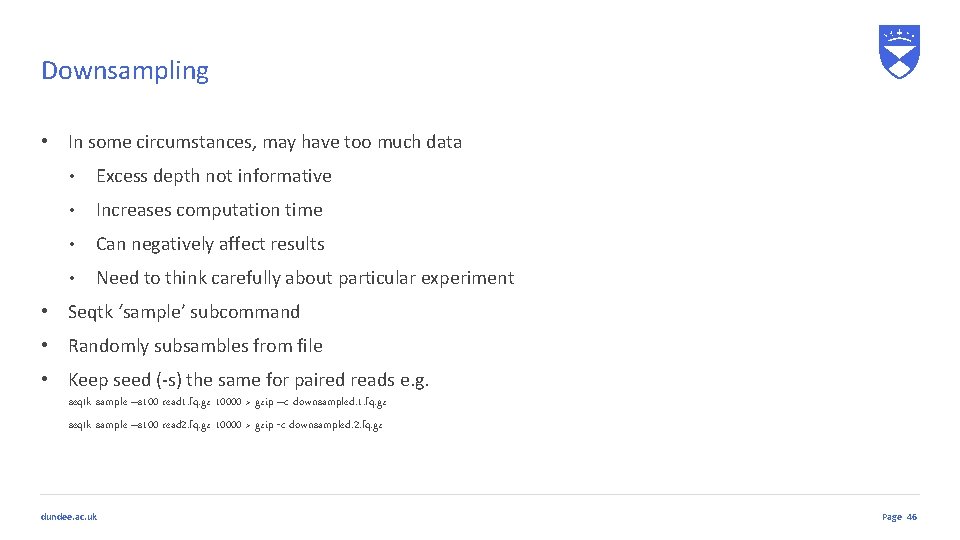
Downsampling • In some circumstances, may have too much data • Excess depth not informative • Increases computation time • Can negatively affect results • Need to think carefully about particular experiment • Seqtk ‘sample’ subcommand • Randomly subsambles from file • Keep seed (-s) the same for paired reads e. g. seqtk sample –s 100 read 1. fq. gz 10000 > gzip –c downsampled. 1. fq. gz seqtk sample –s 100 read 2. fq. gz 10000 > gzip -c downsampled. 2. fq. gz dundee. ac. uk Page 46
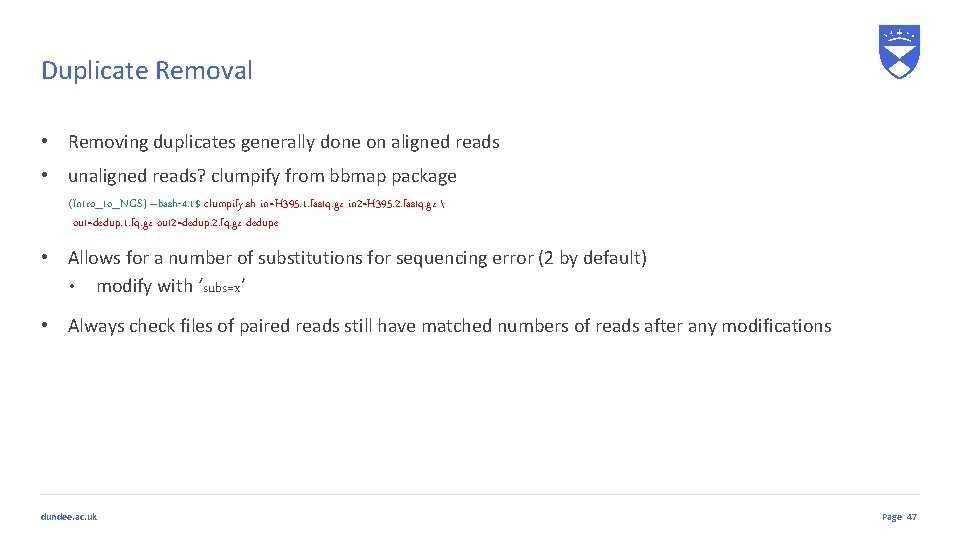
Duplicate Removal • Removing duplicates generally done on aligned reads • unaligned reads? clumpify from bbmap package (Intro_to_NGS) –bash-4. 1$ clumpify. sh in=H 395. 1. fastq. gz in 2=H 395. 2. fastq. gz out=dedup. 1. fq. gz out 2=dedup. 2. fq. gz dedupe • Allows for a number of substitutions for sequencing error (2 by default) • modify with ‘subs=x’ • Always check files of paired reads still have matched numbers of reads after any modifications dundee. ac. uk Page 47
DAG Workflows dundee. ac. uk
The Reproducibility Crisis… • Many difficulties of reproducibility in analysis • What software version? • What arguments? • How is this recorded? • How can someone else replicate the analysis • Scaling up analysis is difficult • Debugging scripts • Ensuring cluster jobs run appropriately • Many things to consider, before you start thinking about the analysis itself dundee. ac. uk Page
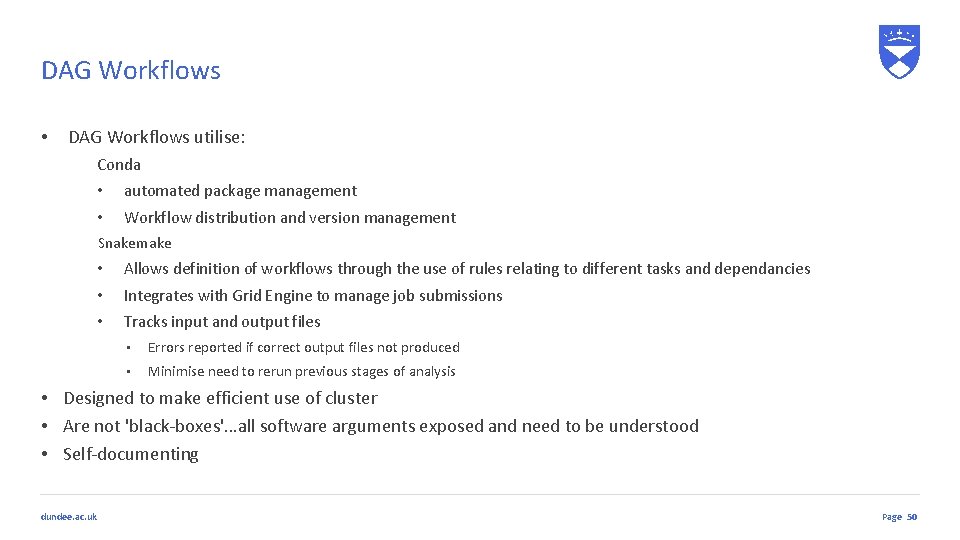
DAG Workflows • DAG Workflows utilise: Conda • automated package management • Workflow distribution and version management Snakemake • Allows definition of workflows through the use of rules relating to different tasks and dependancies • Integrates with Grid Engine to manage job submissions • Tracks input and output files • Errors reported if correct output files not produced • Minimise need to rerun previous stages of analysis • Designed to make efficient use of cluster • Are not 'black-boxes'…all software arguments exposed and need to be understood • Self-documenting dundee. ac. uk Page 50
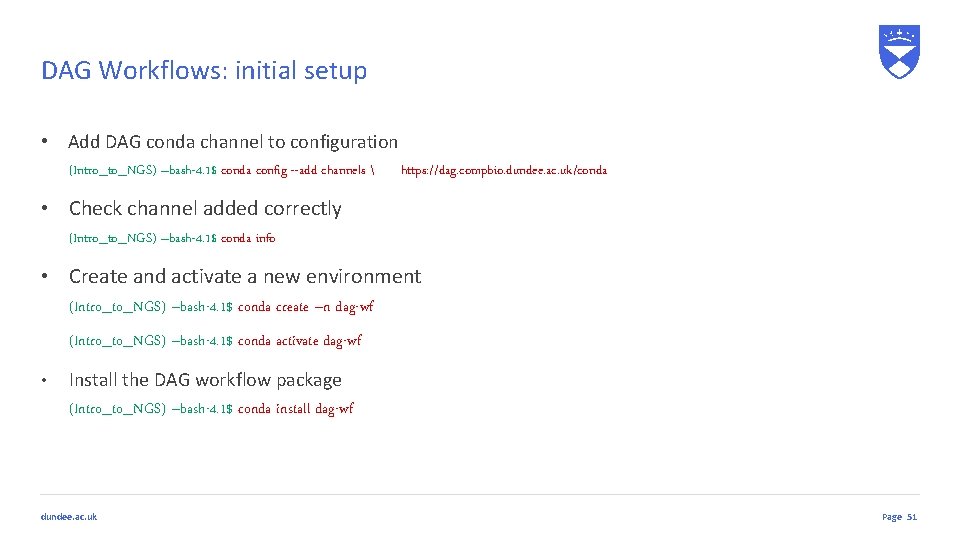
DAG Workflows: initial setup • Add DAG conda channel to configuration (Intro_to_NGS) –bash-4. 1$ conda config --add channels • https: //dag. compbio. dundee. ac. uk/conda Check channel added correctly (Intro_to_NGS) –bash-4. 1$ conda info • Create and activate a new environment (Intro_to_NGS) –bash-4. 1$ conda create –n dag-wf (Intro_to_NGS) –bash-4. 1$ conda activate dag-wf • Install the DAG workflow package (Intro_to_NGS) –bash-4. 1$ conda install dag-wf dundee. ac. uk Page 51
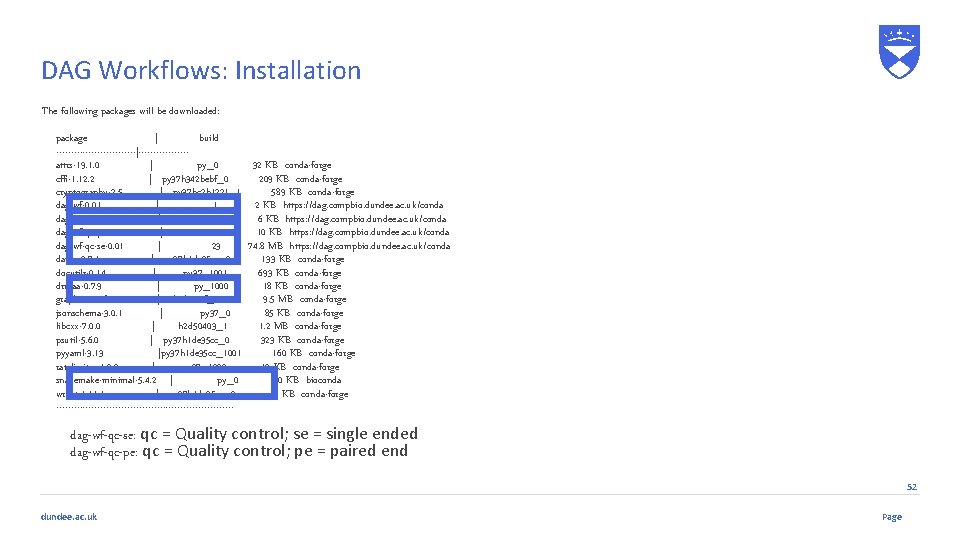
DAG Workflows: Installation The following packages will be downloaded: package | build --------------|--------attrs-19. 1. 0 | py_0 32 KB conda-forge cffi-1. 12. 2 | py 37 h 342 bebf_0 209 KB conda-forge cryptography-2. 5 | py 37 hc 2 b 1221_1 589 KB conda-forge dag-wf-0. 01 | 1 2 KB https: //dag. compbio. dundee. ac. uk/conda dag-wf-core-0. 03 | 9 6 KB https: //dag. compbio. dundee. ac. uk/conda dag-wf-qc-pe-0. 01 | 10 10 KB https: //dag. compbio. dundee. ac. uk/conda dag-wf-qc-se-0. 01 | 23 74. 8 MB https: //dag. compbio. dundee. ac. uk/conda datrie-0. 7. 1 | py 37 h 1 de 35 cc_0 133 KB conda-forge docutils-0. 14 | py 37_1001 693 KB conda-forge drmaa-0. 7. 9 | py_1000 18 KB conda-forge graphviz-2. 38. 0 | hc 6 cc 99 f_1011 9. 5 MB conda-forge jsonschema-3. 0. 1 | py 37_0 85 KB conda-forge libcxx-7. 0. 0 | h 2 d 50403_1 1. 2 MB conda-forge psutil-5. 6. 0 | py 37 h 1 de 35 cc_0 323 KB conda-forge pyyaml-3. 13 |py 37 h 1 de 35 cc_1001 160 KB conda-forge ratelimiter-1. 2. 0 | py 37_1000 12 KB conda-forge snakemake-minimal-5. 4. 2 | py_0 130 KB bioconda wrapt-1. 1 | py 37 h 1 de 35 cc_0 41 KB conda-forge ------------------------------ dag-wf-qc-se: qc = Quality control; se = single ended dag-wf-qc-pe: qc = Quality control; pe = paired end 52 dundee. ac. uk Page
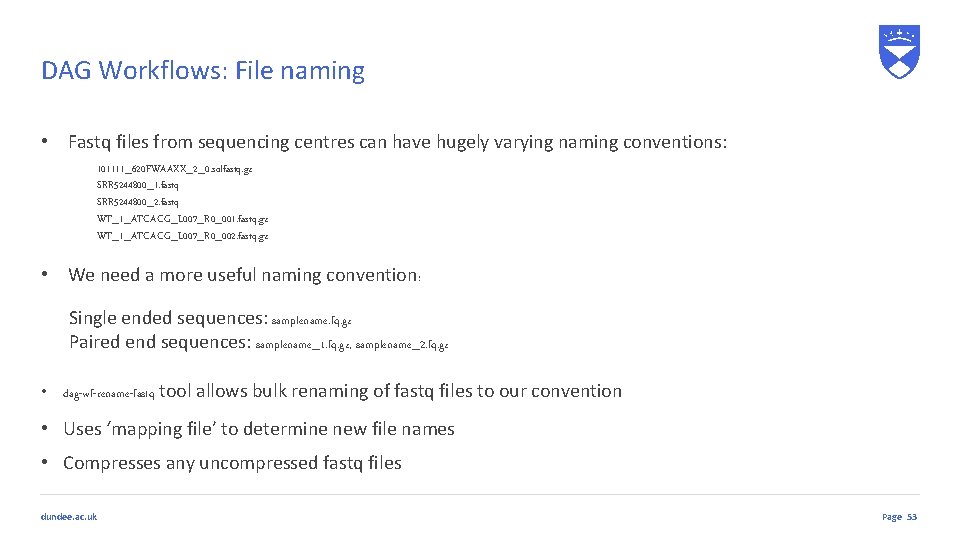
DAG Workflows: File naming • Fastq files from sequencing centres can have hugely varying naming conventions: 101111_620 FWAAXX_2_0. solfastq. gz SRR 5244800_1. fastq SRR 5244800_2. fastq WT_1_ATCACG_L 007_R 0_001. fastq. gz WT_1_ATCACG_L 007_R 0_002. fastq. gz • We need a more useful naming convention: Single ended sequences: samplename. fq. gz Paired end sequences: samplename_1. fq. gz, samplename_2. fq. gz • dag-wf-rename-fastq tool allows bulk renaming of fastq files to our convention • Uses ‘mapping file’ to determine new file names • Compresses any uncompressed fastq files dundee. ac. uk Page 53
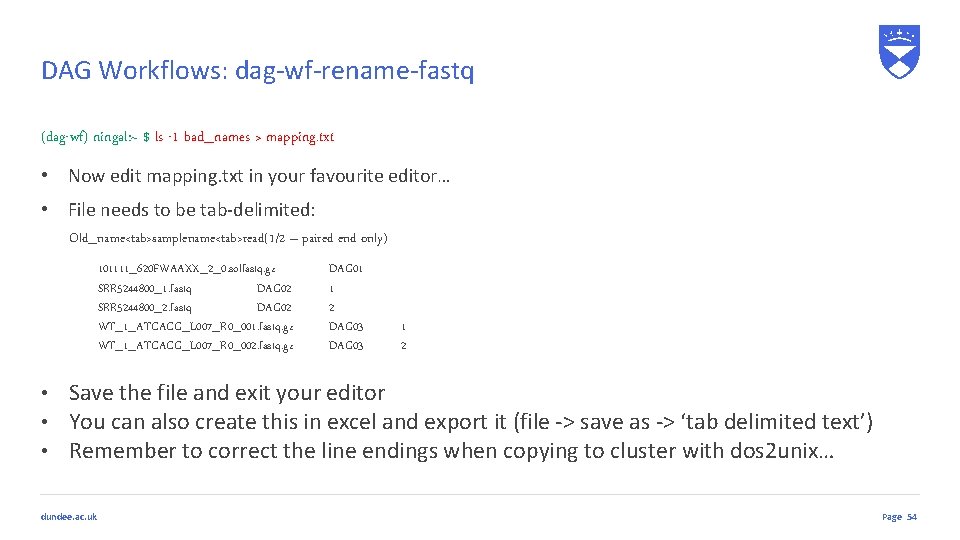
DAG Workflows: dag-wf-rename-fastq (dag-wf) ningal: ~ $ ls -1 bad_names > mapping. txt • Now edit mapping. txt in your favourite editor… • File needs to be tab-delimited: Old_name<tab>samplename<tab>read(1/2 – paired end only) 101111_620 FWAAXX_2_0. solfastq. gz SRR 5244800_1. fastq DAG 02 SRR 5244800_2. fastq DAG 02 WT_1_ATCACG_L 007_R 0_001. fastq. gz WT_1_ATCACG_L 007_R 0_002. fastq. gz DAG 01 1 2 DAG 03 1 2 • Save the file and exit your editor • You can also create this in excel and export it (file -> save as -> ‘tab delimited text’) • Remember to correct the line endings when copying to cluster with dos 2 unix… dundee. ac. uk Page 54
DAG Workflows: dag-wf-rename-fastq (dag-wf) ningal: ~ $ dag-wf-rename-fastq Usage: dag-wf-rename-files [-i inputdir] [-m mapping_file] [-h] Renames batches of files to make them amenable to runnig through DAG workflows The required mapping file should be a tab delimited file containing the following fields: Original_filename Sample Read where: original_filename: the current name of the file sample: the sample name to which the file relates read: either '1' or '2' (not required for single-ended fastq files) Any uncompressed fastq files found will be compressed using gzip Options: * -i: path to input directory containing files to rename * -m: mapping file of filename to sample mappings * -h: Display help • So give it a go…. dundee. ac. uk Page 55
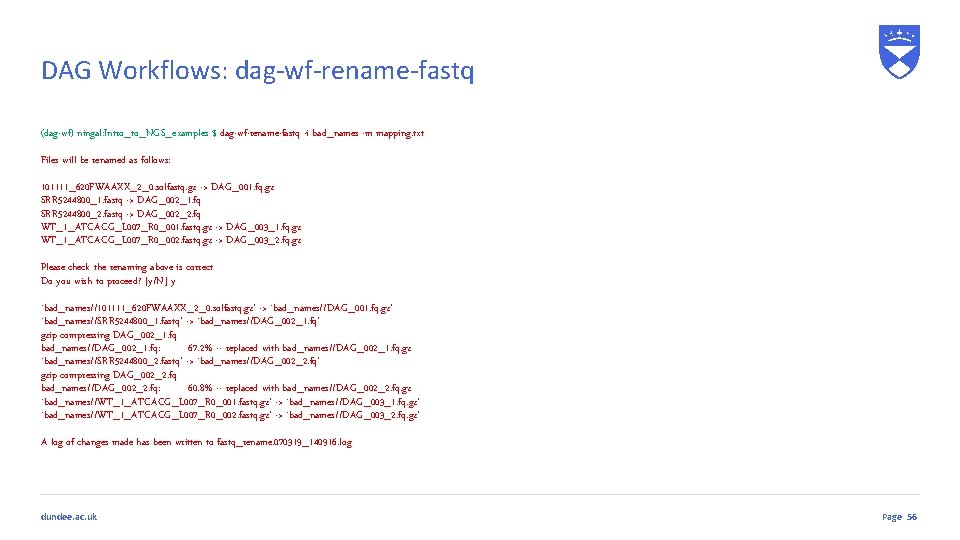
DAG Workflows: dag-wf-rename-fastq (dag-wf) ningal: Intro_to_NGS_examples $ dag-wf-rename-fastq -i bad_names -m mapping. txt Files will be renamed as follows: 101111_620 FWAAXX_2_0. solfastq. gz -> DAG_001. fq. gz SRR 5244800_1. fastq -> DAG_002_1. fq SRR 5244800_2. fastq -> DAG_002_2. fq WT_1_ATCACG_L 007_R 0_001. fastq. gz -> DAG_003_1. fq. gz WT_1_ATCACG_L 007_R 0_002. fastq. gz -> DAG_003_2. fq. gz Please check the renaming above is correct Do you wish to proceed? [y/N] y `bad_names//101111_620 FWAAXX_2_0. solfastq. gz' -> `bad_names//DAG_001. fq. gz' `bad_names//SRR 5244800_1. fastq' -> `bad_names//DAG_002_1. fq' gzip compressing DAG_002_1. fq bad_names//DAG_002_1. fq: 67. 2% -- replaced with bad_names//DAG_002_1. fq. gz `bad_names//SRR 5244800_2. fastq' -> `bad_names//DAG_002_2. fq' gzip compressing DAG_002_2. fq bad_names//DAG_002_2. fq: 60. 8% -- replaced with bad_names//DAG_002_2. fq. gz `bad_names//WT_1_ATCACG_L 007_R 0_001. fastq. gz' -> `bad_names//DAG_003_1. fq. gz' `bad_names//WT_1_ATCACG_L 007_R 0_002. fastq. gz' -> `bad_names//DAG_003_2. fq. gz' A log of changes made has been written to fastq_rename. 070319_140916. log dundee. ac. uk Page 56
DAG Workflows: workflow setup (dag-wf) ningal: ~ $ dag-wf-setup Usage: dag-wf-setup [-n name] [-d directory] [-w workflow] [-i inputdir] Options: * -n: Name of workflow job * -d: Directory to create for containing workflow files * -w: Workflow to initiate * -i: Directory containing input files for workflow * -c: Copy input files into workflow (default: use symlink) Available workflows: qc-pe, qc-se dundee. ac. uk Page 57
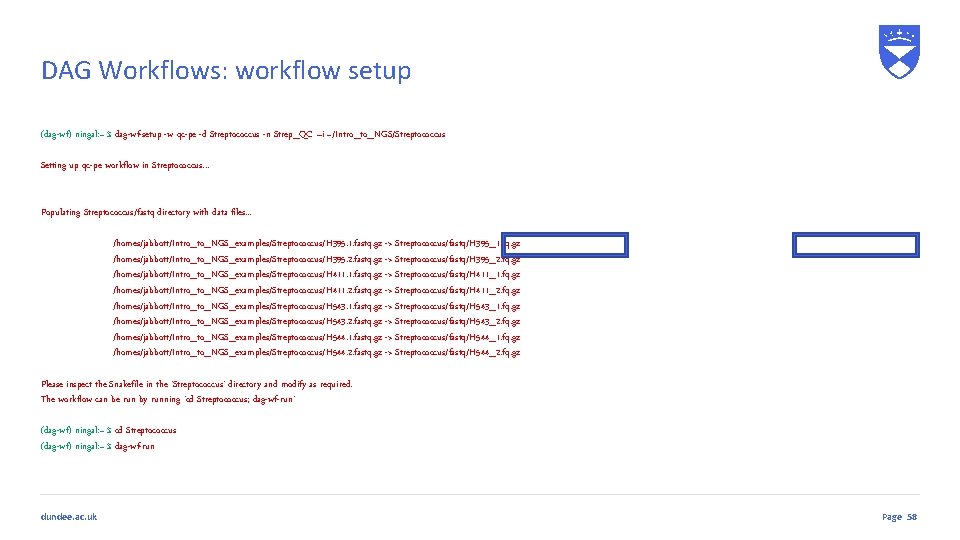
DAG Workflows: workflow setup (dag-wf) ningal: ~ $ dag-wf-setup -w qc-pe -d Streptococcus -n Strep_QC –i ~/Intro_to_NGS/Streptococcus Setting up qc-pe workflow in Streptococcus. . . Populating Streptococcus/fastq directory with data files. . . /homes/jabbott/Intro_to_NGS_examples/Streptococcus/H 395. 1. fastq. gz -> Streptococcus/fastq/H 395_1. fq. gz /homes/jabbott/Intro_to_NGS_examples/Streptococcus/H 395. 2. fastq. gz -> Streptococcus/fastq/H 395_2. fq. gz /homes/jabbott/Intro_to_NGS_examples/Streptococcus/H 411. 1. fastq. gz -> Streptococcus/fastq/H 411_1. fq. gz /homes/jabbott/Intro_to_NGS_examples/Streptococcus/H 411. 2. fastq. gz -> Streptococcus/fastq/H 411_2. fq. gz /homes/jabbott/Intro_to_NGS_examples/Streptococcus/H 543. 1. fastq. gz -> Streptococcus/fastq/H 543_1. fq. gz /homes/jabbott/Intro_to_NGS_examples/Streptococcus/H 543. 2. fastq. gz -> Streptococcus/fastq/H 543_2. fq. gz /homes/jabbott/Intro_to_NGS_examples/Streptococcus/H 544. 1. fastq. gz -> Streptococcus/fastq/H 544_1. fq. gz /homes/jabbott/Intro_to_NGS_examples/Streptococcus/H 544. 2. fastq. gz -> Streptococcus/fastq/H 544_2. fq. gz Please inspect the Snakefile in the 'Streptococcus' directory and modify as required. The workflow can be run by running 'cd Streptococcus; dag-wf-run' (dag-wf) ningal: ~ $ cd Streptococcus (dag-wf) ningal: ~ $ dag-wf-run dundee. ac. uk Page 58
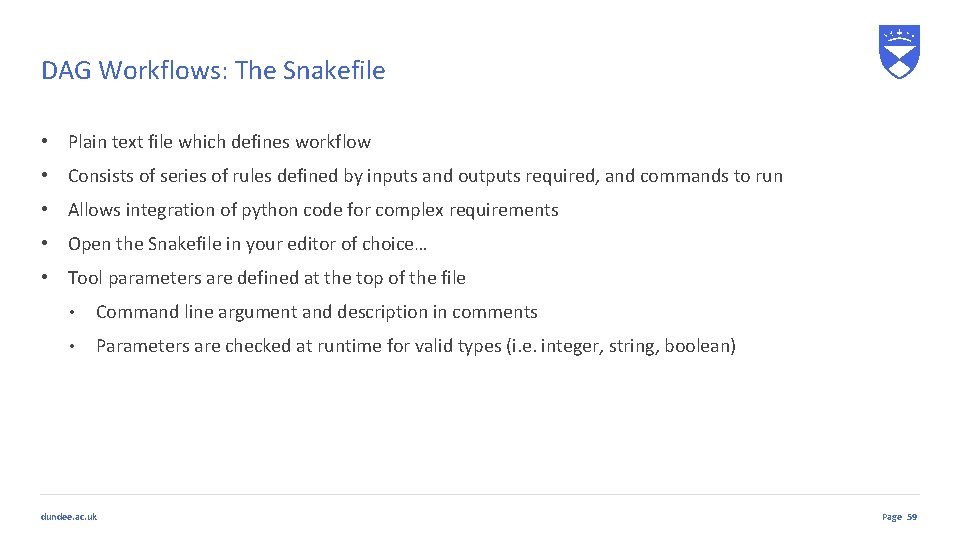
DAG Workflows: The Snakefile • Plain text file which defines workflow • Consists of series of rules defined by inputs and outputs required, and commands to run • Allows integration of python code for complex requirements • Open the Snakefile in your editor of choice… • Tool parameters are defined at the top of the file • Command line argument and description in comments • Parameters are checked at runtime for valid types (i. e. integer, string, boolean) dundee. ac. uk Page 59
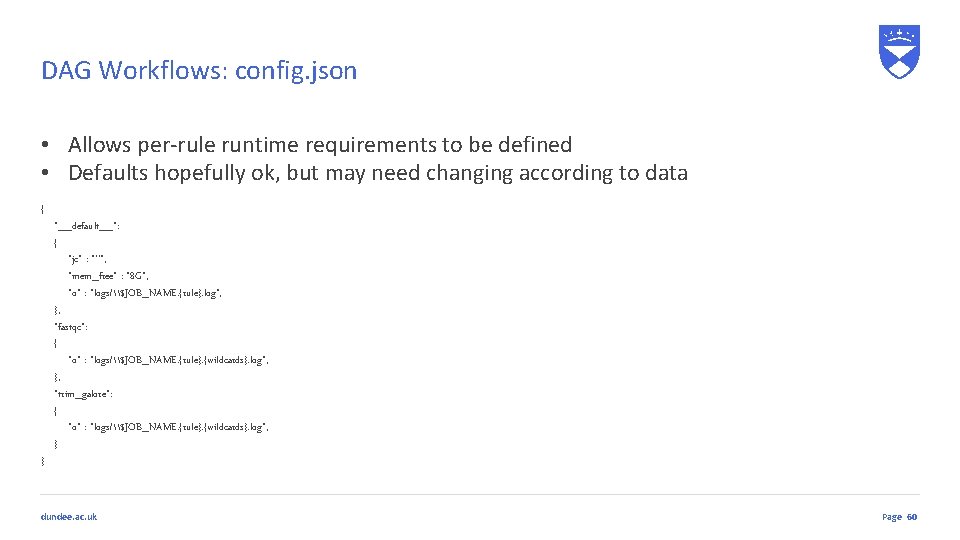
DAG Workflows: config. json • Allows per-rule runtime requirements to be defined • Defaults hopefully ok, but may need changing according to data { } "__default__": { "jc" : "''", "mem_free" : "8 G", "o" : "logs/\$JOB_NAME. {rule}. log", }, "fastqc": { "o" : "logs/\$JOB_NAME. {rule}. {wildcards}. log", }, "trim_galore": { "o" : "logs/\$JOB_NAME. {rule}. {wildcards}. log", } dundee. ac. uk Page 60
DAG Workflows: Sample naming • Single ended libraries: • [samplename]. fastq. gz • [samplename]. fq. gz • Paired end libraries: • [samplename]. 1. fastq. gz, [samplename]. 2. fastq. gz • [samplename]_1. fastq. gz, [samplename]_2. fastq. gz • [samplename]. 1. fq. gz, [samplename]. 2. fq. gz • [samplename]_1. fq. gz, [samplename]_2. fq. gz dundee. ac. uk Page 61
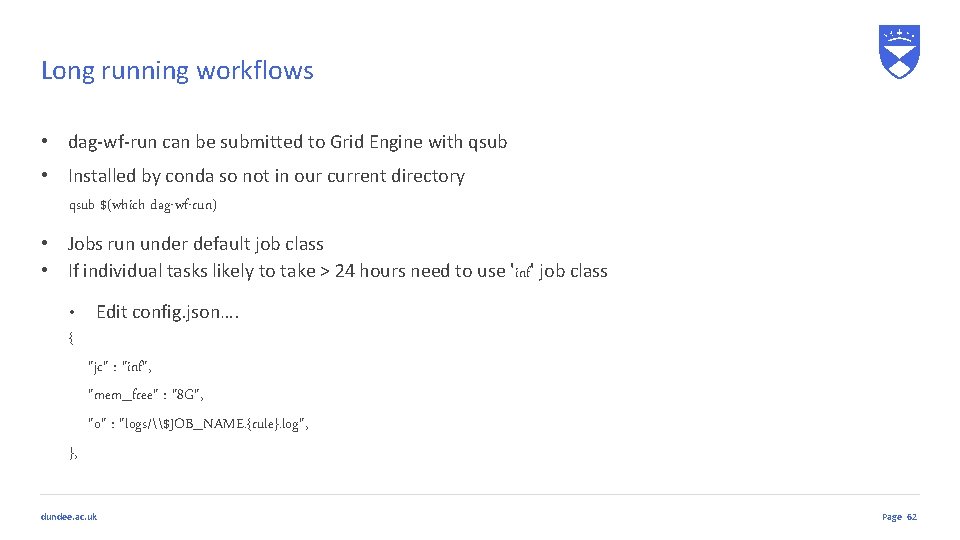
Long running workflows • dag-wf-run can be submitted to Grid Engine with qsub • Installed by conda so not in our current directory qsub $(which dag-wf-run) • Jobs run under default job class • If individual tasks likely to take > 24 hours need to use 'inf' job class • Edit config. json…. { "jc" : "inf", "mem_free" : "8 G", "o" : "logs/\$JOB_NAME. {rule}. log", }, dundee. ac. uk Page 62
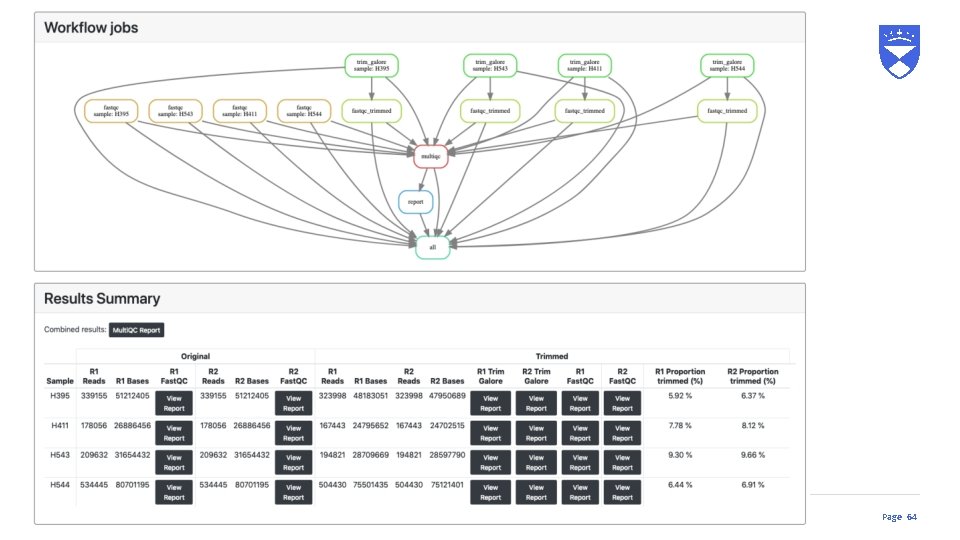
dundee. ac. uk Page 63
dundee. ac. uk Page 64
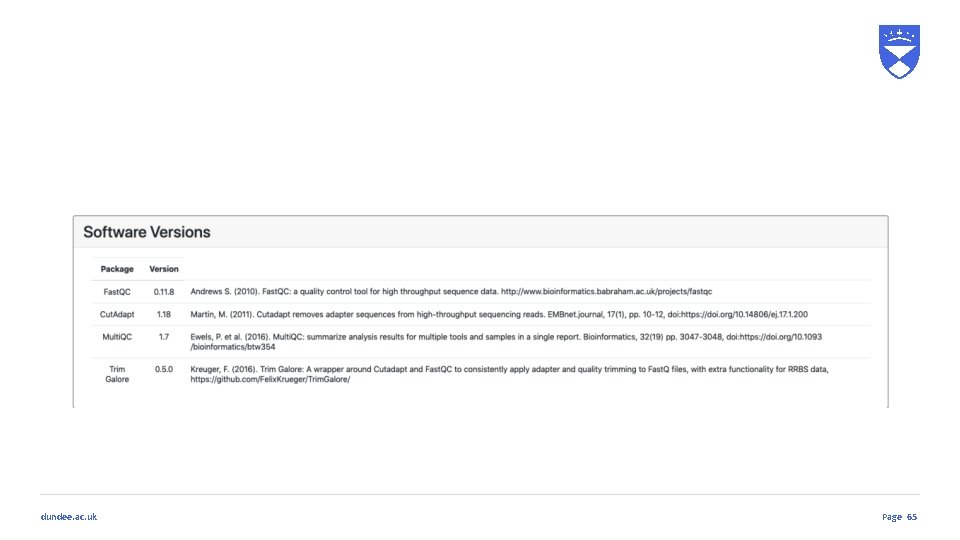
dundee. ac. uk Page 65
The Sequence Read Archive dundee. ac. uk
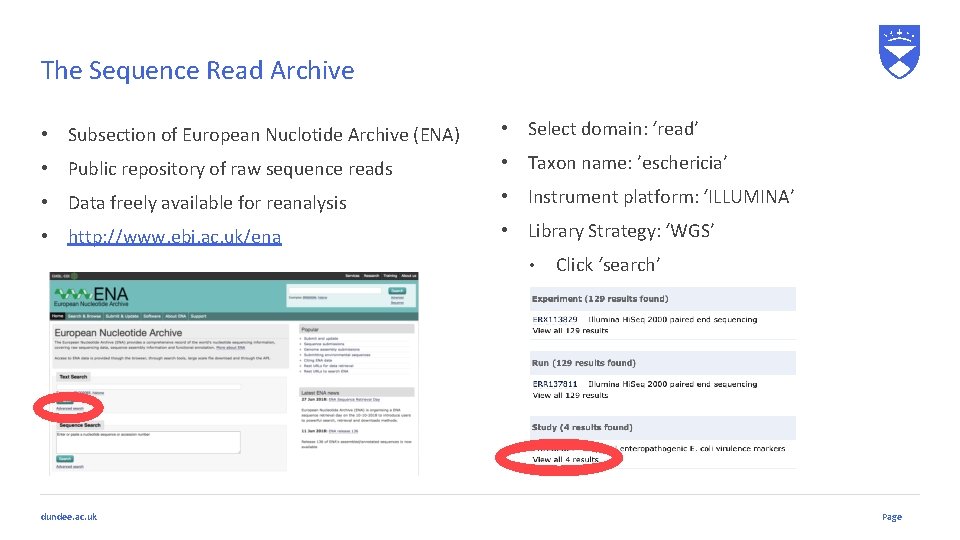
The Sequence Read Archive • Subsection of European Nuclotide Archive (ENA) • Select domain: ‘read’ • Public repository of raw sequence reads • Taxon name: ’eschericia’ • Data freely available for reanalysis • Instrument platform: ‘ILLUMINA’ • http: //www. ebi. ac. uk/ena • Library Strategy: ‘WGS’ • dundee. ac. uk Click ‘search’ Page
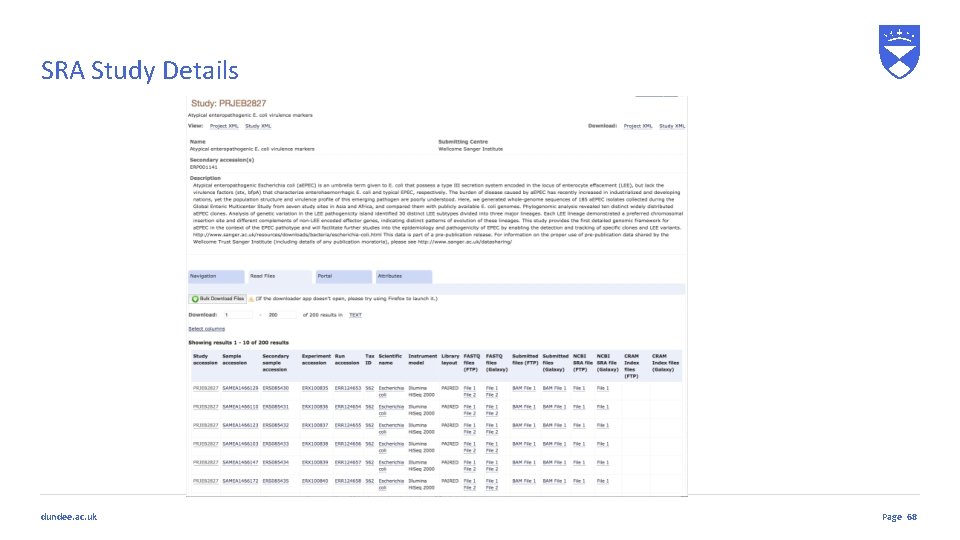
SRA Study Details dundee. ac. uk Page 68
Summary We have covered: • Different approaches to sequencing • Library types (Single end/Paired end/Mate pair) • Sequence base quality • Sequence file formats • Sequence quality assessment • Remedial work for problematic sequences • Read trimming • Subsampling • Duplicate removal • Using DAG workflows for sequence QC • Finding publicly accessible sequence data from the SRA dundee. ac. uk Page 69
Any Questions? 70