
Introduction to Naviance Agenda Lesson 1 Orientation and


- Slides: 14
Introduction to Naviance
Agenda • • Lesson 1: Orientation and Navigation Lesson 2: Naviance Student Lesson 3: Account Information and Access Lesson 4: Working with Student Information Lesson 5: Analytics Lesson 6: Naviance Implementation Methodology Conclusion and Next Steps
Course Objectives Upon completing this course, you will be able to: Naviance is a fully integrated platform designed to help raise student accountability and performance across a number of key indicators leading to increased engagement, improvements in academic performance, and overall workplace and college readiness. This course is designed to introduce Naviance users to some of these key features. • Navigate Naviance • Work with student information • Search for a student • Experience Naviance Student from a student perspective • See how information moves between Naviance and Naviance Student • Generate valuable reports • Gain and understanding of next steps for implementation
Learning Objectives • Navigate Naviance • Understand the components of Naviance and Naviance Student Lesson 1: Orientation and Navigation
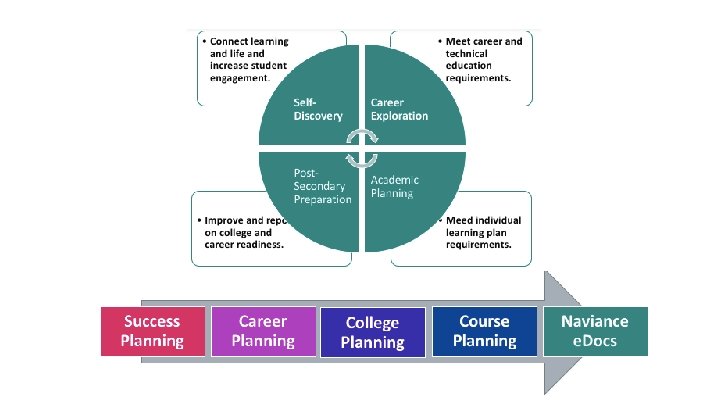
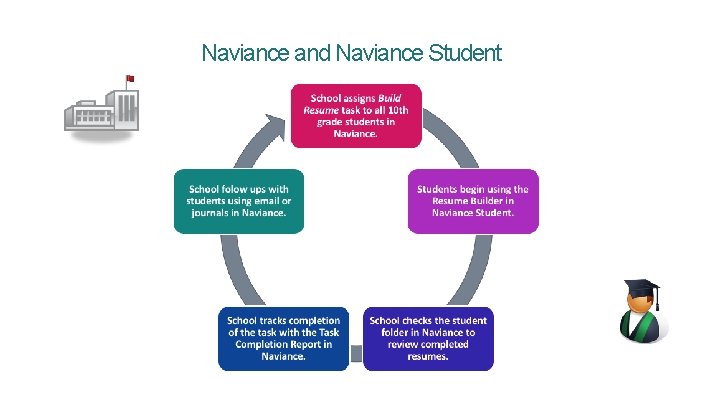
Naviance and Naviance Student
Learning Objectives • Understand Naviance Student from a student’s perspective Lesson 2: Naviance Student
Learning Objectives • Sign into Naviance • Manage your account Lesson 3: Account Information and Access
Learning Objectives • Use Demo Naviance Student • Work with student information in Naviance • Search for a student Lesson 4: Working with Student Information
Learning Objectives • Track college outcomes with Insights • Generate, customize, and email reports Lesson 5: Analytics
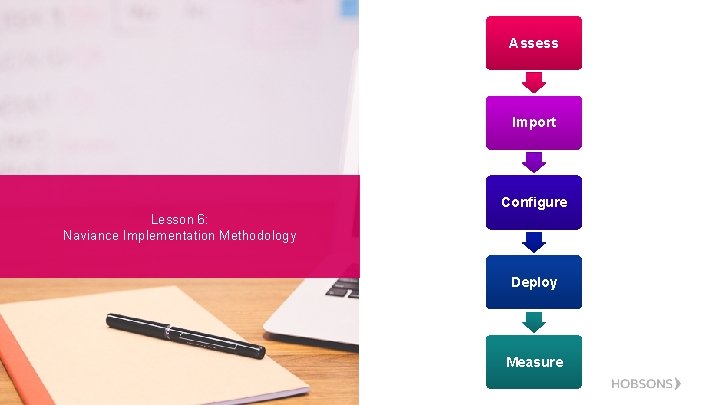
Assess Import Configure Lesson 6: Naviance Implementation Methodology Deploy Measure
Next Steps Conclusion and Next Steps • Meet with staff and administrators to develop an implementation plan, and schedule future trainings to support the agreed-upon implementation plan. • Use the resources available in the Naviance Help Center
Additional Resources Counselor Community Naviance Help Center Contact Support Services Connect and collaborate with Naviance users Read help articles written by Naviance Experts Email: support@naviance. com Phone: 866. 337. 0080, option#2
Questions?