
Introduction to LEGO NXT robotics and Robot Sumo
Introduction to LEGO NXT robotics and Robot Sumo – Sept 20, 2008 Lawrence Technological University Douglas G. Czinder IEEE SEM R&A Chairperson chair@semrobotics. org Professor Keith Bozin kbozin@greaybox. com CJ Chung, Ph. D. Associate Professor and Director of Robofest chung@LTU. edu
This program is possible thanks to: ¡ ¡ a grant from The Chrysler Foundation the Southeastern Michigan Chapter of the IEEE Robotics & Automation Society

Workshop Schedule – Sept 20, 2008 ¡ 9: 30 10: 00 10: 20 11: 00 11: 15 ¡ 12: 30 - 1: 30 ¡ ¡ ¡ ¡ ¡ 1: 30 2: 15 2: 30 3: 00 3: 30 – 10: 00 – 10: 20 – 11: 00 - 11: 15 - 12: 30 - 2: 15 – 2: 30 – 3: 00 – 3: 30 – 4: 00 Continental Breakfast (provided) Intro to Lego NXT & Robofest Basic NXTG programming Break Programming with Sensors Lunch (provided) Programming with Sensors (cont’d) Break Basic Sumo Program Improved Sumo Program Mini Competition
Introduction to Robotics ¡ What is a true robot? l l ¡ autonomous robot with an on board computer Mechanical, electrical, and computational components Six fundamental components of a robot l l l A brain or brains – computer Body: physical chasses that holds other pieces Actuators: motors, hydraulic pistons, pneumatics Sensors Power sources Communication mechanism

What is Robofest? 100% Autonomous ¡ Affordable ¡ Challenging: Unknown problem ¡ No direct adult help allowed during the competition ¡ Qualifiers and a World Championship ¡ Various categories including Robot Sumo ¡ Two divisions: ¡ l l 5 th – 9 th grade: Jr. Division 9 th – 12 th grade: Sr. Division

Robo. Sumo Push the other robot out of the Sumo ring
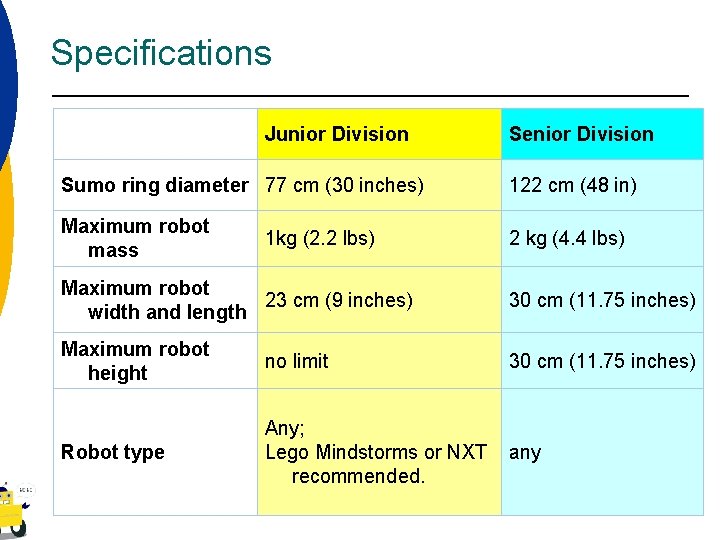
Specifications Junior Division Senior Division Sumo ring diameter 77 cm (30 inches) 122 cm (48 in) Maximum robot mass 2 kg (4. 4 lbs) 1 kg (2. 2 lbs) Maximum robot 23 cm (9 inches) width and length 30 cm (11. 75 inches) Maximum robot height no limit 30 cm (11. 75 inches) Robot type Any; Lego Mindstorms or NXT recommended. any

Why Sumo? The most popular robot competition in the world ¡ Integrator in Science Education – Math, Logic, Computers, Mechanics, and Physics ¡ Good for rookie teams ¡ Fun Motivator ¡

Unknown Problem in Robofest Sumo How to start is unknown ¡ Need sensor(s) ¡ Teams must bring a computer to program the unknown parts ¡
Introduction to Lego NXT Brain – RCX micro computer ¡ Body: Lego Technic pieces ¡ Actuators: up to 3 motors ¡ Sensors: Light, Touch, Ultrasonic, Sound, etc. ¡ Power source: 9 V (six AA batteries or rechargeable battery pack) ¡ Communication mechanism: USB or Blue Tooth ¡

Introduction to “SB 2 (Sumo Bot 2)” Left motor: A ¡ Right motor: C ¡ Touch: 1 ¡ Light: 3 ¡ Ultra Sonic (distance): 4 ¡

Introduction to NXTG Programming ¡ Please go through Getting Started and Software Overview after this class
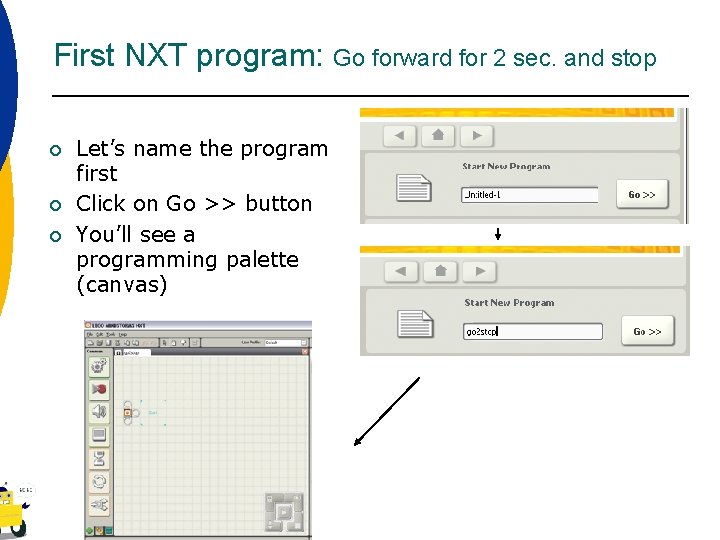
First NXT program: Go forward for 2 sec. and stop ¡ ¡ ¡ Let’s name the program first Click on Go >> button You’ll see a programming palette (canvas)
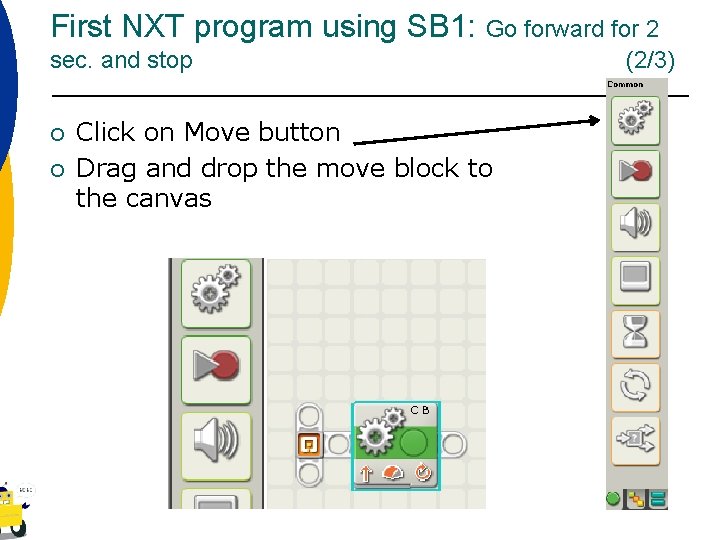
First NXT program using SB 1: Go forward for 2 sec. and stop ¡ ¡ Click on Move button Drag and drop the move block to the canvas (2/3)

First NXT program using SB 2: Go forward for 2 sec. and stop ¡ Change parameters for the Move l l l Port Direction Steering Power Duration Next Action (3/3) Block Configuration Panel
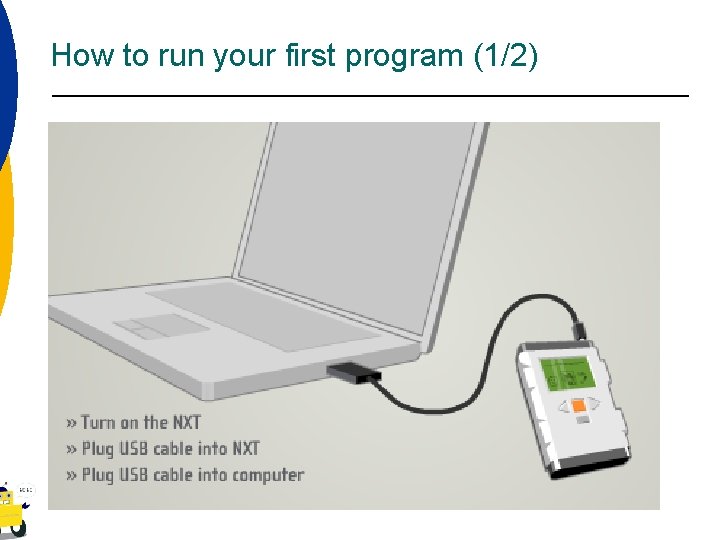
How to run your first program (1/2)

How to run your 1 st program (2/2) If “Found New Hardware” pops up, just follow the instruction ¡ Click on “Download” button ¡ Recommended to un-plug the cable from the Bot ¡ Press the orange button 4 times (Turn on, My files, Software files, Run your program entitled go 2 stop) ¡
How to rerun the program Check the program name on the LCD ¡ Press the orange button just once again ¡
How to stop the program ¡ Gray button

First NXT Program: Go forward for 2 sec. and stop (Review)
Do not forget: Save your programs ¡ Meaningful file (program) names ¡ Use comments ¡
2 nd Program: Forward. Back 1. 2. 3. Go Forward 2 rotations Wait 3 seconds, then Backward 1 rotation

Go Forward 2 rotations, Wait 3 seconds then Backward 1 rotation – Forward. Back

Making Turns (Instructor Slide) ¡ Objective l l l Challenge the students to think about how a turn is made Two ways to turn using one motor (demonstrate by turning with your leg) Demonstrate advantage of turning by spinning stop ¡ Turn left Left wheel Right wheel ¡ Spin left Left wheel Right wheel ¡ Face left stop Left wheel Right wheel

Making Turns ¡ Turn left stop Left wheel ¡ Spin left Left wheel ¡ Right wheel Face left stop Left wheel Right wheel
Turn 90 Left – Using a Motor Block! ¡ ¡ ¡ Forward 2 rotations, Turn Left 90 Degrees, and Forward 2 rotations

Forward 2 rotations, Turn Left 90 Degrees, and Forward 2 rotations – Turn 90 Left
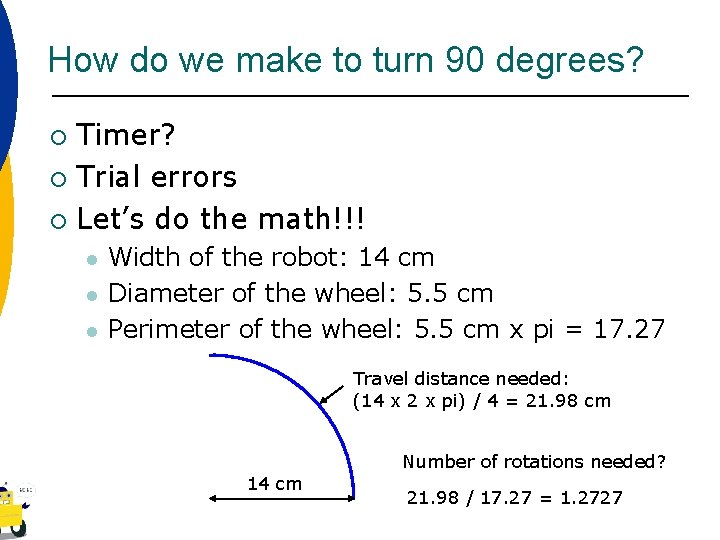
How do we make to turn 90 degrees? Timer? ¡ Trial errors ¡ Let’s do the math!!! ¡ l l l Width of the robot: 14 cm Diameter of the wheel: 5. 5 cm Perimeter of the wheel: 5. 5 cm x pi = 17. 27 Travel distance needed: (14 x 2 x pi) / 4 = 21. 98 cm 14 cm Number of rotations needed? 21. 98 / 17. 27 = 1. 2727

Programming with Sensors ¡ Programming with l l l Touch Sensor Light Sensor Ultrasonic Sensor Repeat ¡ Basic Sumo Program ¡

Start-Touch Wait until the touch sensor is pressed; ¡ Then start the robot to go forward ¡ Stop after a second ¡

Start-Light Locate the robot in the middle of the ring ¡ Wait until the light sensor detects very bright (lantern) light ¡ Then start the robot to go forward ¡ Stop after a second ¡
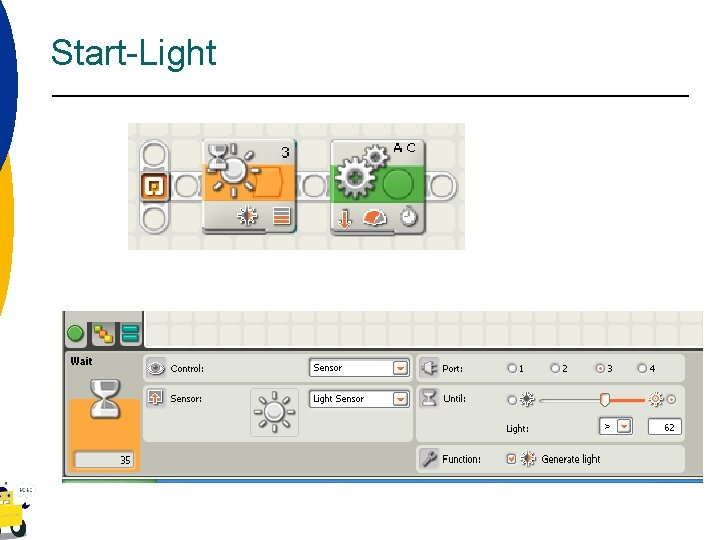
Start-Light

Stop-Touch Go straight until the bumper is hit ¡ then stop ¡
Stop-Edge Go straight until the white edge of the ring ¡ Then stop ¡
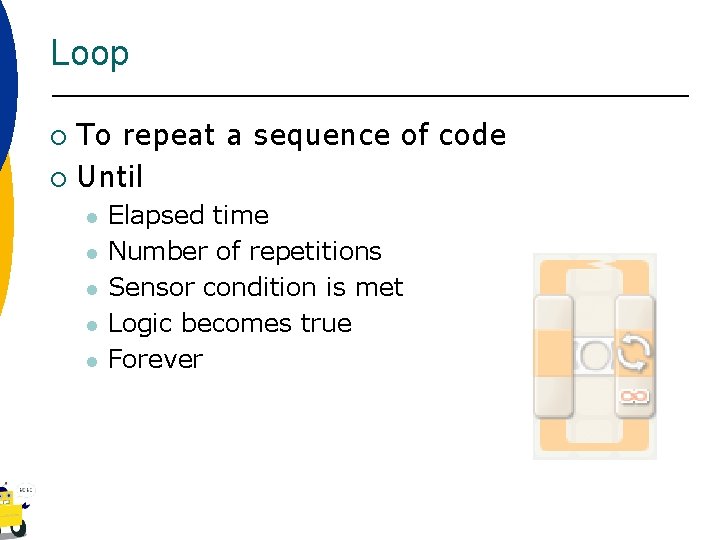
Loop To repeat a sequence of code ¡ Until ¡ l l l Elapsed time Number of repetitions Sensor condition is met Logic becomes true Forever
Say “Yes” – 10 times

Make the robot move around in the ring – Basic Sumo (Sumo 0) ¡ Repeat the following forever: l l l Go forward until the edge Backward slightly Spin right

Sumo 0

First Sumo Competition Some matches ¡ Ask students to list ideas to improve the Sumo robot ¡

Improved Sumo Program Improved Sumo program ¡ Unknown Problem ¡ Mini Competition ¡ Tips and Ideas to improve your Robot! ¡

Program for the Mini Competition Press “Shift” to connect parallel sequence beams
Ideas to improve your Sumo. Bot Improve (debug) your program! ¡ Applying Theories learned in Physical Science ¡ l l l ¡ Mass, Newton’s laws Friction Gearing Wheel size Power level Detecting the opponent (can be done later) l l Touch sensor US sensor(s)

Ideas to increase weight of your Robot What is the max weight of each division? ¡ Add more Lego technic pieces, if you have some at home ¡ Add Coins, Used Batteries, or others – make a holder using cardboards ¡ ¡ Put your team name on the robot. An idea: make a team flag
Ideas to increase friction of your Robot Use rubber bands ¡ Add more wheels later for Worlds ¡

Gearing Ideas Use gear train to increase gear ratio ¡ Considering resources, this is not allowed for the school qualifier ¡ The winner from the school qualifier may consider this idea later ¡
Changing Wheels? Using bigger wheels ¡ Considering resources, this is not allowed for the school qualifier ¡ The winner from the school qualifier may consider this idea later ¡
Make sure the Power! Default power level is 75% ¡ Fully charge your battery!!! ¡ How to check the voltage level? ¡ l See the icon on the LCD
Changing the shape of the Robot Make it sturdy ¡ Front part may need some changes (After the school qualifier) ¡
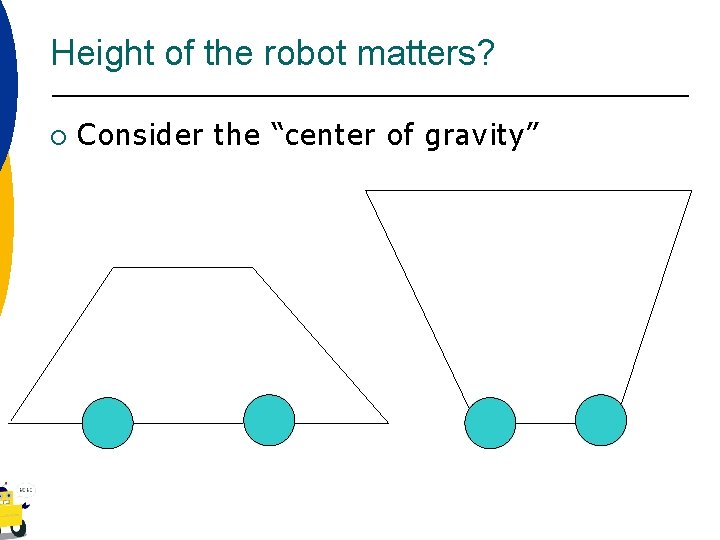
Height of the robot matters? ¡ Consider the “center of gravity”
Ideas using 2 Touch Sensors A touch sensor –front left Another touch sensor – front right If left sensor is pressed – turn left and push hard ¡ If right sensor is pressed – turn right and push hard ¡ If both left and right sensors are pressed, push straight hard ¡
What is next? - Meet with your teacher at least twice before the school qualifier Improve your programs ¡ Add stuff for the max possible weight for your robot ¡ Review what you have learned for the unknown problem. If you do not solve the unknown problem, you lose automatically ¡ Signed Media Release form must be ready before the qualifying competition date at your school ¡

Online Resources www. ortop. org/NXT_Tutorial: a great tutorial on how to program in NXTG ¡ nxtasy. org: with more information than you could ever want about LEGO robots and programming; a great place to ask questions ¡

End of Today’s Workshop Contact us with any questions: Douglas G. Czinder IEEE SEM R&A Chairperson chair@semrobotics. org Professor Keith Bozin kbozin@greaybox. com CJ Chung, Ph. D. Associate Professor and Director of Robofest chung@LTU. edu
- Slides: 53