
Introduction to KU Loket Toledo Campus Antwerp Carolus









- Slides: 26
Introduction to KU Loket Toledo Campus Antwerp Carolus | Brussels Campus KULAK Kortrijk | Leuven Campus
Part 1: Official registration courses in KU Loket Individual Study Programme Individual Exam Schedule (IES or IER) 2 Faculty of Economics and Business
Part I Official registration courses • Two parts 1. Learning Agreement (LA) 2. KU Loket - ISP (Individual study Programme) • LA = ISP = TOR • Deadline registration ISP 27 February 2019 3 Faculty of Economics and Business
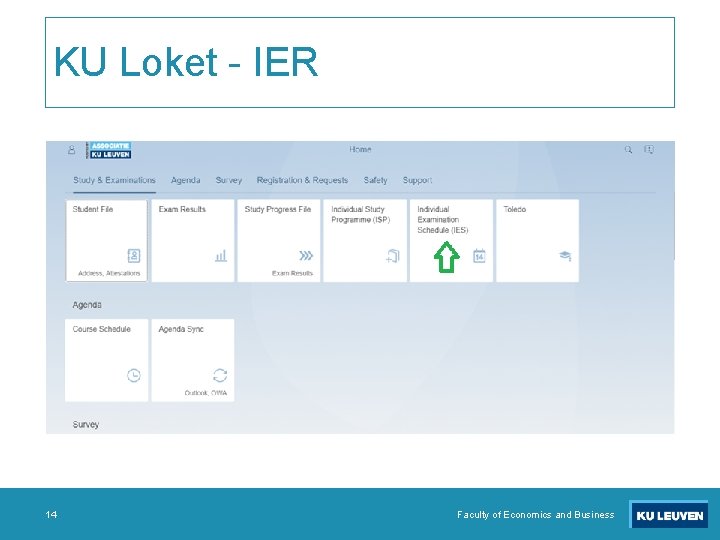
Part I Official registration courses • KU Loket – electronic version 1. Individual Study Programme (ISP) 2. Individual Exam Schedule (IES or IER) 4 Faculty of Economics and Business
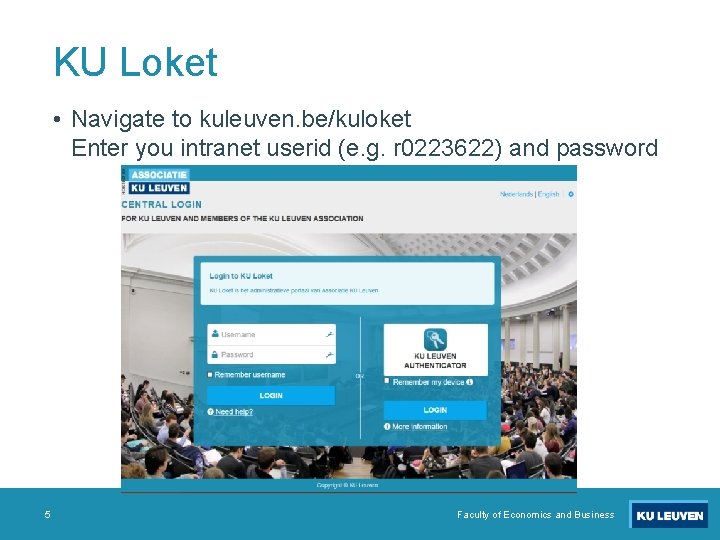
KU Loket • Navigate to kuleuven. be/kuloket Enter you intranet userid (e. g. r 0223622) and password 5 Faculty of Economics and Business
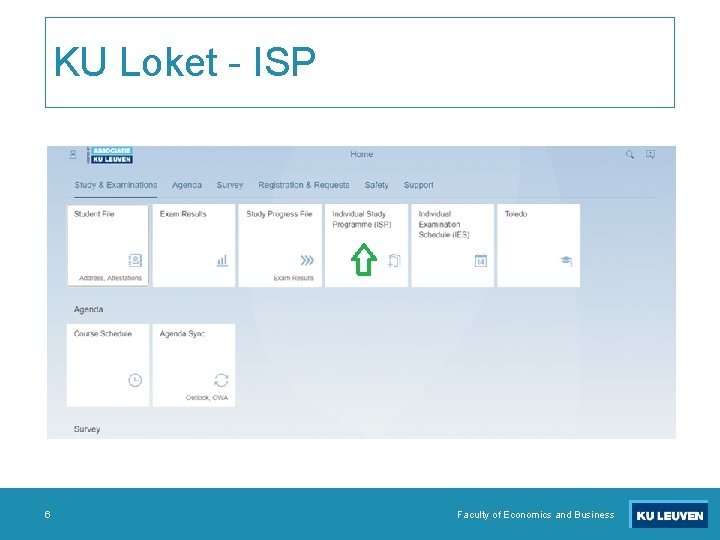
KU Loket - ISP 6 Faculty of Economics and Business
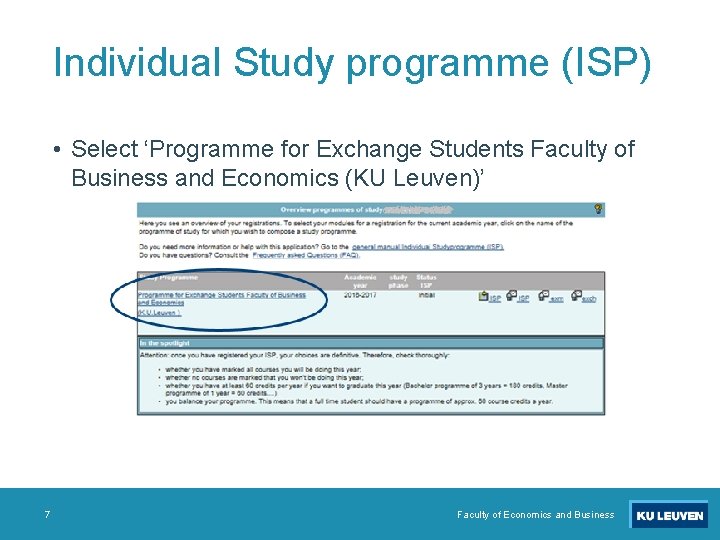
Individual Study programme (ISP) • Select ‘Programme for Exchange Students Faculty of Business and Economics (KU Leuven)’ 7 Faculty of Economics and Business
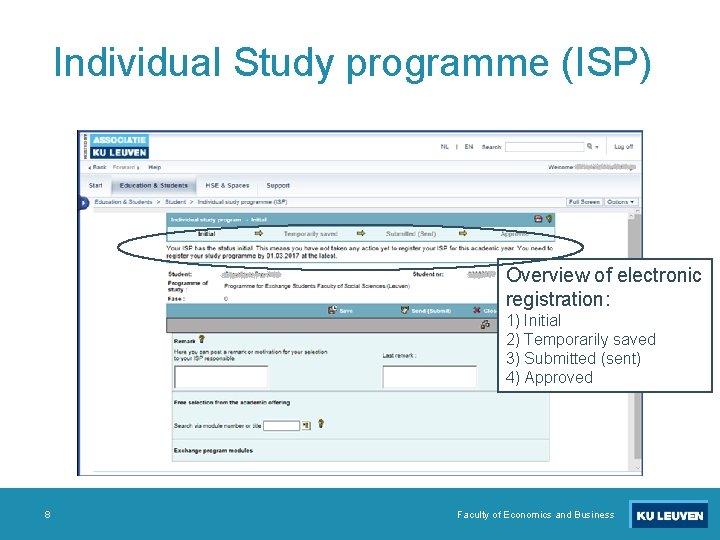
Individual Study programme (ISP) Overview of electronic registration: 1) Initial 2) Temporarily saved 3) Submitted (sent) 4) Approved 8 Faculty of Economics and Business
Individual Study programme (ISP) • Add courses (A-D) A 9 Faculty of Economics and Business
Individual Study programme (ISP) Add courses (A-D) – Pop-up B C D 10 Faculty of Economics and Business
ISP – Overview of selected courses Check your course schedule Make sure that the hours do not overlap! ECTS credits Course selected? Course name Semester = first = second Course number
ISP - Course schedule (pup-up) In case of an overlap… Tick off one of the overlapping courses in the overview (choose another one, if needed) Save your ISP, and verify the new schedule
ISP – Overview of selected courses Save ISP to continue
KU Loket - IER 14 Faculty of Economics and Business
Individual Exam Schedule (IER or IES) • At KU Leuven you should register for your exams when selecting the course • Why? 1) You know your exam schedule weeks (even months) beforehand, so you can start planning whenever you want to 2) You can make sure the exams do not overlap 3) In case of oral exams for an exam, you can immediately select the most suited moment • After selecting all your courses in your ISP (and verifying your schedule), you should also register for your exams 15 Faculty of Economics and Business
Individual Exam Schedule (IER or IES) • Some useful information • The choices you make in your exam schedule are not definitive until you have saved them using the 'save' button! • When moving your cursor over an exam slot you will see 'reeksinfo'. This is important information. If it says a particular exam slot is meant for a group of students to which you don't belong then you are not allowed to register for this exam slot! • The end time of an exam in your IES does not always reflect the amount of time effectively allocated for doing the actual exam. Often a broader time frame then necessary was booked in order to accommodate small adjustments to the start moment • The application works best in Internet Explorer or Mozilla Firefox. Google Chrome might cause some problems 16 Faculty of Economics and Business
Individual Exam Schedule (IER or IES) Legend Calender
Individual Exam Schedule (IER or IES) To get more detailed information about the exam, move the cursor over the exam moment
Individual Exam Schedule (IER or IES) Select your exam moments Note: if you selected a time slot and you wish to change, click on ‘Show available exam slots’
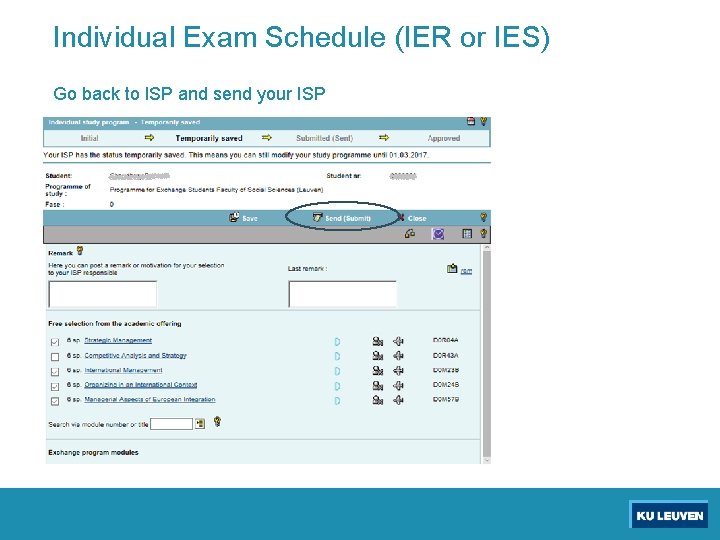
Individual Exam Schedule (IER or IES) Selected a slot for every exam? Perfect! Now save the exam schedule and send your ISP
Individual Exam Schedule (IER or IES) Go back to ISP and send your ISP
Questions and answers ISP ? Kathleen Monsieur Deadline submitting ISP : 27 February 2019 Wytse Joosten – January 2018
Part 2: Toledo 23 Faculty of Economics and Business
Part II Toledo • What ? • Web-based virtual learning environment of the KU Leuven • To share information between professors, assistants and students • Course material, assignments, announcements, mail, discussion boards, … • Where ? • http: //www. toledo. kuleuven. be • How ? • use presentation ‘Toledo Introduction’ • All the courses you have selected in your ISP will automatically appear in your Toledo. If a course is ‘unavailable’, it means the teacher of the course has not made the course available yet. 24 Faculty of Economics and Business
Questions and answers Toledo ? ICTS helpdesk • Via web form https: //admin. kuleuven. be/icts/helpdesk/mail • Via phone (8 am - 5 pm) : +32 16 32 28 00 Wytse Joosten – January 2018
Enjoy your studies! 26 Faculty of Economics and Business