
Introduction to Kamiak Training Workshop Eric Roalson CIRC



- Slides: 40
Introduction to Kamiak Training Workshop Eric Roalson, CIRC Director Peter Mills, Assistant Director Rohit Dhariwal, Computational Scientist Roy Obenchain, HPC Systems Administrator Will Aoki, HPC Systems Administrator hpc. wsu. edu/training/slides hpc. wsu. edu/training/follow-along hpc. wsu. edu/cheat-sheet These slides Handout Cheat Sheet October 26, 2020
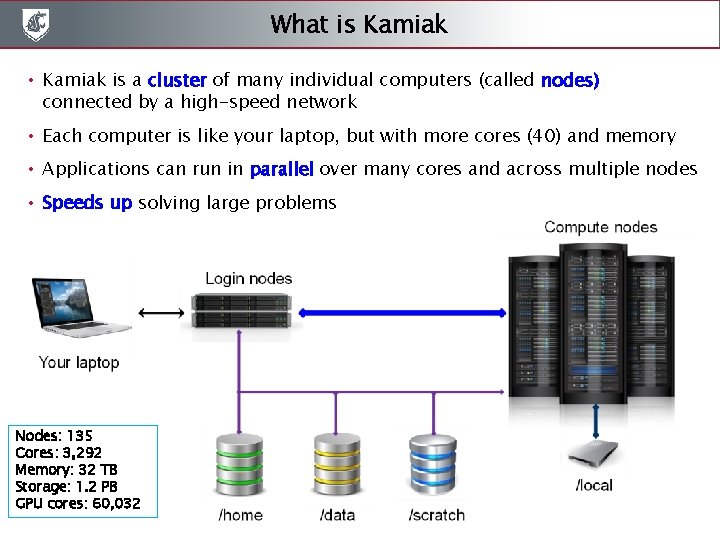
What is Kamiak • Kamiak is a cluster of many individual computers (called nodes) connected by a high-speed network • Each computer is like your laptop, but with more cores (40) and memory • Applications can run in parallel over many cores and across multiple nodes • Speeds up solving large problems Nodes: 135 Cores: 3, 292 Memory: 32 TB Storage: 1. 2 PB GPU cores: 60, 032
What you will learn today • Transfer files to and from Kamiak • Logging into Kamiak • Basic Linux commands to navigate folders, move files • How to run jobs on Kamiak – – Submit batch jobs Interactive compute session Use job arrays Find and load software modules • How to get help • Best practices to being a good user • How to invest in Kamiak for nodes or storage
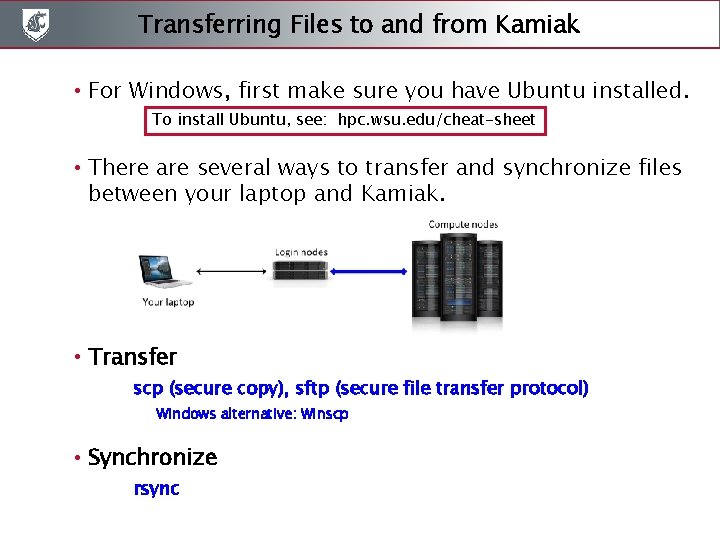
Transferring Files to and from Kamiak • For Windows, first make sure you have Ubuntu installed. To install Ubuntu, see: hpc. wsu. edu/cheat-sheet • There are several ways to transfer and synchronize files between your laptop and Kamiak. • Transfer scp (secure copy), sftp (secure file transfer protocol) Windows alternative: Winscp • Synchronize rsync
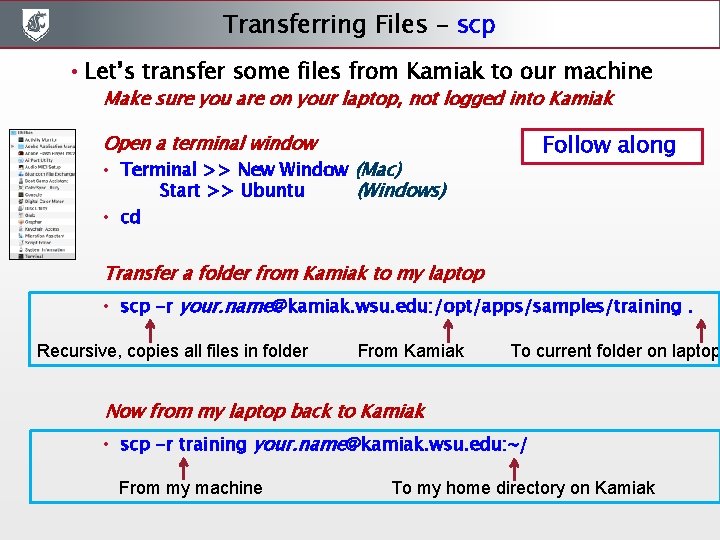
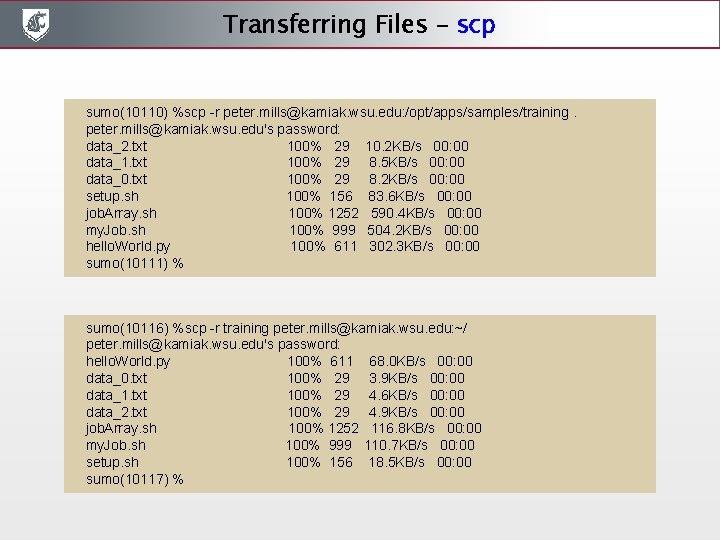
Transferring Files - scp • Let’s transfer some files from Kamiak to our machine Make sure you are on your laptop, not logged into Kamiak Follow along Open a terminal window • Terminal >> New Window (Mac) Start >> Ubuntu (Windows) • cd Transfer a folder from Kamiak to my laptop • scp -r your. name@kamiak. wsu. edu: /opt/apps/samples/training. Recursive, copies all files in folder From Kamiak To current folder on laptop Now from my laptop back to Kamiak • scp -r training your. name@kamiak. wsu. edu: ~/ From my machine To my home directory on Kamiak
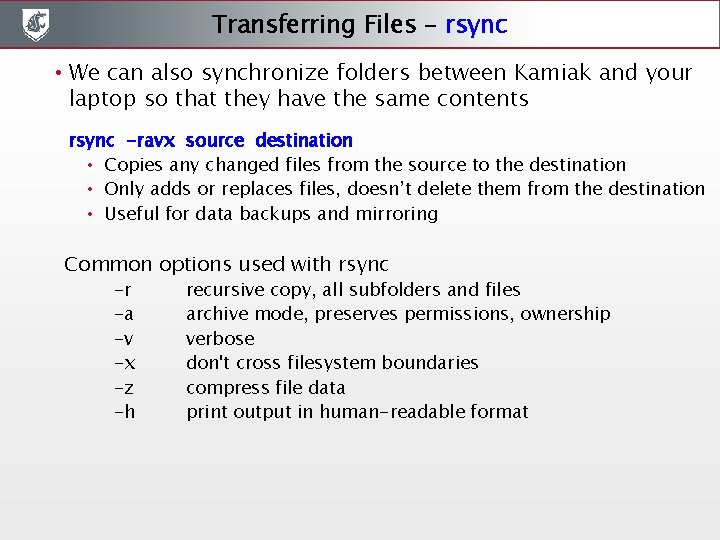
Transferring Files - rsync • We can also synchronize folders between Kamiak and your laptop so that they have the same contents rsync -ravx source destination • Copies any changed files from the source to the destination • Only adds or replaces files, doesn’t delete them from the destination • Useful for data backups and mirroring Common options used with rsync -r -a -v -x -z -h recursive copy, all subfolders and files archive mode, preserves permissions, ownership verbose don't cross filesystem boundaries compress file data print output in human-readable format
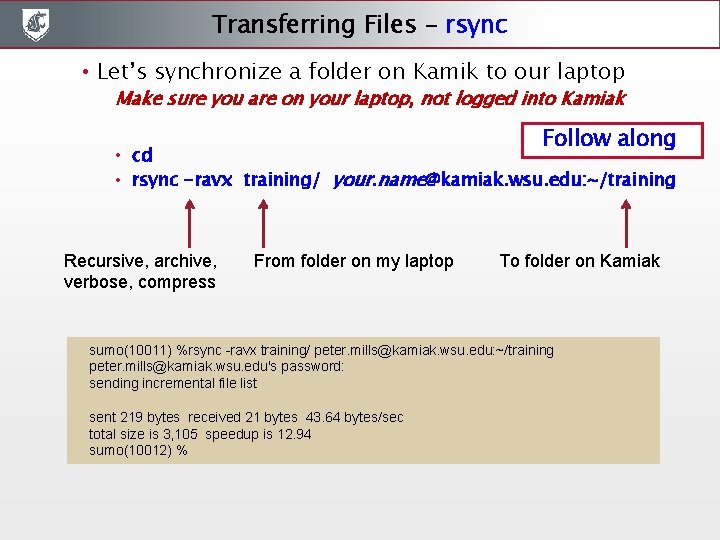
Transferring Files - rsync • Let’s synchronize a folder on Kamik to our laptop Make sure you are on your laptop, not logged into Kamiak Follow along • cd • rsync -ravx training/ your. name@kamiak. wsu. edu: ~/training Recursive, archive, verbose, compress From folder on my laptop To folder on Kamiak sumo(10011) %rsync -ravx training/ peter. mills@kamiak. wsu. edu: ~/training peter. mills@kamiak. wsu. edu's password: sending incremental file list sent 219 bytes received 21 bytes 43. 64 bytes/sec total size is 3, 105 speedup is 12. 94 sumo(10012) %
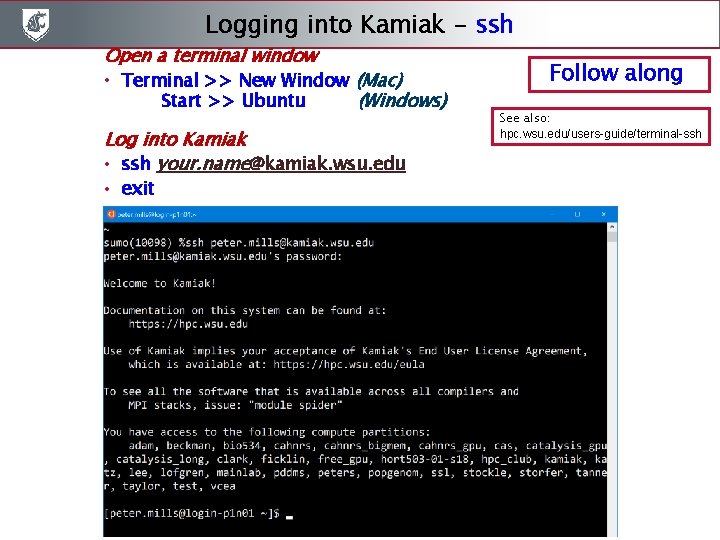
Logging into Kamiak - ssh Open a terminal window • Terminal >> New Window (Mac) Start >> Ubuntu (Windows) Log into Kamiak • ssh your. name@kamiak. wsu. edu • exit Follow along See also: hpc. wsu. edu/users-guide/terminal-ssh
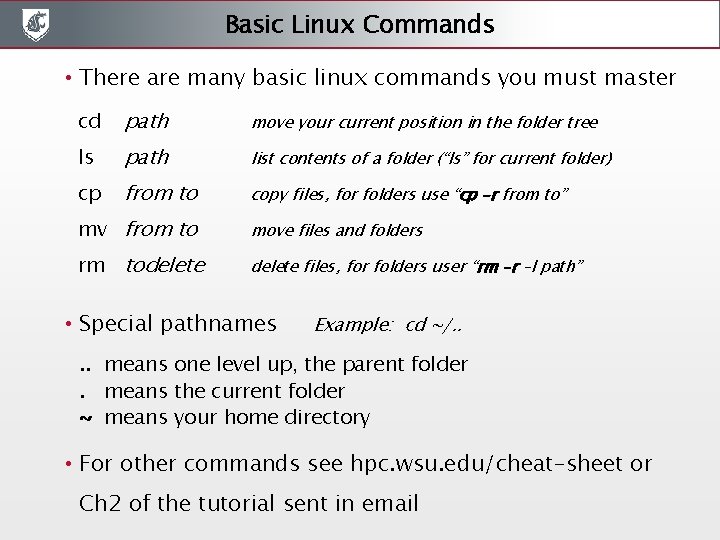
Basic Linux Commands • There are many basic linux commands you must master cd path move your current position in the folder tree ls path list contents of a folder (“ls” for current folder) cp from to copy files, for folders use “cp –r from to” mv from to move files and folders rm todelete files, for folders user “rm –r –I path” • Special pathnames Example: cd ~/. . means one level up, the parent folder. means the current folder ~ means your home directory • For other commands see hpc. wsu. edu/cheat-sheet or Ch 2 of the tutorial sent in email
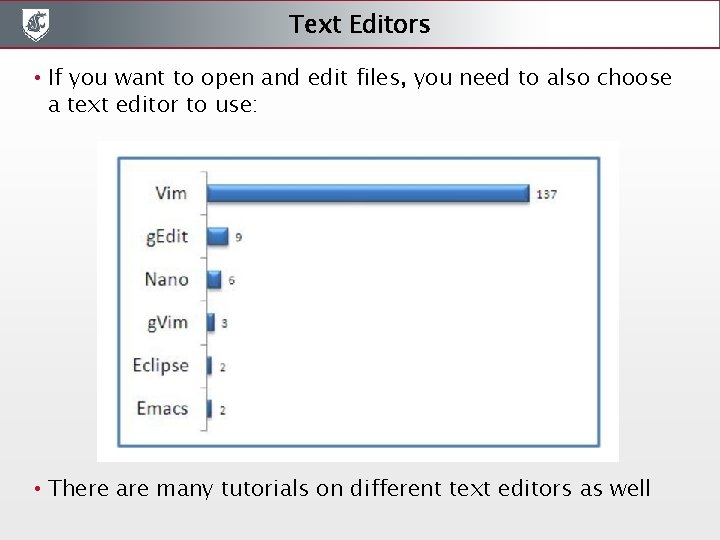
Text Editors • If you want to open and edit files, you need to also choose a text editor to use: • There are many tutorials on different text editors as well
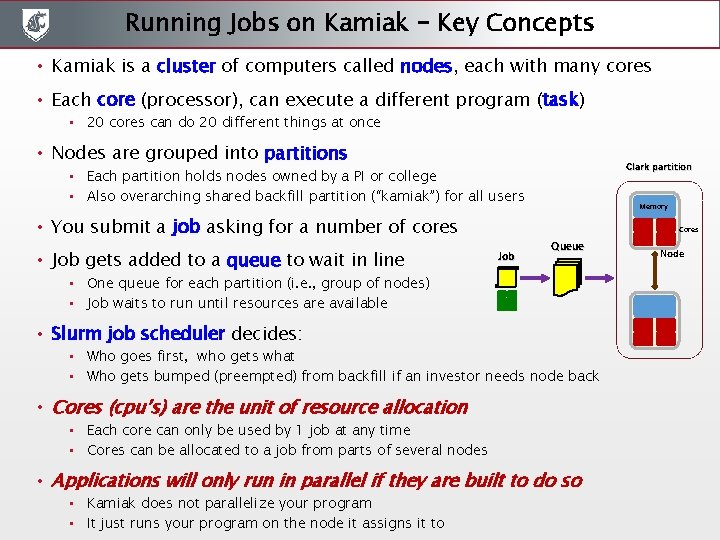
Running Jobs on Kamiak – Key Concepts • Kamiak is a cluster of computers called nodes, each with many cores • Each core (processor), can execute a different program (task) • 20 cores can do 20 different things at once • Nodes are grouped into partitions Clark partition • Each partition holds nodes owned by a PI or college • Also overarching shared backfill partition (“kamiak”) for all users • You submit a job asking for a number of cores • Job gets added to a queue to wait in line Memory Cores Job Queue • One queue for each partition (i. e. , group of nodes) • Job waits to run until resources are available • Slurm job scheduler decides: • Who goes first, who gets what • Who gets bumped (preempted) from backfill if an investor needs node back • Cores (cpu’s) are the unit of resource allocation • Each core can only be used by 1 job at any time • Cores can be allocated to a job from parts of several nodes • Applications will only run in parallel if they are built to do so • Kamiak does not parallelize your program • It just runs your program on the node it assigns it to Node
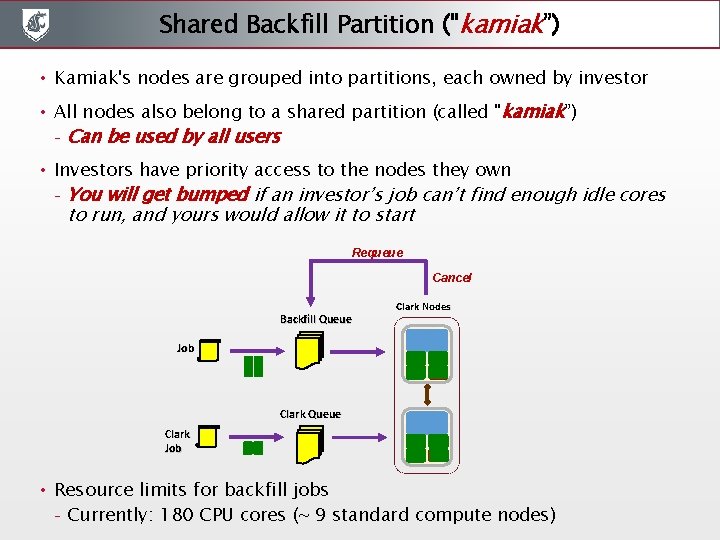
Shared Backfill Partition ("kamiak”) • Kamiak's nodes are grouped into partitions, each owned by investor • All nodes also belong to a shared partition (called "kamiak”) – Can be used by all users • Investors have priority access to the nodes they own – You will get bumped if an investor’s job can’t find enough idle cores to run, and yours would allow it to start Requeue Cancel Backfill Queue Clark Nodes Job Clark Queue Clark Job • Resource limits for backfill jobs – Currently: 180 CPU cores (~ 9 standard compute nodes)
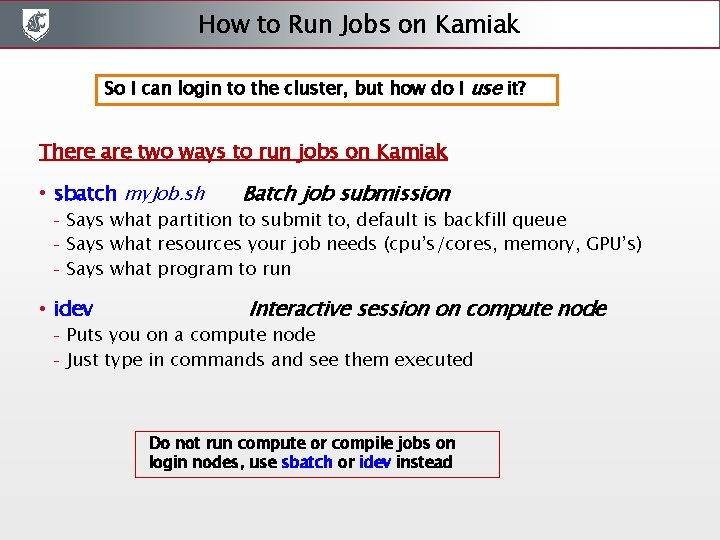
How to Run Jobs on Kamiak So I can login to the cluster, but how do I use it? There are two ways to run jobs on Kamiak • sbatch my. Job. sh – – – Says what partition to submit to, default is backfill queue Says what resources your job needs (cpu’s/cores, memory, GPU’s) Says what program to run • idev – – Batch job submission Interactive session on compute node Puts you on a compute node Just type in commands and see them executed Do not run compute or compile jobs on login nodes, use sbatch or idev instead
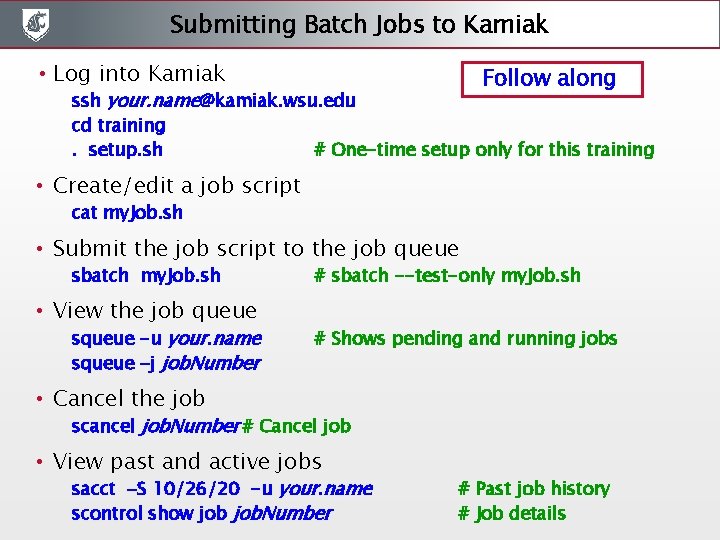
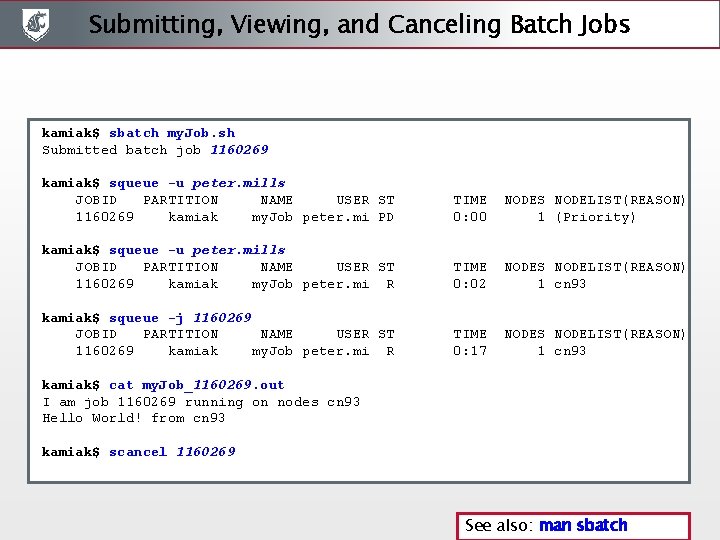
Submitting Batch Jobs to Kamiak • Log into Kamiak Follow along ssh your. name@kamiak. wsu. edu cd training. setup. sh # One-time setup only for this training • Create/edit a job script cat my. Job. sh • Submit the job script to the job queue sbatch my. Job. sh • View the job queue squeue -u your. name squeue –j job. Number # sbatch --test-only my. Job. sh # Shows pending and running jobs • Cancel the job scancel job. Number # Cancel job • View past and active jobs sacct –S 10/26/20 -u your. name scontrol show job. Number # Past job history # Job details
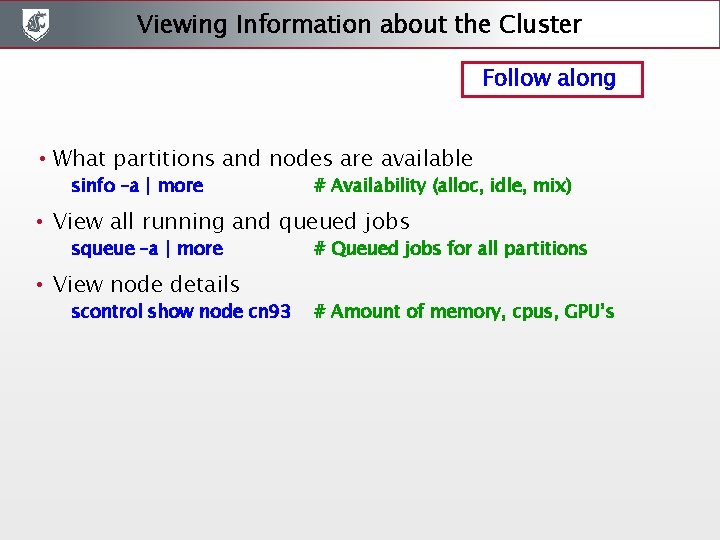
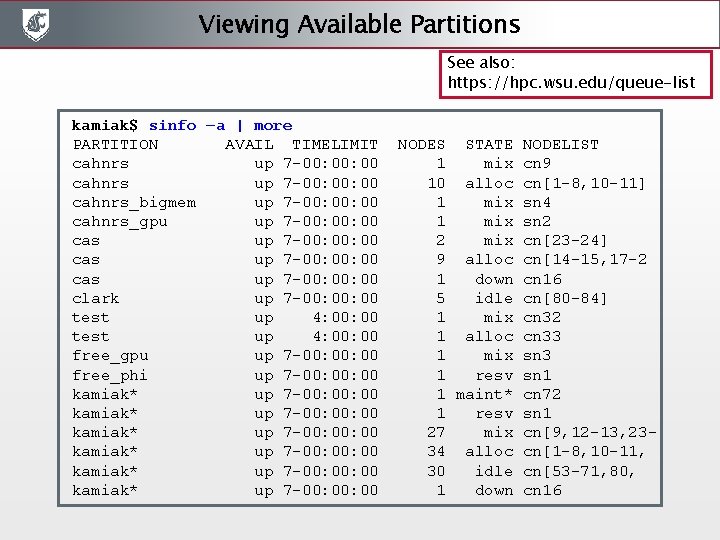
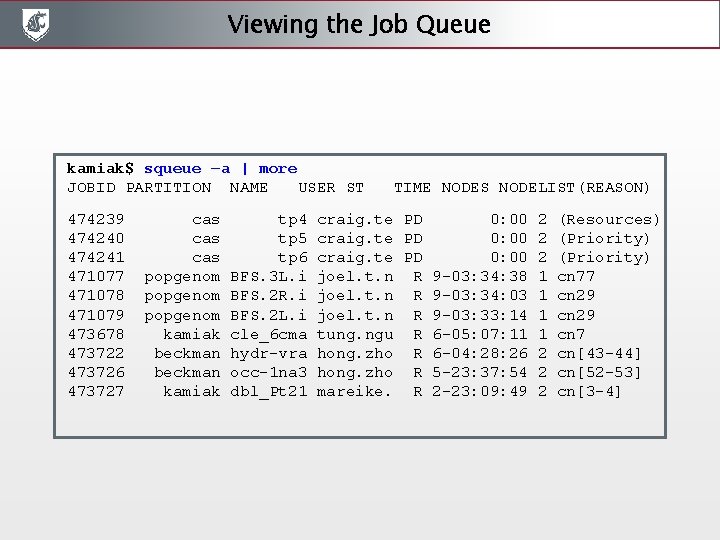
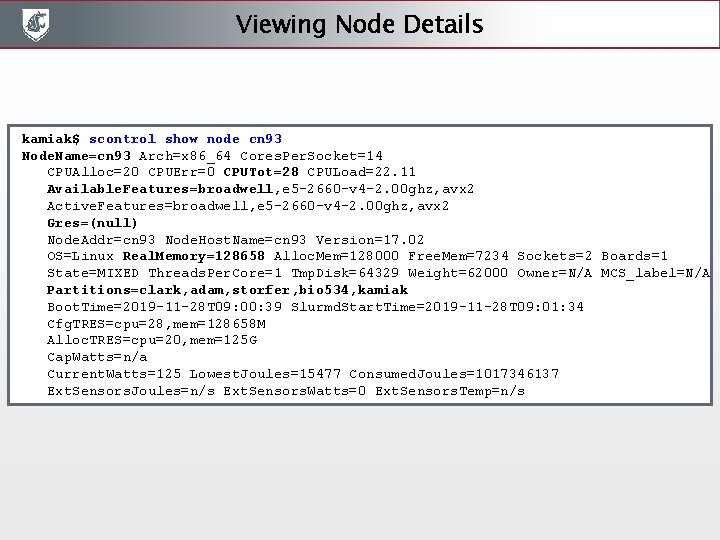
Viewing Information about the Cluster Follow along • What partitions and nodes are available sinfo –a | more # Availability (alloc, idle, mix) • View all running and queued jobs squeue –a | more • View node details scontrol show node cn 93 # Queued jobs for all partitions # Amount of memory, cpus, GPU’s
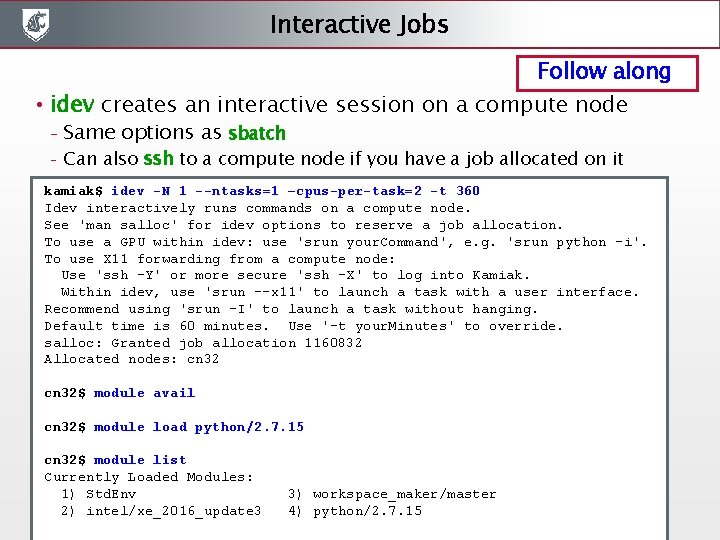
Interactive Jobs Follow along • idev creates an interactive session on a compute node – – Same options as sbatch Can also ssh to a compute node if you have a job allocated on it kamiak$ idev -N 1 --ntasks=1 –cpus-per-task=2 -t 360 Idev interactively runs commands on a compute node. See 'man salloc' for idev options to reserve a job allocation. To use a GPU within idev: use 'srun your. Command', e. g. 'srun python -i'. To use X 11 forwarding from a compute node: Use 'ssh -Y' or more secure 'ssh -X' to log into Kamiak. Within idev, use 'srun --x 11' to launch a task with a user interface. Recommend using 'srun -I' to launch a task without hanging. Default time is 60 minutes. Use '-t your. Minutes' to override. salloc: Granted job allocation 1160832 Allocated nodes: cn 32$ module avail cn 32$ module load python/2. 7. 15 cn 32$ module list Currently Loaded Modules: 1) Std. Env 3) workspace_maker/master 2) intel/xe_2016_update 3 4) python/2. 7. 15
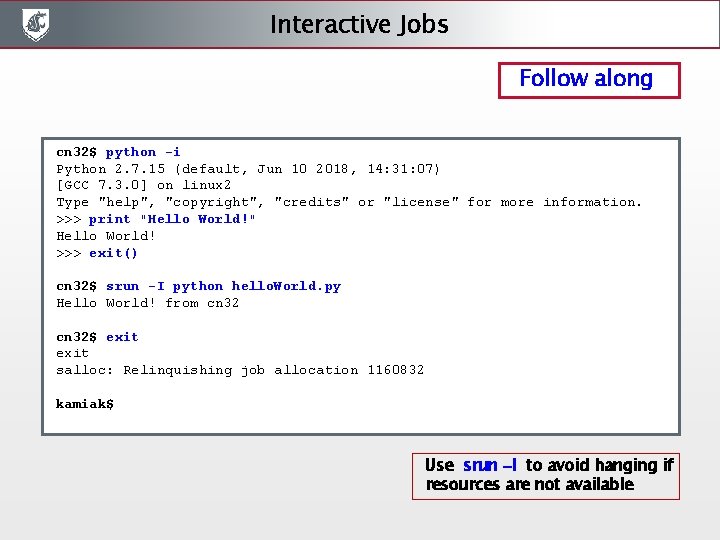
Interactive Jobs Follow along cn 32$ python -i Python 2. 7. 15 (default, Jun 10 2018, 14: 31: 07) [GCC 7. 3. 0] on linux 2 Type "help", "copyright", "credits" or "license" for more information. >>> print "Hello World!" Hello World! >>> exit() cn 32$ srun -I python hello. World. py Hello World! from cn 32$ exit salloc: Relinquishing job allocation 1160832 kamiak$ Use srun –I to avoid hanging if resources are not available
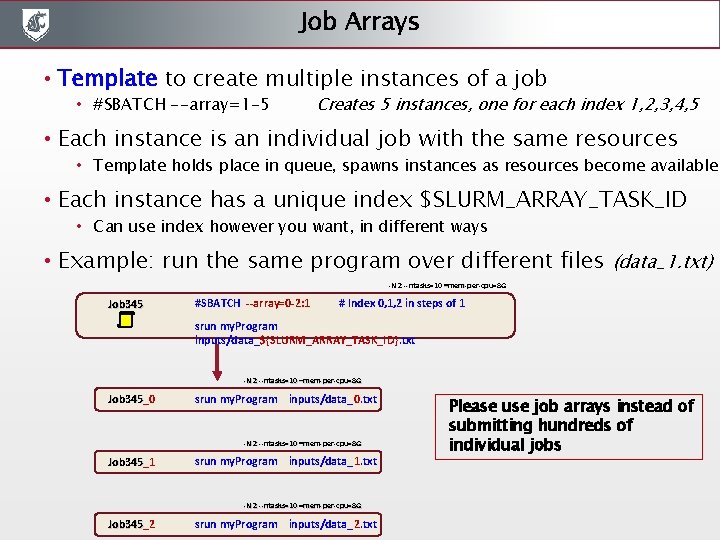
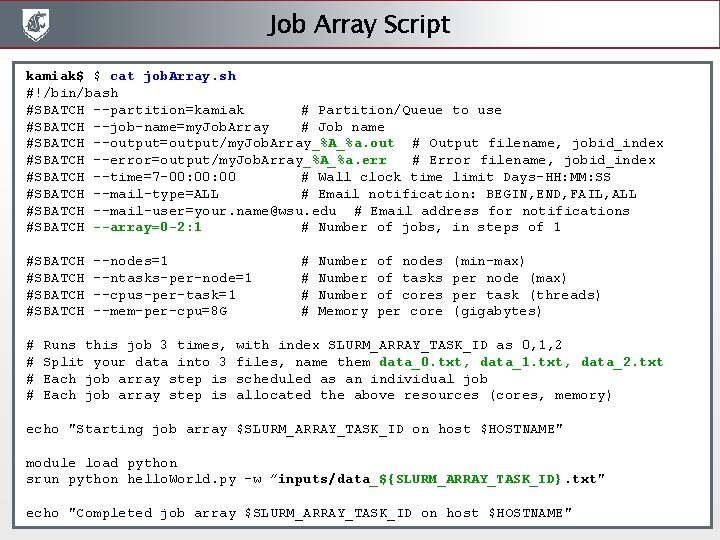
Job Arrays • Template to create multiple instances of a job • #SBATCH --array=1 -5 Creates 5 instances, one for each index 1, 2, 3, 4, 5 • Each instance is an individual job with the same resources • Template holds place in queue, spawns instances as resources become available • Each instance has a unique index $SLURM_ARRAY_TASK_ID • Can use index however you want, in different ways • Example: run the same program over different files (data_1. txt) -N 2 --ntasks=10 –mem-per-cpu=8 G Job 345 #SBATCH --array=0 -2: 1 # Index 0, 1, 2 in steps of 1 srun my. Program inputs/data_${SLURM_ARRAY_TASK_ID}. txt -N 2 --ntasks=10 –mem-per-cpu=8 G Job 345_0 Job 345 srun my. Program inputs/data_0. txt -N 2 --ntasks=10 –mem-per-cpu=8 G Job 345_1 Job 345 srun my. Program inputs/data_1. txt -N 2 --ntasks=10 –mem-per-cpu=8 G Job 345_2 Job 345 srun my. Program inputs/data_2. txt Please use job arrays instead of submitting hundreds of individual jobs
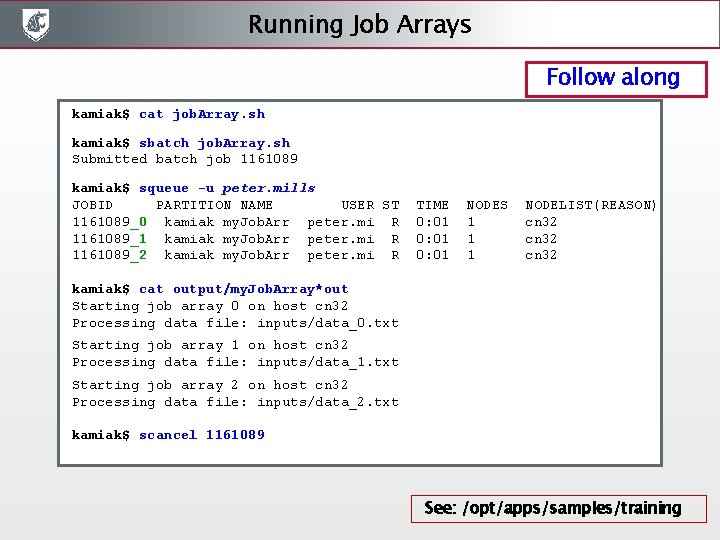
Running Job Arrays Follow along kamiak$ cat job. Array. sh kamiak$ sbatch job. Array. sh Submitted batch job 1161089 kamiak$ squeue -u peter. mills JOBID PARTITION NAME USER ST TIME NODES NODELIST(REASON) 1161089_0 kamiak my. Job. Arr peter. mi R 0: 01 1 cn 32 1161089_1 kamiak my. Job. Arr peter. mi R 0: 01 1 cn 32 1161089_2 kamiak my. Job. Arr peter. mi R 0: 01 1 cn 32 kamiak$ cat output/my. Job. Array*out Starting job array 0 on host cn 32 Processing data file: inputs/data_0. txt Starting job array 1 on host cn 32 Processing data file: inputs/data_1. txt Starting job array 2 on host cn 32 Processing data file: inputs/data_2. txt kamiak$ scancel 1161089 See: /opt/apps/samples/training
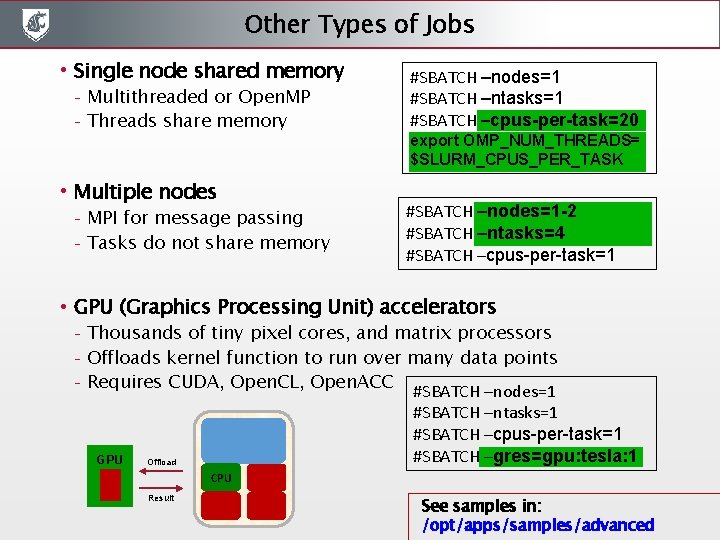
Other Types of Jobs • Single node shared memory – – Multithreaded or Open. MP Threads share memory • Multiple nodes – – MPI for message passing Tasks do not share memory #SBATCH –nodes=1 #SBATCH –ntasks=1 #SBATCH –cpus-per-task=20 export OMP_NUM_THREADS= $SLURM_CPUS_PER_TASK #SBATCH –nodes=1 -2 #SBATCH –ntasks=4 #SBATCH –cpus-per-task=1 • GPU (Graphics Processing Unit) accelerators – – – Thousands of tiny pixel cores, and matrix processors Offloads kernel function to run over many data points Requires CUDA, Open. CL, Open. ACC #SBATCH –nodes=1 GPU #SBATCH –ntasks=1 #SBATCH –cpus-per-task=1 #SBATCH –gres=gpu: tesla: 1 Offload CPU Result See samples in: /opt/apps/samples/advanced
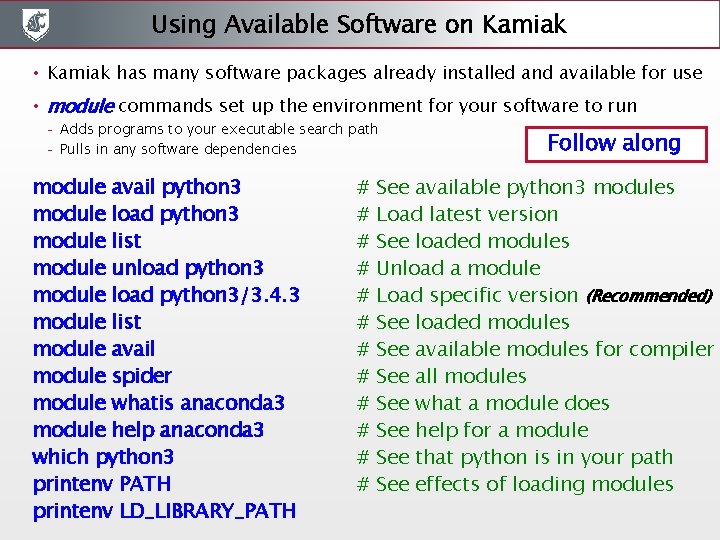
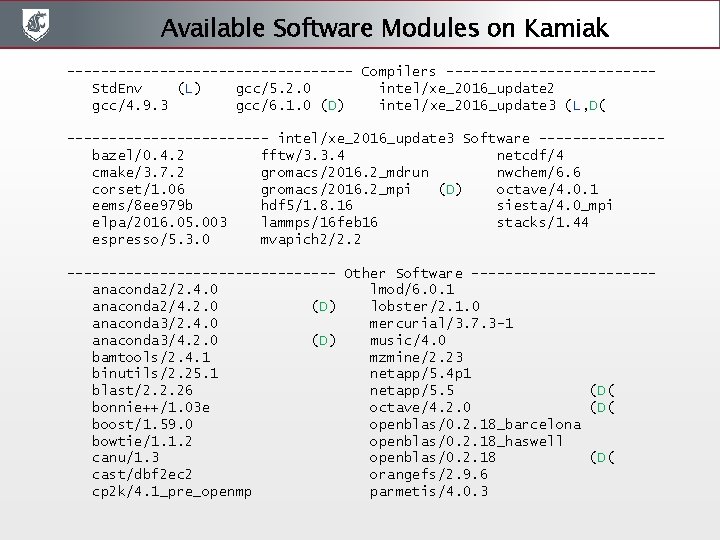
Using Available Software on Kamiak • Kamiak has many software packages already installed and available for use • module commands set up the environment for your software to run – – Adds programs to your executable search path Pulls in any software dependencies module avail python 3 module load python 3 module list module unload python 3 module load python 3/3. 4. 3 module list module avail module spider module whatis anaconda 3 module help anaconda 3 which python 3 printenv PATH printenv LD_LIBRARY_PATH # # # Follow along See available python 3 modules Load latest version See loaded modules Unload a module Load specific version (Recommended) See loaded modules See available modules for compiler See all modules See what a module does See help for a module See that python is in your path See effects of loading modules
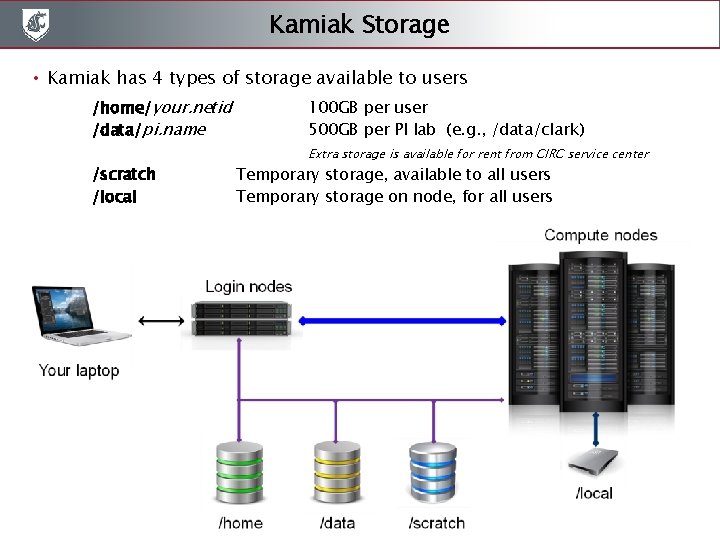
Kamiak Storage • Kamiak has 4 types of storage available to users /home/your. netid /data/pi. name /scratch /local 100 GB per user 500 GB per PI lab (e. g. , /data/clark) Extra storage is available for rent from CIRC service center Temporary storage, available to all users Temporary storage on node, for all users
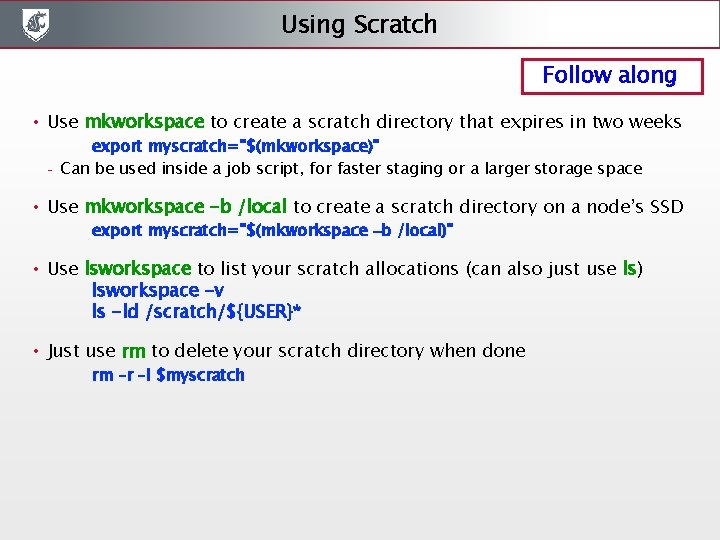
Using Scratch Follow along • Use mkworkspace to create a scratch directory that expires in two weeks – export myscratch="$(mkworkspace)" Can be used inside a job script, for faster staging or a larger storage space • Use mkworkspace -b /local to create a scratch directory on a node’s SSD export myscratch="$(mkworkspace –b /local)" • Use lsworkspace to list your scratch allocations (can also just use ls) lsworkspace -v ls -ld /scratch/${USER}* • Just use rm to delete your scratch directory when done rm –r –I $myscratch
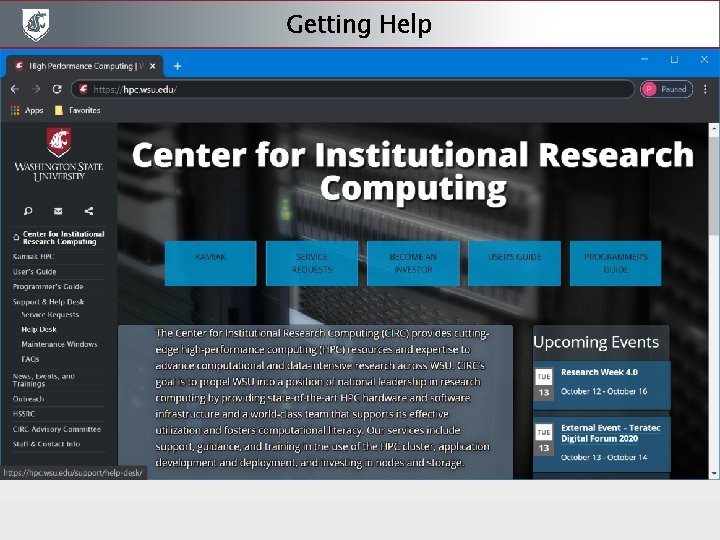
Getting Help
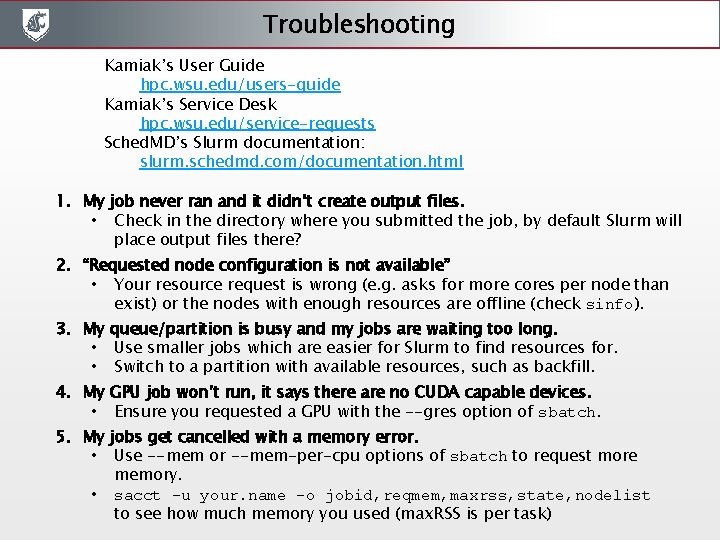
Troubleshooting Kamiak’s User Guide hpc. wsu. edu/users-guide Kamiak’s Service Desk hpc. wsu. edu/service-requests Sched. MD’s Slurm documentation: slurm. schedmd. com/documentation. html 1. My job never ran and it didn’t create output files. • Check in the directory where you submitted the job, by default Slurm will place output files there? 2. “Requested node configuration is not available” • Your resource request is wrong (e. g. asks for more cores per node than exist) or the nodes with enough resources are offline (check sinfo). 3. My queue/partition is busy and my jobs are waiting too long. • Use smaller jobs which are easier for Slurm to find resources for. • Switch to a partition with available resources, such as backfill. 4. My GPU job won’t run, it says there are no CUDA capable devices. • Ensure you requested a GPU with the --gres option of sbatch. 5. My jobs get cancelled with a memory error. • Use --mem or --mem-per-cpu options of sbatch to request more memory. • sacct -u your. name -o jobid, reqmem, maxrss, state, nodelist to see how much memory you used (max. RSS is per task)
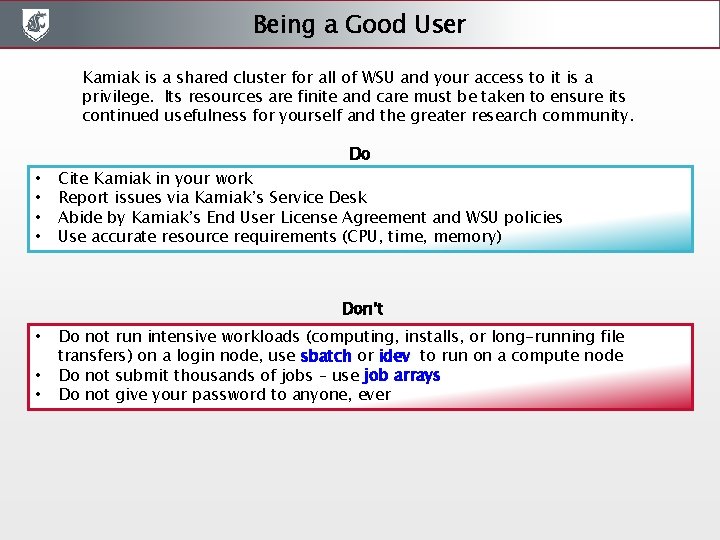
Being a Good User Kamiak is a shared cluster for all of WSU and your access to it is a privilege. Its resources are finite and care must be taken to ensure its continued usefulness for yourself and the greater research community. Do • • Cite Kamiak in your work Report issues via Kamiak’s Service Desk Abide by Kamiak’s End User License Agreement and WSU policies Use accurate resource requirements (CPU, time, memory) Don’t • • • Do not run intensive workloads (computing, installs, or long-running file transfers) on a login node, use sbatch or idev to run on a compute node Do not submit thousands of jobs – use job arrays Do not give your password to anyone, ever
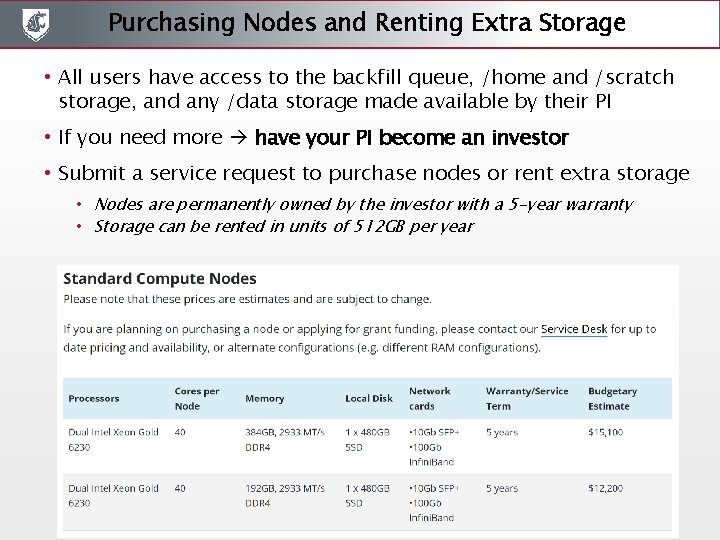
Purchasing Nodes and Renting Extra Storage • All users have access to the backfill queue, /home and /scratch storage, and any /data storage made available by their PI • If you need more have your PI become an investor • Submit a service request to purchase nodes or rent extra storage • Nodes are permanently owned by the investor with a 5 -year warranty • Storage can be rented in units of 512 GB per year
The End • We will be sending out a qualtrix survey to get your feedback about this training event • Other training sessions are planned throughout the year – let us know in the survey what topics would be of interest • Other ways to learn more and participate in Kamiak governance: – CIRC Advisory Committee - share your ideas with its members – WSU HPC club - 4 nodes purchased through Tech Fee grant
Follow Along Screenshots
Transferring Files - scp sumo(10110) %scp -r peter. mills@kamiak. wsu. edu: /opt/apps/samples/training. peter. mills@kamiak. wsu. edu's password: data_2. txt 100% 29 10. 2 KB/s 00: 00 data_1. txt 100% 29 8. 5 KB/s 00: 00 data_0. txt 100% 29 8. 2 KB/s 00: 00 setup. sh 100% 156 83. 6 KB/s 00: 00 job. Array. sh 100% 1252 590. 4 KB/s 00: 00 my. Job. sh 100% 999 504. 2 KB/s 00: 00 hello. World. py 100% 611 302. 3 KB/s 00: 00 sumo(10111) % sumo(10116) %scp -r training peter. mills@kamiak. wsu. edu: ~/ peter. mills@kamiak. wsu. edu's password: hello. World. py 100% 611 68. 0 KB/s 00: 00 data_0. txt 100% 29 3. 9 KB/s 00: 00 data_1. txt 100% 29 4. 6 KB/s 00: 00 data_2. txt 100% 29 4. 9 KB/s 00: 00 job. Array. sh 100% 1252 116. 8 KB/s 00: 00 my. Job. sh 100% 999 110. 7 KB/s 00: 00 setup. sh 100% 156 18. 5 KB/s 00: 00 sumo(10117) %
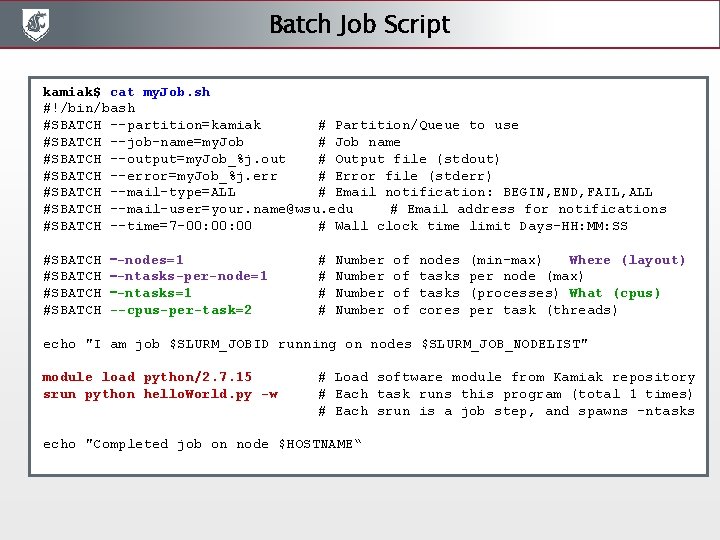
Batch Job Script kamiak$ cat my. Job. sh #!/bin/bash #SBATCH --partition=kamiak # Partition/Queue to use #SBATCH --job-name=my. Job # Job name #SBATCH --output=my. Job_%j. out # Output file (stdout) #SBATCH --error=my. Job_%j. err # Error file (stderr) #SBATCH --mail-type=ALL # Email notification: BEGIN, END, FAIL, ALL #SBATCH --mail-user=your. name@wsu. edu # Email address for notifications #SBATCH --time=7 -00: 00 # Wall clock time limit Days-HH: MM: SS #SBATCH –-nodes=1 #SBATCH –-ntasks-per-node=1 #SBATCH –-ntasks=1 #SBATCH --cpus-per-task=2 # Number of nodes (min-max) Where (layout) # Number of tasks per node (max) # Number of tasks (processes) What (cpus) # Number of cores per task (threads) echo "I am job $SLURM_JOBID running on nodes $SLURM_JOB_NODELIST" module load python/2. 7. 15 srun python hello. World. py -w # Load software module from Kamiak repository # Each task runs this program (total 1 times) # Each srun is a job step, and spawns -ntasks echo "Completed job on node $HOSTNAME“
Submitting, Viewing, and Canceling Batch Jobs kamiak$ sbatch my. Job. sh Submitted batch job 1160269 kamiak$ squeue -u peter. mills JOBID PARTITION NAME USER ST TIME NODES NODELIST(REASON) 1160269 kamiak my. Job peter. mi PD 0: 00 1 (Priority) kamiak$ squeue -u peter. mills JOBID PARTITION NAME USER ST TIME NODES NODELIST(REASON) 1160269 kamiak my. Job peter. mi R 0: 02 1 cn 93 kamiak$ squeue -j 1160269 JOBID PARTITION NAME USER ST TIME NODES NODELIST(REASON) 1160269 kamiak my. Job peter. mi R 0: 17 1 cn 93 kamiak$ cat my. Job_1160269. out I am job 1160269 running on nodes cn 93 Hello World! from cn 93 kamiak$ scancel 1160269 See also: man sbatch
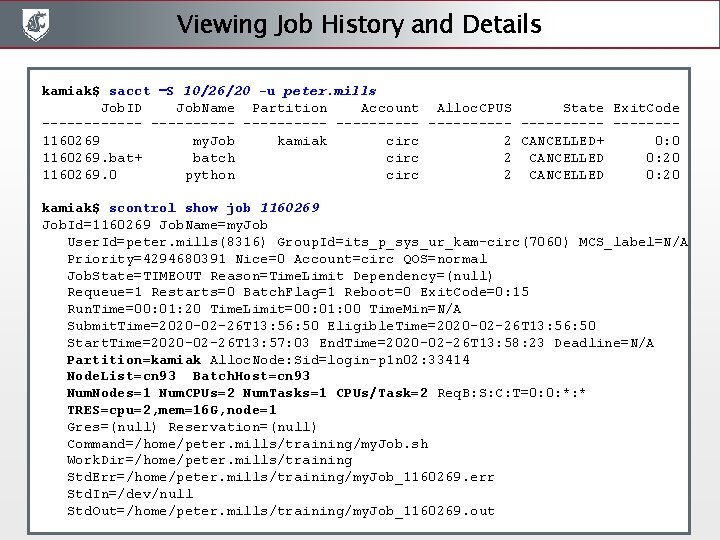
Viewing Job History and Details kamiak$ sacct –S 10/26/20 -u peter. mills Job. ID Job. Name Partition Account Alloc. CPUS State Exit. Code ---------------- -------1160269 my. Job kamiak circ 2 CANCELLED+ 0: 0 1160269. bat+ batch circ 2 CANCELLED 0: 20 1160269. 0 python circ 2 CANCELLED 0: 20 kamiak$ scontrol show job 1160269 Job. Id=1160269 Job. Name=my. Job User. Id=peter. mills(8316) Group. Id=its_p_sys_ur_kam-circ(7060) MCS_label=N/A Priority=4294680391 Nice=0 Account=circ QOS=normal Job. State=TIMEOUT Reason=Time. Limit Dependency=(null) Requeue=1 Restarts=0 Batch. Flag=1 Reboot=0 Exit. Code=0: 15 Run. Time=00: 01: 20 Time. Limit=00: 01: 00 Time. Min=N/A Submit. Time=2020 -02 -26 T 13: 56: 50 Eligible. Time=2020 -02 -26 T 13: 56: 50 Start. Time=2020 -02 -26 T 13: 57: 03 End. Time=2020 -02 -26 T 13: 58: 23 Deadline=N/A Partition=kamiak Alloc. Node: Sid=login-p 1 n 02: 33414 Node. List=cn 93 Batch. Host=cn 93 Num. Nodes=1 Num. CPUs=2 Num. Tasks=1 CPUs/Task=2 Req. B: S: C: T=0: 0: *: * TRES=cpu=2, mem=16 G, node=1 Gres=(null) Reservation=(null) Command=/home/peter. mills/training/my. Job. sh Work. Dir=/home/peter. mills/training Std. Err=/home/peter. mills/training/my. Job_1160269. err Std. In=/dev/null Std. Out=/home/peter. mills/training/my. Job_1160269. out
Viewing Available Partitions See also: https: //hpc. wsu. edu/queue-list kamiak$ sinfo –a | more PARTITION AVAIL TIMELIMIT NODES STATE NODELIST cahnrs up 7 -00: 00 1 mix cn 9 cahnrs up 7 -00: 00 10 alloc cn[1 -8, 10 -11] cahnrs_bigmem up 7 -00: 00 1 mix sn 4 cahnrs_gpu up 7 -00: 00 1 mix sn 2 cas up 7 -00: 00 2 mix cn[23 -24] cas up 7 -00: 00 9 alloc cn[14 -15, 17 -2 cas up 7 -00: 00 1 down cn 16 clark up 7 -00: 00 5 idle cn[80 -84] test up 4: 00 1 mix cn 32 test up 4: 00 1 alloc cn 33 free_gpu up 7 -00: 00 1 mix sn 3 free_phi up 7 -00: 00 1 resv sn 1 kamiak* up 7 -00: 00 1 maint* cn 72 kamiak* up 7 -00: 00 1 resv sn 1 kamiak* up 7 -00: 00 27 mix cn[9, 12 -13, 23 kamiak* up 7 -00: 00 34 alloc cn[1 -8, 10 -11, kamiak* up 7 -00: 00 30 idle cn[53 -71, 80, kamiak* up 7 -00: 00 1 down cn 16
Viewing the Job Queue kamiak$ squeue –a | more JOBID PARTITION NAME USER ST TIME NODES NODELIST(REASON) 474239 cas tp 4 craig. te PD 0: 00 2 (Resources) 474240 cas tp 5 craig. te PD 0: 00 2 (Priority) 474241 cas tp 6 craig. te PD 0: 00 2 (Priority) 471077 popgenom BFS. 3 L. i joel. t. n R 9 -03: 34: 38 1 cn 77 471078 popgenom BFS. 2 R. i joel. t. n R 9 -03: 34: 03 1 cn 29 471079 popgenom BFS. 2 L. i joel. t. n R 9 -03: 33: 14 1 cn 29 473678 kamiak cle_6 cma tung. ngu R 6 -05: 07: 11 1 cn 7 473722 beckman hydr-vra hong. zho R 6 -04: 28: 26 2 cn[43 -44] 473726 beckman occ-1 na 3 hong. zho R 5 -23: 37: 54 2 cn[52 -53] 473727 kamiak dbl_Pt 21 mareike. R 2 -23: 09: 49 2 cn[3 -4]
Viewing Node Details kamiak$ scontrol show node cn 93 Node. Name=cn 93 Arch=x 86_64 Cores. Per. Socket=14 CPUAlloc=20 CPUErr=0 CPUTot=28 CPULoad=22. 11 Available. Features=broadwell, e 5 -2660 -v 4 -2. 00 ghz, avx 2 Active. Features=broadwell, e 5 -2660 -v 4 -2. 00 ghz, avx 2 Gres=(null) Node. Addr=cn 93 Node. Host. Name=cn 93 Version=17. 02 OS=Linux Real. Memory=128658 Alloc. Mem=128000 Free. Mem=7234 Sockets=2 Boards=1 State=MIXED Threads. Per. Core=1 Tmp. Disk=64329 Weight=62000 Owner=N/A MCS_label=N/A Partitions=clark, adam, storfer, bio 534, kamiak Boot. Time=2019 -11 -28 T 09: 00: 39 Slurmd. Start. Time=2019 -11 -28 T 09: 01: 34 Cfg. TRES=cpu=28, mem=128658 M Alloc. TRES=cpu=20, mem=125 G Cap. Watts=n/a Current. Watts=125 Lowest. Joules=15477 Consumed. Joules=1017346137 Ext. Sensors. Joules=n/s Ext. Sensors. Watts=0 Ext. Sensors. Temp=n/s
Job Array Script kamiak$ $ cat job. Array. sh #!/bin/bash #SBATCH --partition=kamiak # Partition/Queue to use #SBATCH --job-name=my. Job. Array # Job name #SBATCH --output=output/my. Job. Array_%A_%a. out # Output filename, jobid_index #SBATCH --error=output/my. Job. Array_%A_%a. err # Error filename, jobid_index #SBATCH --time=7 -00: 00 # Wall clock time limit Days-HH: MM: SS #SBATCH --mail-type=ALL # Email notification: BEGIN, END, FAIL, ALL #SBATCH --mail-user=your. name@wsu. edu # Email address for notifications #SBATCH --array=0 -2: 1 # Number of jobs, in steps of 1 #SBATCH --nodes=1 #SBATCH --ntasks-per-node=1 #SBATCH --cpus-per-task=1 #SBATCH --mem-per-cpu=8 G # Number of nodes (min-max) # Number of tasks per node (max) # Number of cores per task (threads) # Memory per core (gigabytes) # Runs this job 3 times, with index SLURM_ARRAY_TASK_ID as 0, 1, 2 # Split your data into 3 files, name them data_0. txt, data_1. txt, data_2. txt # Each job array step is scheduled as an individual job # Each job array step is allocated the above resources (cores, memory) echo "Starting job array $SLURM_ARRAY_TASK_ID on host $HOSTNAME" module load python srun python hello. World. py –w ”inputs/data_${SLURM_ARRAY_TASK_ID}. txt" echo "Completed job array $SLURM_ARRAY_TASK_ID on host $HOSTNAME"
Available Software Modules on Kamiak ----------------- Compilers ------------Std. Env (L) gcc/5. 2. 0 intel/xe_2016_update 2 gcc/4. 9. 3 gcc/6. 1. 0 (D) intel/xe_2016_update 3 (L, D( ------------ intel/xe_2016_update 3 Software -------bazel/0. 4. 2 fftw/3. 3. 4 netcdf/4 cmake/3. 7. 2 gromacs/2016. 2_mdrun nwchem/6. 6 corset/1. 06 gromacs/2016. 2_mpi (D) octave/4. 0. 1 eems/8 ee 979 b hdf 5/1. 8. 16 siesta/4. 0_mpi elpa/2016. 05. 003 lammps/16 feb 16 stacks/1. 44 espresso/5. 3. 0 mvapich 2/2. 2 ---------------- Other Software -----------anaconda 2/2. 4. 0 lmod/6. 0. 1 anaconda 2/4. 2. 0 (D) lobster/2. 1. 0 anaconda 3/2. 4. 0 mercurial/3. 7. 3 -1 anaconda 3/4. 2. 0 (D) music/4. 0 bamtools/2. 4. 1 mzmine/2. 23 binutils/2. 25. 1 netapp/5. 4 p 1 blast/2. 2. 26 netapp/5. 5 (D( bonnie++/1. 03 e octave/4. 2. 0 (D( boost/1. 59. 0 openblas/0. 2. 18_barcelona bowtie/1. 1. 2 openblas/0. 2. 18_haswell canu/1. 3 openblas/0. 2. 18 (D( cast/dbf 2 ec 2 orangefs/2. 9. 6 cp 2 k/4. 1_pre_openmp parmetis/4. 0. 3
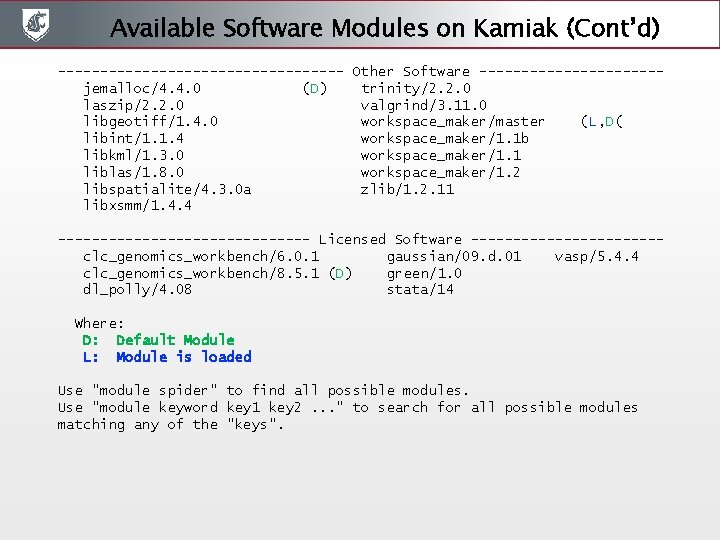
Available Software Modules on Kamiak (Cont’d) ----------------- Other Software -----------jemalloc/4. 4. 0 (D) trinity/2. 2. 0 laszip/2. 2. 0 valgrind/3. 11. 0 libgeotiff/1. 4. 0 workspace_maker/master (L, D( libint/1. 1. 4 workspace_maker/1. 1 b libkml/1. 3. 0 workspace_maker/1. 1 liblas/1. 8. 0 workspace_maker/1. 2 libspatialite/4. 3. 0 a zlib/1. 2. 11 libxsmm/1. 4. 4 --------------- Licensed Software -----------clc_genomics_workbench/6. 0. 1 gaussian/09. d. 01 vasp/5. 4. 4 clc_genomics_workbench/8. 5. 1 (D) green/1. 0 dl_polly/4. 08 stata/14 Where: D: Default Module L: Module is loaded Use "module spider" to find all possible modules. Use "module keyword key 1 key 2. . . " to search for all possible modules matching any of the "keys".
The End