
Introduction to IOS Presented By Dr Waleed Alseat
Introduction to IOS • Presented By • Dr. Waleed Alseat • Mutah University

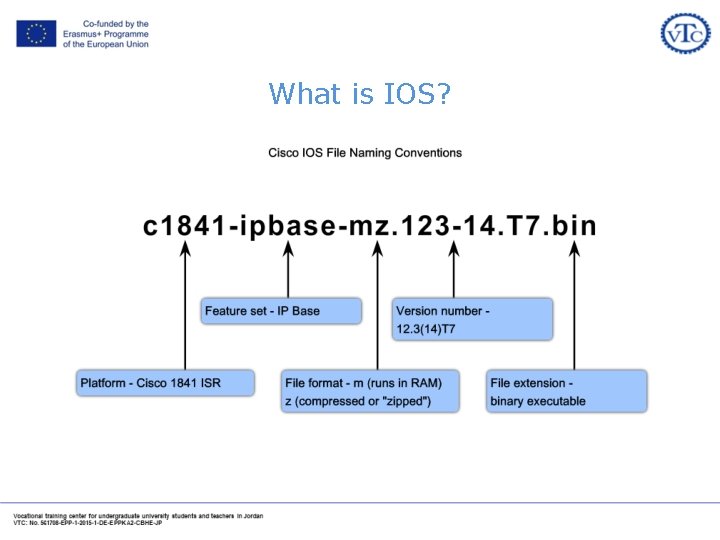
What is IOS? • Internetwork Operating System (IOS) is the Cisco Devices Operating System (Just like Microsoft Windows ® For PC)
What is IOS?
Introduction to IOS 15 CLI Licensing Commands A. Peter Anderson Associate Professor August 4, 2013
License Management Commands • Display License Info • Enable / Disable Technology Package Licenses • Additional Resources: – Cisco IOS Software Activation Command Yes Officer, I Reference have a – Software Activation Configuration. License. Guide, Cisco IOS Release 15 M&T

Command: show license udi • Displays all the unique device identifier (UDI) values that can be licensed on the system
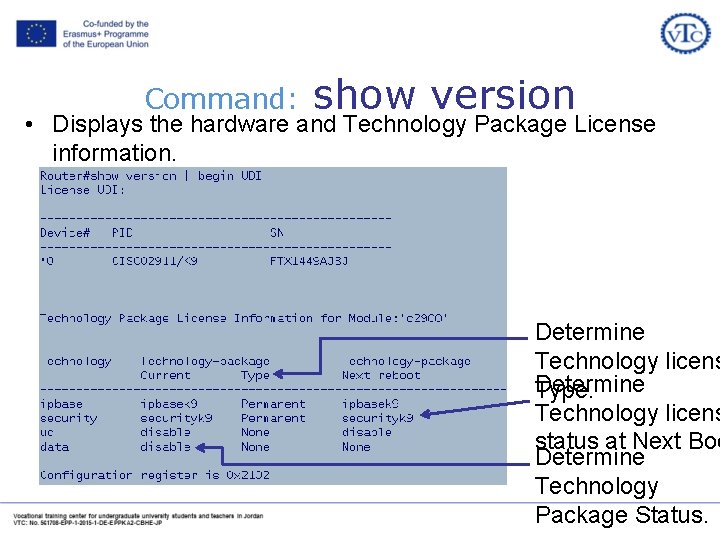
Command: show version • Displays the hardware and Technology Package License information. Determine Technology licens Determine Type. Technology licens status at Next Boo Determine Technology Package Status.
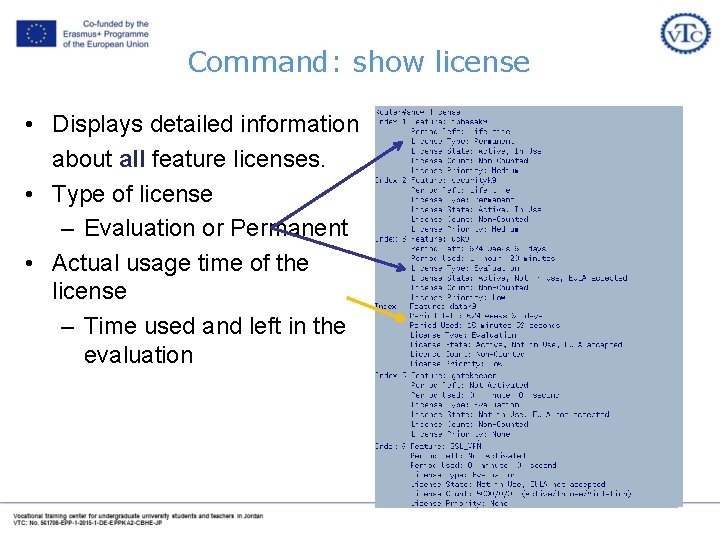
Command: show license • Displays detailed information about all feature licenses. • Type of license – Evaluation or Permanent • Actual usage time of the license – Time used and left in the evaluation
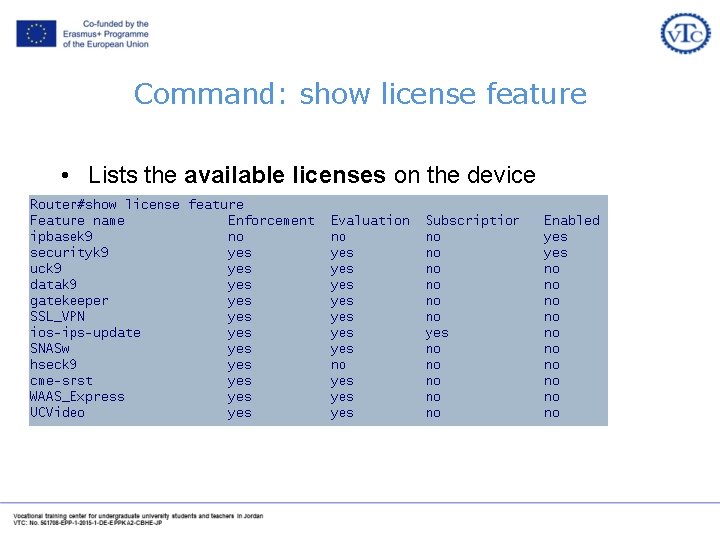
Command: show license feature • Lists the available licenses on the device • Lists the status of the licenses
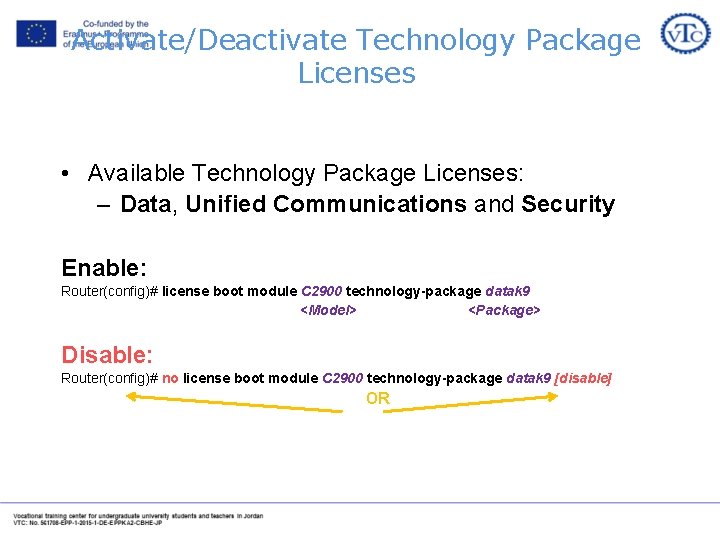
Activate/Deactivate Technology Package Licenses • Available Technology Package Licenses: – Data, Unified Communications and Security Enable: Router(config)# license boot module C 2900 technology-package datak 9 <Model> <Package> Disable: Router(config)# no license boot module C 2900 technology-package datak 9 [disable] OR
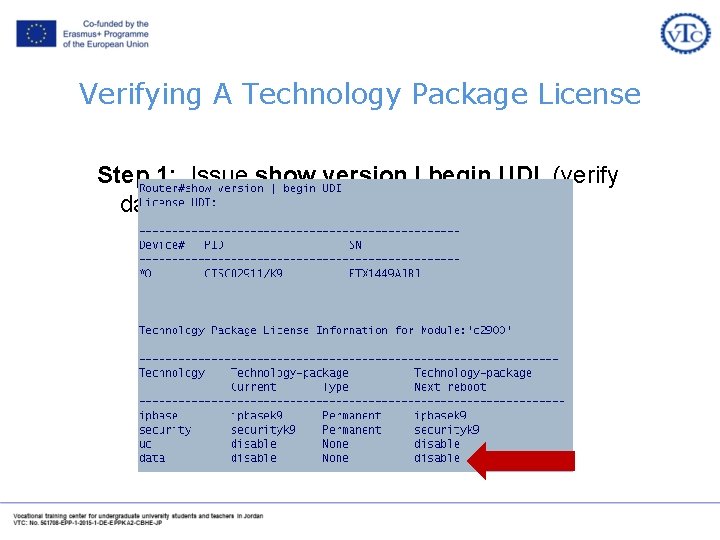
Verifying A Technology Package License Step 1: Issue show version | begin UDI (verify data license is disabled)
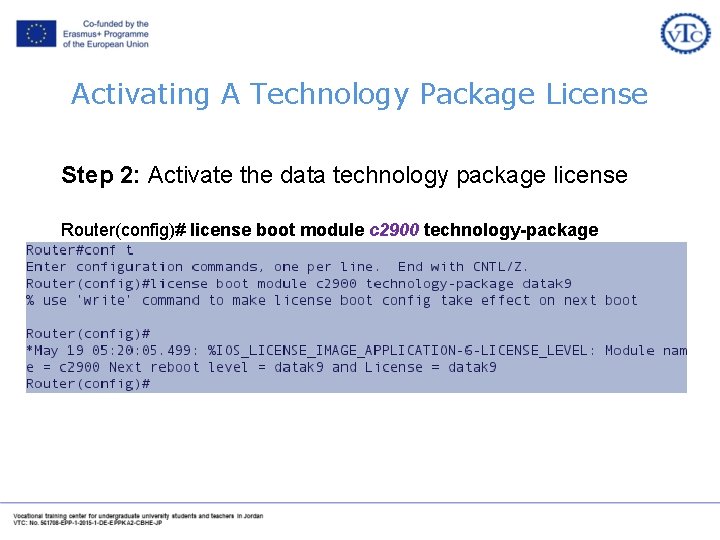
Activating A Technology Package License Step 2: Activate the data technology package license Router(config)# license boot module c 2900 technology-package datak 9
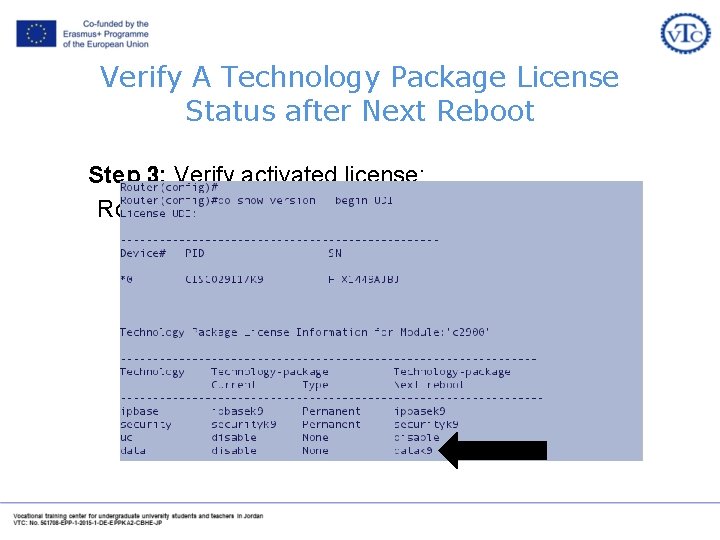
Verify A Technology Package License Status after Next Reboot Step 3: Verify activated license: Router(config)# do show version | begin UDI
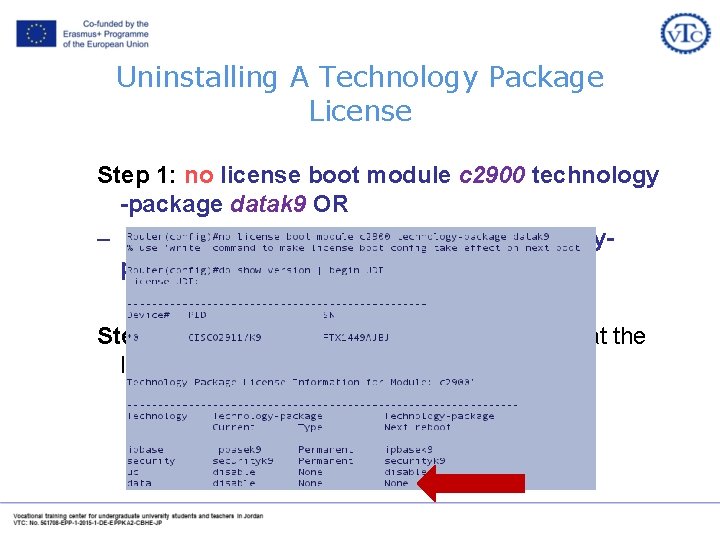
Uninstalling A Technology Package License Step 1: no license boot module c 2900 technology -package datak 9 OR – license boot module c 2900 technologypackage datak 9 disable Step 2: show version | begin UDI to verify that the license is disabled

Overview of IOS 15 Licensing and Process A. Peter Anderson Associate Professor August 4, 2013
Introduction to Licensing
Available License Types on ISR G 2 • Permanent Licenses • Evaluation Licenses • Feature Licenses: – Software Activation Feature Licenses – Right to Use Feature Licenses • Subscription Licenses • Counted Licenses
• A Permanent License never expires. • Once a permanent license is installed on a router, it is good for that particular feature set for the life of the router even across IOS versions. For example, once a UC, Security or Data license is installed on a router, the subsequent features for that license will be active even if the router is upgraded to a new IOS release. • A permanent license is the most common license type used when a feature set is purchased for a device.
• A Evaluation License is good for a limited amount of time. • ISR G 2 includes a full set of 60 day Evaluation License(s) for the Data, UC and Security feature sets. • These can be activated and deactivated at any time to evaluate a feature set before making the decision to convert to a Permanent License. • They also provide a mechanism that gives the user some flexibility before upgrading to a Permanent License. • Only the time a Evaluation License is active counts against the 60 day allotted time. • Once an Evaluation License expires, it cannot be extended.
• Software Activation Feature Licenses – Typically upgrades to one or more technology Package Licenses (Data, UC or Security) – Can be delivered with new router or upgraded at a later time. – Licenses are enforced through Cisco Software Licensing framework • Right to Use Feature Licenses – Does not require software activation (honor system) – Can be ordered with new router or upgraded at a later time.
• May be Software Activation or Right-to-Use Feature Licenses • Subscription Licenses – Time-based licenses – Software Activation Feature Licenses - Intrusion Prevention, Content Filtering • Counted Licenses – Enable a defined number of users – Software Activation Feature Licenses – SSLVPN, CUE – Right-to-Use Feature Licenses – VXML, CME, SRST,
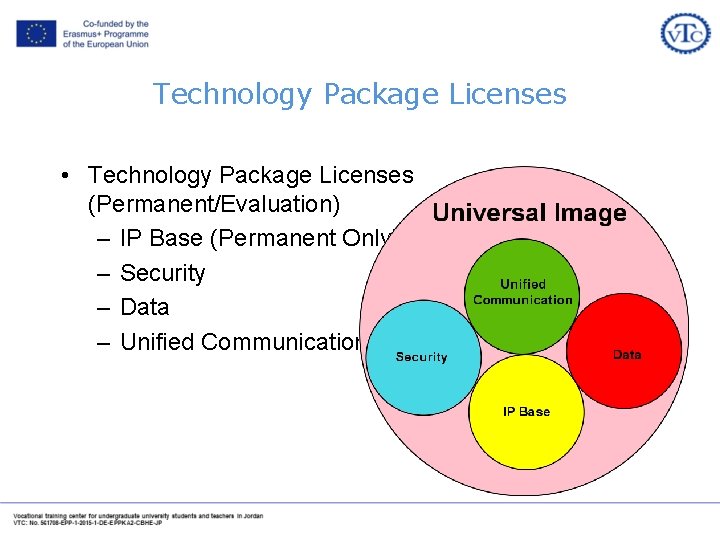
Technology Package Licenses • Technology Package Licenses (Permanent/Evaluation) – IP Base (Permanent Only) – Security – Data – Unified Communication
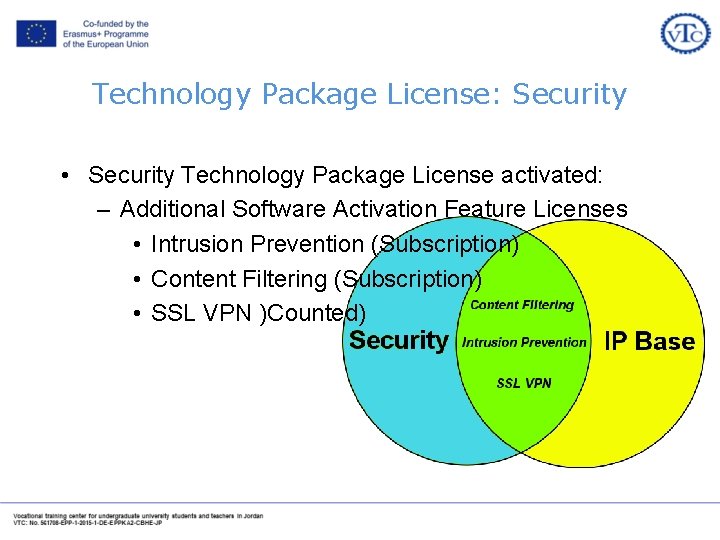
Technology Package License: Security • Security Technology Package License activated: – Additional Software Activation Feature Licenses • Intrusion Prevention (Subscription) • Content Filtering (Subscription) • SSL VPN )Counted)
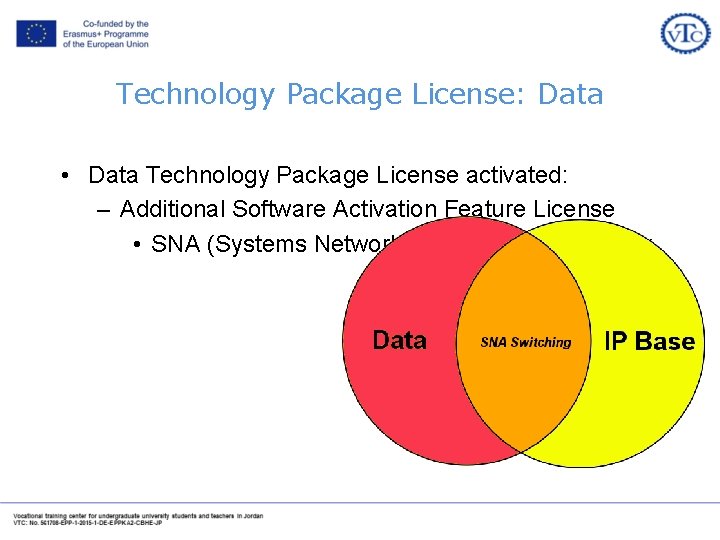
Technology Package License: Data • Data Technology Package License activated: – Additional Software Activation Feature License • SNA (Systems Network Architecture) Switching
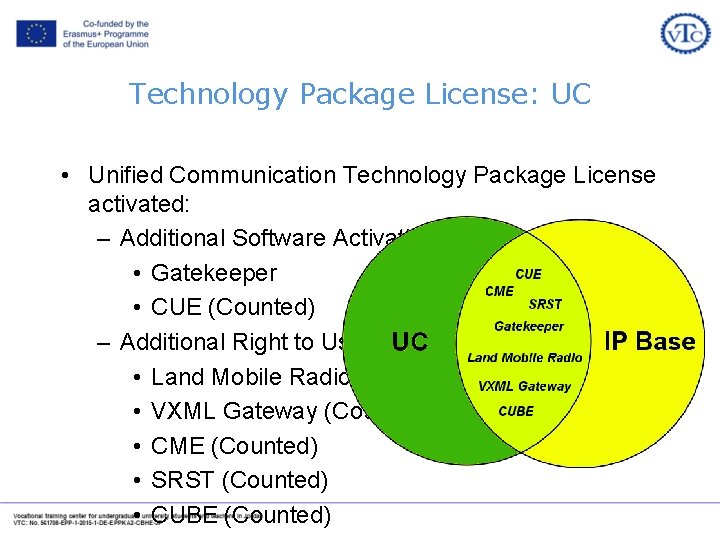
Technology Package License: UC • Unified Communication Technology Package License activated: – Additional Software Activation Feature Licenses • Gatekeeper • CUE (Counted) – Additional Right to Use Feature Licenses • Land Mobile Radio • VXML Gateway (Counted) • CME (Counted) • SRST (Counted) • CUBE (Counted)
Licensing Process • Step 1: Purchase the Software Package or Feature to Install – A Product Authorization Key (PAK) will be provided upon payment • Acts as a Receipt • Used to obtain a license • Step 2: Obtain A License file – Option 1 -Cisco License Manager, which is a free software application available at http: //www. cisco. com/go/clm. – Option 2 -Cisco License Registration Portal: www. cisco. com/go/license
Introduction to IOS 15 Trains, Numbering, and System Image Packaging A. Peter Anderson Associate Professor August 4, 2013
Universal IOS Image
What is a Universal Image? • • • Universal IOS Image contains all Cisco IOS features. Single universal IOS Image is shipped with the ISR G 2 devices. IOS functionality is determined by the specific licenses applied to the devices. Only two IOS images for each release: – universalk 9: This universal image offers all the Cisco IOS features including strong crypto features such as VPN payload, Secure UC, etc. – universalk 9_npe (no payload encryption): This universal image satisfies requirements of import restricted countries. It does not support any strong payload encryption, such as VPN payload, secure voice, etc. Examples: – c 2900 -universalk 9 -mz. SPA. 151 -4. M. bin – c 2900 -universalk 9_npe-mz. SPA. 151. 4 -M. bin
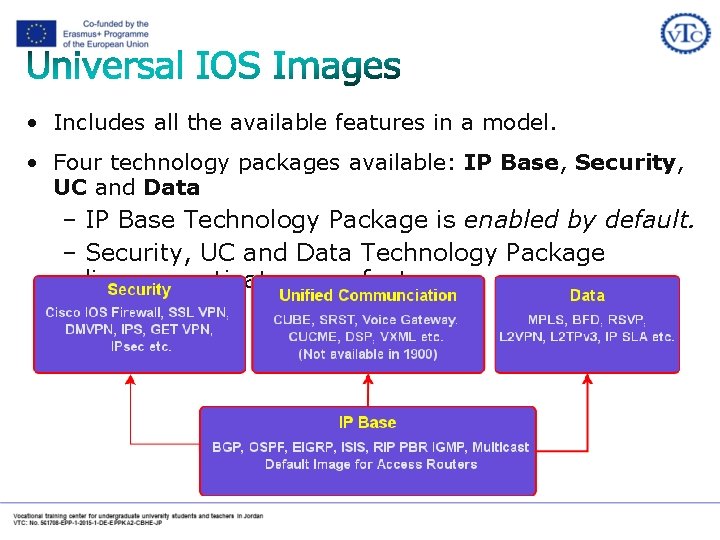
• Includes all the available features in a model. • Four technology packages available: IP Base, Security, UC and Data – IP Base Technology Package is enabled by default. – Security, UC and Data Technology Package licenses activate more features.
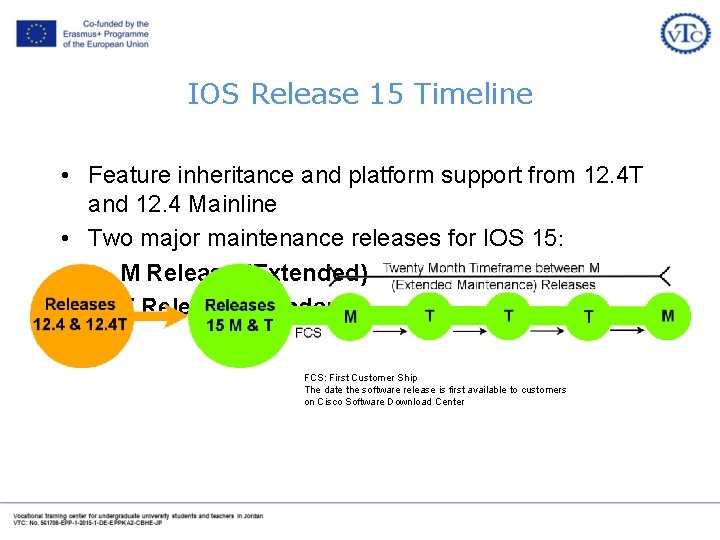
IOS Release 15 Timeline • Feature inheritance and platform support from 12. 4 T and 12. 4 Mainline • Two major maintenance releases for IOS 15: – M Release (Extended) – T Release (Standard) FCS: First Customer Ship The date the software release is first available to customers on Cisco Software Download Center
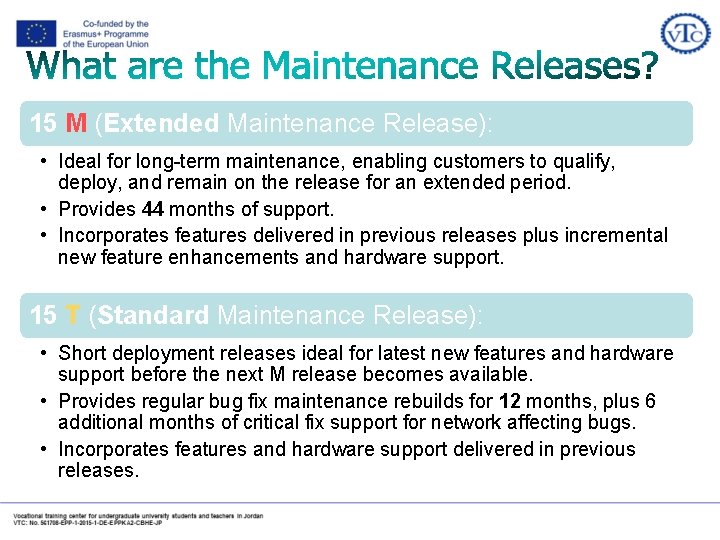
15 M (Extended Maintenance Release): • Ideal for long-term maintenance, enabling customers to qualify, deploy, and remain on the release for an extended period. • Provides 44 months of support. • Incorporates features delivered in previous releases plus incremental new feature enhancements and hardware support. 15 T (Standard Maintenance Release): • Short deployment releases ideal for latest new features and hardware support before the next M release becomes available. • Provides regular bug fix maintenance rebuilds for 12 months, plus 6 additional months of critical fix support for network affecting bugs. • Incorporates features and hardware support delivered in previous releases.
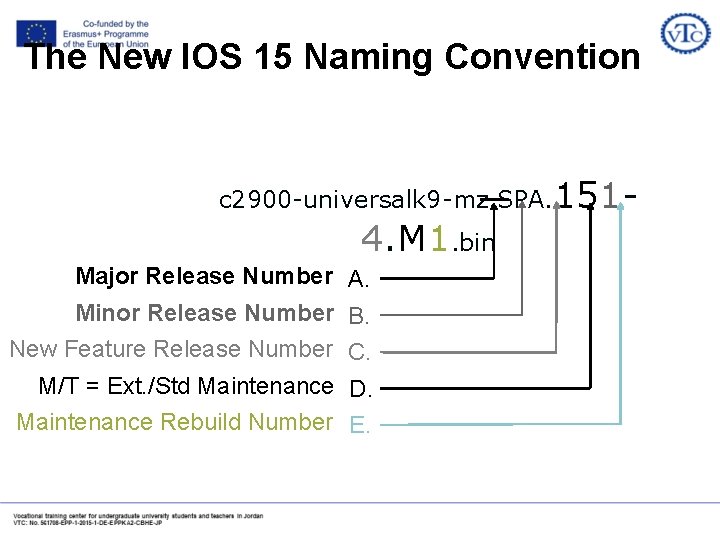
The New IOS 15 Naming Convention c 2900 -universalk 9 -mz. SPA. 151 - 4. M 1. bin Major Release Number A. Minor Release Number B. New Feature Release Number C. M/T = Ext. /Std Maintenance D. Maintenance Rebuild Number E.
- Slides: 37