
Introduction to Information Security SSL TLS Story of


- Slides: 35
Introduction to Information Security SSL & TLS Story of a protocol Part II Itamar Gilad (infosec 15 at modprobe dot net)
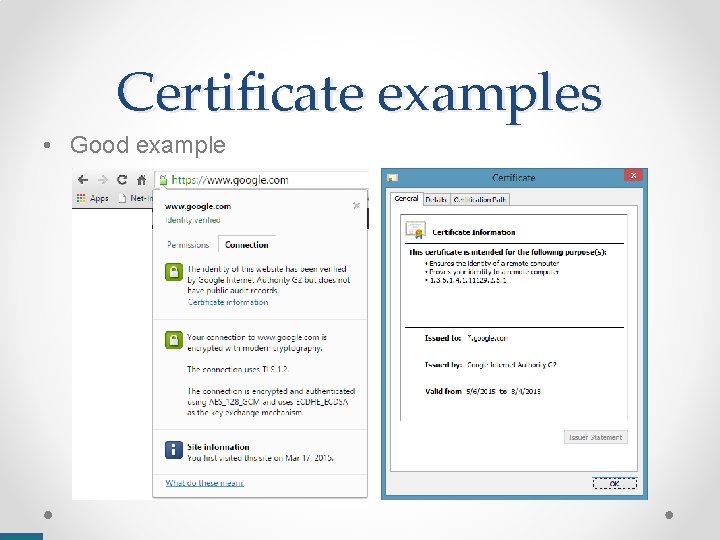
Certificate examples • Good example
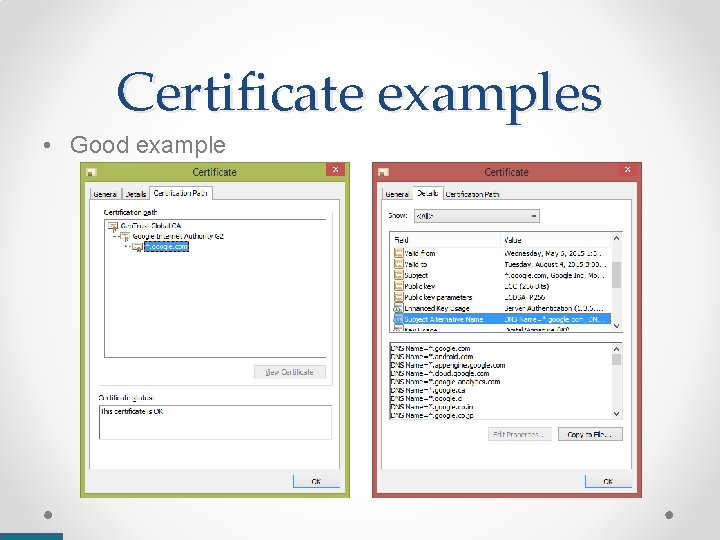
Certificate examples • Good example
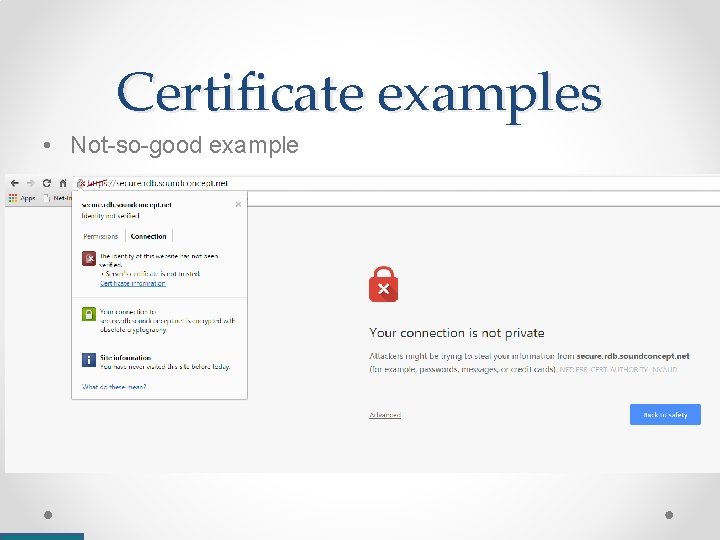
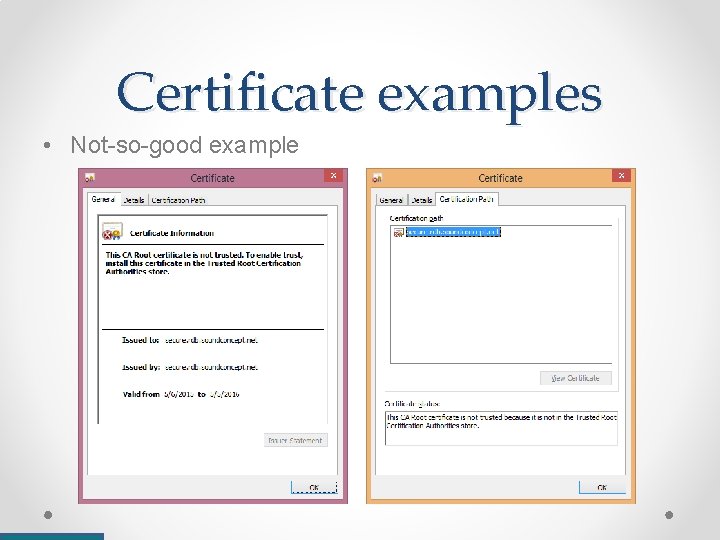
Certificate examples • Not-so-good example
Certificate examples • Not-so-good example
Reflecting trust to users • We want users to know if a site is “safe” or not • There are many things that may cause a certificate to be rejected o o o • • Too old / too new (also caused by mis-configured dates on the host) Misconfigured servers (e. g. : presenting the wrong certificate for a subdomain) Client & server cannot agree on a cipher Self-signed or untrusted certificate, but not a malicious attack Actual attack In reality, attacks are rare Nonetheless, we must be strict – reject and prompt the user! Result – few sites will even use SSL/TLS HTTP is more common than HTTPS by far (and often, users will connect to the HTTP version of an HTTPS website anyway…)
Other reasons HTTPS is not as common as HTTP • Performance issues – o though negligible for the client, a server has to perform many costly operations to support many clients (in particular – public key operations). Solution – Crypto accelerators & better support in modern CPUs • Harder to obtain, configure & maintain – o More complex & often costly than plain HTTP • Bad threat model – o Many companies & organizations do not see themselves or their users as a target, so “there’s no need for encryption” • Internet caching / filtering – o ISPs cannot cache (or otherwise inspect, manipulate or block) traffic that’s encrypted
Increasing use of HTTPS • HSTS (HTTP Strict Transport Security) – o An HTTP header asking the client to use HTTPS in the future o Very effective in minimizing the cleartext attack vector • HTTP certificate pinning (RFC 7469) – o An HTTP header to enable ceritificate pinning over HTTP o At first glance, it seems wrong o But it does make it a little harder for the attacker (you can’t lie to everyone all the time…)
Increasing use of HTTPS • Opportunistic Encryption – o Try using HTTPS when possible, even without a certificate, to fight against mass-collection and tampering (make things harder for attackers without requiring anything new) • “Let’s Encrypt” – o A disruptive yet simple idea pushed by the EFF to offer a free CA to everyone o Instead of background checks and real-world validation – prove validity by proving control over the domain / server content o Theoretically, no reason not to support HTTPS anymore
Review of TLS session setup
What’s required for a secure session? • Ciphers & MACs – o Key exchange (and authentication) method – RSA, DH-RSA, DHE-RSA (PFS), ECDH-RSA, ECDHE-RSA (PFS), DHDSS, DHE-DSS (PFS), PSK-RSA, DHE-PSK (PFS), Kerberos, etc. o Symmetric cipher – Null, RC 4, DES CBC, IDEA CBC, 3 DES CBC, AES CCM, AES GCM, Cha 20 -Poly 1305, etc. o Message authentication code – HMAC-MD 5, HMAC-SHA 1, HMAC-SHA 256, HMAC-SHA 384, AEAD, GOST, etc. • Key material – o (Authenticated) Public key material o Symmetric session keys o MAC session keys
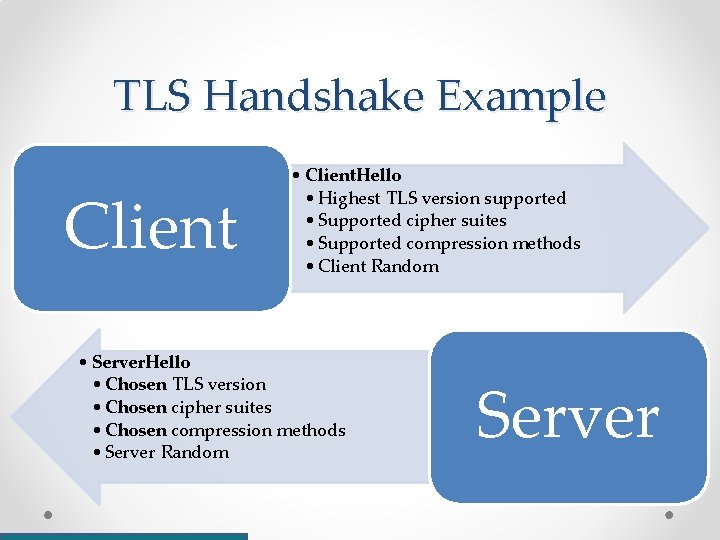
TLS Handshake Example Client • Client. Hello • Highest TLS version supported • Supported cipher suites • Supported compression methods • Client Random • Server. Hello • Chosen TLS version • Chosen cipher suites • Chosen compression methods • Server Random Server
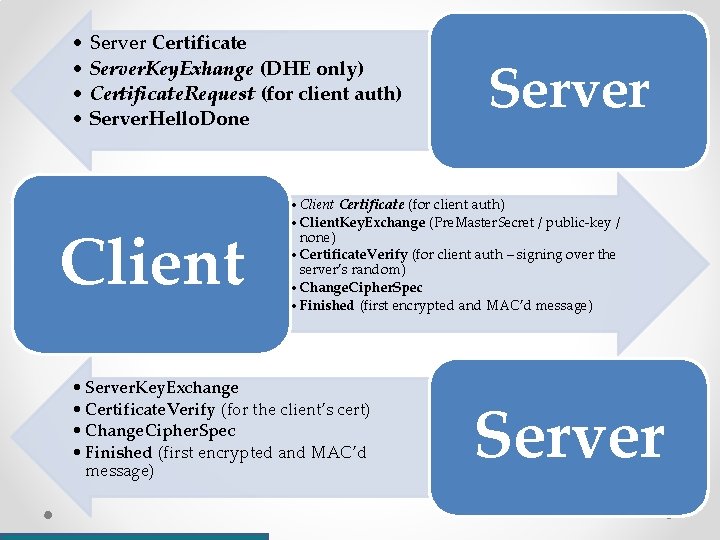
• Server Certificate • Server. Key. Exhange (DHE only) • Certificate. Request (for client auth) • Server. Hello. Done Client Server • Client Certificate (for client auth) • Client. Key. Exchange (Pre. Master. Secret / public-key / none) • Certificate. Verify (for client auth – signing over the server’s random) • Change. Cipher. Spec • Finished (first encrypted and MAC’d message) • Server. Key. Exchange • Certificate. Verify (for the client’s cert) • Change. Cipher. Spec • Finished (first encrypted and MAC’d message) Server
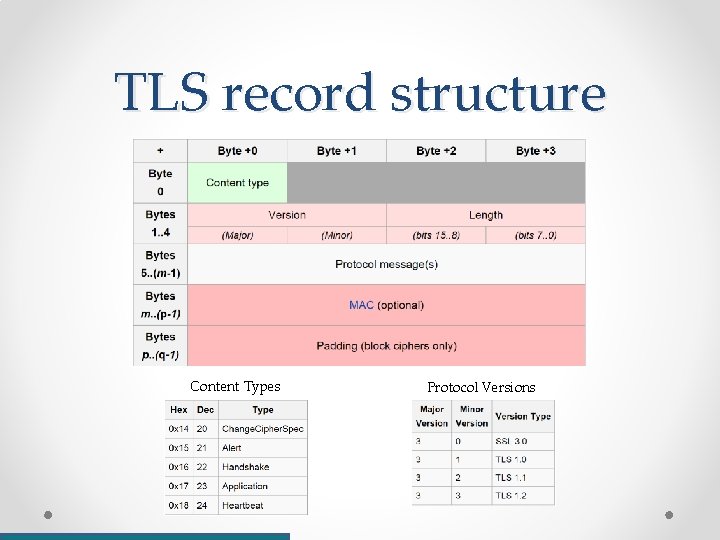
TLS record structure Content Types Protocol Versions
A word about FS/PFS • PFS = “Perfect” Forward Secrecy • Using a fixed key (e. g. : RSA) to send session keys makes any past session vulnerable to future compromise in an attacker can get the private key • Using Diffie-Hellman key-exchange based modes to agree upon session keys avoids this issue • Relevant modes: DHE-RSA, DHE-DSS, ECDHERSA, ECDHE-ECDSA
Version Rollback Attacks • Let’s assume TLS 1. 0 is secure, but we can attack SSL v 3 (not a myth) • If we can find a way to make two TLS-capable hosts use an older version, we can defeat the use of encryption • It just so happens that if two hosts try to use TLS 1. 0 and fail to negotiate a connection, they will fall-back to SSLv 3 • There are some attacks against the TLS 1. 2 False Start extension
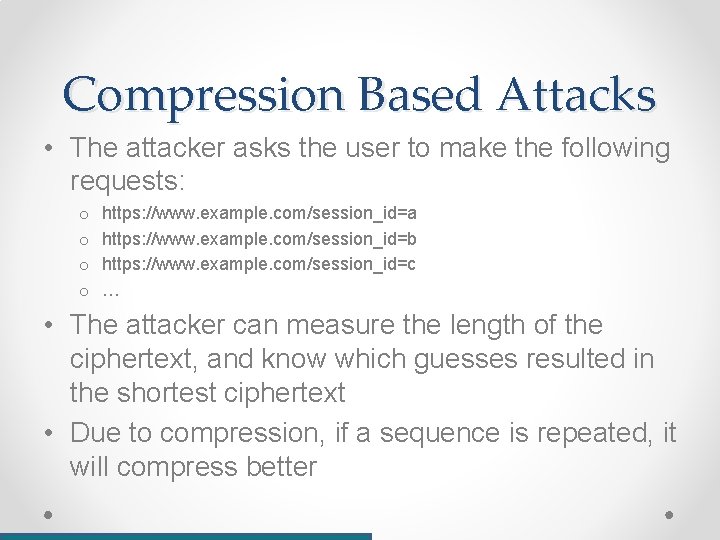
Compression Based Attacks • Any compression must be done before encryption • Thus, TLS supports compression by default • Goal: the attacker wants to know the value of a user’s cookie (i. e. : “session_id”) for domain example. com • And that she can – o Inspect all (encrypted) traffic o Run Javascript code on the target, and thus – ask the user’s browser make multiple HTTPS requests of its choosing (but not get any clear-texts, since that would be a violation of the SOP)
Compression Based Attacks • The attacker asks the user to make the following requests: o o https: //www. example. com/session_id=a https: //www. example. com/session_id=b https: //www. example. com/session_id=c … • The attacker can measure the length of the ciphertext, and know which guesses resulted in the shortest ciphertext • Due to compression, if a sequence is repeated, it will compress better
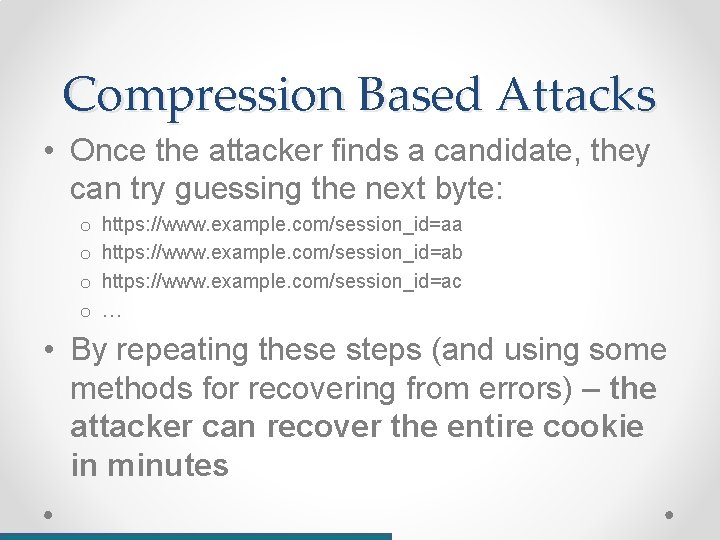
Compression Based Attacks • Once the attacker finds a candidate, they can try guessing the next byte: o o https: //www. example. com/session_id=aa https: //www. example. com/session_id=ab https: //www. example. com/session_id=ac … • By repeating these steps (and using some methods for recovering from errors) – the attacker can recover the entire cookie in minutes
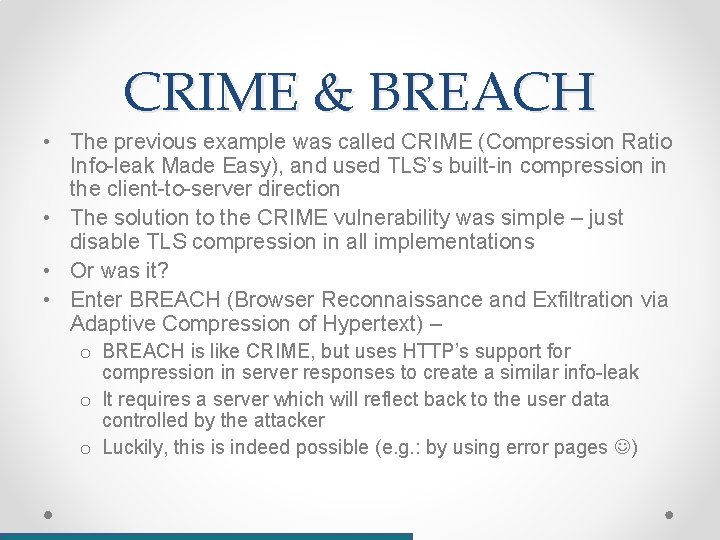
CRIME & BREACH • The previous example was called CRIME (Compression Ratio Info-leak Made Easy), and used TLS’s built-in compression in the client-to-server direction • The solution to the CRIME vulnerability was simple – just disable TLS compression in all implementations • Or was it? • Enter BREACH (Browser Reconnaissance and Exfiltration via Adaptive Compression of Hypertext) – o BREACH is like CRIME, but uses HTTP’s support for compression in server responses to create a similar info-leak o It requires a server which will reflect back to the user data controlled by the attacker o Luckily, this is indeed possible (e. g. : by using error pages )
Heart. Bleed 101 • In SSL/TLS, a “Heart-beat” packet can be used to keep the connection alive / know when the connection has dropped • Similarly an ICMP Echo Request – the peer will echo sent data (using a built-in length field) • Open. SSL (~66% of HTTPS servers on the Internet) allowed a peer to send a heart-beat packet while controlling the length field • Attacker can send a small packet with a large length value Attacker gets back a bigger answer, consisting of unknown server memory Logo credit: http: //heartbleed. com/
Implications • Reading (dynamic) server memory • Which may contain sensitive information • And key material! • If exploited, all your security are belong to us! (can decrypt / MITM that site’s traffic) Logo credit: http: //heartbleed. com/
Mitigation • Proper Solution – o Update to a fixed version of Open. SSL o Generate new certificates o Ask all users to change all passwords, audit anything that happened in the mean time o Never sleep well again • Reality – o o Most of the Internet has been patched very quickly (<24 hours) Not all certificates have been / will be replaced Most sites have not urged users to change passwords Most users won’t do it anyway… Logo credit: http: //heartbleed. com/
FREAK & Logjam • FREAK = Factoring RSA Export Keys • In the past, strong encryption couldn’t legally be exported from USA • SSL/TLS’s solution? – export-grade-compatibility mode, which limits RSA keys to 512 bits (which today are easy to factor) • On many common implementations, a MITM-capable attacker can force the client & server to use the export-grade keys instead of the secure copy • “Logjam” = extremely similar attack for Diffie-Hellman based key exchanges • Both attacks use weaknesses in the state-machine based implementations of SSL/TLS
RSA Key Generation Vulnerabilities • In RSA – o p, q are both large random primes, and are used to create the public and private keys o (n = p * q) is the main part of the public key, which is included in the certificate • What if two hosts chose a common factor? • This shouldn’t ever happen, but it did happen! • Using GCD, researchers managed to verify (and crack) those keys • Out of 11. 4 Million keys, 26995 had common factors • Further checks using larger data sets found even more collisions • Most of these collisions appear to be in embedded devices and security hardware ( ), where real random data is more scarce
SSL/TLS Vulnerabilities • Weak(er) cryptographic primitives – o What we most often fear o Often – not really the problem, but TLS is a ‘pluggable’ system, so these should be very easy to overcome o Examples –RC 4 (significant attacks), MD 5 (likewise) • Weak(er) cryptographic constructs – o o MAC-then-Encrypt vs Encrypt-then-MAC vs simultaneous CBC mode vs. CTR mode Padding oracles Can be an issue (POODLE attack, etc. ), though often harder to exploit
SSL/TLS Vulnerabilities • Implementation issues & design flaws – o o o Timing attacks (Lucky 13, etc. ) State-machine attacks & protocol downgrades Heartbleed & parsing bugs History of design flaws throughout the development of SSL/TLS CA model is a major issue still affecting TLS/SSL security
State of the Web (05/2015) • Report by SSL Pulse (PDF)
Misc. attacks on SSL/TLS • Parsing bugs (ASN. 1, DER, X. 509, PKCS, etc. ) – mainly leading to Do. S, but in some cases – can enable MITM attack (BERserk, 2014) • Session Truncation attacks – o TLS often carried over TCP o TCP metadata is still insecure o Attacker can send a TCP FIN packet to terminate a connection on behalf of the client o E. g. : Can be used to prevent a user from signing-out of a secure server
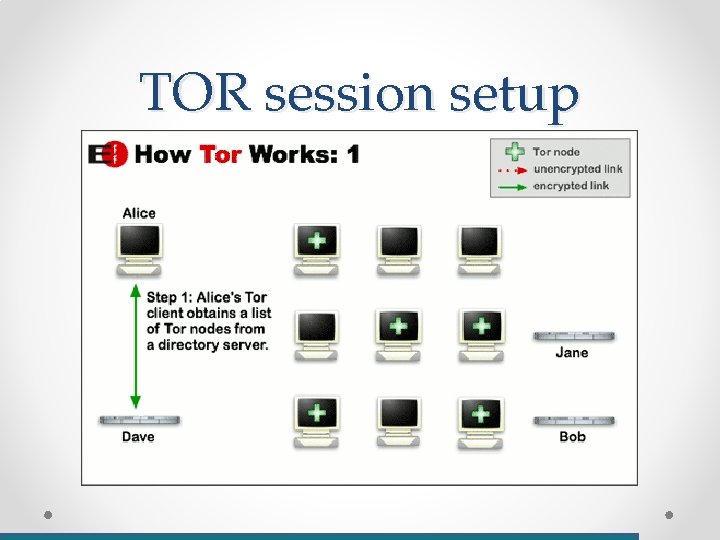
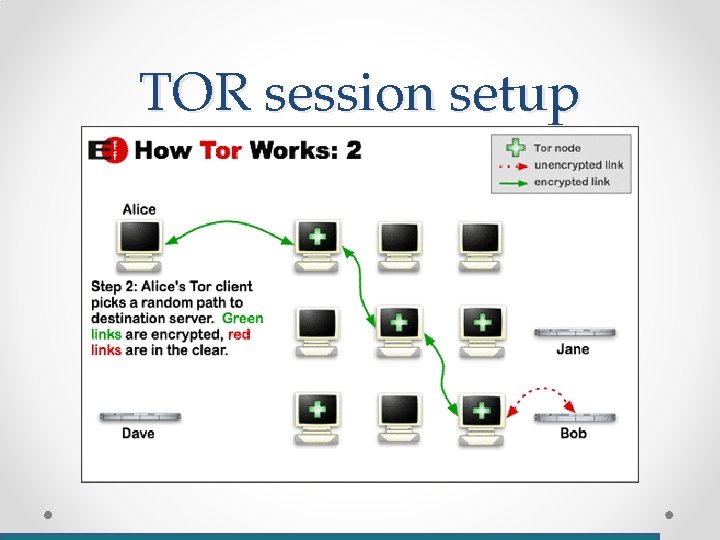
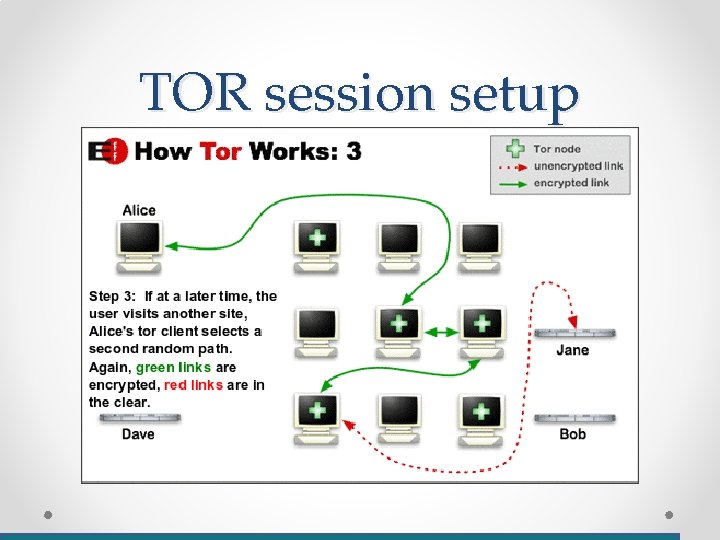
TOR • TOR = The Onion Router • A distributed, community supported network for anonymity – protecting the identities of clients (and servers) • Anonymity is created by using a random path through 3 or more TOR routers • The link to each node is encrypted using another key (‘layered’ encryption onion routing)
TOR session setup
TOR session setup
TOR session setup
TOR issues • Exit nodes can be evil (snoop or attack users) • Side channels (DNS, etc. ) may leak sensitive data • Endpoint security still an issue (attacks against Tor Browser, etc. ) • Traffic correlation attacks demonstrated
Questions?