
Introduction to ICT System Unit Components of System
- Slides: 34
Introduction to ICT • System Unit • Components of System Unit
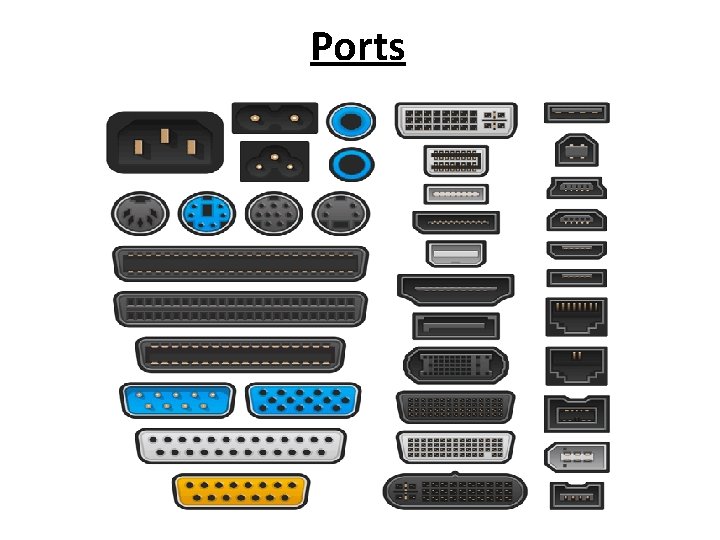
Ports • A port is an interface or connection point through which peripheral devices connect to the computer. • A computer has different type of ports to connect different devices. • Each type of port operates at a certain speed, which is measured in kilobits per second, megabits per second or gigabits per second.
Ports
Types of Ports • • Serial Ports Parallel Ports Universal serial Bus Port Thunderbolt Port HDMI Port e. SATA Port Ethernet Port Audio Port
Serial Ports • It transmits one bit at a time. • It is used to connect devices that do not require fast data transmission like mouse and keyboard. • Data travels over a serial port at 115 kilobits per second. • Serial ports are older ports and not typically found on modern computers.
Parallel Ports • It transmits many bits at a time. • It is used to connect devices that transfer many bits at a time and require fast data transmission like printer and scanner. • The speed of parallel port is 12 Mbps. • These are also older ports and are not found in modern computer.
Universal Serial Bus Port • USB is the most common type of port, it can connect up to 127 different peripheral devices. • It is used to connect devices such as keyboard, mouse, digital camera, scanner, printer, external hard disk and USB flash drive etc.
Universal Serial Bus Port • USB ports can also be used as a power supply for different devices like smart phones and tablets. • Most laptops and desktop computers normally come with at least two USB ports.
Universal Serial Bus Port • USB ports support hot swapping and Plug and Play. • Hot Swapping is the ability to connect and disconnect devices without shutting down the computer. • Plug n Play enables a computer to automatically detect and configure a device when it is connected to a computer.
Universal Serial Bus Port • Multiple devices can be attached to USB port through Daisy Chain. • First device is attached to the USB port of the computer, second USB device connects to the first USB devices, the third USB device connects to the second USB device and so on.
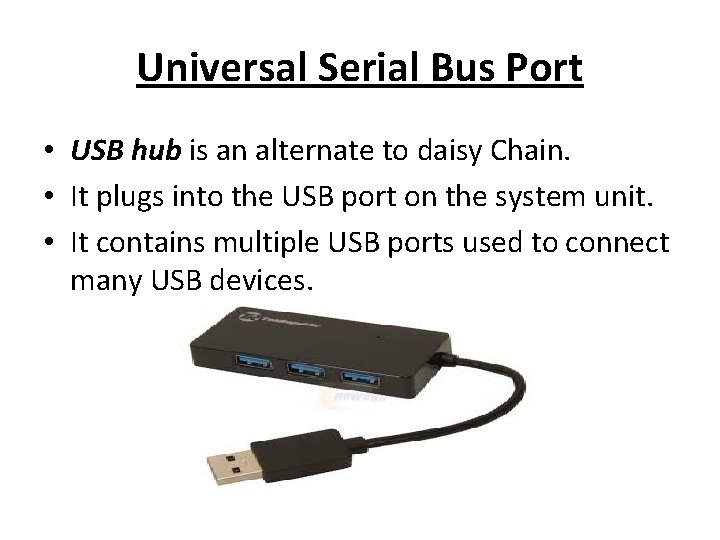
Universal Serial Bus Port • USB hub is an alternate to daisy Chain. • It plugs into the USB port on the system unit. • It contains multiple USB ports used to connect many USB devices.
Thunderbolt Port • It is the fastest type of port used to connect devices to the computer. • It supports a transfer speed of up to 10 Gbps. • It can connect up to six different peripheral devices. • It is very useful for laptop and ultra books due to slim design.
HDMI Port • HDMI stands for High Definition Multimedia Interface. • It is a digital port that can transmit both audio and video signals. • It is the most common multimedia port.
HDMI Port • It is the standard connection for high definition TVs, Video game consoles and other media devices. • All currently available monitors, DVD players, televisions and game consoles have at least one HDMI port.
e. SATA Port • e. SATA stands for external Serial Advanced Technology Attachment. • It is used to connect an external SATA hard disk to a computer. • SATA hard disks are popular because of their fast data transmission speeds. • It provides up to six times faster data transmission speeds than other external hard disks.
Ethernet Port • It is used to connect a computer to local network or cable modem. • Ethernet originally offered a transfer rate of 10 Mbps. • Fast Ethernet provides a transfer rate of 100 Mbps. • Gigabit Ethernet provides higher speed of transmission with transfer rates of 1 Gbps.
Audio Port • Audio port is used to connect headphones, microphones, and speakers to the computer.
Buses • A computer system consists of multiple devices and CPU must be able to communicate with all devices. • The devices are connected together by a communication channel called BUS. • A bus consists of a set of communication lines to move a large amount of bits in the form of electronic pulses from one unit to another.
Buses • The bus is used to connect the following units – CPU • ALU • CU – Main Memory (RAM, ROM) – Input / Output Devices • Bus is a common path to transfer data and commands between CPU, memory and input/output devices. • It is also used to send or receive data from secondary storage.
Buses • The amount of data that a bus can carry at one time is called bus width. • A higher bus width means that a bus can carry more data. • The speed at which data moves from one component to another component of the computer is called bus speed. • Bus width and bus speed affects the overall performance of the computer.
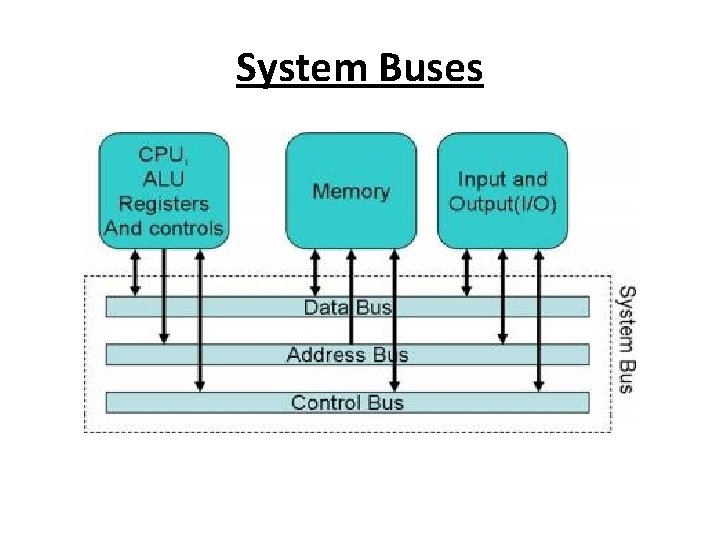
System Buses • System buses are the part of motherboard. • They connect the processor to the main memory. • Different type of system buses are – Data bus – Address bus – Control bus
System Buses
Data Bus • Data bus is used to transfer data between different components of the computer. – It transfers instructions from memory to CPU for execution. – It transfers data between memory and the I/O during input/output operations.
Data Bus • The number of lines in data bus affects the speed of data transfer between different components. • A data bus with more lines can carry more data. • The data bus lines are bi-directional and can carry data to or from memory.
Address Bus • It is used to connect the CPU with main memory to identify particular addresses in main memory. • The number of lines in the address bus determines the amount of memory that can be directly addressed. • The address bus is a unidirectional bus. • It carries address of memory location from CPU to the main memory.
Control Bus • It is used to transmit different commands from one component to another component. • For example, if CPU wants to read data from main memory, it uses control bus to send the memory read command to the main memory of the computer.
Control Bus • The control bus is also used to transmit control signals like ACKS (Acknowledgement signals). • A control signal contains the following – Timing Information: It specifies the time for which a device can use data and address bus. – Command Signal: It specifies the type of operation to be performed.
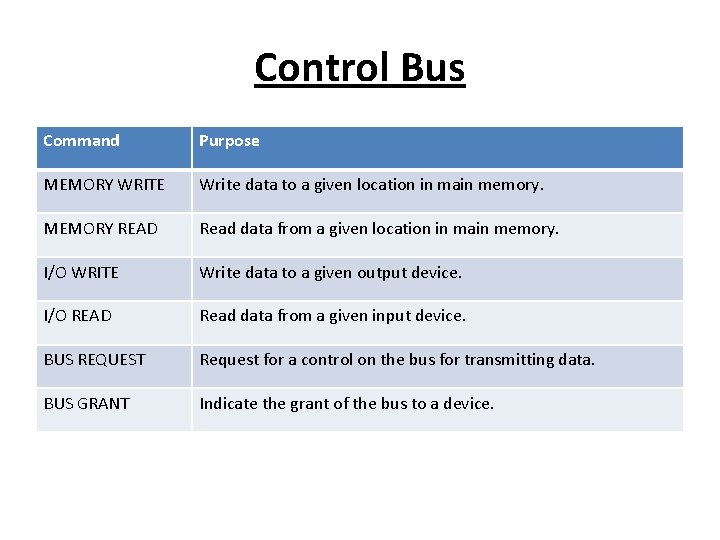
Control Bus Command Purpose MEMORY WRITE Write data to a given location in main memory. MEMORY READ Read data from a given location in main memory. I/O WRITE Write data to a given output device. I/O READ Read data from a given input device. BUS REQUEST Request for a control on the bus for transmitting data. BUS GRANT Indicate the grant of the bus to a device.
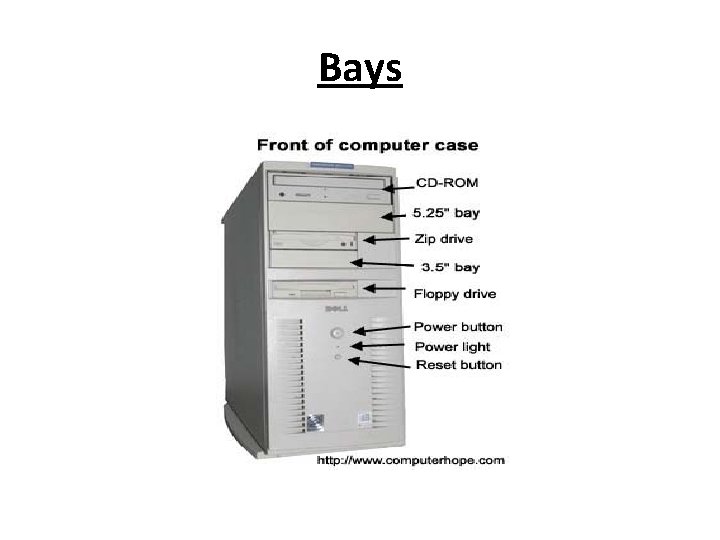
Bays • Bay is an open area inside the system unit to install additional equipment such as storage drives. • Some bays are rectangular opening to hold disk drives. • Some bays hold card readers and ports such as USB. • Drive bays typically hold disk drives.
Bays
Types of Bays • External Drive Bay – It is used to access the drive from outside the system unit. – Examples are CD drive, DVD drive and flash memory card reader. • Internal Drive Bay – It is hidden inside the system unit. – An example is the hard disk drive
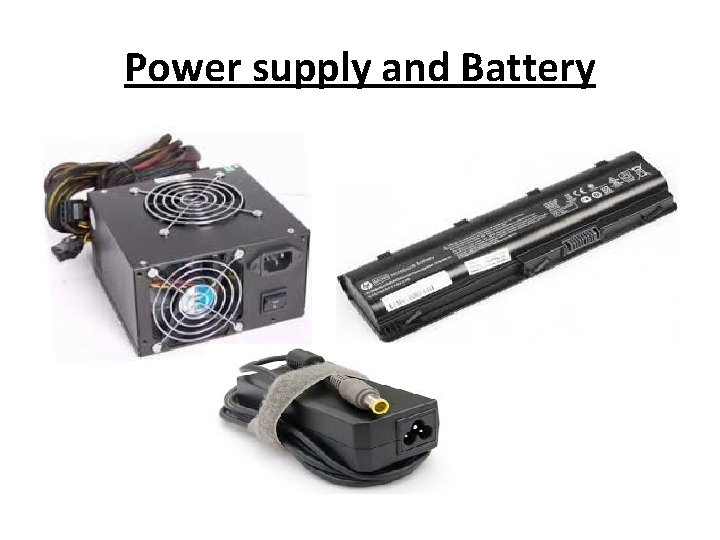
Power supply and Battery • Power supply is located in the back of the computer case. • It is also called power supply unit (PSU). • Most PCs plug in to a standard electrical outlet that supply an alternating current. • Power supply converts alternating current to the direct current.
Power supply and Battery • Battery is a component that supplies power to a device. • It enables the device (laptop, tablets) to work without a power outlet. • Batteries can supply power to a laptop for several hour depending on how much power it requires.
Power supply and Battery