
Introduction to GST ENFORCEMENT MODULE Back Office for

Introduction to GST ENFORCEMENT MODULE (Back Office for Model-2 States) Developed and Designed by GSTN
Objectives of the Session Ø Introduction to Enforcement Module Ø Demonstration of Module Ø Q & A (Parallel to Presentation) Discussion on Ø Suggestions to improve Module Ø Expectations from MIS Ø Nuances of enforcement procedures in different States Developed and Designed by GSTN 2
Presentation plan Enforcement Module… Ø Few Updates Ø Advantages of automating Enforcement Process Ø Design Elements Ø Introducing Key Screens Ø Performing key steps in module Developed and Designed by GSTN 3
Some Updates Developed and Designed by GSTN 4
Few Updates… Ø Full module got rolled out by end of July, 2019 Ø Building MIS is underway Ø MOV forms (presently as part of Circular) are going to be notified Ø Formal intimation of liability before SCN (under Section 73(5) / 74(5)) Developed and Designed by GSTN 5
Few Updates… Ø Cross-Empowerment in Enforcement – Notification under Section 6 Ø Maharashtra & Andhra coming to Model-2 Pradesh Ø Most Model-1 States & CBIC are not yet ready with their Enforcement Modules Developed and Designed by GSTN 6

Advantages of Automating Enforcement Process Developed and Designed by GSTN 7
Advantages Ø Speeds up the documentation issue process (‘Fill-in-the-blank’ approach) Ø Officers can prioritise the Cases better Ø Builds online Archive of all key documents in Investigation Cases Ø Taxpayer can respond online (without physical interaction) Developed and Designed by GSTN 8
Advantages… Ø Supervisory officers can monitor the progress of ongoing investigations Ø Enables analysis of Cases based on goods/services involved, frequent contraventions etc. Ø Aids in measuring performance of officers Ø Aids MIS & BI in profiling potential fraudsters Developed and Designed by GSTN 9

Design Elements Developed and Designed by GSTN 10
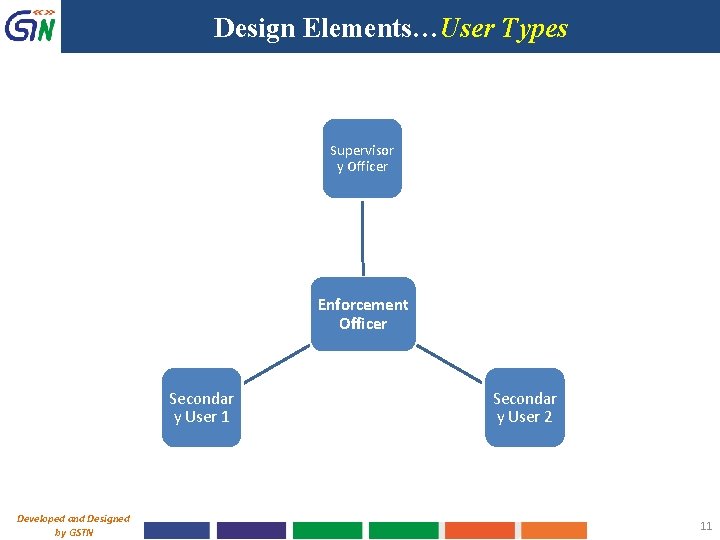
Design Elements…User Types Supervisor y Officer Enforcement Officer Secondar y User 1 Developed and Designed by GSTN Secondar y User 2 11
Design Elements…User Types Ø Role Type namely, ‘Enforcement Officer’ has to be assigned by State Admin. Once assigned, such officer at any level will have uniform view/facilities. Ø State admin will also mark a specific officer as ‘Immediate Supervisor’. For him, the Case ID will be available for ‘VIEW only’. All updates in case progress will be shown in ‘My Tasks’. Ø To upload report reg. results of search, supporting documents etc. or to seek assistance of another enforcement officer and enable him to upload his inputs, ‘Secondary Users’ can be added Developed and Designed by GSTN 12
Design Elements…Case Management • Two broad categories of cases: “Cases in Transit” (Section 68, 129) and “Other than Transit” (Section 67) • At any point of time, there will be only one officer with whom the case will appear as pending and to work upon. • Any Enforcement case (with status other than ‘Closed’), at any stage, can be assigned/transferred to other enforcement officer/module (for approvals, transfer of cases etc. ); Entire Case moves to assignee. Developed and Designed by GSTN 13
Design Elements…Case Prioritisation • Prioritisation of Cases for work: - Listing through Dashboard hyperlinks; - Listing based on precise status (45+); - Notifications in ‘MY TASKS’ - MIS reports Developed and Designed by GSTN 14
Design Elements…Record Search Ø In view of Section 6 of SGST Act, before creating new case, it is to be ensured that no other proceedings were already initiated on the same issue for the same period. Ø ‘Record Search’ and ‘View All-India Records’ Options Ø Once mapped with “View All-India Records” role, the scope of search in ‘Record Search’ (Services Taxpayer Account Record Search) will get widened and the concerned officer will be able to view records of GSTINs pertaining to other States also. Ø A log of such accesses is maintained in system. Developed and Designed by GSTN 15
Design Elements…Case Creation Ø Case ID in Enforcement Module can be created for any GSTIN/Temp ID within the same State i. e. irrespective of the fact whether it is assigned to State or Centre. All the consequent processes can be performed w. r. t that taxpayer. Ø Create Temp ID where there is no GSTIN available or the taxpayer is from Other State. Ø Facility to build historical database of Pre-GST offence details against a particular GSTIN (booked in pre-GST regime under earlier laws). Developed and Designed by GSTN 16
Design Elements…Forms Ø All statutory INS forms and MOV forms (as per Circular) are provided in the module. Ø Several built-in Validations available to reduce chances of errors; At the same time, several non-mandatory fields are kept to make system flexible. Ø All forms, after entry of data on the screen can be previewed as PDF. This is to check for inadvertent errors, if any, before final submission. Ø In all forms, the facility for attachment is given which is useful for uploading any documents/information which could not be captured/entered on screen. (Max. 4 attachments & each 5 MB max. ) Developed and Designed by GSTN 17
Design Elements…Forms Ø All forms issued to taxpayer are enabled with Digital Signature. Ø All forms issued are identified by a unique reference number (which can be generated as part of filling up form itself) Ø Based on nature of Communication, the forms are listed under different tabs such as ‘Notices’, ‘Orders’, ‘Proceedings’ etc. in Case File Developed and Designed by GSTN 18
Opening Screens in Module Developed and Designed by GSTN 19
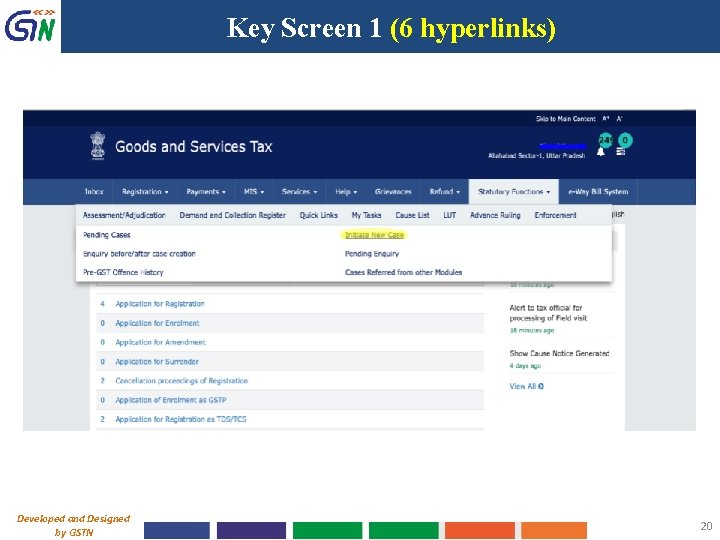
Key Screen 1 (6 hyperlinks) Developed and Designed by GSTN 20
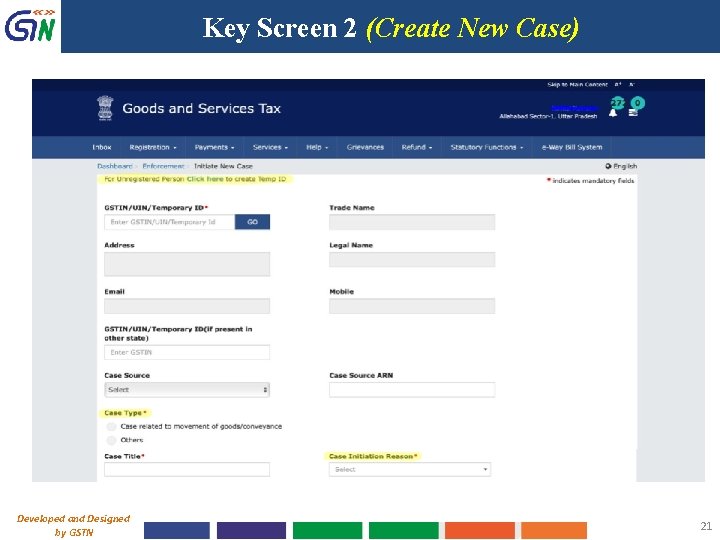
Key Screen 2 (Create New Case) Developed and Designed by GSTN 21
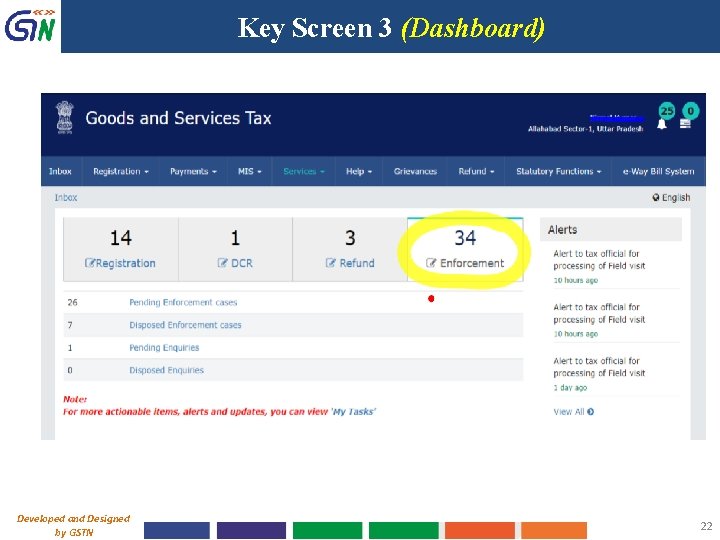
Key Screen 3 (Dashboard) Developed and Designed by GSTN 22
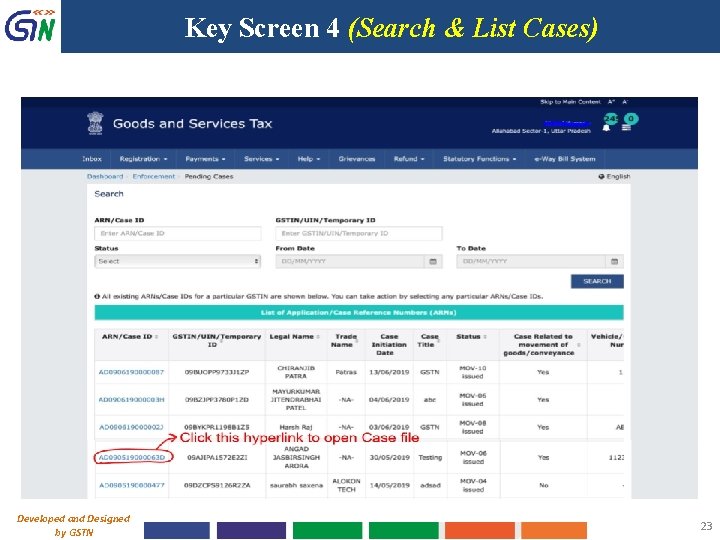
Key Screen 4 (Search & List Cases) Developed and Designed by GSTN 23
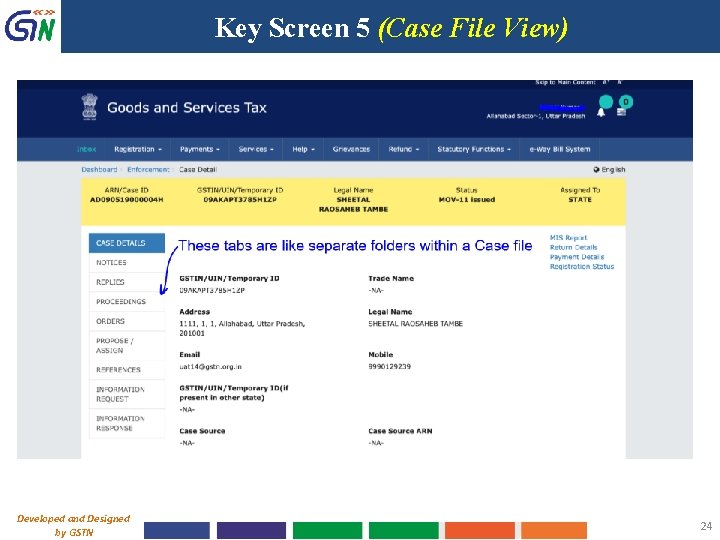
Key Screen 5 (Case File View) Developed and Designed by GSTN 24
Performing Key Steps in Module Developed and Designed by GSTN 25
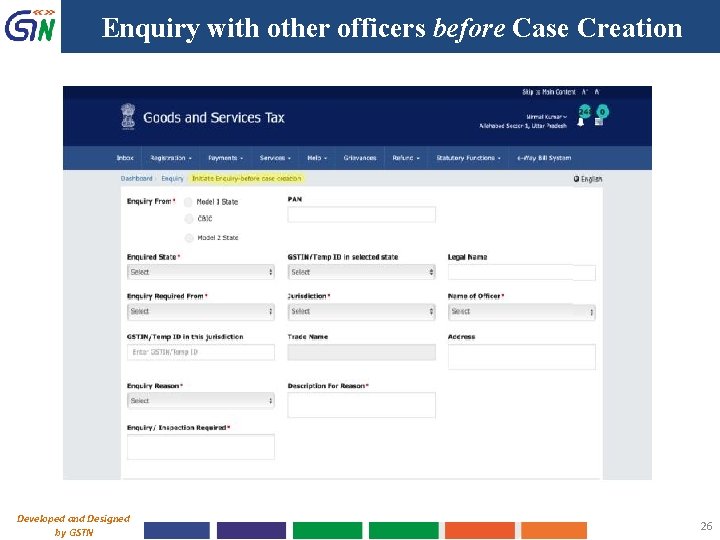
Enquiry with other officers before Case Creation Developed and Designed by GSTN 26
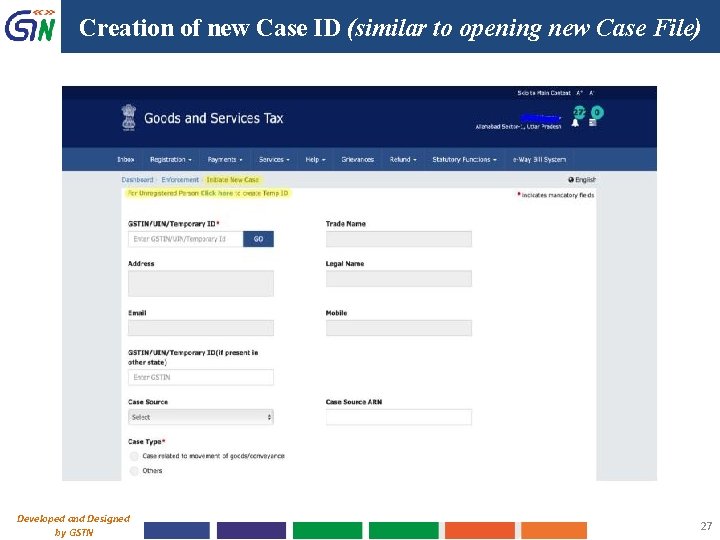
Creation of new Case ID (similar to opening new Case File) Developed and Designed by GSTN 27
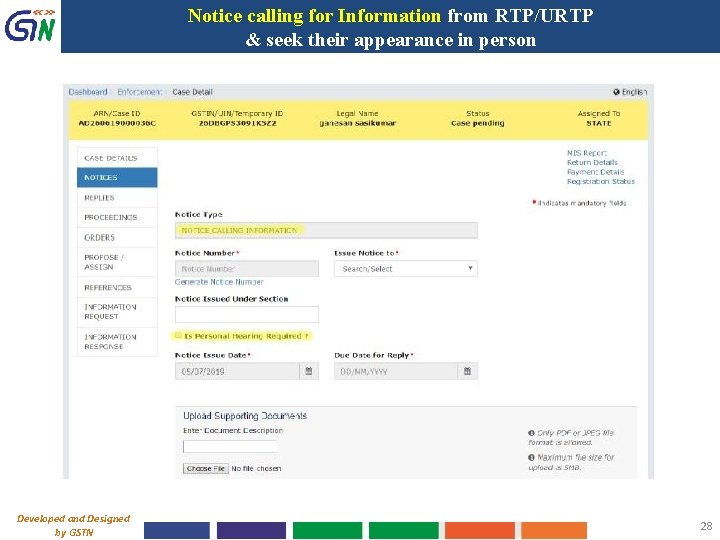
Notice calling for Information from RTP/URTP & seek their appearance in person Developed and Designed by GSTN 28
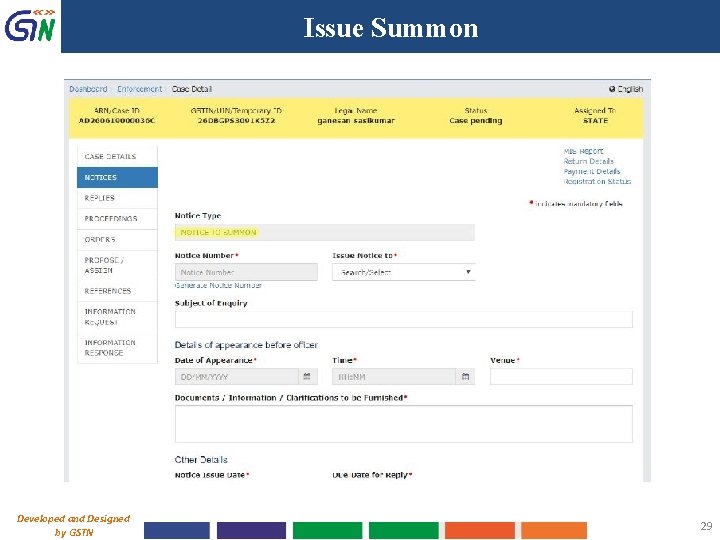
Issue Summon Developed and Designed by GSTN 29
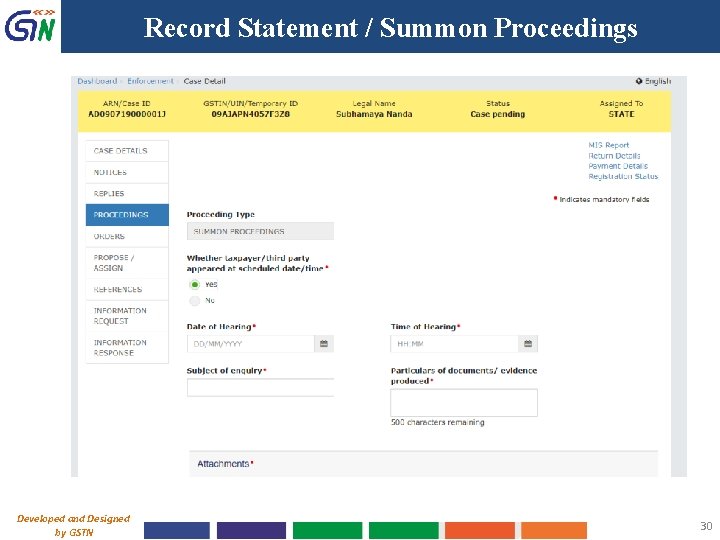
Record Statement / Summon Proceedings Developed and Designed by GSTN 30
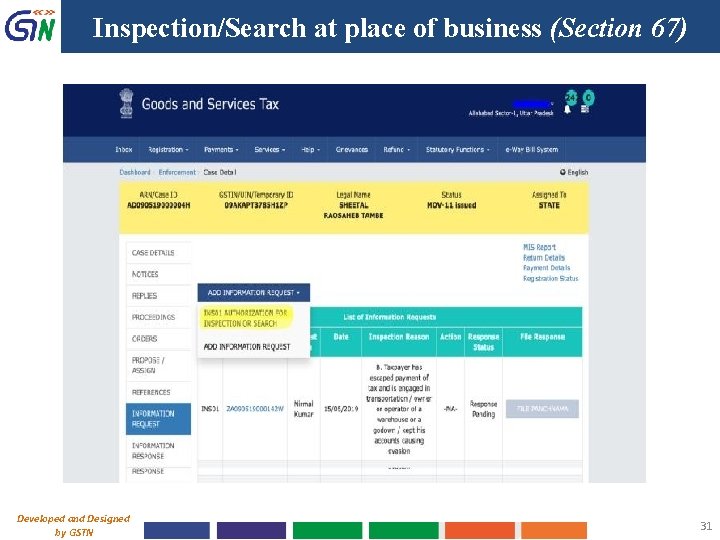
Inspection/Search at place of business (Section 67) Developed and Designed by GSTN 31
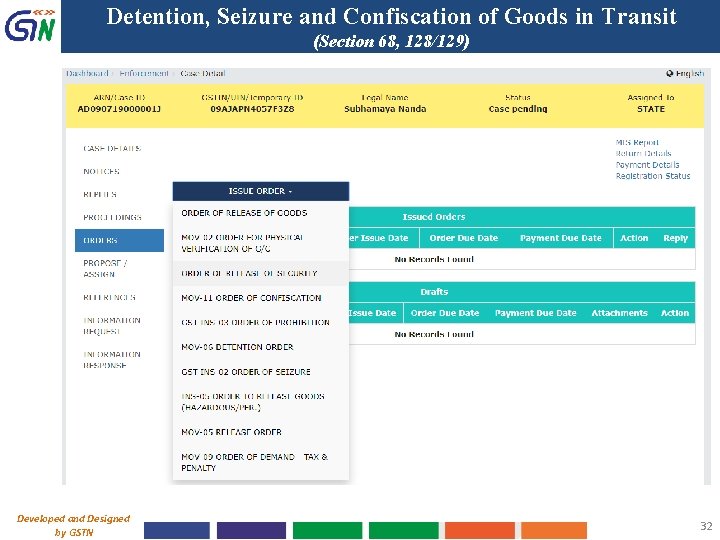
Detention, Seizure and Confiscation of Goods in Transit (Section 68, 128/129) Developed and Designed by GSTN 32
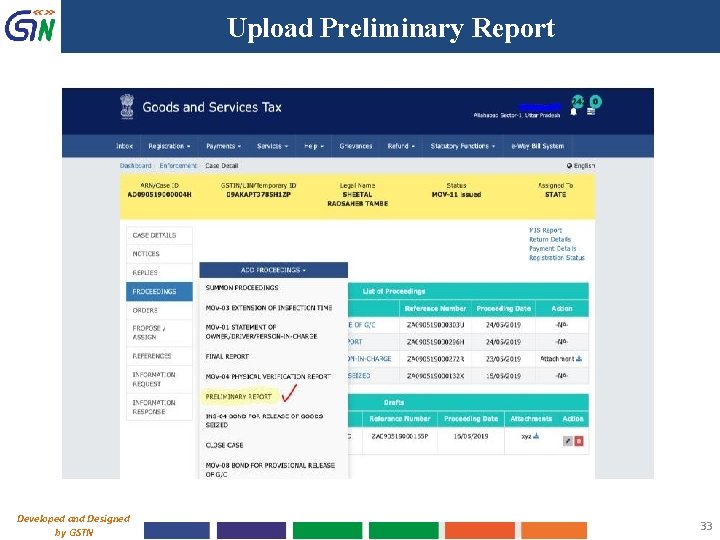
Upload Preliminary Report Developed and Designed by GSTN 33
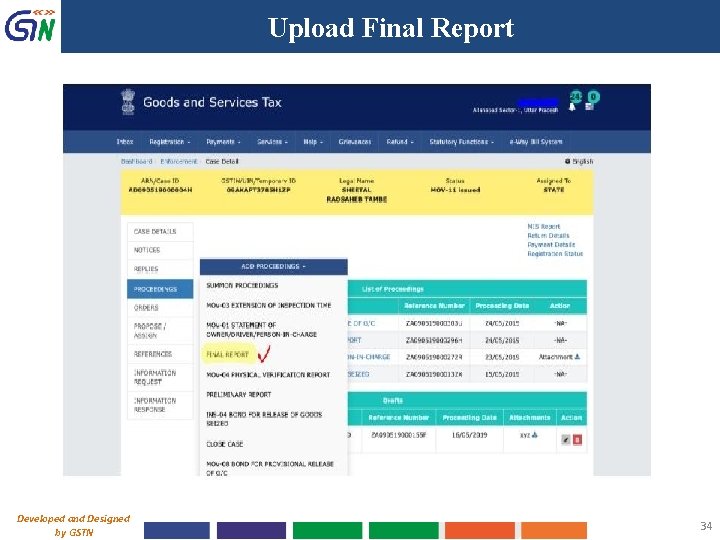
Upload Final Report Developed and Designed by GSTN 34
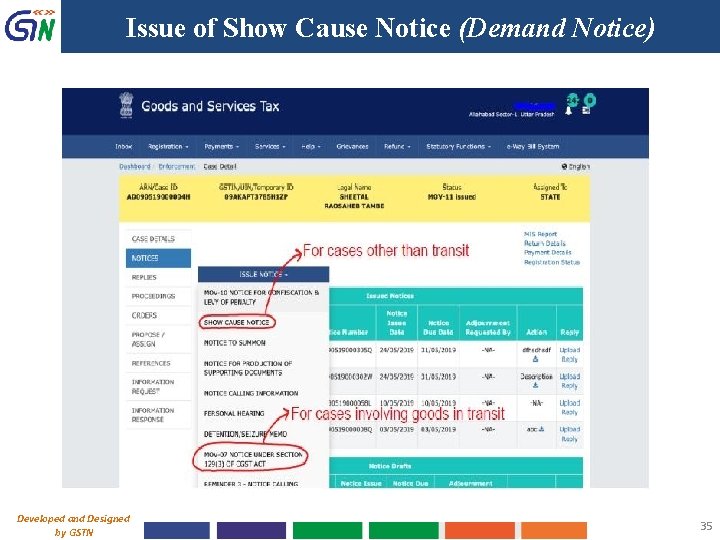
Issue of Show Cause Notice (Demand Notice) Developed and Designed by GSTN 35
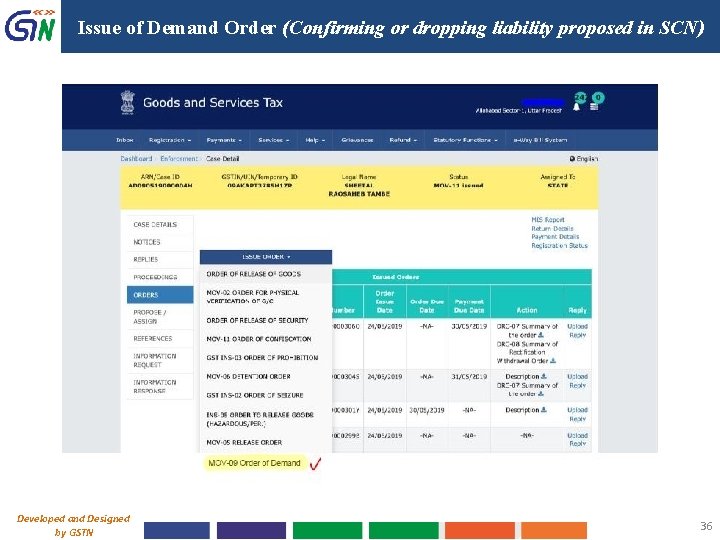
Issue of Demand Order (Confirming or dropping liability proposed in SCN) Developed and Designed by GSTN 36
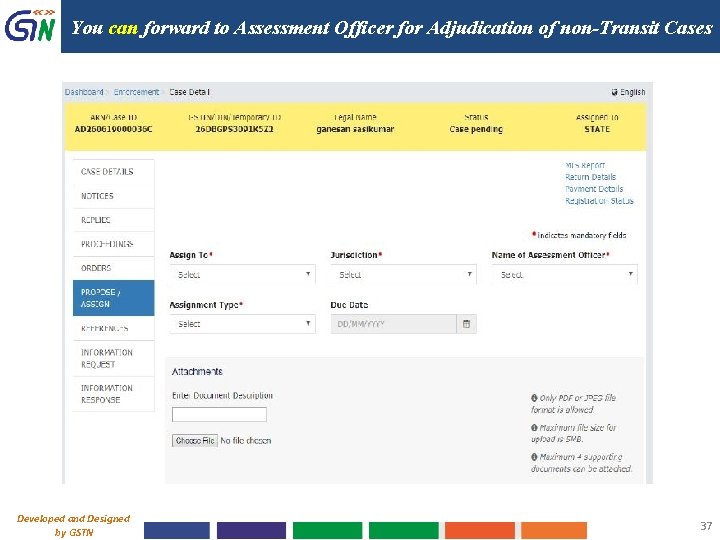
You can forward to Assessment Officer for Adjudication of non-Transit Cases Developed and Designed by GSTN 37
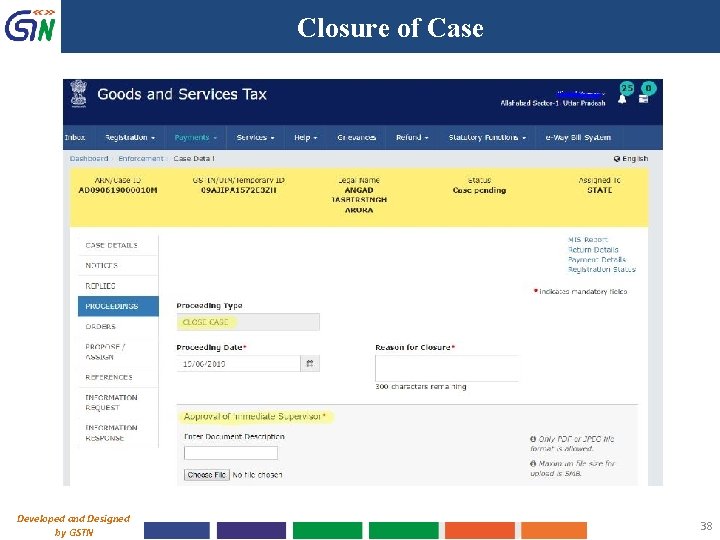
Closure of Case Developed and Designed by GSTN 38
Other Ancillary Processes in Case handling Developed and Designed by GSTN 39
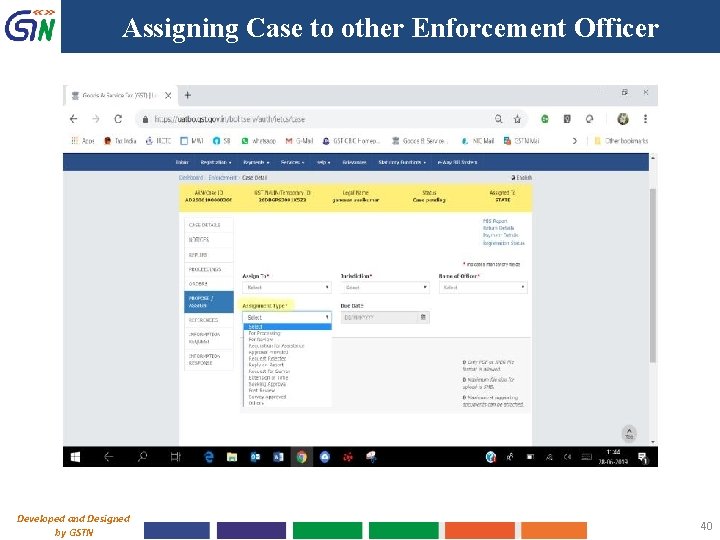
Assigning Case to other Enforcement Officer Developed and Designed by GSTN 40
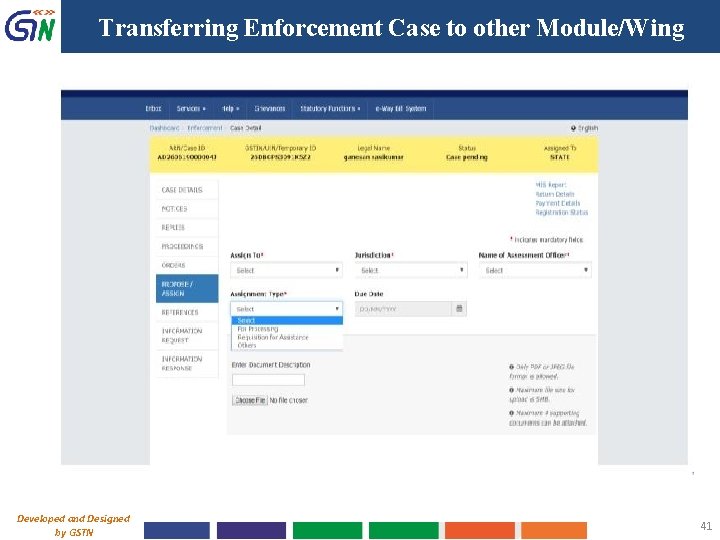
Transferring Enforcement Case to other Module/Wing Developed and Designed by GSTN 41
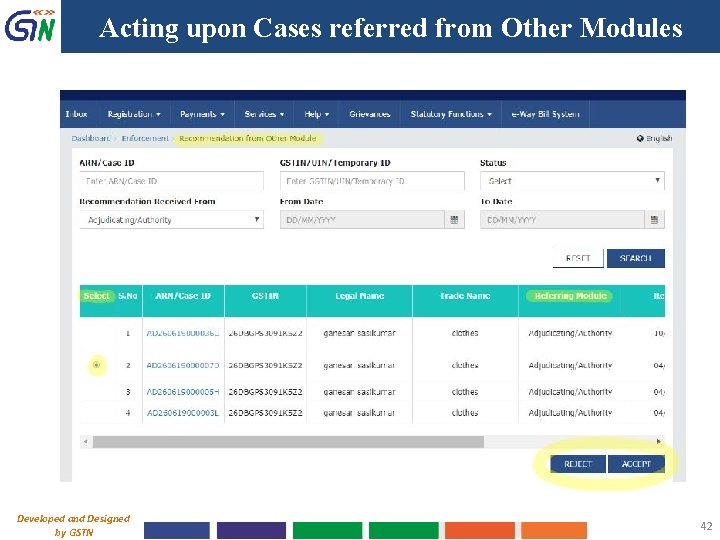
Acting upon Cases referred from Other Modules Developed and Designed by GSTN 42
Taxpayer’s Interface Developed and Designed by GSTN 43
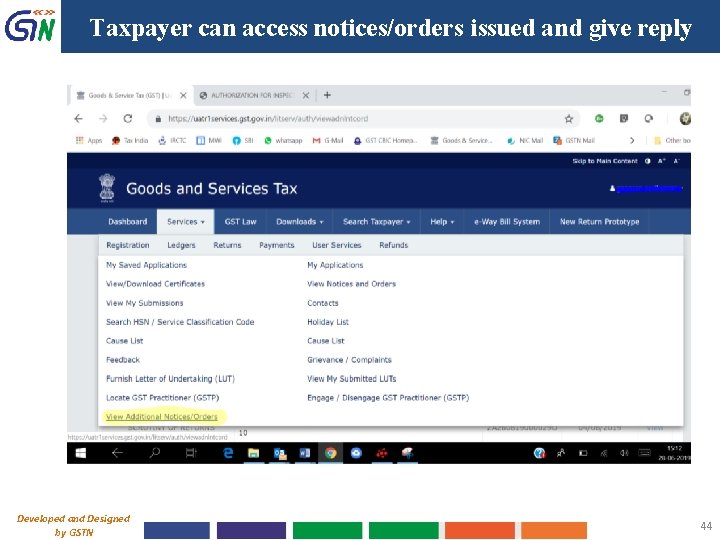
Taxpayer can access notices/orders issued and give reply Developed and Designed by GSTN 44
User Manual, FAQs and Officers’ Handbook Ø User Manuals and FAQs on Enforcement Module: BO Log in > Help > How Can We Help You > Enforcement Ø Handbook for Officers (Version 1. 0 Dt. 18 -9 -2019) already circulated (the version sent later may be taken as final). Ø Report to BO Help Desk in case of any issues/suggestions while working on the module (attach relevant screenshots). Ø Enforcement Questionnaire mailed to all States - to be filled-in & sent ASAP Developed and Designed by GSTN 45
Thank You! GSTN Internal Confidential 46
- Slides: 46