
Introduction to Computer Networks Dr John P Abraham
Introduction to Computer Networks Dr. John P. Abraham INTRODUCTION TO COMPUTER NETWORKS

What is covered in the course n n n Network Applications & Network programming Data communications (low level details) Packet switching and network technologies Internetworking with TCP/IP Other concepts such as interoperability standards, protocol suites and layering models
Lecture material n n Your textbook is a very basic book Since network is constantly evolving I will provide lots of notes from outside the textbook. You should take good notes. Exam questions will come from both.

Socket programming q q All underlying network applications such as email, ftp, web, etc. use underlying technologies and programs The goal of this course is not to teach you programming. Students should write three socket programs in a language of their choice
Data Communication n Technologies used to send data across communication lines q q q Modulation Digital to analog Light Multiplexing Encryption
Packet Switching and networking technologies n Evolved from telegraph and telephone technologies q q Mechanical connections are replaced with electronic switches Packet switching – eliminated the need for a dedicated circuit n n Devices through out the network should have information about how to reach the target destination Takes into account speed, cost, distance and size of packets
Internetworking with TCP/IP n n Tolerance of heterogeneity of underlying technologies. The internet is formed by interconncecting multiple packet-switching networks, as well as public and private networks.
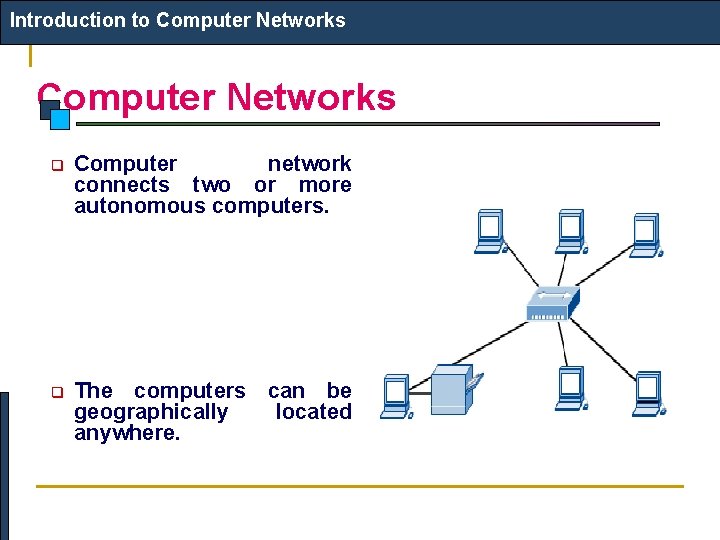
Introduction to Computer Networks q Computer network connects two or more autonomous computers. q The computers can be geographically located anywhere.
Introduction to Computer Networks LAN, MAN & WAN Network in small geographical Area (Room, Building or a Campus) is called LAN (Local Area Network) Network in a City is call MAN (Metropolitan Area Network) Network spread geographically (Country or across Globe) is called WAN (Wide Area Network)
Computer network architectures q the client server n n all communication happens between the server and the client only. A client does not communicate directly with another client. q n q If a client wishes to share a file with another client, it must place the file in a commonly shared area at the server. In case of an application, the client makes the request and the server processes the request and returns the result to the client. the peer-to-peer n n any node can act as a server as well as a client. Only very limited security is available on a peer-to-peer network.
Components used in a Computer Network q q q Computers Communication ports Cables Hubs or switches Routers The network software.
Computers in a Client/Server architecture q Must be be robust n q q must be able to run for months or years without being shut down. Must be fast enough to handle many requests from all the requests from the clients. Must have large fast hard drives to store information for all users. Must have enough memory to cache all the directory information as well as most used pages. The computers must be reliable in case of power failures and hardware failures: n sufficient redundancy must exist.
Example of Types of Servers n n n n Fileserver print server database server domain name server communication server DHCP server Name Server
Communication ports n n Network may be done through any communication ports such as serial, parallel, network cards, etc. Most common Network Cards used today are Ethernet and Token Ring.

Network Interface Card n Plug and play (PNP). q n Open the computer, install the card, and insert the driver disk. Legacy cards: n n the interrupt request line (IRQ), base memory address, and the base I/O port must be manually set up on the card by setting the jumpers or DIP switches, or through the use of the manufacturer provided setup software. Speed: 10 Megabits per second (Mbps), 100 Mbps (Fast Ethernet) or 1000 Mbps (Gigabit Ethernet) depending on the card.
Connectors on NIC n n The connector on most Ethernet cards today is the RJ 45 having 8 pins. Older Ethernet cards may have a Bayonet Nut Connector (BNC), an Attachment Unit Interface (AUI), and/or a RJ-45 connector. A jumper or switch will specify the type of connector used.
Network Addresses n Every computer connected to a network should have two unique identifying numbers, a physical address and an Internet Protocol (IP) address. q The physical address n a 6 Byte number, is encoded on a ROM chip on the Ethernet card at the time of manufacturing q the IP address n A 4 byte address n is used to send messages to the outside world. The physical address. n configured on each machine.
Hub/Switch n n n A Hub or switch connects cables from different nodes together. When purchasing them the number of ports required and the speed of transmission must be specified. An active hub amplifies all signals received and sends the amplified signals on all its ports. Passive hubs are signal splitters and are used only in wiring panels. Even though a little more expensive, a switch will provide faster communication and great deal of diagnostic features. Switches provide link management through physical address identification.
Hubs/Switches n n n As the network grows, multiple switches or hubs can be connected with each other using an uplink port or a direct connect cable. Most modern switches have the auto-sensing feature, which will allow any port to work as an uplink. The best location for a switch or hub is a centrally located closet to which cables from all computers are brought.
Network Cabling n n Cabling is the most time consuming part of networking, particularly when cables need to be hidden inside the walls. For that reason it is advisable to have the cables installed or conduits placed at the time of the building construction. To hide wires inside existing buildings, a tape fish will be needed. It may be well worth the time to investigate the wireless technology, particularly when a small area is being networked.
Network cabling 2 n n n Three types of cables are used today: coaxial, twisted pair, and fiberoptic. Twisted pair cables either can be unshielded or shielded with a foil. Unshielded twisted pair (UTP) cable can transmit 10 Megabits per second and the shielded can transmit more than 100 Mbps, perhaps all the way up to 1000 Mbps. Wires in each pair are twisted to reduce cross-talk and minimize the effect of external electromagnetic interference. Twisted pair cables are categorized into five categories, from Cat 1 to Cat 5, based on the bandwidth capabilities. The maximum length of a segment is 100 meters.
Network Cabling 3 n n The UTP cable has 4 pairs of color-coded (orange, green, blue and brown) wires. The color of one of the wires in a pair will be solid and the other will be striped with white. Pins in the RJ-45 jack are numbered from 1 to 8. When two computers are connected directly without the use of a hub or a switch some wires need to be crossed (Transmit to Receive). Such a cable is called a crossover cable. Crossover cables need to be used when two hubs or switches that lack uplink ports are connected together.
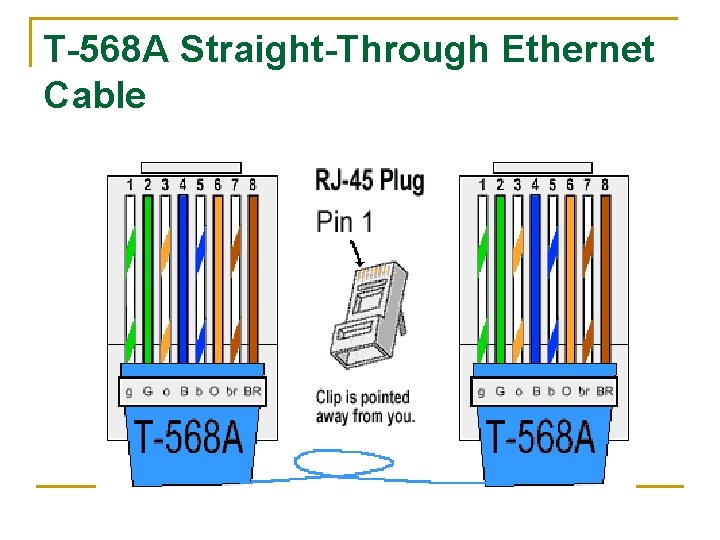
T-568 A Straight-Through Ethernet Cable
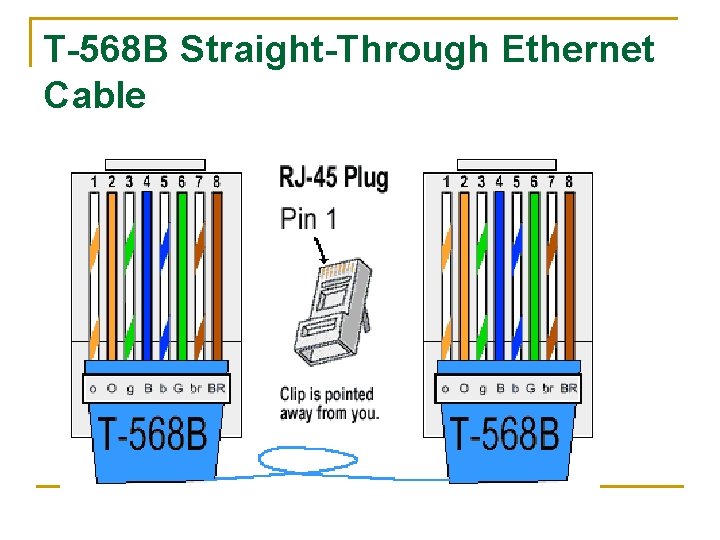
T-568 B Straight-Through Ethernet Cable
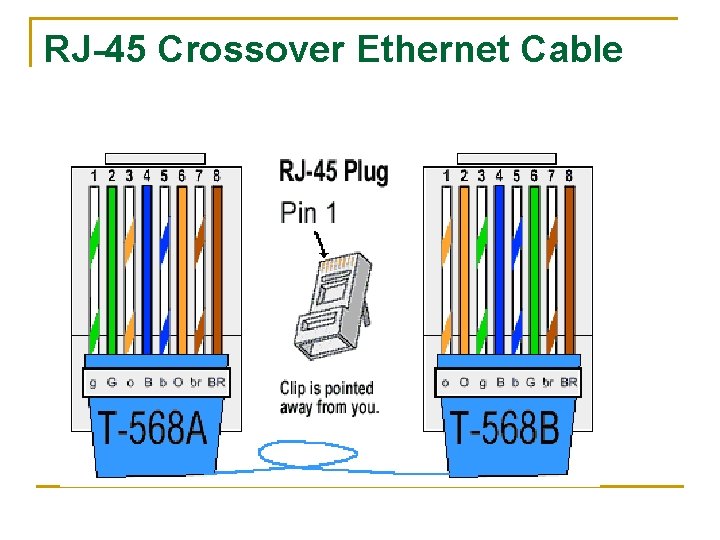
RJ-45 Crossover Ethernet Cable

Crossover cable
Network Protocols n n n 7 layer OSI model 5 layer TCP/IP suite There exists three TCP/IP network environment today, Novell Networking, Microsoft Windows Networking, and the UNIX/LINUX networking.
Network Operating Systems n n The Novell Networking incorporates its original IPX/SPX protocol suite as well as the TCP/IP protocol suite. Windows and Unix operating systems include TCP/IP networking as part of their operating system. All versions of Windows provide the peer-to-peer networking capabilities, while the NT, 2000 professional, and the XP professional provide for Client/Server architecture. The UNIX/LINUX has consistently adhered to the Client/Server architecture.
Windows peer-to-peer networking n n n may use the TCP/IP protocol suite or some other simpler protocols such as the Net. BIOS and the Net. BEUI. The Net. BIOS, an application program interface (API) extends the BIOS to include the support for I/O calls over a network. The Net. BIOS Extnded User Interface (Net. BEUI), developed by IBM and Microsoft, is the protocol used by Windows Workgroup networking.
Windows peer-to-peer networking n n n Net. Bios is non-routable, therefore could not reach beyond the local physical network. It does not require an IP address, rather works with the name registration within a workgroup. In the newer Windows operating systems, the Net. BEUI is encapsulated inside the TCP/IP, referred to as Net. BIOS over TCP/IP (NBT), and uses the IP address.
Configuring the windows network n n n From the control panel’s, local area network, add a NIC if it does not show up already. Insert the appropriate driver software. Next Choose the protocols to be bound to the network card, Net. Bios, TCP/IP, IPX/SPX, Appletalk, etc. Set up the properties for the protocol you chose. For example, for the TCP/IP, you will asked to either obtain the addresses automatically or type in the IP Address, mask, default gateway, and DNS. The default gateway is the address of the host through which internetworks can be reached (a router or a computer that shares Internet). DNS is the server that provides the IP address given a domain name. Install the client services and give your computer a name and a group. Finally, you may want to share your resources.
Introduction to Computer Networks Applications of Networks Resource Sharing Hardware (computing resources, disks, printers) Software (application software) Information Sharing Easy accessibility from anywhere (files, databases) Search Capability (WWW) Communication Email Message broadcast See next slide
Application of network 2 Remote computing Virtualization (see future slides) Supercomputing - used for highly calculation-intensive tasks in quantum physics, genetics, weather modeling, etc. Distributed processing – A program running on top of a network that distributes the job. GRID Computing – very similar to distributed. A middleware is used to manage all the computers in the system (see next slide). Cloud computing (see future slide)
Grid computing n n n Multiple independent computing clusters which act like a “grid” because they are composed of resource nodes not located within a single administrative domain. Offering online computation or storage (like electricity sale). The creation of a “virtual supercomputer” by using spare computing resources within an organization
Virtualization the act of decoupling one computing resource from others without impacting the usability across these resources. User state virtualization Application virtualization. Client-Hosted Desktop virtualization Server-based Desktop virtualization Application Virtualization
User state virtualization. n n separates the user data and settings from any PC and enables IT to store them centrally (i. e. , in the datacenter) while also making them accessible on any PC. It also simplifies the central backup of user data since data is already stored centrally on servers. http: //technet. microsoft. com/enus/windows/ff 629664
Application virtualization n n Only need to install once. Can run it from any machine. Isolates applications from each other and solves application to application compatibility issues by allowing applications to run together even though they may require the same resources from the OS Application virtualization allows IT to store the application centrally and stream the application to a desktop based on user access. http: //www. youtube. com/watch? v=k. Sa 9 VBYyyk 4 http: //www. installfree. com/beta-signup
Client-Hosted Desktop Virtualization. n n n technology (such as Microsoft® Virtual PC or Sun x. VM Virtual Box ) that separates the operating system from the physical hardware and allows a single PC to run virtual machines side by side with the host OS. http: //www. microsoft. com/virtualization/assets /media/chv/local/index. htm http: //www. youtube. com/watch? v=0 Y 2 e. Cl. Ey 7 j. U
Server-Based Desktop Virtualization: n n Allows the execution of an environment at one place and presentation of that environment or user interface at a different location. These technologies usually use remote desktop protocols, such as RDP, to decouple the user interface location from the execution environment location. Remote execution enables organizations to use older PCs as “thin clients, ” giving users the benefit of newer applications and versions of Windows while helping save the environment by avoiding the dumping of electronics into landfills. http: //www. cio. com/article/504348/Desktop_Virtualizati on_5_Most_Popular_Flavors_Explained
Cloud Computing n n n is location independent computing shared servers provide resources, software, and data to computers. computing is moved away from personal computers or an individual application server to a “cloud” of computers. Users of the cloud only need to be concerned with the computing service being asked for, as the underlying details of how it is achieved are hidden. This method of distributed computing is done through pooling all computer resources together and being managed by software rather than a human. http: //www. microsoft. com/en-us/server-cloud/new. aspx
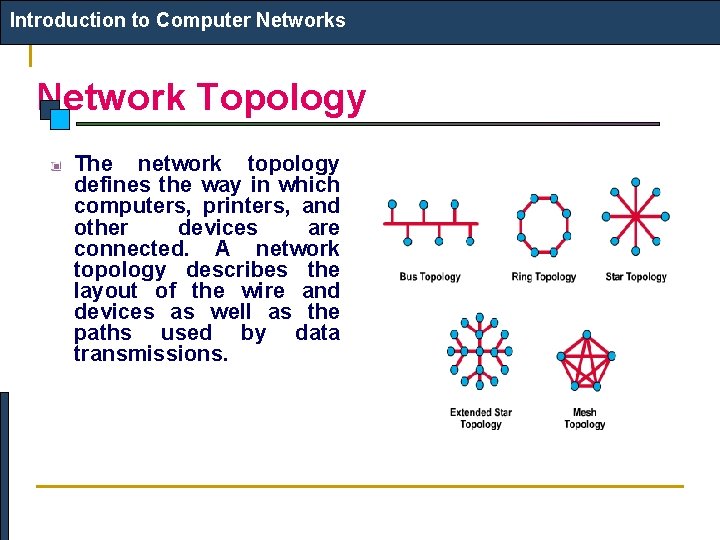
Introduction to Computer Networks Network Topology The network topology defines the way in which computers, printers, and other devices are connected. A network topology describes the layout of the wire and devices as well as the paths used by data transmissions.
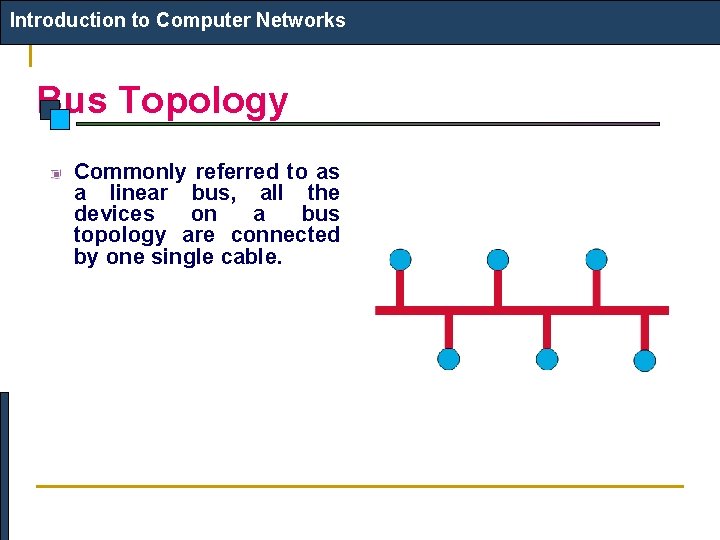
Introduction to Computer Networks Bus Topology Commonly referred to as a linear bus, all the devices on a bus topology are connected by one single cable.
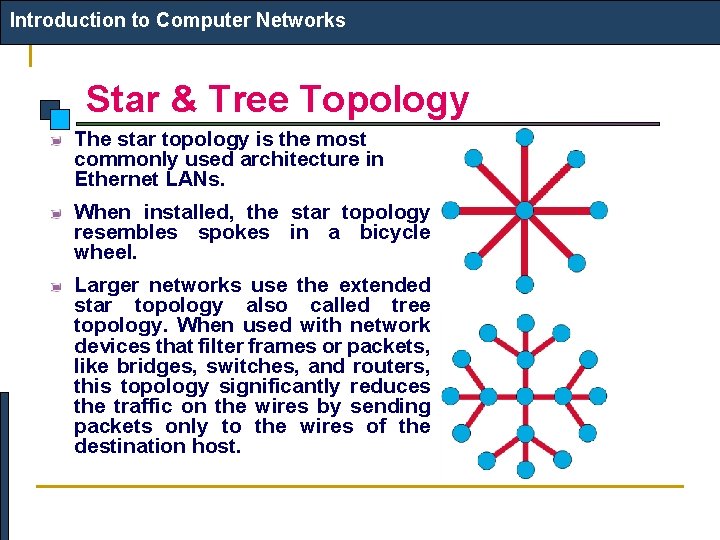
Introduction to Computer Networks Star & Tree Topology The star topology is the most commonly used architecture in Ethernet LANs. When installed, the star topology resembles spokes in a bicycle wheel. Larger networks use the extended star topology also called tree topology. When used with network devices that filter frames or packets, like bridges, switches, and routers, this topology significantly reduces the traffic on the wires by sending packets only to the wires of the destination host.
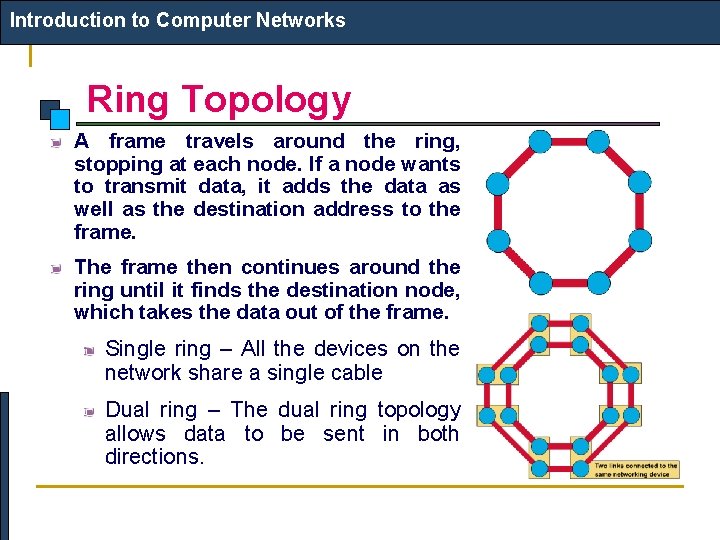
Introduction to Computer Networks Ring Topology A frame travels around the ring, stopping at each node. If a node wants to transmit data, it adds the data as well as the destination address to the frame. The frame then continues around the ring until it finds the destination node, which takes the data out of the frame. Single ring – All the devices on the network share a single cable Dual ring – The dual ring topology allows data to be sent in both directions.
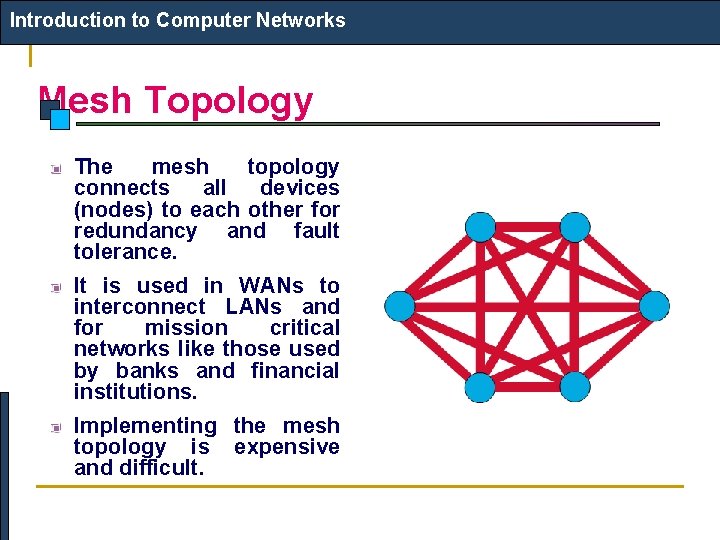
Introduction to Computer Networks Mesh Topology The mesh topology connects all devices (nodes) to each other for redundancy and fault tolerance. It is used in WANs to interconnect LANs and for mission critical networks like those used by banks and financial institutions. Implementing the mesh topology is expensive and difficult.
Introduction to Computer Networks Network Components Physical Media Interconnecting Devices Computers Networking Software Applications
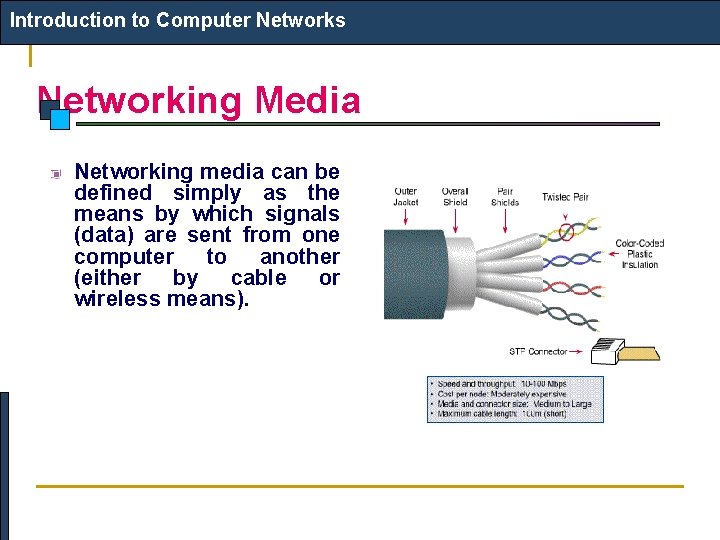
Introduction to Computer Networks Networking Media Networking media can be defined simply as the means by which signals (data) are sent from one computer to another (either by cable or wireless means).
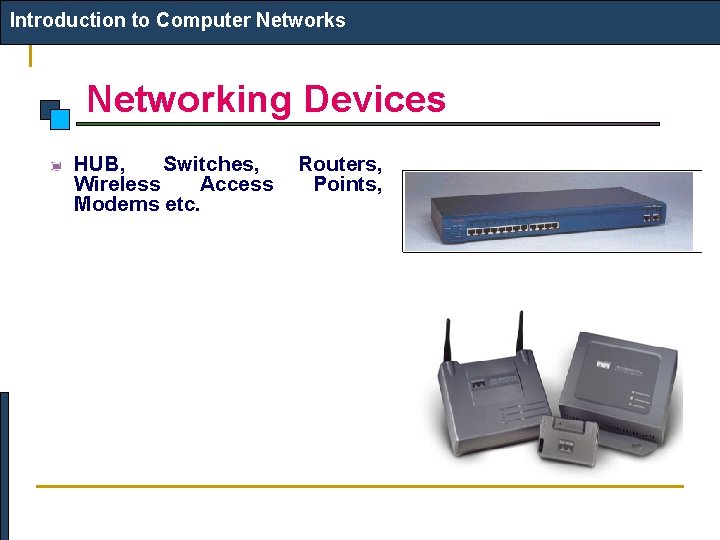
Introduction to Computer Networks Networking Devices HUB, Switches, Wireless Access Modems etc. Routers, Points,
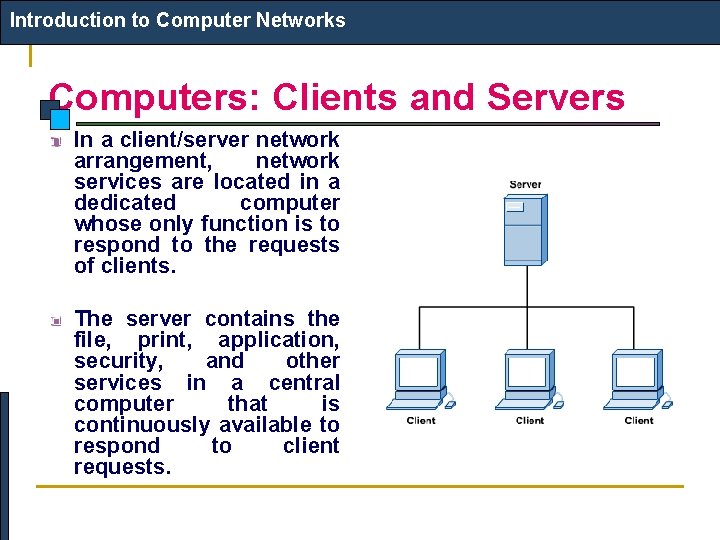
Introduction to Computer Networks Computers: Clients and Servers In a client/server network arrangement, network services are located in a dedicated computer whose only function is to respond to the requests of clients. The server contains the file, print, application, security, and other services in a central computer that is continuously available to respond to client requests.
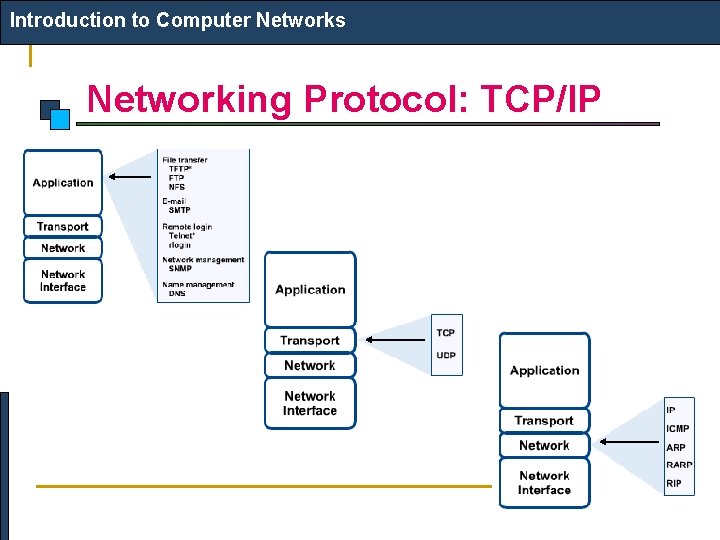
Introduction to Computer Networks Networking Protocol: TCP/IP
Introduction to Computer Networks Applications E-mail Searchable Data (Web Sites) E-Commerce News Groups Internet Telephony (Vo. IP) Video Conferencing Chat Groups Instant Messengers Internet Radio
- Slides: 51