
Introduction to Computer Graphics with Web GL Ed
Introduction to Computer Graphics with Web. GL Ed Angel Professor Emeritus of Computer Science Founding Director, Arts, Research, Technology and Science Laboratory University of New Mexico Angel and Shreiner: Interactive Computer Graphics 7 E © Addison Wesley 2015 1

Video 1. 3 • Example: Draw a triangle Each application consists of (at least) two files HTML file and a Java. Script file • HTML describes page includes utilities includes shaders • Java. Script contains the graphics Angel and Shreiner: Interactive Computer Graphics 7 E © Addison Wesley 2015 2
Coding in Web. GL • Can run Web. GL on any recent browser Chrome Firefox Safari IE • Code written in Java. Script • JS runs within browser Use local resources Angel and Shreiner: Interactive Computer Graphics 7 E © Addison Wesley 2015 3
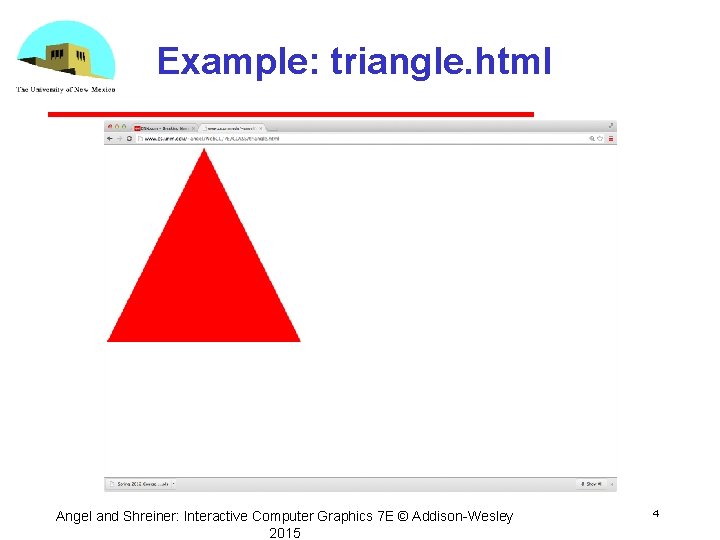
Example: triangle. html Angel and Shreiner: Interactive Computer Graphics 7 E © Addison Wesley 2015 4
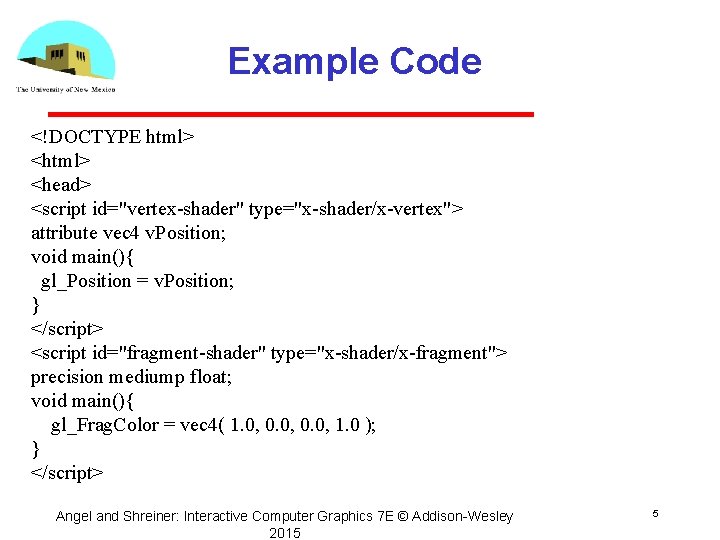
Example Code <!DOCTYPE html> <head> <script id="vertex-shader" type="x-shader/x-vertex"> attribute vec 4 v. Position; void main(){ gl_Position = v. Position; } </script> <script id="fragment-shader" type="x-shader/x-fragment"> precision mediump float; void main(){ gl_Frag. Color = vec 4( 1. 0, 0. 0, 1. 0 ); } </script> Angel and Shreiner: Interactive Computer Graphics 7 E © Addison Wesley 2015 5
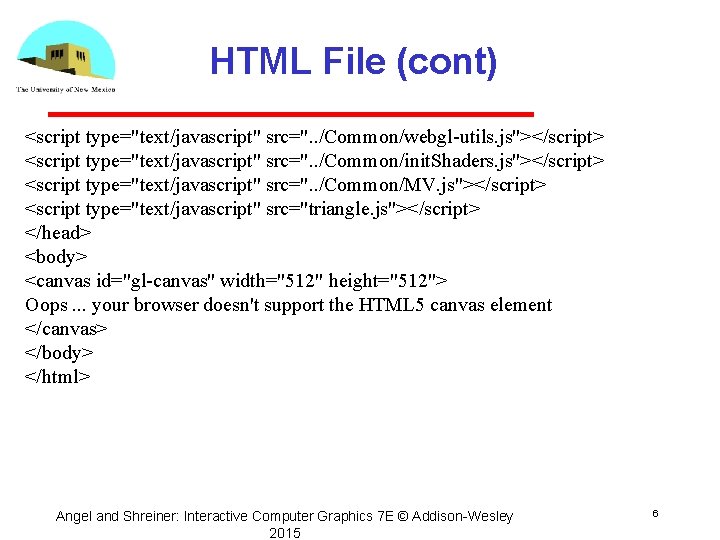
HTML File (cont) <script type="text/javascript" src=". . /Common/webgl-utils. js"></script> <script type="text/javascript" src=". . /Common/init. Shaders. js"></script> <script type="text/javascript" src=". . /Common/MV. js"></script> <script type="text/javascript" src="triangle. js"></script> </head> <body> <canvas id="gl-canvas" width="512" height="512"> Oops. . . your browser doesn't support the HTML 5 canvas element </canvas> </body> </html> Angel and Shreiner: Interactive Computer Graphics 7 E © Addison Wesley 2015 6
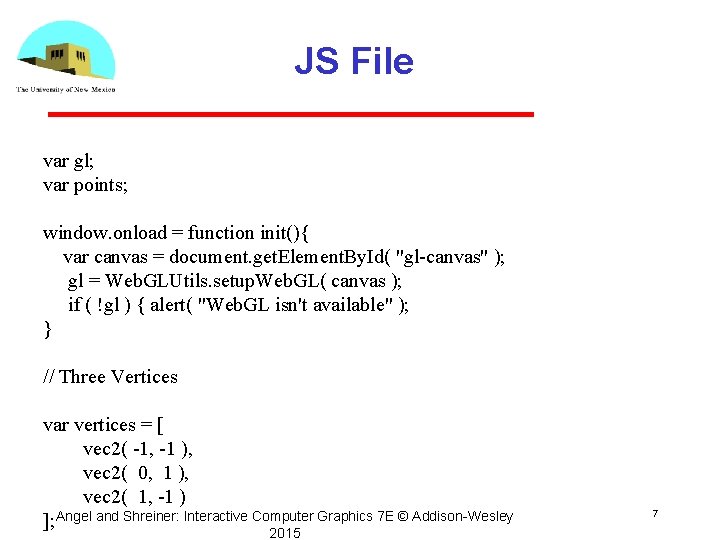
JS File var gl; var points; window. onload = function init(){ var canvas = document. get. Element. By. Id( "gl-canvas" ); gl = Web. GLUtils. setup. Web. GL( canvas ); if ( !gl ) { alert( "Web. GL isn't available" ); } // Three Vertices var vertices = [ vec 2( -1, -1 ), vec 2( 0, 1 ), vec 2( 1, -1 ) ]; Angel and Shreiner: Interactive Computer Graphics 7 E © Addison Wesley 2015 7
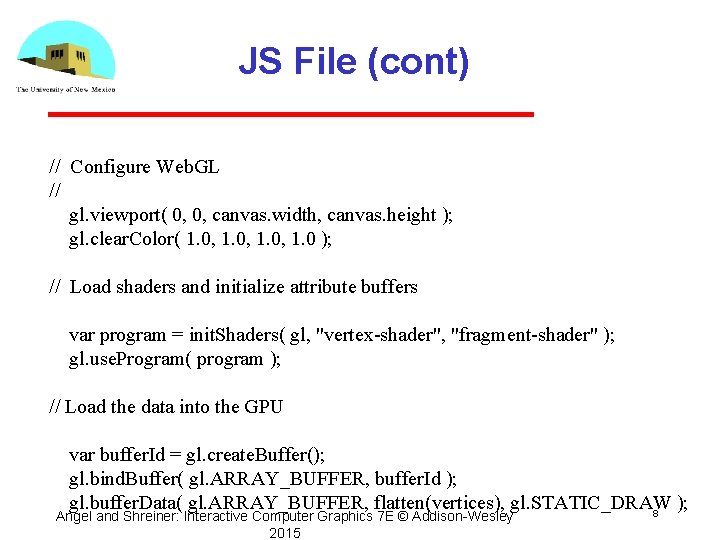
JS File (cont) // Configure Web. GL // gl. viewport( 0, 0, canvas. width, canvas. height ); gl. clear. Color( 1. 0, 1. 0 ); // Load shaders and initialize attribute buffers var program = init. Shaders( gl, "vertex-shader", "fragment-shader" ); gl. use. Program( program ); // Load the data into the GPU var buffer. Id = gl. create. Buffer(); gl. bind. Buffer( gl. ARRAY_BUFFER, buffer. Id ); gl. buffer. Data( gl. ARRAY_BUFFER, flatten(vertices), gl. STATIC_DRAW ); 8 Angel and Shreiner: Interactive Computer Graphics 7 E © Addison Wesley 2015
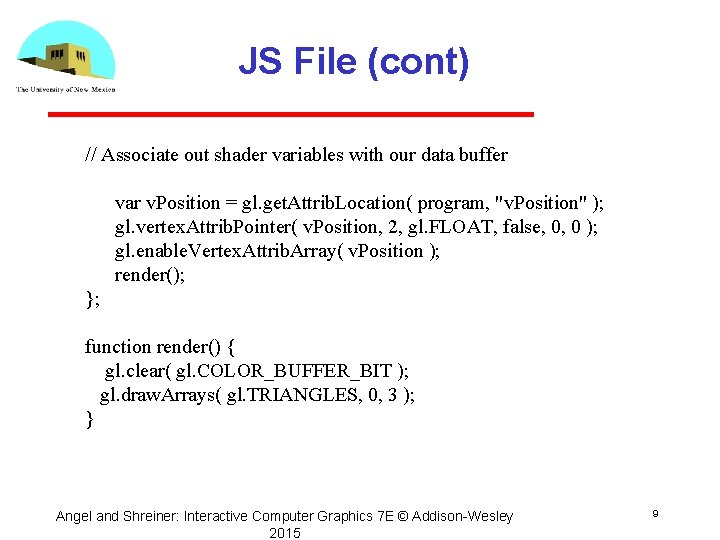
JS File (cont) // Associate out shader variables with our data buffer var v. Position = gl. get. Attrib. Location( program, "v. Position" ); gl. vertex. Attrib. Pointer( v. Position, 2, gl. FLOAT, false, 0, 0 ); gl. enable. Vertex. Attrib. Array( v. Position ); render(); }; function render() { gl. clear( gl. COLOR_BUFFER_BIT ); gl. draw. Arrays( gl. TRIANGLES, 0, 3 ); } Angel and Shreiner: Interactive Computer Graphics 7 E © Addison Wesley 2015 9
Exercise • Run triangle. html from the class website • Load the triangle. html and triangle. js to your computer and run them from there • Edit the two files to change the color and display more than one triangle Angel and Shreiner: Interactive Computer Graphics 7 E © Addison Wesley 2015 10
Java. Script Notes • Java. Script (JS) is the language of the Web All browsers will execute JS code Java. Script is an interpreted object oriented language • References Flanagan, Java. Script: The Definitive Guide, O’Reilly Crockford, Java. Script, The Good Parts, O’Reilly Many Web tutorials Angel and Shreiner: Interactive Computer Graphics 7 E © Addison Wesley 2015 11
JS Notes • Is JS slow? JS engines in browsers are getting much faster Not a key issues for graphics since once we get the data to the GPU it doesn’t matter how we got the data there • JS is a (too) big language We don’t need to use it all Choose parts we want to use Don’t try to make your code look like C or Java Angel and Shreiner: Interactive Computer Graphics 7 E © Addison Wesley 2015 12
JS Notes • Very few native types: numbers strings booleans • Only one numerical type: 32 bit float var x = 1; var x = 1. 0; // same potential issue in loops two operators for equality == and === • Dynamic typing Angel and Shreiner: Interactive Computer Graphics 7 E © Addison Wesley 2015 13
Scoping • Different from other languages • Function scope • variables are hoisted within a function can use a variable before it is declared • Note functions are first class objects in JS Angel and Shreiner: Interactive Computer Graphics 7 E © Addison Wesley 2015 14
JS Arrays • JS arrays are objects inherit methods var a = [1, 2, 3]; is not the same as in C++ or Java a. length // 3 a. push(4); // length now 4 a. pop(); // 4 avoids use of many loops and indexing Problem for Web. GL which expects C style arrays Angel and Shreiner: Interactive Computer Graphics 7 E © Addison Wesley 2015 15
Typed Arrays JS has typed arrays that are like C arrays var a = new Float 32 Array(3) var b = new Uint 8 Array(3) Generally, we prefer to work with standard JS arrays and convert to typed arrays only when we need to send data to the GPU with the flatten function in MV. js Angel and Shreiner: Interactive Computer Graphics 7 E © Addison Wesley 2015 16
A Minimalist Approach • We will use only core JS and HTML no extras or variants • No additional packages CSS JQuery • Focus on graphics examples may lack beauty • You are welcome to use other variants as long as I can run them from your URL Angel and Shreiner: Interactive Computer Graphics 7 E © Addison Wesley 2015 17
- Slides: 17